
AntD-tree组件使用详析
目录
一、selectedKeys与onSelect
官方文档
代码演示
onSelect
注意事项
二、expandedKeys与onExpand
官方文档
代码演示
onExpand
注意事项
三、loadedKeys与onLoad和onExpand
官方文档
代码演示
onExpand与onLoad:
注意事项
四、loadData
官方文档
代码演示
loadData:
注意事项
五、树节点局部节点刷新
实现思路
代码演示
六、递归获取与修改数据
获取数据
修改数据
七、总结
最近一周都在忙关于文件管理的东西,从提出这个需求到目前实现为止已经快一周的时间了。从最开始的找插件,然后发现没有插件可以用,再到打算自己手撸一个发现手写树状图过于困难,且因为技术力的原因估计会留下很多坑。所以在经过多方考虑以后觉得还是通过 antd-tree+手动控制的方式去实现一个文件管理页面。
下面我将着重讲解我在使用antd-tree组件时遇到的各种苦难已经官方文档中方法属性的应用。
一、selectedKeys与onSelect
官方文档
| 参数 | 说明 | 类型 | 版本 |
|---|---|---|---|
| selectedKeys | (受控)设置选中的树节点 | string[] | |
| onSelect | 点击树节点触发 | function(selectedKeys, e:{selected: bool, selectedNodes, node, event}) |
代码演示

onSelect
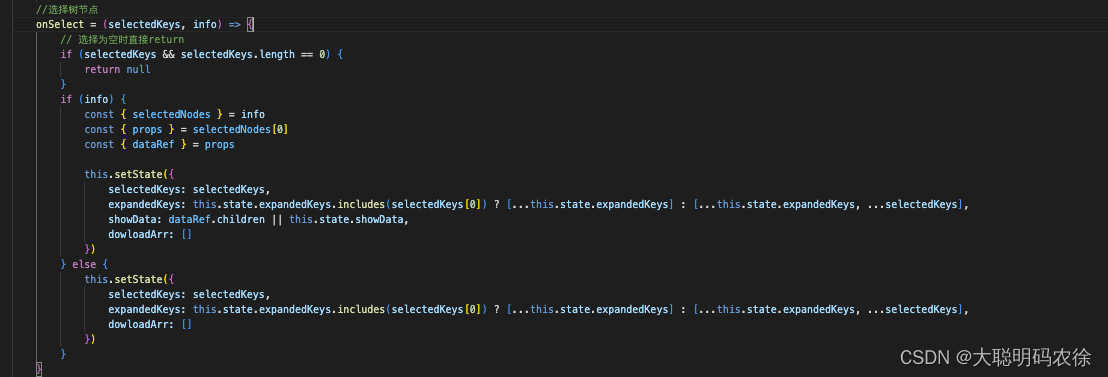
形参:
selectedKeys: 代表当前选中的树节点的key值。获取的值的格式为:[ 'key' ]。可以通过selectedKeys[0]取值。
info: 当前选择的树节点的信息。可以通过info.selectedNodes.props.dataRef.children来获取当前节点的子节点。
注意事项
这里需要注意的是selectedKeys是一个数组类型。有且只有一个当前选中的节点key。一旦点击其他节点,数组内的值就会被替换。
如果树组件设置了selectedKeys这个属性,那么需要在onSelect函数执行时将值赋给该属性。
二、expandedKeys与onExpand
官方文档
| 参数 | 说明 | 类型 | 默认值 | 版本 |
|---|---|---|---|---|
| expandedKeys | (受控)展开指定的树节点 | string[] | [] | |
| onExpand | 展开/收起节点时触发 | function(expandedKeys, {expanded: bool, node}) | - |
代码演示

onExpand
 形参:
形参:
expandedKeys: 代表当前打开的树节点的key值。
info: 当前打开的树节点的信息。
注意事项
这里需要注意的是,expandedKeys也是一个数组的格式,但它与selectedKeys的区别是selectedKeys始终是一个长度为0或1的数组,而expandedKeys则是包含所有被打开的树节点的key值。
三、loadedKeys与onLoad和onExpand
官方文档
| 参数 | 说明 | 类型 | 默认值 | 版本 |
|---|---|---|---|---|
| loadedKeys | (受控)已经加载的节点,需要配合 loadData 使用 | string[] | [] | 3.7.0 |
| onExpand | 展开/收起节点时触发 | function(expandedKeys, {expanded: bool, node}) | - | |
| onLoad | 节点加载完毕时触发 | function(loadedKeys, {event, node}) | - | 3.7.0 |
代码演示

onExpand与onLoad: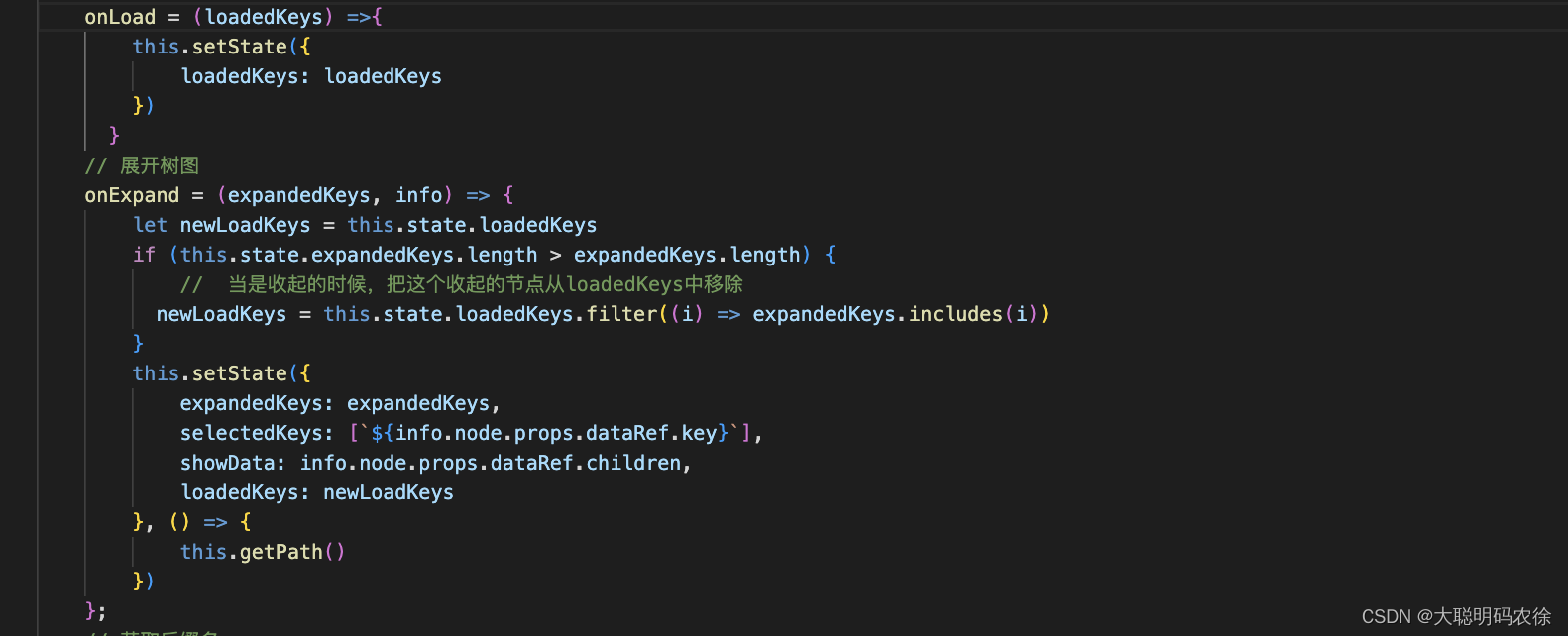
形参:
loadedKeys:已经完成加载的树节点的key,是一个数组的数据类型。
注意事项
这里需要注意的是loadedKeys是一个数组数据类型,且可以存放多个key。一旦被加载过以后,无论怎么点击都不会再触发重新刷新重新加载了。如果想让其刷新,请移步至节点刷新。
四、loadData
官方文档
| 参数 | 说明 | 类型 | 默认值 | 版本 |
|---|---|---|---|---|
| loadData | 异步加载数据 | function(node) | - | |
| loadedKeys | (受控)已经加载的节点,需要配合 loadData 使用 | string[] | [] | 3.7.0 |
| treeData | treeNodes 数据,如果设置则不需要手动构造 TreeNode 节点(key 在整个树范围内唯一) | array\<{key, title, children, [disabled, selectable]}> | - |
代码演示
loadData:
形参:
treeNode :要加载的树节点的信息。
注意事项
这里需要注意的是如果你的树节点,是通过点击以后再加载子节点,那么对于后端的数据格式返回可能就有一些要求了。比如 title 与 isLeaf 等。当然也可以在loadData中自行设置。
loadData中代码的大概流程就是先判断 treeNode 是否有 children这个属性,注意是是否有这个属性,如果有这个属性但这个属性为空数组,在执行中也会判定为true从而不会执行更新操作,而是直接return出去。
五、树节点局部节点刷新
实现思路
因为tree的机制问题,当key节点加载过以后该节点将不会再被重新加载,因此如果我上传了一个文件,实际上服务器上已经有文件了,但因为节点刷新问题,该节点没有重新刷新,我就看不到对应的节点文件。因此需要进行局部节点刷新。
满足节点刷新的条件有这几个。
- 1. loadedKeys中移除该节点的key值和其子孙节点的key值
- 2. treeData中将该节点的children属性删除
- 3. expandedKeys中移除A节点下的所有子孙节点的key值
完成这三点以后再将selectedKeys选取到该节点 ,并将以上数据重新赋值给对应的属性即可完成节点刷新操作。
代码演示
updateTree = () =>{const { selectedKeys , expandedKeys, loadedKeys, treeData } = this.state// 获取新的expandedKeys数组,不包含该节点及子节点const newExpandedKeys = expandedKeys.filter(item =>{return item.indexOf(selectedKeys[0]) == -1})// 获取新的loadedKeys数组,不包含该节点及子节点const newLoadedKeys = loadedKeys.filter(item =>{return item.indexOf(selectedKeys[0]) == -1})const newTreedata = treeDatathis.setState({expandedKeys: [...newExpandedKeys,...[`${selectedKeys[0]}`]],loadedKeys: [...newLoadedKeys],treeData: this.removeShowData(newTreedata),selectedKeys: [`${selectedKeys[0]}`],})}// 获取新的treeData数据removeShowData = (datas) => {const { selectedKeys } = this.stateconst newData = datas;function setGrayNode(data){ //遍历树 获取id数组for(var i=0;i<data.length;i++){if(data[i].key == selectedKeys[0]){// 如果某一个节点是禁用的,它的所有子节点都应该禁用delete data[i].childrencontinue;} else {if(data[i].children){// 如果当前节点有子节点,就递归调用一次setGrayNode(data[i].children);}}}}setGrayNode(newData)return newData;}这里需要注意的是 expandedKeys 虽然删除了当前节点,但要想操作通顺需要再次手动赋值,将该节点打开,并获取新的数据。这样就省去了用户需要再次点击节点的尴尬情况。
六、递归获取与修改数据
因为这是一个树状图,数据结构也稍微复杂一些,所以获取数据时难免需要通过递归拿取数据。所以需要一个递归函数取实现数据的拿取。
获取数据
//递归获取Showdata数据 getShowData = (datas) => {const { selectedKeys } = this.statedatas.map(item => {const { key, children } = itemif (key == selectedKeys[0]) {//符合条件this.setState({showData: datas})return}//如果有孩子,再次调用自己,将孩子传进去。if (children && children.length > 0) {this.getShowData(children)}})}修改数据
// 获取新的treeData数据removeShowData = (datas) => {const { selectedKeys } = this.stateconst newData = datas;function setGrayNode(data){ //遍历树 获取id数组for(var i=0;i<data.length;i++){if(data[i].key == selectedKeys[0]){// 如果某一个节点是禁用的,它的所有子节点都应该禁用delete data[i].childrencontinue;} else {if(data[i].children){// 如果当前节点有子节点,就递归调用一次setGrayNode(data[i].children);}}}}setGrayNode(newData)return newData;}七、总结
一个星期下来还是比较累的,原因是因为组件使用不熟练,且自己的技术力较弱导致的,但好在也顺利完成任务,倒也没有什么大碍。记录一下这一个星期以来遇到的一些问题和实践吧。前端小白一枚,如有错误欢迎指正。
源码:
import React, { Component } from 'react';
import { connect } from 'dva';
import {Modal,Button,Tree,Row,Col,Empty,Tooltip,Icon,Upload,Popconfirm,Select,Spin,notification
} from 'antd';
import { formatMessage, FormattedMessage } from 'umi-plugin-locale';
import globalUtil from '../../utils/global'
import download from '@/utils/download';
import apiconfig from '../../../config/api.config';
import SVG from './svg';
import styles from './index.less';const { TreeNode, DirectoryTree } = Tree;
@connect(({ appControl }) => ({appDetail: appControl.appDetail,})
)class Index extends Component {constructor(props) {super(props);this.state = {treeData: [],selectedKeys: [],expandedKeys: [],pathArr: [],keyArr: [],dowloadArr: [],path: '',podsList: [],selectDefaultValue: '',hostPath: this.props && this.props.hostPath,selectLoading: false,treeDataLoading: false,loadedKeys:[]}}componentDidMount() {this.fetchInstanceInfo()}// 获取podnamefetchInstanceInfo = () => {const { dispatch } = this.props;dispatch({type: 'appControl/fetchPods',payload: {team_name: globalUtil.getCurrTeamName(),app_alias: this.props.appAlias,},callback: res => {if (res && res.list) {this.setState({podsList: res.list.new_pods,selectDefaultValue: res && res.list && res.list.new_pods[0] && res.list.new_pods[0].pod_name,selectLoading: true}, () => {if (this.props.isType) {this.determineStorageType()}else{this.getListFiles()}})}}});};// 获取文件类型determineStorageType = () => {this.props.dispatch({type: 'appControl/determineStorageType',payload: {team_name: globalUtil.getCurrTeamName(),group_id: this.props.appAlias,region_name: globalUtil.getCurrRegionName(),pod_name: this.state.selectDefaultValue,namespace: this.props.appDetail && this.props.appDetail.service && this.props.appDetail.service.namespace,volume_path: this.props && his.props.volumePath,},callback: res => {if(res){this.setState({hostPath: res.bean,},()=>{this.getListFiles()})}}});};// 获取文件列表getListFiles = () => {this.props.dispatch({type: 'appControl/getListFiles',payload: {team_name: globalUtil.getCurrTeamName(),group_id: this.props.appAlias,region_name: globalUtil.getCurrRegionName(),pod_name: this.state.selectDefaultValue,host_path: this.props.appDetail && this.props.appDetail.service && this.props.appDetail.service.extend_method == 'state_multiple' ? `${this.state.hostPath}/${this.state.selectDefaultValue}` : this.state.hostPath,extend_method: this.props.appDetail && this.props.appDetail.service && this.props.appDetail.service.extend_method},callback: res => {if (res && res.list) {res.list.map((item, index) => {item.key = index,item.isLeaf = item.is_leaf})this.setState({treeData: res.list,showData: res.list,treeDataLoading: true})}},handleError: res =>{if(res){notification.error({ message: formatMessage({id:'componentOverview.body.DirectoryPersistence.error'}) });this.setState({showData: [],treeData: []})}}});}// 获取文件列表updataListFiles = (path) => {this.setState({treeDataLoading: false},()=>{this.props.dispatch({type: 'appControl/getListFiles',payload: {team_name: globalUtil.getCurrTeamName(),group_id: this.props.appAlias,region_name: globalUtil.getCurrRegionName(),pod_name: this.state.selectDefaultValue,host_path: this.props.appDetail && this.props.appDetail.service && this.props.appDetail.service.extend_method == 'state_multiple' ? `${this.state.hostPath}/${this.state.selectDefaultValue}${path}` : `${this.state.hostPath}${path}`,extend_method: this.props.appDetail && this.props.appDetail.service && this.props.appDetail.service.extend_method},callback: res => {if (res && res.list) {res.list.map((item, index) => {item.key = index,item.isLeaf = item.is_leaf})this.setState({treeData: res.list,showData: res.list,treeDataLoading: true})}},handleError: res =>{if(res){notification.error({ message: formatMessage({id:'componentOverview.body.DirectoryPersistence.error'}) });this.setState({showData: [],treeData: []})}}});})}// 加载树图onLoadData = treeNode =>new Promise(resolve => {if (treeNode.props.children) {resolve();return;}setTimeout(() => {this.props.dispatch({type: 'appControl/getListFiles',payload: {team_name: globalUtil.getCurrTeamName(),group_id: this.props.appAlias,region_name: globalUtil.getCurrRegionName(),pod_name: this.state.selectDefaultValue,host_path: this.props.appDetail && this.props.appDetail.service && this.props.appDetail.service.extend_method == 'state_multiple' ? `${this.state.hostPath}/${this.state.selectDefaultValue}/${this.state.path}` : `${this.state.hostPath}/${this.state.path}`,extend_method: this.props.appDetail && this.props.appDetail.service && this.props.appDetail.service.extend_method},callback: res => {if (res) {if (res.list && res.list.length == 0) {this.setState({treeData: [...this.state.treeData],showData: res.list});treeNode.props.dataRef.children = []resolve();} else {const arr = res.listarr.map((item, index) => {item.key = `${treeNode.props.eventKey}-${index}`item.isLeaf = item.is_leaf})treeNode.props.dataRef.children = arrthis.setState({treeData: [...this.state.treeData],showData: res.list});resolve();}}}});}, 100)});// 渲染函数renderTreeNodes = data =>data && data.map((item, index) => {if (item.isLeaf) {return (<TreeNode title={item.title} key={item.key} dataRef={item} >{this.renderTreeNodes(item.children)}</TreeNode>);}return null;});//选择树节点 onSelect = (selectedKeys, info) => {// 选择为空时直接returnif (selectedKeys && selectedKeys.length == 0) {return null}if (info) {const { selectedNodes } = infoconst { props } = selectedNodes[0]const { dataRef } = propsthis.setState({selectedKeys: selectedKeys,expandedKeys: this.state.expandedKeys.includes(selectedKeys[0]) ? [...this.state.expandedKeys] : [...this.state.expandedKeys, ...selectedKeys],showData: dataRef.children || this.state.showData,dowloadArr: [],pathArr: [],path: ''}, () => {this.getPath()})} else {this.setState({selectedKeys: selectedKeys,expandedKeys: this.state.expandedKeys.includes(selectedKeys[0]) ? [...this.state.expandedKeys] : [...this.state.expandedKeys, ...selectedKeys],dowloadArr: [],pathArr: [],path: ''}, () => {this.getPath()})}}onLoad = (loadedKeys) =>{this.setState({loadedKeys: loadedKeys})}// 展开树图onExpand = (expandedKeys, info) => {let newLoadKeys = this.state.loadedKeysif (this.state.expandedKeys.length > expandedKeys.length) {//  当是收起的时候,把这个收起的节点从loadedKeys中移除newLoadKeys = this.state.loadedKeys.filter((i) => expandedKeys.includes(i))}this.setState({expandedKeys: expandedKeys,selectedKeys: [`${info.node.props.dataRef.key}`],showData: info.node.props.dataRef.children,loadedKeys: newLoadKeys}, () => {this.getPath()})};// 获取后缀名getSvgIcon = (name) => {if (name) {const str = name.substr(name.lastIndexOf('.') + 1)return `${str}`}}// 鼠标点击folderClick = (data) => {// 判断data数据是否有孩子,如果没有就加载,如果有就if (data && data.children && data.children.length > 0) {this.setState({expandedKeys: [...this.state.expandedKeys, ...[`${data.key}`]],selectedKeys: [`${data.key}`],showData: data.children,dowloadArr: []}, () => {this.getPath()})} else {this.setState({expandedKeys: [...this.state.expandedKeys, ...[`${data.key}`]],selectedKeys: [`${data.key}`],dowloadArr: []}, () => {this.getPath()})}}//递归获取Showdata数据 getShowData = (datas) => {const { selectedKeys } = this.statedatas.map(item => {const { key, children } = itemif (key == selectedKeys[0]) {this.setState({showData: datas})}if (children && children.length > 0) {this.getShowData(children)}})}// 获取key值的path数据getPathData = (data) => {const { treeData, keyArr } = this.statedata.map(item => {const { title, children } = itemif (keyArr.indexOf(`${item.key}`) != -1) {const arr = this.state.pathArrarr.push(title)this.setState({pathArr: arr})}if (children && children.length > 0) {this.getPathData(children)}})}//递归获取path数据 getPath = () => {const { selectedKeys, treeData, pathArr } = this.stateif (selectedKeys == []) {return}if (selectedKeys && selectedKeys[0]) {const length = selectedKeys[0].lengthconst str = selectedKeys[0]const arr = str.split("-")const keyArr = []for (let index = 0; index < arr.length + 1; index++) {const newarr = arr.slice(0, index)const newstr = newarr.join("-")keyArr.push(newstr)}keyArr.shift();this.setState({keyArr: keyArr,pathArr: []}, () => {this.getPathData(treeData)})setTimeout(() => {const path = this.state.pathArr.join("/")this.setState({path: path})}, 100)}}// 返回上一级goBack = () => {const { selectedKeys } = this.state// 如果选择为空,则展示所有数据if (selectedKeys[0] == undefined) {return}// 如果选择有值且值不大于1if ((selectedKeys[0]).indexOf("-") == -1) {this.setState({selectedKeys: [],showData: this.state.treeData,dowloadArr: []}, () => {this.getPath()})// 如果选择有值且值大于1} else {this.getShowData(this.state.treeData)this.setState({selectedKeys: [`${selectedKeys[0].substring(0, (selectedKeys[0]).lastIndexOf("-"))}`],dowloadArr: []}, () => {this.getPath()})}}// 下载dowloadTitle = (val) => {const { dowloadArr } = this.statesetTimeout(() => {if (dowloadArr.includes(val)) {const arr = []dowloadArr.map(item => {if (item != val) {arr.push(item)}})this.setState({dowloadArr: [...arr]})} else {const arr = []arr.push(val)this.setState({dowloadArr: [...this.state.dowloadArr, ...arr]})}}, 10)}// 下拉框选择selectChange = (val) => {this.setState({selectDefaultValue: val},()=>{this.getListFiles()})}fileDownload = () => {const { dowloadArr } = this.stateif(dowloadArr.length == 0 ){notification.info({ message: formatMessage({id:'componentOverview.body.DirectoryPersistence.download'}) });}else{dowloadArr.map(item =>{this.fileDownloadApi(item)})}setTimeout(()=>{this.setState({dowloadArr:[]})},100)}// 下载接口fileDownloadApi = ( title ) =>{const dowloadPath = this.state.path ? this.props.appDetail && this.props.appDetail.service && this.props.appDetail.service.extend_method == 'state_multiple' ? `${this.state.hostPath}/${this.state.selectDefaultValue}/${this.state.path}` : `${this.state.hostPath}/${this.state.path}` : this.props.appDetail && this.props.appDetail.service && this.props.appDetail.service.extend_method == 'state_multiple' ? `${this.state.hostPath}/${this.state.selectDefaultValue}` : `${this.state.hostPath}`;const host = apiconfig.baseUrl;const url = host.slice(0,host.lastIndexOf(":"))// const path = `${url}:6060/v2/ws/download/${title}?path=${dowloadPath}`const path = `http://47.104.161.96:6060/v2/ws/download/${title}?path=${dowloadPath}`this.download(`${path}`,title)}download = (downloadPath, title) => {console.log(title.indexOf("txt") == -1,"title.indexOf() == -1");if(title.indexOf("txt") == -1){let aEle = document.querySelector('#down-a-element');if (!aEle) {aEle = document.createElement('a');aEle.setAttribute('target', '_blank')aEle.setAttribute('download', title);document.body.appendChild(aEle);}aEle.href = downloadPath;if (document.all) {aEle.click();} else {const e = document.createEvent('MouseEvents');e.initEvent('click', true, true);aEle.dispatchEvent(e);}}else{var element = document.createElement('a');element.setAttribute('href', 'data:text/plain;charset=utf-8,' + encodeURIComponent(title));element.setAttribute('download', title);element.style.display = 'none';document.body.appendChild(element);element.click();document.body.removeChild(element);}};uploadChange = info => {const { path, selectedKeys } = this.stateif (info && info.file && info.file.status === 'done') {notification.success({ message: formatMessage({id:'notification.success.upload'})});if(selectedKeys[0] == undefined){this.getListFiles()}else{this.updateTree()}} else if (info && info.file && info.file.status === 'error') {notification.error({ message: formatMessage({id:'notification.error.update'}) });}};updateTree = () =>{const { selectedKeys , expandedKeys, loadedKeys, treeData } = this.state// 获取新的expandedKeys数组,不包含该节点及子节点const newExpandedKeys = expandedKeys.filter(item =>{return item.indexOf(selectedKeys[0]) == -1})// 获取新的loadedKeys数组,不包含该节点及子节点const newLoadedKeys = loadedKeys.filter(item =>{return item.indexOf(selectedKeys[0]) == -1})const newTreedata = treeDatathis.setState({expandedKeys: [...newExpandedKeys,...[`${selectedKeys[0]}`]],loadedKeys: [...newLoadedKeys],treeData: this.removeShowData(newTreedata),selectedKeys: [`${selectedKeys[0]}`],})}// 获取新的treeData数据removeShowData = (datas) => {const { selectedKeys } = this.stateconst newData = datas;function setGrayNode(data){ //遍历树  获取id数组for(var i=0;i<data.length;i++){if(data[i].key == selectedKeys[0]){// 如果某一个节点是禁用的,它的所有子节点都应该禁用delete data[i].childrencontinue;} else {if(data[i].children){// 如果当前节点有子节点,就递归调用一次setGrayNode(data[i].children);}}}}setGrayNode(newData)return newData;}render() {const {selectedKeys,expandedKeys,showData,path,dowloadArr,podsList,selectDefaultValue,selectLoading,treeDataLoading,hostPath,loadedKeys} = this.stateconst upLoadPath = this.state.path ? this.props.appDetail && this.props.appDetail.service && this.props.appDetail.service.extend_method == 'state_multiple' ? `${this.state.hostPath}/${this.state.selectDefaultValue}/${this.state.path}` : `${this.state.hostPath}/${this.state.path}` : this.props.appDetail && this.props.appDetail.service && this.props.appDetail.service.extend_method == 'state_multiple' ? `${this.state.hostPath}/${this.state.selectDefaultValue}` : `${this.state.hostPath}`;const host = apiconfig.baseUrl;const url = host.slice(0,host.lastIndexOf(":"))// const upload = `${url}:6060/v2/ws/upload`const upload = `http://47.104.161.96:6060/v2/ws/upload`const props = {action: upload,data:{path: upLoadPath},method:"post",name:'packageTarFile',};const isFile = showData.filter(item => { return item.title.indexOf('.') == -1 })const notFile = showData.filter(item => { return item.title.indexOf('.') != -1 })const folder = []isFile.map((item,index) =>{if(item.isLeaf == true){folder.unshift(item)}else{folder.push(item)}})const showDataArr = [...folder,...notFile]return (<div><ModalclassName={styles.ModalStyle}title={<>{formatMessage({id:'componentOverview.body.DirectoryPersistence.example'})}<Selectvalue={selectDefaultValue}style={{ maxWidth: 184, marginLeft: 5 }}onChange={this.selectChange}loading={!selectLoading}>{podsList && podsList.length > 0 &&podsList.map(item => {return <Select.Option value={item.pod_name}>{item.pod_name}</Select.Option>})}</Select></>}visible={true}width={1000}closable={false}footer={<><Upload{...props}showUploadList={false}multipleonChange={this.uploadChange}// directory={true}><Button type="primary" style={{ marginRight: 10 }}><Icon type="upload" /> {formatMessage({id:'applicationMarket.Offline.upload'})}</Button></Upload><Button type="primary" onClick={this.fileDownload}><Icon type="download" />{formatMessage({id:'button.download'})}</Button><Button onClick={this.props.isShow}>{formatMessage({id:'popover.cancel'})}</Button></>}>{treeDataLoading ? (<Row><Col span={6}><TreeloadData={this.onLoadData}onSelect={this.onSelect}selectedKeys={selectedKeys}onExpand={this.onExpand}expandedKeys={expandedKeys}switcherIcon={<Icon type="down" />}onLoad={this.onLoad}   loadedKeys={loadedKeys} >{this.renderTreeNodes(this.state.treeData)}</Tree></Col><Col span={18} style={{ position: 'relative' }}><div className={styles.goBack}><button onClick={this.goBack}>{SVG.getSvg("goBack", 12)}{formatMessage({id:'componentOverview.body.DirectoryPersistence.return'})}</button></div><div className={styles.iconShow}>{showDataArr && showDataArr.length > 0 ? (showDataArr.map((item, index) => {const { title, isLeaf } = itemif (isLeaf) {return <div className={styles.outerLayer} style={{ cursor: "pointer" }} onDoubleClick={() => this.folderClick(item)}><div>{SVG.getSvg('file', 70)}</div><div><Tooltip placement="top" title={item.title}>{item.title}</Tooltip></div></div>} else {return <div className={styles.outerLayer} onClick={() => this.dowloadTitle(item.title)} style={{ background: dowloadArr.includes(item.title) ? "#e6f7ff" : '#fff' }}><div>{SVG.getSvg(this.getSvgIcon(title), 70)}</div><div><Tooltip placement="top" title={item.title}>{item.title}</Tooltip></div></div>}})) : (<Empty className={styles.emptyStyle} />)}</div></Col></Row>) : (<Spin size="large" style={{width: '100%',height: 400,display: 'flex',alignItems: 'center',justifyContent: 'center',}} />)}</Modal></div>);}
}export default Index;
相关文章:

AntD-tree组件使用详析
目录 一、selectedKeys与onSelect 官方文档 代码演示 onSelect 注意事项 二、expandedKeys与onExpand 官方文档 代码演示 onExpand 注意事项 三、loadedKeys与onLoad和onExpand 官方文档 代码演示 onExpand与onLoad: 注意事项 四、loadData …...

spring的事务控制
1.调用这个方法的对象是否是spring的代理对象($CGLIB结尾的) 2.这个方法是否是加了Transactional注释 都符合才可以被事物控制 如果调用方法的对象没有被事物控制,那么被调用的方法即便是加了Transactional也是没用的 事务失效情况…...
4.如何靠IT逆袭大学?
学习的动力不止于此: IT逆袭 这两天利用工作空余时间读了贺利坚老师的《逆袭大学——传给 IT 学子的正能量》,感触很多,有些后悔没有好好利用大学时光。 不过人都是撞了南墙再回头的,吃一堑长一智。 这本书无论你是工作了还是…...

提供网络可测试的接口【公共Webservice】
提供网络可测试的接口 1、腾讯QQ在线状态 WEB 服务 Endpoint: qqOnlineWebService Web 服务 Disco: http://www.webxml.com.cn/webservices/qqOnlineWebService.asmx?disco WSDL: http://www.webxml.com.cn/webservices/qqOnlineWebService.asmx?wsdl 腾讯QQ在线状态 WEB 服…...

【深入理解计算机系统】库打桩 - 阅读笔记
文章目录库打桩机制1. 编译时打桩2. 链接时打桩3. 运行时打桩库打桩机制 Linux 链接器支持一个很强大的技术,称为库打桩 (library interpositioning),它允许你截获对共享库函数的调用,取而代之执行自己的代码。使用打桩机制,你可以…...
RocketMQ高性能原理分析
目录一、读队列与写队列1.概念介绍2.读写队列个数关系分析二、消息持久化1.持久化文件介绍2.持久化结构介绍:三、过期文件删除1.如何判断文件过期2.什么时候删除过期文件四、高效文件写1.零拷贝技术加速文件读写2.文件顺序写3.刷盘机制五、 消息主从复制六、负载均衡…...
前端面试当中CDN会问啥------CDN详细教程来啦
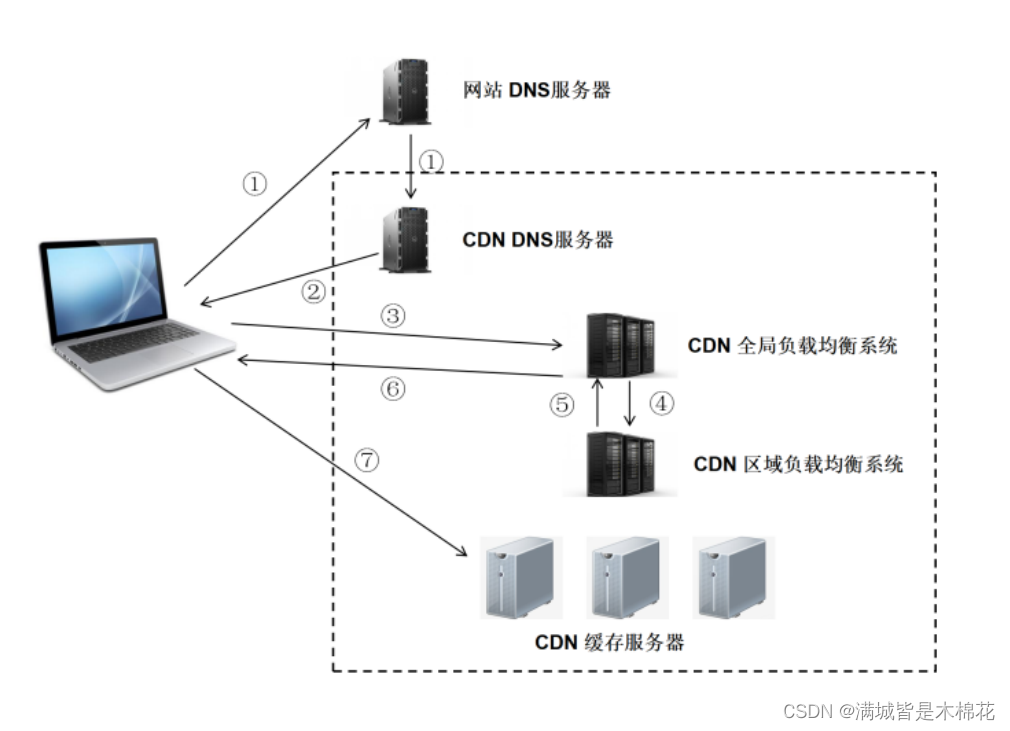
⼀、CDN 1. CDN的概念 CDN(Content Delivery Network,内容分发⽹络)是指⼀种通过互联⽹互相连接的电脑⽹络系统,利 ⽤最靠近每位⽤户的服务器,更快、更可靠地将⾳乐、图⽚、视频、应⽤程序及其他⽂件发送给⽤户&…...

刷题记录:牛客NC19429红球进黑洞 区间拆位异或+区间求和
传送门:牛客 题目描述: 区间求和区间异或k 输入: 10 10 8 5 8 9 3 9 8 3 3 6 2 1 4 1 1 2 6 2 9 10 8 1 1 7 2 4 7 8 2 8 8 6 2 2 3 0 1 1 2 2 9 10 4 1 2 3 输出: 33 50 13 13一道区间求和区间异或的题目,可以称得上是线段树的一道好题 首先对于异或运算来说,并不满足…...

信息数智化招采系统源码——信息数智化招采系统
信息数智化招采系统 服务框架:Spring Cloud、Spring Boot2、Mybatis、OAuth2、Security 前端架构:VUE、Uniapp、Layui、Bootstrap、H5、CSS3 涉及技术:Eureka、Config、Zuul、OAuth2、Security、OSS、Turbine、Zipkin、Feign、Monit…...
20230217使AIO-3399J开发板上跑通Android11系统
20230217使AIO-3399J开发板上跑通Android11系统 2023/2/17 15:45 1、解压缩SDK:rk3399-android-11-r20211216.tar.xzrootrootrootroot-X99-Turbo:~$ tar xvf rk3399-android-11-r20211216.tar.xz 2、编译U-boot: rootrootrootroot-X99-Turbo:~/rk3399-a…...
Java 基础面试题——面向对象
目录1.面向对象和面向过程有什么区别?2.面向对象的有哪些特征?3.静态变量和实例变量有什么区别?4.Java 对象实例化顺序是怎样的?5.浅拷贝和深拷贝的区别是什么?5.1.浅拷贝5.2.深拷贝5.3.总结6.Java 中创建对象的方式有哪几种&…...
,依赖免费pdfbox)
PDF文件替换内容(电子签章),依赖免费pdfbox
首先提前准备,压入如下依赖 <!-- https://mvnrepository.com/artifact/org.apache.pdfbox/pdfbox --> <dependency> <groupId>org.apache.pdfbox</groupId> <artifactId>pdfbox</artifactId>…...
nvm 控制 node版本
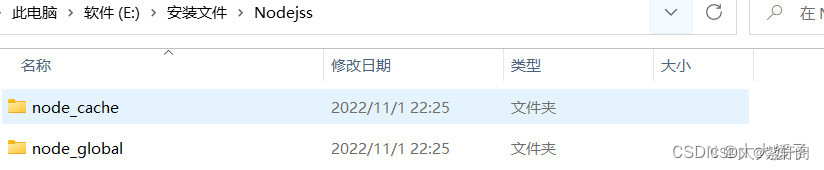
nvm 官网 https://nvm.uihtm.com/ 1、卸掉nodejs,根据官网操作 2、如果之前安装过的nodejs,且安装的目录改变了,需重新配置系统环境 第一步:打开此电脑 > 右键属性 > 高级系统设置 > 环境变量 第二步: 在系统变量中选中…...
javaEE 初阶 — 传输层 TCP 协议中的异常情况与面向字节流的粘包问题
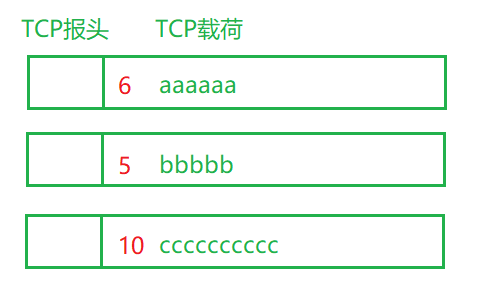
文章目录1 粘包问题1.1 什么是粘包问题1.2 如何解决粘包问题2 异常情况TCP 的十个特性:确认应答机制 超时重传机制 连接管理机制 滑动窗口 流量控制与拥塞控制 延迟应答与捎带应答 1 粘包问题 1.1 什么是粘包问题 面向字节流引入了一个比较麻烦的粘包问题。 …...
IP路由基础
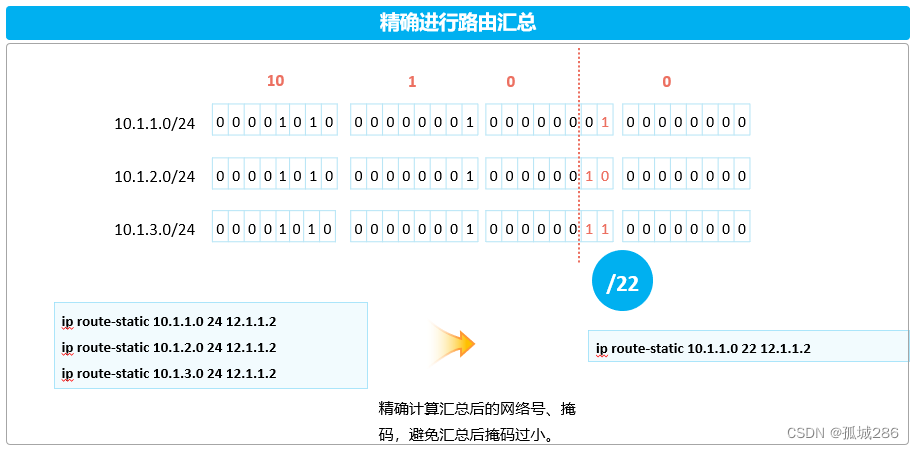
——IP路由基础(IA)—— HCIA全套笔记已经上线(arpAAAvlanTrunk链路聚合vlan间通信ACL广域网技术以太网交换...........)_孤城286的博客-CSDN博客 目录 ——IP路由基础(IA)—— (1&#…...
12.centos7部署sonarqube9.6
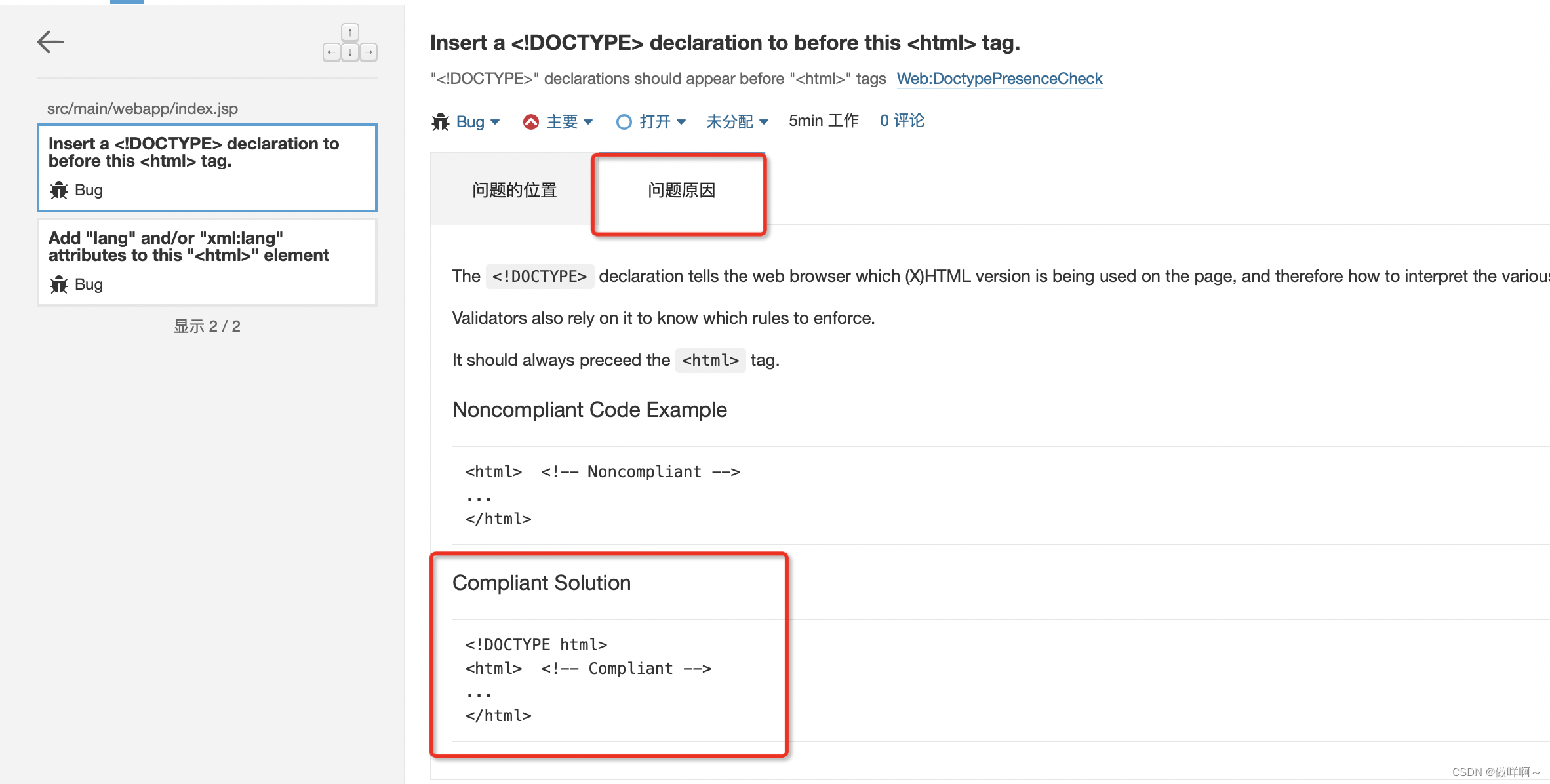
12.centos7部署sonarqube9.6环境:sonarqube9.6Postgresql13JDK11sonarqube9.6下载地址:Postgresql13 rpm下载地址:JDK11下载地址:准备工作:修改文件句柄数(最大文件数)和用户最大进程数限制修改…...

大学四年自学Java编程,现在拿到28万年薪的offer,还是觉得挺值的
最近刚拿到美团的Java后端工程师的offer,(底薪、奖金、补贴、年终奖、五险一金)总包加在大概有28万的年薪,实际到手不会有这么多,但是我对于这个待遇还是非常满意的。说来还是非常的感慨,我属于那种从大一到…...

MySQL的日志详解
目录 一.介绍 日志分类 二.错误日志 三.二进制日志—binlog 概述 日志格式 操作 四.查询日志 五.慢查询日志 一.介绍 在任何一种数据库中,都会有各种各样的日志,记录着数据库工作的方方面面,以帮助数据库管理员追踪数据库曾经发生过的…...

输出该股票所有收盘比开盘上涨3%以上的日期
1:输出该股票所有收盘比开盘上涨3%以上的日期 #codingutf-8 import tushare as ts import pandas as pd import numpy as np#获取某支股票的历史行情数据 dfts.get_hist_data(code600519,start2001-01-01) #将互联网上的数据获取并且存储到本地 df.to_csv(./maotai…...
数值卡,让数据可视化玩出新花样丨三叠云
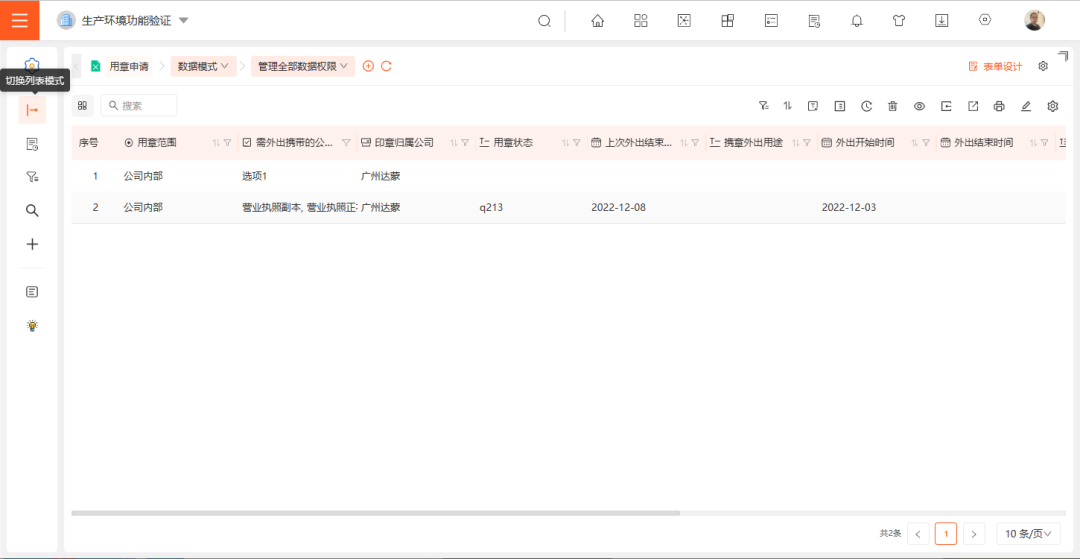
数值卡 路径 仪表盘 >> 仪表盘设计 功能简介 1. 数值卡增加「数值标题」、「图标」、「进度条」功能,使得应用场景更为广泛,实现数据可视化,让用户能够轻松地获取、处理信息。 2.「数据模型」支持0个维度1个指标、1个维度1个指标。…...
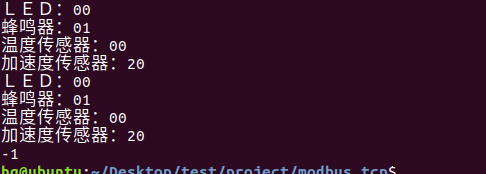
网络编程(Modbus进阶)
思维导图 Modbus RTU(先学一点理论) 概念 Modbus RTU 是工业自动化领域 最广泛应用的串行通信协议,由 Modicon 公司(现施耐德电气)于 1979 年推出。它以 高效率、强健性、易实现的特点成为工业控制系统的通信标准。 包…...

以下是对华为 HarmonyOS NETX 5属性动画(ArkTS)文档的结构化整理,通过层级标题、表格和代码块提升可读性:
一、属性动画概述NETX 作用:实现组件通用属性的渐变过渡效果,提升用户体验。支持属性:width、height、backgroundColor、opacity、scale、rotate、translate等。注意事项: 布局类属性(如宽高)变化时&#…...
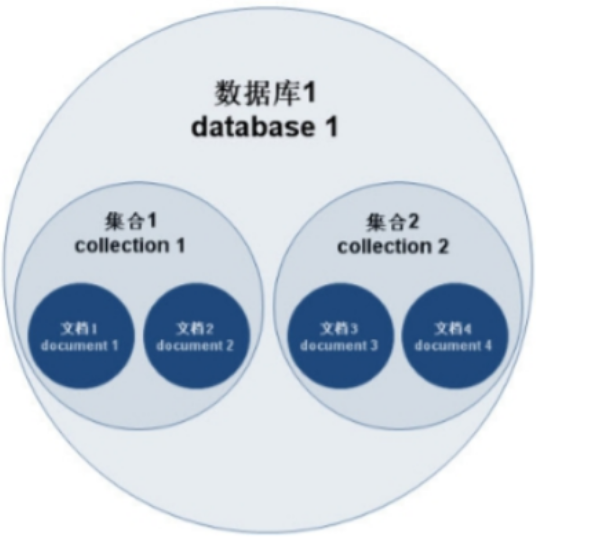
MongoDB学习和应用(高效的非关系型数据库)
一丶 MongoDB简介 对于社交类软件的功能,我们需要对它的功能特点进行分析: 数据量会随着用户数增大而增大读多写少价值较低非好友看不到其动态信息地理位置的查询… 针对以上特点进行分析各大存储工具: mysql:关系型数据库&am…...
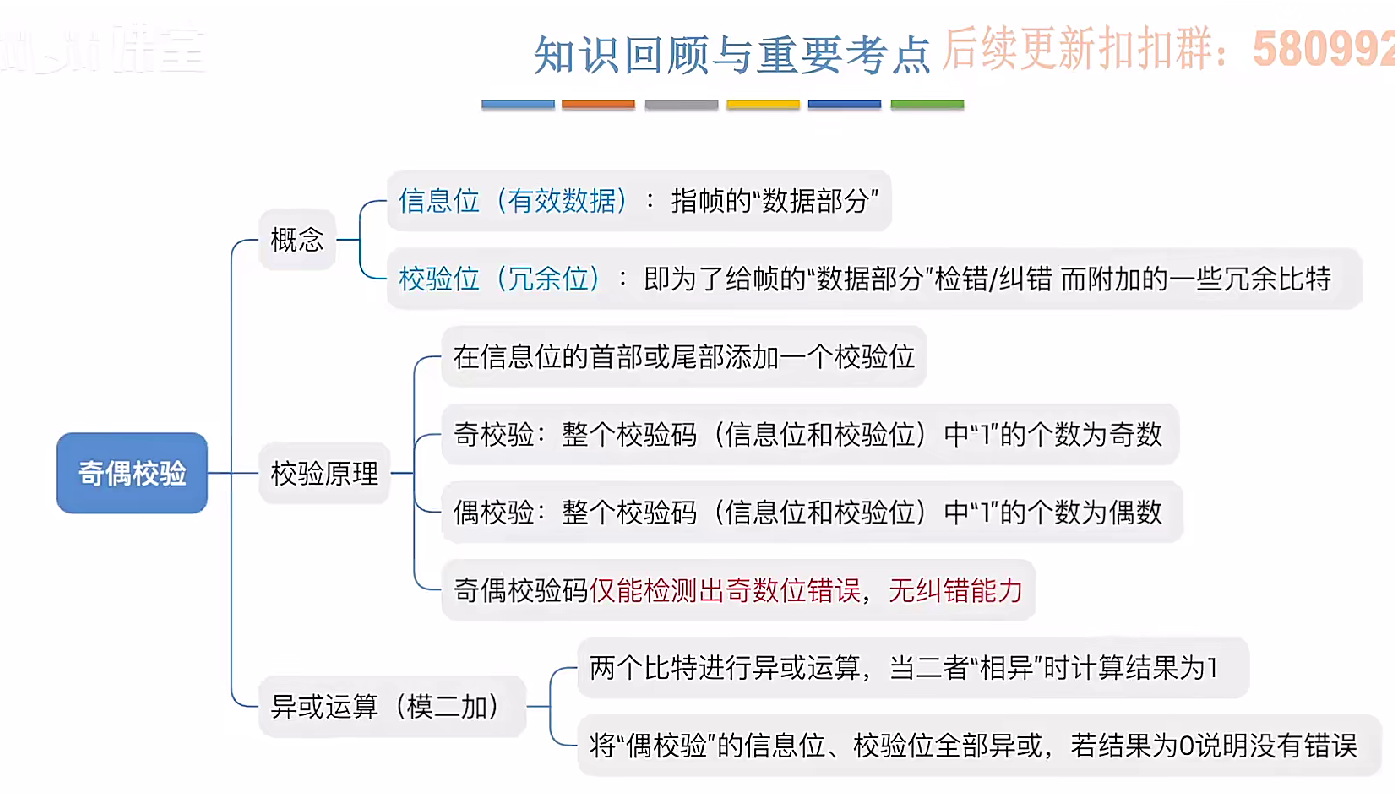
3.3.1_1 检错编码(奇偶校验码)
从这节课开始,我们会探讨数据链路层的差错控制功能,差错控制功能的主要目标是要发现并且解决一个帧内部的位错误,我们需要使用特殊的编码技术去发现帧内部的位错误,当我们发现位错误之后,通常来说有两种解决方案。第一…...
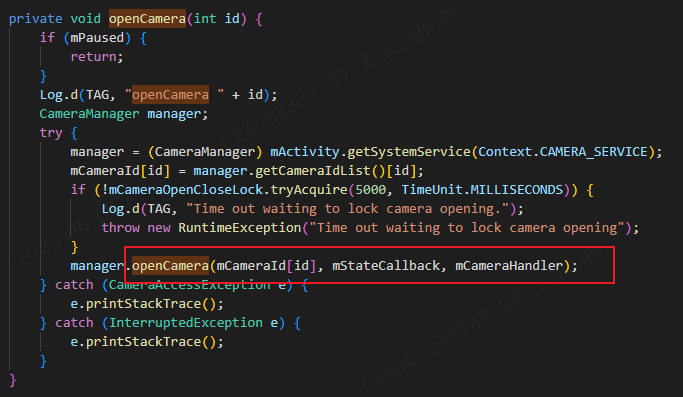
相机从app启动流程
一、流程框架图 二、具体流程分析 1、得到cameralist和对应的静态信息 目录如下: 重点代码分析: 启动相机前,先要通过getCameraIdList获取camera的个数以及id,然后可以通过getCameraCharacteristics获取对应id camera的capabilities(静态信息)进行一些openCamera前的…...

AI编程--插件对比分析:CodeRider、GitHub Copilot及其他
AI编程插件对比分析:CodeRider、GitHub Copilot及其他 随着人工智能技术的快速发展,AI编程插件已成为提升开发者生产力的重要工具。CodeRider和GitHub Copilot作为市场上的领先者,分别以其独特的特性和生态系统吸引了大量开发者。本文将从功…...
用docker来安装部署freeswitch记录
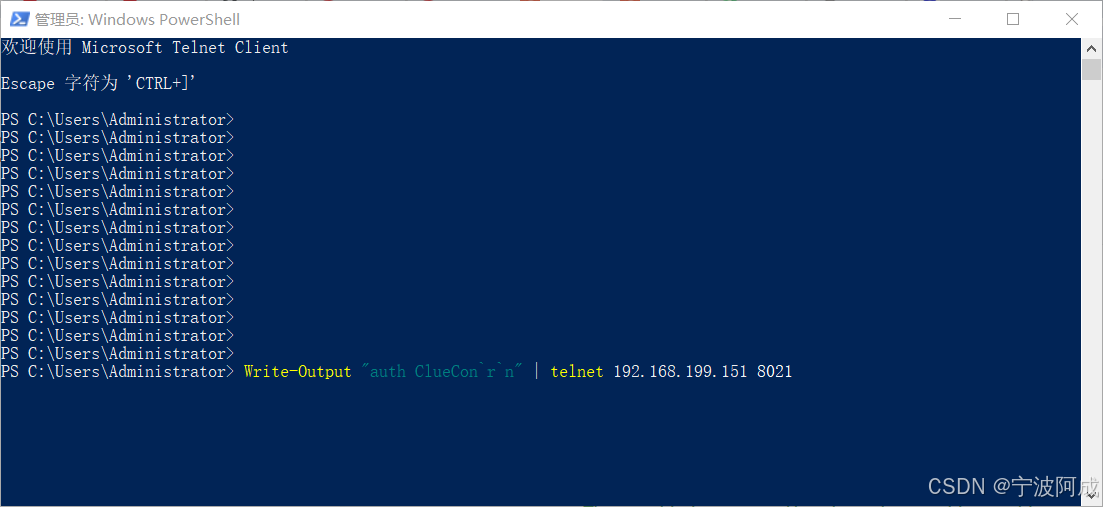
今天刚才测试一个callcenter的项目,所以尝试安装freeswitch 1、使用轩辕镜像 - 中国开发者首选的专业 Docker 镜像加速服务平台 编辑下面/etc/docker/daemon.json文件为 {"registry-mirrors": ["https://docker.xuanyuan.me"] }同时可以进入轩…...

C++八股 —— 单例模式
文章目录 1. 基本概念2. 设计要点3. 实现方式4. 详解懒汉模式 1. 基本概念 线程安全(Thread Safety) 线程安全是指在多线程环境下,某个函数、类或代码片段能够被多个线程同时调用时,仍能保证数据的一致性和逻辑的正确性…...

selenium学习实战【Python爬虫】
selenium学习实战【Python爬虫】 文章目录 selenium学习实战【Python爬虫】一、声明二、学习目标三、安装依赖3.1 安装selenium库3.2 安装浏览器驱动3.2.1 查看Edge版本3.2.2 驱动安装 四、代码讲解4.1 配置浏览器4.2 加载更多4.3 寻找内容4.4 完整代码 五、报告文件爬取5.1 提…...
USB Over IP专用硬件的5个特点
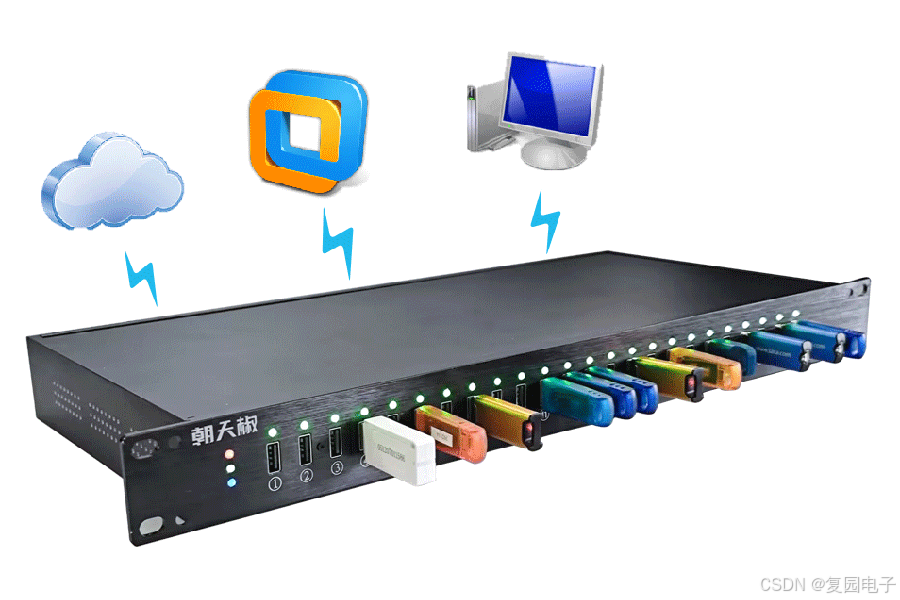
USB over IP技术通过将USB协议数据封装在标准TCP/IP网络数据包中,从根本上改变了USB连接。这允许客户端通过局域网或广域网远程访问和控制物理连接到服务器的USB设备(如专用硬件设备),从而消除了直接物理连接的需要。USB over IP的…...