
Apache2.4源码安装与配置
环境准备
openssl-devel
pcre-devel
expat-devel
libtool
gcc
libxml2-devel
这些包要提前安装,否则httpd编译安装时候会报错
下载源码、解压缩、软连接
1、wget下载[root@node01 ~]# wget https://downloads.apache.org/httpd/httpd-2.4.57.tar.gz
--2023-07-20 12:49:02--  https://downloads.apache.org/httpd/httpd-2.4.57.tar.gz
Resolving downloads.apache.org (downloads.apache.org)... 135.181.214.104, 88.99.95.219, 2a01:4f9:3a:2c57::2, ...
Connecting to downloads.apache.org (downloads.apache.org)|135.181.214.104|:443... connected.
HTTP request sent, awaiting response... 200 OK
Length: 9773385 (9.3M) [application/x-gzip]
Saving to: ‘httpd-2.4.57.tar.gz’100%[===========================================================>] 9,773,385   3.50MB/s   in 2.7s   2023-07-20 12:49:05 (3.50 MB/s) - ‘httpd-2.4.57.tar.gz’ saved [9773385/9773385]2、解压缩
[root@node01 ~]# tar -zxf httpd-2.4.57.tar.gz -C /usr/local/cluster/3、软连接
[root@node01 ~]# ln -s /usr/local/cluster/httpd-2.4.57/ /usr/local/cluster/httpd
编译安装需要两个依赖包
[root@node01 ~]# wget https://downloads.apache.org/apr/apr-1.7.4.tar.gz
--2023-07-20 16:43:32--  https://downloads.apache.org/apr/apr-1.7.4.tar.gz
Resolving downloads.apache.org (downloads.apache.org)... 88.99.95.219, 135.181.214.104, 2a01:4f9:3a:2c57::2, ...
Connecting to downloads.apache.org (downloads.apache.org)|88.99.95.219|:443... connected.
HTTP request sent, awaiting response... 200 OK
Length: 1122147 (1.1M) [application/x-gzip]
Saving to: ‘apr-1.7.4.tar.gz’100%[===========================================================>] 1,122,147    933KB/s   in 1.2s   2023-07-20 16:43:34 (933 KB/s) - ‘apr-1.7.4.tar.gz’ saved [1122147/1122147][root@node01 ~]# wget https://downloads.apache.org/apr/apr-util-1.6.3.tar.gz
--2023-07-20 16:45:01--  https://downloads.apache.org/apr/apr-util-1.6.3.tar.gz
Resolving downloads.apache.org (downloads.apache.org)... 88.99.95.219, 135.181.214.104, 2a01:4f8:10a:201a::2, ...
Connecting to downloads.apache.org (downloads.apache.org)|88.99.95.219|:443... connected.
HTTP request sent, awaiting response... 200 OK
Length: 556623 (544K) [application/x-gzip]
Saving to: ‘apr-util-1.6.3.tar.gz’100%[===========================================================>] 556,623      476KB/s   in 1.1s   2023-07-20 16:45:03 (476 KB/s) - ‘apr-util-1.6.3.tar.gz’ saved [556623/556623][root@node01 ~]# ll -h apr*
-rw-r--r-- 1 root root 1.1M Apr 16 21:07 apr-1.7.4.tar.gz
-rw-r--r-- 1 root root 544K Feb  2 03:06 apr-util-1.6.3.tar.gz
编译安装apr
[root@node01 ~]# tar -zxf apr-1.7.4.tar.gz -C /usr/local/cluster/
[root@node01 ~]# ln -s /usr/local/cluster/apr-1.7.4/ /usr/local/cluster/apr
[root@node01 ~]# cd /usr/local/cluster/apr添加#注释
[root@node01 apr]# vim configure
#    $RM "$cfgfile"[root@node01 apr]# ./configure --prefix=/usr/local/apr
。。。
configure: creating ./config.status
config.status: creating Makefile
config.status: creating include/apr.h
config.status: creating build/apr_rules.mk
config.status: creating build/pkg/pkginfo
config.status: creating apr-1-config
config.status: creating apr.pc
config.status: creating test/Makefile
config.status: creating test/internal/Makefile
config.status: creating include/arch/unix/apr_private.h
config.status: executing libtool commands
config.status: executing default commands
config.status: include/apr.h is unchanged
config.status: include/arch/unix/apr_private.h is unchanged[root@node01 apr]# make && make install
。。。
----------------------------------------------------------------------
/usr/bin/install -c -m 644 apr.exp /usr/local/apr/lib/apr.exp
/usr/bin/install -c -m 644 apr.pc /usr/local/apr/lib/pkgconfig/apr-1.pc
for f in libtool shlibtool; do \if test -f ${f}; then /usr/bin/install -c -m 755 ${f} /usr/local/apr/build-1; fi; \
done
/usr/bin/install -c -m 755 /usr/local/cluster/apr/build/mkdir.sh /usr/local/apr/build-1
for f in make_exports.awk make_var_export.awk; do \/usr/bin/install -c -m 644 /usr/local/cluster/apr/build/${f} /usr/local/apr/build-1; \
done
/usr/bin/install -c -m 644 build/apr_rules.out /usr/local/apr/build-1/apr_rules.mk
/usr/bin/install -c -m 755 apr-config.out /usr/local/apr/bin/apr-1-config
编译安装apr-util
[root@node01 ~]# tar -zxf apr-util-1.6.3.tar.gz -C /usr/local/cluster/
[root@node01 ~]# ln -s /usr/local/cluster/apr-util-1.6.3/ /usr/local/cluster/apr-util
[root@node01 ~]# cd /usr/local/cluster/apr-util[root@node01 apr-util]# ./configure --prefix=/usr/local/apr-util --with-apr=/usr/local/apr
。。。
configure: creating ./config.status
config.status: creating Makefile
config.status: creating export_vars.sh
config.status: creating build/pkg/pkginfo
config.status: creating apr-util.pc
config.status: creating apu-1-config
config.status: creating include/private/apu_select_dbm.h
config.status: creating include/apr_ldap.h
config.status: creating include/apu.h
config.status: creating include/apu_want.h
config.status: creating test/Makefile
config.status: creating include/private/apu_config.h
config.status: executing default commands[root@node01 apr-util]# make && make install报错提示需要安装expat
xml/apr_xml.c:35:19: fatal error: expat.h: No such file or directory#include <expat.h>^
compilation terminated.
make[1]: *** [xml/apr_xml.lo] Error 1
make[1]: Leaving directory `/usr/local/cluster/apr-util-1.6.3'
make: *** [all-recursive] Error 1[root@node01 apr-util]# yum install expat-devel -y再次执行
[root@node01 apr-util]# make && make installSee any operating system documentation about shared libraries for
more information, such as the ld(1) and ld.so(8) manual pages.
----------------------------------------------------------------------
/usr/bin/install -c -m 644 aprutil.exp /usr/local/apr-util/lib
/usr/bin/install -c -m 755 apu-config.out /usr/local/apr-util/bin/apu-1-config
编译安装httpd
因为没有提前安装依赖包,需要重新编译安装apr和apr-util,最后再重新编译安装httpd[root@node01 ~]# tar -zxf httpd-2.4.57.tar.gz -C /usr/local/cluster/
[root@node01 ~]# ln -s /usr/local/cluster/httpd-2.4.57/ /usr/local/cluster/httpd
[root@node01 ~]# cd /usr/local/cluster/httpd[root@node01 httpd]# ./configure --prefix=/usr/local/httpd --enable-so --enable-ssl --enable-cgi --enable--rewrite --with-zlib --with-pcre --with-apr=/usr/local/apr --with-apr-util=/usr/local/apr-util --enable-modules=most  --enable-mpms-shared=all --with-mpm=prefork报错需要pcre包
checking for pcre-config... no
configure: error: pcre(2)-config for libpcre not found. PCRE is required and available from http://pcre.org/[root@node01 httpd]# yum install pcre-devel -y再次执行checking for OpenSSL version >= 0.9.8a... FAILED
configure: WARNING: OpenSSL version is too old
no
checking whether to enable mod_ssl... configure: error: mod_ssl has been requested but can not be built due to prerequisite failures[root@node01 httpd]# yum list openssl*
Loaded plugins: fastestmirror
Loading mirror speeds from cached hostfile* base: mirrors.aliyun.com* extras: mirrors.tuna.tsinghua.edu.cn* updates: mirrors.aliyun.com
Installed Packages
openssl.x86_64                               1:1.0.2k-19.el7                                @anaconda
openssl-libs.x86_64                          1:1.0.2k-19.el7                                @anaconda
Available Packages
openssl.x86_64                               1:1.0.2k-26.el7_9                              updates
openssl-devel.i686                           1:1.0.2k-26.el7_9                              updates
openssl-devel.x86_64                         1:1.0.2k-26.el7_9                              updates
openssl-libs.i686                            1:1.0.2k-26.el7_9                              updates
openssl-libs.x86_64                          1:1.0.2k-26.el7_9                              updates
openssl-perl.x86_64                          1:1.0.2k-26.el7_9                              updates
openssl-static.i686                          1:1.0.2k-26.el7_9                              updates
openssl-static.x86_64                        1:1.0.2k-26.el7_9                              updates
openssl098e.i686                             0.9.8e-29.el7.centos.3                         base
openssl098e.x86_64                           0.9.8e-29.el7.centos.3                         base   升级OpenSSL 安装openssl-devel
[root@node01 httpd]# yum install openssl-devel -y再次执行
[root@node01 httpd]# ./configure --prefix=/usr/local/httpd --enable-so --enable-ssl --enable-cgi --enable--rewrite --with-zlib --with-pcre --with-apr=/usr/local/apr --with-apr-util=/usr/local/apr-util --enable-modules=most  --enable-mpms-shared=all --with-mpm=prefork configure: summary of build options:Server Version: 2.4.57Install prefix: /usr/local/httpdC compiler:     gcc -std=gnu11CFLAGS:          -g -O2 -pthread  CPPFLAGS:        -DLINUX -D_REENTRANT -D_GNU_SOURCE  LDFLAGS:           LIBS:             C preprocessor: gcc -std=gnu11 -E[root@node01 httpd]# make && make install报错
/usr/local/apr/build-1/libtool --silent --mode=link gcc -std=gnu11  -g -O2 -pthread         -o htpasswd  htpasswd.lo passwd_common.lo      /usr/local/apr-util/lib/libaprutil-1.la /usr/local/apr/lib/libapr-1.la -lrt -lcrypt -lpthread -ldl -lcrypt
/usr/local/apr-util/lib/libaprutil-1.so: undefined reference to `XML_GetErrorCode'
/usr/local/apr-util/lib/libaprutil-1.so: undefined reference to `XML_SetEntityDeclHandler'
/usr/local/apr-util/lib/libaprutil-1.so: undefined reference to `XML_ParserCreate'
/usr/local/apr-util/lib/libaprutil-1.so: undefined reference to `XML_SetCharacterDataHandler'
/usr/local/apr-util/lib/libaprutil-1.so: undefined reference to `XML_ParserFree'
/usr/local/apr-util/lib/libaprutil-1.so: undefined reference to `XML_SetUserData'
/usr/local/apr-util/lib/libaprutil-1.so: undefined reference to `XML_StopParser'
/usr/local/apr-util/lib/libaprutil-1.so: undefined reference to `XML_Parse'
/usr/local/apr-util/lib/libaprutil-1.so: undefined reference to `XML_ErrorString'
/usr/local/apr-util/lib/libaprutil-1.so: undefined reference to `XML_SetElementHandler'
collect2: error: ld returned 1 exit status
make[2]: *** [htpasswd] Error 1
make[2]: Leaving directory `/usr/local/cluster/httpd-2.4.57/support'
make[1]: *** [all-recursive] Error 1
make[1]: Leaving directory `/usr/local/cluster/httpd-2.4.57/support'
make: *** [all-recursive] Error 1[root@node01 httpd]# yum install libtool -y解决参考文档
https://my.oschina.net/LuCastiel/blog/1590706安装 libxml2-devel 包[root@node01 httpd]# yum install libxml2-devel -y删除 apr-util 安装目录,并重新编译安装
[root@node01 httpd]# rm -rf /usr/local/apr-util/
[root@node01 httpd]# cd /usr/local/cluster/apr-util这一步很重要,必须清除之前配置时的缓存
[root@node01 apr-util]# make clean再次重新编译安装apr-util
[root@node01 apr-util]# ./configure --prefix=/usr/local/apr-util --with-apr=/usr/local/apr
[root@node01 apr-util]# make && make install重新编译安装 httpd
[root@node01 apr-util]# cd /usr/local/cluster/httpd
[root@node01 httpd]# make clean
[root@node01 httpd]# ./configure --prefix=/usr/local/httpd --enable-so --enable-ssl --enable-cgi --enable--rewrite --with-zlib --with-pcre --with-apr=/usr/local/apr --with-apr-util=/usr/local/apr-util --enable-modules=most  --enable-mpms-shared=all --with-mpm=prefork
configure: summary of build options:Server Version: 2.4.57Install prefix: /usr/local/httpdC compiler:     gcc -std=gnu11CFLAGS:          -g -O2 -pthread  CPPFLAGS:        -DLINUX -D_REENTRANT -D_GNU_SOURCE  LDFLAGS:           LIBS:             C preprocessor: gcc -std=gnu11 -E[root@node01 httpd]# make && make instal
。。。
make[4]: Entering directory `/usr/local/cluster/httpd-2.4.57/modules/mappers'
make[4]: Nothing to be done for `local-shared-build'.
make[4]: Leaving directory `/usr/local/cluster/httpd-2.4.57/modules/mappers'
make[3]: Leaving directory `/usr/local/cluster/httpd-2.4.57/modules/mappers'
make[2]: Leaving directory `/usr/local/cluster/httpd-2.4.57/modules'
make[2]: Entering directory `/usr/local/cluster/httpd-2.4.57/support'
make[2]: Leaving directory `/usr/local/cluster/httpd-2.4.57/support'Installing configuration files
mkdir /usr/local/httpd/conf
mkdir /usr/local/httpd/conf/extra
mkdir /usr/local/httpd/conf/original
mkdir /usr/local/httpd/conf/original/extra
Installing HTML documents
mkdir /usr/local/httpd/htdocs
Installing error documents
mkdir /usr/local/httpd/error
Installing icons
mkdir /usr/local/httpd/icons
mkdir /usr/local/httpd/logs
Installing CGIs
mkdir /usr/local/httpd/cgi-bin
Installing header files
mkdir /usr/local/httpd/include
Installing build system files
mkdir /usr/local/httpd/build
Installing man pages and online manual
mkdir /usr/local/httpd/man
mkdir /usr/local/httpd/man/man1
mkdir /usr/local/httpd/man/man8
mkdir /usr/local/httpd/manual
make[1]: Leaving directory `/usr/local/cluster/httpd-2.4.57'根据输出信息可以看到安装目录是/usr/local/httpd
启动httpd服务
[root@node01 httpd]# whereis httpd
httpd: /usr/local/httpd[root@node01 httpd]# cd /usr/local/httpd/[root@node01 httpd]# ll -h
total 36K
drwxr-xr-x  2 root root  262 Jul 20 18:43 bin
drwxr-xr-x  2 root root  167 Jul 20 18:43 build
drwxr-xr-x  2 root root   78 Jul 20 18:43 cgi-bin
drwxr-xr-x  4 root root   84 Jul 20 18:43 conf
drwxr-xr-x  3 root root 4.0K Jul 20 18:43 error
drwxr-xr-x  2 root root   24 Jul 20 18:43 htdocs
drwxr-xr-x  3 root root 8.0K Jul 20 18:43 icons
drwxr-xr-x  2 root root 4.0K Jul 20 18:43 include
drwxr-xr-x  2 root root    6 Jul 20 18:43 logs
drwxr-xr-x  4 root root   30 Jul 20 18:43 man
drwxr-xr-x 14 root root 8.0K Jul 20 18:43 manual
drwxr-xr-x  2 root root 4.0K Jul 20 18:43 modules[root@node01 httpd]# cd bin/[root@node01 bin]# ./apachectl start
AH00558: httpd: Could not reliably determine the server's fully qualified domain name, using 192.168.6.101. Set the 'ServerName' directive globally to suppress this message
httpd (pid 548) already runninghttpd已经运行
[root@node01 bin]# netstat -anp |grep httpd
tcp6       0      0 :::80                   :::*                    LISTEN      548/httpd [root@node01 bin]# ./apachectl stop
AH00558: httpd: Could not reliably determine the server's fully qualified domain name, using 192.168.6.101. Set the 'ServerName' directive globally to suppress this message修改配置文件
[root@node01 conf]# pwd
/usr/local/httpd/conf
[root@node01 conf]# vim httpd.conf
ServerName 192.168.6.101:80[root@node01 bin]# ./apachectl stop
[root@node01 bin]# ./apachectl start
[root@node01 bin]# ps -ef |grep httpd
root       3236      1  0 18:52 ?        00:00:00 /usr/local/httpd/bin/httpd -k start
daemon     3237   3236  0 18:52 ?        00:00:00 /usr/local/httpd/bin/httpd -k start
daemon     3238   3236  0 18:52 ?        00:00:00 /usr/local/httpd/bin/httpd -k start
daemon     3239   3236  0 18:52 ?        00:00:00 /usr/local/httpd/bin/httpd -k start
daemon     3240   3236  0 18:52 ?        00:00:00 /usr/local/httpd/bin/httpd -k start
daemon     3241   3236  0 18:52 ?        00:00:00 /usr/local/httpd/bin/httpd -k start
root       3352   1706  0 18:52 pts/0    00:00:00 grep --color=auto httpd
[root@node01 bin]# [root@node01 bin]# netstat -anp | grep httpd
tcp6       0      0 :::80                   :::*                    LISTEN      3236/httpd    [root@node01 htdocs]# more index.html
<html><body><h1>It works!</h1></body></html>
相关文章:
Apache2.4源码安装与配置
环境准备 openssl-devel pcre-devel expat-devel libtool gcc libxml2-devel 这些包要提前安装,否则httpd编译安装时候会报错 下载源码、解压缩、软连接 1、wget下载[rootnode01 ~]# wget https://downloads.apache.org/httpd/httpd-2.4.57.tar.gz --2023-07-20 …...
Flume原理剖析
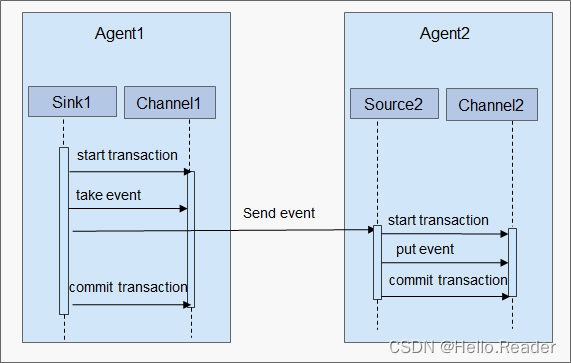
一、介绍 Flume是一个高可用、高可靠,分布式的海量日志采集、聚合和传输的系统。Flume支持在日志系统中定制各类数据发送方,用于收集数据;同时,Flume提供对数据进行简单处理,并写到各种数据接受方(可定制&…...
)
【leetcode】202. 快乐数(easy)
编写一个算法来判断一个数 n 是不是快乐数。 「快乐数」 定义为: 对于一个正整数,每一次将该数替换为它每个位置上的数字的平方和。然后重复这个过程直到这个数变为 1,也可能是 无限循环 但始终变不到 1。如果这个过程 结果为 1,…...
如何用瀑布图分析公司年报
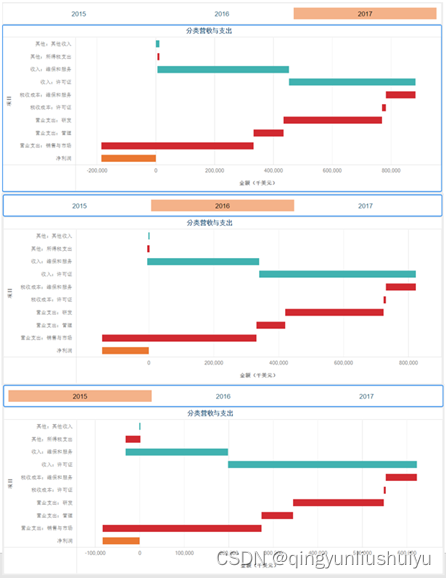
原创: MicroStrategy微策略中国 , Jiping Sun 微策略企业级数据分析与移动应用9月21日2018年 摘要:利用达析报告开箱即用的瀑布图来展示各个度量值如何增加或减少。下载MicroStrategy Desktop 10.11以上版本,自己动手创建瀑布图。 瀑布图是由…...
Asynq: 基于Redis实现的Go生态分布式任务队列和异步处理库
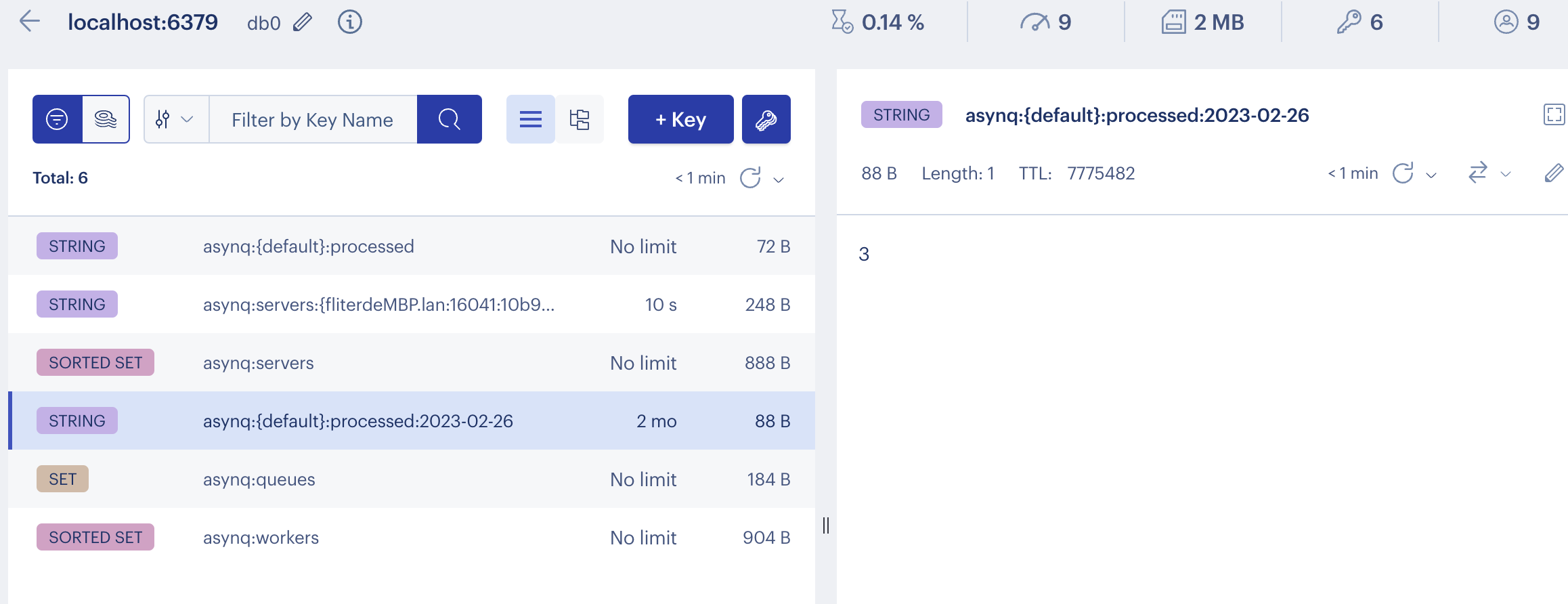
Asynq[1]是一个Go实现的分布式任务队列和异步处理库,基于redis,类似Ruby的sidekiq[2]和Python的celery[3]。Go生态类似的还有machinery[4]和goworker 同时提供一个WebUI asynqmon[5],可以源码形式安装或使用Docker image, 还可以和Prometheus…...

保证率计算公式 正态分布
在正态分布中,如果我们要计算一个给定区间内的保证率,可以使用下面的计算公式: 找到给定保证率对应的标准正态分布的z值。可以使用标准正态分布表或计算器进行查询。例如,对于95%的保证率,对应的z值为1.96。 使用z值和…...
docker容器监控:Cadvisor+InfluxDB+Grafana的安装部署
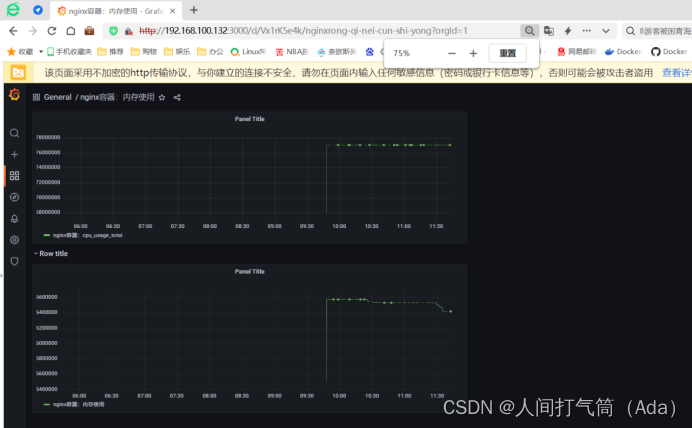
目录 CadvisorInfluxDBGrafan安装部署 1、安装docker-ce 2、阿里云镜像加速器 3、下载组件镜像 4、创建自定义网络 5、创建influxdb容器 6、创建Cadvisor 容器 7、查看Cadvisor 容器: (1)准备测试镜像 (2)通…...
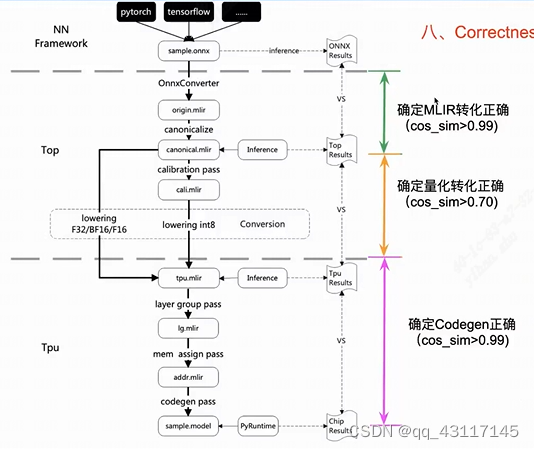
论文讲解——TPU-MLIR: A Compiler For TPU Using MLIR
论文讲解——TPU-MLIR: A Compiler For TPU Using MLIR https://arxiv.org/pdf/2210.15016.pdf概览模型转换TranslationCanonicalizeLoweringLayerGroup BufferizationCalibration QuantizationCorrectness Check相关资料 https://arxiv.org/pdf/2210.15016.pdf 本文将对TPU…...
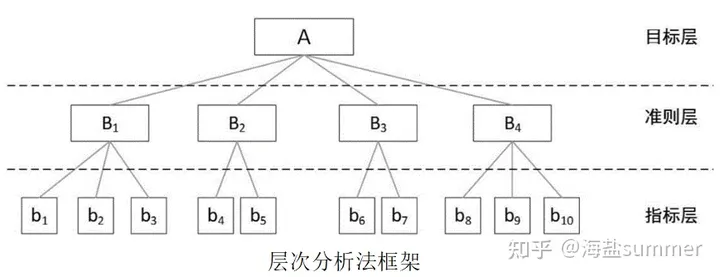
基于最新导则下生态环评报告编制技术暨报告篇、制图篇、指数篇、综合应用篇系统性实践技能提升
查看原文>>>基于最新导则下生态环评报告编制技术暨报告篇、制图篇、指数篇、综合应用篇系统性实践技能提升 目录 专题一、生态环评报告编制规范 专题二、土地利用图 专题三、植被类型及植被覆盖度图 专题四、物种适宜生境分布图 专题五、生物多样性测定 专题六…...

NGZORRO:动态表单/模型驱动 的相关问题
官网的demo的[nzFor]"control.controlInstance",似乎是靠[formControlName]"control.controlInstance"来关联的。 <form nz-form [formGroup]"validateForm" (ngSubmit)"submitForm()"><nz-form-item *ngFor&quo…...

第十七次CCF计算机软件能力认证
第一题:小明种苹果 n , m map(int , input().split()) t , k , p 0 , 0 , -1 for _ in range(n):l list(map(int , input().split()))t sum(l)x -sum(l[i] for i in range(1 , len(l)))if x > p:p xk _ 1 print(t , k , p) 第二题:小明种苹…...
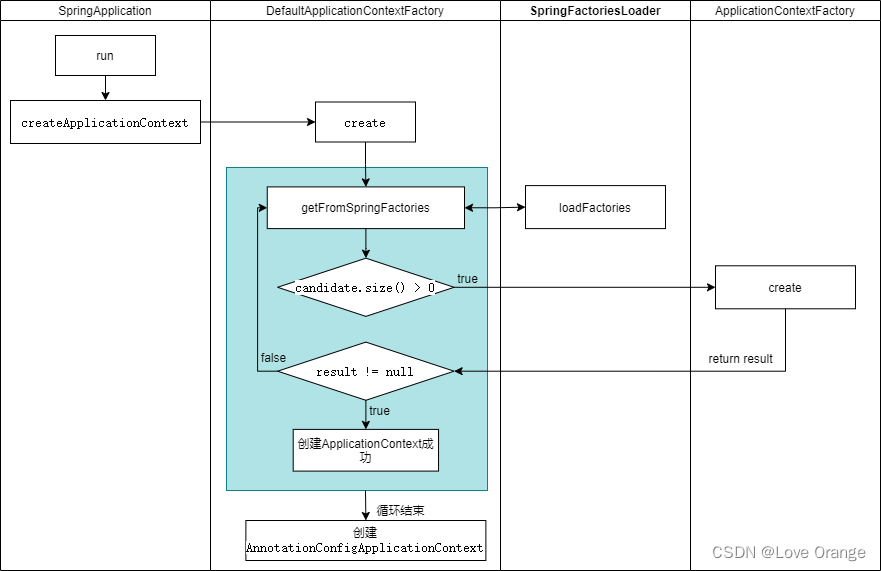
ApplicationContext在Spring Boot中是如何创建的?
一、ApplicationContext在Spring Boot中是如何创建的? 1. SpringApplication ApplicationContextFactory有三个实现类,分别是AnnotationConfigReactiveWebServerApplicationContext.Factory、AnnotationConfigServletWebServerApplicationContext.Facto…...

后端开发7.轮播图模块【mongdb开发】
概述 轮播图模块数据库采用mongdb开发 效果图 数据库设计 创建数据库 use sc; 添加数据 db.banner.insertMany([ {bannerId:"1",bannerName:"商城轮播图1",bannerUrl:"http://xx:8020/img/轮播图/shop1.png"}, {bannerId:"2"…...

Linux常用命令(一):创建文件目录
一、touch: 1、作用: 1). 改变已有文件的时间戳属性,修改文件时间戳时,用户必须的文件的属主,或者拥有写文件的权限 2). 创建新的空文件 2、语法: touch [option] 文件名 ,后面可跟多个文件名3、示例 …...

如何创建一个Vue组件?如何在父组件和子组件之间传递数据?如何在子组件中向父组件发送消息?
1、如何创建一个Vue组件? 要创建一个Vue组件,可以按照以下步骤进行: 安装Vue CLI(如果还没有安装): npm install -g vue/cli创建一个新的Vue组件: vue create my-component在 src/component…...
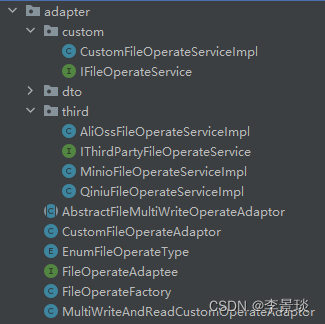
设计模式之适配器模式
一、概述 将一个类的接口转换成客户希望的另外一个接口。Adapter模式使得原本由于接口不兼容而不能一起工作的那些类可以一起工作。 二、适用性 1.你想使用一个已经存在的类,而它的接口不符合你的需求。 2.你想创建一个可以复用的类,该类可以与其他不…...
)
让ChatGPT介绍一下ChatGPT(ChatGPT的自我介绍)
ChatGPT是这样介绍自己的: ChatGPT是由OpenAI开发的一种基于大规模预训练的语言模型。它是建立在GPT(Generative Pre-trained Transformer)架构的基础上,经过大量的数据训练而成。 ChatGPT旨在通过对话与用户进行交互࿰…...

CentOS 7 构建 LVS-DR 群集
一、LVS-DR集群摘要 LVS(Linux Virtual Server)是一个用于构建可扩展和高可用性的负载均衡集群的软件。它基于Linux操作系统,并提供了一种将网络流量分发到多个后端服务器的机制。 二、基本工作原理 配置负载均衡器:在LVS集群中…...

MySQL8.0.33二进制包安装与部署
官方文档 https://downloads.mysql.com/archives/community/https://dev.mysql.com/doc/refman/8.1/en/binary-installation.html官方文档操作步骤 # Preconfiguration setup $> groupadd mysql $> useradd -r -g mysql -s /bin/false mysql # Beginning of source-build…...
RocketMQ发送消息失败:error CODE: 14 DESC: service not available now, maybe disk full
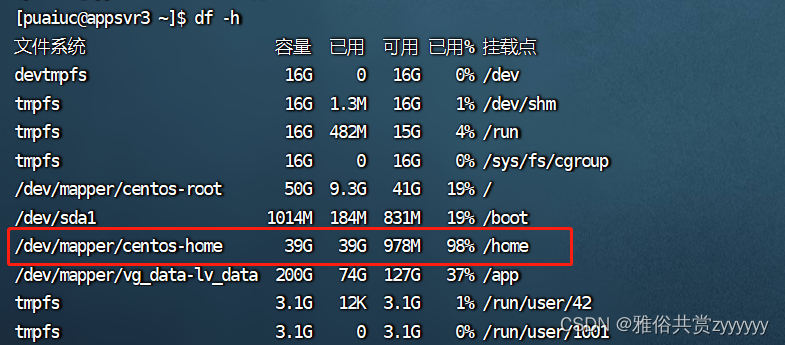
在执行业务时,发现MQ控制台没有查询到消息,在日志中发现消息发送失败,报错error CODE: 14 DESC: service not available now, maybe disk full 分析报错应该是磁盘空间不足,导致broker不能进行正常的消息存储刷盘,去查…...

web vue 项目 Docker化部署
Web 项目 Docker 化部署详细教程 目录 Web 项目 Docker 化部署概述Dockerfile 详解 构建阶段生产阶段 构建和运行 Docker 镜像 1. Web 项目 Docker 化部署概述 Docker 化部署的主要步骤分为以下几个阶段: 构建阶段(Build Stage):…...

手游刚开服就被攻击怎么办?如何防御DDoS?
开服初期是手游最脆弱的阶段,极易成为DDoS攻击的目标。一旦遭遇攻击,可能导致服务器瘫痪、玩家流失,甚至造成巨大经济损失。本文为开发者提供一套简洁有效的应急与防御方案,帮助快速应对并构建长期防护体系。 一、遭遇攻击的紧急应…...
Lombok 的 @Data 注解失效,未生成 getter/setter 方法引发的HTTP 406 错误
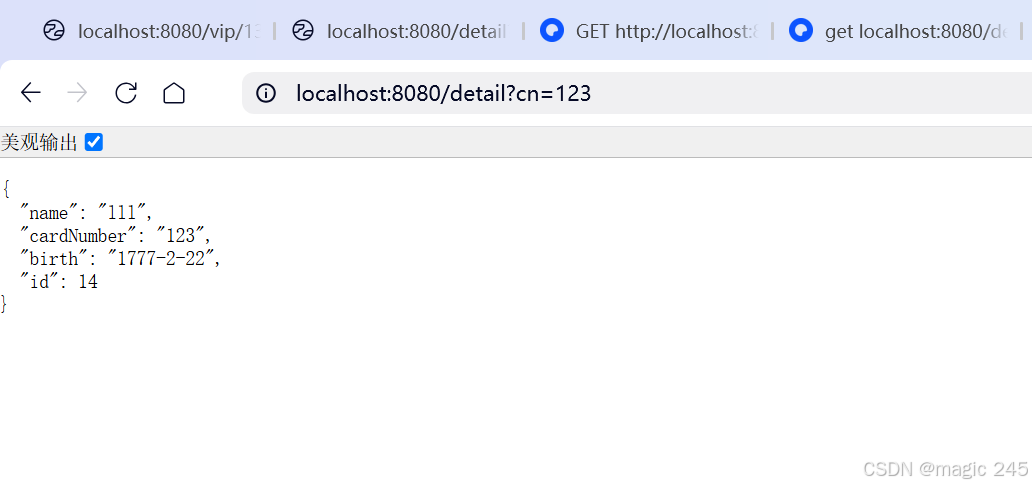
HTTP 状态码 406 (Not Acceptable) 和 500 (Internal Server Error) 是两类完全不同的错误,它们的含义、原因和解决方法都有显著区别。以下是详细对比: 1. HTTP 406 (Not Acceptable) 含义: 客户端请求的内容类型与服务器支持的内容类型不匹…...

在鸿蒙HarmonyOS 5中实现抖音风格的点赞功能
下面我将详细介绍如何使用HarmonyOS SDK在HarmonyOS 5中实现类似抖音的点赞功能,包括动画效果、数据同步和交互优化。 1. 基础点赞功能实现 1.1 创建数据模型 // VideoModel.ets export class VideoModel {id: string "";title: string ""…...

Java - Mysql数据类型对应
Mysql数据类型java数据类型备注整型INT/INTEGERint / java.lang.Integer–BIGINTlong/java.lang.Long–––浮点型FLOATfloat/java.lang.FloatDOUBLEdouble/java.lang.Double–DECIMAL/NUMERICjava.math.BigDecimal字符串型CHARjava.lang.String固定长度字符串VARCHARjava.lang…...

【JavaSE】绘图与事件入门学习笔记
-Java绘图坐标体系 坐标体系-介绍 坐标原点位于左上角,以像素为单位。 在Java坐标系中,第一个是x坐标,表示当前位置为水平方向,距离坐标原点x个像素;第二个是y坐标,表示当前位置为垂直方向,距离坐标原点y个像素。 坐标体系-像素 …...

MySQL用户和授权
开放MySQL白名单 可以通过iptables-save命令确认对应客户端ip是否可以访问MySQL服务: test: # iptables-save | grep 3306 -A mp_srv_whitelist -s 172.16.14.102/32 -p tcp -m tcp --dport 3306 -j ACCEPT -A mp_srv_whitelist -s 172.16.4.16/32 -p tcp -m tcp -…...
优选算法第十二讲:队列 + 宽搜 优先级队列
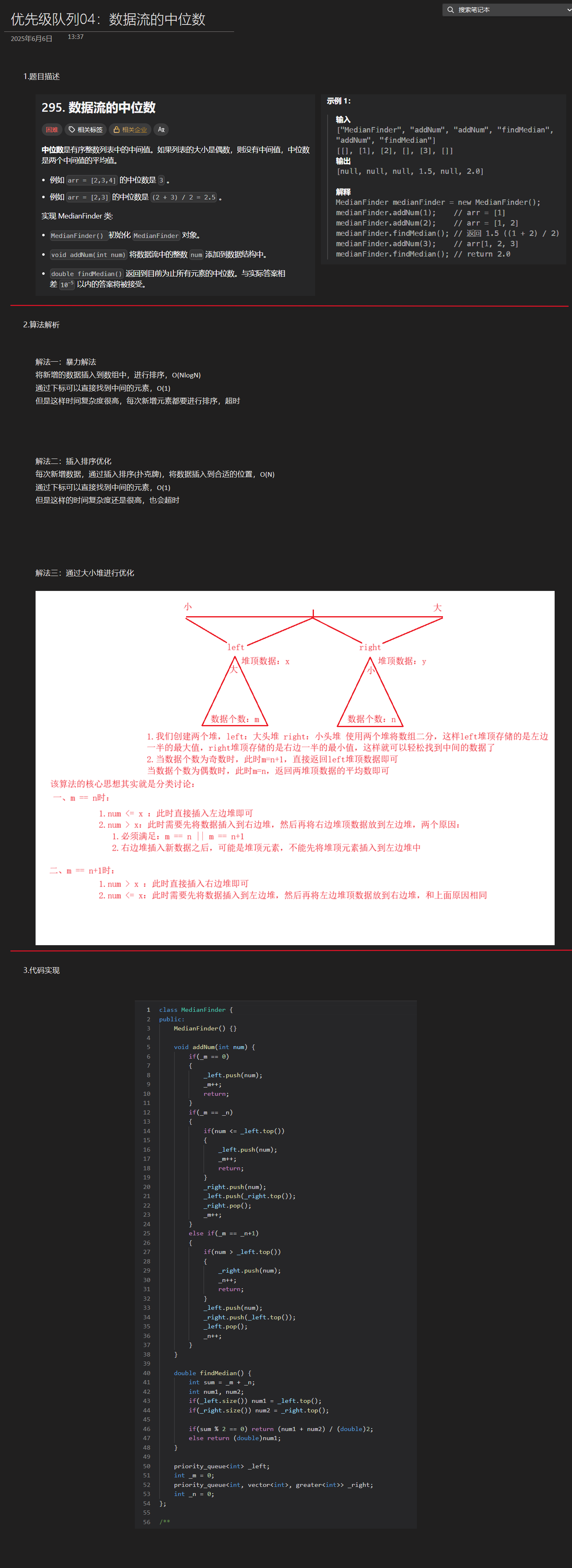
优选算法第十二讲:队列 宽搜 && 优先级队列 1.N叉树的层序遍历2.二叉树的锯齿型层序遍历3.二叉树最大宽度4.在每个树行中找最大值5.优先级队列 -- 最后一块石头的重量6.数据流中的第K大元素7.前K个高频单词8.数据流的中位数 1.N叉树的层序遍历 2.二叉树的锯…...

华硕a豆14 Air香氛版,美学与科技的馨香融合
在快节奏的现代生活中,我们渴望一个能激发创想、愉悦感官的工作与生活伙伴,它不仅是冰冷的科技工具,更能触动我们内心深处的细腻情感。正是在这样的期许下,华硕a豆14 Air香氛版翩然而至,它以一种前所未有的方式&#x…...

基于SpringBoot在线拍卖系统的设计和实现
摘 要 随着社会的发展,社会的各行各业都在利用信息化时代的优势。计算机的优势和普及使得各种信息系统的开发成为必需。 在线拍卖系统,主要的模块包括管理员;首页、个人中心、用户管理、商品类型管理、拍卖商品管理、历史竞拍管理、竞拍订单…...