
vue实现xml在线编辑功能
先看效果 避免误会
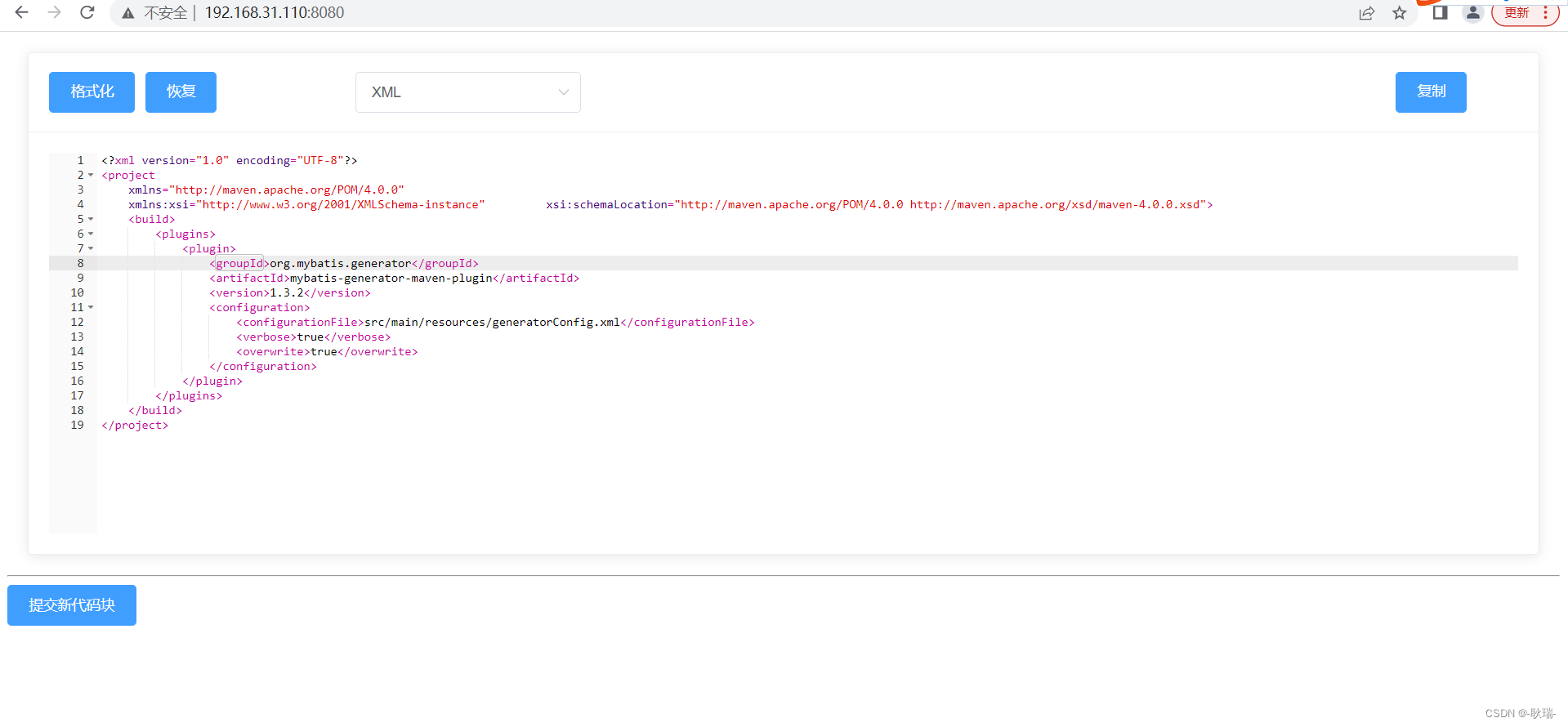
这是一个在线编辑器 我们可以在这上面随意的编写xml代码格式
我们修改上面的内容之后 就可以在控制台输出内容
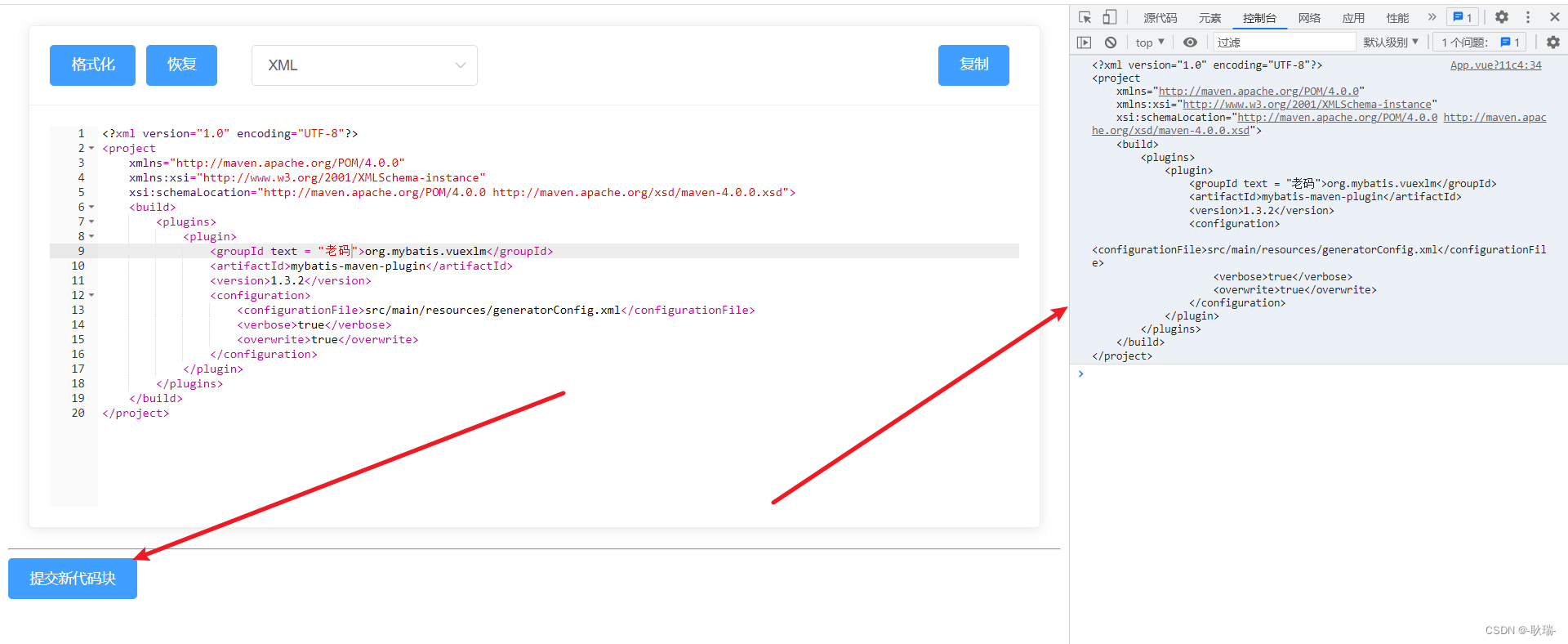
如果这正是您想要的东西 那就可以先创建一个vue项目
我们先引入依赖
npm install brace -S
npm install element-ui  -S
npm install vue-clipboard2 -S
npm install vkbeautify --save
然后在src 目录 下新建文件夹 就叫 components
在components下再创建一个文件 叫 editor
然后 在下面创建一个js文件 叫 data_format_utils
data_format_utils.js 参考代码如下
// 对json和xml进行格式化
import vkbeautify from 'vkbeautify'export function string_to_json_wrap(v) {try {if (is_json(v)) {return unicode_to_china(JSON.stringify(string_to_json(v), null, '\t'))} else {return v}} catch (e) {console.log(e);}return v
}export function json_wrap_to_string(v) {try {if (is_json(v)) {return unicode_to_china(JSON.stringify(string_to_json(v)))} else {return v}} catch (e) {console.log(e);}return v
}export function string_to_xml_wrap(v) {try {return vkbeautify.xml(v);} catch (e) {return v}
}export function xml_wrap_to_string(v) {try {return vkbeautify.xmlmin(v);} catch (e) {return v}
}export function is_json(str) {if (typeof str == 'string') {try {let obj = JSON.parse(str);if (typeof obj == 'object' && obj) {return true;} else {return false;}} catch (e) {return false;}}
}export function check_string_type(v) {try {if (v.startsWith("<!DOCTYPE html")) {return 'HTML'} else if (v.startsWith("<")) {return 'XML'} else if (is_json(v)) {return 'JSON'} else {return 'TEXT'}} catch (e) {return 'TEXT'}
}export function wrap_to_string(v, t) {let type = t || check_string_type(v)switch (type) {case 'JSON': {return json_wrap_to_string(v)}case 'XML': {return xml_wrap_to_string(v)}case 'HTML': {return xml_wrap_to_string(v)}}return v
}export function string_to_wrap(v, t) {let type = t || check_string_type(v)switch (type) {case 'JSON': {return string_to_json_wrap(v)}case 'XML': {return string_to_xml_wrap(v)}case 'HTML': {return string_to_xml_wrap(v)}}return v
}export function string_to_json(v) {try {if (is_json(v)) {return v} else {return v}} catch (e) {return v}
}export function unicode_to_china(input) {try {return input.replace(/\\\\u([0-9a-fA-F]{2,4})/g, function (string, matched) {return String.fromCharCode(parseInt(matched, 16))})} catch (e) {console.log(e);}return input
}
然后在 editor目录下创建一个组件 我这里叫 index.vue
参考代码如下
<template><div><el-card class="box-card"><!-- 操作栏 --><el-row slot="header" class="clearfix" v-if="toolbar == true"><el-col :span="5"><el-button type="primary" @click="toolsBarLeft">格式化</el-button><el-button type="primary" @click="toolsBarRight">恢复</el-button></el-col><el-col :span="6"><el-select v-model="value_type"><el-option label="JSON" value="JSON"></el-option><el-option label="TEXT" value="TEXT"></el-option><el-option label="XML" value="XML"></el-option><el-option label="HTML" value="HTML"></el-option></el-select></el-col><el-col :span="2" style="float:right"><el-button type="primary" v-clipboard:copy="contentBackup" @click="copy_value">复制</el-button></el-col></el-row><!-- 编辑器 --><div ref="vue_editor" style="height: 50vh;width: 100%"></div></el-card></div>
</template>
<style>
.box-card {margin: 20px;
}
.btn-hover {padding-left: 6px;padding-right: 6px;
}
.btn-hover:hover {background: #e0e0e0 !important;
}
.ace-xcode .ace_gutter {border-right: none !important;background: #fafafa !important;
}
.ace_content_disable {background: #fafafa !important;
}
</style>
<script>
// 引入ace代码编辑器
import ace from "brace/index";
import "brace/ext/emmet";
import "brace/ext/language_tools";
import "brace/mode/html";
import "brace/mode/json";
import "brace/mode/text";
import "brace/mode/xml";
import "brace/mode/javascript";
import "brace/theme/xcode";
import "brace/theme/terminal";
import "brace/snippets/javascript";
// 代码格式化方法
import {string_to_json_wrap,json_wrap_to_string,string_to_xml_wrap,check_string_type,wrap_to_string,string_to_wrap
} from "./data_format_utils";
// 主要代码
export default {name: "vue_editor",/*** 参数介绍:* value:(必填)双向绑定的数据;* theme:(非必填)ace编辑器主题默认xcode,可根据官网自行更换;* height:(必填)高度;* width:(必填)宽度;* options:(非必填)ace编辑器的设置* toolbar: (非必填)操作栏;* disable:(必填)是否启用编辑功能;* type:(非必填)json/xml/html/text,也支持更多,自行引用**/props: {value: {required: true},theme: {type: String,default: "xcode",required: false},options: Object,toolbar: {required: false,default: true,type: Boolean},disable: {required: false,type: Boolean,default: false},type: {required: false,type: String}},data() {return {editor: null,contentBackup: "",value_type: null,internalChange: false};},watch: {theme(v) {this.editor.setTheme("ace/theme/" + v);},options(v) {this.editor.setOptions(v);},height() {this.$nextTick(function() {this.editor.resize();});},width() {this.$nextTick(function() {this.editor.resize();});},value(v) {if (this.editor && !this.internalChange) {v = v && v !== null ? v : "";typeof v === "object" && (v = JSON.stringify(v));this.contentBackup = string_to_wrap(v);this.value_type = this.type || check_string_type(this.contentBackup);this.editor.session.setValue(this.contentBackup);}},value_type(nv) {switch (nv) {case "JSON": {this.contentBackup = string_to_json_wrap(this.contentBackup);this.editor.getSession().setMode("ace/mode/" + nv.toLowerCase());this.editor.session.setValue(this.contentBackup);break;}case "TEXT": {this.contentBackup = json_wrap_to_string(this.contentBackup);this.editor.getSession().setMode("ace/mode/" + nv.toLowerCase());this.editor.session.setValue(this.contentBackup);break;}case "XML": {this.contentBackup = string_to_xml_wrap(this.contentBackup);this.editor.getSession().setMode("ace/mode/" + nv.toLowerCase());this.editor.session.setValue(this.contentBackup);break;}case "HTML": {this.contentBackup = string_to_xml_wrap(this.contentBackup);this.editor.getSession().setMode("ace/mode/" + nv.toLowerCase());this.editor.session.setValue(this.contentBackup);break;}// 新增类别case "javascript": {this.editor.getSession().setMode("ace/mode/" + nv.toLowerCase());this.editor.session.setValue(this.contentBackup);break;}}},disable(v) {if (this.editor) {this.editor.setReadOnly(v);v? this.$refs.vue_editor.classList.add("ace_content_disable"): this.$refs.vue_editor.classList.remove("ace_content_disable");}}},methods: {// 单位校验px(n) {if (/^\d*$/.test(n)) {return n + "px";}return n;},// 格式化toolsBarLeft() {this.contentBackup = string_to_wrap(this.contentBackup, this.value_type);this.editor.session.setValue(this.contentBackup);},// 数据转字符串toolsBarRight() {this.contentBackup = wrap_to_string(this.contentBackup, this.value_type);this.editor.session.setValue(this.contentBackup);},copy_value() {this.$copyText(this.contentBackup).then(() => {this.$message.success("已经复制到粘贴板!");},() => {this.$message.error("复制失败!");});},onChange() {let error = false;let v;try {v = this.editor.getValue();error = false;} catch (err) {error = true;}if (error) {this.$emit("error");} else {if (this.editor) {this.internalChange = true;this.contentBackup = v;this.$emit("input", v);this.$nextTick(() => {this.internalChange = false;});}}},// 编辑器initView() {this.contentBackup = this.value && this.value !== null ? this.value : "";this.value_type = check_string_type(this.value);let vm = this;let lang = this.lang || "text";let theme = this.theme && this.theme !== "xcode" ? this.theme : "xcode";let editor_div = this.$refs.vue_editor;let editor = (vm.editor = ace.edit(editor_div));this.$emit("init", editor);editor.$blockScrolling = Infinity;editor.setOption("enableEmmet", false);editor.getSession().setMode("ace/mode/" + lang);editor.setTheme("ace/theme/" + theme);editor.getSession().setUseWrapMode(true);editor.setShowPrintMargin(false);editor.setValue(this.contentBackup);editor.on("change", vm.onChange);if (vm.options) editor.setOptions(vm.options);if (vm.disable) {editor.setReadOnly(true);}// 启用提示editor.setOption({enableBasicAutocompletion: true,enableSnippets: true,enableLiveAutocompletion: true});}},beforeDestroy() {this.editor.destroy();this.editor.container.remove();},mounted() {this.initView();}
};
</script>
然后在 src下的 main.js全局引入依赖 参考代码如下
import Vue from 'vue'
import App from './App.vue'
import ElementUI from 'element-ui';
import 'element-ui/lib/theme-chalk/index.css';
Vue.config.productionTip = false
Vue.use(ElementUI);// 引入复制
import VueClipboard from 'vue-clipboard2'
VueClipboard.config.autoSetContainer = true
Vue.use(VueClipboard)new Vue({render: h => h(App),
}).$mount('#app')
然后 因为这是个实验的项目 我就直接将最终引入的代码写在App.vue里啦
在src项目下找到根节点 App.vue组件
参考代码如下
<template><div><!-- 引用插件 --><VueDataEditor@input="codeChange":value="code":disable="false"></VueDataEditor><hr /><el-button @click="update" type="primary">提交新代码块</el-button></div>
</template>
<script>
import VueDataEditor from "./components/editor";export default {data() {return {// 双向绑定的值code:'<?xml version="1.0" encoding="UTF-8"?><project xmlns="http://maven.apache.org/POM/4.0.0"         xmlns:xsi="http://www.w3.org/2001/XMLSchema-instance"         xsi:schemaLocation="http://maven.apache.org/POM/4.0.0 http://maven.apache.org/xsd/maven-4.0.0.xsd">    <build>        <plugins>            <plugin>                <groupId>org.mybatis.generator</groupId>                <artifactId>mybatis-generator-maven-plugin</artifactId>                <version>1.3.2</version>                <configuration>                    <configurationFile>src/main/resources/generatorConfig.xml</configurationFile>                    <verbose>true</verbose>                    <overwrite>true</overwrite>                </configuration>            </plugin>        </plugins>    </build></project>',disable: false,};},components: {VueDataEditor},methods: {// 子组件传递过来的最新值的方法codeChange(event) {this.code = event;},// 打印update() {console.log(this.code);}}
};
</script>
启动项目即可实现最开始演示的效果
相关文章:
vue实现xml在线编辑功能
先看效果 避免误会 这是一个在线编辑器 我们可以在这上面随意的编写xml代码格式 我们修改上面的内容之后 就可以在控制台输出内容 如果这正是您想要的东西 那就可以先创建一个vue项目 我们先引入依赖 npm install brace -S npm install element-ui -S npm install vue-cli…...

GitHub Workflow
GitHub Workflow 基本流程 把远程仓库克隆到本地 git clone xxxx.git在本地切换至新的分支 git checkout -b new_branch修改本地仓库的文件 项目修改完成后,查看修改的内容 git diff上传修改之后的内容到本地暂存区 git add modified_files将本地暂存区的代码更新…...

vue学习
vue 其实你只要安装一个vue-cli 就可以了 vue-cli 你可以用比较高的版本 这 当然是 可以滴...
Windows使用ssh协议远程连接ubuntu linux系统
Windows使用ssh协议远程连接ubuntu linux系统一、Windows远程连接ubuntu linux系统二、开启ubuntu ssh服务三、获取ubuntu子系统的ip地址四、从windows上通过ssh连接到ubuntu子系统五、设置ubuntu系统ssh自启动(18.04)一、Windows远程连接ubuntu linux系…...

大数据处理 - Overview
本文主要介绍大数据处理的一些思路。何谓海量数据处理?所谓海量数据处理,无非就是基于海量数据上的存储、处理、操作。何谓海量,就是数据量太大,所以导致要么是无法在较短时间内迅速解决,要么是数据太大,导致无法一次…...
12-Composer的配置与使用详解
1、自定义类与非类的自动加载与测试 # composer> php 包管理工具 ,类似npm1.自己写的类,函数,接口,常量等全局成员,通过自动加载来实现按需加载 2.自己写的代码,有哪些依赖,用到了哪些外部成…...

RK3566开启wifi自适应
系统:linux(buildroot) 一、修改Makefile,使能RTW_ADAPTIVITY 文件路径:..\x3566_linux_v1.2.0\kernel\drivers\net\wireless\rockchip_wlan\rtl8821cs\Makefile 第74行: CONFIG_RTW_ADAPTIVITY_EN disable 改为: CONFIG_RTW_ADAPTIVITY_EN enab…...

shell编程之变量定义
typora-copy-images-to: pictures typora-root-url: …\pictures 文章目录typora-copy-images-to: pictures typora-root-url: ..\..\pictures一、SHELL介绍㈠ 什么是shell脚本?㈡ 什么时候用到脚本?㈢ shell脚本能干啥?㈣ 如何学习shell脚本?㈤ 学习s…...
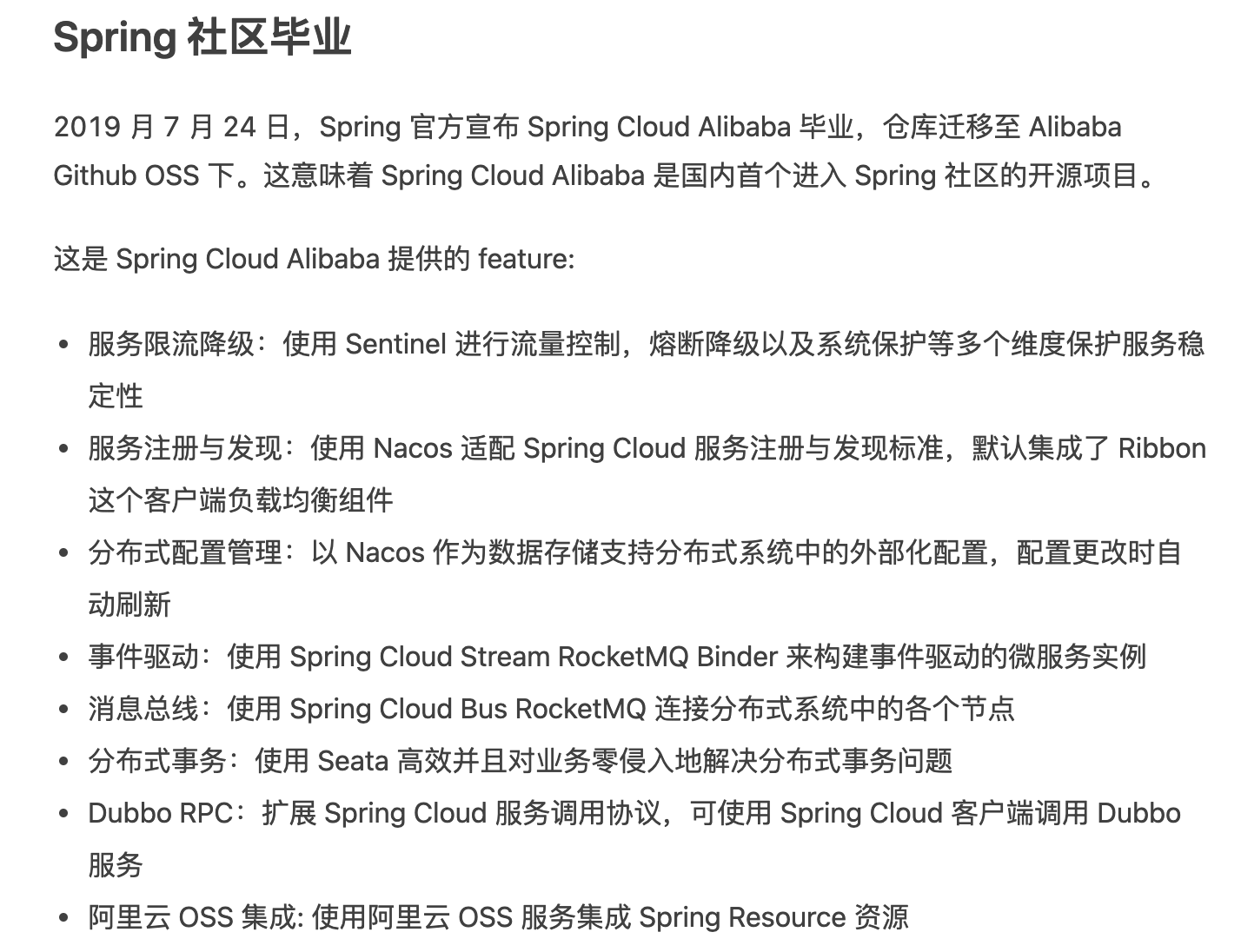
Spring Cloud Alibaba 微服务简介
微服务简介 1 什么是微服务 2014年,Martin Fowler(马丁福勒 ) 提出了微服务的概念,定义了微服务是由以单一应用程序构成的小服务,自己拥有自己的进程与轻量化处理,服务依业务功能设计,以全自动…...

【调试】GDB使用总结
启动 在shell下敲gdb命令即可启动gdb,启动后会显示下述信息,出现gdb提示符。 ➜ example gdb GNU gdb (Ubuntu 8.1.1-0ubuntu1) 8.1.1 Copyright (C) 2018 Free Software Foundation, Inc. License GPLv3: GNU GPL v…...
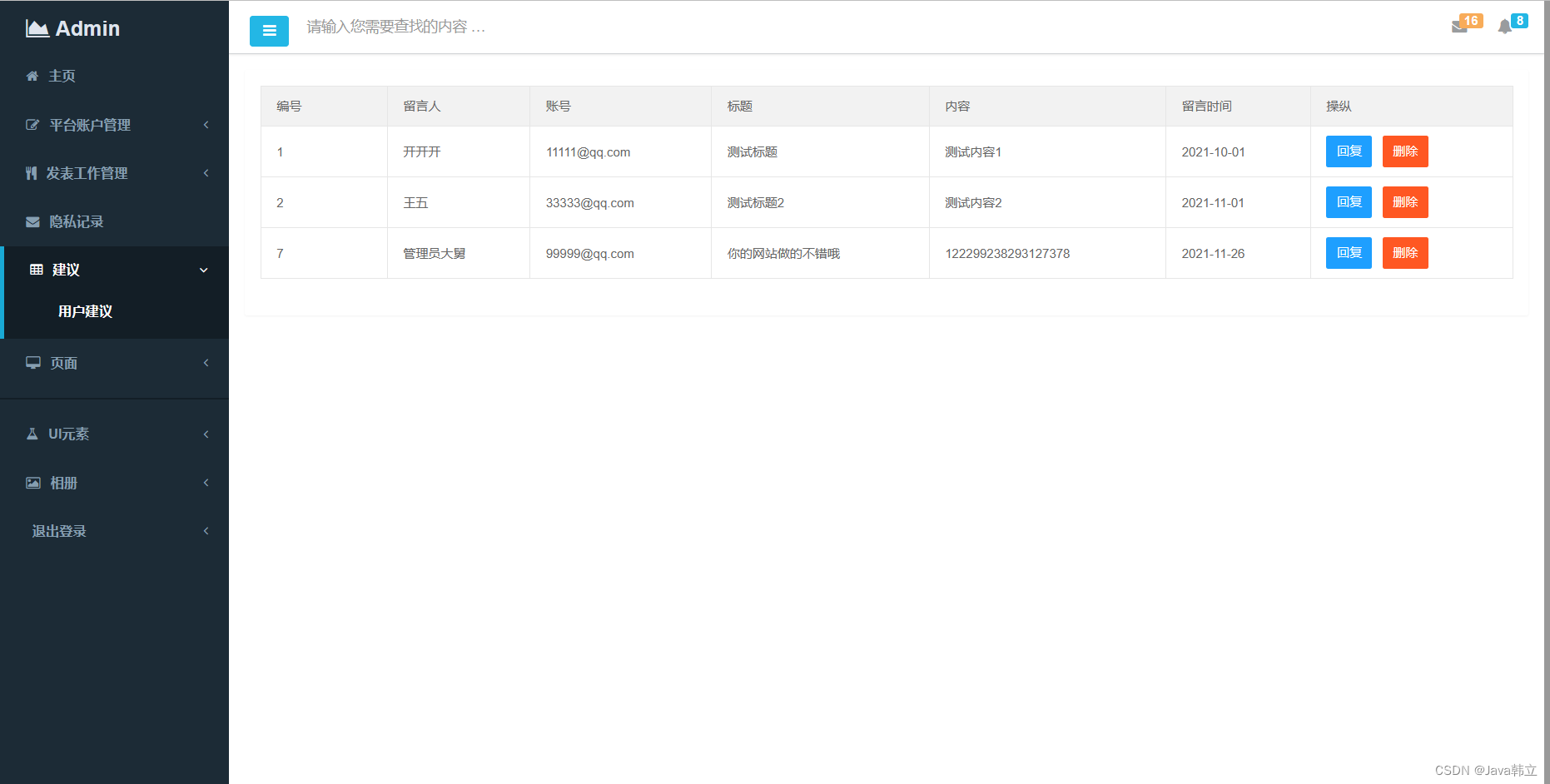
基于Spring、Spring MVC、MyBatis的招聘管理系统
文章目录项目介绍主要功能截图:首页账户管理招聘建议部分代码展示设计总结项目获取方式🍅 作者主页:Java韩立 🍅 简介:Java领域优质创作者🏆、 简历模板、学习资料、面试题库【关注我,都给你】 …...
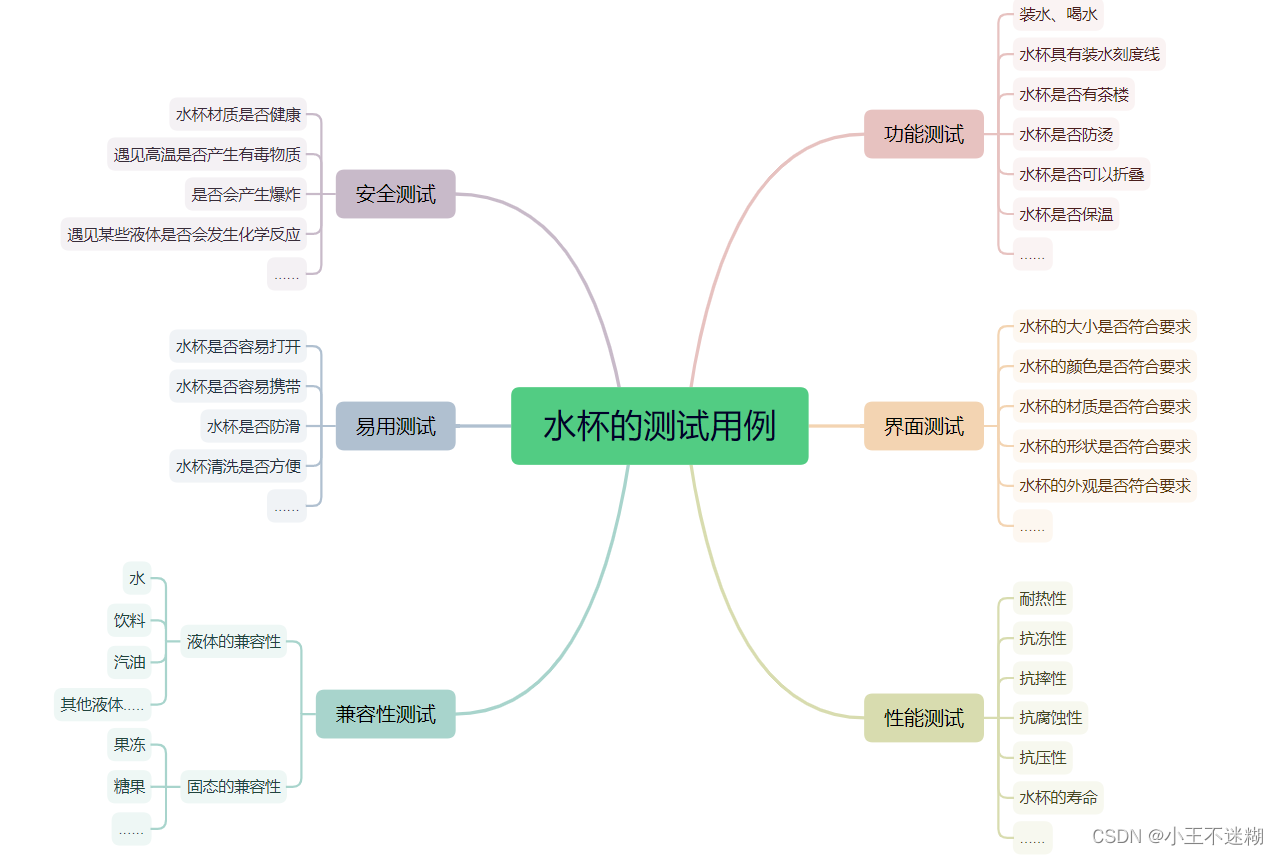
软件测试基础
文章目录前言一、软件测试入门1.什么是软件测试?2.测试和开发的区别3.调试和测试的区别4.一些常问面试题5.测试人员需要具备的素质二、软件测试基础1.需求2.测试用例3.Bug4.软件的生命周期5.开发模型三、Bug1.如何创建bug2.Bug的级别3.Bug的生命周期4.跟开发产生争执…...
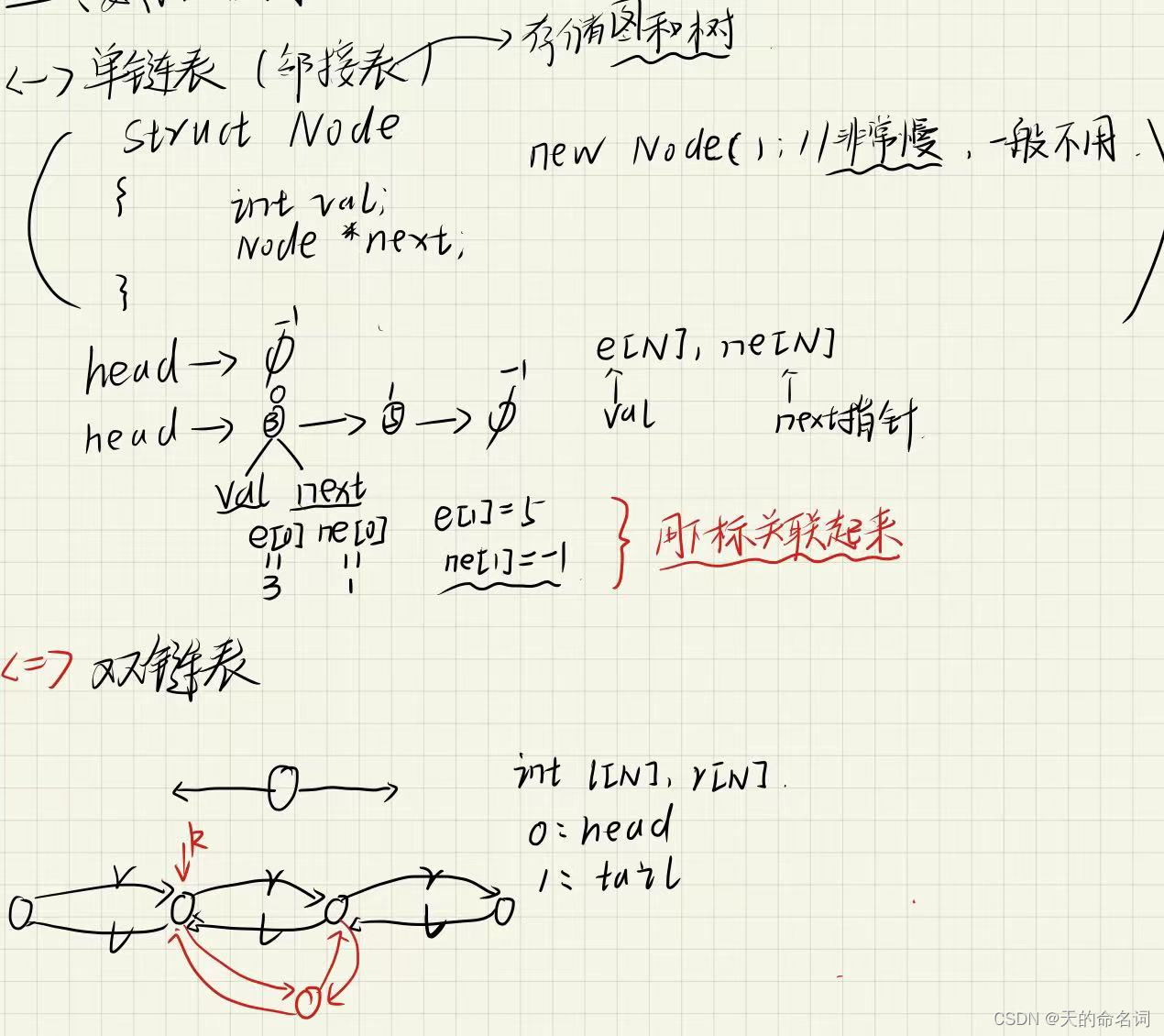
【算法基础】链表
一、单链表例题:实现一个单链表,链表初始为空,支持三种操作:向链表头插入一个数;删除第 k个插入的数后面的数;在第 k� 个插入的数后插入一个数。现在要对该链表进行 M次操作,进行完所…...
[AUTOSAR][Fls模块] Flash Driver Module
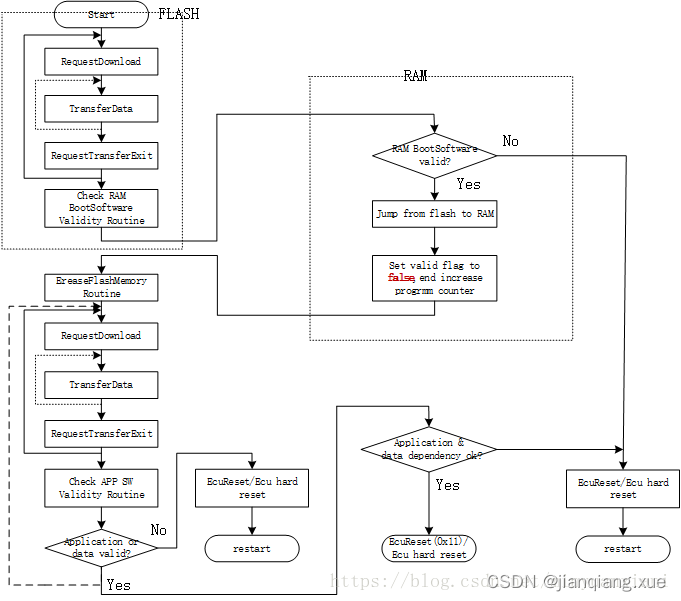
Flash Driver Module--jianqiang.xue一、 简介二、 措施方式一:将FLASH操作程序作为Bootloader组件的一部分固化在存储器中方式二:通过通讯口将该部分代码从上位机下载到指定的RAM方式三:将Flash功能函数作为数据运行(推荐!&#…...
如何正确选择好用的投票平台微信公众平台投票链接链接投票平台
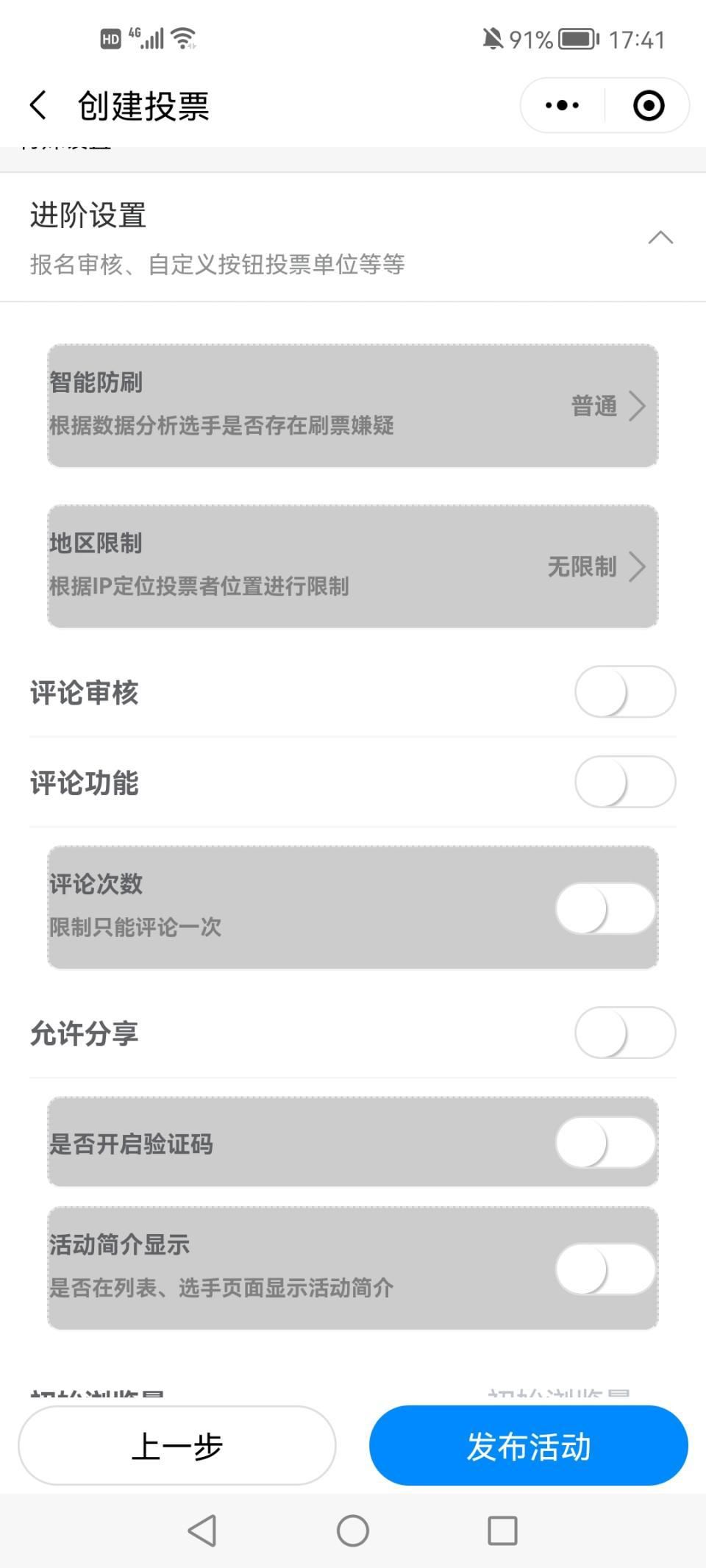
“年度人物楷模”网络评选投票_免费链接投票_作品投票通道_扫码投票怎样进行现在来说,公司、企业、学校更多的想借助短视频推广自己。通过微信投票小程序,网友们就可以通过手机拍视频上传视频参加活动,而短视频微信投票评选活动既可以给用户发…...
gocd部署应用
产品需要在多个环境部署测试,为了提高部署测试效率,故计划使用CD工具,jenkins确实足够强大,但是使用部署功能是需要安装插件的,再说自己本身只用部署功能,故决定找一个小巧的CD工具,经过一番查找…...
P2P视频聊天技术分析
整个P2P视频过程需要知道双方的媒体类型、流和候选者,所以这里就会用到一下技术: 信令服务器socket.io 状态机 ICE服务器 WebRTC框架 媒体协商 信令服务器Socket.io 信令服务器说白了作用就是发消息的中转站,A把msg发到…...
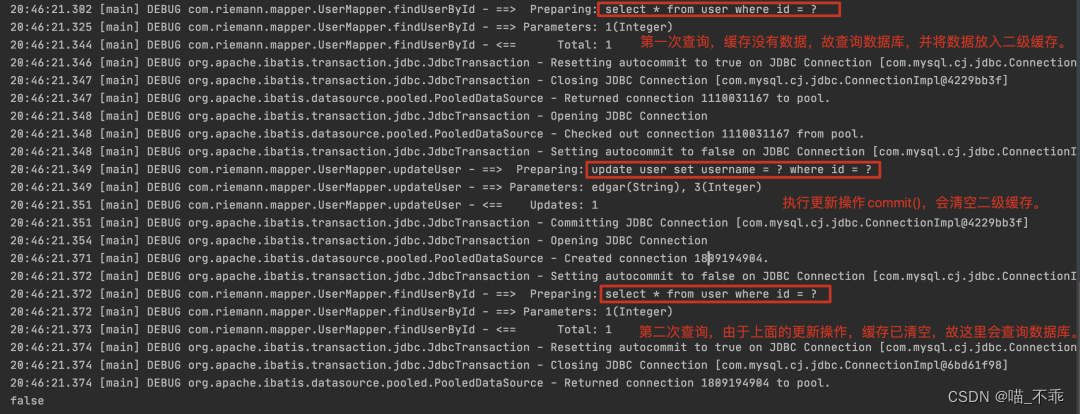
MyBatis 的一级、二级缓存机制
目录标题缓存什么是缓存为什么使用缓存什么样的数据能使用缓存,什么样的数据不能使用适用于缓存不适用于缓存MyBatis 一级缓存、二级缓存关系1. 一级缓存1.1 什么是一级缓存mybatis1.2 一级缓存配置1.3 什么情况下会命中一级缓存mybatis清除一级缓存的几种方法1.4 内…...

剑指 Offer 65. 不用加减乘除做加法
摘要 剑指 Offer 65. 不用加减乘除做加法 一、位运算 有符号整数通常用补码来表示和存储,补码具有如下特征: 正整数的补码与原码相同;负整数的补码为其原码除符号位外的所有位取反后加 11。可以将减法运算转化为补码的加法运算来实现。符…...

5年软件测试年薪30w+,我的坎坷之路谁又知道
在深圳做了五年软件测试工作,从之前的一脸懵的点点点,到现在会自动化测试,说一点点非计算机专业人员从事软件测试的心得体会,仅供参考交流。 大部分测试在公司没啥地位,当然如果你懂技术就还行,单纯点点点…...

自托管知识库Lorex:基于现代Web技术栈的部署与架构解析
1. 项目概述与核心价值最近在折腾一个挺有意思的开源项目,叫 Lorex。这名字乍一听可能有点陌生,但如果你对构建一个功能齐全、界面现代的在线知识库或文档系统感兴趣,那它绝对值得你花时间研究。简单来说,Lorex 是一个基于 Web 的…...

[具身智能-607]:树莓派 4B/5 或 RK3568/RK3588 开发板的电机电气接口与通信协议
一、树莓派 4B / 5(Raspberry Pi 4B/5)1. 核心电气接口(电机控制)GPIO 接口(40-pin)电平:3.3V(严禁直接 5V)数量:~28 个通用 GPIO,支持 PWM、UART…...

NeuralBridge:AI工作流轻量级集成枢纽的设计与实战
1. 项目概述:一个为AI工作流打造的轻量级集成枢纽如果你正在尝试将AI驱动的智能体(比如基于LangChain、AutoGPT构建的应用)连接到外部的数据库、API或者SaaS服务,大概率会遇到一个头疼的问题:集成工作既繁琐又重复。每…...

智能体任务编排实战:基于DAG的自动化流程与生产级部署指南
1. 项目概述:从“Agent-Task”看智能体任务编排的实战价值最近在开源社区里,KwokKwok/agent-task 这个项目引起了我的注意。乍一看名字,你可能会觉得它又是一个关于AI智能体(Agent)的通用框架,但深入探究后…...

Datadog Cursor插件:用自然语言对话查询监控数据的完整指南
1. 项目概述:在IDE里用自然语言查询Datadog如果你和我一样,日常开发离不开Datadog来监控应用状态,同时又重度依赖Cursor这类AI驱动的IDE来提升效率,那么最近Datadog官方推出的这个Cursor插件,绝对值得你花十分钟了解一…...

华为CANN通信远端内存API
HcclChannelGetRemoteMems 【免费下载链接】hcomm HCOMM(Huawei Communication)是HCCL的通信基础库,提供通信域以及通信资源的管理能力。 项目地址: https://gitcode.com/cann/hcomm 产品支持情况 Ascend 950PR/Ascend 950DT…...

Copy4AI:VSCode扩展,智能复制代码结构助力AI编程助手
1. 项目概述:一个为AI对话而生的代码复制工具如果你经常和ChatGPT、Claude这类大语言模型打交道,尤其是需要它们帮你分析、调试或重构代码时,你肯定遇到过这个痛点:怎么把项目里一堆相关的文件内容,连同它们的目录结构…...

Motif强化学习算法鲁棒性分析:超参数敏感性与数据依赖评估
1. 项目概述:当强化学习遇上“真实世界”的挑战在强化学习(Reinforcement Learning, RL)的研究和应用中,我们常常会看到算法在精心调优的基准测试环境(如Atari游戏、MuJoCo连续控制任务)中取得令人惊艳的性…...

Tenere:专为LLM设计的终端TUI工具,提升开发者AI对话效率
1. 项目概述:一个为LLM而生的TUI终端神器 如果你和我一样,每天在终端里泡的时间比在图形界面里还多,同时又离不开各种大语言模型来辅助编程、写作或者查资料,那你肯定也受够了在浏览器标签页和终端窗口之间反复横跳的麻烦。每次想…...
)
续:封装哈希表实现MyUnorderedMap MyUnorderedSet(复刻STL)
文章目录前言一、回顾核心设计:通用哈希表的适配性二、完整代码实现(复用通用哈希表,可直接复制)三、测试MyUnorderedMap & MyUnorderedSet(验证功能)四、核心知识点(面试高频,必…...