
Vue--BM记事本
效果如下:
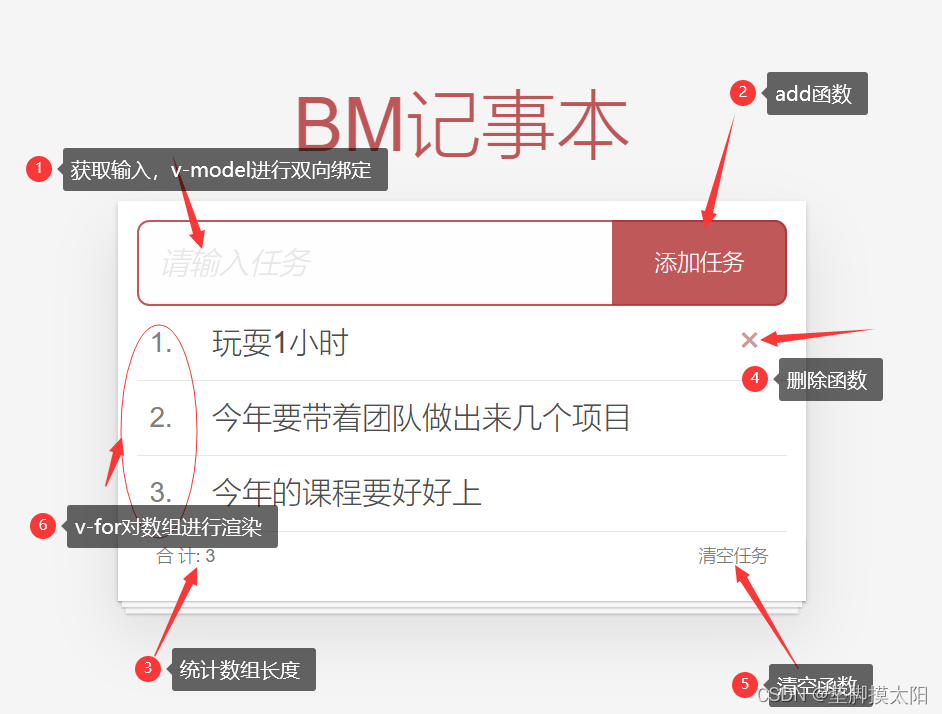
用到了如下的技术:
1.列表渲染:v-for key的设置
2.删除功能:v-on调用参数 fliter过滤 覆盖修改原数组
3.添加功能:v-model绑定,unshift修改原数组添加
html文件如下:
<!DOCTYPE html>
<html lang="en">
<head>
<meta charset="UTF-8" />
<meta http-equiv="X-UA-Compatible" content="IE=edge" />
<meta name="viewport" content="width=device-width, initial-scale=1.0" />
<link rel="stylesheet" href="index.css" /><!-- 这里需要改为自己的文件路径!!! -->
<title>记事本案例</title>
</head>
<body><!-- 主体区域 -->
<section id="app"><!-- 输入框 --><header class="header"><h1>BM记事本</h1><input v-model="todoName" placeholder="请输入任务" class="new-todo" /><!-- v-model双向绑定 --><button @click="add" class="add">添加任务</button></header><!-- 列表区域 --><section class="main"><ul class="todo-list"><li class="todo" v-for="(item, index) in List" :key="item.id"><div class="view"><span class="index">{{index + 1}}.</span> <label>{{item.name}}</label><button @click="del(item.id)" class="destroy" ></button></div></li></ul></section><!-- 底部 --><footer class="footer" v-show="List.length > 0"><!-- 数组为空,隐藏底部 --><!-- 统计 --><span class="todo-count">合 计:<strong> {{List.length}} </strong></span><!-- 清空 --><button @click="clear" class="clear-completed">清空任务</button></footer></section><script src="https://cdn.jsdelivr.net/npm/vue/dist/vue.js"></script>
<script>const app = new Vue({el: '#app',data: {todoName: '',List: [{id: 1, name: "玩耍1小时"},{id: 2, name: "今年要带着团队做出来几个项目"},{id: 3, name: "今年的课程要好好上"}]},methods: {del (id) {this.List = this.List.filter(item => item.id !== id)//保留下数组中id与参数id不相等的元素==删除参数id元素。},add () {if(this.todoName.trim() === '') {//添加的数据为空,则不会添加。alert("任务名称不能为空")return}this.List.unshift({//不为空,接收id和nameid: +new Date(),name: this.todoName})//清空this.todoName = ''//添加完后输入栏清空},clear () {this.List = []}}})</script>
</body>
</html>
css文件如下:
html,
body {margin: 0;padding: 0;
}
body {background: #fff;
}
button {margin: 0;padding: 0;border: 0;background: none;font-size: 100%;vertical-align: baseline;font-family: inherit;font-weight: inherit;color: inherit;-webkit-appearance: none;appearance: none;-webkit-font-smoothing: antialiased;-moz-osx-font-smoothing: grayscale;
}body {font: 14px 'Helvetica Neue', Helvetica, Arial, sans-serif;line-height: 1.4em;background: #f5f5f5;color: #4d4d4d;min-width: 230px;max-width: 550px;margin: 0 auto;-webkit-font-smoothing: antialiased;-moz-osx-font-smoothing: grayscale;font-weight: 300;
}:focus {outline: 0;
}.hidden {display: none;
}#app {background: #fff;margin: 180px 0 40px 0;padding: 15px;position: relative;box-shadow: 0 2px 4px 0 rgba(0, 0, 0, 0.2), 0 25px 50px 0 rgba(0, 0, 0, 0.1);
}
#app .header input {border: 2px solid rgba(175, 47, 47, 0.8);border-radius: 10px;
}
#app .add {position: absolute;right: 15px;top: 15px;height: 68px;width: 140px;text-align: center;background-color: rgba(175, 47, 47, 0.8);color: #fff;cursor: pointer;font-size: 18px;border-radius: 0 10px 10px 0;
}#app input::-webkit-input-placeholder {font-style: italic;font-weight: 300;color: #e6e6e6;
}#app input::-moz-placeholder {font-style: italic;font-weight: 300;color: #e6e6e6;
}#app input::input-placeholder {font-style: italic;font-weight: 300;color: gray;
}#app h1 {position: absolute;top: -120px;width: 100%;left: 50%;transform: translateX(-50%);font-size: 60px;font-weight: 100;text-align: center;color: rgba(175, 47, 47, 0.8);-webkit-text-rendering: optimizeLegibility;-moz-text-rendering: optimizeLegibility;text-rendering: optimizeLegibility;
}.new-todo,
.edit {position: relative;margin: 0;width: 100%;font-size: 24px;font-family: inherit;font-weight: inherit;line-height: 1.4em;border: 0;color: inherit;padding: 6px;box-shadow: inset 0 -1px 5px 0 rgba(0, 0, 0, 0.2);box-sizing: border-box;-webkit-font-smoothing: antialiased;-moz-osx-font-smoothing: grayscale;
}.new-todo {padding: 16px;border: none;background: rgba(0, 0, 0, 0.003);box-shadow: inset 0 -2px 1px rgba(0, 0, 0, 0.03);
}.main {position: relative;z-index: 2;
}.todo-list {margin: 0;padding: 0;list-style: none;overflow: hidden;
}.todo-list li {position: relative;font-size: 24px;height: 60px;box-sizing: border-box;border-bottom: 1px solid #e6e6e6;
}.todo-list li:last-child {border-bottom: none;
}.todo-list .view .index {position: absolute;color: gray;left: 10px;top: 20px;font-size: 22px;
}.todo-list li .toggle {text-align: center;width: 40px;/* auto, since non-WebKit browsers doesn't support input styling */height: auto;position: absolute;top: 0;bottom: 0;margin: auto 0;border: none; /* Mobile Safari */-webkit-appearance: none;appearance: none;
}.todo-list li .toggle {opacity: 0;
}.todo-list li .toggle + label {/*Firefox requires `#` to be escaped - https://bugzilla.mozilla.org/show_bug.cgi?id=922433IE and Edge requires *everything* to be escaped to render, so we do that instead of just the `#` - https://developer.microsoft.com/en-us/microsoft-edge/platform/issues/7157459/*/background-image: url('data:image/svg+xml;utf8,%3Csvg%20xmlns%3D%22http%3A//www.w3.org/2000/svg%22%20width%3D%2240%22%20height%3D%2240%22%20viewBox%3D%22-10%20-18%20100%20135%22%3E%3Ccircle%20cx%3D%2250%22%20cy%3D%2250%22%20r%3D%2250%22%20fill%3D%22none%22%20stroke%3D%22%23ededed%22%20stroke-width%3D%223%22/%3E%3C/svg%3E');background-repeat: no-repeat;background-position: center left;
}.todo-list li .toggle:checked + label {background-image: url('data:image/svg+xml;utf8,%3Csvg%20xmlns%3D%22http%3A//www.w3.org/2000/svg%22%20width%3D%2240%22%20height%3D%2240%22%20viewBox%3D%22-10%20-18%20100%20135%22%3E%3Ccircle%20cx%3D%2250%22%20cy%3D%2250%22%20r%3D%2250%22%20fill%3D%22none%22%20stroke%3D%22%23bddad5%22%20stroke-width%3D%223%22/%3E%3Cpath%20fill%3D%22%235dc2af%22%20d%3D%22M72%2025L42%2071%2027%2056l-4%204%2020%2020%2034-52z%22/%3E%3C/svg%3E');
}.todo-list li label {word-break: break-all;padding: 15px 15px 15px 60px;display: block;line-height: 1.2;transition: color 0.4s;
}.todo-list li.completed label {color: #d9d9d9;text-decoration: line-through;
}.todo-list li .destroy {display: none;position: absolute;top: 0;right: 10px;bottom: 0;width: 40px;height: 40px;margin: auto 0;font-size: 30px;color: #cc9a9a;margin-bottom: 11px;transition: color 0.2s ease-out;
}.todo-list li .destroy:hover {color: #af5b5e;
}.todo-list li .destroy:after {content: '×';
}.todo-list li:hover .destroy {display: block;
}.todo-list li .edit {display: none;
}.todo-list li.editing:last-child {margin-bottom: -1px;
}.footer {color: #777;padding: 10px 15px;height: 20px;text-align: center;border-top: 1px solid #e6e6e6;
}.footer:before {content: '';position: absolute;right: 0;bottom: 0;left: 0;height: 50px;overflow: hidden;box-shadow: 0 1px 1px rgba(0, 0, 0, 0.2), 0 8px 0 -3px #f6f6f6,0 9px 1px -3px rgba(0, 0, 0, 0.2), 0 16px 0 -6px #f6f6f6,0 17px 2px -6px rgba(0, 0, 0, 0.2);
}.todo-count {float: left;text-align: left;
}.todo-count strong {font-weight: 300;
}.filters {margin: 0;padding: 0;list-style: none;position: absolute;right: 0;left: 0;
}.filters li {display: inline;
}.filters li a {color: inherit;margin: 3px;padding: 3px 7px;text-decoration: none;border: 1px solid transparent;border-radius: 3px;
}.filters li a:hover {border-color: rgba(175, 47, 47, 0.1);
}.filters li a.selected {border-color: rgba(175, 47, 47, 0.2);
}.clear-completed,
html .clear-completed:active {float: right;position: relative;line-height: 20px;text-decoration: none;cursor: pointer;
}.clear-completed:hover {text-decoration: underline;
}.info {margin: 50px auto 0;color: #bfbfbf;font-size: 15px;text-shadow: 0 1px 0 rgba(255, 255, 255, 0.5);text-align: center;
}.info p {line-height: 1;
}.info a {color: inherit;text-decoration: none;font-weight: 400;
}.info a:hover {text-decoration: underline;
}/*Hack to remove background from Mobile Safari.Can't use it globally since it destroys checkboxes in Firefox
*/
@media screen and (-webkit-min-device-pixel-ratio: 0) {.toggle-all,.todo-list li .toggle {background: none;}.todo-list li .toggle {height: 40px;}
}@media (max-width: 430px) {.footer {height: 50px;}.filters {bottom: 10px;}
}
相关文章:
Vue--BM记事本
效果如下: 用到了如下的技术: 1.列表渲染:v-for key的设置 2.删除功能:v-on调用参数 fliter过滤 覆盖修改原数组 3.添加功能:v-model绑定,unshift修改原数组添加 html文件如下: <!DOCTYPE …...
openpnp - 板子上最小物料封装尺寸的选择
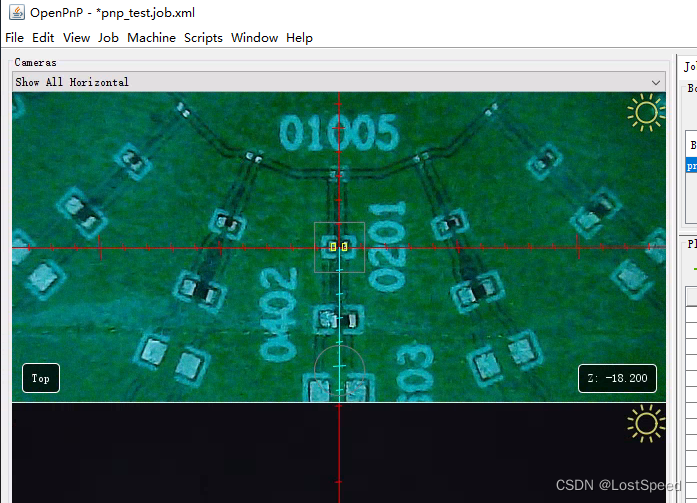
文章目录 openpnp - 板子上最小物料封装尺寸的选择概述END openpnp - 板子上最小物料封装尺寸的选择 概述 现在设备调试完了, 用散料飞达载入物料试了一下. 0402以上贴的贴别准, 贴片流程也稳, 基本不需要手工干预. 0201可以贴, 但是由于底部相机元件视觉识别成功率不是很高…...

什么是非功能性需求,它们如何影响产品开发?
我们在选购新车时,会预设一些选购的标准,比如GPS导航必须能够保存目的地,或者必须要买黑色的车。我们可能下意识以为这些是功能性需求,但实际上这些特性都是与用户体验相关的非功能性需求。 一、什么是非功能性需求(NFR)? 非功…...

Oracle jdk8 exe->zip
一、背景 目前Oracle网站对应jdk8安装windows仅存在exe安装包,对于某些用户一台机器上对应jdk版本需动态切换,故需使用zip版本jdk,更加方便,本文介绍如何从jdk对应exe提取zip。 二、步骤 下载jdk8对应exe安装包;使用…...

Android 命令行如何运行 JAR 文件
最近有位老哥问了一个问题,说如果将java的jar文件在Android中执行?这个其实很简单的一个问题,直接写个App放里面不就可以了么?但是人家说没有App,直接使用命令行去运行。说明这个需求的时候,把我给整懵了…...
5.4 webrtc的线程
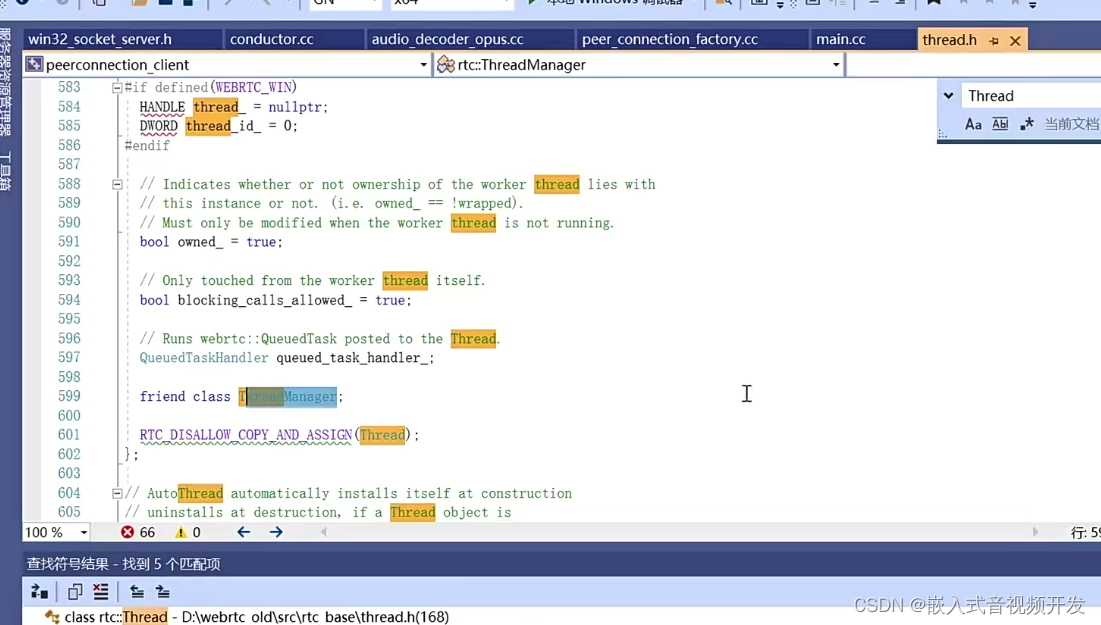
那今天呢?我们来了解一下webrtc中的threed,首先我们看一下threed的类,它里边儿都含了哪些内容?由于threed的类非常大啊,我们将它分成两部分。 那第一部分呢,是我们看threed的类中都包含了哪些数据之后呢&a…...
vscode | linux | c++ intelliense 被弃用解决方案
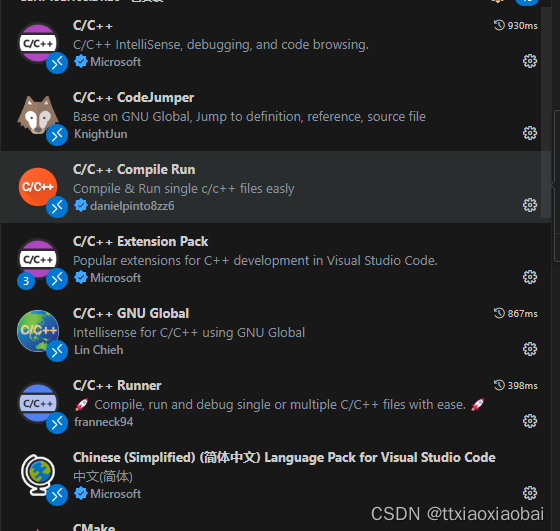
每日一句,vscode用的爽是爽,主要是可配置太强了。如果也很会研究,可以直接去咸鱼接单了 废话少说,直接整。 用着用着说是c intelliense被弃用,很多辅助功能无法使用,像查看定义、查看引用、函数跳转、智能提…...

HPE服务器常见报错信息以及解决方案
General controller issues 常规控制器问题 Controllers are no longer redundant 控制器不再冗余 HPE Dynamic Smart Array B140i drives are not found when RAID mode is disabled 禁用 RAID 模式时找不到 HPE 动态智能阵列 B140i 驱动器 Data located on drives accessed i…...
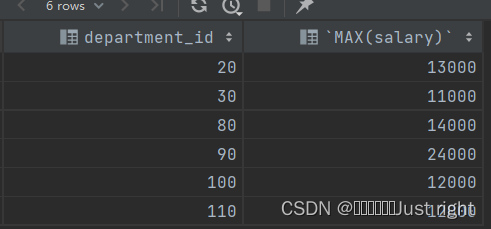
尚硅谷宋红康MySQL笔记 3-9
我不会记录的特别详细 大体框架 基本的Select语句运算符排序与分页多表查询单行函数聚合函数子查询 第三章 基本的SELECT语句 SQL分类 这个分类有很多种,大致了解下即可 DDL(Data Definition Languages、数据定义语言),定义了…...

Leetcode.2337 移动片段得到字符串
题目链接 Leetcode.2337 移动片段得到字符串 rating : 1693 题目描述 给你两个字符串 start 和 target ,长度均为 n n n 。每个字符串 仅 由字符 L、R 和 _ 组成,其中: 字符 L 和 R 表示片段,其中片段 L 只有在其左侧直接存在一…...
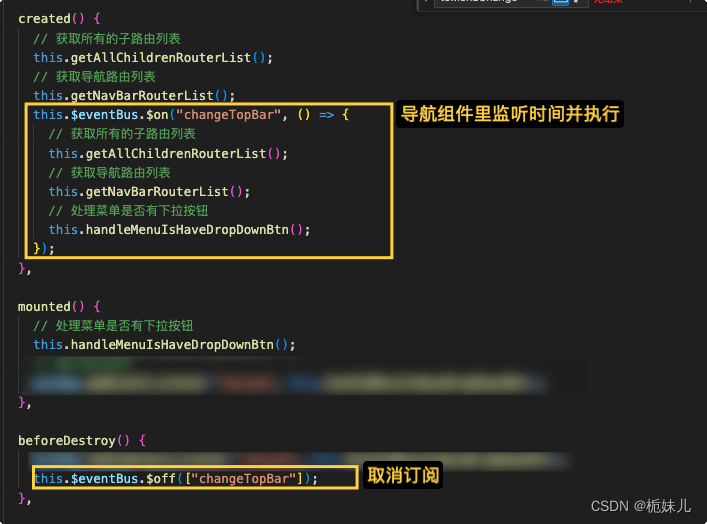
【vue】更改角色权限后,实现页面不刷新更改其可展示的导航菜单
登入的角色本身属于领导级别(集团权限),没有下级的不同权限: 切换不同身份(公司),以获得相应部门的不同导航菜单及权限 这里实现:更改角色权限后,实现页面 不刷新 更改…...

【G-LAB】网络工程师常用排错命令详细版
网络工程师在日常配置中难免出现各种配置错误,比如接口地址配错、掩码位数配错、接口忘记no shutdown。除去这些基础错误,在配置各种路由选择协议时也会因为网络类型、邻居类型、区域和路由器层级等各种问题使邻居无法建立、路由无法传递进而导致网络不通…...

Linux 桌面版关闭GUI桌面环境
持久打开和关闭 通过CtrlAltF1-F6快捷键进入命令行界面 执行以下命令,持久关闭Ubuntu桌面版的GUI环境: sudo systemctl set-default multi-user.target执行以下命令,持久开启Ubuntu桌面版的GUI环境 通过CtrlAltF7快捷键进入GUI界面 sudo s…...

ChatGPT能代替搜索引擎吗?ChatGPT和搜索引擎有什么区别?
ChatGPT和搜索引擎是两种在信息获取和交流中常用的工具,ChatGPT是一种基于人工智能技术的聊天机器人,而搜索引擎是一种在互联网上搜索信息的工具。尽管它们都是依托互联网与信息获取和交流有关,部分功能重合,但在很多方面存在着明…...
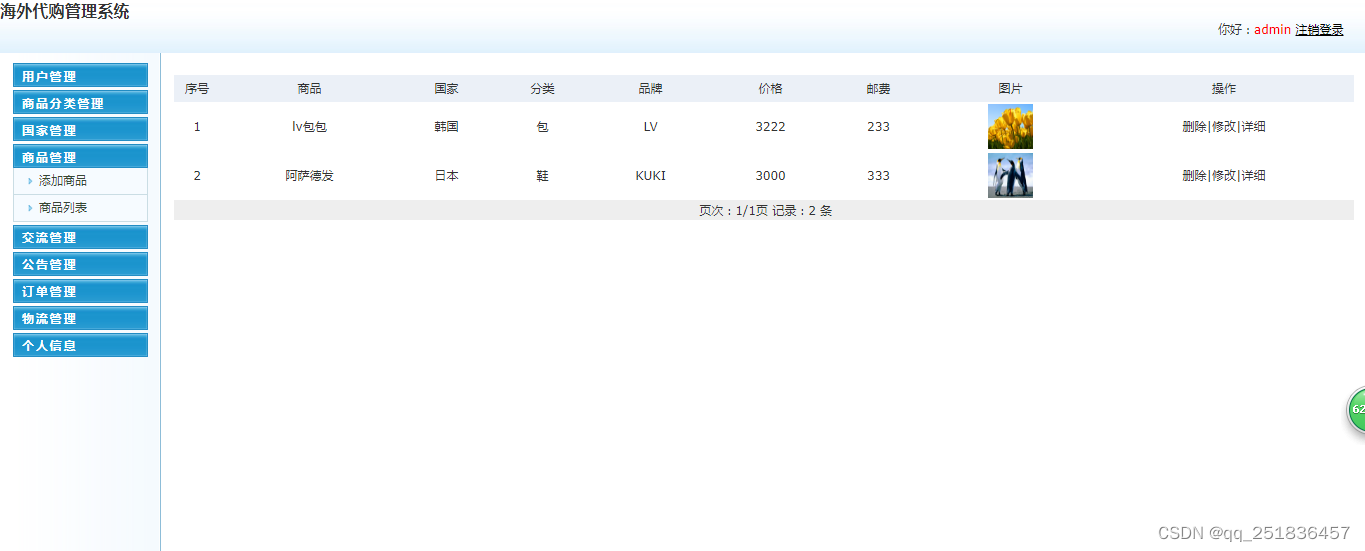
PHP海外代购管理系统mysql数据库web结构apache计算机软件工程网页wamp
一、源码特点 PHP 海外代购管理系统是一套完善的web设计系统,对理解php编程开发语言有帮助,系统具有完整的源代码和数据库,系统主要采用B/S模式开发。 代码下载 https://download.csdn.net/download/qq_41221322/88229435 论文 https://…...
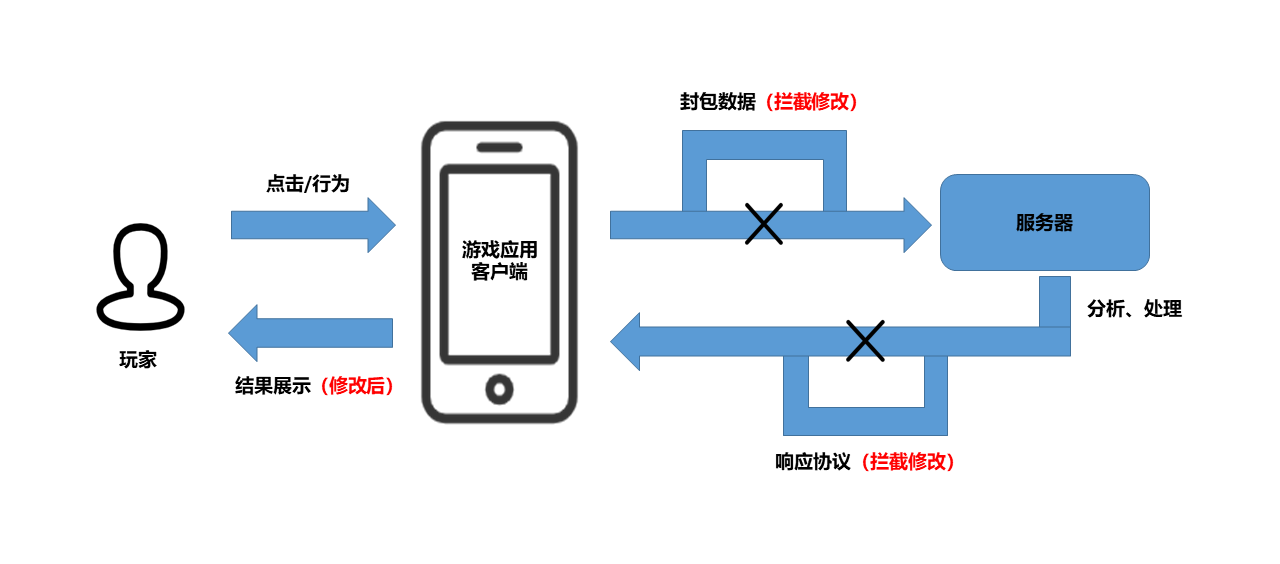
游戏反外挂方案解析
近年来,游戏市场高速发展,随之而来的还有图谋利益的游戏黑产。在利益吸引下,游戏黑产扩张迅猛,已发展成具有庞大规模的产业链,市面上游戏受其侵扰的案例屡见不鲜。 据《FairGuard游戏安全2022年度报告》数据统计&…...
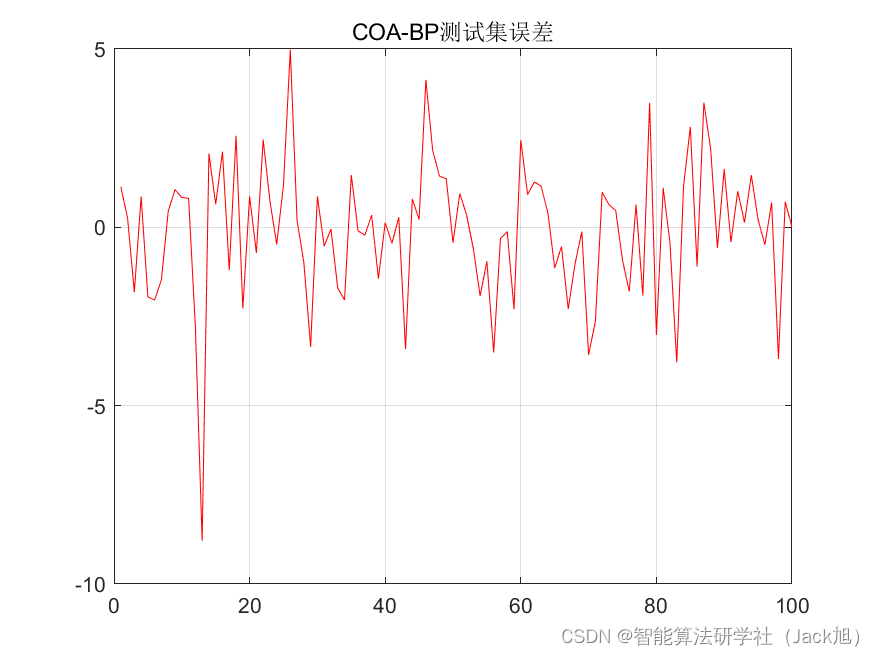
基于郊狼算法优化的BP神经网络(预测应用) - 附代码
基于郊狼算法优化的BP神经网络(预测应用) - 附代码 文章目录 基于郊狼算法优化的BP神经网络(预测应用) - 附代码1.数据介绍2.郊狼优化BP神经网络2.1 BP神经网络参数设置2.2 郊狼算法应用 4.测试结果:5.Matlab代码 摘要…...
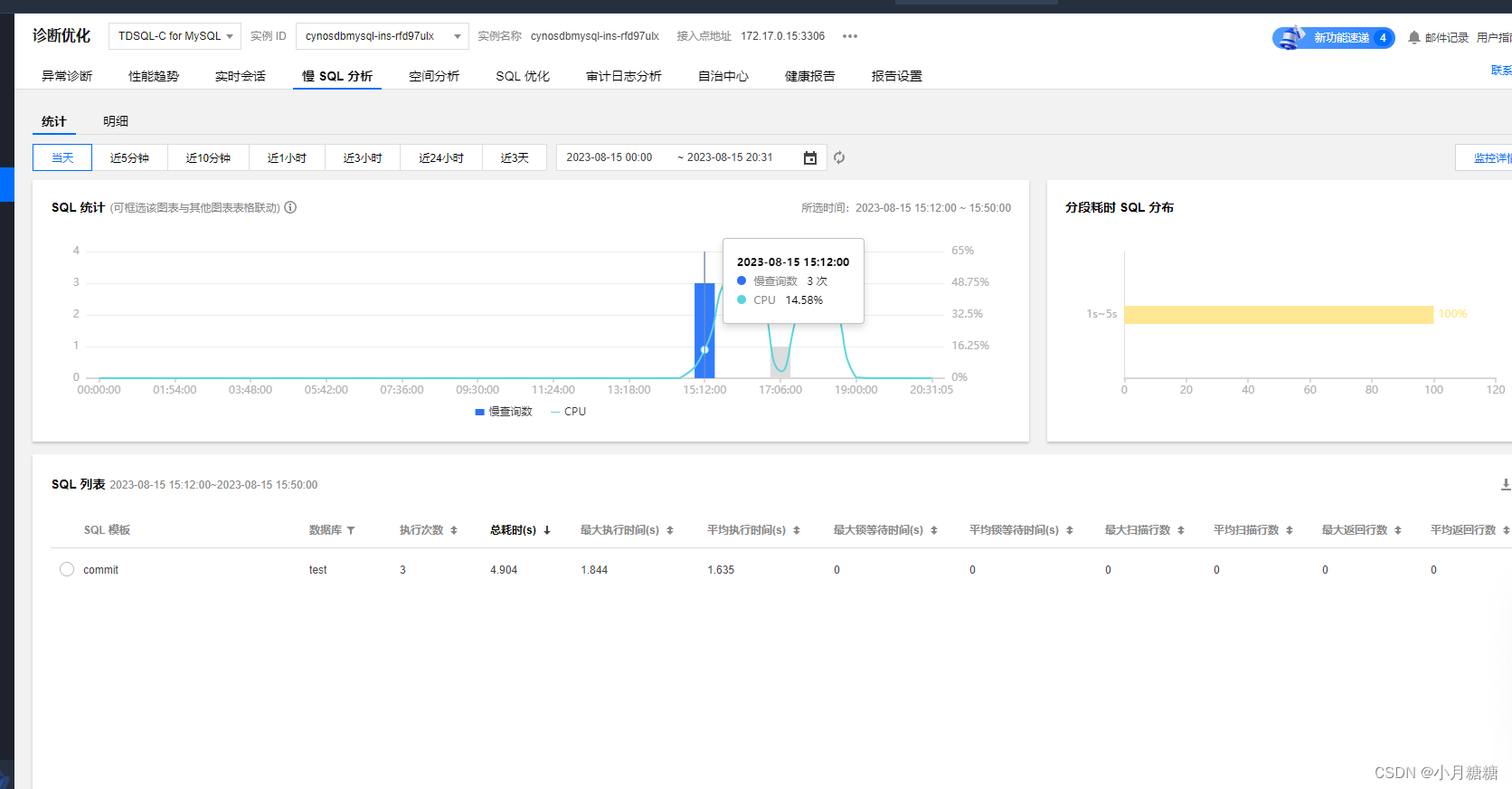
【腾讯云 TDSQL-C Serverless 产品测评】全面测评TDSQL-C Mysql Serverless
全面测评TDSQL-C Mysql Serverless 文章目录 全面测评TDSQL-C Mysql Serverless前言什么是TDSQL-C Mysql Serverless初始化 TDSQL-C Mysql Serverless新建数据库建立数据表开启外网访问 兼容性SQL文件 导入导出navicat 直接在线传输 构建测试环境准备Python测试脚本准备 Jmeter…...
Qt应用开发(基础篇)——纯文本编辑窗口 QPlainTextEdit
一、前言 QPlainTextEdit类继承于QAbstractScrollArea,QAbstractScrollArea继承于QFrame,是Qt用来显示和编辑纯文本的窗口。 滚屏区域基类https://blog.csdn.net/u014491932/article/details/132245486?spm1001.2014.3001.5501框架类QFramehttps://blo…...
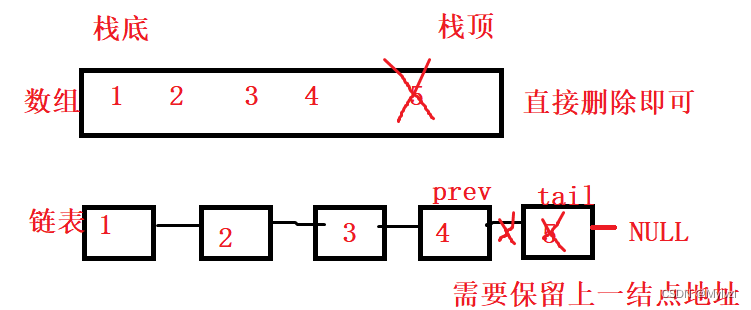
数据结构-->栈
💕休对故人思故国,且将新火试新茶,诗酒趁年华💕 作者:Mylvzi 文章主要内容:详解链表OJ题 前言: 前面已经学习过顺序表,链表。他们都是线性表,今天要学习的栈也是一种线…...

qmc-decoder实用指南:三步高效转换QQ音乐加密格式
qmc-decoder实用指南:三步高效转换QQ音乐加密格式 【免费下载链接】qmc-decoder Fastest & best convert qmc 2 mp3 | flac tools 项目地址: https://gitcode.com/gh_mirrors/qm/qmc-decoder 你是否曾在QQ音乐下载了心爱的歌曲,却发现只能在特…...

崩坏星穹铁道自动化助手:三月七小助手完全使用指南
崩坏星穹铁道自动化助手:三月七小助手完全使用指南 【免费下载链接】March7thAssistant 崩坏:星穹铁道全自动 三月七小助手 项目地址: https://gitcode.com/gh_mirrors/ma/March7thAssistant 告别重复劳动,重获游戏乐趣的智能解决方案…...

如何快速掌握AO3镜像访问:终极完整指南
如何快速掌握AO3镜像访问:终极完整指南 【免费下载链接】AO3-Mirror-Site 项目地址: https://gitcode.com/gh_mirrors/ao/AO3-Mirror-Site 你是否曾经遇到过这样的困境:想要访问全球最大的同人创作平台AO3,却发现页面无法加载&#x…...

忍者像素绘卷惊艳案例:尾兽化鸣人×16色限定调色板高饱和度表现
忍者像素绘卷惊艳案例:尾兽化鸣人16色限定调色板高饱和度表现 1. 作品概述与核心亮点 忍者像素绘卷是基于Z-Image-Turbo深度优化的图像生成工作站,它将传统忍者文化与16-Bit复古游戏美学完美融合。本次展示的"尾兽化鸣人"作品,采…...

C语言能做什么?系统编程和嵌入式开发
有这样一种编程语言叫C语言,它是通用的,其应用范围那可是相当广泛,能用来开发各种不同类型的应用程序。C 语言具备高效的特性,并有着灵活的特质,还拥有可移植的特点,它属于底层系统编程的主流语言当中之一&…...

Python篇---# -*- coding: utf-8 -*- 声明
简单来说,# -*- coding: utf-8 -*- 这行声明的作用,就是告诉Python解释器:“这个.py文件是用UTF-8编码保存的,请按这个规则来读取它。”关于Windows和Linux下的差异,最核心的原因在于Python 2与Python 3的默认编码不同…...

告别手动输入:在Windows Terminal与Powershell中实现类iTerm2的智能补全体验
1. 为什么Windows开发者需要iTerm2般的智能补全体验 作为一个从macOS转回Windows的开发者,最让我抓狂的就是命令行环境的效率落差。在iTerm2里,轻轻按个Tab键就能自动补全路径和命令,上下箭头可以快速切换历史记录,这种丝滑体验在…...

代码出错不再重启,不再查日志,不再等PR——智能生成+实时自愈如何将MTTR从小时级压缩至2.7秒,一线大厂SRE团队已全面部署
第一章:代码出错不再重启,不再查日志,不再等PR——智能生成实时自愈如何将MTTR从小时级压缩至2.7秒,一线大厂SRE团队已全面部署 2026奇点智能技术大会(https://ml-summit.org) 当服务突发500错误、数据库连接池耗尽或Kafka消费者…...
)
保姆级教程:在CentOS 7上从零部署RuoYi-Vue前后端分离项目(含Nginx+Tomcat10配置)
CentOS 7实战:RuoYi-Vue全栈部署指南与避坑手册 当你拿到一台全新的CentOS 7服务器,准备部署RuoYi-Vue这个流行的前后端分离框架时,是否曾被各种环境配置、服务联动和权限问题困扰?本文将带你从零开始,用最接地气的方式…...

python pip-audit
# 聊聊 Python 项目里的安全卫士:pip-audit 最近在维护几个老项目,升级依赖的时候总有点提心吊胆。不知道你有没有这种体验——明明只是更新了一个小版本,测试也通过了,但心里总不踏实,担心某个不起眼的依赖包里藏着已…...