
Andriod 简单控件
目录
- 一、文本显示
- 1.1 设置文本内容
- 1.2 设置文本大小
- 1.3 设置文本颜色
- 二、视图基础
- 2.1 设置视图宽高
- 2.2 设置视图间距
- 2.3 设置视图对齐方式
- 三、常用布局
- 3.1 线性布局LinearLayout
- 3.2 相对布局RelativeLayout
- 3.3 网格布局GridLayout
- 3.4 滚动视图ScrollView
- 四、按钮触控
- 4.1 按钮控件
- 4.2 点击和长按事件
- 4.3 禁用与恢复按钮
- 五、图像显示
- 5.1 图像视图ImageView
- 5.2 图像按钮ImageButton
- 5.3 同时展示文本与图像
一、文本显示
1.1 设置文本内容
android:text属性
<?xml version="1.0" encoding="utf-8"?>
<LinearLayout xmlns:android="http://schemas.android.com/apk/res/android"android:layout_width="match_parent"android:layout_height="match_parent"><TextViewandroid:id="@+id/tv_hello"android:layout_width="wrap_content"android:layout_height="wrap_content"android:text="@string/hello"/>
</LinearLayout>
1.2 设置文本大小
字体大小用sp单位
android:textSize属性
<?xml version="1.0" encoding="utf-8"?>
<LinearLayout xmlns:android="http://schemas.android.com/apk/res/android"android:layout_width="match_parent"android:layout_height="match_parent"android:orientation="vertical"><TextViewandroid:id="@+id/tv_dp"android:layout_width="wrap_content"android:layout_height="wrap_content"android:text="@string/hello"android:textSize="30sp"/>
</LinearLayout>
1.3 设置文本颜色
android:textColor属性
<?xml version="1.0" encoding="utf-8"?>
<LinearLayout xmlns:android="http://schemas.android.com/apk/res/android"android:layout_width="match_parent"android:layout_height="match_parent"android:orientation="vertical"><TextViewandroid:id="@+id/tv_code_system"android:layout_width="wrap_content"android:layout_height="wrap_content"android:text="代码设置系统自动的颜色代码"android:textSize="17sp"/><TextViewandroid:id="@+id/tv_code_eight"android:layout_width="wrap_content"android:layout_height="wrap_content"android:text="代码设置8位颜色"android:textSize="17sp"/><TextViewandroid:id="@+id/tv_code_six"android:layout_width="wrap_content"android:layout_height="wrap_content"android:text="代码设置6位颜色"android:textSize="17sp"/><TextViewandroid:id="@+id/tv_xml"android:layout_width="wrap_content"android:layout_height="wrap_content"android:text="xml设置6位颜色"android:textSize="17sp"android:textColor="#ff00ff"/><TextViewandroid:id="@+id/tv_values"android:layout_width="wrap_content"android:layout_height="wrap_content"android:text="xml设置6位颜色"android:textSize="17sp"android:textColor="@color/teal_200"/><TextViewandroid:id="@+id/tv_code_background"android:layout_width="wrap_content"android:layout_height="wrap_content"android:text="背景设置绿色"android:textSize="17sp"/><!--  android:background="@color/teal_200" -->
</LinearLayout>
二、视图基础
2.1 设置视图宽高
视图宽高和间距用dp单位
android:layout_width设置宽度
android:layout_height设置高度
wrap_content 由内容撑开,match_parent 匹配父容器
<?xml version="1.0" encoding="utf-8"?>
<LinearLayout xmlns:android="http://schemas.android.com/apk/res/android"android:layout_width="match_parent"android:layout_height="match_parent"android:orientation="vertical"><TextViewandroid:layout_width="wrap_content"android:layout_height="wrap_content"android:textColor="@color/teal_200"android:layout_marginTop="5dp"android:background="@color/black"android:textSize="17sp"/></LinearLayout>
2.2 设置视图间距
间距用dp单位
这里和前端的css属性非常类似,比如左边距margin-lfet,在安卓中就是layout_marginLeft
android:padding设置内边距
android:layout_margin设置外边距
<?xml version="1.0" encoding="utf-8"?>
<LinearLayout xmlns:android="http://schemas.android.com/apk/res/android"android:layout_width="match_parent"android:layout_height="300dp"android:orientation="vertical"android:background="#00aaff"android:padding="30dp"><!--中间层布局颜色为黄色--><LinearLayoutandroid:layout_width="match_parent"android:layout_height="match_parent"android:layout_margin="20dp"android:background="#ffff99"android:padding="60dp"><!--内层视图颜色为红色--><Viewandroid:layout_width="match_parent"android:layout_height="match_parent"android:background="#00ff00" /></LinearLayout></LinearLayout>
2.3 设置视图对齐方式
android:layout_gravity 设置父容器的对齐方式
android:gravity 设置子组件在父容器的对齐方式
<?xml version="1.0" encoding="utf-8"?>
<LinearLayout xmlns:android="http://schemas.android.com/apk/res/android"android:layout_height="300dp"android:layout_width="match_parent"android:background="#ffff99"android:orientation="horizontal"><!-- 第一个子布局背景为红色,它在上级视图中朝下对齐,它的下级视图则靠左对齐 --><LinearLayoutandroid:layout_width="0dp"android:layout_height="200dp"android:layout_weight="1"android:layout_margin="10dp"android:padding="10dp"android:background="#ff0000"android:layout_gravity="bottom"android:gravity="center"><!--内部视图的宽度和高度都是100dp,且背景色为青色--><Viewandroid:layout_width="100dp"android:layout_height="100dp"android:background="@color/teal_200"/></LinearLayout><!--第二个子布局背景为红色,它在上级视图中朝上对齐,它的下级视图则靠右对齐--><LinearLayoutandroid:layout_width="0dp"android:layout_height="200dp"android:layout_weight="1"android:layout_margin="10dp"android:padding="10dp"android:background="#ff0000"android:gravity="right"><!--内部视图的宽度和高度都是100dp,且背景色为青色--><Viewandroid:layout_width="100dp"android:layout_height="100dp"android:background="@color/teal_200"/></LinearLayout></LinearLayout>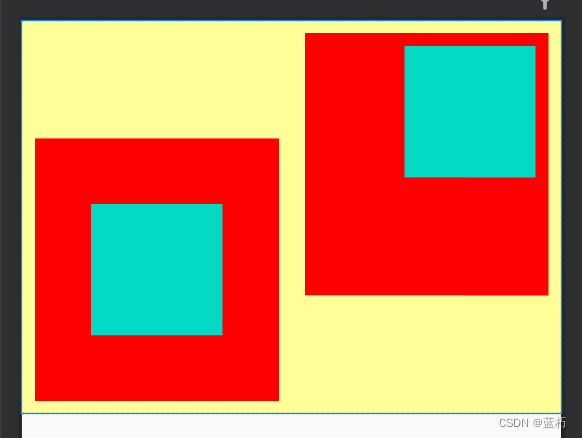
三、常用布局
3.1 线性布局LinearLayout
LinearLayout 为线性布局,它可以通过android:orientation 来设置页面的排列方向,vertical是垂直方向,horizontal是水平方向排列
代码示例:
<!--水平排列--><LinearLayoutandroid:layout_width="match_parent"android:layout_height="wrap_content"android:orientation="horizontal"><TextViewandroid:layout_width="wrap_content"android:layout_height="wrap_content"android:text="横排第一个"android:textSize="17sp"android:textColor="#000000"/><TextViewandroid:layout_width="wrap_content"android:layout_height="wrap_content"android:text="横排第二个"android:layout_marginLeft="10dp"android:textSize="17sp"android:textColor="#000000"/></LinearLayout>
3.2 相对布局RelativeLayout
相对布局可以相对某一个组件设置对齐方式,比如要让A组件在B组件的下面,就可以使用android:layout_below="@id/B"
常用属性如下:
android:layout_centerInParent="true"在父容器中间对齐android:layout_centerHorizontal="true"在父容器水平居中android:layout_centerVertical="true"在父容器垂直居中android:layout_alignParentLeft="true"在父容器左边对齐android:layout_alignParentRight="true"在父容器右边对齐android:layout_alignParentTop="true"在父容器顶部对齐android:layout_alignParentBottom="true"在父容器底部对齐android:layout_toLeftOf="@id/tv_center"在tv_center组件的左边android:layout_toRightOf="@id/tv_center"在tv_center组件的右边android:layout_above="@id/tv_center"在tv_center组件的上边android:layout_below="@id/tv_center"在tv_center组件的下方android:layout_alignTop="@id/tv_center"与tv_center组件顶部对齐android:layout_alignBottom="@id/tv_center"与tv_center组件底部对齐android:layout_alignLeft="@id/tv_center"与tv_center组件左边对齐android:layout_alignRight="@id/tv_center"与tv_center组件右边对齐
3.3 网格布局GridLayout
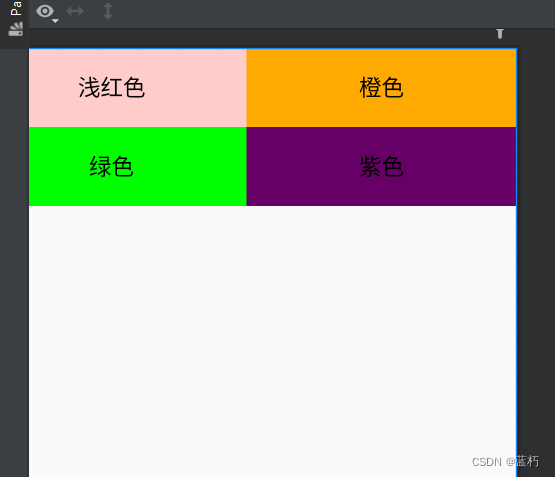
网格布局就是类似表格一样的布局,用起来还是很方便的
常用属性:
| 属性 | 作用 |
|---|---|
| android:columnCount | 设置列数 |
| android:rowCount | 设置行数 |
| android:layout_columnWeight | 设置列宽的权重 |
| android:layout_rowWeight | 纵向乘剩余空间分配方式 |
| android:layout_rowSpan | 横向跨几行 |
| android:layout_columnSpan | 横向跨几列 |
代码示例:
<?xml version="1.0" encoding="utf-8"?>
<GridLayout xmlns:android="http://schemas.android.com/apk/res/android"android:layout_width="match_parent"android:layout_height="match_parent"android:columnCount="2"android:rowCount="2"><TextViewandroid:layout_height="60dp"android:layout_width="0dp"android:layout_columnWeight="1"android:text="浅红色"android:background="#ffcccc"android:textColor="#000000"android:textSize="17sp"android:gravity="center"/><TextViewandroid:layout_height="60dp"android:layout_width="0dp"android:layout_columnWeight="1"android:text="橙色"android:background="#ffaa00"android:textColor="#000000"android:textSize="17sp"android:gravity="center"/><TextViewandroid:layout_height="60dp"android:layout_width="0dp"android:layout_columnWeight="1"android:text="绿色"android:background="#00ff00"android:textColor="#000000"android:textSize="17sp"android:gravity="center"/><TextViewandroid:layout_height="60dp"android:layout_width="0dp"android:layout_columnWeight="1"android:text="紫色"android:background="#660066"android:textColor="#000000"android:textSize="17sp"android:gravity="center"/>
</GridLayout>
3.4 滚动视图ScrollView
滚动视图分为垂直滚动和水平滚动
1.水平滚动HorizontalScrollView
<?xml version="1.0" encoding="utf-8"?>
<LinearLayout xmlns:android="http://schemas.android.com/apk/res/android"android:layout_width="match_parent"android:layout_height="match_parent"android:orientation="vertical"><!--水平滚动--><HorizontalScrollViewandroid:layout_width="wrap_content"android:layout_height="200dp"><!-- 水平方向的线性布局,两个于视图的颜色分别为青色和黄色--><LinearLayoutandroid:layout_width="wrap_content"android:layout_height="match_parent"android:orientation="horizontal"><Viewandroid:layout_width="300dp"android:layout_height="match_parent"android:background="#aaffff" /><Viewandroid:layout_width="300dp"android:layout_height="match_parent"android:background="#aaff00"/></LinearLayout></HorizontalScrollView></LinearLayout>

2. 垂直滚动ScrollView
<?xml version="1.0" encoding="utf-8"?>
<LinearLayout xmlns:android="http://schemas.android.com/apk/res/android"android:layout_width="match_parent"android:layout_height="match_parent"android:orientation="vertical"><!--垂直滚动--><ScrollViewandroid:layout_width="match_parent"android:layout_height="wrap_content"><LinearLayoutandroid:layout_width="wrap_content"android:layout_height="match_parent"android:orientation="vertical"><Viewandroid:layout_width="match_parent"android:layout_height="400dp"android:background="#00ff00" /><Viewandroid:layout_width="match_parent"android:layout_height="400dp"android:background="#ffffaa"/></LinearLayout></ScrollView>
</LinearLayout>

四、按钮触控
可以通过findViewById找到在xml中定义的组件,只要在xml中定义组件时指定id即可
4.1 按钮控件
按钮控件用Button标签,按钮控件自带样式,如果想要自定义样式要先修改res->values->themes.xml中的parent属性值为"Theme.MaterialComponents.DayNight.DarkActionBar.Bridge"
代码示例:
<Buttonandroid:layout_width="match_parent"android:layout_height="wrap_content"android:text="Hello world"android:textColor="@color/black"android:textSize="17sp"/>
4.2 点击和长按事件
1.点击事件
定义两个按钮,演示不同的绑定事件的方法
<Buttonandroid:id="@+id/btn_click_single"android:layout_width="match_parent"android:layout_height="wrap_content"android:text="指定点击事件监听"android:textColor="#000000"android:textSize="17sp"/><Buttonandroid:id="@+id/btn_click_public"android:layout_width="match_parent"android:layout_height="wrap_content"android:text="指定公点击事件监听"android:textColor="#000000"android:textSize="17sp"/>
在ButtonClickActivity中绑定监听事件。绑定监听事件有两种方式,第一种让本类实现View.OnClickListener接口,重写onClick方法,第二种是自定义一个类实现View.OnClickListener接口,重写onClick方法
public class ButtonClickActivity extends AppCompatActivity implements View.OnClickListener{private TextView tv_result;@Overrideprotected void onCreate(Bundle savedInstanceState) {super.onCreate(savedInstanceState);setContentView(R.layout.activity_button_click);tv_result = findViewById(R.id.tv_result);Button btn_click_single = findViewById(R.id.btn_click_single);Button btn_click_public = findViewById(R.id.btn_click_public);btn_click_single.setOnClickListener(new MyOnClickListener(tv_result));btn_click_public.setOnClickListener(this);}//第二种方式@Overridepublic void onClick(View v) {if (v.getId() == R.id.btn_click_public){String s = String.format("%s 你点击了按钮: %s", DateUtil.getNowTime(), ((Button) v).getText());tv_result.setText(s);}}//第一种方式static class MyOnClickListener implements View.OnClickListener{private final TextView tv_result;public MyOnClickListener(TextView tv_result) {this.tv_result = tv_result;}@Overridepublic void onClick(View v) {String s = String.format("%s 你点击了按钮: %s", DateUtil.getNowTime(), ((Button) v).getText());tv_result.setText(s);}}
}
4.3 禁用与恢复按钮
按钮的禁用和启动主要通过enabled属性来控制,false禁用,true启用
可以通过xml配置,也可通过java代码设置。
1.xml设置
<Buttonandroid:id="@+id/btn_test"android:layout_width="match_parent"android:layout_height="wrap_content"android:text="测试按钮"android:enabled="false"android:textColor="#888888"android:textSize="17sp"/>
2.java代码设置
public class ButtonEnableActivity extends AppCompatActivity implements View.OnClickListener{private Button btn_test;@Overrideprotected void onCreate(Bundle savedInstanceState) {super.onCreate(savedInstanceState);setContentView(R.layout.activity_button_enable);btn_test = findViewById(R.id.btn_test);//启用true|禁用falsebtn_test.setEnabled(true);}
}
五、图像显示
标签ImageView
1.android:adjustViewBounds:设置ImageView是否调整自己的边界来保持所显示图片的长宽比。
2.android:maxHeight:设置ImageView的最大高度。
3.android:maxWidth:设置ImageView的最大宽度。
5.android:src:设置ImageView所显示的Drawable对象的ID。
6.android:scaleType 图像在ImageView中的显示效果,下面是一些常用属性
- fitXY :横向、纵向独立缩放,以适应该ImageView。
- fitStart:保持纵横比缩放图片,并且将图片放在ImageView的左上角。
- fitCenter:保持纵横比缩放图片,缩放完成后将图片放在ImageView的中央。
- fitEnd:保持纵横比缩放图片,缩放完成后将图片放在ImageView的右下角。
- center:把图片放在ImageView的中央,但是不进行任何缩放。
- centerCrop:保持纵横比缩放图片,以使图片能完全覆盖ImageView。
- centerInside:保持纵横比缩放图片,以使得ImageView能完全显示该图片。
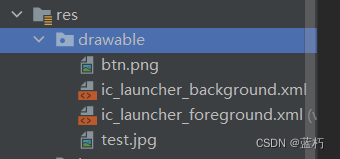
图片资源放在下图中,注意不能用数字命名开头
5.1 图像视图ImageView
代码示例:
<?xml version="1.0" encoding="utf-8"?>
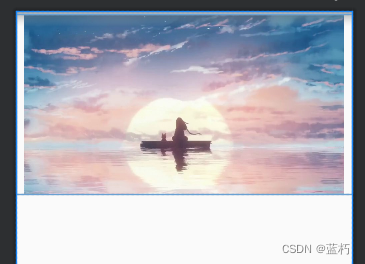
<LinearLayout xmlns:android="http://schemas.android.com/apk/res/android"android:layout_width="match_parent"android:layout_height="match_parent"android:orientation="vertical"><ImageViewandroid:id="@+id/iv_scale"android:layout_width="match_parent"android:layout_height="220dp"android:layout_marginTop="5dp"android:scaleType="centerInside"android:src="@drawable/test"/><!--android:src="@drawable/ic_launcher_background"-->
</LinearLayout>
5.2 图像按钮ImageButton
标签是ImageButton,它继承于Button类
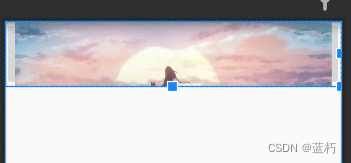
代码示例:
<LinearLayout xmlns:android="http://schemas.android.com/apk/res/android"android:layout_width="match_parent"android:layout_height="match_parent"android:orientation="vertical"><ImageButtonandroid:layout_width="match_parent"android:layout_height="80dp"android:scaleType="centerCrop"android:src="@drawable/test" />
</LinearLayout>
5.3 同时展示文本与图像
常用属性值:
android:drawableBottom底部添加图片android:drawableEnd在末尾添加图片android:drawableLeft在左边添加图片android:drawableRight在右边添加图片android:drawabLeStart在开始位置添加图片android:drawableTop在顶部添加图片
给Button添加图片和文字
代码示例:
<?xml version="1.0" encoding="utf-8"?>
<LinearLayout xmlns:android="http://schemas.android.com/apk/res/android"android:layout_width="match_parent"android:layout_height="match_parent"android:orientation="vertical"><Buttonandroid:layout_width="wrap_content"android:layout_height="wrap_content"android:text="图标在左"android:drawableLeft="@drawable/btn"android:background="#ffffff"android:drawablePadding="5dp"/>
</LinearLayout>

相关文章:
Andriod 简单控件
目录 一、文本显示1.1 设置文本内容1.2 设置文本大小1.3 设置文本颜色 二、视图基础2.1 设置视图宽高2.2 设置视图间距2.3 设置视图对齐方式 三、常用布局3.1 线性布局LinearLayout3.2 相对布局RelativeLayout3.3 网格布局GridLayout3.4 滚动视图ScrollView 四、按钮触控4.1 按…...

Substructure‑aware subgraph reasoning for inductive relation prediction
摘要 关系预测的目的是推断知识图中实体之间缺失的关系,其中归纳关系预测因其适用于新兴实体的有效性而广受欢迎。大多数现有方法学习逻辑组合规则或利用子图来预测缺失关系。尽管在性能方面已经取得了很大的进展,但目前的模型仍然不是最优的,因为它们捕获拓扑信息的能力有…...
古诗词学习鉴赏APP设计与实现(源码+lw+部署文档+讲解等)
文章目录 前言具体实现截图论文参考详细视频演示为什么选择我自己的网站自己的小程序(小蔡coding)有保障的售后福利 代码参考源码获取 前言 💗博主介绍:✌全网粉丝10W,CSDN特邀作者、博客专家、CSDN新星计划导师、全栈领域优质创作…...

深度学习与python theano
文章目录 前言1.人工神经网络2.计算机神经网络3.反向传播4.梯度下降-cost 函数1.一维2.二维3.局部最优4.迁移学习 5. theano-GPU-CPU theano介绍1.安装2.基本用法1.回归2.分类 3.function用法4.shared 变量5.activation function6.Layer层7.regression 回归例子8.classificatio…...
【算法优选】双指针专题——贰
文章目录 😎前言🌲[快乐数](https://leetcode.cn/problems/happy-number/)🚩题目描述🚩题⽬分析:🚩算法思路:🚩代码实现: 🎋[盛水最多的容器](https://leetco…...

AI智能电话机器人实用吗
近几年,人工智能得到很大的发展,同时语音识别技术的不断完善,很多以语音识别为基础的应用涌现出来,尤其是最近3年,出现了很多智能电话机器人。百度开发者大会上展示了百度智能客服也吸引了很多人对智能电话机器人的兴趣…...
网络爬虫--伪装浏览器
从用户请求的Headers反反爬 在访问某些网站的时候,网站通常会用判断访问是否带有头文件来鉴别该访问是否为爬虫,用来作为反爬取的一种策略。很多网站都会对Headers的User-Agent进行检测,还有一部分网站会对Referer进行检测(一些资…...
C/C++程序的内存开辟
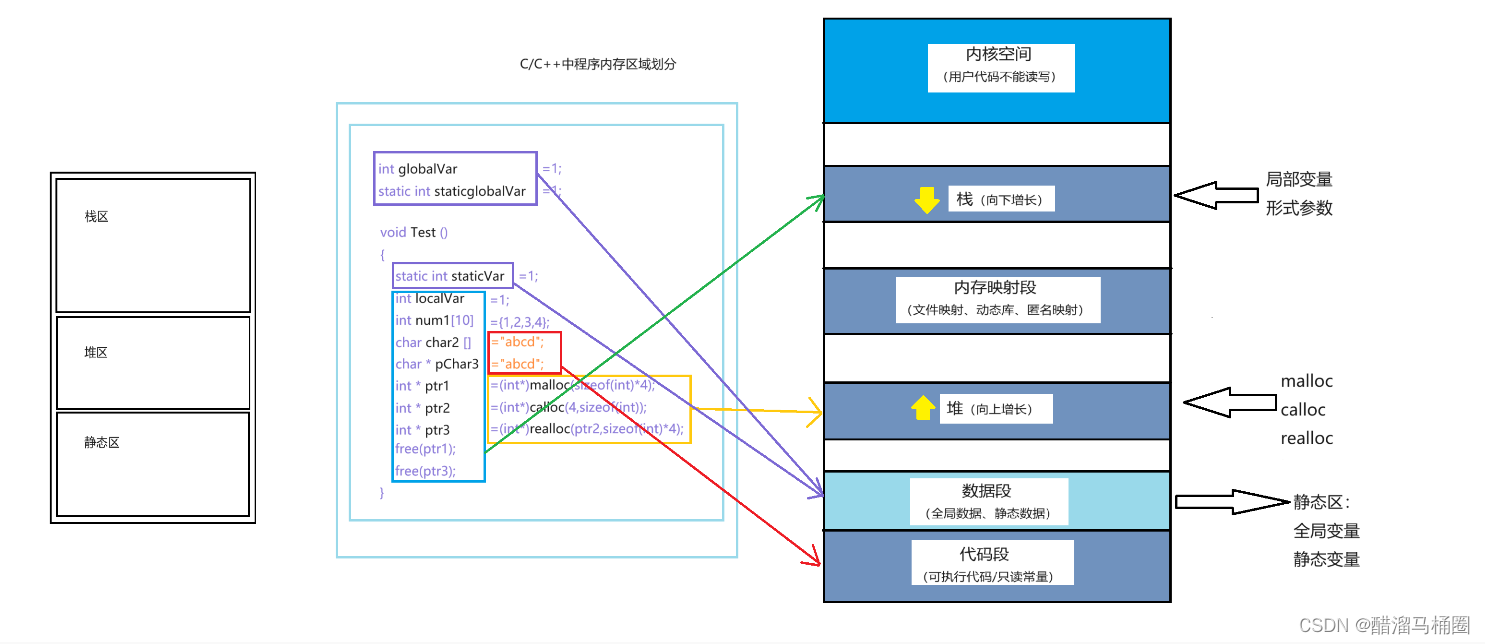
前面我们说过,计算机中内存分为三个区域:栈区,堆区,静态区 但是这只是个简化的版本,接下来我们仔细看看内存区域的划分 C/C程序内存分配的几个区域: 栈区(stack):在执行…...
【Java 进阶篇】JDBC DriverManager 详解
JDBC(Java Database Connectivity)是 Java 标准库中用于与数据库进行交互的 API。它允许 Java 应用程序连接到各种不同的数据库管理系统(DBMS),执行 SQL 查询和更新操作,以及处理数据库事务。在 JDBC 中&am…...

2023年Linux总结常用命令
1.常用命令 1.1创建文件夹 mkdir -p forever/my 1.2当前目录 pwd 1.3创建文件 touch 1.txt 1.4查看文件 cat 1.txt 1.5复制文件 说明:-r是复制文件夹 cp -r my myCopy 1.6删除文件 说明:-r带包删除文件夹,-f表示强制删除(保存问题) rm -r…...
Mybatis3详解 之 全局配置文件详解
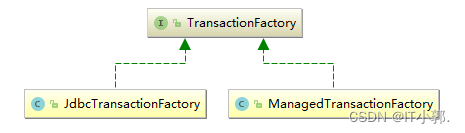
1、全局配置文件 前面我们看到的Mybatis全局文件并没有全部列举出来,所以这一章我们来详细的介绍一遍,Mybatis的全局配置文件并不是很复杂,它的所有元素和代码如下所示: <?xml version"1.0" encoding"UTF-8&…...

力扣-345.反转字符串中的元音字母
Idea 将s中的元音字母存在字符串sv中,并且使用一个数组依次存储元音字母的下标。 然后将字符串sv进行反转,并遍历元音下标数组,将反转后的字符串sv依次插入到源字符串s中 AC Code class Solution { public:string reverseVowels(string s) {…...
643. 子数组最大平均数I(滑动窗口)
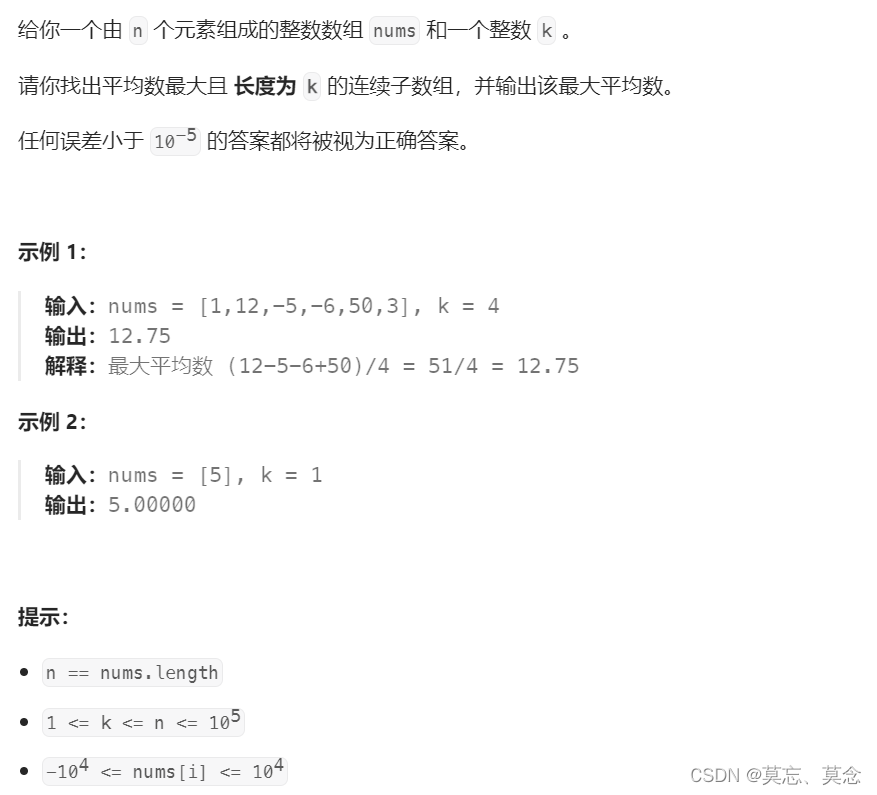
目录 一、题目 二、代码 一、题目 643. 子数组最大平均数 I - 力扣(LeetCode) 二、代码 class Solution { public:double findMaxAverage(vector<int>& nums, int k) {double Average INT_MIN;double sum nums[0];int left 0, right 0…...

Java 21 新特性:虚拟线程(Virtual Threads)
I often take exercise. Why only yesterday I had breakfast in bed. 在Java 21中,引入了虚拟线程(Virtual Threads)来简化和增强并发性,这使得在Java中编程并发程序更容易、更高效。 虚拟线程,也称为“用户模式线程…...
18scala笔记
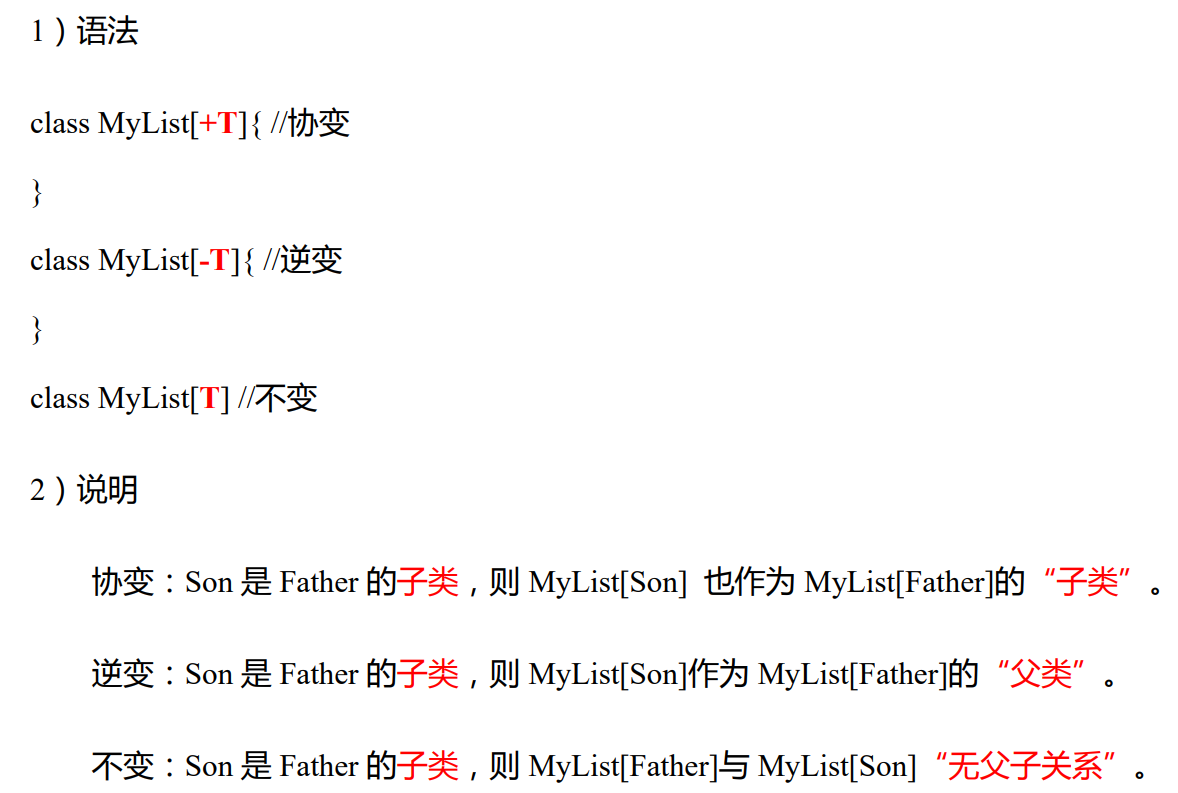
Scala2.12 视频地址 1 入门 1.1 发展历史 … 1.2 Scala 和 Java Scala Java 编写代码使用scalac编译成.class字节码文件scala .class文件 执行代码 1.3 特点 1.4 安装 视频地址 注意配置好环境变量 简单代码 1.5 编译文件 编译scala文件会产生两个.class文件 使用java…...

【LeetCode周赛】LeetCode第365场周赛
目录 有序三元组中的最大值 I有序三元组中的最大值 II无限数组的最短子数组 有序三元组中的最大值 I 给你一个下标从 0 开始的整数数组nums。 请你从所有满足 i < j < k 的下标三元组 (i, j, k) 中,找出并返回下标三元组的最大值。如果所有满足条件的三元组的…...
响应式设计的实现方式
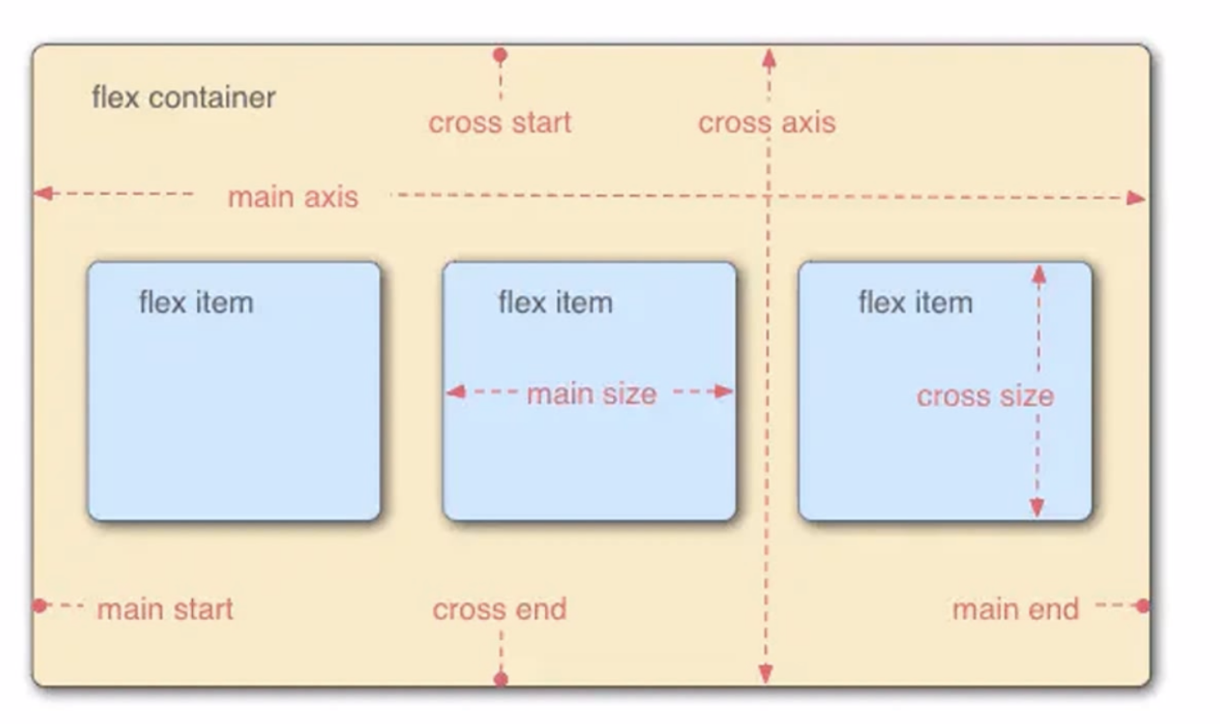
一. 什么是响应式 响应式网站设计是一种网络页面设计布局。页面的设计与开发应当根据用户行为以及设备环境(系统平台,屏幕尺寸,屏幕定向等)进行相应的响应和调整。 响应式网站常见特点: 1. 同时适配PC平板手机。 2…...
PHP 反序列化漏洞:__PHP_Incomplete_Class 与 serialize(unserialize($x)) !== $x;
文章目录 参考环境声明__PHP_Incomplete_Class灵显为什么需要 __PHP_Incomplete_Class?不可访问的属性 serialize(unserialize($x)) $x;serialize(unserialize($x)) ! $x;雾现__PHP_Incomplete_Class 对象与其序列化文本的差异试构造 __PHP__Incomplete_Class 对象…...
TempleteMethod
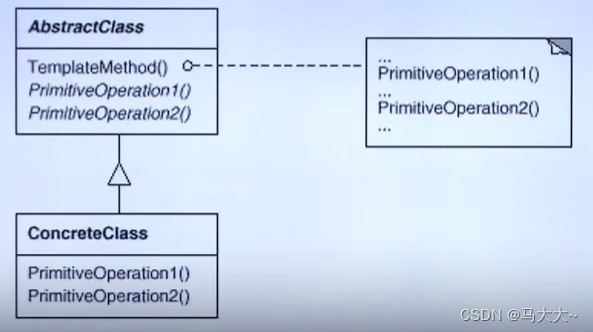
TempleteMethod 动机 在软件构建过程中,对于某一项任务,它常常有稳定的整体操作结构,但各个子步骤却有很多改变的需求,或者由于固有的原因 (比如框架与应用之间的关系)而无法和任务的整体结构同时实现。如…...
1558. 得到目标数组的最少函数调用次数
1558. 得到目标数组的最少函数调用次数 原题链接:完成情况:解题思路:参考代码: 原题链接: 1558. 得到目标数组的最少函数调用次数 https://leetcode.cn/problems/minimum-numbers-of-function-calls-to-make-target…...
微信小程序之bind和catch
这两个呢,都是绑定事件用的,具体使用有些小区别。 官方文档: 事件冒泡处理不同 bind:绑定的事件会向上冒泡,即触发当前组件的事件后,还会继续触发父组件的相同事件。例如,有一个子视图绑定了b…...
docker详细操作--未完待续
docker介绍 docker官网: Docker:加速容器应用程序开发 harbor官网:Harbor - Harbor 中文 使用docker加速器: Docker镜像极速下载服务 - 毫秒镜像 是什么 Docker 是一种开源的容器化平台,用于将应用程序及其依赖项(如库、运行时环…...

Java 8 Stream API 入门到实践详解
一、告别 for 循环! 传统痛点: Java 8 之前,集合操作离不开冗长的 for 循环和匿名类。例如,过滤列表中的偶数: List<Integer> list Arrays.asList(1, 2, 3, 4, 5); List<Integer> evens new ArrayList…...

FFmpeg 低延迟同屏方案
引言 在实时互动需求激增的当下,无论是在线教育中的师生同屏演示、远程办公的屏幕共享协作,还是游戏直播的画面实时传输,低延迟同屏已成为保障用户体验的核心指标。FFmpeg 作为一款功能强大的多媒体框架,凭借其灵活的编解码、数据…...

MVC 数据库
MVC 数据库 引言 在软件开发领域,Model-View-Controller(MVC)是一种流行的软件架构模式,它将应用程序分为三个核心组件:模型(Model)、视图(View)和控制器(Controller)。这种模式有助于提高代码的可维护性和可扩展性。本文将深入探讨MVC架构与数据库之间的关系,以…...

【决胜公务员考试】求职OMG——见面课测验1
2025最新版!!!6.8截至答题,大家注意呀! 博主码字不易点个关注吧,祝期末顺利~~ 1.单选题(2分) 下列说法错误的是:( B ) A.选调生属于公务员系统 B.公务员属于事业编 C.选调生有基层锻炼的要求 D…...
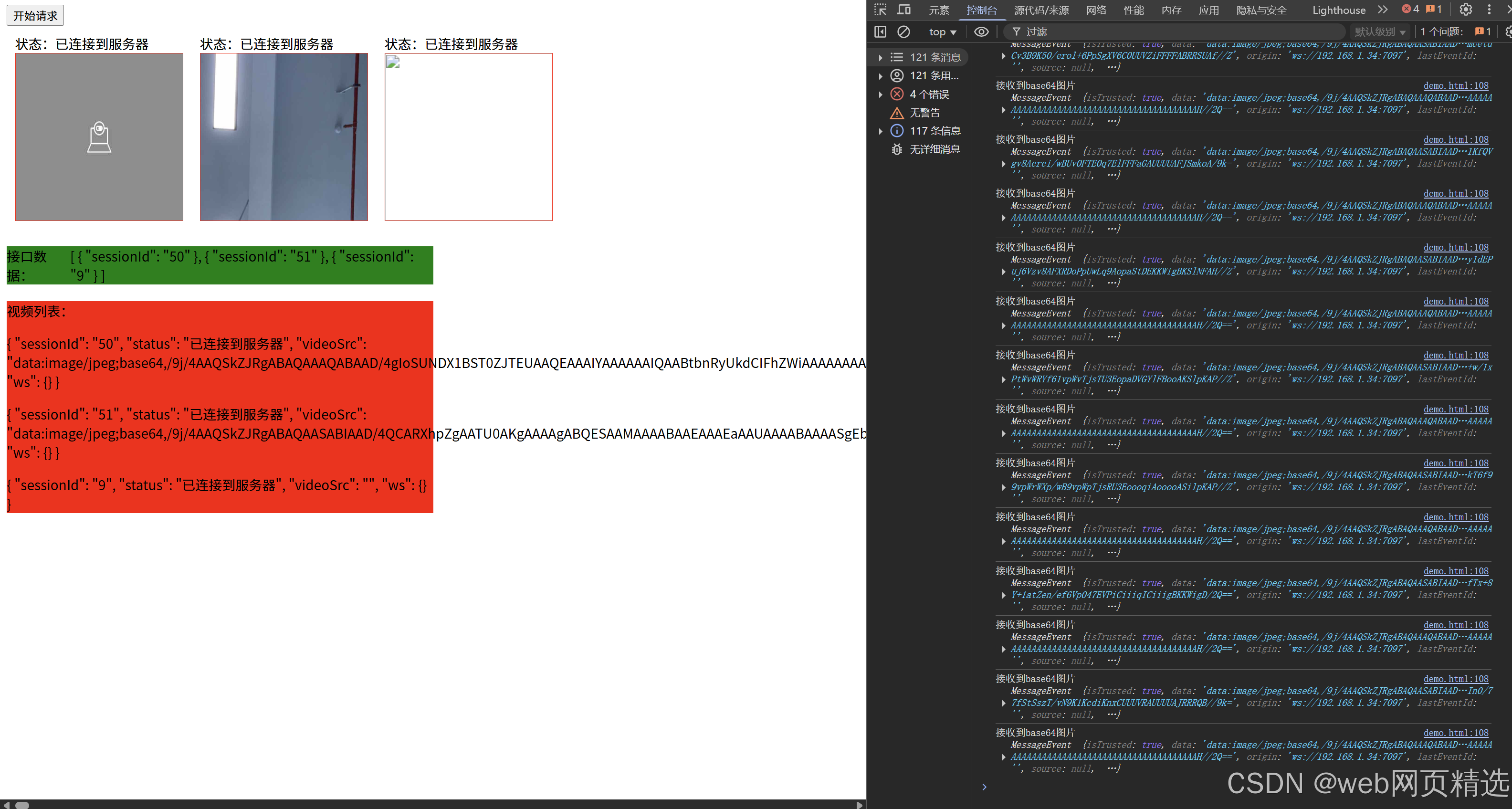
uniapp微信小程序视频实时流+pc端预览方案
方案类型技术实现是否免费优点缺点适用场景延迟范围开发复杂度WebSocket图片帧定时拍照Base64传输✅ 完全免费无需服务器 纯前端实现高延迟高流量 帧率极低个人demo测试 超低频监控500ms-2s⭐⭐RTMP推流TRTC/即构SDK推流❌ 付费方案 (部分有免费额度&#x…...
渗透实战PortSwigger靶场:lab13存储型DOM XSS详解
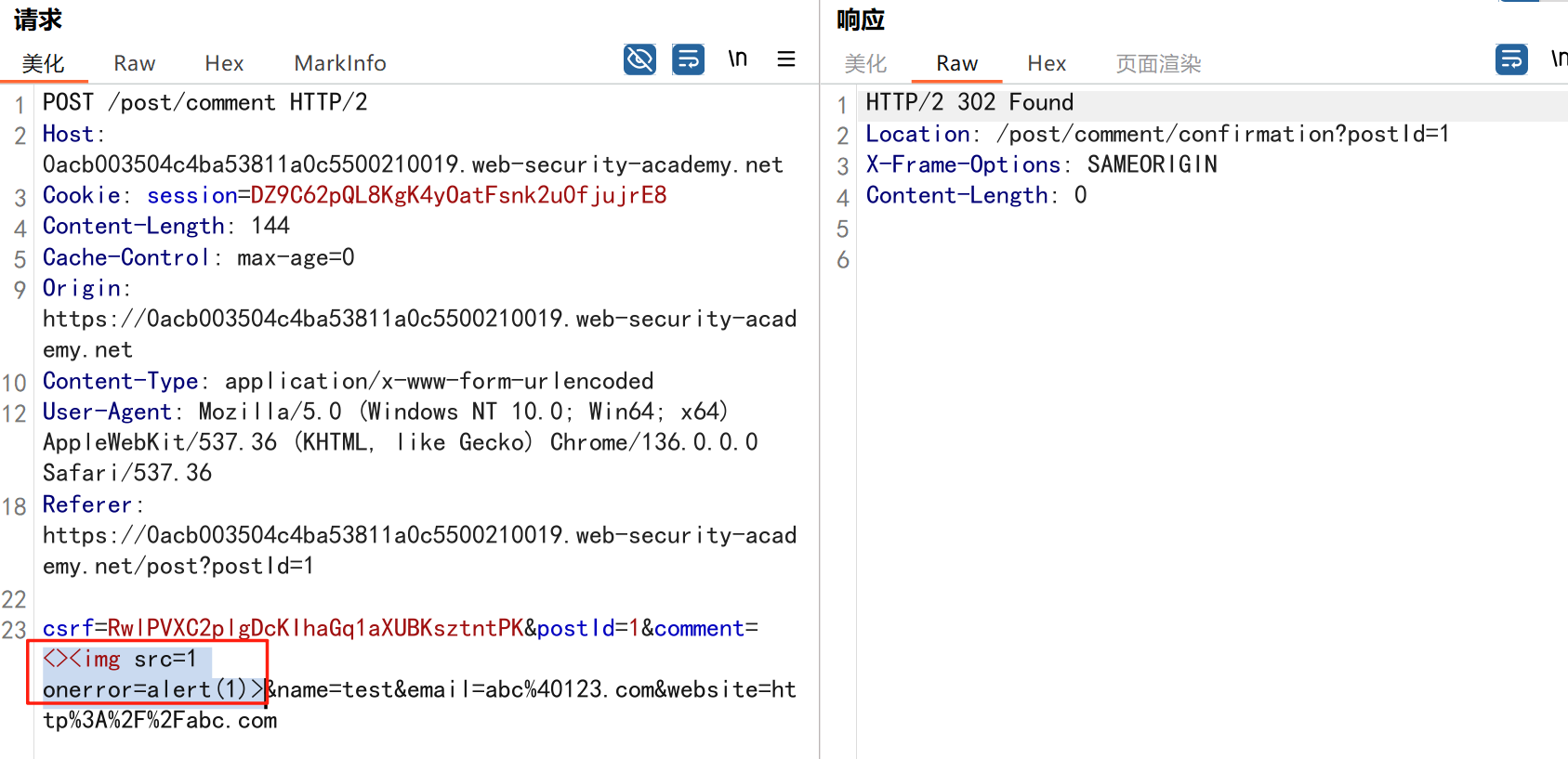
进来是需要留言的,先用做简单的 html 标签测试 发现面的</h1>不见了 数据包中找到了一个loadCommentsWithVulnerableEscapeHtml.js 他是把用户输入的<>进行 html 编码,输入的<>当成字符串处理回显到页面中,看来只是把用户输…...

小木的算法日记-多叉树的递归/层序遍历
🌲 从二叉树到森林:一文彻底搞懂多叉树遍历的艺术 🚀 引言 你好,未来的算法大神! 在数据结构的世界里,“树”无疑是最核心、最迷人的概念之一。我们中的大多数人都是从 二叉树 开始入门的,它…...
【无标题】湖北理元理律师事务所:债务优化中的生活保障与法律平衡之道
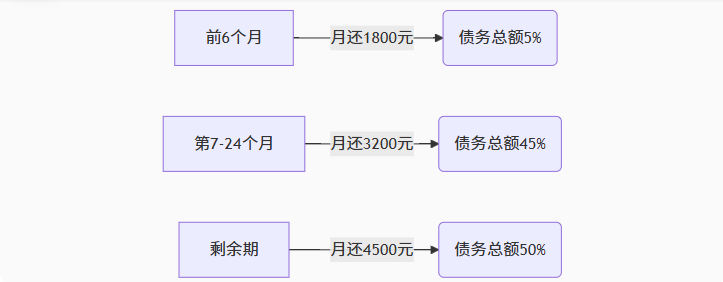
文/法律实务观察组 在债务重组领域,专业机构的核心价值不仅在于减轻债务数字,更在于帮助债务人在履行义务的同时维持基本生活尊严。湖北理元理律师事务所的服务实践表明,合法债务优化需同步实现三重平衡: 法律刚性(债…...