
maven-war-plugin插件 overlays maven-war-plugin翻译
说明
翻译
maven-war-plugin插件的部分内容官方地址为:https://maven.apache.org/plugins/maven-war-plugin/index.html
Overview
概述
Introduction
介绍
Apache Maven WAR Plugin
apache maven war 插件
The WAR Plugin is responsible for collecting all artifact dependencies, classes and resources of the web application and packaging them into a web application archive.
war插件负责收集web工程中所有的依赖引用、class文件和资源文件,并将它们打包到一个web工程存档中
Goals Overview
目标概述
-
war:war is the default goal invoked during the package phase for projects with a packaging type of war. It builds a WAR file.
-
当项目的打包类型为war时,war:war是一个默认的目标在package执行阶段被调用
-
war:exploded is generally used to speed up testing during the developement phase by creating an exploded webapp in a specified directory.
-
war:exploded用来在指定的目录下创建一个解包的webapp,这通常用来在开发阶段提升测试速度
-
war:inplace another variation of war:explode where the webapp is instead generated in the web application source directory, which is src/main/webapp by default.
-
war:inplace是war:explode的一个变体,会在web工程的源目录下创建webapp,默认的目录是src/main/webapp
Usage
用法
General instructions on how to use the WAR Plugin can be found on the usage page. Some more specific use cases are described in the examples given below. To share common resources across multiple web applications, see the documentation about using overlays.
关于如何使用war插件的整体介绍在usage页面可以找到。后面的examples中会给出一些更具体的使用案例。要在多个web工程中共享公共资源,请参阅有关使用overlays的文档
In case you still have questions regarding the plugin’s usage, please have a look at the FAQ and feel free to contact the user mailing list. The posts to the mailing list are archived and could already contain the answer to your question as part of an older thread. Hence, it is also worth browsing/searching the mail archive.
If you feel like the plugin is missing a feature or has a defect, you can fill a feature request or bug report in our issue tracker. When creating a new issue, please provide a comprehensive description of your concern. Especially for fixing bugs it is crucial that the developers can reproduce your problem. For this reason, entire debug logs, POMs or most preferably little demo projects attached to the issue are very much appreciated. Of course, patches are welcome, too. Contributors can check out the project from our source repository and will find supplementary information in the guide to helping with Maven.
Goals
Plugin Documentation
Goals available for this plugin:
| Goal | Description |
|---|---|
| war:exploded | Create an exploded webapp in a specified directory. |
| war:help | Display help information on maven-war-plugin. Call mvn war:help -Ddetail=true -Dgoal= to display parameter details. |
| war:inplace | Generate the webapp in the WAR source directory. |
| war:war | Build a WAR file. |
System Requirements
The following specifies the minimum requirements to run this Maven plugin:
| Maven | 3.1.0 |
|---|---|
| JDK | 1.7 |
| Memory | No minimum requirement. |
| Disk Space | No minimum requirement. |
Usage
用法
You should specify the version in your project’s plugin configuration:
您应该明确指定项目中所使用插件的版本
<project>...<build><!-- To define the plugin version in your parent POM --><pluginManagement><plugins><plugin><groupId>org.apache.maven.plugins</groupId><artifactId>maven-war-plugin</artifactId><version>3.3.2</version></plugin>...</plugins></pluginManagement><!-- To use the plugin goals in your POM or parent POM --><plugins><plugin><groupId>org.apache.maven.plugins</groupId><artifactId>maven-war-plugin</artifactId><version>3.3.2</version></plugin>...</plugins></build>...
</project>
For more information, see “Guide to Configuring Plug-ins”
Usage
Usage
There are 4 ways to use the WAR Plugin:
-
using the
packagephase with the project package type aswar -
当项目的打包方式为war包时,使用package阶段
-
invocation of the
war:wargoal -
调用war:war目标
-
invocation of the
war:explodedgoal -
调用war:exploded目标
-
invocation of the
war:inplacegoal -
调用war:inplace目标
Note: When using the war: goals it is assumed that the compile phase is already done. The WAR Plugin is not responsible for compiling the java sources or copying the resources.
注意:当使用
war:目标时,假设compile阶段已经完成,war插件不负责编译源代码或者复制resources资源
To handle archiving this version of Maven WAR Plugin uses Maven Archiver 3.5.0.
To handle filtering this version of Maven WAR Plugin uses Maven Filtering 3.1.1.
Using the package phase with the project package type as war / invocation of the war:war goal
当项目的打包方式为war包时使用package阶段/调用war:war目标
This is the normal way of using the WAR Plugin. To illustrate, here’s the pom.xml for our project:
这是war插件的一般使用方式,为了说明,这是我们项目的pom文件
<project>...<groupId>com.example.projects</groupId><artifactId>documentedproject</artifactId><packaging>war</packaging><version>1.0-SNAPSHOT</version><name>Documented Project</name><url>http://example.com</url>...
</project>
The project’s structure looks like this:
项目结构如下
|-- pom.xml`-- src`-- main|-- java| `-- com| `-- example| `-- projects| `-- SampleAction.java|-- resources| `-- images| `-- sampleimage.jpg`-- webapp|-- WEB-INF| `-- web.xml|-- index.jsp`-- jsp`-- websource.jsp
Invoking
mvn package
or
mvn compile war:war
will generate the WAR file target/documentedproject-1.0-SNAPSHOT.war. Here are the contents of that WAR file:
documentedproject-1.0-SNAPSHOT.war|-- META-INF| |-- MANIFEST.MF| `-- maven| `-- com.example.projects| `-- documentedproject| |-- pom.properties| `-- pom.xml|-- WEB-INF| |-- classes| | |-- com| | | `-- example| | | `-- projects| | | `-- SampleAction.class| | `-- images| | `-- sampleimage.jpg| `-- web.xml|-- index.jsp`-- jsp`-- websource.jsp
Invocation of war:exploded goal
To speed up testing during the developement phase, war:explode can be used to generate the WAR in exploded form. Use the same project as above and invoke:
mvn compile war:exploded
This will generate an exploded version of the WAR in target/documentedproject-1.0-SNAPSHOT. The contents of that directory looks like this:
documentedproject-1.0-SNAPSHOT|-- META-INF|-- WEB-INF| |-- classes| | |-- com| | | `-- example| | | `-- projects| | | `-- SampleAction.class| | `-- images| | `-- sampleimage.jpg| `-- web.xml|-- index.jsp`-- jsp`-- websource.jsp
The default directory for the exploded WAR is target/<finalName>. The finalName is usually in the form of <artifactId>-<version>. This default directory can be overridden by specifying the webappDirectory parameter.
解包的war默认的目录是 target/,finalName通常采用-的形式,可以通过指定webappDirectory参数来覆盖此默认目录
<project>...<build><plugins><plugin><groupId>org.apache.maven.plugins</groupId><artifactId>maven-war-plugin</artifactId><version>3.3.2</version><configuration><webappDirectory>/sample/servlet/container/deploy/directory</webappDirectory></configuration></plugin></plugins></build>...
</project>
Invocation of war:inplace goal
Another variation of war:exploded is war:inplace. With war:inplace the exploded WAR is created in the webapp source, which defaults to src/main/webapp. Use our sample project above, and invoke:
mvn compile war:inplace
This will result in:
|-- pom.xml|-- src| `-- main| |-- java| | `-- com| | `-- example| | `-- projects| | `-- SampleAction.java| |-- resources| | `-- images| | `-- sampleimage.jpg| `-- webapp| |-- META-INF| |-- WEB-INF| | |-- classes| | | |-- com| | | | `-- example| | | | `-- projects| | | | `-- SampleAction.class| | | `-- images| | | `-- sampleimage.jpg| | `-- web.xml| |-- index.jsp| `-- jsp| `-- websource.jsp`-- target`-- classes|-- com| `-- example| `-- projects| `-- SampleAction.class`-- images`-- sampleimage.jpg
Configuration
Overlays
Overlays
Overlays are used to share common resources across multiple web applications. The dependencies of a WAR project are collected in WEB-INF/lib, except for WAR artifacts which are overlayed on the WAR project itself.
overlays用于跨多个web应用共享公共资源。除了要在war项目本身做叠加的组件,其它的依赖会被收集在WEB-INF/lib目录下
Overlays at a glance
To demonstrate, given this structure for the project documentedproject:
为了做演示,给出项目documentedproject的格式
|-- pom.xml`-- src`-- main|-- java| `-- com| `-- example| `-- projects| `-- SampleAction.java|-- resources| |-- images| | `-- sampleimage.jpg| `-- sampleresource`-- webapp|-- WEB-INF| `-- web.xml|-- index.jsp`-- jsp`-- websource.jsp
The project depends on another WAR artifact, documentedprojectdependency-1.0-SNAPSHOT.war, which is declared as a dependency in the project’s pom.xml:
项目依赖另一个war组件,documentedprojectdependency-1.0-SNAPSHOT.war,这个组件在pom.xml文件中,会被声明为一个dependency依赖
<project>...<dependencies><dependency><groupId>com.example.projects</groupId><artifactId>documentedprojectdependency</artifactId><version>1.0-SNAPSHOT</version><type>war</type><scope>runtime</scope></dependency>...</dependencies>...
</project>
The structure for the documentedprojectdependency WAR file looks like this:
documentedprojectdependency组件的结构如下
documentedprojectdependency-1.0-SNAPSHOT.war|-- META-INF| |-- MANIFEST.MF| `-- maven| `-- com.example.projects| `-- documentedprojectdependency| |-- pom.properties| `-- pom.xml|-- WEB-INF| |-- classes| | |-- com| | | `-- example| | | `-- projects| | | `-- SampleActionDependency.class| | `-- images| | `-- sampleimage-dependency.jpg| `-- web.xml`-- index-dependency.jsp
The resulting WAR would end up like this:
|-- META-INF| |-- MANIFEST.MF| `-- maven| `-- com.example.projects| `-- documentedproject| |-- pom.properties| `-- pom.xml|-- WEB-INF| |-- classes| | |-- com| | | `-- example| | | `-- projects| | | |-- SampleAction.class| | | `-- SampleActionDependency.class| | `-- images| | |-- sampleimage-dependency.jpg| | `-- sampleimage.jpg| `-- web.xml|-- index-dependency.jsp|-- index.jsp`-- jsp`-- websource.jsp
The web.xml file above comes from documentedproject.
上面的web.xml文件来自documentedproject
Overlay types
The WAR Plugin handles both war and zip artifacts as overlays. However, for backward compatibility reasons, zip overlays are handled only if they are defined explicitly in the plugin’s configuration.
war插件可以对wer或者zip组件做覆盖处理。然而,出于向后兼容的原因,只有在插件配置中明确指明了才会进行zip覆盖处理
Configuring Overlays
In previous versions of the WAR Plugin, no configuration was necessary. This is still the case if you are happy with the default settings. However, if you need more control, read on!
在插件的以前版本中,没有一个配置是必须的。如果默认配置感到满意,现在也仍是这样。然而,如果您需要更多的控制,请继续阅读
The element can have the following child elements:
overlay节点可以包含以下的子节点
-
id - the id of the overlay. If none is provided, the WAR Plugin will generate one.
-
id - overlay的id,如果没有,war插件将会生成一个。
-
groupId - the groupId of the overlay artifact you want to configure.
-
groupld - 想要配置的叠加组件的groupId
-
artifactId - the artifactId of the overlay artifact you want to configure.
-
artifactId - 想要配置的叠加组件的artifactId
-
type - the type of the overlay artifact you want to configure. Default value is:
war. -
type - 想要配置的叠加组件的type,默认是:war
-
classifier - the classifier of the overlay artifact you want to configure if multiple artifacts matches the groupId/artifactId.
-
classifier - 想要配置的叠加组件的classifier,如果多个组件匹配groupId/artifactId
-
includes - the files to include. By default, all files are included.
-
要包含的文件,默认会包含所有文件
-
excludes - the files to exclude. By default, the
META-INF/MANIFEST.MFfile is excluded. -
要排除的文件,默认META-INF/MANIFEST.MF文件会被排除
-
targetPath - the target relative path in the webapp structure, which is only available for overlays of type
war. By default, the content of the overlay is added in the root structure of the webapp. -
targetPath - 目标在webapp结构中的相对路径,仅适用于war类型的覆盖。默认叠加的内容会被添加到webapp结构的根路径
-
skip - set to
trueto skip this overlay. Default value is:false. -
skip - 设置为true可以跳过这个overlay,默认值为:false
-
filtered - whether to apply filtering to this overlay. Default value is
false. -
是否对这个overlay进行过滤,默认值为:false
For instance, to exclude the sampleimage-dependency.jpg of our documentedprojectdependency war overlay above:
例如,叠加documentedprojectdependency.war组件并排除其中的sampleimage-dependency.jpg文件
<project>...<build><plugins><plugin><groupId>org.apache.maven.plugins</groupId><artifactId>maven-war-plugin</artifactId><version>3.3.2</version><configuration><overlays><overlay><groupId>com.example.projects</groupId><artifactId>documentedprojectdependency</artifactId><excludes><exclude>WEB-INF/classes/images/sampleimage-dependency.jpg</exclude></excludes></overlay></overlays></configuration></plugin></plugins></build>...
</project>
Overlays packaging
Overlays are applied with a first-win strategy (hence if a file has been copied by one overlay, it won’t be copied by another). Overlays are applied in the order in which they are defined in the configuration. If no configuration is provided, the order in which the dependencies are defined in the POM is used (warning: this is not deterministic, especially if you have overlays as transitive dependencies). In case of a mixed situation (e.g. configured overlays and non-configured overlays), non-configured overlays are applied after configured overlays.
叠加采用的是先赢策略(因此,如果一个文件被复制从一个叠加组件复制过来,就不会再从其它组件复制了),按照在overlays配置中定义的顺序进行加载。如果未提供相关的配置,加载的顺序为该依赖在pom文件中被应用的顺序(警告:这是不确定的,尤其当叠加为传递依赖时)。在混合情况下(例如,有配置的叠加和无配置的叠加),先加载有配置的叠加,再加载无配置的叠加
By default, the source of the project (a.k.a the current build) is added first (e.g. before any overlay is applied). The current build is defined as a special overlay with no groupId, artifactId. If overlays need to be applied first, simply configure the current build after those overlays.
默认情况下,项目的源代码(也就是当前构建的项目)会被优先加载(例如,在任何的叠加被加载之前),当前构建的项目被定义为一个没有groupId和artifactId的特殊的叠加,如果有一些叠加需要被首先应用,只需要配置当前构建的项目在这些叠加之后。
For instance, if my-webapp from the com.example.projects group is a dependency of the project and needs to be applied before the project’s own source, do as follows:
举例,如果项目的一个依赖my-webapp,com.example.proects需要在项目自己的源代码之前被应用,请执行以下操作:
<project>...<build><plugins><plugin><groupId>org.apache.maven.plugins</groupId><artifactId>maven-war-plugin</artifactId><version>3.3.2</version><configuration><overlays><overlay><groupId>com.example.projects</groupId><artifactId>my-webapp</artifactId></overlay><overlay><!-- empty groupId/artifactId represents the current build --></overlay></overlays></configuration></plugin></plugins></build>...
</project>
Note: In the scenario above, any other WAR dependency will be applied after the current build since they have not been configured in the <overlays> element.
注意:在上面的场景中,任何其他WAR依赖项都将在当前构建之后应用,因为它们尚未在<overlays>元素中配置。
To perform an even more fine grained overwriting policy, overlays can be packaged multiple times with different includes/excludes. For instance if the index.jsp file of the overlay my-webapp must be set in the webapp but other files can be controlled the regular way, define two overlay configurations for my-webapp:
为了执行更细粒度的覆盖策略,可以使用不同的包含/排除对叠加进行多次打包。例如,如果my-webapp中的index.jsp文件必须设置在webapp中,但其他文件可以用常规的方式控制,可以为my-webapp定义两个叠加配置:
<project>...<build><plugins><plugin><groupId>org.apache.maven.plugins</groupId><artifactId>maven-war-plugin</artifactId><version>3.3.2</version><configuration><overlays><overlay><id>my-webapp-index.jsp</id><groupId>com.example.projects</groupId><artifactId>my-webapp</artifactId><includes><include>index.jsp</include></includes></overlay><overlay><!-- empty groupId/artifactId represents the current build --></overlay><!-- Other overlays here if necessary --><overlay><id>my-webapp</id><groupId>com.example.projects</groupId><artifactId>my-webapp</artifactId></overlay></overlays></configuration></plugin></plugins></build>...
</project>
Overlay global settings
The following settings can be specified globally and modify the way all overlays are applied.
下面的配置是全局配置,修改会对所有的叠加应用
-
dependentWarIncludes - sets the default includes to apply to all overlays. Any overlay that has no specific
includeselement will inherit this setting by default. -
dependentWarIncludes - 对所有的叠加设置默认的包含目录。默认情况下,任何没有指定includes元素的叠加都将继承此设置。
<project>...<plugins><plugin><groupId>org.apache.maven.plugins</groupId><artifactId>maven-war-plugin</artifactId><version>3.3.2</version><configuration><dependentWarIncludes>**/IncludeME,**/images</dependentWarIncludes></configuration></plugin></plugins>... </project> -
dependentWarExcludes - sets the default excludes to apply to all overlays. Any overlay that has no specific
excludeselement will inherit this setting by default. -
dependentWarExcludes - 对所有的叠加设置默认的排除目录。默认情况下,任何没有指定excludes元素的叠加都将继承此设置。
<project>...<plugins><plugin><groupId>org.apache.maven.plugins</groupId><artifactId>maven-war-plugin</artifactId><version>3.3.2</version><configuration><dependentWarExcludes>WEB-INF/web.xml,index.*</dependentWarExcludes></configuration></plugin></plugins>... </project> -
workDirectory - sets the directory where overlays will be temporarily extracted.
-
workDirectory - 设置临时提取叠加的目录
<project>...<plugins><plugin><groupId>org.apache.maven.plugins</groupId><artifactId>maven-war-plugin</artifactId><version>3.3.2</version><configuration><!-- default value is target/war/work --><workDirectory>/tmp/extract_here</workDirectory></configuration></plugin></plugins>...
</project>
Zip dependencies with overlays
To use a zip dependency as an overlay you have to configure it explicitly in the plugin’s configuration. For instance to inject the content of a zip overlay in the scripts directory of the webapp, do as follows:
要使用zip依赖作为叠加,您必须在插件的配置中明确配置它。例如,要在webapp的scripts目录中添加一个zip叠加的内容,请执行以下操作:
<project>...<plugins><plugin><groupId>org.apache.maven.plugins</groupId><artifactId>maven-war-plugin</artifactId><version>3.3.2</version><configuration><overlays><overlay><groupId>zipGroupId</groupId><artifactId>zipArtifactId</artifactId><type>zip</type><targetPath>scripts</targetPath></overlay></overlays></configuration></plugin></plugins>...
</project>
相关文章:

maven-war-plugin插件 overlays maven-war-plugin翻译
说明 翻译maven-war-plugin插件的部分内容 官方地址为:https://maven.apache.org/plugins/maven-war-plugin/index.html Overview 概述 Introduction 介绍 Apache Maven WAR Plugin apache maven war 插件 The WAR Plugin is responsible for collecting all artifa…...
【数据结构】初识二叉树(二叉树的入门知识)
初识二叉树一、树概念及结构1、树的概念2、树的相关概念3、树的表示4、树在实际中的运用(表示文件系统的目录树结构)二、二叉树概念及结构1、概念2、特殊的二叉树3、二叉树的性质4、二叉树的存储结构三、结语一、树概念及结构 1、树的概念 树是一种非线…...
)
RV1126笔记三十二:基于 FastDeploy 在 RV1126 上的部署示例(RV1126 上部署 YOLOv5 检测模型测试)
若该文为原创文章,转载请注明原文出处。 FastDeploy是一款全场景、易用灵活、极致高效的AI推理部署工具, 支持云边端部署。提供超过 🔥160+ Text,Vision, Speech和跨模态模型📦开箱即用的部署体验,并实现🔚端到端的推理性能优化。包括 物体检测、字符识别(OCR)、…...
JVM垃圾回收——G1垃圾收集器
目录 一、什么是G1垃圾收集器 二、G1垃圾收集器的内存划分 三、G1垃圾收集器的收集过程 四、G1收集器的优缺点 五、G1收集器的JVM参数配置 一、什么是G1垃圾收集器 Garbage First(简称G1)收集器是垃圾收集器技术发展史上里程碑式的成果,它摒弃了传统垃圾收集器的…...
C语言深度剖析:关键字
C语言深度剖析:关键字C语言深度剖析:关键字前言定义与声明(补充内容)最宏大的关键字-auto最快的关键字-register关键字static被冤枉的关键字-sizeof整型在内存中的存储原码、反码、补码大小端补充理解变量内容的存储和取出为什么都是补码整型取值范围关于…...
聊一聊过度设计!
文章目录什么是过度设计?过度设计的坏处如何避免过度设计充分理解问题本身保持简单小步快跑征求其他人的意见总结新手程序员在做设计时,因为缺乏经验,很容易写出欠设计的代码,但有一些经验的程序员,尤其是在刚学习过设…...

程序员在小公司(没有大牛,人少)怎么成长?
大多数小公司都是创业公司,所以它们有着非常独特的“创业心态”。所谓创业心态通常表现为关注快速增长,竭尽所能让公司盈利,或者达成其他一些迫切目标。 在这样一家公司工作的软件开发人员,你极有可能要身兼多职,不能…...
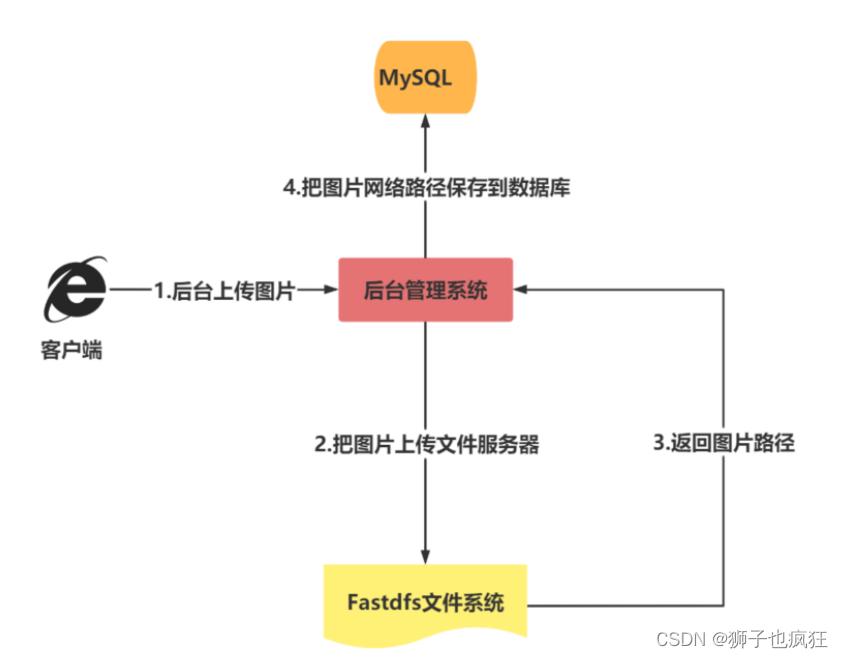
【Fastdfs实战】在本地如何将文件上传到Linux虚拟机
作者:狮子也疯狂 专栏:《Fastdfs连续剧》 坚持做好每一步,幸运之神自然会驾凌在你的身上 目录一. 🦁 前言二. 🦁 上传原理Ⅰ. 🐇 原理图解Ⅱ. 🐇 传输原理三. 🦁 实战演示Ⅰ. &…...

ERP 系统的应用对企业财务会计信息系统内部控制的影响
(一)对企业的财务信息数据进行实时和动态管理传统的财务会计信息系统一般都是采用单一的软件系统,所以在信息的传递及处理上常常不能满足企业的需要,信息与其他部门存在不对称及滞后的现象。而ERP 系统是通过有效的技术手段将企业的各种分散的数据进行完…...
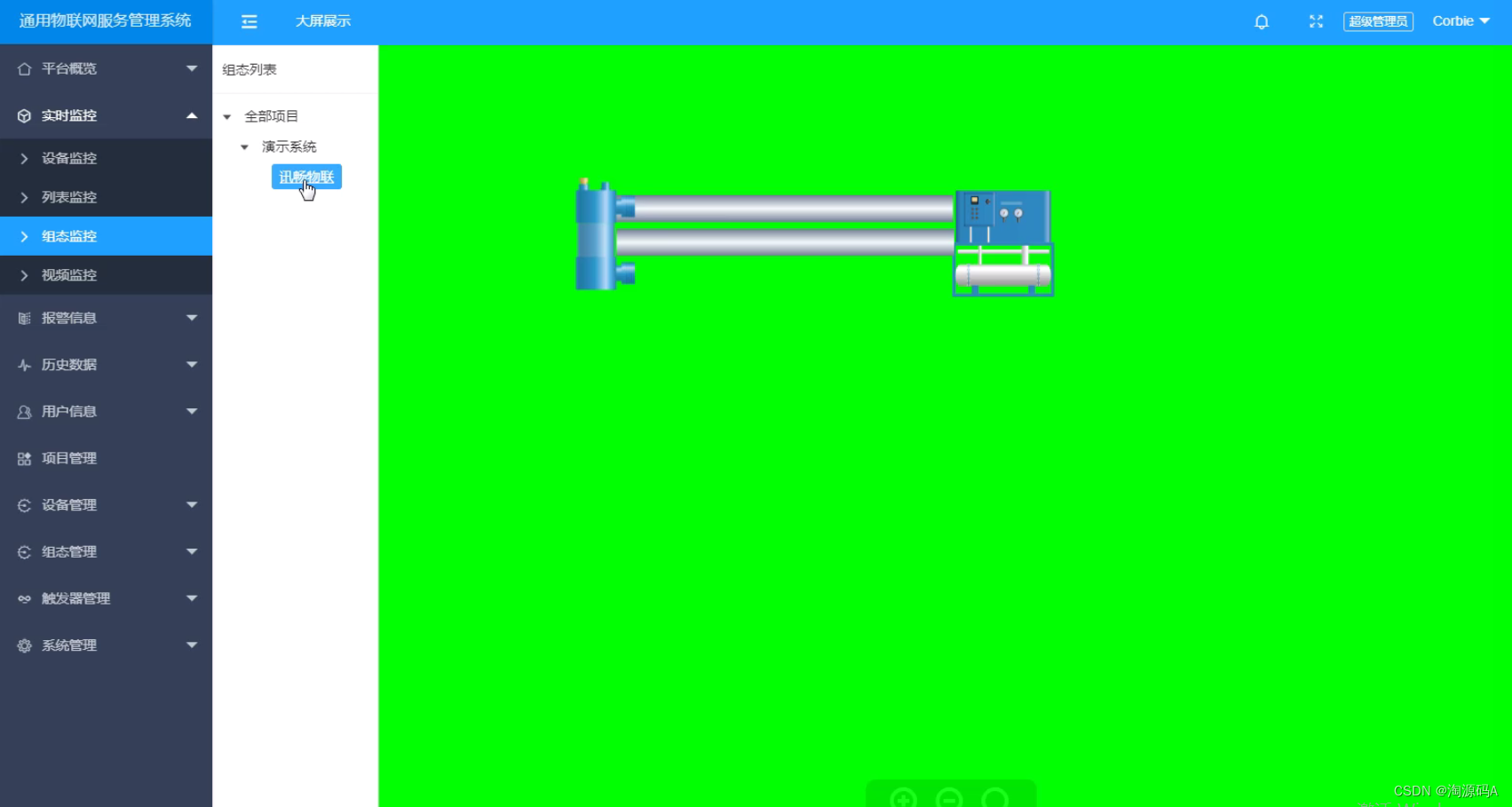
智慧物联网源码带手机端源码 物联网系统源码
在智慧工厂领域,智慧城市领域,都需要对设备进行监控。比如工厂需要对周围环境温度、湿度、气压、电压,灯的开关进行监控。这时候就需要物联网平台来进行管理。 推荐一个基于java开发的物联网平台,前端HTML带云组态、可接入视频监…...

AI绘画进军三次元,有人用它打造赛博女友?(diffusion)
目录0 写在前面1 AI绘画技术飞跃2 效果展示3 环境配置3.1 下载基础模型3.2 更新.NET和模型3.3 下载绘画模型3.4 启动项目3.5 标签配置4 结语0 写在前面 机器学习强基计划聚焦深度和广度,加深对机器学习模型的理解与应用。“深”在详细推导算法模型背后的数学原理&a…...
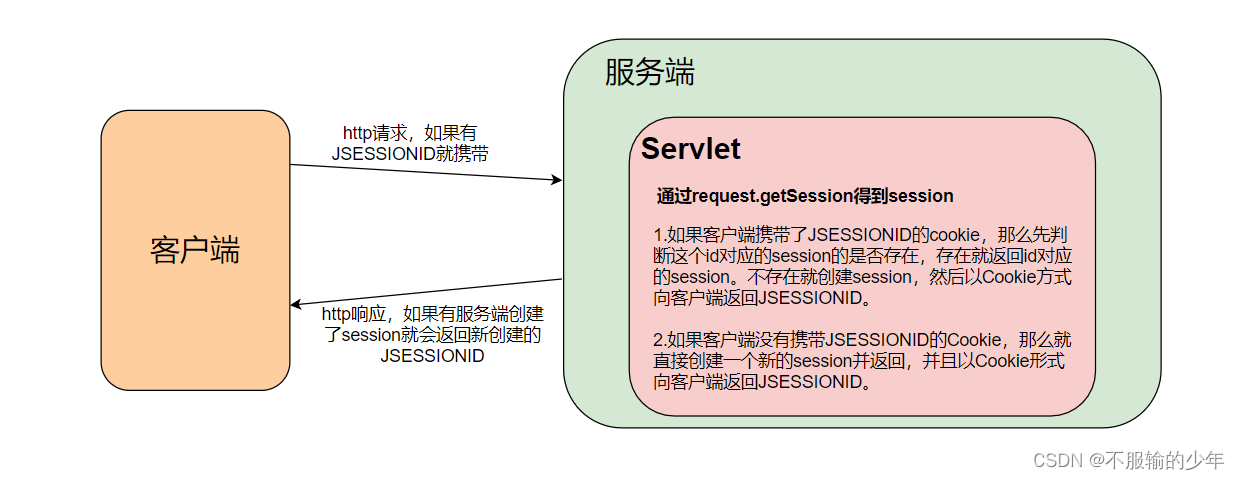
计算机网络高频知识点
目录 一、http状态码 二、浏览器怎么数据缓存 三、强缓存与协商缓存 1、强缓存 2、协商缓存 四、简单请求与复杂请求 五、PUT 请求类型 六、GET请求类型 七、GET 和 POST 的区别 八、跨域 1、什么时候会跨域 2、解决方式 九、计算机网络的七层协议与五层协议分别指…...
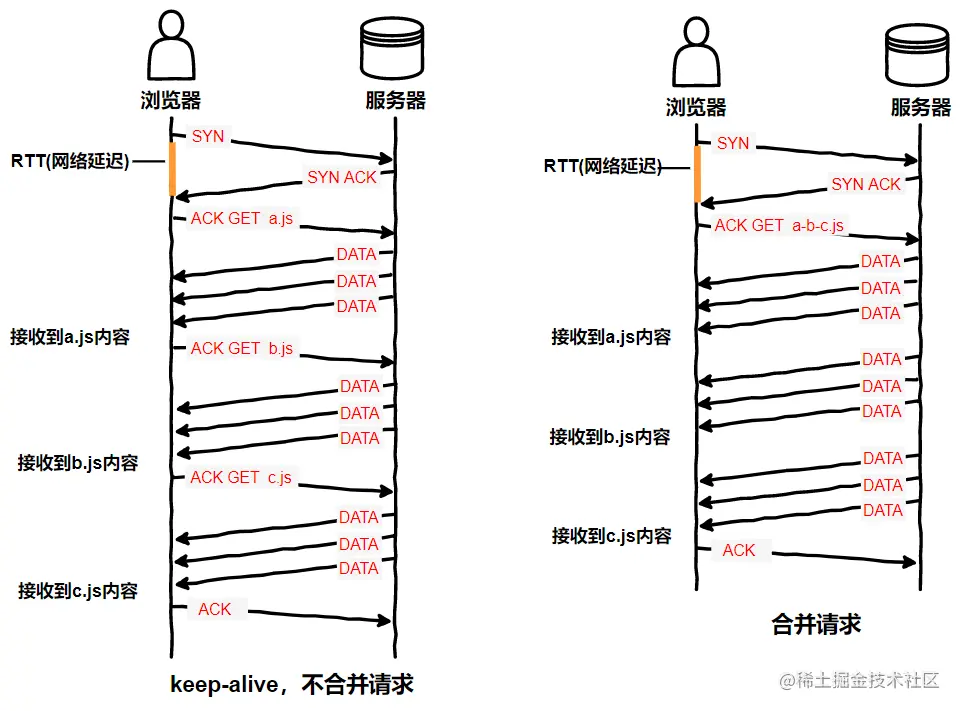
谈谈前端性能优化-面试版
前言 当我们去面试的时候,很大概率会被面试官问这么一个问题:你有尝试过对项目做性能优化吗?或者你了解哪些性能优化的方法?听到这个问题的你可能是这样的: 似曾相识但又说不清楚,往往只能零散地说出那么几…...
JAVA连接数据库——JDBC的简单使用
JDBC即Java数据库连接.用来实现Java程序对数据库增删查改。 为了对接Java程序和数据库,java.sql提供了很多api包含在java.sql和javax.sql里面 结构: DriverManager接口: 每一个数据库的驱动程序都必须去到DriverManager注册,生成一个Connection Conn…...
Pandas数据查询
Pandas数据查询 Pandas查询数据的几种方法 df.loc方法,根据行、列的标签值查询 df.iloc方法,根据行、列的数字位置查询 df.where方法 df.query方法 .loc既能查询,又能覆盖写入,强烈推荐! Pandas使用df.loc查询数据…...

NLP-统计词频之处理停用词
前言 本文是该专栏的第1篇,后面会持续分享NLP的各种干货知识,值得关注。 一般来说,自然语言处理(NLP)就是开发能够理解人类语言的应用程序或者应用服务。 举个例子,如Facebook News Feed这种社交网站推送,它的算法知道你的兴趣是自然语言处理,就会推送相关的广告或者…...
))
sort 定制排序规则(配合functools.cmp_to_key())
sort 定制排序规则(配合functools.cmp_to_key()) 配合例题学习 题目链接:179. 最大数 题目大意:给定一组非负整数 nums,重新排列每个数的顺序(每个数不可拆分)使之组成一个最大的整数。 注意&a…...

【华为OD机试模拟题】用 C++ 实现 - 内存池(2023.Q1)
最近更新的博客 【华为OD机试模拟题】用 C++ 实现 - 去重求和(2023.Q1) 文章目录 最近更新的博客使用说明内存池题目输入输出示例一输入输出说明Code使用说明 参加华为od机试,一定要注意不要完全背诵代码,需要理解之后模仿写出,通过率才会高。 华为 OD 清单查看地址:…...

Python--深入浅出的装饰器--1
本章一起深入浅出一下装饰器。前面我们讲过一章装饰器了。不知道各位看懂了多少。每太看懂也没关系,本章就一起实操一下。简单的例子例1例2上述的两个例子,执行结果为:1423.为什么呢???解析语法糖ÿ…...
如何从0创建Spring Cloud Alibaba(多模块)
以一个父工程带两个Module(test1、test2)为例。 一、创建父工程 由于是模块化项目,那么父工程不需要实际的代码逻辑,因此无需创建src,那么可以有几种方式创建,例如: 使用Spring Initializr脚…...

Linux 文件类型,目录与路径,文件与目录管理
文件类型 后面的字符表示文件类型标志 普通文件:-(纯文本文件,二进制文件,数据格式文件) 如文本文件、图片、程序文件等。 目录文件:d(directory) 用来存放其他文件或子目录。 设备…...

服务器硬防的应用场景都有哪些?
服务器硬防是指一种通过硬件设备层面的安全措施来防御服务器系统受到网络攻击的方式,避免服务器受到各种恶意攻击和网络威胁,那么,服务器硬防通常都会应用在哪些场景当中呢? 硬防服务器中一般会配备入侵检测系统和预防系统&#x…...
MMaDA: Multimodal Large Diffusion Language Models
CODE : https://github.com/Gen-Verse/MMaDA Abstract 我们介绍了一种新型的多模态扩散基础模型MMaDA,它被设计用于在文本推理、多模态理解和文本到图像生成等不同领域实现卓越的性能。该方法的特点是三个关键创新:(i) MMaDA采用统一的扩散架构…...

镜像里切换为普通用户
如果你登录远程虚拟机默认就是 root 用户,但你不希望用 root 权限运行 ns-3(这是对的,ns3 工具会拒绝 root),你可以按以下方法创建一个 非 root 用户账号 并切换到它运行 ns-3。 一次性解决方案:创建非 roo…...
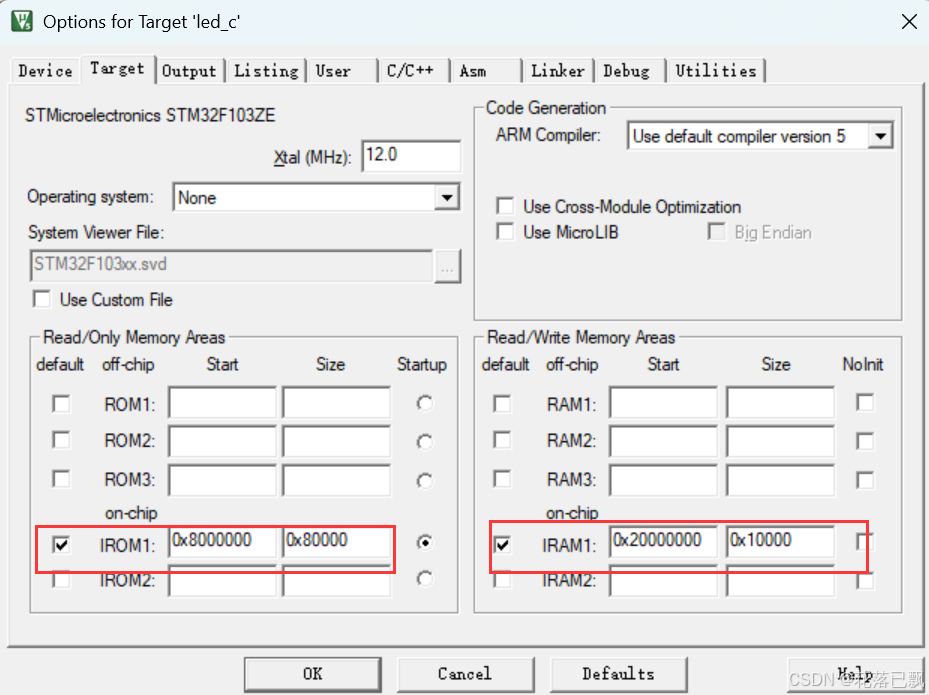
Keil 中设置 STM32 Flash 和 RAM 地址详解
文章目录 Keil 中设置 STM32 Flash 和 RAM 地址详解一、Flash 和 RAM 配置界面(Target 选项卡)1. IROM1(用于配置 Flash)2. IRAM1(用于配置 RAM)二、链接器设置界面(Linker 选项卡)1. 勾选“Use Memory Layout from Target Dialog”2. 查看链接器参数(如果没有勾选上面…...

linux 下常用变更-8
1、删除普通用户 查询用户初始UID和GIDls -l /home/ ###家目录中查看UID cat /etc/group ###此文件查看GID删除用户1.编辑文件 /etc/passwd 找到对应的行,YW343:x:0:0::/home/YW343:/bin/bash 2.将标红的位置修改为用户对应初始UID和GID: YW3…...

【C语言练习】080. 使用C语言实现简单的数据库操作
080. 使用C语言实现简单的数据库操作 080. 使用C语言实现简单的数据库操作使用原生APIODBC接口第三方库ORM框架文件模拟1. 安装SQLite2. 示例代码:使用SQLite创建数据库、表和插入数据3. 编译和运行4. 示例运行输出:5. 注意事项6. 总结080. 使用C语言实现简单的数据库操作 在…...

laravel8+vue3.0+element-plus搭建方法
创建 laravel8 项目 composer create-project --prefer-dist laravel/laravel laravel8 8.* 安装 laravel/ui composer require laravel/ui 修改 package.json 文件 "devDependencies": {"vue/compiler-sfc": "^3.0.7","axios": …...
关键领域软件测试的突围之路:如何破解安全与效率的平衡难题
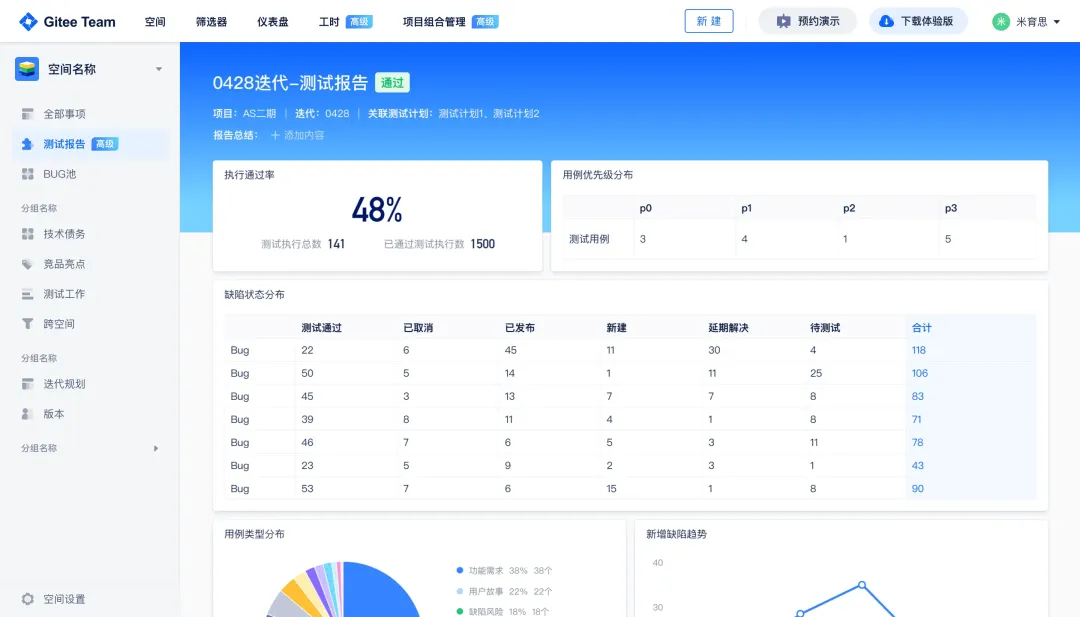
在数字化浪潮席卷全球的今天,软件系统已成为国家关键领域的核心战斗力。不同于普通商业软件,这些承载着国家安全使命的软件系统面临着前所未有的质量挑战——如何在确保绝对安全的前提下,实现高效测试与快速迭代?这一命题正考验着…...
深度学习习题2
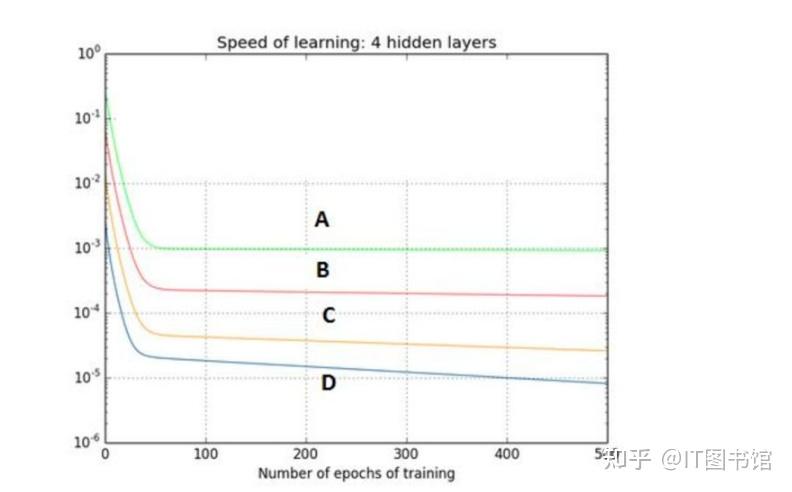
1.如果增加神经网络的宽度,精确度会增加到一个特定阈值后,便开始降低。造成这一现象的可能原因是什么? A、即使增加卷积核的数量,只有少部分的核会被用作预测 B、当卷积核数量增加时,神经网络的预测能力会降低 C、当卷…...