
html通过CDN引入Vue使用Vuex以及Computed、Watch监听
html通过CDN引入Vue使用Vuex以及Computed、Watch监听
近期遇到个需求,就是需要在.net MVC的项目中,对已有的项目的首页进行优化,也就是写原生html和js。但是咱是一个写前端的,写html还可以,.net的话,开发也不方便,还得安装Visual Studio启动项目。所以就计划在html文件中开发,然后移植到.net的项目中
功能说明:需要开发一个dashboard,也就是大屏可视化,多个模块,然后由图表作为主要内容。那么就意味着需要全局监听,如果筛选条件改变,那么所有的组件都需要监听到这个改变,做出相应的反应。
效果图

代码实现
store.js
const store = new Vuex.Store({state: {msg: 'Hello World',count: 5},mutations: {increment(state, payload) {console.log('的话',state,payload)state.count ++}},actions: {increment(context, payload) {setTimeout(() => {context.commit('increment', payload);}, 2000);}},getters: {msg(state) {return state.msg.toUpperCase();},count(state) {return state.count;}},
});
然后将store挂载到Vue上
主页面html
<!DOCTYPE html>
<html lang="zh-CN">
<head><meta charset="UTF-8"><meta name="viewport" content="width=device-width, initial-scale=1.0"><title>Vue Grid Layout 示例</title><!-- 引入样式 --><link rel="stylesheet" href="https://unpkg.com/element-ui/lib/theme-chalk/index.css"><style>#loader-wrapper { position: fixed; top: 0; left: 0; width: 100vw; height: 100vh; z-index: 999999; }#loader {display: block; position: relative; left: 50%; top: 40%; z-index: 1001; width: 90px; height: 90px; margin: -45px 0 0 -45px; border-radius: 50%; border: 3px solid transparent;border-top-color: #fe9501;         -webkit-animation: spin 2s linear infinite;-ms-animation: spin 2s linear infinite;-moz-animation: spin 2s linear infinite;-o-animation: spin 2s linear infinite;animation: spin 2s linear infinite;}#loader:before {content: ""; position: absolute; top: 5px; left: 5px; right: 5px; bottom: 5px; border-radius: 50%; border: 3px solid transparent; border-top-color: #fe9501;-webkit-animation: spin 3s linear infinite;-moz-animation: spin 3s linear infinite;-o-animation: spin 3s linear infinite;-ms-animation: spin 3s linear infinite;animation: spin 3s linear infinite;}#loader:after {content: ""; position: absolute; top: 15px; left: 15px; right: 15px; bottom: 15px; border-radius: 50%; border: 3px solid transparent; border-top-color: #fe9501;-moz-animation: spin 1.5s linear infinite;-o-animation: spin 1.5s linear infinite;-ms-animation: spin 1.5s linear infinite;-webkit-animation: spin 1.5s linear infinite;animation: spin 1.5s linear infinite;}@-webkit-keyframes spin {0% { -webkit-transform: rotate(0deg); -ms-transform: rotate(0deg); transform: rotate(0deg); }100% { -webkit-transform: rotate(360deg); -ms-transform: rotate(360deg); transform: rotate(360deg); }}@keyframes spin {0% { -webkit-transform: rotate(0deg); -ms-transform: rotate(0deg); transform: rotate(0deg); }100% { -webkit-transform: rotate(360deg); -ms-transform: rotate(360deg); transform: rotate(360deg); }}.load-text{color: #fe9501;text-align: center;position: relative;top: 55%;transform: translateY(-50%);}html {font-size: 100%; /*100 ÷ 16 × 100% = 625%*/}@media screen and (min-width:800px) and (max-width:999px) {html { font-size: 65%; }}@media screen and (min-width:1000px) and (max-width:1024px) {html { font-size: 70%; }}@media screen and (min-width:1025px) and (max-width:1280px) {html { font-size: 90%; }}@media screen and (min-width:1281px) and (max-width:1680px) {html { font-size: 100%; }}@media screen and (min-width:1681px) and (max-width:1920px) {html { font-size: 100%; }}@media screen and (min-width:1921px) and (max-width:2240px) {html { font-size: 150%; }}@media screen and (min-width:2241px){html { font-size: 150%; }}.vue-grid-layout {background: #eee;}.vue-grid-item:not(.vue-grid-placeholder) {background: #ccc;border: 1px solid black;}.vue-grid-item .resizing {opacity: 0.9;}.vue-grid-item .static {background: #cce;}.vue-grid-item .text {font-size: 24px;text-align: center;position: absolute;top: 0;bottom: 0;left: 0;right: 0;margin: auto;height: 100%;width: 100%;}.vue-grid-item .no-drag {height: 100%;width: 100%;}.vue-grid-item .minMax {font-size: 12px;}.vue-grid-item .add {cursor: pointer;}.vue-draggable-handle {position: absolute;width: 20px;height: 20px;top: 0;left: 0;background: url("data:image/svg+xml;utf8,<svg xmlns='http://www.w3.org/2000/svg' width='10' height='10'><circle cx='5' cy='5' r='5' fill='#999999'/></svg>") no-repeat;background-position: bottom right;padding: 0 8px 8px 0;background-repeat: no-repeat;background-origin: content-box;box-sizing: border-box;cursor: pointer;}.vue-grid-item{display: flex;}.echart{width: 100%;height: 100%;min-height: 5rem;}</style>
</head>
<body><div id="app"><!-- <grid-layout :layout="layout" :col-num="12" :row-height="30" :is-draggable="true" :is-resizable="true"><grid-item v-for="item in layout" :key="item.i" :x="item.x" :y="item.y" :w="item.w" :h="item.h" class="grid-item">{{ item.i }}</grid-item></grid-layout> --><el-button @click="cliackDialog" type="success">Button</el-button><el-button @click="increment" type="success">{{count}}</el-button><el-dialog :visible.sync="visible" title="Hello world"><p>Try Element</p></el-dialog><my-component title="标题" content="This is the first component"></my-component></div><!-- 引入Vue --><script src="https://cdn.jsdelivr.net/npm/vue/dist/vue.js"></script><!-- 引入Vuex --><script src="https://unpkg.com/vuex@3.6.2/dist/vuex.js"></script><!-- 引入gird组件 --><script src="./vue-grid-layout.common.js"></script><script src="./vue-grid-layout.umd.min.js"></script><!-- 引入组件库 --><script src="https://unpkg.com/element-ui/lib/index.js"></script><script src="https://cdnjs.cloudflare.com/ajax/libs/echarts/5.4.3/echarts.min.js"></script><!-- 引入子组件 --><script src="./son.js"></script><!-- 引入vuex --><script src="./store.js"></script><script>new Vue({el: '#app',store,data: {draggable: true,resizable: false,index: 0,visible:false,},computed: {count() {return this.$store.state.count;}},watch:{'$store.state.count':{handler(newVal,oldVal){console.log('主界面监听Vuex',newVal,oldVal)}}},mounted(){this.initEchart()},methods: {increment() {this.$store.commit('increment');},cliackDialog(){this.visible = !this.visible},}   });</script>
</body>
</html>
子组件js
{/* <script src="https://cdnjs.cloudflare.com/ajax/libs/echarts/5.4.3/echarts.min.js"></script> */}var link = document.createElement('link');
link.rel = 'stylesheet';
link.href = './son.css';
document.head.appendChild(link);let htmlstr = `<div><div class="son-box">{{ title }} - {{ content }} - {{str}}</div><div class="echart2">2</div></div>
`
// 导入 mapState 辅助函数  这样监听和通过$store监听都可以
// const { mapState } = Vuex;// my-component.js
Vue.component('my-component', {props: ['title', 'content'],template: htmlstr,data(){return{str:1}},// computed: {//   ...mapState(['count'])// },watch: {// count:{//   handler(v){//     // 在 count 发生变化时执行的操作//     console.log('子组件监听Vuex', v);//   }// },'$store.state.count':{handler(newVal,oldVal){console.log('子组件监听Vuex',newVal,oldVal)}}},mounted(){// setTimeout(()=>{this.initEchart()// })},methods:{initEchart(){var option = {xAxis: {type: 'category',data: ['Mon', 'Tue', 'Wed', 'Thu', 'Fri', 'Sat', 'Sun']},yAxis: {type: 'value'},series: [{data: [150, 230, 224, 218, 135, 147, 260],type: 'line'}]};setTimeout(()=>{let chartDom2 = document.getElementsByClassName('echart2')[0]var myChart2 = echarts.init(chartDom2);myChart2.setOption(option);})}}
});
相关文章:
html通过CDN引入Vue使用Vuex以及Computed、Watch监听
html通过CDN引入Vue使用Vuex以及Computed、Watch监听 近期遇到个需求,就是需要在.net MVC的项目中,对已有的项目的首页进行优化,也就是写原生html和js。但是咱是一个写前端的,写html还可以,.net的话,开发也…...

【LabVIEW学习】5.数据通信之TCP协议,控制电脑的一种方式
一。tcp连接以及写数据(登录) 数据通信--》协议--》TCP 1.tcp连接 创建while循环,中间加入事件结构,创建tcp连接,写入IP地址与端口号 2.写入tcp数据 登录服务器除了要知道IP地址以及端口以外,需要用户名与密…...
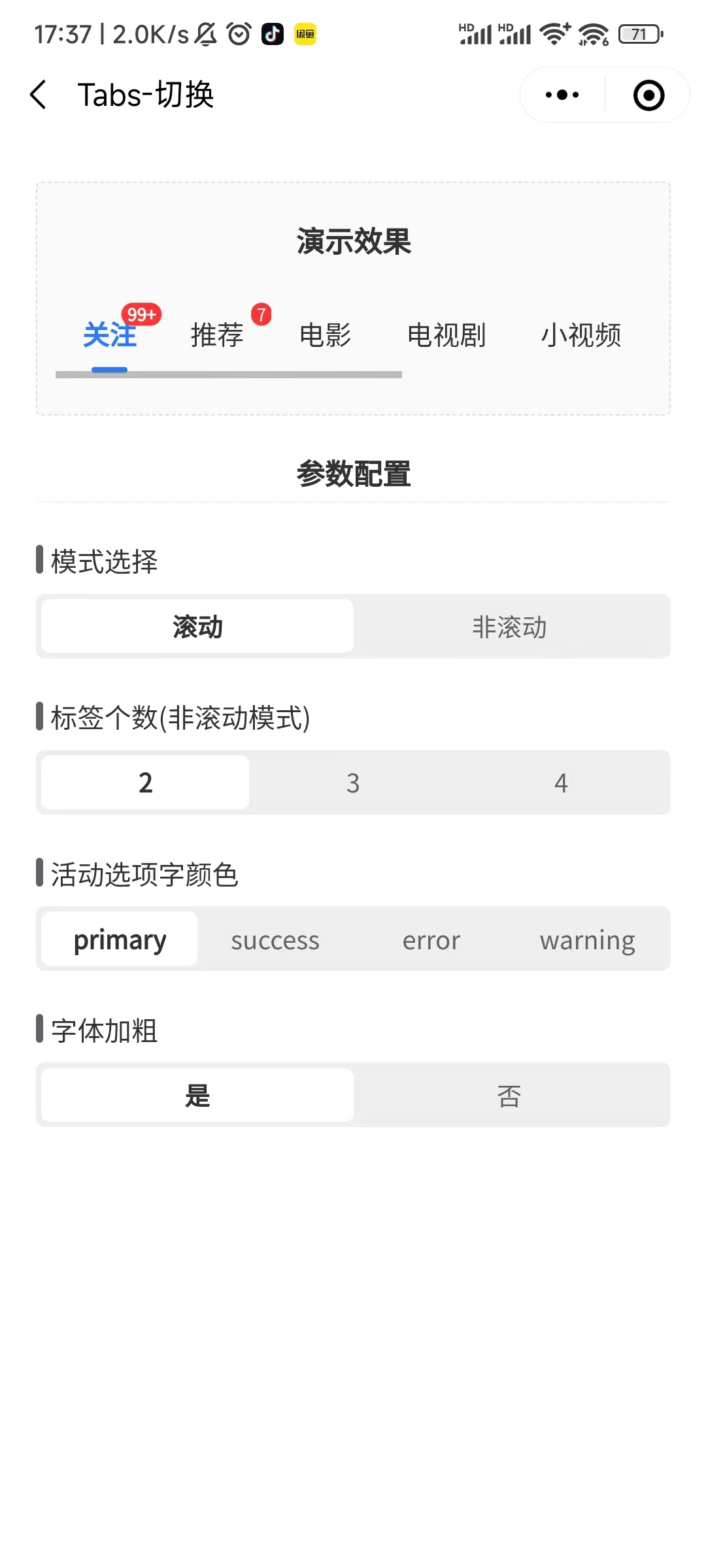
uview1 的u-tabs组件在微信小程序中会出现横向滚动条
uview1 的u-tabs组件在微信小程序中会出现横向滚动条,真机才会生效,微信开发者工具没问题包括官方示例也会 原因:未屏蔽微信小程序的滚动条 解决办法:uview-ui中uview-ui/components/u-tabs/u-tabs.vue文件把h5屏蔽滚动条的条件编…...

服务器ipv6地址显示“scope global dadfailed tentative noprefixroute”无法连通的问题处理一例
服务器规模启用ipv6地址后,遇到一起案例 ,配置的服务ipv6地址显示“scope global dadfailed tentative noprefixroute”,无法连通,现将解决过程记录如下。 一、问题情况 1、ipv6信息检查 某台服务器配置ipv6地址后,…...
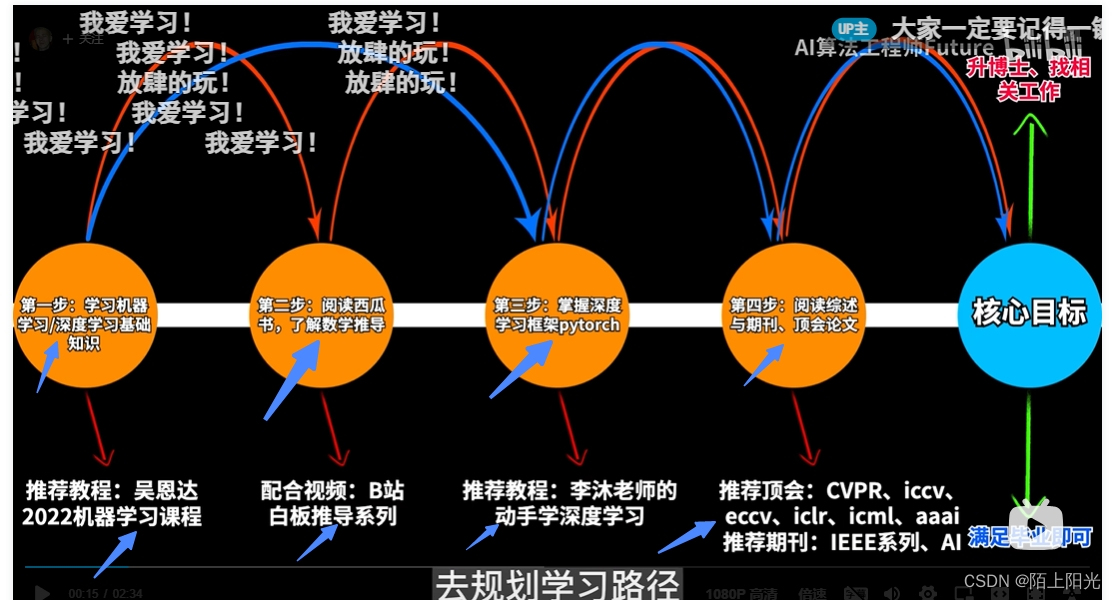
深度学习学习顺序梳理
https://www.bilibili.com/video/BV1to4y1G7xq/?spm_id_from333.999.0.0&vd_source9607a6d9d829b667f8f0ccaaaa142fcb 1.吴恩达机器学习课程 已学完,时间较久了,后续可以重新听一遍,整理一下笔记 2. 白板推导读西瓜书 统计学习方法看…...
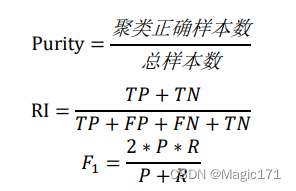
机器学习实验六:聚类
系列文章目录 机器学习实验一:线性回归机器学习实验二:决策树模型机器学习实验三:支持向量机模型机器学习实验四:贝叶斯分类器机器学习实验五:集成学习机器学习实验六:聚类 文章目录 系列文章目录一、实验…...

逆向思考 C. Fence Painting
Problem - 1481C - Codeforces 思路:逆序考虑,因为每一块木板都是被最后一次粉刷所决定的。 从后往前开始,对于 c i c_i ci来说, 如果这个颜色还有没有涂的木板,那么涂到其中一个木板即可如果这个颜色下没有未涂的…...

当当狸AR智能学习图集跨越千年文明传承,邀您“面对面”与虚拟诗人互动对诗
中华传统文化底蕴深厚,余韵悠长。即使经过千年的历史裂变,依然历久铭心慰藉着一代又一代人的灵魂。千百年后的今天,成为了我们独一无二的财富。 如今,国人学习中华传统文化的方式有很多,诗词集、动画影片、诗歌传颂等…...

CESM笔记——component活动状态+compset前缀解析+B1850,BHIST区别
时隔一年没写CSDN笔记了,一些CESM的知识点我都快忘了。诶,主要是在国外办公室的网屏蔽了好多国内的网络,CSDN登不上,回家又不想干活。。。好吧,好多借口。。。 昨天师弟问我一些问题,想想要不可以水一篇小…...

vue 页面跳转时,浏览器上方显示进度条
vue 页面跳转时,浏览器上方显示进度条 文章目录 vue 页面跳转时,浏览器上方显示进度条先看效果一、安装 nprogress二、main.js 引入nprogress1.引入库 三、在router.js中对路由钩子进行设置四、测试 先看效果 vue 页面跳转时,浏览器上方显示进…...

tqdm输出字符串被截断
tqdm输出截断 1.遇到的问题2.tqdm默认的字符串长度是80(ncols属性)3.修改tqdm的ncols属性4.本人字符串长度是64 1.遇到的问题 字符串打印,显示不完整, 2.tqdm默认的字符串长度是80(ncols属性) 3.修改tqdm的…...

Qt::UniqueConnection和lambda一块用无效
如果槽函数是lambda。 那么用了Qt::UniqueConnection也会出现槽函数被多次调用的问题。 原因: 参考官方文档: QObject Class | Qt Core 5.15.16https://doc.qt.io/qt-5/qobject.html#connect...

四川技能大赛——2023年四川网信人才技能大赛(网络安全管理员赛项)决赛
四川技能大赛——2023年四川网信人才技能大赛(网络安全管理员赛项)决赛 文章目录 四川技能大赛——2023年四川网信人才技能大赛(网络安全管理员赛项)决赛C1-比64少的bas - DONEC2-affine - DONEC3-简单的RSA - DONEM1-不要动我的f…...
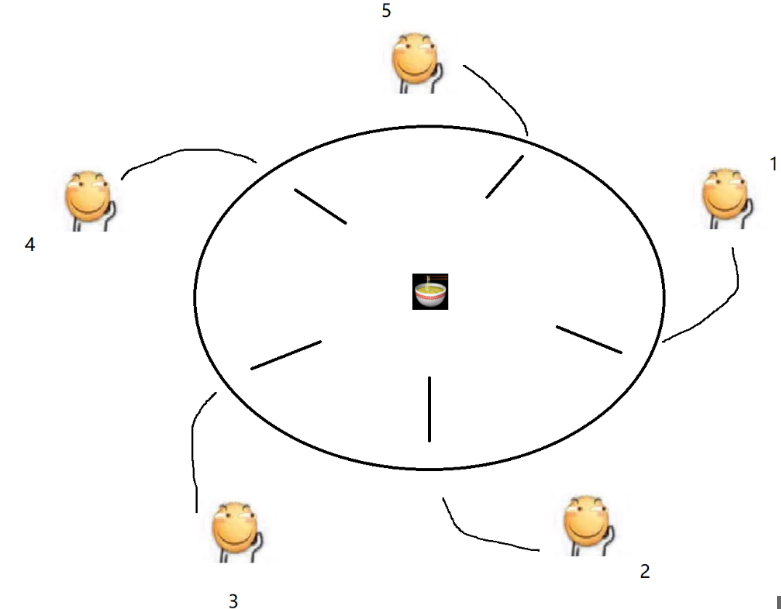
死锁(面试常问)
1.什么是死锁 简单来说就是一个线程加锁后解锁不了 一个线程,一把锁,线程连续加锁两次。如果这个锁是不可重入锁,会死锁。两个线程,两把锁。 举几个例子,1.钥匙锁车里了,车钥匙锁家里了。2. 现在有一本书…...
)
GO设计模式——3、抽象工厂模式(创建型)
目录 抽象工厂模式(Abstract Factory Pattern) 抽象工厂模式的核心角色 优缺点 代码实现 抽象工厂模式(Abstract Factory Pattern) 抽象工厂模式(Abstract Factory Pattern)是围绕一个超级工厂创建其他…...

AUTOSAR_PRS_LogAndTraceProtocol文档翻译
1简介和概述 本协议规范规定了AUTOSAR协议Dlt的格式、消息序列和语义。 该协议允许将诊断、日志和跟踪信息发送到通信总线上。 因此,Dlt模块从应用程序或其他软件模块收集调试信息,向调试信息添加元数据,并将其发送到通信总线。 此外&#x…...

自定义比较器
package org.jeecg.modules.develop.api.livePort; import java.util.ArrayList; import java.util.Collections; import java.util.Comparator; import java.util.List; // 创建一个泛型类 class MyObject { private T data; public MyObject(T data) {this.data data; }p…...
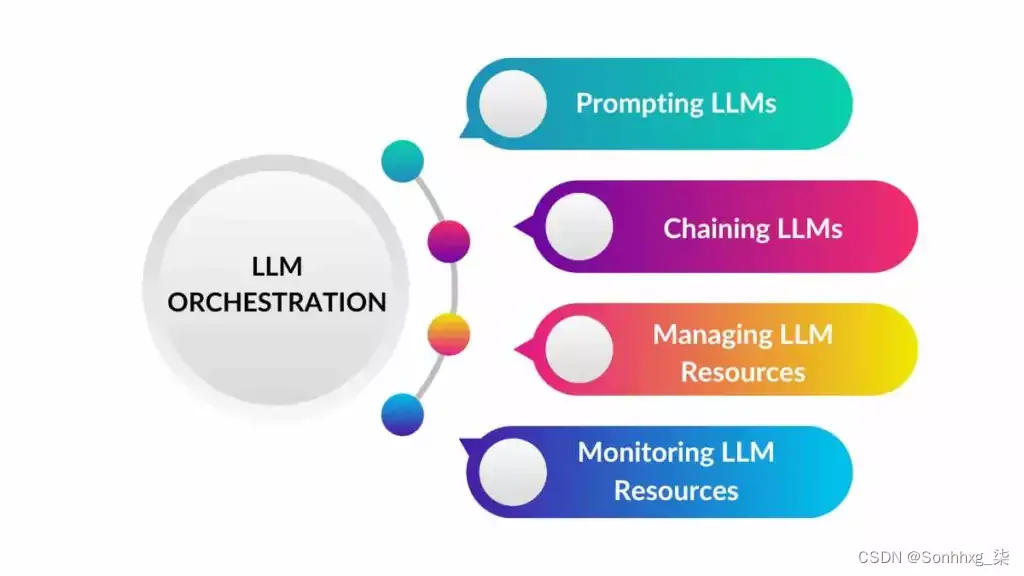
【NLP】如何管理大型语言模型 (LLM)
什么是LLM编排? LLM 编排是管理和控制大型语言模型 (LLM)的过程,以优化其性能和有效性。这包括以下任务: 提示LLM:生成有效的提示,为LLMs提供适当的背景和信息以产生所需的输出。链接LLM: 结合多个LLM的输…...

利用机器学习实现客户细分的实战
前言: Hello大家好,我是Dream。 今天来学习一下机器学习实战中的案例:创建客户细分,在此过程中也会补充很多重要的知识点,欢迎大家一起前来探讨学习~ 一、导入数据 在此项目中,我们使用 UCI 机器学习代码库…...

Tair(4):Tair原理架构
一个Tair集群主要包括3个必选模块:ConfigServer、Dataserver和Client 通常情况下,一个 Tair 集群中包含2台 Configserver 及多台 DataServer。其中两台 Configserver 互为主备。通过和 Dataserver 之间的心跳检测获取集群中存活可用的 Dataserver&#…...
AI-调查研究-01-正念冥想有用吗?对健康的影响及科学指南
点一下关注吧!!!非常感谢!!持续更新!!! 🚀 AI篇持续更新中!(长期更新) 目前2025年06月05日更新到: AI炼丹日志-28 - Aud…...
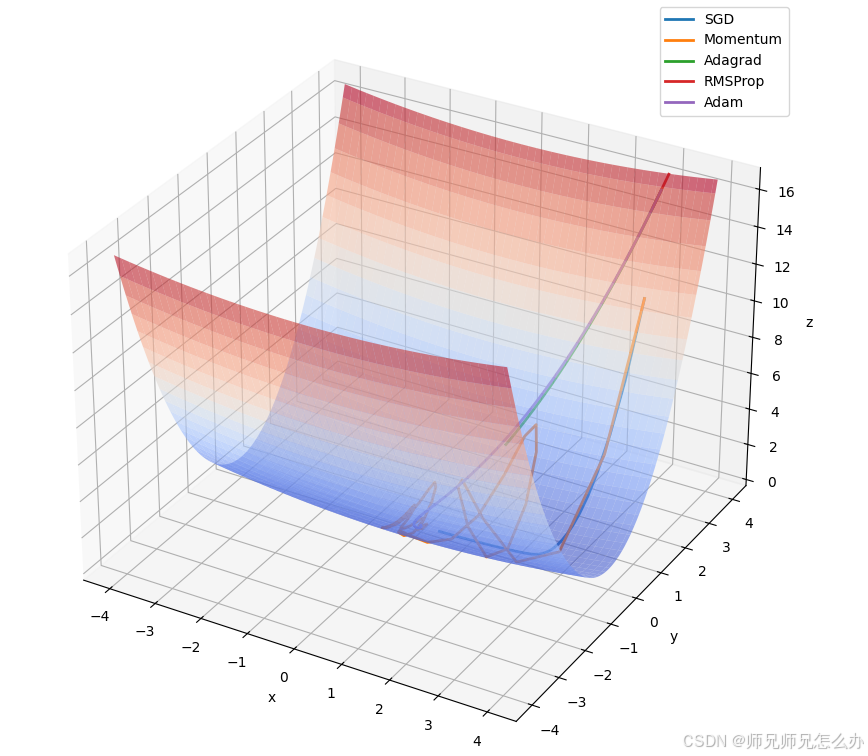
【人工智能】神经网络的优化器optimizer(二):Adagrad自适应学习率优化器
一.自适应梯度算法Adagrad概述 Adagrad(Adaptive Gradient Algorithm)是一种自适应学习率的优化算法,由Duchi等人在2011年提出。其核心思想是针对不同参数自动调整学习率,适合处理稀疏数据和不同参数梯度差异较大的场景。Adagrad通…...

边缘计算医疗风险自查APP开发方案
核心目标:在便携设备(智能手表/家用检测仪)部署轻量化疾病预测模型,实现低延迟、隐私安全的实时健康风险评估。 一、技术架构设计 #mermaid-svg-iuNaeeLK2YoFKfao {font-family:"trebuchet ms",verdana,arial,sans-serif;font-size:16px;fill:#333;}#mermaid-svg…...

质量体系的重要
质量体系是为确保产品、服务或过程质量满足规定要求,由相互关联的要素构成的有机整体。其核心内容可归纳为以下五个方面: 🏛️ 一、组织架构与职责 质量体系明确组织内各部门、岗位的职责与权限,形成层级清晰的管理网络…...

Java多线程实现之Callable接口深度解析
Java多线程实现之Callable接口深度解析 一、Callable接口概述1.1 接口定义1.2 与Runnable接口的对比1.3 Future接口与FutureTask类 二、Callable接口的基本使用方法2.1 传统方式实现Callable接口2.2 使用Lambda表达式简化Callable实现2.3 使用FutureTask类执行Callable任务 三、…...
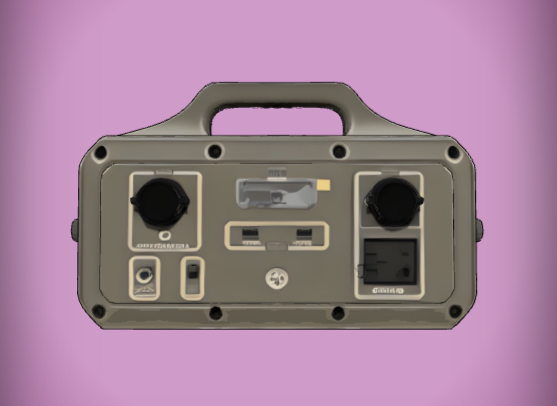
成都鼎讯硬核科技!雷达目标与干扰模拟器,以卓越性能制胜电磁频谱战
在现代战争中,电磁频谱已成为继陆、海、空、天之后的 “第五维战场”,雷达作为电磁频谱领域的关键装备,其干扰与抗干扰能力的较量,直接影响着战争的胜负走向。由成都鼎讯科技匠心打造的雷达目标与干扰模拟器,凭借数字射…...
智能仓储的未来:自动化、AI与数据分析如何重塑物流中心
当仓库学会“思考”,物流的终极形态正在诞生 想象这样的场景: 凌晨3点,某物流中心灯火通明却空无一人。AGV机器人集群根据实时订单动态规划路径;AI视觉系统在0.1秒内扫描包裹信息;数字孪生平台正模拟次日峰值流量压力…...
SpringTask-03.入门案例
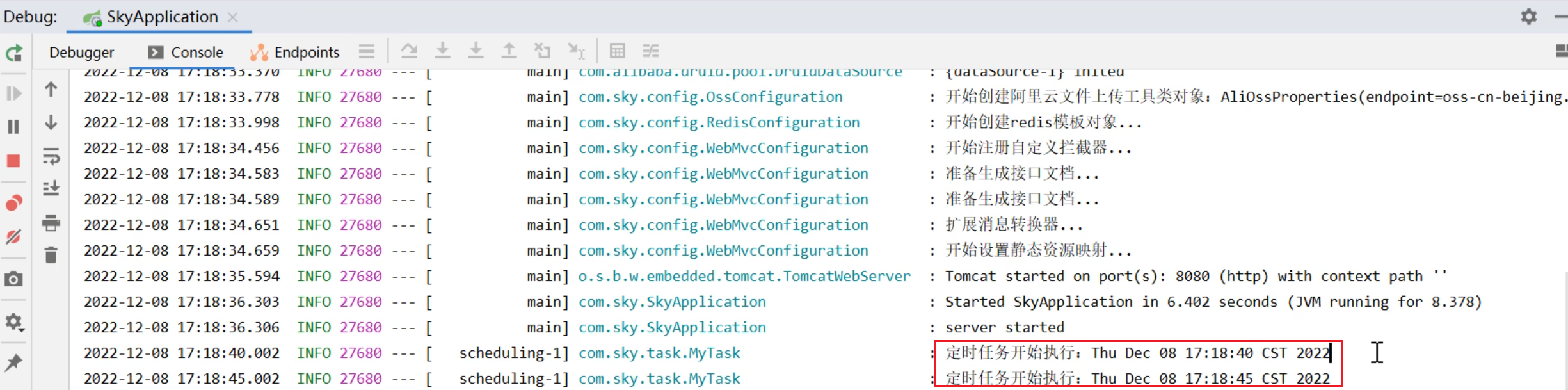
一.入门案例 启动类: package com.sky;import lombok.extern.slf4j.Slf4j; import org.springframework.boot.SpringApplication; import org.springframework.boot.autoconfigure.SpringBootApplication; import org.springframework.cache.annotation.EnableCach…...

算法笔记2
1.字符串拼接最好用StringBuilder,不用String 2.创建List<>类型的数组并创建内存 List arr[] new ArrayList[26]; Arrays.setAll(arr, i -> new ArrayList<>()); 3.去掉首尾空格...

重启Eureka集群中的节点,对已经注册的服务有什么影响
先看答案,如果正确地操作,重启Eureka集群中的节点,对已经注册的服务影响非常小,甚至可以做到无感知。 但如果操作不当,可能会引发短暂的服务发现问题。 下面我们从Eureka的核心工作原理来详细分析这个问题。 Eureka的…...