
mac m2芯片 安装nginx + php + mysql
1.安装homebrew:
系统本身就有(命令brew -v查看下),如果没有安装一下
/bin/zsh -c "$(curl -fsSL https://gitee.com/cunkai/HomebrewCN/raw/master/Homebrew.sh)"2.安装nginx
brew install nginx3.安装php
brew tap shivammathur/php
brew search php
brew install shivammathur/php/php@7.4
如果安装多个php版本,就修改下PHP端口配置:
我的路径是:/opt/homebrew/etc/php/7.4/php-fpm.d/www.conf
listen = 127.0.0.1:9000
改为
listen = 127.0.0.1:9074
4.修改nginx配置
sudo vim /opt/homebrew/etc/nginx/nginx.conf
#user  nobody;
worker_processes  1;error_log  /var/logs/error.log;
#error_log  logs/error.log  notice;
#error_log  logs/error.log  info;#pid        logs/nginx.pid;events {worker_connections  1024;
}http {include       mime.types;default_type  application/octet-stream;#log_format  main  '$remote_addr - $remote_user [$time_local] "$request" '#                  '$status $body_bytes_sent "$http_referer" '#                  '"$http_user_agent" "$http_x_forwarded_for"';#access_log  logs/access.log  main;sendfile        on;#tcp_nopush     on;#keepalive_timeout  0;keepalive_timeout  65;#gzip  on;include servers/*;
}
5.在 /opt/homebrew/etc/nginx下新建文件夹servers,在servers下新建新建test1.conf和test2.conf
mkdir servers
cd servers
vim test1.conf
test1.conf配置内容
server {listen       80;server_name www.test1.cn;# 配置项目路径root  /Users/liuxiaoyun/www/test1; #access_log  logs/host.access.log  main;location / {index  index.html index.htm index.php;if (!-e $request_filename) {rewrite  ^(.*)$  /index.php?s=/$1  last;break;}}#error_page  404              /404.html;# redirect server error pages to the static page /50x.html#error_page   500 502 503 504  /50x.html;location = /50x.html {root   html;}# pass the PHP scripts to FastCGI server listening on 127.0.0.1:9000location ~ \.php$ {# 9074上面设置的监听端口,加载php7.4fastcgi_pass   127.0.0.1:9074;fastcgi_index  index.php;fastcgi_param  SCRIPT_FILENAME  $document_root$fastcgi_script_name;include        fastcgi_params;}
}
test2.conf的配置
server {listen       80;server_name www.test2.cn;# 配置项目路径root  /Users/liuxiaoyun/www/test2; #access_log  logs/host.access.log  main;location / {index  index.html index.htm index.php;if (!-e $request_filename) {rewrite  ^(.*)$  /index.php?s=/$1  last;break;}}#error_page  404              /404.html;# redirect server error pages to the static page /50x.html#error_page   500 502 503 504  /50x.html;location = /50x.html {root   html;}# pass the PHP scripts to FastCGI server listening on 127.0.0.1:9000location ~ \.php$ {# 9074上面设置的监听端口,加载php7.4fastcgi_pass   127.0.0.1:9074;fastcgi_index  index.php;fastcgi_param  SCRIPT_FILENAME  $document_root$fastcgi_script_name;include        fastcgi_params;}
}
6.检查配置
nginx -t
如果报文件权限问题:sudo chmod -R 777 /var/logs
7.设置php-fpm开机自启
sudo cp /opt/homebrew/opt/php@7.4/homebrew.php@7.4.service /Library/LaunchAgents8.启动php-fpm
brew services start php@7.4
9.验证是否启动成功
lsof -i :907410.终端切换php版本
解除之前版本链接:brew unlink php
增加新版本链接:
brew link --overwrite php@7.4
11.php加入环境变量
echo 'export PATH="/opt/homebrew/opt/php@7.4/bin:$PATH"' >> ~/.zshrc
echo 'export PATH="/opt/homebrew/opt/php@7.4/sbin:$PATH"' >> ~/.zshrc
12.安装composer
php -r "copy('https://getcomposer.org/installer', 'composer-setup.php');"
php -r "if (hash_file('sha384', 'composer-setup.php') === 'e21205b207c3ff031906575712edab6f13eb0b361f2085f1f1237b7126d785e826a450292b6cfd1d64d92e6563bbde02') { echo 'Installer verified'; } else { echo 'Installer corrupt'; unlink('composer-setup.php'); } echo PHP_EOL;"
php composer-setup.php
php -r "unlink('composer-setup.php');"
sudo mv composer.phar /usr/local/bin/composer74
13.验证composer
composer74 -v14.mysql加入环境变量
echo 'export PATH="/opt/homebrew/opt/mysql@5.7/bin:$PATH"' >> ~/.zshrcFor compilers to find mysql@5.7 you may need to set:export LDFLAGS="-L/opt/homebrew/opt/mysql@5.7/lib"export CPPFLAGS="-I/opt/homebrew/opt/mysql@5.7/include"15.启动数据库
brew services start mysql@5.716.brew安装mysql5.7总是出问题,我的解决办法是,更新homebrew,安装的mysql8.0
17.php项目运行:
(1).nginx执行重新加载:nginx -s reload ;报错:
[error] invalid PID number "" in "/opt/homebrew/var/run/nginx.pid"
解决:
重新加载配置文件 nginx.conf,然后再执行 reload:nginx -c /opt/homebrew/etc/nginx/nginx.conf
nginx -s reload
(2). 修改hosts文件,/etc/hosts。添加自定义本地域名
#上边配置的test1.conf和test2.conf文件里自定义的域名
127.0.0.1。www.test1.cn
127.0.0.1。www.test2.cn
(3).在~/www/test1里添加index.php。访问域名www.test1.cn就完成啦
相关文章:

mac m2芯片 安装nginx + php + mysql
1.安装homebrew: 系统本身就有(命令brew -v查看下),如果没有安装一下 /bin/zsh -c "$(curl -fsSL https://gitee.com/cunkai/HomebrewCN/raw/master/Homebrew.sh)" 2.安装nginx brew install nginx 3.安装php bre…...

vue axios 使用
使用Vue中的Axios需要先安装axios库,可以通过yarn或npm安装: yarn add axios # 或者 npm install axios --save然后在Vue组件中导入axios并使用: import axios from axios;export default {data() {return {responseData: null,error: null…...

使用docker实现logstash同步mysql到es
准备工作: 1.有mysql的连接方式,并且可以连接成功 2.有es的连接方式,并且可以连接成功 3.安装了docker 环境是Ubuntu中安装了docker 一、创建配置文件,用于容器卷挂载 # 切换目录,可自定义 cd /home/test/ # 创建lo…...
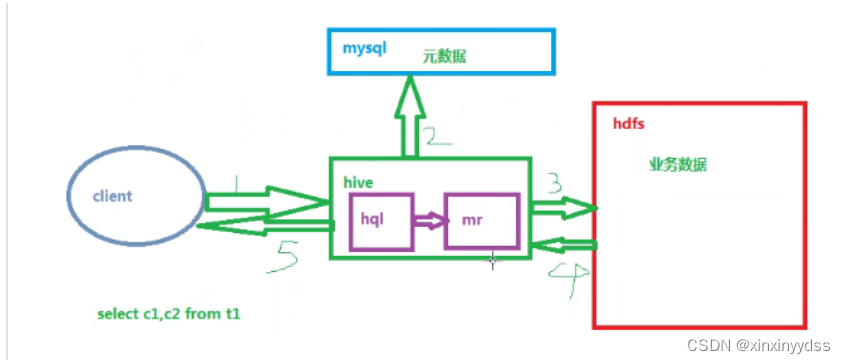
hive数据仓库工具
1、hive是一套操作数据仓库的应用工具,通过这个工具可实现mapreduce的功能 2、hive的语言是hql[hive query language] 3、官网hive.apache.org 下载hive软件包地址 Welcome! - The Apache Software Foundationhttps://archive.apache.org/ 4、hive在管理数据时分为元…...
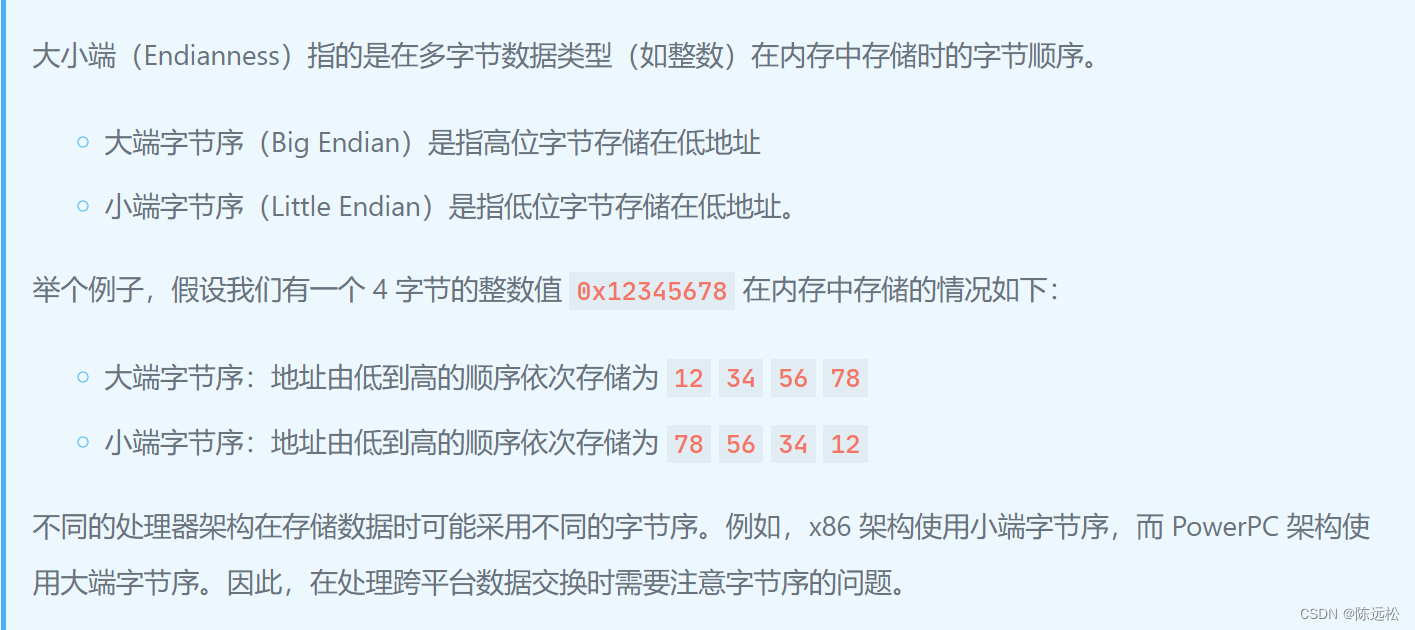
C语言 联合体验证 主机字节序 +枚举
联合体应用:验证当前主机的大小端(字节序) //验证当前主机的大小端 #include <stdio.h>union MyData {unsigned int data;struct{unsigned char byte0;unsigned char byte1;unsigned char byte2;unsigned char byte3;}byte; };int main…...
python和pygame实现烟花特效
python和pygame实现烟花特效 新年来临之际,来一个欢庆新年烟花祝贺,需要安装使用第三方库pygame,关于Python中pygame游戏模块的安装使用可见 https://blog.csdn.net/cnds123/article/details/119514520 效果图及源码 先看效果图:…...
gRPC-Gateway:高效转换 RESTful 接口 | 开源日报 No.105
grpc-ecosystem/grpc-gateway Stars: 16.4k License: BSD-3-Clause gRPC-Gateway 是一个遵循 gRPC HTTP 规范的 gRPC 到 JSON 代理生成器。它是 Google 协议缓冲编译器 protoc 的插件,可以读取 protobuf 服务定义并生成反向代理服务器,将 RESTful HTTP…...
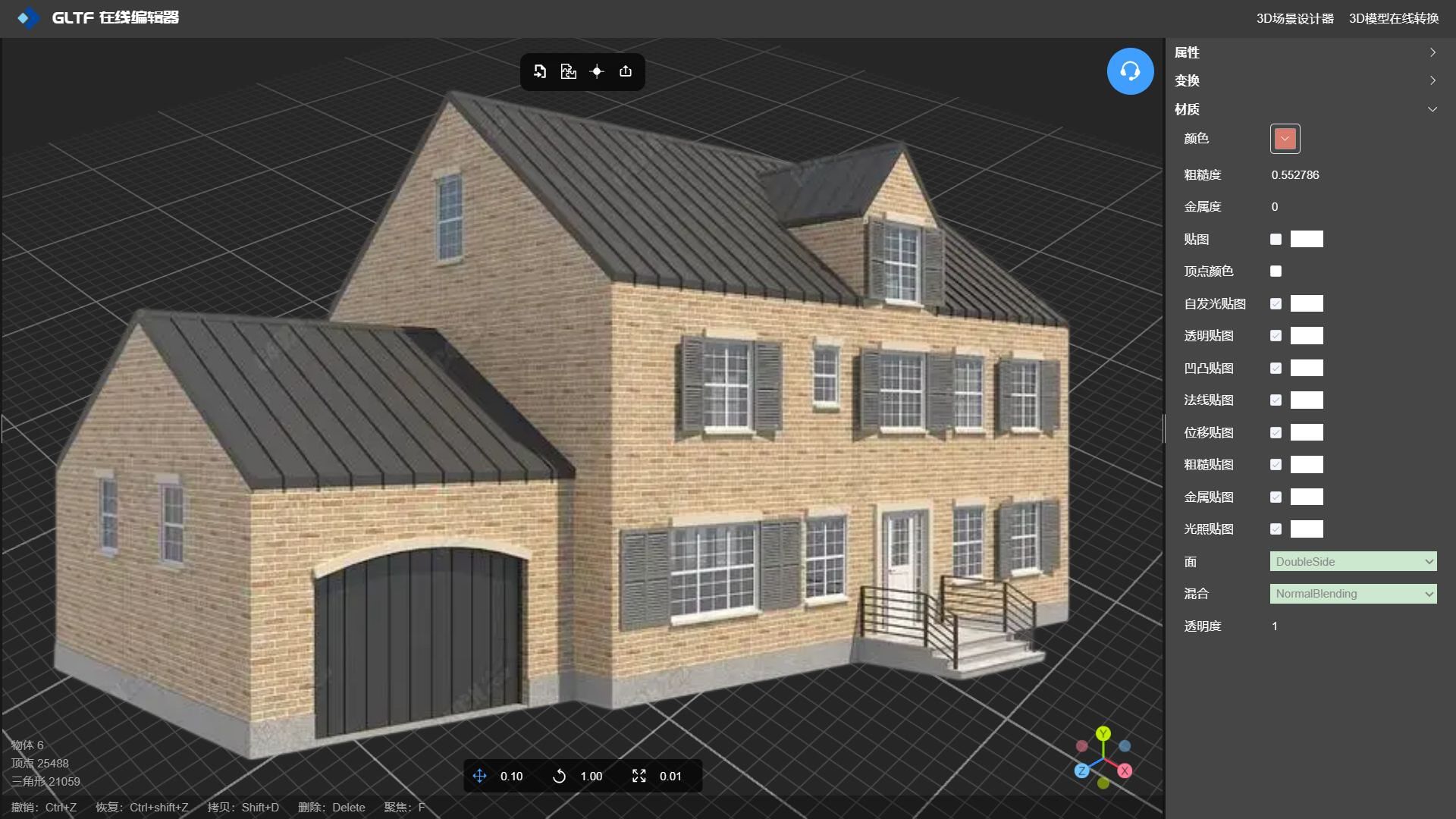
非专业的建模人员如何给模型设置材质纹理贴图?
在线工具推荐: 3D数字孪生场景编辑器 - GLTF/GLB材质纹理编辑器 - 3D模型在线转换 - Three.js AI自动纹理开发包 - YOLO 虚幻合成数据生成器 - 三维模型预览图生成器 - 3D模型语义搜索引擎 1、材质和纹理的区别于关联 材质(Material)是…...

自动化测试、压力测试、持续集成
因为项目的原因,前段时间研究并使用了 SoapUI 测试工具进行自测开发的 api。下面将研究的成果展示给大家,希望对需要的人有所帮助。 SoapUI 是什么? SoapUI 是一个开源测试工具,通过 soap/http 来检查、调用、实现 Web Service …...

FFmpeg之HWContextType
HWContextType算是ffmpeg中为硬解码第三方接口的一个辅助类,它自己有两个辅助子类 AVHWDeviceContext和AVHWFramesContext。 AVHWDeviceContext主要表示硬件上下文 AVHWFramesContext主要表示硬件Frame的一些参数,比如你解码后的YUV数据还在硬件上&#…...

Python面向对象之类和对象(Python系列16)
前言:面向对象是什么,为什么要学面向对象?面向对象是一种思想,让我们的程序变得更加的贴切我们的生活,更加的形象,让代码的可读性和扩展性变得更高。 面向对象:可以使用类将变量和函数组成新的…...

电商对传统零售业的影响:销售渠道、价格竞争与服务质量挑战
随着互联网的普及和电商行业的飞速发展,传统零售业面临着前所未有的挑战。电商不仅改变了消费者的购物方式和消费习惯,还对传统零售业的销售渠道、价格竞争和服务质量等方面产生了深远的影响。本文将详细分析电商对传统零售业的影响,以期为传…...
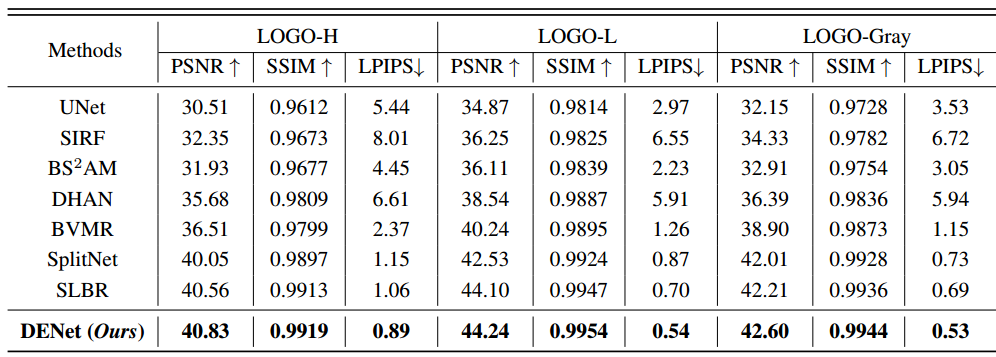
DENet:用于可见水印去除的Disentangled Embedding网络笔记
1 Title DENet: Disentangled Embedding Network for Visible Watermark Removal(Ruizhou Sun、Yukun Su、Qingyao Wu)[AAAI2023 Oral] 2 Conclusion This paper propose a novel contrastive learning mechanism to disentangle the high-level embedd…...
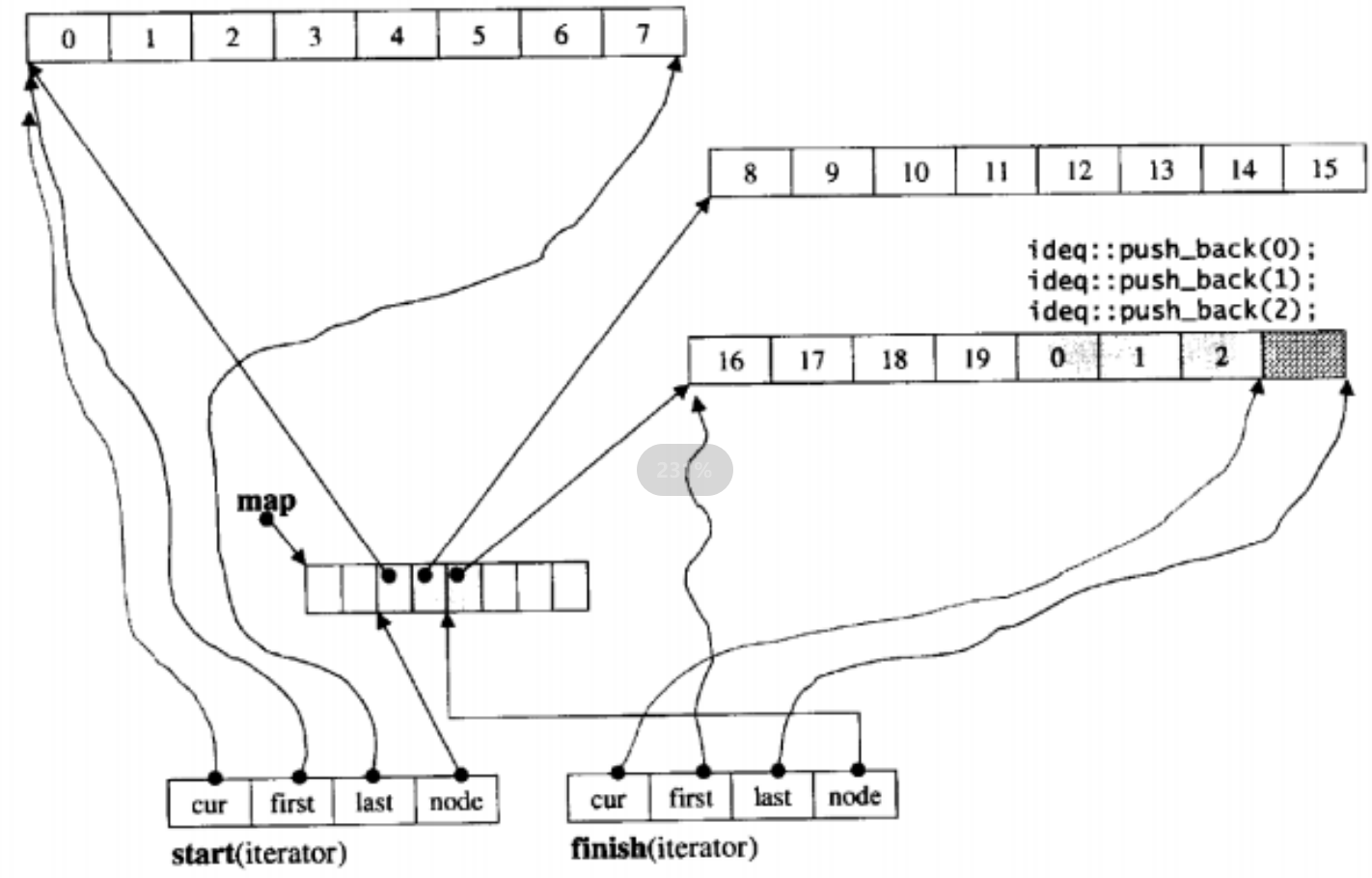
C++初阶(十五)Stack和Queue
文章目录 一、Stack的模拟实现二、Queue的模拟实现三、容器适配器1、什么是容器适配器2、STL标准库中stack和queue的底层结构3、 deque的简单介绍(了解)1、deque的原理介绍2、deque的缺陷 4、为什么选择deque作为stack和queue的底层默认容器 一、Stack的模拟实现 #include<…...

C#面试题
基本概念 装箱和拆箱 装箱的过程,是将 值类型 转换为 引用类型 的过程; 拆箱则是将引用类型转换为值类型。 int val 100; object obj val; //装箱 int num (int) obj; //拆箱 委托(delegate) 委托(Delegate) 是存有对某个…...
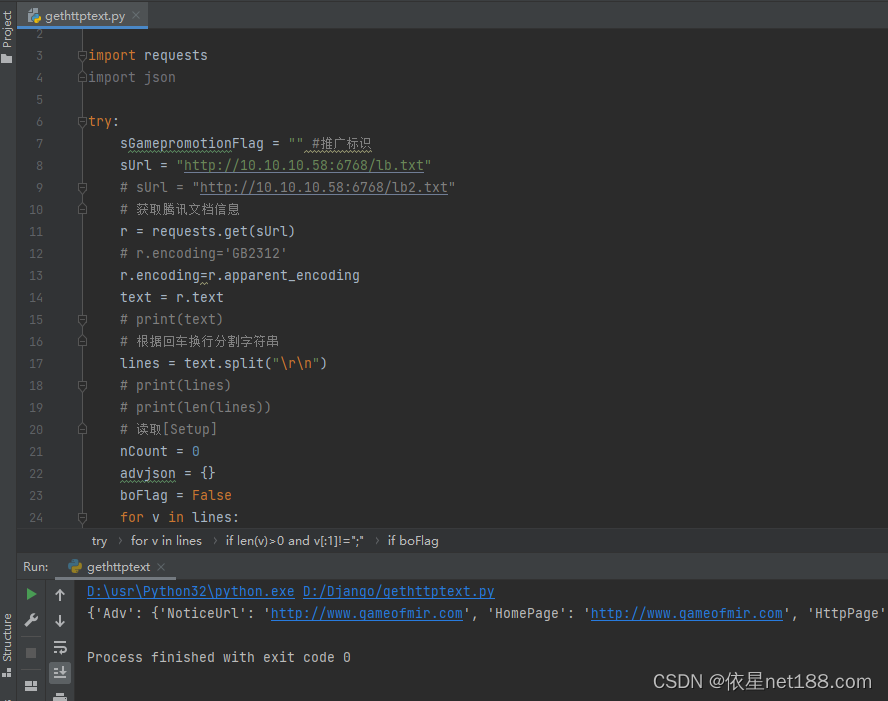
python源码,在线读取传奇列表,并解析为需要的JSON格式
python源码,在线读取传奇列表,并解析为需要的JSON格式 [Server] ; 使用“/”字符分开颜色,也可以不使用颜色,支持以前的旧格式,只有标题和服务器标题支持颜色 ; 标题/颜色代码(0-255)|服务器标题/颜色代码(0-255)|服务…...
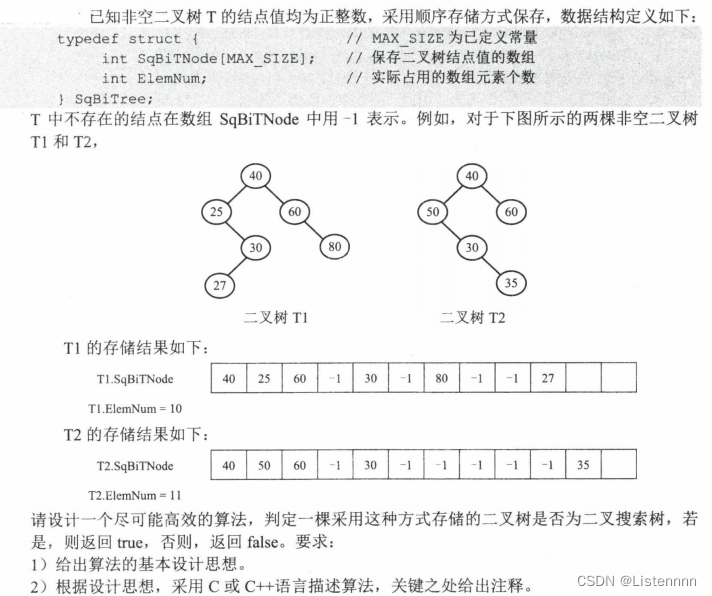
二叉排序树的判断(二叉树的顺序存储):2022年408算法题
对于采用顺序存储方式保存的二叉树,根结点保存在SqBiTNode[0]中;当某结点保存SqBiTNode[i]中时,若有左孩子,则其值保存在SqBiTNode [2i1]中;若有右孩子,则其值保存在SqBiTNode[2i2]中;若有双亲结…...
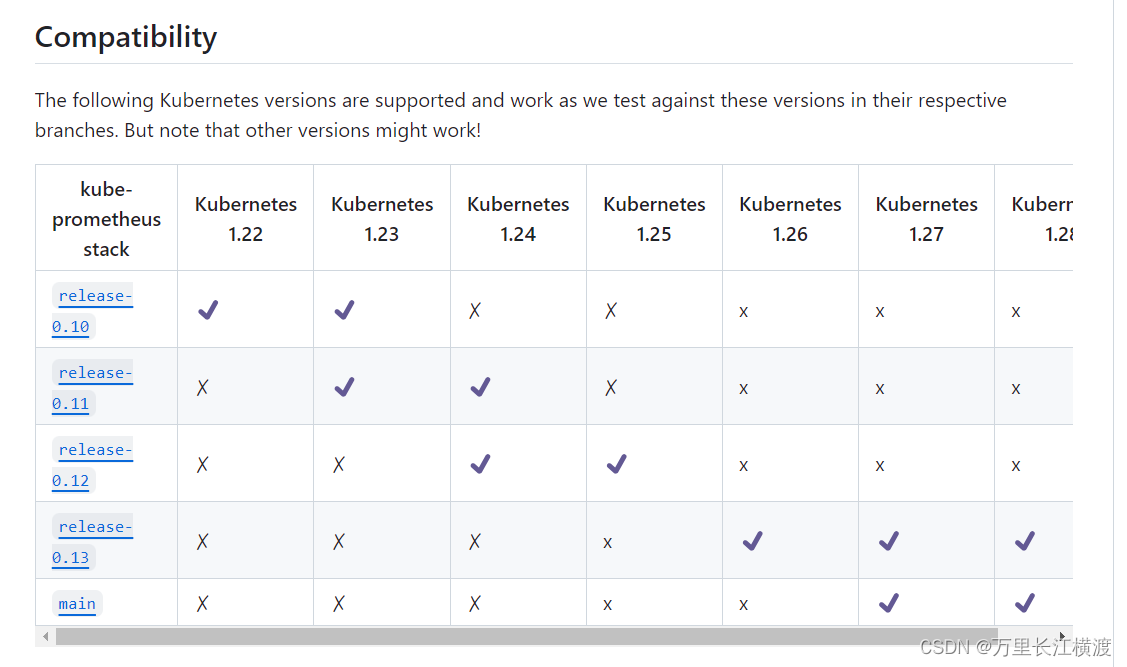
Kubernetes版本升级到v1.18.0方法
升级k8s版本才能使用kube-prometheus安装监控 1、查看集群状态 [rootk8s-master k8s-script]# kubectl get nodes NAME STATUS ROLES AGE VERSION k8s-master Ready master 5d22h v1.18.0 k8s-slave1 Ready <none> 4d10h v1.18.0 k…...
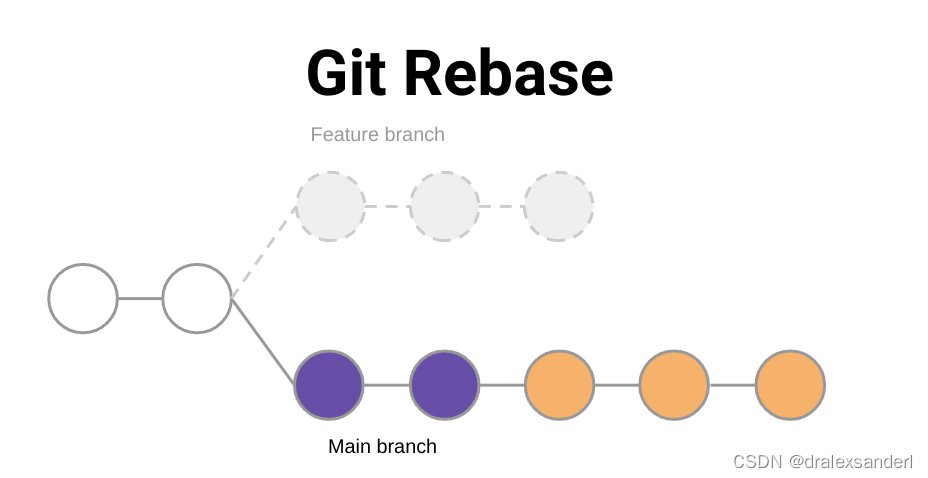
了解 git rebase
了解 git rebase 大多数人习惯使用 git merge 将更改从功能分支合并到主分支,但还有其他方法。我们是否曾经遇到过 git rebase 这个术语并想知道它是什么?或者我们可能听说过 rebase 和 merge ,但不确定何时使用哪个?不用担心&am…...

程序员的养生之道:延寿健康的十大秘诀(下)
程序员的养生之道:延寿健康的十大秘诀(上)-CSDN博客 目录 6. 心理调节,减轻压力 6.1 程序员常见的心理问题 6.2 压力管理的重要性 6.3 放松技巧与应对策略 6.4 积极心态与心理健康 7. 正确坐姿,保护颈椎腰椎 …...
)
uniapp 对接腾讯云IM群组成员管理(增删改查)
UniApp 实战:腾讯云IM群组成员管理(增删改查) 一、前言 在社交类App开发中,群组成员管理是核心功能之一。本文将基于UniApp框架,结合腾讯云IM SDK,详细讲解如何实现群组成员的增删改查全流程。 权限校验…...

【Linux】shell脚本忽略错误继续执行
在 shell 脚本中,可以使用 set -e 命令来设置脚本在遇到错误时退出执行。如果你希望脚本忽略错误并继续执行,可以在脚本开头添加 set e 命令来取消该设置。 举例1 #!/bin/bash# 取消 set -e 的设置 set e# 执行命令,并忽略错误 rm somefile…...
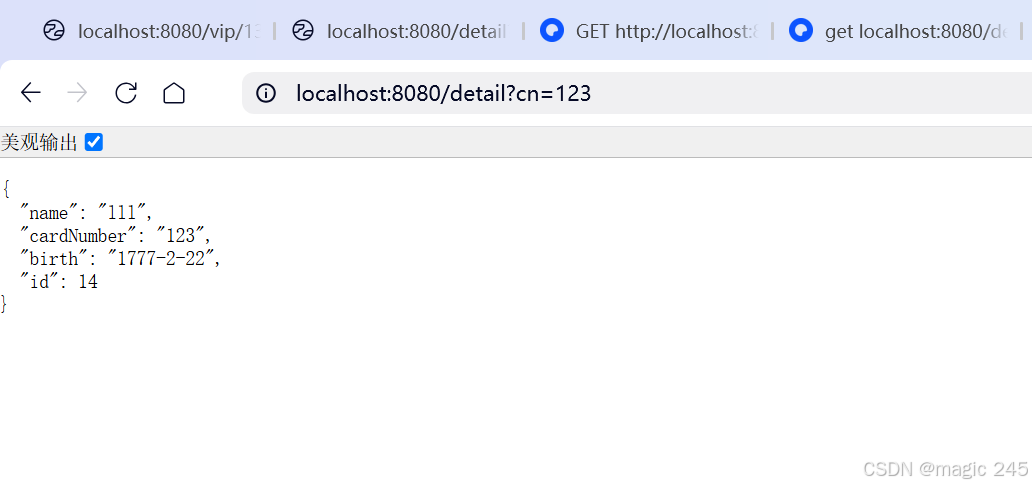
Lombok 的 @Data 注解失效,未生成 getter/setter 方法引发的HTTP 406 错误
HTTP 状态码 406 (Not Acceptable) 和 500 (Internal Server Error) 是两类完全不同的错误,它们的含义、原因和解决方法都有显著区别。以下是详细对比: 1. HTTP 406 (Not Acceptable) 含义: 客户端请求的内容类型与服务器支持的内容类型不匹…...

uni-app学习笔记二十二---使用vite.config.js全局导入常用依赖
在前面的练习中,每个页面需要使用ref,onShow等生命周期钩子函数时都需要像下面这样导入 import {onMounted, ref} from "vue" 如果不想每个页面都导入,需要使用node.js命令npm安装unplugin-auto-import npm install unplugin-au…...

代理篇12|深入理解 Vite中的Proxy接口代理配置
在前端开发中,常常会遇到 跨域请求接口 的情况。为了解决这个问题,Vite 和 Webpack 都提供了 proxy 代理功能,用于将本地开发请求转发到后端服务器。 什么是代理(proxy)? 代理是在开发过程中,前端项目通过开发服务器,将指定的请求“转发”到真实的后端服务器,从而绕…...
论文笔记——相干体技术在裂缝预测中的应用研究
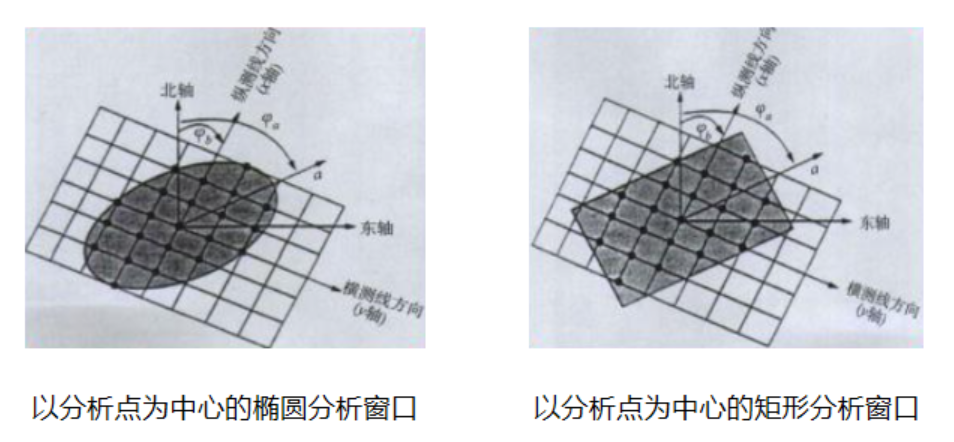
目录 相关地震知识补充地震数据的认识地震几何属性 相干体算法定义基本原理第一代相干体技术:基于互相关的相干体技术(Correlation)第二代相干体技术:基于相似的相干体技术(Semblance)基于多道相似的相干体…...
使用LangGraph和LangSmith构建多智能体人工智能系统
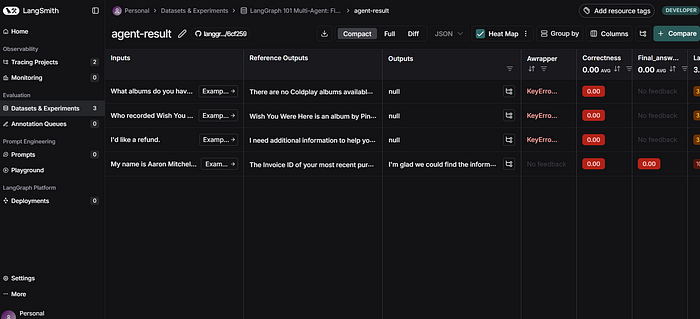
现在,通过组合几个较小的子智能体来创建一个强大的人工智能智能体正成为一种趋势。但这也带来了一些挑战,比如减少幻觉、管理对话流程、在测试期间留意智能体的工作方式、允许人工介入以及评估其性能。你需要进行大量的反复试验。 在这篇博客〔原作者&a…...

MySQL JOIN 表过多的优化思路
当 MySQL 查询涉及大量表 JOIN 时,性能会显著下降。以下是优化思路和简易实现方法: 一、核心优化思路 减少 JOIN 数量 数据冗余:添加必要的冗余字段(如订单表直接存储用户名)合并表:将频繁关联的小表合并成…...
宇树科技,改名了!
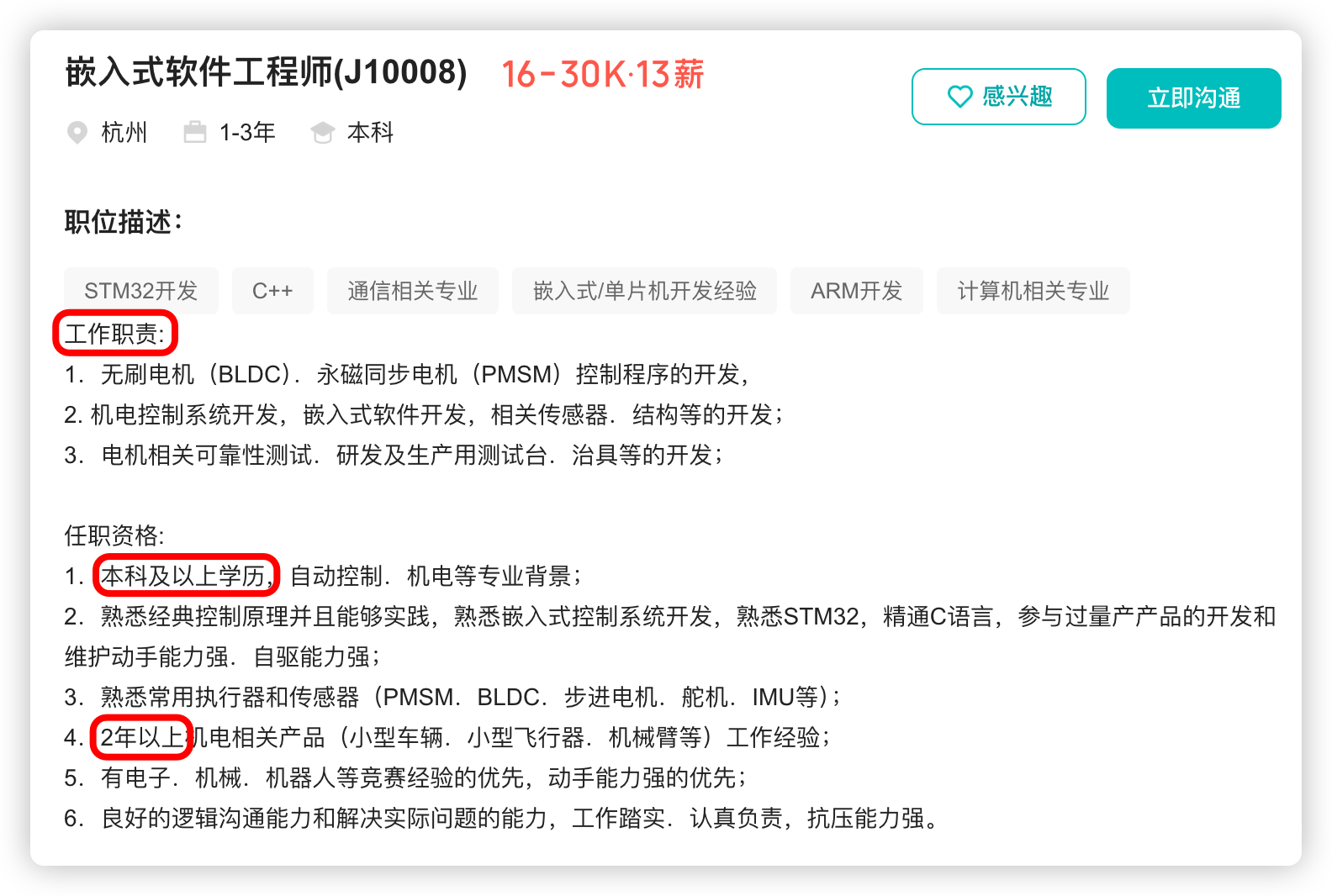
提到国内具身智能和机器人领域的代表企业,那宇树科技(Unitree)必须名列其榜。 最近,宇树科技的一项新变动消息在业界引发了不少关注和讨论,即: 宇树向其合作伙伴发布了一封公司名称变更函称,因…...

探索Selenium:自动化测试的神奇钥匙
目录 一、Selenium 是什么1.1 定义与概念1.2 发展历程1.3 功能概述 二、Selenium 工作原理剖析2.1 架构组成2.2 工作流程2.3 通信机制 三、Selenium 的优势3.1 跨浏览器与平台支持3.2 丰富的语言支持3.3 强大的社区支持 四、Selenium 的应用场景4.1 Web 应用自动化测试4.2 数据…...