
Day22
Day22
一,生产者消费者模型
1.1,单个生产者单个消费者
public class Test01 {/*** 知识点:生产者消费者模型 - 单个生产者单个消费者* * 分析:* 		产品类 - Phone:属性(brand,price)* 		生产者线程 - Producer* 		消费者线程 - Consumer* 最终的目的:生产一个、消费一个* * 步骤:* 		1.多个线程(生产者线程、消费者线程)操作同一个资源(产品类的对象)* 		2.多个产品之间来回切换(华为 <--> 小米)* 			null -- 0.0* 			华为 -- 0.0* 			小米 -- 3999* 			华为 -- 1999* 			脏数据的解决思路:加锁* 		3.生产一个消费一个* 			*/public static void main(String[] args) {//brand - null//price - 0.0Phone phone = new Phone();Producer p = new Producer(phone);Consumer c = new Consumer(phone);p.start();c.start();}
}
//产品类
public class Phone {private String brand;private double price;private boolean store;public Phone() {}public Phone(String brand, double price) {this.brand = brand;this.price = price;}public String getBrand() {return brand;}public void setBrand(String brand) {this.brand = brand;}public double getPrice() {return price;}public void setPrice(double price) {this.price = price;}public boolean isStore() {return store;}public void setStore(boolean store) {this.store = store;}@Overridepublic String toString() {return "Phone [brand=" + brand + ", price=" + price + "]";}
}
//生产者线程
public class Producer extends Thread{private Phone phone;public Producer(Phone phone) {this.phone = phone;}@Overridepublic void run() {boolean flag = true;while(true){synchronized(phone){if(phone.isStore()){//有库存//等待//1.将当前线程记录在对象监视器中(记录当前线程进入到阻塞状态)//2.释放锁资源(解锁)//3.当前线程进入到阻塞状态try {phone.wait();} catch (InterruptedException e) {e.printStackTrace();}}if(flag){phone.setBrand("华为");phone.setPrice(3999);}else{phone.setBrand("小米");phone.setPrice(1999);}flag = !flag;phone.setStore(true);//唤醒:唤醒的是对象监视器中随机一个等待的线程,唤醒的线程进入到就绪态phone.notify();}}}
}
//消费者线程
public class Consumer extends Thread{private Phone phone;public Consumer(Phone phone) {this.phone = phone;}@Overridepublic void run() {while(true){synchronized(phone){if(!phone.isStore()){//没有库存try {//等待://1.将当前线程记录在对象监视器中(记录当前线程进入到阻塞状态)//2.释放锁资源(解锁)//3.当前线程进入到阻塞状态phone.wait();} catch (InterruptedException e) {e.printStackTrace();}}System.out.println(phone.getBrand() + " -- " + phone.getPrice());phone.setStore(false);//唤醒:唤醒的是对象监视器中随机一个等待的线程,唤醒的线程进入到就绪态phone.notify();}}}
}
1.2,多个生产者多个消费者
public class Test01 {/*** 知识点:生产者消费者模型 - 多个生产者多个消费者* * 分析:* 		产品类 - Phone:属性(brand,price)* 		生产者线程 - Producer* 		消费者线程 - Consumer* 最终的目的:生产一个、消费一个* * 步骤:* 		1.多个线程(生产者线程、消费者线程)操作同一个资源(产品类的对象)* 		2.多个产品之间来回切换(华为 <--> 小米)* 			null -- 0.0* 			华为 -- 0.0* 			小米 -- 3999* 			华为 -- 1999* 			脏数据的解决思路:加锁* 		3.生产一个消费一个* 			*/public static void main(String[] args) {//brand - null//price - 0.0Phone phone = new Phone();Producer p1 = new Producer(phone);Producer p2 = new Producer(phone);Consumer c1 = new Consumer(phone);Consumer c2 = new Consumer(phone);p1.start();p2.start();c1.start();c2.start();}
}
//生产者线程
public class Producer extends Thread{private Phone phone;public Producer(Phone phone) {this.phone = phone;}@Overridepublic void run() {boolean flag = true;while(true){synchronized(phone){while(phone.isStore()){//有库存//等待//1.将当前线程记录在对象监视器中(记录当前线程进入到阻塞状态)//2.释放锁资源(解锁)//3.当前线程进入到阻塞状态try {phone.wait();} catch (InterruptedException e) {e.printStackTrace();}}if(flag){phone.setBrand("华为");phone.setPrice(3999);}else{phone.setBrand("小米");phone.setPrice(1999);}flag = !flag;phone.setStore(true);//唤醒:唤醒对象监视器中所有的线程phone.notifyAll();}}}
}
//产品类
public class Phone {private String brand;private double price;private boolean store;public Phone() {}public Phone(String brand, double price) {this.brand = brand;this.price = price;}public String getBrand() {return brand;}public void setBrand(String brand) {this.brand = brand;}public double getPrice() {return price;}public void setPrice(double price) {this.price = price;}public boolean isStore() {return store;}public void setStore(boolean store) {this.store = store;}@Overridepublic String toString() {return "Phone [brand=" + brand + ", price=" + price + "]";}
}
//消费者线程
public class Consumer extends Thread{private Phone phone;public Consumer(Phone phone) {this.phone = phone;}@Overridepublic void run() {while(true){synchronized(phone){while(!phone.isStore()){//没有库存try {//等待://1.将当前线程记录在对象监视器中(记录当前线程进入到阻塞状态)//2.释放锁资源(解锁)//3.当前线程进入到阻塞状态phone.wait();} catch (InterruptedException e) {e.printStackTrace();}}System.out.println(phone.getBrand() + " -- " + phone.getPrice());phone.setStore(false);//唤醒:唤醒对象监视器中所有的线程phone.notifyAll();}}}
}
区别就是只有一个生产者和消费者的时候不需要一直去判断有没有库存,因为生产了才能消费,消费了才生产
二,仓储模型
2.1一个生产者一个消费者
public class Test01 {/*** 知识点:仓储模型 - 一个生产者一个消费者* * 分析:* 		产品类 - Cake(brand、price、datetime)* 		仓库类 - Store(maxCapacity、curCapacity、list)* 		生产者线程 - Producer* 		消费者线程 - Consumer* 		注意:先生产的先卖出 -- 队列模式* * 经验:对象监视器如何选择?* 		锁对象* */public static void main(String[] args) {Store store = new Store();Producer p = new Producer(store);Consumer c = new Consumer(store);p.start();c.start();}
}
import java.util.LinkedList;
//仓库类
public class Store {private static final int DEFAULT_INIT_CAPACITY = 20;private int maxCapacity;private int curCapacity;private LinkedList<Cake> list;public Store() {maxCapacity = DEFAULT_INIT_CAPACITY;list = new LinkedList<>();}public Store(int maxCapacity) {this.maxCapacity = maxCapacity;list = new LinkedList<>();}//入库public synchronized void push(Cake cake){if(curCapacity >= maxCapacity){try {this.wait();} catch (InterruptedException e) {e.printStackTrace();}}list.add(cake);curCapacity++;System.out.println("入库,当前库存为:" + curCapacity);this.notify();}//出库public synchronized Cake pop(){if(curCapacity <= 0){try {this.wait();} catch (InterruptedException e) {e.printStackTrace();}}Cake cake = list.removeFirst();curCapacity--;System.out.println("出库,当前的库存为:" + curCapacity + ",卖出的产品是:" + cake);this.notify();return cake;}}
//生产与存储对象类
public class Cake {private String brand;private double price;private String datetime;public Cake() {}public Cake(String brand, double price, String datetime) {this.brand = brand;this.price = price;this.datetime = datetime;}public String getBrand() {return brand;}public void setBrand(String brand) {this.brand = brand;}public double getPrice() {return price;}public void setPrice(double price) {this.price = price;}public String getDatetime() {return datetime;}public void setDatetime(String datetime) {this.datetime = datetime;}@Overridepublic String toString() {return "Cake [brand=" + brand + ", price=" + price + ", datetime=" + datetime + "]";}
}
import java.time.LocalDateTime;
//生产者类
public class Producer extends Thread{private Store store;public Producer(Store store) {this.store = store;}@Overridepublic void run() {while(true){Cake cake = new Cake("桃李蛋糕", 2.5, LocalDateTime.now().toString());store.push(cake);}}
}
//消费者类
public class Consumer extends Thread{private Store store;public Consumer(Store store) {this.store = store;}@Overridepublic void run() {while(true){store.pop();}}
}
2.2,多个生产者多个消费者
只需把仓库类的出库入库的判断改为while循环即测试类多几个生产,消费线程,其他同上
import java.util.LinkedList;public class Store {private static final int DEFAULT_INIT_CAPACITY = 20;private int maxCapacity;private int curCapacity;private LinkedList<Cake> list;public Store() {maxCapacity = DEFAULT_INIT_CAPACITY;list = new LinkedList<>();}public Store(int maxCapacity) {this.maxCapacity = maxCapacity;list = new LinkedList<>();}//入库public synchronized void push(Cake cake){while(curCapacity >= maxCapacity){try {this.wait();} catch (InterruptedException e) {e.printStackTrace();}}list.add(cake);curCapacity++;System.out.println("入库,当前库存为:" + curCapacity);this.notifyAll();}//出库public synchronized Cake pop(){while(curCapacity <= 0){try {this.wait();} catch (InterruptedException e) {e.printStackTrace();}}Cake cake = list.removeFirst();curCapacity--;System.out.println("出库,当前的库存为:" + curCapacity + ",卖出的产品是:" + cake);this.notifyAll();return cake;}
}
//测试类
public class Test01 {/*** 知识点:仓储模型 - 多个生产者多个消费者* * 分析:* 		产品类 - Cake(brand、price、datetime)* 		仓库类 - Store(maxCapacity、curCapacity、list)* 		生产者线程 - Producer* 		消费者线程 - Consumer* 		注意:先生产的先卖出 -- 队列模式* * 经验:对象监视器如何选择?* 		锁对象* */public static void main(String[] args) {Store store = new Store();Producer p1 = new Producer(store);Producer p2 = new Producer(store);Consumer c1 = new Consumer(store);Consumer c2 = new Consumer(store);p1.start();p2.start();c1.start();c2.start();}
}
三,线程池
//任务类
public class Task implements Runnable{private int num;public Task(int num) {this.num = num;}@Overridepublic void run() {System.out.println(Thread.currentThread().getName() + "去执行任务" + num);}}
1,创建单个线程的线程池
import java.util.concurrent.ExecutorService;
import java.util.concurrent.Executors;public class Test01 {/*** 知识点:使用JDK1.8自带的线程池*/public static void main(String[] args) {//创建单个线程的线程池ExecutorService pool = Executors.newSingleThreadExecutor();for (int i = 1; i <= 100; i++) {Task task = new Task(i);//将任务提交给线程池pool.execute(task);}//关闭线程池pool.shutdown();}
}
2,创建指定线程个数的线程池
import java.util.concurrent.ExecutorService;
import java.util.concurrent.Executors;public class Test02 {/*** 知识点:使用JDK1.8自带的线程池*/public static void main(String[] args) {//创建指定线程个数的线程池ExecutorService pool = Executors.newFixedThreadPool(3);for (int i = 1; i <= 100; i++) {Task task = new Task(i);//将任务提交给线程池pool.execute(task);}//关闭线程池pool.shutdown();}
}
3,创建可缓存的线程池
import java.util.concurrent.ExecutorService;
import java.util.concurrent.Executors;public class Test03 {/*** 知识点:使用JDK1.8自带的线程池*/public static void main(String[] args) {//创建可缓存的线程池(原本线程池中没有线程,有任务就创建线程,60秒工作的线程任务是闲置线程,就回收)ExecutorService pool = Executors.newCachedThreadPool();for (int i = 1; i <= 100; i++) {Task task = new Task(i);//将任务提交给线程池pool.execute(task);}//关闭线程池pool.shutdown();}
}
4,创建延迟任务的线程池
import java.util.concurrent.Executors;
import java.util.concurrent.ScheduledExecutorService;
import java.util.concurrent.TimeUnit;public class Test04 {/*** 知识点:使用JDK1.8自带的线程池*/public static void main(String[] args) throws InterruptedException {//创建延迟任务的线程池ScheduledExecutorService pool = Executors.newScheduledThreadPool(3);for (int i = 1; i <= 100; i++) {Task task = new Task(i);//提交任务,设置延迟时间pool.schedule(task, 5, TimeUnit.SECONDS);}//关闭线程池pool.shutdown();}
}
四,自定义线程
import java.util.concurrent.ArrayBlockingQueue;
import java.util.concurrent.RejectedExecutionHandler;
import java.util.concurrent.ThreadFactory;
import java.util.concurrent.ThreadPoolExecutor;
import java.util.concurrent.TimeUnit;public class Test01 {/*** 知识点:自定义线程池*/public static void main(String[] args) {//自定义线程池ThreadPoolExecutor pool = new ThreadPoolExecutor(5, //核心线程数20, //最大线程数60, //闲置时间TimeUnit.SECONDS, //时间单位new ArrayBlockingQueue<>(30), //任务队列 - 有界队列new ThreadFactory() {//自定义线程工程int num = 1;@Overridepublic Thread newThread(Runnable r) {Thread t = new Thread(r);t.setName("最牛逼的线程" + num);t.setPriority(Thread.MAX_PRIORITY);num++;return t;}}, new RejectedExecutionHandler() {//自定义拒绝策略@Overridepublic void rejectedExecution(Runnable r, ThreadPoolExecutor executor) {System.out.println("傻逼,你提交的任务太快了~~~");}});for (int i = 1; i <= 100; i++) {Task task = new Task(i);//将任务提交给线程池pool.execute(task);}//闲置时间到后,会销毁核心线程的方法//注意:如果连核心线程都销毁了,何谈线程的复用率?pool.allowCoreThreadTimeOut(true);pool.shutdown();}
}
public class Task implements Runnable{private int num;public Task(int num) {this.num = num;}@Overridepublic void run() {System.out.println(Thread.currentThread().getName() + "去执行任务" + num);}
}
.
import java.util.concurrent.ArrayBlockingQueue;
import java.util.concurrent.TimeUnit;public class Test01 {/*** 知识点:自定义线程池*/public static void main(String[] args) {MyThreadPool pool = new MyThreadPool(5, 20, 60, TimeUnit.SECONDS, new ArrayBlockingQueue<>(30));for (int i = 1; i <= 100; i++) {Task task = new Task(i);//将任务提交给线程池pool.execute(task);}pool.shutdown();}
}
import java.util.concurrent.BlockingQueue;
import java.util.concurrent.RejectedExecutionHandler;
import java.util.concurrent.ThreadFactory;
import java.util.concurrent.ThreadPoolExecutor;
import java.util.concurrent.TimeUnit;public class MyThreadPool extends ThreadPoolExecutor{private static final MyThreadFactory myThreadFactory = new MyThreadFactory();private static final MyRejectedExecutionHandler myRejectedExecutionHandler = new MyRejectedExecutionHandler();public MyThreadPool(int corePoolSize, int maximumPoolSize, long keepAliveTime, TimeUnit unit,BlockingQueue<Runnable> workQueue) {this(corePoolSize, maximumPoolSize, keepAliveTime, unit, workQueue, myThreadFactory, myRejectedExecutionHandler);}public MyThreadPool(int corePoolSize, int maximumPoolSize, long keepAliveTime, TimeUnit unit,BlockingQueue<Runnable> workQueue, ThreadFactory threadFactory, RejectedExecutionHandler handler) {super(corePoolSize, maximumPoolSize, keepAliveTime, unit, workQueue, threadFactory, handler);}//自定义拒绝策略private static class MyRejectedExecutionHandler implements RejectedExecutionHandler{@Overridepublic void rejectedExecution(Runnable r, ThreadPoolExecutor executor) {System.out.println("哎呀,你提交的任务太快了~~~");}}//自定义线程工程private static class MyThreadFactory implements ThreadFactory{int num = 1;@Overridepublic Thread newThread(Runnable r) {Thread t = new Thread(r);t.setName("最厉害的线程" + num);t.setPriority(Thread.MAX_PRIORITY);num++;return t;}}}
五,死锁
小结:
1.死锁不会报错,程序会一直抢资源2.尽可能不要锁嵌套
public class Test01 {/*** 知识点:死锁* */public static void main(String[] args) {new Thread(new Runnable() {@Overridepublic void run() {synchronized (KuaiZi.a) {try {Thread.sleep(1);} catch (InterruptedException e) {e.printStackTrace();}synchronized (KuaiZi.b) {System.out.println("哲学家1吃饭饭");}}}}).start();new Thread(new Runnable() {@Overridepublic void run() {synchronized (KuaiZi.b) {try {Thread.sleep(1);} catch (InterruptedException e) {e.printStackTrace();}synchronized (KuaiZi.a) {System.out.println("哲学家2吃饭饭");}}}}).start();}
}class KuaiZi{public static Object a = new Object();public static Object b = new Object();
}
六,带返回值得任务类(补Day21)
//注意MyThreadPool是我上面自写的线程池
import java.util.concurrent.ArrayBlockingQueue;
import java.util.concurrent.ExecutionException;
import java.util.concurrent.Future;
import java.util.concurrent.TimeUnit;
//导入你自己路径上的
import com.qf.thread_pool_03.MyThreadPool;public class Test01 {/*** 需求:计算任务,一个包含了2万个整数的数组,分拆了多个线程来进行并行计算,最后汇总出计算的结果。* * 使用带有返回值的任务类去解决该需求
s	 */public static void main(String[] args) throws InterruptedException, ExecutionException {//创建数组int[] arr = new int[20000];//初始化数组中的元素for (int i = 0; i < arr.length; i++) {arr[i] = i+1;}//创建线程池MyThreadPool pool = new MyThreadPool(4, 4, 60, TimeUnit.SECONDS, new ArrayBlockingQueue<>(30));//创建任务Task task1 = new Task(arr, 0, 5000);Task task2 = new Task(arr, 5000, 10000);Task task3 = new Task(arr, 10000, 15000);Task task4 = new Task(arr, 15000, 20000);//提交任务,返回Future,任务的返回值就在Future里Future<Integer> future1 = pool.submit(task1);Future<Integer> future2 = pool.submit(task2);Future<Integer> future3 = pool.submit(task3);Future<Integer> future4 = pool.submit(task4);//合并计算System.out.println(future1.get() + future2.get() + future3.get() + future4.get());pool.shutdown();}
}
import java.util.concurrent.Callable;//带有返回值的任务类
public class Task implements Callable<Integer>{private int[] arr;private int startIndex;private int endIndex;public Task(int[] arr, int startIndex, int endIndex) {this.arr = arr;this.startIndex = startIndex;this.endIndex = endIndex;}@Overridepublic Integer call() throws Exception {int sum = 0;for (int i = startIndex; i < endIndex; i++) {sum += arr[i];}return sum;}
}
相关文章:

Day22
Day22 一,生产者消费者模型 1.1,单个生产者单个消费者 public class Test01 {/*** 知识点:生产者消费者模型 - 单个生产者单个消费者* * 分析:* 产品类 - Phone:属性(brand,price)* 生产者线程 - Producer* 消费者线程 - Consumer* …...
)
Windows下linux 子系统 WSL2怎样使用usb串口(USBIPD-win4.0.0)
Windows下linux 子系统 WSL2怎样使用usb串口(USBIPD-win4.0.0) 一、widows安装二、ubuntu安装三、widows配置四、wsl配置 一、widows安装 https://github.com/dorssel/usbipd-win 直接下载最新版本的msi文件安装 二、ubuntu安装 sudo apt install lin…...

飞腾Ubantu22.04.3安装OpenNebula测试
1.概述 因OpenneBula官方镜像源只有AMD架构的镜像包不存在ARM的镜像包,借此用源码编译进行测试。 2.官网github地址 下载解压存放在服务器上: https://github.com/OpenNebula/minione/blob/master文件目录: 3.安装依赖包 sudo apt -y …...
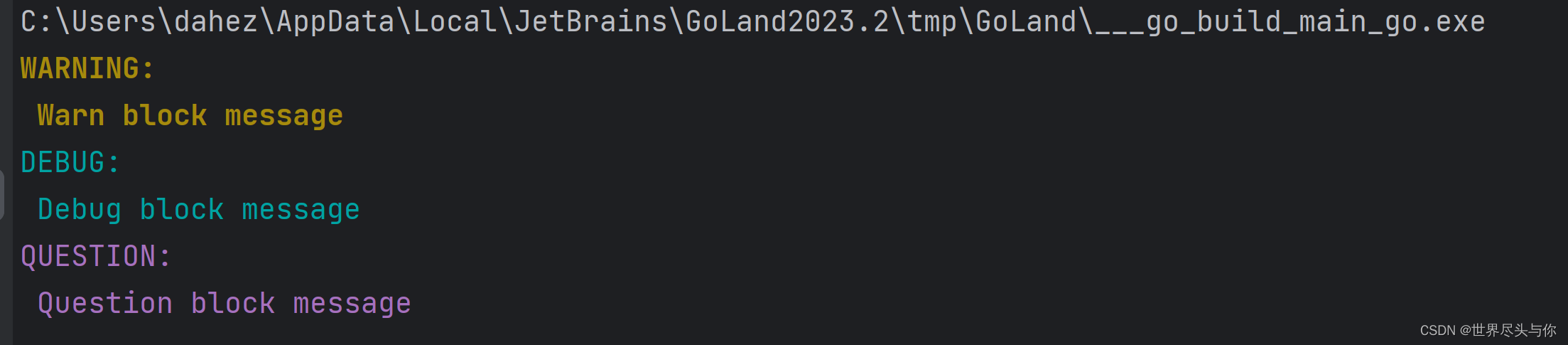
gookit/color - Go语言命令行色彩使用库教程
gookit/color - Go语言命令行色彩使用库教程 1.安装2.基础颜色(16-color)3.256色彩/RGB风格 1.安装 go get github.com/gookit/color2.基础颜色(16-color) 提供通用的API方法:Print Printf Println Sprint Sprintf 1、例如: color.Yellow.Println(&q…...

python弹奏《起风了》
代码是很大的! 其实就是python用ctypes调用Win API import ctypes import threading import time winmm = ctypes.windll.winmmclass Scale:Rest = 0C8 = 108B7 = 107A7s = 106A7 = 105G7s = 104G7 = 103F7s = 102F7 = 101E7 = 100D7s = 99D7 = 98C7s = 97C7 = 96B6 = 95A6s…...

Linux---all
Linux常用命令: Linux常用命令-CSDN博客 Linux命令大全(超详细版)_linux命令行大全-CSDN博客Linux常用命令大全(非常全面)-CSDN博客Linux 命令大全(看这一篇就足够)_linux命令-CSDN博客Linux常用命令大全——赶紧收藏…...

前端中级算法题
前端中级算法题 反转字符串 编写一个函数,接受一个字符串作为输入,并返回反转后的字符串。 示例: function reverseString(str) {return str.split().reverse().join(); }reverseString(hello); // 输出: olleh 找出数组中的最大值 编写一个函…...
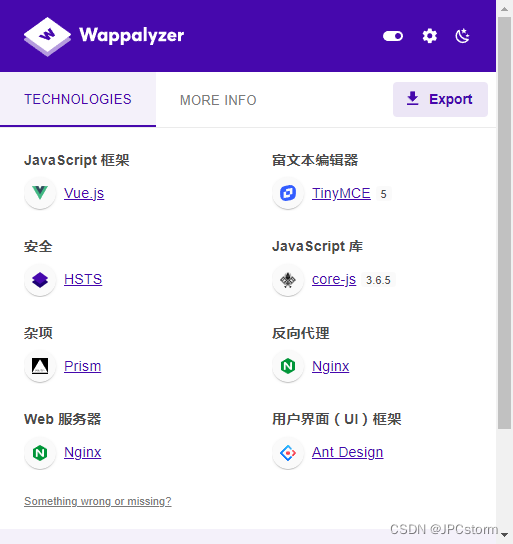
Ant Design Vue 编译后的网页特点是什么,怎么确认他是用的前端 Ant Design Vue 技术栈的呢?
Ant Design Vue 是一个前端 UI 框架,使用 Vue.js 构建。它包含了大量的预设样式和组件,如按钮、表单、表格等,可以帮助开发者快速构建出优雅且功能丰富的网页。但是,要确定一个编译后的网页是否使用了 Ant Design Vue,…...

python | PYTHON正则表达式
操作符说明实例.表示任何单个字符[]字符集,对单个字符给出取值范围[abc]表示a、b、c,[a-z]表示a到z单个字符[^ ]非字符集,对单个字符给出排除范围[^abc]表示非a或b或c的单个字符*前一个字符0次或无限次扩充abc* 表示ab,abc&#x…...
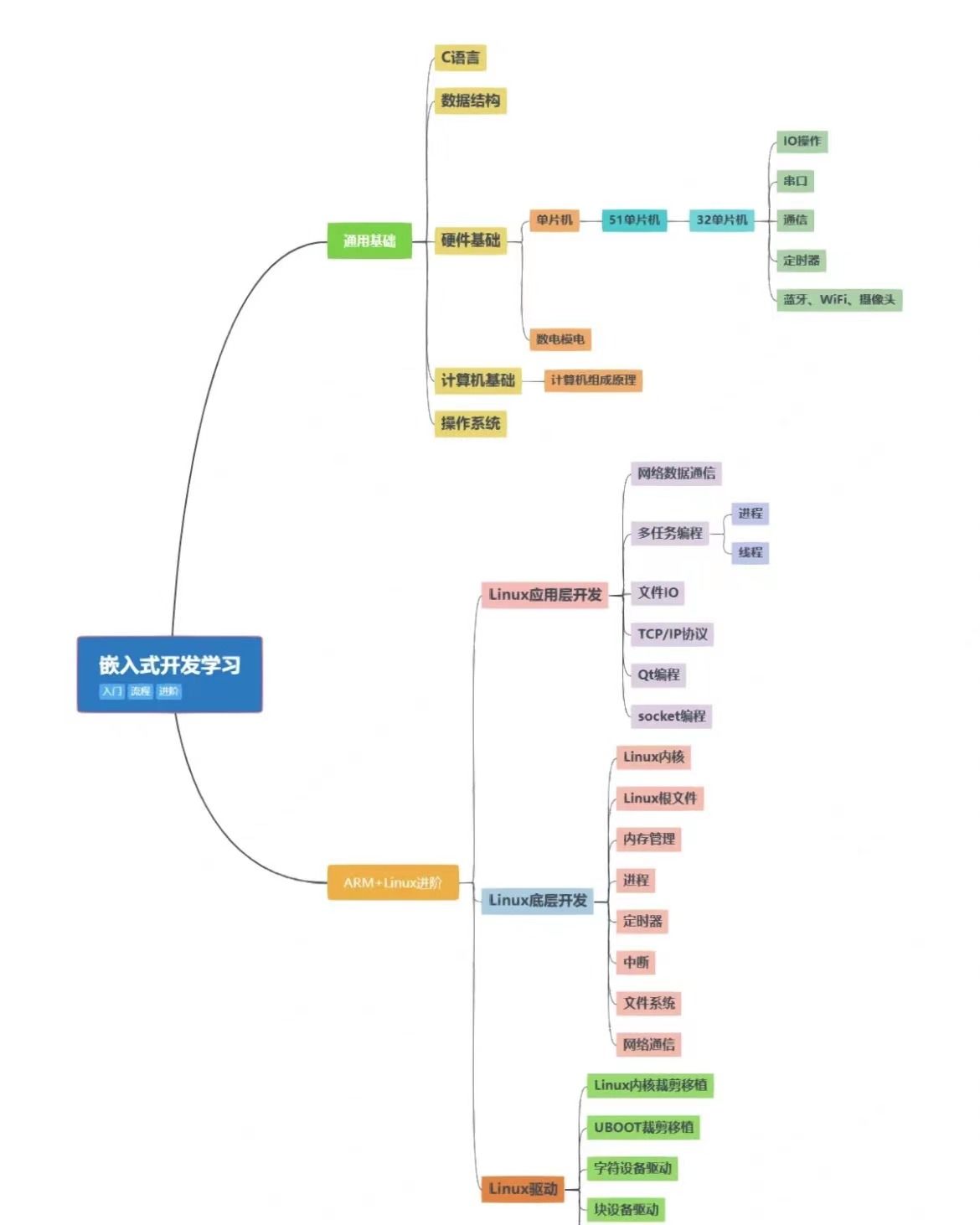
为什么大学c语言课不顺便教一下Linux,Makefile
为什么大学c语言课不顺便教一下Linux,Makefile,git,gdb等配套工具链呢? 在开始前我有一些资料,是我根据自己从业十年经验,熬夜搞了几个通宵,精心整理了一份「Linux的资料从专业入门到高级教程工具包」&…...

Go后端开发 -- main函数 变量 常量 函数
Go后端开发 – main函数 & 变量 & 常量 & 函数 文章目录 Go后端开发 -- main函数 & 变量 & 常量 & 函数一、第一个main函数1.创建工程2.main函数解析 二、变量声明1.单变量声明2.多变量声明 三、常量1.常量的定义2.优雅的常量 iota 四、函数1.函数返回…...

2023/12/30 c++ work
定义一个Person类,私有成员int age,string &name,定义一个Stu类,包含私有成员double *score,写出两个类的构造函数、析构函数、拷贝构造和拷贝赋值函数,完成对Person的运算符重载(算术运算符、条件运算…...

ctfshow——文件上传
文章目录 文件上传思路web 151web 152web 153知识点解题 web 154web 155web 156web 157web 158web 159web160web 161 文件上传思路 web 151 打开页面显示:前台校验不可靠。说明这题是前端验证。 右键查看源代码,找到与上传点有关的前端代码:…...
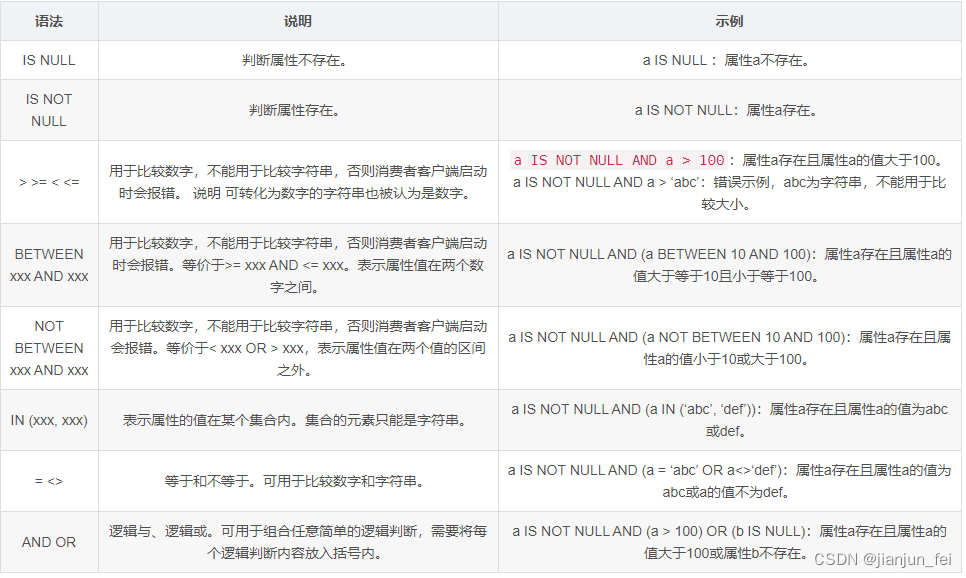
【RocketMQ每日一问】RocketMQ SQL92过滤用法以及原理?
1.生产端 public class SQLProducer {public static int count 10;public static String topic "xiao-zou-topic";public static void main(String[] args) {DefaultMQProducer producer MQUtils.createLocalProducer();IntStream.range(0, count).forEach(i -&g…...

Go语言中的包管理工具之Go Path的使用
GoLang 中常用的包管理的方式 1 )概述 常用的有三种 Go PathGo VendorGo Modules 2 )发展历程 早期go的包管理存在很大缺陷,甚至可以说没有官方统一的包管理工具 一方面官方在努力发布一些实验性的包管理工具。同时也出现了很多社区开发…...
 webview 可以在上层添加UI控件)
cocos creator(2.4.7版本) webview 可以在上层添加UI控件
实现原理:cocos本身在平台中属于view,所以可以把webview放在底层,以达到目标。 实现过程:参考 cocos creator(2.4.7版本) videoplayer 可以在上层添加UI控件() 需要增加以下过程: …...
2023 年四川省职业院校技能大赛“信息安全管理与评估”样题
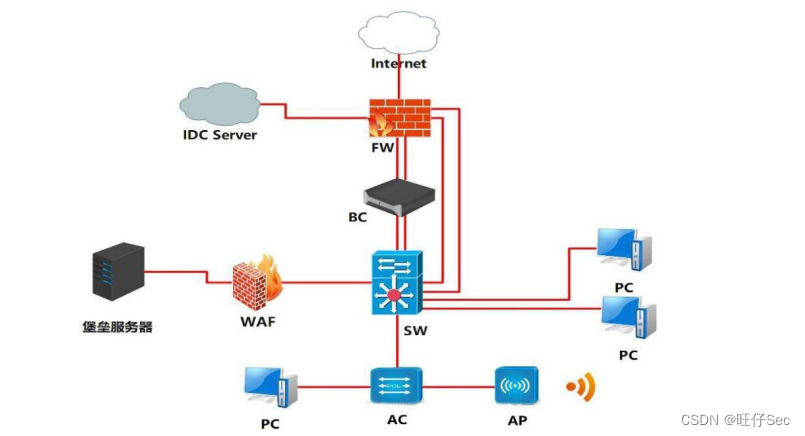
2023 年四川省职业院校技能大赛(高等职业教育) “信息安全管理与评估”样题 竞赛需要完成三个阶段的任务,分别完成三个模块,总分共计 1000分。三个模块内容和分值分别是: 第一阶段:模块一 网络平台搭建与设…...

ubuntu2204,mysql8.x安装
ubuntu 2204, MySQL8.x安装 sudo apt-get update sudo apt-get upgrade# 习惯性的先设置一下时区,这里我使用东八区 date -R # 若发现时间正常则无需设置tzselect# 依次选择 4 -> 10 -> 1 -> 1cp /usr/share/zoneinfo/Asia/Shanghai /etc/localtimedate -R# 同步时间…...

CG Magic分享云渲染和本地渲染之间的区别有什么?
无论是效果图渲染还是影视渲染,对于3D设计师来说都是常见的渲染方式就是云渲染和本地渲染。 本地电脑渲染是指将渲染任务分配给本地计算机进行处理,而云渲染是指将渲染任务上传至云端服务器进行处理。 对于一些初入行业的新手朋友来说,会在想…...
【算法与数据结构】763、LeetCode划分字母区间
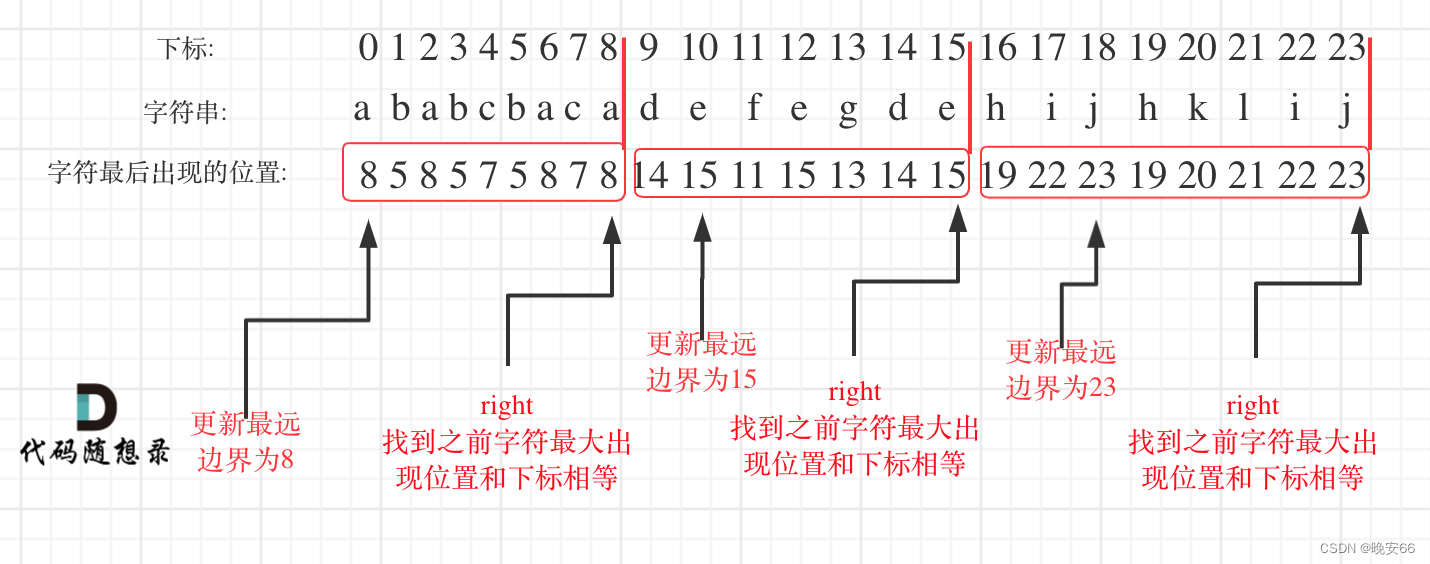
文章目录 一、题目二、解法三、完整代码 所有的LeetCode题解索引,可以看这篇文章——【算法和数据结构】LeetCode题解。 一、题目 二、解法 思路分析:本题要求为: 1.尽可能多的划分片段2.字母只能出现在一个片段中3.片段连接起来仍然是s&…...

synchronized 学习
学习源: https://www.bilibili.com/video/BV1aJ411V763?spm_id_from333.788.videopod.episodes&vd_source32e1c41a9370911ab06d12fbc36c4ebc 1.应用场景 不超卖,也要考虑性能问题(场景) 2.常见面试问题: sync出…...

使用VSCode开发Django指南
使用VSCode开发Django指南 一、概述 Django 是一个高级 Python 框架,专为快速、安全和可扩展的 Web 开发而设计。Django 包含对 URL 路由、页面模板和数据处理的丰富支持。 本文将创建一个简单的 Django 应用,其中包含三个使用通用基本模板的页面。在此…...
ardupilot 开发环境eclipse 中import 缺少C++
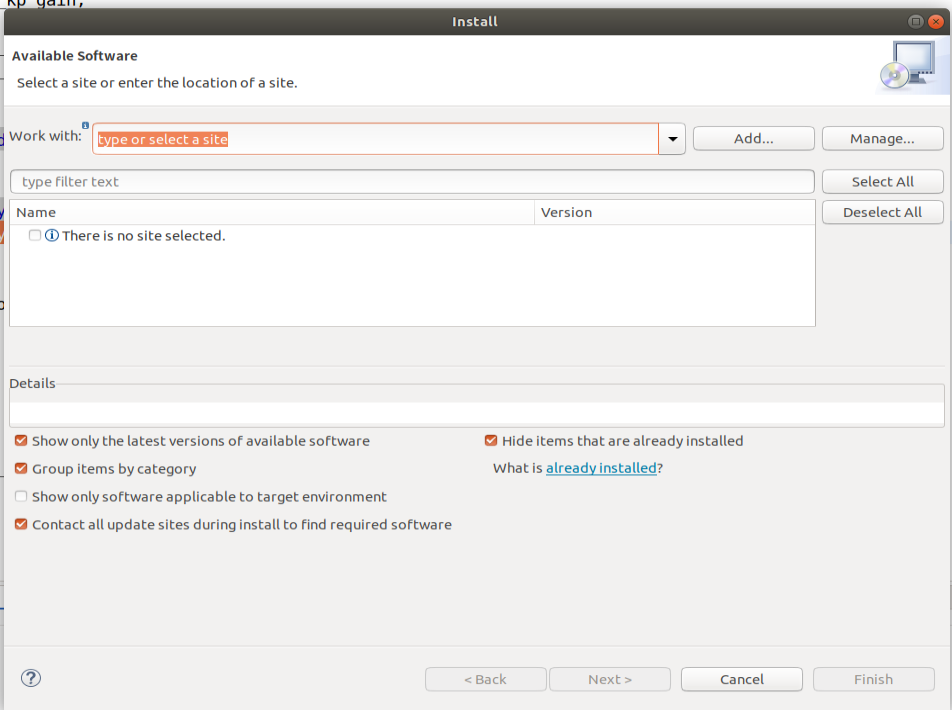
目录 文章目录 目录摘要1.修复过程摘要 本节主要解决ardupilot 开发环境eclipse 中import 缺少C++,无法导入ardupilot代码,会引起查看不方便的问题。如下图所示 1.修复过程 0.安装ubuntu 软件中自带的eclipse 1.打开eclipse—Help—install new software 2.在 Work with中…...
自然语言处理——Transformer
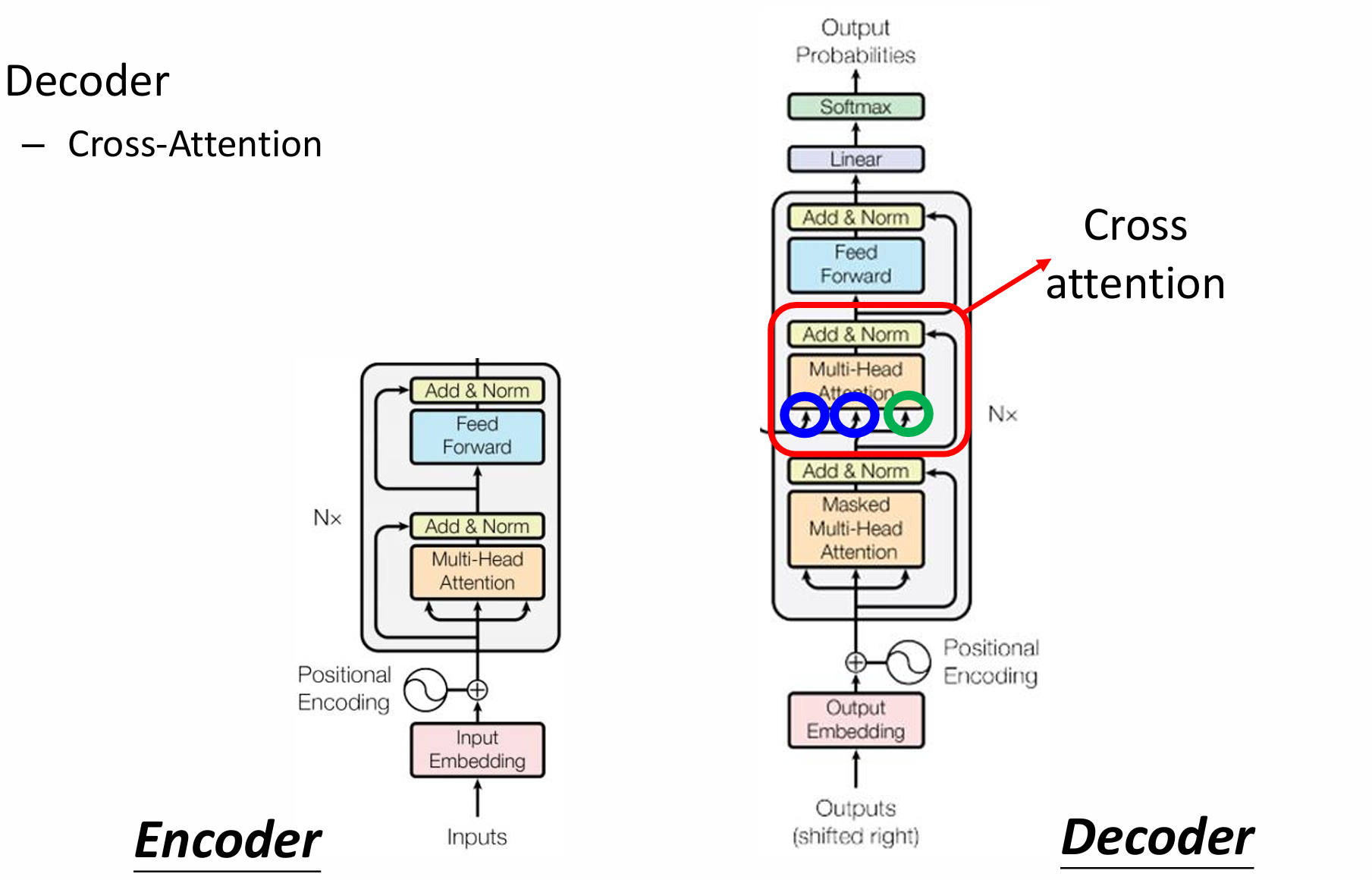
自然语言处理——Transformer 自注意力机制多头注意力机制Transformer 虽然循环神经网络可以对具有序列特性的数据非常有效,它能挖掘数据中的时序信息以及语义信息,但是它有一个很大的缺陷——很难并行化。 我们可以考虑用CNN来替代RNN,但是…...

在鸿蒙HarmonyOS 5中使用DevEco Studio实现录音机应用
1. 项目配置与权限设置 1.1 配置module.json5 {"module": {"requestPermissions": [{"name": "ohos.permission.MICROPHONE","reason": "录音需要麦克风权限"},{"name": "ohos.permission.WRITE…...
dify打造数据可视化图表
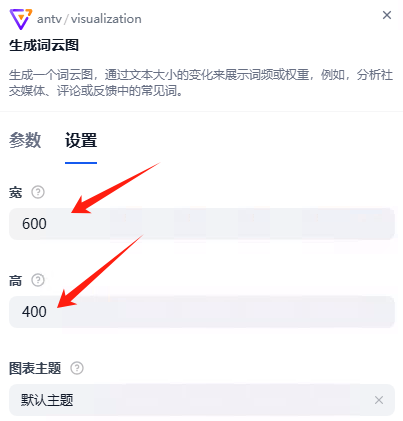
一、概述 在日常工作和学习中,我们经常需要和数据打交道。无论是分析报告、项目展示,还是简单的数据洞察,一个清晰直观的图表,往往能胜过千言万语。 一款能让数据可视化变得超级简单的 MCP Server,由蚂蚁集团 AntV 团队…...
关键领域软件测试的突围之路:如何破解安全与效率的平衡难题
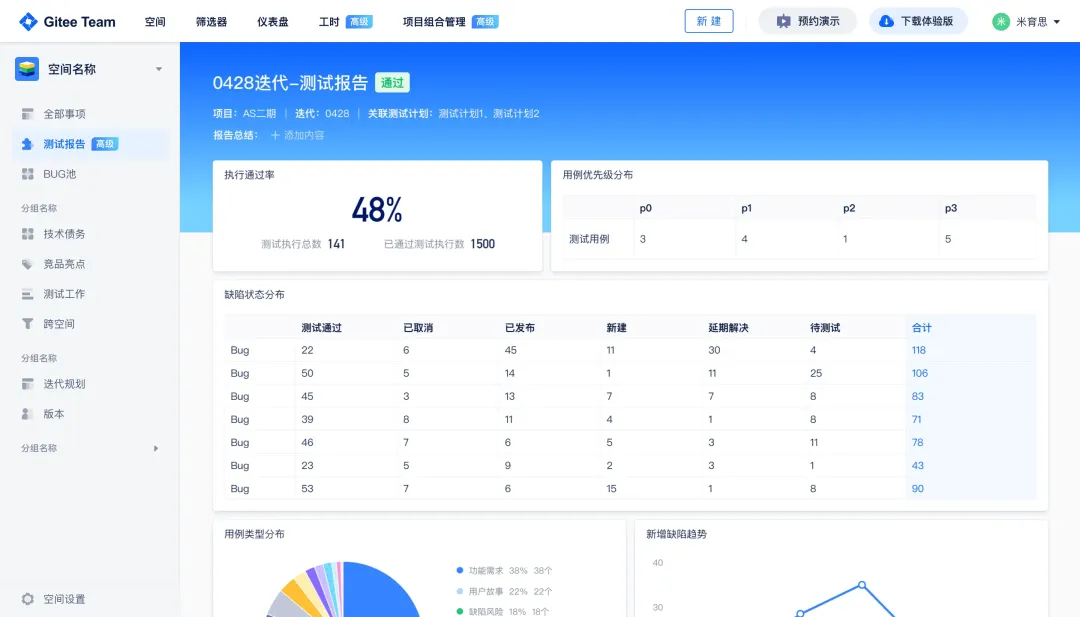
在数字化浪潮席卷全球的今天,软件系统已成为国家关键领域的核心战斗力。不同于普通商业软件,这些承载着国家安全使命的软件系统面临着前所未有的质量挑战——如何在确保绝对安全的前提下,实现高效测试与快速迭代?这一命题正考验着…...

招商蛇口 | 执笔CID,启幕低密生活新境
作为中国城市生长的力量,招商蛇口以“美好生活承载者”为使命,深耕全球111座城市,以央企担当匠造时代理想人居。从深圳湾的开拓基因到西安高新CID的战略落子,招商蛇口始终与城市发展同频共振,以建筑诠释对土地与生活的…...
Windows安装Miniconda
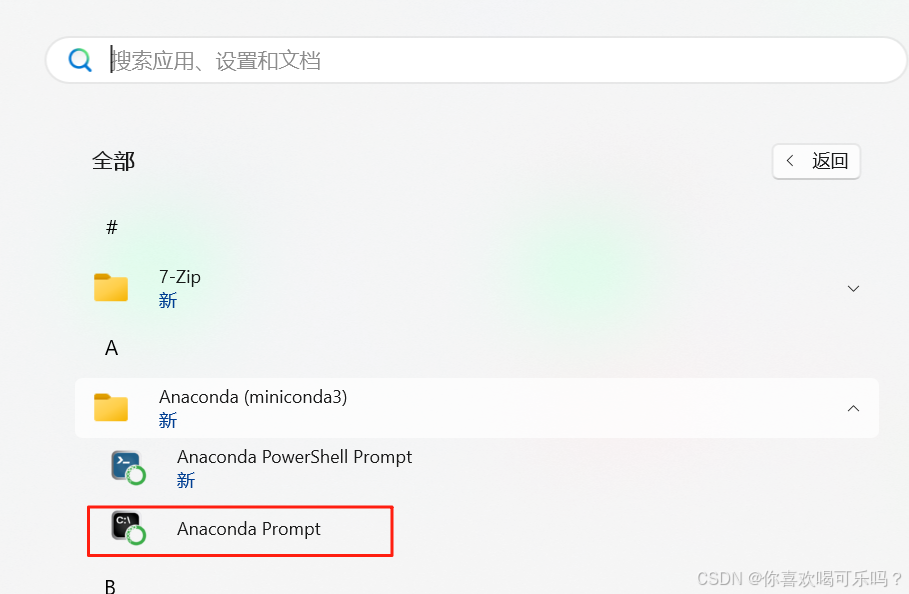
一、下载 https://www.anaconda.com/download/success 二、安装 三、配置镜像源 Anaconda/Miniconda pip 配置清华镜像源_anaconda配置清华源-CSDN博客 四、常用操作命令 Anaconda/Miniconda 基本操作命令_miniconda创建环境命令-CSDN博客...

多模态图像修复系统:基于深度学习的图片修复实现
多模态图像修复系统:基于深度学习的图片修复实现 1. 系统概述 本系统使用多模态大模型(Stable Diffusion Inpainting)实现图像修复功能,结合文本描述和图片输入,对指定区域进行内容修复。系统包含完整的数据处理、模型训练、推理部署流程。 import torch import numpy …...