
Netty 介绍、使用场景及案例
Netty 介绍、使用场景及案例

1、Netty 介绍
https://github.com/netty/netty
Netty是一个高性能、异步事件驱动的网络应用程序框架,用于快速开发可扩展的网络服务器和客户端。它是一个开源项目,最初由JBoss公司开发,现在由社区维护。Netty的设计和实现以处理高并发、低延迟、可靠性和灵活性为目标,因此非常适合构建各种网络应用,包括网络服务器、代理、聊天应用、在线游戏、实时通信和分布式系统等。
以下是一些Netty的主要特点和优势:
-
异步和事件驱动:Netty采用异步非阻塞的IO模型,允许处理大量并发连接而不会阻塞应用程序线程。它使用事件驱动的方式来处理网络事件,这使得编写高效的网络应用程序变得更容易。
-
高性能:Netty在性能方面表现出色,其底层的NIO实现充分利用了现代操作系统的异步IO特性,能够处理大量并发连接和数据传输,同时保持低延迟。
-
可扩展性:Netty提供了灵活的扩展机制,可以轻松地定制和扩展功能,以满足不同应用程序的需求。它支持各种协议和编解码器,如HTTP、WebSocket、TLS/SSL等。
-
安全性:Netty内置了对TLS/SSL的支持,可以加密网络连接以确保数据的安全传输。
-
多协议支持:Netty支持多种网络协议,包括TCP、UDP、HTTP、WebSocket等,使其适用于各种应用场景。
-
大型社区和活跃开发:Netty有一个庞大的开发社区,不断更新和改进框架,以适应新的技术和需求。
-
文档丰富:Netty提供了详细的文档和示例代码,使开发者可以快速上手并学习如何使用框架。
总之,Netty是一个强大的网络应用程序框架,适用于构建高性能、可扩展和可靠的网络应用。它在许多大型互联网公司和开源项目中被广泛使用,并且在处理网络通信方面具有广泛的应用。如果您需要开发网络应用程序或服务器,特别是需要处理大量并发连接和低延迟的场景,Netty是一个值得考虑的选择。
Netty 概述:
Netty是一个基于Java的高性能网络应用框架,它提供了简单而强大的网络编程接口,使得开发者可以轻松地构建各种类型的网络应用程序,包括服务器和客户端。Netty是一个开源项目,广泛用于构建可伸缩性、高性能、可维护性好的网络服务器和客户端应用。它提供了一组易于使用的API,用于处理底层的网络通信,包括TCP、UDP、HTTP等协议,以及各种编解码、数据传输和其他网络相关的功能。Netty的设计理念是简单而灵活,同时具备高性能和可扩展性。
2、原生 NIO 存在的问题
原生Java NIO(New I/O)提供了一种非阻塞I/O的编程方式,相对于传统的阻塞I/O(BIO)来说,它在某些情况下可以提供更好的性能,但也存在一些问题和挑战:
-
复杂性:NIO编程模型相对复杂,需要程序员处理底层的缓冲区、通道、选择器等概念,编写代码较为繁琐。
-
可读性:NIO代码通常相对难以理解和维护,因为需要处理很多底层细节,使得代码可读性较差。
-
错误处理:NIO中的错误处理相对复杂,需要处理各种异常和错误状态,容易引入bug。
-
编程难度:NIO编程难度较大,需要处理事件驱动的异步编程模型,容易出现并发问题。
-
性能限制:虽然NIO可以提供非阻塞I/O,但在高并发和高负载情况下,仍然存在性能瓶颈,需要合理的线程管理和资源调度。
Netty作为一个网络编程框架,通过对原生NIO的封装和优化,解决了上述问题,提供了更加简洁、高效、可维护的网络编程接口,使得开发者能够更容易地构建高性能的网络应用。它的异步、事件驱动、高性能和可扩展性等特点使得它在网络编程领域得到广泛应用。
3、Netty 线程模型
线程模型基本介绍:
-
传统阻塞I/O服务模型: 传统的阻塞I/O服务模型是最简单的,每个连接都需要一个独立的线程来处理,这导致了线程数量的快速增长,对系统资源的浪费。
-
Reactor模式: Reactor模式是一种基于事件驱动的模型,它通过一个事件循环来处理所有的I/O操作。它通常包括一个主线程(Reactor)和多个工作线程,主线程负责接收连接,工作线程负责处理I/O操作。
不同的线程模式对程序性能的影响:
不同的线程模式对程序性能有显著的影响。传统阻塞I/O服务模型通常会导致资源浪费和性能下降,因为每个连接都需要一个线程,线程的创建和销毁开销很大。
Reactor模式通过事件驱动的方式可以显著提高性能,特别是在高并发情况下。但是,Reactor模式的性能仍然受限于单个主线程的处理能力。
Netty线程模型:
Netty主要基于主从Reactor多线程模型做了一定的改进,其中主从Reactor多线程模型包括多个Reactor。以下是Netty线程模型的一些特点:
-
单Reactor单线程: Netty可以采用单Reactor单线程模型,这是一种简单的模型,适用于处理低并发的情况。主Reactor负责接收连接,子Reactor负责处理I/O操作。
-
单Reactor多线程: 这种模型使用多个工作线程来处理I/O操作,可以提高并发性能。主Reactor接收连接并将其分发给工作线程处理。
-
主从Reactor多线程: 这是Netty中最常用的模型,包括一个主Reactor和多个从Reactor,以及每个从Reactor对应的工作线程池。主Reactor负责接收连接,从Reactor负责处理I/O操作。这种模型可以在高并发情况下充分利用多核处理器,提高性能。
Netty线程模型的优越性:
Netty的线程模型的优越性在于其高度可扩展性和性能。通过采用主从Reactor多线程模型,Netty可以轻松地适应高并发的情况,同时充分利用多核处理器,提供出色的性能表现。此外,Netty还提供了异步事件处理和内存管理等高级功能,使得开发网络应用变得更加方便和高效。
4、案例:Netty TCP服务
它抽象出了两组线程池,即BossGroup和WorkerGroup,来处理不同的网络任务。
-
BossGroup和WorkerGroup都是NioEventLoopGroup类型,代表了事件循环组。每个NioEventLoopGroup包含多个NioEventLoop,每个NioEventLoop都是一个不断循环执行处理任务的线程。
-
BossGroup负责接收客户端的连接请求,它的主要工作是轮询监听accept事件,当有新的连接请求时,会处理该事件,并生成NioSocketChannel,然后将它注册到某个WorkerGroup的NioEventLoop上的Selector中。这个过程确保了每个连接的读写操作都会由WorkerGroup来处理。
-
WorkerGroup负责处理网络的读写操作,它的主要工作是轮询监听read和write事件,当有数据需要读写时,会处理对应的事件,即在NioSocketChannel上执行读写操作。此外,WorkerGroup也负责处理任务队列中的任务,这些任务通常是业务逻辑相关的任务。
-
每个BossGroup下的NioEventLoop循环执行的步骤包括轮询accept事件、处理accept事件建立连接、继续处理任务队列中的任务。
-
每个WorkerGroup下的NioEventLoop循环执行的步骤包括轮询read和write事件、处理I/O事件、处理任务队列中的任务。
-
在处理业务逻辑时,每个WorkerGroup的NioEventLoop会使用管道(pipeline)来管理不同的处理器(Handler)。管道中包含了通道(channel),通过管道可以获取到对应的通道,从而处理具体的业务逻辑。
通过BossGroup和WorkerGroup的组合,实现了高效的网络通信处理。BossGroup专门处理连接请求,WorkerGroup专门处理读写操作和业务逻辑,通过事件循环的方式,实现了高性能的网络编程。管道和处理器的使用也使得开发者能够方便地定制和扩展网络应用程序。
NettyServer
import io.netty.bootstrap.ServerBootstrap;
import io.netty.channel.*;
import io.netty.channel.nio.NioEventLoopGroup;
import io.netty.channel.socket.SocketChannel;
import io.netty.channel.socket.nio.NioServerSocketChannel;public class NettyServer {public static void main(String[] args) throws Exception {// 创建BossGroup和WorkerGroup// 说明// 1. 创建两个线程组,bossGroup和workerGroup// 2. bossGroup只是处理连接请求,真正的和客户端业务处理,会交给workerGroup完成// 3. 两个都是无限循环// 4. bossGroup和workerGroup含有的子线程(NioEventLoop)的个数//    默认实际CPU核数 * 2EventLoopGroup bossGroup = new NioEventLoopGroup(1);EventLoopGroup workerGroup = new NioEventLoopGroup(); // 默认 CPU核数 * 2try {// 创建服务器端的启动对象,配置参数ServerBootstrap bootstrap = new ServerBootstrap();// 使用链式编程来进行设置bootstrap.group(bossGroup, workerGroup) // 设置两个线程组.channel(NioServerSocketChannel.class) // 使用NioSocketChannel作为服务器的通道实现.option(ChannelOption.SO_BACKLOG, 128) // 设置线程队列等待连接个数.childOption(ChannelOption.SO_KEEPALIVE, true) // 设置保持活动连接状态.childHandler(new ChannelInitializer<SocketChannel>() {// 创建一个通道初始化对象(匿名对象)// 给pipeline设置处理器@Overrideprotected void initChannel(SocketChannel ch) throws Exception {System.out.println("客户SocketChannel hashCode=" + ch.hashCode()); // 可以使用一个集合管理SocketChannel,再推送消息时,可以将业务加入到各个channel对应的NIOEventLoop的taskQueue或scheduleTaskQueuech.pipeline().addLast(new NettyServerHandler());}}); // 给我们的workerGroup的EventLoop对应的管道设置处理器System.out.println("...服务器 is ready...");// 绑定一个端口并同步生成了一个ChannelFuture对象(也就是立马返回这样一个对象)// 启动服务器(并绑定端口)ChannelFuture cf = bootstrap.bind(6668).sync();// 给cf注册监听器,监控我们关心的事件cf.addListener(new ChannelFutureListener() {@Overridepublic void operationComplete(ChannelFuture future) throws Exception {if (cf.isSuccess()) {System.out.println("监听端口 6668 成功");} else {System.out.println("监听端口 6668 失败");}}});// 对关闭通道事件进行监听cf.channel().closeFuture().sync();} finally {bossGroup.shutdownGracefully();workerGroup.shutdownGracefully();}}
}
NettyServerHandler
import io.netty.buffer.ByteBuf;
import io.netty.buffer.Unpooled;
import io.netty.channel.Channel;
import io.netty.channel.ChannelHandlerContext;
import io.netty.channel.ChannelInboundHandlerAdapter;
import io.netty.channel.ChannelPipeline;
import io.netty.util.CharsetUtil;/*** 说明:* 1. 我们自定义一个Handler需要继承Netty规定好的某个HandlerAdapter(规范)* 2. 这时我们自定义一个Handler,才能称为一个handler*/
public class NettyServerHandler extends ChannelInboundHandlerAdapter {// 读取数据事件(这里我们可以读取客户端发送的消息)/*1. ChannelHandlerContext ctx:上下文对象,含有管道pipeline,通道channel,地址2. Object msg:就是客户端发送的数据,默认Object*/@Overridepublic void channelRead(ChannelHandlerContext ctx, Object msg) throws Exception {System.out.println("服务器读取线程 " + Thread.currentThread().getName() + " channle =" + ctx.channel());System.out.println("server ctx =" + ctx);System.out.println("看看channel和pipeline的关系");Channel channel = ctx.channel();ChannelPipeline pipeline = ctx.pipeline(); // 本质是一个双向链表// 将msg转成一个ByteBuf// ByteBuf是Netty提供的,不是NIO的ByteBuffer.ByteBuf buf = (ByteBuf) msg;System.out.println("客户端发送消息是:" + buf.toString(CharsetUtil.UTF_8));System.out.println("客户端地址:" + channel.remoteAddress());}// 数据读取完毕@Overridepublic void channelReadComplete(ChannelHandlerContext ctx) throws Exception {// writeAndFlush是write + flush// 将数据写入到缓存,并刷新// 一般讲,我们对这个发送的数据进行编码ctx.writeAndFlush(Unpooled.copiedBuffer("hello, 客户端~(>^ω^<)喵1", CharsetUtil.UTF_8));}// 发生异常后,一般是需要关闭通道@Overridepublic void exceptionCaught(ChannelHandlerContext ctx, Throwable cause) throws Exception {ctx.close();}
}
NettyClient
import io.netty.bootstrap.Bootstrap;
import io.netty.channel.ChannelFuture;
import io.netty.channel.ChannelInitializer;
import io.netty.channel.EventLoopGroup;
import io.netty.channel.nio.NioEventLoopGroup;
import io.netty.channel.socket.SocketChannel;
import io.netty.channel.socket.nio.NioSocketChannel;public class NettyClient {public static void main(String[] args) throws Exception {//客户端需要一个事件循环组EventLoopGroup group = new NioEventLoopGroup();try {//创建客户端启动对象//注意客户端使用的不是 ServerBootstrap 而是 BootstrapBootstrap bootstrap = new Bootstrap();//设置相关参数bootstrap.group(group) //设置线程组.channel(NioSocketChannel.class) // 设置客户端通道的实现类(反射).handler(new ChannelInitializer<SocketChannel>() {@Overrideprotected void initChannel(SocketChannel ch) throws Exception {ch.pipeline().addLast(new NettyClientHandler()); //加入自己的处理器}});System.out.println("客户端 ok..");//启动客户端去连接服务器端//关于 ChannelFuture 要分析,涉及到netty的异步模型ChannelFuture channelFuture = bootstrap.connect("127.0.0.1", 6668).sync();//对关闭通道事件  进行监听channelFuture.channel().closeFuture().sync();}finally {group.shutdownGracefully();}}
}
NettyClientHandler
import io.netty.buffer.ByteBuf;
import io.netty.buffer.Unpooled;
import io.netty.channel.ChannelHandlerContext;
import io.netty.channel.ChannelInboundHandlerAdapter;
import io.netty.util.CharsetUtil;/*** 说明:* 1. 当通道就绪时会触发channelActive方法,用于向服务器发送初始消息。* 2. 当通道有读取事件时会触发channelRead方法,用于处理从服务器接收到的消息。* 3. 如果发生异常,会触发exceptionCaught方法,通常会在发生异常时关闭连接。*/
public class NettyClientHandler extends ChannelInboundHandlerAdapter {// 当通道就绪时会触发该方法@Overridepublic void channelActive(ChannelHandlerContext ctx) throws Exception {System.out.println("Client " + ctx);ctx.writeAndFlush(Unpooled.copiedBuffer("Hello, server: (>^ω^<)喵", CharsetUtil.UTF_8));}// 当通道有读取事件时会触发@Overridepublic void channelRead(ChannelHandlerContext ctx, Object msg) throws Exception {ByteBuf buf = (ByteBuf) msg;System.out.println("Server's reply: " + buf.toString(CharsetUtil.UTF_8));System.out.println("Server's address: " + ctx.channel().remoteAddress());}@Overridepublic void exceptionCaught(ChannelHandlerContext ctx, Throwable cause) throws Exception {cause.printStackTrace();ctx.close();}
}
5、Task使用场景
任务队列中的Task具有三种典型的使用场景,这些场景展示了Netty异步模型的优势和灵活性:
-
用户程序自定义的普通任务:在这种情况下,用户可以将自定义的任务提交到任务队列中,这些任务可以是耗时的操作,但由于Netty的异步模型,不会阻塞主线程。举例来说,可以在一个连接处理器中,将一些需要耗时处理的任务交给任务队列处理,以确保不会阻塞其他连接的处理。
-
用户自定义定时任务:Netty允许用户定义定时任务,这些任务会在一定的延迟后执行。这对于执行定期操作非常有用,例如定时向客户端发送心跳消息或执行其他周期性任务。
以下是前两种场景的示例代码:
// 解决方案1: 用户程序自定义的普通任务
ctx.channel().eventLoop().execute(new Runnable() {@Overridepublic void run() {// 执行耗时操作}
});// 解决方案2: 用户自定义定时任务
ctx.channel().eventLoop().schedule(new Runnable() {@Overridepublic void run() {// 延迟一定时间后执行任务}
}, 5, TimeUnit.SECONDS);
- 非当前Reactor线程调用Channel的各种方法:有时候,需要在业务线程中处理某个特定连接的操作,例如向特定用户推送消息。这会导致非当前Reactor线程调用Channel的方法,这种情况下,Netty会将这些操作提交到任务队列中,以确保线程安全和异步执行。(外部线程调用:有时,其他部分的代码可能会在非当前Reactor线程上调用Netty的Channel方法,例如在业务线程中找到特定用户的连接并向其发送消息。这也属于非当前Reactor线程的情况。)
无论是定时任务、自定义任务还是外部线程调用,Netty都提供了机制来确保线程安全和异步执行,以避免对Reactor线程的阻塞和提高性能。任务队列和异步执行是Netty的核心特性,使其成为高性能和可扩展的网络编程框架。
6、案例:Netty HTTP服务
TestServer
import io.netty.bootstrap.ServerBootstrap;
import io.netty.channel.ChannelFuture;
import io.netty.channel.EventLoopGroup;
import io.netty.channel.nio.NioEventLoopGroup;
import io.netty.channel.socket.nio.NioServerSocketChannel;public class TestServer {public static void main(String[] args) throws Exception {EventLoopGroup bossGroup = new NioEventLoopGroup(1);EventLoopGroup workerGroup = new NioEventLoopGroup();try {ServerBootstrap serverBootstrap = new ServerBootstrap();serverBootstrap.group(bossGroup, workerGroup).channel(NioServerSocketChannel.class).childHandler(new TestServerInitializer());ChannelFuture channelFuture = serverBootstrap.bind(16668).sync();channelFuture.channel().closeFuture().sync();} finally {bossGroup.shutdownGracefully();workerGroup.shutdownGracefully();}}
}
TestServerInitializer
import io.netty.channel.ChannelInitializer;
import io.netty.channel.ChannelPipeline;
import io.netty.channel.socket.SocketChannel;
import io.netty.handler.codec.http.HttpServerCodec;public class TestServerInitializer extends ChannelInitializer<SocketChannel> {@Overrideprotected void initChannel(SocketChannel ch) throws Exception {//向管道加入处理器//得到管道ChannelPipeline pipeline = ch.pipeline();//加入一个netty 提供的httpServerCodec codec =>[coder - decoder]//HttpServerCodec 说明//1. HttpServerCodec 是netty 提供的处理http的 编-解码器pipeline.addLast("MyHttpServerCodec", new HttpServerCodec());//2. 增加一个自定义的handlerpipeline.addLast("MyTestHttpServerHandler", new TestHttpServerHandler());System.out.println("ok~~~~");}
}
TestHttpServerHandler
import io.netty.buffer.ByteBuf;
import io.netty.buffer.Unpooled;
import io.netty.channel.ChannelHandlerContext;
import io.netty.channel.SimpleChannelInboundHandler;
import io.netty.handler.codec.http.*;
import io.netty.util.CharsetUtil;import java.net.URI;/*
说明
1. SimpleChannelInboundHandler 是 ChannelInboundHandlerAdapter
2. HttpObject 客户端和服务器端相互通讯的数据被封装成 HttpObject*/
public class TestHttpServerHandler extends SimpleChannelInboundHandler<HttpObject> {//channelRead0 读取客户端数据@Overrideprotected void channelRead0(ChannelHandlerContext ctx, HttpObject msg) throws Exception {System.out.println("对应的channel=" + ctx.channel() + " pipeline=" + ctx.pipeline() + " 通过pipeline获取channel" + ctx.pipeline().channel());System.out.println("当前ctx的handler=" + ctx.handler());//判断 msg 是不是 httprequest请求if (msg instanceof HttpRequest) {System.out.println("ctx 类型=" + ctx.getClass());System.out.println("pipeline hashcode" + ctx.pipeline().hashCode() + " TestHttpServerHandler hash=" + this.hashCode());System.out.println("msg 类型=" + msg.getClass());System.out.println("客户端地址" + ctx.channel().remoteAddress());//获取到HttpRequest httpRequest = (HttpRequest) msg;//获取uri, 过滤指定的资源URI uri = new URI(httpRequest.uri());if ("/favicon.ico".equals(uri.getPath())) {System.out.println("请求了 favicon.ico, 不做响应");return;}//回复信息给浏览器 [http协议]ByteBuf content = Unpooled.copiedBuffer("hello, 我是服务器", CharsetUtil.UTF_8);//构造一个http的相应,即 httpresponseFullHttpResponse response = new DefaultFullHttpResponse(HttpVersion.HTTP_1_1, HttpResponseStatus.OK, content);response.headers().set(HttpHeaderNames.CONTENT_TYPE, "text/plain");response.headers().set(HttpHeaderNames.CONTENT_LENGTH, content.readableBytes());//将构建好 response返回ctx.writeAndFlush(response);}}
}
7、Netty的核心模块和组件
-
Bootstrap和ServerBootstrap:Bootstrap用于客户端的启动引导,而ServerBootstrap用于服务端的启动引导。它们用于配置和启动整个Netty应用程序,包括串联各个组件。
-
Channel和ChannelFuture:Channel表示一个网络连接的通道,它可以用于执行网络I/O操作。ChannelFuture用于处理异步操作,可以注册监听器来处理操作成功、失败或取消时的事件。
-
ChannelHandler:ChannelHandler是一个接口,用于处理I/O事件或拦截I/O操作,并将它们转发到ChannelPipeline中的下一个处理程序。通常需要自定义ChannelHandler来实现业务逻辑。
-
ChannelPipeline:ChannelPipeline是一组ChannelHandler的集合,它负责处理和拦截入站和出站的事件和操作。它的作用是串联和管理ChannelHandler,允许用户完全控制事件的处理方式。
-
Selector:Selector是Netty基于的多路复用机制,用于实现非阻塞I/O。它可以同时监听多个通道上的事件,以便高效地管理多个连接。
-
EventLoopGroup:EventLoopGroup是一组EventLoop的抽象,用于管理多个EventLoop线程。在Netty中,通常会有两个EventLoopGroup,一个用于Boss线程,负责接受客户端连接,另一个用于Worker线程,负责处理I/O操作。
-
ChannelOption:ChannelOption用于设置Channel的配置参数,例如接收缓冲区大小等。
-
ByteBuf:ByteBuf是Netty用于操作缓冲区的工具类,它是数据容器,用于存储和处理数据。
8、案例:Netty 群聊系统
服务器端:可以监测用户上线,离线,并实现消息转发功能
客户端:通过 channel 可以非阻塞发送消息给其它所有用户,同时可以接受其它用户发送的消息
GroupChatServer
import io.netty.bootstrap.ServerBootstrap;
import io.netty.channel.*;
import io.netty.channel.nio.NioEventLoopGroup;
import io.netty.channel.socket.SocketChannel;
import io.netty.channel.socket.nio.NioServerSocketChannel;
import io.netty.handler.codec.string.StringDecoder;
import io.netty.handler.codec.string.StringEncoder;public class GroupChatServer {private int port; //监听端口public GroupChatServer(int port) {this.port = port;}//编写run方法,处理客户端的请求public void run() throws Exception {//创建两个线程组EventLoopGroup bossGroup = new NioEventLoopGroup(1);EventLoopGroup workerGroup = new NioEventLoopGroup(); //8个NioEventLooptry {ServerBootstrap b = new ServerBootstrap();b.group(bossGroup, workerGroup).channel(NioServerSocketChannel.class).option(ChannelOption.SO_BACKLOG, 128).childOption(ChannelOption.SO_KEEPALIVE, true).childHandler(new ChannelInitializer<SocketChannel>() {@Overrideprotected void initChannel(SocketChannel ch) throws Exception {//获取到pipelineChannelPipeline pipeline = ch.pipeline();//向pipeline加入解码器pipeline.addLast("decoder", new StringDecoder());//向pipeline加入编码器pipeline.addLast("encoder", new StringEncoder());//加入自己的业务处理handlerpipeline.addLast(new GroupChatServerHandler());}});System.out.println("netty 服务器启动");ChannelFuture channelFuture = b.bind(port).sync();//监听关闭channelFuture.channel().closeFuture().sync();} finally {bossGroup.shutdownGracefully();workerGroup.shutdownGracefully();}}public static void main(String[] args) throws Exception {new GroupChatServer(7000).run();}
}
GroupChatServerHandler
import io.netty.channel.Channel;
import io.netty.channel.ChannelHandlerContext;
import io.netty.channel.SimpleChannelInboundHandler;
import io.netty.channel.group.ChannelGroup;
import io.netty.channel.group.DefaultChannelGroup;
import io.netty.util.concurrent.GlobalEventExecutor;import java.text.SimpleDateFormat;
import java.util.ArrayList;
import java.util.HashMap;
import java.util.List;
import java.util.Map;public class GroupChatServerHandler extends SimpleChannelInboundHandler<String> {//这样写还要自己遍历Channel//public static List<Channel> channels = new ArrayList<Channel>();//使用一个hashmap 管理私聊(私聊本案例并未实现,只是提供个思路)//public static Map<String, Channel> channels = new HashMap<String,Channel>();//定义一个channle 组,管理所有的channel//GlobalEventExecutor.INSTANCE) 是全局的事件执行器,是一个单例private static ChannelGroup channelGroup = new DefaultChannelGroup(GlobalEventExecutor.INSTANCE);SimpleDateFormat sdf = new SimpleDateFormat("yyyy-MM-dd HH:mm:ss");//handlerAdded 表示连接建立,一旦连接,第一个被执行//将当前channel 加入到  channelGroup@Overridepublic void handlerAdded(ChannelHandlerContext ctx) throws Exception {Channel channel = ctx.channel();//将该客户加入聊天的信息推送给其它在线的客户端//该方法会将 channelGroup 中所有的channel 遍历,并发送消息,我们不需要自己遍历channelGroup.add(channel);channelGroup.writeAndFlush("[客户端]" + channel.remoteAddress() + " 加入聊天" + sdf.format(new java.util.Date()) + " \n");//私聊如何实现
//         channels.put("userid100",channel);}//断开连接, 将xx客户离开信息推送给当前在线的客户@Overridepublic void handlerRemoved(ChannelHandlerContext ctx) throws Exception {Channel channel = ctx.channel();channelGroup.writeAndFlush("[客户端]" + channel.remoteAddress() + " 离开了\n");channelGroup.remove(channel);System.out.println("channelGroup size" + channelGroup.size());}//表示channel 处于活动状态, 提示 xx上线@Overridepublic void channelActive(ChannelHandlerContext ctx) throws Exception {//这个是给服务端看的,客户端上面已经提示xxx加入群聊了System.out.println(ctx.channel().remoteAddress() + " 上线了~");}//表示channel 处于不活动状态, 提示 xx离线了@Overridepublic void channelInactive(ChannelHandlerContext ctx) throws Exception {System.out.println(ctx.channel().remoteAddress() + " 离线了~");}//读取数据,转发给在线的每一个客户端@Overrideprotected void channelRead0(ChannelHandlerContext ctx, String msg) throws Exception {//获取到当前channelChannel channel = ctx.channel();//这时我们遍历channelGroup, 根据不同的情况,回送不同的消息channelGroup.forEach(ch -> {if (channel != ch) { //不是当前的channel,转发消息ch.writeAndFlush("[客户]" + channel.remoteAddress() + " 发送了消息" + msg + "\n");} else {//回显自己发送的消息给自己ch.writeAndFlush("[自己]发送了消息" + msg + "\n");}});}@Overridepublic void exceptionCaught(ChannelHandlerContext ctx, Throwable cause) throws Exception {//关闭通道ctx.close();}
}
GroupChatClient
import io.netty.bootstrap.Bootstrap;
import io.netty.channel.*;
import io.netty.channel.nio.NioEventLoopGroup;
import io.netty.channel.socket.SocketChannel;
import io.netty.channel.socket.nio.NioSocketChannel;
import io.netty.handler.codec.string.StringDecoder;
import io.netty.handler.codec.string.StringEncoder;import java.util.Scanner;public class GroupChatClient {//属性private final String host;private final int port;public GroupChatClient(String host, int port) {this.host = host;this.port = port;}public void run() throws Exception {EventLoopGroup group = new NioEventLoopGroup();try {Bootstrap bootstrap = new Bootstrap().group(group).channel(NioSocketChannel.class).handler(new ChannelInitializer<SocketChannel>() {@Overrideprotected void initChannel(SocketChannel ch) throws Exception {//得到pipelineChannelPipeline pipeline = ch.pipeline();//加入相关handlerpipeline.addLast("decoder", new StringDecoder());pipeline.addLast("encoder", new StringEncoder());//加入自定义的handlerpipeline.addLast(new GroupChatClientHandler());}});ChannelFuture channelFuture = bootstrap.connect(host, port).sync();//得到channelChannel channel = channelFuture.channel();System.out.println("-------" + channel.localAddress() + "--------");//客户端需要输入信息,创建一个扫描器Scanner scanner = new Scanner(System.in);while (scanner.hasNextLine()) {String msg = scanner.nextLine();//通过channel 发送到服务器端channel.writeAndFlush(msg + "\r\n");}} finally {group.shutdownGracefully();}}public static void main(String[] args) throws Exception {new GroupChatClient("127.0.0.1", 7000).run();}
}
GroupChatClientHandler
import io.netty.channel.ChannelHandlerContext;
import io.netty.channel.SimpleChannelInboundHandler;public class GroupChatClientHandler extends SimpleChannelInboundHandler<String> {//从服务器拿到的数据@Overrideprotected void channelRead0(ChannelHandlerContext ctx, String msg) throws Exception {System.out.println(msg.trim());}
}
9、案例:Netty 心跳检测
MyServer
import io.netty.bootstrap.ServerBootstrap;
import io.netty.channel.ChannelFuture;
import io.netty.channel.ChannelInitializer;
import io.netty.channel.ChannelPipeline;
import io.netty.channel.EventLoopGroup;
import io.netty.channel.nio.NioEventLoopGroup;
import io.netty.channel.socket.SocketChannel;
import io.netty.channel.socket.nio.NioServerSocketChannel;
import io.netty.handler.logging.LogLevel;
import io.netty.handler.logging.LoggingHandler;
import io.netty.handler.timeout.IdleStateHandler;import java.util.concurrent.TimeUnit;public class MyServer {public static void main(String[] args) throws Exception {//创建两个线程组EventLoopGroup bossGroup = new NioEventLoopGroup(1);// 并没有传入参数,因此默认会创建多个NioEventLoop(通常是CPU核心数的两倍)EventLoopGroup workerGroup = new NioEventLoopGroup();try {ServerBootstrap serverBootstrap = new ServerBootstrap();serverBootstrap.group(bossGroup, workerGroup);serverBootstrap.channel(NioServerSocketChannel.class);//在bossGroup增加一个日志处理器serverBootstrap.handler(new LoggingHandler(LogLevel.INFO));serverBootstrap.childHandler(new ChannelInitializer<SocketChannel>() {@Overrideprotected void initChannel(SocketChannel ch) throws Exception {ChannelPipeline pipeline = ch.pipeline();//加入一个netty 提供 IdleStateHandler/*说明1. IdleStateHandler 是netty 提供的处理空闲状态的处理器2. long readerIdleTime : 表示多长时间没有读, 就会发送一个心跳检测包检测是否连接3. long writerIdleTime : 表示多长时间没有写, 就会发送一个心跳检测包检测是否连接4. long allIdleTime : 表示多长时间没有读写, 就会发送一个心跳检测包检测是否连接5. 文档说明triggers an {@link IdleStateEvent} when a {@link Channel} has not performedread, write, or both operation for a while.6. 当 IdleStateEvent 触发后 , 就会传递给管道 的下一个handler去处理,通过调用(触发)下一个handler 的 userEventTiggered , 在该方法中去处理 IdleStateEvent(读空闲,写空闲,读写空闲)7.handlerRemoved有时候是无法感知连接断掉,所以还是需要心跳包的检测来判断连接是否还有效*/pipeline.addLast(new IdleStateHandler(3, 5, 7, TimeUnit.SECONDS));//加入一个对空闲检测进一步处理的handler(自定义)pipeline.addLast(new MyServerHandler());}});//启动服务器ChannelFuture channelFuture = serverBootstrap.bind(7000).sync();channelFuture.channel().closeFuture().sync();} finally {bossGroup.shutdownGracefully();workerGroup.shutdownGracefully();}}
}
MyServerHandler
import io.netty.channel.ChannelHandlerContext;
import io.netty.channel.ChannelInboundHandlerAdapter;
import io.netty.handler.timeout.IdleStateEvent;public class MyServerHandler extends ChannelInboundHandlerAdapter {/*** @param ctx 上下文* @param evt 事件* @throws Exception*/@Overridepublic void userEventTriggered(ChannelHandlerContext ctx, Object evt) throws Exception {if (evt instanceof IdleStateEvent) {//将  evt 向下转型 IdleStateEventIdleStateEvent event = (IdleStateEvent) evt;String eventType = null;switch (event.state()) {case READER_IDLE:eventType = "读空闲";break;case WRITER_IDLE:eventType = "写空闲";break;case ALL_IDLE:eventType = "读写空闲";break;}System.out.println(ctx.channel().remoteAddress() + "--超时时间--" + eventType);System.out.println("服务器做相应处理..");//如果发生空闲,我们关闭通道// ctx.channel().close();}}
}
10、案例:WebSocket 服务器和客户端长连接
MyServer
import io.netty.bootstrap.ServerBootstrap;
import io.netty.channel.ChannelFuture;
import io.netty.channel.ChannelInitializer;
import io.netty.channel.ChannelPipeline;
import io.netty.channel.EventLoopGroup;
import io.netty.channel.nio.NioEventLoopGroup;
import io.netty.channel.socket.SocketChannel;
import io.netty.channel.socket.nio.NioServerSocketChannel;
import io.netty.handler.codec.http.HttpObjectAggregator;
import io.netty.handler.codec.http.HttpServerCodec;
import io.netty.handler.codec.http.websocketx.WebSocketServerProtocolHandler;
import io.netty.handler.logging.LogLevel;
import io.netty.handler.logging.LoggingHandler;
import io.netty.handler.stream.ChunkedWriteHandler;public class MyServer {public static void main(String[] args) throws Exception {//创建两个线程组EventLoopGroup bossGroup = new NioEventLoopGroup(1);EventLoopGroup workerGroup = new NioEventLoopGroup(); //8个NioEventLooptry {ServerBootstrap serverBootstrap = new ServerBootstrap();serverBootstrap.group(bossGroup, workerGroup);serverBootstrap.channel(NioServerSocketChannel.class);serverBootstrap.handler(new LoggingHandler(LogLevel.INFO));serverBootstrap.childHandler(new ChannelInitializer<SocketChannel>() {@Overrideprotected void initChannel(SocketChannel ch) throws Exception {ChannelPipeline pipeline = ch.pipeline();//因为基于http协议,使用http的编码和解码器pipeline.addLast(new HttpServerCodec());//http是以块方式写,添加ChunkedWriteHandler处理器pipeline.addLast(new ChunkedWriteHandler());/*说明1. http数据在传输过程中是分段, HttpObjectAggregator ,就是可以将多个段聚合2. 这就就是为什么,当浏览器发送大量数据时,就会发出多次http请求*/pipeline.addLast(new HttpObjectAggregator(8192));/*说明1. 对应websocket ,它的数据是以 帧(frame) 形式传递2. 可以看到WebSocketFrame 下面有六个子类3. 浏览器请求时 ws://localhost:7000/hello 表示请求的uri4. WebSocketServerProtocolHandler 核心功能是将 http协议升级为 ws协议 , 保持长连接5. 是通过一个 状态码 101*/pipeline.addLast(new WebSocketServerProtocolHandler("/hello"));//自定义的handler ,处理业务逻辑pipeline.addLast(new MyTextWebSocketFrameHandler());}});//启动服务器ChannelFuture channelFuture = serverBootstrap.bind(7888).sync();channelFuture.channel().closeFuture().sync();} finally {bossGroup.shutdownGracefully();workerGroup.shutdownGracefully();}}
}
MyTextWebSocketFrameHandler
import io.netty.channel.ChannelHandlerContext;
import io.netty.channel.SimpleChannelInboundHandler;
import io.netty.handler.codec.http.websocketx.TextWebSocketFrame;import java.time.LocalDateTime;//这里 TextWebSocketFrame 类型,表示一个文本帧(frame)
public class MyTextWebSocketFrameHandler extends SimpleChannelInboundHandler<TextWebSocketFrame> {@Overrideprotected void channelRead0(ChannelHandlerContext ctx, TextWebSocketFrame msg) throws Exception {System.out.println("服务器收到消息 " + msg.text());//回复消息ctx.channel().writeAndFlush(new TextWebSocketFrame("服务器时间" + LocalDateTime.now() + " " + msg.text()));}//当web客户端连接后, 触发方法@Overridepublic void handlerAdded(ChannelHandlerContext ctx) throws Exception {//id 表示唯一的值,LongText 是唯一的 ShortText 不是唯一System.out.println("handlerAdded 被调用" + ctx.channel().id().asLongText());System.out.println("handlerAdded 被调用" + ctx.channel().id().asShortText());}@Overridepublic void handlerRemoved(ChannelHandlerContext ctx) throws Exception {System.out.println("handlerRemoved 被调用" + ctx.channel().id().asLongText());}@Overridepublic void exceptionCaught(ChannelHandlerContext ctx, Throwable cause) throws Exception {System.out.println("异常发生 " + cause.getMessage());ctx.close(); //关闭连接}
}
页面
<!DOCTYPE html>
<html lang="en">
<head><meta charset="UTF-8"><title>Title</title>
</head>
<body>
<script>var socket;//判断当前浏览器是否支持websocketif (window.WebSocket) {//go onsocket = new WebSocket("ws://localhost:7888/hello");//相当于channelReado, ev 收到服务器端回送的消息socket.onmessage = function (ev) {var rt = document.getElementById("responseText");rt.value = rt.value + "\n" + ev.data;}//相当于连接开启(感知到连接开启)socket.onopen = function (ev) {var rt = document.getElementById("responseText");rt.value = "连接开启了.."}//相当于连接关闭(感知到连接关闭)socket.onclose = function (ev) {var rt = document.getElementById("responseText");rt.value = rt.value + "\n" + "连接关闭了.."}} else {alert("当前浏览器不支持websocket")}//发送消息到服务器function send(message) {if (!window.socket) { //先判断socket是否创建好return;}if (socket.readyState == WebSocket.OPEN) {//通过socket 发送消息socket.send(message)} else {alert("连接没有开启");}}
</script>
<form onsubmit="return false"><textarea name="message" style="height: 300px; width: 300px"></textarea><input type="button" value="发送消息" onclick="send(this.form.message.value)"><textarea id="responseText" style="height: 300px; width: 300px"></textarea><input type="button" value="清空内容" onclick="document.getElementById('responseText').value=''">
</form>
</body>
</html>
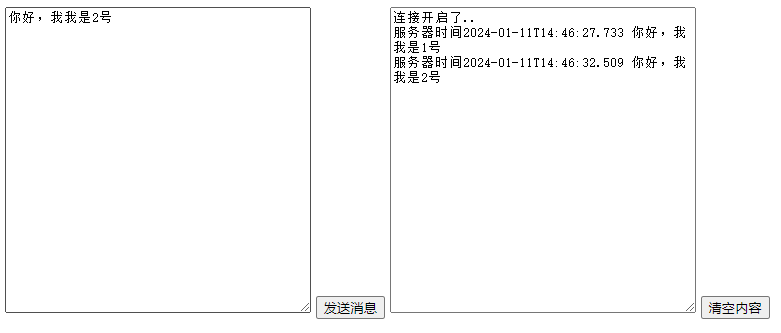
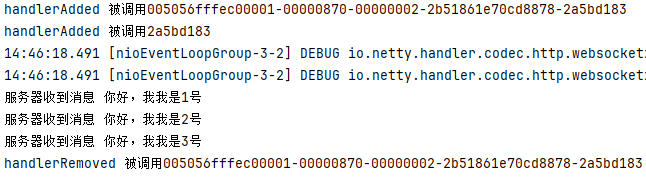
相关文章:
Netty 介绍、使用场景及案例
Netty 介绍、使用场景及案例 1、Netty 介绍 https://github.com/netty/netty Netty是一个高性能、异步事件驱动的网络应用程序框架,用于快速开发可扩展的网络服务器和客户端。它是一个开源项目,最初由JBoss公司开发,现在由社区维护。Netty的…...

小游戏选型(一):游戏化设计助力直播间互动和营收
一、社交直播间小游戏火爆 大家好,作为一个技术宅和游戏迷,今天来聊聊近期爆火的社交直播间小游戏的潮流。喜欢冲浪玩社交产品的小伙伴会发现,近期各大平台都推出了直播间社交小游戏,直播间氛围火爆,小游戏玩法简单&a…...
社区嵌入式服务设施建设为社区居家养老服务供给增加赋能
近年来,沈阳市浑南区委、区政府牢记在辽宁考察时的重要指示精神,认真践行以人民为中心的发展思想,聚集“一老一小”民生关切,统筹推进以社区为骨干结点的养老服务探索实践。围绕“品质养老”民生服务理念,针对社区老年…...
SpringBoot请求参数加密、响应参数解密
SpringBoot请求参数加密、响应参数解密 1.说明 在项目开发工程中,有的项目可能对参数安全要求比较高,在整个http数据传输的过程中都需要对请求参数、响应参数进行加密,也就是说整个请求响应的过程都是加密处理的,不在浏览器上暴…...

Mysql适配国产化数据库人大金仓冲突记录
1、mysql中查询中如果使用双引号,在人大金仓数据库中不支持,需改为单引号 例如: select 字段A,字段B,字段C from tableA where 字段A "1" 改为: select 字段A,字段B,字段…...
在微服务架构中认证和授权的那些事儿
在微服务架构中认证和授权是最基础的服务能力,其中这一块行业类的标准就是OAuth2 和 SSO ,而OAuth2 和 SSO 可以归类为“用户管理和身份验证”工具,OpenID Connect 1.0是 OAuth 2.0 协议之上的一个简单身份层。 Part.1 认识OAuth 2.0 OAuth…...

Git使用统一规范
为什么要统一git使用的风格? 统一的风格使我们在工作的时候无需考虑工作流程上该如何去做的问题,按照一个风格去做就好了每个人风格不同,格式凌乱,查看很不方便commit没有准确的message,后续难以追踪问题 git messag…...

如何在前端优化中处理大量的图像资源?
在前端优化中,处理大量的图像资源是一项重要的任务。由于图像占据了网站带宽的大部分,因此优化图像可以显著提高网站的性能和用户体验。下面将介绍一些在前端优化中处理大量图像资源的常见方法。 一、压缩图像 压缩图像是减少图像文件大小和优化图像的…...

【MYSQL】性能相关
SQL 语句的性能分析是一个非常重要的任务,尤其是在处理大数据时。下面是一些常用的 SQL 性能分析方法: 执行计划: 使用 EXPLAIN 命令来查看 SQL 语句的执行计划。这可以帮助你了解查询是如何被数据库执行的,从而发现可能的性能瓶颈。 注意&…...
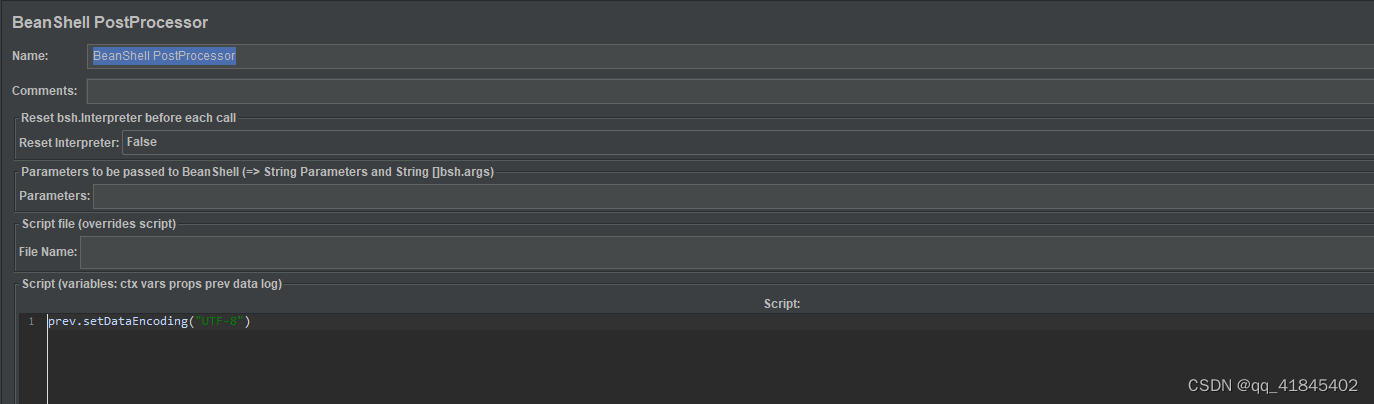
【Jmeter之get请求传递的值为JSON体实践】
Jmeter之get请求传递的值为JSON体实践 get请求的常见传参方式 1、在URL地址后面拼接,有多个key和value时,用&链接 2、在Parameters里面加上key和value 第一次遇到value的值不是字符串也不是整型,我尝试把json放到value里面࿰…...
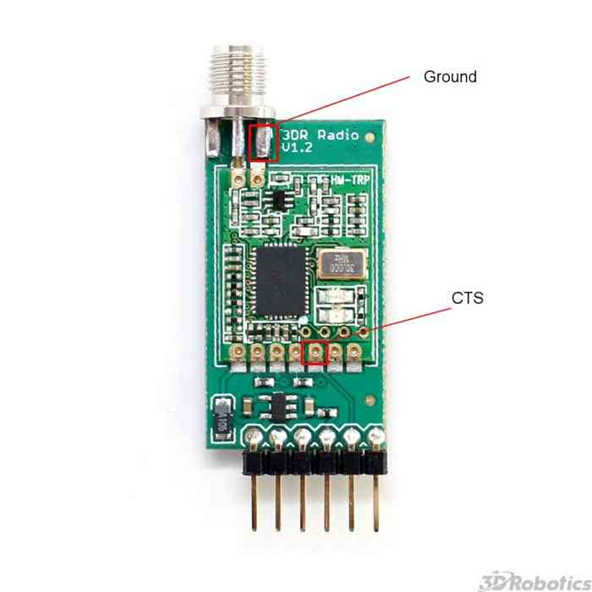
(1)(1.13) SiK无线电高级配置(六)
文章目录 前言 15 使用FTDI转USB调试线配置SiK无线电设备 16 强制启动加载程序模式 17 名词解释 前言 本文提供 SiK 遥测无线电(SiK Telemetry Radio)的高级配置信息。它面向"高级用户"和希望更好地了解无线电如何运行的用户。 15 使用FTDI转USB调试线配置SiK无线…...

用JAVA实现樱花飘落
用java实现一个樱花飘落的方法 package Text2;import javax.swing.*; import java.awt.*; import java.util.ArrayList; import java.util.List;public class Sakura extends JFrame {private List<Point> sakuraList; // 樱花的位置列表public Sakura() {sakuraList n…...
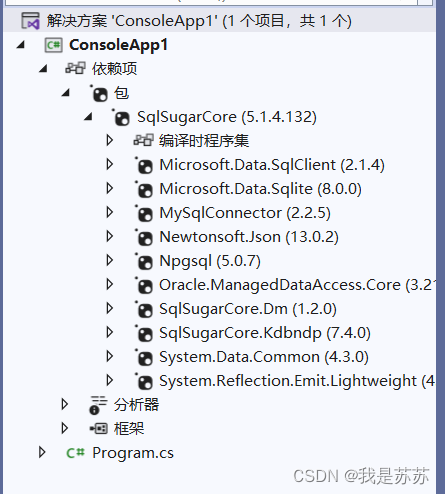
Web开发:SQLsugar的安装和使用
一、安装 第一步,在你的项目中找到解决方案,右键-管理解决方案的Nuget 第二步,下载对应的包,注意你的框架是哪个就下载哪个的包,一个项目安装一次包即可 点击应用和确定 安装好后会显示sqlsugar的包 二、使用…...

Redis面试题10
Redis 支持哪些数据结构? Redis 支持以下几种常用的数据结构: 字符串(String):用于存储字符串值,可以是文本或二进制数据。 列表(List):用于存储一个有序的字符串列表&am…...

arm64架构编译electron长征路
文章目录 1. gn工具生成1.1 问题,找不到last_commit_position.h文件问题描述如下:解决方法1.2 ninja文件不是对应架构问题问题描述:解决方法1.3 问题3:clang++找不到问题描述解决方法2. electron 编译参数生成2.1 下载对应版本debian_bullseye_arm64-sysroot错误描述...
建模软件Rhinoceros mac介绍说明
Rhinoceros mac是一款3D设计软件“犀牛”,在当今众多三维建模软件中,Rhinoceros 版因为其体积小、功能强大、对硬件要求低而广受欢迎,对于专业的3D设计人员来说它是一款不错的3D建模软件,Rhinoceros Mac中文版能轻易整合3DS MAX与…...

视频号下载小助手:教你微信视频号怎么提取视频出来
作为一名剪辑师或自由职业者,我们作为短视频创作者有时候需要下载多个视频用于制作多个解说系列的视频或者连续剧。然而,下载这些视频通常需要花费大量时间和精力,尤其是在没有合适的工具的情况下,让我们制作视频也确实困难,那么我们该如何解决呢&#x…...

C#-委托
委托类型 (delegate type) 表示对具有特定参数列表和返回类型的方法的引用。通过委托,我们能够将方法作为实体赋值给变量和作为参数传递。委托类似于在其他某些语言中的函数指针的概念,但是与函数指针不同,委托是面向对象的,并且是…...
Mr_HJ / form-generator项目文档学习与记录(续2)
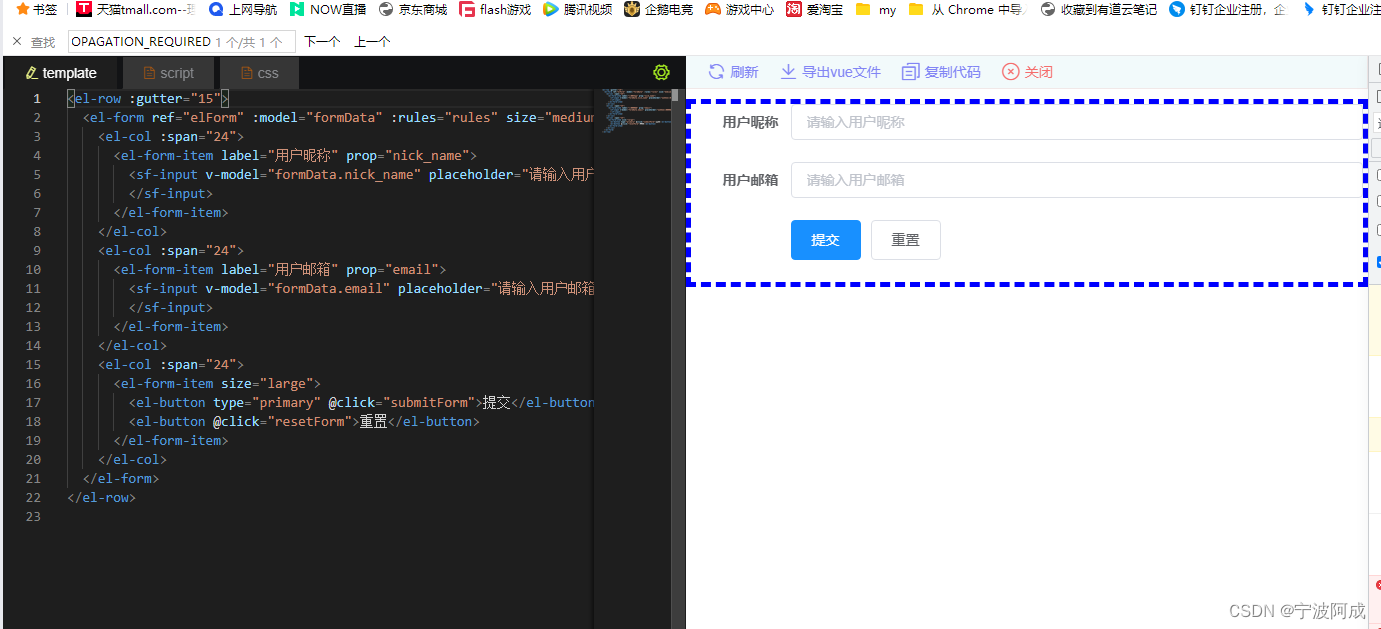
更多ruoyi-nbcio功能请看演示系统 gitee源代码地址 前后端代码: https://gitee.com/nbacheng/ruoyi-nbcio 演示地址:RuoYi-Nbcio后台管理系统 更多nbcio-boot功能请看演示系统 gitee源代码地址 后端代码: https://gitee.com/nbacheng/n…...

React16源码: React中FiberRoot的源码实现
关于 FiberRoot 1 )概述 在 ReactDOM.render 过程当中,创建了一个 ReactRoot的对象这个 ReactRoot 对象最主要承担了创建 FiberRoot 对象这个对象它非常重要,在后期整个应用调度过程当中都会跟它有关关于 FiberRoot 对象 A. 它是整个应用的起…...
UE5 学习系列(二)用户操作界面及介绍
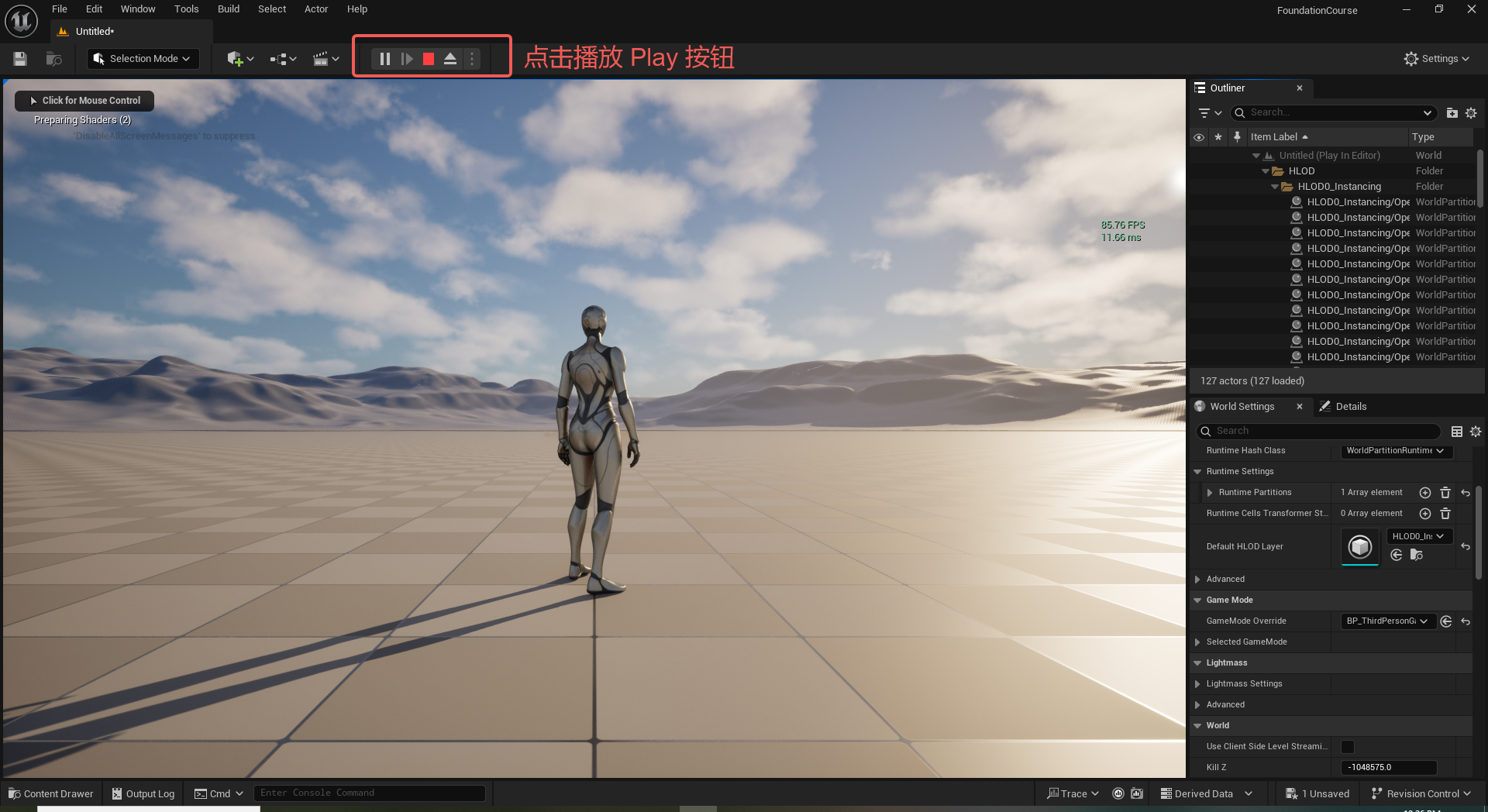
这篇博客是 UE5 学习系列博客的第二篇,在第一篇的基础上展开这篇内容。博客参考的 B 站视频资料和第一篇的链接如下: 【Note】:如果你已经完成安装等操作,可以只执行第一篇博客中 2. 新建一个空白游戏项目 章节操作,重…...
多云管理“拦路虎”:深入解析网络互联、身份同步与成本可视化的技术复杂度
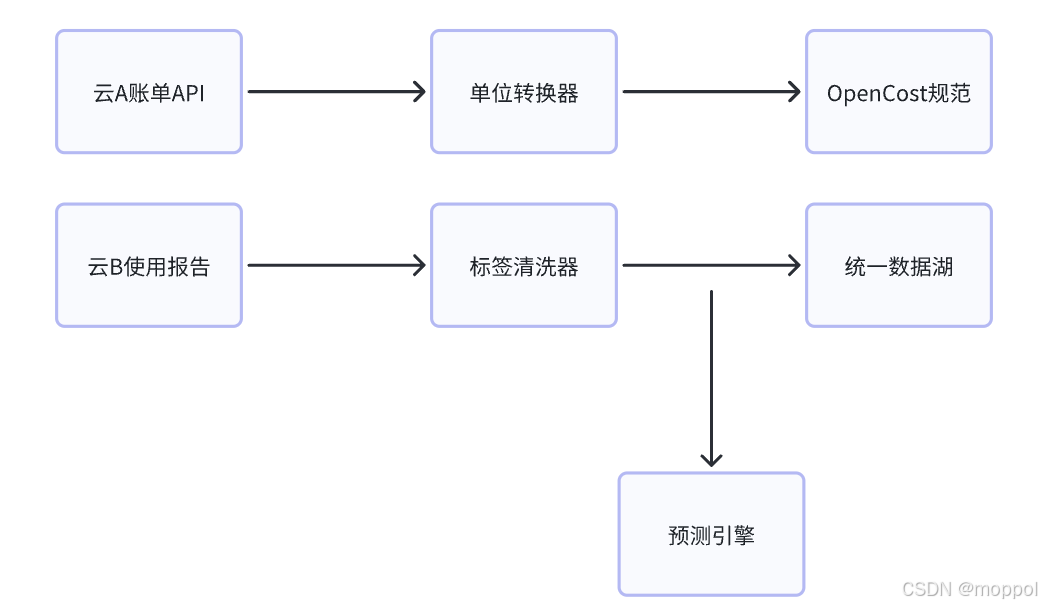
一、引言:多云环境的技术复杂性本质 企业采用多云策略已从技术选型升维至生存刚需。当业务系统分散部署在多个云平台时,基础设施的技术债呈现指数级积累。网络连接、身份认证、成本管理这三大核心挑战相互嵌套:跨云网络构建数据…...
大数据学习栈记——Neo4j的安装与使用
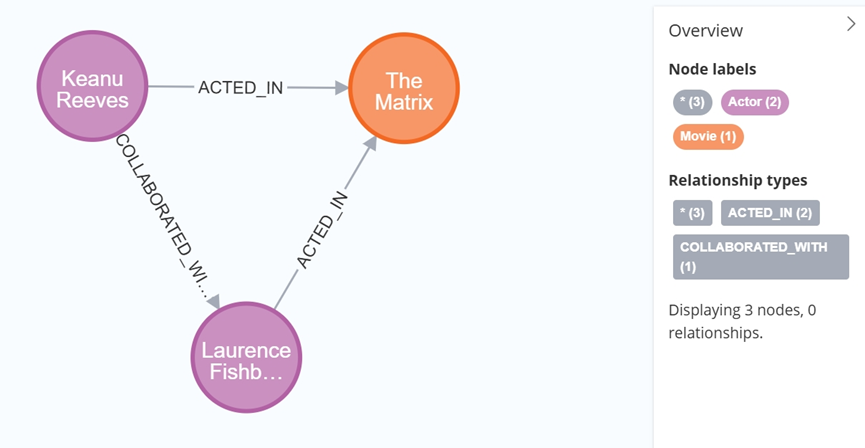
本文介绍图数据库Neofj的安装与使用,操作系统:Ubuntu24.04,Neofj版本:2025.04.0。 Apt安装 Neofj可以进行官网安装:Neo4j Deployment Center - Graph Database & Analytics 我这里安装是添加软件源的方法 最新版…...

k8s从入门到放弃之Ingress七层负载
k8s从入门到放弃之Ingress七层负载 在Kubernetes(简称K8s)中,Ingress是一个API对象,它允许你定义如何从集群外部访问集群内部的服务。Ingress可以提供负载均衡、SSL终结和基于名称的虚拟主机等功能。通过Ingress,你可…...

大型活动交通拥堵治理的视觉算法应用
大型活动下智慧交通的视觉分析应用 一、背景与挑战 大型活动(如演唱会、马拉松赛事、高考中考等)期间,城市交通面临瞬时人流车流激增、传统摄像头模糊、交通拥堵识别滞后等问题。以演唱会为例,暖城商圈曾因观众集中离场导致周边…...

测试markdown--肇兴
day1: 1、去程:7:04 --11:32高铁 高铁右转上售票大厅2楼,穿过候车厅下一楼,上大巴车 ¥10/人 **2、到达:**12点多到达寨子,买门票,美团/抖音:¥78人 3、中饭&a…...
【2025年】解决Burpsuite抓不到https包的问题
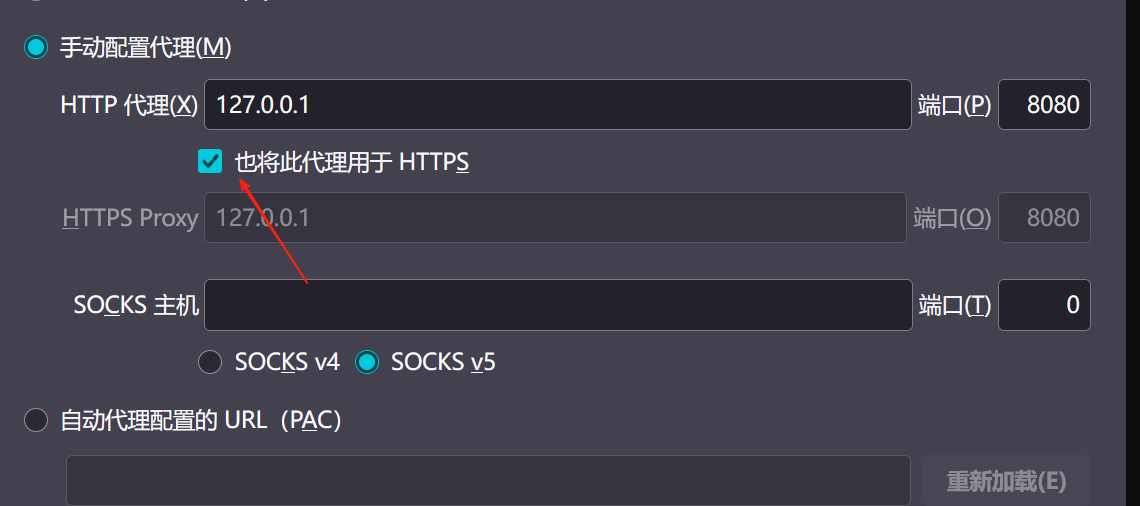
环境:windows11 burpsuite:2025.5 在抓取https网站时,burpsuite抓取不到https数据包,只显示: 解决该问题只需如下三个步骤: 1、浏览器中访问 http://burp 2、下载 CA certificate 证书 3、在设置--隐私与安全--…...
Springcloud:Eureka 高可用集群搭建实战(服务注册与发现的底层原理与避坑指南)
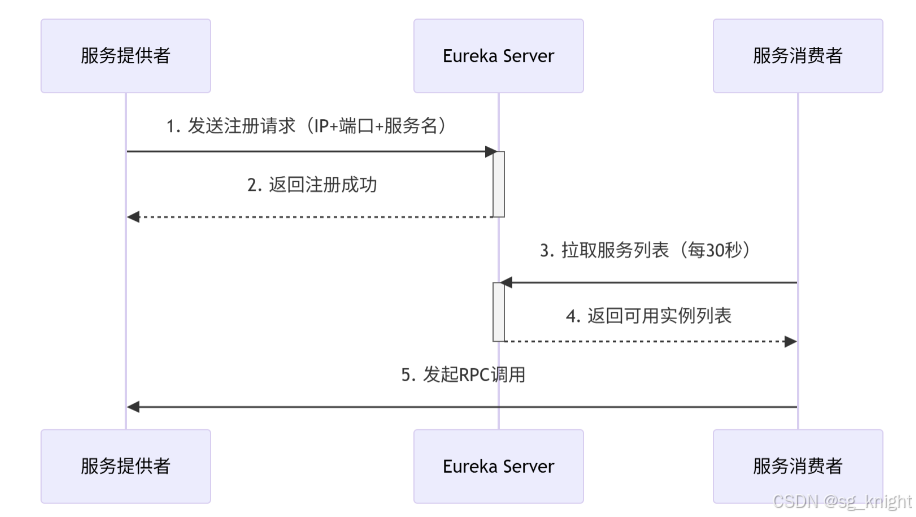
引言:为什么 Eureka 依然是存量系统的核心? 尽管 Nacos 等新注册中心崛起,但金融、电力等保守行业仍有大量系统运行在 Eureka 上。理解其高可用设计与自我保护机制,是保障分布式系统稳定的必修课。本文将手把手带你搭建生产级 Eur…...

【AI学习】三、AI算法中的向量
在人工智能(AI)算法中,向量(Vector)是一种将现实世界中的数据(如图像、文本、音频等)转化为计算机可处理的数值型特征表示的工具。它是连接人类认知(如语义、视觉特征)与…...
)
【服务器压力测试】本地PC电脑作为服务器运行时出现卡顿和资源紧张(Windows/Linux)
要让本地PC电脑作为服务器运行时出现卡顿和资源紧张的情况,可以通过以下几种方式模拟或触发: 1. 增加CPU负载 运行大量计算密集型任务,例如: 使用多线程循环执行复杂计算(如数学运算、加密解密等)。运行图…...