
Flink会话集群docker-compose一键安装
1、安装docker
参考,本人这篇博客:https://blog.csdn.net/taotao_guiwang/article/details/135508643?spm=1001.2014.3001.5501
2、flink-conf.yaml
flink-conf.yaml放在/home/flink/conf/job、/home/flink/conf/task下面,flink-conf.yaml内容如下:
################################################################################
#  Licensed to the Apache Software Foundation (ASF) under one
#  or more contributor license agreements.  See the NOTICE file
#  distributed with this work for additional information
#  regarding copyright ownership.  The ASF licenses this file
#  to you under the Apache License, Version 2.0 (the
#  "License"); you may not use this file except in compliance
#  with the License.  You may obtain a copy of the License at
#
#      http://www.apache.org/licenses/LICENSE-2.0
#
#  Unless required by applicable law or agreed to in writing, software
#  distributed under the License is distributed on an "AS IS" BASIS,
#  WITHOUT WARRANTIES OR CONDITIONS OF ANY KIND, either express or implied.
#  See the License for the specific language governing permissions and
# limitations under the License.
#################################################################################==============================================================================
# Common
#==============================================================================# The external address of the host on which the JobManager runs and can be
# reached by the TaskManagers and any clients which want to connect. This setting
# is only used in Standalone mode and may be overwritten on the JobManager side
# by specifying the --host <hostname> parameter of the bin/jobmanager.sh executable.
# In high availability mode, if you use the bin/start-cluster.sh script and setup
# the conf/masters file, this will be taken care of automatically. Yarn/Mesos
# automatically configure the host name based on the hostname of the node where the
# JobManager runs.jobmanager.rpc.address: jobmanager# The RPC port where the JobManager is reachable.jobmanager.rpc.port: 6123# The total process memory size for the JobManager.
#
# Note this accounts for all memory usage within the JobManager process, including JVM metaspace and other overhead.jobmanager.memory.process.size: 4096m# The total process memory size for the TaskManager.
#
# Note this accounts for all memory usage within the TaskManager process, including JVM metaspace and other overhead.taskmanager.memory.process.size: 16384m# To exclude JVM metaspace and overhead, please, use total Flink memory size instead of 'taskmanager.memory.process.size'.
# It is not recommended to set both 'taskmanager.memory.process.size' and Flink memory.
#
# taskmanager.memory.flink.size: 1280m# The number of task slots that each TaskManager offers. Each slot runs one parallel pipeline.taskmanager.numberOfTaskSlots: 10# The parallelism used for programs that did not specify and other parallelism.parallelism.default: 1# The default file system scheme and authority.
#
# By default file paths without scheme are interpreted relative to the local
# root file system 'file:///'. Use this to override the default and interpret
# relative paths relative to a different file system,
# for example 'hdfs://mynamenode:12345'
#
# fs.default-scheme#==============================================================================
# High Availability
#==============================================================================# The high-availability mode. Possible options are 'NONE' or 'zookeeper'.
#
# high-availability: zookeeper# The path where metadata for master recovery is persisted. While ZooKeeper stores
# the small ground truth for checkpoint and leader election, this location stores
# the larger objects, like persisted dataflow graphs.
#
# Must be a durable file system that is accessible from all nodes
# (like HDFS, S3, Ceph, nfs, ...)
#
# high-availability.storageDir: hdfs:///flink/ha/# The list of ZooKeeper quorum peers that coordinate the high-availability
# setup. This must be a list of the form:
# "host1:clientPort,host2:clientPort,..." (default clientPort: 2181)
#
# high-availability.zookeeper.quorum: localhost:2181# ACL options are based on https://zookeeper.apache.org/doc/r3.1.2/zookeeperProgrammers.html#sc_BuiltinACLSchemes
# It can be either "creator" (ZOO_CREATE_ALL_ACL) or "open" (ZOO_OPEN_ACL_UNSAFE)
# The default value is "open" and it can be changed to "creator" if ZK security is enabled
#
# high-availability.zookeeper.client.acl: open#==============================================================================
# Fault tolerance and checkpointing
#==============================================================================# The backend that will be used to store operator state checkpoints if
# checkpointing is enabled.
#
# Supported backends are 'jobmanager', 'filesystem', 'rocksdb', or the
# <class-name-of-factory>.
#
# state.backend: filesystem# Directory for checkpoints filesystem, when using any of the default bundled
# state backends.
#
# state.checkpoints.dir: hdfs://namenode-host:port/flink-checkpoints# Default target directory for savepoints, optional.
#
#state.savepoints.dir: file:/tmp/savepoint# Flag to enable/disable incremental checkpoints for backends that
# support incremental checkpoints (like the RocksDB state backend).
#
# state.backend.incremental: false# The failover strategy, i.e., how the job computation recovers from task failures.
# Only restart tasks that may have been affected by the task failure, which typically includes
# downstream tasks and potentially upstream tasks if their produced data is no longer available for consumption.jobmanager.execution.failover-strategy: region#==============================================================================
# Rest & web frontend
#==============================================================================# The port to which the REST client connects to. If rest.bind-port has
# not been specified, then the server will bind to this port as well.
#
#rest.port: 8081# The address to which the REST client will connect to
#
#rest.address: 0.0.0.0# Port range for the REST and web server to bind to.
#
#rest.bind-port: 8080-8090# The address that the REST & web server binds to
#
#rest.bind-address: 0.0.0.0# Flag to specify whether job submission is enabled from the web-based
# runtime monitor. Uncomment to disable.#web.submit.enable: false#==============================================================================
# Advanced
#==============================================================================# Override the directories for temporary files. If not specified, the
# system-specific Java temporary directory (java.io.tmpdir property) is taken.
#
# For framework setups on Yarn or Mesos, Flink will automatically pick up the
# containers' temp directories without any need for configuration.
#
# Add a delimited list for multiple directories, using the system directory
# delimiter (colon ':' on unix) or a comma, e.g.:
#     /data1/tmp:/data2/tmp:/data3/tmp
#
# Note: Each directory entry is read from and written to by a different I/O
# thread. You can include the same directory multiple times in order to create
# multiple I/O threads against that directory. This is for example relevant for
# high-throughput RAIDs.
#
# io.tmp.dirs: /tmp# The classloading resolve order. Possible values are 'child-first' (Flink's default)
# and 'parent-first' (Java's default).
#
# Child first classloading allows users to use different dependency/library
# versions in their application than those in the classpath. Switching back
# to 'parent-first' may help with debugging dependency issues.
#
# classloader.resolve-order: child-first# The amount of memory going to the network stack. These numbers usually need
# no tuning. Adjusting them may be necessary in case of an "Insufficient number
# of network buffers" error. The default min is 64MB, the default max is 1GB.
#
# taskmanager.memory.network.fraction: 0.1
# taskmanager.memory.network.min: 64mb
# taskmanager.memory.network.max: 1gb#==============================================================================
# Flink Cluster Security Configuration
#==============================================================================# Kerberos authentication for various components - Hadoop, ZooKeeper, and connectors -
# may be enabled in four steps:
# 1. configure the local krb5.conf file
# 2. provide Kerberos credentials (either a keytab or a ticket cache w/ kinit)
# 3. make the credentials available to various JAAS login contexts
# 4. configure the connector to use JAAS/SASL# The below configure how Kerberos credentials are provided. A keytab will be used instead of
# a ticket cache if the keytab path and principal are set.# security.kerberos.login.use-ticket-cache: true
# security.kerberos.login.keytab: /path/to/kerberos/keytab
# security.kerberos.login.principal: flink-user# The configuration below defines which JAAS login contexts# security.kerberos.login.contexts: Client,KafkaClient#==============================================================================
# ZK Security Configuration
#==============================================================================# Below configurations are applicable if ZK ensemble is configured for security# Override below configuration to provide custom ZK service name if configured
# zookeeper.sasl.service-name: zookeeper# The configuration below must match one of the values set in "security.kerberos.login.contexts"
# zookeeper.sasl.login-context-name: Client#==============================================================================
# HistoryServer
#==============================================================================# The HistoryServer is started and stopped via bin/historyserver.sh (start|stop)# Directory to upload completed jobs to. Add this directory to the list of
# monitored directories of the HistoryServer as well (see below).
#jobmanager.archive.fs.dir: hdfs:///completed-jobs/# The address under which the web-based HistoryServer listens.
#historyserver.web.address: 0.0.0.0# The port under which the web-based HistoryServer listens.
#historyserver.web.port: 8082# Comma separated list of directories to monitor for completed jobs.
#historyserver.archive.fs.dir: hdfs:///completed-jobs/# Interval in milliseconds for refreshing the monitored directories.
#historyserver.archive.fs.refresh-interval: 10000blob.server.port: 6124
query.server.port: 6125
3、docker-compose.yaml
使用如下命令部署集群:
docker-compose -f docker-compose.yml up -d
docker-compose.yaml内容如下:
version: "2.1"
services:jobmanager:image: flink:1.12.7-scala_2.11expose:- "6123"ports:- "8081:8081"command: jobmanagerenvironment:- JOB_MANAGER_RPC_ADDRESS=jobmanagervolumes:- /home/flink/conf/job/flink-conf.yaml:/opt/flink/conf/flink-conf.yamlrestart: alwaystaskmanager:image: flink:1.12.7-scala_2.11expose:- "6121"- "6122"depends_on:- jobmanagercommand: taskmanagerlinks:- "jobmanager:jobmanager"environment:- JOB_MANAGER_RPC_ADDRESS=jobmanagervolumes:- /home/flink/conf/task/flink-conf.yaml:/opt/flink/conf/flink-conf.yamlrestart: always
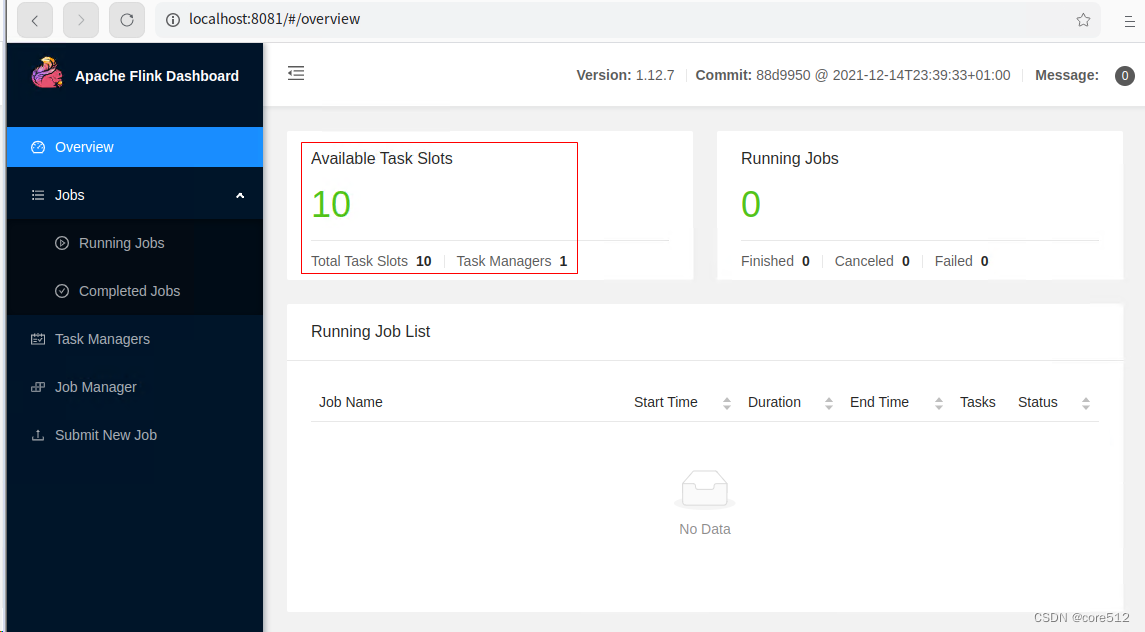
4、启动后

5、页面访问
访问地址:http://IP:8081
相关文章:
Flink会话集群docker-compose一键安装
1、安装docker 参考,本人这篇博客:https://blog.csdn.net/taotao_guiwang/article/details/135508643?spm1001.2014.3001.5501 2、flink-conf.yaml flink-conf.yaml放在/home/flink/conf/job、/home/flink/conf/task下面,flink-conf.yaml…...

qt.qpa.plugin: Could not find the Qt platform plugin “windows“ in ““
系统环境:Win10家庭中文版 Qt : 5.12.9 链接了一些64位的第三方库,程序编译完运行后出现 qt.qpa.plugin: Could not find the Qt platform plugin "windows" in "" 弹窗如下: 网上搜了一些都是关于pyQt的,…...

vue面试题集锦
1. 谈一谈对 MVVM 的理解? MVVM 是 Model-View-ViewModel 的缩写。MVVM 是一种设计思想。 Model 层代表数据模型,也可以在 Model 中定义数据修改和操作的业务逻辑; View 代表 UI 组件,它负责将数据模型转化成 UI 展现出来,View 是…...
2024年学鸿蒙开发就业前景怎么样?
随着科技的不断进步,鸿蒙系统作为华为自主研发的操作系统,逐渐引起了人们的关注。 2024年,鸿蒙开发就业前景如何? 对于那些对鸿蒙开发感兴趣并希望在这一领域寻找职业发展的人来说,这是一个非常重要的问题。 首先&a…...

Unity网络通讯学习
---部分截图来自 siki学院Unity网络通讯课程 Socket 网络上的两个程序通过一个双向的通信连接实现数据交换,这个连接的一端称为一个 Socket ,Socket 包含了网络通信必须的五种信息 Socket 例子{ 协议: TCP 本地: IP ÿ…...

js入口函数和jQuery入口函数的区别
JS入口函数指的是JavaScript中的主入口函数,用来初始化页面加载完成后的操作。通常情况下,JS入口函数是在HTML页面中的<script>标签中定义的,通过onload事件等方式触发调用。 jQuery入口函数则是指使用jQuery库时的主入口函数…...

Docker-Compose编排Nginx1.25.1+PHP7.4.33+Redis7.0.11环境
实践说明:基于RHEL7(CentOS7.9)部署docker环境(23.0.1、24.0.2),编排也可应用于RHEL7-9(如AlmaLinux9.1),但因为docker的特性,适用场景是不限于此的。 文档形成时期:2017-2023年 因系统或软件版本不同,构建…...

《新课程教学》(电子版)是正规期刊吗?能评职称吗?
《新课程教学》(电子版)主要出版内容为学科教学理论、学科教学实践经验和成果,主要读者对象为中小学教师,期刊设卷首语、名家讲堂、课程与教学、教学实践、考试评价、教育信息化、教学琐谈、教育管理、教师心语、一线课堂、重温经…...

Posgresql macOS安装和基础操作
摘要 本文介绍macOS版本Postgresql的安装,pg常用命令。作为笔记记录,后续方便查看。 Postgresql安装 官网下载postgresql安装包https://www.postgresql.org/download/。官网下载慢时,可以从这里下载我上传的mac版本的pg安装包资源。下载后&am…...
ArkUI-X跨平台已至,何需其它!
运行环境 DevEco Studio:4.0Release OpenHarmony SDK API10 开发板:润和DAYU200 自从写了一篇ArkUI-X跨平台的文章之后,好多人都说对这个项目十分关注。 那么今天我们就来完整的梳理一下这个项目。 1、ArkUI-X 我们之前可能更多接触的…...

(2024,分数蒸馏抽样,Delta 降噪分数,LoRA)PALP:文本到图像模型的提示对齐个性化
PALP: Prompt Aligned Personalization of Text-to-Image Models 公和众和号:EDPJ(进 Q 交流群:922230617 或加 VX:CV_EDPJ 进 V 交流群) 目录 0. 摘要 4. 提示对齐方法 4.1 概述 4.2 个性化 4.3 提示对齐分数抽…...

近日遇到数据库及其他问题
一、查找备份表和原表不一样数据 select * from A where (select count(1) from A_BAK where A.IDA_BAK.ID) 0 二、在数据量比较大的表中新增有默认值的列速度较慢问题 使用 以下语句,在上亿数据的表中执行速度较慢 alter table TEST add col_a integer DEFA…...
【conda】conda 版本控制和环境迁移/安装conda加速工具mamba /conda常用指令/Anaconda配置
【conda】安装conda加速工具mamba /conda常用指令/Anaconda配置 0. conda 版本控制和环境迁移1. 安装conda加速工具mamba2. conda install version3. [Anaconda 镜像](https://mirrors.tuna.tsinghua.edu.cn/help/anaconda/)使用帮助4. error deal 0. conda 版本控制和环境迁移…...

“/bin/bash“: stat /bin/bash: no such file or directory: unknown
简介:常规情况下,在进入容器时习惯使用 /bin/bash为结尾,如:docker exec -it test-sanic /bin/bash, 但是如果容器本身使用了精简版,只装了sh命令,未安装bash。这时就会抛出"/bin/bash&quo…...
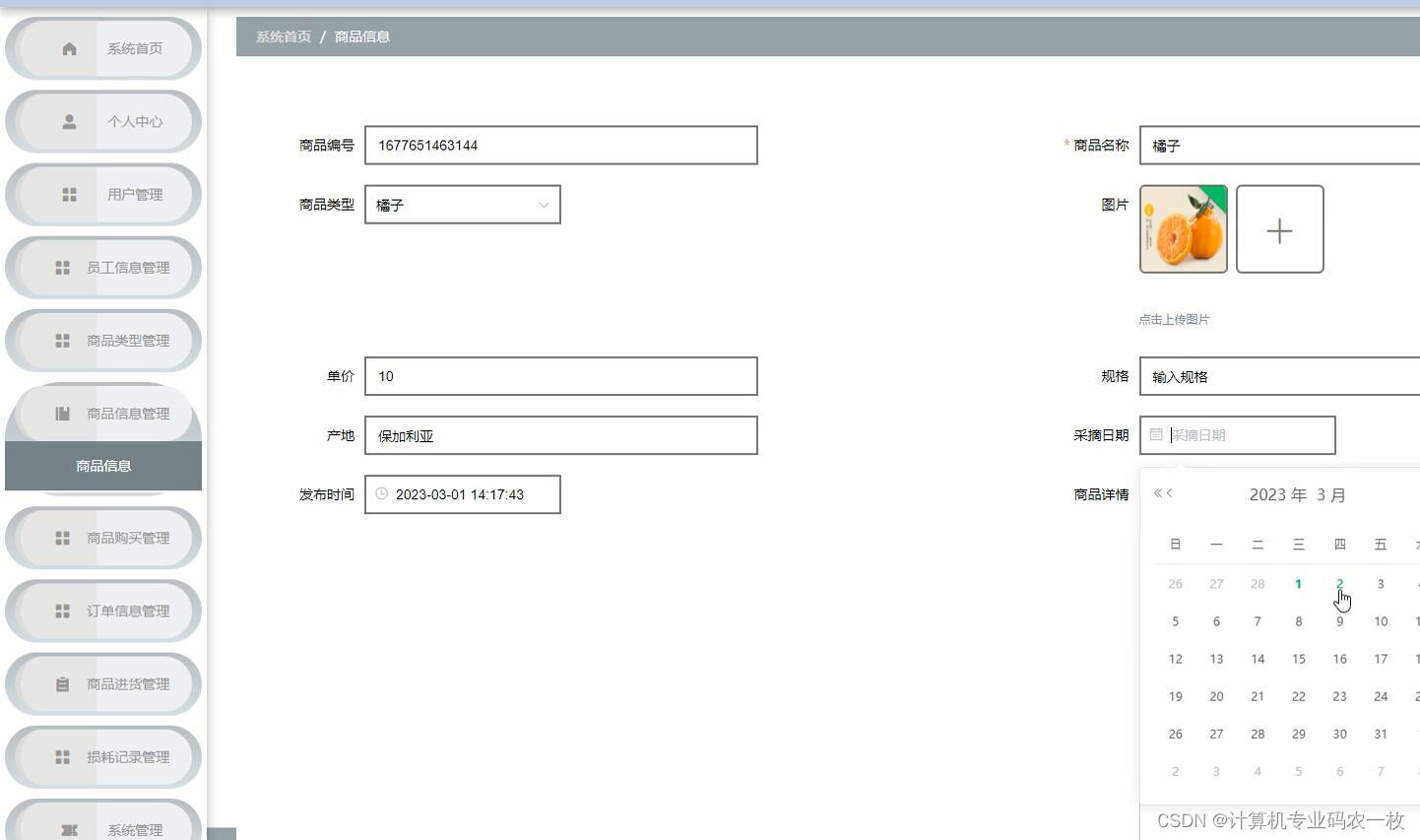
基于Spring Boot+vue的云上新鲜水果超市商城系统
本云上水果超市是为了提高用户查阅信息的效率和管理人员管理信息的工作效率,可以快速存储大量数据,还有信息检索功能,这大大的满足了用户、员工信息和管理员这三者的需求。操作简单易懂,合理分析各个模块的功能,尽可能…...
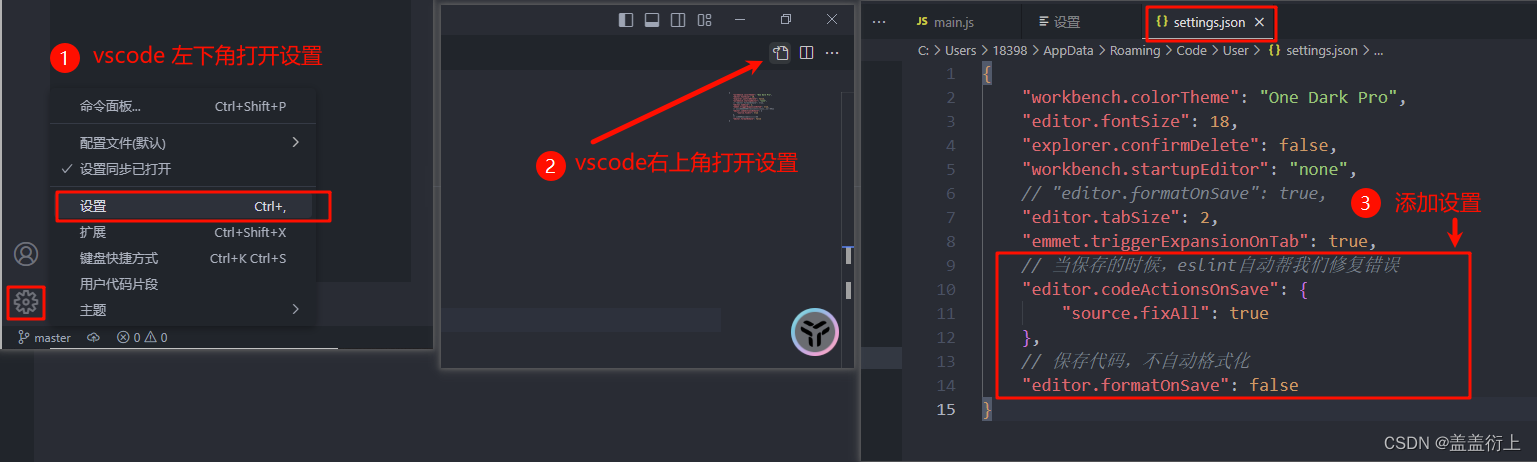
vue-ESlint代码规范及修复
1. 介绍 ESLint:是一个代码检查工具,用来检查你的代码是否符合指定的规则(你和你的团队可以自行约定一套规则)。 在创建项目时,我们使用的是 JavaScript Standard Style 代码风格的规则。 规范网址:https://standardjs.com/rules-zhcn.htm…...

Oracle数据库断电后不能打开的解决
数据库突然断电后,不能打开。或者偶尔能打开,但是很快就关闭。 原因可能很多。但是解决问题只有一种办法:看trace日志,alert错误日志 简单写下我的解决过程: 1,在alert日志中: 错误如下两种:…...
论文复现: In-Loop Filter with Customized Weights For VVC Intra Coding
论文复现: In-Loop Filter with Customized Weights For VVC Intra Coding 这个好难好难。啊啊啊啊。核心:权重预测模块功能快捷键合理的创建标题,有助于目录的生成如何改变文本的样式插入链接与图片如何插入一段漂亮的代码片生成一个适合你的…...
配置华为设备NQA UDP Jitter检测VoIP业务抖动
组网需求 如图1所示,总部和子公司之间需要跨越外部网络进行通信,DeviceA和DeviceD为总部和子公司的网络出口设备,DeviceB和DeviceC为外部网络提供商的边缘设备。 总部和子公司之间经常要通过VoIP进行电话会议,要求双向时延小于2…...

GitHub要求所有贡献代码的用户在2023年底前启用双因素认证
到2023年底,所有向github托管的存储库贡献代码的用户都必须启用一种或多种形式的2FA。 双重身份认证 所谓双重身份认证(Two-Factor Authentication),就是在账号密码以外还额外需要一种方式来确认用户身份。 GitHub正在大力推动双…...

PLC控制箱出问题?这套排查逻辑更高效
PLC控制箱是工业自动化核心单元,故障易导致设备停摆、产线停机,掌握高效排查思路,能快速定位问题、减少损失。一、先看“表象”:故障现象分类排故首步是判断故障类型,找准排查方向,常见故障分三类ÿ…...
)
嵌入式C项目上线前必过的一关:为什么92%的汽车ECU团队在2024年已弃用PC-Lint?(MISRA-C合规性深度拆解)
第一章:嵌入式 C 语言静态代码分析工具选型指南嵌入式系统对可靠性、实时性与资源约束高度敏感,静态代码分析(Static Code Analysis, SCA)是保障 C 代码质量的关键前置环节。选型需综合考量目标架构兼容性(如 ARM Cort…...
)
从图形学到机械臂控制:如何用Bresenham算法实现3轴机械臂的直线插补(附Processing代码)
从图形学到机械臂控制:Bresenham算法在3轴机械臂直线插补中的实战应用 当我在工作室第一次尝试让机械臂画出完美直线时,电机发出的咔嗒声和纸上歪歪扭扭的轨迹形成了鲜明对比。这让我意识到,将图形学算法移植到物理世界需要跨越理论到实践的鸿…...

避坑指南:Xinference-v1.17.1在Jupyter中常见问题解决,小白也能轻松上手
避坑指南:Xinference-v1.17.1在Jupyter中常见问题解决,小白也能轻松上手 1. 准备工作与环境检查 1.1 确认镜像正确加载 在CSDN星图镜像广场启动xinference-v1.17.1镜像后,首先需要确认环境是否正常。打开Jupyter Notebook,在第…...

EVA-02模型辅助“重装系统”后环境快速重建:生成个性化配置清单与脚本
EVA-02模型辅助“重装系统”后环境快速重建:生成个性化配置清单与脚本 每次重装系统或者换新电脑,你是不是也经历过那种“从头再来”的绝望?面对一个干净的操作系统,要重新安装Python、Node.js、Docker,配置各种环境变…...

从8跳到3跳:EVPN 分布式网关让时延降低67%的完整实战
众里寻他千百度,蓦然回首,那网关却在,灯火阑珊处。经过几次实验,我们用BGP Unnumbered实现了Underlay网络的搭建(告别OSPF!EVE-NG专业版BGP Unnumbered打通Underlay的完整实战),用BF…...

Mac系统高效搭建PyQt5与Qt Designer开发环境的完整指南
1. 环境准备:为什么选择PyQt5Qt Designer组合 在Mac上开发图形界面应用,PyQt5和Qt Designer这对黄金搭档绝对是首选方案。PyQt5作为Python绑定Qt库的成熟解决方案,提供了超过620个类和6000个函数,而Qt Designer则是可视化拖拽布局…...

C++ SOCKET编程:同步阻塞与异步非阻塞通信服务端和客户端代码,支持多连接、断线重连及详...
1、CSOCKET同步阻塞、异步非阻塞通信服务端、客户端代码,支持多个客户端连接。2、断线重连(服务端或客户端没有启动顺序要求,先开启的等待另一端连接); 3、服务端支持同时连接多个客户端; 4、阅读代码就明白…...

革新性深岩银河存档管理解决方案:突破传统限制的全方位游戏数据掌控工具
革新性深岩银河存档管理解决方案:突破传统限制的全方位游戏数据掌控工具 【免费下载链接】DRG-Save-Editor Rock and stone! 项目地址: https://gitcode.com/gh_mirrors/dr/DRG-Save-Editor 1 行业痛点深度剖析:为何传统存档管理工具难以满足玩家…...
const 关键字的作用(和 define 比呢?))
单片机/C语言八股:(十四)const 关键字的作用(和 define 比呢?)
上一篇下一篇C 语言实现矩阵乘法 目 录 const 关键字的作用(和 define 比呢?)1)const 修饰变量① 局部变量(函数内部)② 全局变量(文件作用域) 2)const 与指针的组合&…...