
Spring Boot 笔记 005 环境搭建
1.1 创建数据库和表(略)
2.1 创建Maven工程
2.2 补齐resource文件夹和application.yml文件

2.3 porn.xml中引入web,mybatis,mysql等依赖
2.3.1 引入springboot parent
2.3.2 删除junit 依赖--不能删,删了会报错
2.3.3 引入spring web依赖
2.3.4 引入mybatis依赖
2.3.5 引入mysql依赖
<?xml version="1.0" encoding="UTF-8"?><project xmlns="http://maven.apache.org/POM/4.0.0" xmlns:xsi="http://www.w3.org/2001/XMLSchema-instance"xsi:schemaLocation="http://maven.apache.org/POM/4.0.0 http://maven.apache.org/xsd/maven-4.0.0.xsd"><modelVersion>4.0.0</modelVersion><!--  引入springboot父工程--><parent><artifactId>spring-boot-starter-parent</artifactId><groupId>org.springframework.boot</groupId><version>3.1.8</version></parent><groupId>com.geji</groupId><artifactId>big-event</artifactId><version>1.0-SNAPSHOT</version><name>big-event</name><!-- FIXME change it to the project's website --><url>http://www.example.com</url><properties><project.build.sourceEncoding>UTF-8</project.build.sourceEncoding><maven.compiler.source>1.7</maven.compiler.source><maven.compiler.target>1.7</maven.compiler.target></properties><dependencies><!--    spring web依赖 --><dependency><groupId>org.springframework.boot</groupId><artifactId>spring-boot-starter-web</artifactId></dependency>
<!--    mybatis依赖--><dependency><groupId>org.mybatis.spring.boot</groupId><artifactId>mybatis-spring-boot-starter</artifactId><version>3.0.0</version></dependency>
<!--    mysql驱动依赖--><dependency><groupId>com.mysql</groupId><artifactId>mysql-connector-j</artifactId></dependency><dependency><groupId>junit</groupId><artifactId>junit</artifactId><version>4.11</version><scope>test</scope></dependency></dependencies><build><pluginManagement><!-- lock down plugins versions to avoid using Maven defaults (may be moved to parent pom) --><plugins><!-- clean lifecycle, see https://maven.apache.org/ref/current/maven-core/lifecycles.html#clean_Lifecycle --><plugin><artifactId>maven-clean-plugin</artifactId><version>3.1.0</version></plugin><!-- default lifecycle, jar packaging: see https://maven.apache.org/ref/current/maven-core/default-bindings.html#Plugin_bindings_for_jar_packaging --><plugin><artifactId>maven-resources-plugin</artifactId><version>3.0.2</version></plugin><plugin><artifactId>maven-compiler-plugin</artifactId><version>3.8.0</version></plugin><plugin><artifactId>maven-surefire-plugin</artifactId><version>2.22.1</version></plugin><plugin><artifactId>maven-jar-plugin</artifactId><version>3.0.2</version></plugin><plugin><artifactId>maven-install-plugin</artifactId><version>2.5.2</version></plugin><plugin><artifactId>maven-deploy-plugin</artifactId><version>2.8.2</version></plugin><!-- site lifecycle, see https://maven.apache.org/ref/current/maven-core/lifecycles.html#site_Lifecycle --><plugin><artifactId>maven-site-plugin</artifactId><version>3.7.1</version></plugin><plugin><artifactId>maven-project-info-reports-plugin</artifactId><version>3.0.0</version></plugin></plugins></pluginManagement></build>
</project>
3.1 在application.yml中配置数据库信息
spring:datasource:driver-class-name: com.mysql.cj.jdbc.Driverurl: jdbc:mysql://localhost:3306/big_eventusername: rootpassword: 1234
4.1 创建包结构
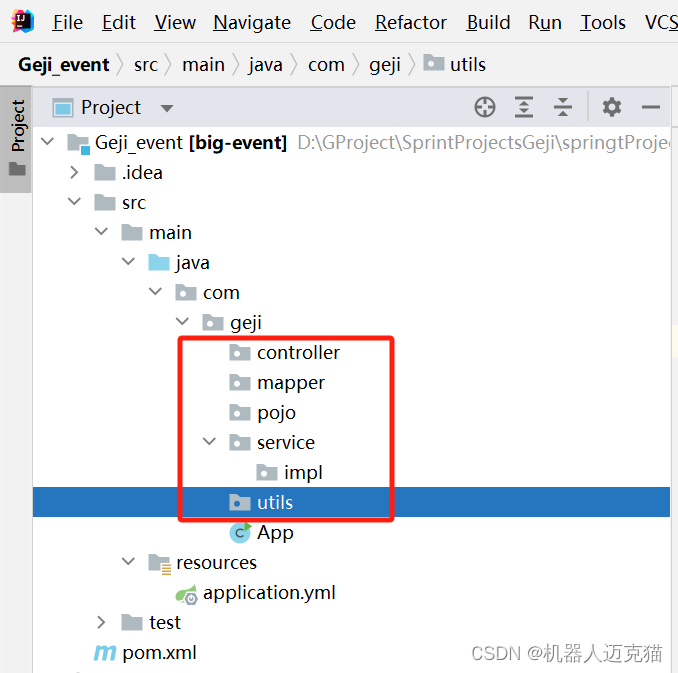
tips: 有情况下idea中包结构是.形式的没有铺开,可以按图示方式转换成普通的包结构显示

4.2 根据数据库表创建实体类

4.2.1 Article
package com.geji.pojo;import java.time.LocalDateTime;public class Article {private Integer id;//主键IDprivate String title;//文章标题private String content;//文章内容private String coverImg;//封面图像private String state;//发布状态 已发布|草稿private Integer categoryId;//文章分类idprivate Integer createUser;//创建人IDprivate LocalDateTime createTime;//创建时间private LocalDateTime updateTime;//更新时间
}
4.2.2 Category
package com.geji.pojo;import java.time.LocalDateTime;public class Category {private Integer id;//主键IDprivate String categoryName;//分类名称private String categoryAlias;//分类别名private Integer createUser;//创建人IDprivate LocalDateTime createTime;//创建时间private LocalDateTime updateTime;//更新时间
}
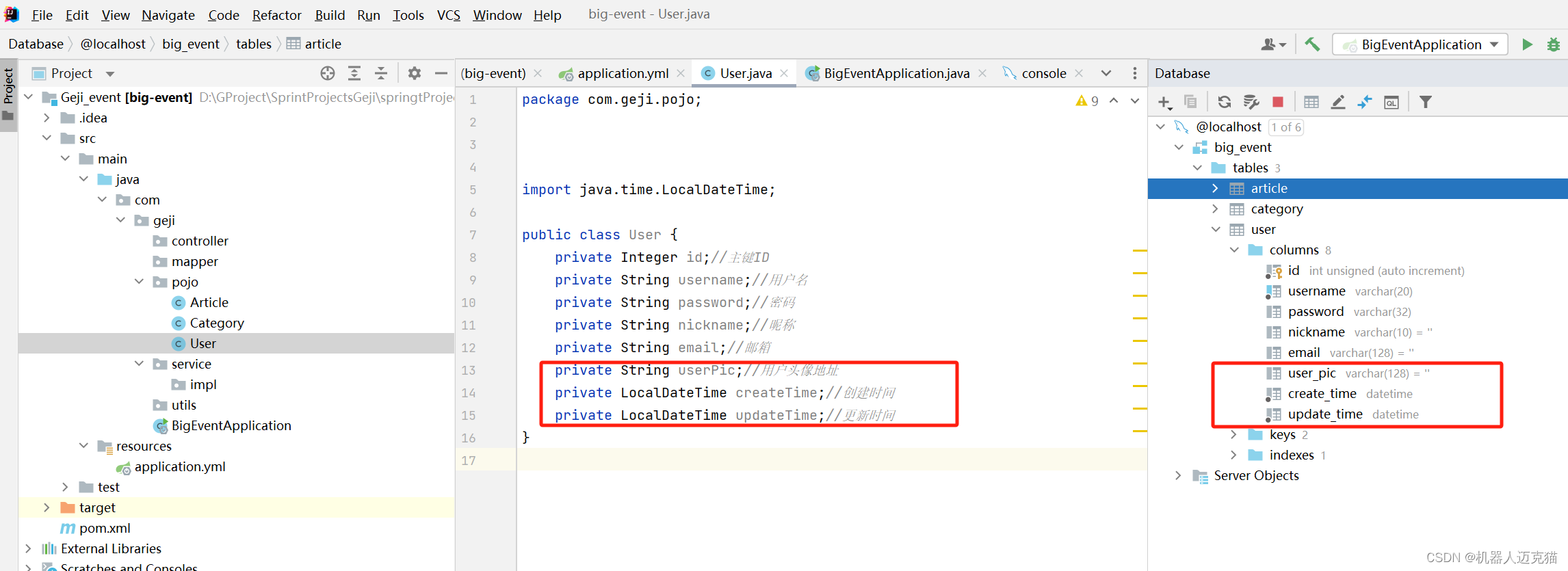
4.2.3 User
package com.geji.pojo;import java.time.LocalDateTime;public class User {private Integer id;//主键IDprivate String username;//用户名private String password;//密码private String nickname;//昵称private String email;//邮箱private String userPic;//用户头像地址private LocalDateTime createTime;//创建时间private LocalDateTime updateTime;//更新时间
}
注意命名方式,实体类为驼峰,数据库为下划线
5.1 更改启动类名字,并编写相应代码
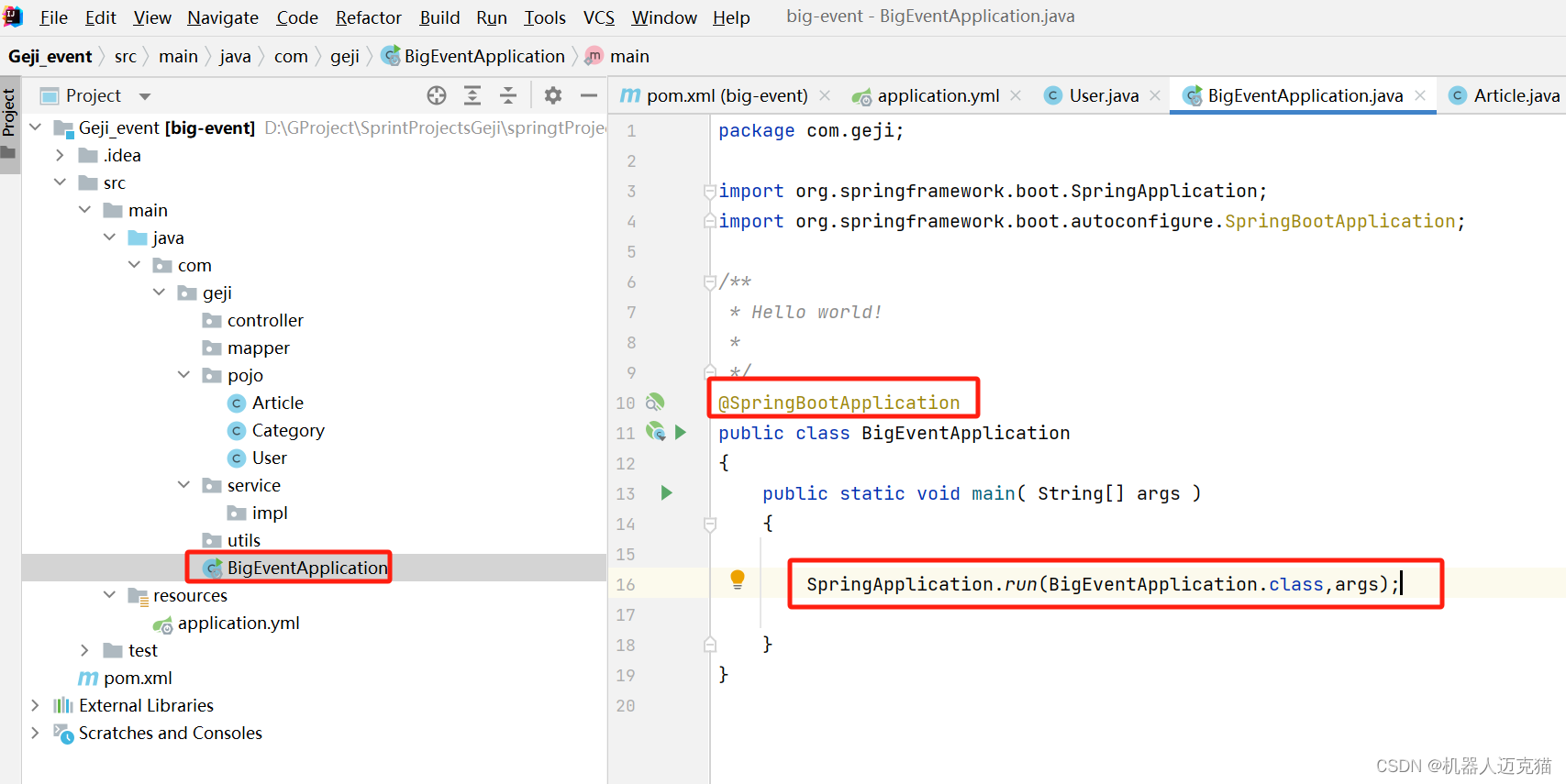
package com.geji;import org.springframework.boot.SpringApplication;
import org.springframework.boot.autoconfigure.SpringBootApplication;/*** Hello world!**/
@SpringBootApplication
public class BigEventApplication
{public static void main( String[] args ){SpringApplication.run(BigEventApplication.class,args);}
}
6.1 启动,不报错则创建环境成功

tips:
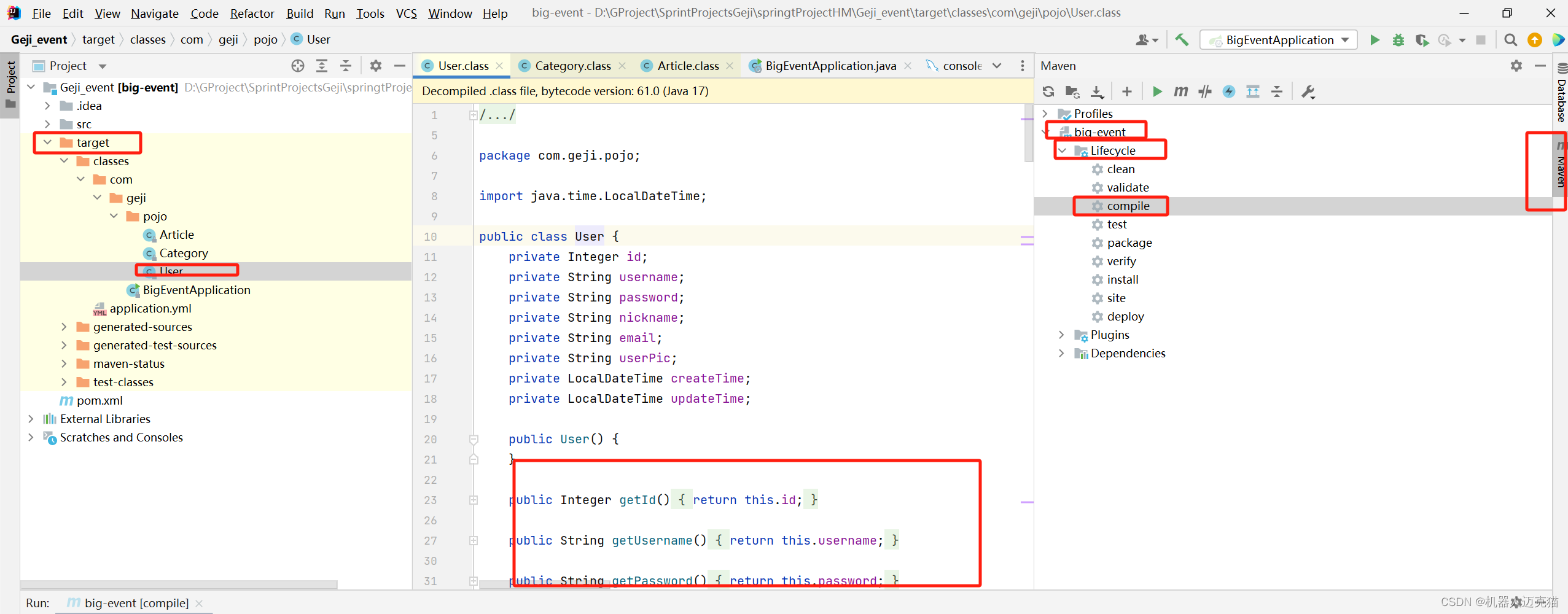
7.1 以上实体类没有getter,setter等方法,可以使用lombok在编辑阶段自动生成
7.1.1 在依赖中引入lombok

<!-- lombok依赖--><dependency><groupId>org.projectlombok</groupId><artifactId>lombok</artifactId></dependency>7.1.2 在实体类上加入@Data注解

7.1.3 在maven中重新编译,然后在target文件夹中就会发现编译好的实体类中有getter,setter等方法了
相关文章:
Spring Boot 笔记 005 环境搭建
1.1 创建数据库和表(略) 2.1 创建Maven工程 2.2 补齐resource文件夹和application.yml文件 2.3 porn.xml中引入web,mybatis,mysql等依赖 2.3.1 引入springboot parent 2.3.2 删除junit 依赖--不能删,删了会报错 2.3.3 引入spring web依赖…...
【解决(几乎)任何机器学习问题】:超参数优化篇(超详细)
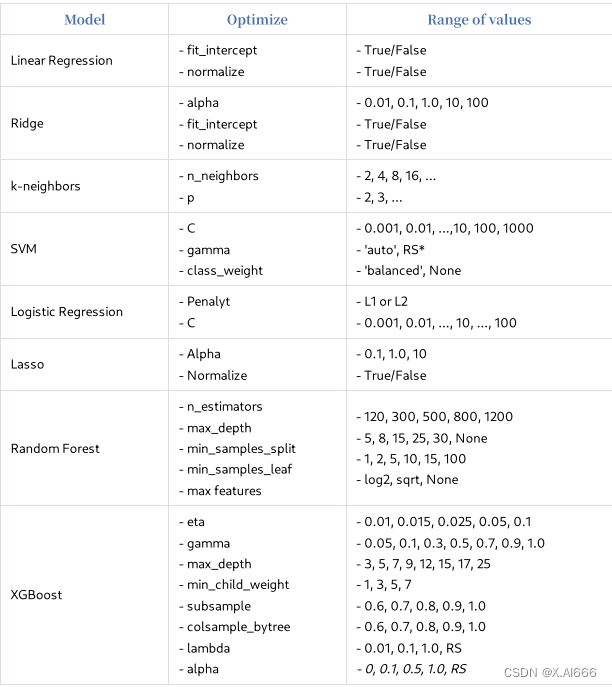
这篇文章相当长,您可以添加至收藏夹,以便在后续有空时候悠闲地阅读。 有了优秀的模型,就有了优化超参数以获得最佳得分模型的难题。那么,什么是超参数优化呢?假设您的机器学习项⽬有⼀个简单的流程。有⼀个数据集&…...

面试计算机网络框架八股文十问十答第七期
面试计算机网络框架八股文十问十答第七期 作者:程序员小白条,个人博客 相信看了本文后,对你的面试是有一定帮助的!关注专栏后就能收到持续更新! ⭐点赞⭐收藏⭐不迷路!⭐ 1)UDP协议为什么不可…...
Codeforces Round 926 (Div. 2)
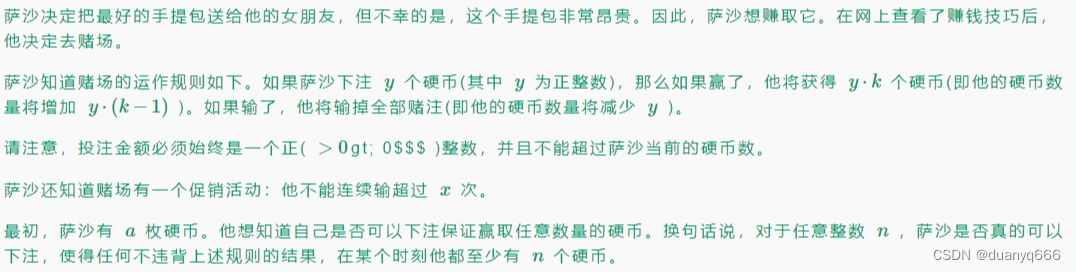
A. Sasha and the Beautiful Array(模拟) 思路 最大值减去最小值 #include<iostream> #include<algorithm> using namespace std; const int N 110; int a[N];int main(){int t, n;cin>>t;while(t--){cin>>n;for(int i 0; i…...
构建智慧交通平台:架构设计与实现
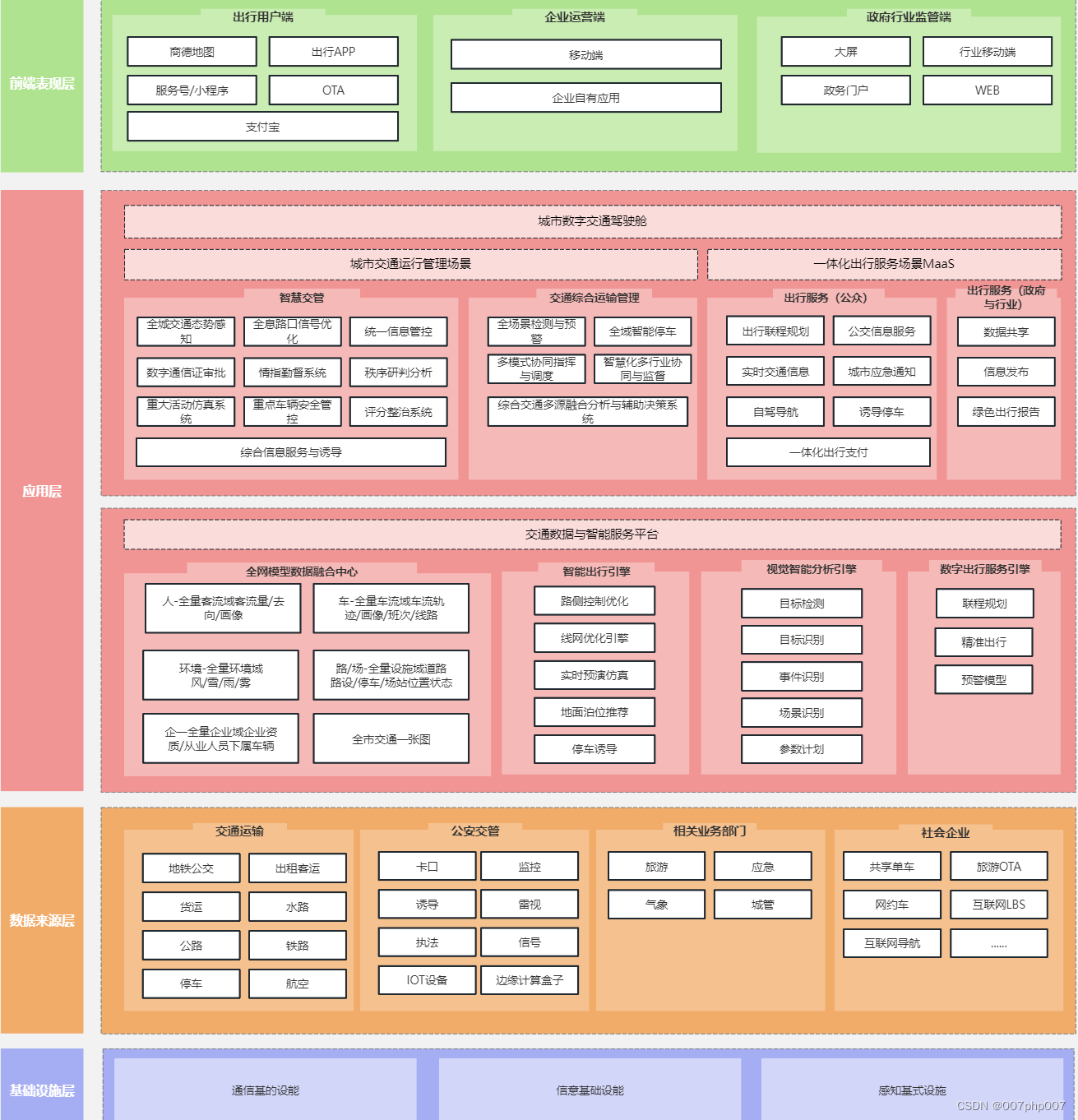
随着城市交通的不断发展和智能化技术的迅速进步,智慧交通平台作为提升城市交通管理效率和水平的重要手段备受关注。本文将探讨如何设计和实现智慧交通平台的系统架构,以应对日益增长的城市交通需求,并提高交通管理的智能化水平。 ### 1. 智慧…...
移动端设置position: fixed;固定定位,底部出现一条缝隙,不知原因,欢迎探讨!!!
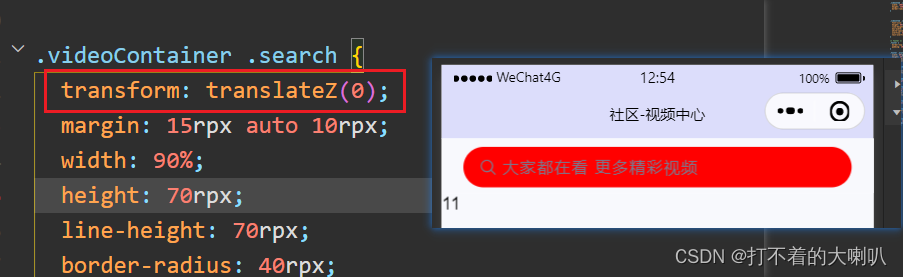
1、问题 在父盒子中有一个子盒子,父盒子加了固定定位,需要子盒子上下都有要边距,用margin或者padding挤开时,会出现缝隙是子盒子背景颜色的。 测试过了,有些手机型号有,有些没有,微信小程序同移…...
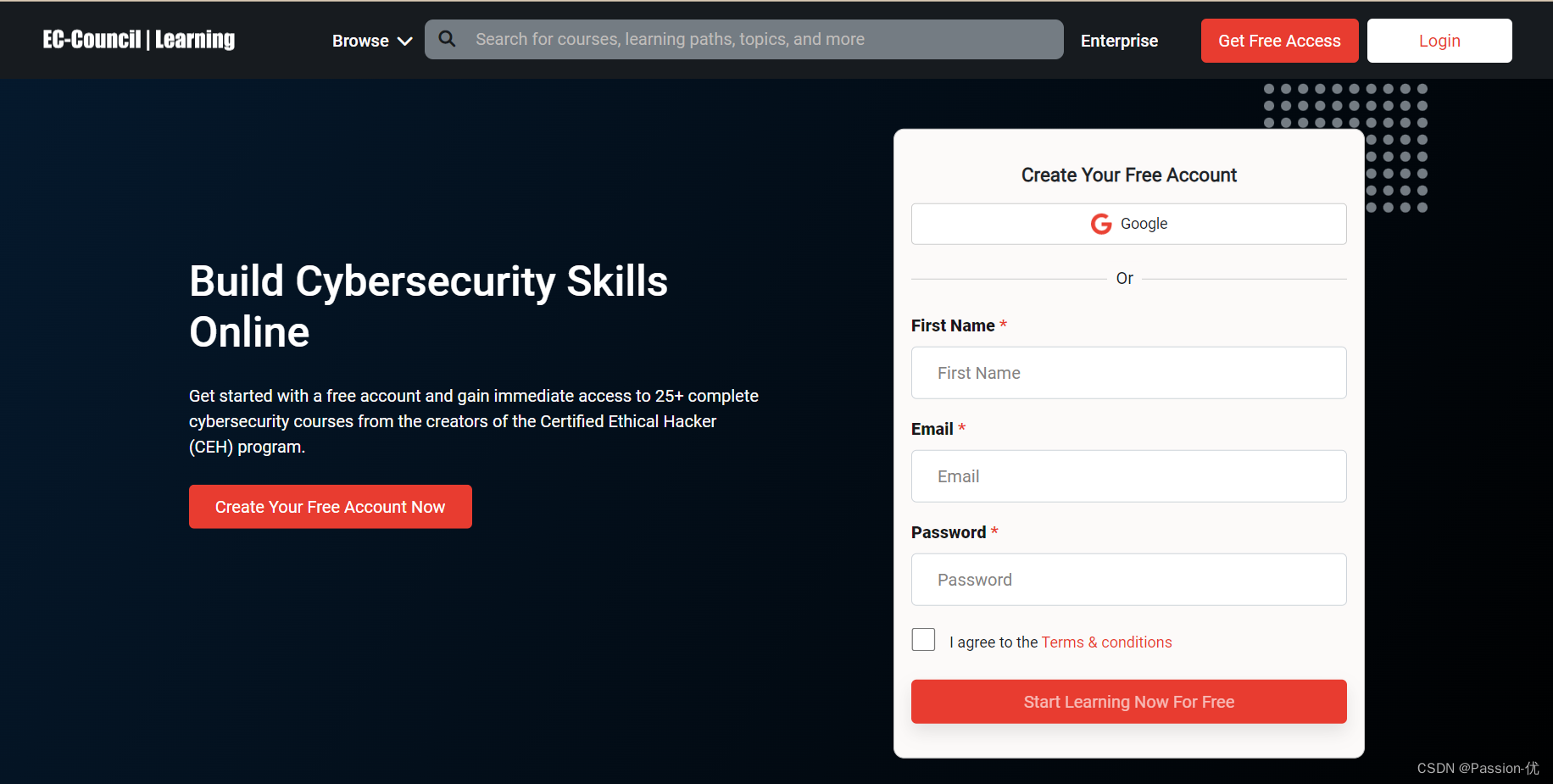
有关网络安全的课程学习网页
1.思科网络学院 免费学习skillsforall的课程 课程链接:Introduction to Cybersecurity by Cisco: Free Online Course (skillsforall.com) 2.斯坦福大学计算机和网络安全基础 该证书对于初学者来说最有价值,它由最著名的大学之一斯坦福大学提供。您可…...

计算机网络-面试题
一、基础 1、网络编程 网络编程的本质是多台计算机之间的数据交换存在问题 如何准确的定位网络上一台或多台主机如何进行可靠传输2、网络协议 在计算机网络有序的交换数据,就必须遵守一些事先约定好的规则,比如交换数据的格式、是否需要发送一个应答信息。这些规则被称为网络…...

C++虚函数
C虚函数 在C中,虚函数(Virtual Function)是一个使用关键字virtual声明的成员函数,它在基类中被声明,以便在任何派生类中被重写(Override)。使用虚函数的目的是实现多态性——一种允许使用基类指…...
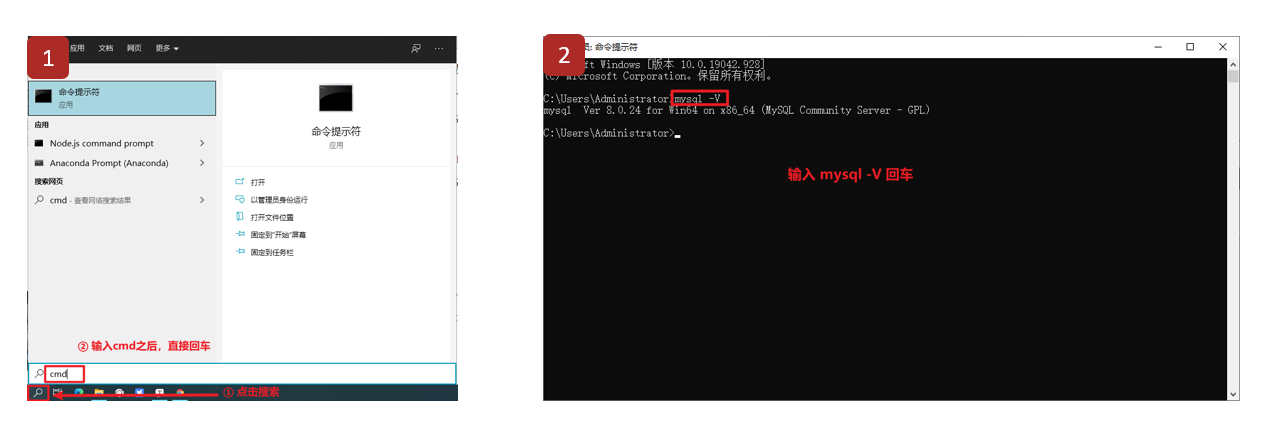
MySQL数据库基础(二):MySQL数据库介绍
文章目录 MySQL数据库介绍 一、MySQL介绍 二、MySQL的特点 三、MySQL版本 四、MySQL数据库下载与安装 1、下载 2、安装 五、添加环境变量(Windows) 六、检测环境变量是否配置成功 MySQL数据库介绍 一、MySQL介绍 MySQL是一个关系型数据库管理…...

常用文件命令
文章目录 文件命令文件内容查看catnlmoreless(more的plus版)headtailod 文件属性操作用户权限常见的权限chownchmodchgrpumask 隐藏属性常见的隐藏属性lsattrchattr 查找文件查看文件类型查找文件位置whichwhereislocatefind 文件操作(复制、…...

在屏蔽任何FRP环境下从零开始搭建安全的FRP内网穿透服务
背景 本人目前在境外某大学读博,校园网屏蔽了所有内网穿透的工具的数据包和IP访问,为了实现在家也能远程访问服务器,就不得不先开个学校VPN,再登陆。我们实验室还需要访问另一个大学的服务器,每次我都要去找另一个大学…...
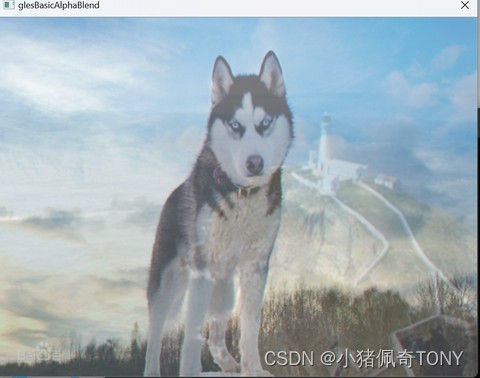
OpenGL-ES 学习(1)---- AlphaBlend
AlphaBlend OpenGL-ES 混合本质上是将 2 个片元的颜色进行调和(一般是求和操作),产生一个新的颜色 OpenGL ES 混合发生在片元通过各项测试之后,准备进入帧缓冲区的片元和原有的片元按照特定比例加权计算出最终片元的颜色值,不再是新…...

Python 函数的学习笔记
Python 函数的学习笔记 0. Python 函数的概要说明1. 自定义函数示例2. 匿名函数示例3. 内置函数示例3-1. filter() 示例3-2. map() 示例3-3. reduce() 示例 4. 可变长参数*args和**kwargs示例4-1. *args(Positional Variadic Arguments)4-2. **kwargs&am…...

详解 Redis 实现数据去重
✨✨ 欢迎大家来到喔的嘛呀的博客✨✨ 🎈🎈希望这篇博客对大家能有帮助🎈🎈 目录 言 一. Redis去重原理 1. Redis Set 数据结构 2. 基于 Set 实现数据去重 3. 代码示例 4. 总结 …...
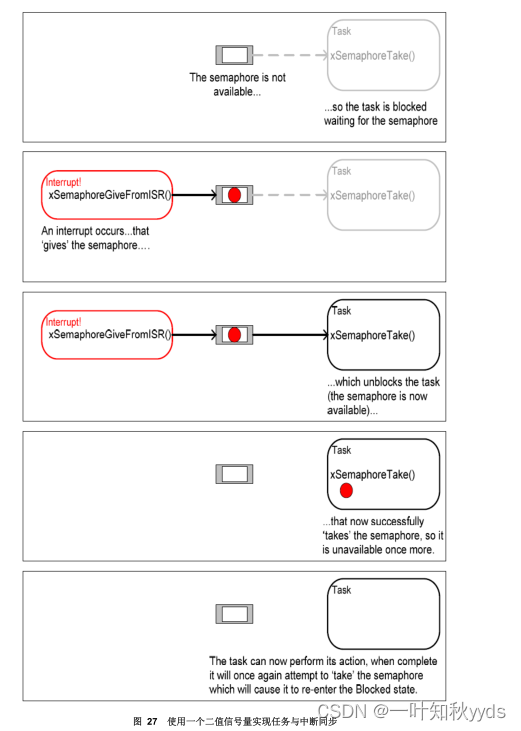
FreeRTOS 延迟中断处理
采用二值信号量同步 二值信号量可以在某个特殊的中断发生时,让任务解除阻塞,相当于让任务与中断 同步。这样就可以让中断事件处理量大的工作在同步任务中完成,中断服务例程(ISR) 中只是快速处理少部份工作。如此,中断处理可以说是…...

计网体系结构
计算机网络的概述 概念 网络:网状类的东西或系统。 计算机网络:是一个将分散的、具有独立性功能的计算机系统,通过通信设备与线路连接起来,由功能完善的软件实现资源共享和信息传递的系统。即计算机网络是互连(通过通信链路互连…...
linux系统zabbix工具监控web页面
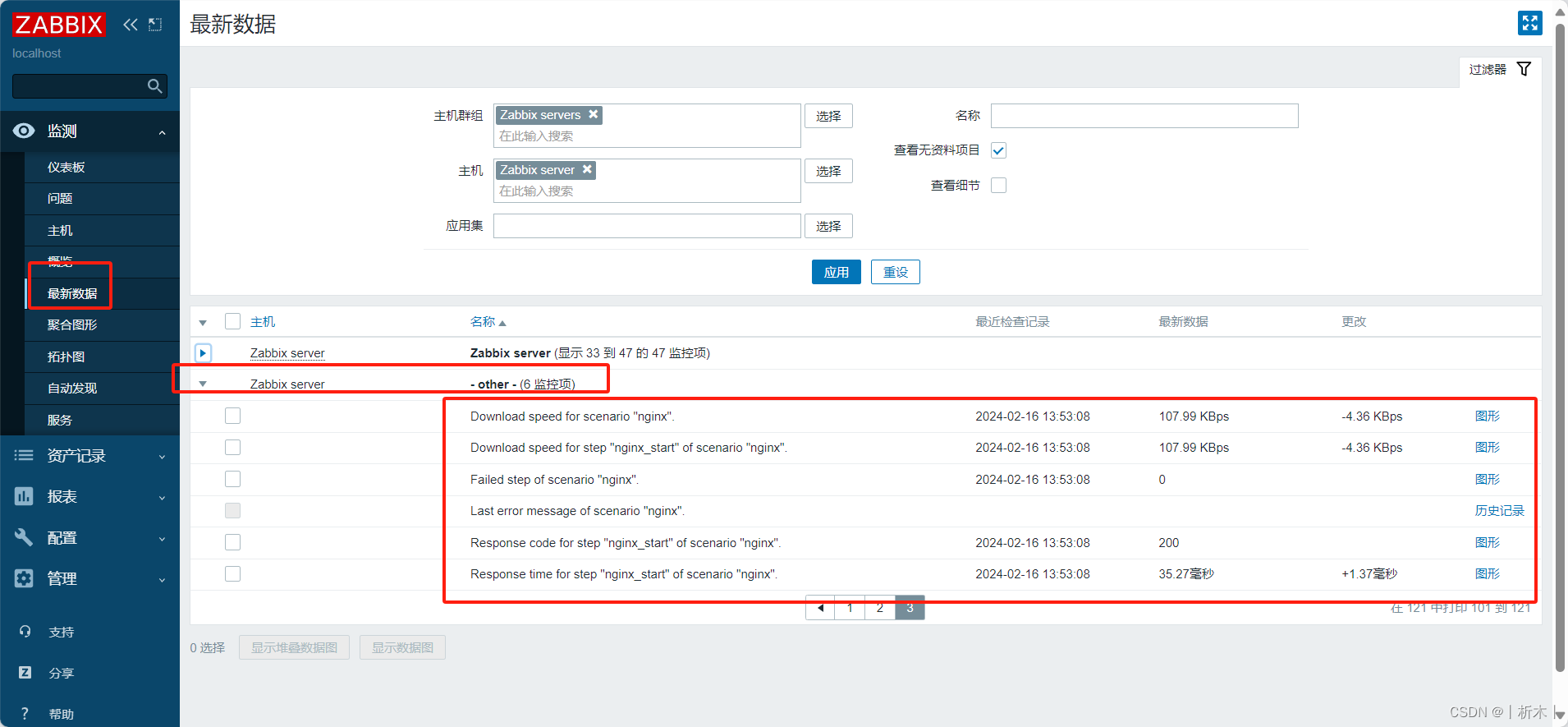
web页面监控 内建key介绍浏览器配置浏览器页面查看方式 监控指定的站点的资源下载速度,及页面响应时间,还有响应代码; web Scenario: web场景(站点)web page :web页面,一个场景有多…...
VMware虚拟机网络配置
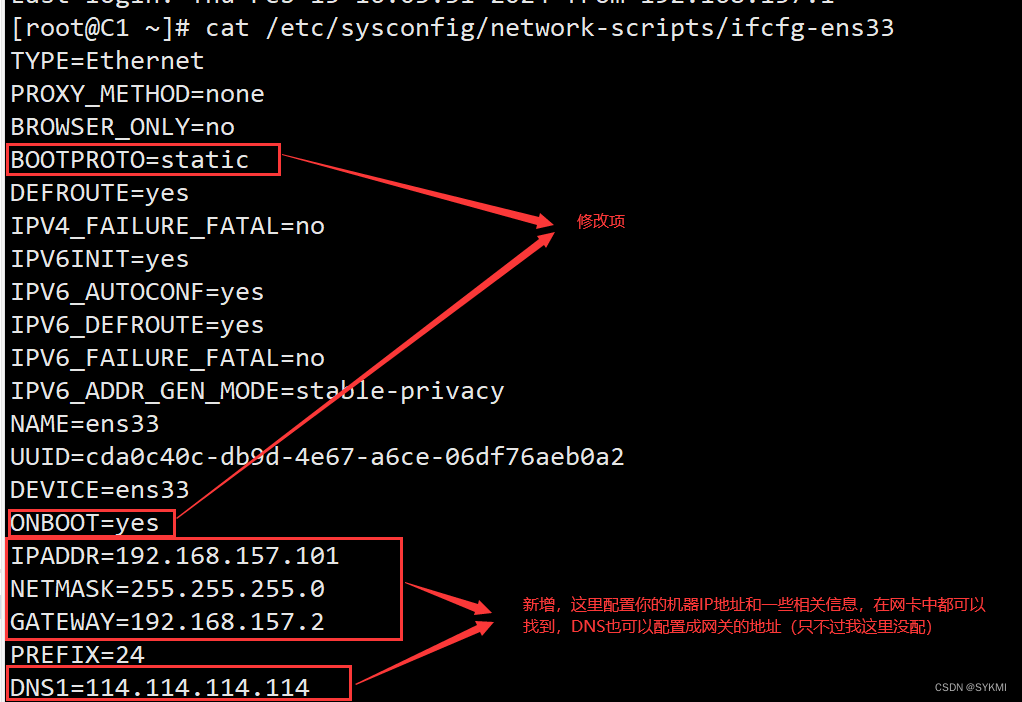
VMware虚拟机网络配置 桥接模式NAT网络 桥接模式 桥接模式其实就是借助你宿主机上的网卡进行联网和通信,所以相当于虚拟机和宿主机平级,处于同一个网段中。 配置要点: 注意选择正确的宿主机网卡 查看宿主机的网络信息,这些信息指…...

代码随想录算法训练营DAY18 | 二叉树 (5)
一、LeetCode 513 找树左下角的值 题目链接:513.找树左下角的值https://leetcode.cn/problems/find-bottom-left-tree-value/ 思路一:递归回溯全局变量比深度。 class Solution {int Max_depth 0;int result 0;public int findBottomLeftValue(TreeNo…...

华为云AI开发平台ModelArts
华为云ModelArts:重塑AI开发流程的“智能引擎”与“创新加速器”! 在人工智能浪潮席卷全球的2025年,企业拥抱AI的意愿空前高涨,但技术门槛高、流程复杂、资源投入巨大的现实,却让许多创新构想止步于实验室。数据科学家…...
Flask RESTful 示例
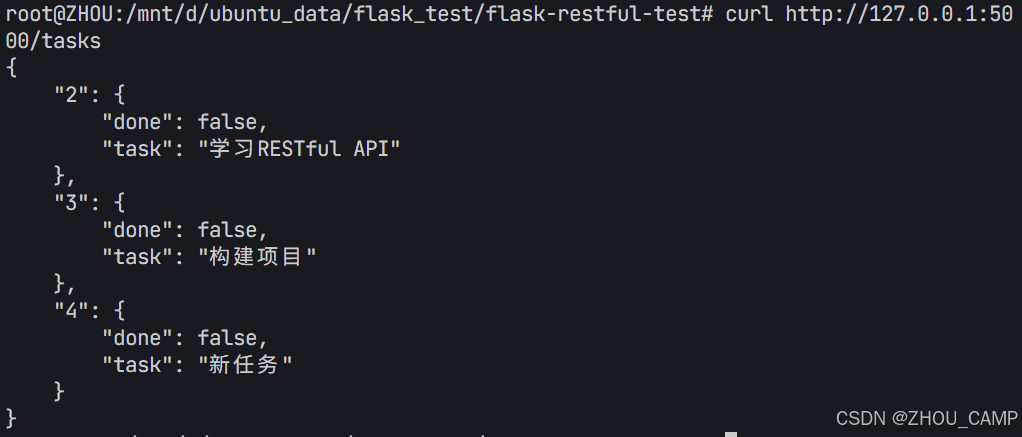
目录 1. 环境准备2. 安装依赖3. 修改main.py4. 运行应用5. API使用示例获取所有任务获取单个任务创建新任务更新任务删除任务 中文乱码问题: 下面创建一个简单的Flask RESTful API示例。首先,我们需要创建环境,安装必要的依赖,然后…...

51c自动驾驶~合集58
我自己的原文哦~ https://blog.51cto.com/whaosoft/13967107 #CCA-Attention 全局池化局部保留,CCA-Attention为LLM长文本建模带来突破性进展 琶洲实验室、华南理工大学联合推出关键上下文感知注意力机制(CCA-Attention),…...

从WWDC看苹果产品发展的规律
WWDC 是苹果公司一年一度面向全球开发者的盛会,其主题演讲展现了苹果在产品设计、技术路线、用户体验和生态系统构建上的核心理念与演进脉络。我们借助 ChatGPT Deep Research 工具,对过去十年 WWDC 主题演讲内容进行了系统化分析,形成了这份…...

OkHttp 中实现断点续传 demo
在 OkHttp 中实现断点续传主要通过以下步骤完成,核心是利用 HTTP 协议的 Range 请求头指定下载范围: 实现原理 Range 请求头:向服务器请求文件的特定字节范围(如 Range: bytes1024-) 本地文件记录:保存已…...

Python如何给视频添加音频和字幕
在Python中,给视频添加音频和字幕可以使用电影文件处理库MoviePy和字幕处理库Subtitles。下面将详细介绍如何使用这些库来实现视频的音频和字幕添加,包括必要的代码示例和详细解释。 环境准备 在开始之前,需要安装以下Python库:…...

uniapp中使用aixos 报错
问题: 在uniapp中使用aixos,运行后报如下错误: AxiosError: There is no suitable adapter to dispatch the request since : - adapter xhr is not supported by the environment - adapter http is not available in the build 解决方案&…...

使用Matplotlib创建炫酷的3D散点图:数据可视化的新维度
文章目录 基础实现代码代码解析进阶技巧1. 自定义点的大小和颜色2. 添加图例和样式美化3. 真实数据应用示例实用技巧与注意事项完整示例(带样式)应用场景在数据科学和可视化领域,三维图形能为我们提供更丰富的数据洞察。本文将手把手教你如何使用Python的Matplotlib库创建引…...
:观察者模式)
JS设计模式(4):观察者模式
JS设计模式(4):观察者模式 一、引入 在开发中,我们经常会遇到这样的场景:一个对象的状态变化需要自动通知其他对象,比如: 电商平台中,商品库存变化时需要通知所有订阅该商品的用户;新闻网站中࿰…...

Proxmox Mail Gateway安装指南:从零开始配置高效邮件过滤系统
💝💝💝欢迎莅临我的博客,很高兴能够在这里和您见面!希望您在这里可以感受到一份轻松愉快的氛围,不仅可以获得有趣的内容和知识,也可以畅所欲言、分享您的想法和见解。 推荐:「storms…...