
NTP服务搭建
一、ntpd和ntpdate区别
1.ntpd是自动执行的远程更新本地系统时钟的服务,是平滑同步;
2.ntpdate是手工执行的服务,也就是一般用它执行一次本地时间更新,如果做成半自动,可以写入到crontab自动任务,从而变成自动任务。可能会因为时钟跃变(经历两个相同的时刻)导致许多问题,如数据库事务等,
二、安装包离线下载
rpm地址:https://rpmfind.net/linux/rpm2html/search.php
autogen-libopts-5.18-5.el7.x86_64.rpm,ntp-4.2.6p5-29.el7.centos.2.x86_64.rpm,ntpdate-4.2.6p5-29.el7.centos.x86_64.rpm,compat-openssl10-1.0.2o-3.el8.x86_64.rpm
rpm -ivh autogen-libopts-5.18-5.el7.x86_64.rpm
rpm -ivh ntpdate-4.2.6p5-29.el7.centos.x86_64.rpm
rpm -ivh ntp-4.2.6p5-29.el7.centos.2.x86_64.rpm
安装ntp-4.2.6p5-29.el7.centos.2.x86_64.rpm缺依赖时,执行:
rpm -ivh ntp-4.2.6p5-29.el7.centos.2.x86_64.rpm --nodeps --force
三、配置ntp master
vim /etc/ntp.conf
# For more information about this file, see the man pages
# ntp.conf(5), ntp_acc(5), ntp_auth(5), ntp_clock(5), ntp_misc(5), ntp_mon(5).driftfile /var/lib/ntp/drift# Permit time synchronization with our time source, but do not
# permit the source to query or modify the service on this system.
restrict default nomodify notrap nopeer noquery# Permit all access over the loopback interface.  This could
# be tightened as well, but to do so would effect some of
# the administrative functions.
restrict 127.0.0.1
restrict ::1
server 127.127.1.0
fudge 127.127.1.0 stratum 10
# Hosts on local network are less restricted.
#restrict 192.168.1.0 mask 255.255.255.0 nomodify notrap# Use public servers from the pool.ntp.org project.
# Please consider joining the pool (http://www.pool.ntp.org/join.html).
#server 0.centos.pool.ntp.org iburst
#server 1.centos.pool.ntp.org iburst
#server 2.centos.pool.ntp.org iburst
#server 3.centos.pool.ntp.org iburst#broadcast 192.168.1.255 autokey        # broadcast server
#broadcastclient                        # broadcast client
#broadcast 224.0.1.1 autokey            # multicast server
#multicastclient 224.0.1.1              # multicast client
#manycastserver 239.255.254.254         # manycast server
#manycastclient 239.255.254.254 autokey # manycast client# Enable public key cryptography.
#cryptoincludefile /etc/ntp/crypto/pw# Key file containing the keys and key identifiers used when operating
# with symmetric key cryptography.
keys /etc/ntp/keys# Specify the key identifiers which are trusted.
#trustedkey 4 8 42# Specify the key identifier to use with the ntpdc utility.
#requestkey 8# Specify the key identifier to use with the ntpq utility.
#controlkey 8# Enable writing of statistics records.
#statistics clockstats cryptostats loopstats peerstats# Disable the monitoring facility to prevent amplification attacks using ntpdc
# monlist command when default restrict does not include the noquery flag. See
# CVE-2013-5211 for more details.
# Note: Monitoring will not be disabled with the limited restriction flag.
disable monitor
启动ntpd:
systemctl start ntpd
查看状态:
systemctl status ntpd
停止ntpd:
systemctl stop ntpd
四、配置ntp client
# For more information about this file, see the man pages
# ntp.conf(5), ntp_acc(5), ntp_auth(5), ntp_clock(5), ntp_misc(5), ntp_mon(5).driftfile /var/lib/ntp/drift# Permit time synchronization with our time source, but do not
# permit the source to query or modify the service on this system.
restrict default nomodify notrap nopeer noquery# Permit all access over the loopback interface.  This could
# be tightened as well, but to do so would effect some of
# the administrative functions.
restrict 127.0.0.1
restrict ::1
server 172.17.0.3
fudge 172.17.0.3 stratum 10
# Hosts on local network are less restricted.
#restrict 192.168.1.0 mask 255.255.255.0 nomodify notrap# Use public servers from the pool.ntp.org project.
# Please consider joining the pool (http://www.pool.ntp.org/join.html).
#server 0.centos.pool.ntp.org iburst
#server 1.centos.pool.ntp.org iburst
#server 2.centos.pool.ntp.org iburst
#server 3.centos.pool.ntp.org iburst#broadcast 192.168.1.255 autokey        # broadcast server
#broadcastclient                        # broadcast client
#broadcast 224.0.1.1 autokey            # multicast server
#multicastclient 224.0.1.1              # multicast client
#manycastserver 239.255.254.254         # manycast server
#manycastclient 239.255.254.254 autokey # manycast client# Enable public key cryptography.
#cryptoincludefile /etc/ntp/crypto/pw# Key file containing the keys and key identifiers used when operating
# with symmetric key cryptography.
keys /etc/ntp/keys# Specify the key identifiers which are trusted.
#trustedkey 4 8 42# Specify the key identifier to use with the ntpdc utility.
#requestkey 8# Specify the key identifier to use with the ntpq utility.
#controlkey 8# Enable writing of statistics records.
#statistics clockstats cryptostats loopstats peerstats# Disable the monitoring facility to prevent amplification attacks using ntpdc
# monlist command when default restrict does not include the noquery flag. See
# CVE-2013-5211 for more details.
# Note: Monitoring will not be disabled with the limited restriction flag.
disable monitor
查看时间服务器:
ntpq -p
查看偏差时间:
ntpdc -c loopinfo
查看ntp状态:
ntpstat
相关文章:

NTP服务搭建
一、ntpd和ntpdate区别 1.ntpd是自动执行的远程更新本地系统时钟的服务,是平滑同步; 2.ntpdate是手工执行的服务,也就是一般用它执行一次本地时间更新,如果做成半自动,可以写入到crontab自动任务,从而变成…...

Linux离线安装mysql,node,forever
PS:本文是基于centos7实现的,要求系统能够查看ifconfig和unzip解压命令, 实现无网络可安装运行 首先现在百度网盘的离线文件包****安装Xftp 和 Xshell 把机房压缩包传到 home目录下****解压unzip 包名.zip 获取IP先获取到 linux 主机的ip ifconfig Xftp 连接输入IP,然后按照…...
WPF中获取TreeView以及ListView获取其本身滚动条进行滚动
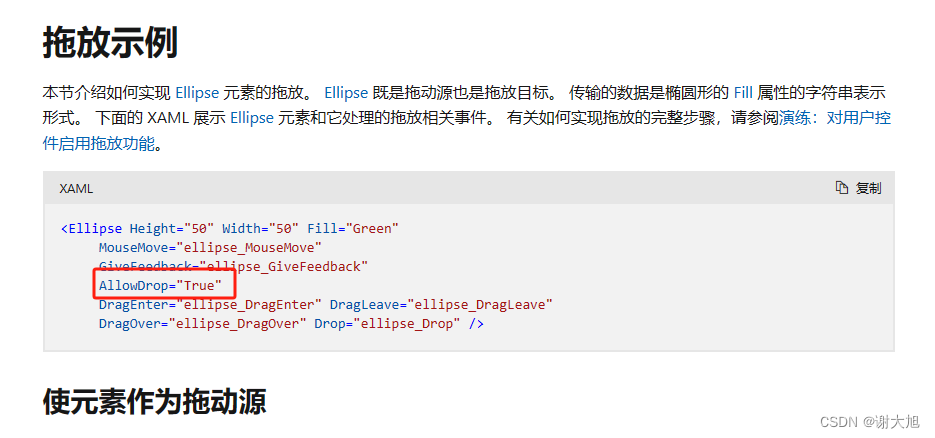
实现自行调节scoll滚动的位置(可相应获取任何控件中的内部滚动条) TreeView:TreeViewAutomationPeer lvap new TreeViewAutomationPeer(treeView); var svap lvap.GetPattern(PatternInterface.Scroll) as ScrollViewerAutomationPeer; var scroll svap.Owner as ScrollVie…...
C语言: 指针讲解
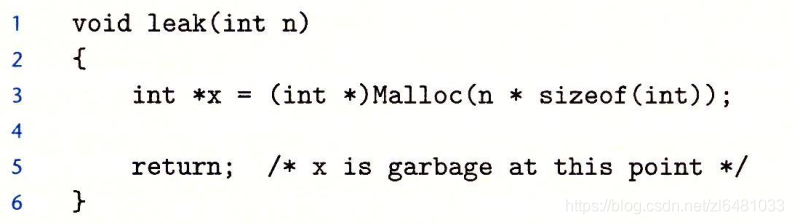
为什么需要指针? (1)指针的使用使得不同区域的代码可以轻易的共享内存数据。当然你也可以通过数据的复制达到相同的效果,但是这样往往效率不太好,因为诸如结构体等大型数据,占用的字节数多,复制很消耗性能…...

C#使用Stopwatch类来实现计时功能
前言 在 C# 中,Stopwatch 类是用于测量经过的时间的工具类,提供了高精度的计时功能。Stopwatch 类位于 System.Diagnostics 命名空间中。通常情况下,使用 Stopwatch 的流程是创建一个 Stopwatch 对象,然后调用 Start 方法开始计时…...

ubuntu18.04安装qt
ubuntu18.04安装qt 1、下载文件 比如我下载的是5.13.0版本 下载链接 2、安装 wget https://download.qt.io/archive/qt/5.13/5.13.0/qt-opensource-linux-x64-5.13.0.runsudo chmod x qt-opensource-linux-x64-5.13.0.runsudo ./qt-opensource-linux-x64-5.13.0.run参考文…...
ElasticSearch、java的四大内置函数式接口、Stream流、parallelStream背后的技术、Optional类
第四周笔记 一、ElasticSearch 1.安装 apt-get install lrzsz adduser -m es 创建用户组: useradd *-m* xiaoming(用户名) *PS:追加参数-m* passwd xiaoming(用户名) passwd xiaoming 输入新的 UNIX 密码: 重新输入新的 UNIX 密码&…...

深入MNN:开源深度学习框架的介绍、安装与编译指南
引言 在人工智能的世界里,深度学习框架的选择对于研究和应用的进展至关重要。MNN,作为一个轻量级、高效率的深度学习框架,近年来受到了众多开发者和研究人员的青睐。它由阿里巴巴集团开源,专为移动端设备设计,支持跨平…...

[LeetCode][400]第 N 位数字
题目 400. 第 N 位数字 给你一个整数 n ,请你在无限的整数序列 [1, 2, 3, 4, 5, 6, 7, 8, 9, 10, 11, …] 中找出并返回第 n 位上的数字。 示例 1: 输入:n 3 输出:3 示例 2: 输入:n 11 输出:…...

clickhouse 查询group 分组最大值的一行数据。
按照 sql_finger_md5 分组取query_time_ms 最大的一行数据。 使用any函数可以去匹配到的第一行数据,所以可以先让数据按照query_time_ms 排序,然后再使用group by 和any结合取第一行数据,就是最大值的那一行数据。 selectany (time) as time…...

Python装饰器与生成器:从原理到实践
一、引言 Python 是一种功能强大且易于学习的编程语言,其丰富的特性使得开发者能够高效地完成各种任务。在 Python 中,装饰器和生成器是两个非常重要的概念,它们能够极大地增强代码的可读性和可维护性。本文将详细介绍如何学习 Python 装饰器…...

python-函数引入模块面向对象编程创建类继承
远离复读机行为 def calculate_BMI(weight,height):BMI weight / height**2if BMI < 18.5:category "偏瘦"elif BMI < 25:category "正常"elif BMI < 30:category "偏胖"else:category "肥胖"print(f"您的BMI分类…...
Spring:面试八股
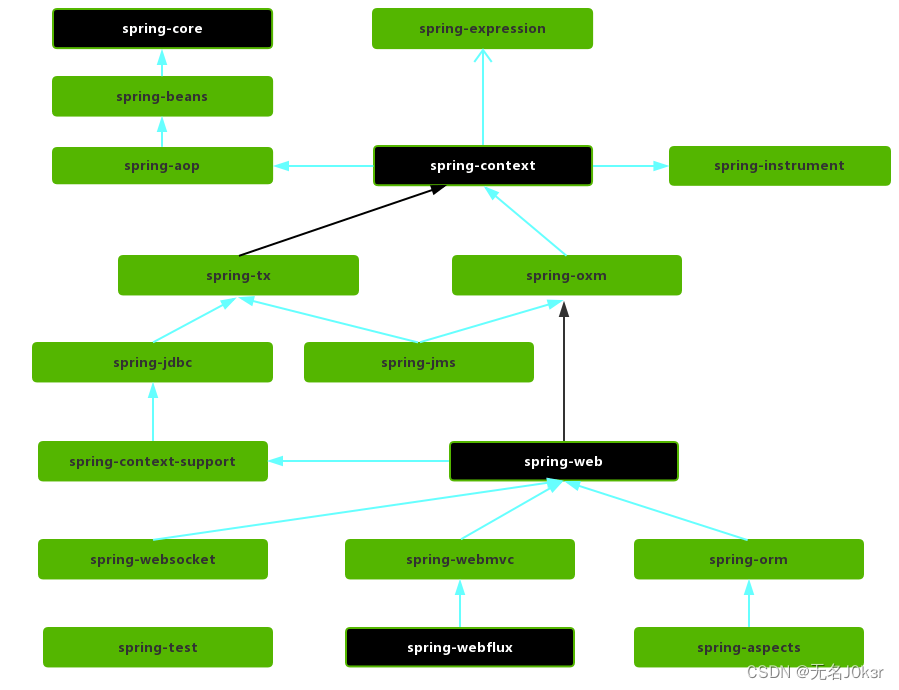
文章目录 参考Spring模块CoreContainerAOP 参考 JavaGuide Spring模块 CoreContainer Spring框架的核心模块,主要提供IoC依赖注入功能的支持。内含四个子模块: Core:基本的核心工具类。Beans:提供对bean的创建、配置、管理功能…...
Flask Python:请求上下文和应用上下文
请求上下文和应用上下文详解 一、背景二、什么是上下文2.1、请求上下文2.2、应用上下文2.3、两种上下文的底层逻辑 三、写在最后 一、背景 在如何实现异步发送邮件的时候,遇到过这样一个报错 RuntimeError: Working outside of request context.This typically me…...

哔哩哔哩直播姬有线投屏教程
1 打开哔哩哔哩直播姬客户端并登录(按下图进行操作) 2 手机用usb数据线连接电脑(若跳出安装驱动的弹窗点击确定或允许),usb的连接方式为仅充电(手机差异要求为仅充电),不同品牌手机要求可能不一样,根据实际的来 3 在投屏过程中不要更改usb的连接方式(不然电脑会死机需要重启) …...

您现在可以在家训练 70b 语言模型
原文:Answer.AI - You can now train a 70b language model at home 我们正在发布一个基于 FSDP 和 QLoRA 的开源系统,可以在两个 24GB GPU 上训练 70b 模型。 已发表 2024 年 3 月 6 日 概括 今天,我们发布了 Answer.AI 的第一个项目&#…...
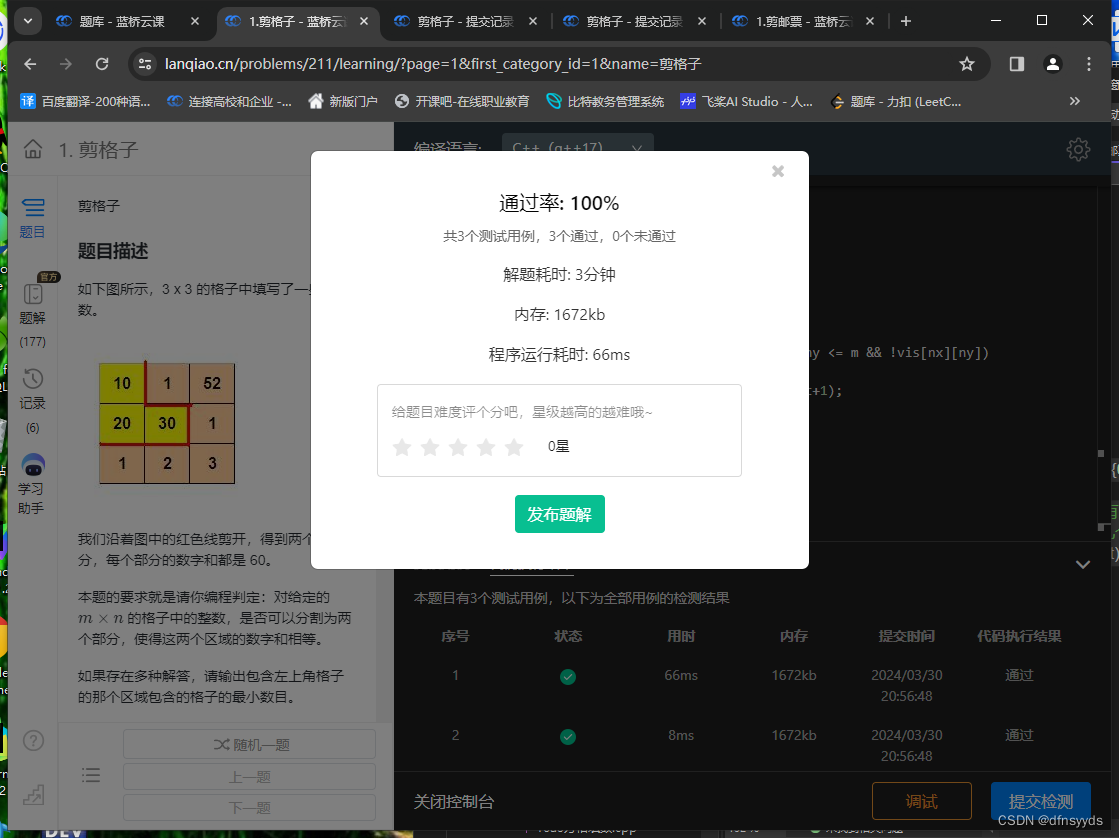
算法题剪格子使我重视起了编程命名习惯
剪格子是一道dfs入门题。 我先写了个dfs寻找路径的模板,没有按题上要求输出。当我确定我的思路没错时,一直运行不出正确结果。然后我挨个和以前写的代码对比,查了两个小时才发现,是命名风格的问题。 我今天写的代码如下ÿ…...

P19:注释
注释是什么? 在java的源程序中,对java代码的解释说明注释内容不会被编译到.class字节码文件中一个的开发习惯应该多写注释,增加程序的可读性 java中注释的方式: 单行注释:注释内容只占一行 // 注释内容多行注释&…...
)
python习题小练习(挑战全对)
1. (单选题)Python 3.0版本正式发布的时间? A. 1991B. 2000C. 2008D. 1989 2. (单选题)以下关于Python语言中“缩进”说法正确的是: A. 缩进在程序中长度统一且强制使用B. 缩进是非强制的,仅为了提高代码可读性C. 缩进可以用在任何语句之后…...

大数据学习-2024/3/30-MySQL基本语法使用介绍实例
学生信息表 create table studend(stu_id int primary key auto_increment comment 学生学号,stu_name varchar(20) not null comment 学生名字,mobile char(11) unique comment 手机号码,stu_sex char(3) default 男 comment 学生性别,birth date comment 出生日期,stu_time …...

CentOS 7下‘Development Tools’和‘开发工具’组有区别吗?实测告诉你答案
CentOS 7下‘Development Tools’与‘开发工具’的隐藏关联:技术细节全解析在Linux系统管理中,yum的软件包组功能一直是个既实用又充满谜团的领域。特别是当系统语言环境与软件包元数据语言不一致时,开发者们常常会遇到一个有趣的现象&#x…...
)
从测速到配置:一套完整的cFosSpeed网络加速保姆级教程(适用于小白)
从零开始掌握cFosSpeed:网络加速全流程实战指南对于经常进行在线游戏、视频会议或大文件传输的用户来说,网络延迟和带宽利用率低下往往是影响体验的关键痛点。cFosSpeed作为一款专业的网络流量优化工具,能够显著改善这些问题,但许…...

Win10家庭版别再卡了!保姆级教程:手动修复gpedit.msc路径,彻底关闭Antimalware Service
Win10家庭版性能优化实战:精准修复组策略路径与系统服务调优每次游戏激战正酣时突然卡顿,或是视频渲染到关键时刻系统响应迟缓,很多Win10家庭版用户都遭遇过这类困扰。任务管理器里那个名为"Antimalware Service Executable"的进程…...

小米MIMO最新邀请码
欢迎使用,各得10元体验金...
)
告别外部中断!用EnableInterrupt库轻松搞定Arduino Nano多通道PWM读取(附完整代码)
Arduino Nano多通道PWM读取实战:用EnableInterrupt突破硬件限制当你用Arduino Nano开发四轴飞行器或机器人项目时,是否遇到过这样的尴尬:遥控器的四个通道PWM信号需要同时读取,但Nano只有两个外部中断引脚?这个问题困扰…...

为什么鸿蒙 App 最终都会走向状态驱动?
子玥酱 (掘金 / 知乎 / CSDN / 简书 同名) 大家好,我是 子玥酱,一名长期深耕在一线的前端程序媛 👩💻。曾就职于多家知名互联网大厂,目前在某国企负责前端软件研发相关工作,主要聚…...

taotoken如何帮助ubuntu开发者应对大模型api的频繁更新与版本迭代
🚀 告别海外账号与网络限制!稳定直连全球优质大模型,限时半价接入中。 👉 点击领取海量免费额度 Taotoken如何帮助Ubuntu开发者应对大模型API的频繁更新与版本迭代 对于在Ubuntu环境下进行开发的工程师而言,大模型API…...

DS4Windows终极指南:3步让PS手柄在PC上完美运行游戏
DS4Windows终极指南:3步让PS手柄在PC上完美运行游戏 【免费下载链接】DS4Windows Like those other ds4tools, but sexier 项目地址: https://gitcode.com/gh_mirrors/ds/DS4Windows 还在为PS手柄连接Windows电脑后无法识别而烦恼吗?🎮…...

OmenSuperHub:基于WMI BIOS控制的高性能笔记本硬件管理方案
OmenSuperHub:基于WMI BIOS控制的高性能笔记本硬件管理方案 【免费下载链接】OmenSuperHub Control Omen laptop performance, fan speeds, and keyboard lighting, and unlock power limits. 项目地址: https://gitcode.com/gh_mirrors/om/OmenSuperHub 在惠…...

基于IRS2092的200W D类功放设计:从PWM原理到保护电路实战
1. 项目概述与核心思路折腾音响功放,从经典的AB类玩到D类,感觉就像是从燃油车换到了电动车,动力响应和效率完全是两个维度。这次要聊的这块“200W Class-D Audio Power Amplifier [150115]”单板功放,就是一个非常典型的D类功放设…...