
OpenStack云平台搭建(6) | 部署Neutron
目录
1.在控制节点登录数据库配置
2.要创建服务证书,完成这些步骤
3.创建网络服务API端点:
4.安装网络组件
5.配置neutron组件
6.配置 Modular Layer 2 (ML2) 插件
7.配置Linuxbridge代理
8.配置DHCP代理
9.配置元数据代理
10.编辑``/etc/nova/nova.conf``文件并完成以下操作
11.安装完成
12.然后再计算节点
13.配置Linuxbridge代理
14.为计算节点配置网络服务
14.完成安装
15.验证
- neutron是openstack核心项目之一,提供云计算环境下的虚拟网络功能
- OpenStack网络(neutron)管理OpenStack环境中所有虚拟网络基础设施(VNI),物理网络基础设施(PNI)的接入层。
1.在控制节点登录数据库配置
- 用数据库连接客户端以 root 用户连接到数据库服务器:
[root@controller ~]# mysql -p
Enter password:
Welcome to the MariaDB monitor.  Commands end with ; or \g.
Your MariaDB connection id is 18
Server version: 10.3.20-MariaDB MariaDB ServerCopyright (c) 2000, 2018, Oracle, MariaDB Corporation Ab and others.Type 'help;' or '\h' for help. Type '\c' to clear the current input statement.MariaDB [(none)]> - 创建``neutron`` 数据库:
MariaDB [(none)]> CREATE DATABASE neutron;
- 对``neutron`` 数据库授予合适的访问权限,使用合适的密码替换``NEUTRON_DBPASS``:
MariaDB [(none)]> GRANT ALL PRIVILEGES ON neutron.* TO 'neutron'@'%' \IDENTIFIED BY '123';-
退出数据库客户端。
2.要创建服务证书,完成这些步骤
- 创建``neutron``用户:
openstack user create --domain default --password-prompt neutron- 添加``admin`` 角色到``neutron`` 用户:
openstack role add --project service --user neutron admin- 创建``neutron``服务实体:
openstack service create --name neutron --description "OpenStack Networking" network3.创建网络服务API端点:
openstack endpoint create --region RegionOne network public http://controller:9696openstack endpoint create --region RegionOne network internal http://controller:9696openstack endpoint create --region RegionOne network admin http://controller:9696
4.安装网络组件
yum install openstack-neutron openstack-neutron-ml2 openstack-neutron-linuxbridge ebtables -y5.配置neutron组件
- 编辑``/etc/neutron/neutron.conf`` 文件
vi /etc/neutron/neutron.conf- 在 [database] 部分,配置数据库访问:
[database]
connection = mysql+pymysql://neutron:123@controller/neutron- 在``[DEFAULT]``部分,启用ML2插件并禁用其他插件:
[DEFAULT]
core_plugin = ml2
service_plugins =- 在 “[DEFAULT]” 和 “[oslo_messaging_rabbit]”部分,配置 “RabbitMQ” 消息队列的连接:
[DEFAULT]
transport_url = rabbit://openstack:123@controller- 在 “[DEFAULT]” 和 “[keystone_authtoken]” 部分,配置认证服务访问:
[DEFAULT]
auth_strategy = keystone[keystone_authtoken]
www_authenticate_uri = http://controller:5000
auth_url = http://controller:5000
memcached_servers = controller:11211
auth_type = password
project_domain_name = default
user_domain_name = default
project_name = service
username = neutron
password = neutron- 在``[DEFAULT]``和``[nova]``部分,配置网络服务来通知计算节点的网络拓扑变化:
[DEFAULT]
notify_nova_on_port_status_changes = true
notify_nova_on_port_data_changes = true[nova]
auth_url = http://controller:5000
auth_type = password
project_domain_name = default
user_domain_name = default
region_name = RegionOne
project_name = service
username = nova
password = nova- 在 [oslo_concurrency] 部分,配置锁路径:
[oslo_concurrency]
lock_path = /var/lib/neutron/tmp
6.配置 Modular Layer 2 (ML2) 插件
- 编辑``/etc/neutron/plugins/ml2/ml2_conf.ini``文件并完成以下操作:
vi /etc/neutron/plugins/ml2/ml2_conf.ini- 删除里面所有的内容添加下面内容,然后进行修改
[DEFAULT]#
# From oslo.log
## If set to true, the logging level will be set to DEBUG instead of the default
# INFO level. (boolean value)
# Note: This option can be changed without restarting.
#debug = false# DEPRECATED: If set to false, the logging level will be set to WARNING instead
# of the default INFO level. (boolean value)
# This option is deprecated for removal.
# Its value may be silently ignored in the future.
#verbose = true# The name of a logging configuration file. This file is appended to any
# existing logging configuration files. For details about logging configuration
# files, see the Python logging module documentation. Note that when logging
# configuration files are used then all logging configuration is set in the
# configuration file and other logging configuration options are ignored (for
# example, logging_context_format_string). (string value)
# Note: This option can be changed without restarting.
# Deprecated group/name - [DEFAULT]/log_config
#log_config_append = <None># Defines the format string for %%(asctime)s in log records. Default:
# %(default)s . This option is ignored if log_config_append is set. (string
# value)
#log_date_format = %Y-%m-%d %H:%M:%S# (Optional) Name of log file to send logging output to. If no default is set,
# logging will go to stderr as defined by use_stderr. This option is ignored if
# log_config_append is set. (string value)
# Deprecated group/name - [DEFAULT]/logfile
#log_file = <None># (Optional) The base directory used for relative log_file  paths. This option
# is ignored if log_config_append is set. (string value)
# Deprecated group/name - [DEFAULT]/logdir
#log_dir = <None># Uses logging handler designed to watch file system. When log file is moved or
# removed this handler will open a new log file with specified path
# instantaneously. It makes sense only if log_file option is specified and
# Linux platform is used. This option is ignored if log_config_append is set.
# (boolean value)
#watch_log_file = false# Use syslog for logging. Existing syslog format is DEPRECATED and will be
# changed later to honor RFC5424. This option is ignored if log_config_append
# is set. (boolean value)
#use_syslog = false# Syslog facility to receive log lines. This option is ignored if
# log_config_append is set. (string value)
#syslog_log_facility = LOG_USER# Log output to standard error. This option is ignored if log_config_append is
# set. (boolean value)
#use_stderr = true# Format string to use for log messages with context. (string value)
#logging_context_format_string = %(asctime)s.%(msecs)03d %(process)d %(levelname)s %(name)s [%(request_id)s %(user_identity)s] %(instance)s%(message)s# Format string to use for log messages when context is undefined. (string
# value)
#logging_default_format_string = %(asctime)s.%(msecs)03d %(process)d %(levelname)s %(name)s [-] %(instance)s%(message)s# Additional data to append to log message when logging level for the message
# is DEBUG. (string value)
#logging_debug_format_suffix = %(funcName)s %(pathname)s:%(lineno)d# Prefix each line of exception output with this format. (string value)
#logging_exception_prefix = %(asctime)s.%(msecs)03d %(process)d ERROR %(name)s %(instance)s# Defines the format string for %(user_identity)s that is used in
# logging_context_format_string. (string value)
#logging_user_identity_format = %(user)s %(tenant)s %(domain)s %(user_domain)s %(project_domain)s# List of package logging levels in logger=LEVEL pairs. This option is ignored
# if log_config_append is set. (list value)
#default_log_levels = amqp=WARN,amqplib=WARN,boto=WARN,qpid=WARN,sqlalchemy=WARN,suds=INFO,oslo.messaging=INFO,iso8601=WARN,requests.packages.urllib3.connectionpool=WARN,urllib3.connectionpool=WARN,websocket=WARN,requests.packages.urllib3.util.retry=WARN,urllib3.util.retry=WARN,keystonemiddleware=WARN,routes.middleware=WARN,stevedore=WARN,taskflow=WARN,keystoneauth=WARN,oslo.cache=INFO,dogpile.core.dogpile=INFO# Enables or disables publication of error events. (boolean value)
#publish_errors = false# The format for an instance that is passed with the log message. (string
# value)
#instance_format = "[instance: %(uuid)s] "# The format for an instance UUID that is passed with the log message. (string
# value)
#instance_uuid_format = "[instance: %(uuid)s] "# Enables or disables fatal status of deprecations. (boolean value)
#fatal_deprecations = false[ml2]#
# From neutron.ml2
## List of network type driver entrypoints to be loaded from the
# neutron.ml2.type_drivers namespace. (list value)
#type_drivers = local,flat,vlan,gre,vxlan,geneve# Ordered list of network_types to allocate as tenant networks. The default
# value 'local' is useful for single-box testing but provides no connectivity
# between hosts. (list value)
#tenant_network_types = local# An ordered list of networking mechanism driver entrypoints to be loaded from
# the neutron.ml2.mechanism_drivers namespace. (list value)
#mechanism_drivers =# An ordered list of extension driver entrypoints to be loaded from the
# neutron.ml2.extension_drivers namespace. For example: extension_drivers =
# port_security,qos (list value)
#extension_drivers =# Maximum size of an IP packet (MTU) that can traverse the underlying physical
# network infrastructure without fragmentation when using an overlay/tunnel
# protocol. This option allows specifying a physical network MTU value that
# differs from the default global_physnet_mtu value. (integer value)
#path_mtu = 0# A list of mappings of physical networks to MTU values. The format of the
# mapping is <physnet>:<mtu val>. This mapping allows specifying a physical
# network MTU value that differs from the default global_physnet_mtu value.
# (list value)
#physical_network_mtus =# Default network type for external networks when no provider attributes are
# specified. By default it is None, which means that if provider attributes are
# not specified while creating external networks then they will have the same
# type as tenant networks. Allowed values for external_network_type config
# option depend on the network type values configured in type_drivers config
# option. (string value)
#external_network_type = <None># IP version of all overlay (tunnel) network endpoints. Use a value of 4 for
# IPv4 or 6 for IPv6. (integer value)
#overlay_ip_version = 4[ml2_type_flat]#
# From neutron.ml2
## List of physical_network names with which flat networks can be created. Use
# default '*' to allow flat networks with arbitrary physical_network names. Use
# an empty list to disable flat networks. (list value)
#flat_networks = *[ml2_type_geneve]#
# From neutron.ml2
## Comma-separated list of <vni_min>:<vni_max> tuples enumerating ranges of
# Geneve VNI IDs that are available for tenant network allocation (list value)
#vni_ranges =# Geneve encapsulation header size is dynamic, this value is used to calculate
# the maximum MTU for the driver. This is the sum of the sizes of the outer ETH
# + IP + UDP + GENEVE header sizes. The default size for this field is 50,
# which is the size of the Geneve header without any additional option headers.
# (integer value)
#max_header_size = 30[ml2_type_gre]#
# From neutron.ml2
## Comma-separated list of <tun_min>:<tun_max> tuples enumerating ranges of GRE
# tunnel IDs that are available for tenant network allocation (list value)
#tunnel_id_ranges =[ml2_type_vlan]#
# From neutron.ml2
## List of <physical_network>:<vlan_min>:<vlan_max> or <physical_network>
# specifying physical_network names usable for VLAN provider and tenant
# networks, as well as ranges of VLAN tags on each available for allocation to
# tenant networks. (list value)
#network_vlan_ranges =[ml2_type_vxlan]#
# From neutron.ml2
## Comma-separated list of <vni_min>:<vni_max> tuples enumerating ranges of
# VXLAN VNI IDs that are available for tenant network allocation (list value)
#vni_ranges =# Multicast group for VXLAN. When configured, will enable sending all broadcast
# traffic to this multicast group. When left unconfigured, will disable
# multicast VXLAN mode. (string value)
#vxlan_group = <None>[securitygroup]#
# From neutron.ml2
## Driver for security groups firewall in the L2 agent (string value)
#firewall_driver = <None># Controls whether the neutron security group API is enabled in the server. It
# should be false when using no security groups or using the nova security
# group API. (boolean value)
#enable_security_group = true# Use ipset to speed-up the iptables based security groups. Enabling ipset
# support requires that ipset is installed on L2 agent node. (boolean value)
#enable_ipset = true- 在``[ml2]``部分,启用flat和VLAN网络:
[ml2]
type_drivers = flat,vlan- 在``[ml2]``部分,禁用私有网络:
[ml2]
tenant_network_types =- 在``[ml2]``部分,启用Linuxbridge机制:
[ml2]
mechanism_drivers = linuxbridge- 在``[ml2]`` 部分,启用端口安全扩展驱动:
[ml2]
extension_drivers = port_security- 在``[ml2_type_flat]``部分,配置公共虚拟网络为flat网络:
[ml2_type_flat]
flat_networks = extent- 在 ``[securitygroup]``部分,启用 ipset 增加安全组规则的高效性:
[securitygroup]
enable_ipset = true
7. 配置Linuxbridge代理
- 编辑``/etc/neutron/plugins/ml2/linuxbridge_agent.ini``文件
vi /etc/neutron/plugins/ml2/linuxbridge_agent.ini删除里面所有的内容添加下面内容,然后进行修改
[DEFAULT]#
# From oslo.log
## If set to true, the logging level will be set to DEBUG instead of the default
# INFO level. (boolean value)
# Note: This option can be changed without restarting.
#debug = false# DEPRECATED: If set to false, the logging level will be set to WARNING instead
# of the default INFO level. (boolean value)
# This option is deprecated for removal.
# Its value may be silently ignored in the future.
#verbose = true# The name of a logging configuration file. This file is appended to any
# existing logging configuration files. For details about logging configuration
# files, see the Python logging module documentation. Note that when logging
# configuration files are used then all logging configuration is set in the
# configuration file and other logging configuration options are ignored (for
# example, logging_context_format_string). (string value)
# Note: This option can be changed without restarting.
# Deprecated group/name - [DEFAULT]/log_config
#log_config_append = <None># Defines the format string for %%(asctime)s in log records. Default:
# %(default)s . This option is ignored if log_config_append is set. (string
# value)
#log_date_format = %Y-%m-%d %H:%M:%S# (Optional) Name of log file to send logging output to. If no default is set,
# logging will go to stderr as defined by use_stderr. This option is ignored if
# log_config_append is set. (string value)
# Deprecated group/name - [DEFAULT]/logfile
#log_file = <None># (Optional) The base directory used for relative log_file  paths. This option
# is ignored if log_config_append is set. (string value)
# Deprecated group/name - [DEFAULT]/logdir
#log_dir = <None># Uses logging handler designed to watch file system. When log file is moved or
# removed this handler will open a new log file with specified path
# instantaneously. It makes sense only if log_file option is specified and
# Linux platform is used. This option is ignored if log_config_append is set.
# (boolean value)
#watch_log_file = false# Use syslog for logging. Existing syslog format is DEPRECATED and will be
# changed later to honor RFC5424. This option is ignored if log_config_append
# is set. (boolean value)
#use_syslog = false# Syslog facility to receive log lines. This option is ignored if
# log_config_append is set. (string value)
#syslog_log_facility = LOG_USER# Log output to standard error. This option is ignored if log_config_append is
# set. (boolean value)
#use_stderr = true# Format string to use for log messages with context. (string value)
#logging_context_format_string = %(asctime)s.%(msecs)03d %(process)d %(levelname)s %(name)s [%(request_id)s %(user_identity)s] %(instance)s%(message)s# Format string to use for log messages when context is undefined. (string
# value)
#logging_default_format_string = %(asctime)s.%(msecs)03d %(process)d %(levelname)s %(name)s [-] %(instance)s%(message)s# Additional data to append to log message when logging level for the message
# is DEBUG. (string value)
#logging_debug_format_suffix = %(funcName)s %(pathname)s:%(lineno)d# Prefix each line of exception output with this format. (string value)
#logging_exception_prefix = %(asctime)s.%(msecs)03d %(process)d ERROR %(name)s %(instance)s# Defines the format string for %(user_identity)s that is used in
# logging_context_format_string. (string value)
#logging_user_identity_format = %(user)s %(tenant)s %(domain)s %(user_domain)s %(project_domain)s# List of package logging levels in logger=LEVEL pairs. This option is ignored
# if log_config_append is set. (list value)
#default_log_levels = amqp=WARN,amqplib=WARN,boto=WARN,qpid=WARN,sqlalchemy=WARN,suds=INFO,oslo.messaging=INFO,iso8601=WARN,requests.packages.urllib3.connectionpool=WARN,urllib3.connectionpool=WARN,websocket=WARN,requests.packages.urllib3.util.retry=WARN,urllib3.util.retry=WARN,keystonemiddleware=WARN,routes.middleware=WARN,stevedore=WARN,taskflow=WARN,keystoneauth=WARN,oslo.cache=INFO,dogpile.core.dogpile=INFO# Enables or disables publication of error events. (boolean value)
#publish_errors = false# The format for an instance that is passed with the log message. (string
# value)
#instance_format = "[instance: %(uuid)s] "# The format for an instance UUID that is passed with the log message. (string
# value)
#instance_uuid_format = "[instance: %(uuid)s] "# Enables or disables fatal status of deprecations. (boolean value)
#fatal_deprecations = false[agent]#
# From neutron.ml2.linuxbridge.agent
## The number of seconds the agent will wait between polling for local device
# changes. (integer value)
#polling_interval = 2# Set new timeout in seconds for new rpc calls after agent receives SIGTERM. If
# value is set to 0, rpc timeout won't be changed (integer value)
#quitting_rpc_timeout = 10# DEPRECATED: Enable suppression of ARP responses that don't match an IP
# address that belongs to the port from which they originate. Note: This
# prevents the VMs attached to this agent from spoofing, it doesn't protect
# them from other devices which have the capability to spoof (e.g. bare metal
# or VMs attached to agents without this flag set to True). Spoofing rules will
# not be added to any ports that have port security disabled. For LinuxBridge,
# this requires ebtables. For OVS, it requires a version that supports matching
# ARP headers. This option will be removed in Ocata so the only way to disable
# protection will be via the port security extension. (boolean value)
# This option is deprecated for removal.
# Its value may be silently ignored in the future.
#prevent_arp_spoofing = true# Extensions list to use (list value)
#extensions =[linux_bridge]#
# From neutron.ml2.linuxbridge.agent
## Comma-separated list of <physical_network>:<physical_interface> tuples
# mapping physical network names to the agent's node-specific physical network
# interfaces to be used for flat and VLAN networks. All physical networks
# listed in network_vlan_ranges on the server should have mappings to
# appropriate interfaces on each agent. (list value)
#physical_interface_mappings =# List of <physical_network>:<physical_bridge> (list value)
#bridge_mappings =[securitygroup]#
# From neutron.ml2.linuxbridge.agent
## Driver for security groups firewall in the L2 agent (string value)
#firewall_driver = <None># Controls whether the neutron security group API is enabled in the server. It
# should be false when using no security groups or using the nova security
# group API. (boolean value)
#enable_security_group = true# Use ipset to speed-up the iptables based security groups. Enabling ipset
# support requires that ipset is installed on L2 agent node. (boolean value)
#enable_ipset = true[vxlan]#
# From neutron.ml2.linuxbridge.agent
## Enable VXLAN on the agent. Can be enabled when agent is managed by ml2 plugin
# using linuxbridge mechanism driver (boolean value)
#enable_vxlan = true# TTL for vxlan interface protocol packets. (integer value)
#ttl = <None># TOS for vxlan interface protocol packets. (integer value)
#tos = <None># Multicast group(s) for vxlan interface. A range of group addresses may be
# specified by using CIDR notation. Specifying a range allows different VNIs to
# use different group addresses, reducing or eliminating spurious broadcast
# traffic to the tunnel endpoints. To reserve a unique group for each possible
# (24-bit) VNI, use a /8 such as 239.0.0.0/8. This setting must be the same on
# all the agents. (string value)
#vxlan_group = 224.0.0.1# IP address of local overlay (tunnel) network endpoint. Use either an IPv4 or
# IPv6 address that resides on one of the host network interfaces. The IP
# version of this value must match the value of the 'overlay_ip_version' option
# in the ML2 plug-in configuration file on the neutron server node(s). (IP
# address value)
#local_ip = <None># Extension to use alongside ml2 plugin's l2population mechanism driver. It
# enables the plugin to populate VXLAN forwarding table. (boolean value)
#l2_population = false# Enable local ARP responder which provides local responses instead of
# performing ARP broadcast into the overlay. Enabling local ARP responder is
# not fully compatible with the allowed-address-pairs extension. (boolean
# value)
#arp_responder = false- 在``[linux_bridge]``部分,将公共虚拟网络和公共物理网络接口对应起来:
[linux_bridge]
physical_interface_mappings = extent:ens33- 在``[vxlan]``部分,禁止VXLAN覆盖网络:
[vxlan]
enable_vxlan = false- 在 ``[securitygroup]``部分,启用安全组并配置 Linuxbridge iptables firewall driver:
[securitygroup]
enable_security_group = true
firewall_driver = neutron.agent.linux.iptables_firewall.IptablesFirewallDriver- 通过验证以下所有sysct1值都设置为,确保您的 Linux 操作系统内核支持网桥过滤器1,修改文件
#vi /etc/sysctl.confnet.bridge.bridge-nf-call-iptables = 1
net.bridge.bridge-nf-call-ip6tables = 1- 修改完,执行
modprobe br_netfilter
8.配置DHCP代理
- 编辑``/etc/neutron/dhcp_agent.ini``文件并完成下面的操作:
[DEFAULT]
interface_driver = linuxbridge
dhcp_driver = neutron.agent.linux.dhcp.Dnsmasq
enable_isolated_metadata = true
9.配置元数据代理
- 编辑``/etc/neutron/metadata_agent.ini``文件并完成以下操作:
- 在``[DEFAULT]`` 部分,配置元数据主机以及共享密码:
[DEFAULT]
nova_metadata_ip = controller
metadata_proxy_shared_secret = hao123
10. 编辑``/etc/nova/nova.conf``文件并完成以下操作
[neutron]
url = http://controller:9696
auth_url = http://controller:35357
auth_type = password
project_domain_name = default
user_domain_name = default
region_name = RegionOne
project_name = service
username = neutron
password = neutronservice_metadata_proxy = True
metadata_proxy_shared_secret = hao123
11.安装完成
- 网络服务初始化脚本需要一个超链接 /etc/neutron/plugin.ini``指向ML2插件配置文件/etc/neutron/plugins/ml2/ml2_conf.ini``。如果超链接不存在,使用下面的命令创建它:
ln -s /etc/neutron/plugins/ml2/ml2_conf.ini /etc/neutron/plugin.ini- 同步数据库:
su -s /bin/sh -c "neutron-db-manage --config-file /etc/neutron/neutron.conf \--config-file /etc/neutron/plugins/ml2/ml2_conf.ini upgrade head" neutron- 重启计算API 服务:
systemctl restart openstack-nova-api.service- 当系统启动时,启动 Networking 服务并配置它启动。
systemctl enable neutron-server.service \neutron-linuxbridge-agent.service neutron-dhcp-agent.service \neutron-metadata-agent.service
systemctl start neutron-server.service \neutron-linuxbridge-agent.service neutron-dhcp-agent.service \neutron-metadata-agent.service12.然后再计算节点
- 安装neutron组件
yum install openstack-neutron-linuxbridge ebtables ipset- 编辑``/etc/neutron/neutron.conf`` 文件并完成如下操作:
[DEFAULT]
transport_url = rabbit://openstack:123@controller- 在 “[DEFAULT]” 和 “[keystone_authtoken]” 部分,配置认证服务访问:
[DEFAULT]
auth_strategy = keystone[keystone_authtoken]
www_authenticate_uri = http://controller:5000
auth_url = http://controller:5000
memcached_servers = controller:11211
auth_type = password
project_domain_name = default
user_domain_name = default
project_name = service
username = neutron
password = neutron- 在 [oslo_concurrency] 部分,配置锁路径:
[oslo_concurrency]
lock_path = /var/lib/neutron/tmp
13.配置Linuxbridge代理
- 编辑``/etc/neutron/plugins/ml2/linuxbridge_agent.ini``文件并且完成以下操作:
[linux_bridge]
physical_interface_mappings = extnet:ens33- 在``[vxlan]``部分,禁止VXLAN覆盖网络:
[vxlan]
enable_vxlan = false- 在 ``[securitygroup]``部分,启用安全组并配置 Linuxbridge iptables firewall driver:
[securitygroup]
enable_security_group = true
firewall_driver = neutron.agent.linux.iptables_firewall.IptablesFirewallDriver- 修改/etc/sysctl.conf文件
net.bridge.bridge-nf-call-iptables = 1
net.bridge.bridge-nf-call-ip6tables = 1
14.为计算节点配置网络服务
- 编辑``/etc/nova/nova.conf``文件并完成下面的操作:
[neutron]
auth_url = http://controller:5000
auth_type = password
project_domain_name = default
user_domain_name = default
region_name = RegionOne
project_name = service
username = neutron
password = neutron
14.完成安装
- 重启计算服务:
systemctl restart openstack-nova-compute.service- 启动Linuxbridge代理并配置它开机自启动:
systemctl enable neutron-linuxbridge-agent.service
systemctl start neutron-linuxbridge-agent.service
15.验证
openstack extension list --network
neutron部署完成
- Neutron网络结构图,管理员创建和管理Neutron外部网络,是租户虚拟机与互联网信息交互的桥梁。更具体的,外部网络会分出一个子网,它是一组在互联网上可寻址的IP地址。一般情况下,外部网络只有一个(neutron是支持多个外部网络的),且由管理员创建。租户虚拟机创建和管理租户网络,每个网络可以根据需要划分成多个子网。诸多子网通过路由器与Neutron外部网络(图中具体是子网A)连接。路由器的gateway网关端连接外部网络的子网,interfaces接口端有多个,连接租户网络的子网。路由器及interface接口端连接的网络都是由租户根据需要自助创建,管理者只创建和管理Neutron外部网络部分。
总结来看,创建一个Neutron网络的过程如下:
1 、首先管理员拿到一组可以在互联网上寻址的IP地址,并且创建一个外部网络和子网
2、 租户创建一个网络和子网
3、 租户创建一个路由器并且连接租户子网和外部网络
4、 租户创建虚拟机
OpenStack简介 | 常见的基础组件
OpenStack云平台搭建(1) | 基础环境准备
OpenStack云平台搭建(2) | 安装Keystone
OpenStack云平台搭建(3) | 部署Glance
OpenStack云平台搭建(4) | 部署Placement
OpenStack云平台搭建(5) | 部署Nova
相关文章:
 | 部署Neutron)
OpenStack云平台搭建(6) | 部署Neutron
目录 1.在控制节点登录数据库配置 2.要创建服务证书,完成这些步骤 3.创建网络服务API端点: 4.安装网络组件 5.配置neutron组件 6.配置 Modular Layer 2 (ML2) 插件 7.配置Linuxbridge代理 8.配置DHCP代理 9.配置元数据代理 10.编辑/etc/nova/no…...

Lesson 05.Configuring the Oracle Network Environment
Lesson 05. Configuring the Oracle Network Environment 文章目录Lesson 05. Configuring the Oracle Network Environment1. 监听程序的配置文件有哪些,如何命名,保存在什么位置?2. Oracle 网络的服务名称文件是如何命名的,需要…...

理论五:接口vs抽象类的区别,如何用普通的类模拟抽象类和接口
在面向对象编程中,抽象类和接口是两个经常被用到的语法概念,是面向对象四大特性,以及很多设计模式、设计思想、设计原则编程实现的基础。比如,我们可以使用接口来实现面向对象的抽象特性、多态特性和基于接口而非实现的设计原则,使用抽象类来实现面向对象的继承特性和模板设计模…...
【Hello Linux】 Linux的权限以及Shell原理
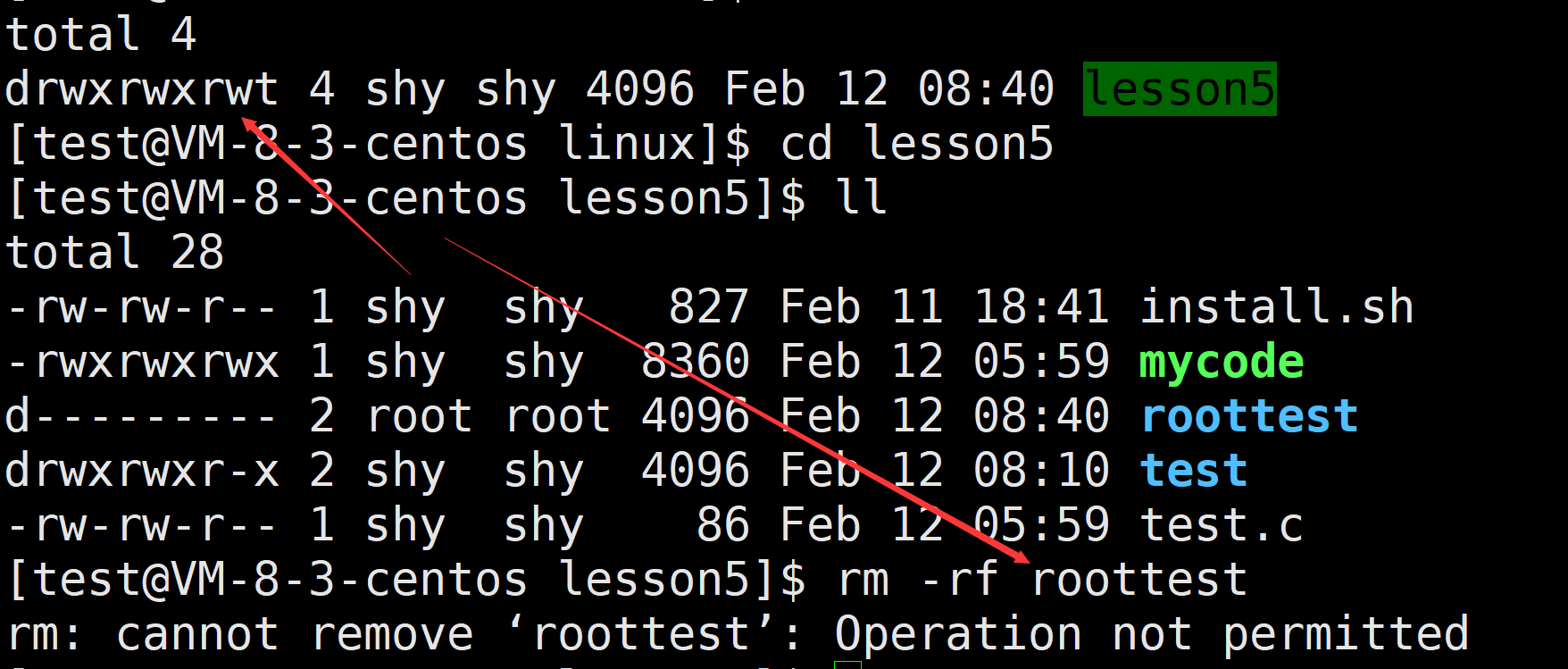
作者:小萌新 专栏:Linux 作者简介:大二学生 希望能和大家一起进步! 本篇博客简介:介绍Linux的基础命令 Linux的权限以及Shell原理Shell的运行原理权限Linux中权限的概念如何切换用户如何提升当前操作的权限如何添加信任…...
【STM32】【HAL库】遥控关灯2 分机
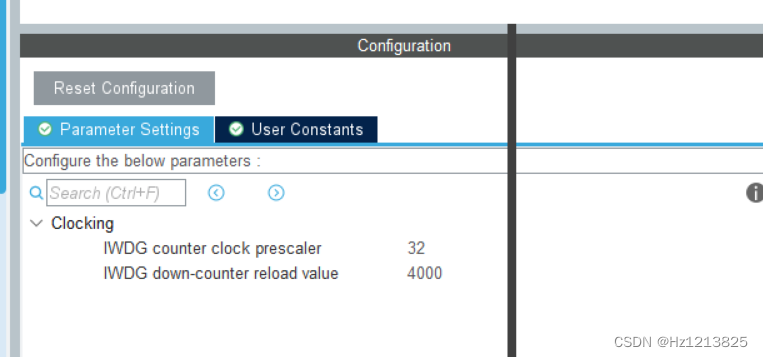
相关连接 【STM32】【HAL库】遥控关灯0 概述 【STM32】【HAL库】遥控关灯1主机 【STM32】【HAL库】遥控关灯2 分机 【STM32】【HAL库】遥控关灯3 遥控器 需求 接收RF433和红外信号,根据信号内容控制舵机 硬件设计 主控采用stm32F103c6 STM32 433接收 其他接口 软件设计 接…...

代码随想录算法训练营第27天|● 93.复原IP地址 ● 78.子集 ● 90.子集II
93.复原IP地址 看完题后的思路 典型分割问题略lue略剪枝条件 sub: 1) 不是一位首字母为0 2)大于三位 3)介于0-255之间 4) 当已分割得到3个时,第四个直接从startIndex到末尾就行 代码 ArrayList<String> slist…...

Unity UI合批的问题
今天看到一个问题,主要说的是Unity中的UI资源合批的问题之前一直以为主要和UI资源在Hierarchy中的排列顺序有关,但其实这并不是最主要的,因为Unity会对同一个Canvas下的UI进行排序(注:不同Canvas下的资源是不能够合批的…...
MWORKS--系统建模与仿真
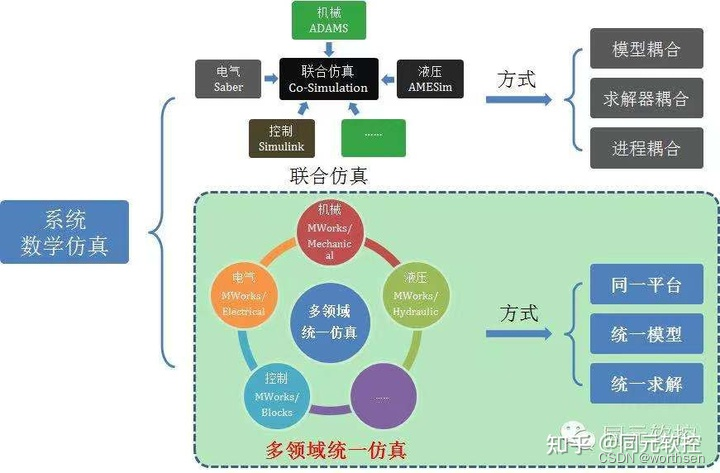
MWORKS--系统建模与仿真1 系统定义特征2 系统研究2.1 特点与原则2.2 方法百度百科归纳同元杠归纳3 系统建模与仿真3.1 系统、模型、仿真的关系3.2 系统建模4 建模方法4.1 方法4.2 一般流程4.3 目的5 仿真方法5.1 方法5.2 流程参考1 系统定义 系统是由相互作用相互依赖的若干组…...

PC端开发GUI
PC端开发GUI 一、搭建PC端环境:常规方式1、Python2、Pycharm二、搭建PC端环境:创建虚拟环境1、创建文件夹存放虚拟环境相关2、配置环境变量3、创建.ui文件4、.ui文件转成.py文件5、打包.py文件来发布.exe一、搭建PC端环境:常规方式 1、Python 注意Python版本不能超过3.9,…...
解读手机拍照的各个参数(拍照时,上面会有6个符号)
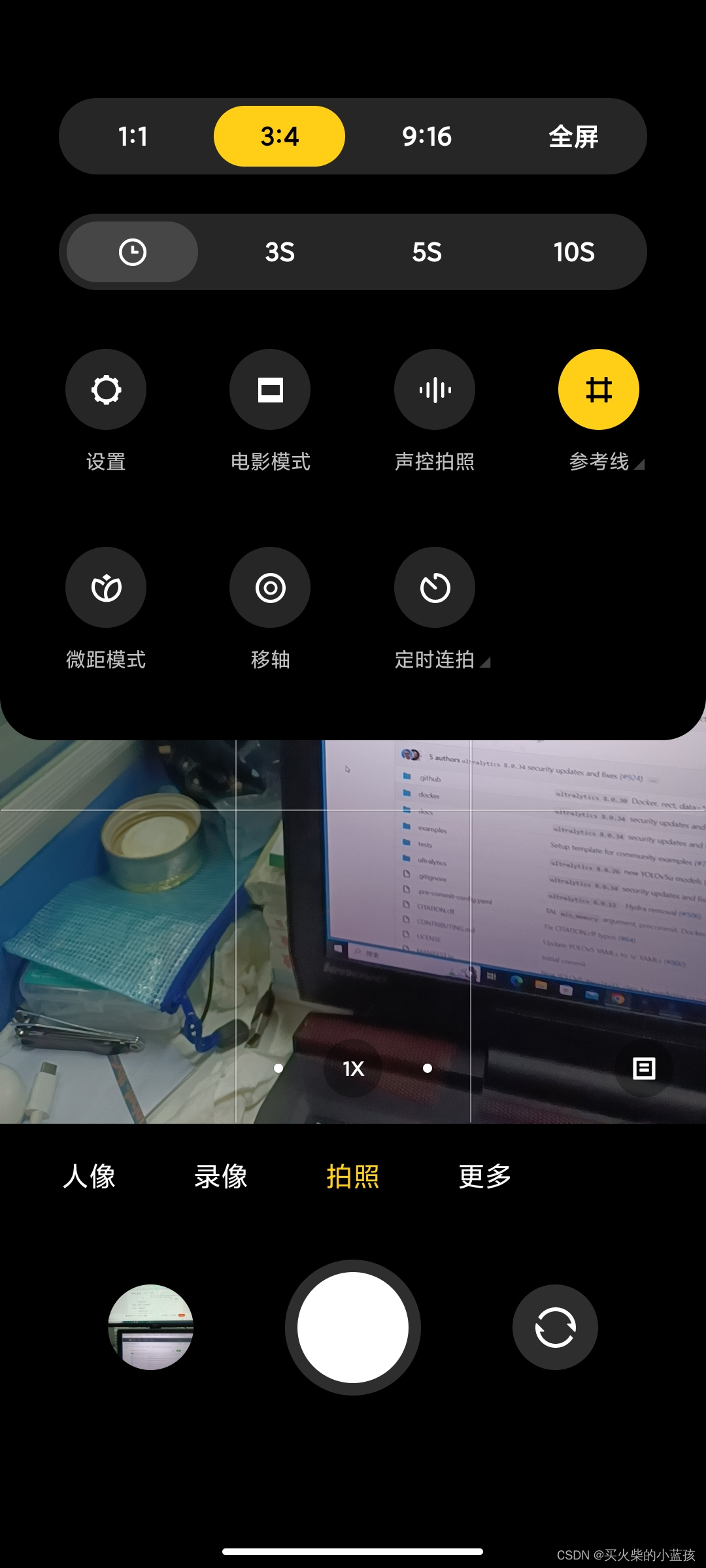
1第一个符号是闪光灯符号,如下图所示。有四种模式, 手机的闪光灯分别为关闭、自动、开启和常亮四种状态。 关闭:就是在任何情况下都不会闪光 自动:由手机来判断此时的光线强弱,若手机测光认为光线太弱,则…...

数字钥匙最新进展文章
在未来出行上,智能汽车越来越卷。 新车除了拼高精度激光雷达、堆大算力芯片、标配辅助驾驶、智能语音识别,还在车钥匙上展开了激烈角逐,越来越多的厂商开始在量产车型上搭载数字钥匙,实现无钥匙进入车内。 去年1月蔚来发布轿车E…...
如何在VMware虚拟机上安装运行Mac OS系统(详细图文教程)
一、安装前准备 虚拟机运行软件:VMware Workstation Pro,版本:16.0.0 。VMware Mac OS支持套件:Unlocker。Mac OS系统镜像。 如果VMware 在没有安装Unlocker的情况下启动,在选择客户机操作系统时没有支持Mac OS的选项…...

C++中的强制类型转换
接触过C语言的朋友都知道,C语言中也有强制类型转换,但是C语言中的强制类型转换会有一些问题,比如: int a 0x1234; char b (char)a; 上述的代码出现一个问题就是a 这个int型强制转化成b 这个char型时损失了一些精度,…...

任何人都可以学习Rasa之优秀Rasa学习资源推荐
任何人都可以学习Rasa之优秀Rasa学习资源推荐 欢迎同学们报名Gavin老师的Rasa系列课程,任何人都可以学习Rasa之优秀Rasa学习资源推荐: 1.NLP on Transformers高手之路137课 2 .Rasa 3.X 智能对话机器人案例开发硬核实战高手之路 (7大项目Ex…...

数据中心的 TCP-Delay ACK 与 RTO, RACK
TCP 对 RTO 有个最小值限制,一般限制为 MIN_RTO 200ms。之所以有这个限制,在于要适应 Delay ACK,而 Delay ACK 的意义,不多说,摘自 RFC1122: MIN_RTO 应该足够大,以覆盖 Delay ACK 的影响&…...

MySQL与常见面试题
目录 事务概述ACIDAUTOCOMMIT总结并发一致性问题丢失修改读脏数据不可重复读幻读原因和解决方法隔离级别未提交读(READ UNCOMMITTED)提交读(READ COMMITTED)可重复读(REPEATABLE READ)可串行化(SERIALIZABLE)加锁封锁粒度封锁类型读写锁意向锁...

FFmpeg进阶: 采用音频滤镜对音频进行转码
文章目录采样位数采样率声道布局码率使用FFmpeg音频滤镜进行转码参考链接很多时候为了让视频文件适应不同的播放领域,我们需要对音频文件进行转码操作,转码操作其实主要就是修改音频文件的各种参数包括:采样位数、采样率、音频布局、码率等等。下面分别介…...
C++:AVL树
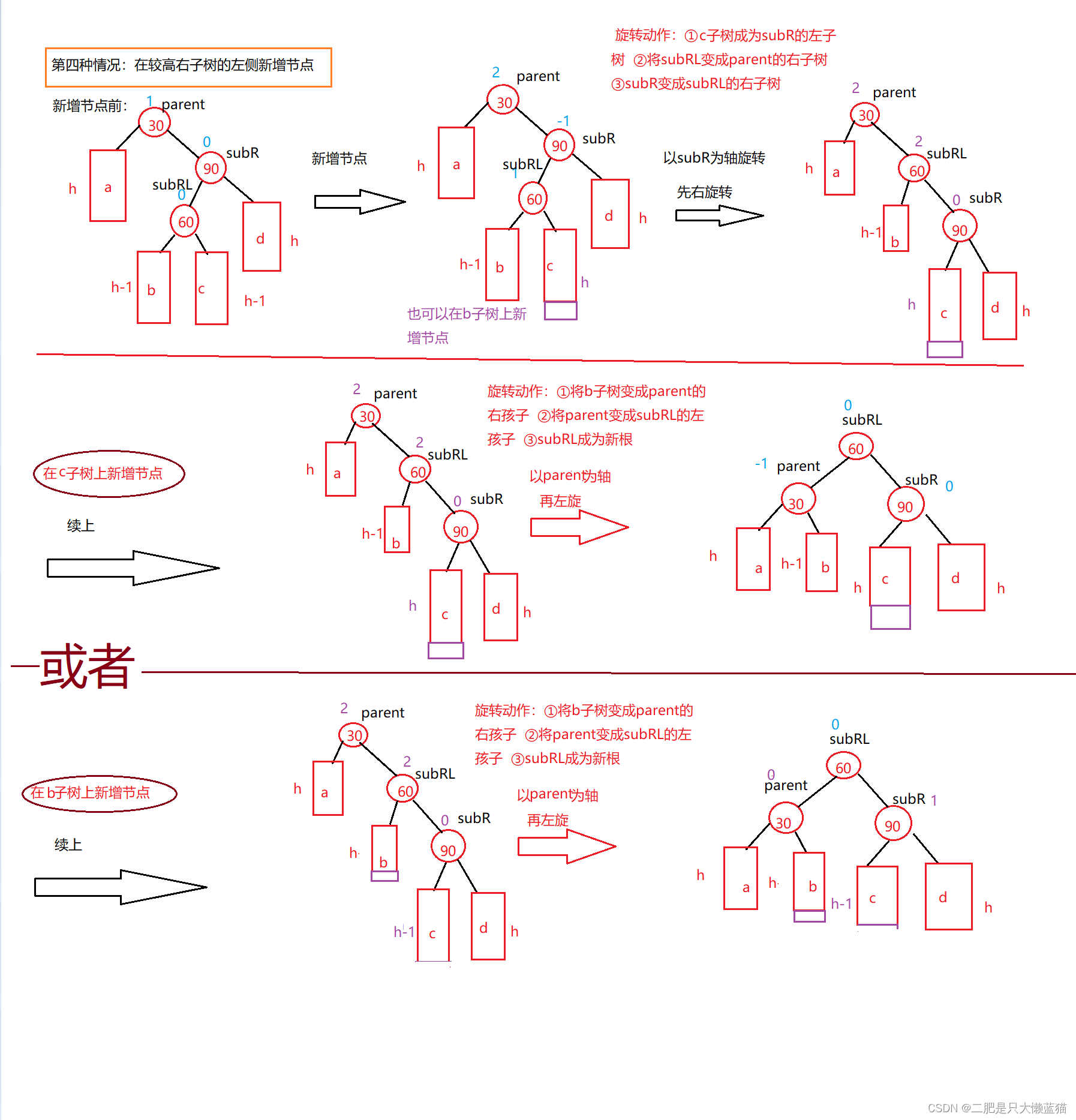
AVL树的概念 二叉搜索树虽可以缩短查找的效率,但如果数据有序或接近有序二叉搜索树将退化为单支树,查找元素相当于在顺序表中搜索元素,效率低下,时间复杂度为O(N); 两位俄罗斯的数学家G.M.Ade…...
Docker中安装Oracle-12c
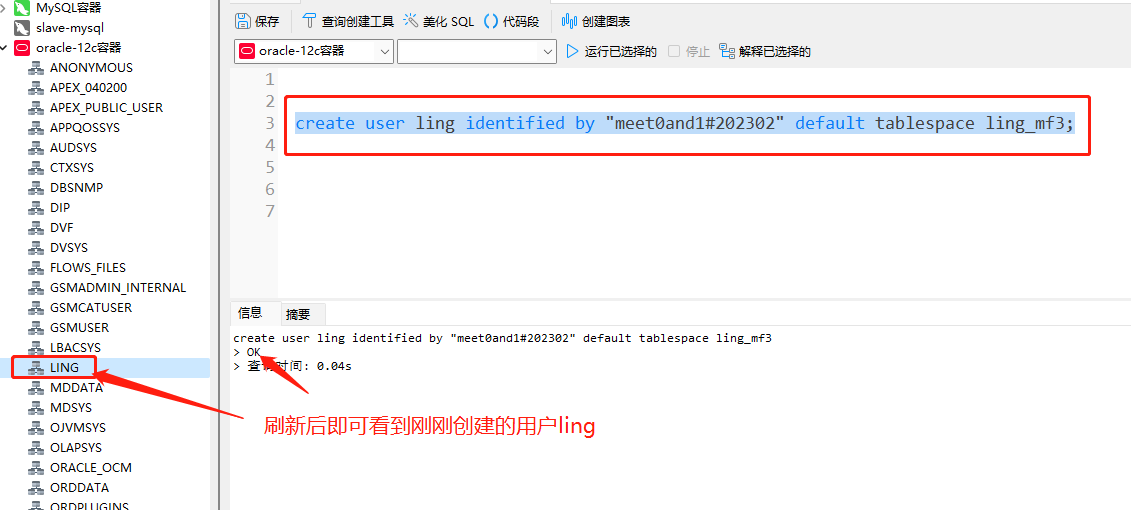
前言 MySQL和Oracle是开发中常用到的两个关系型数据库管理系统,接上一期内容,这一期在Docker中完成oracle-12c的安装和配置。 安装oracle-12c 1、拉取oracle-12c镜像 启动Docker Desktop后在cmd窗口中执行docker search oracle命令,搜索O…...

教你如何用Python分析出选注双色球号码
前言 嗨喽,大家好呀~这里是爱看美女的茜茜呐 又到了学Python时刻~ 数据集介绍 找从19年到现在的开奖历史数据,我们首先要把这个历史数据拿到, 拿到我们再进行做分析,分析每个号码出现的频率是多少, 哪个多&#x…...
)
保姆级教程:在ROS2 Humble/Foxy的Gazebo中配置RGB-D相机(附解决点云颜色/坐标问题)
ROS2 Humble/Foxy中Gazebo深度相机仿真全攻略:从配置到点云问题解决在机器人仿真开发中,深度相机(RGB-D)是不可或缺的传感器之一。它能够同时提供彩色图像和深度信息,为SLAM、物体识别、避障等任务提供关键数据支持。本…...

诚信标签工厂端解决方案 适配俄标 CRPT 体系一体化技术方案
俄罗斯诚实标签依托 CRPT 体系执行强制管控,各类出口货品必须完成 Data Matrix 编码采集、格式转换、多层包装数据绑定,数据合规后方可通关流通。美妆食品、日化建材、玩具五金等品类包装形态差异较大,人工采集方式普遍存在识别精度不足、批量…...

HFSS仿真结果怎么看?以T型波导为例,读懂S参数与电场动态图
HFSS仿真结果深度解析:从S参数到电场动态图的实战指南当你第一次在HFSS中完成T型波导仿真后,面对满屏的曲线和彩色云图,是否感到既兴奋又困惑?那些起伏的S参数曲线究竟告诉你什么信息?电场图中跳跃的颜色又代表怎样的物…...

搞定这 5 个全栈电商项目,面试别再用 Todo-List 凑数了
找独立开发练手项目或者写简历项目时,最忌讳两件事:一是太简单(纯前端 Mock 数据,点两下就没了),二是太假(一上来就硬套微服务、消息队列、高并发,结果自己根本Hold不住)…...

举一个具体例子说明为什么索引不是越多越好,举具体字段
文章目录1. 核心舞台:笔记表 (t_note) 结构设计🚨 错误的操作:2. 结合具体字段,拆解三大翻车现场现场一:给 view_count(浏览量)加索引 —— 导致写放大,拖垮数据库现场二:…...

氘可来昔替尼常见副作用为鼻咽炎头痛及腹泻,如何应对
任何口服药物的临床价值,都必须在疗效与安全性的天平上找到精准的平衡点。氘可来昔替尼以PASI 75应答率的全面胜出证明了自己在银屑病治疗中的卓越地位,而其不良反应谱同样经过了严苛的临床验证。鼻咽炎、头痛和腹泻构成了这款药物最需关注的三大安全信号…...

保姆级教程:在Ubuntu上配置Frida环境,搞定Android App的IO重定向与签名绕过
在Ubuntu上构建Android逆向工程环境:Frida实战与IO重定向技术解析 对于习惯Linux环境的安全研究人员而言,Windows-centric的逆向工具链往往带来诸多不便。本文将系统性地介绍如何在Ubuntu上搭建完整的Android逆向环境,并深入探讨如何利用Frid…...

HoRain云--CLAUDE.md 使用指南
🎬 HoRain云小助手:个人主页 🔥 个人专栏: 《Linux 系列教程》《c语言教程》 ⛺️生活的理想,就是为了理想的生活! ⛳️ 推荐 前些天发现了一个超棒的服务器购买网站,性价比超高,大内存超划算!…...
)
别再只用鼠标了!用Leap Motion手势控制Unity游戏,保姆级配置避坑指南(2024版)
2024年Unity手势交互开发实战:Leap Motion从配置到游戏逻辑全解析在游戏开发领域,交互方式的创新往往能带来全新的体验。想象一下,玩家不再需要键盘鼠标,仅凭自然的手部动作就能操控游戏角色——这正是Leap Motion手势识别技术为U…...

抖音内容批量下载实战:从零开始构建个人视频资料库
抖音内容批量下载实战:从零开始构建个人视频资料库 【免费下载链接】douyin-downloader A practical Douyin downloader for both single-item and profile batch downloads, with progress display, retries, SQLite deduplication, and browser fallback support.…...