
Chrome 源码阅读:跟踪一个鼠标事件的流程
我们通过在关键节点打断点的方式,去分析一个鼠标事件的流程。
我们知道chromium是多进程模型,那么,我们可以推测:一个鼠标消息先从主进程产生,再通过跨进程通信发送给渲染进程,渲染进程再发送给WebFrame,最后被派发到目标Node上。
于是,首先,我们在主进程,找到鼠标时间的最终消费点,打上断点,进行分析:

主进程继续往下走,就是把事件通过跨进程通信框架mojo发送过去的逻辑了:
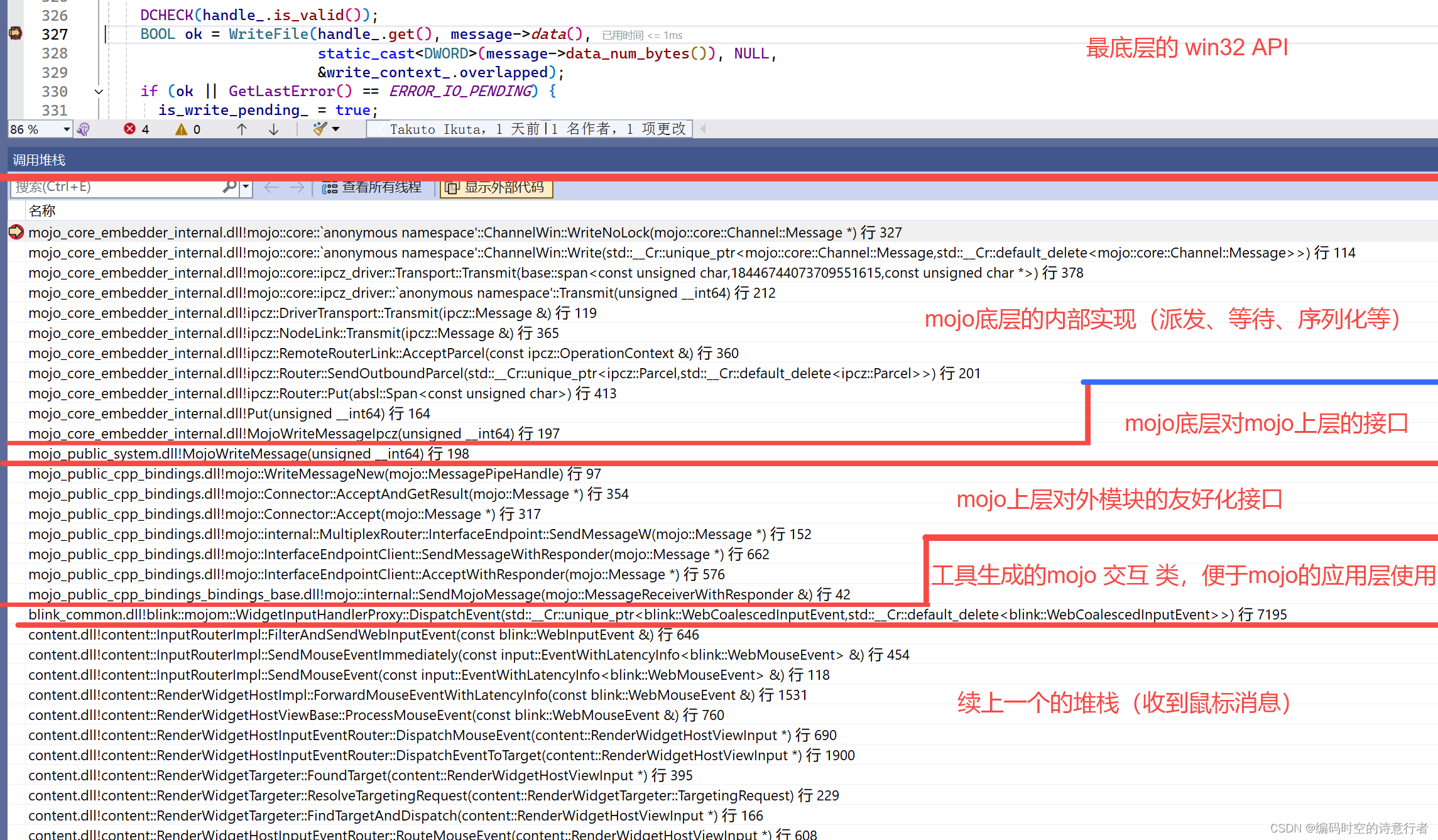
接下来,我们要换个进程,在渲染进程打上断点,看看消息过来后,怎么走的流程:
首先搜索这个mojom的事件,确认渲染进程断点落脚处:
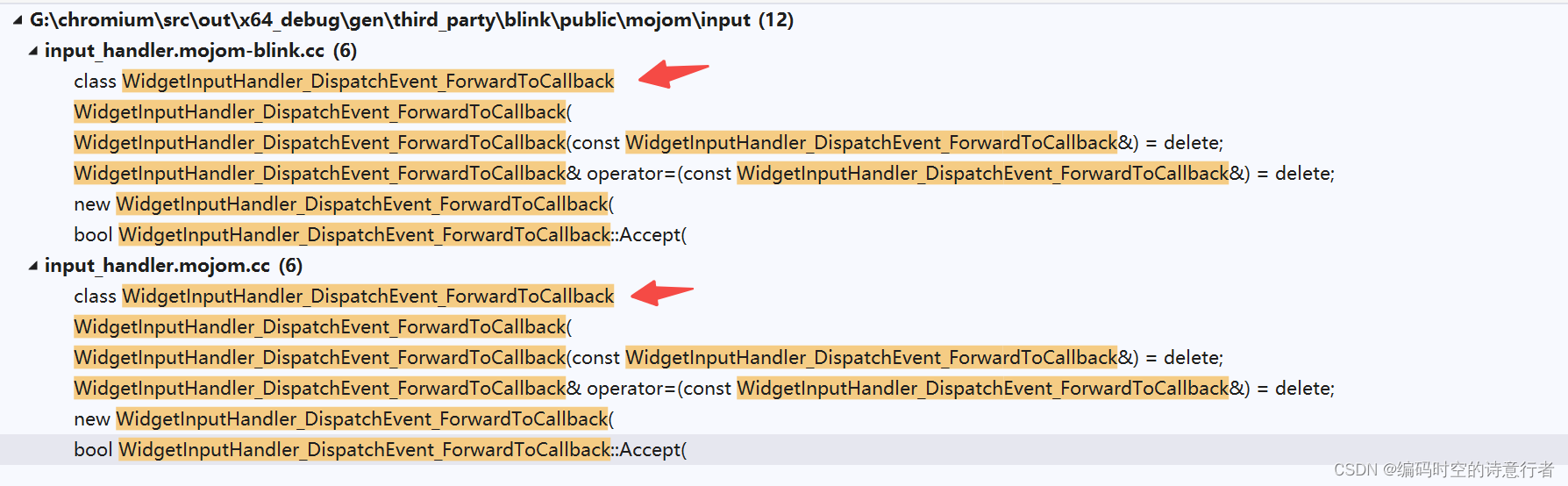
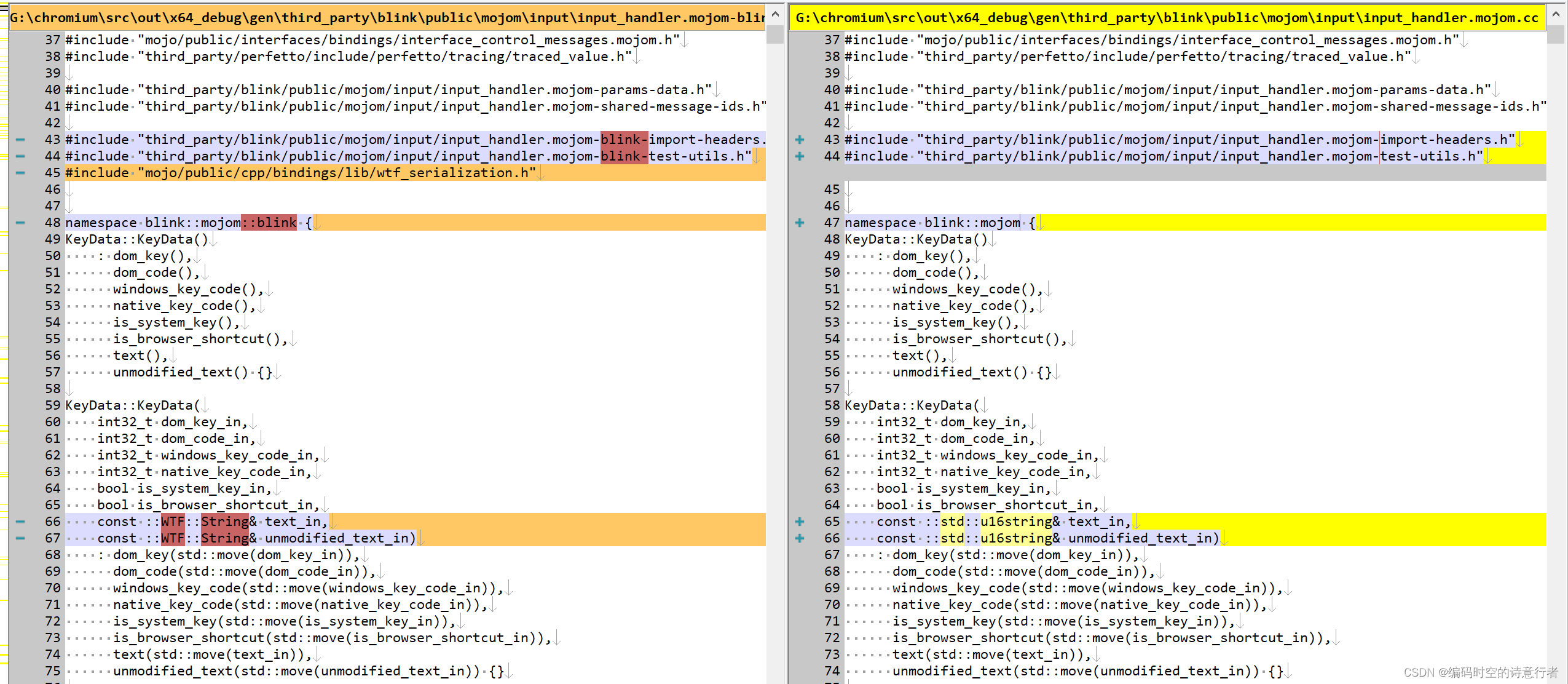
题外话:这个input_handler.mojom.cc到了渲染进程那就成了input_handler.mojom-blink.cc了。
这两个文件99%相似,只有少量的不同(命名空间、基础类型):
这两个类的基类是一样的:
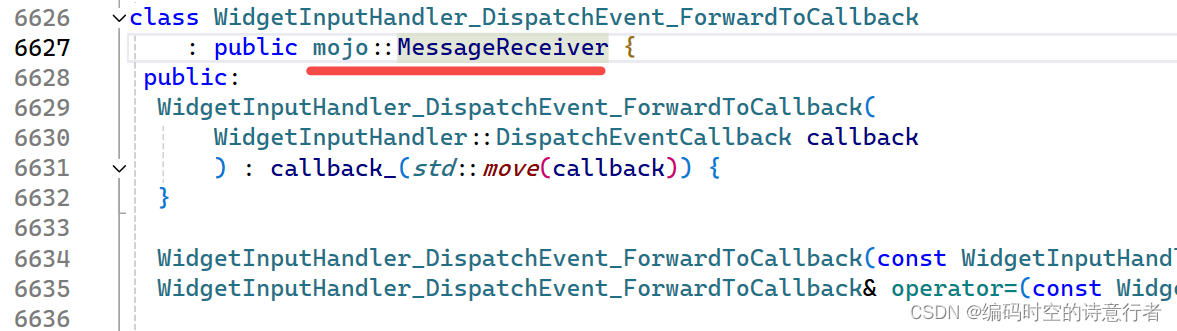
这个类的头文件写明了,是由什么工具生成的:

很好奇生成源,我们也去看看:
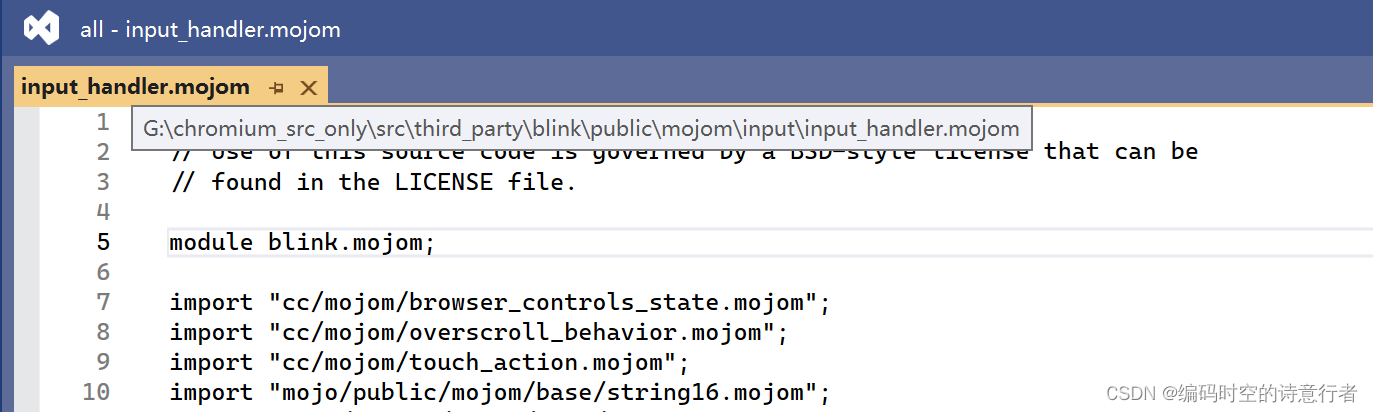
// Copyright 2020 The Chromium Authors
// Use of this source code is governed by a BSD-style license that can be
// found in the LICENSE file.module blink.mojom;import "cc/mojom/browser_controls_state.mojom";
import "cc/mojom/overscroll_behavior.mojom";
import "cc/mojom/touch_action.mojom";
import "mojo/public/mojom/base/string16.mojom";
import "mojo/public/mojom/base/time.mojom";
import "third_party/blink/public/mojom/input/gesture_event.mojom";
import "third_party/blink/public/mojom/input/handwriting_gesture_result.mojom";
import "third_party/blink/public/mojom/input/input_event_result.mojom";
import "third_party/blink/public/mojom/input/input_event.mojom";
import "third_party/blink/public/mojom/input/pointer_lock_context.mojom";
import "third_party/blink/public/mojom/input/pointer_lock_result.mojom";
import "third_party/blink/public/mojom/input/ime_host.mojom";
import "third_party/blink/public/mojom/input/stylus_writing_gesture.mojom";
import "third_party/blink/public/mojom/input/touch_event.mojom";
import "third_party/blink/public/mojom/selection_menu/selection_menu_behavior.mojom";
import "ui/base/ime/mojom/ime_types.mojom";
import "ui/events/mojom/event_constants.mojom";
import "ui/events/mojom/event_latency_metadata.mojom";
import "ui/events/mojom/event.mojom";
import "ui/events/mojom/scroll_granularity.mojom";
import "ui/gfx/geometry/mojom/geometry.mojom";
import "ui/gfx/range/mojom/range.mojom";
import "ui/latency/mojom/latency_info.mojom";[EnableIf=is_android]
import "third_party/blink/public/mojom/input/synchronous_compositor.mojom";// These structs are purposely duplicated from ui/events/mojom/event.mojom.
// They map WebInputEvent <-> WebInputEvent across mojo.
// We have to work at unifying them. The current problem is that the browser
// uses WebInputEvents inside the render widget host and input router. Once
// we move these to ui::Event's then we can get rid of these duplicated
// mojom structs. Ideally the browser would use ui::Event up until we
// pass the events into the renderer and just use a StructTraits to perform
// conversion from ui::mojom::Event --> blink::WebInputEvent.
struct KeyData {int32 dom_key;int32 dom_code;int32 windows_key_code;int32 native_key_code;bool is_system_key;bool is_browser_shortcut;mojo_base.mojom.String16 text;mojo_base.mojom.String16 unmodified_text;
};struct PointerData {int32 pointer_id;float force;double tilt_x;double tilt_y;float tangential_pressure;int32 twist;blink.mojom.Button button;ui.mojom.EventPointerType pointer_type;int32 movement_x;int32 movement_y;bool is_raw_movement_event;gfx.mojom.PointF widget_position;gfx.mojom.PointF screen_position;MouseData? mouse_data;int32 device_id;
};struct WheelData {float delta_x;float delta_y;float wheel_ticks_x;float wheel_ticks_y;float acceleration_ratio_x;float acceleration_ratio_y;uint8 phase;uint8 momentum_phase;blink.mojom.DispatchType cancelable;uint8 event_action;uint8 delta_units;
};struct MouseData {int32 click_count;WheelData? wheel_data;
};struct ScrollUpdate {float velocity_x;float velocity_y;
};struct ScrollData {float delta_x;float delta_y;ui.mojom.ScrollGranularity delta_units;bool target_viewport;blink.mojom.InertialPhaseState inertial_phase;bool synthetic;int32 pointer_count;// Used for GestureScrollBegin type only. If this is true, we use the scroll// sequence to do cursor control rather than scroll.bool cursor_control;ScrollUpdate? update_details;
};struct PinchBeginData {bool needs_wheel_event;
};struct PinchUpdateData {float scale;bool zoom_disabled;bool needs_wheel_event;
};struct PinchEndData {bool needs_wheel_event;
};struct FlingData {float velocity_x;float velocity_y;bool target_viewport;bool prevent_boosting;
};struct TapData {int32 tap_count;bool needs_wheel_event;
};struct TapDownData {int32 tap_down_count;
};struct GestureData {gfx.mojom.PointF screen_position;gfx.mojom.PointF widget_position;blink.mojom.GestureDevice source_device;bool is_source_touch_event_set_blocking;ui.mojom.EventPointerType primary_pointer_type;int32 primary_unique_touch_event_id;int32 unique_touch_event_id;gfx.mojom.Size? contact_size;ScrollData? scroll_data;PinchBeginData? pinch_begin_data;PinchUpdateData? pinch_update_data;PinchEndData? pinch_end_data;TapData? tap_data;TapDownData? tap_down_data;FlingData? fling_data;
};struct TouchPoint {blink.mojom.TouchState state;float radius_x;float radius_y;float rotation_angle;PointerData pointer_data;
};struct TouchData {blink.mojom.DispatchType cancelable;bool moved_beyond_slop_region;bool touch_start_or_first_move;bool hovering;uint32 unique_touch_event_id;array<TouchPoint> touches;
};struct Event {blink.mojom.EventType type;int32 modifiers;mojo_base.mojom.TimeTicks timestamp;ui.mojom.LatencyInfo latency;ui.mojom.EventLatencyMetadata event_latency_metadata;KeyData? key_data;PointerData? pointer_data;GestureData? gesture_data;TouchData? touch_data;
};// Represents the current state of overscroll.
struct DidOverscrollParams {gfx.mojom.Vector2dF accumulated_overscroll;gfx.mojom.Vector2dF latest_overscroll_delta;gfx.mojom.Vector2dF current_fling_velocity;gfx.mojom.PointF causal_event_viewport_point;cc.mojom.OverscrollBehavior overscroll_behavior;
};// A struct wrapper for the TouchAction enumeration because
// enumerations cannot be optional.
struct TouchActionOptional {cc.mojom.TouchAction touch_action;
};// Types related to sending edit commands to the renderer.
struct EditCommand {string name;string value;
};// A structure that indicates selection offsets if the selection could be
// established.
struct SelectAroundCaretResult {// The offset differences between the extended selection and the initial// selection (which is a caret).int32 extended_start_adjust;int32 extended_end_adjust;// The offset differences between the word selection (regardless of the// extended selection granularity) and the initial selection (which is a// caret).int32 word_start_adjust;int32 word_end_adjust;
};// GENERATED_JAVA_ENUM_PACKAGE: org.chromium.blink_public.input
// GENERATED_JAVA_CLASS_NAME_OVERRIDE: SelectionGranularity
enum SelectionGranularity {kWord,kSentence,
};// An enumeration that describes the allowed non-directional pan action for the
// element under pointer being considered.
enum PanAction {// No pan action allowed.kNone,// Pan action is scroll.kScroll,// Pan action moves cursor when initial touch move is in horizontal direction,// or scrolls in the vertical direction.kMoveCursorOrScroll,// Pan action is stylus writable.kStylusWritable,
};// Interface exposed by the browser to the renderer.
interface WidgetInputHandlerHost {// When the renderer's main thread computes the touch action, send this to the// browser.SetTouchActionFromMain(cc.mojom.TouchAction touch_action);// Sets the pan action possible for the element under pointer which could be// one of the actions described under enum PanAction. Note that this is// different from TouchAction and does not contain directional pan info.SetPanAction(PanAction pan_action);// Sent by the compositor when input scroll events are dropped due to bounds// restrictions on the root scroll offset.DidOverscroll(DidOverscrollParams params);// Sent by the compositor when a GSB has started scrolling the viewport.DidStartScrollingViewport();// Required for cancelling an ongoing input method composition.ImeCancelComposition();// Sends the character bounds after every composition change// to always have correct bound info.ImeCompositionRangeChanged(gfx.mojom.Range range,array<gfx.mojom.Rect>? character_bounds,array<gfx.mojom.Rect>? line_bounds);// Updates the mouse capture state of this widget. While capture is enabled,// all mouse events, including those that don't hittest to this widget, will// be targeted to this widget. This enables Blink to behave correctly when// a scrollbar is being dragged, or text is being drag-highlighted, even// when the mouse passes across different RenderWidget areas.SetMouseCapture(bool capture);// Updates the browser whether this main frame widget has ongoing autoscroll// selection. Any further mouse up event should always be dispatched to the// main frame in addition to it's event target (OOP child frame) if the state// is active. This API should only ever be called on the InputHandler for a// main frame's RenderWidgetHost.SetAutoscrollSelectionActiveInMainFrame(bool autoscroll_selection);// Requests locking the target of mouse events to a single element and// removing the cursor from view.  Mostly used by the Pointer Lock API.// See https://www.w3.org/TR/pointerlock/ for more info. This call is// also used by Pepper Flash.// |from_user_gesture| indicates whether this request came from a user// gesture or not.// |unadjusted_movement| indicates whether the request asked for raw mouse// movement data or just what the operating system returns (often accelerated// mouse movement).// |result| kSuccess if the mouse has been locked or the appropriate error// reason if not.// |context| is one end of a mojo pipe that will stay connected as long as// the mouse is locked. Is a NullRemote if |result| is not kSuccess.RequestMouseLock(bool from_user_gesture,bool unadjusted_movement)=> (PointerLockResult result,pending_remote<blink.mojom.PointerLockContext>? context);
};// This interface provides the input actions associated with the FrameWidget.
// Other input actions may also be dispatched via the WidgetInputHandler
// interface. If frame input actions are dispatched the WidgetInputHandler
// should be fetched via the associated interface request so that input calls
// remain in order. See https://goo.gl/x4ee8A for more details.
interface FrameWidgetInputHandler {// Adds text decorations between a given valid start and end offsets in the// currently focused editable field.AddImeTextSpansToExistingText(uint32 start, uint32 end, array<ui.mojom.ImeTextSpan> ime_text_spans);// Clears text decorations type between a given valid start and end offsets// in the currently focused editable field.ClearImeTextSpansByType(uint32 start, uint32 end, ui.mojom.ImeTextSpanType type);// Sets the text composition to be between the given start and end offsets in// the currently focused editable field.SetCompositionFromExistingText(int32 start, int32 end, array<ui.mojom.ImeTextSpan> ime_text_spans);// Deletes the current selection plus the specified number of characters// before and after the selection or caret.ExtendSelectionAndDelete(int32 before, int32 after);// Deletes the current selection plus the specified number of characters// before and after the selection or caret.ExtendSelectionAndReplace(uint32 before,uint32 after,mojo_base.mojom.String16 replacement_text);// Deletes text before and after the current cursor position, excluding the// selection. The lengths are supplied in Java chars (UTF-16 Code Unit),// not in code points or in glyphs.DeleteSurroundingText(int32 before, int32 after);// Deletes text before and after the current cursor position, excluding the// selection. The lengths are supplied in code points, not in Java chars// (UTF-16 Code Unit) or in glyphs. Does nothing if there are one or more// invalid surrogate pairs in the requested rangeDeleteSurroundingTextInCodePoints(int32 before, int32 after);// Selects between the given start and end offsets in the currently focused// editable field.SetEditableSelectionOffsets(int32 start, int32 end);// Stylus Writing - perform Gesture action in input using gesture data.HandleStylusWritingGestureAction(blink.mojom.StylusWritingGestureData gesture_data)=> (HandwritingGestureResult result);// Message payload is the name/value of a WebCore edit command to execute.ExecuteEditCommand(string command, mojo_base.mojom.String16? value);// These messages are typically generated from context menus and request the// renderer to apply the specified operation to the current selection.Undo();Redo();Cut();Copy();CopyToFindPboard();CenterSelection();Paste();PasteAndMatchStyle();Delete();SelectAll();CollapseSelection();// Pushed from the browser to the renderer each time the IME is activated,// e.g. an editable element becomes focused.[EnableIf=is_android]PassImeRenderWidgetHost(pending_remote<ImeRenderWidgetHost> remote);// Replaces the selected region or a word around the cursor with the// specified string.Replace(mojo_base.mojom.String16 word);// Replaces the misspelling in the selected region with the specified string.ReplaceMisspelling(mojo_base.mojom.String16 word);// Requests the renderer to select the region between two points.// Expects a SelectRange_ACK message when finished.SelectRange(gfx.mojom.Point base, gfx.mojom.Point extent);// Sent by the browser to ask the renderer to adjust the selection start and// end points by the given amounts. A negative amount moves the selection// towards the beginning of the document, a positive amount moves the// selection towards the end of the document. Will send show selection menu// event when needed.AdjustSelectionByCharacterOffset(int32 start, int32 end, SelectionMenuBehavior behavior);// Requests the renderer to select the specified granularity around caret and// to potentially show the selection handles and / or context menu after// selection.// Expects ack with new selection information when finished, or null if the// selection failed.SelectAroundCaret(SelectionGranularity granularity, bool should_show_handle,bool should_show_context_menu)=> (SelectAroundCaretResult? result);// Requests the renderer to move the selection extent point to a new position.// Expects a MoveRangeSelectionExtent_ACK message when finished.MoveRangeSelectionExtent(gfx.mojom.Point extent);// Tells the renderer to scroll the currently focused node into view only if// the currently focused node is a Text node (textfield, text area or content// editable divs).ScrollFocusedEditableNodeIntoView();// Replies when the next PageScaleAnimation has completed. Can only be called// on the outermost main frame. Can be used to reliably wait for a// ScrollFocusedEditableNodeIntoView to complete since that may create a// PageScaleAnimation which can take several frames to complete.// ScrollFocusedEditableNodeIntoView cannot use a reply callback for this// since it may be called on a subframe but the scroll will be completed in// another renderer when it bubbles up to the root. Additionally, the caller// may not be the one to have called ScrollFocusedEditableNodeIntoView; for// example, a test that simulates tapping an input box.WaitForPageScaleAnimationForTesting() => ();// Requests the renderer to move the caret selection toward the point.MoveCaret(gfx.mojom.Point point);
};// An enumeration describing the active and focus states. If a widget is
// focused then it must also be active, therefore there is no focused and
// not active value in this enumeration. All widgets in a tab will have
// the same active state. Active state is tab specific, and focus state is
// frame specific. See
// https://www.chromium.org/developers/design-documents/aura/focus-and-activation/
enum FocusState
{kFocused,kNotFocusedAndActive,kNotFocusedAndNotActive
};// Interface exposed by the renderer to the browser. This class represents
// an input interface for an associated Widget object. See FrameWidgetInputHandler
// for an interface at the frame level.
interface WidgetInputHandler {// Tells widget focus has been changed.SetFocus(FocusState state);// Tells widget mouse capture has been lost.MouseCaptureLost();// This message notifies the renderer that the next key event is bound to one// or more pre-defined edit commands. If the next key event is not handled// by blink, the specified edit commands shall be executed against current// focused frame.// Parameters// * edit_commands//   See t_p/b/renderer/core/editing/commands/editing_command_type.h//   Contains one or more edit commands.// See t_p/b/renderer/core/editing/commands/editor_command.cc for// detailed definition of webkit edit commands.//// This message must be sent just before sending a key event.SetEditCommandsForNextKeyEvent(array<EditCommand> commands);// Sends the cursor visibility state to the render widget.CursorVisibilityChanged(bool visible);// This message sends a string being composed with an input method.// Note, the response is specifically for Devtools to learn about completionImeSetComposition(mojo_base.mojom.String16 text,array<ui.mojom.ImeTextSpan> ime_text_spans,gfx.mojom.Range range, int32 start, int32 end) => ();// This message deletes the current composition, inserts specified text, and// moves the cursor.// Note, the response is specifically for Devtools to learn about completionImeCommitText(mojo_base.mojom.String16 text,array<ui.mojom.ImeTextSpan> ime_text_spans,gfx.mojom.Range range, int32 relative_cursor_position) => ();// This message inserts the ongoing composition.ImeFinishComposingText(bool keep_selection);// Request from browser to update text input state.RequestTextInputStateUpdate();// Request from browser to update the cursor and composition information which// will be sent through ImeCompositionRangeChanged. Setting// |immediate_request| to true  will lead to an immediate update. If// |monitor_updates| is set to true then changes to text selection or regular// updates in each compositor frame (when there is a change in composition// info) will lead to updates being sent to the browser.RequestCompositionUpdates(bool immediate_request, bool monitor_request);// Sends an input event to the render widget. The browser should use this// API if it wants to know about the result of the rendering handling// the event. The callback may be delayed based on the event running on// the main thread so DispatchNonBlockingEvent is always preferred if// you don't require notification.DispatchEvent(Event event)=> (blink.mojom.InputEventResultSource source,ui.mojom.LatencyInfo updated_latency,blink.mojom.InputEventResultState state,DidOverscrollParams? overscroll,TouchActionOptional? touch_action);// Sends a non-blocking input event to the render widget. The behaviour// of this API is the same as DispatchEvent just that there is no callback// after the event is processed.DispatchNonBlockingEvent(Event event);// Forces input to be flushed and resolves the callback only once the input// has been fully processed, meaning its effects are visible to the full// system. In practice, this will force a redraw and wait until the new// CompositorFrame (containing all changes caused by prior input) has been// displayed.WaitForInputProcessed() => ();// Attach the synchronous compositor interface. This method only// should be called for Android WebView.[EnableIf=is_android]AttachSynchronousCompositor(pending_remote<SynchronousCompositorControlHost> control_host,pending_associated_remote<SynchronousCompositorHost> host,pending_associated_receiver<SynchronousCompositor> compositor_request);// Return an associated FrameWidgetInputHandler interface so that input// messages to the frame associated with this widget can be sent// serially.GetFrameWidgetInputHandler(pending_associated_receiver<FrameWidgetInputHandler> interface_request);// Notifies the renderer whether hiding/showing the browser controls is// enabled, what the current state should be, and whether or not to// animate to the proper state.UpdateBrowserControlsState(cc.mojom.BrowserControlsState constraints,cc.mojom.BrowserControlsState current,bool animate);
};
可见,这个生成的不止一个事件,包含了大部分用户事件了。去看看所在目录,也初步熟悉blink的目录结构了:
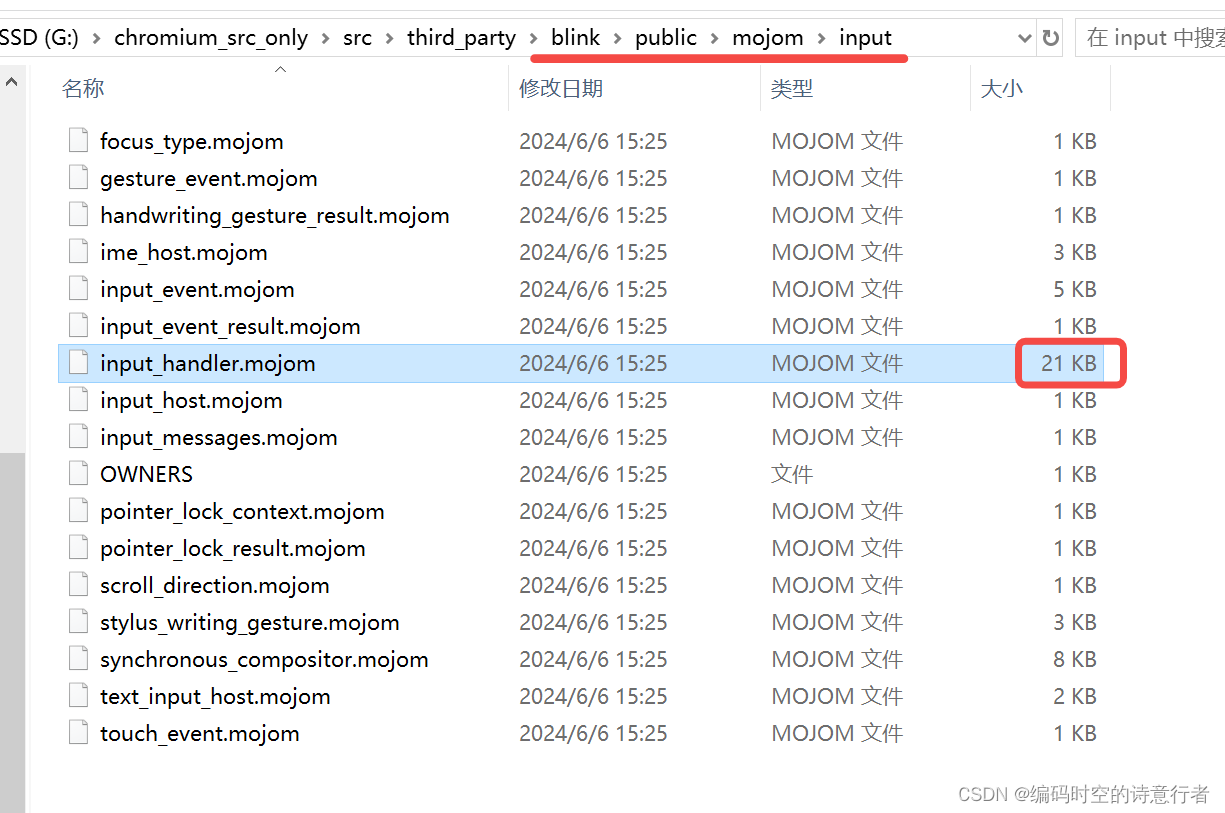
后面我们再详细介绍这套mojo跨进程通信框架的细节。
言归正传,我们attach到render进程,继续打断点跟踪鼠标事件。
想在渲染进程找到WidgetInputHandler类对应的消息,只需要在后面加个Impl即可,我们通过符号跳转,找到WidgetInputHandlerImpl类:
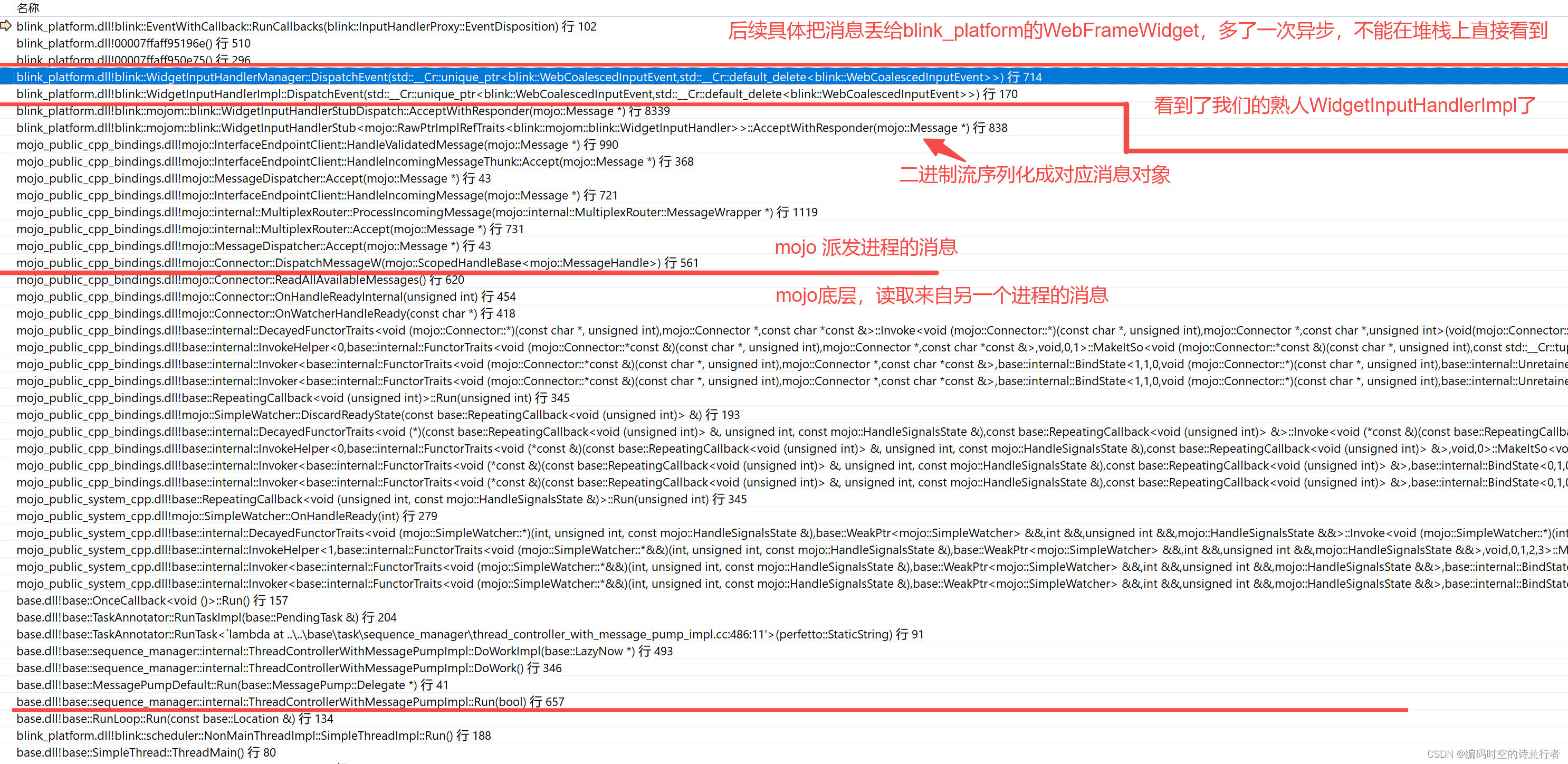
接下来,中间弯弯绕绕太多,我们直接在node打个断点,看看鼠标事件如何传递到node具体的处理逻辑中的:

事件首先被捕获并封装为一个MouseEvent或PointerEvent对象。然后通过EventDispatcher类和相关方法,事件被分发到目标Node。对应的HTML元素(通过HTMLElement和特化的TextControlInnerEditorElement)会处理这个事件,然后这个时间触发默认基类的处理器。
WebFrameWidget:继承自WebWidget,但是大部分函数依然是虚函数,用于专门负责处理一个WebFrame(即一个网页框架)的渲染和事件。如果要想显示一个网页,那么需要继承自WebFrameWidget并实现相关纯虚函数。
WebFrameWidgetImpl:是WebFrameWidget在blink里的一个具体实现类。它实现了接口中定义的所有方法,并提供了框架的具体行为。WebFrameWidgetImpl负责实际的绘图逻辑、输入事件处理、视图的更新和大小调整等。这个实现将抽象的行为具体化,它通过调用Blink渲染引擎的其他组件,如布局引擎、绘图系统等,来完成对Web内容的渲染和事件处理。WebFrameWidgetImpl是Web内容在Blink中被渲染的核心地方,它直接与底层的渲染流水线交互。
讲到这里,也要引出一个重量级的基类:Node:
Node类是一个非常重要的基类,它表示文档中的一个节点。Node类扮演了核心角色,以下是对Node类及其作用的更详细介绍:
层次结构:
Node类位于 DOM(文档对象模型)层次结构中的基础位置。在 DOM 中,所有的元素、文本内容和属性都被视为节点。因此,Node类提供了一系列的基础方法和属性,用于管理节点之间的关系(例如父子关系和兄弟关系)、节点的遍历以及节点的基本操作(比如插入、替换、删除)。事件模型:
Node类还是事件模型的一部分。在 Blink 中,事件通常会在节点之间传播,遵循捕获阶段、目标阶段和冒泡阶段。Node类提供了事件处理的相关方法,比如绑定事件监听器、分发事件等。当事件发生时,比如用户的点击或键盘操作,它会被分发到正确的Node对象,并且通过事件监听器进行相应的处理。渲染:
虽然Node类本身并不直接处理渲染,但它的派生类,如Element和特化后的HTMLElement,会存储与渲染相关的属性(例如样式信息)。这些类将Node的基础功能扩展到了渲染管线中,这样渲染引擎就可以使用这些信息来呈现视觉元素。类型多样性:
DOM 中有不同类型的节点,包括但不限于元素节点(Element)、文本节点(Text)、注释节点(Comment)和文档节点(Document)。Node类是这些具体节点类型的基类,通过继承和多态,不同类型的节点可以拥有特化的行为,并且仍然能够通过Node类的接口进行通用处理。API 和脚本接口:
Node类还提供了一系列的 API,供 JavaScript 脚本访问和操纵节点。开发者可以通过这些 API 查询节点信息、修改节点结构、动态添加或移除节点等。这为开发者提供了强大的能力来改变页面内容和行为。总的来说,
Node类是 Blink 和 Web 开发者用来操作和理解 Web 页面结构的基础,它为构建、遍历和交互提供了基本的框架。通过Node及其派生类,Blink 渲染引擎能够将结构化的 HTML 文档转化为用户可以看到和交互的网页。
未完待续 ....
相关文章:
Chrome 源码阅读:跟踪一个鼠标事件的流程
我们通过在关键节点打断点的方式,去分析一个鼠标事件的流程。 我们知道chromium是多进程模型,那么,我们可以推测:一个鼠标消息先从主进程产生,再通过跨进程通信发送给渲染进程,渲染进程再发送给WebFrame&a…...
[C/C++]_[初级]_[在Windows和macOS平台上导出动态库的一些思考]
场景 最近看了《COM本质论》里关于如何设计基于抽象基类作为二进制接口,把编译器和链接器的实现隐藏在这个二进制接口中,从而使用该DLL时不需要重新编译。在编译出C接口时,发现接口名直接是函数名,比如BindNativePort,怎么不是_BindNativePort?说明 VC++导出的函数默认是使…...
MySQL排序操作
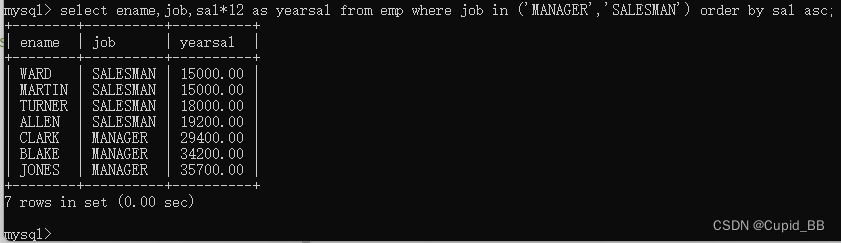
025排序操作 select .. from .. order by 字段 asc/descselect empno, ename, sal from emp order by sal asc;asc 不写的话,默认升序 多个字段排序 查询员工的编号、姓名、薪资,按照薪资升序排列,如果薪资相同的,再按照姓名升…...
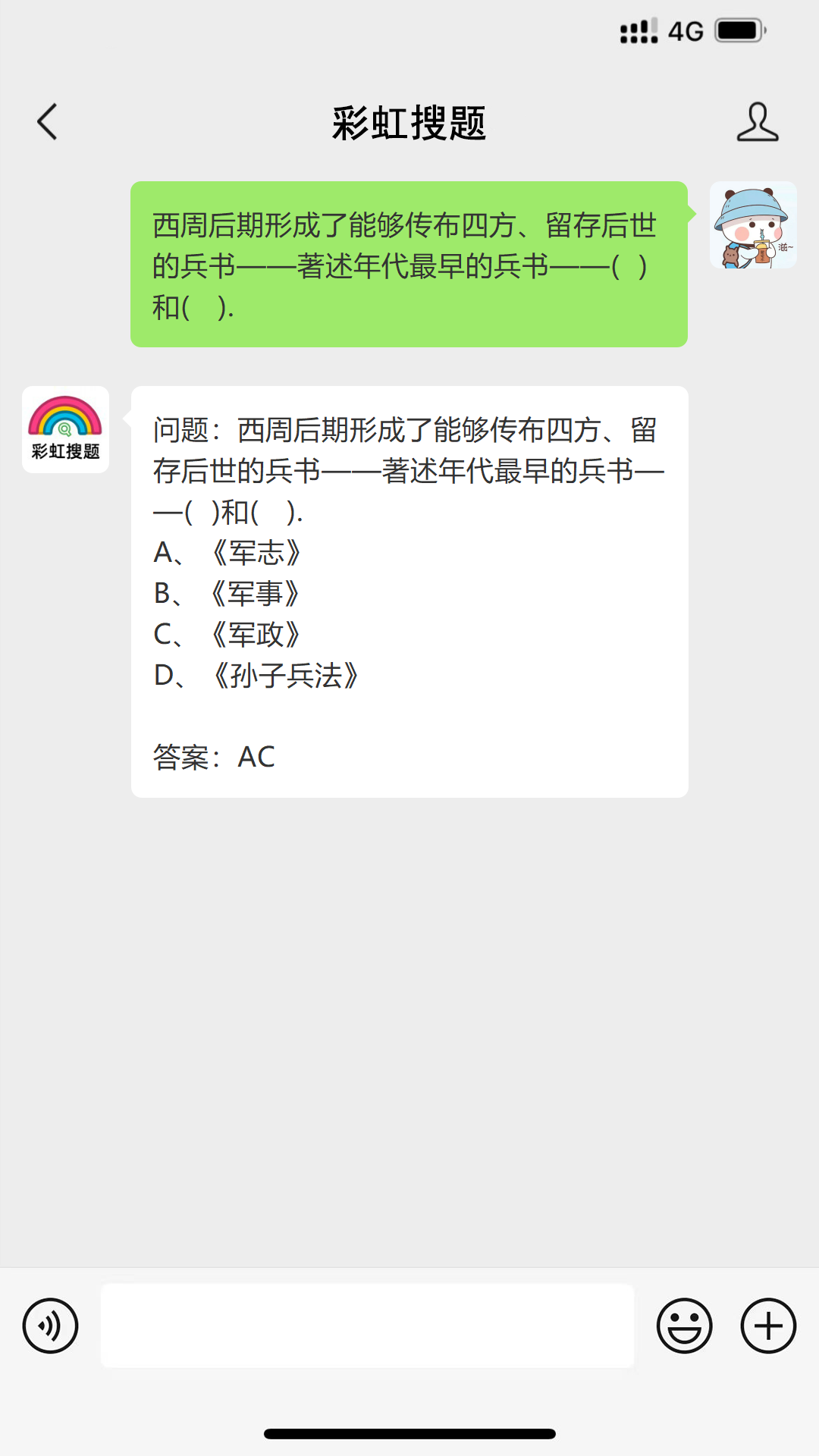
问题:西周后期形成了能够传布四方、留存后世的兵书——著述年代最早的兵书——( )和( ). #媒体#知识分享
问题:西周后期形成了能够传布四方、留存后世的兵书——著述年代最早的兵书——( )和( ). A、《军志》 B、《军事》 C、《军政》 D、《孙子兵法》 参考答案如图所示...
kafka-消费者-指定offset消费(SpringBoot整合Kafka)
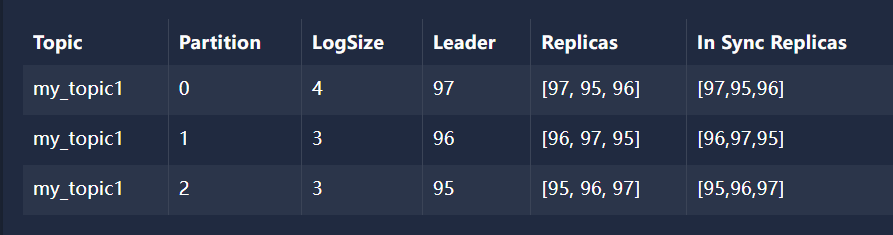
文章目录 1、指定offset消费1.1、创建消费者监听器‘1.2、application.yml配置1.3、使用 Java代码 创建 主题 my_topic1 并建立3个分区并给每个分区建立3个副本1.4、创建生产者发送消息1.4.1、分区0中的数据 1.5、创建SpringBoot启动类1.6、屏蔽 kafka debug 日志 logback.xml1…...
JavaWeb2-Vue
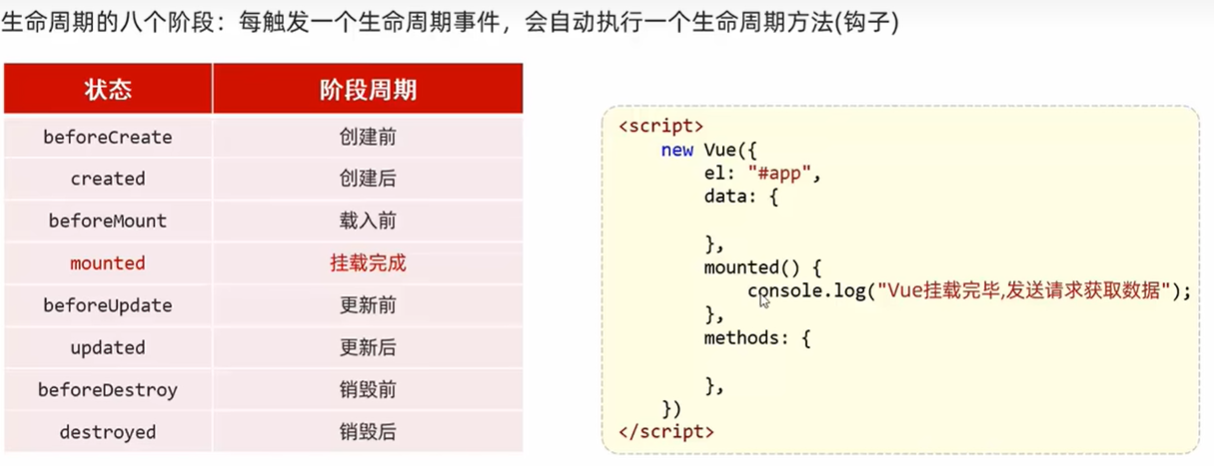
Vue 前端框架,免除原生JS中的DOM操作简化书写 (以前学过又忘了,现在才知道原来vue是前端的) 基于MVVM思想(model-view -viewModel)实现数据双向绑定 model是数据模型 view负责数据展示 即DOM 中间这个负责…...
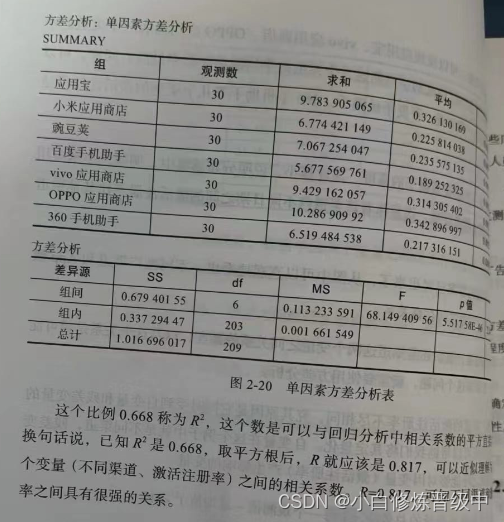
《广告数据定量分析》读书笔记之统计原理2
3.相关分析:描述的是两个数值变量间关系的强度。(两个数值型变量之间的关系) (1)图表表示:散点图 (2)衡量关系强度指标:相关系数r。 (r的取值为-1到 1&…...

计算机视觉与模式识别实验2-2 SIFT特征提取与匹配
文章目录 🧡🧡实验流程🧡🧡SIFT算法原理总结:实现SIFT特征检测和匹配通过RANSAC 实现图片拼接更换其他图片再次测试效果(依次进行SIFT特征提取、RANSAC 拼接) 🧡🧡全部代…...
 - PROCESS_TGS)
kerberos: Clock skew too great (37) - PROCESS_TGS
kerberos认证失败错误信息: Caused by: org.ietf.jgss.GSSException: No valid credentials provided (Mechanism level: Clock skew too great (37) - PROCESS_TGS)at sun.security.jgss.krb5.Krb5Context.initSecContext(Krb5Context.java:772)at sun.security.j…...

【MATLAB高级编程】入门篇 | 向量化编程
【入门篇】向量化编程 1. 什么是向量?2. 向量的创建2.1 行向量2.2 列向量2.3 使用冒号运算符2.4 使用`linspace`和`logspace`3. 向量的基本操作3.1 向量元素访问3.2 向量的长度3.3 向量的加法和减法3.4 向量的点乘和叉乘3.5 向量的元素乘法和除法4. 向量的高级操作4.1 逻辑索引…...

Debezium日常分享系列之:Debezium 2.7.0.Beta1发布
Debezium日常分享系列之:Debezium 2.7.0.Beta1发布 一、重大变化1.快照工件2.Oracle 二、新功能和改进1.在 z/OS 上支持 Db22.NATS JetStream 接收器身份验证改进3.JDBC 接收器 MariaDB 方言支持4.JMX 导出器添加到 Debezium 服务器5.使用 Debezium Operator 启用 J…...

eNSP学习——RIP的水平分割和触发更新
目录 主要命令 原理概述 实验目的 实验内容 实验拓扑 实验编址 实验步骤 1、基本配置 2、搭建RIP网络 3、验证触发更新 4.验证水平分割 5、验证毒性逆转 需要eNSP各种配置命令的点击链接自取:华为eNSP各种设备配置命令大全PDF版_…...
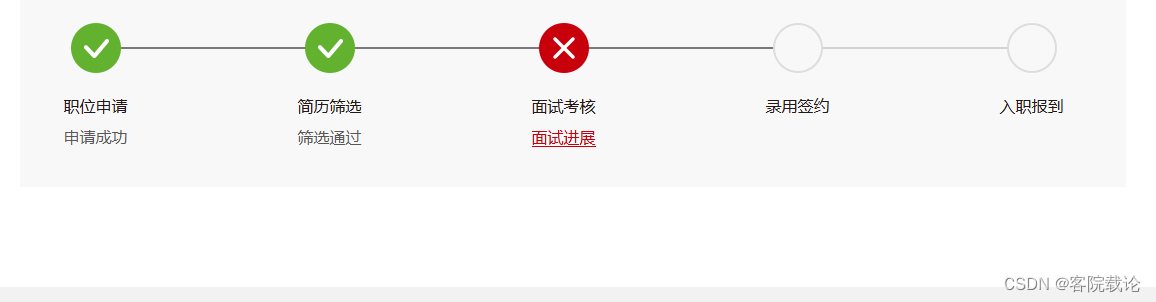
华为面经整理
文章目录 实习第一面准备提问相关算法相关 第一面结果提问环节 总结 实习 第一面准备 提问相关 操作系统有哪些功能 进程管理: 进程调度、进程同步和通信、多任务处理 内存管理: 内存分配、虚拟内存技术、内存保护 文件系统管理: 文件存储…...
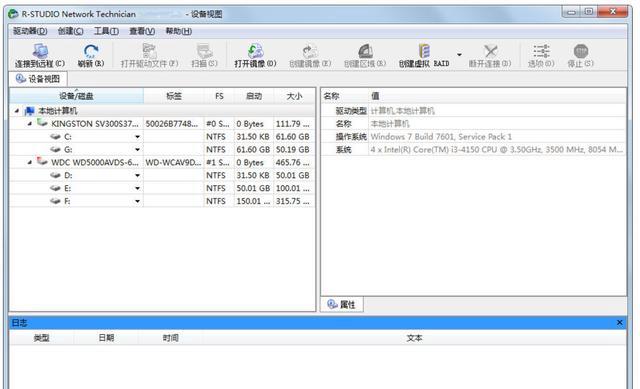
数据恢复工具推荐:电脑回收站删除的文件怎么恢复?8个回收站恢复软件,收藏!
当文件从电脑的回收站被删除后,许多用户可能认为这些文件已永久丢失。然而,实际上,在数据被新数据覆盖之前,这些删除的文件仍然可以通过使用专门的数据恢复软件来恢复。本文将介绍8款顶级的文件恢复软件,恢复电脑回收站…...

)
前端之npm运行时配置文件.npmrc(可用于配置npm淘宝源)
文章目录 前端之npm运行时配置文件.npmrc什么是.npmrc设置项目配置文件设置用户配置文件设置全局配置文件给npm 命令添加注册源选项 前端之npm运行时配置文件.npmrc 什么是.npmrc 官网:https://nodejs.cn/npm/cli/v7/configuring-npm/npmrc/ .npmrc,可…...
如何充分利用代理IP扩大网络接触面
目录 前言 第一部分:什么是代理IP? 第二部分:如何获取代理IP? 1. IP质量 2. 匿名性 3. 限制 第三部分:如何使用代理IP? 第四部分:如何充分利用代理IP? 总结: 前…...

StableDiffusion Windows本地部署
检查电脑环境 启动CMD命令窗。 如上图,在CMD窗口输入python命令,可查看本地安装的python版本信息等。输入exit()退出python命令行 执行where命令,可查看python安装目录。 必须安装Python3.10.x,因为stable-diffusion-webui的一…...
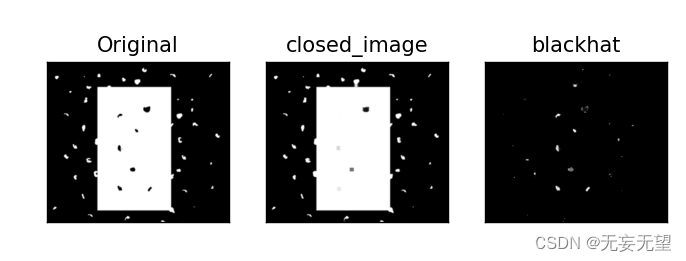
OpenCV学习(4.5) 图像的形态转换
1.目标 在本教程中: 我们将学习不同的形态操作,如腐蚀、膨胀、开、闭等。我们将看到不同的函数,如: cv.erode()**、 **cv.dilate()**、 **cv.morphologyEx() 等。 理论: 图像的形态转换是图像处理中的一个重要领域…...

MFC设置窗口在Z轴上的位置
函数原型: BOOL CWnd::SetWindowPos(const CWnd* pWndInsertAfter, int x, int y, int cx, int cy, UINT nFlags);返回值: 如果函数成功,则返回非零值;否则返回0。 参数: pWndInsertAfter:标识了在Z轴次…...

ES6从入门到精通:前言
ES6简介 ES6(ECMAScript 2015)是JavaScript语言的重大更新,引入了许多新特性,包括语法糖、新数据类型、模块化支持等,显著提升了开发效率和代码可维护性。 核心知识点概览 变量声明 let 和 const 取代 var…...
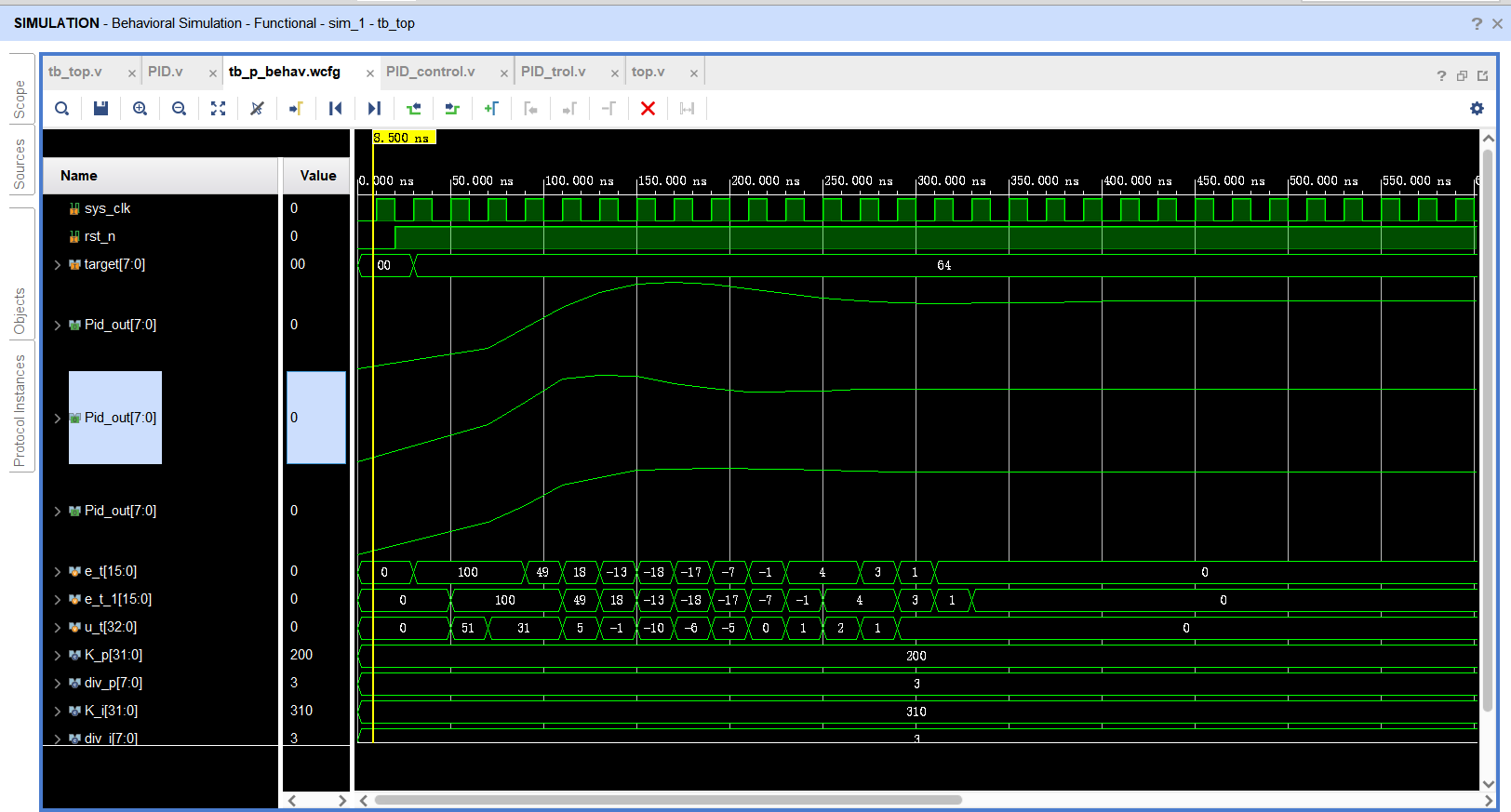
基于FPGA的PID算法学习———实现PID比例控制算法
基于FPGA的PID算法学习 前言一、PID算法分析二、PID仿真分析1. PID代码2.PI代码3.P代码4.顶层5.测试文件6.仿真波形 总结 前言 学习内容:参考网站: PID算法控制 PID即:Proportional(比例)、Integral(积分&…...

Rapidio门铃消息FIFO溢出机制
关于RapidIO门铃消息FIFO的溢出机制及其与中断抖动的关系,以下是深入解析: 门铃FIFO溢出的本质 在RapidIO系统中,门铃消息FIFO是硬件控制器内部的缓冲区,用于临时存储接收到的门铃消息(Doorbell Message)。…...

Fabric V2.5 通用溯源系统——增加图片上传与下载功能
fabric-trace项目在发布一年后,部署量已突破1000次,为支持更多场景,现新增支持图片信息上链,本文对图片上传、下载功能代码进行梳理,包含智能合约、后端、前端部分。 一、智能合约修改 为了增加图片信息上链溯源,需要对底层数据结构进行修改,在此对智能合约中的农产品数…...
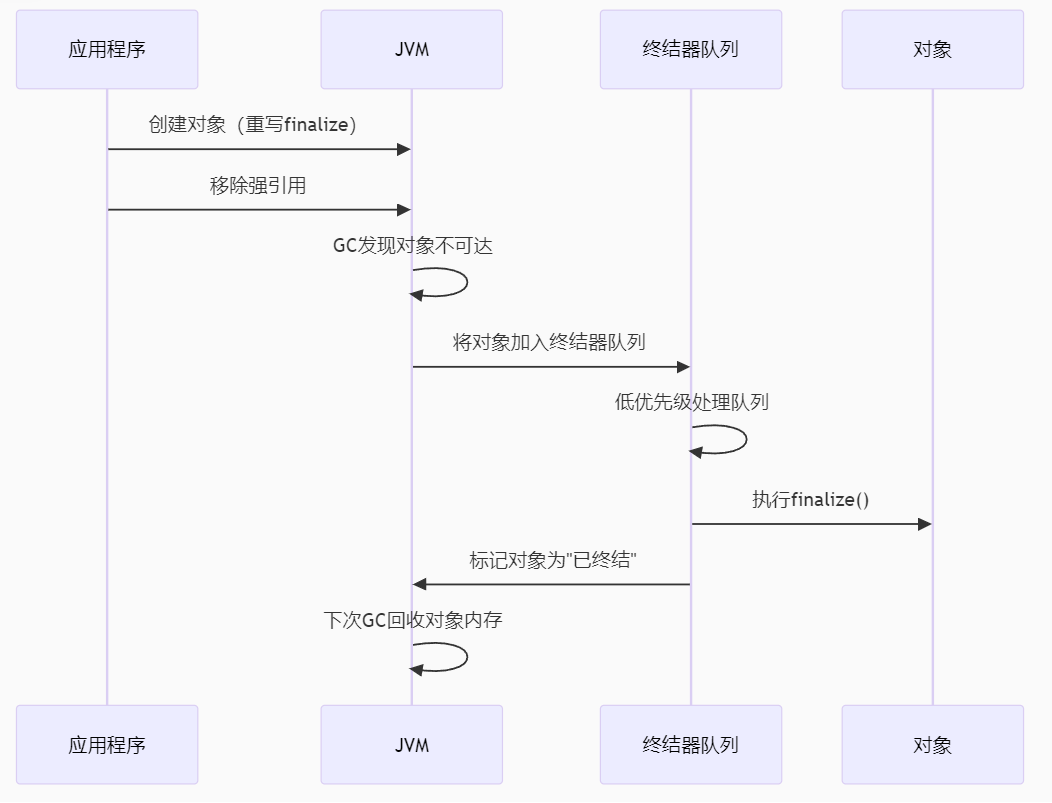
【 java 虚拟机知识 第一篇 】
目录 1.内存模型 1.1.JVM内存模型的介绍 1.2.堆和栈的区别 1.3.栈的存储细节 1.4.堆的部分 1.5.程序计数器的作用 1.6.方法区的内容 1.7.字符串池 1.8.引用类型 1.9.内存泄漏与内存溢出 1.10.会出现内存溢出的结构 1.内存模型 1.1.JVM内存模型的介绍 内存模型主要分…...
)
【LeetCode】3309. 连接二进制表示可形成的最大数值(递归|回溯|位运算)
LeetCode 3309. 连接二进制表示可形成的最大数值(中等) 题目描述解题思路Java代码 题目描述 题目链接:LeetCode 3309. 连接二进制表示可形成的最大数值(中等) 给你一个长度为 3 的整数数组 nums。 现以某种顺序 连接…...

C语言中提供的第三方库之哈希表实现
一. 简介 前面一篇文章简单学习了C语言中第三方库(uthash库)提供对哈希表的操作,文章如下: C语言中提供的第三方库uthash常用接口-CSDN博客 本文简单学习一下第三方库 uthash库对哈希表的操作。 二. uthash库哈希表操作示例 u…...

WEB3全栈开发——面试专业技能点P4数据库
一、mysql2 原生驱动及其连接机制 概念介绍 mysql2 是 Node.js 环境中广泛使用的 MySQL 客户端库,基于 mysql 库改进而来,具有更好的性能、Promise 支持、流式查询、二进制数据处理能力等。 主要特点: 支持 Promise / async-await…...
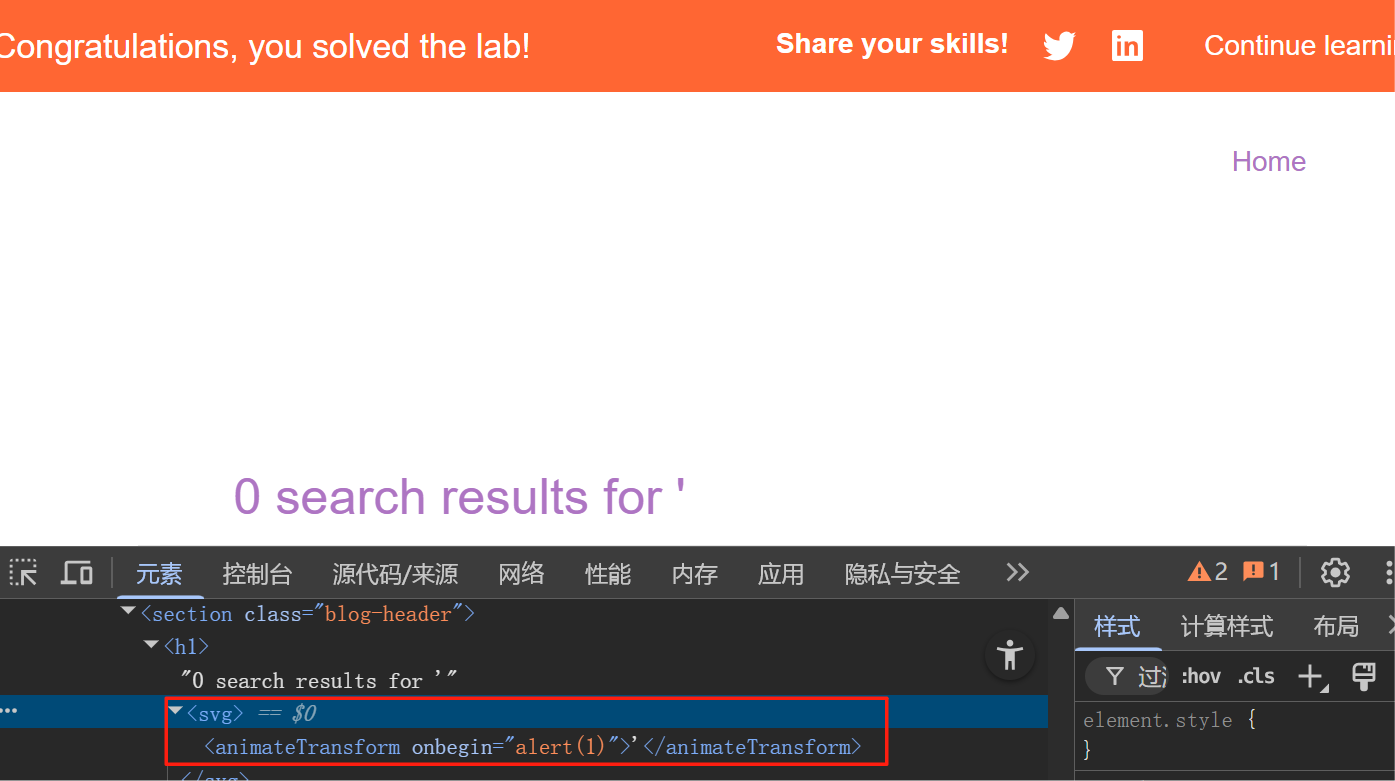
渗透实战PortSwigger Labs指南:自定义标签XSS和SVG XSS利用
阻止除自定义标签之外的所有标签 先输入一些标签测试,说是全部标签都被禁了 除了自定义的 自定义<my-tag onmouseoveralert(xss)> <my-tag idx onfocusalert(document.cookie) tabindex1> onfocus 当元素获得焦点时(如通过点击或键盘导航&…...

【大模型】RankRAG:基于大模型的上下文排序与检索增强生成的统一框架
文章目录 A 论文出处B 背景B.1 背景介绍B.2 问题提出B.3 创新点 C 模型结构C.1 指令微调阶段C.2 排名与生成的总和指令微调阶段C.3 RankRAG推理:检索-重排-生成 D 实验设计E 个人总结 A 论文出处 论文题目:RankRAG:Unifying Context Ranking…...