
【Webpack】使用 Webpack 构建 Vue3+TS 项目
构建项目目录
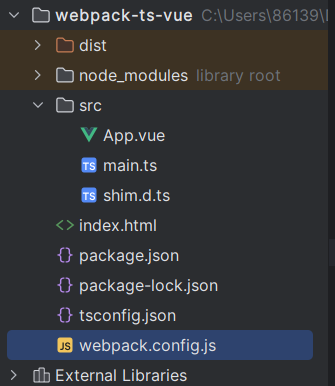
tsc --init
npm init -y
shim.d.ts 文件是一个类型声明文件,用于告诉 TypeScript 编译器如何处理 Vue 的单文件组件(SFC)和其他自定义模块。为 Vue 的单文件组件和其他非 TypeScript 模块提供类型信息,以便在 TypeScript 项目中使用它们时能够正确地进行类型检查和代码提示。
相关文件
App.vue
<template><div>{{ x }}</div><div>{{ date }}</div>
</template>
<script setup lang="ts">
import moment from "moment";const x: number = 243
const date = moment().format("YYYY-MM-DD")
</script>
<style lang="less">
@red: red;
div {color: @red;
}
</style>
main.ts
import {createApp} from "vue";
import App from "./App.vue";createApp(App).mount("#app")
shim.d.ts
// 识别 .vue 文件
declare module "*.vue" {import {DefineComponent} from "vue";const component: DefineComponent<{}, {}, any>export default component;
}
index.html
<!DOCTYPE html>
<html lang="en">
<head><meta charset="UTF-8"><title>Title</title>
</head>
<body>
<div id="app"></div>
</body>
</html>
安装相关依赖
webpack5 以上的版本需要安装 webpack-cli。
webpack-dev-server 开启一个本地服务。
{"name": "webpack-ts-vue","version": "1.0.0","description": "","main": "index.js","scripts": {"dev": "webpack-dev-server","build": "webpack"},"keywords": [],"author": "","license": "ISC","devDependencies": {"html-webpack-plugin": "^5.6.0","less": "^4.2.0","less-loader": "^12.2.0","mini-css-extract-plugin": "^2.9.0","style-loader": "^4.0.0","ts-loader": "^9.5.1","typescript": "^5.4.5","vue-loader": "^17.4.2","webpack": "^5.92.0","webpack-cli": "^5.1.4","webpack-dev-server": "^5.0.4"},"dependencies": {"css-loader": "^7.1.2","moment": "^2.30.1","vue": "^3.4.27"}
}
相关配置
tsconfig.json
{"compilerOptions": {/* Visit https://aka.ms/tsconfig to read more about this file *//* Projects */// "incremental": true,                              /* Save .tsbuildinfo files to allow for incremental compilation of projects. */// "composite": true,                                /* Enable constraints that allow a TypeScript project to be used with project references. */// "tsBuildInfoFile": "./.tsbuildinfo",              /* Specify the path to .tsbuildinfo incremental compilation file. */// "disableSourceOfProjectReferenceRedirect": true,  /* Disable preferring source files instead of declaration files when referencing composite projects. */// "disableSolutionSearching": true,                 /* Opt a project out of multi-project reference checking when editing. */// "disableReferencedProjectLoad": true,             /* Reduce the number of projects loaded automatically by TypeScript. *//* Language and Environment */"target": "es2016",/* Set the JavaScript language version for emitted JavaScript and include compatible library declarations. */// "lib": [],                                        /* Specify a set of bundled library declaration files that describe the target runtime environment. */// "jsx": "preserve",                                /* Specify what JSX code is generated. */// "experimentalDecorators": true,                   /* Enable experimental support for legacy experimental decorators. */// "emitDecoratorMetadata": true,                    /* Emit design-type metadata for decorated declarations in source files. */// "jsxFactory": "",                                 /* Specify the JSX factory function used when targeting React JSX emit, e.g. 'React.createElement' or 'h'. */// "jsxFragmentFactory": "",                         /* Specify the JSX Fragment reference used for fragments when targeting React JSX emit e.g. 'React.Fragment' or 'Fragment'. */// "jsxImportSource": "",                            /* Specify module specifier used to import the JSX factory functions when using 'jsx: react-jsx*'. */// "reactNamespace": "",                             /* Specify the object invoked for 'createElement'. This only applies when targeting 'react' JSX emit. */// "noLib": true,                                    /* Disable including any library files, including the default lib.d.ts. */// "useDefineForClassFields": true,                  /* Emit ECMAScript-standard-compliant class fields. */// "moduleDetection": "auto",                        /* Control what method is used to detect module-format JS files. *//* Modules */"module": "commonjs",/* Specify what module code is generated. */// "rootDir": "./",                                  /* Specify the root folder within your source files. */// "moduleResolution": "node10",                     /* Specify how TypeScript looks up a file from a given module specifier. */// "baseUrl": "./",                                  /* Specify the base directory to resolve non-relative module names. */// "paths": {},                                      /* Specify a set of entries that re-map imports to additional lookup locations. */// "rootDirs": [],                                   /* Allow multiple folders to be treated as one when resolving modules. */// "typeRoots": [],                                  /* Specify multiple folders that act like './node_modules/@types'. */// "types": [],                                      /* Specify type package names to be included without being referenced in a source file. */// "allowUmdGlobalAccess": true,                     /* Allow accessing UMD globals from modules. */// "moduleSuffixes": [],                             /* List of file name suffixes to search when resolving a module. */// "allowImportingTsExtensions": true,               /* Allow imports to include TypeScript file extensions. Requires '--moduleResolution bundler' and either '--noEmit' or '--emitDeclarationOnly' to be set. */// "resolvePackageJsonExports": true,                /* Use the package.json 'exports' field when resolving package imports. */// "resolvePackageJsonImports": true,                /* Use the package.json 'imports' field when resolving imports. */// "customConditions": [],                           /* Conditions to set in addition to the resolver-specific defaults when resolving imports. */// "resolveJsonModule": true,                        /* Enable importing .json files. */// "allowArbitraryExtensions": true,                 /* Enable importing files with any extension, provided a declaration file is present. */// "noResolve": true,                                /* Disallow 'import's, 'require's or '<reference>'s from expanding the number of files TypeScript should add to a project. *//* JavaScript Support */// "allowJs": true,                                  /* Allow JavaScript files to be a part of your program. Use the 'checkJS' option to get errors from these files. */// "checkJs": true,                                  /* Enable error reporting in type-checked JavaScript files. */// "maxNodeModuleJsDepth": 1,                        /* Specify the maximum folder depth used for checking JavaScript files from 'node_modules'. Only applicable with 'allowJs'. *//* Emit */// "declaration": true,                              /* Generate .d.ts files from TypeScript and JavaScript files in your project. */// "declarationMap": true,                           /* Create sourcemaps for d.ts files. */// "emitDeclarationOnly": true,                      /* Only output d.ts files and not JavaScript files. */// "sourceMap": true,                                /* Create source map files for emitted JavaScript files. */// "inlineSourceMap": true,                          /* Include sourcemap files inside the emitted JavaScript. */// "outFile": "./",                                  /* Specify a file that bundles all outputs into one JavaScript file. If 'declaration' is true, also designates a file that bundles all .d.ts output. */// "outDir": "./",                                   /* Specify an output folder for all emitted files. */// "removeComments": true,                           /* Disable emitting comments. */// "noEmit": true,                                   /* Disable emitting files from a compilation. */// "importHelpers": true,                            /* Allow importing helper functions from tslib once per project, instead of including them per-file. */// "importsNotUsedAsValues": "remove",               /* Specify emit/checking behavior for imports that are only used for types. */// "downlevelIteration": true,                       /* Emit more compliant, but verbose and less performant JavaScript for iteration. */// "sourceRoot": "",                                 /* Specify the root path for debuggers to find the reference source code. */// "mapRoot": "",                                    /* Specify the location where debugger should locate map files instead of generated locations. */// "inlineSources": true,                            /* Include source code in the sourcemaps inside the emitted JavaScript. */// "emitBOM": true,                                  /* Emit a UTF-8 Byte Order Mark (BOM) in the beginning of output files. */// "newLine": "crlf",                                /* Set the newline character for emitting files. */// "stripInternal": true,                            /* Disable emitting declarations that have '@internal' in their JSDoc comments. */// "noEmitHelpers": true,                            /* Disable generating custom helper functions like '__extends' in compiled output. */// "noEmitOnError": true,                            /* Disable emitting files if any type checking errors are reported. */// "preserveConstEnums": true,                       /* Disable erasing 'const enum' declarations in generated code. */// "declarationDir": "./",                           /* Specify the output directory for generated declaration files. */// "preserveValueImports": true,                     /* Preserve unused imported values in the JavaScript output that would otherwise be removed. *//* Interop Constraints */// "isolatedModules": true,                          /* Ensure that each file can be safely transpiled without relying on other imports. */// "verbatimModuleSyntax": true,                     /* Do not transform or elide any imports or exports not marked as type-only, ensuring they are written in the output file's format based on the 'module' setting. */// "allowSyntheticDefaultImports": true,             /* Allow 'import x from y' when a module doesn't have a default export. */"esModuleInterop": true,/* Emit additional JavaScript to ease support for importing CommonJS modules. This enables 'allowSyntheticDefaultImports' for type compatibility. */// "preserveSymlinks": true,                         /* Disable resolving symlinks to their realpath. This correlates to the same flag in node. */"forceConsistentCasingInFileNames": true,/* Ensure that casing is correct in imports. *//* Type Checking */"strict": true,/* Enable all strict type-checking options. */// "noImplicitAny": true,                            /* Enable error reporting for expressions and declarations with an implied 'any' type. */// "strictNullChecks": true,                         /* When type checking, take into account 'null' and 'undefined'. */// "strictFunctionTypes": true,                      /* When assigning functions, check to ensure parameters and the return values are subtype-compatible. */// "strictBindCallApply": true,                      /* Check that the arguments for 'bind', 'call', and 'apply' methods match the original function. */// "strictPropertyInitialization": true,             /* Check for class properties that are declared but not set in the constructor. */// "noImplicitThis": true,                           /* Enable error reporting when 'this' is given the type 'any'. */// "useUnknownInCatchVariables": true,               /* Default catch clause variables as 'unknown' instead of 'any'. */// "alwaysStrict": true,                             /* Ensure 'use strict' is always emitted. */// "noUnusedLocals": true,                           /* Enable error reporting when local variables aren't read. */// "noUnusedParameters": true,                       /* Raise an error when a function parameter isn't read. */// "exactOptionalPropertyTypes": true,               /* Interpret optional property types as written, rather than adding 'undefined'. */// "noImplicitReturns": true,                        /* Enable error reporting for codepaths that do not explicitly return in a function. */// "noFallthroughCasesInSwitch": true,               /* Enable error reporting for fallthrough cases in switch statements. */// "noUncheckedIndexedAccess": true,                 /* Add 'undefined' to a type when accessed using an index. */// "noImplicitOverride": true,                       /* Ensure overriding members in derived classes are marked with an override modifier. */// "noPropertyAccessFromIndexSignature": true,       /* Enforces using indexed accessors for keys declared using an indexed type. */// "allowUnusedLabels": true,                        /* Disable error reporting for unused labels. */// "allowUnreachableCode": true,                     /* Disable error reporting for unreachable code. *//* Completeness */// "skipDefaultLibCheck": true,                      /* Skip type checking .d.ts files that are included with TypeScript. */"skipLibCheck": true/* Skip type checking all .d.ts files. */},//指定编译时需要包含的文件路径"include": ["src/**/*"]
}
webpack.config.js
const {Configuration} = require('webpack');
const path = require("path");
const HtmlWebpackPlugin = require("html-webpack-plugin");
const {VueLoaderPlugin} = require("vue-loader");
const MiniCssExtractPlugin = require("mini-css-extract-plugin");/**** @type {Configuration} 开启配置智能提示*/
const config = {mode: 'development',entry: './src/main.ts',output: {filename: '[chunkhash].js', // 防止命名冲突path: path.resolve(__dirname, 'dist'), // 生成目录clean: true // 每次打包前清除之前的打包目录},stats: "errors-only",  // 控制台只打印错误信息plugins: [// html 插件 使 html 文件与 webpack 关联起来new HtmlWebpackPlugin({template: './index.html'}),// 识别 vue 文件new VueLoaderPlugin(),// 分割 css 模块new MiniCssExtractPlugin()], // webpack的插件都是 class 需要 newmodule: {rules: [// 支持 .ts 文件{test: /\.ts$/,// use: "ts-loader",use: {loader: 'ts-loader',// ts-loader 文档中的配置options: {appendTsSuffixTo: [/\.vue$/], // 支持 .vue 中的 ts 代码}}, // 处理文件使用 loader},// 1. vue-loader 2. .vue 文件声明(shim.d.ts) 3. VueLoaderPlugin 插件配置(支持 Vue3){test: /\.vue$/,use: 'vue-loader'},{test: /\.css$/,// use: ['style-loader', 'css-loader']use: [MiniCssExtractPlugin.loader, 'css-loader'] // 打包抽离 css 文件},{test: /\.less$/,// use: ['style-loader', 'css-loader', 'less-loader']use: [MiniCssExtractPlugin.loader, 'css-loader', 'less-loader']}]},// 分模块打包optimization: {splitChunks: {cacheGroups: {moment: {name: "moment",chunks: "all",test: /[\\/]node_modules[\\/]moment[\\/]/,},// 抽离公共依赖common: {name: "common",chunks: 'all',minChunks: 2, // 依赖的引用次数大于2个才会被抽离}}}}
}
module.exports = config;
相关文章:
【Webpack】使用 Webpack 构建 Vue3+TS 项目
构建项目目录 tsc --init npm init -yshim.d.ts 文件是一个类型声明文件,用于告诉 TypeScript 编译器如何处理 Vue 的单文件组件(SFC)和其他自定义模块。为 Vue 的单文件组件和其他非 TypeScript 模块提供类型信息,以便在 TypeScr…...

数据防泄漏的六个步骤|数据防泄漏软件有哪些
在当前复杂多变的网络安全环境下,数据防泄漏软件成为了企业信息安全架构中不可或缺的一环。下面以安企神软件为例,告诉你怎么防止数据泄露,以及好用的防泄露软件。 1. 安企神软件 安企神软件是当前市场上备受推崇的企业级数据防泄漏解决方案…...
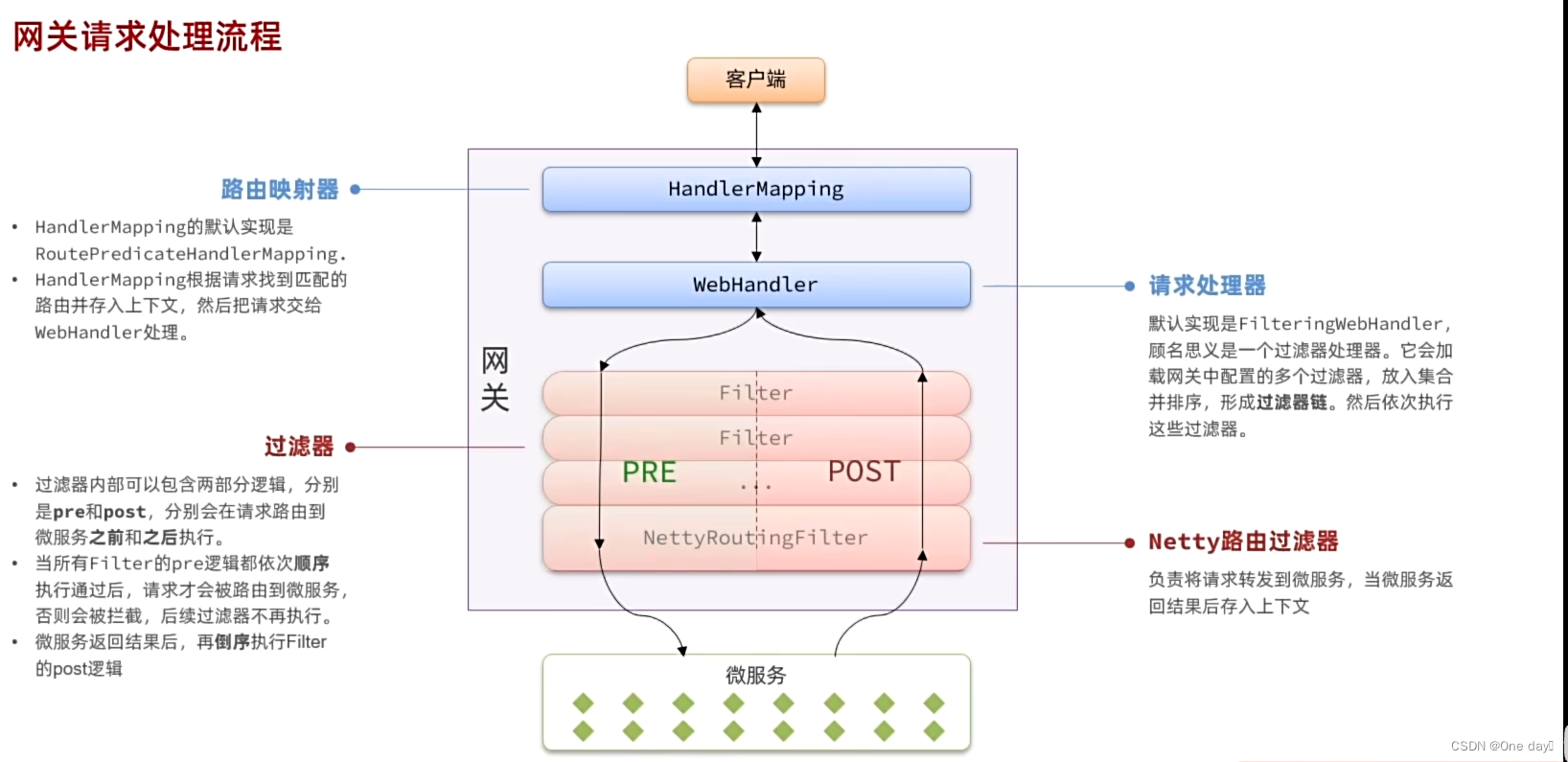
SpringCloud 网关Gateway配置并使用
目录 1 什么是网关? 2 Gateway的使用 2.1 在其pom文件中引入依赖 2.2 然后gateway配置文件中配置信息 2.3 启动网关微服务 3 网关处理流程 4 前端-网关-微服务-微服务间实现信息共享传递 1 什么是网关? 网关:就是网络的关口ÿ…...
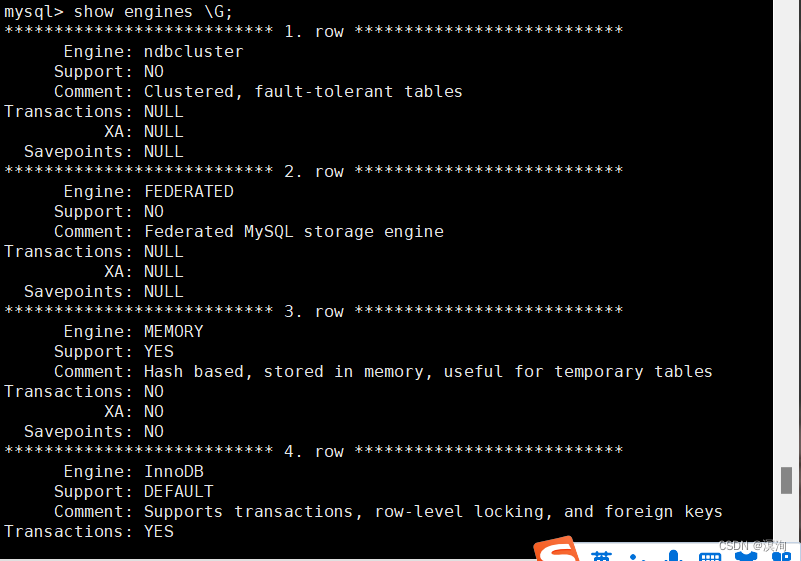
MySQl基础----Linux下搭建mysql软件及登录和基本使用(附实操图超简单一看就会)
绪论 涓滴之水可磨损大石,不是由于他力量强大,而是由于昼夜不舍地滴坠。 只有勤奋不懈地努力,才能够获得那些技巧。 ——贝多芬。新开MySQL篇章,本章非常基础包括如何在Linux上搭建(当然上面的SQL语句你在其他能执行…...
允许UNION(没有ALL)使用MergeAppend)
PostgreSQL17优化器改进(4)允许UNION(没有ALL)使用MergeAppend
PostgreSQL17优化器改进(4)允许UNION(没有ALL)使用MergeAppend UNION存在的问题 到PostgreSQL16.3版本为止,UNION执行计划通常不是最优的,优化器有两种处理方法: 优化器只考虑使用Append节点并通过使用Hash Aggregate,Append -…...
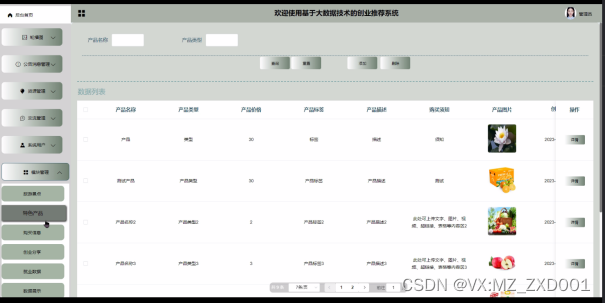
SSM 基于大数据技术的创业推荐系统-计算机毕业设计源码02979
摘 要 科技进步的飞速发展引起人们日常生活的巨大变化,电子信息技术的飞速发展使得电子信息技术的各个领域的应用水平得到普及和应用。信息时代的到来已成为不可阻挡的时尚潮流,人类发展的历史正进入一个新时代。在现实运用中,应用软件的工作…...

基于WPF技术的换热站智能监控系统03--实现左侧加载动画
1、左侧布局规划 左侧分5行,每行的高度通过height属性来指定,1.2*表示占1.2倍的宽度 2、创建用户控件 在WPF中想要进行个性化处理,主要可以通过三个方面来实现:控件模板(控件模板、数据模板、数据容器模板)…...
4D毫米波雷达技术及发展
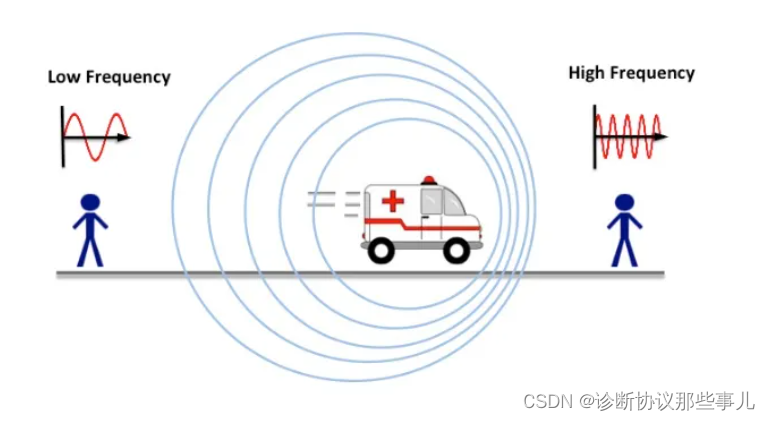
文章目录 前言一、4D毫米波雷达是什么?二、毫米波雷达是什么?毫米波雷达的基本原理多普勒效应 前言 现阶段自动驾驶技术中,主要用到的传感器有摄像头、激光雷达和毫米波雷达。 摄像头的光谱从可见光到红外光谱,是最接近人眼的传感…...

请解释Java Web应用的开发流程,包括前后端分离和交互方式。请解释Java中的锁分离技术,并讨论其在提高并发性能方面的作用。
请解释Java Web应用的开发流程,包括前后端分离和交互方式。 Java Web应用的开发流程是一个涵盖多个阶段的过程,这些阶段从需求分析开始,经过设计、编码、测试,最终到部署和维护。在这个过程中,前后端分离成为现代Web应…...

selenium使用已经打开的浏览器
Selenium 本身不支持直接连接到一个已经打开的浏览器页面。Selenium 启动的浏览器实例是一个全新的会话,它与手动打开的浏览器页面是分开的。但是,有一些变通的方法可以实现类似的效果。 一种方法是通过附加代理连接到已经打开的浏览器。下面是如何实现…...

Redis: 深入解析高性能内存数据库的实现原理
一、Redis简介 Redis是一种基于内存的键值存储数据库,支持丰富的数据类型,如字符串、列表、集合、有序集合和哈希表。它不仅具有极高的性能,还支持数据持久化、主从复制和分布式架构,使其在各种应用场景中表现出色。 1.1 Redis的…...

使用 Python进行自动备份文件
文件备份对数据保护至关重要,让我们使用 shutil 模块创建一个简单的备份脚本 这段代码的作用就是将指定源目录中的所有文件备份到目标备份目录中,并在备份目录中创建带有时间戳的子目录,通过定期运行这段代码,可以实现自动备份文…...
02_01_SpringMVC初识
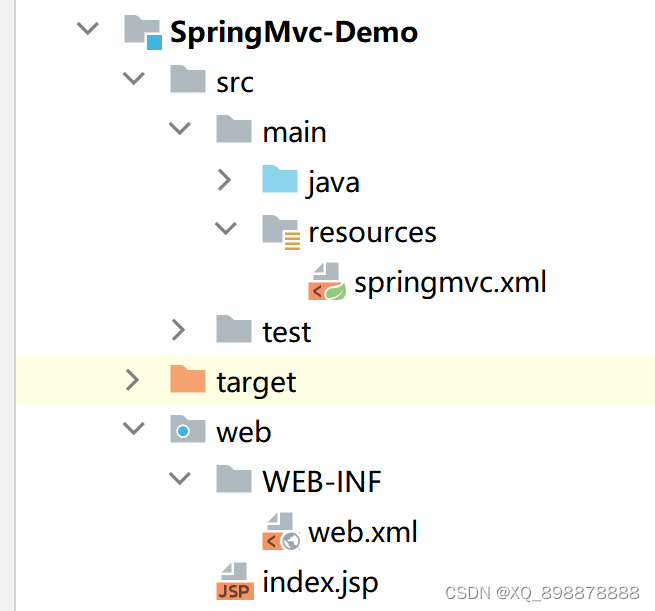
一、回顾MVC三层架构 1、什么是MVC三层 MVC是 模型(Model)、视图(View)、控制器(Controller)的简写,是一种软件设计规范。主要作用是降低视图与业务逻辑之间的双向耦合,它不是一种…...
Python学习打卡:day04
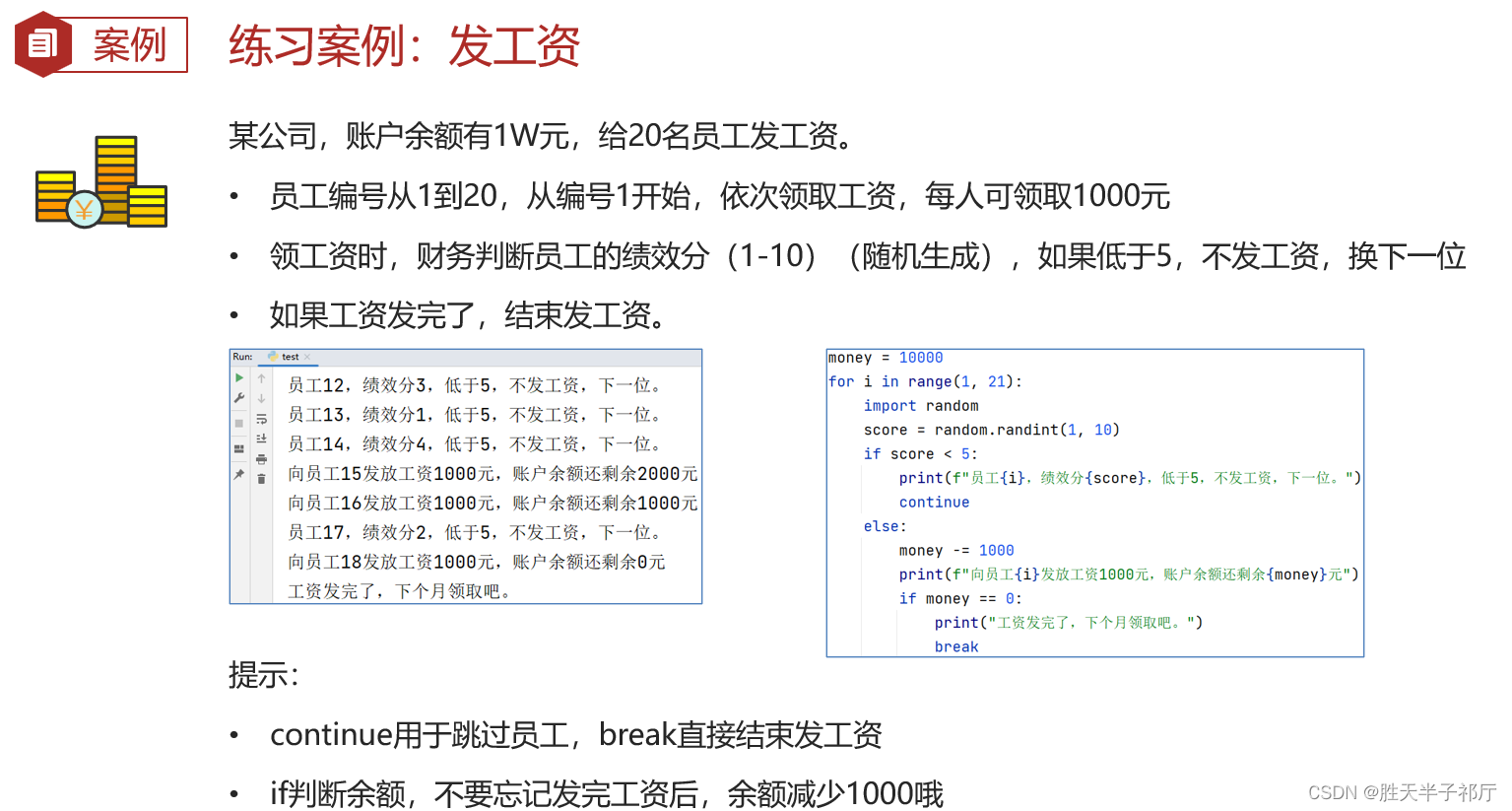
day4 笔记来源于:黑马程序员python教程,8天python从入门到精通,学python看这套就够了 目录 day428、while 循环的嵌套应用29、while 循环案例 — 九九乘法表补充知识示例:九九乘法表 30、for 循环基本语法while 和 for 循环对比f…...

gitlab问题记录
You wont be able to pull or push project code via SSH until you add an SSH key to you 解决方案:https://blog.csdn.net/gufenchen/article/details/95663284...
OpenCV练习(1)签名修复
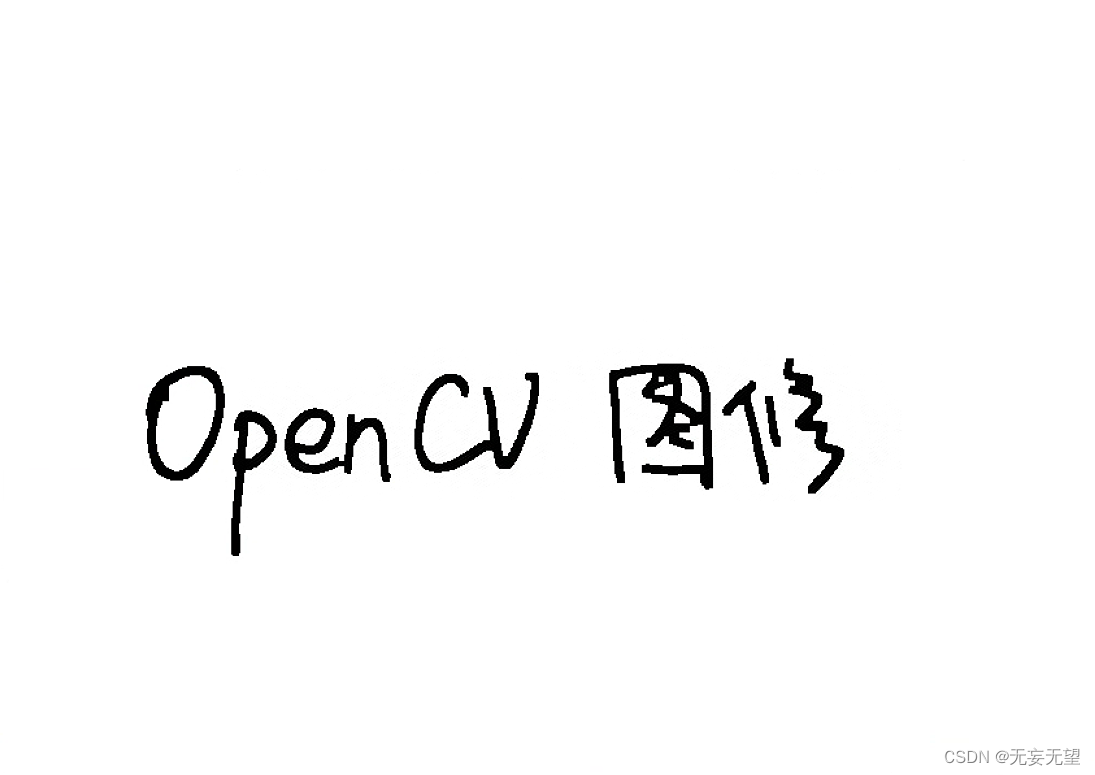
1.目的 在学校的学习过程中,需要递交许多材料,且每份材料上都需要对应负责人签名,有时候找别人要签名,然后自己粘贴的话,会出现签名模糊,背景不是纯白透明。为此以word中的“颜色校正”功能为参照…...

软设之系统测试之测试的基本概念及分类
测试的基本概念 尽早,不断地进行测试 程序员避免测试自己设计的程序 既要选择有效,合理的数据,也要选择无效,不合理的数据 修改后应进行回归测试 尚未发现的错误数量与该程序已发现错误其他成正比。 动态测试 黑盒测试(测试…...
Python学习打卡:day06
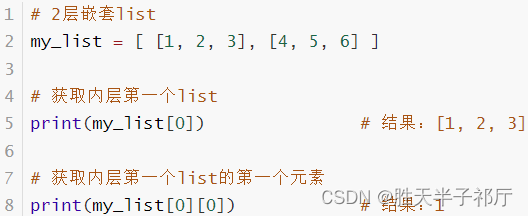
day6 笔记来源于:黑马程序员python教程,8天python从入门到精通,学python看这套就够了 目录 day648、函数综合案例49、数据容器入门50、列表的定义语法51、列表的下标索引1、列表的下标(索引)2、列表的下标(…...
支付宝 沙盒demo使用
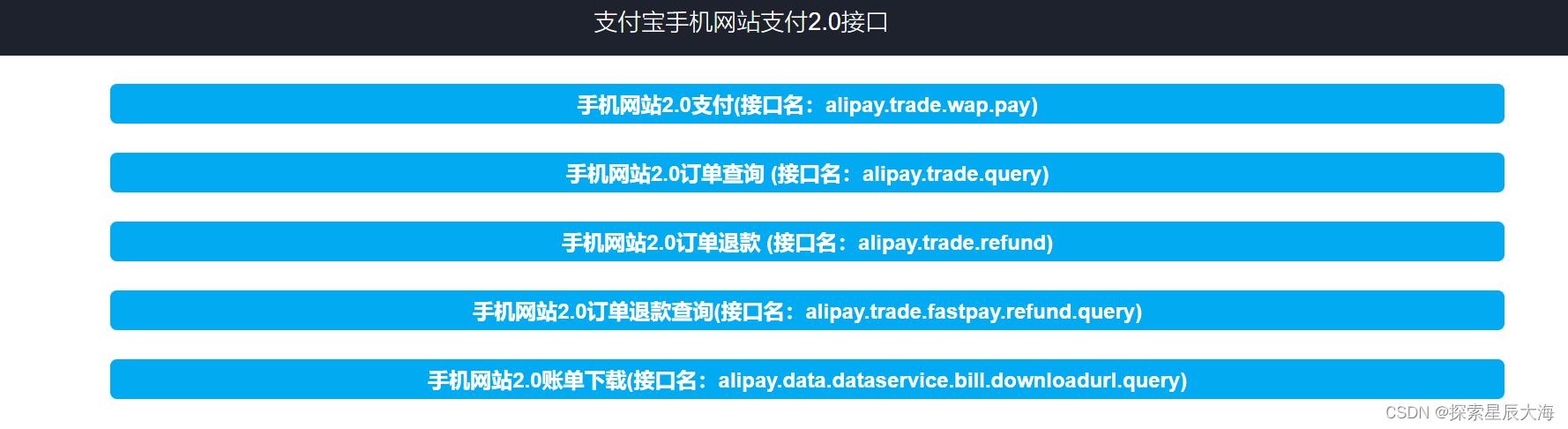
简介:支付宝沙箱环境是一个为开发者提供的模拟测试环境,用于在应用上线前进行接口功能开发和联调。在这个环境中,开发者可以模拟开放接口,进行开发调试工作,以确保应用上线后能顺利运行。 1. 配置沙盒 1. 1 沙箱控制…...
ConcurrentHashMap如何保证线程安全?
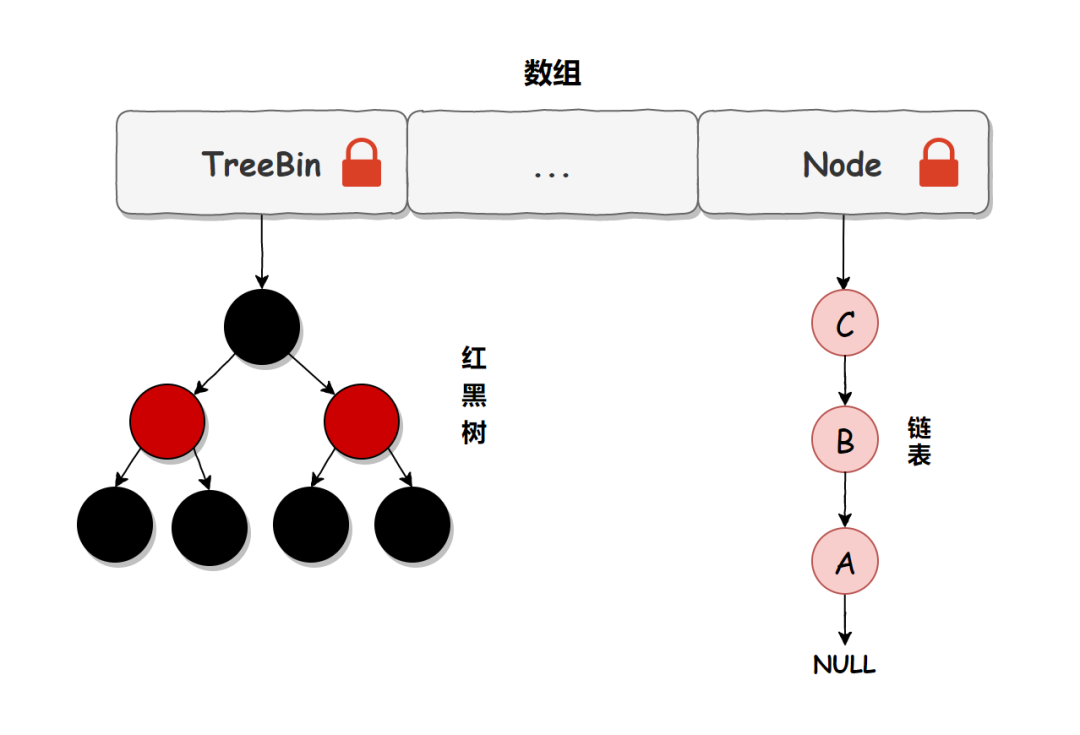
ConcurrentHashMap 是 HashMap 的多线程版本,HashMap 在并发操作时会有各种问题,比如死循环问题、数据覆盖等问题。而这些问题,只要使用 ConcurrentHashMap 就可以完美解决了,那问题来了,ConcurrentHashMap 是如何保证…...

Umi-OCR:完全免费开源的离线OCR神器,3分钟快速上手文字识别
Umi-OCR:完全免费开源的离线OCR神器,3分钟快速上手文字识别 【免费下载链接】Umi-OCR OCR software, free and offline. 开源、免费的离线OCR软件。支持截屏/批量导入图片,PDF文档识别,排除水印/页眉页脚,扫描/生成二维…...

从PUMA560到你的项目:手把手教你将经典DH建模流程迁移到自定义机械臂
从PUMA560到自定义机械臂:DH建模实战迁移指南 当机械臂从教科书案例走向真实项目时,最令人头疼的莫过于面对一个全新构型却不知如何下手。本文将以工业界经典的PUMA560为跳板,拆解一套可迁移的DH建模方法论,带您跨越从理论到实践的…...

如何为《欧洲卡车模拟2》实现完整智能驾驶体验?ETS2LA自动驾驶插件终极指南
如何为《欧洲卡车模拟2》实现完整智能驾驶体验?ETS2LA自动驾驶插件终极指南 【免费下载链接】Euro-Truck-Simulator-2-Lane-Assist Plugin based interface program for ETS2/ATS. 项目地址: https://gitcode.com/gh_mirrors/eur/Euro-Truck-Simulator-2-Lane-Ass…...

Zotero插件市场:三步快速上手的插件管理神器
Zotero插件市场:三步快速上手的插件管理神器 【免费下载链接】zotero-addons Zotero Add-on Market | Zotero插件市场 | Browsing, installing, and reviewing plugins within Zotero 项目地址: https://gitcode.com/gh_mirrors/zo/zotero-addons 想象一下&a…...

δ - mem:提升大型语言模型内存效率,得分最高可达 1.31 倍!
快速通道可了解 arXiv 成为独立非营利组织的情况,也能直达康奈尔大学官网。同时,还能通过链接进行捐赠,支持 arXiv 的发展。搜索与导航提供了多种搜索途径,可在所有字段(标题、作者、摘要等)进行搜索。还有…...

立体孪生全域可视,实现仓储人货动线全周期透明管控
立体孪生全域可视,实现仓储人货动线全周期透明管控副标题:动态三维实时还原库区人员、物资、车辆立体态势,运用库区无感定位、跨货架跨镜长距跟踪、身体指纹在岗确权,出入库、巡检、值守、调度全程透明可追溯一、方案总览现代规模…...

CompressO:终极跨平台视频图片压缩神器,轻松解决存储难题
CompressO:终极跨平台视频图片压缩神器,轻松解决存储难题 【免费下载链接】compressO Convert any video/image into a tiny size. 100% free & open-source. Available for Mac, Windows & Linux. 项目地址: https://gitcode.com/gh_mirrors/…...

m4s-converter终极指南:如何无损转换B站缓存视频并保留弹幕
m4s-converter终极指南:如何无损转换B站缓存视频并保留弹幕 【免费下载链接】m4s-converter 一个跨平台小工具,将bilibili缓存的m4s格式音视频文件合并成mp4 项目地址: https://gitcode.com/gh_mirrors/m4/m4s-converter 在数字内容日益丰富的今天…...

AI驱动全栈开发:Cursor集成模板与高效协作实践
1. 项目概述:当AI代码助手遇上全栈开发最近在GitHub上看到一个挺有意思的项目,叫“Cursor-FullStack-AI-App”。光看名字,你大概能猜到它和Cursor这个AI编程工具,以及全栈应用开发有关。作为一个在前后端都摸爬滚打过多年的开发者…...

从零构建大语言模型:Transformer架构、训练技巧与实战指南
1. 项目概述:从零构建你自己的大语言模型最近几年,大语言模型(LLM)的热度居高不下,从ChatGPT到Claude,再到国内外的各种开源模型,它们展现出的理解和生成能力让人惊叹。但你是否也和我一样&…...