
PG如何实现跨大版本升级
数据库进行升级,是一个再正常不过的功能,比如功能的需要,遇到BUG,安全漏洞等等,具体升级包含子版本升级,主版本升级。如果用过ORACLE的朋友,一定知道,在ORACLE中,如果要实现大版本的升级,比如从11g,升级到19c,一般使用的dbua来完成,并且标准的升级,一定会有数据库停机时间,小版本的升级,如19.3,升级到19.24 ,使用OPATCH 工具来完成,一样需要停数据库。
那对于PG,一样也存在升级,如果是小版本升级,比如12.0 升级到12.19 ,直接使用二进制文件替换即可,如果是大版本升级,一般使用 pg_upgrade来完成,当然,如果时间允许,也可以使用pg_dumpall也行。只是时间要长一些。
关于PG_UPGRADE的使用,可以参见官方文档:PostgreSQL: Documentation: 16: pg_upgrade
部分截图如下:


PG_UPGRADE 的用法:
pg_upgrade -b oldbindir [-B newbindir] -d oldconfigdir -D newconfigdir [option...]

目前pg_upgrade 支持从 9.2.x 到目前最新的版本,甚至BETA版本。
下面我们以一个升级案例来说明:
目录
1.升级环境
2.源码安装新版本16.3
3.关闭源和目标数据库
4.执行升级检查
5.正式升级
6.修改环境变量
7.修改初始参数
8.启动PG并调整PG_UPGRADE要求的脚本
9.结果验证
10、联系我们
1.升级环境
源版本:pg 12.0
PGHOME=/u01/app/postgres/product/12.0/dbhome_1
PGDATA=/u01/app/postgres/product/pgdata_12
PORT=5432
目标版本:pg 16.3
PGHOME=/u01/app/postgres/product/16.3/dbhome_1
PGDATA=/u01/app/postgres/product/pgdata
PORT=5432
操作系统:OpenEuler 24.03
sztechdb=# select * from version();
version
-----------------------------------------------------------------------------------------------------------
PostgreSQL 12.0 on x86_64-pc-linux-gnu, compiled by gcc (GCC) 12.3.1 (openEuler 12.3.1-30.oe2403), 64-bit
(1 row)


2.源码安装新版本16.3
这个步骤,可以参见前面的文档:https://blog.csdn.net/cqsztech/article/details/140748640
如果源端有额外的插件,需要安装
这里安装,只需要到 initdb即可,不需要打开
postgres@openeuler2403 bin]$ ./initdb --pgdata=/u01/app/postgres/pgdata -U postgres
The files belonging to this database system will be owned by user "postgres".
This user must also own the server process.
The database cluster will be initialized with locale "zh_CN.UTF-8".
The default database encoding has accordingly been set to "UTF8".
initdb: could not find suitable text search configuration for locale "zh_CN.UTF-8"
The default text search configuration will be set to "simple".
Data page checksums are disabled.
fixing permissions on existing directory /u01/app/postgres/pgdata ... ok
creating subdirectories ... ok
selecting dynamic shared memory implementation ... posix
selecting default max_connections ... 100
selecting default shared_buffers ... 128MB
selecting default time zone ... Asia/Shanghai
creating configuration files ... ok
running bootstrap script ... ok
performing post-bootstrap initialization ... ok
syncing data to disk ... ok
initdb: warning: enabling "trust" authentication for local connections
initdb: hint: You can change this by editing pg_hba.conf or using the option -A, or --auth-local and --auth-host, the next time you run initdb.
Success. You can now start the database server using:
pg_ctl -D /u01/app/postgres/pgdata -l logfile start

3.关闭源和目标数据库
把源和目标数据库都关闭。
[postgres@openeuler2403 pgdata_12]$ pg_ctl stop
waiting for server to shut down.... done
server stopped
4.执行升级检查
是否能升级,正式升级之前,可以先检查一下,有点试升级的味道。
注意,执行PG_UPGRADE命令,需要在高版本的环境下运行
先看看pg_upgrade 的用法:
[postgres@openeuler2403 bin]$ pg_upgrade -c --old-datadir=/u01/app/postgres/pgdata_12 \
> --new-datadir=/u01/app/postgres/pgdata \
> --old-bindir=/u01/app/postgres/product/12.0/dbhome_1/bin \
> --new-bindir=/u01/app/postgres/product/16.3/dbhome_1/bin

查看丢失的库是什么
[postgres@openeuler2403 pgdata_12]$ cat /u01/app/postgres/pgdata/pg_upgrade_output.d/20240801T164259.299/loadable_libraries.txt
could not load library "$libdir/pgcrypto": ERROR: could not access file "$libdir/pgcrypto": ûĿ¼
In database: postgres
--暂时源端去掉这个插件
postgres=# drop extension pgcrypto;
DROP EXTENSION

再次检查,OK。

5.正式升级
[postgres@openeuler2403 bin]$ pg_upgrade --old-datadir=/u01/app/postgres/pgdata_12 \
> --new-datadir=/u01/app/postgres/pgdata \
> --old-bindir=/u01/app/postgres/product/12.0/dbhome_1/bin \
> --new-bindir=/u01/app/postgres/product/16.3/dbhome_1/bin
Performing Consistency Checks
-----------------------------
Checking cluster versions ok
Checking database user is the install user ok
Checking database connection settings ok
Checking for prepared transactions ok
Checking for system-defined composite types in user tables ok
Checking for reg* data types in user tables ok
Checking for contrib/isn with bigint-passing mismatch ok
Checking for incompatible "aclitem" data type in user tables ok
Checking for user-defined encoding conversions ok
Checking for user-defined postfix operators ok
Checking for incompatible polymorphic functions ok
Creating dump of global objects ok
Creating dump of database schemas
ok
Checking for presence of required libraries ok
Checking database user is the install user ok
Checking for prepared transactions ok
Checking for new cluster tablespace directories ok
If pg_upgrade fails after this point, you must re-initdb the
new cluster before continuing.
Performing Upgrade
------------------
Setting locale and encoding for new cluster ok
Analyzing all rows in the new cluster ok
Freezing all rows in the new cluster ok
Deleting files from new pg_xact ok
Copying old pg_xact to new server ok
Setting oldest XID for new cluster ok
Setting next transaction ID and epoch for new cluster ok
Deleting files from new pg_multixact/offsets ok
Copying old pg_multixact/offsets to new server ok
Deleting files from new pg_multixact/members ok
Copying old pg_multixact/members to new server ok
Setting next multixact ID and offset for new cluster ok
Resetting WAL archives ok
Setting frozenxid and minmxid counters in new cluster ok
Restoring global objects in the new cluster ok
Restoring database schemas in the new cluster
ok
Copying user relation files
ok
Setting next OID for new cluster ok
Sync data directory to disk ok
Creating script to delete old cluster ok
Checking for extension updates notice
Your installation contains extensions that should be updated
with the ALTER EXTENSION command. The file
update_extensions.sql
when executed by psql by the database superuser will update
these extensions.
Upgrade Complete
----------------
Optimizer statistics are not transferred by pg_upgrade.
Once you start the new server, consider running:
/u01/app/postgres/product/16.3/dbhome_1/bin/vacuumdb --all --analyze-in-stages
Running this script will delete the old cluster's data files:
./delete_old_cluster.sh
[postgres@openeuler2403 bin]$
6.修改环境变量
[postgres@openeuler2403 bin]$ cat ~/.bash_profile
# Source /root/.bashrc if user has one
[ -f ~/.bashrc ] && . ~/.bashrc
export PGPORT=5432
export PGDATA=/u01/app/postgres/pgdata
export PGHOME=/u01/app/postgres/product/16.3/dbhome_1
export LD_LIBRARY_PATH=$PGHOME/lib:$LD_LIBRARY_PATH
export PATH=$PGHOME/bin:$PATH:.
export PGHOST=$PGDATA
export PGUSER=postgres
export PGDATABASE=postgres
export PGCLIENTENCODING=GBK
7.修改初始参数
cat >> $PGDATA/postgresql.conf << "EOF"
listen_addresses = '*'
port=5432
unix_socket_directories='/u01/app/postgres/pgdata'
logging_collector = on
log_directory = 'pg_log'
log_filename = 'postgresql-%a.log'
log_truncate_on_rotation = on
max_connections = 500
shared_buffers = 2GB
EOF
cat >> $PGDATA/pg_hba.conf << "EOF"
# TYPE DATABASE USER ADDRESS METHOD
host all all 0.0.0.0/0 md5
EOF
8.启动PG并调整PG_UPGRADE要求的脚本
--插件更新
[postgres@openeuler2403 pgdata]$ psql -f /u01/app/postgres/product/16.3/dbhome_1/bin/update_extensions.sql
You are now connected to database "postgres" as user "postgres".
ALTER EXTENSION
ALTER EXTENSION
ALTER EXTENSION
--收集统计信息
[postgres@openeuler2403 pgdata]$ /u01/app/postgres/product/16.3/dbhome_1/bin/vacuumdb --all --analyze-in-stages
vacuumdb: processing database "postgres": Generating minimal optimizer statistics (1 target)
vacuumdb: processing database "sztechdb": Generating minimal optimizer statistics (1 target)
vacuumdb: processing database "template1": Generating minimal optimizer statistics (1 target)
vacuumdb: processing database "postgres": Generating medium optimizer statistics (10 targets)
vacuumdb: processing database "sztechdb": Generating medium optimizer statistics (10 targets)
vacuumdb: processing database "template1": Generating medium optimizer statistics (10 targets)
vacuumdb: processing database "postgres": Generating default (full) optimizer statistics
vacuumdb: processing database "sztechdb": Generating default (full) optimizer statistics
vacuumdb: processing database "template1": Generating default (full) optimizer statistics
--删除老版本的文件
[postgres@openeuler2403 pgdata]$ cat /u01/app/postgres/product/16.3/dbhome_1/bin/delete_old_cluster.sh
#!/bin/sh
rm -rf '/u01/app/postgres/pgdata_12'
rm -rf '/data/pgdata/PG_12_201909212'
[postgres@openeuler2403 pgdata]$ /u01/app/postgres/product/16.3/dbhome_1/bin/delete_old_cluster.sh
[postgres@openeuler2403 pgdata]$ ls -ltr /u01/app/postgres/
总计 8
drwxrwxr-x. 4 postgres postgres 30 7月31日 17:53 product
drwxr-xr-x. 2 postgres postgres 4096 7月31日 19:17 archive_log
drwx------. 21 postgres postgres 4096 8月 1日 17:36 pgdata
[postgres@openeuler2403 pgdata]$ ls -ltr /data/pgdata/
总计 8
drwx------ 3 postgres postgres 4096 8月 1日 09:23 PG_16_202307071_bak
drwx------ 3 postgres postgres 4096 8月 1日 17:27 PG_16_202307071
9.结果验证


到此,PG_UPGRADE 升级就完成了。
但感觉PG_UPGRADE还是有一些遗憾,
1.整个升级,都是命令行完成,没有图形界面,不太直观
2.升级过程中,数据文件路径要变化,不能就数据文件原地升级,也许是强迫症吧。
10、联系我们
如果你还想和我交流,可以按如下方式找到我们。
----------------------------------------------------------------------
微信群:水煮数据库
主要交流日常运维中用到的数据库相关问题,包含但不限于:ORACLE,PG,MYSQL,SQLSERVER,OB,TIDB,达梦,TDSQL,OPENGAUSS,人大金仓,GBASE等等,
加我微信:zq24803366,备注:水煮数据库, 我拉你入群。
----------------------------------------------------------------------
相关文章:
PG如何实现跨大版本升级
数据库进行升级,是一个再正常不过的功能,比如功能的需要,遇到BUG,安全漏洞等等,具体升级包含子版本升级,主版本升级。如果用过ORACLE的朋友,一定知道,在ORACLE中,如果要实…...

JDK 8 升级 17 及 springboot 2.x 升级 3.x 指南
JDK 8 升级 17 简介 从 JDK 8 升级到 JDK 17 的过程中,有几个主要的变化,特别是 Java Platform Module System (JPMS) 的引入,以及一些包路径的调整。以下是与 JDK 17 相关的一些重要变化: Java Platform Module System (JPMS) …...

基于java的人居环境整治管理系统(源码+lw+部署文档+讲解等)
前言 💗博主介绍:✌全网粉丝20W,CSDN特邀作者、博客专家、CSDN新星计划导师、全栈领域优质创作者,博客之星、掘金/华为云/阿里云/InfoQ等平台优质作者、专注于Java、小程序技术领域和毕业项目实战✌💗 👇🏻…...

深入了解Pip:Python包管理器的详细指南
目录 Pip简介Pip的安装与升级Pip的基本使用 安装包卸载包列出已安装的包查看包的信息 管理依赖 使用requirements.txt冻结当前环境的包 Pip进阶用法 安装特定版本的包使用代理安装包从本地文件安装包 创建和发布Python包 创建一个Python包编写setup.py文件发布到PyPI 常见问题…...

Corsearch 用 ClickHouse 替换 MySQL 进行内容和品牌保护
本文字数:3357;估计阅读时间:9 分钟 作者:ClickHouse Team 本文在公众号【ClickHouseInc】首发 Chase Richards 自 2011 年在初创公司 Marketly 担任工程负责人,直到 2020 年公司被收购。他现在是品牌保护公司 Corsear…...

常见的应急救援设备有哪些_鼎跃安全
在我们的生活中,应急事件的发生常常是突如其来的,它们对人民的生命财产安全构成重大威胁,同时也对社会稳定提出严峻挑战。在这样的紧急情况下,迅速开展有效的救援工作显得尤为重要。而在整个救援过程中,应急设备的使用…...

Vue 项目部署后首页白屏问题排查与解决
引言 在部署 Vue.js 项目时,有时会遇到首页加载后出现白屏的情况,这可能是由于多种原因造成的。本文将介绍一些常见的排查方法和解决方案,帮助开发者快速定位问题并解决。 1. 常见原因分析 首页白屏的问题可能由以下几个方面的原因导致&am…...

STM32 定时器移相任意角度和占空比,频率可调
由于使用了中断修改翻转的CCR值,对于频率超250K以上不太适用. void Motor1_Init(Motor MotorChValue) { GPIO_InitTypeDef GPIO_InitStructure;TIM_TimeBaseInitTypeDef TIM_TimeBaseStructure;TIM_OCInitTypeDef TIM_OCInitStructure;NVIC_InitTypeDef NVIC_Ini…...

C++ 与其他编程语言区别_C++11/14/17新特性总结
C11 decltype类型推导 decltype不依赖于初始化,根据表达式类推导类型 auto b :根据右边a的初始值来推导出变量的类型,然后将该初始值赋给bdecltype 则是根据a表达式来推导类型,变量的初始值与表达式的值无关表达式类型注意点&…...

玩转云服务:Google Cloud谷歌云永久免费云服务器「白嫖」 指南
前几天,和大家分享了: 玩转云服务:Oracle Cloud甲骨文永久免费云服务器注册及配置指南 相信很多同学都卡在了这一步: 可用性域 AD-1 中配置 VM.Standard.E2.1.Micro 的容量不足。请在其他可用性域中创建实例,或稍后…...

用18讲必看:宇哥亲划重点内容+核心题总结
25考研结束之后,张宇老师的风评可能会两极分化 其中一波把张宇老师奉为考研数学之神,吹捧「三向解题法」天下无敌。 另外一波对张宇老师的评价负面,在网上黑张宇老师! 为什么会这么说,因为张宇老师的新版36讲争议太…...

什么是安全生产痕迹化管理?如何做到生产过程中全程痕迹化管理?
安全生产痕迹化管理,简单来说,就是通过记录一些“信息”来确保安全工作的进展。这些方法包括记会议内容、写安全日记、拍照片、签字盖章、指纹识别、面部识别还有手机定位等。记录下来的文字、图片、数据和视频,就像一个个“脚印”࿰…...

VIsual Studio:为同一解决方案下多个项目分别指定不同的编译器
一、引言 如上图,我有一个解决方案【EtchDevice】,他包含两个(甚至更多个)子项目,分别是【DeviceRT】和【DeviceWin】,见名知意,我需要一个项目编译运行在RTOS上,譬如一个名叫INTime…...
Flat Ads资讯:Meta、Google、TikTok 7月产品政策速递
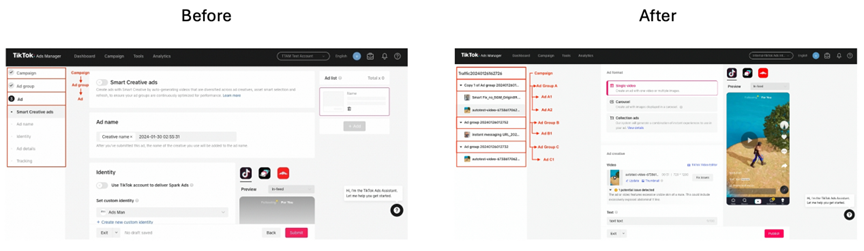
Flat Ads拥有全球媒介采买(MediaBuy)业务,为方便广告主及时了解大媒体最新政策,Flat Ads将整理大媒体产品更新月报,欢迎大家关注我们及时了解最新行业动向。 一、Meta 1、Reels 应用推广现可突出显示应用评分、点评和下载量 为了不断优化 Instagram 上的广告体验和广告表现,…...

嵌入式C++、ROS 、OpenCV、SLAM 算法和路径规划算法:自主导航的移动机器人流程设计(代码示例)
在当今科技迅速发展的背景下,嵌入式自主移动机器人以其广泛的应用前景和技术挑战吸引了越来越多的研究者和开发者。本文将详细介绍一个嵌入式自主移动机器人项目,涵盖其硬件与软件系统设计、代码实现及项目总结,并提供相关参考文献。 项目概…...

数据安全堡垒:SQL Server数据库备份验证与测试恢复全攻略
数据安全堡垒:SQL Server数据库备份验证与测试恢复全攻略 在数据库管理中,备份是确保数据安全的关键环节,但仅仅拥有备份是不够的,验证备份的有效性并能够从备份中成功恢复数据同样重要。SQL Server提供了一系列的工具和方法来执…...

嵌入式人工智能(40-基于树莓派4B的水滴传感器和火焰传感器)
虽然这两个传感器水火不容,我还是把他们放到一起了。本文是有线传感器的最后一个部分了。后面如果还有文章介绍有线传感器,也是补充学习其他内容不得已而为之。如果不是,就当我没说,哈哈。 1、水滴传感器 水滴传感器又称雨滴传感…...

EF访问PostgreSql,如何判断jsonb类型的数组是否包含某个数值
下面代码判断OpenUserIds(long[]类型的jsonb)字段,是否包含 8 basequery basequery.Where(m > Microsoft.EntityFrameworkCore.NpgsqlJsonDbFunctionsExtensions.JsonContains(EF.Functions, m.OpenUserIds, new long[] { 8 }));...
控件 | 8.1、QComboBox)
Qt 实战(8)控件 | 8.1、QComboBox
文章目录 一、QComboBox1、简介2、功能特性2.1、添加和移除项目2.2、设置和获取当前选中项2.3、模型/视图架构2.4、信号与槽 3、总结 前言: QComboBox 是 Qt 框架中一个非常实用的控件,它允许用户从一个下拉列表中选择一个项目。这个控件广泛应用于需要用…...

模拟算法概览
前言 LeetCode上的模拟算法题目主要考察通过直接模拟问题的实际操作和过程来解决问题。这类题目通常不需要高级的数据结构或复杂的算法,而是通过仔细的逻辑和清晰的步骤逐步解决。 适合解决的问题 模拟算法适合用来解决那些逻辑明确、步骤清晰且可以逐步执行的问…...

模型参数、模型存储精度、参数与显存
模型参数量衡量单位 M:百万(Million) B:十亿(Billion) 1 B 1000 M 1B 1000M 1B1000M 参数存储精度 模型参数是固定的,但是一个参数所表示多少字节不一定,需要看这个参数以什么…...

linux 错误码总结
1,错误码的概念与作用 在Linux系统中,错误码是系统调用或库函数在执行失败时返回的特定数值,用于指示具体的错误类型。这些错误码通过全局变量errno来存储和传递,errno由操作系统维护,保存最近一次发生的错误信息。值得注意的是,errno的值在每次系统调用或函数调用失败时…...
ServerTrust 并非唯一
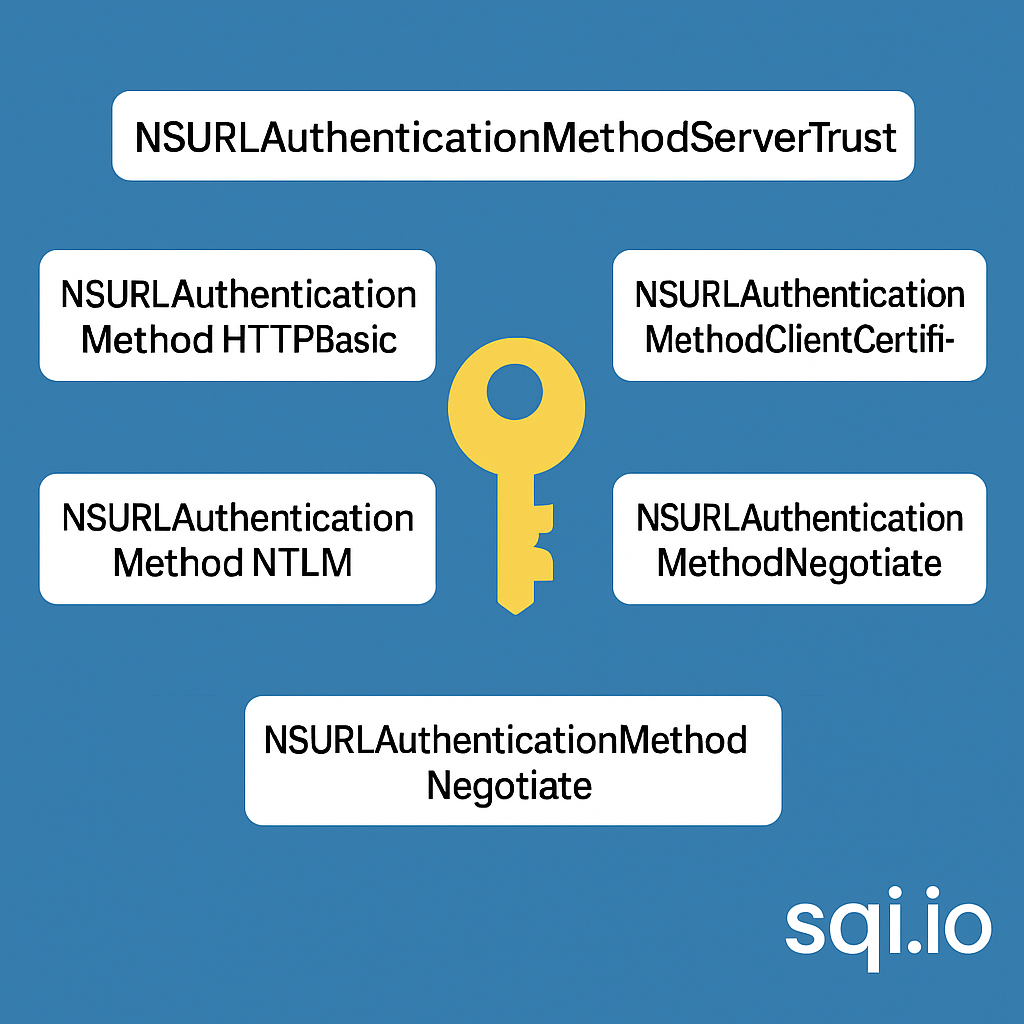
NSURLAuthenticationMethodServerTrust 只是 authenticationMethod 的冰山一角 要理解 NSURLAuthenticationMethodServerTrust, 首先要明白它只是 authenticationMethod 的选项之一, 并非唯一 1 先厘清概念 点说明authenticationMethodURLAuthenticationChallenge.protectionS…...
Module Federation 和 Native Federation 的比较
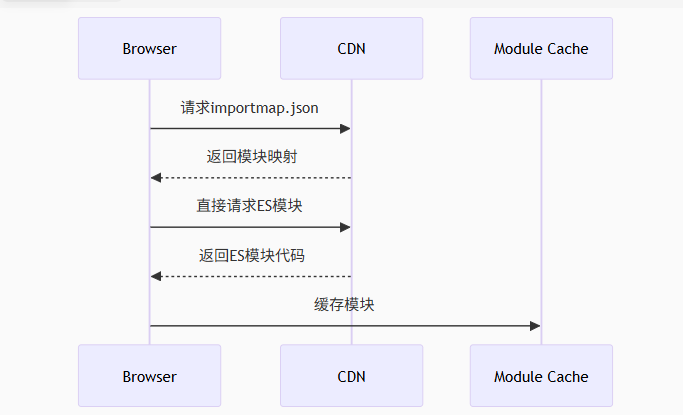
前言 Module Federation 是 Webpack 5 引入的微前端架构方案,允许不同独立构建的应用在运行时动态共享模块。 Native Federation 是 Angular 官方基于 Module Federation 理念实现的专为 Angular 优化的微前端方案。 概念解析 Module Federation (模块联邦) Modul…...

鸿蒙中用HarmonyOS SDK应用服务 HarmonyOS5开发一个生活电费的缴纳和查询小程序
一、项目初始化与配置 1. 创建项目 ohpm init harmony/utility-payment-app 2. 配置权限 // module.json5 {"requestPermissions": [{"name": "ohos.permission.INTERNET"},{"name": "ohos.permission.GET_NETWORK_INFO"…...

AI,如何重构理解、匹配与决策?
AI 时代,我们如何理解消费? 作者|王彬 封面|Unplash 人们通过信息理解世界。 曾几何时,PC 与移动互联网重塑了人们的购物路径:信息变得唾手可得,商品决策变得高度依赖内容。 但 AI 时代的来…...
淘宝扭蛋机小程序系统开发:打造互动性强的购物平台
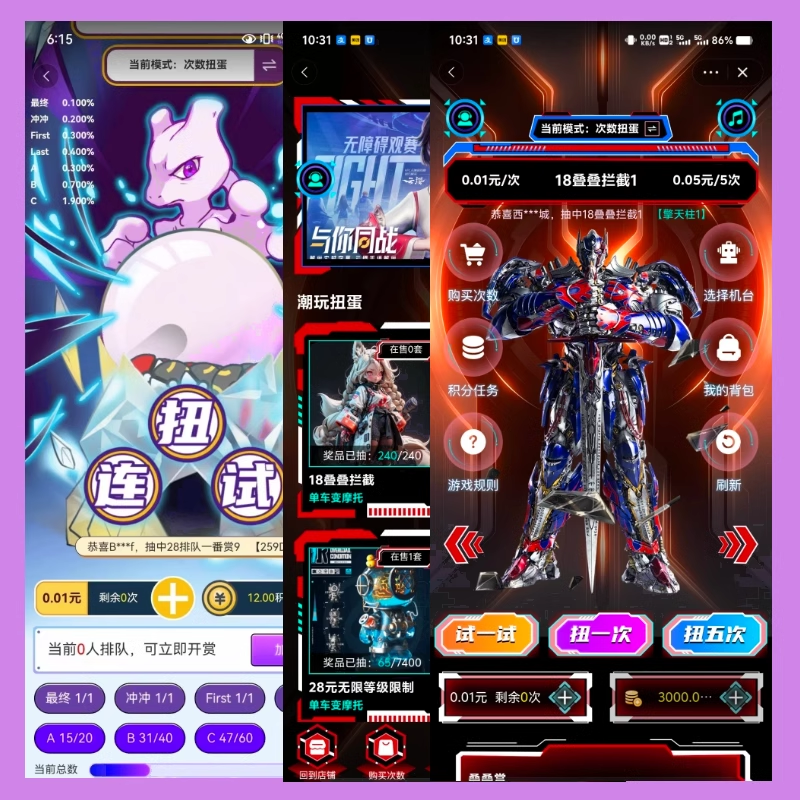
淘宝扭蛋机小程序系统的开发,旨在打造一个互动性强的购物平台,让用户在购物的同时,能够享受到更多的乐趣和惊喜。 淘宝扭蛋机小程序系统拥有丰富的互动功能。用户可以通过虚拟摇杆操作扭蛋机,实现旋转、抽拉等动作,增…...

掌握 HTTP 请求:理解 cURL GET 语法
cURL 是一个强大的命令行工具,用于发送 HTTP 请求和与 Web 服务器交互。在 Web 开发和测试中,cURL 经常用于发送 GET 请求来获取服务器资源。本文将详细介绍 cURL GET 请求的语法和使用方法。 一、cURL 基本概念 cURL 是 "Client URL" 的缩写…...

嵌入式常见 CPU 架构
架构类型架构厂商芯片厂商典型芯片特点与应用场景PICRISC (8/16 位)MicrochipMicrochipPIC16F877A、PIC18F4550简化指令集,单周期执行;低功耗、CIP 独立外设;用于家电、小电机控制、安防面板等嵌入式场景8051CISC (8 位)Intel(原始…...

Kafka主题运维全指南:从基础配置到故障处理
#作者:张桐瑞 文章目录 主题日常管理1. 修改主题分区。2. 修改主题级别参数。3. 变更副本数。4. 修改主题限速。5.主题分区迁移。6. 常见主题错误处理常见错误1:主题删除失败。常见错误2:__consumer_offsets占用太多的磁盘。 主题日常管理 …...