
封装轮播图 (因为基于微博小程序,语法可能有些出入,如需使用需改标签)
这是在组件中使用,基于微博语法
<template><wbx-view class="" style="width: 100vw;height: 70vh;"><WBXswiper @change="gaibian" :vertical="false" :current="current" indicatorActiveColor="#fff" indicatorColor="#c0c0c0" :items="items"   style="width: 375px;height: 200px;border-radius: 20px;"><template slot="swiperItem" slot-scope="scope"><wbx-image :src="scope.item.src" mode="aspectFill" style="width:375px; height: 200px;" /></template></WBXswiper><!-- //测试点击切换轮播 --><wbx-view  style="margin-bottom: 30px;"><web-view style="width: 30px;height: 30px;border: 1px solid red;" @click="add(0)"><view-text>0</view-text></web-view><web-view style="width: 30px;height: 30px;border: 1px solid red;" @click="add(1)"><view-text>1</view-text></web-view><web-view style="width: 30px;height: 30px;border: 1px solid red;" @click="add(2)"><view-text>2</view-text></web-view></wbx-view></wbx-view>
</template><script>
/*** @type WBXAppOption*/
import WBXswiper from "../../commpents/WBXswiper/index.vue";
const pageOptions = {data() {return {items: [{ src: 'res/1.jpg',txt:222222},{ src: 'res/1.jpg',txt:222222},{ src: 'res/1.jpg',txt:222222},],current:0}},computed:{},methods: {gaibian(e){console.log(e,'change')},add(index){console.log(this.current)this.current=index}},components: {WBXswiper,},wbox: {onLoad() { },onShow() {// 页面显示/切入前台时触发},onHide() {// 页面隐藏时触发},onUnload() {// 页面退出时触发},},mounted() { },
};
export default pageOptions;
</script><style></style>
自己封装的swiper组件内部
<template><wbx-viewref="objStyle":style="wrapperStyle"@touchstart="onTouchStart"@touchmove="onTouchMove"@touchend="onTouchEnd"><wbx-viewclass="carousel-wrapper":style="carouselStyle"@transitionend="onTransitionEnd"ref="carouselWrapper"><wbx-view :style="itemStyle"><slot name="swiperItem" :item="items[items.length - 1]"></slot></wbx-view><wbx-view v-for="(item, index) in items" :key="index" :style="itemStyle"><slot name="swiperItem" :item="item"></slot></wbx-view><wbx-view :style="itemStyle"><slot name="swiperItem" :item="items[0]"></slot></wbx-view></wbx-view><wbx-view v-if="indicatorDots" :style="{ width: containerWidth + 'px' }" style="position: absolute; bottom: 10px; display: flex; flex-direction: row; justify-content: center;"><wbx-viewv-for="(item, index) in items":key="index":style="{ backgroundColor: index === realIndex ? indicatorActiveColor : indicatorColor }"style="width: 10px; height: 10px; margin: 0 5px; cursor: pointer; border-radius: 10px;"@click~stop="setCurrentIndex(index)"></wbx-view></wbx-view></wbx-view></template><script>export default {/*items 数据autoPlay 是否自动播放interval 自动播放间隔时间indicatorDots 是否显示指示点indicatorColor 指示点颜色indicatorActiveColor 当前选中的指示点颜色current 当前所在滑块的indexvertical 滑动方向是否为纵向@change 轮播图改变时会触发 change 事件,返回当前索引值*/props: {items: {type: Array,required: true},autoPlay: {type: Boolean,default: false},interval: {type: Number,default: 3000},indicatorDots: {type: Boolean,default: true},indicatorColor: {type: String,default: '#c0c0c0'},indicatorActiveColor: {type: String,default: '#fff'},current: {type: String,default: ''},vertical: {type: Boolean,default: false}},data() {return {currentIndex: 1,timer: null,startX: 0,startY: 0,offset: 0,isTransitioning: false,containerWidth: 0,containerHeight: 0};},watch: {current(newVal) {this.setCurrentIndex(newVal);}},computed: {wrapperStyle() {return {backgroundColor: "rebeccapurple",position: "relative",width: `${this.wrapperWidth}px`,height: `${this.wrapperHeight}px`,};},carouselStyle() {const baseTranslateValue = -this.currentIndex * (this.vertical ? this.containerHeight : this.containerWidth);const translateValue = baseTranslateValue + this.offset;console.log(this.offset,baseTranslateValue,translateValue,"999999")return {display: 'flex',flexDirection: this.vertical ? 'column' : 'row',transform: this.vertical ? `translateY(${translateValue}px)` : `translateX(${translateValue}px)`,transition: this.isTransitioning ? 'transform 0.3s ease-out' : 'none',width: !this.vertical ? `${this.wrapperWidth}px` : `${this.containerWidth}px`,height: this.vertical ? `${this.wrapperHeight}px` : `${this.containerWidth}px`};},wrapperWidth() {return this.containerWidth * (this.items.length + 2);},wrapperHeight() {return this.containerHeight * (this.items.length + 2);},itemStyle() {return {width: !this.vertical ? `${this.containerWidth}px` : `${this.containerWidth}px`,height: this.vertical ? `${this.containerHeight}px` : `${this.containerWidth}px`,flexShrink: 0};},realIndex() {return (this.currentIndex - 1 + this.items.length) % this.items.length;}},mounted() {this.updateDimensions();this.$nextTick(() => {if (this.autoPlay) {this.startAutoPlay();}});},beforeDestroy() {this.stopAutoPlay();},methods: {updateDimensions() {if (this.$refs.objStyle) {const objStyle = this.$refs.objStyle.styleObjectthis.containerWidth = parseFloat(objStyle.width);this.containerHeight = parseFloat(objStyle.height);}},startAutoPlay() {this.timer = setInterval(() => {this.next();}, this.interval);},stopAutoPlay() {if (this.timer) {clearInterval(this.timer);this.timer = null;}},next() {this.offset = 0;this.isTransitioning = true;this.currentIndex += 1;this.$emit('change', { current: this.currentIndex });},prev() {this.offset = 0;this.isTransitioning = true;this.currentIndex -= 1;this.$emit('change', { current: this.currentIndex });},setCurrentIndex(index) {this.stopAutoPlay();this.isTransitioning = true;this.currentIndex = index + 1;if (this.autoPlay) {this.startAutoPlay();}},onTouchStart(e) {this.startX = e.touches[0].clientX;this.startY = e.touches[0].clientY;this.offset = 0;this.stopAutoPlay();},onTouchMove(e) {const moveX = e.touches[0].clientX;const moveY = e.touches[0].clientY;this.offset = this.vertical ? moveY - this.startY : moveX - this.startX;},onTouchEnd() {this.isTransitioning = true;if (Math.abs(this.offset) > (this.vertical ? this.containerHeight : this.containerWidth) /6) {if (this.offset > 0) {this.prev();} else {this.next();}} else {this.offset = 0;}if (this.autoPlay) {this.startAutoPlay();}},onTransitionEnd() {this.isTransitioning = false;this.offset = 0;if (this.currentIndex === this.items.length + 1) {this.currentIndex = 1;}if (this.currentIndex === 0) {this.currentIndex = this.items.length;}}}};</script><style></style>
相关文章:
)
封装轮播图 (因为基于微博小程序,语法可能有些出入,如需使用需改标签)
这是在组件中使用,基于微博语法 <template><wbx-view class"" style"width: 100vw;height: 70vh;"><WBXswiper change"gaibian" :vertical"false" :current"current" indicatorActiveColor"…...

【Ubuntu】minicom安装、配置、使用以及退出
目录 1 安装 2 配置 3 使用 4 退出 minicom是一个串口通信的工具,以root权限登录系统,可用来与串口设备通信。 1 安装 sudo apt-get install minicom 2 配置 使用如下命令进入配置界面: sudo minicon -s 进入配置界面后,…...

MYSQL的监控
1. MySQL服务器都提供了哪几种类型的日志文件?说明每种日志的用途。 Error log:启动、关闭和异常有关的诊断信息 General query log:服务器从客户端收到的所有语句 Slow query log:需要很长时间执行的查询 Audit log:企业版基于策略的审计 Binary…...

CTF ciscn_2019_web_northern_china_day1_web2
ciscn_2019_web_northern_china_day1_web2 BEGIN 拿到题目,先看看 这里发现一个很像提示的东西,然后发现下面是一堆小电视商品,有lv等级和金钱,所以这题的入口可能就是再lv6和这个资金募集上 然后点击下next,看看页…...

linux中vim编辑器的应用实例
前言 Linux有大量的配置文件,其中编辑一些配置文件,最常用的工具就是 Vim ,本文介绍一个实际应用的Vim编辑器开发文档的实例。 Vim是一个类似于Vi的著名的功能强大、高度可定制的文本编辑器,在Vi的基础上改进和增加了很多特性。…...

智慧城市交通管理中的云端多车调度与控制
城市交通管理中的云端多车调度与控制 智慧城市是 21世纪的城市基本发展方向,为了实现智慧城市建设的目标,人们需要用现代化的手段去管理和控制城市中的各种资源和设施。智能交通控制与管理是智慧城市中不可缺少的一部分,因为现代城市交通系统…...

分治(归并排序)
一、基本思路 我们以一个归并排序为例。 . - 力扣(LeetCode) 归并排序的思想:得到两个有序数组,把两个有序数组合并,传到下一层递归,一直得到两个有序数组,一直合并,最后就能得到有…...

小学生为什么要学英语
小学生需要学习英语的原因有很多,以下是其中的一些原因(毕竟我也会累滴(* ̄▽ ̄*)): 1. 全球化交流:英语是国际交流的通用语言,学习英语可以帮助小学生更好地融入全球化的社会环境&am…...

企业云存储如何收费?企业云存储收费标准
企业云存储如何收费?企业云存储的收费方式因不同的服务提供商和具体的服务选项而异,通常从用户数量、存储容量、功能、混合收费、按需定价、定制化、功能模块等多个方面进行考量。以下是对其多方面收费方式的详细介绍: 1.按用户数量收费 适用…...

一步步教你LangGraph Studio:可视化调试基于LangGraph构建的AI智能体
之前我们在第一时间介绍过使用LangChain的LangGraph开发复杂的RAG或者Agent应用,随着版本的迭代,LangGraph已经成为可以独立于LangChain核心,用于开发多步骤、面向复杂任务、支持循环的AI智能体的强大框架。 近期LangGraph推出了一个使得复杂…...

用SpringBoot打造先进的学科竞赛管理系统
1绪 论 1.1研究背景 当今时代是飞速发展的信息时代。在各行各业中离不开信息处理,这正是计算机被广泛应用于信息管理系统的环境。计算机的最大好处在于利用它能够进行信息管理。使用计算机进行信息控制,不仅提高了工作效率,而且大大的提高了其…...

Linux入门攻坚——34、nsswitch、pam、rsyslog和loganalyzer前端展示工具
nsswitch:network service switch 名称解析:name <---> id 认证服务:用户名、密码验证或token验证等 名称解析和认证服务都涉及查找位置,即保存在哪里。如linux认证,passwd、shadow,是在文件中&…...
如何在Excel中快速找出前 N 名,后 N 名
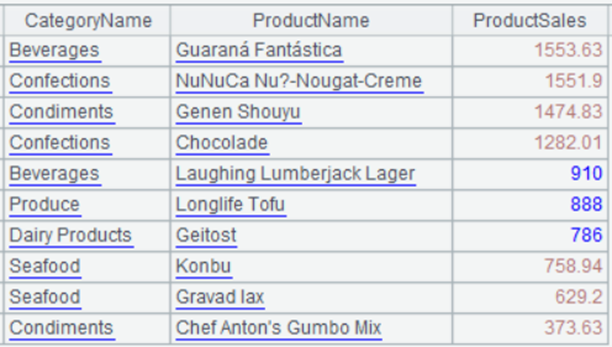
有如下销售额统计表: 找出销售额排前 10 名的产品及其销售额,和销售额排倒数 10 名以内的产品及其销售额,结果如下所示: 前 10 名: spl("E(?1).sort(ProductSales:-1).to(10)",A1:C78)后 10 名࿱…...

创意实现!在uni-app小程序商品详情页轮播中嵌入视频播放功能
背景介绍 通过uni-app框架实现商城小程序商品详情页的视频与图片轮播功能,以提升用户体验和增加商品吸引力。通过展示商品视频和图片,用户可以更全面地了解商品细节,从而提高购买决策的便利性和满意度。这种功能适用于各类商品,如…...
WAF,全称Web Application Firewall,好用WAF推荐
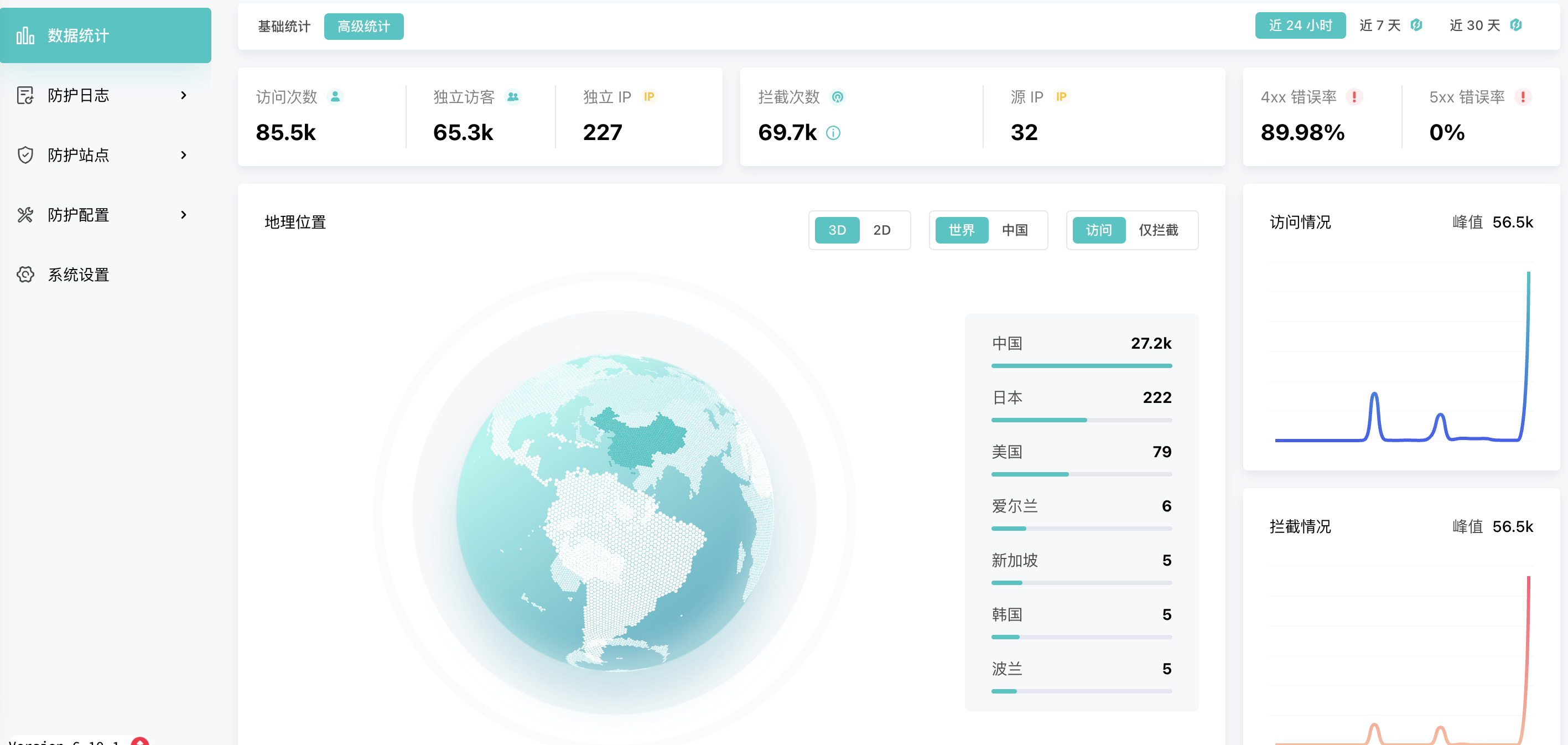
WAF,全称Web Application Firewall,即Web应用防火墙,是一种网络安全设备,旨在保护Web应用程序免受各种Web攻击,如SQL注入、跨站脚本(XSS)、跨站请求伪造(CSRF)等。 WAF通…...

docker中搭建nacos并将springboot项目的配置文件转移到nacos中
前言 网上搜索docker中搭建nacos发现文章不是很好理解,正好最近在搭建nacos练手。记录一下整个搭建过程。文章最后附上了一些过程中遇到的问题,大家可以按需要查看。 docker中搭建nacos并将springboot项目的配置文件转移到nacos中 前言1 docker中下拉na…...

概率论原理
智慧挺不喜欢我,他告诉我需要有耐心,答案在后面;而我总想马上得到答案;但它也会给我奖励,因为我总会自己去寻找答案 B站 大大的小番茄 普林斯顿微积分 PDF 一化儿 BILIBILI 泰勒展开式 知乎https://www.zhihu.com…...

MYSQL的安装和升级
MySQL的RPM安装通常分为不同的包,包括Server、Common、Client、Devel、Libs、Libs-compat、Test、Source,请写出上述每个包的功能。 Server:包含MySQL服务器的核心文件和服务。安装此包后可以运行MySQL数据库服务器。 Common:包…...

深入解析 RISC-V 递归函数的栈使用:以阶乘函数为例
在处理递归函数时,RISC-V 体系架构的寄存器数量有限。为了确保每次递归调用能正确保存和恢复寄存器的状态,栈(stack)提供了灵活的解决方案。本文将结合具体的汇编代码和递归的阶乘函数 fact 来讲解 RISC-V 中如何利用栈进行寄存器…...

【保研纪念】计算机保研经验贴——南大cs、复旦cs、中南cs
文章目录 一、个人情况二、经验总结三、夏令营情况1、南京大学计算机学院(5月31日-6月2日)2、复旦大学计算机学院(7月1日-7月4日)3、中南大学计算机学院(7月5日-7月7日)4、武汉大学计算机学院 四、预推免情…...

别再只用Service了!ROS1 Action通信保姆级教程:从导航进度条到任务取消,手把手教你实现带反馈的机器人任务
别再只用Service了!ROS1 Action通信保姆级教程:从导航进度条到任务取消,手把手教你实现带反馈的机器人任务当你的机器人正在执行一个长达10分钟的导航任务时,突然发现目标点设置错误,这时候如果只能干等着任务完成或者…...
重构)
嘈杂工业场景下的自适应VAD与双码本声纹识别鉴权系统:基于端侧轻量化神经网络与向量量化(VQ)重构
在大型化工车间、能源集控中心以及金融极密隔离库房中,离线声纹识别是物理访问控制和身份安全核验的重要生物特征屏障。然而,在环境本底噪声高达80dB以上的恶劣工业场景下,常规的语音活动检测(VAD)会频繁误触ÿ…...

为什么92%的DeepSeek二次开发团队在6个月内遭遇交付延迟?——基于17个真实项目的技术债务归因分析
更多请点击: https://intelliparadigm.com 第一章:为什么92%的DeepSeek二次开发团队在6个月内遭遇交付延迟?——基于17个真实项目的技术债务归因分析 在对17个采用DeepSeek-R1/VL模型开展定制化开发的工业级项目进行回溯审计后,我…...

搞定这 5 个全栈电商项目,面试别再用 Todo-List 凑数了
找独立开发练手项目或者写简历项目时,最忌讳两件事:一是太简单(纯前端 Mock 数据,点两下就没了),二是太假(一上来就硬套微服务、消息队列、高并发,结果自己根本Hold不住)…...

上线前最后一道防线,DeepSeek代码审查如何帮你拦截87%的CVE类缺陷?
更多请点击: https://intelliparadigm.com 第一章:上线前最后一道防线,DeepSeek代码审查如何帮你拦截87%的CVE类缺陷? 在软件交付生命周期末期,传统人工代码审计与通用SAST工具常因误报率高、上下文理解弱而漏检高危漏…...

1688运营培训/询盘成本从500元降到63.9!1688运营培训还原1688真实玩法
1688运营培训/询盘成本从500元降到63.9!1688运营培训还原1688真实玩法500块钱一个询盘,你敢信?做1688运营培训这么多年,这个数字我都觉得离谱。前阵子遇到一个老板,一上来就开始吐槽1688,说1688就是个垃圾平…...

别再乱建索引了!用Explain的key_len字段,一眼看穿你的MySQL联合索引到底生效了几个字段
解密MySQL联合索引:用key_len精准判断索引生效范围 在数据库性能优化领域,联合索引的使用一直是个既基础又容易踩坑的话题。很多开发者虽然知道"最左匹配原则"这个名词,但在实际业务场景中,面对复杂的查询条件组合时&a…...
)
YOLOv8道路交通信号标志识别检测系统(项目源码+YOLO数据集+模型权重+UI界面+python+深度学习+环境配置)
摘要 道路交通信号标志的自动检测是智能驾驶与交通管理系统中的核心环节。本文基于YOLOv8目标检测算法,构建了一个涵盖21类常见交通信号标志的检测系统,包括禁令标志、指示标志、警告标志及信号灯等。模型在包含1376张训练图像、488张验证图像和229张测…...

AI算法工程师如何进行数据预处理?这5个步骤让你的数据更优质
在AI模型开发与测试的全流程中,数据质量直接决定了最终模型的效果上限——哪怕是最先进的大语言模型,用劣质数据训练出来也只能输出劣质结果。对于软件测试从业者来说,不管是参与AI模型的功能测试、性能测试,还是负责测试数据集的…...

终极虚拟显示器解决方案:ParsecVDisplay完整使用指南
终极虚拟显示器解决方案:ParsecVDisplay完整使用指南 【免费下载链接】parsec-vdd ✨ Perfect virtual display for game streaming 项目地址: https://gitcode.com/gh_mirrors/pa/parsec-vdd ParsecVDisplay是一个基于Parsec虚拟显示驱动(VDD)的独立应用程序…...