
24.12.02 Element
import { createApp } from 'vue'
// 引入elementPlus js库 css库
import ElementPlus from 'element-plus'
import 'element-plus/dist/index.css'
//中文语言包
import zhCn from 'element-plus/es/locale/lang/zh-cn'
//图标库
import * as ElementPlusIconsVue from '@element-plus/icons-vue'import App from './App.vue'
//router单独的配置文件
import router from './router'//typescript js语法做了类型限制
//对象要先设定类型 使用变量 要标记类型let myVue = createApp(App)
//vue插件 与vue高度集成
//启动router插件
myVue.use(router)
//启用elementPlus插件
myVue.use(ElementPlus, {locale: zhCn,})
//把所有图标导入vue全局组件库
for (const [key, component] of Object.entries(ElementPlusIconsVue)) {myVue.component(key, component)
}myVue.mount('#app')
2elementPlus常用组件
2.2基础组件 按钮
按钮主要是样式 比较简单
<template><!-- 基础组件  --><el-button :loading-icon="Eleme" :loading="loadStauts" >Default</el-button><el-button type="primary" disabled>Primary</el-button><el-button type="success">Success</el-button><el-button type="info" :disabled="btnStatus">{{ username }}</el-button><el-button type="warning" link>Warning</el-button><el-button type="danger" text>Danger</el-button><el-button type="primary" :icon="Edit" circle /><el-button type="success" :icon="Check" circle /><el-icon><Check /></el-icon><el-button type="primary">Upl<el-icon class="el-icon--right"><Upload /></el-icon>oad</el-button><el-button-group class="ml-4"><el-button type="primary" :icon="Edit" /><el-button type="primary" :icon="Share" /><el-button type="primary" :icon="Delete" /></el-button-group><el-button color="#19a" >Default</el-button></template><script setup>
import {ref,reactive,onMounted} from 'vue'
import {get,post} from '@/myaxios'
import router from '@/router'
import {Check,Edit,Upload,Share,Delete
} from '@element-plus/icons-vue'/*
ui库中的自定义标签 基础用法与原生标签/属性一致如果不支持 没有效果*/
const username = ref('jack');
const btnStatus = ref(false)
const loadStauts = ref(false)</script><style scoped></style>
2.3边框 颜色等其他基础组件
<template><div class="radius" style="width: 100px;height: 100px; border-radius: var(--el-border-radius-round);box-shadow: var(--el-box-shadow-dark);background-color: rgb(179, 224.5, 156.5);" ><el-icon><Lock /></el-icon><el-link href="http://www.baidu.com" type="success">success</el-link><el-text class="mx-1" type="success">Success</el-text></div></template><script setup>
import {ref,reactive,onMounted} from 'vue'
import {get,post} from '@/myaxios'
import router from '@/router'
import {Check,Edit,Upload,Share,Delete
} from '@element-plus/icons-vue'/*
ui库中的自定义标签 基础用法与原生标签/属性一致如果不支持 没有效果*/ </script><style scoped>.radius {height: 40px;width: 70%;border: 1px solid var(--el-border-color);border-radius: 0;margin-top: 20px;
}
</style>
2.4布局组件
<template><!-- 每行默认24分栏 如果页面需要分布局时  使用 el-row 搭配el-col使用 可以不足24 但是不能超vue 响应式变量 (自动变化)--><el-row :gutter="20">//会有留白<el-col :span="8">11111</el-col><el-col :span="8">11111</el-col><el-col :span="8"><el-row ><el-col :span="12">11111</el-col><el-col :span="12">11111</el-col></el-row></el-col></el-row><el-row :gutter="20"><el-col :offset="2" :span="10">11111</el-col><el-col :span="10">11111</el-col></el-row><el-row justify="space-around"><el-col :span="10">11111</el-col><el-col :span="10">11111</el-col></el-row><!-- 在不同设备上 显示效果会改变套壳APP 只能访问特定网站 浏览器功能按钮全砍掉pc         html css jsios        objcetCAndroid    java -->
<el-row ><el-col :xs="12" :sm="4" :md="20" :lg="12" >11111</el-col><el-col :xs="12" :sm="20" :md="4" :lg="12" >11111</el-col></el-row></template><script setup>
import {ref,reactive,onMounted} from 'vue'
import {get,post} from '@/myaxios'
import router from '@/router'
import {Check,Edit,Upload,Share,Delete
} from '@element-plus/icons-vue'/*
ui库中的自定义标签 基础用法与原生标签/属性一致如果不支持 没有效果*/ </script><style scoped>.radius {height: 40px;width: 70%;border: 1px solid var(--el-border-color);border-radius: 0;margin-top: 20px;
}
</style>
2.5输入框
<template>
<!--
插入图标有两种写法
--><el-input v-model="input" style="width: 240px"   type="textarea"  clearable placeholder="Please input" :suffix-icon="Calendar" />{{ input }}<el-input v-model="input2" style="width: 240px" type="password" show-password placeholder="Please input"><template #prefix>aaaa<el-icon class="el-input__icon"><calendar /></el-icon></template></el-input><el-input v-model="input2" style="width: 240px" type="password" show-password placeholder="Please input"><template #prepend>aaaa<el-icon class="el-input__icon"><calendar /></el-icon></template></el-input><br><el-inputv-model="text"style="width: 240px"maxlength="10"placeholder="Please input"show-word-limittype="text"/>
</template><script setup>
import {ref,reactive,onMounted} from 'vue'
import {get,post} from '@/myaxios'
import router from '@/router'
import {Calendar,
} from '@element-plus/icons-vue'const input = ref('')
const input2 = ref('')
const text = ref('')</script><style scoped></style>
2.6数字输入框
<template>
<!-- 官网文档是ts代码 去掉ts中类型部分 可以成js--><el-input-number v-model="num" :min="1" :max="10" @change="handleChange" /></template><script setup>
import {ref,reactive,onMounted} from 'vue'
import {get,post} from '@/myaxios'
import router from '@/router'
import {Calendar,
} from '@element-plus/icons-vue'const num = ref(1)const handleChange = (value) => {console.log(value)
}</script><style scoped></style>
2.7单选多选开关
<template><el-radio-group v-model="radVal"><el-radio value="1" size="large">Option 1</el-radio><el-radio value="2" size="large">Option 2</el-radio></el-radio-group>{{ radVal }}<el-radio-group v-model="radVal2" size="large"><el-radio-button value="1" >New York</el-radio-button><el-radio-button value="2" >Washington</el-radio-button><el-radio-button value="3" >Los Angeles</el-radio-button><el-radio-button value="4" >Chicago</el-radio-button></el-radio-group>{{ radVal2 }}<hr><el-checkbox-group v-model="checkList"><el-checkbox :value="1" >A</el-checkbox><el-checkbox :value="2" >B</el-checkbox><el-checkbox :value="3" >C</el-checkbox></el-checkbox-group>{{ checkList }}<hr><el-switchv-model="switchVal"style="--el-switch-on-color: #13ce66; --el-switch-off-color: #ff4949"active-text="是"inactive-text="否"inline-prompt/>{{ switchVal }}
</template><script setup>
import {ref,reactive,onMounted} from 'vue'
import {get,post} from '@/myaxios'
import router from '@/router'
import {Calendar,
} from '@element-plus/icons-vue'const radVal = ref('1')
const radVal2 = ref('1')
// 注意数据类型 如果类型不匹配 无法选中
const checkList = ref([1,'3'])//不是:value要用字符串类型const switchVal = ref(true)</script><style scoped></style>
2.8下拉列表
<template><el-selectv-model="selVal"placeholder="请选择"size="large"style="width: 240px"clearablemultiple //可多选、与clearable不可叠加><el-option value="001">北京</el-option><el-option value="002" disabled>上海</el-option><el-option value="003">深圳</el-option></el-select>{{ selVal }}<hr/>
<!--  自动根据层级遍历  (有父子关系的数据)遍历时的key有默认值   label 显示内容 value 选项值 children 子数据-->
<el-cascader v-model="casVal"
:options="options.optionList"
:props="props"/>
{{ casVal }}</template><script setup>
import {ref,reactive,onMounted} from 'vue'
import {get,post} from '@/myaxios'
import router from '@/router'
import areaData from '@/myjs/myData.js'import {Calendar,
} from '@element-plus/icons-vue'const selVal = ref('')
const casVal = ref('')const props = {'label':'name','children':'subArea','value':'code'
}const options = reactive({optionList:[]})onMounted(()=>{console.log(areaData);options.optionList = areaData
})</script><style scoped></style>
2.9日期选择
有日期选择 时间选择
<template><el-date-pickerv-model="dataStr"type="datetime"placeholder="Select date and time"value-format="YYYY-MM-DD HH:mm:ss"/>{{ dataStr }}
</template><script setup>
import {ref,reactive,onMounted} from 'vue'
import {get,post} from '@/myaxios'
import router from '@/router'
import areaData from '@/myjs/myData.js'const dataStr = ref('')</script><style scoped></style>
2.10table组件
table是数据显示的主要组件 每个页面都要使用
主要作用是显示后端返回的动态数据
<template>
<!-- 单选<el-table highlight-current-row
stripe border
height="250"
:data="tableData.dataList"
style="width: 100%"
@current-change="handleCurrentChange"
>
-->
<el-table
ref="tableRef"  // 使用ref可用拿到对应的table对象
stripe border
height="250"
:data="tableData.dataList"
style="width: 100%"><el-table-column type="selection" width="55" /><el-table-column fixed  prop="date" label="日期" width="180" /><el-table-column prop="name" label="名称" width="180" /><el-table-column prop="status" label="状态" width="180" ><!--  table遍历数据插槽的基础上  通过template标签 可自定义table中的内容  自定义每列的内容 美化table--><template #default="xxx"><el-button type="success" v-if="xxx.row.status ==1" >正常</el-button><el-button type="warning" v-else-if="xxx.row.status ==2" >请假</el-button></template></el-table-column><el-table-column prop="address" label="Address" width="280"/><el-table-column prop="address" label="Address" width="280"/><el-table-column prop="address" label="Address" width="280"/><el-table-column fixed="right" label="操作" width="280"><el-button type="warning"  >修改</el-button><el-button type="danger"  >删除</el-button></el-table-column></el-table><el-button @click="myTest">测试</el-button></template><script setup>
import {ref,reactive,onMounted} from 'vue'
import {get,post} from '@/myaxios'
import router from '@/router'
import areaData from '@/myjs/myData.js'let currentRow = {};//文件编译 时会把相同名称的html元素绑定到一起
const tableRef = ref()const tableData = reactive({dataList:[]})const myTest = ()=>{console.log(tableRef.value);//获得的是全部的console.log(tableRef.value.getSelectionRows());//获得的是选中的}const handleCurrentChange = (val)=>{console.log(val);currentRow = val;
}onMounted(()=>{tableData.dataList =  [{date: '2016-05-03',name: 'Tom',status:1,address: 'No. 189, Grove St, Los Angeles',},{date: '2016-05-02',name: 'Tom',status:1,address: 'No. 189, Grove St, Los Angeles',},{date: '2016-05-04',name: 'Tom',status:1,address: 'No. 189, Grove St, Los Angeles',},{date: '2016-05-01',name: 'Tom',status:2,address: 'No. 189, Grove St, Los Angeles',},{date: '2016-05-01',name: 'Tom',status:1,address: 'No. 189, Grove St, Los Angeles',},{date: '2016-05-01',name: 'Tom',address: 'No. 189, Grove St, Los Angeles',},{date: '2016-05-01',name: 'Tom',address: 'No. 189, Grove St, Los Angeles',},{date: '2016-05-01',name: 'Tom',address: 'No. 189, Grove St, Los Angeles',},
]})</script><style scoped></style>
注意:
table是自动遍历的 所以显示每列数据时 通常需要自定义显示的列
需要搭配table的数据插槽使用 主要作用美化界面 提高交互效果
<el-table-column prop="status" label="状态" width="180" ><!-- table遍历数据插槽的基础上 通过template标签 可自定义table中的内容 自定义每列的内容 美化table--><template #default="xxx"><el-button type="success" v-if="xxx.row.status ==1" >正常</el-button><el-button type="warning" v-else-if="xxx.row.status ==2" >请假</el-button></template></el-table-column>
2.11分页组件
<el-paginationv-model:current-page="pageInfo.pageData.page"v-model:page-size="pageInfo.pageData.pageSize":total="pageInfo.pageData.total":page-sizes="[10, 20, 30]" //依次为10页显示方式 总共50页 共有5页layout="total, sizes, prev, pager, next, jumper"@current-change="paginationCurrentChange"@size-change="paginationSizeChange"/>// const total = ref(77);
// const page = ref(2);
// const pageSize = ref(10);
const pageInfo = reactive({pageData:{page:1,pageSize:10,total:55,
}})/*
经常与table的分页功能搭配使用
用户点击按钮时 重新查询table数据 响应之后 给table赋值刷新数据
*/
const paginationCurrentChange = (val)=>{console.log(val);}
const paginationSizeChange = (val)=>{console.log(val);
}注意:分页组件通常与table组合使用
2.12tree组件
// tree自动遍历 有默认读取的key
// 可以通过自定义key的对应表 指定解析的数据//注意:自动的遍历如果没有显示数据 有可能是key每对上(有没有文字的选项)
//对应key的部分多注意 仔细 多复制
//部分代码key没有完全对应
<template><el-treestyle="max-width: 600px":data="data":props="defaultProps"/>
</template><script setup>
import {ref,reactive,onMounted} from 'vue'
import {get,post} from '@/myaxios'
import router from '@/router'
import areaData from '@/myjs/myData.js'
// tree自动遍历 有默认读取的key
// 可以通过自定义key的对应表 指定解析的数据//注意:自动的遍历如果没有显示数据 有可能是key每对上(有没有文字的选项)
//对应key的部分多注意 仔细 多复制
const defaultProps = {children: 'subData',label: 'name',
}const data = [{name: 'Level one 1',subData: [{label: 'Level two 1-1',children: [{label: 'Level three 1-1-1',},],},],},{label: 'Level one 2',children: [{label: 'Level two 2-1',children: [{label: 'Level three 2-1-1',},],},{label: 'Level two 2-2',children: [{label: 'Level three 2-2-1',},],},],},{label: 'Level one 3',children: [{label: 'Level two 3-1',children: [{label: 'Level three 3-1-1',},],},{label: 'Level two 3-2',children: [{label: 'Level three 3-2-1',},],},],},
]</script><style scoped></style>
2.13菜单组件
菜单一般做动态菜单 由后端加载数据 在前端展示
<template><e-row><el-col :span="6" ><el-menuactive-text-color="#ffd04b"background-color="#545c64"default-active="2" //与active-text-color="#ffd04b"形成高亮text-color="#fff">
<!-- 系统管理人员管理菜单管理财务管理人员工资财务报表          --><el-sub-menu v-for="menu in menuList.menuData" :index="menu.mid+''"><template #title><el-icon><component :is="menu.icon"></component></el-icon><span>{{ menu.mname }}</span></template><el-menu-item v-for="subm in menu.subMen" :index="subm.mid+''"><el-icon><component :is="subm.icon"></component></el-icon><span>{{ subm.mname }}</span></el-menu-item></el-sub-menu><!-- <el-sub-menu index="1"><template #title><el-icon><Check /></el-icon><span>系统管理</span></template><el-menu-item index="11"><el-icon><Edit /></el-icon><span>人员管理</span></el-menu-item><el-menu-item index="12"><el-icon><Edit /></el-icon><span>菜单管理</span></el-menu-item></el-sub-menu><el-sub-menu index="2"><template #title><el-icon><Share /></el-icon><span>财务管理</span></template><el-menu-item index="21"><el-icon><Edit /></el-icon><span>人员工资</span></el-menu-item><el-menu-item index="22"><el-icon><Edit /></el-icon><span>财务报表</span></el-menu-item></el-sub-menu> --><!-- <el-sub-menu index="1"><template #title><el-icon><location /></el-icon><span>Navigator One</span></template><el-menu-item-group title="Group One"><el-menu-item index="1-1">item one</el-menu-item><el-menu-item index="1-2">item two</el-menu-item></el-menu-item-group><el-menu-item-group title="Group Two"><el-menu-item index="1-3">item three</el-menu-item></el-menu-item-group><el-sub-menu index="1-4"><template #title>item four</template><el-menu-item index="1-4-1">item one</el-menu-item></el-sub-menu></el-sub-menu><el-menu-item index="2"><el-icon><icon-menu /></el-icon><span>Navigator Two</span></el-menu-item><el-menu-item index="3" disabled><el-icon><document /></el-icon><span>Navigator Three</span></el-menu-item><el-menu-item index="4"><el-icon><setting /></el-icon><span>Navigator Four</span></el-menu-item> --></el-menu></el-col></e-row><!-- 动态标签 <component :is="'input'"></component> --></template><script setup>
import {ref,reactive,onMounted} from 'vue'
import {get,post} from '@/myaxios'
import router from '@/router'
import areaData from '@/myjs/myData.js'
import {Check,Edit,Upload,Share,Delete
} from '@element-plus/icons-vue'const menuList = reactive({menuData:[]})onMounted(()=>{//后端取值menuList.menuData = [{mid:1,mname:"系统管理",icon:'Upload',subMen:[{mid:11,mname:"用户管理",icon:'Delete'},{mid:12,mname:"菜单管理",icon:'Edit'}]},{mid:2,mname:"财务管理",icon:'Share',subMen:[{mid:21,mname:"财务1",icon:'Edit'},{mid:22,mname:"财务2",icon:'Edit'}]}]
})</script><style scoped></style>
2.14反馈组件
<template><el-button :plain="true" @click="myopen">Success</el-button><el-button plain @click="open">Click to open the Message Box</el-button><el-button plain @click="dialogVisible = true">//dialogVisible(刚开始时不显示) = true(点击显示)Click to open the Dialog</el-button><el-button plain @click="drawerVisible = true">Click to open the Drawer </el-button><!-- 多功能组合到同一个界面时 使用对话框 --><el-dialogv-model="dialogVisible"title="Tips"width="500"><span>可以放表格 表单 或其他界面</span></el-dialog><el-drawerv-model="drawerVisible"title="I am the title":direction="'btt'"><span>这是抽屉</span></el-drawer></template><script setup>
import {ref,reactive,onMounted} from 'vue'
import {get,post} from '@/myaxios'
import router from '@/router'
/*
ElMessage     显示用
ElMessageBox  交互用
*/import { ElMessage, ElMessageBox } from 'element-plus'const myopen = ()=>{ElMessage.error('恭喜你操作成功')}const open = () => {ElMessageBox.confirm('确认要继续me?','警告',{confirmButtonText: '确定',cancelButtonText: '不确定',type: 'error',}).then(() => {console.log("执行");}).catch(() => {console.log("点了取消");})
}const dialogVisible = ref(false)//表示刚开始时不显示
const drawerVisible = ref(false)
</script><style scoped></style>
相关文章:
24.12.02 Element
import { createApp } from vue // 引入elementPlus js库 css库 import ElementPlus from element-plus import element-plus/dist/index.css //中文语言包 import zhCn from element-plus/es/locale/lang/zh-cn //图标库 import * as ElementPlusIconsVue from element-plus/i…...
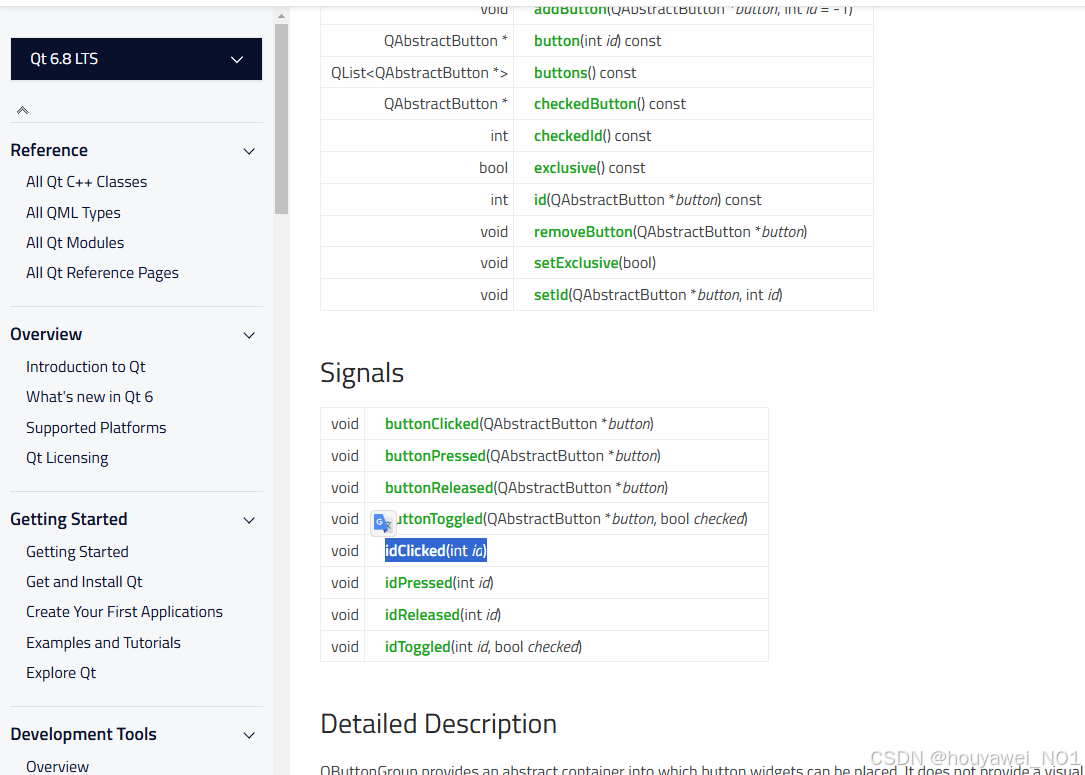
记录QT5迁移到QT6.8上的一些问题
经常看到有的同学说网上的教程都是假的,巴拉巴拉,看看人家发布时间,Qt官方的API都会有所变动,多搜索,多总结,再修改记录。 下次遇到问题多这样搜索 QT 4/5/6 xxx document,对比一下就知道…...

清理Linux/CentOS7根目录的思路
在使用Linux服务器过程中,经常会遇到磁盘空间不足的问题,好多应用默认安装在根目录下,记录一下如何找到问题所在,清理根目录(/) 1. 检查空间使用情况 1.1 查看分区占用: df -h输出࿱…...
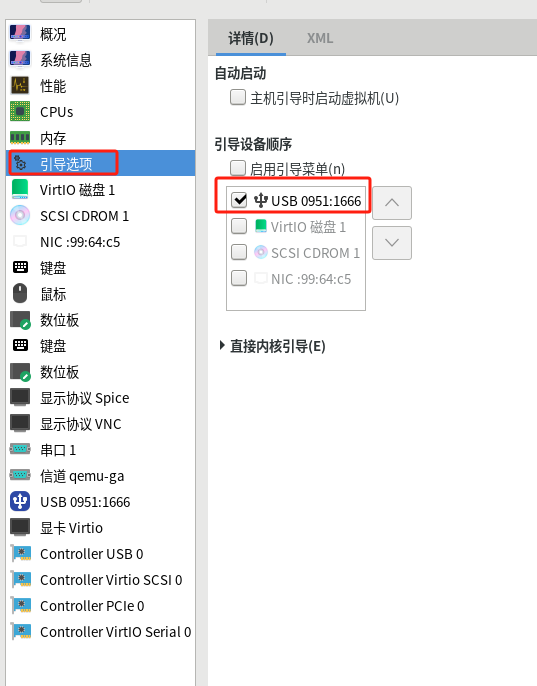
【LInux】kvm添加u盘启动引导
前提:要有一个u盘的启动盘 1、查看u盘设备信息 # lsusb ....忽略其他设备信息,查看到u盘设备 Bus 005 Device 005: ID 0951:1666 Kingston Technology DataTraveler 100 G3/G4/SE9 G2## 主要记住ID 0951:1666确认id为ID 0951:1666 2、修改配置文件 如…...
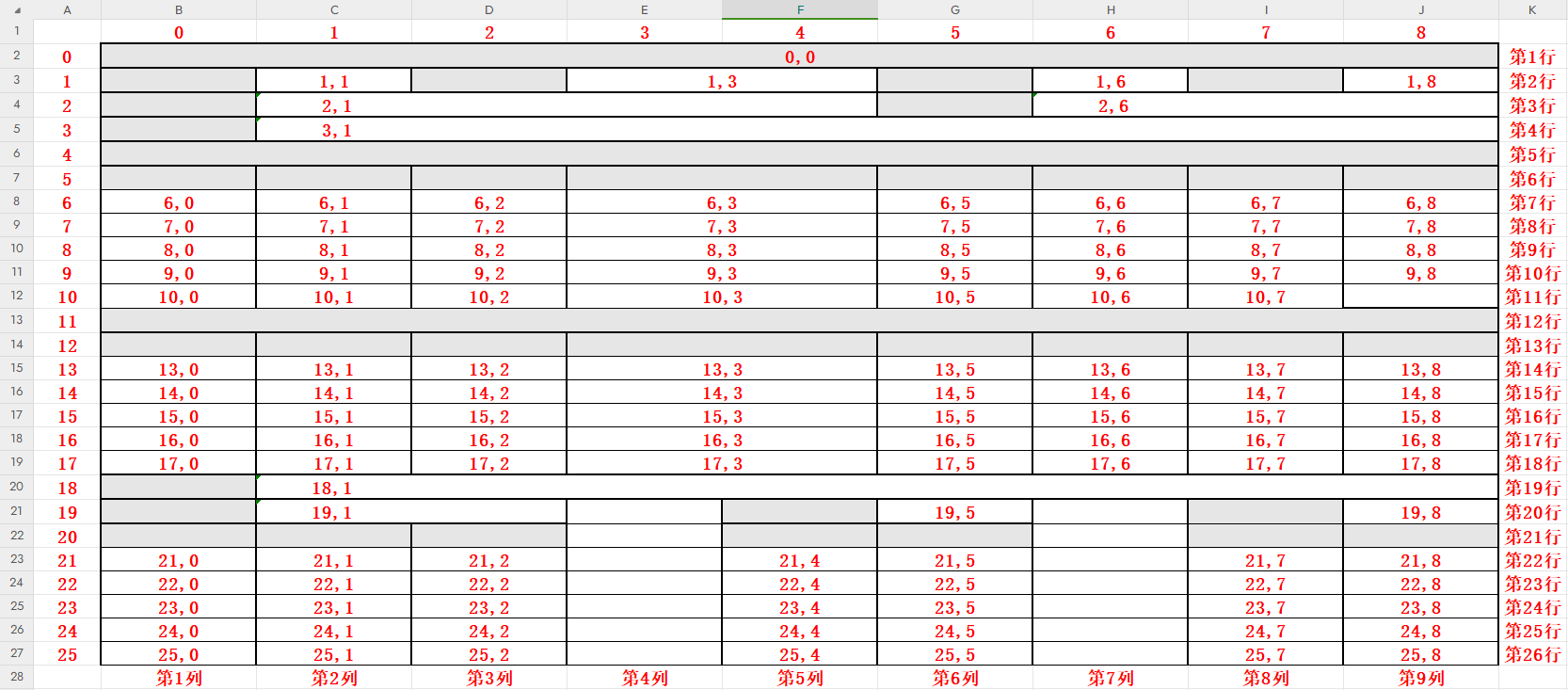
.net XSSFWorkbook 读取/写入 指定单元格的内容
方法如下: using NPOI.SS.Formula.Functions;using NPOI.SS.UserModel;using OfficeOpenXml.FormulaParsing.Excel.Functions.DateTime;using OfficeOpenXml.FormulaParsing.Excel.Functions.Numeric;/// <summary>/// 读取Excel指定单元格内容/// </summa…...

GaussDB(类似PostgreSQL)常用命令和注意事项
文章目录 前言GaussDB(类似PostgreSQL)常用命令和注意事项1. 连接到GaussDB数据库2. 查看当前数据库中的所有Schema3. 进入指定的Schema4. 查看Schema下的表、序列、视图5. 查看Schema下所有的表6. 查看表结构7. 开始事务8. 查询表字段注释9. 注意事项&a…...
【HM-React】02. React基础-下
React表单控制 受控绑定 概念:使用React组件的状态(useState)控制表单的状态 function App(){const [value, setValue] useState()return (<input type"text" value{value} onChange{e > setValue(e.target.value)}/>) …...
【力扣热题100】—— Day3.反转链表
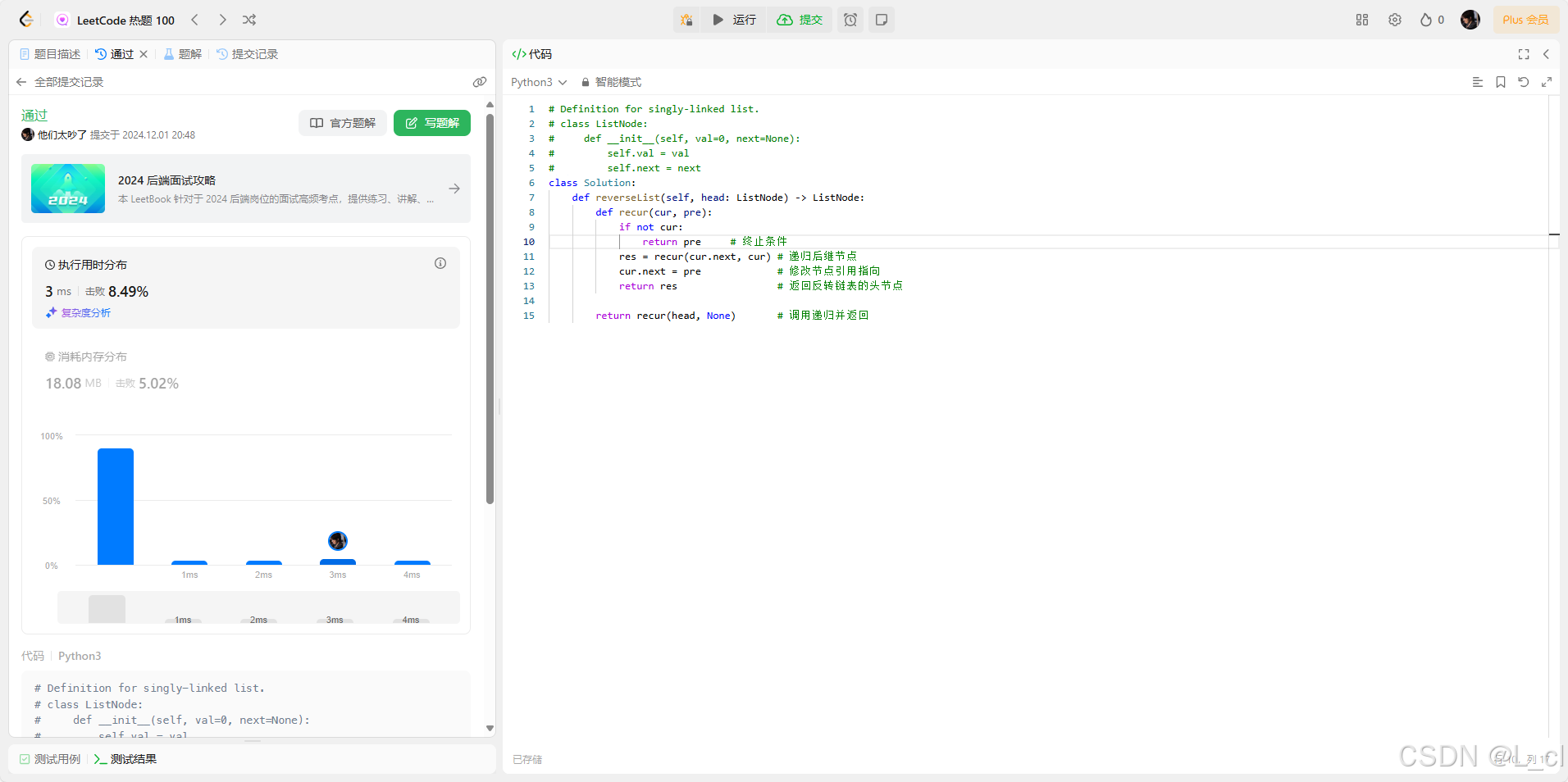
你不会永远顺遂,更不会一直年轻,你太安静了,是时候出发了 —— 24.12.2 206. 反转链表 给你单链表的头节点 head ,请你反转链表,并返回反转后的链表。 示例 1: 输入:head [1,2,3,4,5] 输出&…...
【k8s深入学习之 event 记录】初步了解 k8s event 记录机制
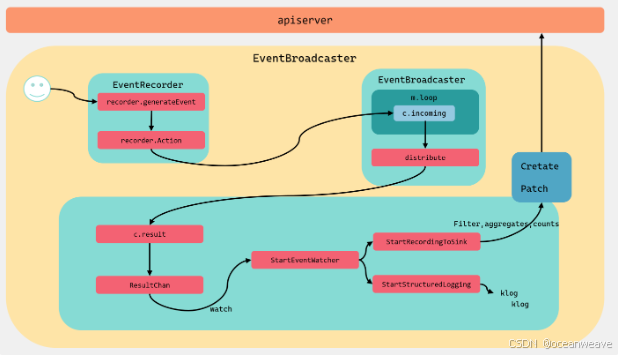
event 事件记录初始化 一般在控制器都会有如下的初始化函数,初始化 event 记录器等参数 1. 创建 EventBroadcaster record.NewBroadcaster(): 创建事件广播器,用于记录和分发事件。StartLogging(klog.Infof): 将事件以日志的形式输出。StartRecording…...

redhat 7.9配置阿里云yum源
1、mv /etc/yum.repos.d/*.repo /etc/yum.repos.d/backup/ 2、添加dns vim/etc/resolv.conf nameserver 8.8.8.8 nameserver 8.8.4.4 nameserver 114.114.114.114 #配置完先检查下通不通 3、vi /etc/yum/pluginconf.d/subscription-manager.conf # 将 “enabled1” 改为 “ena…...

深入探索Flax:一个用于构建神经网络的灵活和高效库
深入探索Flax:一个用于构建神经网络的灵活和高效库 在深度学习领域,TensorFlow 和 PyTorch 作为主流的框架,已被广泛使用。不过,Flax 作为一个较新的库,近年来得到了越来越多的关注。Flax 是一个由Google Research团队…...
Nginx auth_request详解
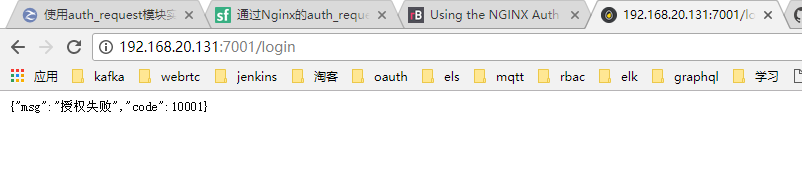
网上看到多篇先关文章,觉得很不错,这里合并记录一下,仅供学习参考。 模块 nginx-auth-request-module 该模块是nginx一个安装模块,使用配置都比较简单,只要作用是实现权限控制拦截作用。默认高版本nginx(比…...
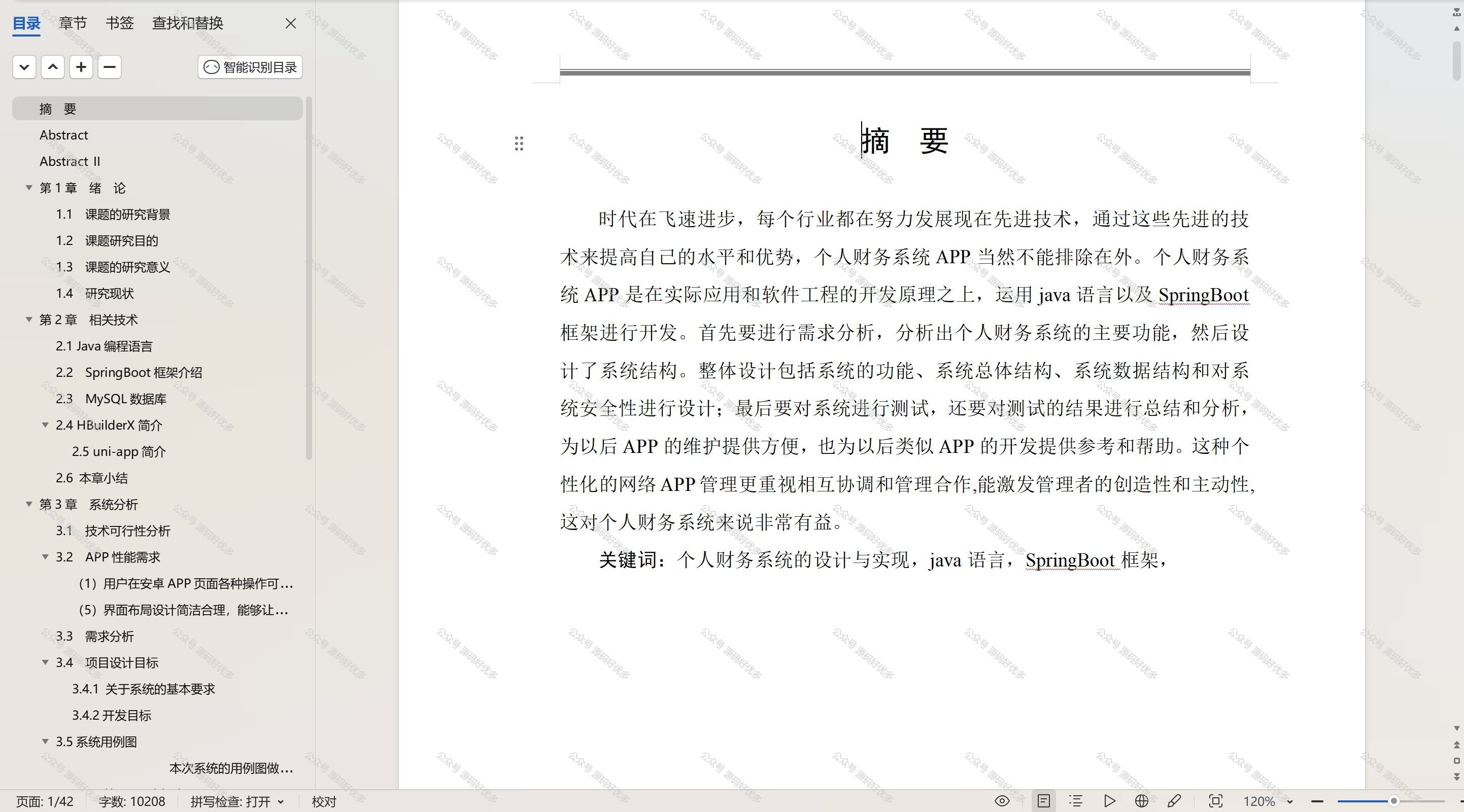
基于Java Springboot个人财务APP且微信小程序
一、作品包含 源码数据库设计文档万字PPT全套环境和工具资源部署教程 二、项目技术 前端技术:Html、Css、Js、Vue、Element-ui 数据库:MySQL 后端技术:Java、Spring Boot、MyBatis 三、运行环境 开发工具:IDEA/eclipse 微信…...

vue3图片报错转换为空白不显示的方法
vue3图片报错转换为空白不显示的方法 直接上代码: <el-table-column label"领料人" align"center"><template #default"scope"><el-imagev-if"scope.row.receiver":src"scope.row.receiver"style…...
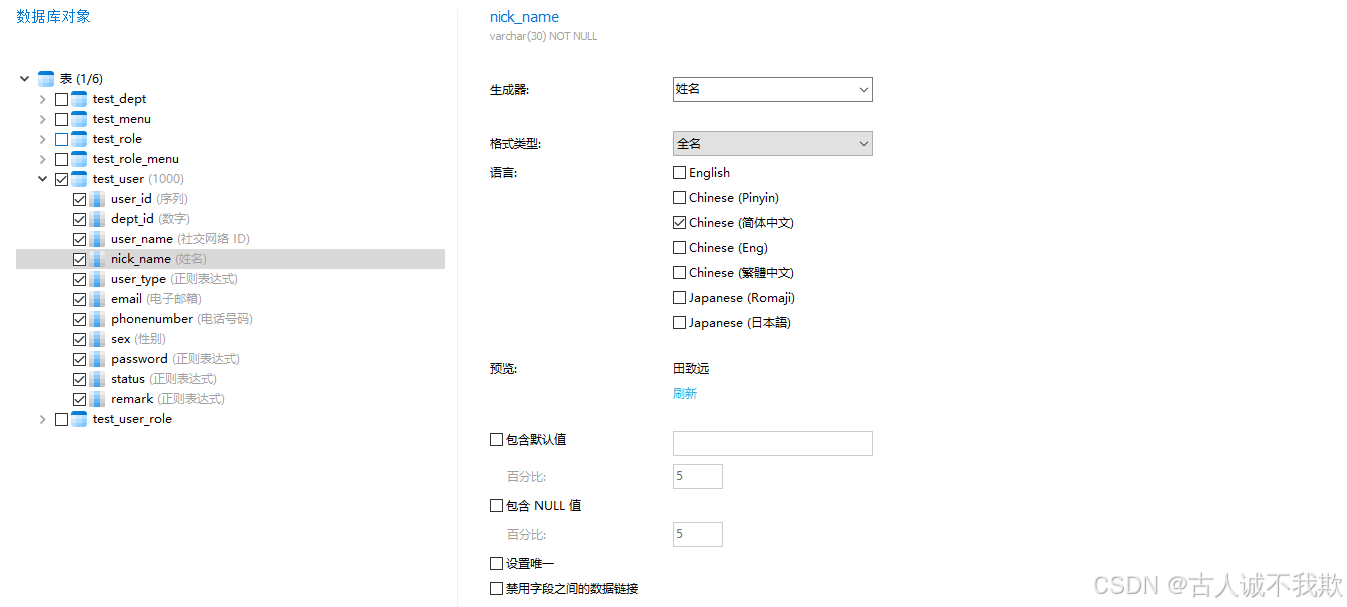
mysq之快速批量的插入生成数据
mysq之快速批量的插入生成数据 1.insert inot select2.存储过程3.借助工具 在日常测试工作时,有时候需要某张表有大量的数据,如:需要有几百个系统中的用户账号等情况;因此,记录整理,如何快速的在表中插入生…...

浅谈C#库之DevExpress
一、DevExpress库介绍 DevExpress是一个功能强大、界面美观的UI组件库,广泛应用于桌面应用程序和Web应用程序的开发中。它提供了丰富的控件和工具,帮助开发人员快速构建现代化的用户界面。DevExpress控件库以其功能丰富、应用简便、界面华丽以及方便定制…...
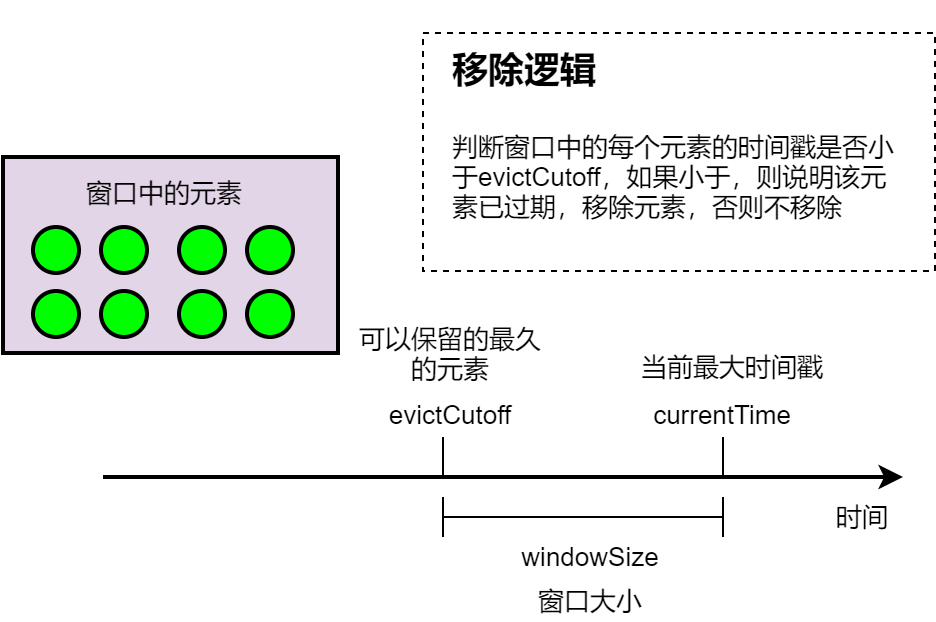
聊聊Flink:这次把Flink的触发器(Trigger)、移除器(Evictor)讲透
一、触发器(Trigger) Trigger 决定了一个窗口(由 window assigner 定义)何时可以被 window function 处理。 每个 WindowAssigner 都有一个默认的 Trigger。 如果默认 trigger 无法满足你的需要,你可以在 trigger(…) 调用中指定自定义的 tr…...

一款支持80+语言,包括:拉丁文、中文、阿拉伯文、梵文等开源OCR库
大家好,今天给大家分享一个基于PyTorch的OCR库EasyOCR,它允许开发者通过简单的API调用来读取图片中的文本,无需复杂的模型训练过程。 项目介绍 EasyOCR 是一个基于Python的开源项目,它提供了一个简单易用的光学字符识别ÿ…...
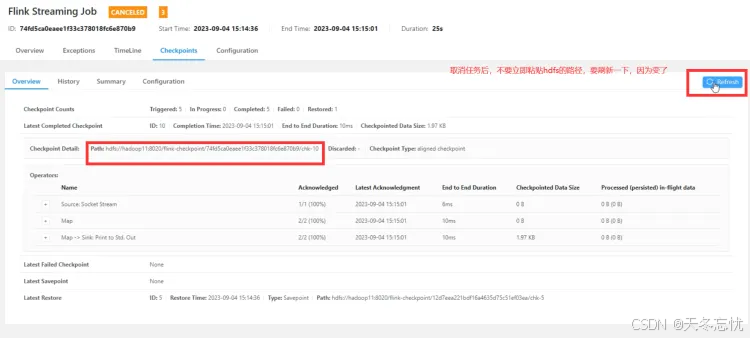
Flink四大基石之CheckPoint(检查点) 的使用详解
目录 一、Checkpoint 剖析 State 与 Checkpoint 概念区分 设置 Checkpoint 实战 执行代码所需的服务与遇到的问题 二、重启策略解读 重启策略意义 代码示例与效果展示 三、SavePoint 与 Checkpoint 异同 操作步骤详解 四、总结 在大数据流式处理领域,Ap…...
)
JVM 常见面试题及解析(2024)
目录 一、JVM 基础概念 二、JVM 内存结构 三、类加载机制 四、垃圾回收机制 五、性能调优 六、实战问题 七、JVM 与其他技术结合 八、JVM 内部机制深化 九、JVM 相关概念拓展 十、故障排查与异常处理 一、JVM 基础概念 1、什么是 JVM?它的主要作用是…...
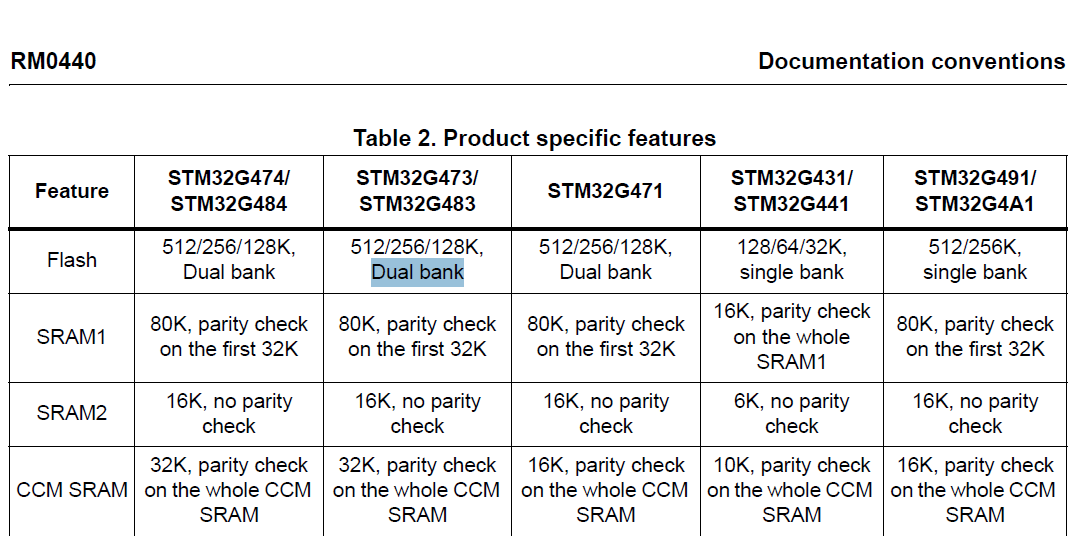
stm32G473的flash模式是单bank还是双bank?
今天突然有人stm32G473的flash模式是单bank还是双bank?由于时间太久,我真忘记了。搜搜发现,还真有人和我一样。见下面的链接:https://shequ.stmicroelectronics.cn/forum.php?modviewthread&tid644563 根据STM32G4系列参考手…...
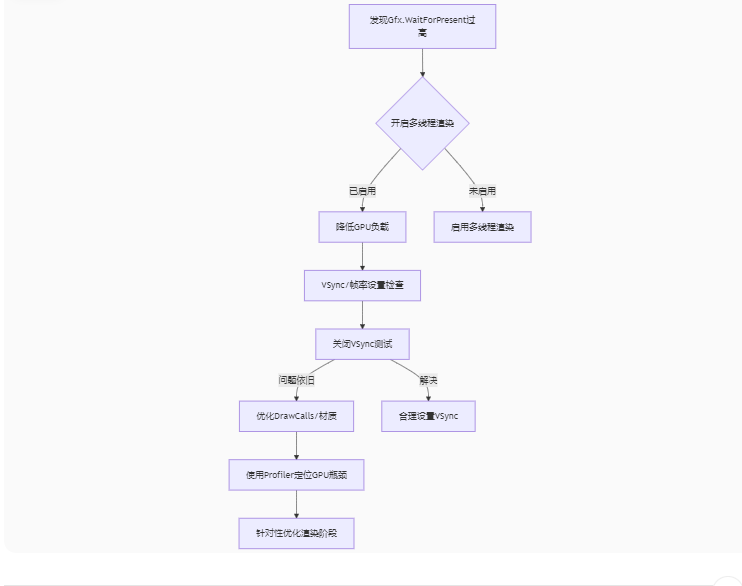
Unity3D中Gfx.WaitForPresent优化方案
前言 在Unity中,Gfx.WaitForPresent占用CPU过高通常表示主线程在等待GPU完成渲染(即CPU被阻塞),这表明存在GPU瓶颈或垂直同步/帧率设置问题。以下是系统的优化方案: 对惹,这里有一个游戏开发交流小组&…...
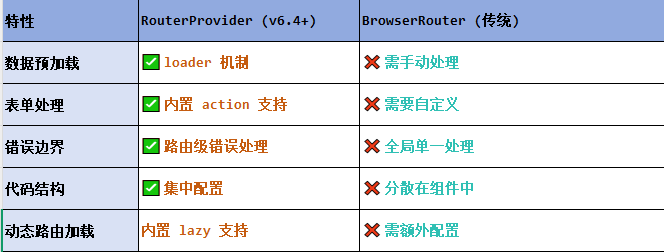
React第五十七节 Router中RouterProvider使用详解及注意事项
前言 在 React Router v6.4 中,RouterProvider 是一个核心组件,用于提供基于数据路由(data routers)的新型路由方案。 它替代了传统的 <BrowserRouter>,支持更强大的数据加载和操作功能(如 loader 和…...

逻辑回归:给不确定性划界的分类大师
想象你是一名医生。面对患者的检查报告(肿瘤大小、血液指标),你需要做出一个**决定性判断**:恶性还是良性?这种“非黑即白”的抉择,正是**逻辑回归(Logistic Regression)** 的战场&a…...

【机器视觉】单目测距——运动结构恢复
ps:图是随便找的,为了凑个封面 前言 在前面对光流法进行进一步改进,希望将2D光流推广至3D场景流时,发现2D转3D过程中存在尺度歧义问题,需要补全摄像头拍摄图像中缺失的深度信息,否则解空间不收敛…...

《用户共鸣指数(E)驱动品牌大模型种草:如何抢占大模型搜索结果情感高地》
在注意力分散、内容高度同质化的时代,情感连接已成为品牌破圈的关键通道。我们在服务大量品牌客户的过程中发现,消费者对内容的“有感”程度,正日益成为影响品牌传播效率与转化率的核心变量。在生成式AI驱动的内容生成与推荐环境中࿰…...

在 Nginx Stream 层“改写”MQTT ngx_stream_mqtt_filter_module
1、为什么要修改 CONNECT 报文? 多租户隔离:自动为接入设备追加租户前缀,后端按 ClientID 拆分队列。零代码鉴权:将入站用户名替换为 OAuth Access-Token,后端 Broker 统一校验。灰度发布:根据 IP/地理位写…...

鸿蒙中用HarmonyOS SDK应用服务 HarmonyOS5开发一个生活电费的缴纳和查询小程序
一、项目初始化与配置 1. 创建项目 ohpm init harmony/utility-payment-app 2. 配置权限 // module.json5 {"requestPermissions": [{"name": "ohos.permission.INTERNET"},{"name": "ohos.permission.GET_NETWORK_INFO"…...
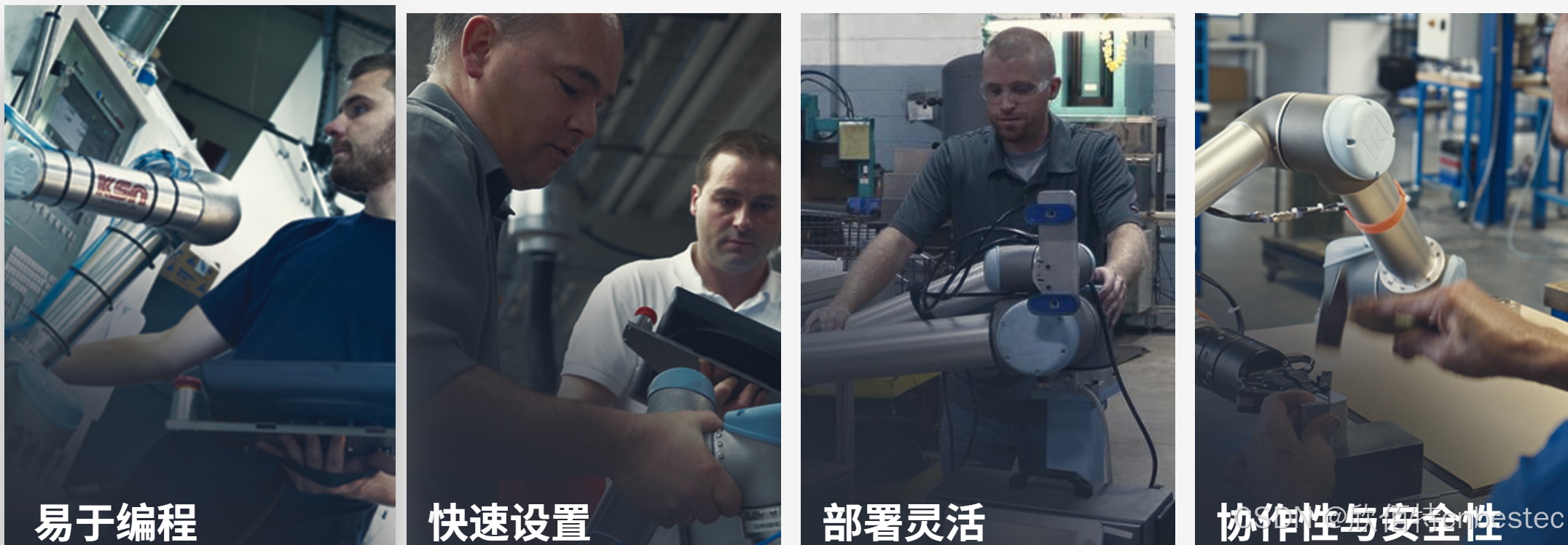
UR 协作机器人「三剑客」:精密轻量担当(UR7e)、全能协作主力(UR12e)、重型任务专家(UR15)
UR协作机器人正以其卓越性能在现代制造业自动化中扮演重要角色。UR7e、UR12e和UR15通过创新技术和精准设计满足了不同行业的多样化需求。其中,UR15以其速度、精度及人工智能准备能力成为自动化领域的重要突破。UR7e和UR12e则在负载规格和市场定位上不断优化…...

爬虫基础学习day2
# 爬虫设计领域 工商:企查查、天眼查短视频:抖音、快手、西瓜 ---> 飞瓜电商:京东、淘宝、聚美优品、亚马逊 ---> 分析店铺经营决策标题、排名航空:抓取所有航空公司价格 ---> 去哪儿自媒体:采集自媒体数据进…...