
使用Kimi开发自己的问答应用
概述
Kimi是大家常用的一个人工智能助手,本文使用Kimi开发文档,以node作为后端,开发与一个问答系统
实现效果

Kimi简介
Kimi是由Moonshot AI开发的人工智能助手,擅长中文和英文对话。目标是帮助用户解决问题、提供信息和执行任务。无论是回答问题、处理文件还是进行网络搜索,都能提供支持。
- 开发文档:https://platform.moonshot.cn/docs/intro
如下图,点击用户中心,在API Key管理可以添加key。

在用量限制可查看账户的用量和剩余数量。

图中的相关名字解释如下:
- 并发: 同一时间内我们最多处理的来自您的请求数
- RPM: request per minute 指一分钟内您最多向我们发起的请求数
- TPM: token per minute 指一分钟内您最多和我们交互的token数
- TPD: token per day 指一天内您最多和我们交互的token数
实现
后端实现
后端是通过node的Express框架实现的。
核心实现步骤与代码如下:
1. 初始化与安装依赖
# 创建目录
mkdir kimi-server && cd kimi-server# 初始化package.json文件
npm init -y# 安装依赖
npm i express openai -S
2. 修改package.json
修改package.json文件中的scripts节点的内容如下:
"scripts": {"test": "echo \"Error: no test specified\" && exit 1",
+  "dev": "nodemon ./app.js",
+  "server": "pm2 start ./app.js --name kimi"
},
3. app.js
const express = require("express");
const kimiRouter = require("./router/kimi.js");const app = express();// 自定义跨域中间件
const allowCors = function (req, res, next) {res.header("Access-Control-Allow-Origin", req.headers.origin);res.header("Access-Control-Allow-Methods", "GET,PUT,POST,DELETE,OPTIONS");res.header("Access-Control-Allow-Headers", "Content-Type");res.header("Access-Control-Allow-Credentials", "true");next();
};
app.use(allowCors); // 使用跨域中间件app.use(express.static("public"));app.use("/kimi", kimiRouter);app.listen(18080, () => {console.log("express server running at http://127.0.0.1:18080");
});
4. kimi.js
const express = require("express");
const OpenAI = require("openai");
const R = require("../R");
const router = express.Router();let r = new R();const client = new OpenAI({apiKey: "你的key",baseURL: "https://api.moonshot.cn/v1",
});let history = [];async function chat(prompt = '') {console.time("prompt", prompt);let response = "";if (prompt) {history.push({role: "user",content: prompt,});const completion = await client.chat.completions.create({model: "moonshot-v1-8k",messages: history,});history = history.concat(completion.choices[0].message);response = completion.choices[0].message.content;} else {response = "哈喽,你好!我是Kimi,由 Moonshot AI 提供的人工智能助手。";history.push({role: "system",content: response,});}console.log({prompt,response,});console.timeEnd("prompt");return response;
}router.get("/chat", async function (req, res) {const { prompt } = req.query;const reply = await chat(prompt);res.send(r.success({reply: reply,}));
});module.exports = router;
前端页面
1. index.html
前端页面通过CDN引入Vue、Element Plus和markdown.js,实现代码如下:
<html lang="en"><head><meta charset="UTF-8"><meta name="viewport" content="width=device-width, initial-scale=1.0"><title>chat</title><!-- Import style --><link rel="stylesheet" href="//unpkg.com/element-plus/dist/index.css" /><link rel="stylesheet" href="./md.css" /><!-- Import Vue 3 --><script src="//unpkg.com/vue@3"></script><!-- Import component library --><script src="//unpkg.com/element-plus"></script><script src="//cdn.jsdelivr.net/npm/marked/marked.min.js"></script><style>html,body,#app {height: 100%;margin: 0;padding: 0;}::-webkit-scrollbar {width: 5px;height: 5px;background-color: #eee;}::-webkit-scrollbar-track {background-color: #eee;}::-webkit-scrollbar-thumb {background: #787878;border-radius: 10px;}.chat-container {display: flex;flex-direction: column;padding: 1rem;height: calc(100% - 2rem);}.chat-messages {flex-grow: 1;overflow-y: auto;padding: 10px;}.message {overflow: hidden;margin-bottom: 1rem;}.message:last-child {margin-bottom: 0;}.message p {margin: 0;}.message-bubble {padding: 10px;border-radius: 10px;display: inline-block;position: relative;max-width: 80%;text-align: justify;line-height: 1.5;}.message-bubble:after {content: ' ';border: 10px solid transparent;position: absolute;top: 0.5rem;}.message-bubble.received {background-color: #f0f0f0;margin-left: 0.3rem;}.message-bubble.received:after {border-right-color: #f0f0f0;left: -16px;}.message-bubble.sent {background-color: #007bff;color: white;float: right;margin-right: 1rem;}.message-bubble.sent:after {border-left-color: #007bff;right: -16px;}.chat-input {margin-top: 1rem;display: flex;}.chat-input input {flex: 1;padding: 1.5rem 0.3rem;}.chat-input button {padding: 1.5rem 1rem;border: none;border-radius: 5px;background-color: #007bff;color: white;cursor: pointer;}</style>
</head><body><div id="app"><div class="chat-container"><div class="chat-messages" ref="messages"><div v-for="message in messages" :key="message.id" class="message"><div :class="['message-bubble', message.type]" v-html="message.text"></div></div></div><div class="chat-input"><el-input :disabled="loading" v-model="newMessage" placeholder="请输入您的问题..."@keyup.enter="sendMessage"></el-input><el-button style="margin-left: 0.5rem;" type="primary" :loading="loading" @click="sendMessage">{{loading ? '回答...' : '点击发送'}}</el-button></div></div></div><script>let url = 'http://127.0.0.1:18080/kimi/chat?prompt='const storageKey = 'history-messages'const App = {data() {return {messages: [],newMessage: '',loading: false};},mounted() {const messages = JSON.parse(localStorage.getItem(storageKey) || '[]')if (messages.length > 0) {this.messages = messagesthis.scrollToBottom()} else {this.sendMessage(true)}},methods: {getMessage(msg = '') {return new Promise(resolve => {this.loading = truefetch(`${url}${msg}`).then(res => res.json()).then(res => {this.loading = falseif (res.code == 200) {resolve(res.data.reply)} else {resolve(res.msg)}})})},scrollToBottom() {setTimeout(() => {this.$refs.messages.scrollTop = this.$refs.messages.scrollHeight}, 100)},sendMessage(init = false) {if (this.newMessage.trim() !== '') {this.messages.push({id: this.messages.length + 1,text: this.newMessage,type: 'sent',});this.scrollToBottom()this.getMessage(this.newMessage).then(msg => {this.messages.push({id: this.messages.length + 1,text: marked.parse(msg),type: 'received',});localStorage.setItem(storageKey, JSON.stringify(this.messages));this.newMessage = '';this.scrollToBottom()})} else {this.getMessage().then(msg => {this.messages.push({id: this.messages.length + 1,text: marked.parse(msg),type: 'received',});localStorage.setItem(storageKey, JSON.stringify(this.messages));this.scrollToBottom()})}},},};const app = Vue.createApp(App);app.use(ElementPlus);app.mount("#app");</script>
</body></html>
2. md.css
md.css为优化markdown样式的外部引用,代码如下:
body {font-family: "Microsoft Yahei", Helvetica, arial, sans-serif;font-size: 14px;line-height: 1.6;padding-top: 10px;padding-bottom: 10px;background-color: white;padding: 30px;color: #516272;
}body>*:first-child {margin-top: 0 !important;
}body>*:last-child {margin-bottom: 0 !important;
}a {color: #4183C4;
}a.absent {color: #cc0000;
}a.anchor {display: block;padding-left: 30px;margin-left: -30px;cursor: pointer;position: absolute;top: 0;left: 0;bottom: 0;
}h1,
h2,
h3,
h4,
h5,
h6 {margin: 20px 0 10px;padding: 0;font-weight: bold;-webkit-font-smoothing: antialiased;cursor: text;position: relative;
}h1:hover a.anchor,
h2:hover a.anchor,
h3:hover a.anchor,
h4:hover a.anchor,
h5:hover a.anchor,
h6:hover a.anchor {background: url(data:image/png;base64,iVBORw0KGgoAAAANSUhEUgAAABAAAAAQCAYAAAAf8/9hAAAAGXRFWHRTb2Z0d2FyZQBBZG9iZSBJbWFnZVJlYWR5ccllPAAAA09pVFh0WE1MOmNvbS5hZG9iZS54bXAAAAAAADw/eHBhY2tldCBiZWdpbj0i77u/IiBpZD0iVzVNME1wQ2VoaUh6cmVTek5UY3prYzlkIj8+IDx4OnhtcG1ldGEgeG1sbnM6eD0iYWRvYmU6bnM6bWV0YS8iIHg6eG1wdGs9IkFkb2JlIFhNUCBDb3JlIDUuMy1jMDExIDY2LjE0NTY2MSwgMjAxMi8wMi8wNi0xNDo1NjoyNyAgICAgICAgIj4gPHJkZjpSREYgeG1sbnM6cmRmPSJodHRwOi8vd3d3LnczLm9yZy8xOTk5LzAyLzIyLXJkZi1zeW50YXgtbnMjIj4gPHJkZjpEZXNjcmlwdGlvbiByZGY6YWJvdXQ9IiIgeG1sbnM6eG1wPSJodHRwOi8vbnMuYWRvYmUuY29tL3hhcC8xLjAvIiB4bWxuczp4bXBNTT0iaHR0cDovL25zLmFkb2JlLmNvbS94YXAvMS4wL21tLyIgeG1sbnM6c3RSZWY9Imh0dHA6Ly9ucy5hZG9iZS5jb20veGFwLzEuMC9zVHlwZS9SZXNvdXJjZVJlZiMiIHhtcDpDcmVhdG9yVG9vbD0iQWRvYmUgUGhvdG9zaG9wIENTNiAoMTMuMCAyMDEyMDMwNS5tLjQxNSAyMDEyLzAzLzA1OjIxOjAwOjAwKSAgKE1hY2ludG9zaCkiIHhtcE1NOkluc3RhbmNlSUQ9InhtcC5paWQ6OUM2NjlDQjI4ODBGMTFFMTg1ODlEODNERDJBRjUwQTQiIHhtcE1NOkRvY3VtZW50SUQ9InhtcC5kaWQ6OUM2NjlDQjM4ODBGMTFFMTg1ODlEODNERDJBRjUwQTQiPiA8eG1wTU06RGVyaXZlZEZyb20gc3RSZWY6aW5zdGFuY2VJRD0ieG1wLmlpZDo5QzY2OUNCMDg4MEYxMUUxODU4OUQ4M0REMkFGNTBBNCIgc3RSZWY6ZG9jdW1lbnRJRD0ieG1wLmRpZDo5QzY2OUNCMTg4MEYxMUUxODU4OUQ4M0REMkFGNTBBNCIvPiA8L3JkZjpEZXNjcmlwdGlvbj4gPC9yZGY6UkRGPiA8L3g6eG1wbWV0YT4gPD94cGFja2V0IGVuZD0iciI/PsQhXeAAAABfSURBVHjaYvz//z8DJYCRUgMYQAbAMBQIAvEqkBQWXI6sHqwHiwG70TTBxGaiWwjCTGgOUgJiF1J8wMRAIUA34B4Q76HUBelAfJYSA0CuMIEaRP8wGIkGMA54bgQIMACAmkXJi0hKJQAAAABJRU5ErkJggg==) no-repeat 10px center;text-decoration: none;
}h1 tt,
h1 code {font-size: inherit;
}h2 tt,
h2 code {font-size: inherit;
}h3 tt,
h3 code {font-size: inherit;
}h4 tt,
h4 code {font-size: inherit;
}h5 tt,
h5 code {font-size: inherit;
}h6 tt,
h6 code {font-size: inherit;
}h1 {font-size: 28px;color: #2B3F52;
}h2 {font-size: 24px;border-bottom: 1px solid #DDE4E9;color: #2B3F52;
}h3 {font-size: 18px;color: #2B3F52;
}h4 {font-size: 16px;color: #2B3F52;
}h5 {font-size: 14px;color: #2B3F52;
}h6 {color: #2B3F52;font-size: 14px;
}p,
blockquote,
ul,
ol,
dl,
li,
table,
pre {margin: 15px 0;color: #516272;
}hr {background: transparent url(data:image/png;base64,iVBORw0KGgoAAAANSUhEUgAAAAYAAAAECAYAAACtBE5DAAAAGXRFWHRTb2Z0d2FyZQBBZG9iZSBJbWFnZVJlYWR5ccllPAAAAyJpVFh0WE1MOmNvbS5hZG9iZS54bXAAAAAAADw/eHBhY2tldCBiZWdpbj0i77u/IiBpZD0iVzVNME1wQ2VoaUh6cmVTek5UY3prYzlkIj8+IDx4OnhtcG1ldGEgeG1sbnM6eD0iYWRvYmU6bnM6bWV0YS8iIHg6eG1wdGs9IkFkb2JlIFhNUCBDb3JlIDUuMC1jMDYwIDYxLjEzNDc3NywgMjAxMC8wMi8xMi0xNzozMjowMCAgICAgICAgIj4gPHJkZjpSREYgeG1sbnM6cmRmPSJodHRwOi8vd3d3LnczLm9yZy8xOTk5LzAyLzIyLXJkZi1zeW50YXgtbnMjIj4gPHJkZjpEZXNjcmlwdGlvbiByZGY6YWJvdXQ9IiIgeG1sbnM6eG1wPSJodHRwOi8vbnMuYWRvYmUuY29tL3hhcC8xLjAvIiB4bWxuczp4bXBNTT0iaHR0cDovL25zLmFkb2JlLmNvbS94YXAvMS4wL21tLyIgeG1sbnM6c3RSZWY9Imh0dHA6Ly9ucy5hZG9iZS5jb20veGFwLzEuMC9zVHlwZS9SZXNvdXJjZVJlZiMiIHhtcDpDcmVhdG9yVG9vbD0iQWRvYmUgUGhvdG9zaG9wIENTNSBNYWNpbnRvc2giIHhtcE1NOkluc3RhbmNlSUQ9InhtcC5paWQ6OENDRjNBN0E2NTZBMTFFMEI3QjRBODM4NzJDMjlGNDgiIHhtcE1NOkRvY3VtZW50SUQ9InhtcC5kaWQ6OENDRjNBN0I2NTZBMTFFMEI3QjRBODM4NzJDMjlGNDgiPiA8eG1wTU06RGVyaXZlZEZyb20gc3RSZWY6aW5zdGFuY2VJRD0ieG1wLmlpZDo4Q0NGM0E3ODY1NkExMUUwQjdCNEE4Mzg3MkMyOUY0OCIgc3RSZWY6ZG9jdW1lbnRJRD0ieG1wLmRpZDo4Q0NGM0E3OTY1NkExMUUwQjdCNEE4Mzg3MkMyOUY0OCIvPiA8L3JkZjpEZXNjcmlwdGlvbj4gPC9yZGY6UkRGPiA8L3g6eG1wbWV0YT4gPD94cGFja2V0IGVuZD0iciI/PqqezsUAAAAfSURBVHjaYmRABcYwBiM2QSA4y4hNEKYDQxAEAAIMAHNGAzhkPOlYAAAAAElFTkSuQmCC) repeat-x 0 0;border: 0 none;color: #cccccc;height: 4px;padding: 0;}body>h2:first-child {margin-top: 0;padding-top: 0;
}body>h1:first-child {margin-top: 0;padding-top: 0;
}body>h1:first-child+h2 {margin-top: 0;padding-top: 0;
}body>h3:first-child,
body>h4:first-child,
body>h5:first-child,
body>h6:first-child {margin-top: 0;padding-top: 0;
}a:first-child h1,
a:first-child h2,
a:first-child h3,
a:first-child h4,
a:first-child h5,
a:first-child h6 {margin-top: 0;padding-top: 0;
}h1 p,
h2 p,
h3 p,
h4 p,
h5 p,
h6 p {margin-top: 0;
}li p.first {display: inline-block;
}li {margin: 0;
}ul,
ol {padding-left: 30px;
}ul :first-child,
ol :first-child {margin-top: 0;
}dl {padding: 0;
}dl dt {font-size: 14px;font-weight: bold;font-style: italic;padding: 0;margin: 15px 0 5px;
}dl dt:first-child {padding: 0;
}dl dt> :first-child {margin-top: 0;
}dl dt> :last-child {margin-bottom: 0;
}dl dd {margin: 0 0 15px;padding: 0 15px;
}dl dd> :first-child {margin-top: 0;
}dl dd> :last-child {margin-bottom: 0;
}blockquote {border-left: 4px solid #ECF0F3;/*padding: 0 15px;*/padding: 15px;background-color: #F7F9FA;color: #2B3F52;
}blockquote> :first-child {margin-top: 0;
}blockquote> :last-child {margin-bottom: 0;
}table {padding: 0;border-collapse: collapse;
}table tr {border-top: 1px solid #cccccc;background-color: white;margin: 0;padding: 0;
}table tr:nth-child(2n) {background-color: #f8f8f8;
}table tr th {font-weight: bold;border: 1px solid #cccccc;margin: 0;padding: 6px 13px;
}table tr td {border: 1px solid #cccccc;margin: 0;padding: 6px 13px;
}table tr th :first-child,
table tr td :first-child {margin-top: 0;
}table tr th :last-child,
table tr td :last-child {margin-bottom: 0;
}img {max-width: 100%;
}span.frame {display: block;overflow: hidden;
}span.frame>span {border: 1px solid #dddddd;display: block;float: left;overflow: hidden;margin: 13px 0 0;padding: 7px;width: auto;
}span.frame span img {display: block;float: left;
}span.frame span span {clear: both;color: #333333;display: block;padding: 5px 0 0;
}span.align-center {display: block;overflow: hidden;clear: both;
}span.align-center>span {display: block;overflow: hidden;margin: 13px auto 0;text-align: center;
}span.align-center span img {margin: 0 auto;text-align: center;
}span.align-right {display: block;overflow: hidden;clear: both;
}span.align-right>span {display: block;overflow: hidden;margin: 13px 0 0;text-align: right;
}span.align-right span img {margin: 0;text-align: right;
}span.float-left {display: block;margin-right: 13px;overflow: hidden;float: left;
}span.float-left span {margin: 13px 0 0;
}span.float-right {display: block;margin-left: 13px;overflow: hidden;float: right;
}span.float-right>span {display: block;overflow: hidden;margin: 13px auto 0;text-align: right;
}code,
tt {margin: 0 2px;padding: 0 5px;white-space: nowrap;border: 1px solid #eaeaea;background-color: #f8f8f8;border-radius: 3px;
}pre code {margin: 0;padding: 0;white-space: pre;border: none;background: transparent;
}.highlight pre {background-color: #f8f8f8;border: 1px solid #cccccc;font-size: 13px;line-height: 19px;overflow: auto;padding: 6px 10px;border-radius: 3px;
}pre {background-color: #f8f8f8;border: 1px solid #cccccc;font-size: 13px;line-height: 19px;overflow: auto;padding: 6px 10px;border-radius: 3px;
}pre code,
pre tt {background-color: transparent;border: none;
}sup {font-size: 0.83em;vertical-align: super;line-height: 0;
}code {white-space: pre-wrap;word-break: break-all;display: inline-block;
}* {-webkit-print-color-adjust: exact;
}@media screen and (min-width: 914px) {body {width: 960px;margin: 0 auto;}
}@media print {table,pre {page-break-inside: avoid;}pre {word-wrap: break-word;}
}
相关文章:
使用Kimi开发自己的问答应用
概述 Kimi是大家常用的一个人工智能助手,本文使用Kimi开发文档,以node作为后端,开发与一个问答系统 实现效果 Kimi简介 Kimi是由Moonshot AI开发的人工智能助手,擅长中文和英文对话。目标是帮助用户解决问题、提供信息和执行任…...

TypeScript进阶
Typescript进阶 基础知识 JavaScript 的核心特点就是灵活,但随着项目规模的增大,灵活反而增加开发者的心智负担。例如在代码中一个变量可以被赋予字符串、布尔、数字、甚至是函数,这样就充满了不确定性。而且这些不确定性可能需要在代码运行…...

jenkins邮件的配置详解
Jenkins邮件的配置涉及多个步骤和细节,以下是详细的配置指南: 一、前期准备 确定邮件服务:明确Jenkins将要使用的邮件服务,如QQ邮箱、163邮箱、公司邮箱(基于Microsoft 365或Exchange Server)等。获取SMTP配置信息:根据邮件服务类型,获取相应的SMTP服务器地址、端口号…...

小皮面板(PHPSTUDY)配置多个域名或IP
问题描述 小皮面板默认采用nginx的静态部署,按照使用nginx的习惯只需要额外添加一个server即可,但是会发现直接往配置文件里添加新的server是不生效的,小皮的官网论坛几乎已经停止维护,因此资料较少,原本也没有仔细使…...

【大语言模型】LangChain LCEL 表达式语言
【大语言模型】LangChain LCEL 表达式语言 一、简介二、LCEL的优势三、LCEL 的基本使用1、Runnable 对象 四、实战实例 一、简介 LangChain LCEL 的全称为 LangChain Expression Language 即可直译为 LangChain 表达式。 为了构造更复杂的 LLM 应用并且更为简便快捷的构造 LLM…...

Leetcode 3382. Maximum Area Rectangle With Point Constraints II
Leetcode 3382. Maximum Area Rectangle With Point Constraints II 1. 解题思路2. 代码实现 题目链接:3382. Maximum Area Rectangle With Point Constraints II 1. 解题思路 这一题是题目3380. Maximum Area Rectangle With Point Constraints I的进阶版&#…...

MitelMiCollab 身份绕过导致任意文件读取漏洞复现(CVE-2024-41713)
0x01 产品描述: Mitel MiCollab 是一个企业协作平台,它将各种通信工具整合到一个应用程序中,提供语音和视频通话、消息传递、状态信息、音频会议、移动支持和团队协作功能。0x02 漏洞描述: Mitel MiCollab 的 NuPoint 统一消息 (NPM) 组件中存在身份验证绕过漏洞,由于输入…...

DVWA 靶场 SQL 注入报错 Illegal mix of collations for operation ‘UNION‘ 的解决方案
在 dvwa 靶场进行联合 SQL 注入时,遇到报错 Illegal mix of collations for operation UNION报错如下图: 解决办法: 找到文件MySQL.php 大致位置在dvwaincludesDBMS 目录下 使用编辑器打开 检索$create_db 第一个就是 在{$_DVWA[ ‘db_d…...

京准电钟分享:医院网络内NTP时间同步服务器作用是什么?
京准电钟分享:医院网络内NTP时间同步服务器作用是什么? 京准电钟分享:医院网络内NTP时间同步服务器作用是什么? 时间同步技术必定将是整个大数据处理系统的重要支撑和保障。时间同步技术使数据产生与处理系统的所有节点具有全局…...

HTML DOM API
HTMLInputElement HTMLInputElement 接口提供了特定的属性和方法,用于管理 <input> 元素的选项、布局和外观。 HTMLInputElement 和 <input> 之间的关系可以理解为接口与具体元素的关系: <input> 元素: <input> 是…...

java时间处理SimpleDateFormat详解
文章目录 常用构造函数日期格式模式常见用法1. 格式化日期2. 解析日期字符串 注意事项示例扩展:指定区域和时区 SimpleDateFormat 是 Java 中用于日期和时间格式化的类,属于 java.text 包。它允许开发者将日期对象格式化为字符串,或者将字符…...

redis-stack redisSearch环境安装搭建
RedisSearch在redis许可证变更之后显得是redis中的一大特色,闲来无事学习记录一下。 尝试通过源码编译redisSearch,貌似非常费劲,所以建议使用docker或者Linux的发行包进行安装redis-stack。redis-stack是基于redis的模块化机制进行一个扩展…...

go返回多个errors
起因 有时候大家可能需要返回多个errors的场景,所以这个时候可能就会考虑如何实现、怎么实现比较好 实现 package mainimport ("errors""fmt" )func main() {errs : retErrors("hello,world")fmt.Println(errs) }func retErrors(t…...

Monkey结合appium模拟操作特定界面
目录 1. 使用 Monkey 操作特定界面(通过UI标识来限制) 2. 结合 uiautomator 或 appium 定位特定元素 步骤: 3. 使用 Monkey Appium 控制特定界面点击 4. 如何结合 Appium 与 Monkey 5. 限制 Monkey 只点击固定界面上的元素 使用 --pc…...

Ubuntu22.04深度学习环境安装【cuda+cudnn】
为了复现一篇深度学习论文,特意安装了Linux系统。前一天已经安装Linux显卡驱动,现在需要安装cuda、cudnn等。 论文代码 论文PDF 确定包版本: 根据论文提供的代码。在requirements.txt中发现cuda版本为11.7,cudnn为8.5.0,python没…...

go语言的sdk项目搭建与git 操作标签tag并推送至远程仓库
在搭建 SDK 项目并结合 Git 操作标签(Tag)时,通常会涉及项目初始化、版本管理、Git 标签的创建与管理等内容。以下是一个完整的步骤指南,帮助您搭建 SDK 项目并学习如何使用 Git 标签。 ### 1. **搭建 SDK 项目** 首先ÿ…...

从零用java实现 小红书 springboot vue uniapp (1)
前言 偶尔会用小红书发一些笔记 闲来无事 想自己实现一个小红书 正好可以学习一下 帖子 留言 im 好友 推送 等功能 下面我们就从零 开发一个小红书 后台依旧用我们的会员系统的脚手架 演示 http://120.26.95.195:8889/ 客户端我们使用uniapp 我们首先对主页进行一个分解 顶部我…...

Python爬虫——HTML中Xpath定位
Xpath是一种路径查询语言。利用一个路径表达式从html文档中找到我们需要的数据位置,进而将其写入到本地或者数据库中。 学习Xpath爬虫,我们首先学习一下python中lxml库 关于库 lxml 终端下载Xpath需要用到的模块 pip install lxml 关于HTML 超文本标…...

电脑无法识别usb设备怎么办?电脑无法识别usb解决方法
usb设备是我们常解除的外部操作以及存储设备,它可以方便用户数据传输以及操作输入。但在使用过程中,大家基本都碰到过电脑无法识别usb设备这种情况。这种情况下,我们应该怎么办呢?下面将为你介绍几种可能的原因和解决方法…...

思特奇政·企数智化产品服务平台正式发布,助力运营商政企数智能力跃迁
数字浪潮下,产业数字化进程加速发展,信息服务迎来更广阔的天地,同时也为运营商政企支撑系统提出了更高要求。12月4日,2024数字科技生态大会期间,思特奇正式发布政企数智化产品服务平台,融合应用大数据、AI等新质生产要素,构建集平台服务、精准营销、全周期运营支撑、智慧大脑于…...

CVPR 2025 MIMO: 支持视觉指代和像素grounding 的医学视觉语言模型
CVPR 2025 | MIMO:支持视觉指代和像素对齐的医学视觉语言模型 论文信息 标题:MIMO: A medical vision language model with visual referring multimodal input and pixel grounding multimodal output作者:Yanyuan Chen, Dexuan Xu, Yu Hu…...

Oracle查询表空间大小
1 查询数据库中所有的表空间以及表空间所占空间的大小 SELECTtablespace_name,sum( bytes ) / 1024 / 1024 FROMdba_data_files GROUP BYtablespace_name; 2 Oracle查询表空间大小及每个表所占空间的大小 SELECTtablespace_name,file_id,file_name,round( bytes / ( 1024 …...
` 方法)
深入浅出:JavaScript 中的 `window.crypto.getRandomValues()` 方法
深入浅出:JavaScript 中的 window.crypto.getRandomValues() 方法 在现代 Web 开发中,随机数的生成看似简单,却隐藏着许多玄机。无论是生成密码、加密密钥,还是创建安全令牌,随机数的质量直接关系到系统的安全性。Jav…...

五年级数学知识边界总结思考-下册
目录 一、背景二、过程1.观察物体小学五年级下册“观察物体”知识点详解:由来、作用与意义**一、知识点核心内容****二、知识点的由来:从生活实践到数学抽象****三、知识的作用:解决实际问题的工具****四、学习的意义:培养核心素养…...
P3 QT项目----记事本(3.8)
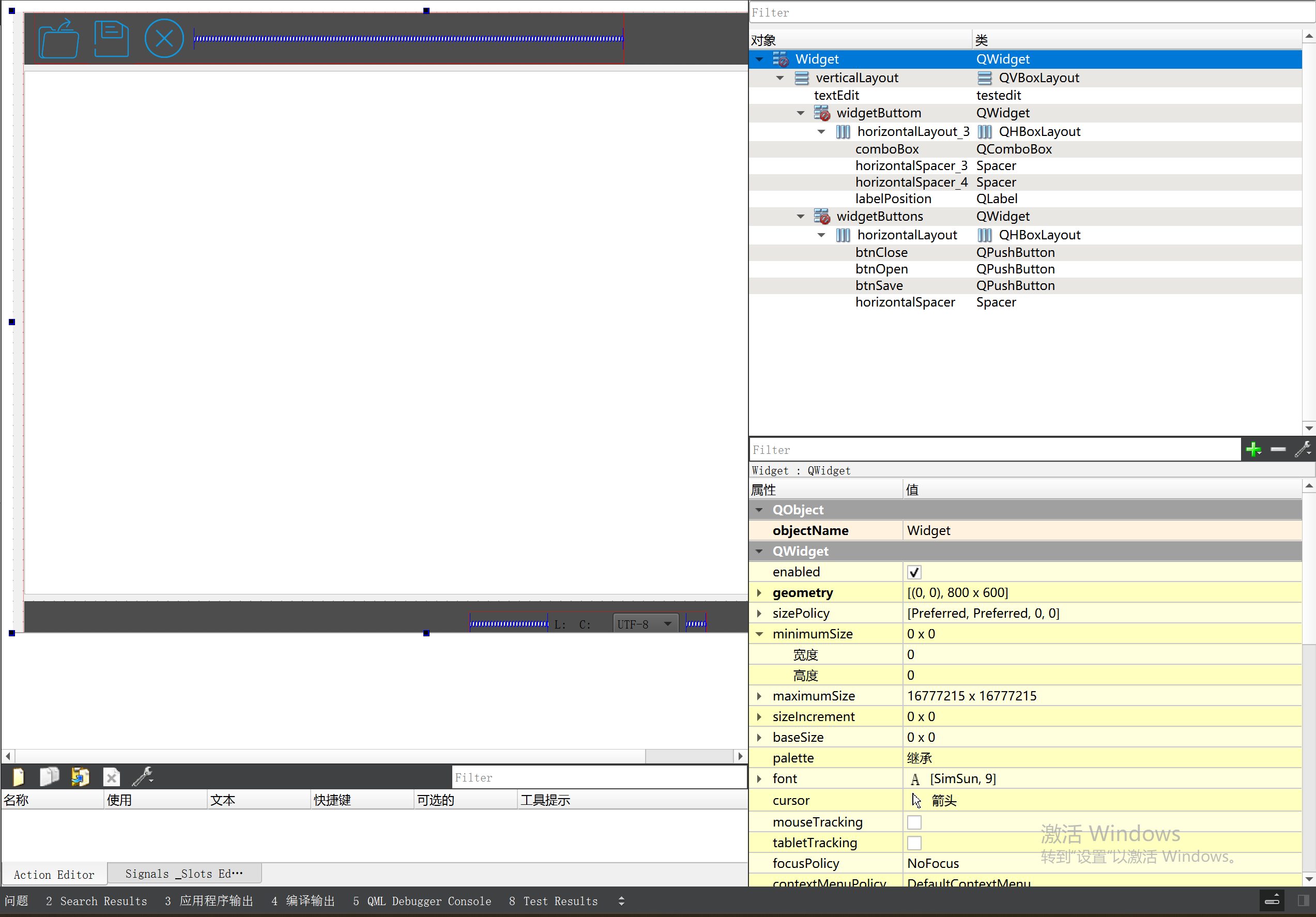
3.8 记事本项目总结 项目源码 1.main.cpp #include "widget.h" #include <QApplication> int main(int argc, char *argv[]) {QApplication a(argc, argv);Widget w;w.show();return a.exec(); } 2.widget.cpp #include "widget.h" #include &q…...

如何为服务器生成TLS证书
TLS(Transport Layer Security)证书是确保网络通信安全的重要手段,它通过加密技术保护传输的数据不被窃听和篡改。在服务器上配置TLS证书,可以使用户通过HTTPS协议安全地访问您的网站。本文将详细介绍如何在服务器上生成一个TLS证…...
SAP学习笔记 - 开发26 - 前端Fiori开发 OData V2 和 V4 的差异 (Deepseek整理)
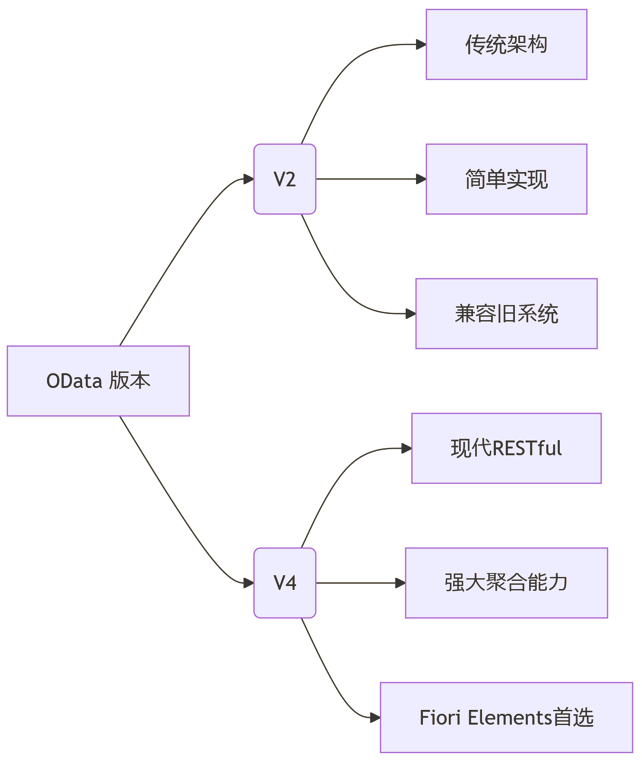
上一章用到了V2 的概念,其实 Fiori当中还有 V4,咱们这一章来总结一下 V2 和 V4。 SAP学习笔记 - 开发25 - 前端Fiori开发 Remote OData Service(使用远端Odata服务),代理中间件(ui5-middleware-simpleproxy)-CSDN博客…...

Java + Spring Boot + Mybatis 实现批量插入
在 Java 中使用 Spring Boot 和 MyBatis 实现批量插入可以通过以下步骤完成。这里提供两种常用方法:使用 MyBatis 的 <foreach> 标签和批处理模式(ExecutorType.BATCH)。 方法一:使用 XML 的 <foreach> 标签ÿ…...

Webpack性能优化:构建速度与体积优化策略
一、构建速度优化 1、升级Webpack和Node.js 优化效果:Webpack 4比Webpack 3构建时间降低60%-98%。原因: V8引擎优化(for of替代forEach、Map/Set替代Object)。默认使用更快的md4哈希算法。AST直接从Loa…...
day36-多路IO复用
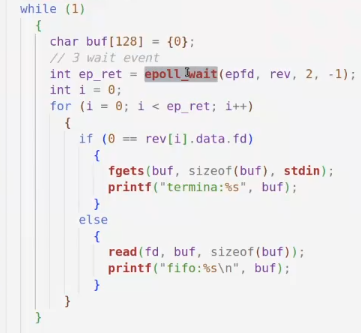
一、基本概念 (服务器多客户端模型) 定义:单线程或单进程同时监测若干个文件描述符是否可以执行IO操作的能力 作用:应用程序通常需要处理来自多条事件流中的事件,比如我现在用的电脑,需要同时处理键盘鼠标…...