
记录一下vue2项目优化,虚拟列表vue-virtual-scroll-list处理10万条数据
文章目录
- 封装BrandPickerVirtual.vue组件
- 页面使用
- 组件属性

select下拉接口一次性返回10万条数据,页面卡死,如何优化??这里使用 分页 + 虚拟列表(vue-virtual-scroll-list),去模拟一个下拉的内容显示区域。支持单选 + 多选 + 模糊查询 + 滚动触底自动分页请求。
粗略实现,满足需求即可哈哈哈哈哈哈哈:
单选:

多选:

封装BrandPickerVirtual.vue组件
<template><div class="brand-picker-virtual"><el-popoverv-model="visible"placement="bottom-start"trigger="click"popper-class="brand-picker-popper":append-to-body="false":width="300"><div class="brand-picker-popover"><div class="search-box"><el-inputv-model="searchKeyword"placeholder="搜索品牌"prefix-icon="el-icon-search"clearable /></div><div class="brand-list" ref="brandList"><virtual-listref="virtualList"class="scroller":data-key="'brand_id'":data-sources="filteredBrands":data-component="itemComponent":estimate-size="40":keeps="20":item-class="'brand-item'":extra-props="{multiple,isSelected: isSelected,handleSelect: handleSelect,disabled}":buffer="10":bottom-threshold="30"@tobottom="handleScrollToBottom"/><div v-if="loading" class="loading-more"><i class="el-icon-loading"></i> 加载中...</div><div ref="observer" class="observer-target"></div></div><div v-if="multiple" class="footer"><el-button size="small" @click="handleClear">清空</el-button><el-button type="primary" size="small" @click="handleConfirm">确定</el-button></div></div><div slot="reference" class="el-input el-input--suffix select-trigger":class="{ 'is-focus': visible }"><div class="el-input__inner select-inner"><div class="select-tags" v-if="multiple && selectedBrands.length"><el-tagv-for="brand in selectedBrands":key="brand.brand_id"closable:disable-transitions="false"@close="handleRemoveTag(brand)"size="small"class="brand-tag">{{ brand.name }}</el-tag></div><div v-else-if="!multiple && selectedBrands.length" class="selected-single"><span class="selected-label">{{ selectedBrands[0].name }}</span></div><inputtype="text"readonly:placeholder="getPlaceholder"class="select-input"><i v-if="selectedBrands.length" class="el-icon-circle-close clear-icon" @click.stop="handleClear"></i></div></div></el-popover></div>
</template><script>
import VirtualList from 'vue-virtual-scroll-list'
import request from '@/utils/request'const BrandItem = {name: 'BrandItem',props: {source: {type: Object,required: true},multiple: Boolean,isSelected: Function,handleSelect: Function,disabled: Boolean},render(h) {const isItemSelected = this.isSelected(this.source)return h('div', {class: {'item-content': true,'is-selected': isItemSelected && !this.multiple},on: {click: (e) => {if (!this.disabled) {this.handleSelect(this.source)}}}}, [this.multiple && h('el-checkbox', {props: {value: isItemSelected,disabled: this.disabled}}),h('span', { class: 'brand-name' }, this.source.name)])}
}export default {name: 'BrandPickerVirtual',components: {VirtualList},props: {multiple: {type: Boolean,default: false},defaultBrandId: {type: [Array, String, Number],default: () => []},api: {type: String,default: 'admin/goods/brands'},disabled: {type: Boolean,default: false}},data() {return {visible: false, // 弹窗是否可见searchKeyword: '', // 搜索关键字brandList: [], // 品牌列表数据selectedBrands: [], // 已选中的品牌列表tempSelectedBrands: [], // 多选时的临时选中列表loading: false, // 是否正在加载数据itemComponent: BrandItem, // 品牌项组件pageNo: 1, // 当前页码pageSize: 20, // 每页数量hasMore: true, // 是否还有更多数据searchTimer: null, // 搜索防抖定时器searchLoading: false, // 搜索加载状态lastScrollTop: 0, // 上次滚动位置isFirstPageLoaded: false, // 是否已加载第一页数据observer: null // 交叉观察器实例}},computed: {/*** 根据搜索关键字过滤品牌列表* @returns {Array} 过滤后的品牌列表*/filteredBrands() {if (!this.searchKeyword) return this.brandListconst keyword = this.searchKeyword.toLowerCase()return this.brandList.filter(item =>item.name.toLowerCase().includes(keyword))},/*** 选中品牌的显示文本* @returns {string} 显示文本*/selectedText() {if (this.multiple) {return this.selectedBrands.length? `已选择 ${this.selectedBrands.length} 个品牌`: ''}return (this.selectedBrands[0] && this.selectedBrands[0].name) || ''},/*** 获取占位符文本*/getPlaceholder() {if (this.multiple) {return this.selectedBrands.length ? '' : '请选择品牌(可多选)'}return this.selectedBrands.length ? '' : '请选择品牌'}},watch: {/*** 监听默认品牌ID变化,同步选中状态*/defaultBrandId: {immediate: true,handler(val) {if (!val || !this.brandList.length) returnif (this.multiple) {this.selectedBrands = this.brandList.filter(item =>val.includes(item.brand_id))} else {const brand = this.brandList.find(item =>item.brand_id === val)this.selectedBrands = brand ? [brand] : []}this.tempSelectedBrands = [...this.selectedBrands]}},/*** 监听弹窗显示状态,首次打开时加载数据*/visible(val) {if (val) {if (this.multiple) {this.tempSelectedBrands = [...this.selectedBrands]}this.resetData()this.getBrandList()// 确保虚拟列表在显示时重新初始化this.$nextTick(() => {if (this.$refs.virtualList) {this.$refs.virtualList.reset()}})}},/*** 监听搜索关键字变化,带防抖的搜索处理*/searchKeyword(val) {if (this.searchTimer) {clearTimeout(this.searchTimer)}this.searchTimer = setTimeout(() => {this.resetData()this.getBrandList()}, 300)}},beforeDestroy() {if (this.observer) {this.observer.disconnect()}},methods: {/*** 初始化交叉观察器,用于监听滚动到底部*/initObserver() {this.observer = new IntersectionObserver((entries) => {const target = entries[0]if (target.isIntersecting && !this.loading && this.hasMore) {this.getBrandList(true)}},{root: this.$el.querySelector('.scroller'),threshold: 0.1})if (this.$refs.observer) {this.observer.observe(this.$refs.observer)}},/*** 获取品牌列表数据* @param {boolean} isLoadMore - 是否是加载更多*/async getBrandList(isLoadMore = false) {if (this.loading || (!isLoadMore && this.searchLoading)) returnif (isLoadMore && !this.hasMore) returnconst loading = isLoadMore ? 'loading' : 'searchLoading'this[loading] = truetry {if (isLoadMore) {this.pageNo++} else {this.pageNo = 1}const response = await request({url: this.api,method: 'get',params: {page_no: this.pageNo,page_size: this.pageSize,keyword: this.searchKeyword},loading: false})const { data, data_total } = response        if (!isLoadMore) {this.brandList = datathis.isFirstPageLoaded = true} else {this.brandList = [...this.brandList, ...data]}this.hasMore = this.brandList.length < data_totalif (this.defaultBrandId && !isLoadMore) {this.initializeSelection()}} catch (error) {console.error('获取品牌列表失败:', error)} finally {this[loading] = false}},/*** 滚动到底部的处理函数*/handleScrollToBottom() {if (!this.loading && this.hasMore) {this.getBrandList(true)}},/*** 初始化选中状态*/initializeSelection() {if (this.multiple) {this.selectedBrands = this.brandList.filter(item =>this.defaultBrandId.includes(item.brand_id))} else {const brand = this.brandList.find(item =>item.brand_id === this.defaultBrandId)this.selectedBrands = brand ? [brand] : []}this.tempSelectedBrands = [...this.selectedBrands]},/*** 判断品牌是否被选中* @param {Object} item - 品牌项* @returns {boolean} 是否选中*/isSelected(item) {return this.multiple? this.tempSelectedBrands.some(brand => brand.brand_id === item.brand_id): this.selectedBrands.some(brand => brand.brand_id === item.brand_id)},/*** 处理品牌选择* @param {Object} item - 选中的品牌项*/handleSelect(item) {if (this.multiple) {const index = this.tempSelectedBrands.findIndex(brand => brand.brand_id === item.brand_id)if (index > -1) {this.tempSelectedBrands.splice(index, 1)} else {this.tempSelectedBrands.push(item)}} else {this.selectedBrands = [item]this.visible = falsethis.emitChange()}},/*** 清空选中的品牌*/handleClear(e) {// 阻止事件冒泡,防止触发下拉框if (e) {e.stopPropagation()}this.selectedBrands = []this.tempSelectedBrands = []this.emitChange()},/*** 确认多选结果*/handleConfirm() {this.selectedBrands = [...this.tempSelectedBrands]this.visible = falsethis.emitChange()},/*** 触发选中值变化事件*/emitChange() {const value = this.multiple? this.selectedBrands.map(item => item.brand_id): (this.selectedBrands[0] && this.selectedBrands[0].brand_id) || nullthis.$emit('changed', value)},handleRemoveTag(brand) {const index = this.selectedBrands.findIndex(item => item.brand_id === brand.brand_id)if (index > -1) {this.selectedBrands.splice(index, 1)}this.tempSelectedBrands = [...this.selectedBrands]this.emitChange()},/*** 重置列表相关数据*/resetData() {this.brandList = []this.pageNo = 1this.hasMore = truethis.loading = falsethis.searchLoading = false}}
}
</script><style lang="scss">
.brand-picker-popper {max-height: calc(100vh - 100px);overflow: visible !important;left: 0 !important;top: 26px !important;.el-popover__title {margin: 0;padding: 0;}
}
</style><style lang="scss" scoped>
.brand-picker-virtual {display: inline-block;width: 100%;position: relative;.select-trigger {width: 100%;&.is-focus .el-input__inner {border-color: #409EFF;}}.select-inner {padding: 3px 8px;min-height: 32px;height: auto;cursor: pointer;position: relative;background-color: #fff;border: 1px solid #dcdfe6;border-radius: 4px;display: flex;align-items: center;flex-wrap: wrap;}.select-tags {display: flex;flex-wrap: wrap;gap: 4px;flex: 1;min-height: 24px;padding: 2px 0;.brand-tag {max-width: 100%;margin: 2px 0;&:last-child {margin-right: 4px;}}}.select-input {width: 0;min-width: 60px;margin: 2px 0;padding: 0;background: none;border: none;outline: none;height: 24px;line-height: 24px;font-size: 14px;color: #606266;flex: 1;&::placeholder {color: #c0c4cc;}}.clear-icon {position: absolute;right: 8px;color: #c0c4cc;font-size: 14px;cursor: pointer;transition: color .2s;&:hover {color: #909399;}}.selected-single {display: flex;align-items: center;flex: 1;padding-right: 24px;.selected-label {flex: 1;font-size: 14px;color: #606266;overflow: hidden;text-overflow: ellipsis;white-space: nowrap;}}.el-input__suffix,.el-icon-arrow-down {display: none;}.brand-picker-popover {margin-top: 4px !important;.search-box {padding: 0 0 12px;.el-input {font-size: 14px;}}.brand-list {position: relative;height: 320px;border: 1px solid #EBEEF5;border-radius: 4px;overflow: hidden;.scroller {height: 100%;overflow-y: auto !important;overflow-x: hidden;padding: 4px 0;/deep/ .virtual-list-container {position: relative !important;}/deep/ .virtual-list-phantom {position: relative !important;}/deep/ .brand-item {.item-content {padding-left: 8px;height: 40px;line-height: 40px;cursor: pointer;transition: all 0.3s;box-sizing: border-box;position: relative;font-size: 14px;color: #606266;border-bottom: 1px solid #f0f0f0;display: flex;align-items: center;user-select: none;.el-checkbox {margin-right: 8px;}.brand-name {flex: 1;overflow: hidden;text-overflow: ellipsis;white-space: nowrap;}&:hover {background-color: #F5F7FA;}&.is-selected {background-color: #F5F7FA;color: #409EFF;font-weight: 500;&::after {content: '';position: absolute;right: 15px;width: 14px;height: 14px;background: url(data:image/svg+xml;base64,PHN2ZyB2aWV3Qm94PSIwIDAgMTAyNCAxMDI0IiB4bWxucz0iaHR0cDovL3d3dy53My5vcmcvMjAwMC9zdmciPjxwYXRoIGQ9Ik00MDYuNjU2IDcwNi45NDRsLTE2MC0xNjBjLTEyLjQ4LTEyLjQ4LTMyLjc2OC0xMi40OC00NS4yNDggMHMtMTIuNDggMzIuNzY4IDAgNDUuMjQ4bDE4Mi42MjQgMTgyLjYyNGMxMi40OCAxMi40OCAzMi43NjggMTIuNDggNDUuMjQ4IDBsNDAwLTQwMGMxMi40OC0xMi40OCAxMi40OC0zMi43NjggMC00NS4yNDhzLTMyLjc2OC0xMi40OC00NS4yNDggMEw0MDYuNjU2IDcwNi45NDR6IiBmaWxsPSIjNDA5RUZGIi8+PC9zdmc+) no-repeat center center;background-size: contain;}}}}}.loading-more {position: absolute;bottom: 0;left: 0;right: 0;padding: 8px;text-align: center;background: rgba(255, 255, 255, 0.95);color: #909399;font-size: 13px;z-index: 1;border-top: 1px solid #f0f0f0;}.observer-target {height: 2px;width: 100%;position: absolute;bottom: 0;left: 0;}}.footer {margin-top: 12px;text-align: right;padding: 0 2px;}}.selected-label {flex: 1;font-size: 14px;color: #606266;overflow: hidden;text-overflow: ellipsis;white-space: nowrap;}.selected-single {display: flex;align-items: center;flex: 1;padding: 0 4px;.selected-label {flex: 1;font-size: 14px;height: 24px;line-height: 24px;color: #606266;overflow: hidden;text-overflow: ellipsis;white-space: nowrap;}.el-icon-circle-close {margin-left: 8px;color: #c0c4cc;font-size: 14px;cursor: pointer;transition: color .2s;&:hover {color: #909399;}}}
}
</style>
页面使用
<template><!-- 单选模式 --><brand-picker-virtual:default-brand-id="singleBrandId"@changed="handleBrandChange"/><!-- 多选模式 --><brand-picker-virtualmultiple:default-brand-id="multipleBrandIds"@changed="handleMultipleBrandChange"/>
</template><script>
// 注册组件别忘了,我这里省略了,我是个全局注册的
export default {data() {return {singleBrandId: null,  // 单选模式:存储单个品牌IDmultipleBrandIds: []  // 多选模式:存储品牌ID数组}},methods: {// 单选回调handleBrandChange(brandId) {this.singleBrandId = brandId},// 多选回调handleMultipleBrandChange(brandIds) {this.multipleBrandIds = brandIds}}
}
</script>
组件属性
props: {// 是否多选模式multiple: {type: Boolean,default: false},// 默认选中的品牌ID(单选时为number/string,多选时为array)defaultBrandId: {type: [Array, String, Number],default: () => []},// 自定义接口地址api: {type: String,default: 'admin/goods/brands'},// 是否禁用disabled: {type: Boolean,default: false}
}
相关文章:
记录一下vue2项目优化,虚拟列表vue-virtual-scroll-list处理10万条数据
文章目录 封装BrandPickerVirtual.vue组件页面使用组件属性 select下拉接口一次性返回10万条数据,页面卡死,如何优化??这里使用 分页 虚拟列表(vue-virtual-scroll-list),去模拟一个下拉的内容…...
)
CDA数据分析师一级经典错题知识点总结(5)
1、数值型缺失值用中位数补充,分类数据用众数补充。 2、偏态系数>1就是高度偏,0.5到1是中度。 3、分布和检验 在 t检验之前进行 F检验的目的是确保 t检验的方差齐性假设成立。如果 F检验结果显示方差不相等,则需要切换到调整后的 t 检验…...

服务器、电脑和移动手机操作系统
一、服务器操作系统 1、Windows Server 开发商是微软公司。友好的用户界面、与微软生态系统的高度集成、提供了广泛的企业级功能(如Active Directory、DNS、DHCP服务等)。适合需要大量运行Microsoft应用和服务的企业环境,如SQL Server等。经…...

深入解析 Flink 与 Spark 的性能差异
💖 欢迎来到我的博客! 非常高兴能在这里与您相遇。在这里,您不仅能获得有趣的技术分享,还能感受到轻松愉快的氛围。无论您是编程新手,还是资深开发者,都能在这里找到属于您的知识宝藏,学习和成长…...
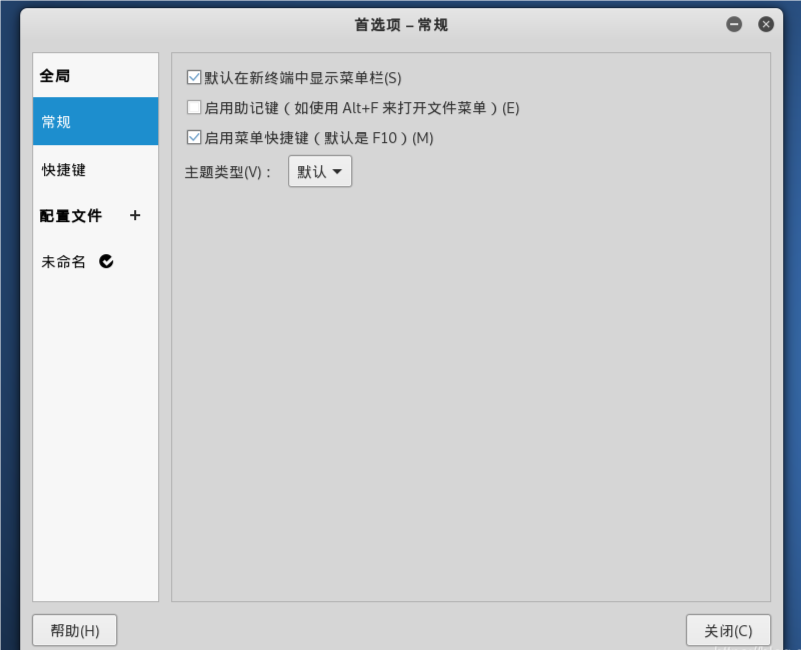
如何在 Linux、MacOS 以及 Windows 中打开控制面板
控制面板不仅仅是一系列图标和菜单的集合;它是通往优化个人计算体验的大门。通过它,用户可以轻松调整从外观到性能的各种参数,确保他们的电脑能够完美地适应自己的需求。无论是想要提升系统安全性、管理硬件设备,还是简单地改变桌…...

微信小程序中 隐藏scroll-view 滚动条 网页中隐藏滚动条
在微信小程序中隐藏scroll-view的滚动条可以通过以下几种方法实现: 方法一:使用CSS隐藏滚动条 在小程序的样式文件中(如app.wxss或页面的.wxss文件),添加以下CSS代码来隐藏滚动条: scroll-view ::-webkit…...
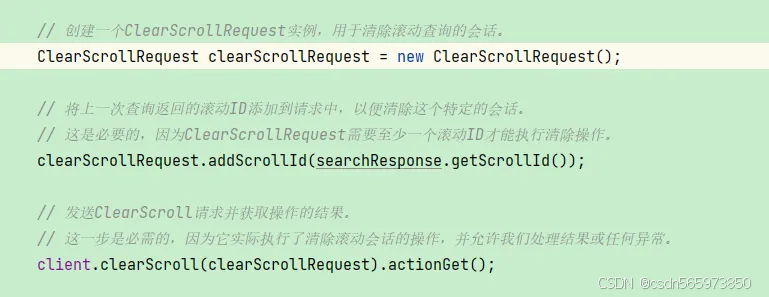
Java 实现 Elasticsearch 查询当前索引全部数据
Java 实现 Elasticsearch 查询当前索引全部数据 需求背景通常情况Java 实现查询 Elasticsearch 全部数据写在最后 需求背景 通常情况下,Elasticsearch 为了提高查询效率,对于不指定分页查询条数的查询语句,默认会返回10条数据。那么这就会有…...
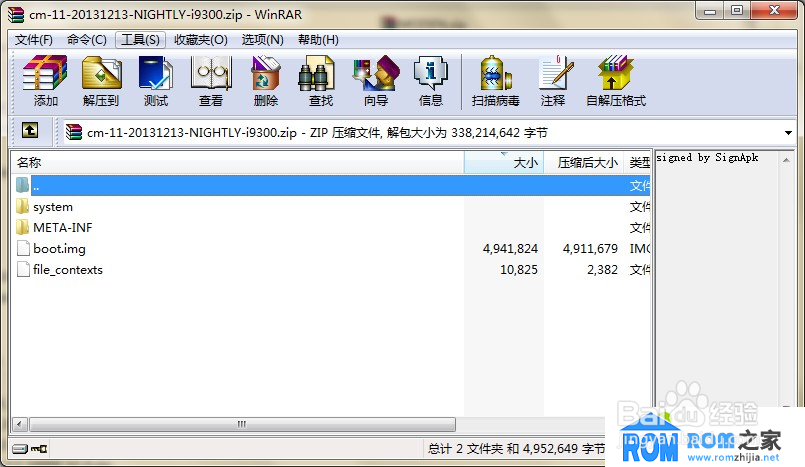
android刷机
android ota和img包下载地址: https://developers.google.com/android/images?hlzh-cn android启动过程 线刷 格式:ota格式 模式:recovery 优点:方便、简单,刷机方法通用,不会破坏手机底层数据࿰…...
【25考研】西南交通大学计算机复试重点及经验分享!
一、复试内容 上机考试:考试题型为编程上机考试,使用 C 语言,考试时长包括 15 分钟模拟考试和 120 分钟正式考试,考试内容涵盖顺序结构、选择结构、循环结构、数组、指针、字符串处理、函数、递归、结构体、动态存储、链表等知识点…...
将视差图(disparity map)重投影到三维空间中函数reprojectImageTo3D()的使用)
OpenCV相机标定与3D重建(49)将视差图(disparity map)重投影到三维空间中函数reprojectImageTo3D()的使用
操作系统:ubuntu22.04 OpenCV版本:OpenCV4.9 IDE:Visual Studio Code 编程语言:C11 算法描述 将视差图像重投影到3D空间。 cv::reprojectImageTo3D 是 OpenCV 库中的一个函数,用于将视差图(disparity map)…...
学习HTTP Range
HTTP Range 请求 一种通过指定文件字节范围加载部分数据的技术,广泛用于断点续传、流媒体播放、分布式文件系统的数据分片加载等场景。 请求格式-在请求头中使用 Range 字段指定所需的字节范围 Range: bytes0-1023// bytes0-1023:表示请求文件的第 0 …...

大语言模型训练的数据集从哪里来?
继续上篇文章的内容说说大语言模型预训练的数据集从哪里来以及为什么互联网上的数据已经被耗尽这个说法并不专业,再谈谈大语言模型预训练数据集的优化思路。 1. GPT2使用的数据集是WebText,该数据集大概40GB,由OpenAI创建,主要内…...

Webpack和Vite的区别
一、构建速度方面 webpack默认是将所有模块都统一打包成一个js文件,每次修改都会重写构建整个项目,自上而下串行执行,所以会随着项目规模的增大,导致其构建打包速度会越来越慢 vite只会对修改过的模块进行重构,构建速…...

【再谈设计模式】模板方法模式 - 算法骨架的构建者
一、引言 在软件工程、软件开发过程中,我们经常会遇到一些算法或者业务逻辑具有固定的流程步骤,但其中个别步骤的实现可能会因具体情况而有所不同的情况。模板方法设计模式(Template Method Design Pattern)就为解决这类问题提供了…...

Bytebase 3.1.1 - 可定制的快捷访问首页
🚀 新功能 可定制的快捷访问首页。 支持查询 Redis 集群中所有节点。 赋予项目角色时,过期时间可以定义精确到秒级的时间点。 🔔 重大变更 移除 Database 消息里的实例角色信息。调用 GetInstance 或 ListInstanceRoles 以获取实例角色信息…...

Java阶段四04
第4章-第4节 一、知识点 CSRF、token、JWT 二、目标 理解什么是CSRF攻击以及如何防范 理解什么是token 理解什么是JWT 理解session验证和JWT验证的区别 学会使用JWT 三、内容分析 重点 理解什么是CSRF攻击以及如何防范 理解什么是token 理解什么是JWT 理解session验…...

B2C API安全警示:爬虫之外,潜藏更大风险挑战
在数字化时代,B2C(Business-to-Consumer)电子商务模式已成为企业连接消费者、推动业务增长的重要桥梁。而B2C API(应用程序编程接口)作为企业与消费者之间数据交互的桥梁,其安全性更是至关重要。然而&#…...

OCR文字识别—基于PP-OCR模型实现ONNX C++推理部署
概述 PaddleOCR 是一款基于 PaddlePaddle 深度学习平台的开源 OCR 工具。PP-OCR是PaddleOCR自研的实用的超轻量OCR系统。它是一个两阶段的OCR系统,其中文本检测算法选用DB,文本识别算法选用CRNN,并在检测和识别模块之间添加文本方向分类器&a…...

如何播放视频文件
文章目录 1. 概念介绍2. 使用方法2.1 实现步骤2.2 具体细节3. 示例代码4. 内容总结我们在上一章回中介绍了"如何获取文件类型"相关的内容,本章回中将介绍如何播放视频.闲话休提,让我们一起Talk Flutter吧。 1. 概念介绍 播放视频是我们常用的功能,不过Flutter官方…...

MySQL -- 约束
1. 数据库约束 数据库约束时关系型数据库的一个重要功能,主要的作用是保证数据的有效性,也可以理解为数据的正确性(数据本身是否正确,关联关系是否正确) 人工检查数据的完整性工作量非常大,在数据库中定义一些约束,那么数据在写入数据库的时候,就会帮我们做一些校验.并且约束一…...
: K8s 核心概念白话解读(上):Pod 和 Deployment 究竟是什么?)
云原生核心技术 (7/12): K8s 核心概念白话解读(上):Pod 和 Deployment 究竟是什么?
大家好,欢迎来到《云原生核心技术》系列的第七篇! 在上一篇,我们成功地使用 Minikube 或 kind 在自己的电脑上搭建起了一个迷你但功能完备的 Kubernetes 集群。现在,我们就像一个拥有了一块崭新数字土地的农场主,是时…...
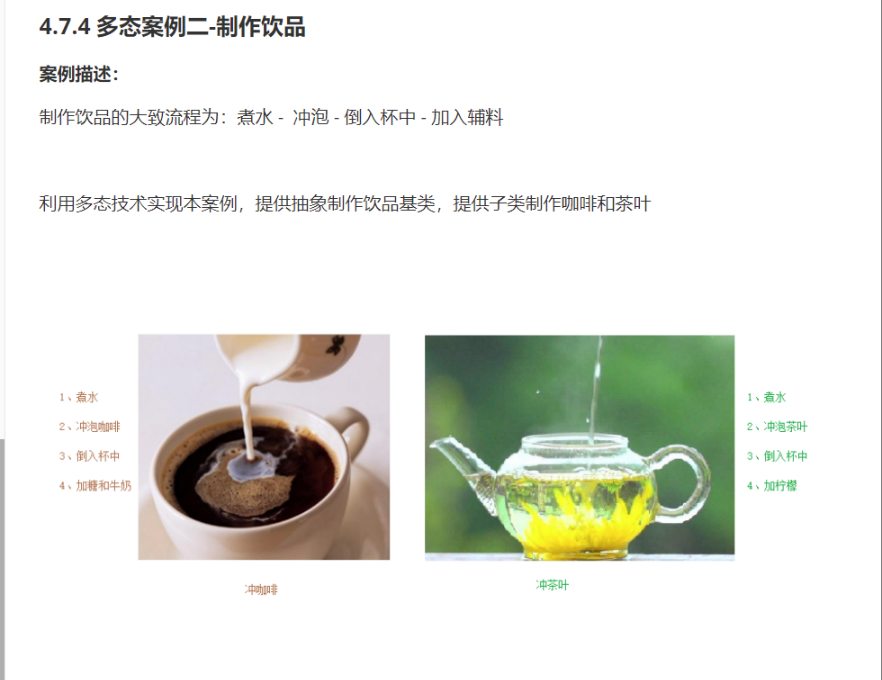
C++_核心编程_多态案例二-制作饮品
#include <iostream> #include <string> using namespace std;/*制作饮品的大致流程为:煮水 - 冲泡 - 倒入杯中 - 加入辅料 利用多态技术实现本案例,提供抽象制作饮品基类,提供子类制作咖啡和茶叶*//*基类*/ class AbstractDr…...

应用升级/灾备测试时使用guarantee 闪回点迅速回退
1.场景 应用要升级,当升级失败时,数据库回退到升级前. 要测试系统,测试完成后,数据库要回退到测试前。 相对于RMAN恢复需要很长时间, 数据库闪回只需要几分钟。 2.技术实现 数据库设置 2个db_recovery参数 创建guarantee闪回点,不需要开启数据库闪回。…...
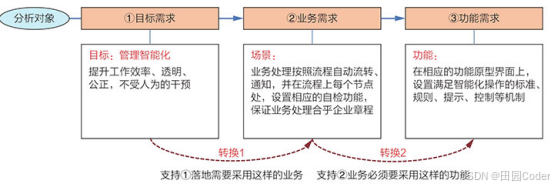
大话软工笔记—需求分析概述
需求分析,就是要对需求调研收集到的资料信息逐个地进行拆分、研究,从大量的不确定“需求”中确定出哪些需求最终要转换为确定的“功能需求”。 需求分析的作用非常重要,后续设计的依据主要来自于需求分析的成果,包括: 项目的目的…...

Oracle查询表空间大小
1 查询数据库中所有的表空间以及表空间所占空间的大小 SELECTtablespace_name,sum( bytes ) / 1024 / 1024 FROMdba_data_files GROUP BYtablespace_name; 2 Oracle查询表空间大小及每个表所占空间的大小 SELECTtablespace_name,file_id,file_name,round( bytes / ( 1024 …...
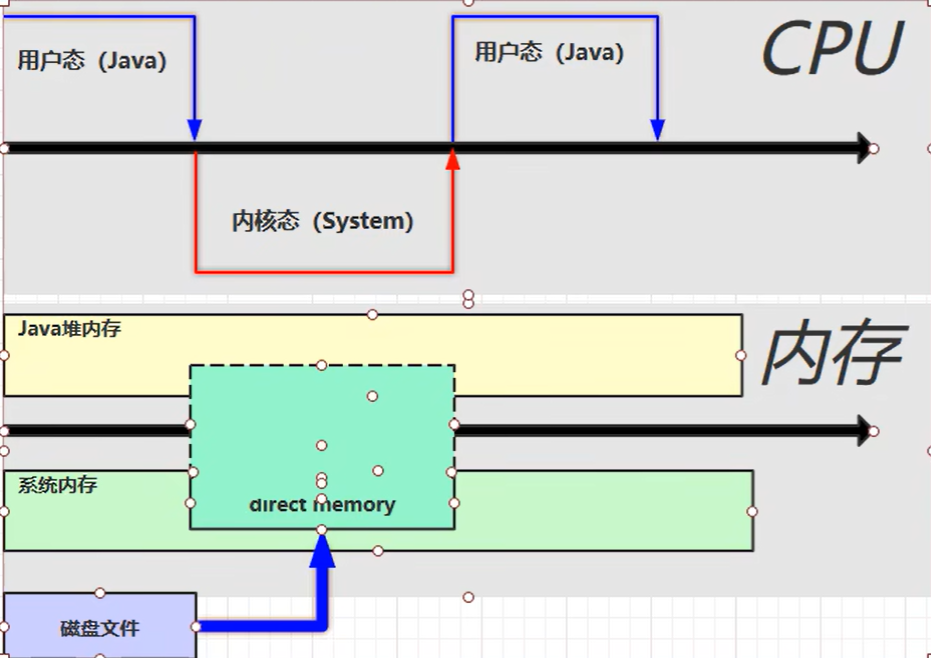
【JVM】- 内存结构
引言 JVM:Java Virtual Machine 定义:Java虚拟机,Java二进制字节码的运行环境好处: 一次编写,到处运行自动内存管理,垃圾回收的功能数组下标越界检查(会抛异常,不会覆盖到其他代码…...

ArcGIS Pro制作水平横向图例+多级标注
今天介绍下载ArcGIS Pro中如何设置水平横向图例。 之前我们介绍了ArcGIS的横向图例制作:ArcGIS横向、多列图例、顺序重排、符号居中、批量更改图例符号等等(ArcGIS出图图例8大技巧),那这次我们看看ArcGIS Pro如何更加快捷的操作。…...

Linux 中如何提取压缩文件 ?
Linux 是一种流行的开源操作系统,它提供了许多工具来管理、压缩和解压缩文件。压缩文件有助于节省存储空间,使数据传输更快。本指南将向您展示如何在 Linux 中提取不同类型的压缩文件。 1. Unpacking ZIP Files ZIP 文件是非常常见的,要在 …...

【Android】Android 开发 ADB 常用指令
查看当前连接的设备 adb devices 连接设备 adb connect 设备IP 断开已连接的设备 adb disconnect 设备IP 安装应用 adb install 安装包的路径 卸载应用 adb uninstall 应用包名 查看已安装的应用包名 adb shell pm list packages 查看已安装的第三方应用包名 adb shell pm list…...
C++_哈希表
本篇文章是对C学习的哈希表部分的学习分享 相信一定会对你有所帮助~ 那咱们废话不多说,直接开始吧! 一、基础概念 1. 哈希核心思想: 哈希函数的作用:通过此函数建立一个Key与存储位置之间的映射关系。理想目标:实现…...