
C#使用OpenTK绘制3D可拖动旋转图形三棱锥
接上篇,绘制着色矩形
C#使用OpenTK绘制一个着色矩形-CSDN博客
上一篇安装OpenTK.GLControl后,这里可以直接拖动控件GLControl

我们会发现GLControl继承于UserControl
//// 摘要:// OpenGL-aware WinForms control. The WinForms designer will always call the default// constructor. Inherit from this class and call one of its specialized constructors// to enable antialiasing or custom OpenTK.GLControl.GraphicsModes.public class GLControl : System.Windows.Forms.UserControl以下我们绘制一个三棱锥,三棱锥需要四个顶点Vertex
新建窗体FormGLControl,拖入一个控件GLControl,绑定Load,Paint等事件
窗体FormGLControl设计器代码为:
文件FormGLControl.Designer.cs
using OpenTK;
namespace OpenTKDemo
{partial class FormGLControl{/// <summary>/// Required designer variable./// </summary>private System.ComponentModel.IContainer components = null;/// <summary>/// Clean up any resources being used./// </summary>/// <param name="disposing">true if managed resources should be disposed; otherwise, false.</param>protected override void Dispose(bool disposing){if (disposing && (components != null)){components.Dispose();}base.Dispose(disposing);}#region Windows Form Designer generated code/// <summary>/// Required method for Designer support - do not modify/// the contents of this method with the code editor./// </summary>private void InitializeComponent(){this.glControl1 = new OpenTK.GLControl();this.SuspendLayout();// // glControl1// this.glControl1.BackColor = System.Drawing.Color.Black;this.glControl1.Location = new System.Drawing.Point(12, 12);this.glControl1.Name = "glControl1";this.glControl1.Size = new System.Drawing.Size(800, 600);this.glControl1.TabIndex = 0;this.glControl1.VSync = false;this.glControl1.Load += new System.EventHandler(this.glControl1_Load);this.glControl1.Paint += new System.Windows.Forms.PaintEventHandler(this.glControl1_Paint);this.glControl1.MouseDown += new System.Windows.Forms.MouseEventHandler(this.glControl1_MouseDown);this.glControl1.MouseMove += new System.Windows.Forms.MouseEventHandler(this.glControl1_MouseMove);this.glControl1.MouseUp += new System.Windows.Forms.MouseEventHandler(this.glControl1_MouseUp);this.glControl1.Resize += new System.EventHandler(this.glControl1_Resize);// // FormGLControl// this.AutoScaleDimensions = new System.Drawing.SizeF(6F, 12F);this.AutoScaleMode = System.Windows.Forms.AutoScaleMode.Font;this.ClientSize = new System.Drawing.Size(832, 619);this.Controls.Add(this.glControl1);this.Name = "FormGLControl";this.Text = "FormGLControl";this.ResumeLayout(false);}#endregionprivate GLControl glControl1;}
}窗体FormGLControl相关代码如下:
文件FormGLControl.cs
using System;
using System.Collections.Generic;
using System.ComponentModel;
using System.Data;
using System.Drawing;
using System.Linq;
using System.Text;
using System.Threading.Tasks;
using System.Windows.Forms;
using OpenTK;
using OpenTK.Graphics.OpenGL;namespace OpenTKDemo
{public partial class FormGLControl : Form{private int vao, vbo, shaderProgram;private Matrix4 model, view, projection;private float rotationX = 0.0f, rotationY = 0.0f; // 旋转角度private bool isDragging = false;private Point lastMousePosition;public FormGLControl(){InitializeComponent();}private void glControl1_Load(object sender, EventArgs e){// 设置清屏颜色GL.ClearColor(1.0f, 1.0f, 1.0f, 1.0f);// 初始化 VAO 和 VBOvao = GL.GenVertexArray();vbo = GL.GenBuffer();GL.BindVertexArray(vao);float[] vertices = {// 顶点位置       // 颜色0.0f,  0.5f,  0.0f,  1.0f, 0.0f, 0.0f, // 顶点1(x,y,z,red,green,blue)-0.5f, -0.5f,  0.5f,  0.0f, 1.0f, 0.0f, // 顶点20.5f, -0.5f,  0.5f,  0.0f, 0.0f, 1.0f, // 顶点30.0f, -0.5f, -0.5f,  1.0f, 1.0f, 0.0f  // 顶点4};int[] indices = {0, 1, 2, // 正面0, 2, 3, // 右面0, 3, 1, // 左面1, 3, 2  // 底面};int ebo = GL.GenBuffer();GL.BindBuffer(BufferTarget.ArrayBuffer, vbo);GL.BufferData(BufferTarget.ArrayBuffer, vertices.Length * sizeof(float), vertices, BufferUsageHint.StaticDraw);GL.BindBuffer(BufferTarget.ElementArrayBuffer, ebo);GL.BufferData(BufferTarget.ElementArrayBuffer, indices.Length * sizeof(int), indices, BufferUsageHint.StaticDraw);GL.VertexAttribPointer(0, 3, VertexAttribPointerType.Float, false, 6 * sizeof(float), 0);GL.EnableVertexAttribArray(0);GL.VertexAttribPointer(1, 3, VertexAttribPointerType.Float, false, 6 * sizeof(float), 3 * sizeof(float));GL.EnableVertexAttribArray(1);// 创建并编译着色器string vertexShaderSource = @"#version 330 corelayout (location = 0) in vec3 aPosition;layout (location = 1) in vec3 aColor;out vec3 vertexColor;uniform mat4 model;uniform mat4 view;uniform mat4 projection;void main(){gl_Position = projection * view * model * vec4(aPosition, 1.0);vertexColor = aColor;}";string fragmentShaderSource = @"#version 330 corein vec3 vertexColor;out vec4 FragColor;void main(){FragColor = vec4(vertexColor, 1.0);}";int vertexShader = CompileShader(ShaderType.VertexShader, vertexShaderSource);int fragmentShader = CompileShader(ShaderType.FragmentShader, fragmentShaderSource);shaderProgram = GL.CreateProgram();GL.AttachShader(shaderProgram, vertexShader);GL.AttachShader(shaderProgram, fragmentShader);GL.LinkProgram(shaderProgram);// 删除着色器GL.DeleteShader(vertexShader);GL.DeleteShader(fragmentShader);// 初始化矩阵view = Matrix4.LookAt(new Vector3(0.0f, 0.0f, 2.0f), Vector3.Zero, Vector3.UnitY);projection = Matrix4.CreatePerspectiveFieldOfView(MathHelper.DegreesToRadians(45.0f), glControl1.Width / (float)glControl1.Height, 0.1f, 100.0f);GL.BindVertexArray(0);}private void glControl1_Paint(object sender, PaintEventArgs e){// 清屏GL.Clear(ClearBufferMask.ColorBufferBit | ClearBufferMask.DepthBufferBit);// 绘制三角锥GL.UseProgram(shaderProgram);model = Matrix4.CreateRotationX(MathHelper.DegreesToRadians(rotationX)) *Matrix4.CreateRotationY(MathHelper.DegreesToRadians(rotationY));GL.UniformMatrix4(GL.GetUniformLocation(shaderProgram, "model"), false, ref model);GL.UniformMatrix4(GL.GetUniformLocation(shaderProgram, "view"), false, ref view);GL.UniformMatrix4(GL.GetUniformLocation(shaderProgram, "projection"), false, ref projection);GL.BindVertexArray(vao);GL.DrawElements(PrimitiveType.Triangles, 12, DrawElementsType.UnsignedInt, 0);glControl1.SwapBuffers();}private void glControl1_Resize(object sender, EventArgs e){GL.Viewport(0, 0, glControl1.Width, glControl1.Height);projection = Matrix4.CreatePerspectiveFieldOfView(MathHelper.DegreesToRadians(45.0f), glControl1.Width / (float)glControl1.Height, 0.1f, 100.0f);}private void glControl1_MouseDown(object sender, MouseEventArgs e){if (e.Button == MouseButtons.Left){isDragging = true;lastMousePosition = e.Location;}}private void glControl1_MouseUp(object sender, MouseEventArgs e){if (e.Button == MouseButtons.Left){isDragging = false;}}private void glControl1_MouseMove(object sender, MouseEventArgs e){if (isDragging){int deltaX = e.X - lastMousePosition.X;int deltaY = e.Y - lastMousePosition.Y;rotationX += deltaY * 0.5f;rotationY += deltaX * 0.5f;lastMousePosition = e.Location;glControl1.Invalidate();}}private int CompileShader(ShaderType type, string source){int shader = GL.CreateShader(type);GL.ShaderSource(shader, source);GL.CompileShader(shader);GL.GetShader(shader, ShaderParameter.CompileStatus, out int status);if (status == 0){GL.GetShaderInfoLog(shader, out string infoLog);throw new Exception($"Error compiling shader ({type}): {infoLog}");}return shader;}}
}
运行如图:

可以拖动旋转:

相关文章:
C#使用OpenTK绘制3D可拖动旋转图形三棱锥
接上篇,绘制着色矩形 C#使用OpenTK绘制一个着色矩形-CSDN博客 上一篇安装OpenTK.GLControl后,这里可以直接拖动控件GLControl 我们会发现GLControl继承于UserControl //// 摘要:// OpenGL-aware WinForms control. The WinForms designer will always call the default//…...

排序的本质、数据类型及算法选择
排序的本质、数据类型及算法选择 一、排序的本质二、排序的数据类型三、排序算法的选择依据 前两天老金写了篇 “十大排序简介”,有点意犹未尽,这一回老金想把排序连根拔起,从排序的本质说道说道。 一、排序的本质 从字面上理解,…...

Python的列表基础知识点(超详细流程)
目录 一、环境搭建 二、列表 2.1 详情 2.2 列表定义 2.3 列表长度 2.4 列表索引 2.5 切片索引 2.6 添加 2.7 插入 2.8 剔除 2.8.1 pop方法 2.8.2 del方法 2.9 任何数据类型 2.10 拼接 2.10.1 “” 2.10.2 “*” 2.11 逆序 编辑 2.12 计算出现次数 2.13 排序…...

HarmonyOS鸿蒙开发 弹窗及加载中指示器HUD功能实现
HarmonyOS鸿蒙开发 弹窗及加载中指示器HUD功能实现 最近在学习鸿蒙开发过程中,阅读了官方文档,在之前做flutter时候,经常使用overlay,使用OverlayEntry加入到overlayState来做添加悬浮按钮、提示弹窗、加载中指示器、加载失败的t…...

【Ubuntu与Linux操作系统:一、Ubuntu安装与基本使用】
第1章 Ubuntu安装与基本使用 1.1 Linux与Ubuntu Linux是一种开源、类Unix操作系统内核,拥有高稳定性和强大的网络功能。由于其开源性和灵活性,Linux被广泛应用于服务器、嵌入式设备以及桌面环境中。 Ubuntu是基于Debian的一个流行Linux发行版…...

React 元素渲染
React 元素渲染 React 是一个用于构建用户界面的 JavaScript 库,它允许开发人员创建大型应用程序,这些应用程序可以随着时间的推移而高效地更新和渲染。React 的核心概念之一是元素渲染,它描述了如何将 JavaScript 对象转换为 DOM࿰…...

【2024年华为OD机试】 (C卷,100分)- 括号匹配(Java JS PythonC/C++)
一、问题描述 题目描述 给定一个字符串,里边可能包含“()”、“[]”、“{}”三种括号,请编写程序检查该字符串中的括号是否成对出现,且嵌套关系正确。 若括号成对出现且嵌套关系正确,或该字符串中无括号字符,输出&am…...
)
解锁企业数字化转型新力量:OpenCoze(开源扣子)
在当今数字化浪潮席卷之下,企业对于高效管理和协同运作的需求愈发迫切,而开源技术正逐渐成为众多企业破局的关键利器。今天,想给大家介绍一款极具潜力的开源项目 ——OpenCoze,中文名称 “开源扣子”。 一、OpenCoze 是什么&…...

【网络云SRE运维开发】2025第2周-每日【2025/01/12】小测-【第12章 rip路由协议】理论和实操考试题解析
文章目录 选择题答案及解析理论题答案及解析实操题答案及解析下一步进阶 选择题答案及解析 RIP路由协议是基于哪种算法的动态路由协议? 答案:B. 距离矢量算法解析:链路状态算法用于OSPF等协议;最小生成树算法主要用于生成树协议&…...

【微服务】8、分布式事务 ( XA 和 AT )
文章目录 利用Seata解决分布式事务问题(XA模式)AT模式1. AT模式原理引入2. AT模式执行流程与XA模式对比3. AT模式性能优势及潜在问题4. AT模式数据一致性解决方案5. AT模式一阶段操作总结6. AT模式二阶段操作分析7. AT模式整体特点8. AT模式与XA模式对比…...

CVE-2025-22777 (CVSS 9.8):WordPress | GiveWP 插件的严重漏洞
漏洞描述 GiveWP 插件中发现了一个严重漏洞,该插件是 WordPress 最广泛使用的在线捐赠和筹款工具之一。该漏洞的编号为 CVE-2025-22777,CVSS 评分为 9.8,表明其严重性。 GiveWP 插件拥有超过 100,000 个活跃安装,为全球无数捐赠平…...

TypeScript Jest 单元测试 搭建
NPM TypeScript 项目搭建 创建目录 mkdir mockprojectcd mockproject初始化NPM项目 npm init -y安装TypeScript npm i -D typescript使用VSCode 打开项目 创建TS配置文件tsconfig.json {"compilerOptions": {"target": "es5","module&…...

基于 SSH 的任务调度系统
文末附有完整项目代码 在当今科技飞速发展的时代,任务调度系统的重要性日益凸显。本文将详细介绍一个基于 SSH(SpringStruts2Hibernate)的任务调度系统的设计与实现。 一、系统概述 本系统旨在改变传统人工任务调度方式,通过计算…...

filestream安装使用全套+filebeat的模块用法
1 filestream介绍 官方宣布:输入类型为log在filebeat7.16版本已经弃用了 Filestream 是 Filebeat 中的一种 输入类型(Input),用于处理日志文件的读取。它是为了取代 Filebeat 中传统的 log 输入(Input)设…...
java项目之房屋租赁系统源码(springboot+mysql+vue)
项目简介 房屋租赁系统实现了以下功能: 房屋租赁系统的主要使用者分为: 系统管理:个人中心、房屋信息管理、预约看房管理、合同信息管理、房屋报修管理、维修处理管理、房屋评价管理等模块的查看及相应操作; 房屋信息管理&#…...

sap mm学习笔记
1. 业务流程 2. 组织架构 3. 物料主数据 4.采购主数据 5. 采购管理 6. 库存管理 7.物料主数据 8. 采购申请 ME51N...

代码随想录_链表
代码随想录02 链表 203.移除链表元素 力扣题目链接(opens new window) 题意:删除链表中等于给定值 val 的所有节点。 示例 1: 输入:head [1,2,6,3,4,5,6], val 6 输出:[1,2,3,4,5] 示例 2: 输入:he…...

EF Code 并发控制
【悲观控制】 不推荐用,EF Core 没有封装悲观并发控制的使用,需要使用原生Sql来使用悲观并发控制 一般使用行锁、表锁等排他锁对资源进行锁定,同时只有一个使用者操作被锁定的资源 拿sql server举例,可以使用表所、或者行所解决…...

ceph fs status 输出详解
ceph fs status 命令用于显示 Ceph 文件系统的状态信息,其中各列的含义如下: RANK:元数据服务器(MDS)的等级或标识符。 STATE:MDS 的当前状态,例如 active(活跃)、stan…...

FFmpeg Muxer HLS
使用FFmpeg命令来研究它对HLS协议的支持程度是最好的方法: ffmpeg -h muxerhls Muxer HLS Muxer hls [Apple HTTP Live Streaming]:Common extensions: m3u8.Default video codec: h264.Default audio codec: aac.Default subtitle codec: webvtt. 这里面告诉我…...
Redis相关知识总结(缓存雪崩,缓存穿透,缓存击穿,Redis实现分布式锁,如何保持数据库和缓存一致)
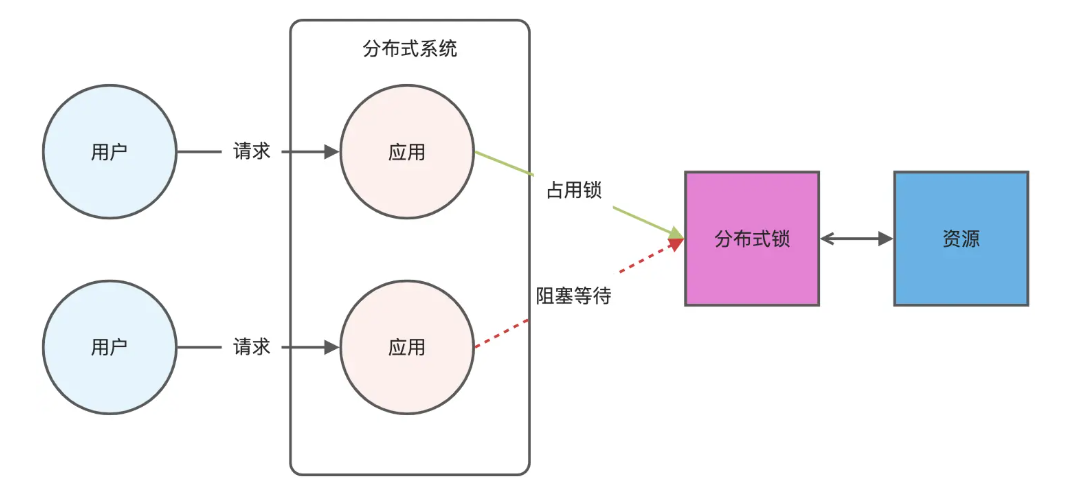
文章目录 1.什么是Redis?2.为什么要使用redis作为mysql的缓存?3.什么是缓存雪崩、缓存穿透、缓存击穿?3.1缓存雪崩3.1.1 大量缓存同时过期3.1.2 Redis宕机 3.2 缓存击穿3.3 缓存穿透3.4 总结 4. 数据库和缓存如何保持一致性5. Redis实现分布式…...
高频面试之3Zookeeper
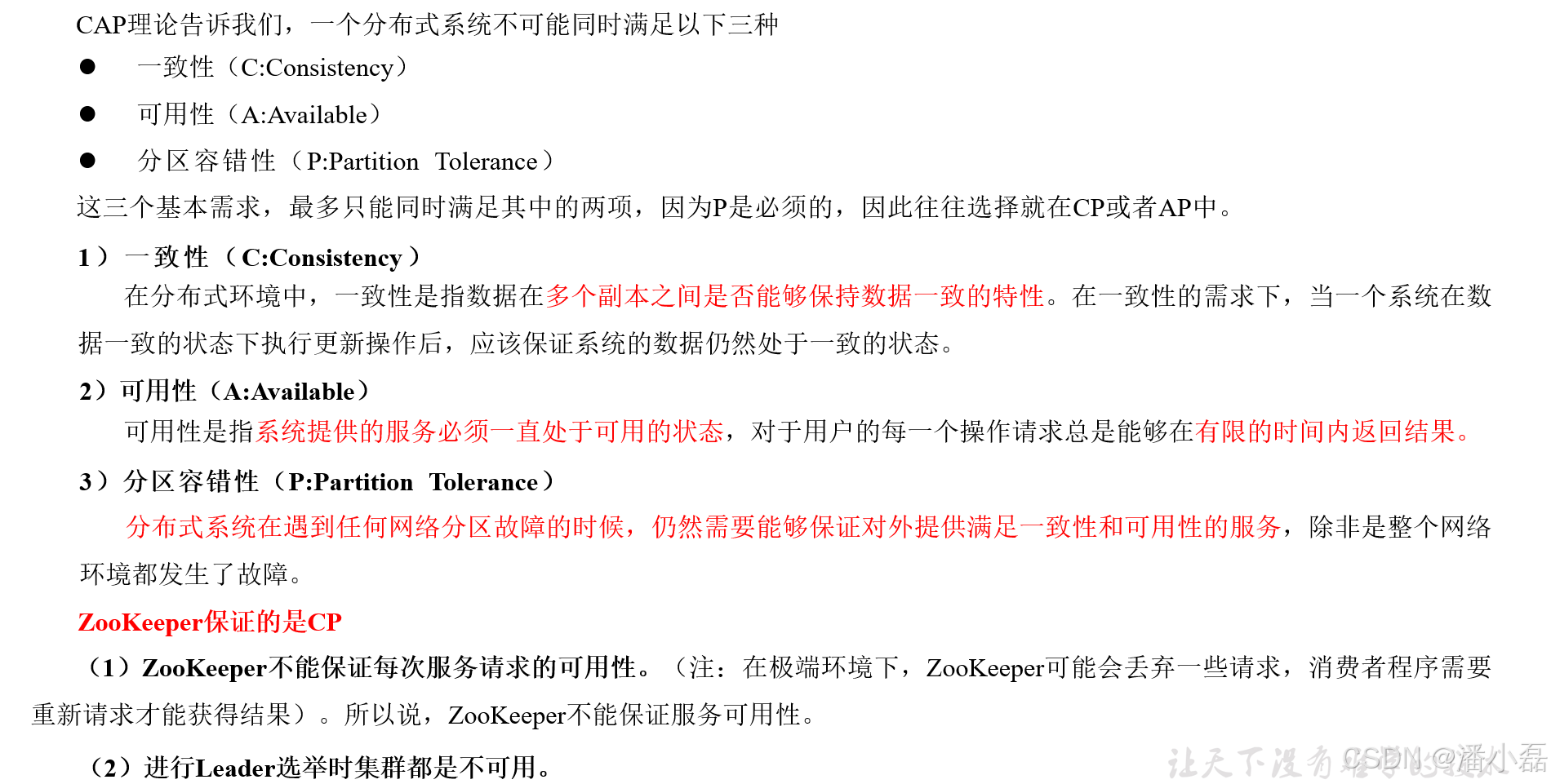
高频面试之3Zookeeper 文章目录 高频面试之3Zookeeper3.1 常用命令3.2 选举机制3.3 Zookeeper符合法则中哪两个?3.4 Zookeeper脑裂3.5 Zookeeper用来干嘛了 3.1 常用命令 ls、get、create、delete、deleteall3.2 选举机制 半数机制(过半机制࿰…...
376. Wiggle Subsequence
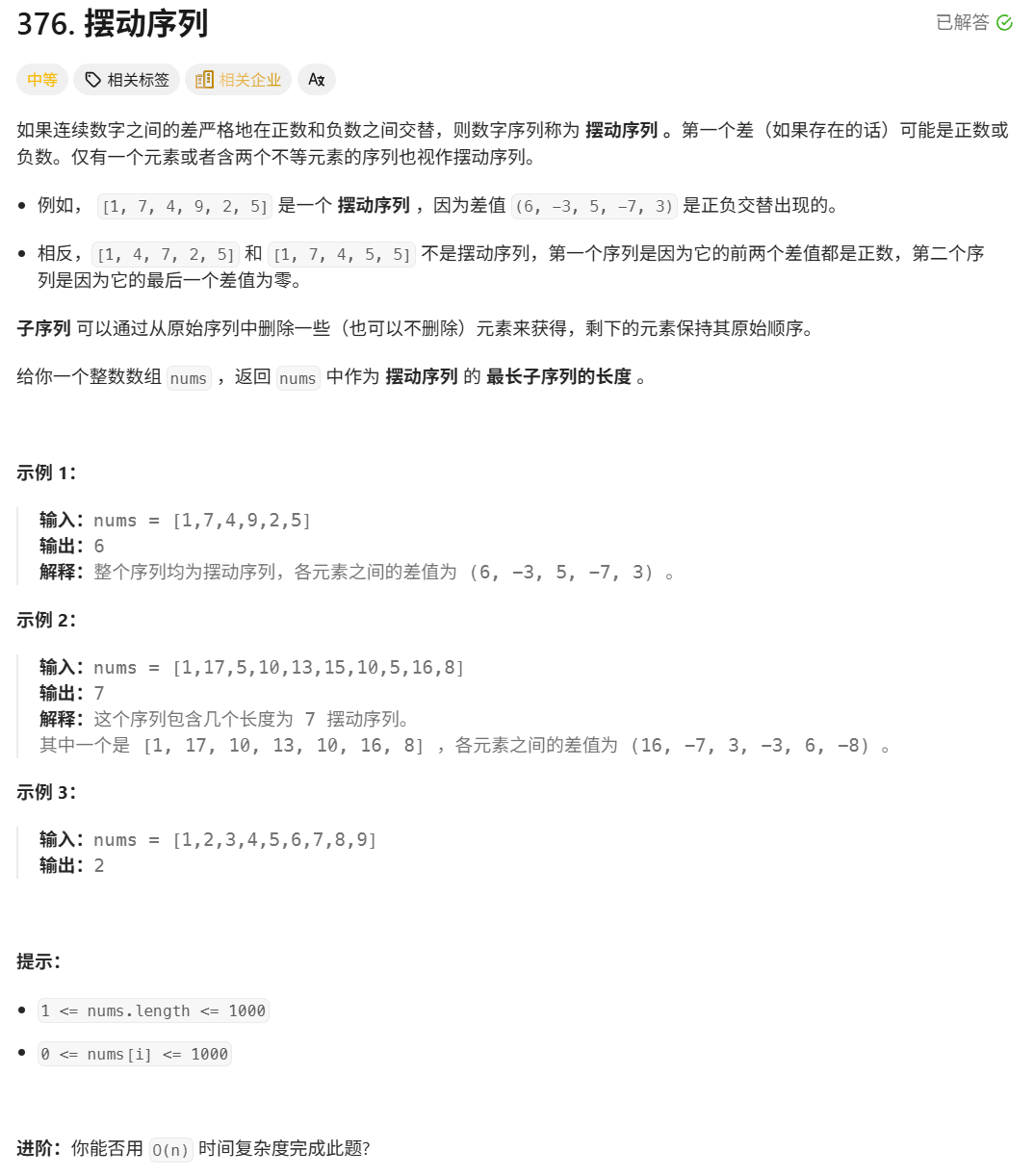
376. Wiggle Subsequence 代码 class Solution { public:int wiggleMaxLength(vector<int>& nums) {int n nums.size();int res 1;int prediff 0;int curdiff 0;for(int i 0;i < n-1;i){curdiff nums[i1] - nums[i];if( (prediff > 0 && curdif…...
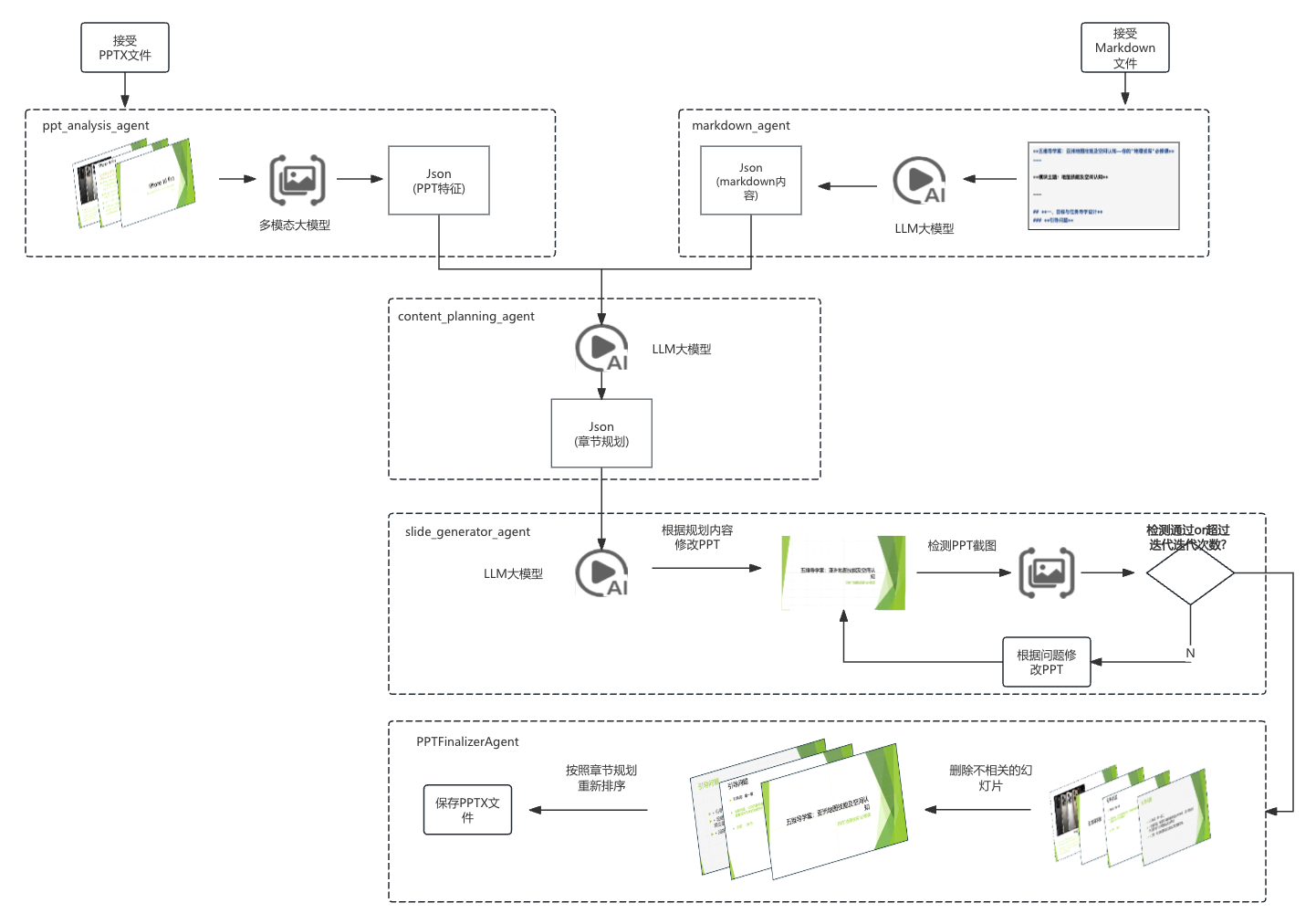
【项目实战】通过多模态+LangGraph实现PPT生成助手
PPT自动生成系统 基于LangGraph的PPT自动生成系统,可以将Markdown文档自动转换为PPT演示文稿。 功能特点 Markdown解析:自动解析Markdown文档结构PPT模板分析:分析PPT模板的布局和风格智能布局决策:匹配内容与合适的PPT布局自动…...
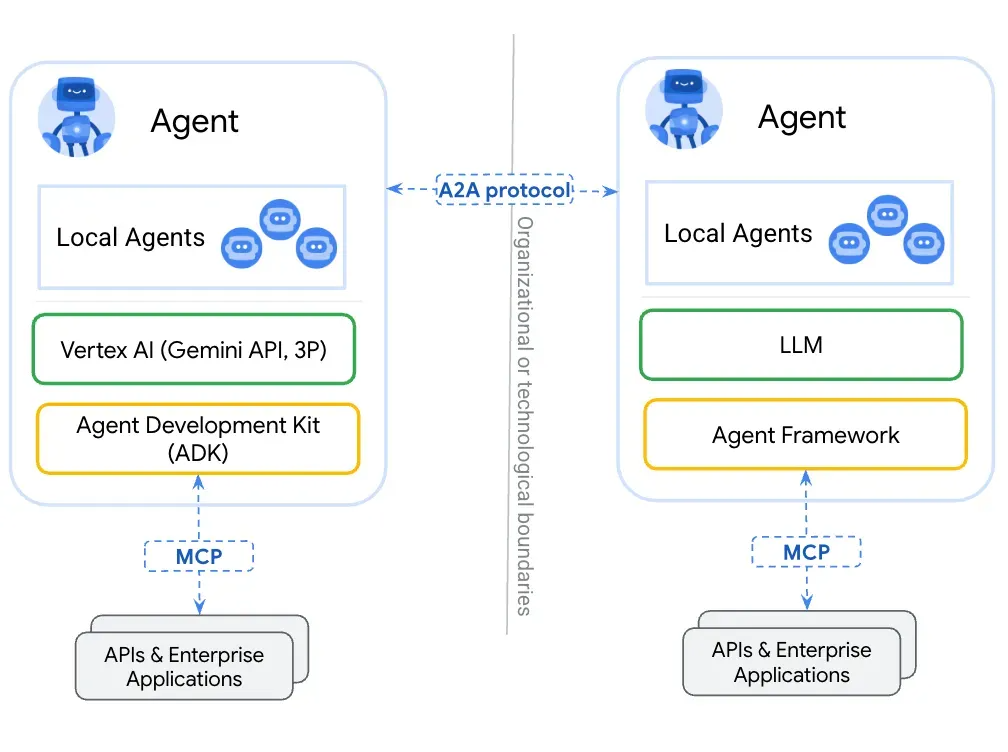
第一篇:Agent2Agent (A2A) 协议——协作式人工智能的黎明
AI 领域的快速发展正在催生一个新时代,智能代理(agents)不再是孤立的个体,而是能够像一个数字团队一样协作。然而,当前 AI 生态系统的碎片化阻碍了这一愿景的实现,导致了“AI 巴别塔问题”——不同代理之间…...

Spring Boot+Neo4j知识图谱实战:3步搭建智能关系网络!
一、引言 在数据驱动的背景下,知识图谱凭借其高效的信息组织能力,正逐步成为各行业应用的关键技术。本文聚焦 Spring Boot与Neo4j图数据库的技术结合,探讨知识图谱开发的实现细节,帮助读者掌握该技术栈在实际项目中的落地方法。 …...
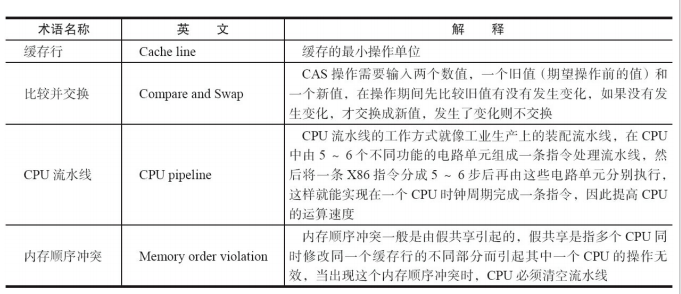
JUC笔记(上)-复习 涉及死锁 volatile synchronized CAS 原子操作
一、上下文切换 即使单核CPU也可以进行多线程执行代码,CPU会给每个线程分配CPU时间片来实现这个机制。时间片非常短,所以CPU会不断地切换线程执行,从而让我们感觉多个线程是同时执行的。时间片一般是十几毫秒(ms)。通过时间片分配算法执行。…...
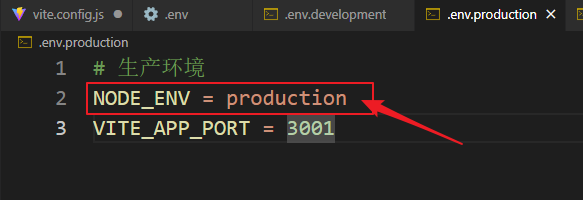
vue3+vite项目中使用.env文件环境变量方法
vue3vite项目中使用.env文件环境变量方法 .env文件作用命名规则常用的配置项示例使用方法注意事项在vite.config.js文件中读取环境变量方法 .env文件作用 .env 文件用于定义环境变量,这些变量可以在项目中通过 import.meta.env 进行访问。Vite 会自动加载这些环境变…...

Device Mapper 机制
Device Mapper 机制详解 Device Mapper(简称 DM)是 Linux 内核中的一套通用块设备映射框架,为 LVM、加密磁盘、RAID 等提供底层支持。本文将详细介绍 Device Mapper 的原理、实现、内核配置、常用工具、操作测试流程,并配以详细的…...
如何在网页里填写 PDF 表格?
有时候,你可能希望用户能在你的网站上填写 PDF 表单。然而,这件事并不简单,因为 PDF 并不是一种原生的网页格式。虽然浏览器可以显示 PDF 文件,但原生并不支持编辑或填写它们。更糟的是,如果你想收集表单数据ÿ…...