
[DO374] Ansible 配置文件
[DO374] Ansible 配置文件
- 1. 配置文件位置
- 2. 配置文件
- 3. Ansible 配置
- 4. Ansible的Ad-hoc
- 5. Ansible 模块
- 6. playbook段落
- 7. 任务执行后续
- 8. Ansible 变量
- 8.1 ansible 变量的定义
- 8.1.1 主机变量
- 8.1.2 主机组变量
- 8.2 vars的循环
- 9. Ansible Collection
- 10. Ansible-galaxy 安装模块
- 10.1 红帽和ansible的hub配置
- 10.2 私有化hub配置
- 11. 剧本执行顺序
- 12. 判断
- 12.1 远程文件的判断
- 12.2 字符串大小写的判断
- 12.3 判断ansible版本(控制端)
- 12.4 子集
- 12.5 父集(超集)
- 12.6 判断字符串是否在集合内
- 12.7 多任务用同一条件判断
- 12.7.1 block
- 12.7.2 rescue
- 12.7.3 always
- 12.7.4 剧本退出
- 12.7.5 带有条件的退出
- 13. 循环语句
- 13.1 遍历列表
- 13.2 遍历字典
- 13.3 loop循环
- 14. 任务委派
- 15. 事实委派
- 16. 缓存事实变量
1. 配置文件位置
- 默认位置(全局)/etc/ansible/ansible.cfg
- 当前工作目录./ansible.cfg
- 当前用户家目录下的~/.ansible.cfg
- 当前系统的ANSIBLE_CONFIG环境变量
优先级顺序: 4 > 2 > 3 > 1
2. 配置文件
| 配置块 | 含义 |
|---|---|
| [defaults] | 通用配置项,配置远程用户,连接密码,文件清单位置等 |
| [inventory] | 主机清单段落,配置清单使用的插件等 |
| [privilege_escalation] | 提权配置,是否提权,提权到哪个用户 |
| [persistent_connection] | RHEL6 连接插件,现在默认ssh连接 |
| [ssh_connection] | SSH连接配置项 |
| [persistent_connection] | 持久连接配置项,连接超时时间,命令超时时间 |
| [accelerate] | 加速项,默认端口:5099 |
| [selinux] | selinux的配置项,用来配置ansible支持的文件系统驱动及lxc容器配置 |
| [colors] | 配置ansible的颜色,定义执行成功,错误输出的颜色 |
| [diff] | 打印任务执行前后的差异 |
3. Ansible 配置
如果使用普通用户进行sudo,客户端需要
# 1. add user
useradd qiu
# 2. Set a passwd to the qiu user
echo redhat | passwd --stdin qiu
# 3. Grant sudo privileges to the qiu user
vim /etc/sudoers.d/qiu
qiu ALL=(ALL) NOPASSWD:ALL
ansible.cfg 配置
[defaults]
inventory=./inventory		# 清单文件
remote_user = root			# 远程用户
ask_pass      = false		# 连接是用  密码/秘钥
[privilege_escalation]
become=True					# 是否提权
become_method=sudo			# 是否 sudo
become_user=root			# 提权到 root 用户
become_ask_pass=False		# 提权是否需要 密码
[ssh_connection]
ssh_args = -C -o ControlMaster=auto -o ControlPersist=60s # ssh 连接加速
通过命令添加
# Set passwd file.
echo "Asimov" > .ansible_pass
chmod 600 .ansible_pass
# Test whether the password can be used for connection.
ansible all -m shell -a "whoami" -u root --vault-pass-file .ansible_pass
# Create qiu user.
ansible all -m shell -u root --vault-pass-file .ansible_pass -a "useradd qiu"
# Grant a password to the qiu user.
ansible all -m shell -u root --vault-pass-file .ansible_pass -a "echo 'root123' qiu"
# Grant sudo privileges to the qiu user.
ansible all -m shell -u root --vault-pass-file .ansible_pass -a "echo 'qiu ALL=(ALL)  NOPASSWD: ALL' > /etc/sudoers.d/qiu"
# Grant access key to the qiu user.
ansible all -m shell -u root --vault-pass-file .ansible_pass -a "mkdir /home/qiu/.ssh;echo 'ssh-rsa AAAAB3NzaC1yc2EAAAADAQABAAABAQDGtUW3ismHyuCW4CDdTVOOOq6aySdtYenXFWWx7HJa4VTepkG00aaLId9ocra10hc+MB0GTJMCyabDv3i8NKdi6GDH/aOLVsp/Ewy8DEzZMBlJDCt4v2i4/wU4liw6KgEFkZs+5hnqU8d4QzldyGJ5onr+AGvFOKG68CS0BBl40Z1twf1HhCyx8k6nzD2ovlkxWRFZKPAFrtPCBVvQDkOfVFZF+lwzaSztgAjbFZ4A9jqQyUYx4kOJ5DtRef36ucdUdVQale0+8lICl7/gb142SPpYfhxe88/BJScLPRjvVNeu1TxRmoHtVazqnAoRxQYAn2MoI6AG+w6QuZf8f7aL LabGradingKey' >> /home/qiu/.ssh/authorized_keys;chmod 600 /home/qiu/.ssh/authorized_keys; chown -R qiu:qiu /home/qiu/.ssh"
# Try to use the qiu remote user to connect with ansible.
# Modify ansible.cfg and change remote_user to qiu user.
ansible all -m ping
4. Ansible的Ad-hoc
ad-hoc: ansible 临时命令,用ansible的模块来完成自动化任务,每次只能使用1个模块,来完成一个任务.因此ad-hoc称为ansible的临时命令
ad-hoc的语法:
格式: ansible 选择的主机 -m [模块] -a “模块的参数” (ansible参数)
# example
ansible all -m shell -a "whoami" -u root -k
5. Ansible 模块

模块查询方式:
ansible-doc -l: 列出当前支持的所有模块
- 命令模块:
| 模块名 | 作用 |
|---|---|
| shell | 相当于在被控端本机上执行linux指令 |
| command | 相当于在被控端本机上执行linux指令,但有4个符号除外 |,>,<,& 出现这4个符号时,command将无法执行该命令 |
| script | 将主控端的shell复制到远程并执行. |
| raw | 不支持高阶参数(chdir,creates,removes) |
chdir 执行命令前修改执行路径
creates 判断文件是否存在,如果存在就不执行后面的命令,文件不存在则执行后续命令
removes 和creates相反
当ansible省略模块时,默认使用command模块,取决于ansible.cfg配置文件中module_name = command参数.
- 文件模块
6. playbook段落
target段落:
hosts: 定义play在那些主机上运行
remote_user: 定义运行play的远程用户是哪个
gather_facts: 定义是否收集事实变量
注意: 在target中定义的参数可以是ansible.cfg中出现的,如果play中没有定义,则按ansible.cfg中的为准
vars段落: 用来定义变量,如果没有可以省略
支持在该段落中定义变量,也支持从文件中引入变量
直接定义变量:
变量名1: 值1
变量名2: 值2
tasks段落 用来定义任务,可以省略
在playbook中默认存在一个facts的任务.可以通过target中的gather_facts: false关闭
tasks:- name: 任务名称模块名称:具体参数: 参数的值
7. 任务执行后续
当需要执行完一个模块后有后续动作,可以用notify通知handlers.
当一个notify需要调用多个handler时,使用listen来关联监听.
---
- name: test notifyhosts: servera.lab.example.comgather_facts: falsetasks:- name: touch fileansible.builtin.file:path: /etc/foo.confstate: touch  notify: show debug infohandlers:- name: handler 1listen: show fileansible.builtin.debug:msg: "in 1"- name: handler 2listen: show fileansible.builtin.debug:msg: "in 2"- name: handler 3listen: show fileansible.builtin.debug:msg: "in 3"

8. Ansible 变量
8.1 ansible 变量的定义
# inventory
servera ansible_port=2222 ansible_host=192.168.31.123 ansible_user=devlop
serverb ansible_port=4422 ansible_host=192.168.31.124 ansible_user=test
| 变量 | 含义 |
|---|---|
| ansible_port | ssh端口 |
| ansible_host | 服务器ip |
| ansible_user | ssh用户 |
| ansible_connection | ssh连接类型:local,ssh,paramikko,默认ssh |
| ansible_ssh_pass | ssh 密码 |
| ansible_ssh_privite_key_file | ssh秘钥文件路径 |
| ansible_ssh_executable | ssh命令路径 |
8.1.1 主机变量
对单个主机自定义变量
[test]
serverd.lab.example.com app=apache
servere.lab.example.com app=vsftpd

8.1.2 主机组变量
对组进行定例变量
[test]
serverd.lab.example.com app=apache
servere.lab.example.com app=vsftpd
[test:vars]
zabbix_agent=yes
prometheus_agent=no

主机的vars优先级高于主机组中的vars
8.2 vars的循环
---
- name: test notifyhosts: servera.lab.example.comgather_facts: falsevars:os_version:redhat:release: '7.9'ubuntu:release: '20.04'openeuler:release: '24.03LTS'tasks:- name: print versionsdebug:msg: "{{ item.value.release }}"loop: "{{ os_version | dict2items }}"

9. Ansible Collection
- 通过红帽自动化中心获取
https://console.redhat.com/ansible/automation-hub
- 通过ansible galaxy来获取
https://galaxy.ansible.com/ui/
- 通过yaml安装
# collection.yml
collections:- name: url
执行命令进行安装
ansible-galaxy collection install -r collection.yml -p 安装的路径和位置
10. Ansible-galaxy 安装模块
10.1 红帽和ansible的hub配置
[defaults]
ask_pass=False
forks=5
inventory=./inventory
remote_user = devops
collections_path=/root/collections
[privilege_escalation]
become_method=sudo
become_user=root
become_ask_pass=False
become=true
[galaxy]
server_list=redhat_hub
[galaxy_server.redhat_hub]
url=https://console.redhat.com/api/automation-hub/content/published/
auth_url=https://sso.redhat.com/auth/realms/redhat-external/protocol/openid-connect/token
token=eyJhbGciOiJIUzUxMiIsInR5cCIgOiAiSldUIiwia2lkIiA6ICI0NzQzYTkzMC03YmJiLTRkZGQtOTgzMS00ODcxNGRlZDc0YjUifQ.eyJpYXQiOjE3MzYzMTg4MzMsImp0aSI6ImI0YjJmZTAxLWM5NWMtNDZiNS05YWE4LWRlZGQyZmE1Y2RiNCIsImlzcyI6Imh0dHBzOi8vc3NvLnJlZGhhdC5jb20vYXV0aC9yZWFsbXMvcmVkaGF0LWV4dGVybmFsIiwiYXVkIjoiaHR0cHM6Ly9zc28ucmVkaGF0LmNvbS9hdXRoL3JlYWxtcy9yZWRoYXQtZXh0ZXJuYWwiLCJzdWIiOiJmOjUyOGQ3NmZmLWY3MDgtNDNlZC04Y2Q1LWZlMTZmNGZlMGNlNjoxMzkxNzA5OTMyMkAxMzkuY29tIiwidHlwIjoiT2ZmbGluZSIsImF6cCI6ImNsb3VkLXNlcnZpY2VzIiwibm9uY2UiOiIwYzYyMDFkZS03MmE4LTRhNDEtOTE3My1mOGMwNzgxYjBmNzQiLCJzaWQiOiJiZTA0ZTk1Zi1iZjViLTRhZTgtOGJhMS05MjBjMzk5NjQxZGYiLCJzY29wZSI6Im9wZW5pZCBiYXNpYyBhcGkuaWFtLnNlcnZpY2VfYWNjb3VudHMgcm9sZXMgd2ViLW9yaWdpbnMgY2xpZW50X3R5cGUucHJlX2tjMjUgb2ZmbGluZV9hY2Nlc3MifQ.QdBlhVTGUj0Z0IsAkSRXM5yR2FfnY8k0Sczj5xVUjaKCiTJ-lCk08dUP2Omcndk6oQ0LYPXDzWL7v4f9423trg

测试安装ansible.posix
ansible-galaxy collection install ansible.posix

确认安装完成
[root@foundation0 ansible]# ls /root/collections/ansible_collections/ansible
posix
添加ansible仓库
[galaxy]
# 下行追加ansible_hub定义
server_list=redhat_hub,ansible_hub
[galaxy_server.redhat_hub]
url=https://console.redhat.com/api/automation-hub/content/published/
auth_url=https://sso.redhat.com/auth/realms/redhat-external/protocol/openid-connect/token
token=eyJhbGciOiJIUzUxMiIsInR5cCIgOiAiSldUIiwia2lkIiA6ICI0NzQzYTkzMC03YmJiLTRkZGQtOTgzMS00ODcxNGRlZDc0YjUifQ.eyJpYXQiOjE3MzYzMTg4MzMsImp0aSI6ImI0YjJmZTAxLWM5NWMtNDZiNS05YWE4LWRlZGQyZmE1Y2RiNCIsImlzcyI6Imh0dHBzOi8vc3NvLnJlZGhhdC5jb20vYXV0aC9yZWFsbXMvcmVkaGF0LWV4dGVybmFsIiwiYXVkIjoiaHR0cHM6Ly9zc28ucmVkaGF0LmNvbS9hdXRoL3JlYWxtcy9yZWRoYXQtZXh0ZXJuYWwiLCJzdWIiOiJmOjUyOGQ3NmZmLWY3MDgtNDNlZC04Y2Q1LWZlMTZmNGZlMGNlNjoxMzkxNzA5OTMyMkAxMzkuY29tIiwidHlwIjoiT2ZmbGluZSIsImF6cCI6ImNsb3VkLXNlcnZpY2VzIiwibm9uY2UiOiIwYzYyMDFkZS03MmE4LTRhNDEtOTE3My1mOGMwNzgxYjBmNzQiLCJzaWQiOiJiZTA0ZTk1Zi1iZjViLTRhZTgtOGJhMS05MjBjMzk5NjQxZGYiLCJzY29wZSI6Im9wZW5pZCBiYXNpYyBhcGkuaWFtLnNlcnZpY2VfYWNjb3VudHMgcm9sZXMgd2ViLW9yaWdpbnMgY2xpZW50X3R5cGUucHJlX2tjMjUgb2ZmbGluZV9hY2Nlc3MifQ.QdBlhVTGUj0Z0IsAkSRXM5yR2FfnY8k0Sczj5xVUjaKCiTJ-lCk08dUP2Omcndk6oQ0LYPXDzWL7v4f9423trg
# 添加以下2行
[galaxy_server.ansible_hub]
url=galaxy.ansible.com
安装一个vmware.vmware的插件
ansible-galaxy collection install vmware.vmware
安装结束后可以看到在/root/collections/ansible_collections/创建了vmware的子目录,我们下载的新插件就安装在这个位置

10.2 私有化hub配置
复制仓库配置

[galaxy]
server_list = community_repo[galaxy_server.community_repo]
url=https://hub.lab.example.com/api/galaxy/content/community/
token=<put your token here>
生成token

修改后的ansible.cfg文件内容
[defaults]
collections_path=/home/student/collection/plugin
[galaxy]
server_list = community_repo
[galaxy_server.community_repo]
url=https://hub.lab.example.com/api/galaxy/content/community/
token=9e266577135f4a42c8612d4bb06a9dcbdb394cdc
创建galaxy collection的路径
mkdir -p /home/student/collection/plugin
安装一个community库的试一下


复制以下命令在命令行执行


11. 剧本执行顺序
- pre_tasks
- pre_tasks中的handler
- roles
- tasks
- roles中的handler
- post_tasks
- post_tasks中的handler
- pre roles和tasks post
12. 判断
12.1 远程文件的判断
---
- name: Is the file in serverahosts: servera.lab.example.comgather_facts: falsetasks:- name: get file statusfile:name: /etc/hostsstate: fileregister: get_file- name: get filedebug:msg: "The file is exists"when: get_file.state == "file"
12.2 字符串大小写的判断
---
- name: Is the file in serverahosts: servera.lab.example.comgather_facts: falsevars:uppercase: REDHATlowercase: redhattasks:- name: Uppercase outputdebug:msg: "It's Uppercase!"when: uppercase is upper- name: Lowercase outputdebug:msg: "It's Lowercase!"when: lowercase is lower
12.3 判断ansible版本(控制端)
---
- name: Is the file in serverahosts: servera.lab.example.comgather_facts: falsetasks:- name: Operating Versiondebug:msg: "The playbook can run."when: ansible_version.full is version("2.8","gt")
12.4 子集
---
- name: Is the file in serverahosts: servera.lab.example.comgather_facts: falsevars:os_type:- rhel- fedora- centos- ubuntu- openeulerredhat:- rhel- fedora- centostasks:- name: Subsetdebug:msg: "It's subset"when: redhat is subset(os_type)

12.5 父集(超集)
---
- name: Is the file in serverahosts: servera.lab.example.comgather_facts: falsevars:os_type:- rhel- fedora- centos- ubuntu- openeulerredhat:- rhel- fedora- centostasks:- name: SuperSetdebug:msg: "It's superset"when: os_type is superset(redhat)

12.6 判断字符串是否在集合内
---
- name: Is the file in serverahosts: servera.lab.example.comgather_facts: falsevars:os_type:- rhel- fedora- centos- ubuntu- openeulerredhat:- rhel- fedora- centoscentos: centostasks:- name: SuperSetdebug:msg: "It's in superset"when: centos in redhat

12.7 多任务用同一条件判断
12.7.1 block
block: 将多个任务包含在一个区块内,进行判断.
---
- name: block message testhosts: allgather_facts: truetasks:- name: in blockblock:- name: debug1debug:msg: "msg 1"- name: debug2debug:msg: "msg 2"- name: debug3debug:msg: "msg 3"- name: debug4debug:msg: "msg 4"- name: display hostnamedebug:var: ansible_hostnamewhen: ansible_hostname == "servera"
这样就不需要在每个模块下面都加一个重复的
when: ansible_hostname == "servera"

12.7.2 rescue
rescue是用来处理block失败的后续手段.
---
- name: block message testhosts: allgather_facts: truetasks:- name: in blockblock:- name: get filefile:name: /opt/rh374.txtstate: filerescue:- name: touch filefile:name: /opt/rh374.txtstate: touch
当block内容执行错误后,rescue的修复任务被触发.如果block执行正常,那么rescue内容不会被执行.

当第二次再次执行,修复任务不在被执行

12.7.3 always
无论如何这个命令都会被执行
---
- name: block message testhosts: allgather_facts: truetasks:- name: in blockblock:- name: get filefile:name: /opt/rh374.txtstate: filerescue:- name: touch filefile:name: /opt/rh374.txtstate: touchalways:- name: show the filename rh374.txtfile:name: /opt/rh374.txtstate: file

12.7.4 剧本退出
---
- name: block message testhosts: servera.lab.example.comgather_facts: truetasks:- name: get filefile:name: /etc/hostsstate: file- name: exit playbookfail:msg: "exit playbook"- name: output messagedebug:msg: "I am running"
当执行到fail段落时候就直接退出了,后续任务不会再被执行

判断ansible版本是否高于2.9,如果太低那么就不执行
---
- name: block message testhosts: servera.lab.example.comgather_facts: truetasks:- name: output messagedebug:msg: "{{ ansible_version.full }}"- name: optput ansible versionfail:msg: "The ansible version is lower than 2.9,you must update the ansible version."when: ansible_version.full is version("2.9","lt")- name: install applicationsdebug:msg: "install apps....."

12.7.5 带有条件的退出
当条件触发,则退出
---
- name: block message testhosts: servera.lab.example.comgather_facts: truetasks:- name: Determine the ansible version,then install applicationsdebug:msg: "Install apps....."failed_when: ansible_version.full is version("2.9","lt")
改为failed_when之后可以将2-3个task合并成一个

13. 循环语句
13.1 遍历列表
在ansible中有很多循环场景需要批量安装或者授权.
---
- name: loop hosts: servera.lab.example.comgather_facts: truevars:user_list:- tom- bob- andy- tony- tedtasks:- name: Add usersuser:name: "{{ item }}"state: presentwith_items: "{{ user_list }}"

13.2 遍历字典
---
- name: loop hosts: servera.lab.example.comgather_facts: truevars:user_list:ituser1:name: tomuid: 3000home: /home/tomituser2:name: jarryuid: 3001home: /home/jarrytasks:- name: Add users#debug:#  msg:  "{{ item.value.name }} {{ item.value.uid }} {{ item.value.home }}"#msg:  "{{ item.value.name }}"user:name: "{{ item.value.name }}"uid: "{{ item.value.uid }}"comment: "{{ item.value.name }}"home: "{{ item.value.home }}"with_dict: "{{ user_list }}"
到servera上确认两个用户正常创建

13.3 loop循环
loop本身是循环列表,可以通过loop dict2items来循环字典.将字典转换成列表.
---
- name: loop hosts: servera.lab.example.comgather_facts: truevars:user_list:ituser1:name: tomuid: 3000home: /home/tomituser2:name: jarryuid: 3001home: /home/jarrytasks:- name: Add usersdebug:msg:  "{{ item.value.name }} {{ item.value.uid }} {{ item.value.home }}"loop: "{{ user_list |dict2items }}"

14. 任务委派
delegate_to 可以将任务交给其他服务器执行,此服务器甚至可以不在inventory中
---
- name: delegate to pluginghosts:  servera,serverbgather_facts: truetasks:- name: Delegate the playbook to serverc.block:- name: Install Apacheyum:name: httpdstate: present- name: Make sure a service unit is runningansible.builtin.systemd:state: startedname: httpdenabled: yes- name: Make sure a service unit is stoppingansible.builtin.systemd:state: stoppedname: firewalldenabled: yes- name: Create the index filecopy:dest: /var/www/html/index.htmlcontent: "In serverc"delegate_to: serverc - name: Download the fileansible.builtin.get_url:url: http://serverc/index.htmldest: /root/aaa.html
将整个block中内容由servera和serverb调度给serverc,在serverc完成了调度后,servera和serverb再从serverc上获取到该文件

15. 事实委派
主要作用就是在服务器之间的参数传递
一般delegate_facts和delegate_to 会同时出现
---
- name: Delegate factshosts: servera,serverbgather_facts: notasks:- name: get servera factssetup:delegate_facts: truedelegate_to: serverb- name: set ip infocopy:dest: /opt/ipaddress.txtcontent: "{{ hostvars['serverb'].ansible_eth0.ipv4.address }}"

16. 缓存事实变量
缓存事实变量目的: 为了加速playbook的执行加速,不必每次运行playbook都要进行实时变量的收集.
常见有3种缓存方式:
- jsonfile
- memcache
- redis
开启缓存方式:
在ansible.cfg中[defaults]段落中gathering= 进行设置
| 参数 | 含义 |
|---|---|
| smart | 智能收集,如果本地有缓存则使用缓存,如果本地没有缓存则收集事实变量并缓存. |
| implicit | 一直收集事实变量(默认) |
| explict | 从来不收集,除非在playbook中指定gather_facts=true |
smart开启后需要指定以下参数:
| 参数 | 值 | 含义 |
|---|---|---|
| fact_caching= | jsonfile/memcached/redis三选一 | 以哪种格式缓存 |
| fact_cacheing_connection | ./facts_cache/ | jsonfile需要指定事实变量缓存的位置 |
| fact_caching_timeout | 86400 (一天) | 当缓存失效后,重新开始缓存 |
memcache配置参数:
| 参数 | 值 | 含义 |
|---|---|---|
| fact_caching | memcached | 使用memcache来做缓存 |
| fact_caching_connection | 127.0.0.1:11211 | memcache的地址 |
相关文章:
[DO374] Ansible 配置文件
[DO374] Ansible 配置文件 1. 配置文件位置2. 配置文件3. Ansible 配置4. Ansible的Ad-hoc5. Ansible 模块6. playbook段落7. 任务执行后续8. Ansible 变量8.1 ansible 变量的定义8.1.1 主机变量8.1.2 主机组变量 8.2 vars的循环 9. Ansible Collection10. Ansible-galaxy 安装…...

【杂谈】-50+个生成式人工智能面试问题(四)
7、生成式AI面试问题与微调相关 Q23. LLMs中的微调是什么? 答案:虽然预训练语言模型非常强大,但它们并不是任何特定任务的专家。它们可能对语言有惊人的理解能力,但仍需要一些LLMs微调过程,开发者通过这个过程提升它…...

RuoYi Cloud项目解读【四、项目配置与启动】
四、项目配置与启动 当上面环境全部准备好之后,接下来就是项目配置。需要将项目相关配置修改成当前相关环境。 1 后端配置 1.1 数据库 创建数据库ry-cloud并导入数据脚本ry_2024xxxx.sql(必须),quartz.sql(可选&…...

51c~Pytorch~合集5
我自己的原文哦~ https://blog.51cto.com/whaosoft/13059544 一、PyTorch DDP 正在郁闷呢 jetson nx 的torchvision安装~~ 自带就剩5g 想弄到ssd 项目中的 venv中又 cuda.h没有... 明明已经装好什么都对 算了说今天主题 啊对 还是搬运啊 学习之工具人而已 勿怪 Distrib…...

【芯片封测学习专栏 -- 什么是 Chiplet 技术】
请阅读【嵌入式开发学习必备专栏 Cache | MMU | AMBA BUS | CoreSight | Trace32 | CoreLink | ARM GCC | CSH】 文章目录 OverviewChiplet 背景UCIeChiplet 的挑战 Overview Chiplet 又称为小芯片。该技术通过将大型SoC划分为更小的芯片,使得每个部分都能采用不同…...
)
Java SpringBoot + Vue + Uniapp 集成JustAuth 最快实现多端三方登录!(QQ登录、微信登录、支付宝登录……)
注:本文基于 若依 集成just-auth实现第三方授权登录 修改完善,所有步骤仅代表本人如下环境亲测可用,其他环境需自辩或联系查看原因! 系统环境 运行系统:Windows10专业版、Linux Centos7.6 Java 版本:1.8.0_…...

支持向量回归(SVR:Support Vector Regression)用于A股数据分析、预测
简单说明 支持向量回归是一种用来做预测的数学方法,属于「机器学习」的一种。 它的目标是找到一条「最合适的线」,能够大致描述数据点的趋势,并允许数据点离这条线有一定的误差(不要求所有点都完全落在这条线上)。 可以把它想象成:找到一条「宽带」或「隧道」,大部分…...

ZYNQ初识10(zynq_7010)UART通信实验
基于bi站正点原子讲解视频: 系统框图(基于串口的数据回环)如下: 以下,是串口接收端的波形图,系统时钟和波特率时钟不同,为异步时钟,,需要先延时两拍,将时钟同…...

专题 - STM32
基础 基础知识 STM所有产品线(列举型号): STM产品的3内核架构(列举ARM芯片架构): STM32的3开发方式: STM32的5开发工具和套件: 若要在电脑上直接硬件级调试STM32设备,则…...

2 XDMA IP中断
三种中断 1. Legacy 定义:Legacy 中断是传统的中断处理方式,使用物理中断线(例如 IRQ)来传递中断信号。缺点: 中断线数量有限,通常为 16 条,限制了可连接设备的数量。中断处理可能会导致中断风…...
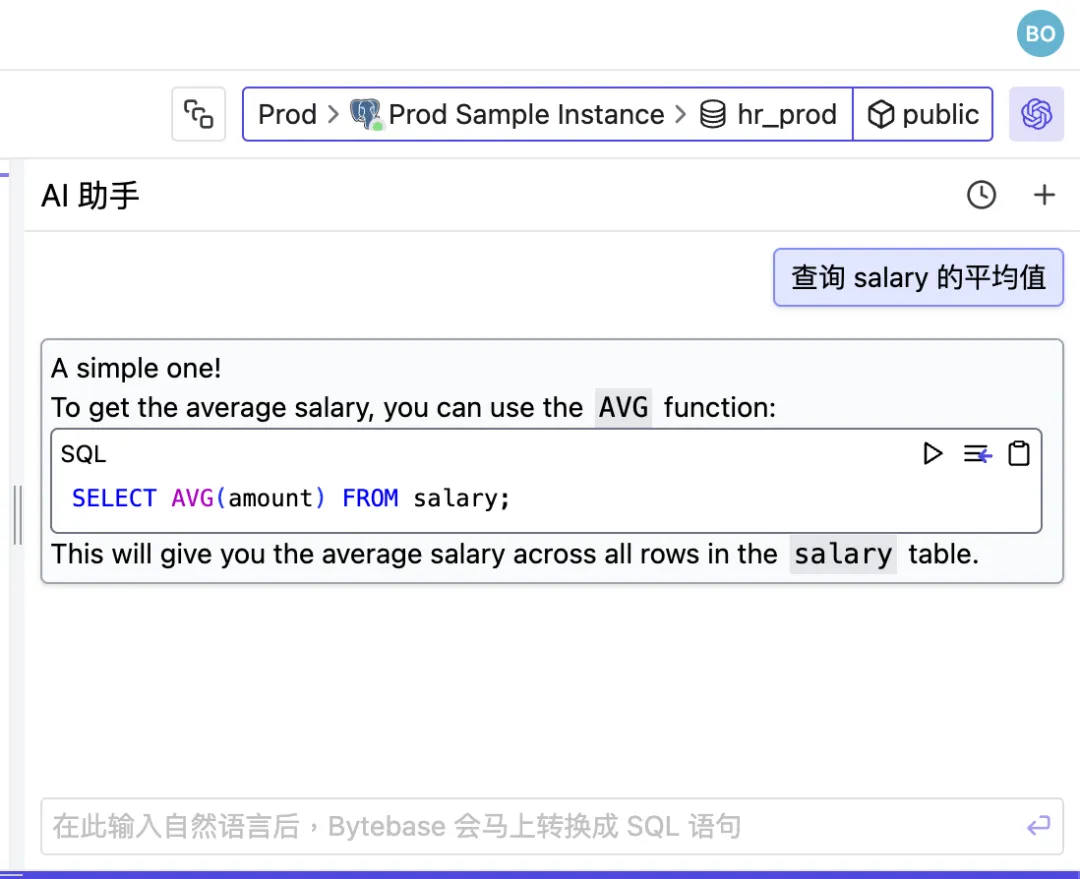
自然语言转 SQL:通过 One API 将 llama3 模型部署在 Bytebase SQL 编辑器
使用 Open AI 兼容的 API,可以在 Bytebase SQL 编辑器中使用自然语言查询数据库。 出于数据安全的考虑,私有部署大语言模型是一个较好的选择 – 本文选择功能强大的开源模型 llama3。 由于 OpenAI 默认阻止出站流量,为了简化网络配置&#…...

抖音矩阵是什么
抖音矩阵是指在同一品牌或个人IP下,通过创建多个不同定位的抖音账号(如主号、副号、子号等),形成一个有机的整体,以实现多维度、多层次的内容覆盖和用户互动。以下是关于抖音矩阵的详细介绍: 抖音矩阵的类…...

怎么抓取ios 移动app的https请求?
怎么抓取IOS应用程序里面的https? 这个涉及到2个问题 1.电脑怎么抓到IOS手机流量? 2.HTTPS怎么解密? 部分app可以使用代理抓包的方式,但是正式点的app用代理抓包是抓不到的,例如pin检测,证书双向校验等…...

pyqt鸟瞰
QApplication是Qt框架中的一个类,专门用于管理基于QWidget的图形用户界面(GUI)应用程序的控制流和主要设置。QApplication类继承自QGuiApplication,提供了许多与GUI相关的功能,如窗口系统集成、事件处理等。 QAppli…...
【Docker】入门教程
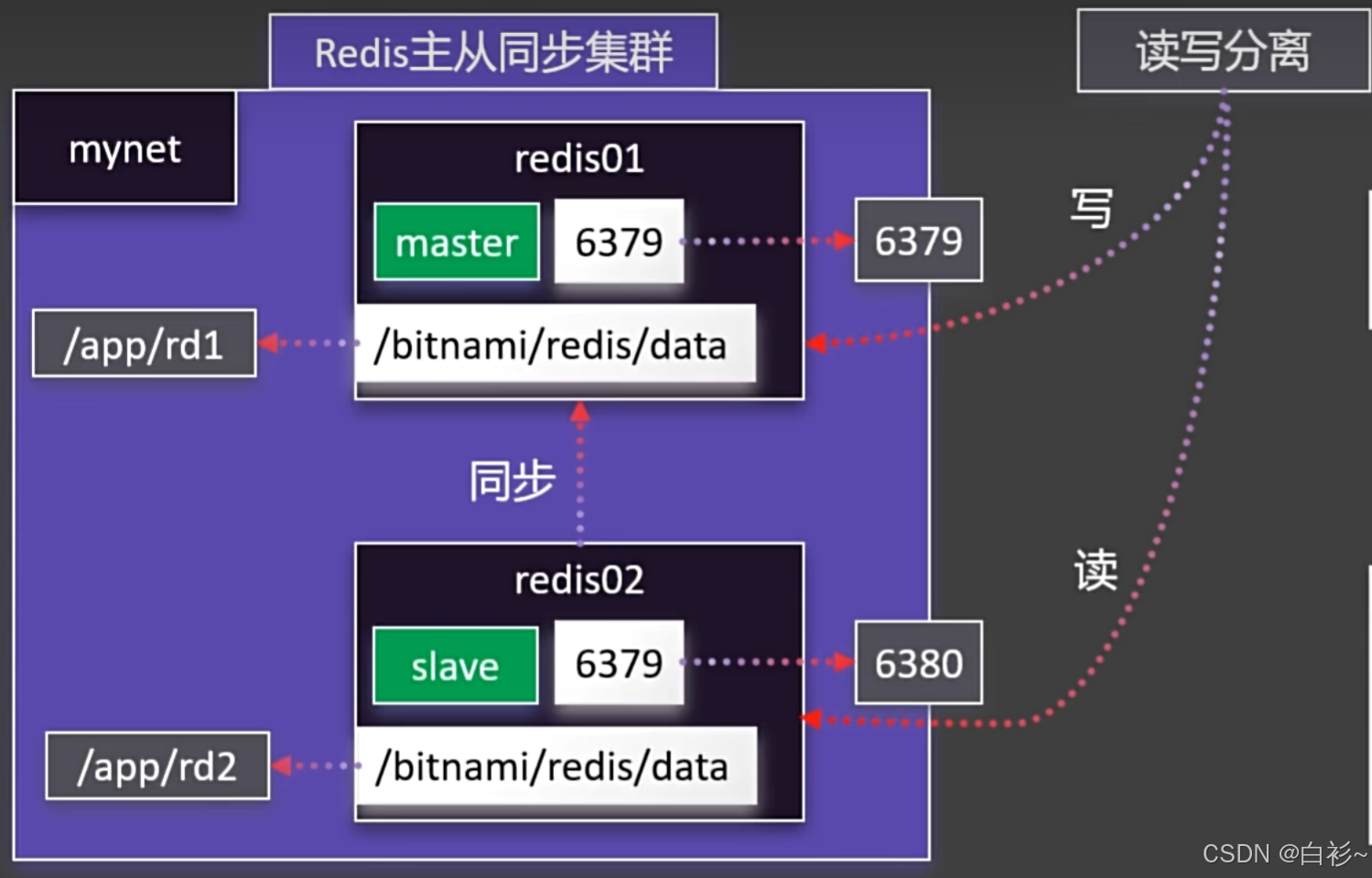
目录 一、Docker的安装 二、Docker的命令 Docker命令实验 1.下载镜像 2.启动容器 3.修改页面 4.保存镜像 5.分享社区 三、Docker存储 1.目录挂载 2.卷映射 四、Docker网络 1.容器间相互访问 2.Redis主从同步集群 3.启动MySQL 五、Docker Compose 1.命令式安装 …...

Token和JWT的关系详细讲解
Token 和 JSON Web Token (JWT) 是两个相关但概念上不同的术语,它们在现代 Web 应用程序的身份验证和授权中扮演着重要角色。下面将详细介绍两者之间的关系以及 JWT 的具体工作原理。 1. Token 概述 Token 是一种广义的概念,指的是任何可以证明用户身份…...

【Linux系列】Curl 参数详解与实践应用
💝💝💝欢迎来到我的博客,很高兴能够在这里和您见面!希望您在这里可以感受到一份轻松愉快的氛围,不仅可以获得有趣的内容和知识,也可以畅所欲言、分享您的想法和见解。 推荐:kwan 的首页,持续学…...

解决 Git SSL 连接错误:OpenSSL SSL_read: SSL_ERROR_SYSCALL, errno
问题描述 在执行 git pull 命令时遇到以下错误: > git pull --tags origin main fatal: unable to access github仓库: OpenSSL SSL_read: SSL_ERROR_SYSCALL, errno 0这个错误通常表示 Git 在尝试通过 HTTPS 连接到 GitHub 时遇到了 SSL 连接问题。 解决方案…...

《Vue3 八》<script setup> 语法
<script setup> 是在单文件中使用 Composition API 的编译时语法糖,里面的代码会被编译成组件 setup() 函数的内容。 <script setup> 中的代码在每次组件实例被创建的时候都都会被执行。 定义数据: 在 <script setup> 语法糖的写法中…...

51单片机和STM32集成蓝牙模块实用指南
51单片机和STM32集成蓝牙模块实用指南 蓝牙模块(如HC-05、HC-06、JDY-31等)是嵌入式开发中常用的无线通信模块,广泛应用于智能家居、物联网、机器人等领域。本文将详细介绍如何将蓝牙模块集成到 51单片机 和 STM32 中,并提供一个…...
练习(含atoi的模拟实现,自定义类型等练习)
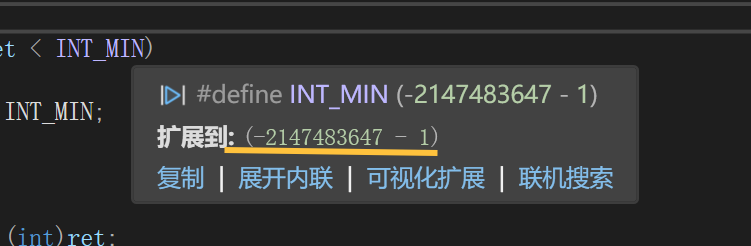
一、结构体大小的计算及位段 (结构体大小计算及位段 详解请看:自定义类型:结构体进阶-CSDN博客) 1.在32位系统环境,编译选项为4字节对齐,那么sizeof(A)和sizeof(B)是多少? #pragma pack(4)st…...
3.3.1_1 检错编码(奇偶校验码)
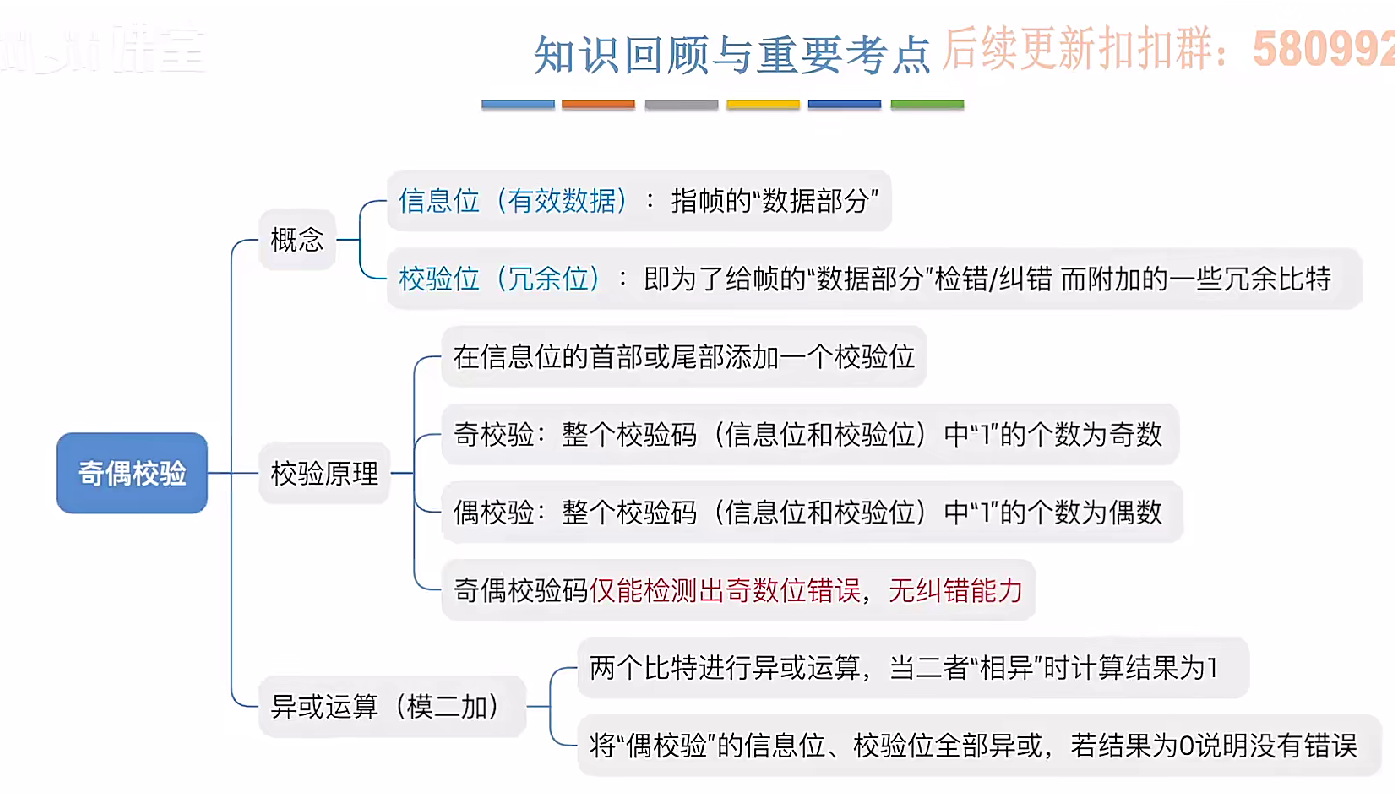
从这节课开始,我们会探讨数据链路层的差错控制功能,差错控制功能的主要目标是要发现并且解决一个帧内部的位错误,我们需要使用特殊的编码技术去发现帧内部的位错误,当我们发现位错误之后,通常来说有两种解决方案。第一…...

在rocky linux 9.5上在线安装 docker
前面是指南,后面是日志 sudo dnf config-manager --add-repo https://download.docker.com/linux/centos/docker-ce.repo sudo dnf install docker-ce docker-ce-cli containerd.io -y docker version sudo systemctl start docker sudo systemctl status docker …...

Swift 协议扩展精进之路:解决 CoreData 托管实体子类的类型不匹配问题(下)
概述 在 Swift 开发语言中,各位秃头小码农们可以充分利用语法本身所带来的便利去劈荆斩棘。我们还可以恣意利用泛型、协议关联类型和协议扩展来进一步简化和优化我们复杂的代码需求。 不过,在涉及到多个子类派生于基类进行多态模拟的场景下,…...
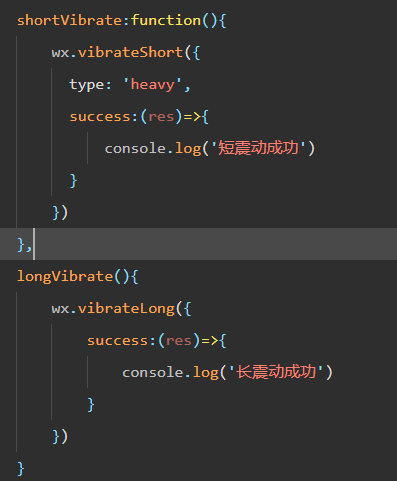
微信小程序 - 手机震动
一、界面 <button type"primary" bindtap"shortVibrate">短震动</button> <button type"primary" bindtap"longVibrate">长震动</button> 二、js逻辑代码 注:文档 https://developers.weixin.qq…...

A2A JS SDK 完整教程:快速入门指南
目录 什么是 A2A JS SDK?A2A JS 安装与设置A2A JS 核心概念创建你的第一个 A2A JS 代理A2A JS 服务端开发A2A JS 客户端使用A2A JS 高级特性A2A JS 最佳实践A2A JS 故障排除 什么是 A2A JS SDK? A2A JS SDK 是一个专为 JavaScript/TypeScript 开发者设计的强大库ÿ…...

JavaScript 数据类型详解
JavaScript 数据类型详解 JavaScript 数据类型分为 原始类型(Primitive) 和 对象类型(Object) 两大类,共 8 种(ES11): 一、原始类型(7种) 1. undefined 定…...

Cilium动手实验室: 精通之旅---13.Cilium LoadBalancer IPAM and L2 Service Announcement
Cilium动手实验室: 精通之旅---13.Cilium LoadBalancer IPAM and L2 Service Announcement 1. LAB环境2. L2公告策略2.1 部署Death Star2.2 访问服务2.3 部署L2公告策略2.4 服务宣告 3. 可视化 ARP 流量3.1 部署新服务3.2 准备可视化3.3 再次请求 4. 自动IPAM4.1 IPAM Pool4.2 …...
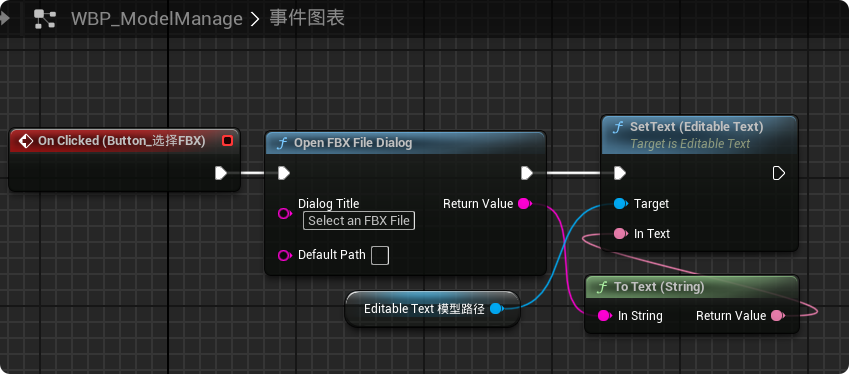
【UE5 C++】通过文件对话框获取选择文件的路径
目录 效果 步骤 源码 效果 步骤 1. 在“xxx.Build.cs”中添加需要使用的模块 ,这里主要使用“DesktopPlatform”模块 2. 添加后闭UE编辑器,右键点击 .uproject 文件,选择 "Generate Visual Studio project files",重…...
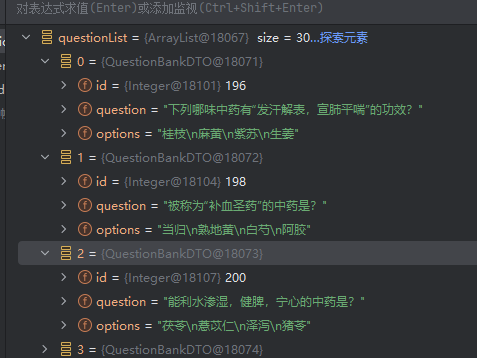
jdbc查询mysql数据库时,出现id顺序错误的情况
我在repository中的查询语句如下所示,即传入一个List<intager>的数据,返回这些id的问题列表。但是由于数据库查询时ID列表的顺序与预期不一致,会导致返回的id是从小到大排列的,但我不希望这样。 Query("SELECT NEW com…...