
界面控件Telerik UI for WinForms使用指南 - 数据绑定 填充(二)
Telerik UI for WinForms拥有适用Windows Forms的110多个令人惊叹的UI控件,所有的UI for WinForms控件都具有完整的主题支持,可以轻松地帮助开发人员在桌面和平板电脑应用程序提供一致美观的下一代用户体验。
Telerik UI for WinForms组件为可视化任何类型的数据提供了非常丰富的UI控件,其中RadGridView是最常用的数据组件。在上文中(点击这里回顾>>),我们主要介绍了如何绑定到DataTable、绑定到JSON、绑定到CSV等,本文继续介绍如何层次结构中的多个子选项卡、嵌套多级层次结构等。
获取Telerik UI for Winform R1 2023 SP2下载(Q技术交流:726377843)
层次结构中的多个子选项卡
每个GridViewTemplate都有一个Templates属性,用于存储其各自的子层次结构级别。因此,可以在同一层次结构级别上添加尽可能多的子模板。
现在,我们将在Products选项卡旁边添加第二个选项卡,其中包含订单:
DataTable ordersTable = new DataTable();
ordersTable.Columns.Add("OrderID", typeof(int));
ordersTable.Columns.Add("CategoryID", typeof(int));
ordersTable.Columns.Add("OrderDate", typeof(DateTime));
for (int i = 0; i < 30; i++)
{
ordersTable.Rows.Add(i, rand.Next(0, 5), DateTime.Now.AddDays(-1 * i));
}GridViewTemplate ordersLevel = new GridViewTemplate();
ordersLevel.DataSource = ordersTable;
ordersLevel.Caption = "Orders";
ordersLevel.AutoSizeColumnsMode = GridViewAutoSizeColumnsMode.Fill;
this.radGridView1.MasterTemplate.Templates.Add(ordersLevel);GridViewRelation relationOrders = new GridViewRelation(radGridView1.MasterTemplate);
relationOrders.ChildTemplate = ordersLevel;
relationOrders.RelationName = "CategoriesOrders";
relationOrders.ParentColumnNames.Add("CategoryID");
relationOrders.ChildColumnNames.Add("CategoryID");
this.radGridView1.Relations.Add(relationOrders);
嵌套多级层次结构
以类似的方式,我们将用必要的GridViewRelations定义嵌套的GridViewTemplates来构造三个层次结构:categories - product - orders。
Random rand = new Random();
DataTable categories = new DataTable();
categories.Columns.Add("CategoryID", typeof(int));
categories.Columns.Add("Title", typeof(string));
categories.Columns.Add("CreatedOn", typeof(DateTime));
for (int i = 0; i < 5; i++)
{
categories.Rows.Add(i, "Master" + i, DateTime.Now.AddDays(i));
}DataTable productsTable = new DataTable();
productsTable.Columns.Add("ProductID", typeof(int));
productsTable.Columns.Add("CategoryID", typeof(int));
productsTable.Columns.Add("Name", typeof(string));
productsTable.Columns.Add("UnitPrice", typeof(decimal));
for (int i = 0; i < 30; i++)
{
productsTable.Rows.Add(i, rand.Next(0, 5), "Product" + i, 1.25 * i);
}this.radGridView1.MasterTemplate.DataSource = categories;
this.radGridView1.MasterTemplate.AutoSizeColumnsMode = GridViewAutoSizeColumnsMode.Fill;GridViewTemplate productsLevel = new GridViewTemplate();
productsLevel.DataSource = productsTable;
productsLevel.Caption = "Products";
productsLevel.AutoSizeColumnsMode = GridViewAutoSizeColumnsMode.Fill;
this.radGridView1.MasterTemplate.Templates.Add(productsLevel);GridViewRelation relation = new GridViewRelation(radGridView1.MasterTemplate);
relation.ChildTemplate = productsLevel;
relation.RelationName = "CategoriesProducts";
relation.ParentColumnNames.Add("CategoryID");
relation.ChildColumnNames.Add("CategoryID");
this.radGridView1.Relations.Add(relation);DataTable ordersTable = new DataTable();
ordersTable.Columns.Add("OrderID", typeof(int));
ordersTable.Columns.Add("ProductID", typeof(int));
ordersTable.Columns.Add("OrderDate", typeof(DateTime));
for (int i = 0; i < 100; i++)
{
ordersTable.Rows.Add(i, rand.Next(0, 30), DateTime.Now.AddDays(-1 * i));
}GridViewTemplate ordersLevel = new GridViewTemplate();
ordersLevel.DataSource = ordersTable;
ordersLevel.Caption = "Orders";
ordersLevel.AutoSizeColumnsMode = GridViewAutoSizeColumnsMode.Fill;
productsLevel.Templates.Add(ordersLevel);GridViewRelation relationOrders = new GridViewRelation(productsLevel);
relationOrders.ChildTemplate = ordersLevel;
relationOrders.RelationName = "ProductsOrders";
relationOrders.ParentColumnNames.Add("ProductID");
relationOrders.ChildColumnNames.Add("ProductID");
this.radGridView1.Relations.Add(relationOrders);
按需加载层次
在某些情况下,不需要为所有层次级别加载整个数据,这就是所谓的按需加载功能。只有在被请求时才加载层次结构级别,例如,当用户展开父行时。
private void LoadOnDemand()
{
Random rand = new Random();
GridViewDecimalColumn idColumn = new GridViewDecimalColumn("CategoryID");
GridViewTextBoxColumn titleColumn = new GridViewTextBoxColumn("Title");
GridViewDateTimeColumn dateColumn = new GridViewDateTimeColumn("CreatedOn");
this.radGridView1.MasterTemplate.Columns.AddRange(idColumn, titleColumn, dateColumn);
this.radGridView1.MasterTemplate.AutoSizeColumnsMode = GridViewAutoSizeColumnsMode.Fill;
for (int i = 0; i < 5; i++)
{
this.radGridView1.MasterTemplate.Rows.Add(i, "Master" + i, DateTime.Now.AddDays(i));
}GridViewTemplate productsLevel = new GridViewTemplate();
productsLevel.AutoSizeColumnsMode = GridViewAutoSizeColumnsMode.Fill;
GridViewDecimalColumn productIdColumn = new GridViewDecimalColumn("ProductID");
GridViewDecimalColumn categoryIdColumn = new GridViewDecimalColumn("CategoryID");
GridViewTextBoxColumn productNameColumn = new GridViewTextBoxColumn("Name");
GridViewDecimalColumn unitPriceColumn = new GridViewDecimalColumn("UnitPrice");
productsLevel.Columns.AddRange(productIdColumn, categoryIdColumn, productNameColumn, unitPriceColumn);
this.radGridView1.MasterTemplate.Templates.Add(productsLevel);
productsLevel.HierarchyDataProvider = new GridViewEventDataProvider(productsLevel);
this.radGridView1.RowSourceNeeded += RadGridView1_RowSourceNeeded;
}private void RadGridView1_RowSourceNeeded(object sender, GridViewRowSourceNeededEventArgs e)
{
if (e.Template.HierarchyLevel==1)
{
for (int i = 0; i < 30; i++)
{
GridViewRowInfo row = e.Template.Rows.NewRow();
row.Cells["ProductID"].Value = i;
row.Cells["CategoryID"].Value = e.ParentRow.Cells["CategoryID"].Value;
row.Cells["Name"].Value = "Product" + row.Cells["CategoryID"].Value+"."+i;
row.Cells["UnitPrice"].Value = 1.25 * i;
e.SourceCollection.Add(row );
}
}
}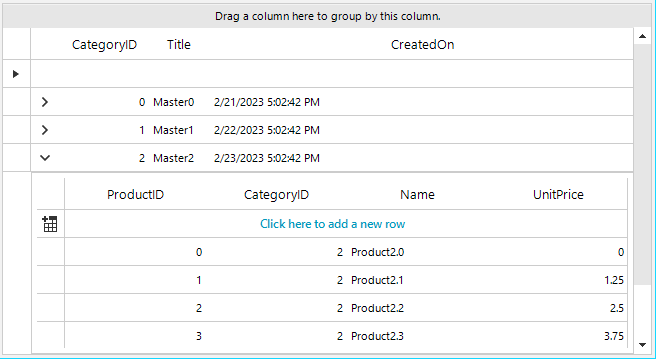
GridViewRowSourceNeededEventArgs让开发者可以访问相应的模板,因此如果您有几个层次结构级别,可以通过Template.HierarchyLevel或Caption轻松区分他们。
转换数据类型
在这篇博文的最后一部分,我们将关注一个非常微妙和重要的问题,即数据绑定和将数据记录的字段与网格列进行映射。当数据记录以与想要使用的RadGridView中相应列不兼容的特定类型存储值时,我们将向您提供如何处理这种情况的技巧。
最常见的情况是在DataSource集合中存储“YES”和“NO”,而GridViewCheckBoxColumn期望布尔值解析true/false值,考虑以下设置:
DataTable dt = new DataTable();
dt.Columns.Add("Id", typeof(int));
dt.Columns.Add("Name", typeof(string));
dt.Columns.Add("IsActive", typeof(string));
for (int i = 0; i < 20; i++)
{
dt.Rows.Add(i, "Item" + i, i % 2 == 0 ? "YES" : "NO");
}
this.radGridView1.DataSource = dt;
默认情况下,RadGridView为字符串字段生成GridViewTextBoxColumn,但是如果想用GridViewCheckBoxColumn替换默认列,则可能会丢失字段值映射,因为字符串值不能解析为布尔值。
为了处理这种情况,我们将实现一个自定义的TypeConverter类,它决定RadGridView如何识别这种类型。
public class ToggleStateConverter : TypeConverter
{
public override bool CanConvertTo(ITypeDescriptorContext context, Type destinationType)
{
return destinationType == typeof(ToggleState) || destinationType == typeof(bool);
}
public override object ConvertTo(ITypeDescriptorContext context, CultureInfo culture, object value, Type destinationType)
{
if (value is string && destinationType == typeof(ToggleState))
{
string stringValue = (string)value;
switch (stringValue)
{
case "YES":
return ToggleState.On;
case "NO":
return ToggleState.Off;
default:
return ToggleState.Indeterminate;
}
}
else if (value is bool && destinationType == typeof(char))
{
bool boolValue = (bool)value;
switch (boolValue)
{
case true:
return "YES";
case false:
return "NO";
default:
return "NO";
}
}
return base.ConvertTo(context, culture, value, destinationType);
}
public override bool CanConvertFrom(ITypeDescriptorContext context, Type sourceType)
{
return sourceType == typeof(ToggleState) || sourceType == typeof(bool);
}
public override object ConvertFrom(ITypeDescriptorContext context, CultureInfo culture, object value)
{
ToggleState state;
bool boolValue;
if (value is ToggleState)
{
state = (ToggleState)value;
switch (state)
{
case ToggleState.On:
return "YES";
case ToggleState.Off:
return "NO";
default:
return "NO";
}
}
else if (value is bool)
{
boolValue = (bool)value;
switch (boolValue)
{
case true:
return "YES";
case false:
return "NO";
default:
return "NO";
}
}
return base.ConvertFrom(context, culture, value);
}
}
现在,对列应用转换器:
DataTable dt = new DataTable();
dt.Columns.Add("Id", typeof(int));
dt.Columns.Add("Name", typeof(string));
dt.Columns.Add("IsActive", typeof(string));
for (int i = 0; i < 20; i++)
{
dt.Rows.Add(i, "Item" + i, i % 2 == 0 ? "YES" : "NO");
}
this.radGridView1.DataSource = dt;
this.radGridView1.Columns.Remove("IsActive");
GridViewCheckBoxColumn checkBoxColumn = new GridViewCheckBoxColumn("IsActive");
checkBoxColumn.FieldName = "IsActive";
checkBoxColumn.DataTypeConverter = new ToggleStateConverter();
checkBoxColumn.EditMode = EditMode.OnValueChange;
this.radGridView1.Columns.Add(checkBoxColumn);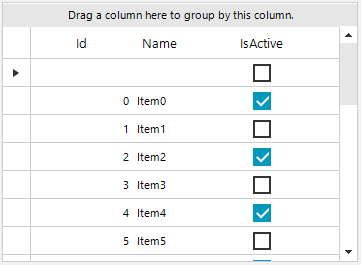
使用TypeConverter的类似方法可以应用于任何网格列,并且可以转换不同的类型。
相关文章:
界面控件Telerik UI for WinForms使用指南 - 数据绑定 填充(二)
Telerik UI for WinForms拥有适用Windows Forms的110多个令人惊叹的UI控件,所有的UI for WinForms控件都具有完整的主题支持,可以轻松地帮助开发人员在桌面和平板电脑应用程序提供一致美观的下一代用户体验。 Telerik UI for WinForms组件为可视化任何类…...

通过栈/队列/优先级队列/了解容器适配器,仿函数和反向迭代器
文章目录 一.stack二.queue三.deque(双端队列)四.优先级队列优先级队列中的仿函数手搓优先级队列 五.反向迭代器手搓反向迭代器 vector和list我们称为容器,而stack和queue却被称为容器适配器。 这和它们第二个模板参数有关系,可以…...

leetcode 704. 二分查找
题目描述解题思路执行结果 leetcode 704. 二分查找 题目描述 二分查找 给定一个 n 个元素有序的(升序)整型数组 nums 和一个目标值 target ,写一个函数搜索 nums 中的 target,如果目标值存在返回下标,否则返回 -1。 示…...

蓝牙耳机什么牌子好?500内好用的蓝牙耳机推荐
随着蓝牙耳机的受欢迎程度越来越高,近几年来,无蓝牙耳机市场呈爆发式增长,蓝牙耳机品牌也越来越多。那么蓝牙耳机什么牌子好?接下来,我来给大家推荐几款500内好用的蓝牙耳机,一起来看看吧。 一、南卡小音舱…...

设计模式 -- 中介者模式
前言 月是一轮明镜,晶莹剔透,代表着一张白纸(啥也不懂) 央是一片海洋,海乃百川,代表着一块海绵(吸纳万物) 泽是一柄利剑,千锤百炼,代表着千百锤炼(输入输出) 月央泽,学习的一种过程,从白纸->吸收各种知识->不断输入输出变成自己的内容 希望大家一起坚持这个过程,也同…...

人工智能的未来之路:语音识别的应用与挑战
随着人工智能技术的不断发展,语音识别已成为人工智能领域的一个重要应用。语音识别是指通过计算机对语音信号进行处理,将其转换为可以被计算机识别的文本或指令的过程。语音识别技术的应用范围非常广泛,例如智能家居、语音助手、智能客服、智…...

c++ 友元介绍
友元的目的就是让一个函数或类访问另一个函数中的私有成员 友元函数 (1)普通函数作为友元函数 class 类名{friend 函数返回值类型 友元函数名(形参列表);//这个形参一般是此类的对象.... } 经过以上操作后,友元函数就可以访问此类中的私有…...
四维轻云地理空间数据在线管理软件能够在线管理哪些数据?
四维轻云是一款地理空间数据在线管理软件,支持各类地理空间数据的在线管理、浏览及分享,用户可不受时间地点限制,随时随地查看各类地理空间数据。软件还具有项目管理、场景搭建、素材库等功能模块,支持在线协作管理,便…...

学习 GitHub 对我们有什么好处?
学习 GitHub 对我们有什么好处? 为什么要学习 GitHub,或者说学习 GitHub 对我们有什么好处? 理由一:GitHub 上有很多大牛出没,国外的咱先不说,就国内的像百度、腾讯、阿里之类的大公司,里面的很…...

java记录-反射
什么是反射 反射是一种让Java拥有一定动态性的机制,它允许程序在执行期间取得任何类的内部信息,并且直接操作任意对象的内部属性及方法 类加载 类加载后通过堆内存方法区的Class类型对象就能了解该类的结构信息,这个对象就像该类的一面镜子…...

这次彻底不需要账号了,无需魔法永久白嫖GPT
免费GPT 自GPT风靡以来,大家用的是不亦乐乎,你用他去解决过实际问题,你用他去写过代码,你用他去修改过bug,你用他去写过sql,你用他去画过图,你问过他你能想到的任何“刁钻”问题。 你ÿ…...
远程桌面连接是什么?如何开启远程桌面连接详细教程
远程桌面连接是一种非常方便的技术,它允许用户通过互联网在不同的计算机之间共享资源和访问数据。目前这个技术已经广泛地应用于企业、教育、医疗和其他领域,使得人们能够更高效地工作和学习。 这篇文章,我将解释远程桌面连接是什么…...
)
lua实战(2)
目录 值和类型子类型类型字符串type (v) 值和类型 Lua是一种动态类型语言。这意味着变量没有类型;只有价值观才有意义。该语言中没有类型定义。所有值都有自己的类型。 Lua中的所有值都是一等值。这意味着所有的值都可以存储在变量中,作为参数传递给其他函数&…...

UI自动化测试案例——简单的Google搜索测试
以下是一个UI自动化测试的经典案例: import unittest from selenium import webdriverclass GoogleSearchTest(unittest.TestCase):def setUp(self):# 创建Chrome浏览器实例self.driver webdriver.Chrome()self.driver.maximize_window() # 最大化浏览器窗口def t…...
C++之虚函数原理
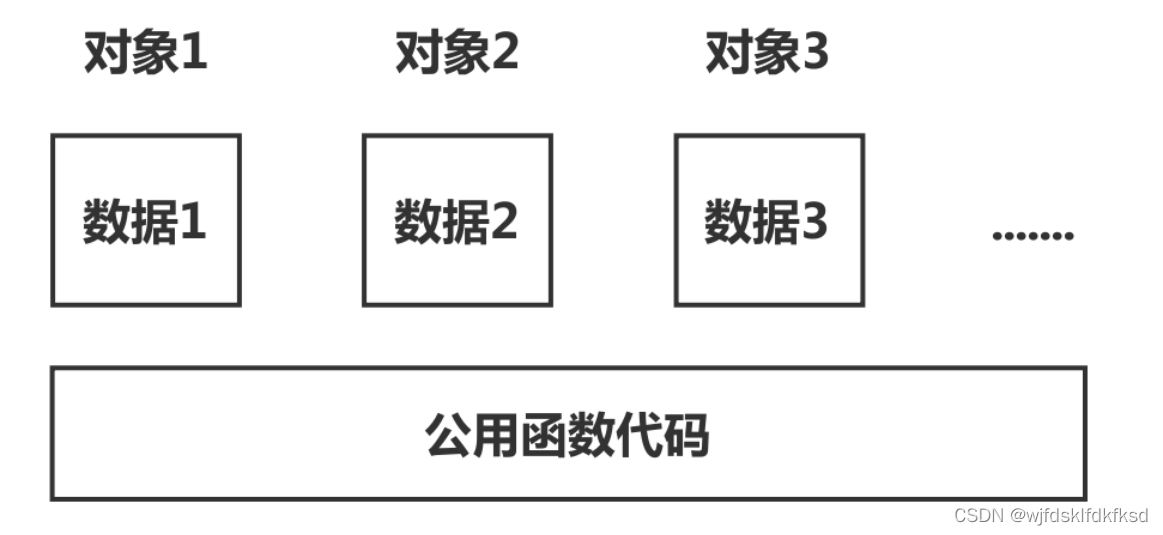
对象数据和函数的存储方式 注意说的是对象。 C中的对象存储方式是 每个对象占用的存储空间只是该对象的数据部分(虚函数指针和虚基类指针也属于数据部分),函数属于公共部分。 虚函数表 虚函数是通过虚函数表实现的。 C实现虚函数的方法是…...
部署方案)
Windows Information Protection(WIP)部署方案
目录 前言 一、方案准备工作 1、确定哪些数据需要保护 2、选择合适的加密方式...

细说Hibernate的缓存机制
Hibernate 的缓存机制主要包括一级缓存和二级缓存。 1. 一级缓存(Session 缓存): 一级缓存是 Hibernate 的 Session 级别的缓存,与每个 Session 对象相关联。当您通过 Session 对象执行查询、保存或更新操作时,Hibern…...
初识C++之线程库
目录 一、C中的线程使用 二、C的线程安全问题 1. 加锁 2. 变为原子操作 3. 递归里面的锁 4. 定时锁 5. RAII的锁 三、条件变量 1. 为什么需要条件变量 2. 条件变量的使用 2.1 条件变量的相关函数 2.2 wait函数 一、C中的线程使用 线程的概念在linux中的线程栏已经…...
ChatGLM-LLaMA-chinese-insturct 学习记录(含LoRA的源码理解)
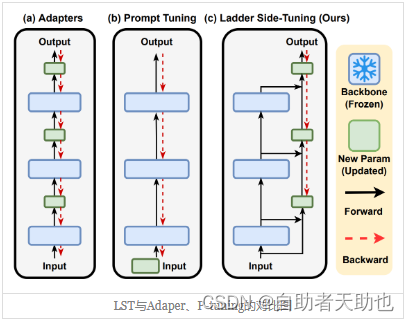
ChatGLM-LLaMA-chinese-insturct 前言一、实验记录1.1 环境配置1.2 代码理解1.2.1 LoRA 1.4 实验结果 二、总结 前言 介绍:探索中文instruct数据在ChatGLM, LLaMA等LLM上微调表现,结合PEFT等方法降低资源需求。 Github: https://github.com/27182812/Ch…...

JuiceFS-K8s部署
目录 1、部署JuiceFS-CSI驱动2、创建OBS认证信息Secret3、创建存储类4、创建PVC--PVC创建时会自动创建PV5、创建测试Pod--测试Pod创建容器内是否挂载成功 官网文档地址:https://juicefs.com/docs/zh/csi/introduction/ 1、部署JuiceFS-CSI驱动 部署yaml如下&#x…...
深度学习在微纳光子学中的应用
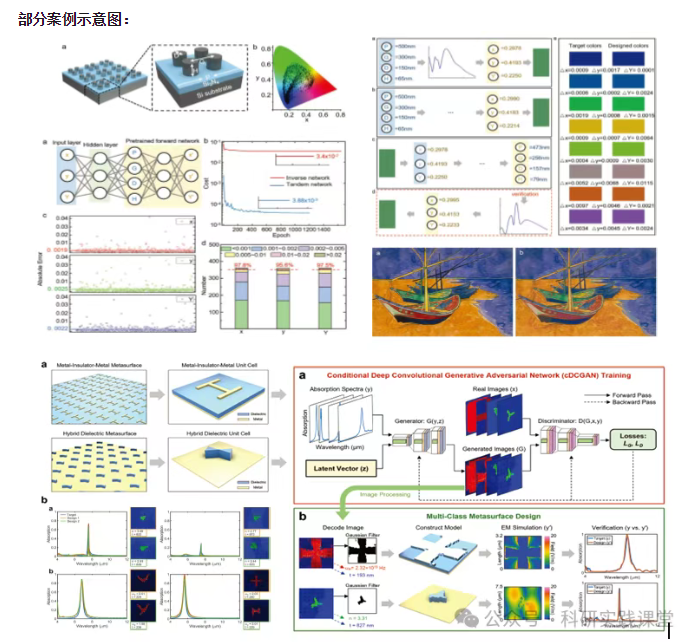
深度学习在微纳光子学中的主要应用方向 深度学习与微纳光子学的结合主要集中在以下几个方向: 逆向设计 通过神经网络快速预测微纳结构的光学响应,替代传统耗时的数值模拟方法。例如设计超表面、光子晶体等结构。 特征提取与优化 从复杂的光学数据中自…...

AI Agent与Agentic AI:原理、应用、挑战与未来展望
文章目录 一、引言二、AI Agent与Agentic AI的兴起2.1 技术契机与生态成熟2.2 Agent的定义与特征2.3 Agent的发展历程 三、AI Agent的核心技术栈解密3.1 感知模块代码示例:使用Python和OpenCV进行图像识别 3.2 认知与决策模块代码示例:使用OpenAI GPT-3进…...

大型活动交通拥堵治理的视觉算法应用
大型活动下智慧交通的视觉分析应用 一、背景与挑战 大型活动(如演唱会、马拉松赛事、高考中考等)期间,城市交通面临瞬时人流车流激增、传统摄像头模糊、交通拥堵识别滞后等问题。以演唱会为例,暖城商圈曾因观众集中离场导致周边…...
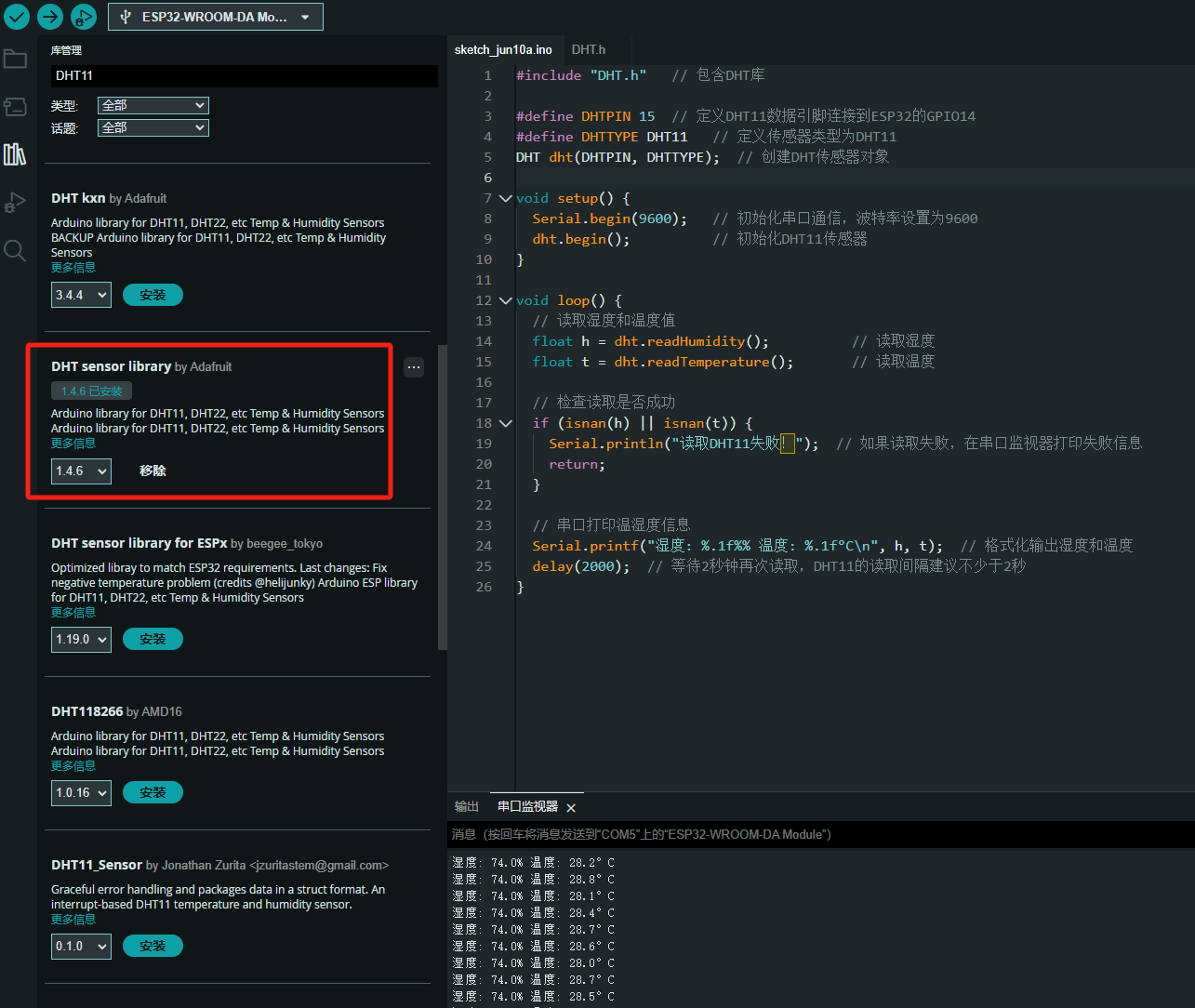
ESP32读取DHT11温湿度数据
芯片:ESP32 环境:Arduino 一、安装DHT11传感器库 红框的库,别安装错了 二、代码 注意,DATA口要连接在D15上 #include "DHT.h" // 包含DHT库#define DHTPIN 15 // 定义DHT11数据引脚连接到ESP32的GPIO15 #define D…...

实现弹窗随键盘上移居中
实现弹窗随键盘上移的核心思路 在Android中,可以通过监听键盘的显示和隐藏事件,动态调整弹窗的位置。关键点在于获取键盘高度,并计算剩余屏幕空间以重新定位弹窗。 // 在Activity或Fragment中设置键盘监听 val rootView findViewById<V…...
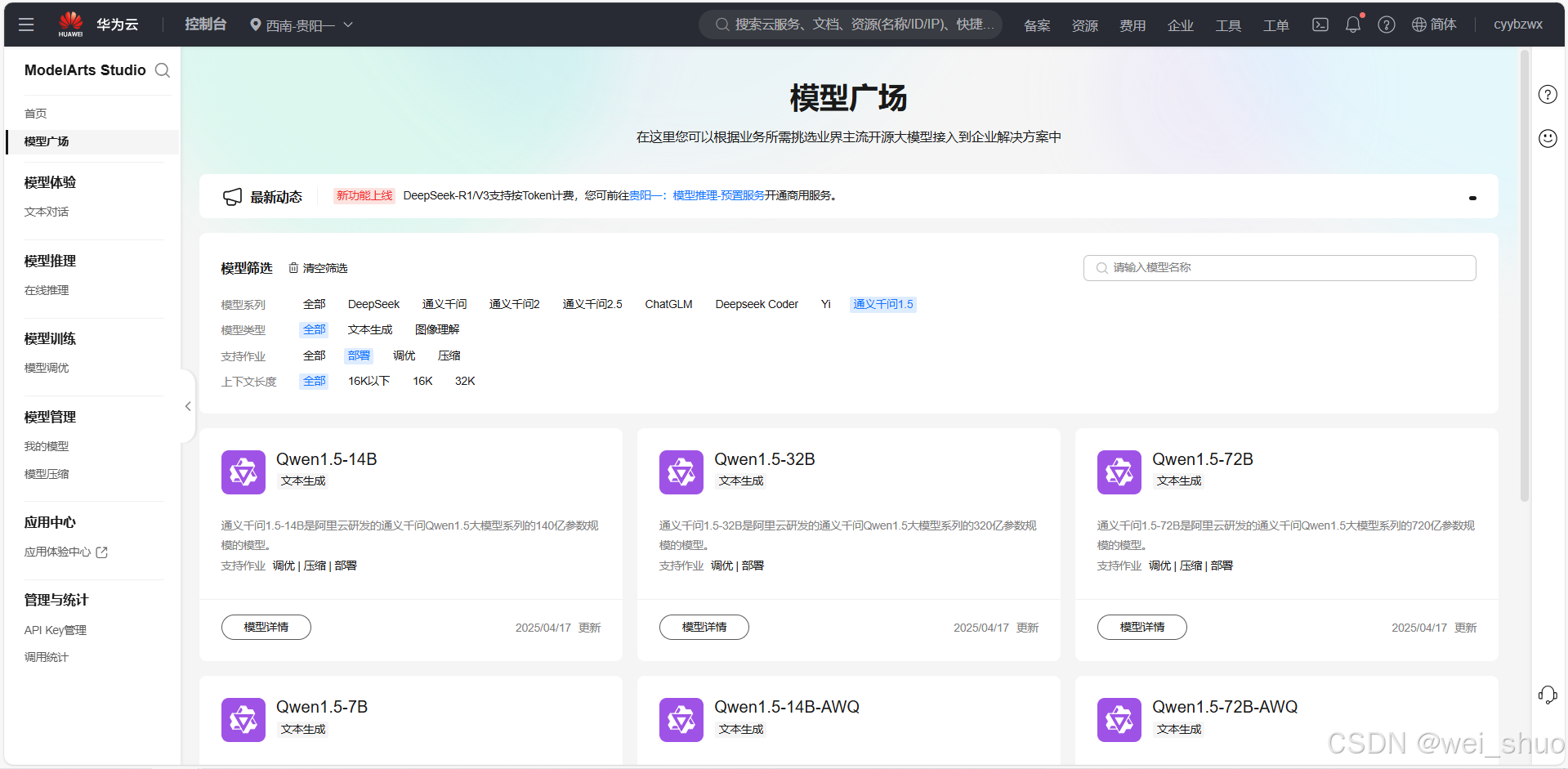
华为云Flexus+DeepSeek征文|DeepSeek-V3/R1 商用服务开通全流程与本地部署搭建
华为云FlexusDeepSeek征文|DeepSeek-V3/R1 商用服务开通全流程与本地部署搭建 前言 如今大模型其性能出色,华为云 ModelArts Studio_MaaS大模型即服务平台华为云内置了大模型,能助力我们轻松驾驭 DeepSeek-V3/R1,本文中将分享如何…...

2025年渗透测试面试题总结-腾讯[实习]科恩实验室-安全工程师(题目+回答)
安全领域各种资源,学习文档,以及工具分享、前沿信息分享、POC、EXP分享。不定期分享各种好玩的项目及好用的工具,欢迎关注。 目录 腾讯[实习]科恩实验室-安全工程师 一、网络与协议 1. TCP三次握手 2. SYN扫描原理 3. HTTPS证书机制 二…...

scikit-learn机器学习
# 同时添加如下代码, 这样每次环境(kernel)启动的时候只要运行下方代码即可: # Also add the following code, # so that every time the environment (kernel) starts, # just run the following code: import sys sys.path.append(/home/aistudio/external-libraries)机…...

C语言中提供的第三方库之哈希表实现
一. 简介 前面一篇文章简单学习了C语言中第三方库(uthash库)提供对哈希表的操作,文章如下: C语言中提供的第三方库uthash常用接口-CSDN博客 本文简单学习一下第三方库 uthash库对哈希表的操作。 二. uthash库哈希表操作示例 u…...

LOOI机器人的技术实现解析:从手势识别到边缘检测
LOOI机器人作为一款创新的AI硬件产品,通过将智能手机转变为具有情感交互能力的桌面机器人,展示了前沿AI技术与传统硬件设计的完美结合。作为AI与玩具领域的专家,我将全面解析LOOI的技术实现架构,特别是其手势识别、物体识别和环境…...