
Elasticsearch(二)
Clasticsearch(二)
DSL查询语法
文档
文档:https://www.elastic.co/guide/en/elasticsearch/reference/current/query-dsl.html
常见查询类型包括:
-
查询所有:查询出所有数据,一般测试用。如:match_all
-
全文检索查询:利用分词器对用户输入的内容分词,然后去倒排索引库中匹配。如
-
- match_query
- multi_match_query
-
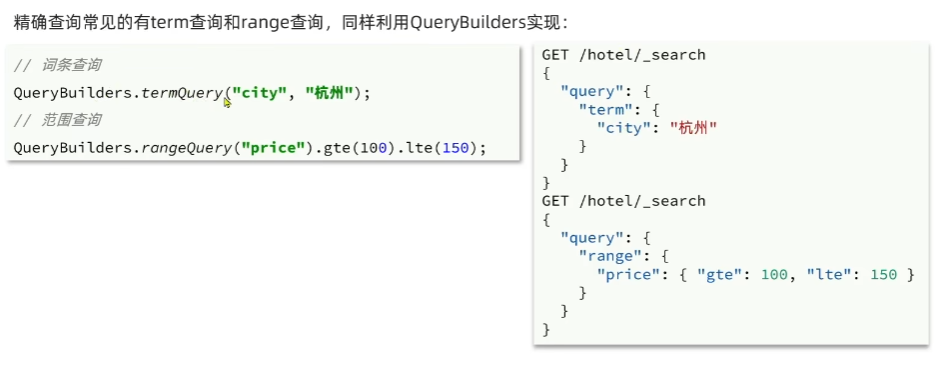
精确查询:根据精确词条查找数据,一般是查找keyword、数值、日期、boolean等字符。如:
-
- ids
- range
- term
-
地理查询:根据经纬度查询。例如:
-
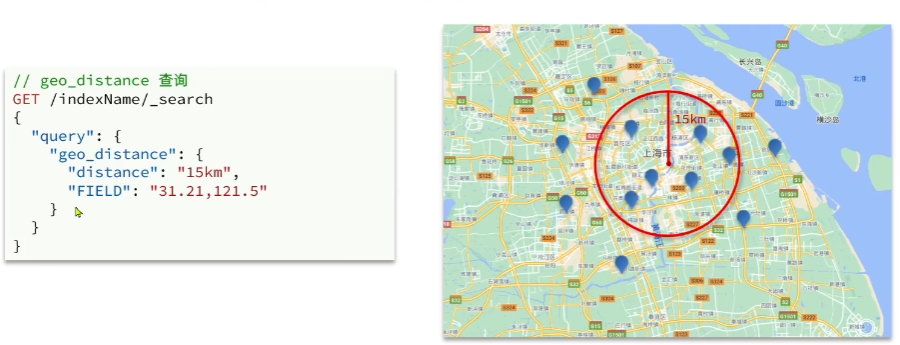
- geo_distance
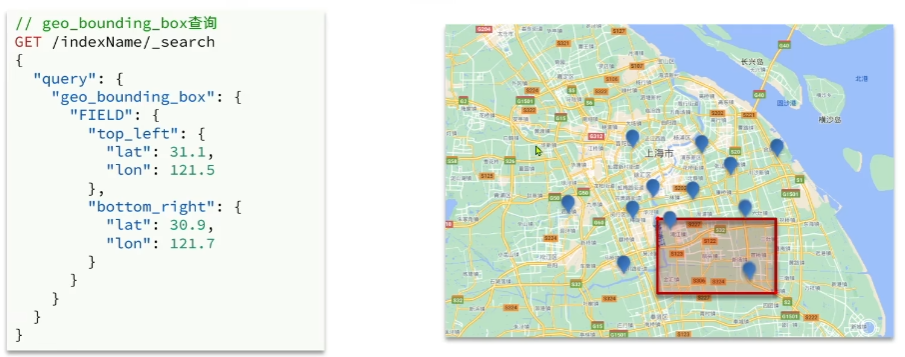
- geo_bounding_box
-
复合查询:复合查询可以将上述各种查询条件组合起来,合并查询条件。如
-
- bool
- function_score
基本语法
查询DSL基本语法
GET /indexName/_search
{"query":{"查询类型":{"查询条件":"条件值"}}
}
全文检索查询
GET /indexName/_search
{"query": {"match": {"FIELD": "TEXT"}}
}
精确查询
常用:
- term查询
GET /hotel/_search
{"query": {"term": {"city": {"value": "上海"}}}
}
- range查询
GET /hotel/_search
{"query": {"range": {"price": {"gte": 100,"lte": 300}}}
}
地理查询
常见场景包括:
- 携程:搜索我附近的酒店
- 滴滴:搜索我附近的出租车
- 微信:搜索我附近的人
根据经纬度查询:
- geo_bounding_box:查询geo_point值落在某个矩形范围的所有文档
- geo_distance:查询到指定中心小于某个距离值得所有文档
复合查询
复合查询:复合查询可以将其它简单查询组合起来,实现复杂得搜索逻辑,例如:
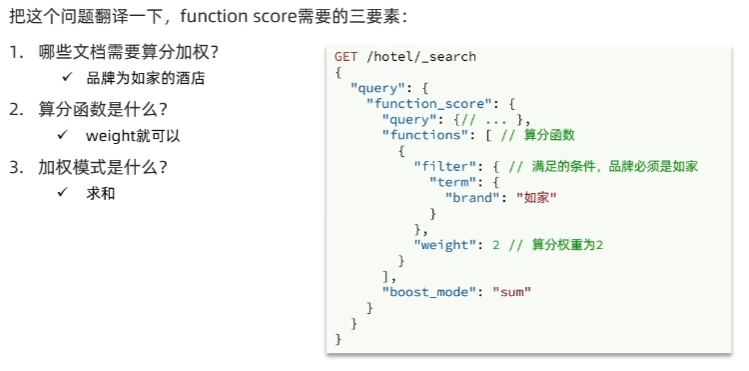
- function score:算分函数查询,可以控制文档相关性算分,控制文档排名
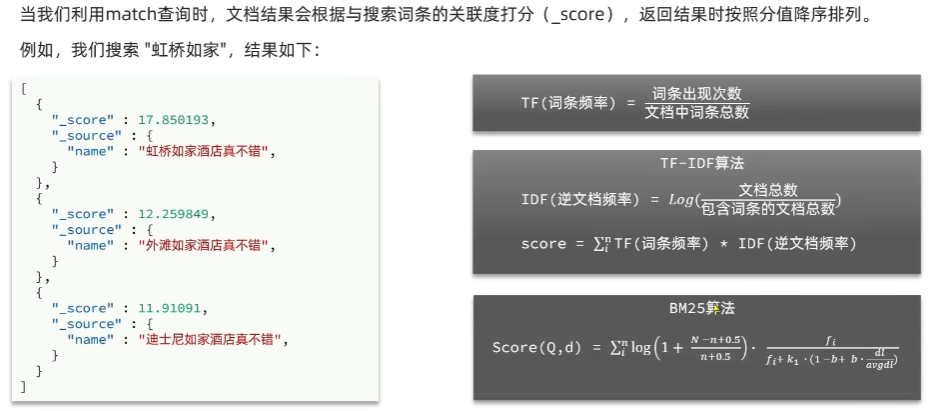
相关性算分
Function Score Query
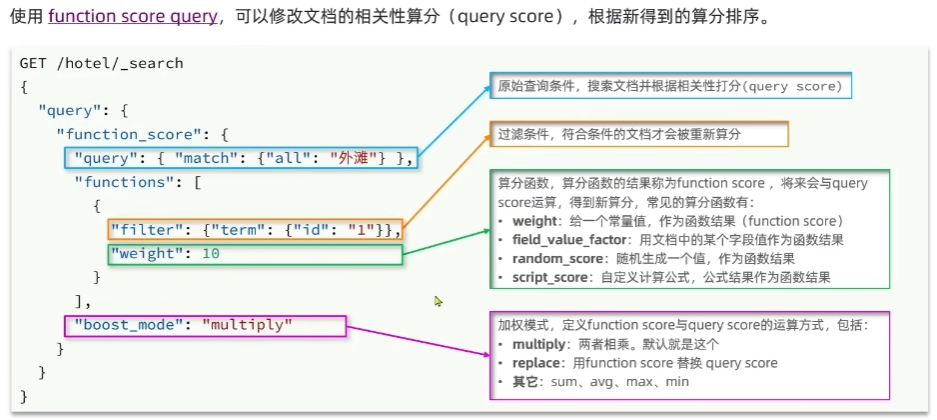
案例:给“如家”这个品牌得酒店排名靠前一些
Boolean Query
布尔查询是一个或多个子句得组合。子查询得组合方式有:
- must:必须匹配每个子查询,类似“与”
- should:选择性匹配子查询,类似“或”
- must_not:必须不匹配,不参与算分,类似“非”
- filter:必须匹配,不参与算分
案例:利用bool查询实现功能
GET /hotel/_search
{"query": {"bool": {"must": [{"match": {"name": "如家"}}],"must_not": [{"range": {"price": {"gt": 400}}}],"filter": [{"geo_distance": {"distance": "10km","location": {"lat": 31.21,"lon": 121.5}}}]}}
}
搜索结果处理
排序
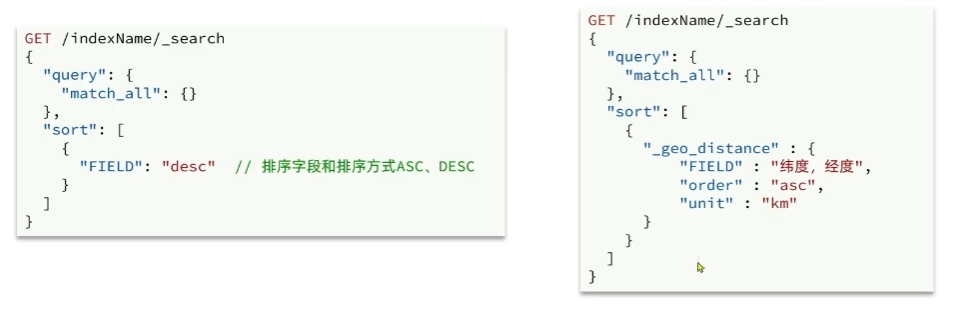
elasticsearch支持搜索结果排序,默认是根据相关度算分来排序。可以排序类型有:keyword类型、数值类型、地理坐标类型、日期类型等。
分页
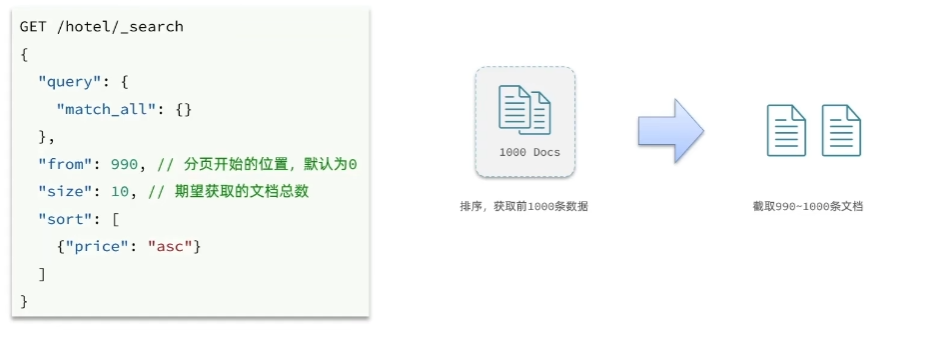
elasticsearch默认情况下只返回top10得数据。如果要查询更多数据就需要修改分页参数。
elasticsearch中通过修改from、size参数来控制要返回得分页结果:
深度分页问题
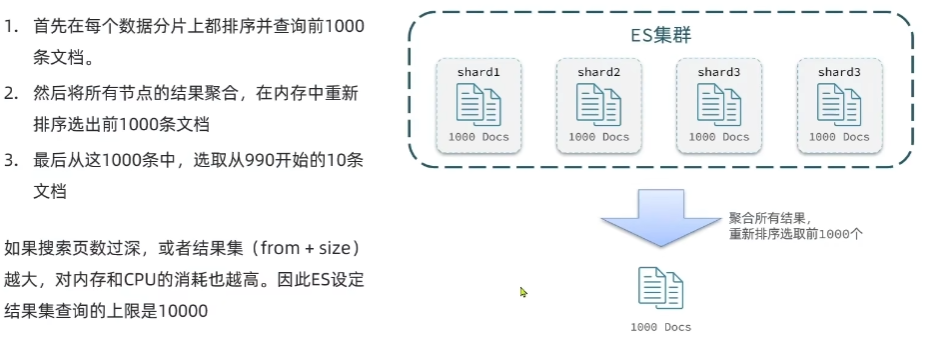
ES是分布式的,所以会面临深度分页问题。
深度分页解决方案
针对深度分页,ES提供了两种解决方案:
- search after:分页时需要排序,原理是从上一次的排序值开始,查询下一页数据。官方推荐使用的方式。
- scroll:原理将排序数据形成快照,保存在内存。官方已经不推荐使用。
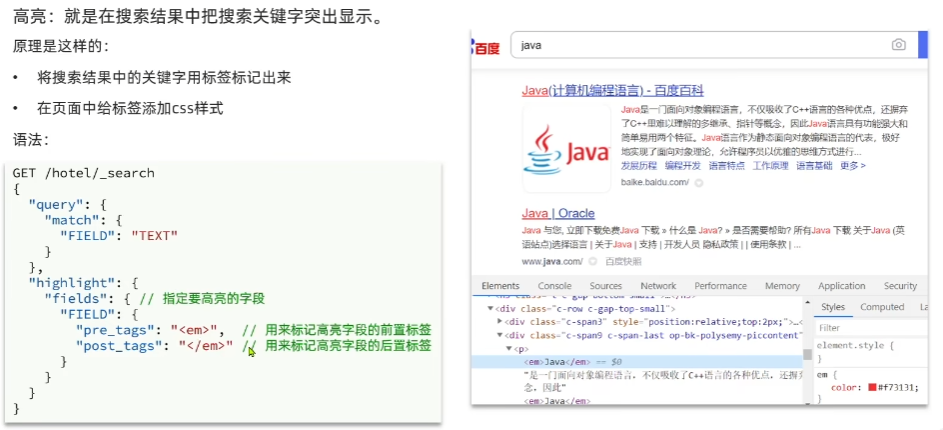
高亮
RestClient查询文档
快速入门
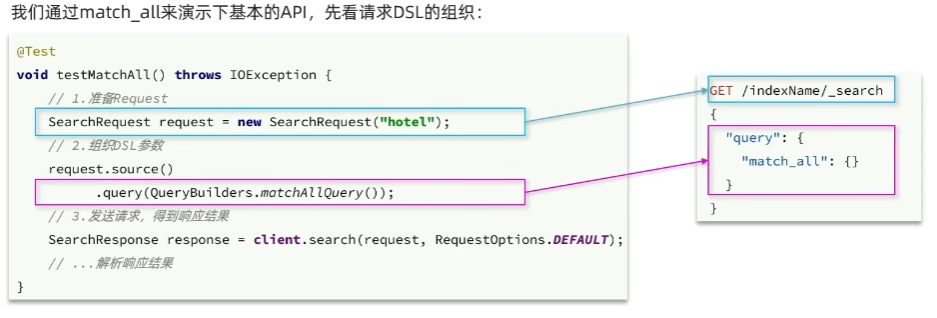
@Testvoid testInit() throws IOException {// 1.准备RequestSearchRequest request = new SearchRequest("hotel");// 2.准备DSLrequest.source().query(QueryBuilders.matchAllQuery());// 3.发送请求SearchResponse response = client.search(request, RequestOptions.DEFAULT);System.out.println(response);}
解析JSON
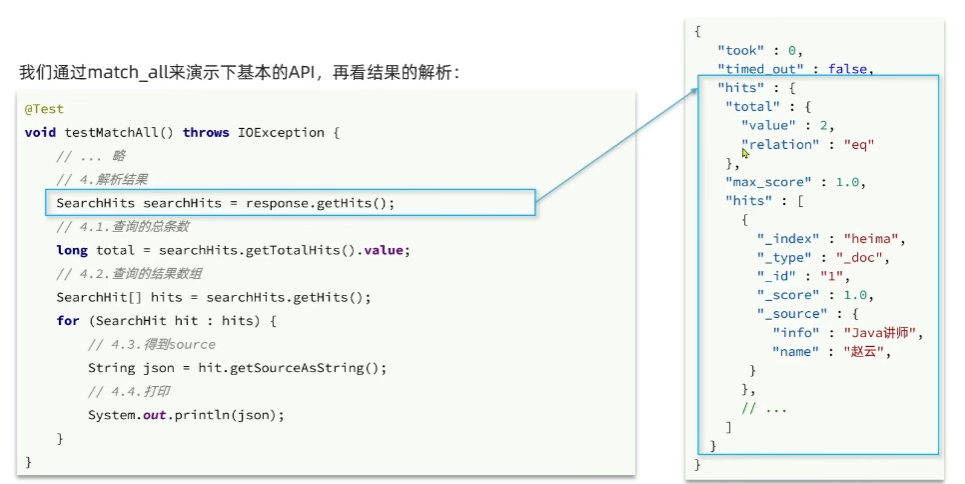
@Testvoid testInit() throws IOException {// 1.准备RequestSearchRequest request = new SearchRequest("hotel");// 2.准备DSLrequest.source().query(QueryBuilders.matchAllQuery());// 3.发送请求SearchResponse response = client.search(request, RequestOptions.DEFAULT);// 4.解析响应SearchHits hits = response.getHits();// 4.1.获取总条数long total = hits.getTotalHits().value;System.out.println(total);// 4.2.遍历文档数组for (SearchHit hit : hits.getHits()) {// 4.3.获取json对象String json = hit.getSourceAsString();// 4.4.将json对象变成java对象HotelDoc hotelDoc = JSON.parseObject(json, HotelDoc.class);System.out.println(hotelDoc);}}
全文检索查询
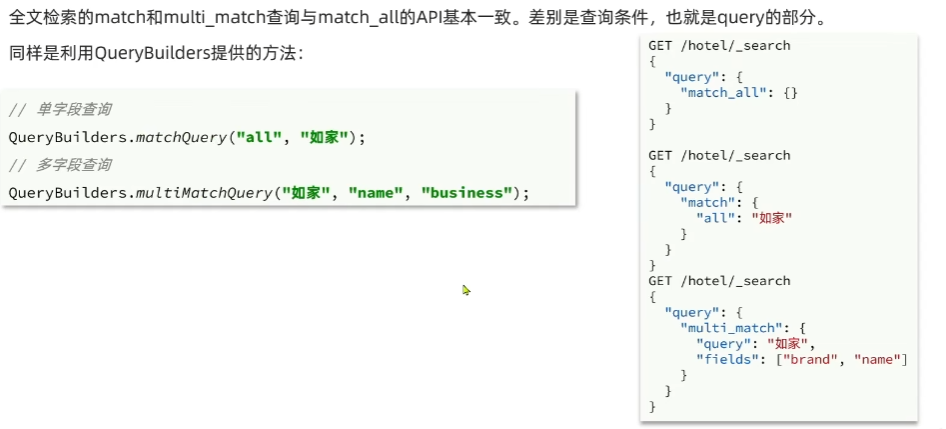
精确查询
复合查询-boolean query
@Testvoid testBool() throws IOException {// 1.准备RequestSearchRequest request = new SearchRequest("hotel");// 2.准备DSLBoolQueryBuilder boolQuery = QueryBuilders.boolQuery();boolQuery.must(QueryBuilders.termQuery("city","上海"));boolQuery.filter(QueryBuilders.rangeQuery("price").lte(250));request.source().query(boolQuery);// 3.发送请求SearchResponse response = client.search(request, RequestOptions.DEFAULT);handleResponse(response);}/*** 解析响应* @param response*/private static void handleResponse(SearchResponse response) {// 4.解析响应SearchHits hits = response.getHits();// 4.1.获取总条数long total = hits.getTotalHits().value;System.out.println(total);// 4.2.遍历文档数组for (SearchHit hit : hits.getHits()) {// 4.3.获取json对象String json = hit.getSourceAsString();// 4.4.将json对象变成java对象HotelDoc hotelDoc = JSON.parseObject(json, HotelDoc.class);System.out.println(hotelDoc);}}
排序和分页
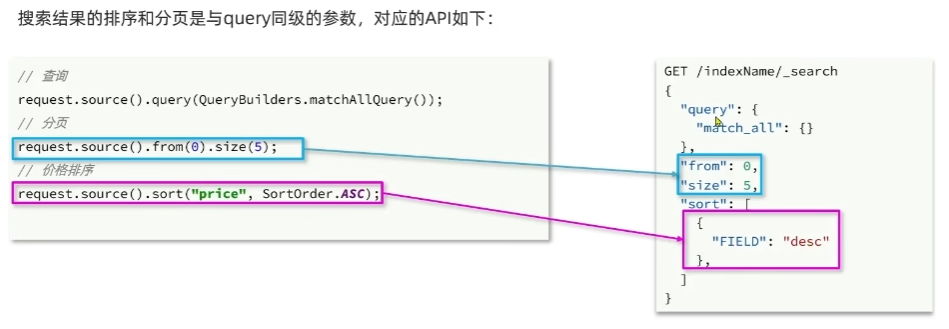
@Testvoid testPageAndSort() throws IOException {// 1.准备RequestSearchRequest request = new SearchRequest("hotel");// 2.准备DSLrequest.source().query(QueryBuilders.matchAllQuery());// 排序request.source().sort("price", SortOrder.ASC);request.source().from(1).size(5);// 3.发送请求SearchResponse response = client.search(request, RequestOptions.DEFAULT);handleResponse(response);}
高亮
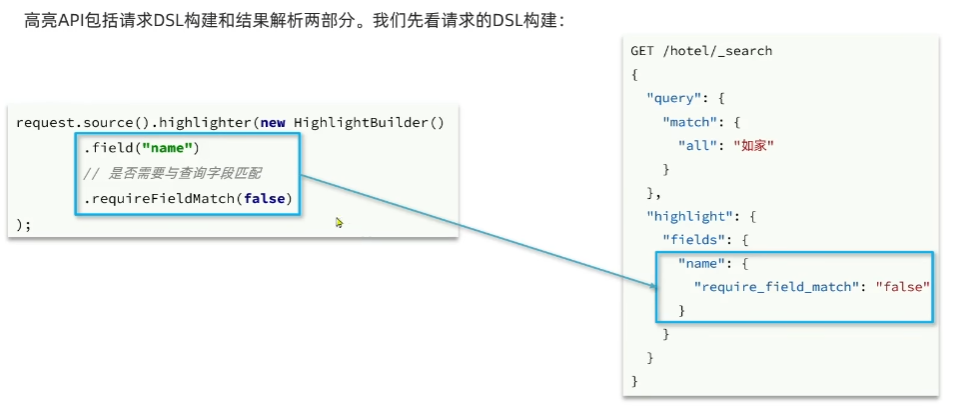
@Testvoid testHighlight() throws IOException {// 1.准备RequestSearchRequest request = new SearchRequest("hotel");// 2.准备DSLrequest.source().query(QueryBuilders.matchQuery("all","如家"));request.source().highlighter(new HighlightBuilder().field("name").requireFieldMatch(false));// 3.发送请求SearchResponse response = client.search(request, RequestOptions.DEFAULT);handleResponse(response);}
高亮的结果解析
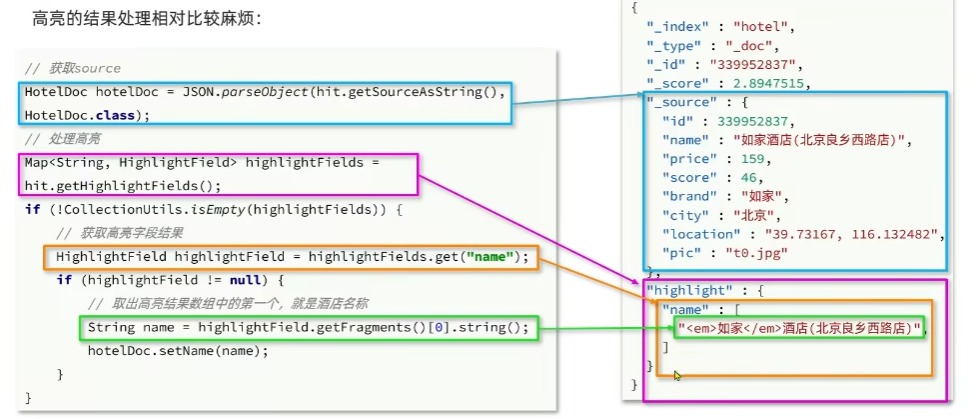
/*** 解析响应* @param response*/private static void handleResponse(SearchResponse response) {// 4.解析响应SearchHits hits = response.getHits();// 4.1.获取总条数long total = hits.getTotalHits().value;System.out.println(total);// 4.2.遍历文档数组for (SearchHit hit : hits.getHits()) {// 4.3.获取json对象String json = hit.getSourceAsString();// 4.4.将json对象变成java对象HotelDoc hotelDoc = JSON.parseObject(json, HotelDoc.class);// 获取高亮结果Map<String, HighlightField> highlightFields = hit.getHighlightFields();if (!CollectionUtils.isEmpty(highlightFields)) {// 根据字段名获取高亮结果HighlightField highlightField = highlightFields.get("name");if (highlightField != null) {// 获取高亮值String name = highlightField.getFragments()[0].string();hotelDoc.setName(name);}}System.out.println(hotelDoc);}}
demo案例
实现搜索功能
1.定义实体类,接受前端请求
RequestParams
@Data
public class RequestParams {private String key;private Integer page;private Integer size;private String sortBy;
}
PageResult
@Data
public class PageResult {private Long total;private List<HotelDoc> hotels;
}
2.定义controller接口,接受页面请求,调用IHotelService的search方法
@PostMapping("/list")public PageResult search(@RequestBody RequestParams params) {return hotelService.search(params);}
3.定义IHotelService中的search方法,利用match查询实现根据关键字搜索酒店信息
@Overridepublic PageResult search(RequestParams params) {try {// 1.准备RequestSearchRequest request = new SearchRequest("hotel");// 2.准备DSLString key = params.getKey();if (StringUtils.isBlank(key)) {request.source().query(QueryBuilders.matchAllQuery());} else {request.source().query(QueryBuilders.matchQuery("all", key));}// 分页int page = params.getPage();int size = params.getSize();request.source().from((page - 1) * size).size(size);// 3.发送请求SearchResponse response = client.search(request, RequestOptions.DEFAULT);return handleResponse(response);} catch (IOException e) {throw new RuntimeException(e);}}/*** 解析响应** @param response*/private static PageResult handleResponse(SearchResponse response) {// 4.解析响应SearchHits hits = response.getHits();// 4.1.获取总条数long total = hits.getTotalHits().value;// 4.2.遍历文档数组List<HotelDoc> hotels = new ArrayList<>();for (SearchHit hit : hits.getHits()) {// 4.3.获取json对象String json = hit.getSourceAsString();// 4.4.将json对象变成java对象HotelDoc hotelDoc = JSON.parseObject(json, HotelDoc.class);hotels.add(hotelDoc);}PageResult pageResult = new PageResult();pageResult.setTotal(total);pageResult.setHotels(hotels);return pageResult;}
添加品牌、城市、星级、价格等过滤功能
1.修改RequestParams类,添加brand、city、starName、minPrice、maxPrice等参数
package cn.itcast.hotel.pojo;import lombok.Data;/*** @author xc* @date 2023/5/11 16:14*/
@Data
public class RequestParams {private String key;private Integer page;private Integer size;private String sortBy;private String city;private String brand;private String starName;private Integer minPrice;private Integer maxPrice;
}
2.修改search方法的实现,在关键字搜索时,如果brand等参数存在,对其做过滤
@Overridepublic PageResult search(RequestParams params) {try {// 1.准备RequestSearchRequest request = new SearchRequest("hotel");// 2.准备DSL// 构建BooleanQueryBoolQueryBuilder boolQuery = QueryBuilders.boolQuery();// 关键字搜索String key = params.getKey();if (StringUtils.isBlank(key)) {boolQuery.must(QueryBuilders.matchAllQuery());} else {boolQuery.must(QueryBuilders.matchQuery("all", key));}// 城市条件if (params.getCity() != null && !params.getCity().equals("")) {boolQuery.filter(QueryBuilders.termQuery("city",params.getCity()));}// 品牌条件if (params.getBrand() != null && !params.getBrand().equals("")) {boolQuery.filter(QueryBuilders.termQuery("brand",params.getBrand()));}// 星级条件if (params.getStarName() != null && !params.getStarName().equals("")) {boolQuery.filter(QueryBuilders.termQuery("starName",params.getStarName()));}// 价格条件if (params.getMinPrice() != null && params.getMaxPrice() != null) {boolQuery.filter(QueryBuilders.rangeQuery("price").gte(params.getMinPrice()).lte(params.getMaxPrice()));}request.source().query(boolQuery);// 分页int page = params.getPage();int size = params.getSize();request.source().from((page - 1) * size).size(size);// 3.发送请求SearchResponse response = client.search(request, RequestOptions.DEFAULT);return handleResponse(response);} catch (IOException e) {throw new RuntimeException(e);}}
附近的酒店
距离排序
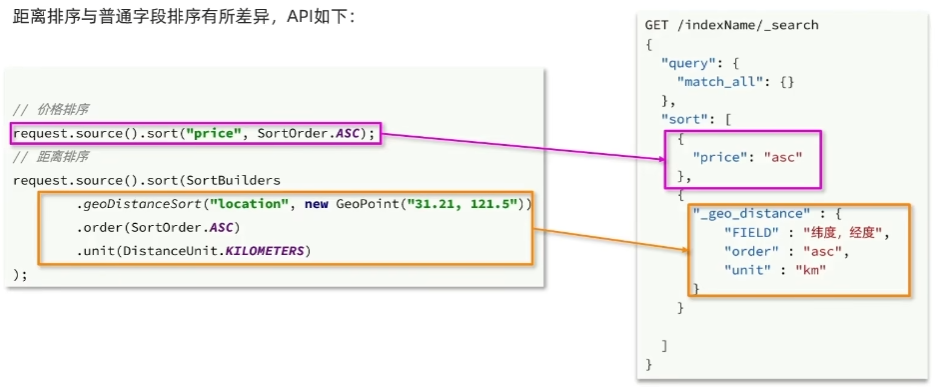
@Overridepublic PageResult search(RequestParams params) {try {// 1.准备RequestSearchRequest request = new SearchRequest("hotel");// 2.准备DSL// 构建BooleanQueryBoolQueryBuilder boolQuery = QueryBuilders.boolQuery();// 关键字搜索String key = params.getKey();if (StringUtils.isBlank(key)) {boolQuery.must(QueryBuilders.matchAllQuery());} else {boolQuery.must(QueryBuilders.matchQuery("all", key));}// 城市条件if (params.getCity() != null && !params.getCity().equals("")) {boolQuery.filter(QueryBuilders.termQuery("city",params.getCity()));}// 品牌条件if (params.getBrand() != null && !params.getBrand().equals("")) {boolQuery.filter(QueryBuilders.termQuery("brand",params.getBrand()));}// 星级条件if (params.getStarName() != null && !params.getStarName().equals("")) {boolQuery.filter(QueryBuilders.termQuery("starName",params.getStarName()));}// 价格条件if (params.getMinPrice() != null && params.getMaxPrice() != null) {boolQuery.filter(QueryBuilders.rangeQuery("price").gte(params.getMinPrice()).lte(params.getMaxPrice()));}request.source().query(boolQuery);// 分页int page = params.getPage();int size = params.getSize();request.source().from((page - 1) * size).size(size);// 2.3.排序String location = params.getLocation();if (location != null && !location.equals("")){request.source().sort(SortBuilders.geoDistanceSort("location",new GeoPoint(location)).order(SortOrder.ASC).unit(DistanceUnit.KILOMETERS));}// 3.发送请求SearchResponse response = client.search(request, RequestOptions.DEFAULT);return handleResponse(response);} catch (IOException e) {throw new RuntimeException(e);}}/*** 解析响应** @param response*/private static PageResult handleResponse(SearchResponse response) {// 4.解析响应SearchHits hits = response.getHits();// 4.1.获取总条数long total = hits.getTotalHits().value;// 4.2.遍历文档数组List<HotelDoc> hotels = new ArrayList<>();for (SearchHit hit : hits.getHits()) {// 4.3.获取json对象String json = hit.getSourceAsString();// 4.4.将json对象变成java对象HotelDoc hotelDoc = JSON.parseObject(json, HotelDoc.class);// 获取排序值Object[] sortValues = hit.getSortValues();if (sortValues.length > 0) {Object sortValue = sortValues[0];hotelDoc.setDistance(sortValue);}hotels.add(hotelDoc);}PageResult pageResult = new PageResult();pageResult.setTotal(total);pageResult.setHotels(hotels);return pageResult;}
广告置顶
1.给HotelDoc类添加isAD字段,Boolean类型
package cn.itcast.hotel.pojo;import lombok.Data;
import lombok.NoArgsConstructor;@Data
@NoArgsConstructor
public class HotelDoc {private Long id;private String name;private String address;private Integer price;private Integer score;private String brand;private String city;private String starName;private String business;private String location;private String pic;private Object distance;private Boolean isAD;public HotelDoc(Hotel hotel) {this.id = hotel.getId();this.name = hotel.getName();this.address = hotel.getAddress();this.price = hotel.getPrice();this.score = hotel.getScore();this.brand = hotel.getBrand();this.city = hotel.getCity();this.starName = hotel.getStarName();this.business = hotel.getBusiness();this.location = hotel.getLatitude() + ", " + hotel.getLongitude();this.pic = hotel.getPic();}
}
2.修改search方法,添加function score功能,给isAD值为true的酒店增加权重
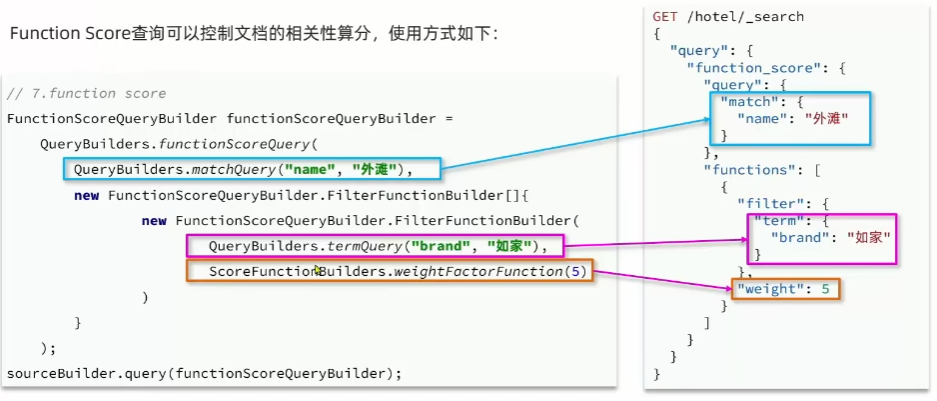
@Overridepublic PageResult search(RequestParams params) {try {// 1.准备RequestSearchRequest request = new SearchRequest("hotel");// 2.准备DSL// 构建BooleanQueryBoolQueryBuilder boolQuery = QueryBuilders.boolQuery();// 关键字搜索String key = params.getKey();if (StringUtils.isBlank(key)) {boolQuery.must(QueryBuilders.matchAllQuery());} else {boolQuery.must(QueryBuilders.matchQuery("all", key));}// 城市条件if (params.getCity() != null && !params.getCity().equals("")) {boolQuery.filter(QueryBuilders.termQuery("city",params.getCity()));}// 品牌条件if (params.getBrand() != null && !params.getBrand().equals("")) {boolQuery.filter(QueryBuilders.termQuery("brand",params.getBrand()));}// 星级条件if (params.getStarName() != null && !params.getStarName().equals("")) {boolQuery.filter(QueryBuilders.termQuery("starName",params.getStarName()));}// 价格条件if (params.getMinPrice() != null && params.getMaxPrice() != null) {boolQuery.filter(QueryBuilders.rangeQuery("price").gte(params.getMinPrice()).lte(params.getMaxPrice()));}// 2.算分FunctionScoreQueryBuilder functionScoreQueryBuilder = QueryBuilders.functionScoreQuery(boolQuery, new FunctionScoreQueryBuilder.FilterFunctionBuilder[]{new FunctionScoreQueryBuilder.FilterFunctionBuilder(QueryBuilders.termQuery("isAD",true),ScoreFunctionBuilders.weightFactorFunction(10))});request.source().query(functionScoreQueryBuilder);// 分页int page = params.getPage();int size = params.getSize();request.source().from((page - 1) * size).size(size);// 2.3.排序String location = params.getLocation();if (location != null && !location.equals("")){request.source().sort(SortBuilders.geoDistanceSort("location",new GeoPoint(location)).order(SortOrder.ASC).unit(DistanceUnit.KILOMETERS));}// 3.发送请求SearchResponse response = client.search(request, RequestOptions.DEFAULT);return handleResponse(response);} catch (IOException e) {throw new RuntimeException(e);}}int size = params.getSize();request.source().from((page - 1) * size).size(size);// 2.3.排序String location = params.getLocation();if (location != null && !location.equals("")){request.source().sort(SortBuilders.geoDistanceSort("location",new GeoPoint(location)).order(SortOrder.ASC).unit(DistanceUnit.KILOMETERS));}// 3.发送请求SearchResponse response = client.search(request, RequestOptions.DEFAULT);return handleResponse(response);} catch (IOException e) {throw new RuntimeException(e);}}
相关文章:
Elasticsearch(二)
Clasticsearch(二) DSL查询语法 文档 文档:https://www.elastic.co/guide/en/elasticsearch/reference/current/query-dsl.html 常见查询类型包括: 查询所有:查询出所有数据,一般测试用。如:…...

工业视觉检测的8个技术优势
工业4.0时代,自动化生产线成为了这个时代的主旋律,而工业视觉检测技术也成为其中亮眼的表现,其机器视觉技术为设备提供了智慧的双眼,让自动化的脚步得以加速! 在实际的生产应用中,视觉技术方案往往先被着手…...

16 KVM虚拟机配置-其他常见配置项
文章目录 16 KVM虚拟机配置-其他常见配置项16.1 概述16.2 元素介绍16.3 配置示例 16 KVM虚拟机配置-其他常见配置项 16.1 概述 除系统资源和虚拟设备外,XML配置文件还需要配置一些其他元素,本节介绍这些元素的配置方法。 16.2 元素介绍 iothreads&…...
(转载)从0开始学matlab(第1天)—变量和数组
MATLAB 程序的基本数据单元是数组。一个数组是以行和列组织起来的数据集合,并且拥有一个数组名。数组中的单个数据是可以被访问的,访问的方法是数组名后带一个括号,括号内是这个数据所对应行标和列标。标量在 MATLAB 中也被当作数组来处理——…...

Linux命令·wget
Linux系统中的wget是一个下载文件的工具,它用在命令行下。对于Linux用户是必不可少的工具,我们经常要下载一些软件或从远程服务器恢复备份到本地服务器。wget支持HTTP,HTTPS和FTP协议,可以使用HTTP代理。所谓的自动下载是指&#…...

API网关简介|TaobaoAPI接入
API网关是什么 在日常工作中,不同的场合下,我们可能听说过很多次网关这个名称,这里说的网关特指API网关(API Gataway)。字面意思是指将所有API的调用统一接入API网关层,由网关层负责接入和输出。 那么在什…...
OJ练习第103题——最大矩形
最大矩形 力扣链接:85. 最大矩形 题目描述 给定一个仅包含 0 和 1 、大小为 rows x cols 的二维二进制矩阵,找出只包含 1 的最大矩形,并返回其面积。 示例 输入:matrix [[“1”,“0”,“1”,“0”,“0”],[“1”,“0”,“1”…...
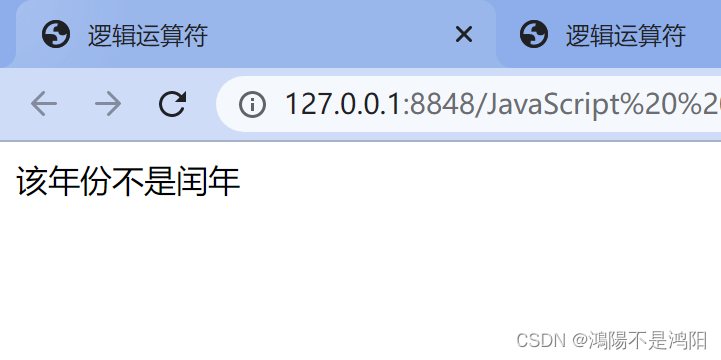
JavaScript实现输入年份判断是否为闰年的代码
以下为实现输入年份判断是否为闰年的程序代码和运行截图 目录 前言 一、输入年份判断是否为闰年 1.1 运行流程及思想 1.2 代码段 1.3 JavaScript语句代码 1.4 运行截图 前言 1.若有选择,您可以在目录里进行快速查找; 2.本博文代码可以根据题目要…...
LiangGaRy-学习笔记-Day12
1、作业回顾 1.1、判断磁盘利用率 要求: 判断磁盘的使用率,如果超过了90%就警告 [rootNode1 sh]# vim disk_check.sh #!/bin/bash #Author By LiangGaRy #2023年5月9日 #Usage:检测硬盘的使用率 ########################################### #定义一…...


浅谈Hutool工具类
一、Hutool简介 Hutool是一个Java工具类库,它封装了很多常用的Java工具类,如加密解密、文件操作、日期时间处理、Http客户端等。它的目标是让Java开发变得更加简单、高效。 二、Hutool的特点 高效:提供了很多高效的工具类和方法。 简单&…...
Mac终端代理
1.打开代理查看代理端口号 打开设置,点击网络,点击详细信息,点击代理查看代理端口号。 2.修改环境变量 1)终端输入下面命令 vim .zshrc 2)在.zshrc文件里添加下面两段内容(注意:7980为端口号…...
Git Clone 报错 `SSL certificate problem: unable to get local issuer certificate`
如果您在尝试克隆Git存储库时得到 “SSL certificate problem: unable to get local issuer certificate” 的错误,这意味着Git无法验证远程存储库的SSL证书。如果SSL证书是自签名的,或者SSL证书链有问题,就会发生这种情况。 $ git clone https://githu…...

第八章 文件与异常
引言 码字不易,如果这篇文章对您有帮助的话,希望您能点赞、收藏、加关注!您的鼓励就是我前进的动力! 目录 一、读取文件(一)读取文件:open(), with, read()(二)文件路径…...
Gradle使用
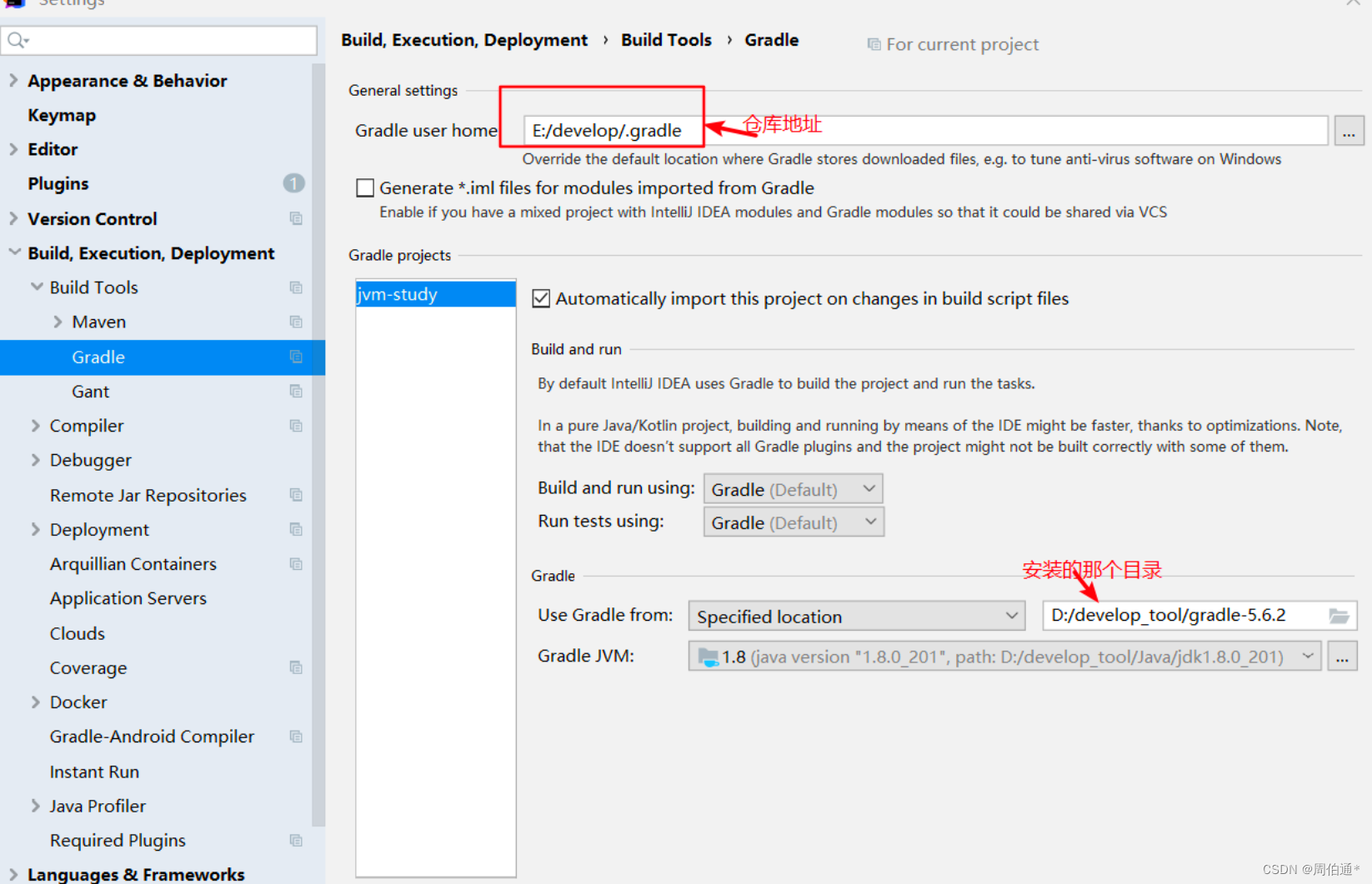
下载Gradle Gradle Distributions 配置环境变量 测试是否成功 cmd输入gradle -v 在.gradle目录下创建一个init.gradle allprojects { repositories { maven { url file:///D:/maven/myRepository} ## 这里是本地maven仓库地址,没有就会依次向下设置的地址寻…...

从七个方面聊聊Linux到底强在哪
从事计算机相关行业的同学不难发现,身边总有一些朋友在学习linux,有的开发同学甚至自己的电脑就是它。经常听他们说linux如何好用等等。那么linux到底好在那里,能让大家如此喜欢。这也是我经常问自己的一个问题。下面我将通过以下七点来为大家…...

python读写json文件方法详解
在我们日常使用 Python时,经常会使用到 json文件。那么在平时写一些小程序时,如何使用 json文件呢?今天我将介绍如何读取和写入 Json文件。 json是一种数据结构,它是将字符串转换成数据的一种技术。使用 json可以非常方便的将一组…...
多处最优服务次序问题——算法设计与分析(C实现)
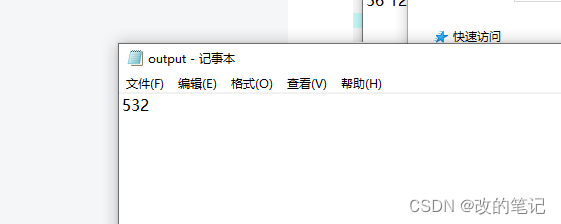
问题描述:设有n个顾客同时等待一项服务。顾客i需要的服务时间为,共有s处可以提供此项服务。应该如何安排n个顾客的服务次序,才能使平均等待时间达到最小?平均等待时间是n个顾客的等待服务时间的总和除以n。 算法设计:对…...
2023 年 IntelliJ IDEA 下载安装教程,超详细图文教程,亲测可用
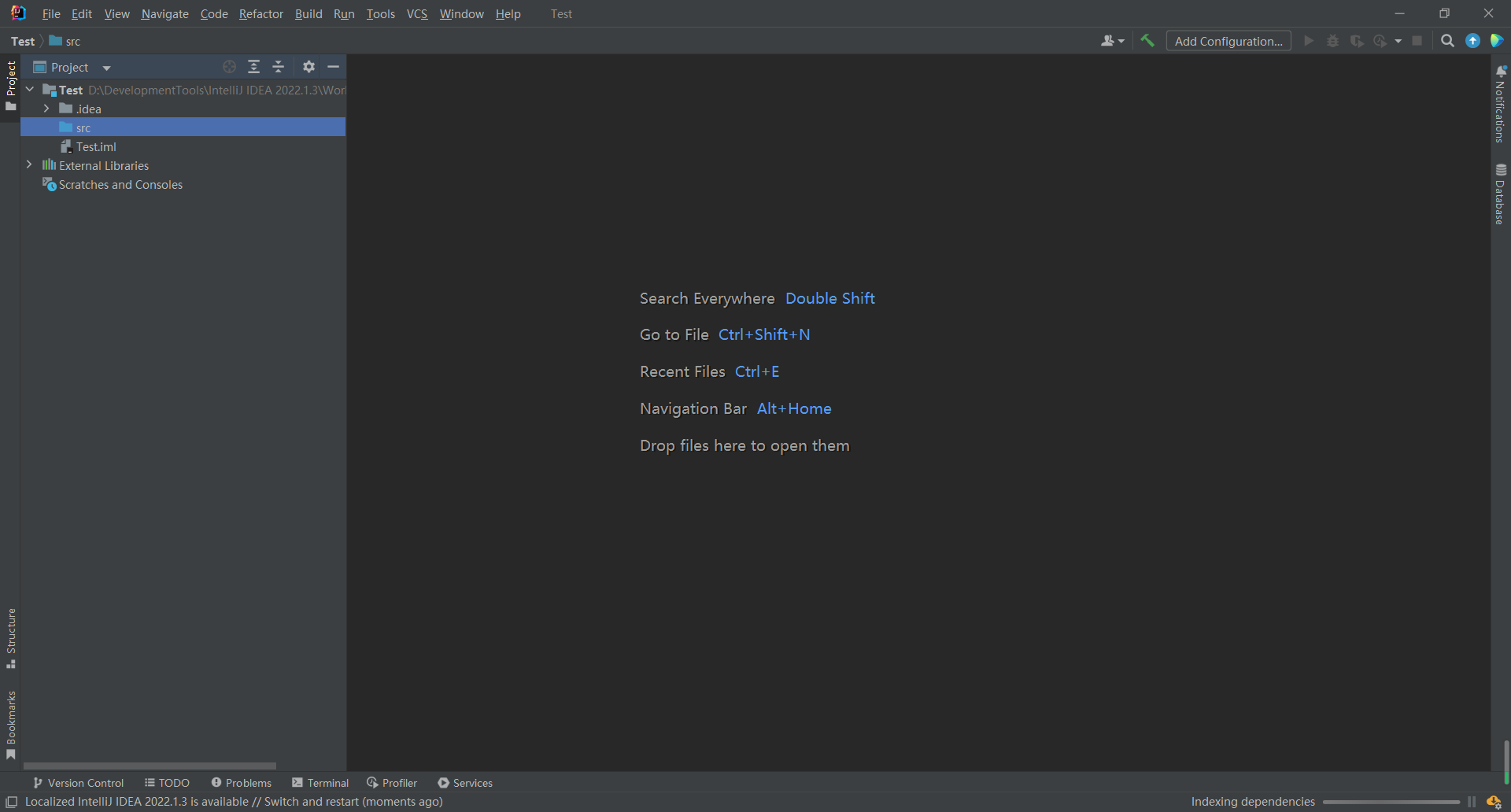
. IDEA 下载 1、打开浏览器输入https://www.jetbrains.com/,进入 Jetbrains官网,点击 Developer Tools,再点击 Intellij IDEA 2、点击中间的 Download,进入IDEA下载界面 3、选择左边的 Ultimate 版本进行下载安装。Ultimate 版…...

前端框架比较:Vue.js、React、AngularJS三者的优缺点和应用场景
章节一:引言 在当前的互联网开发中,前端框架已经成为了不可或缺的一部分。然而,前端框架如此之多,该如何选择呢?Vue.js、React和AngularJS是目前比较受欢迎的三个前端框架,它们各自有着不同的优缺点和应用…...

Oracle查询表空间大小
1 查询数据库中所有的表空间以及表空间所占空间的大小 SELECTtablespace_name,sum( bytes ) / 1024 / 1024 FROMdba_data_files GROUP BYtablespace_name; 2 Oracle查询表空间大小及每个表所占空间的大小 SELECTtablespace_name,file_id,file_name,round( bytes / ( 1024 …...
vscode(仍待补充)
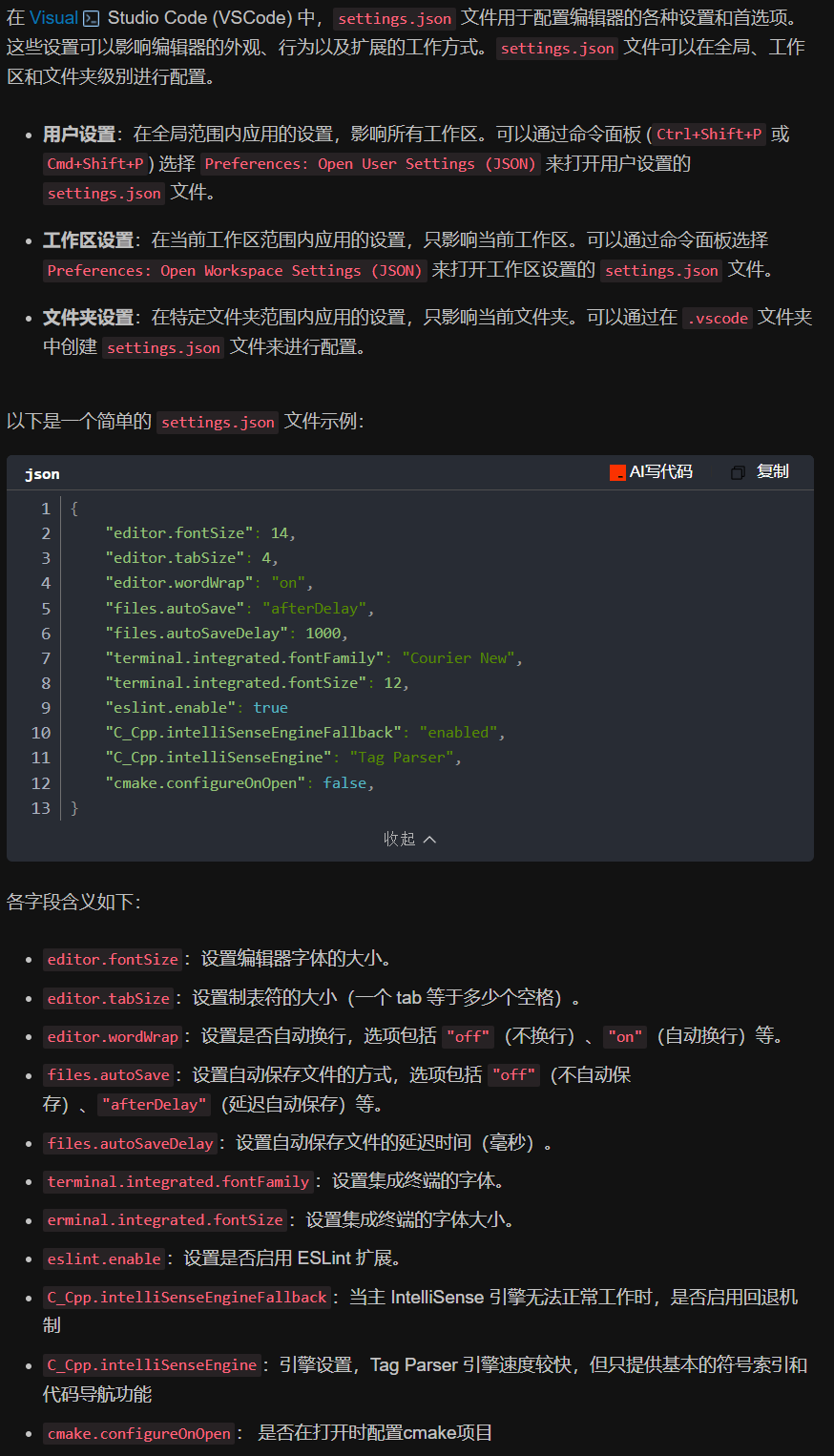
写于2025 6.9 主包将加入vscode这个更权威的圈子 vscode的基本使用 侧边栏 vscode还能连接ssh? debug时使用的launch文件 1.task.json {"tasks": [{"type": "cppbuild","label": "C/C: gcc.exe 生成活动文件"…...

django filter 统计数量 按属性去重
在Django中,如果你想要根据某个属性对查询集进行去重并统计数量,你可以使用values()方法配合annotate()方法来实现。这里有两种常见的方法来完成这个需求: 方法1:使用annotate()和Count 假设你有一个模型Item,并且你想…...
Springcloud:Eureka 高可用集群搭建实战(服务注册与发现的底层原理与避坑指南)
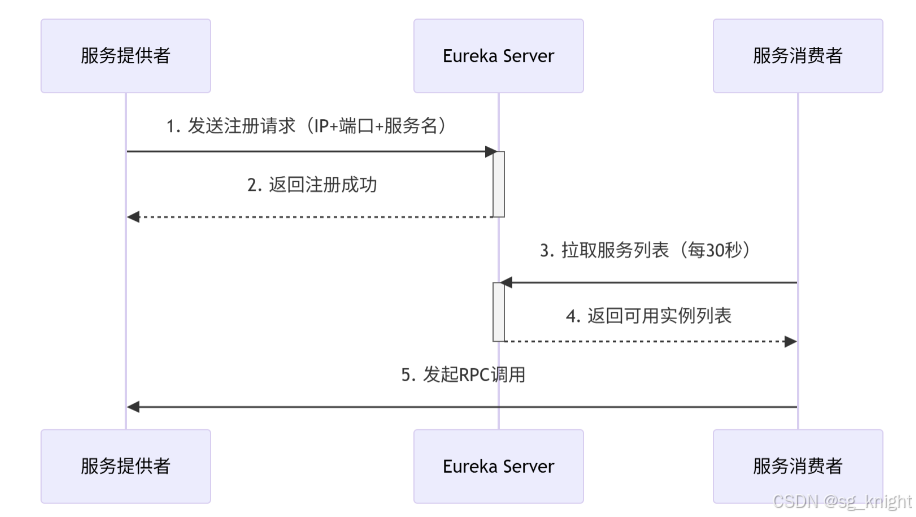
引言:为什么 Eureka 依然是存量系统的核心? 尽管 Nacos 等新注册中心崛起,但金融、电力等保守行业仍有大量系统运行在 Eureka 上。理解其高可用设计与自我保护机制,是保障分布式系统稳定的必修课。本文将手把手带你搭建生产级 Eur…...

BCS 2025|百度副总裁陈洋:智能体在安全领域的应用实践
6月5日,2025全球数字经济大会数字安全主论坛暨北京网络安全大会在国家会议中心隆重开幕。百度副总裁陈洋受邀出席,并作《智能体在安全领域的应用实践》主题演讲,分享了在智能体在安全领域的突破性实践。他指出,百度通过将安全能力…...

OPENCV形态学基础之二腐蚀
一.腐蚀的原理 (图1) 数学表达式:dst(x,y) erode(src(x,y)) min(x,y)src(xx,yy) 腐蚀也是图像形态学的基本功能之一,腐蚀跟膨胀属于反向操作,膨胀是把图像图像变大,而腐蚀就是把图像变小。腐蚀后的图像变小变暗淡。 腐蚀…...

高效线程安全的单例模式:Python 中的懒加载与自定义初始化参数
高效线程安全的单例模式:Python 中的懒加载与自定义初始化参数 在软件开发中,单例模式(Singleton Pattern)是一种常见的设计模式,确保一个类仅有一个实例,并提供一个全局访问点。在多线程环境下,实现单例模式时需要注意线程安全问题,以防止多个线程同时创建实例,导致…...
提供了哪些便利?)
现有的 Redis 分布式锁库(如 Redisson)提供了哪些便利?
现有的 Redis 分布式锁库(如 Redisson)相比于开发者自己基于 Redis 命令(如 SETNX, EXPIRE, DEL)手动实现分布式锁,提供了巨大的便利性和健壮性。主要体现在以下几个方面: 原子性保证 (Atomicity)ÿ…...
uniapp 开发ios, xcode 提交app store connect 和 testflight内测
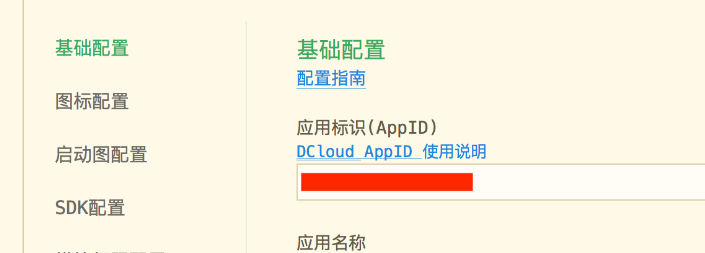
uniapp 中配置 配置manifest 文档:manifest.json 应用配置 | uni-app官网 hbuilderx中本地打包 下载IOS最新SDK 开发环境 | uni小程序SDK hbulderx 版本号:4.66 对应的sdk版本 4.66 两者必须一致 本地打包的资源导入到SDK 导入资源 | uni小程序SDK …...

4. TypeScript 类型推断与类型组合
一、类型推断 (一) 什么是类型推断 TypeScript 的类型推断会根据变量、函数返回值、对象和数组的赋值和使用方式,自动确定它们的类型。 这一特性减少了显式类型注解的需要,在保持类型安全的同时简化了代码。通过分析上下文和初始值,TypeSc…...