
JavaWeb(11)——前端综合案例5(小黑记事本)
一、实例需求 ⌛
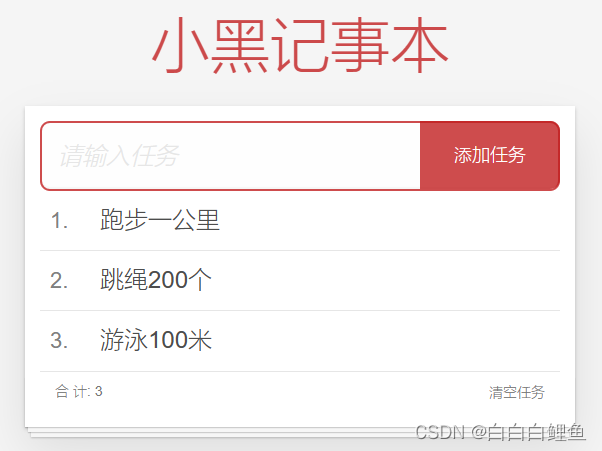
功能需求: ① 列表渲染 ② 删除功能 ③ 添加功能 ④ 底部统计 和 清空任务

二、代码实现 ☕
<!DOCTYPE html>
<html lang="en">
<head>
<meta charset="UTF-8" />
<meta http-equiv="X-UA-Compatible" content="IE=edge" />
<meta name="viewport" content="width=device-width, initial-scale=1.0" />
<link rel="stylesheet" href="./css/index.css" />
<title>记事本</title>
</head>
<body><!-- 主体区域 -->
<section id="app"><!-- 输入框 --><header class="header"><h1>小黑记事本</h1><input v-model="todoName"  placeholder="请输入任务" class="new-todo" /><button @click="add" class="add">添加任务</button></header><!-- 列表区域 --><section class="main"><ul class="todo-list"><li class="todo" v-for="(item, index) in list" :key="item.id"><div class="view"><span class="index">{{ index + 1 }}.</span> <label>{{ item.name }}</label><button @click="del(item.id)" class="destroy"></button></div></li></ul></section><!-- 统计和清空 --><footer class="footer" v-show="list.length > 0"><!-- 统计 --><span class="todo-count">合 计:<strong> {{ list.length }} </strong></span><!-- 清空 --><button @click="clear" class="clear-completed">清空任务</button></footer>
</section><!-- 底部 -->
<script src="https://cdn.jsdelivr.net/npm/vue/dist/vue.js"></script>
<script>// 添加功能// 1. 通过 v-model 绑定 输入框 → 实时获取表单元素的内容// 2. 点击按钮,进行新增,往数组最前面加 unshiftconst app = new Vue({el: '#app',data: {todoName: '',list: [{ id: 1, name: '跑步一公里' },{ id: 3, name: '游泳100米' },]},methods: {del (id) {// console.log(id) => filter 保留所有不等于该 id 的项this.list = this.list.filter(item => item.id !== id)},add () {if (this.todoName.trim() === '') {alert('请输入任务名称')return}this.list.unshift({id: +new Date(),name: this.todoName})this.todoName = ''},clear () {this.list = []}}})</script>
</body>
</html>
html,
body {margin: 0;padding: 0;
}
body {background: #fff;
}
button {margin: 0;padding: 0;border: 0;background: none;font-size: 100%;vertical-align: baseline;font-family: inherit;font-weight: inherit;color: inherit;-webkit-appearance: none;appearance: none;-webkit-font-smoothing: antialiased;-moz-osx-font-smoothing: grayscale;
}body {font: 14px 'Helvetica Neue', Helvetica, Arial, sans-serif;line-height: 1.4em;background: #f5f5f5;color: #4d4d4d;min-width: 230px;max-width: 550px;margin: 0 auto;-webkit-font-smoothing: antialiased;-moz-osx-font-smoothing: grayscale;font-weight: 300;
}:focus {outline: 0;
}.hidden {display: none;
}#app {background: #fff;margin: 180px 0 40px 0;padding: 15px;position: relative;box-shadow: 0 2px 4px 0 rgba(0, 0, 0, 0.2), 0 25px 50px 0 rgba(0, 0, 0, 0.1);
}
#app .header input {border: 2px solid rgba(175, 47, 47, 0.8);border-radius: 10px;
}
#app .add {position: absolute;right: 15px;top: 15px;height: 68px;width: 140px;text-align: center;background-color: rgba(175, 47, 47, 0.8);color: #fff;cursor: pointer;font-size: 18px;border-radius: 0 10px 10px 0;
}#app input::-webkit-input-placeholder {font-style: italic;font-weight: 300;color: #e6e6e6;
}#app input::-moz-placeholder {font-style: italic;font-weight: 300;color: #e6e6e6;
}#app input::input-placeholder {font-style: italic;font-weight: 300;color: gray;
}#app h1 {position: absolute;top: -120px;width: 100%;left: 50%;transform: translateX(-50%);font-size: 60px;font-weight: 100;text-align: center;color: rgba(175, 47, 47, 0.8);-webkit-text-rendering: optimizeLegibility;-moz-text-rendering: optimizeLegibility;text-rendering: optimizeLegibility;
}.new-todo,
.edit {position: relative;margin: 0;width: 100%;font-size: 24px;font-family: inherit;font-weight: inherit;line-height: 1.4em;border: 0;color: inherit;padding: 6px;box-shadow: inset 0 -1px 5px 0 rgba(0, 0, 0, 0.2);box-sizing: border-box;-webkit-font-smoothing: antialiased;-moz-osx-font-smoothing: grayscale;
}.new-todo {padding: 16px;border: none;background: rgba(0, 0, 0, 0.003);box-shadow: inset 0 -2px 1px rgba(0, 0, 0, 0.03);
}.main {position: relative;z-index: 2;
}.todo-list {margin: 0;padding: 0;list-style: none;overflow: hidden;
}.todo-list li {position: relative;font-size: 24px;height: 60px;box-sizing: border-box;border-bottom: 1px solid #e6e6e6;
}.todo-list li:last-child {border-bottom: none;
}.todo-list .view .index {position: absolute;color: gray;left: 10px;top: 20px;font-size: 22px;
}.todo-list li .toggle {text-align: center;width: 40px;/* auto, since non-WebKit browsers doesn't support input styling */height: auto;position: absolute;top: 0;bottom: 0;margin: auto 0;border: none; /* Mobile Safari */-webkit-appearance: none;appearance: none;
}.todo-list li .toggle {opacity: 0;
}.todo-list li .toggle + label {/*Firefox requires `#` to be escaped - https://bugzilla.mozilla.org/show_bug.cgi?id=922433IE and Edge requires *everything* to be escaped to render, so we do that instead of just the `#` - https://developer.microsoft.com/en-us/microsoft-edge/platform/issues/7157459/*/background-image: url('data:image/svg+xml;utf8,%3Csvg%20xmlns%3D%22http%3A//www.w3.org/2000/svg%22%20width%3D%2240%22%20height%3D%2240%22%20viewBox%3D%22-10%20-18%20100%20135%22%3E%3Ccircle%20cx%3D%2250%22%20cy%3D%2250%22%20r%3D%2250%22%20fill%3D%22none%22%20stroke%3D%22%23ededed%22%20stroke-width%3D%223%22/%3E%3C/svg%3E');background-repeat: no-repeat;background-position: center left;
}.todo-list li .toggle:checked + label {background-image: url('data:image/svg+xml;utf8,%3Csvg%20xmlns%3D%22http%3A//www.w3.org/2000/svg%22%20width%3D%2240%22%20height%3D%2240%22%20viewBox%3D%22-10%20-18%20100%20135%22%3E%3Ccircle%20cx%3D%2250%22%20cy%3D%2250%22%20r%3D%2250%22%20fill%3D%22none%22%20stroke%3D%22%23bddad5%22%20stroke-width%3D%223%22/%3E%3Cpath%20fill%3D%22%235dc2af%22%20d%3D%22M72%2025L42%2071%2027%2056l-4%204%2020%2020%2034-52z%22/%3E%3C/svg%3E');
}.todo-list li label {word-break: break-all;padding: 15px 15px 15px 60px;display: block;line-height: 1.2;transition: color 0.4s;
}.todo-list li.completed label {color: #d9d9d9;text-decoration: line-through;
}.todo-list li .destroy {display: none;position: absolute;top: 0;right: 10px;bottom: 0;width: 40px;height: 40px;margin: auto 0;font-size: 30px;color: #cc9a9a;margin-bottom: 11px;transition: color 0.2s ease-out;
}.todo-list li .destroy:hover {color: #af5b5e;
}.todo-list li .destroy:after {content: '×';
}.todo-list li:hover .destroy {display: block;
}.todo-list li .edit {display: none;
}.todo-list li.editing:last-child {margin-bottom: -1px;
}.footer {color: #777;padding: 10px 15px;height: 20px;text-align: center;border-top: 1px solid #e6e6e6;
}.footer:before {content: '';position: absolute;right: 0;bottom: 0;left: 0;height: 50px;overflow: hidden;box-shadow: 0 1px 1px rgba(0, 0, 0, 0.2), 0 8px 0 -3px #f6f6f6,0 9px 1px -3px rgba(0, 0, 0, 0.2), 0 16px 0 -6px #f6f6f6,0 17px 2px -6px rgba(0, 0, 0, 0.2);
}.todo-count {float: left;text-align: left;
}.todo-count strong {font-weight: 300;
}.filters {margin: 0;padding: 0;list-style: none;position: absolute;right: 0;left: 0;
}.filters li {display: inline;
}.filters li a {color: inherit;margin: 3px;padding: 3px 7px;text-decoration: none;border: 1px solid transparent;border-radius: 3px;
}.filters li a:hover {border-color: rgba(175, 47, 47, 0.1);
}.filters li a.selected {border-color: rgba(175, 47, 47, 0.2);
}.clear-completed,
html .clear-completed:active {float: right;position: relative;line-height: 20px;text-decoration: none;cursor: pointer;
}.clear-completed:hover {text-decoration: underline;
}.info {margin: 50px auto 0;color: #bfbfbf;font-size: 15px;text-shadow: 0 1px 0 rgba(255, 255, 255, 0.5);text-align: center;
}.info p {line-height: 1;
}.info a {color: inherit;text-decoration: none;font-weight: 400;
}.info a:hover {text-decoration: underline;
}/*Hack to remove background from Mobile Safari.Can't use it globally since it destroys checkboxes in Firefox
*/
@media screen and (-webkit-min-device-pixel-ratio: 0) {.toggle-all,.todo-list li .toggle {background: none;}.todo-list li .toggle {height: 40px;}
}@media (max-width: 430px) {.footer {height: 50px;}.filters {bottom: 10px;}
}
相关文章:
JavaWeb(11)——前端综合案例5(小黑记事本)
一、实例需求 ⌛ 功能需求: ① 列表渲染 ② 删除功能 ③ 添加功能 ④ 底部统计 和 清空任务 二、代码实现 ☕ <!DOCTYPE html> <html lang"en"> <head> <meta charset"UTF-8" /> <meta http-equiv"X-UA-Compa…...

在使用TensorFlow的时候内部报错:内部某个方法或属性不存在
看到TensorFlow内部封装的方法报错的时候,我的第一反应是版本不匹配,立马去搜了对应版本,按照网上给的TensorFlow 2.2.0keras 2.3.1 python 3.7,反反复复安装、卸载、升级、降低版本了很多回还是八行,就在心态快要爆爆…...
dubbo之高可用
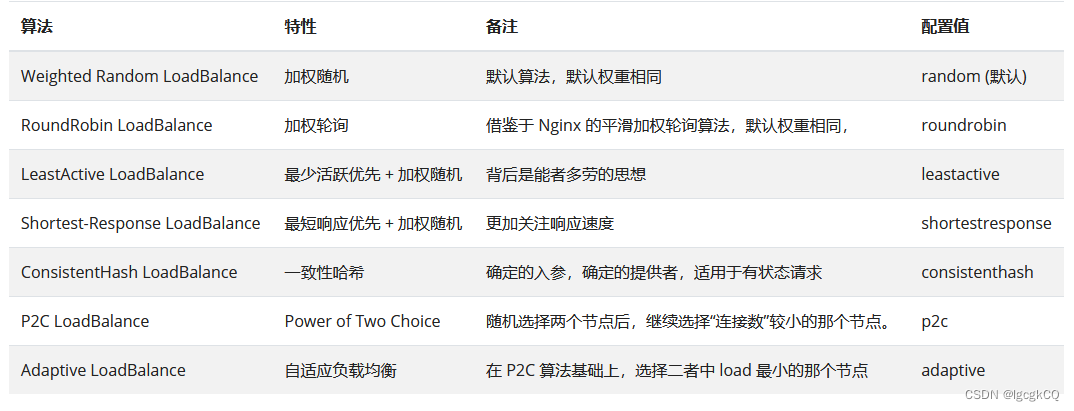
负载均衡 概述 负载均衡是指在集群中,将多个数据请求分散到不同的单元上执行,主要是为了提高系统的容错能力和对数据的处理能力。 Dubbo 负载均衡机制是决定一次服务调用使用哪个提供者的服务。 策略 在Dubbo中提供了7中负载均衡策略,默…...

gitee代码扫描js代码,降低复杂度,减少if-else判断的处理方法
把if-else换成如下形式 页面上的代码 <el-button id"btnSave" type"primary" :loading"loadingEdit" click"saveEdit(put,baseSet)"> {{ $t("formLabel.save") }} </el-button> methods代码: // 编…...
MySQL及SQL语句(3)
MySQL及SQL语句(3) 文章目录 MySQL及SQL语句(3)一、多表查询1.1 准备sql1.2 笛卡尔积1.3 多表查询的分类:内连接查询外连接查询子查询多表查询练习 二、事务2.1 事务的基本介绍概念操作实例事务提交的两种方式 2.2 事务的四大特征原子性持久性隔离性一致性 2.3 事务…...
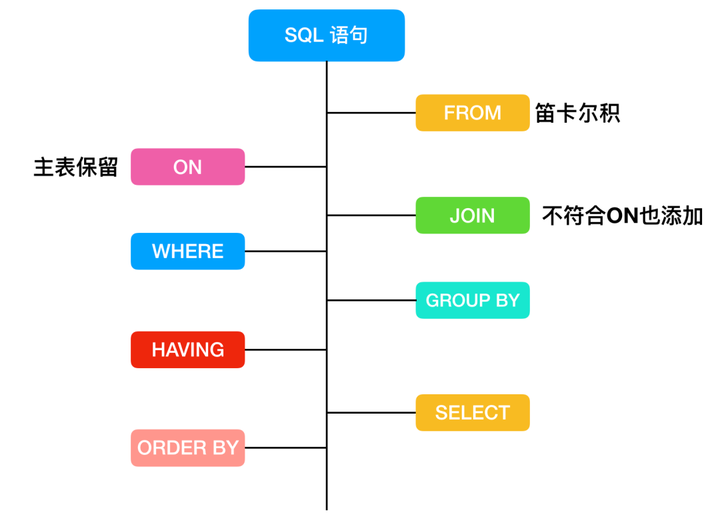
MySQL 查询语句大全
目录 基础查询 直接查询 AS起别名 去重(复)查询 条件查询 算术运算符查询 逻辑运算符查询 正则表达式查询⭐ 模糊查询 范围查询 是否非空判断查询 排序查询 限制查询(分页查询) 随机查询 分组查询 HAVING 高级查询…...

【Axure高保真原型】账单列表和详情
今天和大家分享账单列表和详情的原型模板,点击月份可以展开或收起对应的菜单列表,该模板是用中继器制作的,在中继器里填写数据后,自动计算出支出和收入总和,点击订单,可以查看该订单的详情。 【原型效果】…...

嵌入式面试题1
1 读程序段,回答问题 int main(int argc, char *argv[]) { int c 9, d 0; c c % 5; d c; printf("d%d\n",d);return 0;} a) 写出程序输出 b) 在一个可移植的系统中这种表达式是否存在风险?why? 答: 1.程序输出为:…...

base64转二进制流,file文件
base64转二进制流 img标签src属性,可以直接使用base64字符串,base64需要先解码,然后再转为流 /*** Base64字符串转二进制流* param {String} dataurl Base64字符串(字符串包含Data URI scheme,例如:data:image/png;b…...
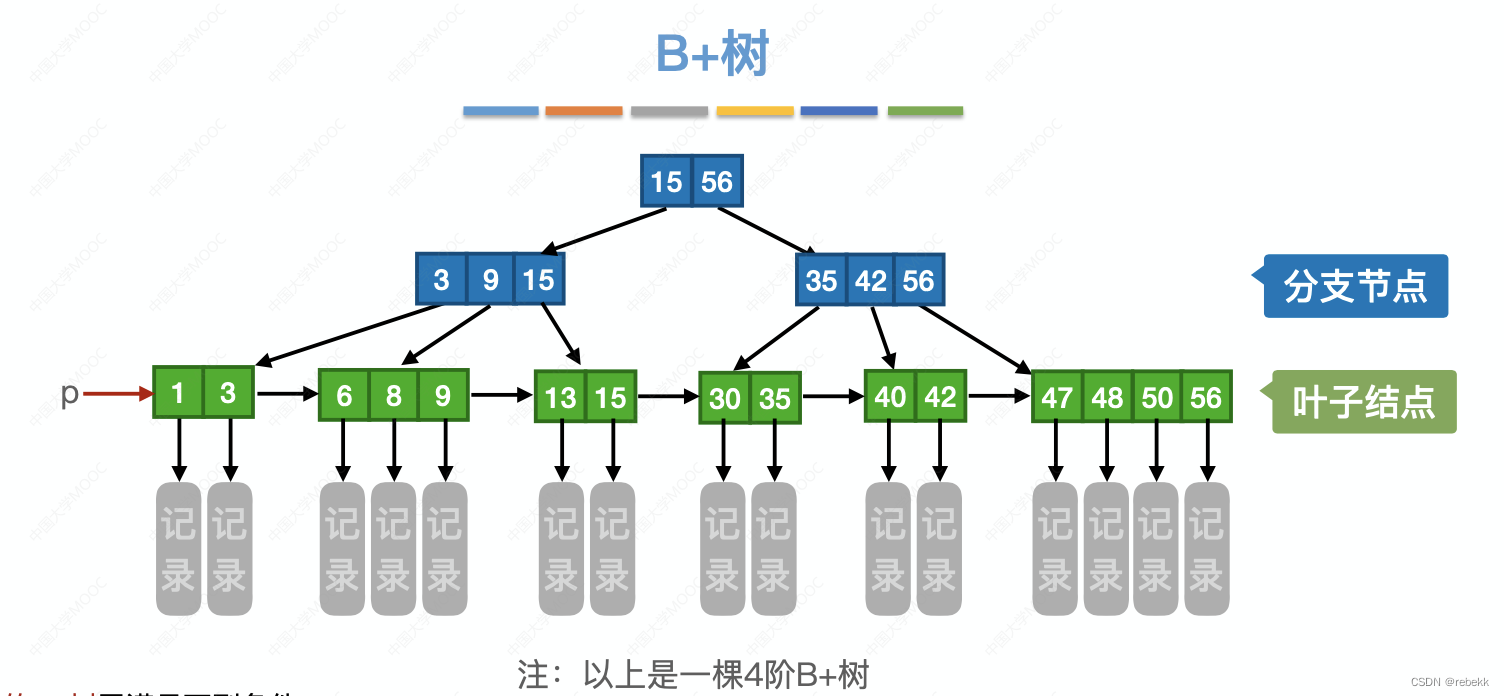
各种查找算法的效率分析
各种查找算法的效率 顺序查找 一般顺序表(没有顺序,随机排列) 成功时平均查找长度: 1 . . . n n n 1 2 \frac{1...n}{n}\frac{n1}{2} n1...n2n1失败时平均查找长度: n n n 有序顺序表(按照递增或递…...

微报告下载!市场不确定性周期下的激光雷达前装赛道
随着理想L9 Pro版本(取消激光雷达)的上市(相比AD Max版本降价3万元),中国乘用车市场仅剩下蔚来(NT2.0平台)、阿维塔11仍全系标配激光雷达。 这对于激光雷达赛道来说,是一个明确的信…...
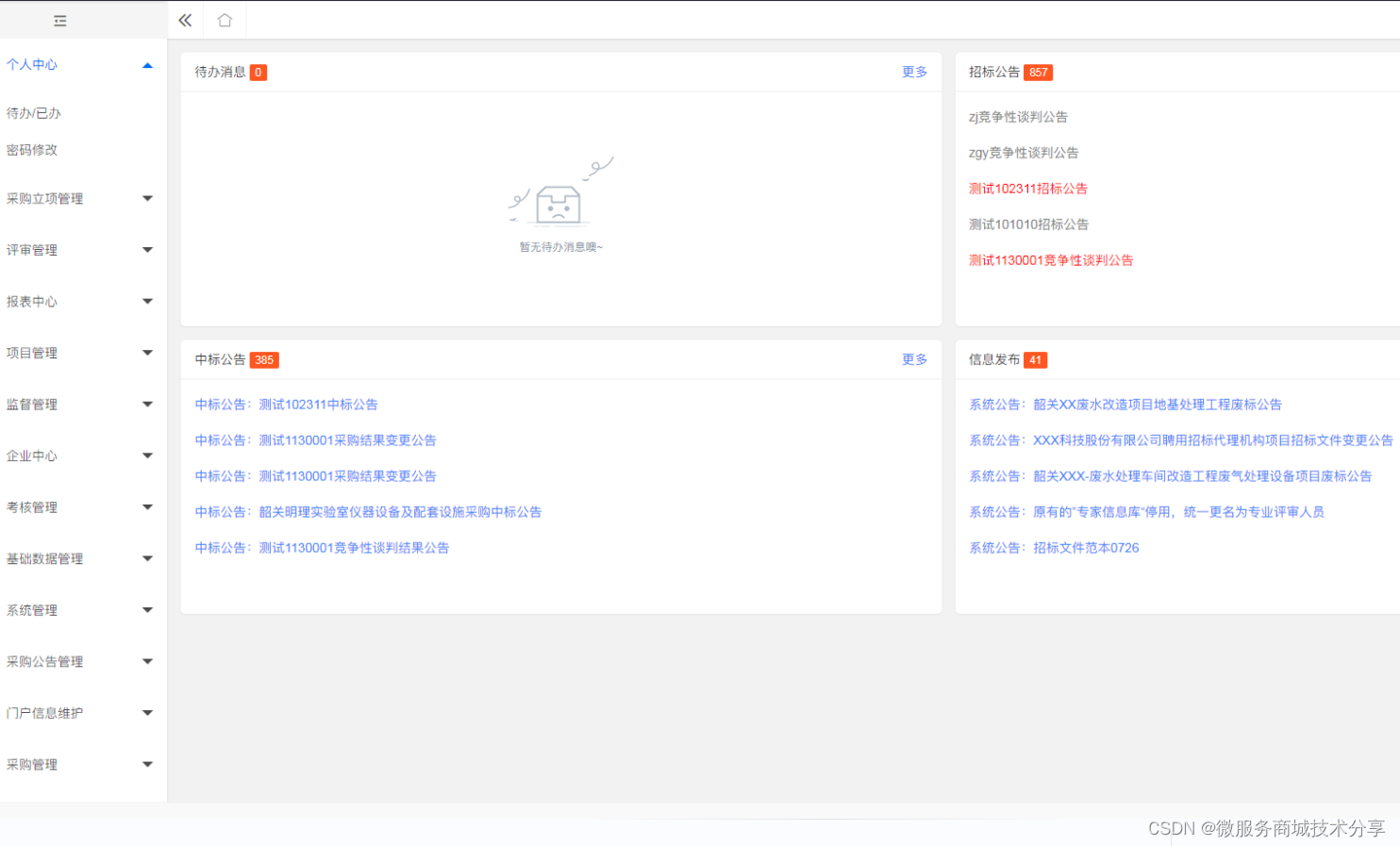
Java版企业电子招标采购系统源码Spring Cloud + Spring Boot +二次开发+ MybatisPlus + Redis tbms
功能描述 1、门户管理:所有用户可在门户页面查看所有的公告信息及相关的通知信息。主要板块包含:招标公告、非招标公告、系统通知、政策法规。 2、立项管理:企业用户可对需要采购的项目进行立项申请,并提交审批,查…...
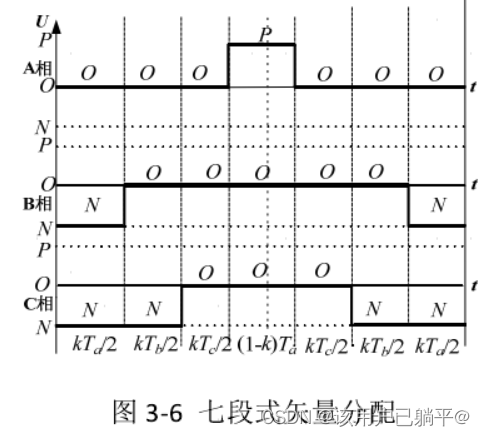
并网逆变器学习笔记6---三电平SVPWM下的连续和不连续调制
之前在学习中总结过一次DPWM策略选择:并网逆变器学习笔记5---三电平DPWM 但是对于三电平逆变器而言,如何从连续调制切换到不连续调制,存在一些疑惑点,下午闲来无事,把SVPWM下的连续调制和不连续调制的开关状态选择&am…...
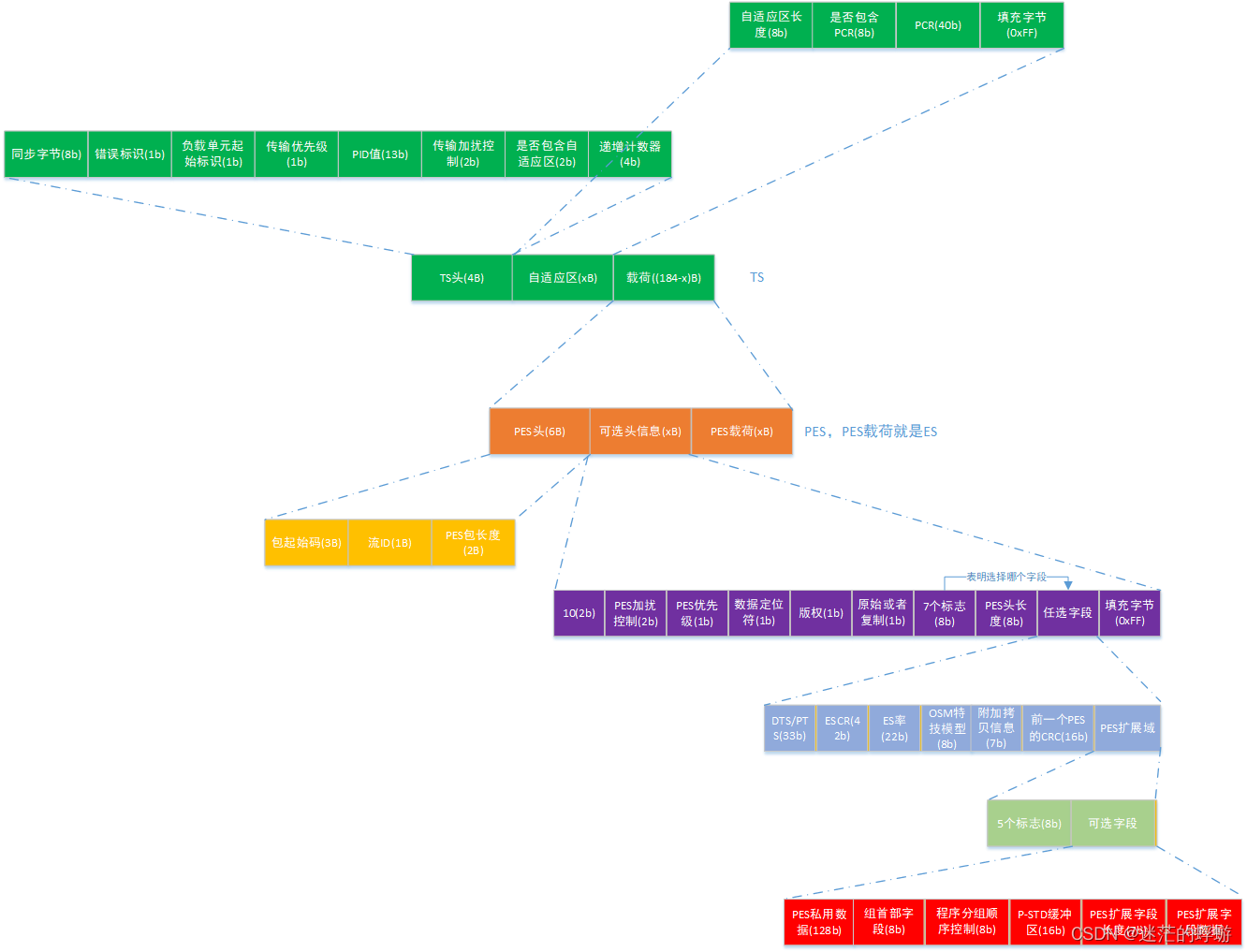
TS协议之PES(ES数据包)
TS协议之PAT(节目关联表)TS协议之PMT(节目映射表)TS协议之PES(ES数据包) 该文档已上传:下载地址 1. 概要 1.1 TS数据包(PES)协议数据组成 TSTS头PES头ES。TS…...

银河麒麟V10 SP3 X86 二进制文件部署 mysql-5.7.29 GTID 半同步复制的双主架构
文章目录 [toc]啰嗦一下mysql 的 AB 复制和 gtid 复制的优缺点AB 复制(Asynchronous Replication)GTID 复制(Global Transaction Identifier Replication) mysql gtid 并行复制和半同步复制的优缺点并行复制(Parallel …...

python爬虫3:requests库-案例1
python爬虫3:requests库-案例1 前言 python实现网络爬虫非常简单,只需要掌握一定的基础知识和一定的库使用技巧即可。本系列目标旨在梳理相关知识点,方便以后复习。 申明 本系列所涉及的代码仅用于个人研究与讨论,并不会对网…...
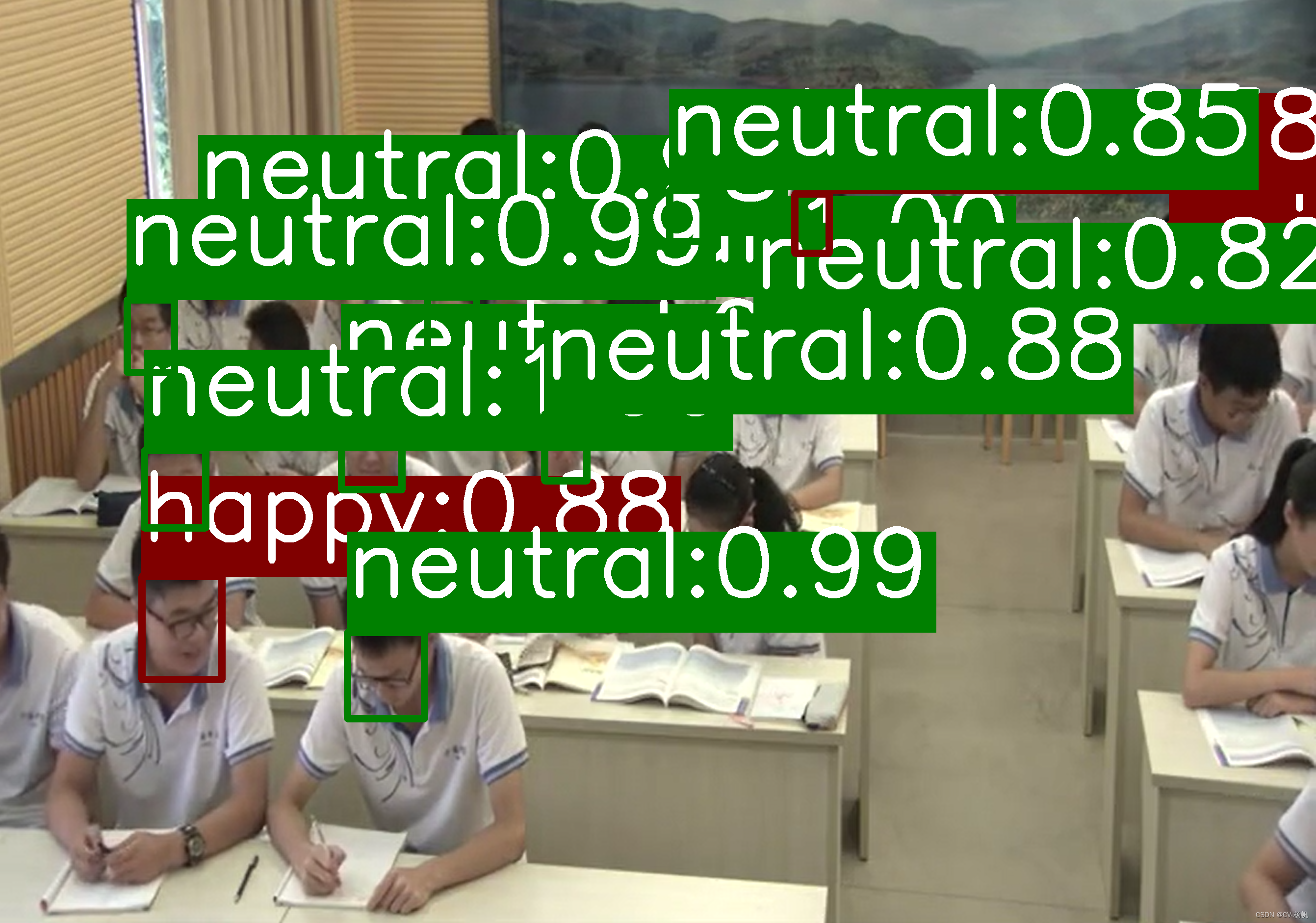
面部表情识别(Pytorch):人脸检测模型+面部表情识别分类模型
目录 0 相关资料1 基于人脸检测面部表情分类识别方法2 项目安装2.1 平台与镜像2.2 项目下载2.3 模型下载2.4 上传待测试图片2.5 项目安装 3 demo测试 0 相关资料 面部表情识别2:Pytorch实现表情识别(含表情识别数据集和训练代码):https://blog.csdn.net…...
外卖点餐小程序开源源码——支持扫码点餐
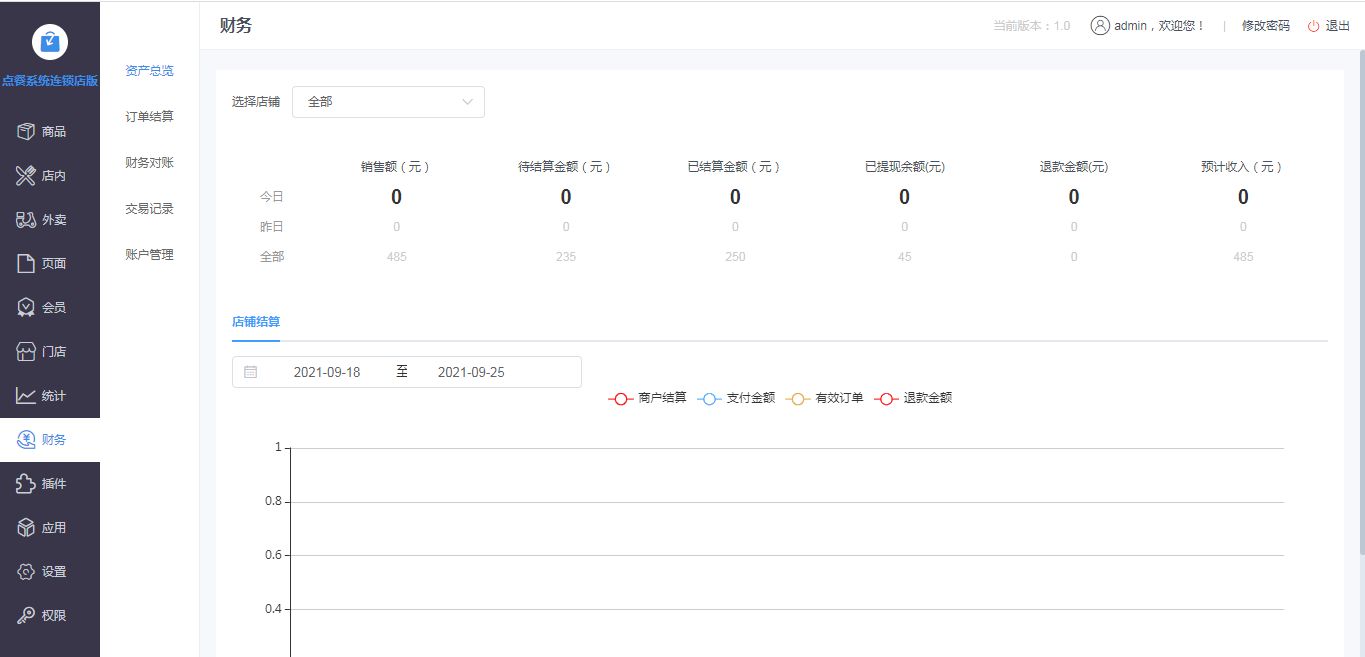
一套支持店内扫码点餐、外卖点餐配送于一体的餐饮系统,支持商家创建优惠券,支持商家自定义打印机功能,支持商家财务管理,支持商户菜品管理,支持菜品自定义分类,支持商家招募骑手入驻功能。系统基于thinkphp…...
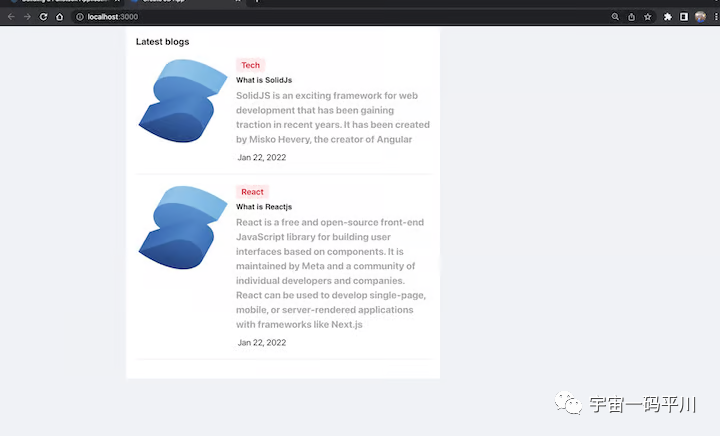
十分钟掌握使用 SolidJS 构建全栈 CRUD 应用程序
我们可以开始讨论 SolidJS,说它比React更好,但没有必要做这种比较。SolidJS只是众多前端框架之一,旨在在Web上快速创建数据驱动。那么,我们为什么要突出这个新孩子呢? 首先,我们不能忽视SolidJS不使用虚拟…...
)
uniapp 对接腾讯云IM群组成员管理(增删改查)
UniApp 实战:腾讯云IM群组成员管理(增删改查) 一、前言 在社交类App开发中,群组成员管理是核心功能之一。本文将基于UniApp框架,结合腾讯云IM SDK,详细讲解如何实现群组成员的增删改查全流程。 权限校验…...

Chapter03-Authentication vulnerabilities
文章目录 1. 身份验证简介1.1 What is authentication1.2 difference between authentication and authorization1.3 身份验证机制失效的原因1.4 身份验证机制失效的影响 2. 基于登录功能的漏洞2.1 密码爆破2.2 用户名枚举2.3 有缺陷的暴力破解防护2.3.1 如果用户登录尝试失败次…...

屋顶变身“发电站” ,中天合创屋面分布式光伏发电项目顺利并网!
5月28日,中天合创屋面分布式光伏发电项目顺利并网发电,该项目位于内蒙古自治区鄂尔多斯市乌审旗,项目利用中天合创聚乙烯、聚丙烯仓库屋面作为场地建设光伏电站,总装机容量为9.96MWp。 项目投运后,每年可节约标煤3670…...
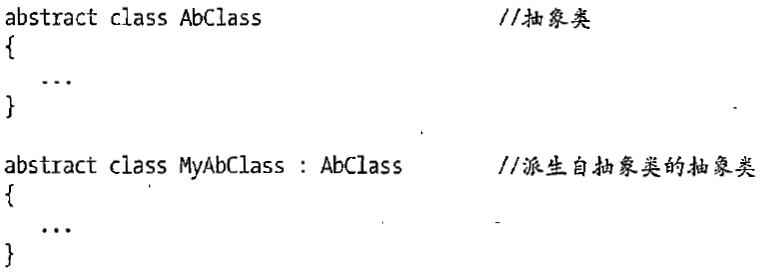
C# 类和继承(抽象类)
抽象类 抽象类是指设计为被继承的类。抽象类只能被用作其他类的基类。 不能创建抽象类的实例。抽象类使用abstract修饰符声明。 抽象类可以包含抽象成员或普通的非抽象成员。抽象类的成员可以是抽象成员和普通带 实现的成员的任意组合。抽象类自己可以派生自另一个抽象类。例…...

AspectJ 在 Android 中的完整使用指南
一、环境配置(Gradle 7.0 适配) 1. 项目级 build.gradle // 注意:沪江插件已停更,推荐官方兼容方案 buildscript {dependencies {classpath org.aspectj:aspectjtools:1.9.9.1 // AspectJ 工具} } 2. 模块级 build.gradle plu…...
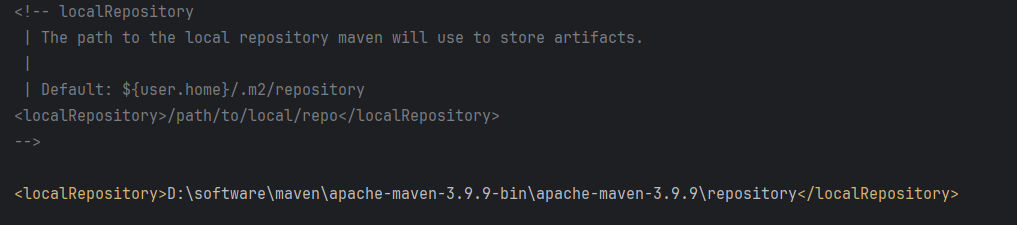
Maven 概述、安装、配置、仓库、私服详解
目录 1、Maven 概述 1.1 Maven 的定义 1.2 Maven 解决的问题 1.3 Maven 的核心特性与优势 2、Maven 安装 2.1 下载 Maven 2.2 安装配置 Maven 2.3 测试安装 2.4 修改 Maven 本地仓库的默认路径 3、Maven 配置 3.1 配置本地仓库 3.2 配置 JDK 3.3 IDEA 配置本地 Ma…...
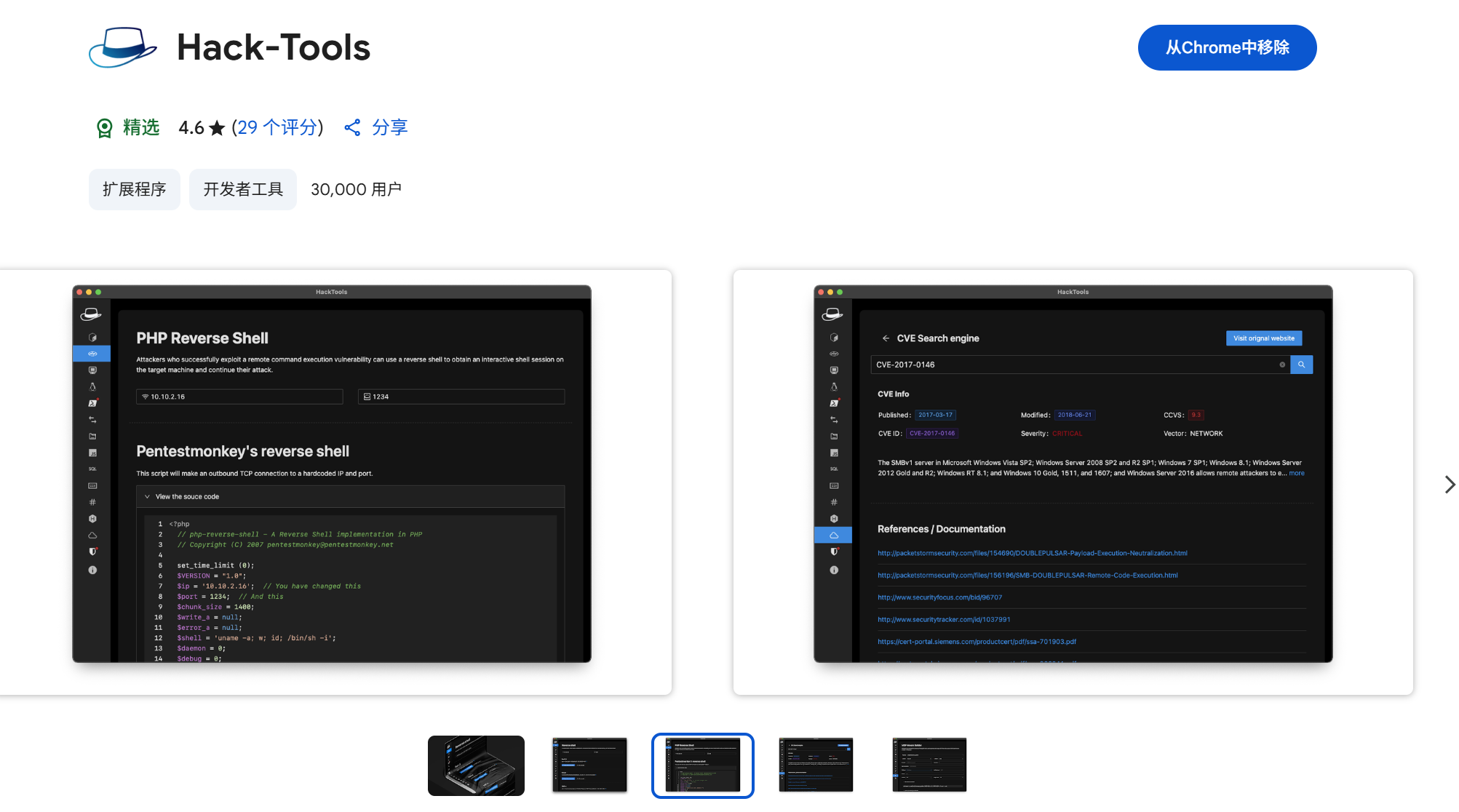
一些实用的chrome扩展0x01
简介 浏览器扩展程序有助于自动化任务、查找隐藏的漏洞、隐藏自身痕迹。以下列出了一些必备扩展程序,无论是测试应用程序、搜寻漏洞还是收集情报,它们都能提升工作流程。 FoxyProxy 代理管理工具,此扩展简化了使用代理(如 Burp…...

前端调试HTTP状态码
1xx(信息类状态码) 这类状态码表示临时响应,需要客户端继续处理请求。 100 Continue 服务器已收到请求的初始部分,客户端应继续发送剩余部分。 2xx(成功类状态码) 表示请求已成功被服务器接收、理解并处…...
【51单片机】4. 模块化编程与LCD1602Debug
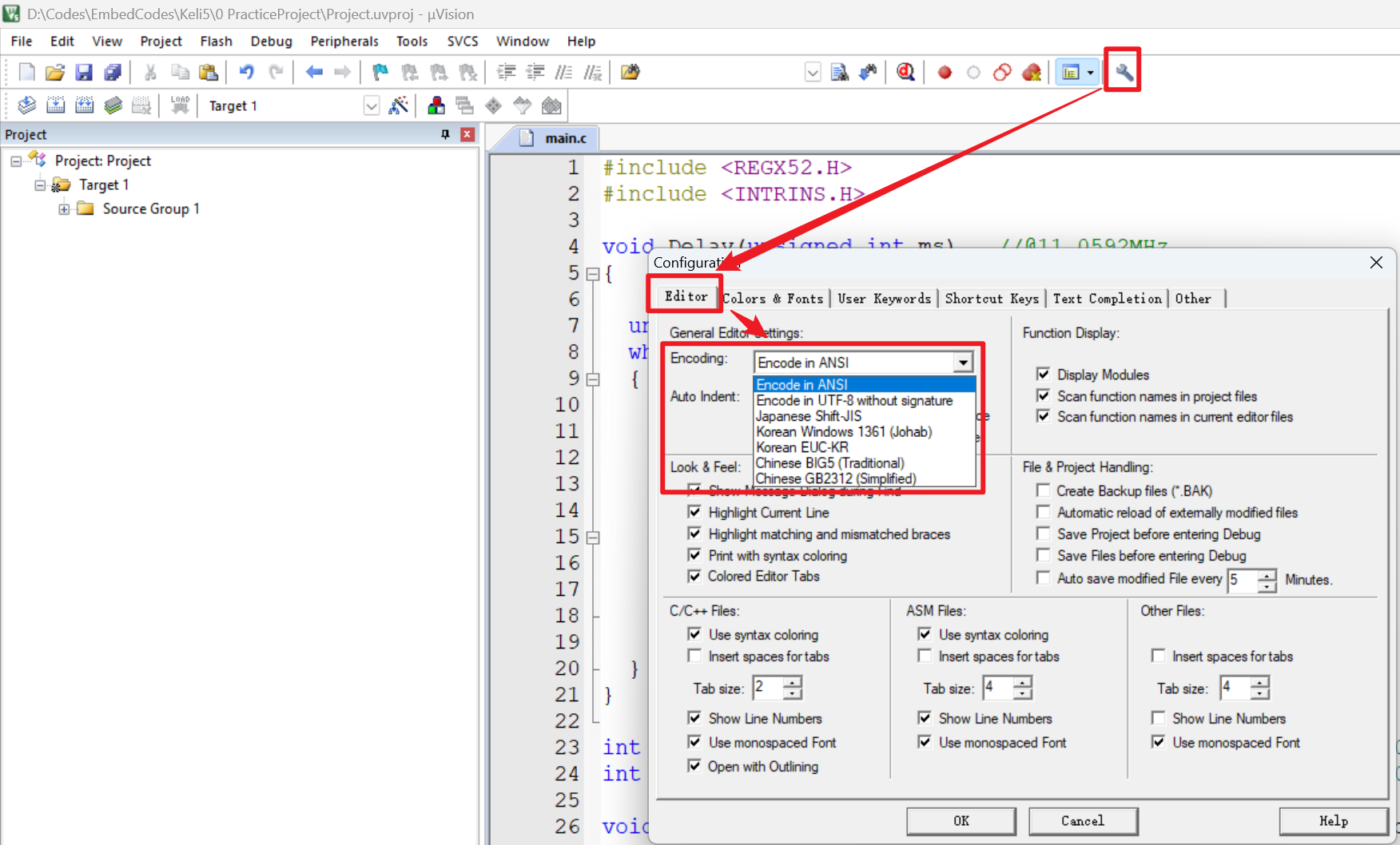
1. 什么是模块化编程 传统编程会将所有函数放在main.c中,如果使用的模块多,一个文件内会有很多代码,不利于组织和管理 模块化编程则是将各个模块的代码放在不同的.c文件里,在.h文件里提供外部可调用函数声明,其他.c文…...
云原生安全实战:API网关Envoy的鉴权与限流详解
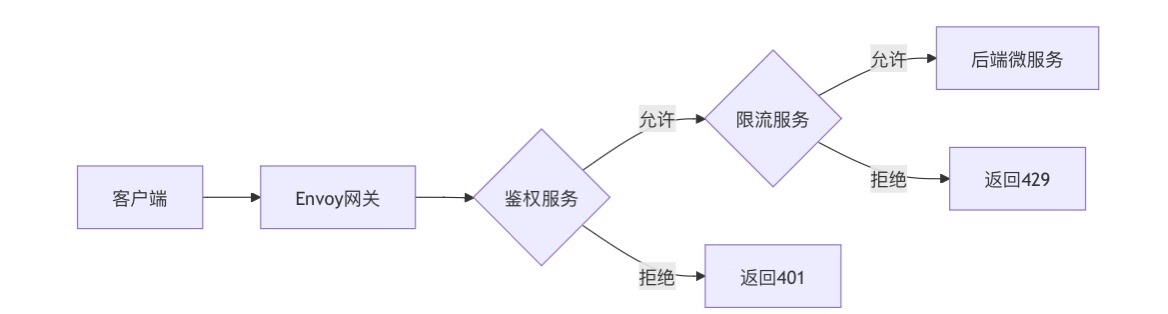
🔥「炎码工坊」技术弹药已装填! 点击关注 → 解锁工业级干货【工具实测|项目避坑|源码燃烧指南】 一、基础概念 1. API网关 作为微服务架构的统一入口,负责路由转发、安全控制、流量管理等核心功能。 2. Envoy 由Lyft开源的高性能云原生…...