
vue3实现自定义select下拉框内容之城市区域篇
分享-2023年资深前端进阶:前端登顶之巅-最全面的前端知识点梳理总结
*分享一个使用比较久的🪜
需求分析:
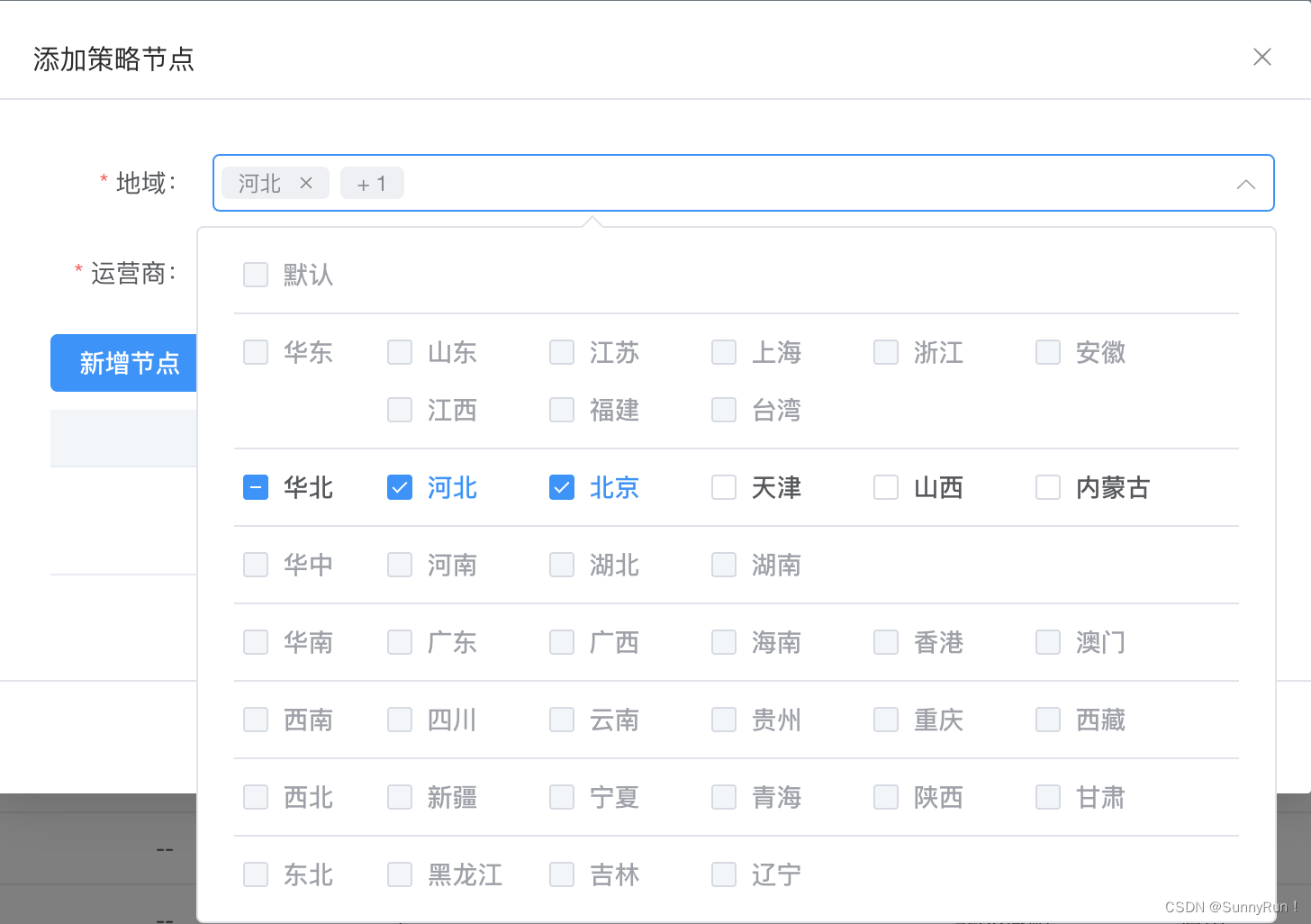
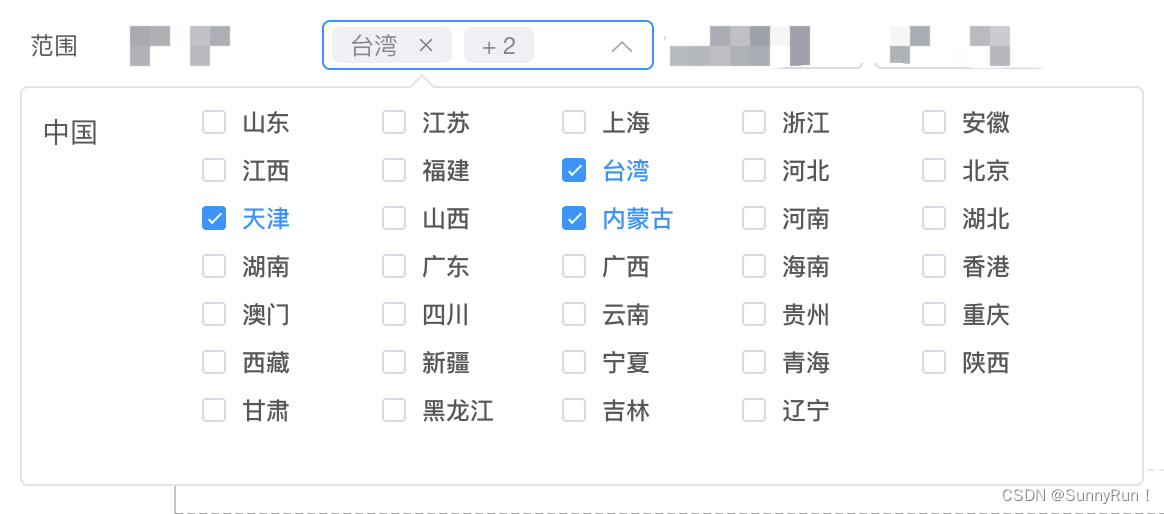
1、实现一个区域下拉选项与现有ui组件库不同,支持多选、单选需求
2、支持选中区域后-全选中当前区域下的所有城市信息
3、只能选中当前一个区域的内的城市其余城市禁用
扩展思路:
1、封装公共组件或者封装在组件库内
2、出入参相关api透明好理解
3、支持单选或者多选,支持只选择当前区域下的城市或者全面区域下的城市
4、在原有的element plus下进行扩展延伸满足需求
5、缺陷:未做maxLength-标签最大展示的api;这个按需自己修改一下就行
1、第一种模式:显示区域信息
2、第二种模式:只展示城市内容
1、相关开发代码篇
创建文件:custom-select.vue文件;复制copy当下代码;
使用方式:
1、外部入参例如城市:dataSource=[{ label: 华北,value: '华东', children: [{ label: '山东',value: 'shandong'}]],树形结构
2、标签引用:<custom-select :disabled="true" :multilevel="true" height="32" v-model="checkGroup" :dataSource="cityList"></custom-select>
3、相关api说明文档在文章底部
<template><divtabindex="1"ref="customSelectRef"@click="handleClickDiv"@mouseenter="handelMouseEnter"@mouseleave="handleMouseLeave":style="{ width: modelLabel && modelValue?.length ? '166px' : '100px', height: (height + 'px') || '25px' }":class="['custom-select_contaniner-i', isShowDropdown && 'custom-select_background']"><div><span v-if="modelLabel" class="custom-tag"><span>{{ modelLabel }}</span><iclass="custom_tag_delete"@mouseenter="handelIconMouseEnter"@mouseleave="handleIconMouseLeave"@click.stop="handleDeleteIcon"><svgv-if="!ishShowIconDeleteText"t="1678090923023"class="icon"viewBox="0 0 1024 1024"version="1.1"xmlns="http://www.w3.org/2000/svg"p-id="6709"width="11"height="11"><pathd="M263.802377 224.219482a7.964444 7.964444 0 0 1 11.263425 0l236.934198 236.934198 236.934198-236.934198a7.964444 7.964444 0 0 1 11.263425 0l39.582895 39.582895a7.964444 7.964444 0 0 1 0 11.263425l-236.934198 236.934198 236.934198 236.934198a7.964444 7.964444 0 0 1 0 11.263425l-39.582895 39.582895a7.964444 7.964444 0 0 1-11.263425 0l-236.934198-236.934198-236.934198 236.934198a7.964444 7.964444 0 0 1-11.263425 0l-39.582895-39.582895a7.964444 7.964444 0 0 1 0-11.263425l236.934198-236.934198-236.934198-236.934198a7.964444 7.964444 0 0 1 0-11.263425l39.582895-39.582895z"fill="#8a8a8a"p-id="6710"/></svg><svgv-elset="1678091410677"class="icon"viewBox="0 0 1024 1024"version="1.1"xmlns="http://www.w3.org/2000/svg"p-id="6936"width="22"height="22"><pathd="M479.072 512l-98.72-98.72c-9.152-9.152-9.088-23.84 0-32.928 9.152-9.152 23.84-9.088 32.928 0l98.72 98.72 98.72-98.72c9.152-9.152 23.84-9.088 32.928 0 9.152 9.152 9.088 23.84 0 32.928l-98.72 98.72 98.72 98.72c9.152 9.152 9.088 23.84 0 32.928-9.152 9.152-23.84 9.088-32.928 0l-98.72-98.72-98.72 98.72c-9.152 9.152-23.84 9.088-32.928 0-9.152-9.152-9.088-23.84 0-32.928l98.72-98.72zM512 837.824c179.936 0 325.824-145.888 325.824-325.824s-145.888-325.824-325.824-325.824c-179.936 0-325.824 145.888-325.824 325.824s145.888 325.824 325.824 325.824z"fill="#B7B8B9"p-id="6937"/></svg></i></span><span v-if="modelLabel && modelValue?.length > 1" class="custom-tag">+ {{ modelValue.length - 1 }}</span><span v-if="!modelLabel" class="cus_placeholder">{{ placeholder }}</span></div><i class="arrow-top-icon" v-if="!isShowIconRemove || !modelLabel" :class="[!isShowDropdown && 'arrow-top-icon-active']"><svg viewBox="0 0 1024 1024" xmlns="http://www.w3.org/2000/svg"><pathfill="currentColor"d="M831.872 340.864 512 652.672 192.128 340.864a30.592 30.592 0 0 0-42.752 0 29.12 29.12 0 0 0 0 41.6L489.664 714.24a32 32 0 0 0 44.672 0l340.288-331.712a29.12 29.12 0 0 0 0-41.728 30.592 30.592 0 0 0-42.752 0z"/></svg></i><i class="remove-icon" v-if="isShowIconRemove && modelLabel" @click.stop="handleRemove"><svgt="1678084213981"class="icon"viewBox="0 0 1024 1024"version="1.1"xmlns="http://www.w3.org/2000/svg"p-id="4480"width="11"height="11"><pathd="M512 32c265.097 0 480 214.903 480 480S777.097 992 512 992 32 777.097 32 512 246.903 32 512 32z m0 64C282.25 96 96 282.25 96 512s186.25 416 416 416 416-186.25 416-416S741.75 96 512 96z m169.706 246.294c12.496 12.497 12.496 32.758 0 45.255L557.256 512l124.45 124.452c12.496 12.497 12.496 32.758 0 45.255-12.497 12.496-32.758 12.496-45.255 0L512 557.254 387.549 681.706c-12.497 12.496-32.758 12.496-45.255 0-12.496-12.497-12.496-32.758 0-45.255l124.452-124.452-124.452-124.45c-12.496-12.497-12.496-32.758 0-45.255 12.497-12.496 32.758-12.496 45.255 0l124.452 124.45 124.45-124.45c12.497-12.496 32.758-12.496 45.255 0z"fill="#8a8a8a"p-id="4481"/></svg></i></div><transition><divv-if="isShowDropdown"ref="cusSelectDropdown"class="cus_select_background":style="{ minWidth: popperOffestWidth + 'px', zIndex: 99999 }"><div v-if="multilevel" style="padding: 5px 20px;"><div :key="key" v-for="(opt, key) in cusDataListChecked" class="multilevel_box"><el-checkboxstyle="width: 60px;"v-model="opt.checkAll"@change="handleCheckAllChange($event, opt)":indeterminate="opt.isIndeterminate":disabled="disabled && checkList.length ? !opt.checkList.length : false">{{ opt.label }}</el-checkbox><el-checkbox-group v-model="opt.checkList"v-if="opt.children"@change="handleCheckedCitiesChange($event, opt)"style="display: inline-block; padding-left: 20px" ><el-checkbox :label="item.value" style="width: 60px":key="index + Math.random()" v-for="(item, index) in opt.children" :disabled="disabled && checkList.length ? !opt.checkList.length : false">{{ item.label }}</el-checkbox></el-checkbox-group></div></div><div class="cus_select_contaniner" v-else><div class="cus_select_left">中国</div><div class="cus_select_right"><el-checkbox-group v-model="checkList" @change="handelCheckGroup"style="display: inline-block; padding-left: 20px" ><el-checkbox :key="index" :label="item.value" style="width: 60px"v-for="(item, index) in dataSource" >{{ item.label }}</el-checkbox></el-checkbox-group></div></div><span class="el-popper__arrow" data-popper-arrow="" style="position: absolute; left: 140px;"></span></div></transition>
</template>
<script setup lang="ts">
import { createPopper } from '@popperjs/core'
import { ref, onMounted, nextTick, watch, onUnmounted, toRaw, onBeforeMount, computed } from 'vue'const props = withDefaults(defineProps<{height?: string | numberdataSource: anymodelValue?: anyplaceholder?: stringmultilevel?: booleandisabled?: boolean}>(),{height: 25,disabled: false,multilevel: false,dataSource: [],modelValue: [],placeholder: '请选择'}
)const emit = defineEmits(['update:modelValue'])const customSelectRef = ref()const cusSelectDropdown = ref()const cusDataListChecked = ref<any[]>([])const checkList = ref<string[]>([])const popperOffestWidth = ref<number>(0)const isShowDropdown = ref<boolean>(false)const modelLabel = ref<string>('')const isShowIconRemove = ref<boolean>(false)const ishShowIconDeleteText = ref<boolean>(false)const handleClickDiv = () => {isShowDropdown.value = !isShowDropdown.value
}const handelCheckGroup = (value) => {const obj = props.dataSource.filter((item) => item.value === value[0])[0]modelLabel.value = obj?.labelemit('update:modelValue', value)
}const handelMouseEnter = () => {isShowIconRemove.value = true
}const handleMouseLeave = () => {isShowIconRemove.value = false
}const handleRemove = () => {modelLabel.value = ''checkList.value = []if (isShowDropdown.value) {isShowDropdown.value = false}if (props.multilevel) {cusDataListChecked.value = addCheckProperties(props.dataSource)}emit('update:modelValue', [])
}const handleDeleteIcon = () => {isShowDropdown.value = falsecheckList.value.splice(0, 1)if (props.multilevel) return cusDataListChecked.value = findTreeChecked(cusDataListChecked.value)const info = toRaw(checkList.value)[0]const obj = props.dataSource.filter((item) => item.value === info)[0]modelLabel.value = obj?.label || ''
}const handelIconMouseEnter = () => {ishShowIconDeleteText.value = true
}const handleIconMouseLeave = () => {ishShowIconDeleteText.value = false
}// 点击某个DOM元素之外的方法
const handlerDocClick = (event) => {const isSelf = customSelectRef.value?.contains(event.target) || cusSelectDropdown.value?.contains(event.target)if (!isSelf) {isShowDropdown.value = false}
}/*** 展示区域省份的逻辑* */
const handleCheckAllChange = (bool: any, option) => {const allCity = option.children ? option.children.map(item => item.value) : [option.value]bool ? option.checkList = allCity : option.checkList = []option.isIndeterminate = falsecheckList.value = option.checkListconst newLabelArr = option.children ? option.children.filter(item => checkList.value.includes(item.value)) : checkList.value?.length ? [{ label: '默认' }] : []modelLabel.value = newLabelArr?.[0]?.label || ''emit('update:modelValue', checkList.value)
}const handleCheckedCitiesChange = (value: any[], option) => {const checkedCount = value.lengthconst allCity = option.children ? option.children.map(item => item.value) : [option.value]option.checkAll = checkedCount === allCity.lengthoption.isIndeterminate = checkedCount > 0 && checkedCount < allCity.lengthcheckList.value = option.checkListconst newLabelArr = option.children ? option.children.filter(item => checkList.value.includes(item.value)) : checkList.value?.length ? [{ label: '默认' }] : []modelLabel.value = newLabelArr?.[0]?.label || ''emit('update:modelValue', checkList.value)
}const addCheckProperties = (treeData) => {let result = []result = JSON.parse(JSON.stringify(treeData))result.forEach(node => {const child = node.children;node.checkAll = false;node.isIndeterminate = false;node.checkList = [];if (child && child.length > 0) {addCheckProperties(child);}});return result
}const findTreeChecked = (treeData) => {let newLabelconst val = toRaw(checkList.value)const defaultBool = val.some(item => item.includes('default'))treeData.forEach(node => {if (node.children?.length) {const child = node.children;const bool = child.some(opt => val.includes(opt.value))!newLabel ? newLabel = child.filter(item => val.includes(item.value))[0] : void nullif (bool) {node.checkAll = val.length === child?.length;node.isIndeterminate = val.length > 0 && val.length < child?.length;node.checkList = val;} else {node.isIndeterminate = false}}})treeData[0].isIndeterminate = false;treeData[0].checkAll = defaultBool ? true : false;treeData[0].checkList = defaultBool ? ['default'] : [];modelLabel.value = defaultBool ? '默认' : newLabel?.label || ''return treeData
}watch([customSelectRef, cusSelectDropdown],() => {if (customSelectRef.value && cusSelectDropdown.value) {createPopper(customSelectRef.value, cusSelectDropdown.value, {placement: 'bottom',modifiers: [{name: 'offset',options: {offset: [80, 8]}}]})}},{deep: true,immediate: true}
)watch(props.modelValue,(newval) => {if (!newval || !newval.length) returncheckList.value = props.modelValueif (props.multilevel) returnconst obj = props.dataSource.filter((item) => item.value === newval[0])[0]modelLabel.value = obj?.label},{deep: true,immediate: true}
)onBeforeMount(() => {if (props.multilevel) {cusDataListChecked.value = addCheckProperties(props.dataSource)}
})onMounted(async () => {await nextTick()popperOffestWidth.value = customSelectRef.value.offsetWidthdocument.addEventListener('click', handlerDocClick, true)if (props.multilevel && props.modelValue.length) { cusDataListChecked.value = findTreeChecked(cusDataListChecked.value)}
})onUnmounted(() => {document.removeEventListener('click', handlerDocClick, true)
})
</script><script lang="ts">
export default { name: 'CustomSelect' }
</script><style lang="scss" scoped>
.v-enter-active,
.v-leave-active {transition: opacity 0.5s ease;
}.v-enter-from,
.v-leave-to {opacity: 0;
}.custom-select_contaniner-i {width: 100%;height: 25px;padding: 7px 9px;padding-left: 5px;border-radius: 4px;line-height: 1;cursor: pointer;position: relative;user-select: none;word-wrap: break-word;word-break: break-all;font-size: 13px;flex-grow: 1;display: inline-flex;align-items: center;box-sizing: border-box;justify-content: space-between;color: var(--el-input-text-color, var(--el-text-color-regular));background-color: var(--el-input-bg-color, var(--el-fill-color-blank));box-shadow: 0 0 0 1px var(--el-input-border-color, var(--el-border-color)) inset;
}.custom-tag {color: var(--el-color-info);display: inline-flex;justify-content: center;align-items: center;height: 18px;padding: 0 9px;line-height: 1;border-radius: 4px;white-space: nowrap;font-size: 12px;background-color: var(--el-fill-color);
}.custom_tag_delete {width: 18px;margin-left: 5px;font-size: 0px;border-radius: 50%;display: flex;justify-content: center;align-items: center;cursor: pointer;color: var(--el-color-info);
}.custom-tag:first-child {margin-right: 6px;padding-right: 4px;
}.arrow-top-icon {width: 14px;transform: rotateX(-180deg);color: var(--el-text-color-placeholder);
}.remove-icon {margin-top: 2px;color: var(--el-text-color-placeholder);
}.arrow-top-icon-active {transform: rotateX(0deg);
}.custom-select:hover {box-shadow: 0 0 0 1px var(--el-border-color-hover) inset;
}.custom-select:focus {outline: none;box-shadow: 0 0 0 1px var(--el-color-primary) inset;
}.custom-select_background {box-shadow: 0 0 0 1px var(--el-color-primary) inset;
}::-webkit-scrollbar {width: 4px;height: 4px;background-color: transparent;
}/*滚动条的轨道*/
::-webkit-scrollbar-track {background-color: transparent;
}/*滚动条的滑块按钮*/
::-webkit-scrollbar-thumb {border-radius: 8px;background-color: rgba(0, 0, 0, 0.1);box-shadow: inset 0 0 2px rgba(#000000, 0.04);
}/*滚动条的上下两端的按钮*/
::-webkit-scrollbar-button {height: 0;background-color: transparent;
}.cus_select_contaniner {padding: 5px 10px;display: flex;
}.cus_select_left {width: 60px;margin-top: 5px;
}.cus_select_right {flex: 1;width: 480px;
}.cus_select_background {min-height: 200px;box-sizing: border-box;border-radius: 4px;font-size: var(--el-font-size-base);color: var(--el-text-color-regular);background: var(--el-bg-color-overlay);border: 1px solid var(--el-border-color-light);.multilevel_box {display: flex; padding: 5px; border-bottom: 1px solid #e4e7ed;}.multilevel_box:last-child {border-bottom: none;}
}.cus_placeholder {color: var(--el-text-color-placeholder);
}.el-popper__arrow {top: -5px;
}.el-popper__arrow {position: absolute;width: 10px;height: 10px;z-index: -1;
}.el-popper__arrow::before {border: 1px solid var(--el-border-color-light);background: var(--el-bg-color-overlay);right: 0;border-bottom-color: transparent!important;border-right-color: transparent!important;
}
</style>
2、组件-相关api说明
| 参数 | 说明 | 类型 | 默认值 | 必填项 |
|---|---|---|---|---|
| height | 输入框的高度 | String/Number | 25 | 否 |
| dataSource | [{}]-label,value;树形结构 | Array[] | [] | 是 |
| modelValue | 当前选中项内容 | Array | [] | 否 |
| placeholder | 输入框内容 | String | 请输入 | 否 |
| multilevel | 是否开启跨层级模式 | Boolean | false | 否 |
| disabled | 是否开启跨层级禁用 | Boolean | false | 否 |
相关文章:
vue3实现自定义select下拉框内容之城市区域篇
分享-2023年资深前端进阶:前端登顶之巅-最全面的前端知识点梳理总结 *分享一个使用比较久的🪜 需求分析: 1、实现一个区域下拉选项与现有ui组件库不同,支持多选、单选需求 2、支持选中区域后-全选中当前区域下的所有城市信息 3、…...
性能测评:腾讯云轻量应用服务器_CPU内存带宽流量
腾讯云轻量应用服务器性能如何?轻量服务器CPU内存带宽配置高,CPU采用什么型号主频多少?轻量应用服务器会不会比云服务器CVM性能差?腾讯云服务器网详解CPU型号主频、内存、公网带宽和系统盘存储多维对比,相对于CVM云服务…...
python中的迭代器和生成器
一、迭代器 支持迭代的容器,如列表(list)、元组(tuple)、字典(dict)、集合(set)这些序列式容器。 自定义迭代器的类中必须实现以下2个方法: __next__(self)…...
Python-OpenCV中的图像处理-图像阀值
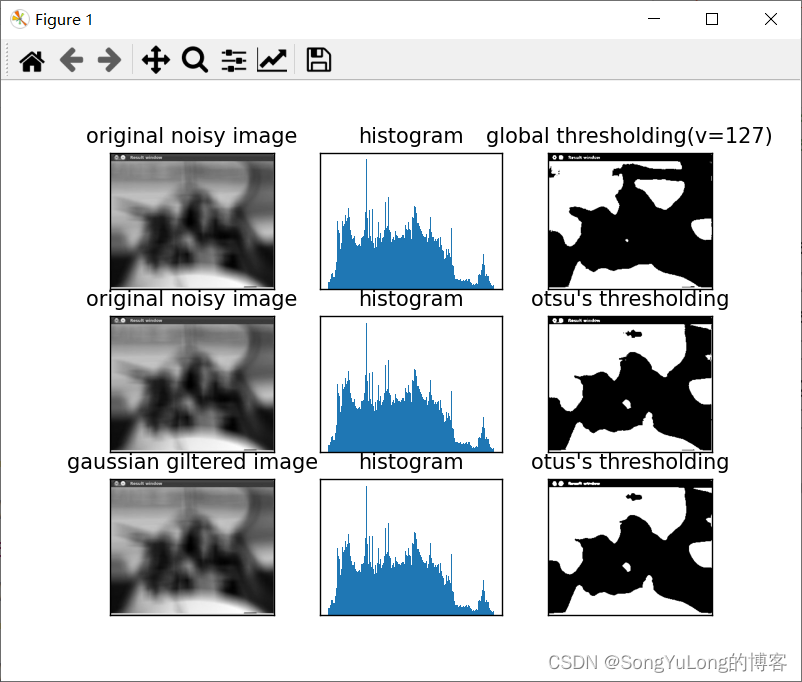
Python-OpenCV中的图像处理-图像阀值 图像阈值单阈值自适应阈值Otsus二值化 图像阈值 单阈值 与名字一样,这种方法非常简单。但像素值高于阈值时,我们给这个像素赋予一个新值(可能是白色),否则我们给它赋予另外一种颜…...

VB+SQL酒店客房管理设计与实现
摘要 二十一世纪是信息技术的时代,计算机已经应用到了各行各业中。采用计算机信息管理技术,可以有效的降低企业的管理成本,提高企业内部的工作效率。 本文从天天宾馆客房客房管理的一般流程出发,设计了一套天天宾馆客房管理信息系统,它可以管理天天宾馆客房中所有的客房的…...
【Linux】从0到1实现一个进度条小程序
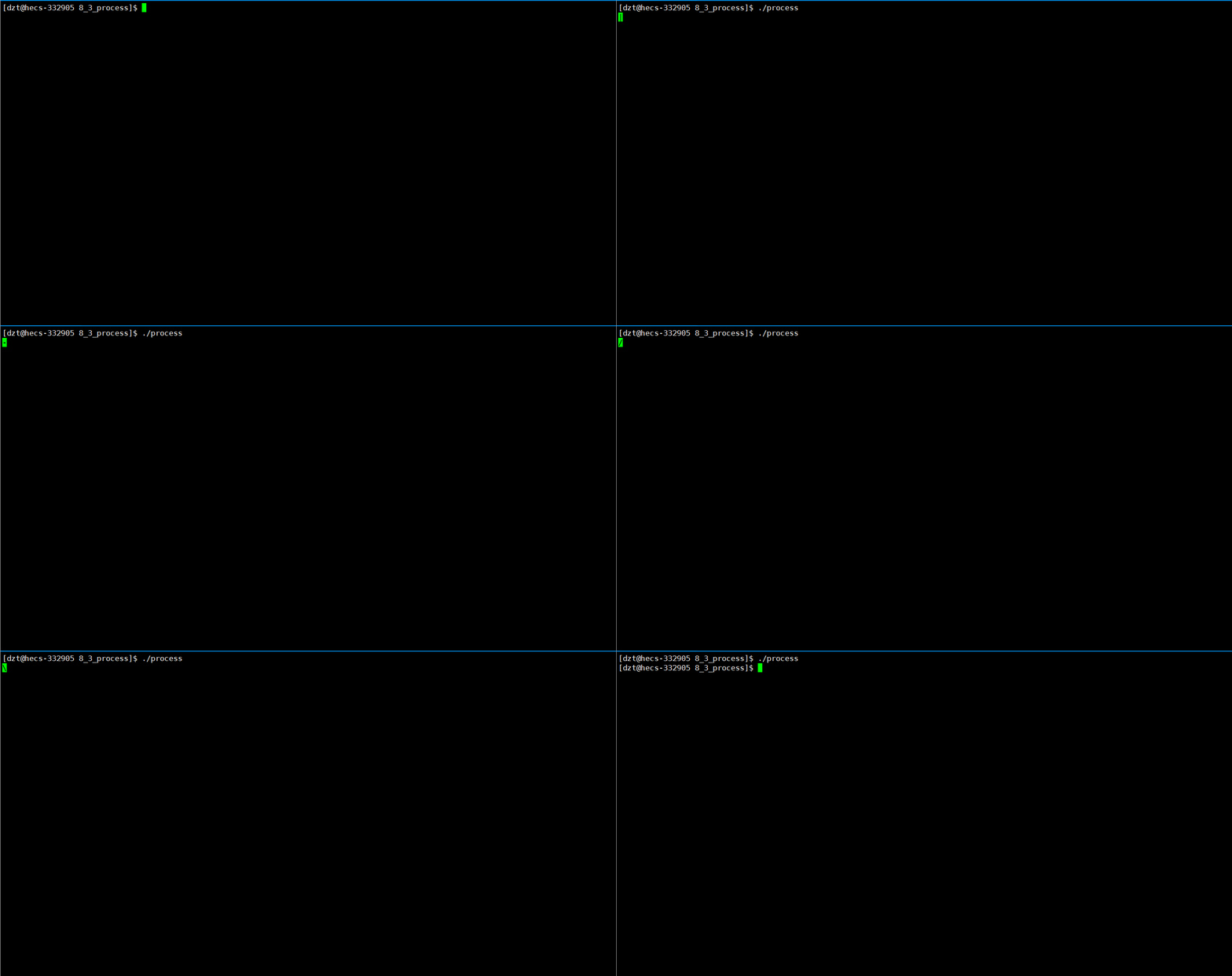
个人主页:🍝在肯德基吃麻辣烫 我的gitee:gitee仓库 分享一句喜欢的话:热烈的火焰,冰封在最沉默的火山深处 文章目录 前言一、理解回车 \r 和换行 \n二、初步认识缓冲区1. 认识第一个函数:sleep2.观察缓冲区…...
江南大学轴承数据故障诊断(利用一维CNN进行故障诊断,代码和数据放在压缩包,无需修改任何东西,解压缩后直接运行,有详细注释)
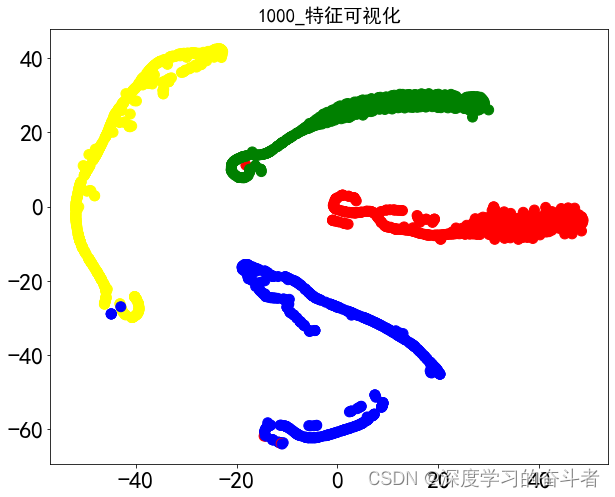
1.江南大学轴承数据集介绍 采样频率:50khz,采样时间:10s 转速:600 800 1000/rpm 内圈:ib 外圈:ob 滚动体:tb 正常:N 以600转速下的内圈故障数据为例展示: 开始数据…...
【网络基础实战之路】基于BGP协议连接三个AS区域的实战详解
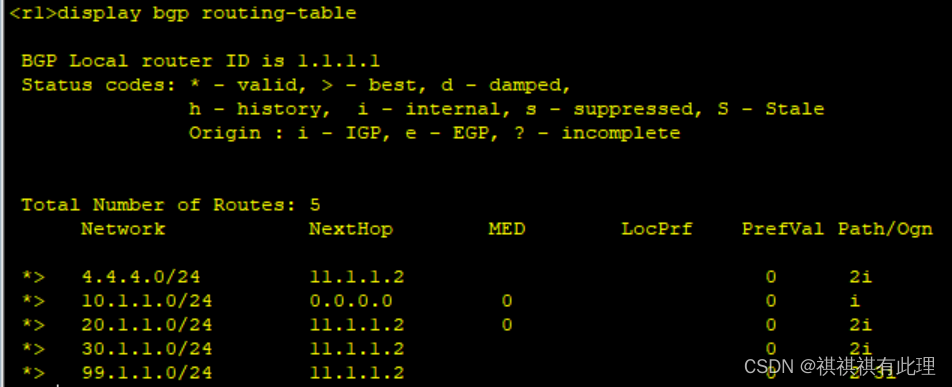
系列文章传送门: 【网络基础实战之路】设计网络划分的实战详解 【网络基础实战之路】一文弄懂TCP的三次握手与四次断开 【网络基础实战之路】基于MGRE多点协议的实战详解 【网络基础实战之路】基于OSPF协议建立两个MGRE网络的实验详解 【网络基础实战之路】基于…...
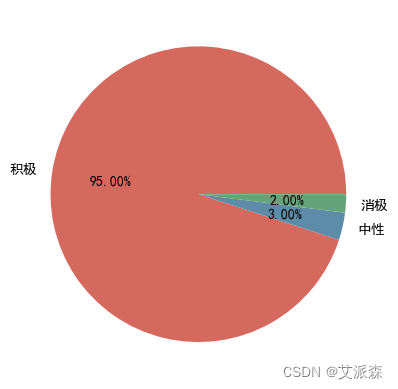
基于Python爬虫+词云图+情感分析对某东上完美日记的用户评论分析
🤵♂️ 个人主页:艾派森的个人主页 ✍🏻作者简介:Python学习者 🐋 希望大家多多支持,我们一起进步!😄 如果文章对你有帮助的话, 欢迎评论 💬点赞Ǵ…...
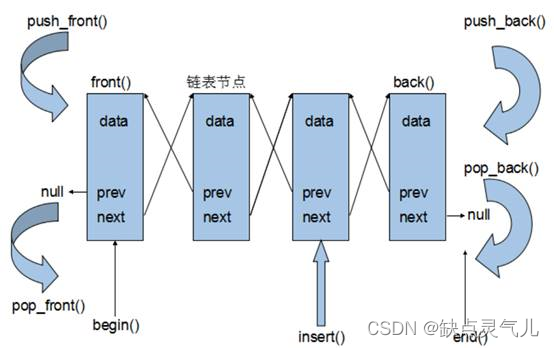
Day 26 C++ list容器(链表)
文章目录 list基本概念定义结构双向迭代器优点缺点List和vector区别存储结构内存管理迭代器稳定性随机访问效率 list构造函数——创建list容器函数原型示例 list 赋值和交换函数原型 list 大小操作函数原型示例 list 插入和删除函数原型示例 list 数据存取函数原型注意示例 lis…...
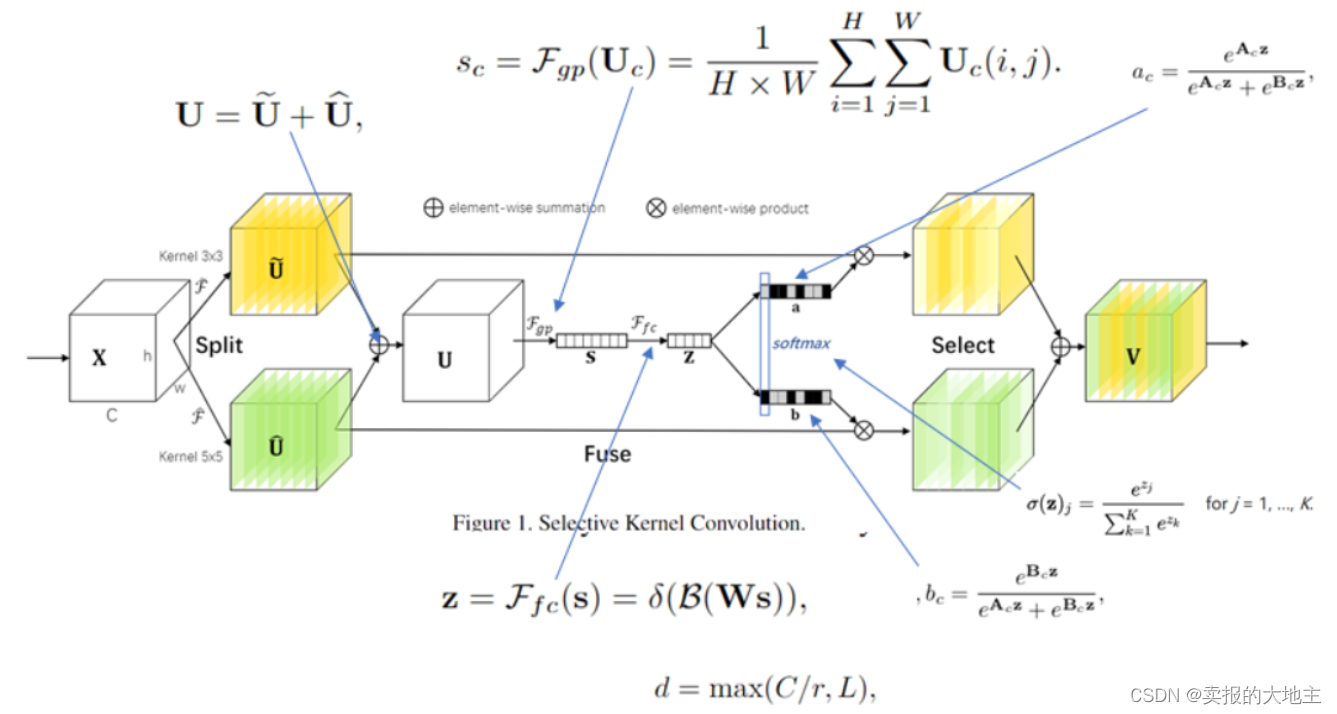
【深度学习注意力机制系列】—— SKNet注意力机制(附pytorch实现)
SKNet(Selective Kernel Network)是一种用于图像分类和目标检测任务的深度神经网络架构,其核心创新是引入了选择性的多尺度卷积核(Selective Kernel)以及一种新颖的注意力机制,从而在不增加网络复杂性的情况…...

Markdown语法和表情
Markdown语法和表情 1. 标题2. 段落3. 加粗和斜体4.分隔线5.删除线6.下划线7.引用8.列表9.链接10. 图片11. 代码12.Markdown 表格其他1.支持的 HTML 元素2.转义3.公式 Markdown表情参考 Markdown 是一种轻量级的标记语言,用于简洁地编写文本并转换为HTML。它的语法简…...

CSDN编纂目录索引跳转设置
CSDN编纂目录索引跳转设置 文章目录 题目第一小节第二小节第三小节结论 题目 第一小节 第二小节 第三小节 结论...
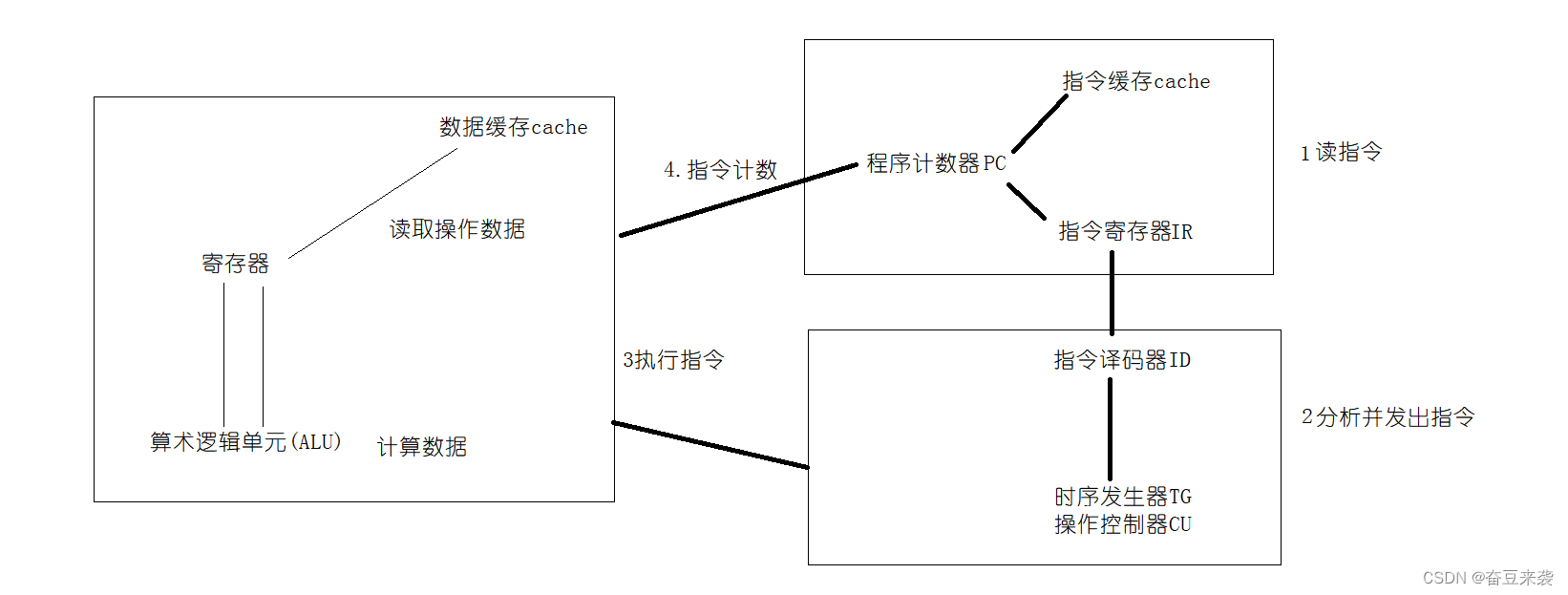
cpu的架构
明天继续搞一下cache,还有后面的, 下面是cpu框架图 开始解释cpu 1.控制器 控制器又称为控制单元(Control Unit,简称CU),下面是控制器的组成 1.指令寄存器IR:是用来存放当前正在执行的的一条指令。当一条指令需要被执行时,先按…...
FastAPI和Flask:构建RESTful API的比较分析
Python 是一种功能强大的编程语言,广泛应用于 Web 开发领域。FastAPI 和 Flask 是 Python Web 开发中最受欢迎的两个框架。本文将对 FastAPI 和 Flask 进行综合对比,探讨它们在语法和表达能力、生态系统和社区支持、性能和扩展性、开发工具和调试支持、安…...

用康虎云报表打印二维码
用康虎云报表打印二维码 1 安装: 下载地址: https://www.khcloud.net/cfprint_download, 选择Odoo免代码报表模块和自定义SQL报表模块 下载下来后解压缩,一共有四个模块 cf_report_designer # 报表设计模块 cf_sale_print_ext # 演示模块 cf_sql_report cfprint …...

网盘直链下载助手
一、插件介绍 1.介绍 这是一款免费开源获取网盘文件真实下载地址的油猴脚本,基于 PCSAPI,支持 Windows,Mac,Linux 等多平台,支持 IDM,XDown,Aria2 等多线程下载工具,支持 JSON-RPC…...
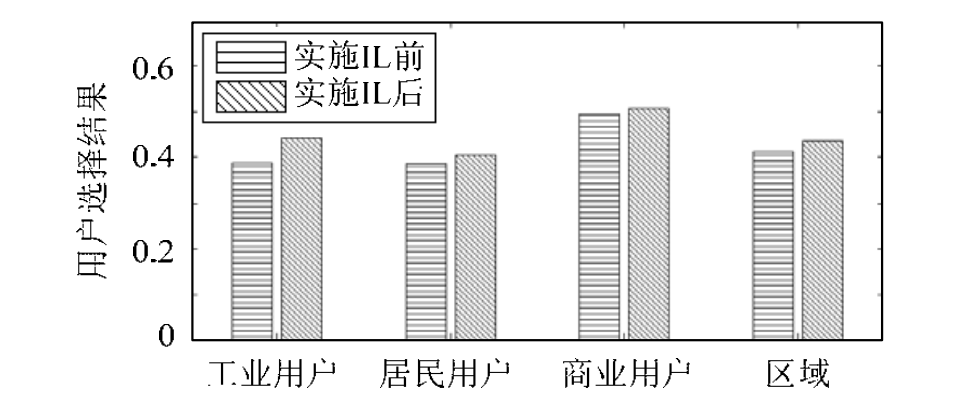
【EI复现】售电市场环境下电力用户选择售电公司行为研究(Matlab代码实现)
💥💥💞💞欢迎来到本博客❤️❤️💥💥 🏆博主优势:🌞🌞🌞博客内容尽量做到思维缜密,逻辑清晰,为了方便读者。 ⛳️座右铭&a…...

并发——何谓悲观锁与乐观锁
乐观锁对应于生活中乐观的人总是想着事情往好的方向发展,悲观锁对应于生活中悲观的人总是想着事情往坏的方向发展。这两种人各有优缺点,不能不以场景而定说一种人好于另外一种人。 悲观锁 总是假设最坏的情况,每次去拿数据的时候都认为别人会…...

【C++】模板
1.模板的概念 2.函数模板基本语法 3.未完待续。。。 https://www.bilibili.com/video/BV1et411b73Z?p169&spm_id_frompageDriver&vd_sourcefb8dcae0aee3f1aab700c21099045395...

基于大模型的 UI 自动化系统
基于大模型的 UI 自动化系统 下面是一个完整的 Python 系统,利用大模型实现智能 UI 自动化,结合计算机视觉和自然语言处理技术,实现"看屏操作"的能力。 系统架构设计 #mermaid-svg-2gn2GRvh5WCP2ktF {font-family:"trebuchet ms",verdana,arial,sans-…...
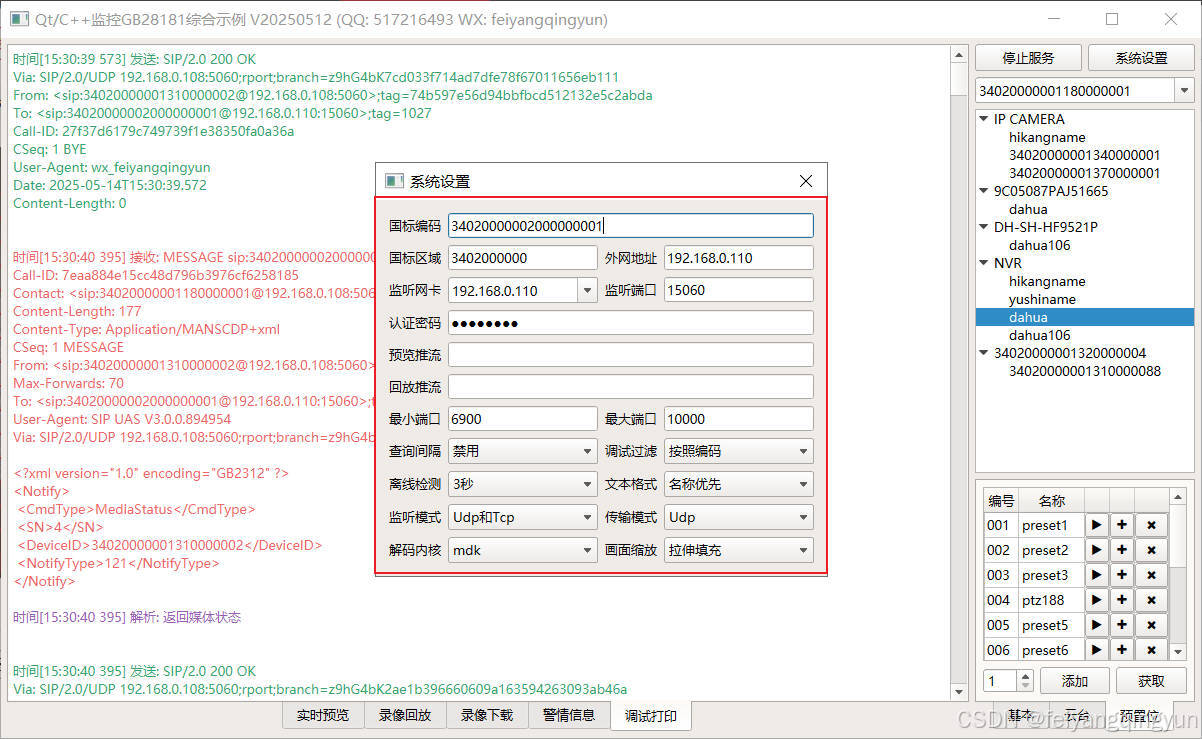
Qt/C++开发监控GB28181系统/取流协议/同时支持udp/tcp被动/tcp主动
一、前言说明 在2011版本的gb28181协议中,拉取视频流只要求udp方式,从2016开始要求新增支持tcp被动和tcp主动两种方式,udp理论上会丢包的,所以实际使用过程可能会出现画面花屏的情况,而tcp肯定不丢包,起码…...

中南大学无人机智能体的全面评估!BEDI:用于评估无人机上具身智能体的综合性基准测试
作者:Mingning Guo, Mengwei Wu, Jiarun He, Shaoxian Li, Haifeng Li, Chao Tao单位:中南大学地球科学与信息物理学院论文标题:BEDI: A Comprehensive Benchmark for Evaluating Embodied Agents on UAVs论文链接:https://arxiv.…...

Qt Widget类解析与代码注释
#include "widget.h" #include "ui_widget.h"Widget::Widget(QWidget *parent): QWidget(parent), ui(new Ui::Widget) {ui->setupUi(this); }Widget::~Widget() {delete ui; }//解释这串代码,写上注释 当然可以!这段代码是 Qt …...
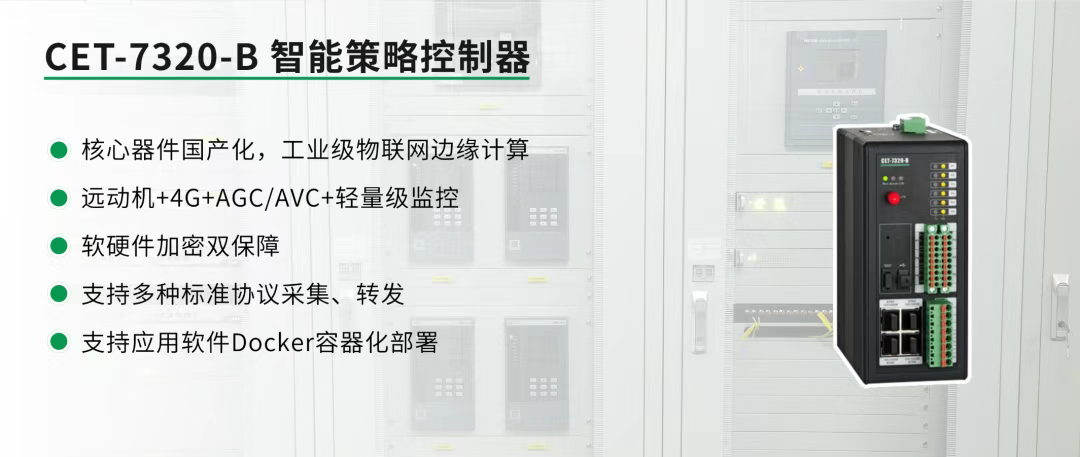
屋顶变身“发电站” ,中天合创屋面分布式光伏发电项目顺利并网!
5月28日,中天合创屋面分布式光伏发电项目顺利并网发电,该项目位于内蒙古自治区鄂尔多斯市乌审旗,项目利用中天合创聚乙烯、聚丙烯仓库屋面作为场地建设光伏电站,总装机容量为9.96MWp。 项目投运后,每年可节约标煤3670…...
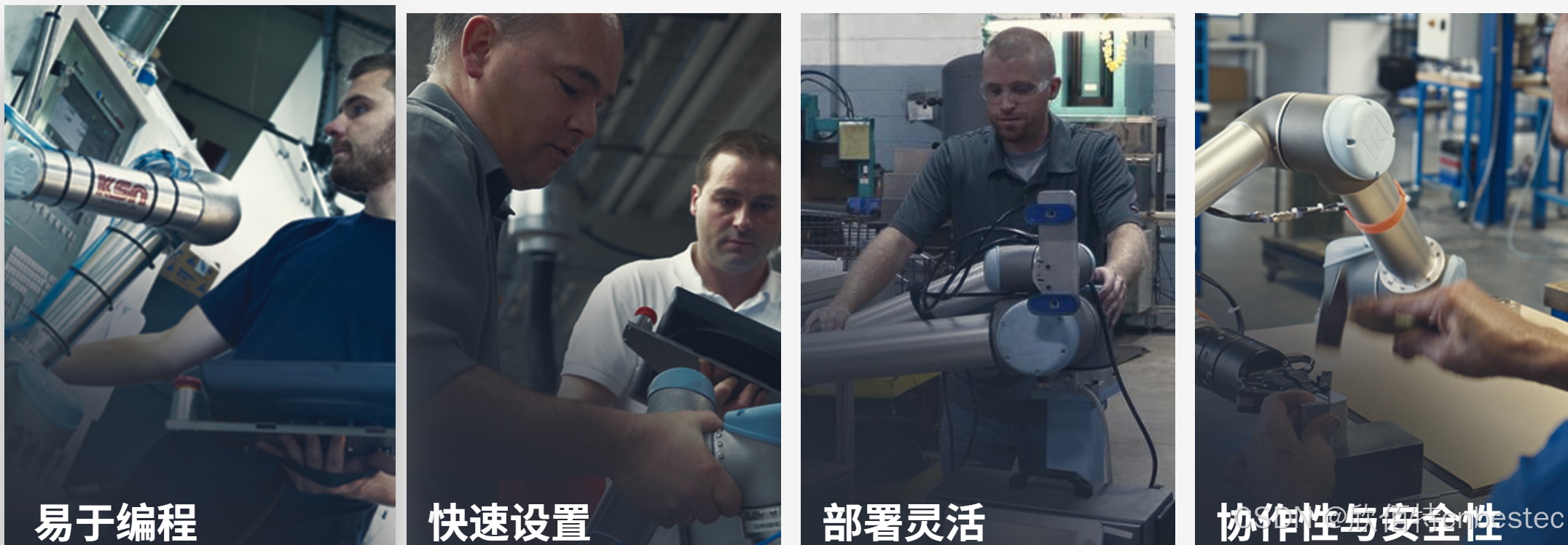
UR 协作机器人「三剑客」:精密轻量担当(UR7e)、全能协作主力(UR12e)、重型任务专家(UR15)
UR协作机器人正以其卓越性能在现代制造业自动化中扮演重要角色。UR7e、UR12e和UR15通过创新技术和精准设计满足了不同行业的多样化需求。其中,UR15以其速度、精度及人工智能准备能力成为自动化领域的重要突破。UR7e和UR12e则在负载规格和市场定位上不断优化…...

Linux --进程控制
本文从以下五个方面来初步认识进程控制: 目录 进程创建 进程终止 进程等待 进程替换 模拟实现一个微型shell 进程创建 在Linux系统中我们可以在一个进程使用系统调用fork()来创建子进程,创建出来的进程就是子进程,原来的进程为父进程。…...
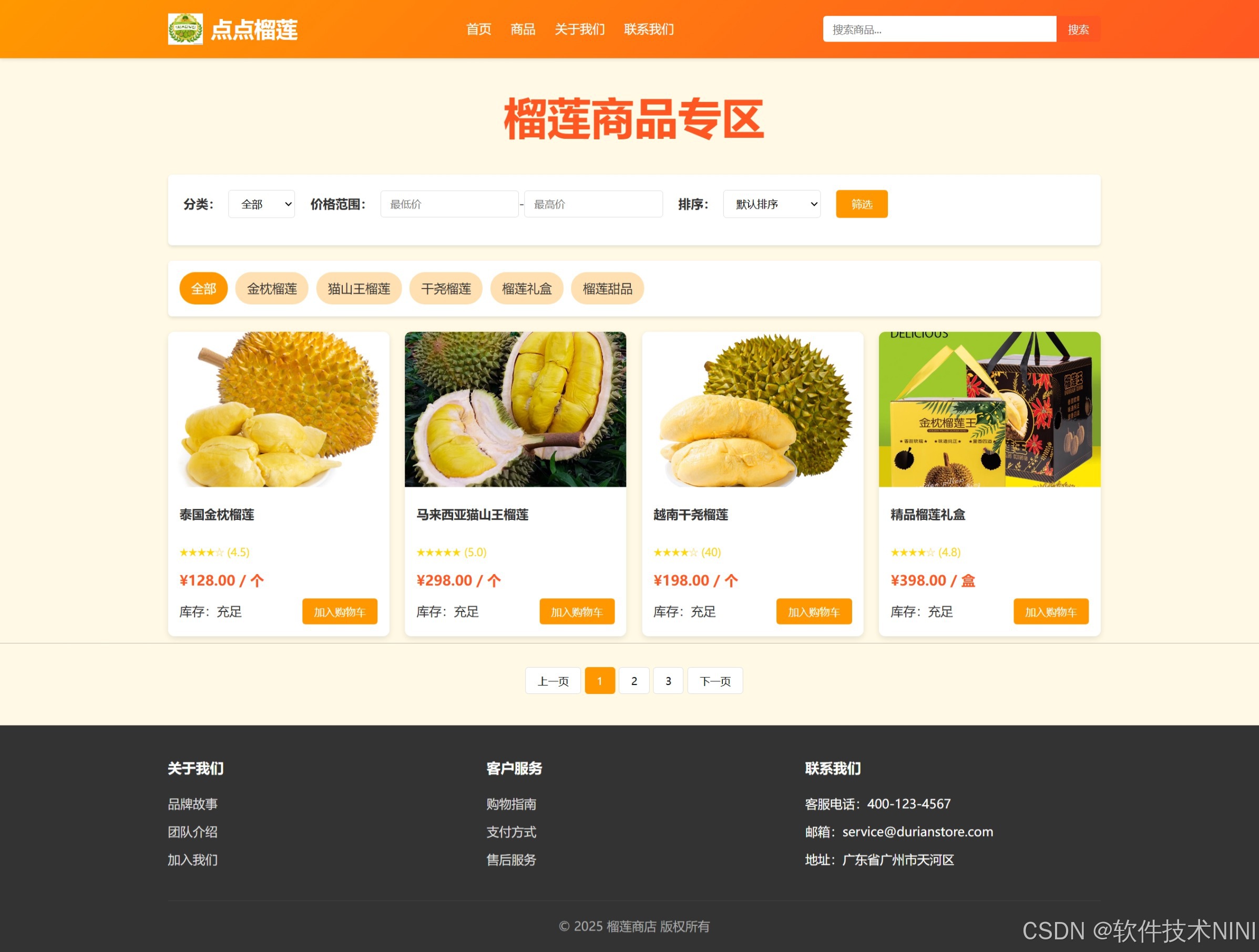
html css js网页制作成品——HTML+CSS榴莲商城网页设计(4页)附源码
目录 一、👨🎓网站题目 二、✍️网站描述 三、📚网站介绍 四、🌐网站效果 五、🪓 代码实现 🧱HTML 六、🥇 如何让学习不再盲目 七、🎁更多干货 一、👨…...

管理学院权限管理系统开发总结
文章目录 🎓 管理学院权限管理系统开发总结 - 现代化Web应用实践之路📝 项目概述🏗️ 技术架构设计后端技术栈前端技术栈 💡 核心功能特性1. 用户管理模块2. 权限管理系统3. 统计报表功能4. 用户体验优化 🗄️ 数据库设…...

SiFli 52把Imagie图片,Font字体资源放在指定位置,编译成指定img.bin和font.bin的问题
分区配置 (ptab.json) img 属性介绍: img 属性指定分区存放的 image 名称,指定的 image 名称必须是当前工程生成的 binary 。 如果 binary 有多个文件,则以 proj_name:binary_name 格式指定文件名, proj_name 为工程 名&…...