
gor工具http流量复制、流量回放,生产运维生气
gor是一款流量复制回放工具,gor工具的官网:https://goreplay.org/
1、对某个端口的http流量进行打印
./gor --input-raw :8000 --output-stdout
2、对流量实时转发,把81端口流量转发到192.168.3.221:80端口
./gor --input-raw :81--output-http="http://192.168.3.221:80"3、把抓取到的流量以文件的形式存储到磁盘上
./gor --input-raw :8000 --output-file=requests.gor4、对抓取到的流量进行回放
#流量回放到192.168.3.221:80
./gor --input-file requests.gor --output-http="http://192.168.3.221:80"
#流量回放打印到屏幕上
./gor --input-file requests.gor --output-stdout
5、快速开一个静态服务器
./gor file-server :80006、gor的运行参数如下:
Gor is a simple http traffic replication tool written in Go. Its main goal is to replay traffic from production servers to staging and dev environments.
Project page: https://github.com/buger/gor
Author: <Leonid Bugaev> leonsbox@gmail.com
Current Version: v1.3.0-copy-buffer-size valueSet the buffer size for an individual request (default 5MB)-cpuprofile stringwrite cpu profile to file-exit-after durationexit after specified duration-http-allow-header valueA regexp to match a specific header against. Requests with non-matching headers will be dropped:gor --input-raw :8080 --output-http staging.com --http-allow-header api-version:^v1-http-allow-method valueWhitelist of HTTP methods to replay. Anything else will be dropped:gor --input-raw :8080 --output-http staging.com --http-allow-method GET --http-allow-method OPTIONS-http-allow-url valueA regexp to match requests against. Filter get matched against full url with domain. Anything else will be dropped:gor --input-raw :8080 --output-http staging.com --http-allow-url ^www.-http-basic-auth-filter valueA regexp to match the decoded basic auth string against. Requests with non-matching headers will be dropped:gor --input-raw :8080 --output-http staging.com --http-basic-auth-filter "^customer[0-9].*"-http-disallow-header valueA regexp to match a specific header against. Requests with matching headers will be dropped:gor --input-raw :8080 --output-http staging.com --http-disallow-header "User-Agent: Replayed by Gor"-http-disallow-url valueA regexp to match requests against. Filter get matched against full url with domain. Anything else will be forwarded:gor --input-raw :8080 --output-http staging.com --http-disallow-url ^www.-http-header-limiter valueTakes a fraction of requests, consistently taking or rejecting a request based on the FNV32-1A hash of a specific header:gor --input-raw :8080 --output-http staging.com --http-header-limiter user-id:25%-http-original-hostNormally gor replaces the Host http header with the host supplied with --output-http.  This option disables that behavior, preserving the original Host header.-http-param-limiter valueTakes a fraction of requests, consistently taking or rejecting a request based on the FNV32-1A hash of a specific GET param:gor --input-raw :8080 --output-http staging.com --http-param-limiter user_id:25%-http-pprof :8181Enable profiling. Starts  http server on specified port, exposing special /debug/pprof endpoint. Example: :8181-http-rewrite-header valueRewrite the request header based on a mapping:gor --input-raw :8080 --output-http staging.com --http-rewrite-header Host: (.*).example.com,$1.beta.example.com-http-rewrite-url valueRewrite the request url based on a mapping:gor --input-raw :8080 --output-http staging.com --http-rewrite-url /v1/user/([^\/]+)/ping:/v2/user/$1/ping-http-set-header valueInject additional headers to http request:gor --input-raw :8080 --output-http staging.com --http-set-header 'User-Agent: Gor'-http-set-param valueSet request url param, if param already exists it will be overwritten:gor --input-raw :8080 --output-http staging.com --http-set-param api_key=1-input-dummy valueUsed for testing outputs. Emits 'Get /' request every 1s-input-file valueRead requests from file: gor --input-file ./requests.gor --output-http staging.com-input-file-dry-runSimulate reading from the data source without replaying it. You will get information about expected replay time, number of found records etc.-input-file-loopLoop input files, useful for performance testing.-input-file-max-wait durationSet the maximum time between requests. Can help in situations when you have too long periods between request, and you want to skip them. Example: --input-raw-max-wait 1s-input-file-read-depth intGoReplay tries to read and cache multiple records, in advance. In parallel it also perform sorting of requests, if they came out of order. Since it needs hold this buffer in memory, bigger values can cause worse performance (default 100)-input-kafka-host stringSend request and response stats to Kafka:gor --output-stdout --input-kafka-host '192.168.0.1:9092,192.168.0.2:9092'-input-kafka-json-formatIf turned on, it will assume that messages coming in JSON format rather than  GoReplay text format.-input-kafka-topic stringSend request and response stats to Kafka:gor --output-stdout --input-kafka-topic 'kafka-log'-input-raw valueCapture traffic from given port (use RAW sockets and require *sudo* access):# Capture traffic from 8080 portgor --input-raw :8080 --output-http staging.com-input-raw-allow-incompleteIf turned on Gor will record HTTP messages with missing packets-input-raw-bpf-filter stringBPF filter to write custom expressions. Can be useful in case of non standard network interfaces like tunneling or SPAN port. Example: --input-raw-bpf-filter 'dst port 80'-input-raw-buffer-size valueControls size of the OS buffer which holds packets until they dispatched. Default value depends by system: in Linux around 2MB. If you see big package drop, increase this value.-input-raw-buffer-timeout durationset the pcap timeout. for immediate mode don't set this flag-input-raw-engine libpcapIntercept traffic using libpcap (default), `raw_socket` or `pcap_file`-input-raw-expire durationHow much it should wait for the last TCP packet, till consider that TCP message complete. (default 2s)-input-raw-monitorenable RF monitor mode-input-raw-override-snaplenOverride the capture snaplen to be 64k. Required for some Virtualized environments-input-raw-promiscenable promiscuous mode-input-raw-protocol valueSpecify application protocol of intercepted traffic. Possible values: http, binary-input-raw-realip-header stringIf not blank, injects header with given name and real IP value to the request payload. Usually this header should be named: X-Real-IP-input-raw-statsenable stats generator on raw TCP messages-input-raw-timestamp-type stringPossible values: PCAP_TSTAMP_HOST, PCAP_TSTAMP_HOST_LOWPREC, PCAP_TSTAMP_HOST_HIPREC, PCAP_TSTAMP_ADAPTER, PCAP_TSTAMP_ADAPTER_UNSYNCED. This values not supported on all systems, GoReplay will tell you available values of you put wrong one.-input-raw-track-responseIf turned on Gor will track responses in addition to requests, and they will be available to middleware and file output.-input-tcp valueUsed for internal communication between Gor instances. Example: # Receive requests from other Gor instances on 28020 port, and redirect output to staginggor --input-tcp :28020 --output-http staging.com-input-tcp-certificate stringPath to PEM encoded certificate file. Used when TLS turned on.-input-tcp-certificate-key stringPath to PEM encoded certificate key file. Used when TLS turned on.-input-tcp-secureTurn on TLS security. Do not forget to specify certificate and key files.-kafka-tls-ca-cert stringCA certificate for Kafka TLS Config:gor  --input-raw :3000 --output-kafka-host '192.168.0.1:9092' --output-kafka-topic 'topic' --kafka-tls-ca-cert cacert.cer.pem --kafka-tls-client-cert client.cer.pem --kafka-tls-client-key client.key.pem-kafka-tls-client-cert stringClient certificate for Kafka TLS Config (mandatory with to kafka-tls-ca-cert and kafka-tls-client-key)-kafka-tls-client-key stringClient Key for Kafka TLS Config (mandatory with to kafka-tls-client-cert and kafka-tls-client-key)-memprofile stringwrite memory profile to this file-middleware stringUsed for modifying traffic using external command-output-binary valueForwards incoming binary payloads to given address.# Redirect all incoming requests to staging.com address gor --input-raw :80 --input-raw-protocol binary --output-binary staging.com:80-output-binary-debugEnables binary debug output.-output-binary-timeout durationSpecify HTTP request/response timeout. By default 5s. Example: --output-binary-timeout 30s-output-binary-track-responseIf turned on, Binary output responses will be set to all outputs like stdout, file and etc.-output-binary-workers intGor uses dynamic worker scaling by default.  Enter a number to run a set number of workers.-output-file valueWrite incoming requests to file: gor --input-raw :80 --output-file ./requests.gor-output-file-appendThe flushed chunk is appended to existence file or not. -output-file-buffer stringThe path for temporary storing current buffer: gor --input-raw :80 --output-file s3://mybucket/logs/%Y-%m-%d.gz --output-file-buffer /mnt/logs (default "/tmp")-output-file-flush-interval durationInterval for forcing buffer flush to the file, default: 1s. (default 1s)-output-file-max-size-limit valueMax size of output file, Default: 1TB-output-file-queue-limit intThe length of the chunk queue. Default: 256 (default 256)-output-file-size-limit valueSize of each chunk. Default: 32mb-output-http valueForwards incoming requests to given http address.# Redirect all incoming requests to staging.com address gor --input-raw :80 --output-http http://staging.com-output-http-elasticsearch stringSend request and response stats to ElasticSearch:gor --input-raw :8080 --output-http staging.com --output-http-elasticsearch 'es_host:api_port/index_name'-output-http-queue-len intNumber of requests that can be queued for output, if all workers are busy. default = 1000 (default 1000)-output-http-redirects intEnable how often redirects should be followed.-output-http-response-buffer valueHTTP response buffer size, all data after this size will be discarded.-output-http-skip-verifyDon't verify hostname on TLS secure connection.-output-http-statsReport http output queue stats to console every N milliseconds. See output-http-stats-ms-output-http-stats-ms intReport http output queue stats to console every N milliseconds. default: 5000 (default 5000)-output-http-timeout durationSpecify HTTP request/response timeout. By default 5s. Example: --output-http-timeout 30s (default 5s)-output-http-track-responseIf turned on, HTTP output responses will be set to all outputs like stdout, file and etc.-output-http-worker-timeout durationDuration to rollback idle workers. (default 2s)-output-http-workers intGor uses dynamic worker scaling. Enter a number to set a maximum number of workers. default = 0 = unlimited.-output-http-workers-min intGor uses dynamic worker scaling. Enter a number to set a minimum number of workers. default = 1.-output-kafka-host stringRead request and response stats from Kafka:gor --input-raw :8080 --output-kafka-host '192.168.0.1:9092,192.168.0.2:9092'-output-kafka-json-formatIf turned on, it will serialize messages from GoReplay text format to JSON.-output-kafka-topic stringRead request and response stats from Kafka:gor --input-raw :8080 --output-kafka-topic 'kafka-log'-output-nullUsed for testing inputs. Drops all requests.-output-stdoutUsed for testing inputs. Just prints to console data coming from inputs.-output-tcp valueUsed for internal communication between Gor instances. Example: # Listen for requests on 80 port and forward them to other Gor instance on 28020 portgor --input-raw :80 --output-tcp replay.local:28020-output-tcp-response-buffer valueTCP response buffer size, all data after this size will be discarded.-output-tcp-secureUse TLS secure connection. --input-file on another end should have TLS turned on as well.-output-tcp-skip-verifyDon't verify hostname on TLS secure connection.-output-tcp-statsReport TCP output queue stats to console every 5 seconds.-output-tcp-stickyUse Sticky connection. Request/Response with same ID will be sent to the same connection.-output-tcp-workers intNumber of parallel tcp connections, default is 10 (default 10)-prettify-httpIf enabled, will automatically decode requests and responses with: Content-Encoding: gzip and Transfer-Encoding: chunked. Useful for debugging, in conjunction with --output-stdout-recognize-tcp-sessions[PRO] If turned on http output will create separate worker for each TCP session. Splitting output will session based as well.-split-output trueBy default each output gets same traffic. If set to true it splits traffic equally among all outputs.-statsTurn on queue stats output-verbose intset the level of verbosity, if greater than zero then it will turn on debug output
相关文章:
gor工具http流量复制、流量回放,生产运维生气
gor是一款流量复制回放工具,gor工具的官网:https://goreplay.org/ 1、对某个端口的http流量进行打印 ./gor --input-raw :8000 --output-stdout 2、对流量实时转发,把81端口流量转发到192.168.3.221:80端口 ./gor --input-raw :81--output-ht…...
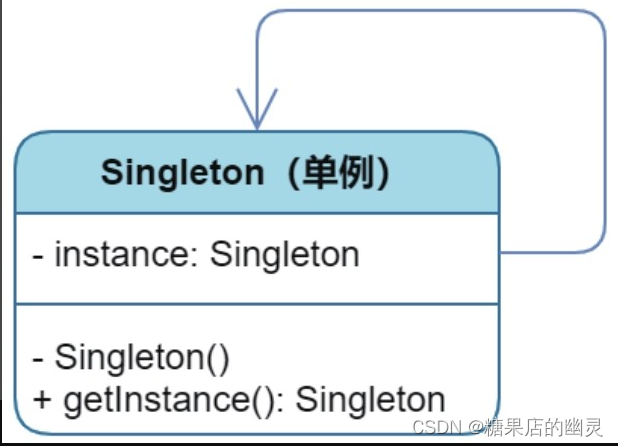
设计模式之单例设计模式
单例设计模式 2.1 孤独的太阳盘古开天,造日月星辰。2.2 饿汉造日2.3 懒汉的队伍2.4 大道至简 读《秒懂设计模式总结》 单例模式(Singleton)是一种非常简单且容易理解的设计模式。顾名思义,单例即单一的实例,确切地讲就是指在某个系统中只存在…...

Java自学到什么程度就可以去找工作了?
引言 Java作为一门广泛应用于软件开发领域的编程语言,对于初学者来说,了解到什么程度才能开始寻找实习和入职机会是一个常见的问题。 本文将从实习和入职这两个方面,分点详细介绍Java学习到什么程度才能够开始进入职场。并在文章末尾给大家安…...
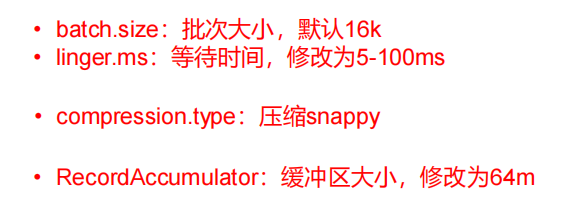
三、Kafka生产者
目录 3.1 生产者消息发送流程3.1.1 发送原理 3.2 异步发送 API3.3 同步发送数据3.4 生产者分区3.4.1 kafka分区的好处3.4.2 生产者发送消息的分区策略3.4.3 自定义分区器 3.5 生产者如何提高吞吐量3.6 数据可靠性 3.1 生产者消息发送流程 3.1.1 发送原理 3.2 异步发送 API 3…...

【SA8295P 源码分析】19 - QNX Host NFS 文件系统配置
【SA8295P 源码分析】19 - QNX Host NFS 文件系统配置 一、NFS Server二、NFS Client三、NFS 相关的文件及目录四、将文件放入QNX 文件系统中五、编译下载验证系列文章汇总见:《【SA8295P 源码分析】00 - 系列文章链接汇总》 本文链接:《【SA8295P 源码分析】19 - QNX Host N…...

JRE、JDK、JVM及JIT之间有什么不同?_java基础知识总结
当涉及Java编程和执行时,以下术语具有不同的含义: 1.JRE (Java Runtime Environment) JRE是Java运行时环境的缩写。它是一个包含用于在计算机上运行Java应用程序所需的组件集合。JRE包括了以下几个主要部分: Java虚拟机(JVM):用…...

sqlite3数据库的实现
sqlite3代码实现数据库的插入、删除、修改、退出功能 #include <head.h> #include <sqlite3.h> #include <unistd.h> int do_insert(sqlite3 *db); int do_delete(sqlite3 *db); int do_update(sqlite3 *db);int main(int argc, const char *argv[]) {sqlit…...
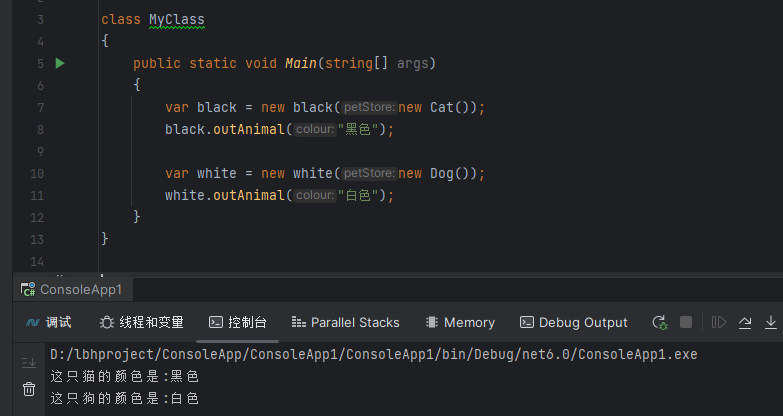
c#设计模式-结构型模式 之 桥接模式
前言 桥接模式是一种设计模式,它将抽象与实现分离,使它们可以独立变化。这种模式涉及到一个接口作为桥梁,使实体类的功能独立于接口实现类。这两种类型的类可以结构化改变而互不影响。 桥接模式的主要目的是通过将实现和抽象分离,…...
【Vue-Router】导航守卫
前置守卫 main.ts import { createApp } from vue import App from ./App.vue import {router} from ./router // import 引入 import ElementPlus from element-plus import element-plus/dist/index.css const app createApp(App) app.use(router) // use 注入 ElementPlu…...

07无监督学习——降维
1.降维的概述 维数灾难(Curse of Dimensionality):通常是指在涉及到向量的计算的问题中,随着维数的增加,计算量呈指数倍增长的一种现象。 1.1什么是降维? 1.降维(Dimensionality Reduction)是将训练数据中的样本(实例)从高维空间转换到低维…...
)
系列七、IOC操作bean管理(xml自动装配)
一、概述 自动装配是根据指定规则(属性名称或者属性类型),Spring自动将匹配的属性值进行注入。 二、分类 xml自动装配分为按照属性名称自动装配(byName)和按照属性类型自动装配(byType)。 2.1…...
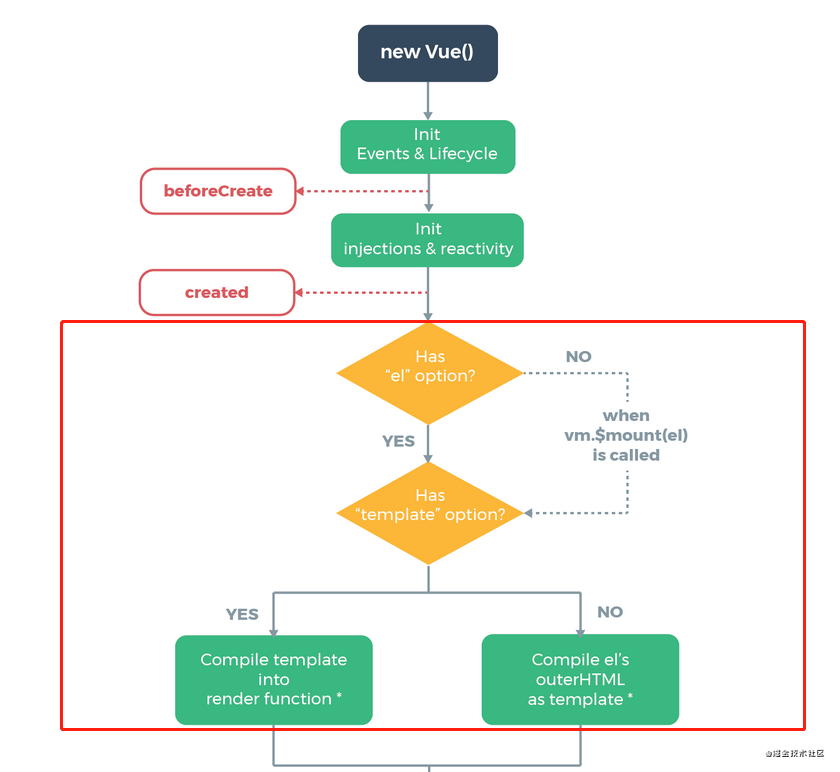
01- vdom 和模板编译源码
组件渲染的过程 template --> ast --> render --> vDom --> 真实的Dom --> 页面 Runtime-Compiler和Runtime-Only的区别 - 简书 编译步骤 模板编译是Vue中比较核心的一部分。关于 Vue 编译原理这块的整体逻辑主要分三个部分,也可以说是分三步&am…...

C++入门知识点——解决C语言不足
😶🌫️Take your time ! 😶🌫️ 💥个人主页:🔥🔥🔥大魔王🔥🔥🔥 💥代码仓库:🔥🔥魔…...
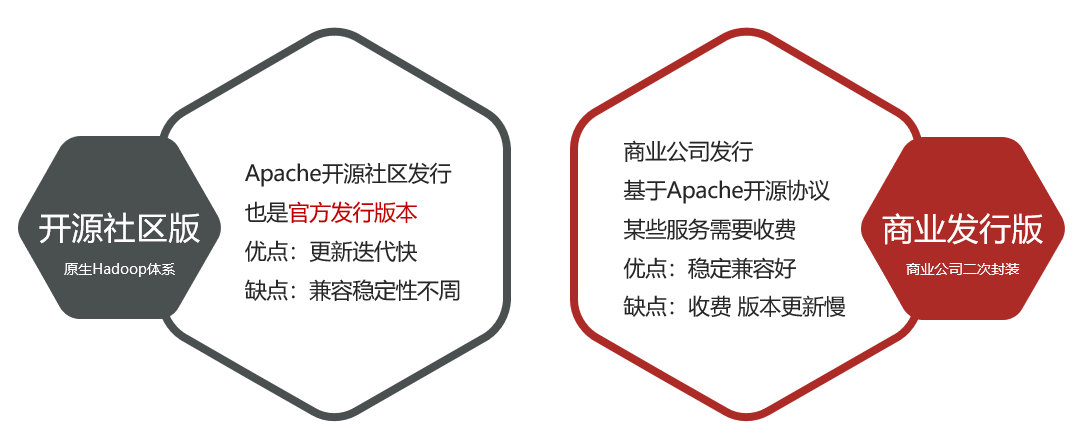
探秘分布式大数据:融合专业洞见,燃起趣味火花,启迪玄幻思维
文章目录 一 数据导论二 大数据的诞生三 大数据概论3.1 大数据的5V特征3.2 大数据的工作核心 四 大数据软件生态4.1 数据存储软件4.2 数据计算软件4.3 数据传输软件 五 Apache Hadoop概述5.1 Apache Hadoop框架5.2 Hadoop的功能5.3 Hadoop的发展5.4 Hadoop发行版本 一 数据导论…...

什么是 SPI,和API有什么区别?
面试回答 Java 中区分 API 和 SPI,通俗的讲:API 和 SPI 都是相对的概念,他们的差别只在语义上,API 直接被应用开发人员使用,SPI 被框架扩展人员使用。 API Application Programming Interface 大多数情况下ÿ…...
 失败)
python3 安装clickhouse_sqlalchemy(greenlet) 失败
环境信息: centos7操作系统,python3.8 执行pip3 install clickhouse_sqlalchemy或者pip3 install greenlet报以下报错: Command "/opt/python3.6.10-customized/bin/python3.6 -u -c "import setuptools, tokenize;file/tmp/pip-in…...

五款拿来就能用的炫酷表白代码
「作者主页」:士别三日wyx 「作者简介」:CSDN top100、阿里云博客专家、华为云享专家、网络安全领域优质创作者 「推荐专栏」:小白零基础《Python入门到精通》 五款炫酷表白代码 1、无限弹窗表白2、做我女朋友好吗,不同意就关机3、…...

Springboot 封装整活 Mybatis 动态查询条件SQL自动组装拼接
前言 ps:最近在参与3100保卫战,战况很激烈,刚刚打完仗,来更新一下之前写了一半的博客。 该篇针对日常写查询的时候,那些动态条件sql 做个简单的封装,自动生成(抛砖引玉,搞个小玩具&a…...
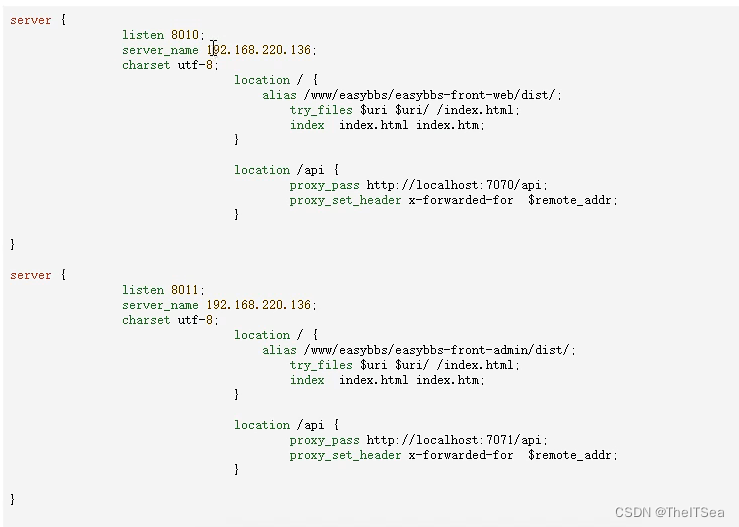
宝塔部署Java+Vue前后端分离项目经验总结
前言 之前部署服务器都是在Linux环境下自己一点一点安装软件,听说用宝塔傻瓜式部署更快,这次浅浅尝试了一把。 确实简单! 1、 买服务器 咋买服务器略,记得服务器装系统就装 Cent OS 7系列即可,我装的7.6。 2、创建…...

【公告】停止更新
CSDN 博客的限制太多了。阅读体验也非常差。后续将不再 CSDN 上更新。 逐步迁移到掘金和个人博客。 欢迎关注 掘金:0xforee 个人博客:0xforee’s blog...
结构体的进阶应用)
基于算法竞赛的c++编程(28)结构体的进阶应用
结构体的嵌套与复杂数据组织 在C中,结构体可以嵌套使用,形成更复杂的数据结构。例如,可以通过嵌套结构体描述多层级数据关系: struct Address {string city;string street;int zipCode; };struct Employee {string name;int id;…...

Vim 调用外部命令学习笔记
Vim 外部命令集成完全指南 文章目录 Vim 外部命令集成完全指南核心概念理解命令语法解析语法对比 常用外部命令详解文本排序与去重文本筛选与搜索高级 grep 搜索技巧文本替换与编辑字符处理高级文本处理编程语言处理其他实用命令 范围操作示例指定行范围处理复合命令示例 实用技…...

变量 varablie 声明- Rust 变量 let mut 声明与 C/C++ 变量声明对比分析
一、变量声明设计:let 与 mut 的哲学解析 Rust 采用 let 声明变量并通过 mut 显式标记可变性,这种设计体现了语言的核心哲学。以下是深度解析: 1.1 设计理念剖析 安全优先原则:默认不可变强制开发者明确声明意图 let x 5; …...
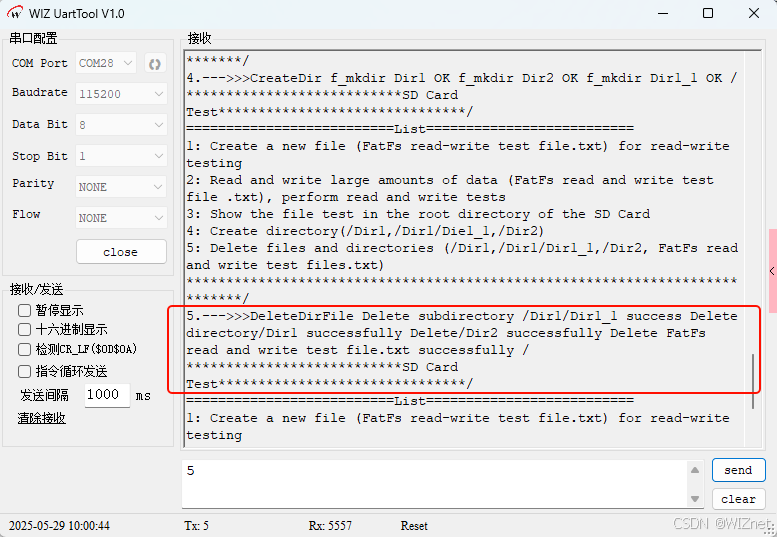
【第二十一章 SDIO接口(SDIO)】
第二十一章 SDIO接口 目录 第二十一章 SDIO接口(SDIO) 1 SDIO 主要功能 2 SDIO 总线拓扑 3 SDIO 功能描述 3.1 SDIO 适配器 3.2 SDIOAHB 接口 4 卡功能描述 4.1 卡识别模式 4.2 卡复位 4.3 操作电压范围确认 4.4 卡识别过程 4.5 写数据块 4.6 读数据块 4.7 数据流…...

论文浅尝 | 基于判别指令微调生成式大语言模型的知识图谱补全方法(ISWC2024)
笔记整理:刘治强,浙江大学硕士生,研究方向为知识图谱表示学习,大语言模型 论文链接:http://arxiv.org/abs/2407.16127 发表会议:ISWC 2024 1. 动机 传统的知识图谱补全(KGC)模型通过…...
Map相关知识
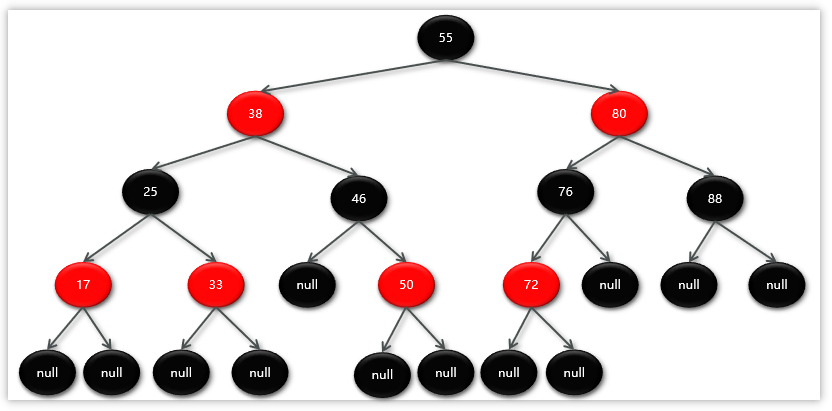
数据结构 二叉树 二叉树,顾名思义,每个节点最多有两个“叉”,也就是两个子节点,分别是左子 节点和右子节点。不过,二叉树并不要求每个节点都有两个子节点,有的节点只 有左子节点,有的节点只有…...

laravel8+vue3.0+element-plus搭建方法
创建 laravel8 项目 composer create-project --prefer-dist laravel/laravel laravel8 8.* 安装 laravel/ui composer require laravel/ui 修改 package.json 文件 "devDependencies": {"vue/compiler-sfc": "^3.0.7","axios": …...
如何在网页里填写 PDF 表格?
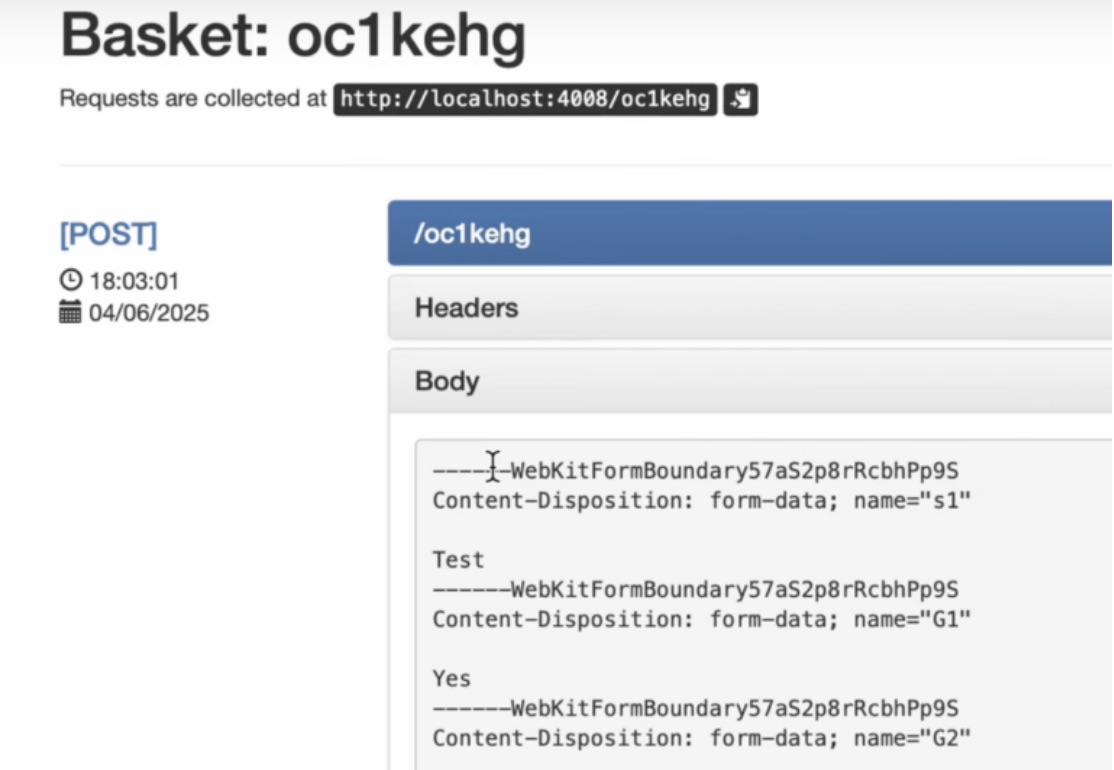
有时候,你可能希望用户能在你的网站上填写 PDF 表单。然而,这件事并不简单,因为 PDF 并不是一种原生的网页格式。虽然浏览器可以显示 PDF 文件,但原生并不支持编辑或填写它们。更糟的是,如果你想收集表单数据ÿ…...
Mobile ALOHA全身模仿学习
一、题目 Mobile ALOHA:通过低成本全身远程操作学习双手移动操作 传统模仿学习(Imitation Learning)缺点:聚焦与桌面操作,缺乏通用任务所需的移动性和灵活性 本论文优点:(1)在ALOHA…...
云原生玩法三问:构建自定义开发环境
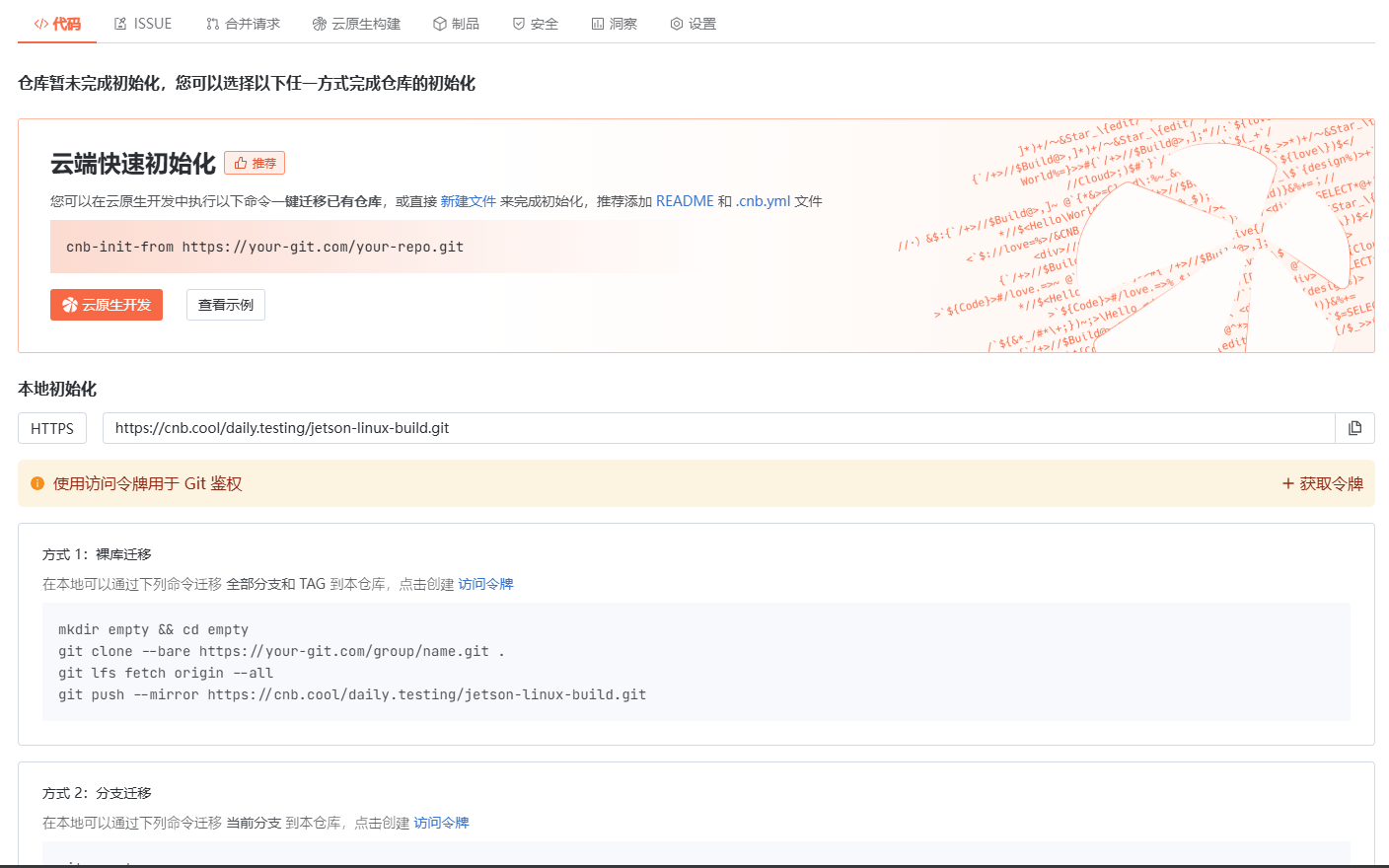
云原生玩法三问:构建自定义开发环境 引言 临时运维一个古董项目,无文档,无环境,无交接人,俗称三无。 运行设备的环境老,本地环境版本高,ssh不过去。正好最近对 腾讯出品的云原生 cnb 感兴趣&…...