
React + TypeScript + antd 常见开发场景
时间戳转格式
// 获取当前时间戳(示例)
const timestamp = Date.now(); // 或者使用特定的时间戳值// 创建一个新的Date对象,并传入时间戳
const date = new Date(timestamp);// 获取年、月、日的值
const year = date.getFullYear();
const month = String(date.getMonth() + 1).padStart(2, '0'); // 月份从0开始,需要+1,然后使用padStart方法补零
const day = String(date.getDate()).padStart(2, '0'); // 使用padStart方法补零// 将年、月、日拼接为所需的日期格式
const formattedDate = `${year}-${month}-${day}`;console.log(formattedDate); // 输出:2018-09-12===========================================================方法二const dateString = "Fri Aug 25 2023 14:10:13 GMT+0800 (中国标准时间)";
const regex = /\w{3} (\w{3} \d{2} \d{4}).*/; // 匹配并提取日期部分const match = dateString.match(regex);
const formattedDate = match ? match[1] : "";console.log(formattedDate); // 输出:2023-08-25
禁用的表单
import { Button, Form, Input } from "antd";
import React, { useEffect, useRef } from "react";
const { TextArea } = Input;
const FormPage = () => {const formRef = useRef<any>(null);const data = [{id: 1,num: 10991,name: "黑色耳机",commodityType: "RJ",text: "如果它们不相关,那么存在多个 state 变量是一个好主意,例如本例中的 index 和 showMore。但是,如果你发现经常同时更改两个 state 变量,那么最好将它们合并为一个。",textDate: "2023-10-01 10:36:03",},];// 方法一//   useEffect(() => {//     formRef.current?.setFieldsValue(data[0]);//   }, []);return (<div className="box"><div>{/* 方法二 */}<Button onClick={() => formRef.current?.setFieldsValue(data[0])}>填入内容</Button></div><Formref={formRef}disabledname="basic"labelCol={{ span: 3 }}wrapperCol={{ span: 16 }}><Form.Item label="物品号码" name="num"><Input /></Form.Item><Form.Item label="物品名称" name="name"><Input /></Form.Item><Form.Item label="物品名称(类型)" name="commodityType"><Input /></Form.Item><Form.Item label="物品详细概述" name="text"><TextArea /></Form.Item><Form.Item label="物品录入时间" name="textDate"><TextArea /></Form.Item></Form></div>);
};export default FormPage;
删除多选表格
import React, { useState } from "react";
import { Button, Table, message } from "antd";
import type { ColumnsType } from "antd/es/table";// 可选择删除列表interface DataType {key: React.Key;name: string;age: number;address: string;
}const columns: ColumnsType<DataType> = [{title: "Name",dataIndex: "name",},{title: "Age",dataIndex: "age",},{title: "Address",dataIndex: "address",},{title: "Controls",dataIndex: "Controls",render: () => <Button>显示</Button>,},
];// for (let i = 6; i < 46; i++) {
// data.push({
// key: i,
// name: `Edward King ${i}`,
// age: 32,
// address: `London, Park Lane no. ${i}`,
// });
// }const TablePage: React.FC = () => {/* selectedRowKeys 指定选中项的 key 数组,需要和 onChange 进行配合在此处,通过 rowSelection.selectedRowKeys 来控制选中项。*/const [selectedRowKeys, setSelectedRowKeys] = useState<React.Key[]>([]);// loading 页面是否加载中const [loading, setLoading] = useState(false);const [data, setData] = useState([{ key: "t", name: "唐诗", age: 18, address: "唐朝" },{ key: "s", name: "宋词", age: 18, address: "宋朝" },{ key: "y", name: "元曲", age: 18, address: "元朝" },{ key: "m", name: "明文", age: 18, address: "明朝" },{ key: "q", name: "清小说", age: 18, address: "清朝" },]);// 点击了清空const start = () => {setLoading(true);// ajax request after empty completingsetTimeout(() => {setSelectedRowKeys([]);setLoading(false);}, 1000);};// onSelectChange 触发了选择改变const onSelectChange = (newSelectedRowKeys: React.Key[]) => {console.log("selectedRowKeys changed: ", newSelectedRowKeys);setSelectedRowKeys(newSelectedRowKeys);};// 开启可选则按钮const rowSelection = {selectedRowKeys,onChange: onSelectChange,};//禁用const hasSelected = selectedRowKeys.length > 0;// 删除const deleteList = () => {console.log(selectedRowKeys);const dataVale = data.filter((item) => !selectedRowKeys.includes(item.key));setData(dataVale);console.log(dataVale);// 提示框message.success("删除成功!");};return (<div><div style={{ marginBottom: 16 }}><Buttontype="primary"onClick={start}disabled={!hasSelected}loading={loading}>清空</Button>{" "} <Button onClick={deleteList}>删除</Button><span style={{ marginLeft: 8 }}>{hasSelected ? `你选择了 ${selectedRowKeys.length} 个 ` : ""}</span></div>{/* rowSelection :表格行是否可选择,配置项columns 表格列的配置描述dataSource 数据数组*/}<Table rowSelection={rowSelection} columns={columns} dataSource={data} /></div>);
};export default TablePage;文字内容
import Button from "antd/lib/button";
import "./index.css";
import { ShareAltOutlined } from "@ant-design/icons";
const TextContent = () => {return (<div className="box"><div className="textContent"><p>1. 当一个组件需要在多次渲染间“记住”某些信息时使用 state 变量。 </p><p>2. Hook 是以 `use` 开头的特殊函数。它们能让你 “hook” 到像 state 这样的 React 特性中。</p></div><br /><div><Button type="primary">提交表单校验 <ShareAltOutlined /></Button></div></div>);
};export default TextContent;
================================================css
.textContent {border: solid 1px #c9c9c9;background-color: #f7f8fa;padding: 10px;width: 680px;
}.textContent p {margin: 0;padding: 0;color: #636364;
}.textContent p:first-child {/* 样式规则 */margin: 0 0 10px 0;
}
筛选对象
const filteredData = Object.fromEntries(Object.entries(dataList).filter(([key, value]) => value !== undefined)
);======================add
specificationModel/create1.  dataLength: 32
1.  goodsSpecificationModel: "2|1|34|wer|we|we|we|we|fg|gf|fgd"
1.  headId: "01H7HWTXWRWJMF6Z30BG556H0T"
自封装表格
import "./index.css";
import React from "react";
import { Switch } from "antd";
import { useState } from "react";const TableModule = () => {const data: any = [{materialNo: "asfcas21345r1c",goodsName: "红茶",codeTs: 11012,antd: "109",},{materialNo: "asfcas21345r1c",goodsName: "鼠标垫",codeTs: 11013,antd: "109",},{materialNo: "asfcas21345r1c",goodsName: "楼房",codeTs: 11014,antd: "109",},];const table = ["商品料号", "商品名称", "商品编码"];//const uniqueData: any = [];const uniqueValues: any = {};for (const obj of data) {const values = Object.values(obj).join("-");if (!uniqueValues[values]) {uniqueValues[values] = true;uniqueData.push(obj);}}console.log(36, uniqueData);return (<div className="box"><div className="table-container"><div className="header-column">{table.map((item, index) => {return (<div key={index} className="header-row">{item}</div>);})}</div>{data.map((item: any) => {return (<div className="data-column" key={item.codeTs}><div className="data-row">{item.codeTs}</div><div className="data-row">{item.goodsName}</div><div className="data-row">{item.materialNo}</div></div>);})}</div></div>);
};export default TableModule;
==============================================css.table-container {box-shadow: 0 0 0 1px #b0b0b0;display: flex;
}.header-column,
.data-column {border-left: 1px solid #b0b0b0;flex: 1;
}.header-row,
.data-row {border-top: 1px solid #b0b0b0;padding: 8px;
}
.header-row {background-color: #efefef;
}.header-row:last-child,
.data-row:last-child {border-bottom: 1px solid #b0b0b0;
}
模态框
import "./index.css";
import React, { useState } from "react";
import { Button, Checkbox, Form, Input, Modal, Select } from "antd";
import { useEffect } from "react";
import { InfoCircleOutlined } from "@ant-design/icons";const { Option } = Select;type FieldType = {username?: string;password?: string;remember?: string;
};const ModalBox: React.FC = () => {const [open, setOpen] = useState(false);const [confirmLoading, setConfirmLoading] = useState(false);const [specification, setSpecification] = useState<any>("");const [form] = Form.useForm();//   const [zf, setZf] = useState("");//   const [energy, setEnergy] = useState("");//   const [dbz, setDbz] = useState("");//   const [tshhw, setTshhw] = useState("");//   const [tang, setTang] = useState("");//   const [na, setNa] = useState("");//   const [wss, setWss] = useState("");const onFinish = (values: any) => {console.log("Success:", values);};const onFinishFailed = (errorInfo: any) => {console.log("Failed:", errorInfo);};const onChangeEnergy = (value: string) => {console.log(value);};const onChangeWss = (value: string) => {console.log(value);};const onValuesChange = (value: any) => {// setZf(value.zf && zf);// setEnergy(value.energy && energy);// setDbz(value.dbz && dbz);// setTshhw(value.tshhw && tshhw);// setTang(value.tang && tang);// setNa(value.na && na);// setWss(value.wss && wss);console.log(50, value);};useEffect(() => {const getFormValueData = () => {};}, [specification]);// 显示模态框const showModal = () => {setOpen(true);};// 点击了确定const handleOk = () => {setConfirmLoading(true);setTimeout(() => {setOpen(false);setConfirmLoading(false);}, 1000);};// 点击了取消const handleCancel = () => {console.log("Clicked cancel button");setOpen(false);};return (<div className="box"><Button type="primary" onClick={showModal}>添加</Button><Modaltitle="申报规范"width={"40%"}open={open}onOk={handleOk}confirmLoading={confirmLoading}onCancel={handleCancel}><div className="modalInputBox"><span>商品信息:</span><Input className="modalInput" disabled value="100237-普洱茶" /></div><div><br /><h3 className="modal-h">规格型号 (根据 LZ 公司规定,需全部填写)</h3><div className="modal-form"><FormlabelCol={{ span: 4 }}wrapperCol={{ span: 19 }}name="basic"initialValues={{ remember: true }}// 提交表单且数据验证成功后回调事件onFinish={onFinish}// 提交表单且数据验证失败后回调事件onFinishFailed={onFinishFailed}autoComplete="off"// 字段值更新时触发回调事件//   onValuesChange={onValuesChange}layout="horizontal"labelWrap><Form.Itemlabel="能量"name="energy"rules={[{ required: true, message: "请填写内容" }]}tooltip={{title: "补充能量,增强体质",icon: <InfoCircleOutlined />,}}><Select onChange={onChangeEnergy} allowClear><Option value="100g">100g</Option><Option value="500g">500g</Option><Option value="1000g">1000g</Option></Select></Form.Item><Form.Itemlabel="蛋白质"name="dbz"tooltip="蛋白质"rules={[{ required: true, message: "请填写内容" }]}><Input /></Form.Item><Form.Itemlabel="脂肪"name="zf"rules={[{ required: true, message: "请填写内容" }]}><Input /></Form.Item><Form.Itemlabel="碳水化合物"name="tshhw"rules={[{ required: true, message: "请填写内容" }]}><Input /></Form.Item><Form.Itemlabel="--糖"name="tang"rules={[{ required: true, message: "请填写内容" }]}><Input /></Form.Item><Form.Itemlabel="钠"name="na"rules={[{ required: true, message: "请填写内容" }]}><Input /></Form.Item><Form.Itemlabel="茶多酚柑皮因子"name="tang"rules={[{ required: true, message: "请填写内容" }]}><Input /></Form.Item><Form.Itemlabel="维生素"name="wss"rules={[{ required: true, message: "请填写内容" }]}><Select onChange={onChangeWss} allowClear><Option value="维生素 A">维生素 A</Option><Option value="维生素 B">维生素 B</Option><Option value="维生素 C">维生素 C</Option></Select></Form.Item><Form.Itemlabel="碳酸氢钠"name="tsqn"rules={[{ required: true, message: "请填写内容" }]}><Input /></Form.Item></Form></div></div><div className="modalInputBox"><br /><span>规格型号:</span><InputclassName="modalInput"disabled// value={//   zf +//   "|" +//   energy +//   "|" +//   dbz +//   "|" +//   tshhw +//   "|" +//   tang +//   "|" +//   na +//   "|" +//   wss// }/></div></Modal></div>);
};export default ModalBox;========================================================css
.modalInputBox {margin: 0 0 0 7%;
}
.modalInput {width: 80%;
}.modal-h {font-weight: 700;
}.modal-form {width: 100%;height: 300px;overflow: auto;border: solid 1px #e0e0e0;padding: 10px;
}/* 修改滚动条轨道的样式 */
::-webkit-scrollbar {width: 10px; /* 设置滚动条的宽度 */
}/* 修改滚动条的滑块样式 */
::-webkit-scrollbar-thumb {background-color: #e0e0e0; /* 设置滚动条滑块的背景色 */border-radius: 5px;
}/* 修改滚动条的滑轨样式 */
::-webkit-scrollbar-track {background-color: #f1f1f1; /* 设置滚动条轨道的背景色 */
}
步骤条
import React from "react";
import { Steps } from "antd";
import { CheckCircleFilled } from "@ant-design/icons";
import "./index.css";
import { useState } from "react";const StepsModule: React.FC = () => {const [editState, setEditState] = useState(false);return (<div className="box"><Stepsdirection="vertical"current={1}size="small"items={[{title: (<divclassName="finishedBox"onClick={() => setEditState(!editState)}><p className="finishedText"><span>审核通过 2023-01-04</span><span className="finishedSpan"></span><span>13:14:35</span></p><pclassName={editState? "finishedCuntent ": "finishedCuntent finishedNone"}>一级审核人员:大河,审核已通过</p></div>),icon: <CheckCircleFilled />,},{title: (<divclassName="finishedBox"onClick={() => setEditState(!editState)}><p className="finishedText"><span>审核通过 2023-01-04</span><span className="finishedSpan"></span><span>13:14:35</span></p><p className="finishedCuntent ">一级审核人员:大河,审核已通过</p></div>),icon: <CheckCircleFilled />,},{title: (<divclassName="finishedBox"onClick={() => setEditState(!editState)}><p className="finishedText"><span>审核通过 2023-01-04</span><span className="finishedSpan"></span><span>13:14:35</span></p><pclassName={editState? "finishedCuntent ": "finishedCuntent finishedNone"}>一级审核人员:大河,审核已通过</p></div>),icon: <CheckCircleFilled />,},]}/></div>);
};export default StepsModule;============================================================css.finishedBox {width: 300px;display: flex;flex-direction: column;padding: 0;margin: 0 0 20px 0;border: solid 1px #1677ff;
}.finishedText {color: #1677ff;font-weight: 500;margin: 5px 5px 5px 10px;
}.finishedSpan {width: 60px;display: inline-block;
}.finishedCuntent {padding: 0 0 5px 10px;margin: 0;
}.finishedNone {display: none;
}
搜索框
import type { ProFormColumnsType } from "@ant-design/pro-components";
import { BetaSchemaForm } from "@ant-design/pro-components";type DataItem = {name: string;state: string;
};const columns: ProFormColumnsType<DataItem>[] = [{valueType: "dependency",name: ["type"],columns: ({ type }) => {return [{dataIndex: "discount",width: "m",},];},},
];const MainPage = () => {return (<><BetaSchemaForm<DataItem>layoutType="QueryFilter"onFinish={async (values) => {console.log(values);}}columns={columns}/></>);
};// export default
export default MainPage;
Tree 树
import React, { useMemo, useState } from "react";
import { Input, Tree } from "antd";
import type { DataNode } from "antd/es/tree";
import "./index.css";const { Search } = Input;const defaultData: DataNode[] = [{key: "adult",title: "成年人",children: [{key: "man",title: "男人",children: [{key: "father",title: "父亲",},],},{key: "woman",title: "女人",children: [{key: "mother",title: "母亲",},],},],},{key: "juveniles",title: "未成年人",children: [{key: "boy",title: "男孩",children: [{key: "son",title: "儿子",},],},{key: "girl",title: "女孩",children: [{key: "daughter",title: "女儿",},],},],},
];const dataList: { key: React.Key; title: string }[] = [];
const generateList = (data: DataNode[]) => {for (let i = 0; i < data.length; i++) {const node = data[i];const { key } = node;dataList.push({ key, title: key as string });if (node.children) {generateList(node.children);}}
};
generateList(defaultData);const getParentKey = (key: React.Key, tree: DataNode[]): React.Key => {let parentKey: React.Key;for (let i = 0; i < tree.length; i++) {const node = tree[i];if (node.children) {if (node.children.some((item) => item.key === key)) {parentKey = node.key;} else if (getParentKey(key, node.children)) {parentKey = getParentKey(key, node.children);}}}return parentKey!;
};const TestPage: React.FC = () => {const [expandedKeys, setExpandedKeys] = useState<React.Key[]>([]);const [searchValue, setSearchValue] = useState("");const [autoExpandParent, setAutoExpandParent] = useState(true);// 展开/收起节点时触发const onExpand = (newExpandedKeys: React.Key[]) => {setExpandedKeys(newExpandedKeys);setAutoExpandParent(false);};//   const onChangeClict = (e) => {//     console.log("触发搜索");//     onChange(e);//   };// 触发搜索const onChange = (e: React.ChangeEvent<HTMLInputElement>) => {const { value } = e.target;const newExpandedKeys = dataList.map((item) => {if (item.title.indexOf(value) > -1) {return getParentKey(item.key, defaultData);}return null;}).filter((item, i, self) => item && self.indexOf(item) === i);setExpandedKeys(newExpandedKeys as React.Key[]);setSearchValue(value);setAutoExpandParent(true);};// 数据const treeDataList = useMemo(() => {const loop = (data: DataNode[]): DataNode[] =>data.map((item) => {const strTitle = item.title as string;const index = strTitle.indexOf(searchValue);const beforeStr = strTitle.substring(0, index);const afterStr = strTitle.slice(index + searchValue.length);const title =index > -1 ? (<span>{beforeStr}<span className="site-tree-search-value">{searchValue}</span>{afterStr}</span>) : (<span>{strTitle}</span>);if (item.children) {return { title, key: item.key, children: loop(item.children) };}return {title,key: item.key,};});return loop(defaultData);}, [searchValue]);return (<div><Searchstyle={{ marginBottom: 8 }}placeholder="搜索"onChange={onChange}/>{/* expandedKeys	(受控)展开指定的树节点onExpand   展开/收起节点时触发autoExpandParent	是否自动展开父节点 */}<TreeonExpand={onExpand}expandedKeys={expandedKeys}autoExpandParent={autoExpandParent}treeData={treeDataList}/></div>);
};export default TestPage;
封装axios
// 封装axios
import axios from 'axios'const instance = axios.create({baseURL: 'http://geek.itheima.net/v1_0/',timeout: 5000
})// 添加请求拦截器
instance.interceptors.request.use(function (config) {// 在发送请求之前做些什么return config},function (error) {// 对请求错误做些什么return Promise.reject(error)}
)// 添加响应拦截器
instance.interceptors.response.use(function (response) {// 对响应数据做点什么return response},function (error) {// 对响应错误做点什么return Promise.reject(error)}
)export default instance
CSS滚动样式
/* 设置滚动条的整体样式 */
::-webkit-scrollbar {width: 10px; /* 滚动条的宽度 */height: 8px;background-color: #f2f2f2; /* 滚动条的背景颜色 */
}/* 设置滚动条的滑块样式 */
::-webkit-scrollbar-thumb {margin: 4px 0;background-color: #d9dadc; /* 滑块的颜色 */border-radius: 5px; /* 滑块的圆角 */
}/* 设置滚动条鼠标悬停时滑块的样式 */
::-webkit-scrollbar-thumb:hover {background-color: #9a9a9a; /* 鼠标悬停时滑块的颜色 */box-shadow: 2px 2px 5px;
}/* 设置滚动条轨道样式 */
::-webkit-scrollbar-track {background-color: #ebebeb; /* 轨道的背景颜色 */
}
Tree
import "./index.css";
import {CarryOutOutlined,CaretDownOutlined,FormOutlined,CheckOutlined,
} from "@ant-design/icons";
import { Select, Switch, Tree } from "antd";
import { useState } from "react";const treeData = [{title: "parent 1",key: "0-0",icon: <CarryOutOutlined />,children: [{title: "parent 1-0",key: "0-0-0",icon: <CarryOutOutlined />,children: [{title: "leaf",key: "0-0-0-0",icon: <CarryOutOutlined />,},{title: (<><div>multiple line title</div><div>multiple line title</div></>),key: "0-0-0-1",icon: <CarryOutOutlined />,},{title: "leaf",key: "0-0-0-2",icon: <CarryOutOutlined />,},],},{title: "parent 1-1",key: "0-0-1",icon: <CarryOutOutlined />,children: [{title: "leaf",key: "0-0-1-0",icon: <CarryOutOutlined />,},],},{title: "parent 1-2",key: "0-0-2",icon: <CarryOutOutlined />,children: [{title: "leaf",key: "0-0-2-0",icon: <CarryOutOutlined />,},{title: "leaf",key: "0-0-2-1",icon: <CarryOutOutlined />,switcherIcon: <FormOutlined />,},],},],},{title: "parent 2",key: "0-1",icon: <CarryOutOutlined />,children: [{title: "parent 2-0",key: "0-1-0",icon: <CarryOutOutlined />,children: [{title: "leaf",key: "0-1-0-0",icon: <CarryOutOutlined />,},{title: "leaf",key: "0-1-0-1",icon: <CarryOutOutlined />,},],},],},
];const Treemodule = () => {return (<div className="box-tree "><TreeshowLine={<CheckOutlined />}defaultExpandedKeys={["0-0"]}switcherIcon={<CaretDownOutlined />}treeData={treeData}/></div>);
};export default Treemodule;
Form
import React from "react";
import "./index.css";
import { Button, Form, Input, Select, Row, Col } from "antd";
import type { FormInstance } from "antd/es/form";const { Option } = Select;const itemLayout = {labelCol: {span: 5,},wrapperCol: {span: 19,},
};const FromE = () => {const formRef = React.useRef<FormInstance>(null);const onGenderChange = (value: string) => {switch (value) {case "male":formRef.current?.setFieldsValue({note: 1111,num: 1001,computeNum: "只",});break;case "female":formRef.current?.setFieldsValue({ note: 2222 });break;case "other":formRef.current?.setFieldsValue({ note: 3333 });break;default:break;}};const onFinish = (values: any) => {console.log(values);};return (<div className="from-box"><Formref={formRef}name="search-form"initialValues={{}}onFinish={onFinish}layout="inline"labelWrap><Row><Col span={8}><Form.ItemclassName="inline-form-item"label="标签1342312312312323"><input className="inline-input" /></Form.Item></Col><Col span={8}><Form.ItemclassName="inline-form-item"label="标签1342312312312323"><input className="inline-input" /></Form.Item></Col><Col span={8}><Form.Item className="inline-form-item" label="标2312312323"><input className="inline-input" /></Form.Item></Col><Col span={8}><Form.Item className="inline-form-item" label="标签13"><input className="inline-input" /></Form.Item></Col><Col span={8}><Form.Item className="inline-form-item" label="标312312312323"><input className="inline-input" /></Form.Item></Col><Col span={8}><Form.Item className="inline-form-item" label="标2323"><input className="inline-input" /></Form.Item></Col></Row></Form></div>);
};export default FromE;
简单 Form
import { Button, Form, Input, Col, Row } from "antd";
import { useRef } from "react";
import "./index.css";
// const { Option } = Select;const FormC = () => {//------------------------------------------dataconst [form] = Form.useForm();const formRef = useRef();const itemLayout = {labelCol: {span: 5,},wrapperCol: {span: 19,},};//------------------------------------------functionconst onFinish = (values) => {console.log("Success:", values);};const onReset = () => {form.resetFields();};//------------------------------------------htmlreturn (<Formform={form}ref={formRef}name="search-form"initialValues={{}}onFinish={onFinish}><Row><Col span={6}><Form.Item name="productId" label="产品ID" {...itemLayout}><Input /></Form.Item></Col><Col span={6}><Form.Item name="productName" label="产品名称" {...itemLayout}><Input /></Form.Item></Col><Col span={6}><Form.Item name="industry" label="所属品类" {...itemLayout}><Input /></Form.Item></Col><Col span={6}><Form.Item name="eqType" label="设备类型" {...itemLayout}><Input /></Form.Item></Col><Col span={6}><Form.Item name="agreeType" label="协议类型21313231" {...itemLayout}><Input /></Form.Item></Col><Col span={6}><Form.Item name="creatTime" label="创建时间" {...itemLayout}><Input /></Form.Item></Col><Col span={6}><Form.Item {...itemLayout}><Button type="primary" htmlType="submit">查询</Button><Button htmlType="button" onClick={onReset}>重置</Button></Form.Item></Col></Row></Form>);
};export default FormC;
表格
import { Table, Button } from "antd";
import "./index.css";
import {useState,forwardRef,useImperativeHandle,useRef,createContext,
} from "react";
import { titleData, mokeData } from "../../moke/index";
import Form from "../form";export const ThemeContext = createContext(null);const Tabulation = forwardRef(({ newValue }, ref) => {const [newMokeData, setNewMokeData] = useState(mokeData);const [ControlsNewValue, setControlsNewValue] = useState();const [echoData, setEchoData] = useState({ciqName: "种用大麦",ciqType: "D/M",codeTs: "1003100000",});const columns = [{title: titleData[0],key: "1",dataIndex: "key",rowScope: "row",width: 100,},{title: titleData[1],dataIndex: "ciqCode",key: "2",width: 200,},{title: titleData[2],dataIndex: "ciqName",key: "3",width: 200,},{title: titleData[3],dataIndex: "ciqType",key: "4",width: 200,},{title: titleData[4],dataIndex: "codeTs",key: "5",width: 200,},{title: titleData[5],dataIndex: "commRate",key: "6",width: 200,},{title: titleData[6],dataIndex: "createTime",key: "7",width: 200,},{title: titleData[7],dataIndex: "createUserId",key: "8",width: 300,},{title: titleData[8],dataIndex: "createUserId",key: titleData[8].length + 1,width: 300,},{title: titleData[9],dataIndex: "dclUnit",key: titleData[9].length + 1,width: 200,},{title: titleData[10],dataIndex: "deleted",key: titleData[10].length + 1,width: 200,},{title: titleData[10],dataIndex: "deleted",key: titleData[10].length + 1,width: 200,},{title: titleData[10],dataIndex: "deleted",key: titleData[10].length + 1,width: 200,},{title: "操作列",key: "operation",fixed: "right",width: 250,render: (id) => (<div><Button onClick={() => viewData(id)}>查看</Button> <Button>修改</Button> <Button type="primary">更多</Button></div>),},];const viewData = (id) => {setEchoData(id);formRef.current.showModal();console.log("ck", id, echoData);};const editMokeData = () => {setControlsNewValue({id: 1,key: Date.now(),...newValue,codeTs: "1003100000",commRate: "null",createTime: 1690334576223,createUserId: "01H321BXCVNJMK38KE3BJ29EKE",createUserName: "张三",dclUnit: "002",deleted: 0,firstUnit: "1009",goodsModel:"0:品牌类型|1:出口享惠情况|2:是否改良种用|3:品种|4:GTIN|5:CAS|6:其他",goodsName: "种用大麦",});console.log(newValue);setNewMokeData([...newMokeData, ControlsNewValue]);};useImperativeHandle(ref, () => ({editMokeData,}));const formRef = useRef(null);return (<ThemeContext.Provider value={echoData}><div className="box"><Tablecolumns={columns}dataSource={newMokeData}scroll={{x: 1300,y: 200,}}/><Form ref={formRef}></Form></div></ThemeContext.Provider>);
});export default Tabulation;Button
import type { MenuProps } from "antd";
import { Button, Dropdown } from "antd";
import "./index.css";const items: MenuProps["items"] = [{key: "1",label: (<atarget="_blank"rel="noopener noreferrer"href="https://www.antgroup.com"><div className="but">删除</div></a>),},{key: "2",label: (<atarget="_blank"rel="noopener noreferrer"href="https://www.aliyun.com"><div className="but">变更</div></a>),},
];const ButtonModule = () => {return (<div><Button>查看</Button> <Button>修改</Button> <Dropdown menu={{ items }} trigger={["click"]} placement="bottomRight"><Button type="primary">更多</Button></Dropdown> </div>);
};export default ButtonModule;相关文章:

React + TypeScript + antd 常见开发场景
时间戳转格式 // 获取当前时间戳(示例) const timestamp Date.now(); // 或者使用特定的时间戳值// 创建一个新的Date对象,并传入时间戳 const date new Date(timestamp);// 获取年、月、日的值 const year date.getFullYear(); const mon…...
前端基础踩坑记录
前言:在做vue项目时,有时代码没有报错,但运行时却各种问题,没有报错排查起来就很费劲,本人感悟:写前端,需要好的眼神!!!谨以此博客记录下自己的踩坑点。 一、…...

k8s删除pod镜像没响应marking for deletion pod TaintManagerEviction
使用命令强制删除 Pod的状态为"Marking for deletion"表示该Pod正在被标记为待删除状态,但实际上并没有被删除。这可能是因为以下原因之一: 删除操作被阻塞:可能是由于某些资源或容器正在使用该Pod,导致删除操作被阻塞…...

Nginx 使用 lua-nginx-module 来获取post请求中的request和response信息
如果想要在nginx中打印出 http request 的所有 header,需要在编译nginx时开启 1、安装编译所需的依赖 apt-get install build-essential libpcre3 libpcre3-dev zlib1g zlib1g-dev libssl-dev2、创建下载路径 mkdir -p /opt/download3、下载所需的文件 # 不要下载…...
函数(1))
【Opencv】三维重建之cv::recoverPose()函数(1)
官网链接 从估计的本质矩阵和两幅图像中的对应点恢复相机之间的旋转和平移,使用光束法则进行检验。返回通过检验的内点数目。 #include <opencv2/calib3d.hpp>int cv::recoverPose ( InputArray E, InputArray points1, InputArray points2, InputArray …...

Perl兼容正则表达式函数-PHP8知识详解
在php8中有两类正则表达式函数,一类是perl兼容正则表达式函数,另一类是posix扩展正则表达式函数。二者区别不大,我们推荐使用Perl兼容正则表达式函数。 1、使用正则表达式对字符串进行匹配 用正则表达式对目标字符串进行匹配是正则表达式的主…...

Python处理空值NaN
fork_address_tempread_excel_column_to_list(./eqp_info.xls,Sheet1,车辆地址)for i in fork_address_temp:print(type(i))fork_address[0 if address nan else address for address in fork_address_temp]fork_address结果 <class float><class float><class…...

软件机器人助力交通运输局数据录入,实现高效管理
随着科技的迅速发展,许多传统的行业正在寻求通过科技创新优化工作流程、提升效率。在这样的大背景下,交通运输部门也开始注重引入科技手段改善工作流程。博为小帮软件机器人正逐步改变着交通运输局的工作方式。 软件机器人:交通管理的利器 博…...
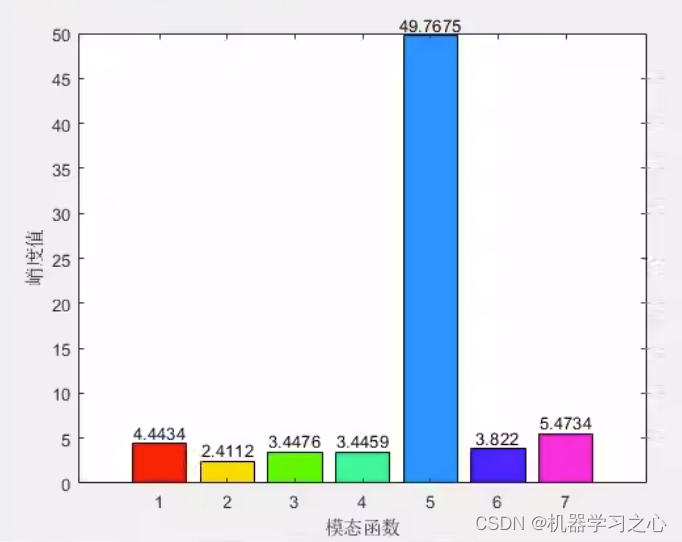
时序分解 | MATLAB实现基于SGMD辛几何模态分解的信号分解分量可视化
时序分解 | MATLAB实现基于SGMD辛几何模态分解的信号分解分量可视化 目录 时序分解 | MATLAB实现基于SGMD辛几何模态分解的信号分解分量可视化效果一览基本介绍程序设计参考资料 效果一览 基本介绍 SGMD分解算法(辛几何模态分解),分解结果可视…...

FinalShell报错:Swap file “.docker-compose.yml.swp“ already exists
FinalShell中编辑docker-compose.yml文件,保存时报错:Swap file ".docker-compose.yml.swp" already exists;报错信息截图如下: 问题原因:有人正在编辑docker-compose.yml文件或者上次编辑没有保存ÿ…...
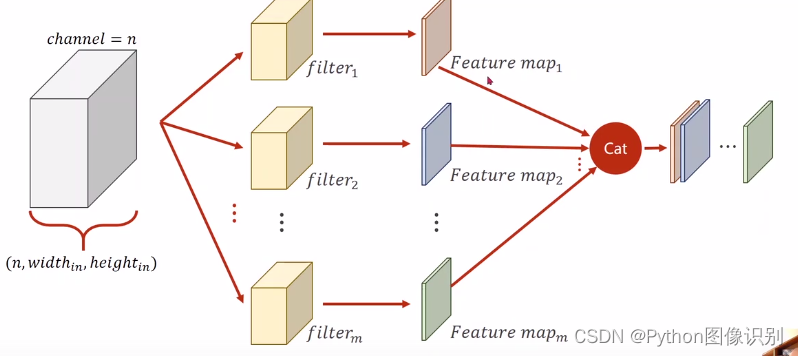
卷积过程详细讲解
1:单通道卷积 以单通道卷积为例,输入为(1,5,5),分别表示1个通道,宽为5,高为5。假设卷积核大小为3x3,padding0,stride1。 卷积过程如下: 相应的卷积核不断…...

代码随想录第五十六天
代码随想录第五十六天 Leetcode 583. 两个字符串的删除操作Leetcode 72. 编辑距离 Leetcode 583. 两个字符串的删除操作 题目链接: 两个字符串的删除操作 自己的思路:想到了,但是初始化初始错了!!!! 思路1:直接动规五…...
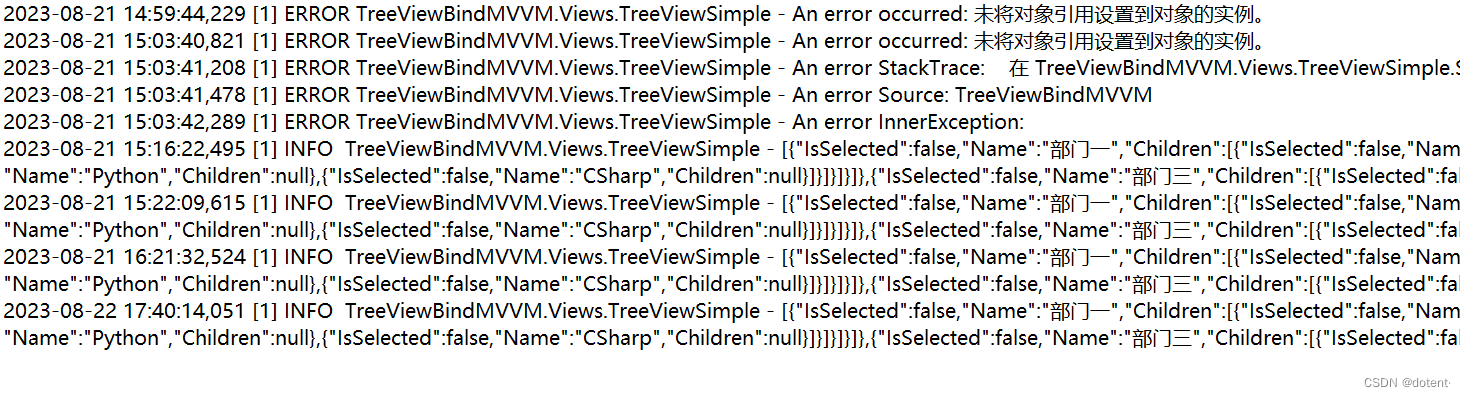
.NET 最便捷的Log4Net日志记录器
最便捷的Log4Net使用方法 LOG4NET 配置日志记录器开始引用nuget LOG4NET 配置日志记录器 Apache log4net 库是一个帮助程序员将日志语句输出到各种的工具 的输出目标。log4net是优秀的Apachelog4j™框架的移植 Microsoft.NET 运行时。我们保持了与原始log4j相似的框架 同时利…...

深入探讨软件逆向工程:解密黑盒的奥秘
引言 逆向工程作为计算机科学领域中的一项关键技术,扮演着解密、漏洞分析、反病毒等诸多领域的重要角色。本文将深入探讨逆向工程的概念、应用领域以及一些常用的逆向工程技术。 什么是逆向工程? 逆向工程是指通过分析已有的程序或设备,推…...
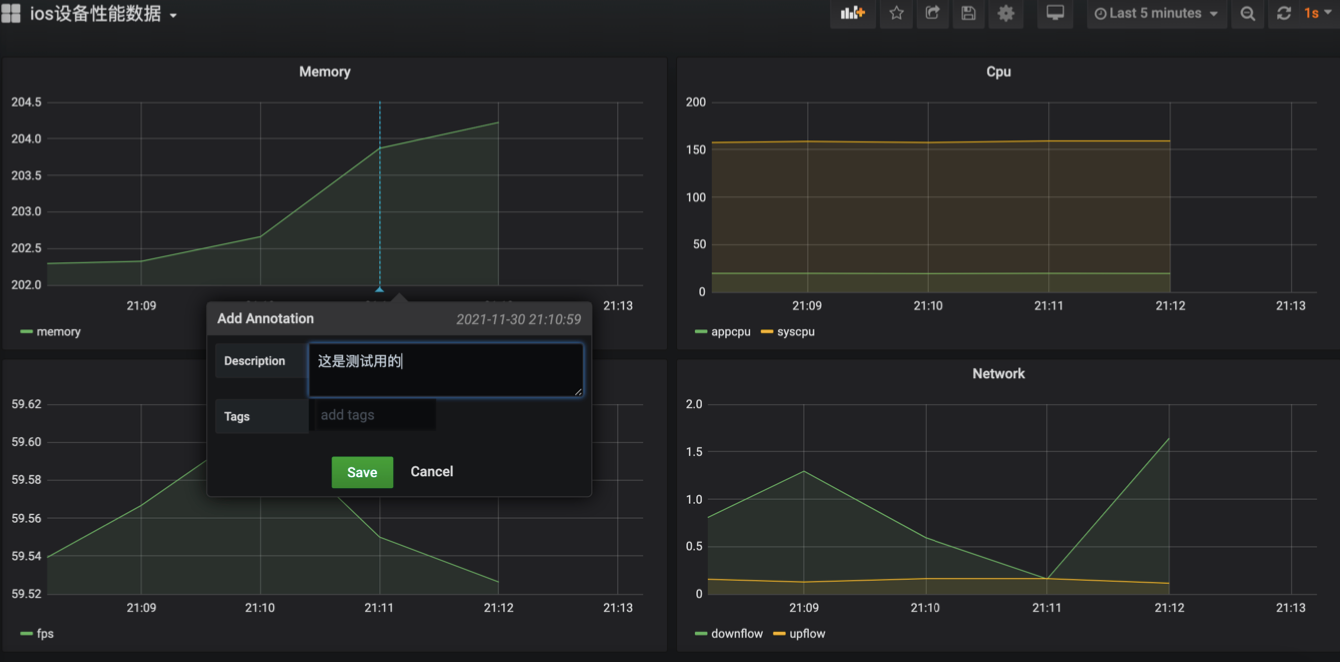
利用tidevice+mysql+grafana实现ios性能测试
利用tidevicemysqlgrafana实现ios性能测试 1.什么是tidevice? tidevice是一个可以和ios设备进行通信的工具,提供以下功能: 截图获取手机信息ipa包的安装和卸载根据bundleID 启动和停止应用列出安装应用信息模拟Xcode运行XCTest,…...
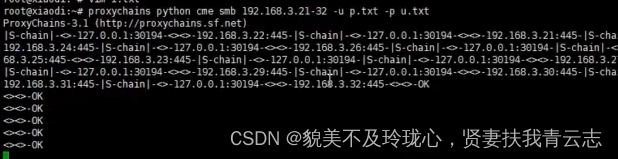
内网安全:WMI协议与SMB协议横向移动
目录 网络拓扑图 网络环境说明 WMI协议 SMB协议 域内信息收集 WMI协议 - 横向移动 利用方式一:wmic命令 利用方式一:cscript 利用方式一:impacket SMB协议 - 横向移动 利用方式一:psexec 利用方式二:psexe…...

05-Numpy基础-用于数组的文件输入输出
np.save和np.load是读写磁盘数组数据的两个主要函数。默认情况下,数组是以未压缩的原始二进制格式保存在扩展名为.npy的文件中的: 如果文件路径末尾没有扩展名.npy,则该扩展名会被自动加上。然后就可以通过np.load读取磁盘上的数组࿱…...

Docker微服务实战
文章目录 业务需求IDEA编写代码编写Dockerfile构建镜像运行容器网页端访问测试 业务需求 利用Docker部署应用服务,实现在网页端通过输入地址 ip:端口/hello/docker,页面显示hello docker ! IDEA编写代码 创建springboot项目 网上很多教程,此步骤省略……...
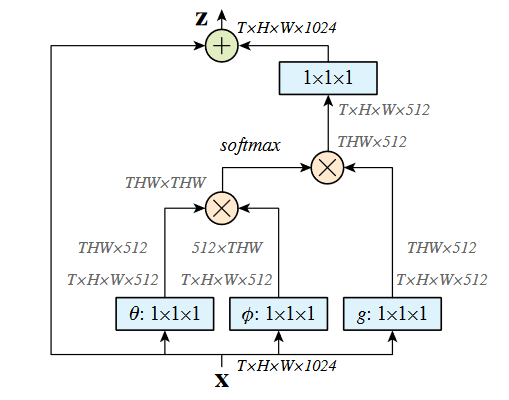
NLNet论文总结和代码实现
Non-local Neural Networks(非局部神经网络):使用自注意力机制捕获远程依赖。 论文: https://arxiv.org/pdf/1711.07971.pdf 源码: 长距离依赖关系,顾名思义,是要和远程建立关系,在l…...
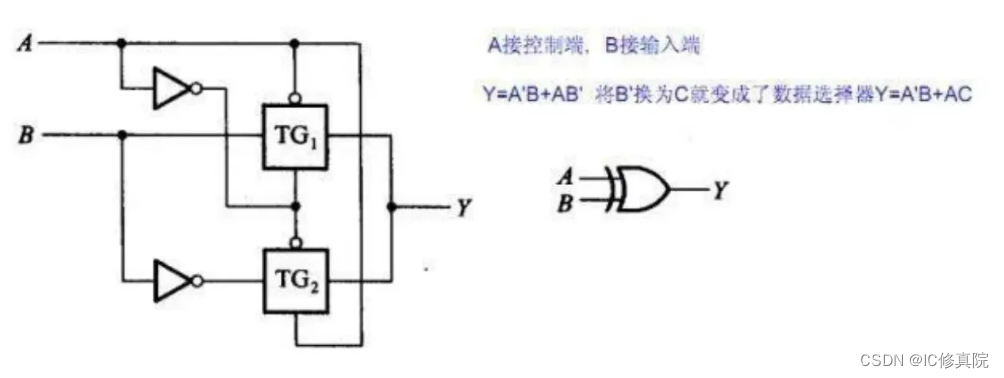
数字 IC 设计职位经典笔/面试题(三)
共100道经典笔试、面试题目(文末可全领) 1. IC 设计中同步复位与异步复位的区别? 同步复位在时钟沿变化时,完成复位动作。异步复位不管时钟,只要复位信号满足条件,就完成复位动作。异步复位对复位信号要求…...

SkyWalking 10.2.0 SWCK 配置过程
SkyWalking 10.2.0 & SWCK 配置过程 skywalking oap-server & ui 使用Docker安装在K8S集群以外,K8S集群中的微服务使用initContainer按命名空间将skywalking-java-agent注入到业务容器中。 SWCK有整套的解决方案,全安装在K8S群集中。 具体可参…...
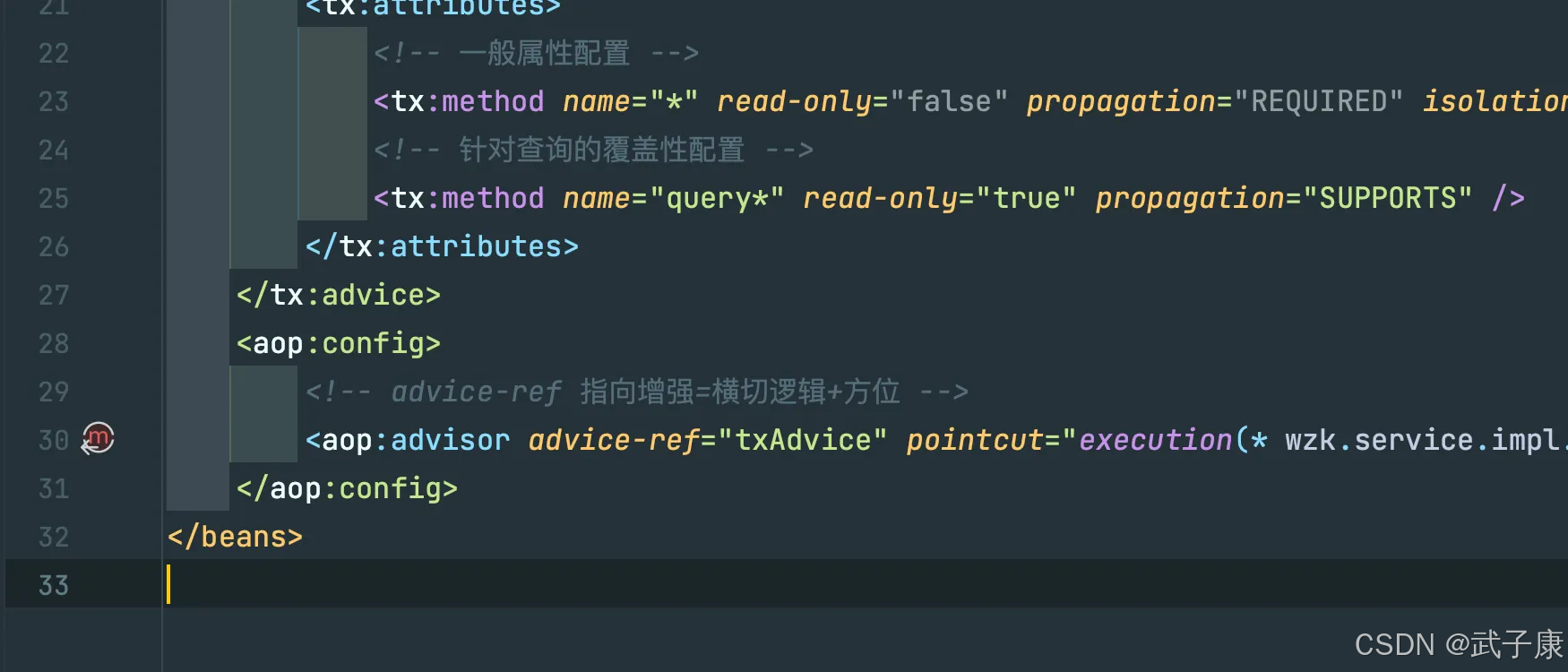
Java-41 深入浅出 Spring - 声明式事务的支持 事务配置 XML模式 XML+注解模式
点一下关注吧!!!非常感谢!!持续更新!!! 🚀 AI篇持续更新中!(长期更新) 目前2025年06月05日更新到: AI炼丹日志-28 - Aud…...
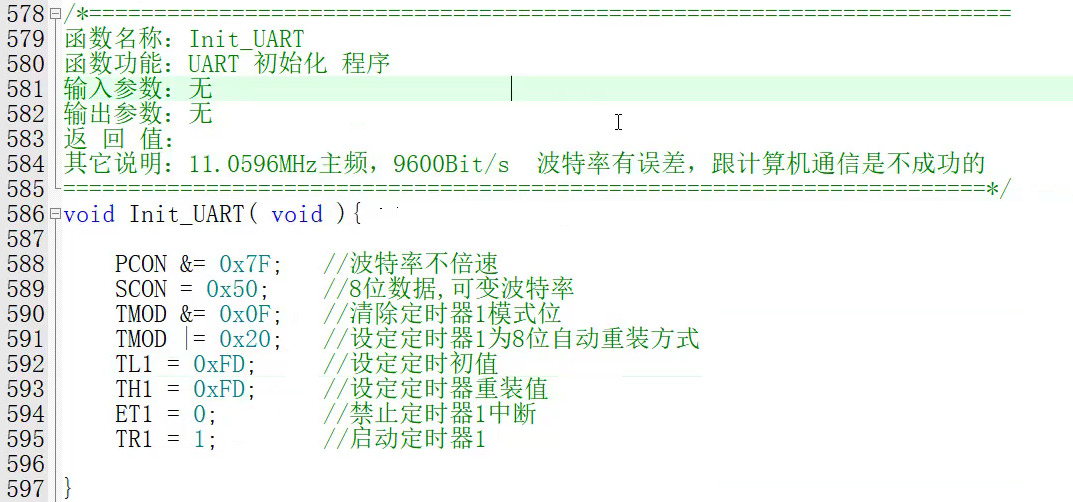
【单片机期末】单片机系统设计
主要内容:系统状态机,系统时基,系统需求分析,系统构建,系统状态流图 一、题目要求 二、绘制系统状态流图 题目:根据上述描述绘制系统状态流图,注明状态转移条件及方向。 三、利用定时器产生时…...
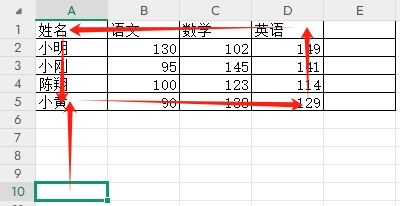
3-11单元格区域边界定位(End属性)学习笔记
返回一个Range 对象,只读。该对象代表包含源区域的区域上端下端左端右端的最后一个单元格。等同于按键 End 向上键(End(xlUp))、End向下键(End(xlDown))、End向左键(End(xlToLeft)End向右键(End(xlToRight)) 注意:它移动的位置必须是相连的有内容的单元格…...
中的KV缓存压缩与动态稀疏注意力机制设计)
大语言模型(LLM)中的KV缓存压缩与动态稀疏注意力机制设计
随着大语言模型(LLM)参数规模的增长,推理阶段的内存占用和计算复杂度成为核心挑战。传统注意力机制的计算复杂度随序列长度呈二次方增长,而KV缓存的内存消耗可能高达数十GB(例如Llama2-7B处理100K token时需50GB内存&a…...

React---day11
14.4 react-redux第三方库 提供connect、thunk之类的函数 以获取一个banner数据为例子 store: 我们在使用异步的时候理应是要使用中间件的,但是configureStore 已经自动集成了 redux-thunk,注意action里面要返回函数 import { configureS…...

sipsak:SIP瑞士军刀!全参数详细教程!Kali Linux教程!
简介 sipsak 是一个面向会话初始协议 (SIP) 应用程序开发人员和管理员的小型命令行工具。它可以用于对 SIP 应用程序和设备进行一些简单的测试。 sipsak 是一款 SIP 压力和诊断实用程序。它通过 sip-uri 向服务器发送 SIP 请求,并检查收到的响应。它以以下模式之一…...
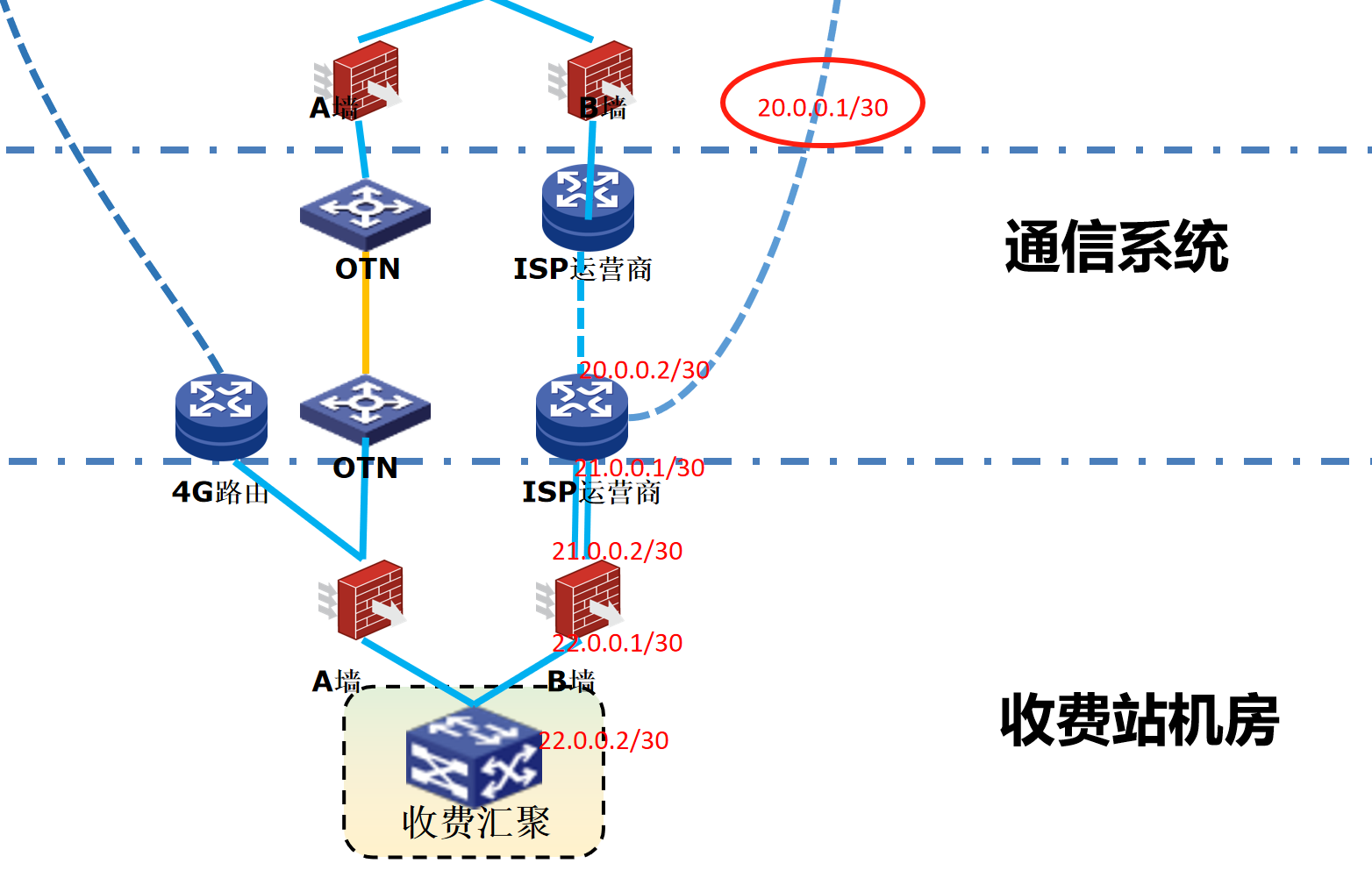
浪潮交换机配置track检测实现高速公路收费网络主备切换NQA
浪潮交换机track配置 项目背景高速网络拓扑网络情况分析通信线路收费网络路由 收费汇聚交换机相应配置收费汇聚track配置 项目背景 在实施省内一条高速公路时遇到的需求,本次涉及的主要是收费汇聚交换机的配置,浪潮网络设备在高速项目很少,通…...

LOOI机器人的技术实现解析:从手势识别到边缘检测
LOOI机器人作为一款创新的AI硬件产品,通过将智能手机转变为具有情感交互能力的桌面机器人,展示了前沿AI技术与传统硬件设计的完美结合。作为AI与玩具领域的专家,我将全面解析LOOI的技术实现架构,特别是其手势识别、物体识别和环境…...

Vue 模板语句的数据来源
🧩 Vue 模板语句的数据来源:全方位解析 Vue 模板(<template> 部分)中的表达式、指令绑定(如 v-bind, v-on)和插值({{ }})都在一个特定的作用域内求值。这个作用域由当前 组件…...