
嵌入式开发-11 Linux下GDB调试工具
目录
1 GDB简介
2 GDB基本命令
3 GDB调试程序
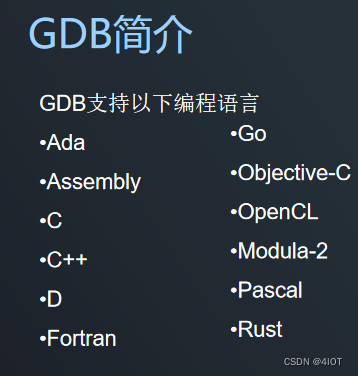
1 GDB简介
GDB是GNU开源组织发布的一个强大的Linux下的程序调试工具。 一般来说,GDB主要帮助你完成下面四个方面的功能:
- 1、启动你的程序,可以按照你的自定义的要求随心所欲的运行程序(按着自己的想法运行)。
- 2、可让被调试的程序在你所指定的调置的断点处停住。(断点可以是条件表达式)
- 3、当程序被停住时,可以检查此时你的程序中所发生的事。
- 4、你可以改变你的程序,将一个BUG产生的影响修正从而测试其他BUG。
2 GDB基本命令
Here are some of the most frequently needed GDB commands:break [file:]functionSet a breakpoint at function (in file).断点run [arglist]Start your program (with arglist, if specified).bt Backtrace: display the program stack.显示程序堆栈print exprDisplay the value of an expression.打印c Continue running your program (after stopping, e.g. at abreakpoint).继续nextExecute next program line (after stopping); step over any functioncalls in the line.下一句edit [file:]function 查看当前停止的程序行。look at the program line where it is presently stopped.list [file:]function 键入程序的文本当程序停止了的位置type the text of the program in the vicinity of where it ispresently stopped.step Execute next program line (after stopping); step into any functioncalls in the line. 执行下一行help [name]Show information about GDB command name, or general informationabout using GDB.quitExit from GDB.You can, instead, specify a process ID as a second argument or use option "-p", if you want to debug a running process:gdb program 1234gdb -p 1234
示例
linux@linux:~/Desktop$ ls
a.out  gdb.c
linux@linux:~/Desktop$ gcc -g gdb.c
linux@linux:~/Desktop$ ./a.out
0
1
2
3
4
hello world
linux@linux:~/Desktop$ gdb a.out
GNU gdb (Ubuntu 7.7-0ubuntu3.1) 7.7
Copyright (C) 2014 Free Software Foundation, Inc.
License GPLv3+: GNU GPL version 3 or later <http://gnu.org/licenses/gpl.html>
This is free software: you are free to change and redistribute it.
There is NO WARRANTY, to the extent permitted by law.  Type "show copying"
and "show warranty" for details.
This GDB was configured as "i686-linux-gnu".
Type "show configuration" for configuration details.
For bug reporting instructions, please see:
<http://www.gnu.org/software/gdb/bugs/>.
Find the GDB manual and other documentation resources online at:
<http://www.gnu.org/software/gdb/documentation/>.
For help, type "help".
Type "apropos word" to search for commands related to "word"...
Reading symbols from a.out...done.
(gdb) l
2
3	void print()
4	{
5		printf("hello world\n");
6	}
7	int main(int argc, const char *argv[])
8	{
9		int i;
10
11		for (i = 0; i < 5; i++)
(gdb) b main
Breakpoint 1 at 0x804846a: file gdb.c, line 11.
(gdb) r
Starting program: /home/linux/Desktop/a.out Breakpoint 1, main (argc=1, argv=0xbffff164) at gdb.c:11
11		for (i = 0; i < 5; i++)
(gdb) c
Continuing.
0
1
2
3
4
hello world
[Inferior 1 (process 5010) exited normally]
(gdb) b 10
Note: breakpoint 1 also set at pc 0x804846a.
Breakpoint 2 at 0x804846a: file gdb.c, line 10.
(gdb) r
Starting program: /home/linux/Desktop/a.out Breakpoint 1, main (argc=1, argv=0xbffff164) at gdb.c:11
11		for (i = 0; i < 5; i++)
(gdb) c
Continuing.
0
1
2
3
4
hello world
[Inferior 1 (process 5113) exited normally]
(gdb) r
Starting program: /home/linux/Desktop/a.out Breakpoint 1, main (argc=1, argv=0xbffff164) at gdb.c:11
11		for (i = 0; i < 5; i++)
(gdb) n
12			printf("%d\n",i);
(gdb) n
0
11		for (i = 0; i < 5; i++)
(gdb) n
12			printf("%d\n",i);
(gdb) n
1
11		for (i = 0; i < 5; i++)
(gdb) p &i
$1 = (int *) 0xbffff0bc
(gdb) p i
$2 = 1
(gdb) n
12			printf("%d\n",i);
(gdb) p i
$3 = 2
(gdb) n
2
11		for (i = 0; i < 5; i++)
(gdb) n
12			printf("%d\n",i);
(gdb) n
3
11		for (i = 0; i < 5; i++)
(gdb) n
12			printf("%d\n",i);
(gdb) p i
$4 = 4
(gdb) n
4
11		for (i = 0; i < 5; i++)
(gdb) n
14		print();
(gdb) s
print () at gdb.c:5
5		printf("hello world\n");
(gdb) n
hello world
6	}
(gdb) n
main (argc=1, argv=0xbffff164) at gdb.c:15
15		return 0;
(gdb)
3 GDB调试程序
示例:定位错误
代码
#include <stdio.h>#ifndef _CORE_void print()
{printf("hello world\n");
}
int main(int argc, const char *argv[])
{int i;for (i = 0; i < 5; i++)printf("%d\n",i);print();return 0;
}#else
int main(int argc,const char *argv[])
{int *temp = NULL;*temp = 10;   //没有分配内存空间,直接会出错return 0;
}#endif
定位错误位置
linux@linux:~/Desktop$ ls
a.out  gdb.c
linux@linux:~/Desktop$ gcc -g gdb.c -D _CORE_
linux@linux:~/Desktop$ ./a.out
Segmentation fault (core dumped)
linux@linux:~/Desktop$ ls
a.out  core  gdb.c
linux@linux:~/Desktop$ gdb a.out core
GNU gdb (Ubuntu 7.7-0ubuntu3.1) 7.7
Copyright (C) 2014 Free Software Foundation, Inc.
License GPLv3+: GNU GPL version 3 or later <http://gnu.org/licenses/gpl.html>
This is free software: you are free to change and redistribute it.
There is NO WARRANTY, to the extent permitted by law.  Type "show copying"
and "show warranty" for details.
This GDB was configured as "i686-linux-gnu".
Type "show configuration" for configuration details.
For bug reporting instructions, please see:
<http://www.gnu.org/software/gdb/bugs/>.
Find the GDB manual and other documentation resources online at:
<http://www.gnu.org/software/gdb/documentation/>.
For help, type "help".
Type "apropos word" to search for commands related to "word"...
Reading symbols from a.out...done.
[New LWP 5904]
Core was generated by `./a.out'.
Program terminated with signal SIGSEGV, Segmentation fault.
#0  0x080483fd in main (argc=1, argv=0xbfea3544) at gdb.c:24
24		*temp = 10;   //没有分配内存空间,直接会出错
(gdb)
如何调试正在运行的进程?
源码
linux@linux:~/Desktop$ cat gdb.c
#include <stdio.h>
#include <unistd.h>int main(int argc, const char *argv[])
{while(1){int i;i++;printf("%d\n",i);sleep(1);}return 0;
}linux@linux:~/Desktop$ gcc -g gdb.c
linux@linux:~/Desktop$ ./a.out
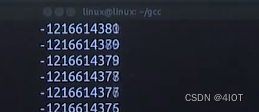
-1217503231
-1217503230
-1217503229
-1217503228...
再开一个终端
linux@linux:~$ ps aux | grep a.out
linux     6291  0.0  0.0   2028   280 pts/0    S+   11:47   0:00 ./a.out
linux     6293  0.0  0.0   4680   832 pts/3    S+   11:47   0:00 grep --color=auto a.out
linux@linux:~$ cd /home/linux/
.bakvim/              .gconf/               .sogouinput/
.cache/               .local/               Templates/
.config/              .mozilla/             tftpboot/
.dbus/                Music/                Videos/
Desktop/              Pictures/             .vim/
Documents/            .pki/                 vmware-tools-distrib/
Downloads/            Public/
linux@linux:~$ cd /home/linux/Desktop/
linux@linux:~/Desktop$ ls
a.out  core  gdb.c
linux@linux:~/Desktop$ gdb a.out -p 4849
GNU gdb (Ubuntu 7.7-0ubuntu3.1) 7.7
Copyright (C) 2014 Free Software Foundation, Inc.
License GPLv3+: GNU GPL version 3 or later <http://gnu.org/licenses/gpl.html>
This is free software: you are free to change and redistribute it.
There is NO WARRANTY, to the extent permitted by law.  Type "show copying"
and "show warranty" for details.
This GDB was configured as "i686-linux-gnu".
Type "show configuration" for configuration details.
For bug reporting instructions, please see:
<http://www.gnu.org/software/gdb/bugs/>.
Find the GDB manual and other documentation resources online at:
<http://www.gnu.org/software/gdb/documentation/>.
For help, type "help".
Type "apropos word" to search for commands related to "word"...
Reading symbols from a.out...done.
Attaching to program: /home/linux/Desktop/a.out, process 4849warning: unable to open /proc file '/proc/4849/status'warning: unable to open /proc file '/proc/4849/status'
ptrace: No such process.
(gdb) b main
Breakpoint 1 at 0x8048456: file gdb.c, line 9.
(gdb) n
The program is not being run.
(gdb) r
Starting program: /home/linux/Desktop/a.out Breakpoint 1, main (argc=1, argv=0xbffff0f4) at gdb.c:9
9			i++;
(gdb) n
10			printf("%d\n",i);
(gdb) n
-1208209407
11			sleep(1);
(gdb) n
12		}
(gdb) q
A debugging session is active.Inferior 1 [process 6317] will be killed.Quit anyway? (y or n) y
linux@linux:~/Desktop$
相关文章:
嵌入式开发-11 Linux下GDB调试工具
目录 1 GDB简介 2 GDB基本命令 3 GDB调试程序 1 GDB简介 GDB是GNU开源组织发布的一个强大的Linux下的程序调试工具。 一般来说,GDB主要帮助你完成下面四个方面的功能: 1、启动你的程序,可以按照你的自定义的要求随心所欲的运行程序&#…...
 --- selenium)
Java测试(11) --- selenium
测试用例方法以teat_开头 运行脚本的时候默认自动会运行test_开头的方法普通方法不以test_开头 普通方法被test_开头的方法调用的时候才会运行测试套件,把不同文件里的不同类里面的不同的测试方法组织起来放在一起运行(1)addTest 把不同…...

vue3 defineExpose 显示的指定组件需要暴露的属性
简介: 是 vue3 新增的一个 api ,用在 <script setup>中使用,用于显示的把组件的属性和方法暴露出来。可用于父子组件通信,子组件使用 defineExpose 将自身的方法或者属性暴露出去,父组件中通过 ref 获取子组件 D…...
算法通关村第十七关:黄金挑战-跳跃游戏问题
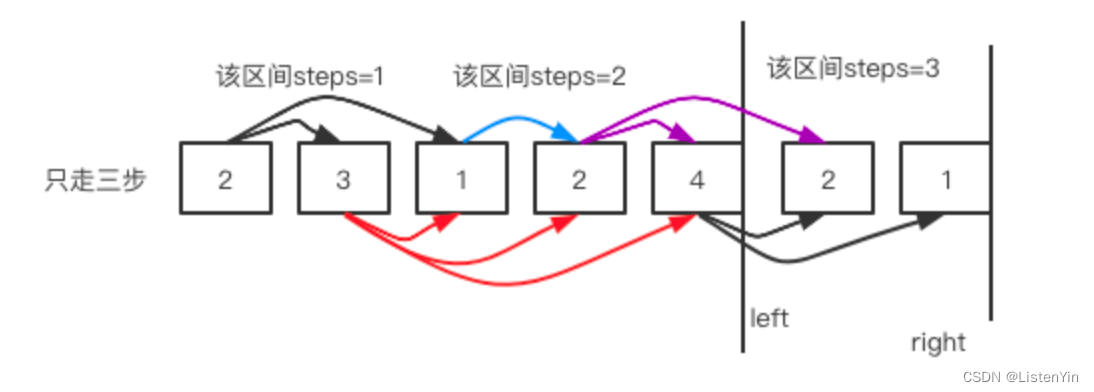
黄金挑战-跳跃游戏问题 1. 跳跃游戏 LeetCode 55 https://leetcode.cn/problems/jump-game/ 思路分析 关键是判断能否到达终点,不用管每一步跳跃到哪里,而是尽可能的跳跃到最远的位置 看最多能覆盖到哪里,只要不断更新能覆盖的距离&#x…...

Git GitHub GitLab
1、Git Git是一个开源的分布式版本控制系统,是一种工具软件,用于代码的存储和版本控制。 2、GitHub GitHub是一个基于Git实现的在线代码仓库,是目前全球最大的代码托管平台。 3、GitLab GitLab也是一个基于Git实现的在线代码仓库&#x…...
前端的规范
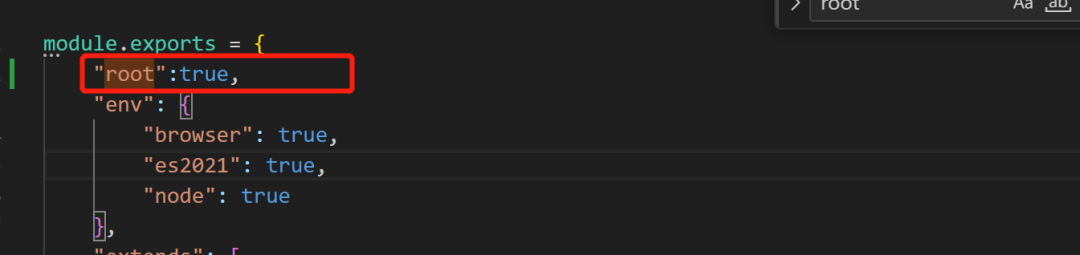
假如团队中的小伙伴在提交代码时没有遵循规范要求,只写了一个"fix"或"update,这会给其他小伙伴造成困扰,不得不花时间查看代码和推测逻辑。 不仅会浪费了时间和精力,可能会导致项目以下问题: 可读性差…...
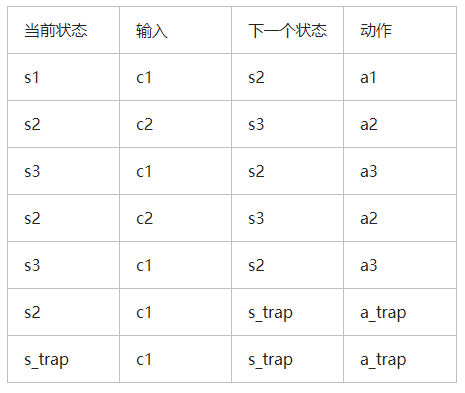
嵌入式软件有限状态机的 C 语言实现
状态机模式是一种行为模式,通过多态实现不同状态的调转行为的确是一种很好的方法,只可惜在嵌入式环境下,有时只能写纯C代码,并且还需要考虑代码的重入和多任务请求跳转等情形,因此实现起来着实需要一番考虑。 近日在看…...

面试题常考:LRU缓存
题目: 请你设计并实现一个满足 LRU (最近最少使用) 缓存 约束的数据结构。 实现 LRUCache 类: LRUCache(int capacity) 以 正整数 作为容量 capacity 初始化 LRU 缓存 int get(int key) 如果关键字 key 存在于缓存中,则返回关键字的值&…...

Redis 教程 - 持久化
Redis 教程 - 持久化 在 Redis 中,持久化是指将数据从内存保存到磁盘上,以便在重启或服务器故障后仍能恢复数据。Redis 提供了两种持久化方式:RDB(Redis Database)和 AOF(Append-Only File)。本…...
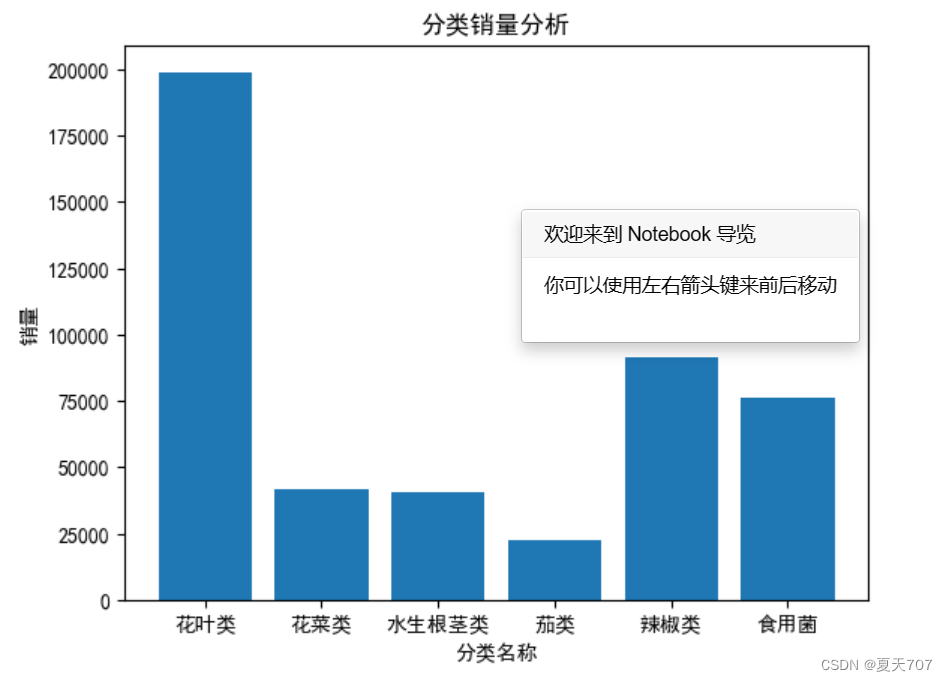
2023 大学生数学建模竞赛-C题-第一问
题目: 在生鲜商超中,一般蔬菜类商品的保鲜期都比较短,且品相随销售时间的增加而变差, 大部分品种如当日未售出,隔日就无法再售。因此,商超通常会根据各商品的历史销售和需 求情况每天进行补货。 由于商超销…...

设计模式3 观察者模式
一 观察者模式 1.1 概述 观察者模式是一种行为模式,又称之为“发布/订阅”模式,在该模式中被观察的对象叫主题,依赖主题的对象被称为观察者,当主题发生改变时,会通知所有观察者进行更新。多个对象存在一对多的关系&a…...

如何防止网络安全攻击
为了防止网络安全攻击,以下是一些常见的防御措施和建议: 使用强密码:确保使用足够长、复杂且随机的密码,并定期更改密码。不要在多个账户中重复使用相同的密码。 更新和修补软件:定期更新操作系统、应用程序和安全补丁…...

怎么从0到1实现一个PHP框架?
写在前面 本人开发的框架在2021年年初开发完成,后面没有再做过任何维护和修改。是仅供大家参考交流的学习项目,请勿使用在生产环境,也勿用作商业用途。 框架地址: https://github.com/yijiebaiyi/fast_framework 整体思路 开发…...

脚本:python实现樱花树
文章目录 代码效果 代码 from turtle import * from random import * from math import * def tree(n, l):pd () # 下笔# 阴影效果t cos ( radians ( heading () 45 ) ) / 8 0.25pencolor ( t, t, t )pensize ( n / 3 )forward ( l ) # 画树枝if n > 0:b random () *…...
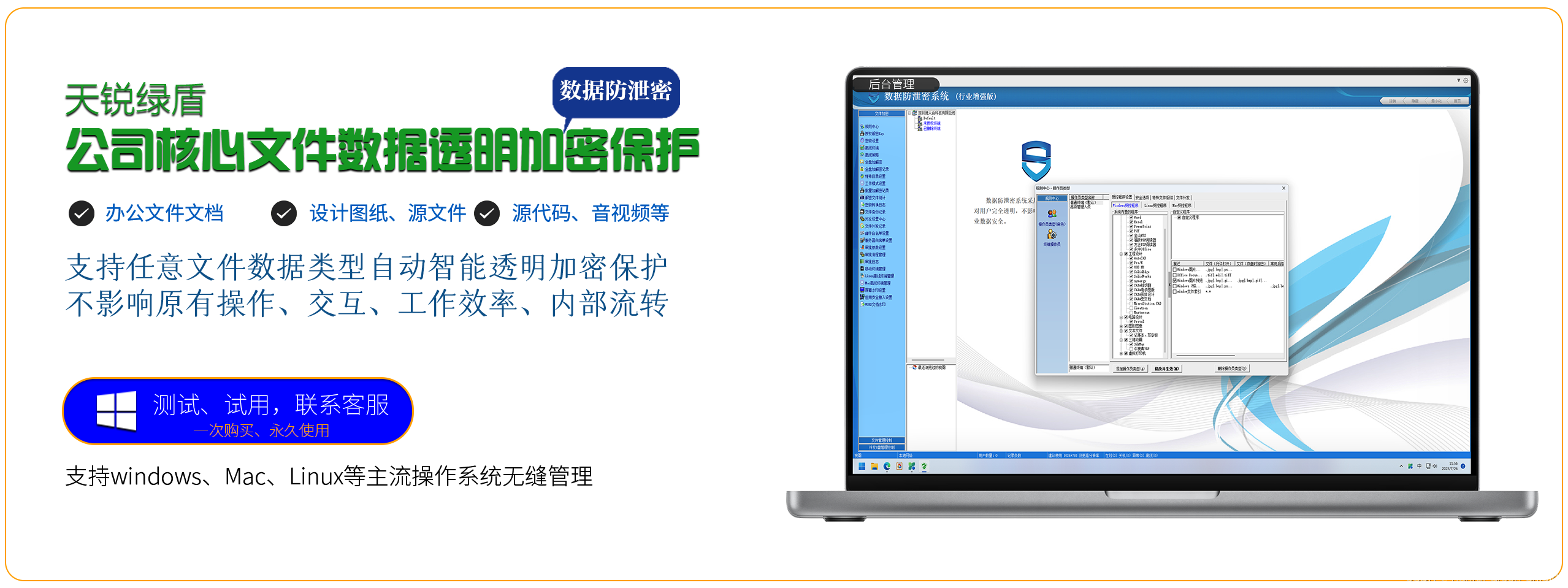
公司内部传文件怎么安全——「用绿盾透明加密软件」
为保证公司内部文件传递的安全性,可以使用天锐绿盾透明加密软件来进行保护。以下是具体的操作步骤: 在公司内部部署天锐绿盾加密软件,确保需要传递的文件都能受到加密保护。 在员工的工作电脑上安装天锐绿盾客户端,并设置好相关的…...
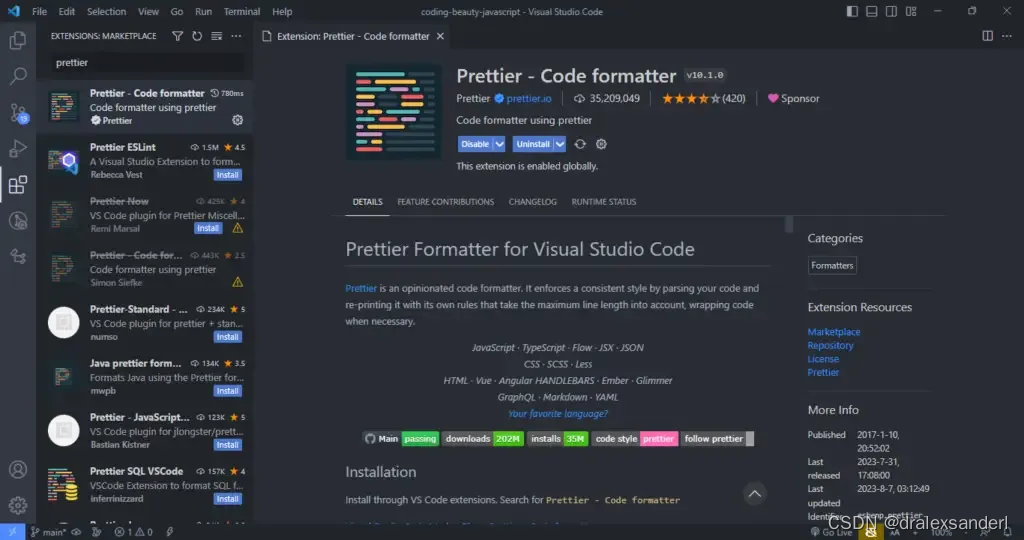
提高使用VS Code工作效率的技巧
提高使用VS Code工作效率的技巧 时间轴视图:本地源代码控制 时间轴视图为我们提供了内置的源代码控制。 我们中的许多人都知道 Git 和其他源代码控制工具有多么有用,它们可以帮助我们轻松跟踪文件更改并在需要时恢复到之前的状态。 因此,…...

软件系统兼容性测试都要注意哪些问题?
兼容性 软件兼容性测试具有相同的含义,它是任何第三方 Web 应用程序测试服务不可分割的一部分。在众多不同的设置中,最重要的是完全的客户满意度,并且可以通过全面的兼容性测试来达到最佳效果。众所周知,软件质量保证是克服 IT 挑…...

索尼 toio™应用创意开发征文|toio俄罗斯方块游戏
目录 引言 摘要 创意简述 准备工作|手工开始 代码编写|合理集成 使用体验|近乎奇妙 引言 索尼toio™编程机器人是一款引领技术创新的产品,为开发者提供了一个全新的编程和创造平台。toio™的设计旨在将技术、塑性和乐趣融为…...
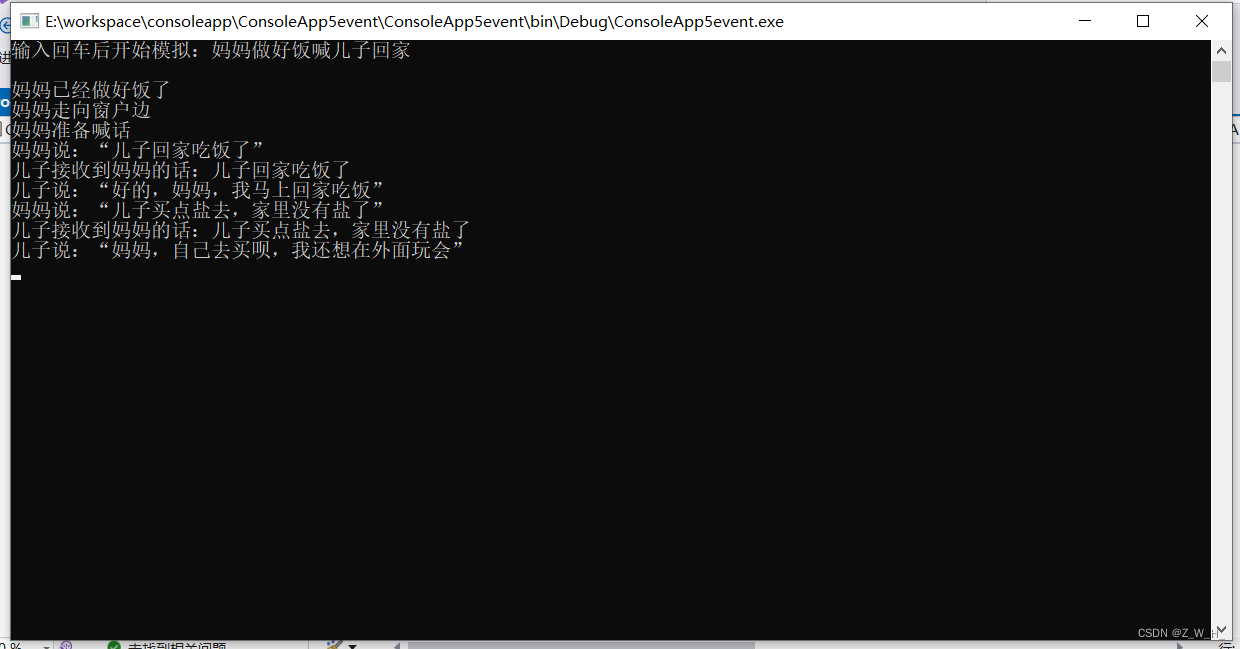
C#事件event
事件模型的5个组成部分 事件拥有者(event source)(类对象)(有些书将其称为事件发布者) 事件成员(event)(事件拥有者的成员)(事件成员就是事件本身…...

气传导耳机什么牌子好?盘点五款好用的气传导耳机分享
对于气传导耳机,大家最关心的可能是佩戴会不会不舒服?音质好不好?会不会漏音?等问题。面对这些问题,今天我就为大家推荐几款市面上最好的气传导耳机,总有一款适合你的! ①NANK南卡00压气传导…...
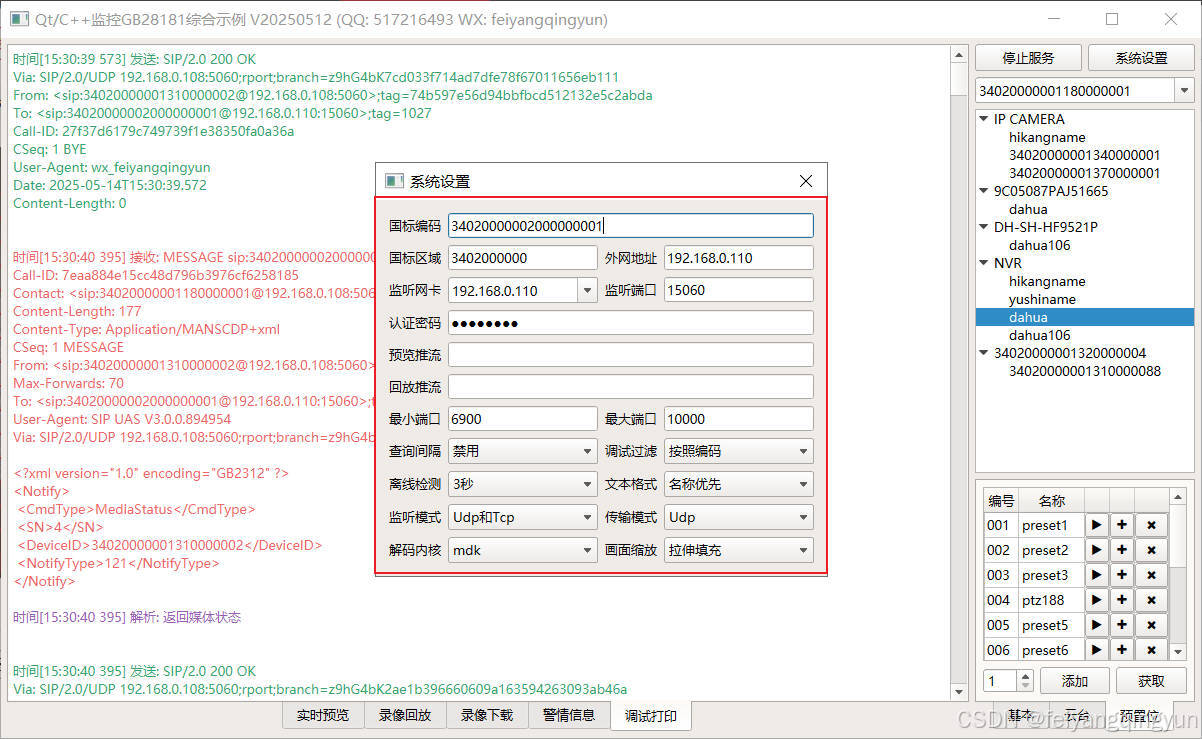
Qt/C++开发监控GB28181系统/取流协议/同时支持udp/tcp被动/tcp主动
一、前言说明 在2011版本的gb28181协议中,拉取视频流只要求udp方式,从2016开始要求新增支持tcp被动和tcp主动两种方式,udp理论上会丢包的,所以实际使用过程可能会出现画面花屏的情况,而tcp肯定不丢包,起码…...
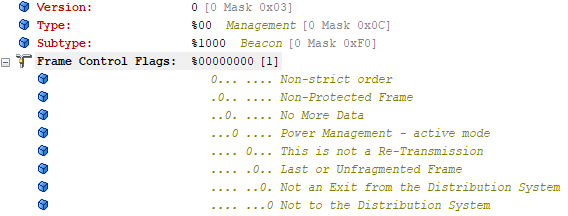
【WiFi帧结构】
文章目录 帧结构MAC头部管理帧 帧结构 Wi-Fi的帧分为三部分组成:MAC头部frame bodyFCS,其中MAC是固定格式的,frame body是可变长度。 MAC头部有frame control,duration,address1,address2,addre…...

大型活动交通拥堵治理的视觉算法应用
大型活动下智慧交通的视觉分析应用 一、背景与挑战 大型活动(如演唱会、马拉松赛事、高考中考等)期间,城市交通面临瞬时人流车流激增、传统摄像头模糊、交通拥堵识别滞后等问题。以演唱会为例,暖城商圈曾因观众集中离场导致周边…...

AI编程--插件对比分析:CodeRider、GitHub Copilot及其他
AI编程插件对比分析:CodeRider、GitHub Copilot及其他 随着人工智能技术的快速发展,AI编程插件已成为提升开发者生产力的重要工具。CodeRider和GitHub Copilot作为市场上的领先者,分别以其独特的特性和生态系统吸引了大量开发者。本文将从功…...
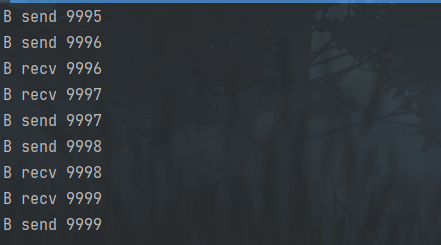
并发编程 - go版
1.并发编程基础概念 进程和线程 A. 进程是程序在操作系统中的一次执行过程,系统进行资源分配和调度的一个独立单位。B. 线程是进程的一个执行实体,是CPU调度和分派的基本单位,它是比进程更小的能独立运行的基本单位。C.一个进程可以创建和撤销多个线程;同一个进程中…...
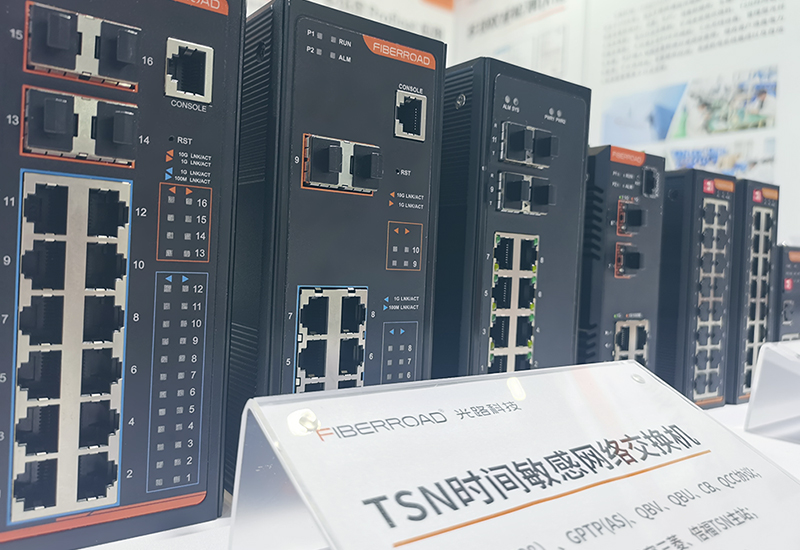
TSN交换机正在重构工业网络,PROFINET和EtherCAT会被取代吗?
在工业自动化持续演进的今天,通信网络的角色正变得愈发关键。 2025年6月6日,为期三天的华南国际工业博览会在深圳国际会展中心(宝安)圆满落幕。作为国内工业通信领域的技术型企业,光路科技(Fiberroad&…...
华为OD机试-最短木板长度-二分法(A卷,100分)
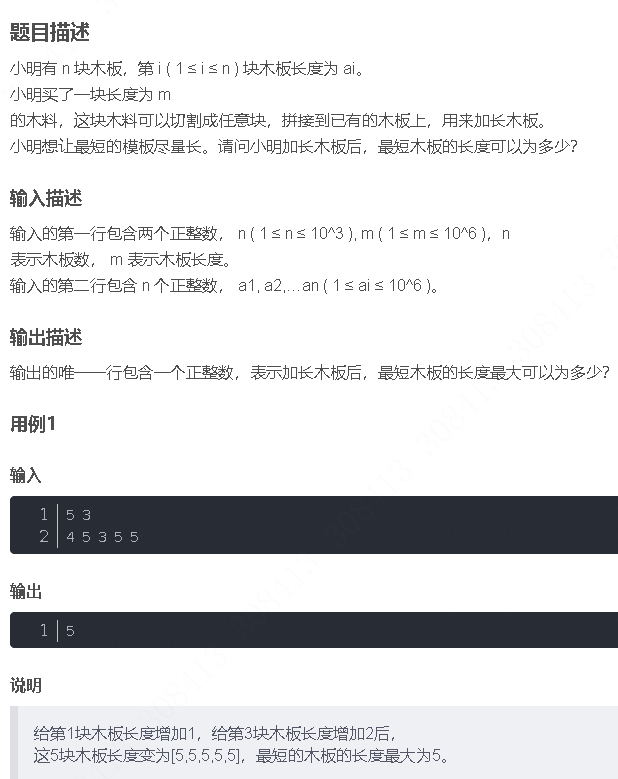
此题是一个最大化最小值的典型例题, 因为搜索范围是有界的,上界最大木板长度补充的全部木料长度,下界最小木板长度; 即left0,right10^6; 我们可以设置一个候选值x(mid),将木板的长度全部都补充到x,如果成功…...
论文阅读:LLM4Drive: A Survey of Large Language Models for Autonomous Driving
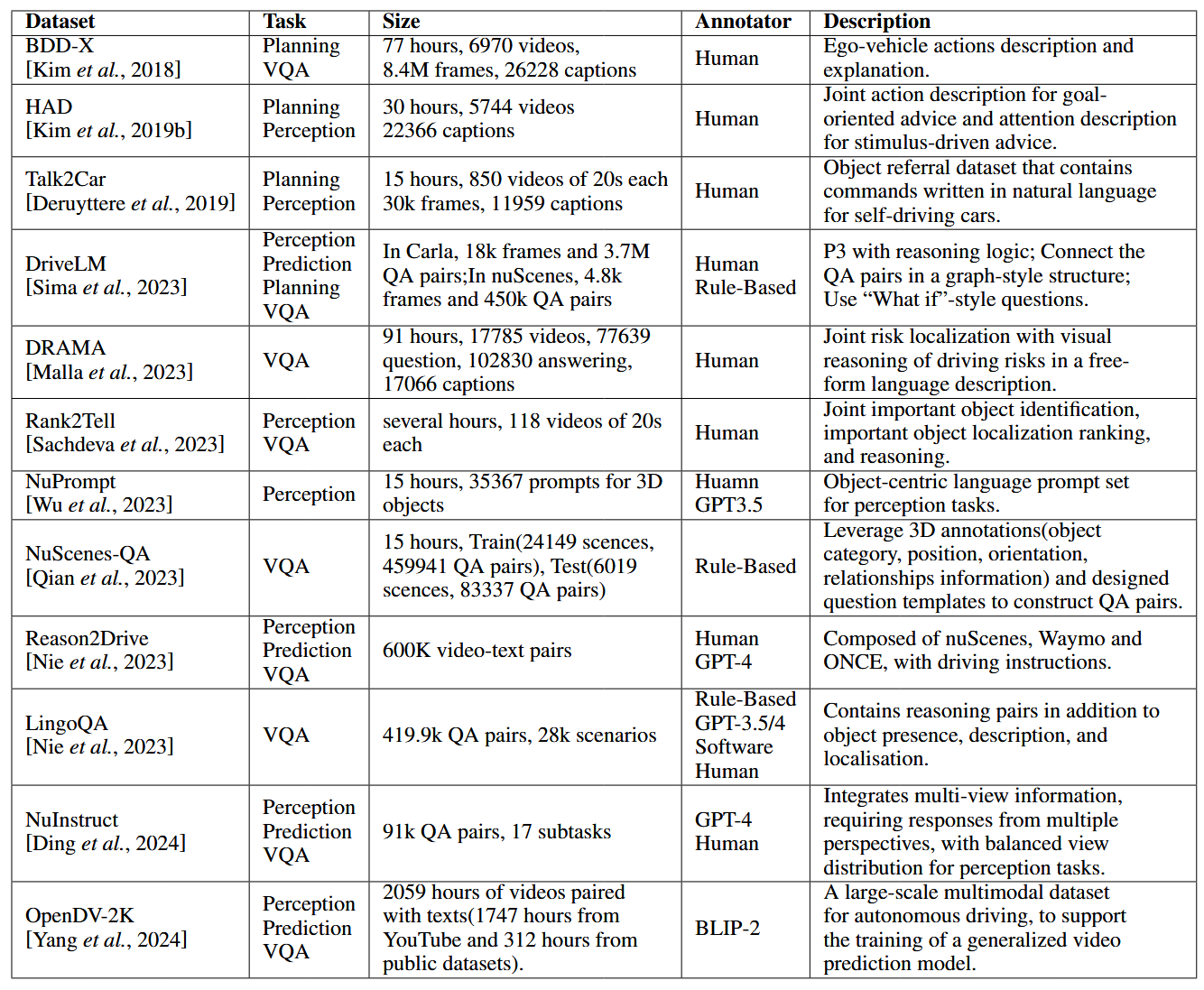
地址:LLM4Drive: A Survey of Large Language Models for Autonomous Driving 摘要翻译 自动驾驶技术作为推动交通和城市出行变革的催化剂,正从基于规则的系统向数据驱动策略转变。传统的模块化系统受限于级联模块间的累积误差和缺乏灵活性的预设规则。…...

Python竞赛环境搭建全攻略
Python环境搭建竞赛技术文章大纲 竞赛背景与意义 竞赛的目的与价值Python在竞赛中的应用场景环境搭建对竞赛效率的影响 竞赛环境需求分析 常见竞赛类型(算法、数据分析、机器学习等)不同竞赛对Python版本及库的要求硬件与操作系统的兼容性问题 Pyth…...
Axure 下拉框联动
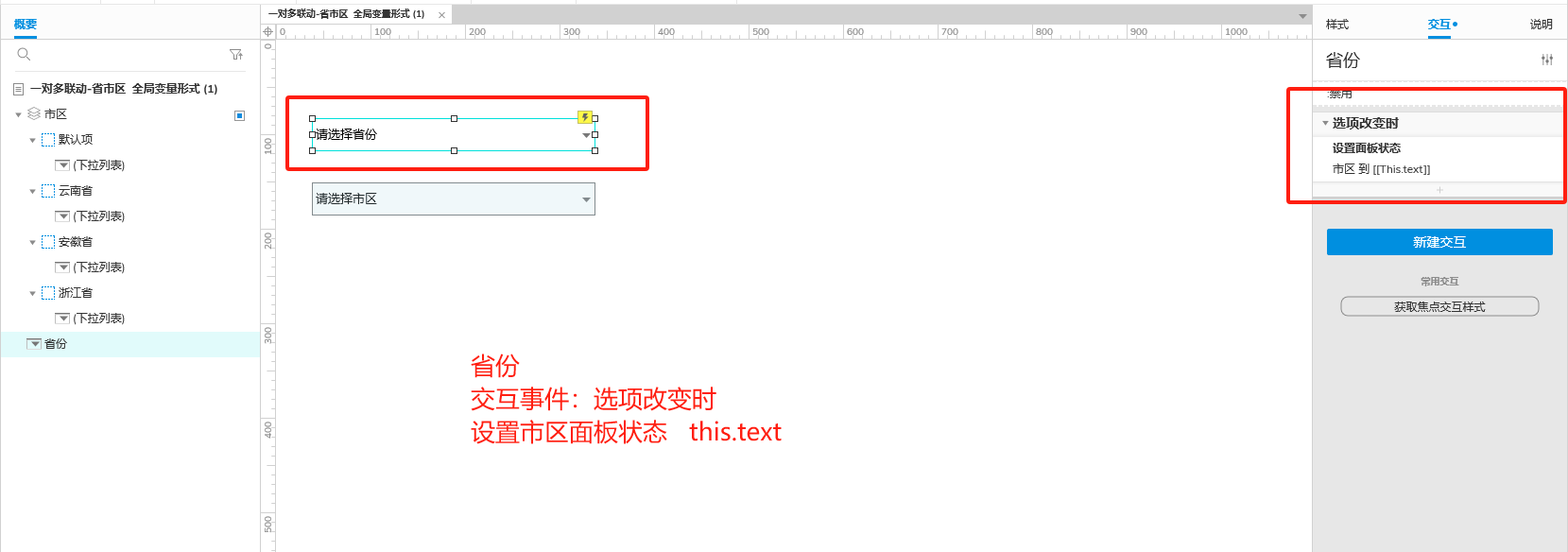
实现选省、选完省之后选对应省份下的市区...