
开发指导—利用组件插值器动画实现 HarmonyOS 动效
一. 组件动画
在组件上创建和运行动画的快捷方式。具体用法请参考通用方法。
获取动画对象
通过调用 animate 方法获得 animation 对象,animation 对象支持动画属性、动画方法和动画事件。
<!-- xxx.hml --><div class="container"><div id="content" class="box" onclick="Show"></div></div>
/* xxx.css */.container {flex-direction: column;justify-content: center;align-items: center;width: 100%;}.box{width: 200px;height: 200px;background-color: #ff0000;margin-top: 30px;}
/* xxx.js */export default {data: {animation: '',},onInit() {},onShow() {var options = {duration: 1500,};var frames = [{width:200,height:200,},{width:300,height:300,}];this.animation = this.$element('content').animate(frames, options); //获取动画对象},Show() {this.animation.play();}}

说明
● 使用 animate 方法时必须传入 Keyframes 和 Options 参数。
● 多次调用 animate 方法时,采用 replace 策略,即最后一次调用时传入的参数生效。
设置动画参数
在获取动画对象后,通过设置参数 Keyframes 设置动画在组件上的样式。
<!-- xxx.hml --><div class="container"><div id="content" class="box" onclick="Show"></div></div>
/* xxx.css */.container {flex-direction: column;justify-content: center;align-items: center;width: 100%;height: 100%;}.box{width: 200px;height: 200px;background-color: #ff0000;margin-top: 30px;}
/* xxx.js */export default {data: {animation: '',keyframes:{},options:{}},onInit() {this.options = {duration: 4000,}this.keyframes = [{transform: {translate: '-120px -0px',scale: 1,rotate: 0},transformOrigin: '100px 100px',offset: 0.0,width: 200,height: 200},{transform: {translate: '120px 0px',scale: 1.5,rotate: 90},transformOrigin: '100px 100px',offset: 1.0,width: 300,height: 300}]},Show() {this.animation = this.$element('content').animate(this.keyframes, this.options)this.animation.play()}}

说明
● translate、scale 和 rtotate 的先后顺序会影响动画效果。
● transformOrigin 只对 scale 和 rtotate 起作用。
在获取动画对象后,通过设置参数 Options 来设置动画的属性。
<!-- xxx.hml --><div class="container"><div id="content" class="box" onclick="Show"></div></div>
/* xxx.css */.container {flex-direction: column;justify-content: center;align-items: center;width: 100%;}.box{width: 200px;height: 200px;background-color: #ff0000;margin-top: 30px;}
/* xxx.js */export default {data: {animation: '',},onInit() {},onShow() {var options = {duration: 1500,easing: 'ease-in',delay: 5,iterations: 2,direction: 'normal',};var frames = [{transform: {translate: '-150px -0px'}},{transform: {translate: '150px 0px'}}];this.animation = this.$element('content').animate(frames, options);},Show() {this.animation.play();}}

说明
direction:指定动画的播放模式。
normal: 动画正向循环播放。
reverse: 动画反向循环播放。
alternate:动画交替循环播放,奇数次正向播放,偶数次反向播放。
alternate-reverse:动画反向交替循环播放,奇数次反向播放,偶数次正向播放。
二. 插值器动画
动画动效
通过设置插值器来实现动画效果。(从 API Version 6 开始支持。)
创建动画对象
通过 createAnimator 创建一个动画对象,通过设置参数 options 来设置动画的属性。
<!-- xxx.hml --><div class="container"><div style="width: 300px;height: 300px;margin-top: 100px;background: linear-gradient(pink, purple);transform: translate({{translateVal}});"></div><div class="row"><button type="capsule" value="play" onclick="playAnimation"></button></div></div>
/* xxx.css */.container {width:100%;height:100%;flex-direction: column;align-items: center;justify-content: center;}button{width: 200px;}.row{width: 65%;height: 100px;align-items: center;justify-content: space-between;margin-top: 50px;margin-left: 260px;}
// xxx.jsimport animator from '@ohos.animator';export default {data: {translateVal: 0,animation: null},onInit() {},onShow(){var options = {duration: 3000,easing:"friction",delay:"1000",fill: 'forwards',direction:'alternate',iterations: 2,begin: 0,end: 180};//设置参数this.animation = animator.createAnimator(options)//创建动画},playAnimation() {var _this = this;this.animation.onframe = function(value) {_this.translateVal= value};this.animation.play();}}

说明
● 使用 createAnimator 创建动画对象时必须传入 options 参数。
● begin 插值起点,不设置时默认为 0。
● end 插值终点,不设置时默认为 1。
添加动画事件和调用接口
animator 支持事件和接口,可以通过添加 frame、cancel、repeat、finish 事件和调用 update、play、pause、cancel、reverse、finish 接口自定义动画效果。animator 支持的事件和接口具体见动画中的createAnimator。
<!-- xxx.hml --><div style="flex-direction: column;align-items: center;width: 100%;height: 100%;"><div style="width:200px;height: 200px;margin-top: 100px;background: linear-gradient(#b30d29, #dcac1b);transform: scale({{scaleVal}});"></div><div style="width: {{DivWidth}};height: {{DivHeight}};margin-top: 200px;background: linear-gradient(pink, purple);margin-top: 200px;transform:translateY({{translateVal}});"></div><div class="row"><button type="capsule" value="play" onclick="playAnimation"></button><button type="capsule" value="update" onclick="updateAnimation"></button></div><div class="row1"><button type="capsule" value="pause" onclick="pauseAnimation"></button><button type="capsule" value="finish" onclick="finishAnimation"></button></div><div class="row2"><button type="capsule" value="cancel" onclick="cancelAnimation"></button><button type="capsule" value="reverse" onclick="reverseAnimation"></button></div></div>
/* xxx.css */button{width: 200px;}.row{width: 65%;height: 100px;align-items: center;justify-content: space-between;margin-top: 150px;position: fixed;top: 52%;left: 120px;}.row1{width: 65%;height: 100px;align-items: center;justify-content: space-between;margin-top: 120px;position: fixed;top: 65%;left: 120px;}.row2{width: 65%;height: 100px;align-items: center;justify-content: space-between;margin-top: 100px;position: fixed;top: 75%;left: 120px;}
// xxx.jsimport animator from '@ohos.animator';import promptAction from '@ohos.promptAction';export default {data: {scaleVal:1,DivWidth:200,DivHeight:200,translateVal:0,animation: null},onInit() {var options = {duration: 3000,fill: 'forwards',begin: 200,end: 270};this.animation = animator.createAnimator(options);},onShow() {var _this= this;//添加动画重放事件this.animation.onrepeat = function() {promptAction.showToast({message: 'repeat'});var repeatoptions = {duration: 2000,iterations: 1,direction: 'alternate',begin: 180,end: 240};_this.animation.update(repeatoptions);_this.animation.play();};},playAnimation() {var _this= this;//添加动画逐帧插值回调事件this.animation.onframe = function(value) {_this. scaleVal= value/150,_this.DivWidth = value,_this.DivHeight = value,_this.translateVal = value-180};this.animation.play();},updateAnimation() {var newoptions = {duration: 5000,iterations: 2,begin: 120,end: 180};this.animation.update(newoptions);this.animation.play();//调用动画播放接口},pauseAnimation() {this.animation.pause();//调用动画暂停接口},finishAnimation() {var _this= this;//添加动画完成事件this.animation.onfinish = function() {promptAction.showToast({message: 'finish'})};this.animation.finish(); //调用动画完成接口},cancelAnimation() {this.animation.cancel(); //调用动画取消接口},reverseAnimation() {this.animation.reverse(); //调用动画倒放接口}}

说明
在调用 update 接口的过程中可以使用这个接口更新动画参数,入参与 createAnimator 一致。
动画帧
请求动画帧
请求动画帧时通过 requestAnimationFrame 函数逐帧回调,在调用该函数时传入一个回调函数。
runframe 在调用 requestAnimationFrame 时传入带有 timestamp 参数的回调函数 step,将 step 中的 timestamp 赋予起始的 startTime。当 timestamp 与 startTime 的差值小于规定的时间时将再次调用 requestAnimationFrame,最终动画将会停止。
<!-- xxx.hml --><div class="container"><tabs onchange="changecontent"><tab-content><div class="container"><stack style="width: 300px;height: 300px;margin-top: 100px;margin-bottom: 100px;"><canvas id="mycanvas" style="width: 100%;height: 100%;background-color: coral;"></canvas><div style="width: 50px;height: 50px;border-radius: 25px;background-color: indigo;position: absolute;left: {{left}};top: {{top}};"></div></stack><button type="capsule" value="play" onclick="runframe"></button></div></tab-content></tabs></div>
/* xxx.css */.container {flex-direction: column;justify-content: center;align-items: center;width: 100%;height: 100%;}button{width: 300px;}
// xxx.jsexport default {data: {timer: null,left: 0,top: 0,flag: true,animation: null,startTime: 0,},onShow() {var test = this.$element("mycanvas");var ctx = test.getContext("2d");ctx.beginPath();ctx.moveTo(0, 0);ctx.lineTo(300, 300);ctx.lineWidth = 5;ctx.strokeStyle = "red";ctx.stroke();},runframe() {this.left = 0;this.top = 0;this.flag = true;this.animation = requestAnimationFrame(this.step);},step(timestamp) {if (this.flag) {this.left += 5;this.top += 5;if (this.startTime == 0) {this.startTime = timestamp;}var elapsed = timestamp - this.startTime;if (elapsed < 500) {console.log('callback step timestamp: ' + timestamp);this.animation = requestAnimationFrame(this.step);}} else {this.left -= 5;this.top -= 5;this.animation = requestAnimationFrame(this.step);}if (this.left == 250 || this.left == 0) {this.flag = !this.flag}},onDestroy() {cancelAnimationFrame(this.animation);}}

说明
requestAnimationFrame 函数在调用回调函数时在第一个参数位置传入 timestamp 时间戳,表示 requestAnimationFrame 开始去执行回调函数的时刻。
取消动画帧
通过 cancelAnimationFrame 函数取消逐帧回调,在调用 cancelAnimationFrame 函数时取消 requestAnimationFrame 函数的请求。
<!-- xxx.hml --><div class="container"><tabs onchange="changecontent"><tab-content><div class="container"><stack style="width: 300px;height: 300px;margin-top: 100px;margin-bottom: 100px;"><canvas id="mycanvas" style="width: 100%;height: 100%;background-color: coral;"></canvas><div style="width: 50px;height: 50px;border-radius: 25px;background-color: indigo;position: absolute;left: {{left}};top: {{top}};"></div></stack><button type="capsule" value="play" onclick="runframe"></button></div></tab-content></tabs></div>
/* xxx.css */.container {flex-direction: column;justify-content: center;align-items: center;width: 100%;height: 100%;}button{width: 300px;}
// xxx.jsexport default {data: {timer: null,left: 0,top: 0,flag: true,animation: null},onShow() {var test = this.$element("mycanvas");var ctx = test.getContext("2d");ctx.beginPath();ctx.moveTo(0, 0);ctx.lineTo(300, 300);ctx.lineWidth = 5;ctx.strokeStyle = "red";ctx.stroke();},runframe() {this.left = 0;this.top = 0;this.flag = true;this.animation = requestAnimationFrame(this.step);},step(timestamp) {if (this.flag) {this.left += 5;this.top += 5;this.animation = requestAnimationFrame(this.step);} else {this.left -= 5;this.top -= 5;this.animation = requestAnimationFrame(this.step);}if (this.left == 250 || this.left == 0) {this.flag = !this.flag}},onDestroy() {cancelAnimationFrame(this.animation);}}
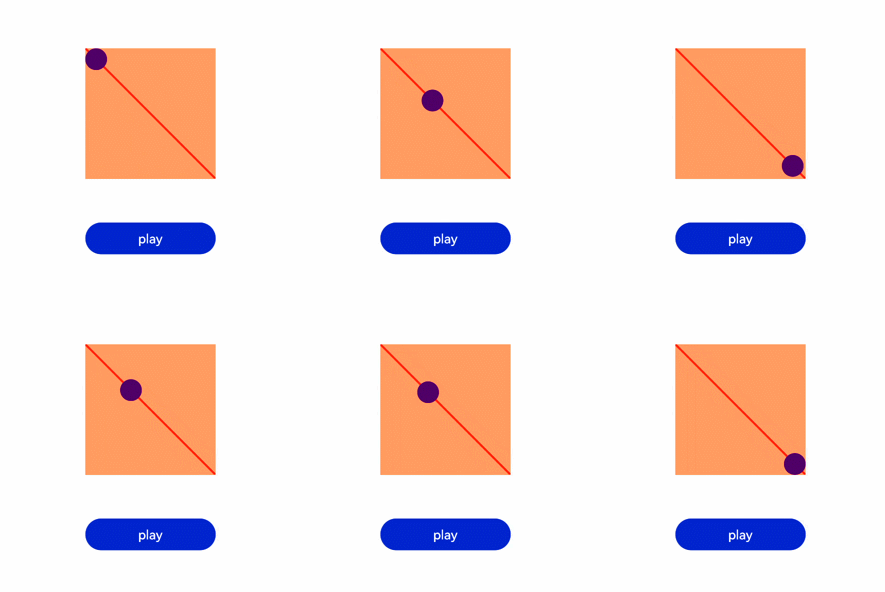
说明
在调用该函数时需传入一个具有标识 id 的参数。
相关文章:
开发指导—利用组件插值器动画实现 HarmonyOS 动效
一. 组件动画 在组件上创建和运行动画的快捷方式。具体用法请参考通用方法。 获取动画对象 通过调用 animate 方法获得 animation 对象,animation 对象支持动画属性、动画方法和动画事件。 <!-- xxx.hml --><div class"container"> <di…...

树莓派入门
目录 前言系统烧录使用官方烧录工具选择操作系统选择存储卡配置 Win32DiskImager 有屏幕树莓派开机树莓派关机无屏幕树莓派开机获取树莓派IP地址通过路由器获取共享网络方式获取给树莓派配置静态IP地址查找默认网关分盘给树莓派的IP地址修改树莓派DHCP配置文件 ssh登录 让树莓派…...
算法模型嵌入式 Mendix应用的开发示例
一、前言 根据埃森哲最新一项调查,2023年67%的企业持续加大在技术方面的投入,其中数据和AI应用是重中之重。AI在企业内部应用这个话题已经保持了十多年的热度,随着ChatGPT为代表的生成式AI技术的出现,这一话题迎来又一波的高潮。…...

如何使用Cygwin编译最新版的Redis源码,生成适用于Windows的Redis
文章目录 一、准备Cygwin环境二、下载Redis源码三、编译redis-7.2.01. 执行make命令2. 重新执行make命令3. 再次执行make命令4. 将编译后的可执行文件及依赖放到同一个文件夹5. 测试编译生成的可执行程序 四、换其他redis版本重新编译1. 编译redis-7.0.122. 编译redis-6.2.133.…...

Linux 修改SSH端口
如果防火墙,或防火墙已经开启,需要先开放2222端口 firewall-cmd --add-port2222/tcp --permanent --zonepublic firewall-cmd --reload编辑文件 vim /etc/ssh/sshd_config: #Port 22 Port 2222 # 打开注释,并修改为以下值 Clien…...
Redis经典问题:缓存穿透
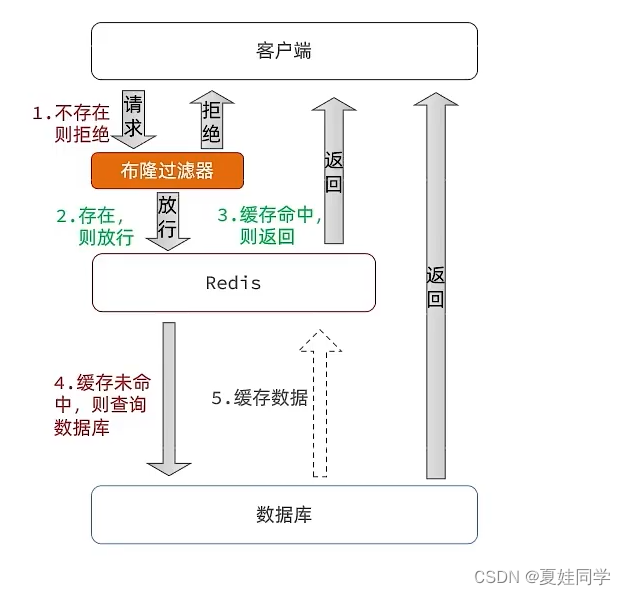
(笔记总结自《黑马点评》项目) 一、产生原因 用户请求的数据在缓存中和数据库中都不存在,不断发起这样的请求,给数据库带来巨大压力。 常见的解决方式有缓存空对象和布隆过滤器。 二、缓存空对象 思路:当我们客户…...
DEFORMABLE DETR: DEFORMABLE TRANSFORMERS FOR END-TO-END OBJECT DETECTION (论文解析)
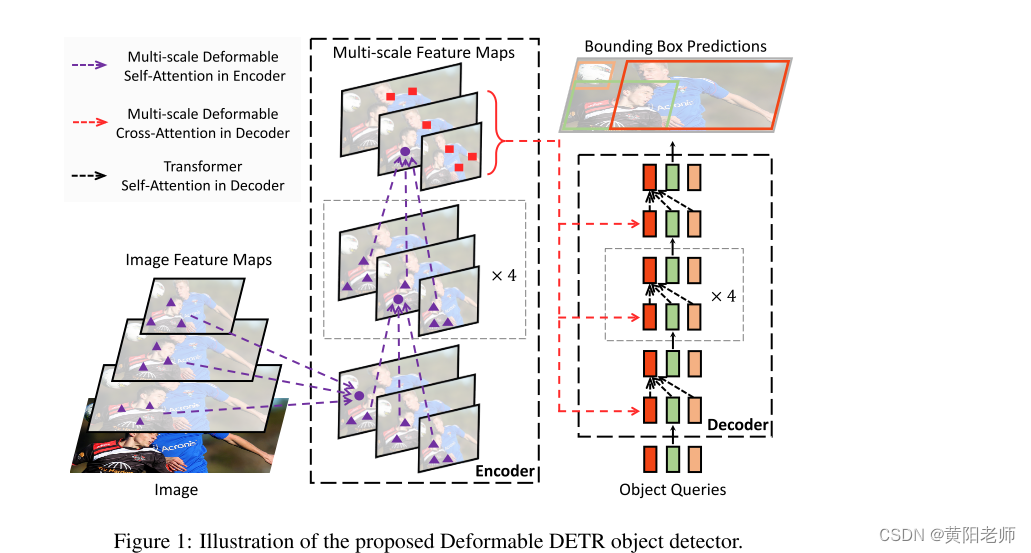
DEFORMABLE DETR: DEFORMABLE TRANSFORMERS FOR END-TO-END OBJECT DETECTION 摘要1 介绍2 相关工作3 重新审视 Transformers 和 DETR4 方法4.1 用于端到端目标检测的可变形transformer4.2 Deformable Detr的其他改进和变型5 实验5.1 和DETR 比较5.2 消融实验5.3 与最先进方法的…...

网络连接评分机制之NetworkFactory
在开机时,各个提供网络连接的对象需要向ConnectivityService注册自己,并把自己所提供的网络的分值告诉ConnectivityService。 为了ConnectivityService便于统一管理,每一个具备提供网络服务的对象都需要创建一个NetworkFactory的子类对象,并利用该对象注册自己,以及提供自…...
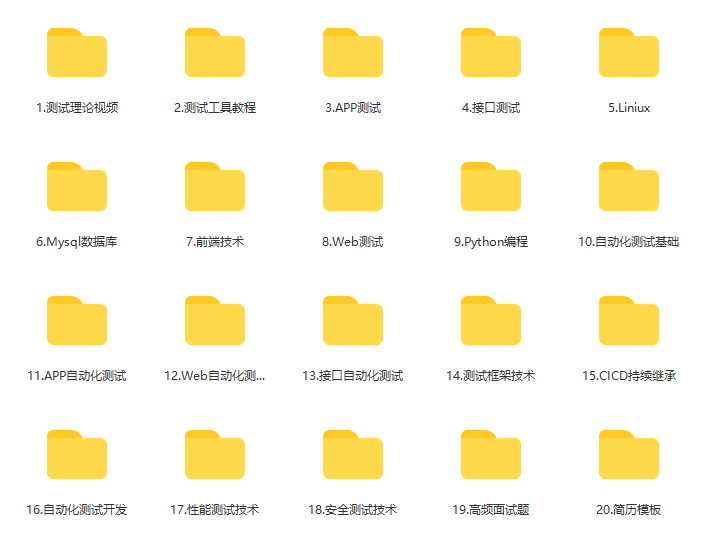
极致精细的jmeter+ant+jenkins 搭建接口自动化测试
一、jmeter 相信大家对jmeter并不陌生哈,如果没有安装和配置环境的小伙伴,可以直接找到我哈,我发给你。 二、ant 安装ant 第一步:下载ant http://ant.apache.org/ 第二步:配置ant window中设置ant环境变量&…...

Unity物体查找方式
参考资料 cUnity中使用GameObject.Find、Transform.Find查找GameObject_思月行云的博客-CSDN博客 GameObject.Find 通过名字或路径查找游戏对象。 GameObject.Find("GameObject"); GameObject.Find("GameObject/ChildGameObject); 使用规范: 1.无法查找隐藏…...

【Spring容器的启动流程】
Spring容器的启动流程主要分为以下几个步骤: 加载配置文件:Spring容器会从指定的配置文件中读取配置信息,包括bean的定义、依赖关系、AOP切面等。 创建容器:Spring容器启动后会创建一个容器实例,容器负责管理bean的生…...

Python---字符串
字符串特点 1. 只可以存储字符串 2. 长度任意 (取决于内存大小) 3. 支持下标索引 4. 允许重复字符串存在 5. 不可以修改 (增加或删除元素等) 6. 支持for和while循环 字符串的下标索引 # 字符串的下标索引 从前向后,下标从0开始 从后向前,下标从-1开始…...

MySQL数据 - 索引
MySQL数据库 - 索引 1:什么是数据库索引?2:都有哪些类型的索引呢?3:MySQL数据库每种索引的底层实现原理,每种索引为什么这么实现?4:上面索引实现基本上是B+树,为什么不用别的数据结构呢?4-1:那为什么不是二叉树呢?4-2:为什么不是红黑树呢?4-3:为什么不是哈希索引…...
长安链BaaS服务平台调研
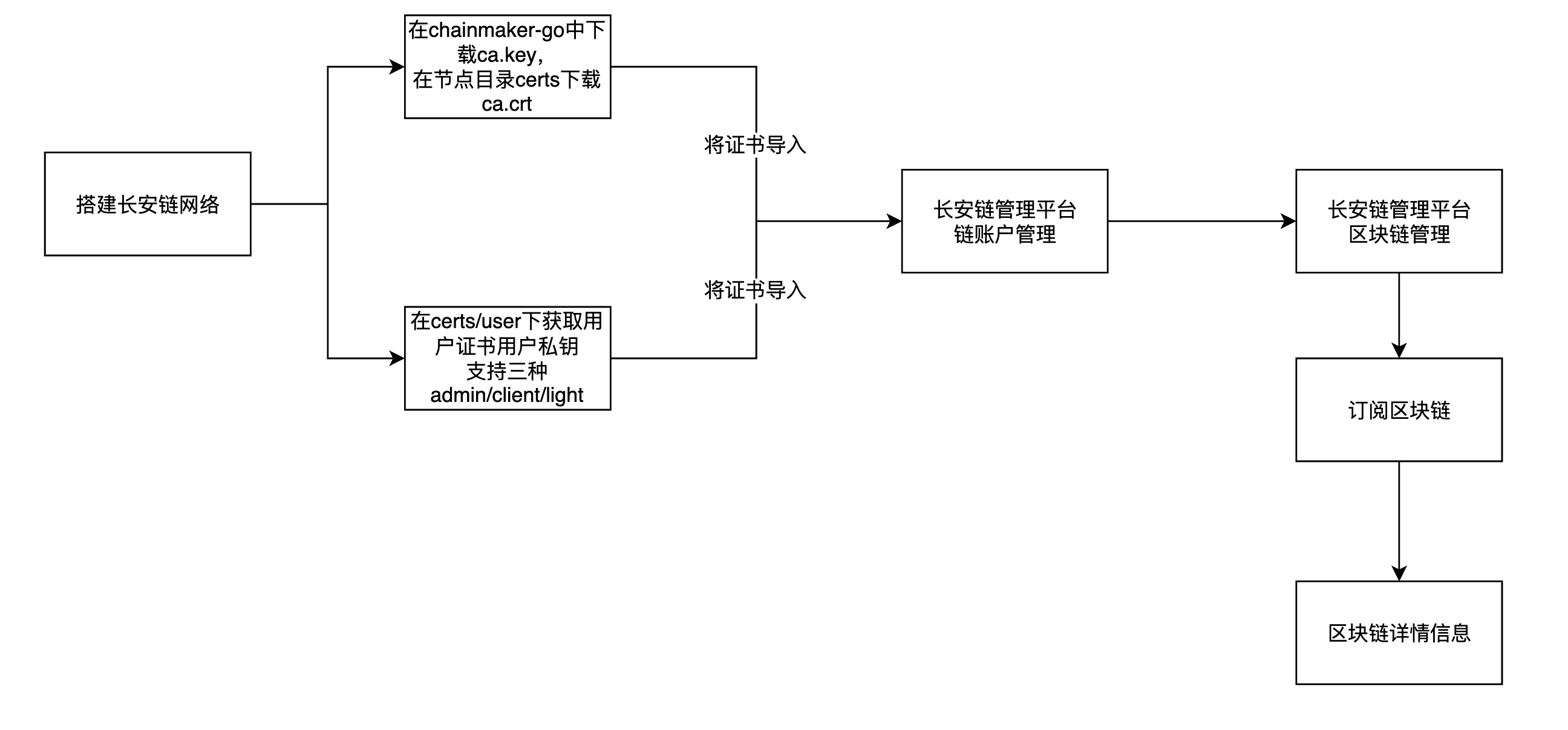
目录 一、菜单功能二、其他说明2.1、服务平台的部署方式2.2、链本身2.3、建链流程2.4、支持连接已部署的链2.5、链治理投票2.6、支持动态节点操作2.7、支持应用 长安链ChainMaker管理平台文档地址:https://docs.chainmaker.org.cn 一、菜单功能 菜单子菜单/功能点…...

怎么关闭php错误提示?两者方法分享
PHP程序员在开发过程中经常会遇到各种错误。为了方便查错,PHP默认会输出错误提示。但在生产环境中,这些错误提示信息不仅可能暴露你的代码结构,还会影响网站的性能和安全性。因此,关闭 PHP 的错误提示信息是一个很有必要并且很简单…...
Android Aidl跨进程通讯(三)--进阶使用
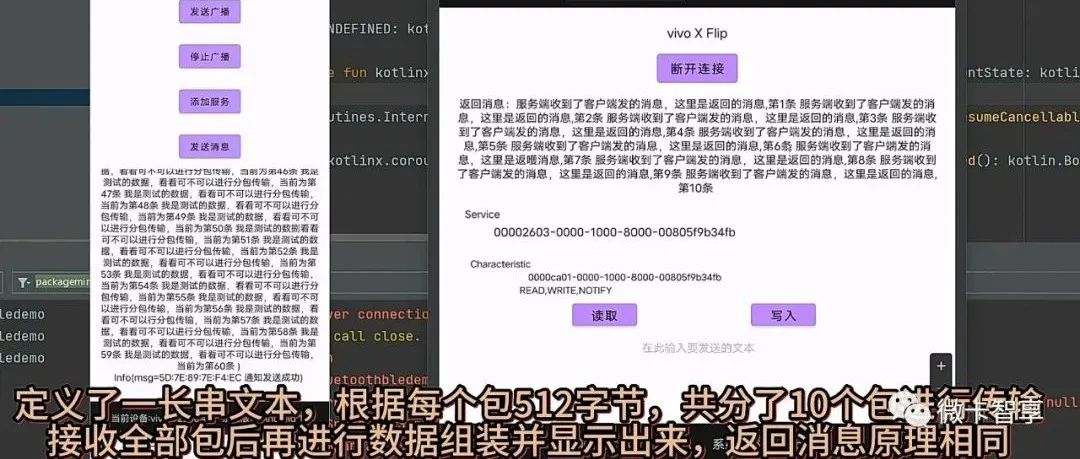
学更好的别人, 做更好的自己。 ——《微卡智享》 本文长度为2478字,预计阅读6分钟 前言 Android的AIDL使用和异常报错都已经介绍过了,今天这篇还是在原来的Demo基础上加入几个AIDL的进阶使用方法。 】 AIDL进阶使用 微卡智享 in,out,inout的使…...
vue.js+nodejs家庭个人理财收支管理系统5x6nf
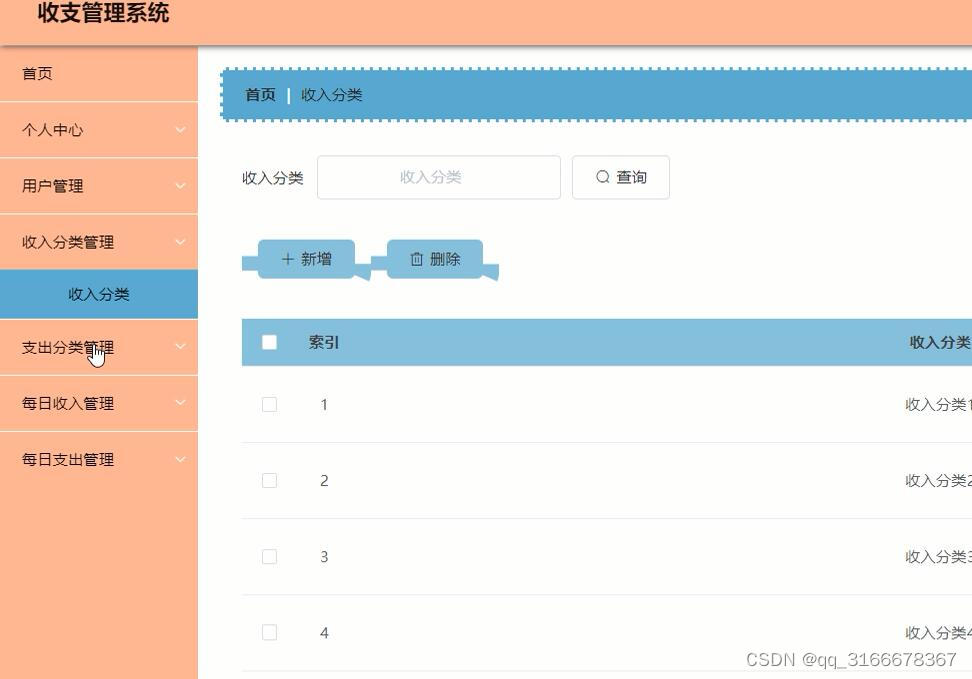
本收支管理系统以vue.js作为框架,nodejs语言,B/S模式以及MySql作为后台运行的数据库。本系统主要包括以下功能模块:用户管理、收入分类、支出分类、每日收入、每日支出等模块。 本文的组织结构如下: 1、绪论。综述了本文的研究背景…...

怎样去掉win11快捷方式的小箭头
前有创造注册表新值的方法,现在有了注册表加文件的方法 开始 先下载这个文件,里面有要用到的信息 下载 保存文件到电脑,并解压 有两个文件, 一个是 Remove_shortcut_arrow_icon.reg 一个是blank.ico 把第二个文件移动到 C:\Windows 文件夹, 然后点击打开文件, 如果提示是…...

Django项目如何配置日志文件信息
1、以dict的方式配置在settings.py中 # 日志文件简单配置LOGGING {"version": 1,"disable_existing_loggers": False,"handlers": {"file": {"level": "DEBUG","class": "logging.FileHandler&…...

遇到一个异步任务后是否会直接加入到异步队列当中
在javascript中,异步任务不会立即加入到异步队列(任务队列)中,而是根据不同的异步操作类型和执行环境,将对应的回调函数函数或事件加入到不同的队列中 javascript中常见的异步操作包括: 定时器࿱…...

【算法训练营Day07】字符串part1
文章目录 反转字符串反转字符串II替换数字 反转字符串 题目链接:344. 反转字符串 双指针法,两个指针的元素直接调转即可 class Solution {public void reverseString(char[] s) {int head 0;int end s.length - 1;while(head < end) {char temp …...

C++ 基础特性深度解析
目录 引言 一、命名空间(namespace) C 中的命名空间 与 C 语言的对比 二、缺省参数 C 中的缺省参数 与 C 语言的对比 三、引用(reference) C 中的引用 与 C 语言的对比 四、inline(内联函数…...

Android15默认授权浮窗权限
我们经常有那种需求,客户需要定制的apk集成在ROM中,并且默认授予其【显示在其他应用的上层】权限,也就是我们常说的浮窗权限,那么我们就可以通过以下方法在wms、ams等系统服务的systemReady()方法中调用即可实现预置应用默认授权浮…...
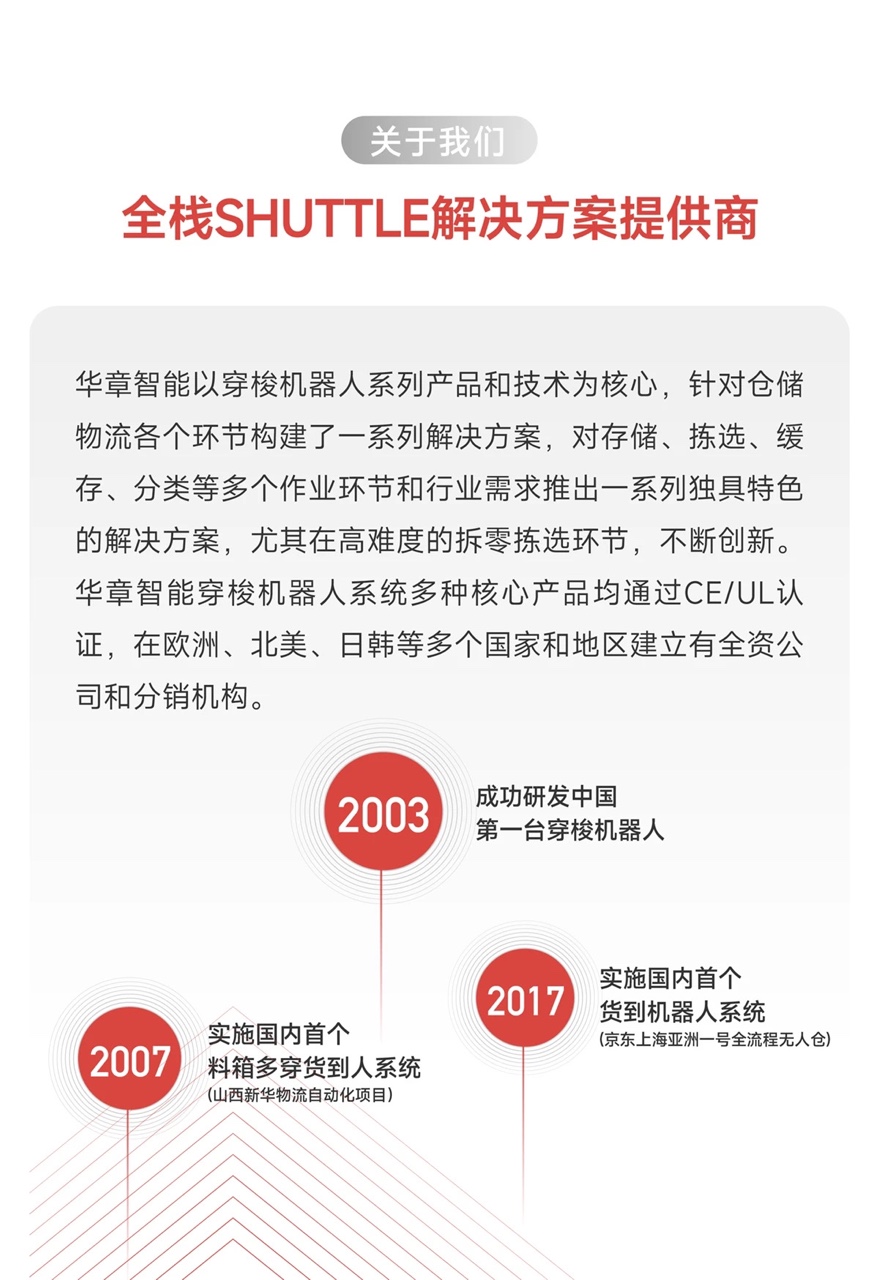
智能仓储的未来:自动化、AI与数据分析如何重塑物流中心
当仓库学会“思考”,物流的终极形态正在诞生 想象这样的场景: 凌晨3点,某物流中心灯火通明却空无一人。AGV机器人集群根据实时订单动态规划路径;AI视觉系统在0.1秒内扫描包裹信息;数字孪生平台正模拟次日峰值流量压力…...
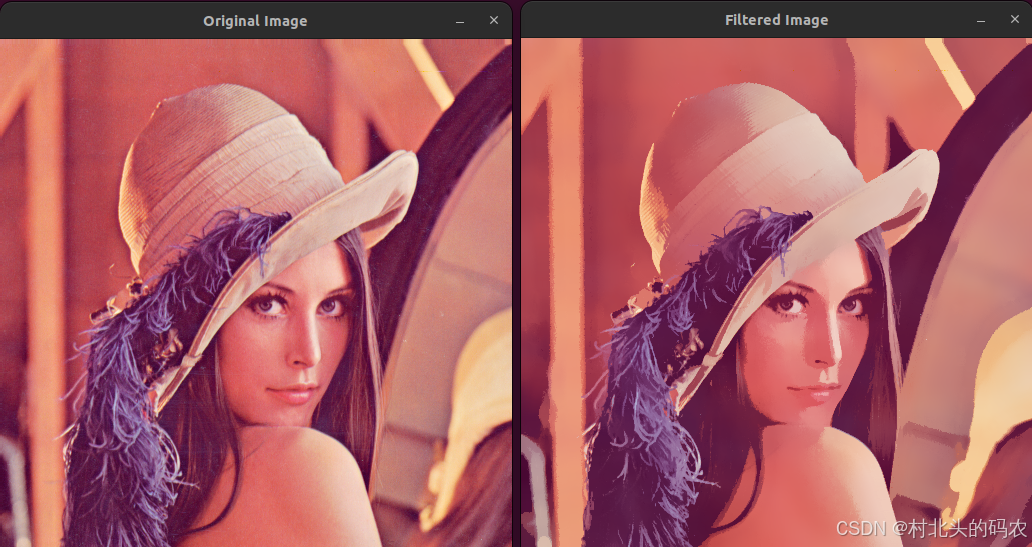
OPenCV CUDA模块图像处理-----对图像执行 均值漂移滤波(Mean Shift Filtering)函数meanShiftFiltering()
操作系统:ubuntu22.04 OpenCV版本:OpenCV4.9 IDE:Visual Studio Code 编程语言:C11 算法描述 在 GPU 上对图像执行 均值漂移滤波(Mean Shift Filtering),用于图像分割或平滑处理。 该函数将输入图像中的…...

QT3D学习笔记——圆台、圆锥
类名作用Qt3DWindow3D渲染窗口容器QEntity场景中的实体(对象或容器)QCamera控制观察视角QPointLight点光源QConeMesh圆锥几何网格QTransform控制实体的位置/旋转/缩放QPhongMaterialPhong光照材质(定义颜色、反光等)QFirstPersonC…...

AI+无人机如何守护濒危物种?YOLOv8实现95%精准识别
【导读】 野生动物监测在理解和保护生态系统中发挥着至关重要的作用。然而,传统的野生动物观察方法往往耗时耗力、成本高昂且范围有限。无人机的出现为野生动物监测提供了有前景的替代方案,能够实现大范围覆盖并远程采集数据。尽管具备这些优势…...

【Linux】Linux 系统默认的目录及作用说明
博主介绍:✌全网粉丝23W,CSDN博客专家、Java领域优质创作者,掘金/华为云/阿里云/InfoQ等平台优质作者、专注于Java技术领域✌ 技术范围:SpringBoot、SpringCloud、Vue、SSM、HTML、Nodejs、Python、MySQL、PostgreSQL、大数据、物…...

DiscuzX3.5发帖json api
参考文章:PHP实现独立Discuz站外发帖(直连操作数据库)_discuz 发帖api-CSDN博客 简单改造了一下,适配我自己的需求 有一个站点存在多个采集站,我想通过主站拿标题,采集站拿内容 使用到的sql如下 CREATE TABLE pre_forum_post_…...
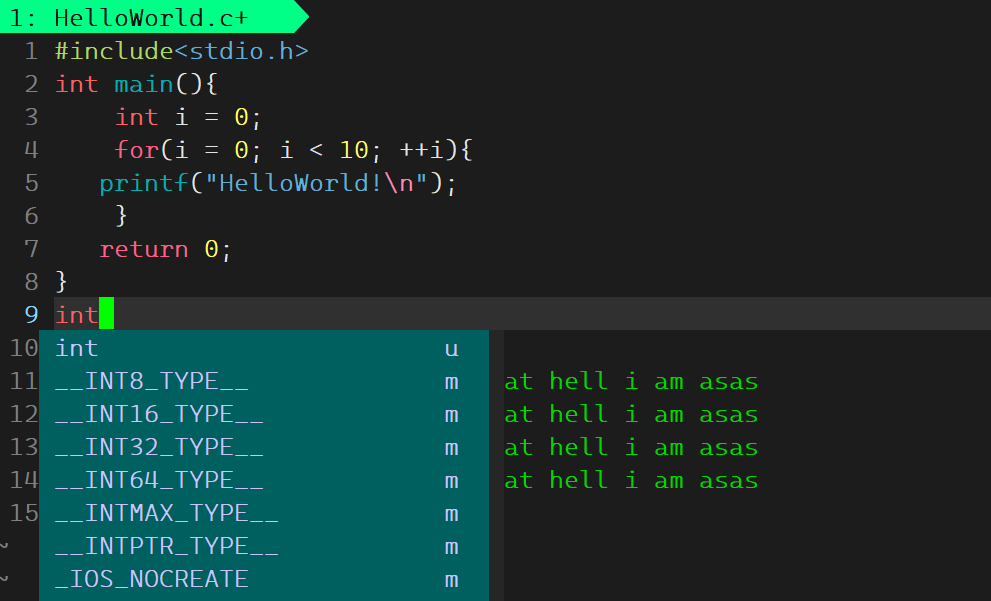
Linux基础开发工具——vim工具
文章目录 vim工具什么是vimvim的多模式和使用vim的基础模式vim的三种基础模式三种模式的初步了解 常用模式的详细讲解插入模式命令模式模式转化光标的移动文本的编辑 底行模式替换模式视图模式总结 使用vim的小技巧vim的配置(了解) vim工具 本文章仍然是继续讲解Linux系统下的…...