
好看的货架效果(含3D效果)
搭配thymeleaf + layui合成
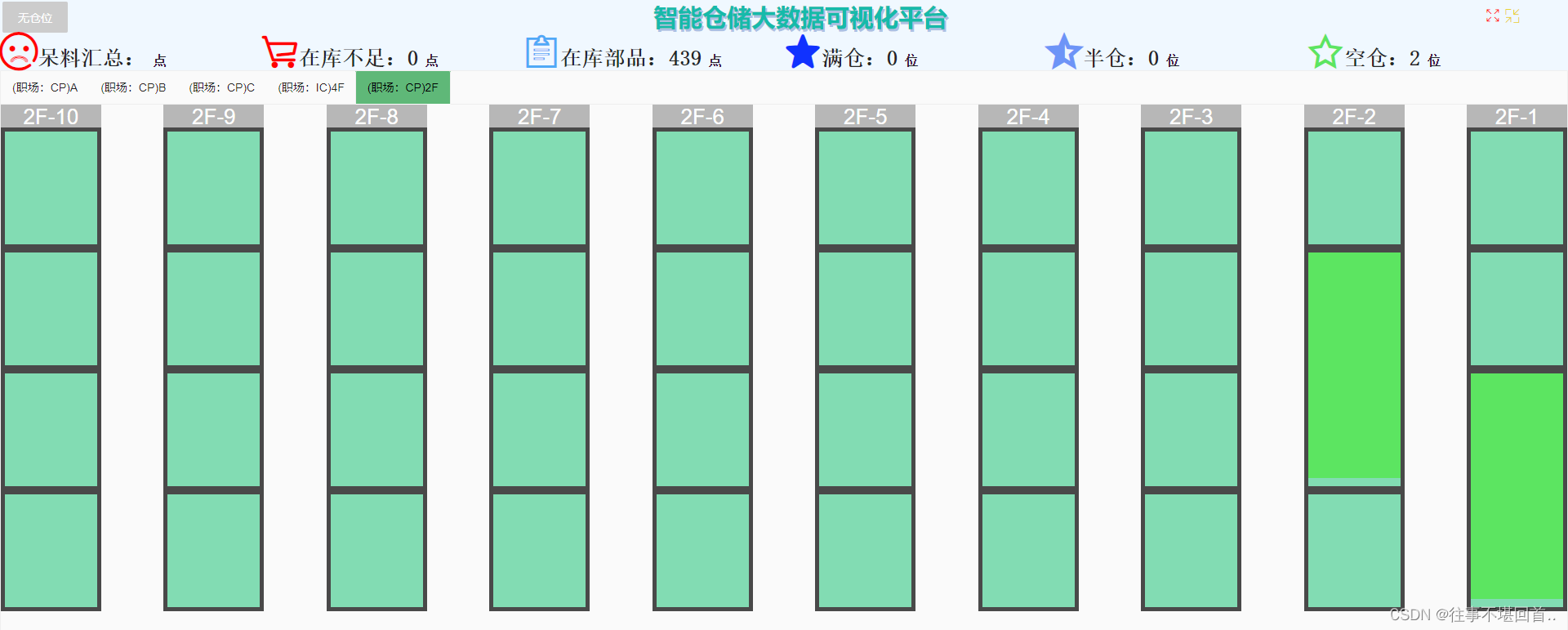
货架一
1. css
#gudinghuojia2F .layui-row {  display: flex; justify-content: space-between; height: 100%;}
#gudinghuojia2F .layui-col-xs10 {margin-right: 4%;}
#gudinghuojia2F .layui-col-xs10:last-child {margin-right: 0;}
.inner-title{font-size: 26px;height: 28px;background-color: #b7b7b7; color: #fff;}
.inner-div {background: #82dcb3;}
.inner-div:not(:first-child) {border: 5px solid #494949;height: calc(80% / 4);}
2.html片段
<div style="height: 100%;"><div class="layui-row" ><div class="layui-col-xs10" th:each="i : ${#numbers.sequence(10, 1, -1)}" ><div class="inner-title" th:text="${‘2F’ + '-' + i}" style="text-align: center;"></div><div class="inner-div" th:each="ii : ${#numbers.sequence(4, 1, -1)}" th:id="${‘2F’ + '-' + i + '-1-'+ ii}"></div></div></div>
</div>
3.效果(效果只是图中的货架,上面部分只是截图效果贴上来的,代码并没有包含):
货架二
1. css
.layout_4F{height: 100%;width: 70%;display: block; position: relative;}.tongdao {position: absolute;color: #ccd9d9c7;text-align: center; letter-spacing: 10vh; font-size: x-large;} /* 设置字之间的间隔为10vh,设置所有通道的背景为白色 */.ltongdao{position: absolute;left: calc(6% + 10px);top: 14%;writing-mode: vertical-rl;letter-spacing: 12vh;font-size: xxx-large;color: #ccd9d9c7;}.rtongdao{position: absolute;right: 17%;height: 60%;width: 5%;top: 15%;line-height: 300%;font-size: xxx-large;color: #ccd9d9c7;}.container {position: relative;width: 100%; height: 100vh; background-color: #fff;}.chu{position: absolute;height: 4%;line-height: 100%;background-color: #e7dfdf;letter-spacing: 10vh; font-size: 3vh;color: #75b9b9c7;}.chu1{top: calc(12% + 6px);l}.btongdao{position: absolute;right: 40%;bottom: 20%;height: 8%;font-size: xx-large;letter-spacing: 10vh;color: #ccd9d9c7;}.wai{height: 6%;width: 100%;top: calc(6% + 10px);}.zhong{position: absolute; text-align: center; left: calc(12% + 6px); right: 27%;}.quyu2{top: calc(28% + 6px);height: 20%;border: 10px solid #ccc;border-bottom: 5px #000 dashed;}.quyu3{left: 29%;top:51%;height: calc(20%);border: 10px solid #ccc;border-bottom: 5px #000 dashed;}.top {position: absolute;width: 80%; height:5%;border: 10px solid #ccc;border-bottom: 5px #000 dashed; }.right {position: absolute;right: 0;height: 60%; top: 12%;width:15%;}.bottom {position: absolute;bottom: 0;width: 70%;left: calc(12% + 6px);height:20%;border: 10px solid #ccc;border-bottom: 5px #000 dashed;}.left {position: absolute;height: 80%;top: calc(12% + 10px);bottom: 0; width: 6%;border: 10px solid #ccc;border-right: 5px #000 dashed;}.da{height: 100%;width: 100%;}/*.content-div { *//* 中间区域 *//*position: absolute;top: 16%; *//* 调整以适应悬浮div的高度 *//*right: 27%; *//* 调整以适应悬浮div的宽度 *//*bottom: 27%; *//* 调整以适应悬浮div的高度 *//*left: 15%; *//* 调整以适应悬浮div的宽度 *//*}*/.parent {display: flex; /*Flexbox布局的简写属性,必须设置这个,否则就需要设置浮动,但设置浮动很麻烦*/ }.b_child {height: calc(100% / 5); }.b_child_child{width: calc(100% / 12); /* 占据列高度宽度的各1/10 ,但每个div都有边框3px,因此需要减去6px,否则内容会超出父div之外*/}.l_child {height: calc(100% / 3 - 3px);}.t_child {width: calc(100% / 3 - 3px); }.r_child {width: calc(100% / 5); /* 占据整个div的高度的1/5 */}.r_child_child{height: calc(100% / 10 - 2px);}.c2_child_child{height: calc(100% / 5);} /*本来是5部分的,第一部分为一面墙,固定给10%的宽度,剩下的90,4个平分*/.c3_child_child{height: calc(100% / 5);} /*本来是5部分的,第一部分为一面墙,固定给10%的宽度,剩下的90,3个平分*/.c2_child_child_lie{width: calc(100% / 11 );} /*2区域内每个小单元格*/.c3_child_child_lie{width: calc(100% / 8);} /*3区域内每个小单元格*/.ts{position: absolute;color: #eb8383;font-size: 3vh;right: 0;}.ge{border: 1px solid #ccc;background-color: #f5f5f5;}.inner-div:hover, .da:hover, .b_child_child:hover, .l_child:hover, .t_child:hover, .r_child_child:hover, .c2_child_child_lie:hover, .c3_child_child_lie:hover{box-shadow: 6px 5px 10px rgba(0, 0, 0, 0.8); background-color: #bebeeb; cursor: pointer; position: relative; z-index: 999;}/*transform: scale(1.1); 放大效果 z-index: 999;/*放大的话就需要设置在最上层,否则会被遮挡,设置z-index就必须设置position ,不要设置放大,最下面的这个大区域,如果放大就会超过屏幕大小了,导致滚动条蹦出来*//* transition: all 0.2s ease-out; 添加过渡效果 */2. html (参数中的lay是货架参数,内包含da大区域,zhong中区域,ceng层,lie 列,的数量),只看效果把id全干掉就好了,不影响生成效果,我的id只是为了渲染实时在库数进行颜色变更
<!DOCTYPE html>
<html xmlns:th="http://www.w3.org/1999/xhtml">
<HEAD><meta http-equiv="Content-Type" content="text/html; charset=utf-8" />
</HEAD>
<body><div id ="daJian" class="container" th:fragment="LayoutByDaJian"><div class="right parent" style="border: 10px solid #ccc;border-left: 5px #000 dashed;"><!-- 111111111111111111111111111111111111111111 --><div class="r_child"><div class="da ge" th:id="${lay.da + '-1-1-1-0' }"></div></div>  <!--大区域的中区域1的第一层只有一列,且大件料是只有0,么有AB,如果以后有AB那就需要修改代码--><div class="r_child" th:each="i : ${#numbers.sequence(2, 5)}" th:id="${lay.da + '-1-' + i}"><!--1是中区域,需要写死,有5层,其中第一层写死,第二层到第五层动态生成--><div class="r_child_child ge" th:each="ii : ${#numbers.sequence(1, 10)}" th:id="${lay.da + '-1-' + i + '-' + ii + '-0'}"></div></div></div><div class="zhong quyu2" ><!-- 222222222222222222222222222222222222 --><div class="c2_child_child parent" th:each="i : ${#numbers.sequence(5, 2, -1)}" th:id="${lay.da + '-2-' + i}"> <!--倒序遍历生成--><div class="c2_child_child_lie ge" th:each="ii : ${#numbers.sequence(1, 11)}" th:id="${lay.da +'-2-'+ i + '-' + ii + '-0'}"></div></div><div class="c2_child_child parent"><div class="da ge" th:id="${lay.da + '-2-1-1-0' }"></div></div></div><div class="zhong quyu3" ><!-- 333333333333333333333333333333333333333333 --><div class="c3_child_child parent" th:each="i : ${#numbers.sequence(5, 2, -1)}" th:id="${lay.da + '-3-' + i}"><div class="c3_child_child_lie ge" th:each="ii : ${#numbers.sequence(1,8)}" th:id="${lay.da +'-3-'+ i + '-' + ii + '-0'}"></div></div><div class="c3_child_child parent"><div class="da ge" th:id="${lay.da + '-3-1-1-0' }"></div>  </div></div><div class="bottom"><!-- 44444444444444444444444444444444444444444444444444444444444 --><div class="b_child parent" th:each="i : ${#numbers.sequence(5, 2, -1)}" th:id="${lay.da + '-4-' + i}"><div class="b_child_child ge" th:each="ii : ${#numbers.sequence(1, 12)}" th:id="${lay.da +'-4-'+ i + '-' + ii + '-0'}"></div></div><div class="b_child "> <div class="da ge" th:id="${lay.da + '-4-1-1-0' }"></div></div></div><div class="left"><!-- 555555555555555555555555555555555555555555 --><div class="l_child ge" th:each="i : ${#numbers.sequence(3, 1, -1)}" th:id="${lay.da +'-5-1-'+ i + '-0'}"></div></div><div class="top parent"><!-- 666666666666666666666666666666666666666 --><div class="t_child ge" th:each="i : ${#numbers.sequence(1, 3)}" th:id="${lay.da +'-6-1-'+ i + '-0'}"></div></div><span class="ts">*虚线为货架底部</span><div class="ltongdao"> 内通道</div><div class="wai tongdao"> 外通道</div><div class="rtongdao"> 内通道</div><!-- 中中中中中中中中中中中中中中中中中中中中中间 --><div class="zhong chu chu1"> 废物回收处</div><div class="zhong tongdao" style="height: 4%;top:calc(16% + 6px);"> 内通道</div><div class="zhong chu" style="top:calc(20% + 6px)"> 空箱放置处</div><div class="zhong tongdao" style="height: 4%;top:calc(24% + 6px);"> 内通道</div><!-- 中中中中中中中中中中中中中中中中中中中中中间 --><div class="btongdao"> 内通道</div>
</div>
</body>
</html>
3. 效果

相关文章:
好看的货架效果(含3D效果)
搭配thymeleaf layui合成 货架一 1. css #gudinghuojia2F .layui-row { display: flex; justify-content: space-between; height: 100%;} #gudinghuojia2F .layui-col-xs10 {margin-right: 4%;} #gudinghuojia2F .layui-col-xs10:last-child {margin-right: 0;} .inner-ti…...
【每日一题】1498. 满足条件的子序列数目
1498. 满足条件的子序列数目 - 力扣(LeetCode) 给你一个整数数组 nums 和一个整数 target 。 请你统计并返回 nums 中能满足其最小元素与最大元素的 和 小于或等于 target 的 非空 子序列的数目。 由于答案可能很大,请将结果对 109 7 取余后…...

Go语言数据类型实例讲解 - Go语言从入门到实战
Go语言数据类型实例讲解 - Go语言从入门到实战 基础数据类型 bool string int int8 int16 int32 int64 uint uint8 uint16 uint32 uint64 uintptr byte rune float32 float64 complex64 complex128类型描述bool布尔型(bool):可以是true或f…...

RocketMQ 事务消息发送
目录 事务消息介绍 应用场景 功能原理 使用限制 使用示例 使用建议 事务消息介绍 在一些对数据一致性有强需求的场景,可以用 RocketMQ 事务消息来解决,从而保证上下游数据的一致性。 应用场景 分布式事务的诉求 分布式系统调用的特点为一个核…...

后端-POST请求中只需要两个参数,后端不想创建对象时
问题: 在前后端对接中,很多前端的规范是POST,参数放body里面,媒体类型是json,后端就需要用RequestBody去接收,但是后端只用接收两个对象,这时候后端不想创建对象,使用RequestParm&a…...
UG\NX二次开发 通过点云生成曲面 UF_MODL_create_surf_from_cloud
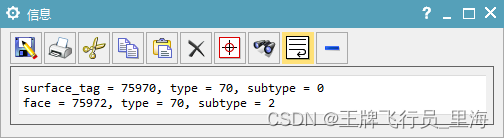
文章作者:里海 来源网站:《里海NX二次开发3000例专栏》 感谢粉丝订阅 感谢 Rlgun 订阅本专栏,非常感谢。 简介 有网友想做一个通过点云生成曲面的程序,我们也试一下 效果 代码 #include "me.hpp" /*HEAD CREATE_SURF_FROM_CLOUD CCC UFUN */...
Linux常用指令(二)
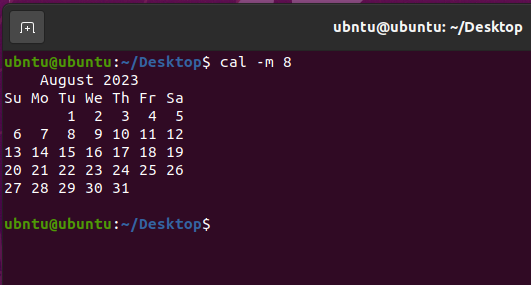
目录 一、 删除空目录(rmdir) 二、ln 硬链接与软链接 三、新建空文件或更新文件的时间戳(touch) 四、比较文件内容的差异(diff) 五、显示当前时间或设置系统时间(date) 六、显…...
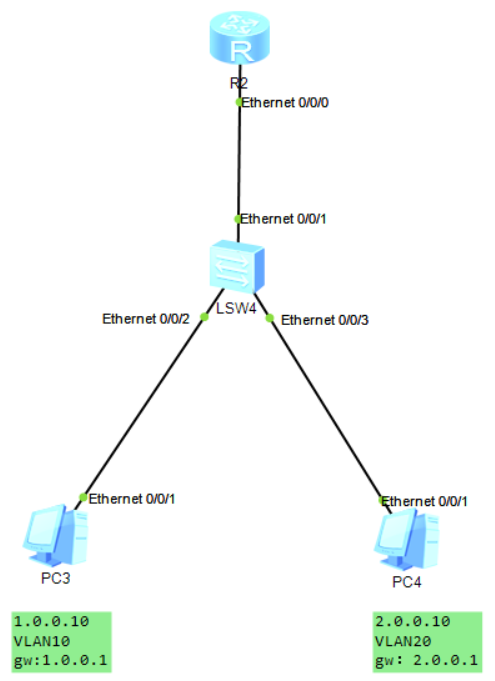
【HUAWEI】单臂路由
目录 🥮写在前面 🥮2.1、拓扑图 🥮2.2、操作思路 🥮2.3、配置操作 🍣2.3.1、LSW4配置 🍣2.3.2、R2配置 🍣2.3.3、测试网络 🦐博客主页:大虾好吃吗的博客 &…...
安全学习_开发相关_Java第三方组件Log4jFastJSON及相关安全问题简介
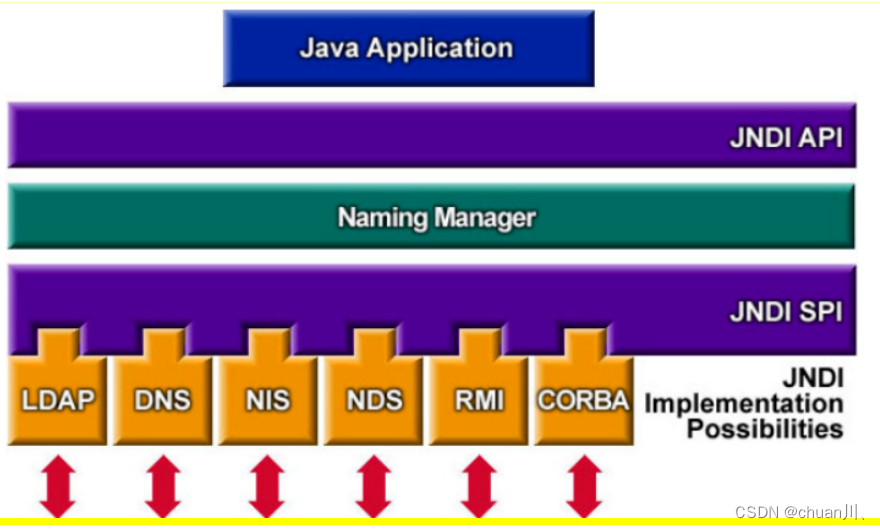
文章目录 JNDI:(见图) Java-三方组件-Log4J&JNDILog4J:Log4j-组件安全复现使用Log4j Java-三方组件-FastJsonFastJson:Fastjson-组件安全复现对象转Json(带类型)Json转对象Fastjson漏洞复现(大佬文章 JNDI:(见图) …...
零代码编程:用ChatGPT批量自动下载archive.org上的音频书
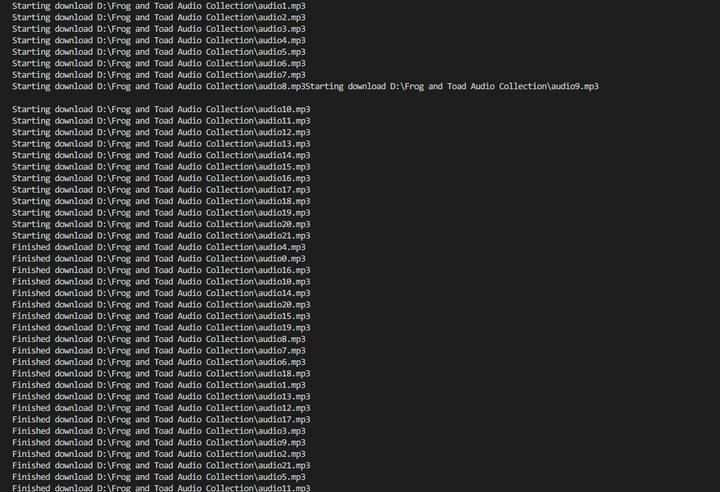
http://archive.org 是一个神奇的网站,可以下载各种古旧的软件、书籍、音频、视频,还可以搜索各个网站的历史网页。 比如说,一些儿童故事音频就可以在http://archive.org下载到,可以用来做英语听力启蒙用。 举个例子,…...

力扣用队列实现栈
自己写的栈,再让其他函数去调用自己写的栈 typedef int QDataType; typedef struct QueueNode {struct QueueNode* next;//单链表QDataType data;//放数据 }QNode;typedef struct Queue {QNode* phead;//头节点QNode* ptail;//尾节点QDataType size; //统计有多少节…...
一朵华为云,如何做好百模千态?
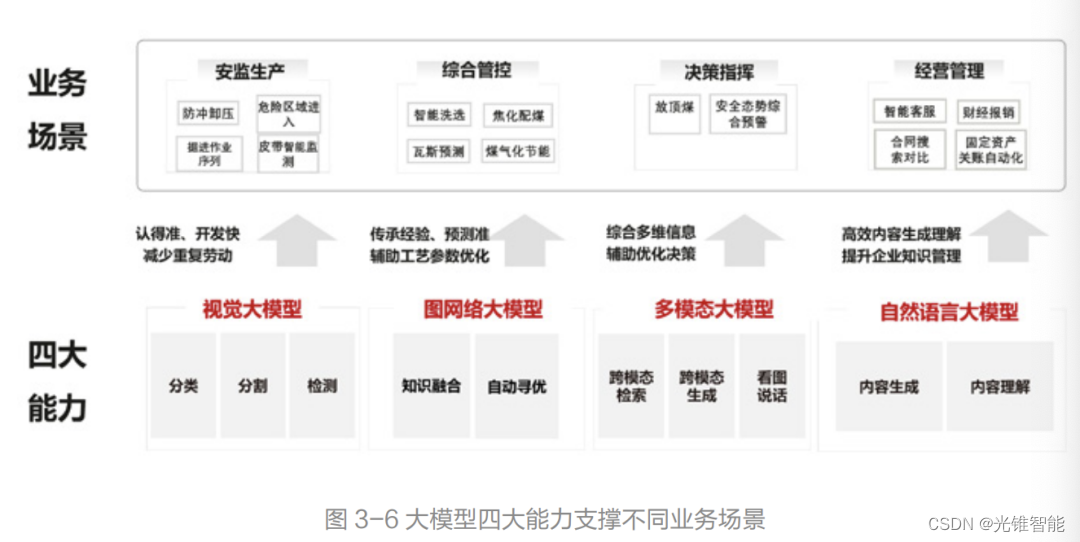
点击关注 文丨刘雨琦、郝鑫 2005年华为提出网络时代的“All IP”,2011年提出数字化时代的“All Cloud”,2023年提出智能时代的“All Intelligence”。 截至目前,华为的战略升级经历了三个阶段。 步入智能化,需要迎接的困难依然…...
华为云云耀云服务器L实例评测 | 实例使用教学之软件安装:华为云云耀云服务器环境下安装 Docker
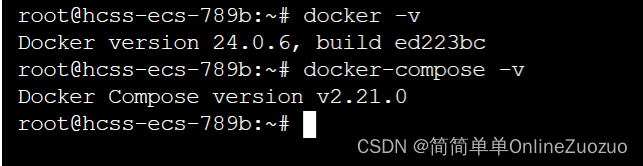
华为云云耀云服务器L实例评测 | 实例使用教学之软件安装:华为云云耀云服务器环境下安装 Docker 介绍华为云云耀云服务器 华为云云耀云服务器 (目前已经全新升级为 华为云云耀云服务器L实例) 华为云云耀云服务器是什么华为云云耀云…...
小程序编译器性能优化之路
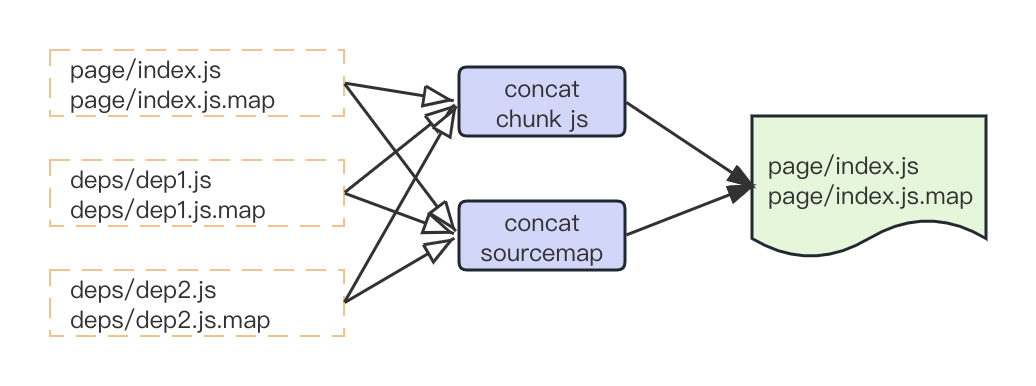
作者 | 马可 导读 小程序编译器是百度开发者工具中的编译构建模块,用来将小程序代码转换成运行时代码。旧版编译器由于业务发展,存在编译慢、内存占用高的问题,我们对编译器做了一次大规模的重构,采用自研架构,做了多线…...
FFmpeg 命令:从入门到精通 | ffmpeg 命令分类查询
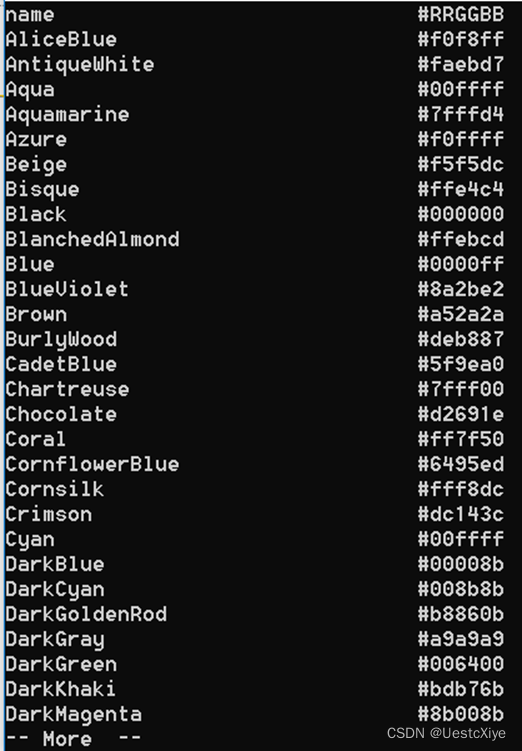
FFmpeg 命令:从入门到精通 | ffmpeg 命令分类查询 FFmpeg 命令:从入门到精通 | ffmpeg 命令分类查询ffmpeg -versionffmpeg -buildconfffmpeg -formatsffmpeg -muxersffmpeg -demuxersffmpeg -codecsffmpeg -decodersffmpeg -encodersffmpeg -bsfsffmpeg…...
Linux学习记录——삼십일 socket编程---TCP套接字
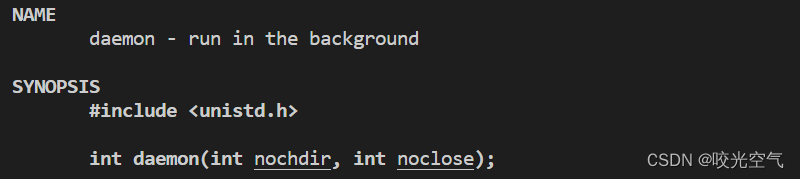
文章目录 TCP套接字简单通信1、服务端1、基本框架2、获取连接 2、客户端3、多进程4、多线程5、线程池6、简单的日志系统7、守护进程8、其它 TCP套接字简单通信 本篇gitee 学习完udp套接字通信后,再来看TCP套接字。 四个文件tcp_server.hpp, tcp_serve…...
【学习笔记】深度学习分布式系统
深度学习分布式系统 前言1. 数据并行:参数服务器2. 流水线并行:GPipe3. 张量并行:Megatron LM4. 切片并行:ZeRO5. 异步分布式:PATHWAYS总结参考链接 前言 最近跟着李沐老师的视频学习了深度学习分布式系统的发展。这里…...

【数据结构】树、二叉树的概念和二叉树的顺序结构及实现
目录 前言:一、树的概念及结构1.树的概念2.树的相关概念3.树的存储4.树在实际中的运用 二、二叉树概念及结构1.概念2.特殊的二叉树(1)满二叉树(2)完全二叉树 3.二叉树的性质4.二叉树的存储(1)顺序存储(2)链式存储 三、…...

rust学习-string
介绍 A UTF-8–encoded, growable string(可增长字符串). 拥有string内容的所有权 A String is made up of three components: a pointer to some bytes, a length, and a capacity. The length is the number of bytes currently stored in the buffer pub fn as_bytes(&…...

No167.精选前端面试题,享受每天的挑战和学习
🤍 前端开发工程师(主业)、技术博主(副业)、已过CET6 🍨 阿珊和她的猫_CSDN个人主页 🕠 牛客高级专题作者、在牛客打造高质量专栏《前端面试必备》 🍚 蓝桥云课签约作者、已在蓝桥云课上架的前后端实战课程《Vue.js 和 Egg.js 开发企业级健康管理项目》、《带你从入…...

CNVD通用型漏洞挖掘思路,平台漏洞列表一眼定睛法!网络安全挖漏洞零基础入门到精通教程!
有一种艺术叫做,我只需看一眼就能一眼定睛其实最有效率挖cnvd的方法是在于平台本身公布出的漏洞,因为绝对不止一个漏洞这里比如我们看web应用(其他类型都可以看看)一般我们看第一页的漏洞信息就够的了,这里我们点最新的那个KingPortal开发系统存在弱口令,很好,继续挖…...

AI安全危局:五大实战策略构建企业级防护壁垒
AI安全危局:五大实战策略构建企业级防护壁垒 本文深入解读AI系统安全的五大最佳实践,涵盖治理框架、数据保护、模型防御、供应链安全及持续监控,为企业提供构建纵深防护体系的实战指南。 随着人工智能技术从实验室走向千行百业,AI…...

LLM - 2026 AI 文本转可视化工具终极指南:PicDoc.ai vs Napkin.ai 及 EdrawMax、Whimsical 等 8 大神器深度对比
文章目录概述一、PicDoc.ai vs Napkin.ai:专业全能 vs 轻快协作二、其他 6 大同类工具推荐三、8 大工具终极对比一览表(关键指标)四、 建议概述 在 2026 年的 AI 生产力浪潮中,把枯燥文字一键变成专业流程图、思维导图、信息图、…...

模块联邦和monorepo比较和pnpm包管理工具
本篇文章用于个人学习梳理,模块联邦和monorepo项目的用法的区别比较,下面是我通过豆包生成的核心区别: 对比维度Monorepo模块联邦 (Module Federation)核心目标统一管理多项目代码,提升开发效率(复用、版本、依赖&…...

javaweb图书馆借阅管理系统设计与实现uv6546wm
目录同行可拿货,招校园代理 ,本人源头供货商功能分析用户管理模块图书管理模块借阅管理模块预约与通知模块统计与报表模块系统设置模块技术实现要点扩展功能(可选)项目技术支持源码获取详细视频演示 :文章底部获取博主联系方式!同…...

效率倍增,使用快马生成ansible playbook自动化部署ubuntu生产服务器
效率倍增,使用快马生成ansible playbook自动化部署ubuntu生产服务器 重复性的ubuntu环境安装与配置工作,往往让开发者感到头疼。每次新服务器上线,都需要手动执行一系列繁琐的操作,不仅耗时耗力,还容易出错。最近我发…...

MogFace人脸检测模型-WebUI多场景:儿童早教APP中注意力区域动态追踪
MogFace人脸检测模型在儿童早教APP中的实战应用:注意力区域动态追踪 1. 引言:从“看见”到“理解”,AI如何守护孩子的专注力? 想象这样一个场景:在儿童早教APP的互动学习环节,一个5岁的孩子正跟着屏幕上的…...

System-Controller完整能力手册
System Controller 完整能力手册基于你电脑的实际硬件(小米笔记本 i5-6200U / 8GB / 940MX / 1080p)和 System Controller 技能的全部能力边界。一、能力总览 用户自然语言指令↓ ┌─────────────────────────────────…...

显卡驱动清理完全指南:从问题诊断到自动化解决方案
显卡驱动清理完全指南:从问题诊断到自动化解决方案 【免费下载链接】display-drivers-uninstaller Display Driver Uninstaller (DDU) a driver removal utility / cleaner utility 项目地址: https://gitcode.com/gh_mirrors/di/display-drivers-uninstaller …...

abaqus constraint 中,tie和coupling的区别
通过AI整理相关问题回答 tie和coupling的区别 在 Abaqus 中,Tie (绑定) 和 Coupling (耦合) 是最常用的两种连接约束,但它们在力学逻辑、自由度限制和应用场景上有着本质的区别。1. Tie Constraint (绑定约束) Tie 的核心逻辑是“胶合”。它将两个表面&a…...