
el-tree中插入图标并且带提示信息
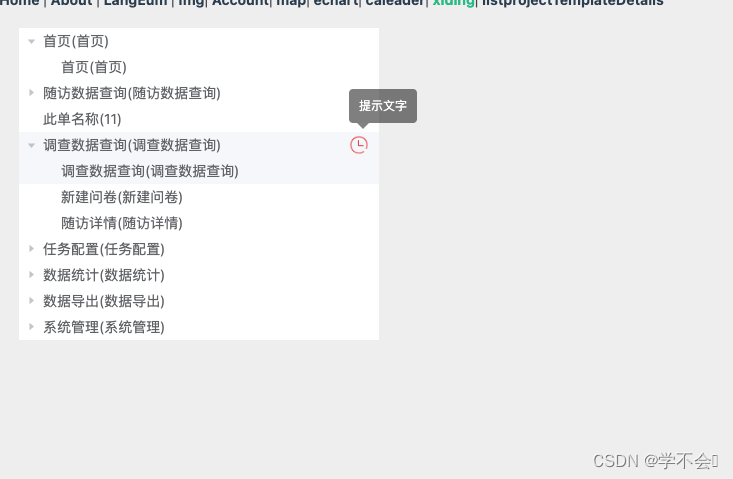
<template><div class="left"><!-- default-expanded-keys 默认展开 --><!-- expand-on-click-node 只有点击箭头才会展开树 --><el-tree :data="list" :props="defaultProps" @node-click="handleNodeClick" :default-expanded-keys="[1]" :expand-on-click-node='false' node-key='menuId'><span class="custom-tree-node box" slot-scope="{ node, data }"><span style="flex:1">{{ node.label }}</span><!-- 此处判断,是否展示图标 --><span style="padding-right:10px" v-if="data.menuId === 6"><el-tooltip class="item" effect="dark" content="提示文字" placement="top-start"><img src="../assets/icon-time.png" style="width: 20px;"></el-tooltip></span></span></el-tree></div>
</template><script>
export default {data () {return {defaultProps: {children: 'children',label: 'menuName'},// 数据源list: [{"menuId": 1,"menuName": "首页(首页)","menuCode": "首页","parentId": 0,"orderNum": 0,"path": "/page","component": null,"query": null,"isFrame": 0,"isCache": 0,"menuType": 0,"visible": 1,"perms": null,"icon": "iconfont icon-shouye","status": 1,"remark": null,"roleId": null,"selected": true,"level": 1,"children": [{"menuId": 2,"menuName": "首页(首页)","menuCode": "首页","parentId": 1,"orderNum": 1,"path": "/welcome","component": null,"query": null,"isFrame": 0,"isCache": 0,"menuType": 1,"visible": 1,"perms": null,"icon": "","status": 1,"remark": null,"roleId": null,"selected": true,"level": 2,"children": null}]},{"menuId": 3,"menuName": "随访数据查询(随访数据查询)","menuCode": "随访数据查询","parentId": 0,"orderNum": 1,"path": "/followUpDataQuery","component": null,"query": null,"isFrame": 0,"isCache": 0,"menuType": 0,"visible": 1,"perms": null,"icon": "iconfont icon-shengwuxuejiance","status": 1,"remark": null,"roleId": null,"selected": true,"level": 1,"children": [{"menuId": 4,"menuName": "随访数据查询(随访数据查询)","menuCode": "随访数据查询","parentId": 3,"orderNum": 1,"path": "index","component": null,"query": null,"isFrame": 0,"isCache": 0,"menuType": 1,"visible": 1,"perms": null,"icon": "","status": 1,"remark": null,"roleId": null,"selected": true,"level": 2,"children": null},{"menuId": 5,"menuName": "随访详情(随访详情)","menuCode": "随访详情","parentId": 3,"orderNum": 2,"path": "detail","component": null,"query": null,"isFrame": 0,"isCache": 0,"menuType": 1,"visible": 1,"perms": null,"icon": "","status": 1,"remark": null,"roleId": null,"selected": true,"level": 2,"children": null}]},{"menuId": 21,"menuName": "此单名称(11)","menuCode": "11","parentId": 0,"orderNum": 1,"path": "请问请问饿```","component": null,"query": null,"isFrame": 0,"isCache": 0,"menuType": 0,"visible": 1,"perms": null,"icon": "321","status": 1,"remark": null,"roleId": null,"selected": true,"level": 1,"children": null},{"menuId": 6,"menuName": "调查数据查询(调查数据查询)","menuCode": "调查数据查询","parentId": 0,"orderNum": 2,"path": "/surveyDataQuery","component": null,"query": null,"isFrame": 0,"isCache": 0,"menuType": 0,"visible": 1,"perms": null,"icon": "iconfont icon-shaichaxinxichaxun","status": 1,"remark": null,"roleId": null,"selected": true,"level": 1,"children": [{"menuId": 7,"menuName": "调查数据查询(调查数据查询)","menuCode": "调查数据查询","parentId": 6,"orderNum": 1,"path": "index","component": null,"query": null,"isFrame": 0,"isCache": 0,"menuType": 1,"visible": 1,"perms": null,"icon": "","status": 1,"remark": null,"roleId": null,"selected": true,"level": 2,"children": null},{"menuId": 8,"menuName": "新建问卷(新建问卷)","menuCode": "新建问卷","parentId": 6,"orderNum": 2,"path": "evaluationreport","component": null,"query": null,"isFrame": 0,"isCache": 0,"menuType": 1,"visible": 1,"perms": null,"icon": "","status": 1,"remark": null,"roleId": null,"selected": true,"level": 2,"children": null},{"menuId": 9,"menuName": "随访详情(随访详情)","menuCode": "随访详情","parentId": 6,"orderNum": 3,"path": "evaluationlook","component": null,"query": null,"isFrame": 0,"isCache": 0,"menuType": 1,"visible": 1,"perms": null,"icon": "","status": 1,"remark": null,"roleId": null,"selected": true,"level": 2,"children": null}]},{"menuId": 10,"menuName": "任务配置(任务配置)","menuCode": "任务配置","parentId": 0,"orderNum": 3,"path": "/taskSet","component": null,"query": null,"isFrame": 0,"isCache": 0,"menuType": 0,"visible": 1,"perms": null,"icon": "iconfont icon-renwuguanli","status": 1,"remark": null,"roleId": null,"selected": true,"level": 1,"children": [{"menuId": 11,"menuName": "任务配置(任务配置)","menuCode": "任务配置","parentId": 10,"orderNum": 1,"path": "index","component": null,"query": null,"isFrame": 0,"isCache": 0,"menuType": 1,"visible": 1,"perms": null,"icon": "","status": 1,"remark": null,"roleId": null,"selected": true,"level": 2,"children": null}]},{"menuId": 12,"menuName": "数据统计(数据统计)","menuCode": "数据统计","parentId": 0,"orderNum": 4,"path": "/dataStatistics","component": null,"query": null,"isFrame": 0,"isCache": 0,"menuType": 0,"visible": 1,"perms": null,"icon": "iconfont icon-shujutongji","status": 1,"remark": null,"roleId": null,"selected": true,"level": 1,"children": [{"menuId": 13,"menuName": "数据统计(数据统计)","menuCode": "数据统计","parentId": 12,"orderNum": 1,"path": "index","component": null,"query": null,"isFrame": 0,"isCache": 0,"menuType": 1,"visible": 1,"perms": null,"icon": "","status": 1,"remark": null,"roleId": null,"selected": true,"level": 2,"children": null}]},{"menuId": 14,"menuName": "数据导出(数据导出)","menuCode": "数据导出","parentId": 0,"orderNum": 5,"path": "/dataExport","component": null,"query": null,"isFrame": 0,"isCache": 0,"menuType": 0,"visible": 1,"perms": null,"icon": "iconfont icon-suifangrenwuguanli","status": 1,"remark": null,"roleId": null,"selected": true,"level": 1,"children": [{"menuId": 15,"menuName": "数据导出(数据导出)","menuCode": "数据导出","parentId": 14,"orderNum": 1,"path": "index","component": null,"query": null,"isFrame": 0,"isCache": 0,"menuType": 1,"visible": 1,"perms": null,"icon": "","status": 1,"remark": null,"roleId": null,"selected": true,"level": 2,"children": null}]},{"menuId": 16,"menuName": "系统管理(系统管理)","menuCode": "系统管理","parentId": 0,"orderNum": 6,"path": "/systemManage","component": null,"query": null,"isFrame": 0,"isCache": 0,"menuType": 0,"visible": 1,"perms": null,"icon": "iconfont icon-xitongguanli","status": 1,"remark": null,"roleId": null,"selected": true,"level": 1,"children": [{"menuId": 17,"menuName": "用户管理(用户管理)","menuCode": "用户管理","parentId": 16,"orderNum": 1,"path": "usersManage","component": null,"query": null,"isFrame": 0,"isCache": 0,"menuType": 1,"visible": 1,"perms": null,"icon": "","status": 1,"remark": null,"roleId": null,"selected": true,"level": 2,"children": null},{"menuId": 18,"menuName": "角色管理(角色管理)","menuCode": "角色管理","parentId": 16,"orderNum": 2,"path": "roleManage","component": null,"query": null,"isFrame": 0,"isCache": 0,"menuType": 1,"visible": 1,"perms": null,"icon": "","status": 1,"remark": null,"roleId": null,"selected": true,"level": 2,"children": null},{"menuId": 19,"menuName": "权限配置(权限配置)","menuCode": "权限配置","parentId": 16,"orderNum": 3,"path": "permissionSetting","component": null,"query": null,"isFrame": 0,"isCache": 0,"menuType": 1,"visible": 1,"perms": null,"icon": "","status": 1,"remark": null,"roleId": null,"selected": true,"level": 2,"children": null},{"menuId": 20,"menuName": "菜单管理(菜单管理)","menuCode": "菜单管理","parentId": 16,"orderNum": 4,"path": "menuManage","component": null,"query": null,"isFrame": 0,"isCache": 0,"menuType": 1,"visible": 1,"perms": null,"icon": "","status": 1,"remark": null,"roleId": null,"selected": true,"level": 2,"children": null}]}],defaultExpandedKeys: []}},methods: {// 点击树handleNodeClick (val) {console.log(val);}}
}
</script><style lang="less" scoped>
.left {width: 360px;margin: 20px;
}
.box {display: flex;flex: 1;
}
</style>
相关文章:
el-tree中插入图标并且带提示信息
<template><div class"left"><!-- default-expanded-keys 默认展开 --><!-- expand-on-click-node 只有点击箭头才会展开树 --><el-tree :data"list" :props"defaultProps" node-click"handleNodeClick" :…...
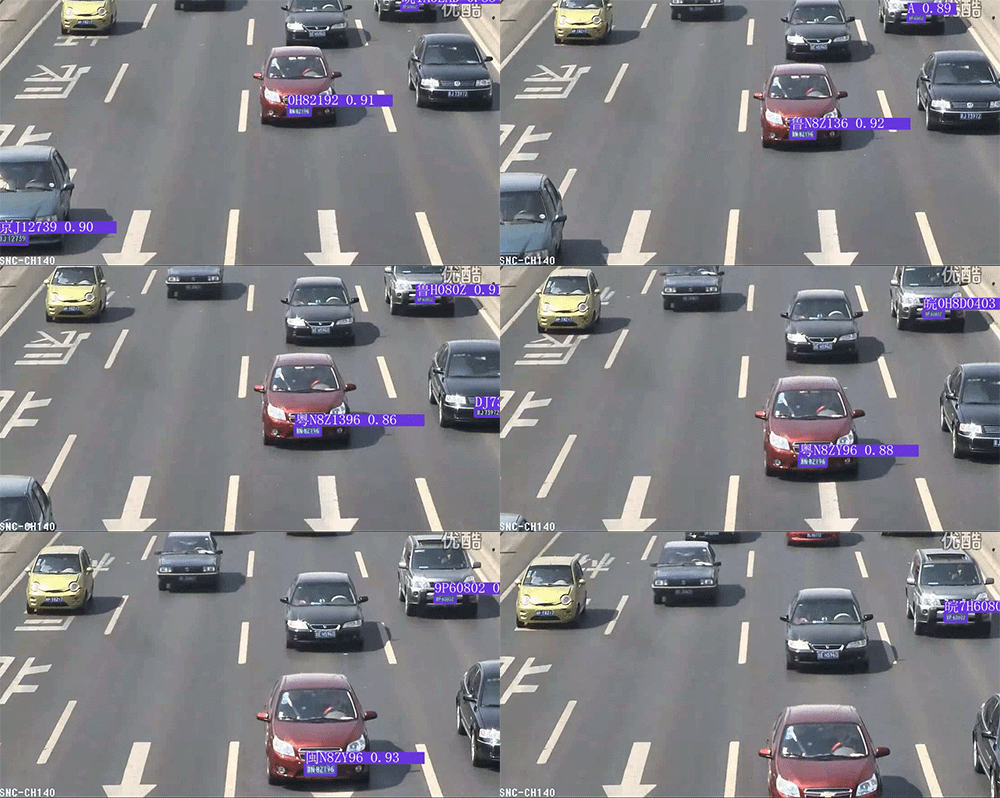
竞赛选题 深度学习 YOLO 实现车牌识别算法
文章目录 0 前言1 课题介绍2 算法简介2.1网络架构 3 数据准备4 模型训练5 实现效果5.1 图片识别效果5.2视频识别效果 6 部分关键代码7 最后 0 前言 🔥 优质竞赛项目系列,今天要分享的是 🚩 基于yolov5的深度学习车牌识别系统实现 该项目较…...
Direct3D网格(一)
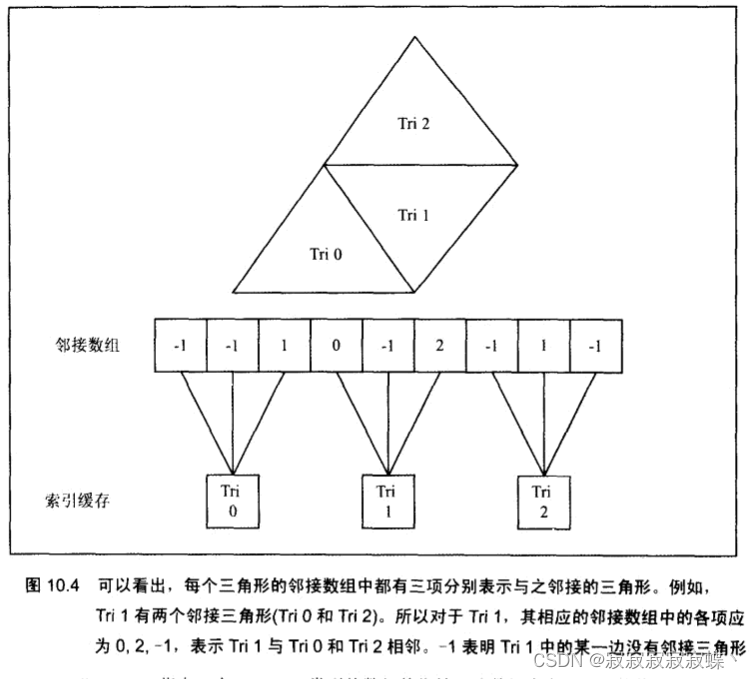
创建网格 我们可以用D3DXCreateMeshFVF函数创建一个"空"网格对象 ,空网格对象是指我们指定了网格的面片总数和顶点总数,然后由该函数为顶点缓存、索引缓存和属性缓存分配大小合适的内存,之后即可手工填入网格数据。 HRESULT WINA…...
C语言打印菱形
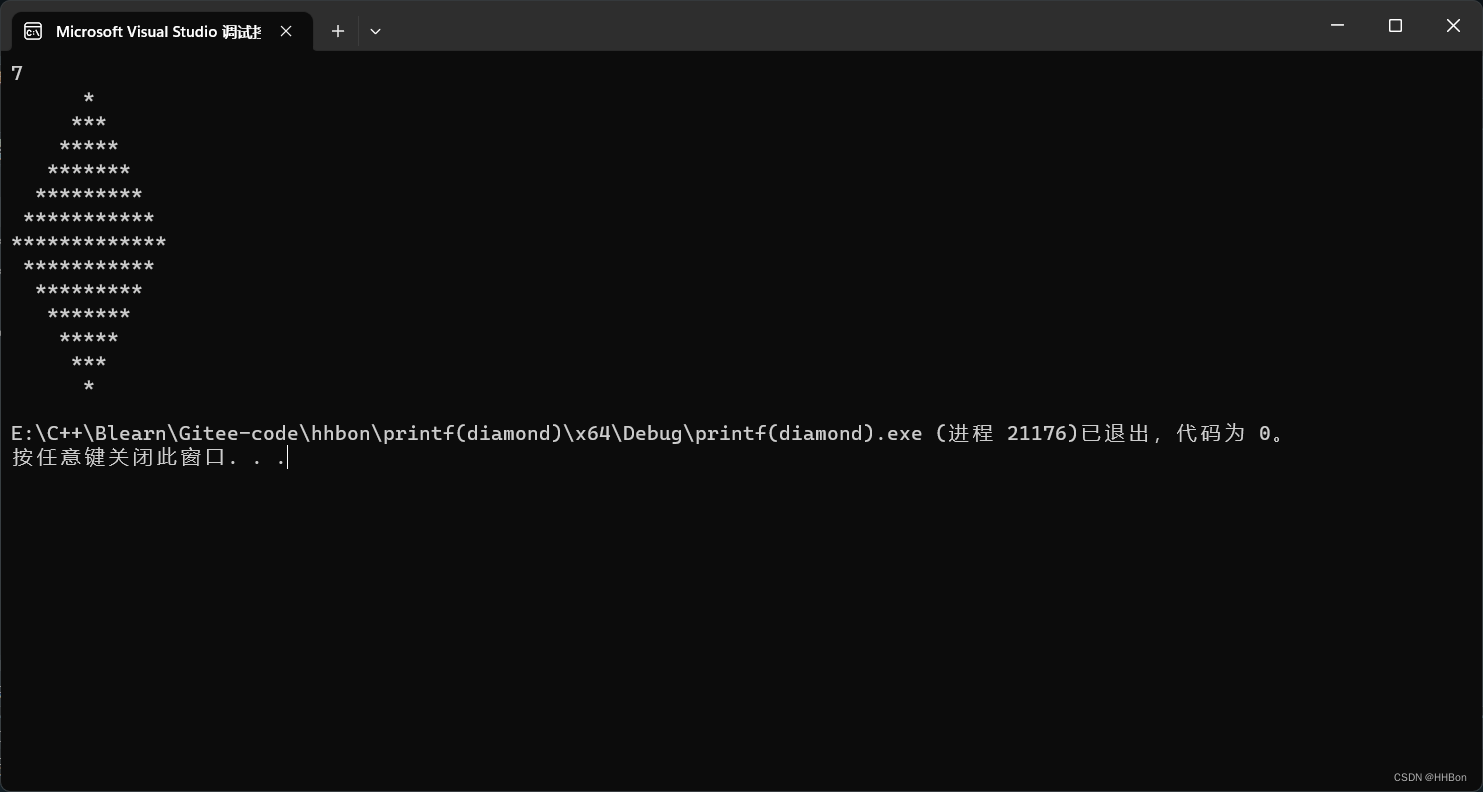
一、运行结果图 二、源代码 # define _CRT_SECURE_NO_WARNINGS # include <stdio.h>int main() {//初始化变量值;int line 0;int i 0;int j 0;//获取变量值;scanf("%d", &line);//循环打印上半部分;for (i 0; i <…...
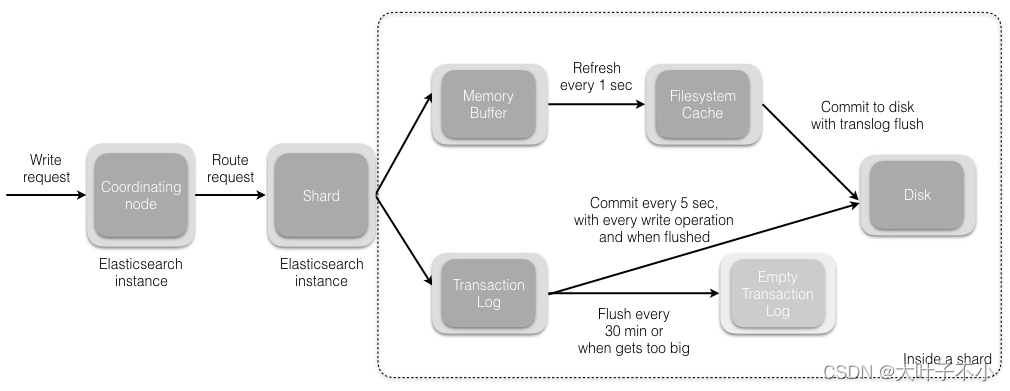
ElasticSearch搜索引擎:数据的写入流程
一、ElasticSearch 写数据的总体流程: (1)ES 客户端选择一个节点 node 发送请求过去,这个节点就是协调节点 coordinating node (2)协调节点对 document 进行路由,通过 hash 算法计算出数据应该…...

python3 调用 另外一个python脚本
3种python调用其他脚本脚本的方法_python 调用python脚本_linjingyg的博客-CSDN博客 Python之系统交互(调用系统命令)subprocess_subprocess.getoutput(cmd) 参数格式不正确-CSDN博客 subprocess.call()只能返回状态码。subprocess.getoutput(cmd)只能输出命令结果。 str(py…...

【13】c++设计模式——>简单工厂模式
工厂模式的定义 c中的工厂模式是一种创建型设计模式,它提供一种创建对象的接口,但具体创建的对象类型可以在运行时决定,这样可以将对象的创建与使用代码分离,提高代码的灵活性和可维护性。 在c中实现工厂模式,通常会定…...

系统架构设计:2 论软件设计方法及其应用
目录 一 软件设计方法 1结构化设计 2信息工程 3面向对象设计 4原型设计...

基于Winform的UDP通信
1、文件结构 2、UdpReceiver.cs using System; using System.Collections.Generic; using System.Linq; using System.Net; using System.Net.Sockets; using System.Text; using System.Threading.Tasks;namespace UDPTest.Udp {public class UdpStateEventArgs : EventArgs…...
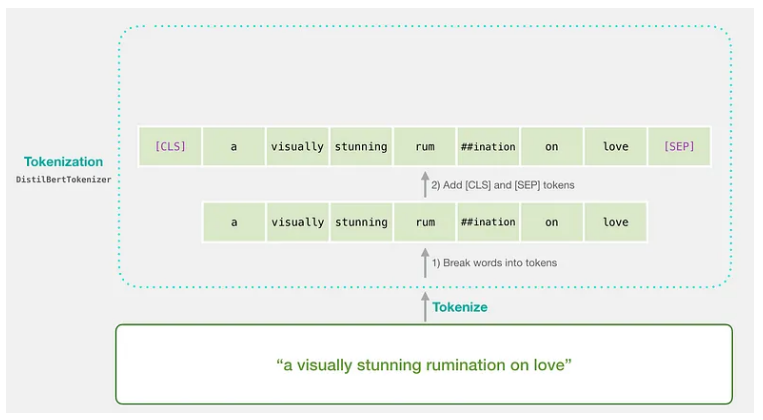
掌握 BERT:自然语言处理 (NLP) 从初级到高级的综合指南(1)
简介 BERT(来自 Transformers 的双向编码器表示)是 Google 开发的革命性自然语言处理 (NLP) 模型。它改变了语言理解任务的格局,使机器能够理解语言的上下文和细微差别。在本文[1]中,我们将带您踏上从 BERT 基础知识到高级概念的旅…...
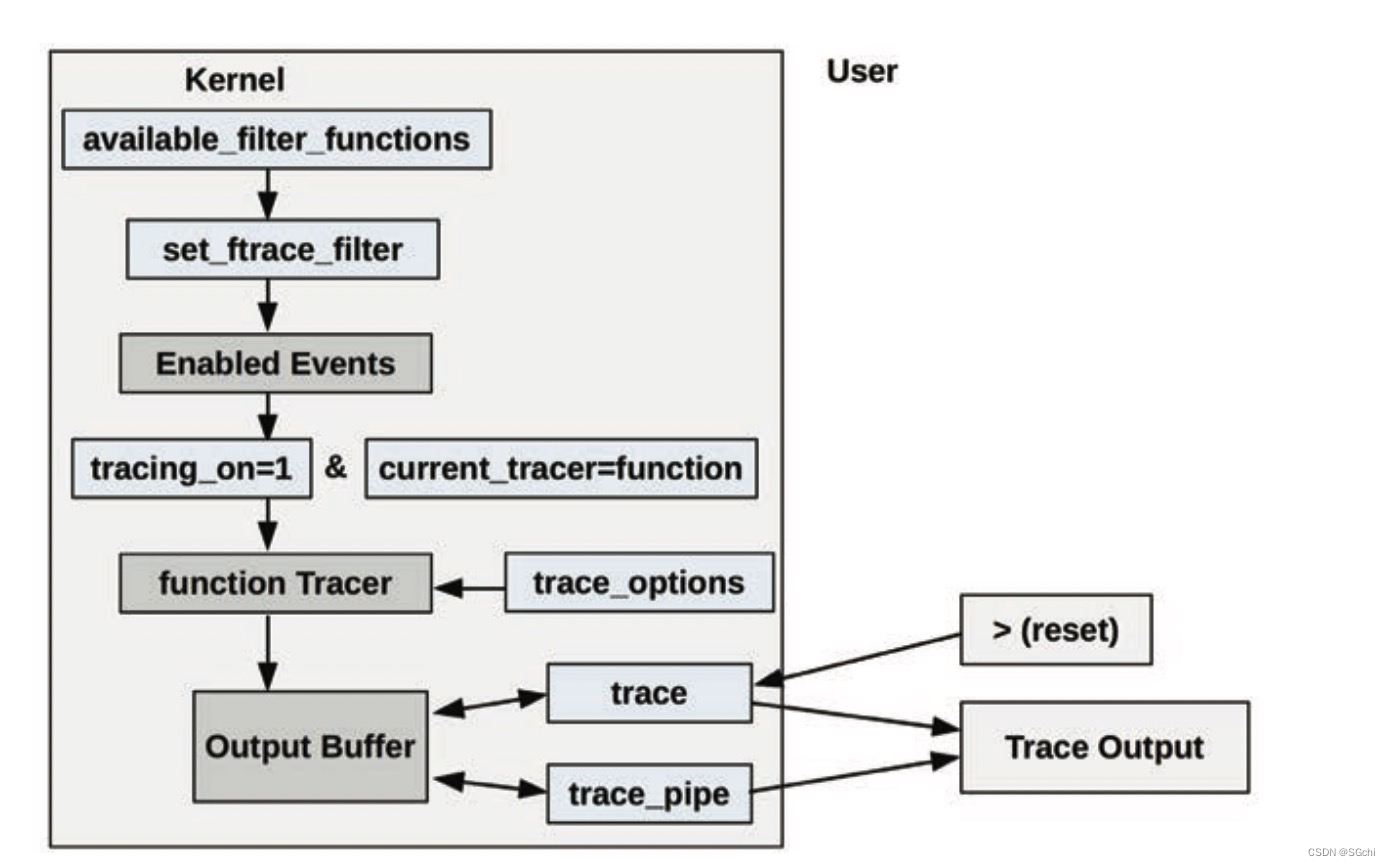
Linux Ftrace介绍
文章目录 一、简介二、内核函数调用跟踪参考链接: 一、简介 Ftrace 是 Linux 官方提供的跟踪工具,在 Linux 2.6.27 版本中引入。Ftrace 可在不引入任何前端工具的情况下使用,让其可以适合在任何系统环境中使用。 Ftrace 可用来快速排查以下相…...
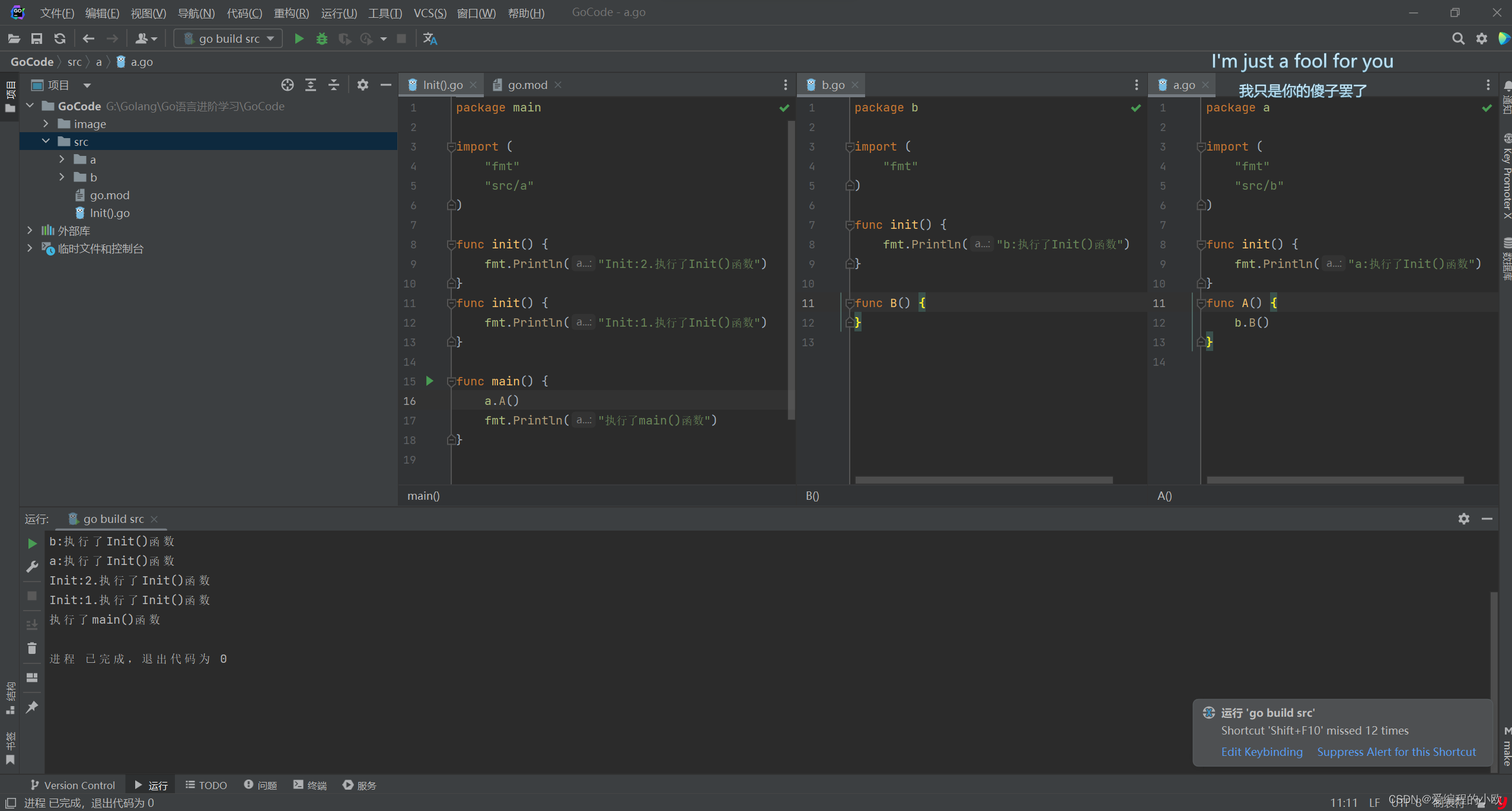
Go语言进阶------>init()函数
Init()包初始化 执行优先级 Init()函数的执行优先级比main()函数的执行优先级要高,也就是说程序会优先执行Init()函数之后再执行main()函数. 代码如下 package mainimport "fmt"func init() {fmt.Println("执行了Init()函数") }func main() {fmt.Println…...

云计算:常用微服务框架
目录 一、理论 1.Java微服务框架 2.Go微服务框架 3.Python微服务框架 4.Node.js微服务框架 5..Net微服务框架 一、理论 1.Java微服务框架 Spring Cloud:最早最成熟,Java开源微服务框架方案 SpringBoot:全新框架,设计目的是…...
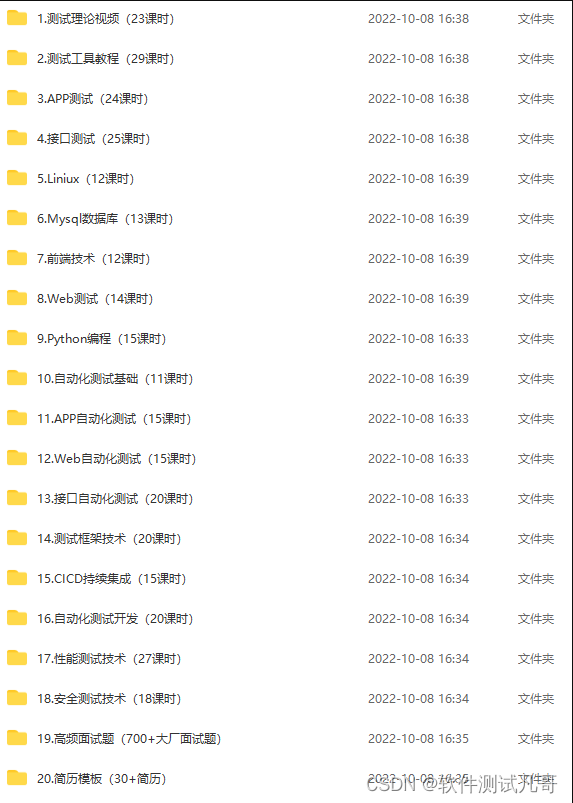
jmeter添加断言(详细图解)
先创建一个线程组,再创建一个http请求。 为了方便观察,我们添加两个监听器,察看结果树和断言结果。 添加断言:响应断言,响应断言也是比较常用的一个断言 设置响应断言:正常情况下响应代码是200。选择响应代…...
few shot object detection via feature reweight笔记
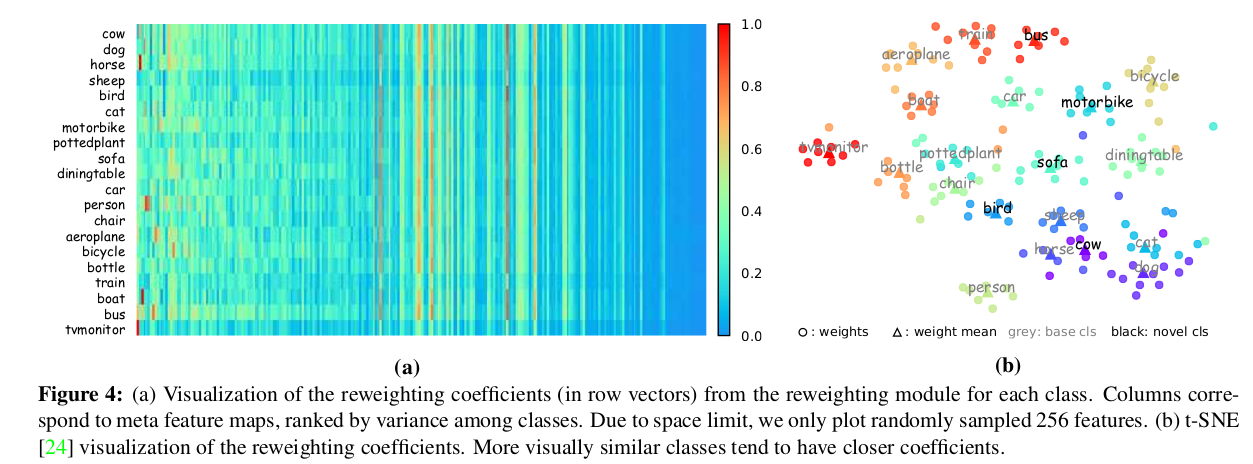
摘要部分 few shot很多用的都是faster R-CNN为基础,本文用的是one-stage 结构。 用了一个meta feature learner和reweighting模块。 和其他的few shot一样,先学习base数据集,再推广到novel数据集。 feature learner会从base数据集中提取meta…...

工会排队模式:电商新营销模式吸引消费者,提升销售!
随着电商行业的繁荣发展,私域流量已经成为了电商平台争夺消费者和促进销售的重要手段。工会排队模式正是在这种背景下应运而生的一种创新性的电商营销模式。这种模式通过奖金池的资金来为消费者和商家提供返现和排队奖励,构建了一个实现消费者和商家共赢…...
国际红外技术及设备展览会)
定档通知2024中国(北京)国际红外技术及设备展览会
时间:2024年7月14-16日 地点:北京国家会议中心 ◆展会背景background: 各有关红外企业厂商:2024年7月14~16日,2024中国国际红外技术及设…...

自助建站系统,一建建站系统api版,自动建站
安装推荐php7.2或7.2以下都行 可使用虚拟主机或者服务器进行搭建。 分站进入网站后台 域名/admin 初始账号123456qq.com密码123456 找到后台的网站设置 将主站域名及你在主站的通信secretId和通信secretKey填进去。 即可正常使用 通信secretId和通信secretKey在主站的【账号…...
算法框架-LLM-1-Prompt设计(一)
原文:算法框架-LLM-1-Prompt设计(一) - 知乎 目录 收起 1 prompt-engineering-for-developers 1.1 Prompt Engineering 1.1.1 提示原则 1. openai的环境 2. 两个基本原则 3. 示例 eg.1 eg.2 结构化输出 eg.3 模型检验 eg.4 提供示…...
一个rar压缩包如何分成三个?
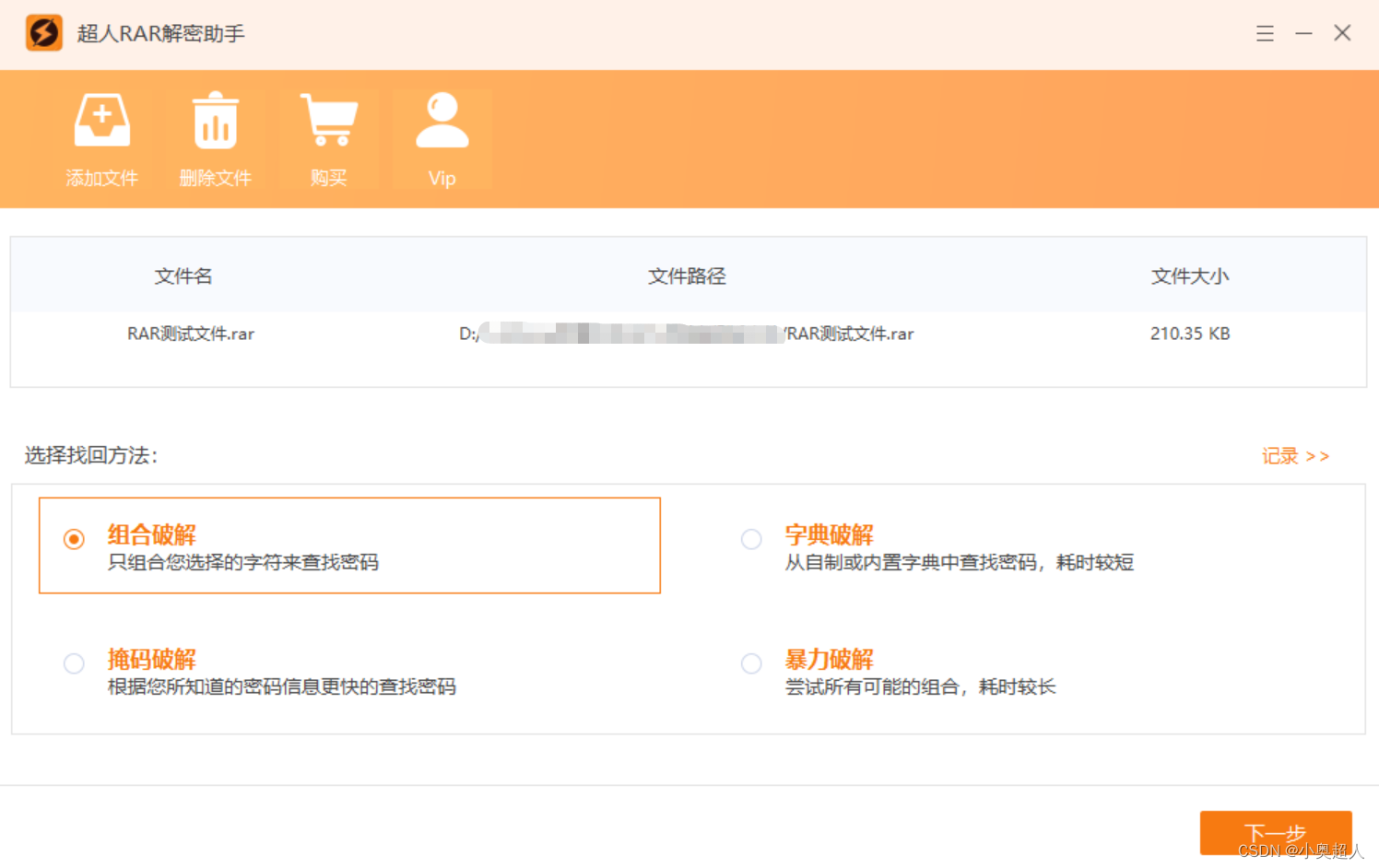
一个rar压缩包体积太大了,想要将压缩包分为三个,该如何做到?其实很简单,方法就在我们经常使用的WinRAR当中。 我们先将压缩包内的文件解压出来,然后查看一下,然后打开WinRAR软件,找到文件&…...

【OSG学习笔记】Day 18: 碰撞检测与物理交互
物理引擎(Physics Engine) 物理引擎 是一种通过计算机模拟物理规律(如力学、碰撞、重力、流体动力学等)的软件工具或库。 它的核心目标是在虚拟环境中逼真地模拟物体的运动和交互,广泛应用于 游戏开发、动画制作、虚…...

K8S认证|CKS题库+答案| 11. AppArmor
目录 11. AppArmor 免费获取并激活 CKA_v1.31_模拟系统 题目 开始操作: 1)、切换集群 2)、切换节点 3)、切换到 apparmor 的目录 4)、执行 apparmor 策略模块 5)、修改 pod 文件 6)、…...
YSYX学习记录(八)
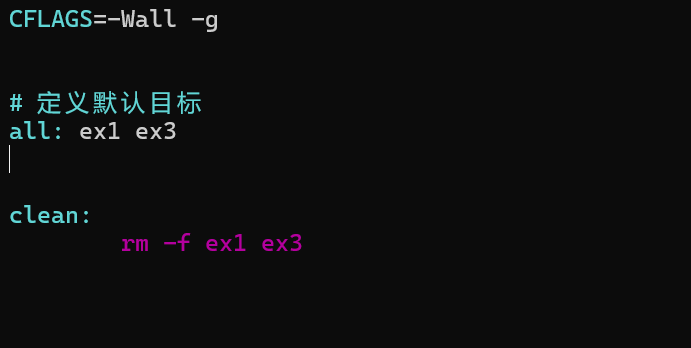
C语言,练习0: 先创建一个文件夹,我用的是物理机: 安装build-essential 练习1: 我注释掉了 #include <stdio.h> 出现下面错误 在你的文本编辑器中打开ex1文件,随机修改或删除一部分,之后…...
STM32F4基本定时器使用和原理详解
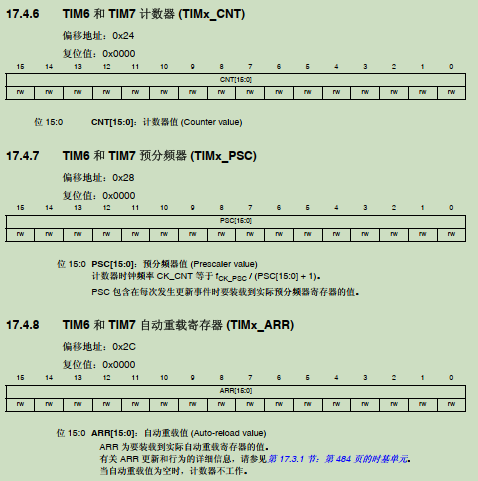
STM32F4基本定时器使用和原理详解 前言如何确定定时器挂载在哪条时钟线上配置及使用方法参数配置PrescalerCounter ModeCounter Periodauto-reload preloadTrigger Event Selection 中断配置生成的代码及使用方法初始化代码基本定时器触发DCA或者ADC的代码讲解中断代码定时启动…...

【机器视觉】单目测距——运动结构恢复
ps:图是随便找的,为了凑个封面 前言 在前面对光流法进行进一步改进,希望将2D光流推广至3D场景流时,发现2D转3D过程中存在尺度歧义问题,需要补全摄像头拍摄图像中缺失的深度信息,否则解空间不收敛…...

鸿蒙中用HarmonyOS SDK应用服务 HarmonyOS5开发一个医院查看报告小程序
一、开发环境准备 工具安装: 下载安装DevEco Studio 4.0(支持HarmonyOS 5)配置HarmonyOS SDK 5.0确保Node.js版本≥14 项目初始化: ohpm init harmony/hospital-report-app 二、核心功能模块实现 1. 报告列表…...
)
python爬虫:Newspaper3k 的详细使用(好用的新闻网站文章抓取和解析的Python库)
更多内容请见: 爬虫和逆向教程-专栏介绍和目录 文章目录 一、Newspaper3k 概述1.1 Newspaper3k 介绍1.2 主要功能1.3 典型应用场景1.4 安装二、基本用法2.2 提取单篇文章的内容2.2 处理多篇文档三、高级选项3.1 自定义配置3.2 分析文章情感四、实战案例4.1 构建新闻摘要聚合器…...

【git】把本地更改提交远程新分支feature_g
创建并切换新分支 git checkout -b feature_g 添加并提交更改 git add . git commit -m “实现图片上传功能” 推送到远程 git push -u origin feature_g...

学习STC51单片机32(芯片为STC89C52RCRC)OLED显示屏2
每日一言 今天的每一份坚持,都是在为未来积攒底气。 案例:OLED显示一个A 这边观察到一个点,怎么雪花了就是都是乱七八糟的占满了屏幕。。 解释 : 如果代码里信号切换太快(比如 SDA 刚变,SCL 立刻变&#…...
GC1808高性能24位立体声音频ADC芯片解析
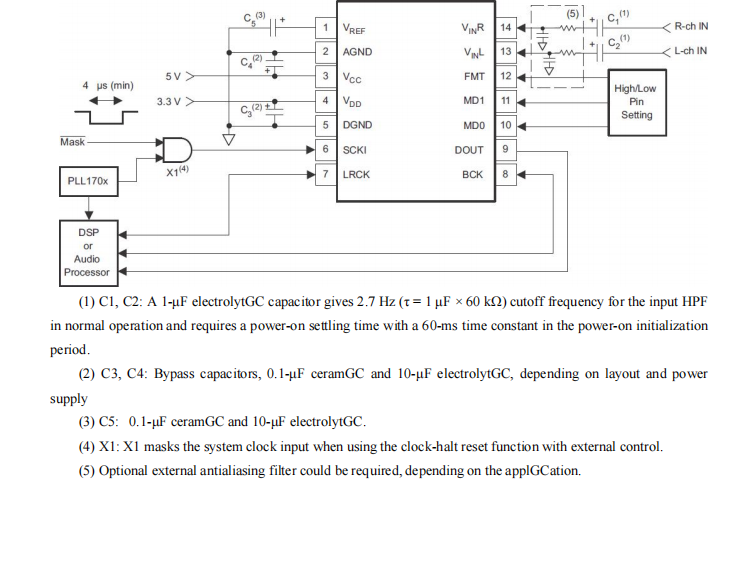
1. 芯片概述 GC1808是一款24位立体声音频模数转换器(ADC),支持8kHz~96kHz采样率,集成Δ-Σ调制器、数字抗混叠滤波器和高通滤波器,适用于高保真音频采集场景。 2. 核心特性 高精度:24位分辨率,…...