
H5游戏分享-烟花效果
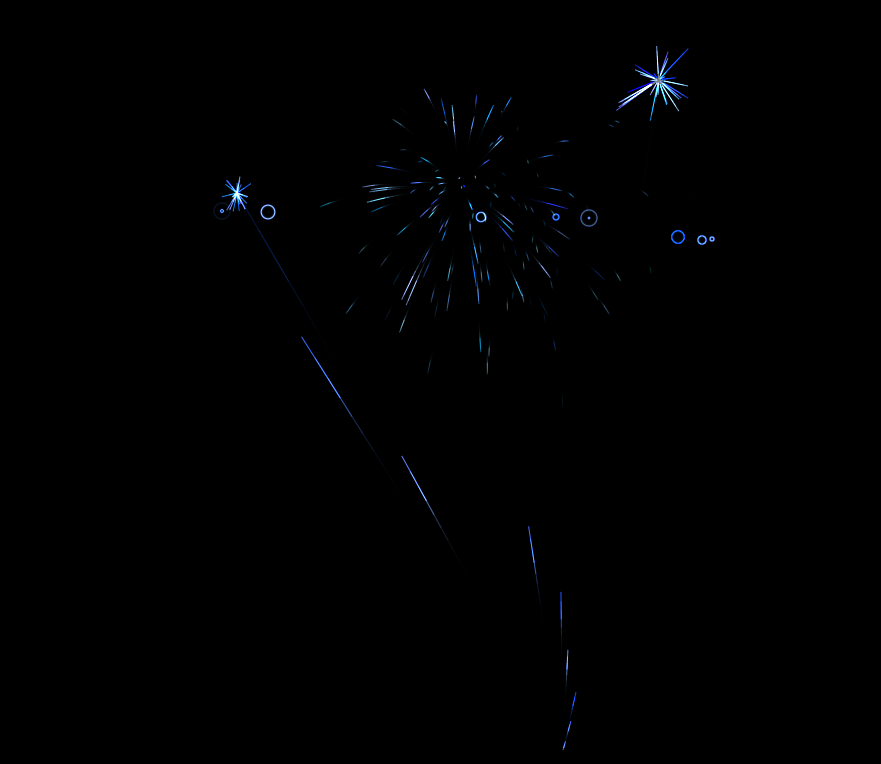
<!DOCTYPE html>
<html dir="ltr" lang="zh-CN">
<head>
<meta charset="UTF-8" />
<meta name="viewport" content="width=device-width" />
<title>点击夜空欣赏烟花</title> <script type="text/javascript" src="http://app.46465.com/html5/qw/jquery.min.js"></script><script type="text/javascript">var dataForWeixin = {appId: "gh_ff79a97cd7f3",TLImg: "http://app.46465.com/html5/yh/logo.jpg",url: "http://app.46465.com/html5/yh/",title: "经典寂寞的烟花欣赏,如果觉得好看请您分享到微信里",desc: "分享到微信,发送给朋友或朋友圈,才能体现你的无私的爱!"};var onBridgeReady = function(){WeixinJSBridge.on('menu:share:appmessage', function(argv){var infos = $("#infos").text();     WeixinJSBridge.invoke('sendAppMessage', {"appid": dataForWeixin.appId,"img_url": dataForWeixin.TLImg,"img_width": "120","img_height": "120","link": dataForWeixin.url + '?f=wx_hy_bb',"title": infos + dataForWeixin.title,"desc": dataForWeixin.desc });setTimeout(function () {location.href = "http://app.46465.com/html5/yh/";}, 1500); });WeixinJSBridge.on('menu:share:timeline', function(argv){var infos = $("#infos").text();             WeixinJSBridge.invoke('shareTimeline', {"appid": dataForWeixin.appId,"img_url":dataForWeixin.TLImg,"img_width": "120","img_height": "120","link": dataForWeixin.url + '?f=wx_pyq_bb',"title": infos + dataForWeixin.title,"desc": dataForWeixin.desc});setTimeout(function () {location.href = "http://app.46465.com/html5/yh/";}, 1500);  });};if(document.addEventListener){document.addEventListener('WeixinJSBridgeReady', onBridgeReady, false);}else if(document.attachEvent){document.attachEvent('WeixinJSBridgeReady', onBridgeReady);document.attachEvent('onWeixinJSBridgeReady', onBridgeReady);}   </script>
<style>
/* basic styles for black background and crosshair cursor */
body {background: #000;margin: 0;
}canvas {cursor: crosshair;display: block;
}
.STYLE1 {color: #333333}
</style>
</head>
<div style="text-align:center;clear:both"></div>
<canvas id="canvas"><span class="STYLE1">Open IE effect more perfect </span></canvas>
<script>
// when animating on canvas, it is best to use requestAnimationFrame instead of setTimeout or setInterval
// not supported in all browsers though and sometimes needs a prefix, so we need a shim
window.requestAnimFrame = ( function() {return window.requestAnimationFrame ||window.webkitRequestAnimationFrame ||window.mozRequestAnimationFrame ||function( callback ) {window.setTimeout( callback, 1000 / 60 );};
})();// now we will setup our basic variables for the demo
var canvas = document.getElementById( 'canvas' ),ctx = canvas.getContext( '2d' ),// full screen dimensionscw = window.innerWidth,ch = window.innerHeight,// firework collectionfireworks = [],// particle collectionparticles = [],// starting huehue = 120,// when launching fireworks with a click, too many get launched at once without a limiter, one launch per 5 loop tickslimiterTotal = 5,limiterTick = 0,// this will time the auto launches of fireworks, one launch per 80 loop tickstimerTotal = 80,timerTick = 0,mousedown = false,// mouse x coordinate,mx,// mouse y coordinatemy;// set canvas dimensions
canvas.width = cw;
canvas.height = ch;// now we are going to setup our function placeholders for the entire demo// get a random number within a range
function random( min, max ) {return Math.random() * ( max - min ) + min;
}// calculate the distance between two points
function calculateDistance( p1x, p1y, p2x, p2y ) {var xDistance = p1x - p2x,yDistance = p1y - p2y;return Math.sqrt( Math.pow( xDistance, 2 ) + Math.pow( yDistance, 2 ) );
}// create firework
function Firework( sx, sy, tx, ty ) {// actual coordinatesthis.x = sx;this.y = sy;// starting coordinatesthis.sx = sx;this.sy = sy;// target coordinatesthis.tx = tx;this.ty = ty;// distance from starting point to targetthis.distanceToTarget = calculateDistance( sx, sy, tx, ty );this.distanceTraveled = 0;// track the past coordinates of each firework to create a trail effect, increase the coordinate count to create more prominent trailsthis.coordinates = [];this.coordinateCount = 3;// populate initial coordinate collection with the current coordinateswhile( this.coordinateCount-- ) {this.coordinates.push( [ this.x, this.y ] );}this.angle = Math.atan2( ty - sy, tx - sx );this.speed = 2;this.acceleration = 1.05;this.brightness = random( 50, 70 );// circle target indicator radiusthis.targetRadius = 1;
}// update firework
Firework.prototype.update = function( index ) {// remove last item in coordinates arraythis.coordinates.pop();// add current coordinates to the start of the arraythis.coordinates.unshift( [ this.x, this.y ] );// cycle the circle target indicator radiusif( this.targetRadius < 8 ) {this.targetRadius += 0.3;} else {this.targetRadius = 1;}// speed up the fireworkthis.speed *= this.acceleration;// get the current velocities based on angle and speedvar vx = Math.cos( this.angle ) * this.speed,vy = Math.sin( this.angle ) * this.speed;// how far will the firework have traveled with velocities applied?this.distanceTraveled = calculateDistance( this.sx, this.sy, this.x + vx, this.y + vy );// if the distance traveled, including velocities, is greater than the initial distance to the target, then the target has been reachedif( this.distanceTraveled >= this.distanceToTarget ) {createParticles( this.tx, this.ty );// remove the firework, use the index passed into the update function to determine which to removefireworks.splice( index, 1 );} else {// target not reached, keep travelingthis.x += vx;this.y += vy;}
}// draw firework
Firework.prototype.draw = function() {ctx.beginPath();// move to the last tracked coordinate in the set, then draw a line to the current x and yctx.moveTo( this.coordinates[ this.coordinates.length - 1][ 0 ], this.coordinates[ this.coordinates.length - 1][ 1 ] );ctx.lineTo( this.x, this.y );ctx.strokeStyle = 'hsl(' + hue + ', 100%, ' + this.brightness + '%)';ctx.stroke();ctx.beginPath();// draw the target for this firework with a pulsing circlectx.arc( this.tx, this.ty, this.targetRadius, 0, Math.PI * 2 );ctx.stroke();
}// create particle
function Particle( x, y ) {this.x = x;this.y = y;// track the past coordinates of each particle to create a trail effect, increase the coordinate count to create more prominent trailsthis.coordinates = [];this.coordinateCount = 5;while( this.coordinateCount-- ) {this.coordinates.push( [ this.x, this.y ] );}// set a random angle in all possible directions, in radiansthis.angle = random( 0, Math.PI * 2 );this.speed = random( 1, 10 );// friction will slow the particle downthis.friction = 0.95;// gravity will be applied and pull the particle downthis.gravity = 1;// set the hue to a random number +-20 of the overall hue variablethis.hue = random( hue - 20, hue + 20 );this.brightness = random( 50, 80 );this.alpha = 1;// set how fast the particle fades outthis.decay = random( 0.015, 0.03 );
}// update particle
Particle.prototype.update = function( index ) {// remove last item in coordinates arraythis.coordinates.pop();// add current coordinates to the start of the arraythis.coordinates.unshift( [ this.x, this.y ] );// slow down the particlethis.speed *= this.friction;// apply velocitythis.x += Math.cos( this.angle ) * this.speed;this.y += Math.sin( this.angle ) * this.speed + this.gravity;// fade out the particlethis.alpha -= this.decay;// remove the particle once the alpha is low enough, based on the passed in indexif( this.alpha <= this.decay ) {particles.splice( index, 1 );}
}// draw particle
Particle.prototype.draw = function() {ctx. beginPath();// move to the last tracked coordinates in the set, then draw a line to the current x and yctx.moveTo( this.coordinates[ this.coordinates.length - 1 ][ 0 ], this.coordinates[ this.coordinates.length - 1 ][ 1 ] );ctx.lineTo( this.x, this.y );ctx.strokeStyle = 'hsla(' + this.hue + ', 100%, ' + this.brightness + '%, ' + this.alpha + ')';ctx.stroke();
}// create particle group/explosion
function createParticles( x, y ) {// increase the particle count for a bigger explosion, beware of the canvas performance hit with the increased particles thoughvar particleCount = 30;while( particleCount-- ) {particles.push( new Particle( x, y ) );}
}// main demo loop
function loop() {// this function will run endlessly with requestAnimationFramerequestAnimFrame( loop );// increase the hue to get different colored fireworks over timehue += 0.5;// normally, clearRect() would be used to clear the canvas// we want to create a trailing effect though// setting the composite operation to destination-out will allow us to clear the canvas at a specific opacity, rather than wiping it entirelyctx.globalCompositeOperation = 'destination-out';// decrease the alpha property to create more prominent trailsctx.fillStyle = 'rgba(0, 0, 0, 0.5)';ctx.fillRect( 0, 0, cw, ch );// change the composite operation back to our main mode// lighter creates bright highlight points as the fireworks and particles overlap each otherctx.globalCompositeOperation = 'lighter';// loop over each firework, draw it, update itvar i = fireworks.length;while( i-- ) {fireworks[ i ].draw();fireworks[ i ].update( i );}// loop over each particle, draw it, update itvar i = particles.length;while( i-- ) {particles[ i ].draw();particles[ i ].update( i );}// launch fireworks automatically to random coordinates, when the mouse isn't downif( timerTick >= timerTotal ) {if( !mousedown ) {// start the firework at the bottom middle of the screen, then set the random target coordinates, the random y coordinates will be set within the range of the top half of the screenfireworks.push( new Firework( cw / 2, ch, random( 0, cw ), random( 0, ch / 2 ) ) );timerTick = 0;}} else {timerTick++;}// limit the rate at which fireworks get launched when mouse is downif( limiterTick >= limiterTotal ) {if( mousedown ) {// start the firework at the bottom middle of the screen, then set the current mouse coordinates as the targetfireworks.push( new Firework( cw / 2, ch, mx, my ) );limiterTick = 0;}} else {limiterTick++;}
}// mouse event bindings
// update the mouse coordinates on mousemove
canvas.addEventListener( 'mousemove', function( e ) {mx = e.pageX - canvas.offsetLeft;my = e.pageY - canvas.offsetTop;
});// toggle mousedown state and prevent canvas from being selected
canvas.addEventListener( 'mousedown', function( e ) {e.preventDefault();mousedown = true;
});canvas.addEventListener( 'mouseup', function( e ) {e.preventDefault();mousedown = false;
});// once the window loads, we are ready for some fireworks!
window.onload = loop;
</script>
<audio autoplay="autoplay">
<source src="http://www.sypeiyin.cn/Uploads/zh/News/2012071516257FJR.mp3" type="audio/mpeg">
</audio>
<img src="yanhua.jpg" width="380" height="120">
<img src="http://img.tongji.linezing.com/3455448/tongji.gif" />
项目地址:https://download.csdn.net/download/Highning0007/88481855
相关文章:
H5游戏分享-烟花效果
<!DOCTYPE html> <html dir"ltr" lang"zh-CN"> <head> <meta charset"UTF-8" /> <meta name"viewport" content"widthdevice-width" /> <title>点击夜空欣赏烟花</title> <sc…...
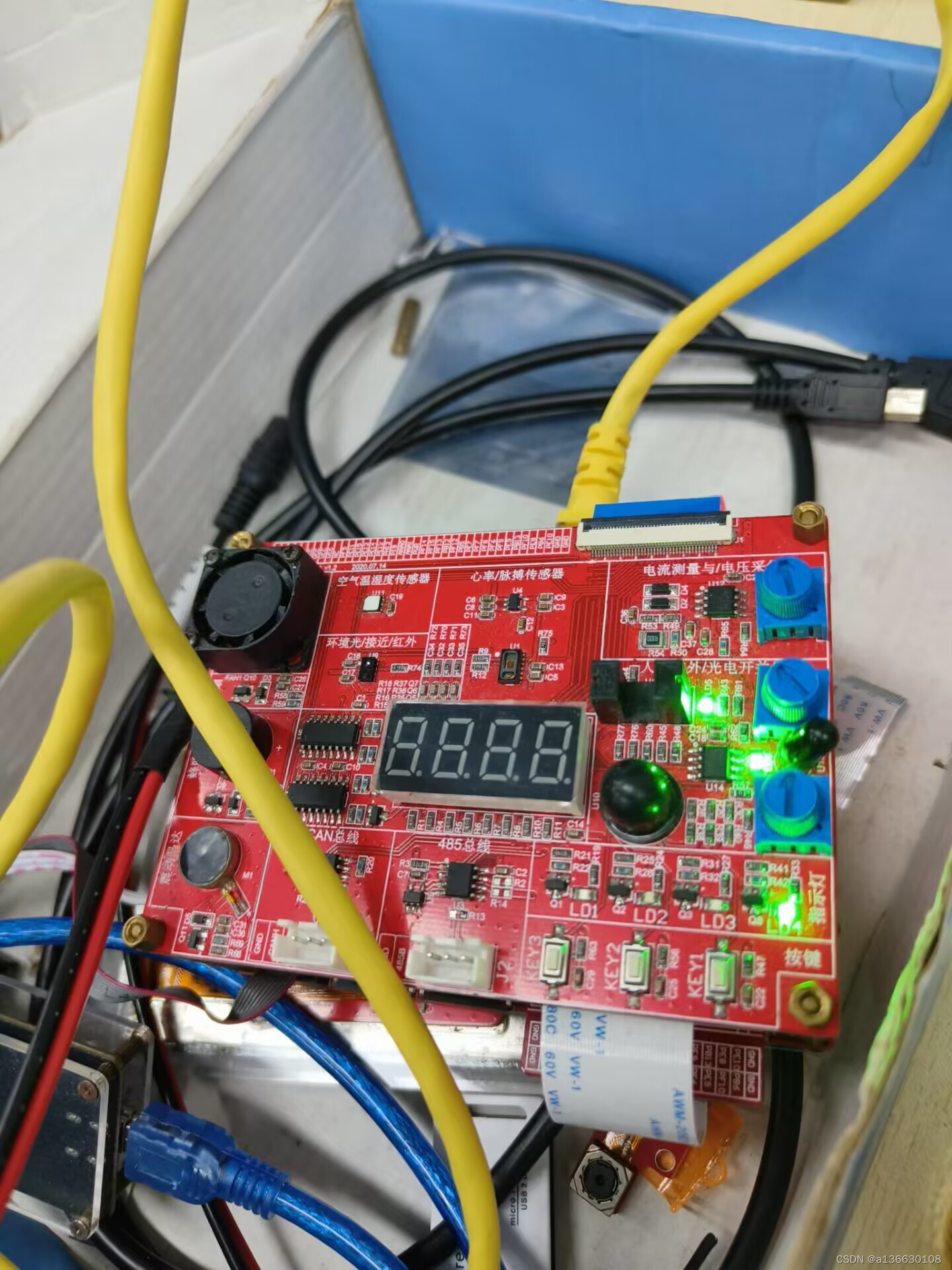
底层驱动day8作业
代码: //驱动程序 #include<linux/init.h> #include<linux/module.h> #include<linux/of.h> #include<linux/of_gpio.h> #include<linux/gpio.h> #include<linux/timer.h>struct device_node *dnode; //unsigned int gpiono; …...

openWRT SFTP 实现远程文件安全传输
🔥博客主页: 小羊失眠啦. 🔖系列专栏: C语言、Linux、 Cpolar ❤️感谢大家点赞👍收藏⭐评论✍️ 文章目录 前言 1. openssh-sftp-server 安装2. 安装cpolar工具3.配置SFTP远程访问4.固定远程连接地址 前言 本次教程我…...
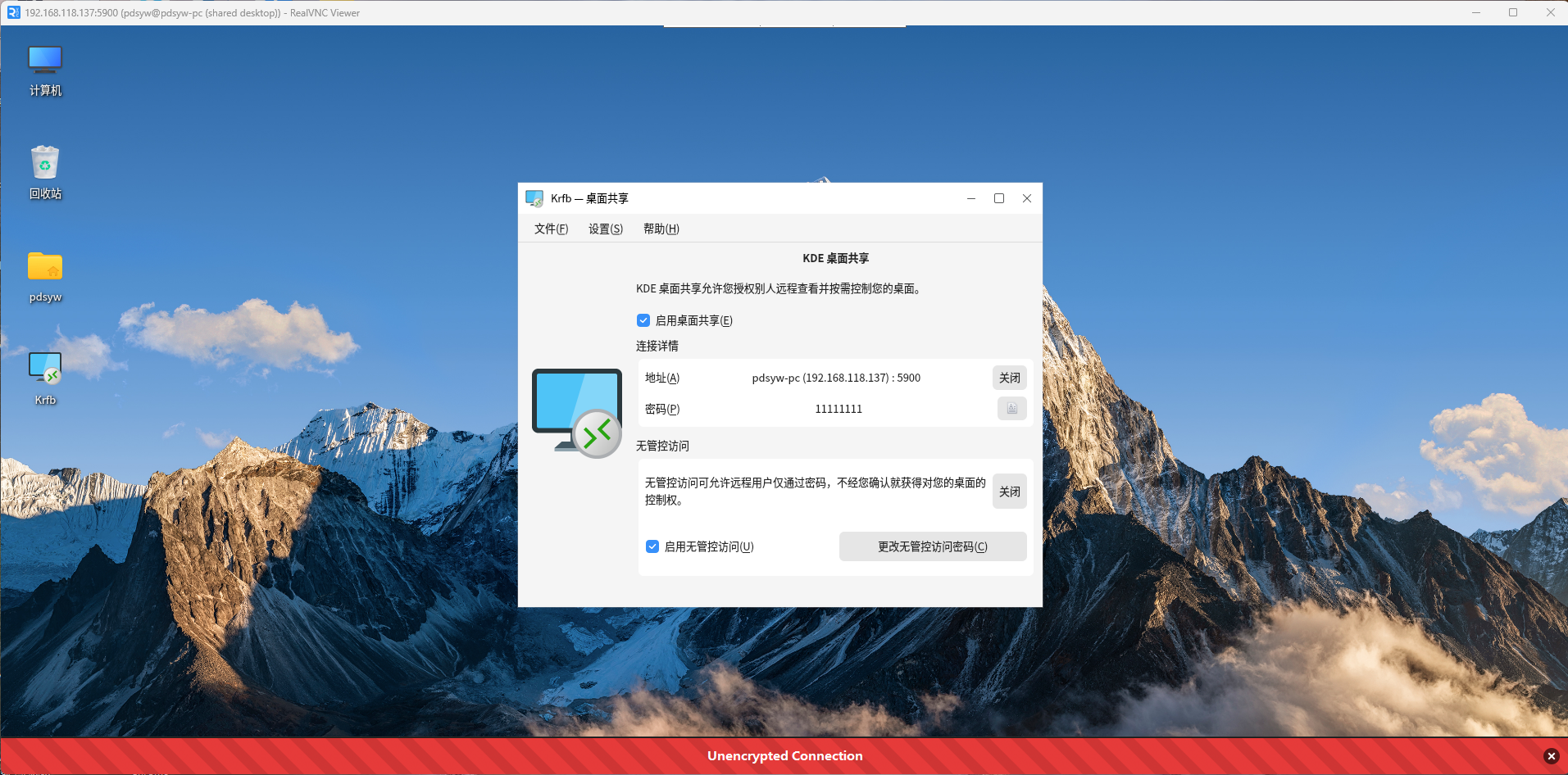
麒麟KYLINOS2303版本上使用KDE桌面共享软件
原文链接:麒麟KYLINOS2303版本上使用KDE桌面共享软件 hello,大家好啊,今天给大家推荐一个在麒麟KYLINOS桌面操作系统2303版本上使用KDE桌面共享软件的文章,通过安装KDE桌面共享软件,可以让远程vnc客户端连接访问本机桌…...
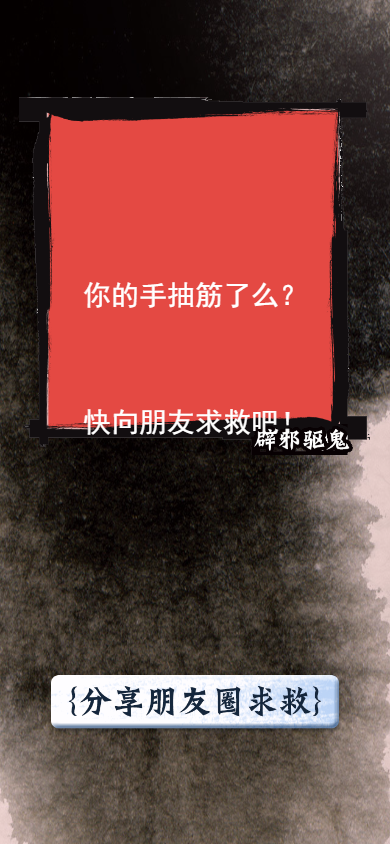
H5游戏源码分享-手机捉鬼游戏
H5游戏源码分享-手机捉鬼游戏 一款考验手速的游戏 <!DOCTYPE html> <html><head><meta http-equiv"Content-Type" content"text/html; charsetUTF-8"><title>手机捉鬼 微信HTML5在线朋友圈游戏</title><meta name&…...
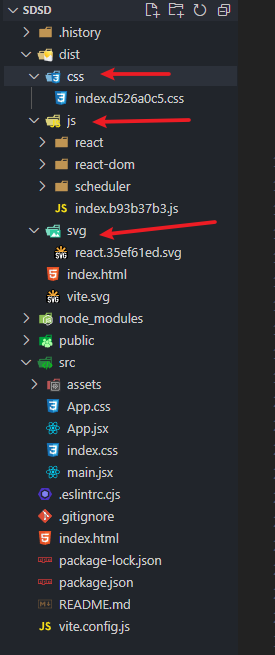
vite中将css,js文件归类至文件夹
build: {chunkSizeWarningLimit: 1500,rollupOptions: {output: {// 最小化拆分包manualChunks(id) {if (id.includes(node_modules)) {return id.toString().split(node_modules/)[1].split(/)[0].toString()}},// 用于从入口点创建的块的打包输出格式[name]表示文件名,[hash]…...

【通信原理】第一章|绪论|信息度量和通信系统的性能指标
前言 那么这里博主先安利一些干货满满的专栏了! 首先是博主的高质量博客的汇总,这个专栏里面的博客,都是博主最最用心写的一部分,干货满满,希望对大家有帮助。 高质量博客汇总 绪论 1. 信息和信息的度量 定义信息…...
)
基于STM32+OneNet设计的物联网智能鱼缸(2023升级版)
基于STM32+OneNet设计的智能鱼缸(升级版) 一、前言 随着物联网技术的快速发展,智能家居和智能养殖领域的应用越来越广泛。智能鱼缸作为智能家居和智能养殖的结合体,受到了越来越多消费者的关注。本项目设计一款基于STM32的物联网智能鱼缸,通过集成多种传感器和智能化控制模…...

NET-MongoDB的安装使用
一.下载 MongoDB 点击 Select package 选择自己所需版本后点击下载,本文选用Windows 6.0版本以上 二、配置MongoDB 在 Windows 上,MongoDB 将默认安装在 C:\Program Files\MongoDB 中。 将 C:\Program Files\MongoDB\Server\version_numbe…...
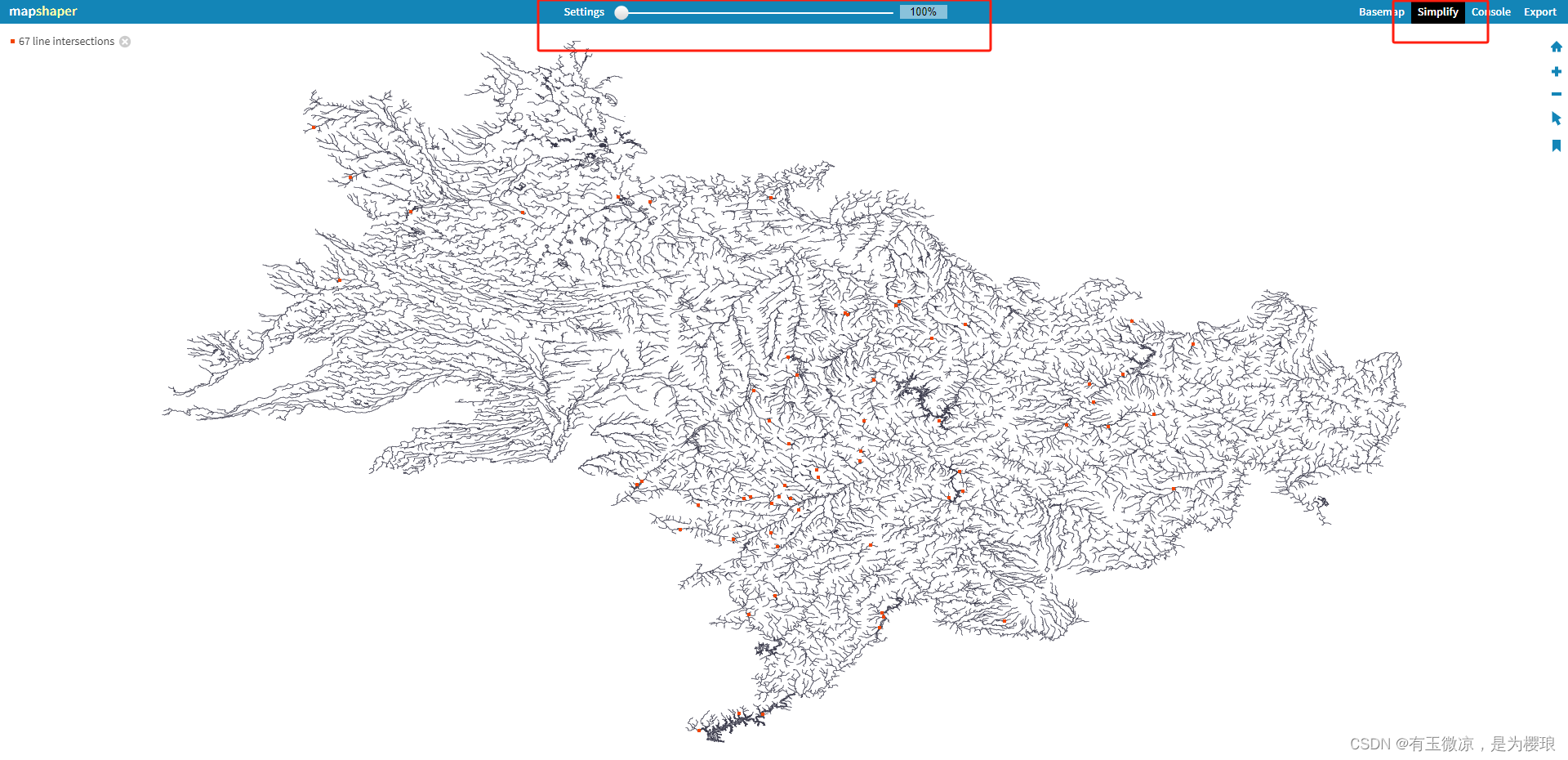
简化geojson策略
1、删除无用的属性,也就是字段,在shp的时候就给删了 用arcgis等等软件都可以做到 2、简化坐标的小数位数 (1)网上推荐的办法,俺不会Python… github.com/perrygeo/geojson-precision (2)曲线…...
:Binder进程和线程的创建)
一个Binder的前生今世 (二):Binder进程和线程的创建
文章目录 一个Binder的前生今世 (二):Binder进程和线程的创建binder在进程中的启动小结注释一个Binder的前生今世 (二):Binder进程和线程的创建 前篇文章一个Binder的前生今世 (一):Service的创建 讲了一个Service是如何创建以及如何与客户端建立联系的。讲解中涉及到…...
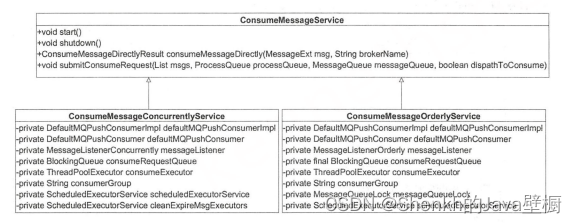
RocketMq源码分析(八)--消息消费流程
文章目录 一、消息消费实现二、消息消费过程1、消息拉取2、消息消费1)提交消费请求2)消费消息 一、消息消费实现 消息消费有2种实现,分别为:并发消费实现(ConsumeMessageConcurrentlyService)和顺序消费实现…...
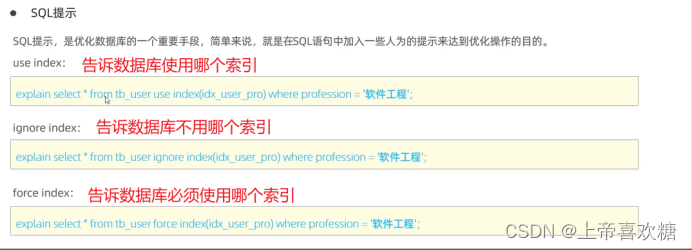
sql--索引使用
最左前缀法则(联合索引) 联合索引 位置不影响,但是所有索引必须连续使用,才会走索引 中间跳过则会造成后面索引则会失效 索引失效 规避方法---尽量使用> 或 < Explain需要重点关注的字段 Type key_leng possibl…...
-- Map、List ==》JSON字符串)
alibaba.fastjson的使用(三)-- Map、List ==》JSON字符串
目录 1.使用到的方法为: 2. Map转JSON字符串 3. List转JSON字符串 1.使用到的方法为: static String toJSONString(Object object) 2. Map转JSON字符串 /**...
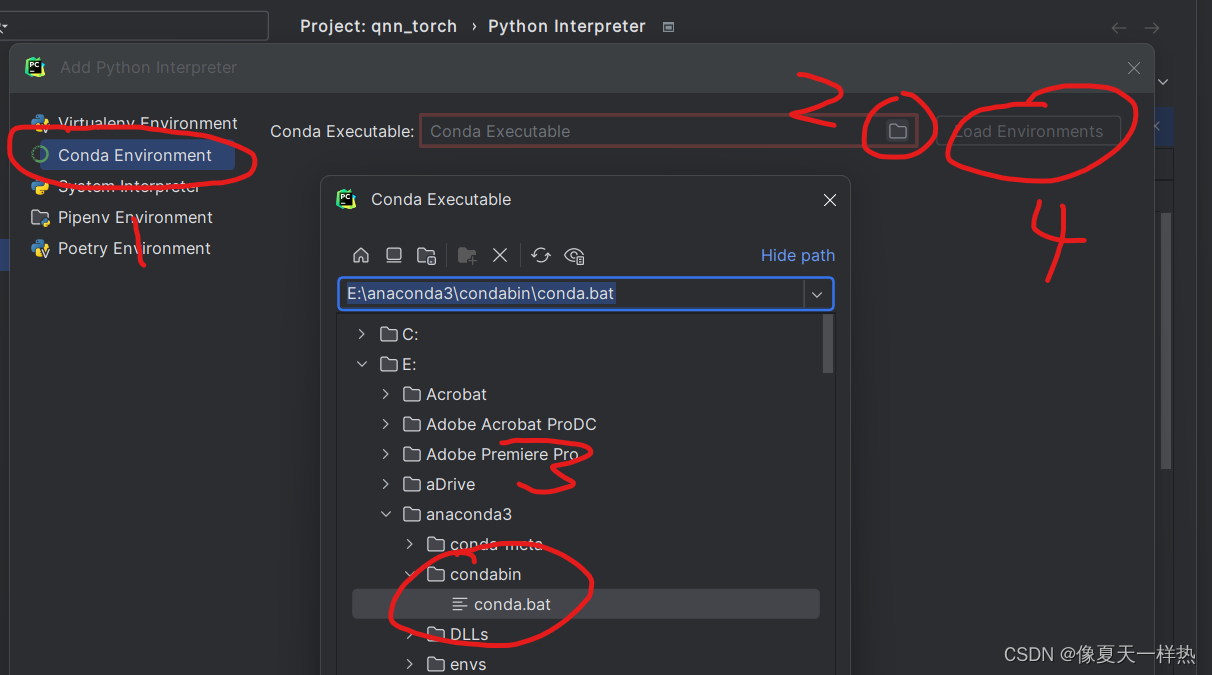
pycharm 2023.2.3设置conda虚拟环境
分两步: (1)设置Virtualenv Environment (2)设值Conda Executable 加载conda环境,然后选择conda环境...

安卓Frida 脱壳
总结下现在脱壳的方法,比如寒冰大佬的Fart,买Nexus 手机,然后刷入肉丝老师的镜像就可以。是比较快速的方式。我今天推荐的方式是,使用Frida 来脱壳,基本上满足日常需求。也不用特别准备手机,脱壳镜像等。 Frida 环境电脑端安装比较简单,主要注意和手机版本相同即可。手机…...

【C】为什么7.0会被存储为6.99999
在《C Primer Plus》第 6 版 3.3.3 节 浮点数的介绍中,作者说浮点数通常只是实际值的近似值,例如,7.0可能被储存为浮点值6.99999。 如果采用32位的IEEE 754浮点表示形式来存储7.0,那么它的二进制表示将如下: 符号位&…...
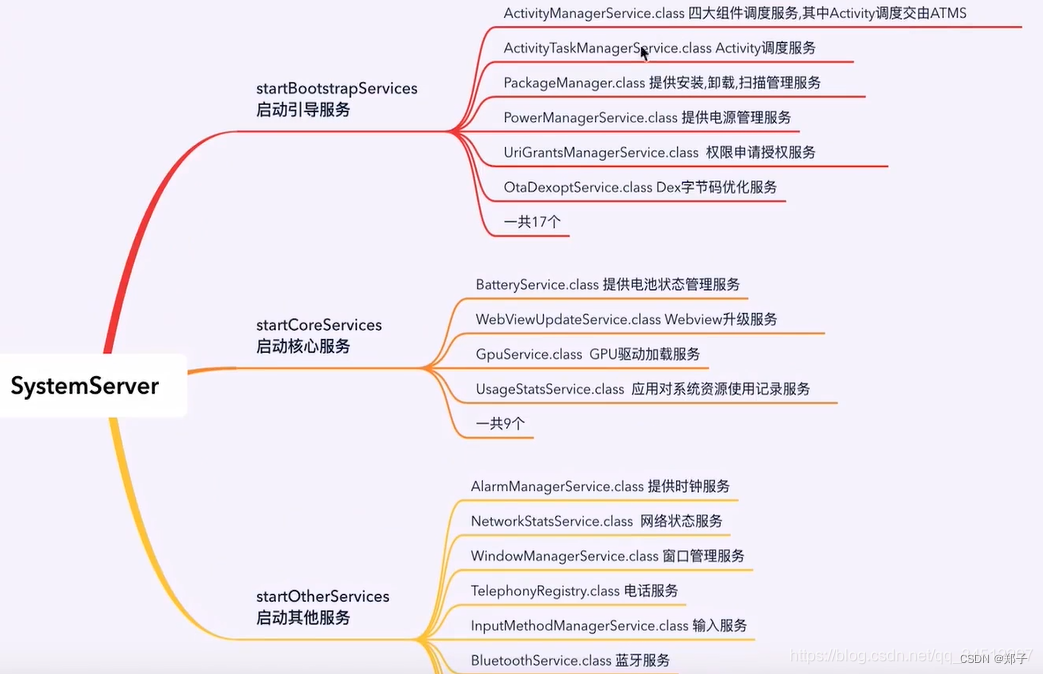
Framework -- 系统架构
一、前言 framework的学习,需要掌握到什么程度? App 的启动流程:整体的过程,具体到某些类在整个流程中所起的作用;组件的设计模式,核心设计思想;需要知晓目前已知的问题,以及解决方…...

1.1 计算机安全概念
思维导图: 前言: 第1章: 计算机与网络安全概念笔记 1. 学习目标 了解保密性、完整性和可用性的关键安全需求。了解OSI的X.800安全架构。识别和举例说明不同的安全威胁和攻击。掌握安全设计的基本准则。熟悉攻击面和攻击树的使用。了解与密码标准相关的…...

react中的函数柯里化
函数柯里化是一种将接受多个参数的函数转化为一系列接受单一参数的函数的技术。在React开发中,函数柯里化可以帮助我们更好地组织组件的代码,使其具有更好的可读性和可复用性。 一个简单的函数柯里化示例: function add(a) {return functio…...

直接上结论:开源免费首选!千笔·降AI率助手 VS PaperRed
在AI技术迅速发展的今天,越来越多的学生和研究者开始依赖AI工具辅助论文写作,以提高效率和内容质量。然而,随着学术审查标准的不断提升,AI生成内容的痕迹愈发明显,查重系统对AIGC(人工智能生成内容…...

高通量测序原理与平台对比:Illumina、ONT、PacBio——读长、精度、成本的博弈与选择
点击 “AladdinEdu,你的AI学习实践工作坊”,注册即送-H卡级别算力,沉浸式云原生集成开发环境,80G大显存多卡并行,按量弹性计费,教育用户更享超低价。 摘要:高通量测序技术已彻底改变生命科学研究…...

无人机电池及传感器快拆领域的最新技术进展
🎓作者简介:科技自媒体优质创作者 🌐个人主页:莱歌数字-CSDN博客 💌公众号:莱歌数字(B站同名) 📱个人微信:yanshanYH 211、985硕士,从业16年 从…...
: QDragEvent事件)
QT编程(12): QDragEvent事件
一、QDragEvent核心认知 QDragEvent是Qt拖放(Drag and Drop)机制中的事件基类,并非独立触发的单一事件,而是QDragEnterEvent、QDragMoveEvent、QDragLeaveEvent、QDropEvent的父类,专门用于处理GUI界面内、跨控件、跨…...

YOLO26改进96:全网首发--c3k2模块添加ConvAttn模块
论文介绍 论文核心内容翻译 本文致力于解决轻量级图像超分辨率(SR)任务中Transformer模型的高计算开销问题。基于对自注意力机制层间重复性的观察,提出了一种卷积化自注意力模块——卷积注意力(ConvAttn),该模块通过单个共享大核和动态卷积核,模拟自注意力机制的远程建…...

ERP为跨境电商卖家身打造的全链路解决方案的庖丁解牛
跨境电商卖家面临的核心挑战是**“全球卖、本地化运营、合规化经营、精细化核算”**。单一工具(如打单软件、库存表格)已无法支撑复杂业务。 全链路 ERP 解决方案的本质,是将选品、采购、刊登、订单、仓储、物流、财务、客服、合规九大环节&a…...
)
Java 部署:Jenkins Pipeline 构建 Java 项目(自动化)
Java 部署:Jenkins Pipeline 构建 Java 项目(自动化)完整指南 在现代 Java 开发中,Jenkins Pipeline 是实现 CI/CD(持续集成/持续交付)的最主流方式。它将整个构建、测试、打包、部署流程写成代码…...

2026年专科生必看!学生热捧的降AIGC平台 —— 千笔·专业降AI率智能体
在AI技术迅速渗透学术写作领域的今天,越来越多的学生和研究人员开始依赖AI工具提升写作效率。然而,随之而来的“AI率超标”问题也愈发严峻——随着查重系统不断升级,AI生成内容的痕迹被更加精准地识别,论文一旦被判定为AI痕迹过重…...

跨境电商WMS的生命周期的庖丁解牛
跨境电商 WMS (Warehouse Management System,仓储管理系统) 的生命周期,是实物履约效率、库存数据精度、作业成本控制的三重演进。 与 ERP 关注“生意逻辑”、TMS 关注“运输链路”不同,WMS 的核心是**“库内作业”。在跨境场景下,…...

Flutter鸿蒙开发:跨平台技术栈融合下的机遇与挑战
摘要: 随着HarmonyOS(鸿蒙操作系统)的蓬勃发展,其独特的分布式理念和多设备协同能力为应用开发带来了新的机遇和挑战。Flutter,作为谷歌推出的高性能跨平台UI框架,因其高效的渲染引擎、丰富的组件库和良好的…...