
android 12添加系统字体并且设置为默认字体
需求:在11.0 12.0系统定制化开发中,在产品定制中,有产品需求对于系统字体风格不太满意,所以想要更换系统的默认字体,对于系统字体的修改也是常有的功能,而系统默认也支持增加字体,所以就来添加楷体字体为系统字体,并替换为系统默认字体。
添加系统字体并且设置为默认字体的核心类
frameworks/base/data/fonts/
frameworks/base/data/fonts/fonts.mk
frameworks/base/data/fonts/Android.mk
frameworks/base/data/fonts/fonts.xml
添加系统字体并且设置为默认字体核心功能实现和分析
对于系统添加新字体功能,是默认支持的但是有些字体会导致系统的支持性不是太好,所以要选择好系统字体也是比较关键的
具体步骤如下:
2.1fonts下增加新字体
在目录frameworks/base/data/fonts/ 添加 KTFont.ttf
2.2 在frameworks/base/data/fonts/fonts.mk中添加新的字体
具体先看fonts.mk文件
# Copyright (C) 2008 The Android Open Source Project
#
# Licensed under the Apache License, Version 2.0 (the "License");
# you may not use this file except in compliance with the License.
# You may obtain a copy of the License at
#
#      http://www.apache.org/licenses/LICENSE-2.0
#
# Unless required by applicable law or agreed to in writing, software# distributed under the License is distributed on an "AS IS" BASIS,# WITHOUT WARRANTIES OR CONDITIONS OF ANY KIND, either express or implied.# See the License for the specific language governing permissions and# limitations under the License.# Warning: this is actually a product definition, to be inherited fromPRODUCT_PACKAGES := \DroidSansMono.ttf \AndroidClock.ttf \fonts.xml
增加新字体如下:
PRODUCT_PACKAGES := \DroidSansMono.ttf \AndroidClock.ttf \
+    KTFont.ttf \fonts.xml
2.3 在frameworks/base/data/fonts/Android.mk中添加新的字体
在font_src_files 添加新增的字体格式,如下
 ################################# Build the rest of font files as prebuilt.# $(1): The source file name in LOCAL_PATH.#       It also serves as the module name and the dest file name.define build-one-font-module$(eval include $(CLEAR_VARS))\$(eval LOCAL_MODULE := $(1))\$(eval LOCAL_SRC_FILES := $(1))\$(eval LOCAL_MODULE_CLASS := ETC)\$(eval LOCAL_MODULE_TAGS := optional)\$(eval LOCAL_MODULE_PATH := $(TARGET_OUT)/fonts)\$(eval include $(BUILD_PREBUILT))endef
font_src_files := \AndroidClock.ttf \KTFont.ttf
2.4fonts.xml配置默认字体作为默认系统字体
frameworks/base/data/fonts/fonts.xml 中替换默认字体
先来看下 fonts.xml
<?xml version="1.0" encoding="utf-8"?>
<!--WARNING: Parsing of this file by third-party apps is not supported. Thefile, and the font files it refers to, will be renamed and/or moved outfrom their respective location in the next Android release, and/or theformat or syntax of the file may change significantly. If you parse thisfile for information about system fonts, do it at your own risk. Yourapplication will almost certainly break with the next major Androidrelease.In this file, all fonts without names are added to the default list.Fonts are chosen based on a match: full BCP-47 language tag includingscript, then just language, and finally order (the first font containingthe glyph).Order of appearance is also the tiebreaker for weight matching. This isthe reason why the 900 weights of Roboto precede the 700 weights - weprefer the former when an 800 weight is requested. Since bold spanseffectively add 300 to the weight, this ensures that 900 is the boldpaired with the 500 weight, ensuring adequate contrast.
-->
<familyset version="23"><!-- first font is default --><family name="sans-serif"><font weight="100" style="normal">Roboto-Thin.ttf</font><font weight="100" style="italic">Roboto-ThinItalic.ttf</font><font weight="300" style="normal">Roboto-Light.ttf</font><font weight="300" style="italic">Roboto-LightItalic.ttf</font><font weight="400" style="normal">Roboto-Regular.ttf</font><font weight="400" style="italic">Roboto-Italic.ttf</font><font weight="500" style="normal">Roboto-Medium.ttf</font><font weight="500" style="italic">Roboto-MediumItalic.ttf</font><font weight="900" style="normal">Roboto-Black.ttf</font><font weight="900" style="italic">Roboto-BlackItalic.ttf</font><font weight="700" style="normal">Roboto-Bold.ttf</font><font weight="700" style="italic">Roboto-BoldItalic.ttf</font></family><!-- Note that aliases must come after the fonts they reference. --><alias name="sans-serif-thin" to="sans-serif" weight="100" /><alias name="sans-serif-light" to="sans-serif" weight="300" /><alias name="sans-serif-medium" to="sans-serif" weight="500" /><alias name="sans-serif-black" to="sans-serif" weight="900" /><alias name="arial" to="sans-serif" /><alias name="helvetica" to="sans-serif" /><alias name="tahoma" to="sans-serif" /><alias name="verdana" to="sans-serif" /><family name="sans-serif-condensed"><font weight="300" style="normal">RobotoCondensed-Light.ttf</font><font weight="300" style="italic">RobotoCondensed-LightItalic.ttf</font><font weight="400" style="normal">RobotoCondensed-Regular.ttf</font><font weight="400" style="italic">RobotoCondensed-Italic.ttf</font><font weight="500" style="normal">RobotoCondensed-Medium.ttf</font><font weight="500" style="italic">RobotoCondensed-MediumItalic.ttf</font><font weight="700" style="normal">RobotoCondensed-Bold.ttf</font><font weight="700" style="italic">RobotoCondensed-BoldItalic.ttf</font></family>。。。。。
通过阅读代码发现第一个family 就是默认的字体KTFont.ttf 所以要把添加在一条就行了
所以修改如下:
 <familyset version="23"><!-- first font is default --><family name="sans-serif">
+           <font weight="400" style="normal">KTFont.ttf</font><font weight="100" style="normal">Roboto-Thin.ttf</font><font weight="100" style="italic">Roboto-ThinItalic.ttf</font><font weight="300" style="normal">Roboto-Light.ttf</font><font weight="300" style="italic">Roboto-LightItalic.ttf</font>
-        <font weight="400" style="normal">Roboto-Regular.ttf</font>
+        <!--font weight="400" style="normal">Roboto-Regular.ttf</font--><font weight="400" style="italic">Roboto-Italic.ttf</font><font weight="500" style="normal">Roboto-Medium.ttf</font><font weight="500" style="italic">Roboto-MediumItalic.ttf</font>
@@ -545,10 +546,7 @@<family>
同时注意要注释掉相同属性的 Roboto-Regular.ttf的字体 不然系统会抛异常开不了机
在加载系统默认字体的时候 weight 400的字体已经存在了 所以要注释掉一个即可
相关文章:

android 12添加系统字体并且设置为默认字体
需求:在11.0 12.0系统定制化开发中,在产品定制中,有产品需求对于系统字体风格不太满意,所以想要更换系统的默认字体,对于系统字体的修改也是常有的功能,而系统默认也支持增加字体,所以就来添加楷…...

LeetCode刷题系列 -- 1094. 拼车
车上最初有 capacity 个空座位。车 只能 向一个方向行驶(也就是说,不允许掉头或改变方向)给定整数 capacity 和一个数组 trips , trip[i] [numPassengersi, fromi, toi] 表示第 i 次旅行有 numPassengersi 乘客,接他们和放他们的…...
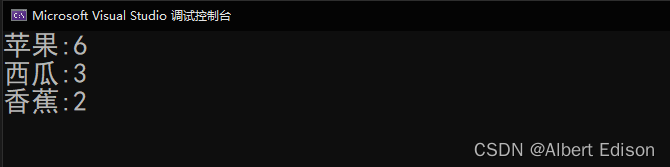
二叉查找树的应用 —— K模型和KV模型
文章目录前言1. K模型2. KV模型🍑 构建KV模型的树🍑 英汉词典🍑 统计水果出现的次数3. 总结前言 在上一篇文章中,我们进行了二叉查找树的实现(文章链接),那么今天主要探讨一下二叉查找树的应用…...
深度学习实战(11):使用多层感知器分类器对手写数字进行分类
使用多层感知器分类器对手写数字进行分类 1.简介 1.1 什么是多层感知器(MLP)? MLP 是一种监督机器学习 (ML) 算法,属于前馈人工神经网络 [1] 类。该算法本质上是在数据上进行训练以学习函数。给定一组特征和一个目标变量&#x…...

ThingsBoard-警报
1、使用 IoT 设备警报 ThingsBoard 提供了创建和管理与您的实体相关的警报的能力:设备、资产、客户等。例如,您可以将 ThingsBoard 配置为在温度传感器读数高于某个阈值时自动创建警报。当然,这是一个非常简化的案例,实际场景可能要复杂得多。 2、主要概念 下面让我们回…...
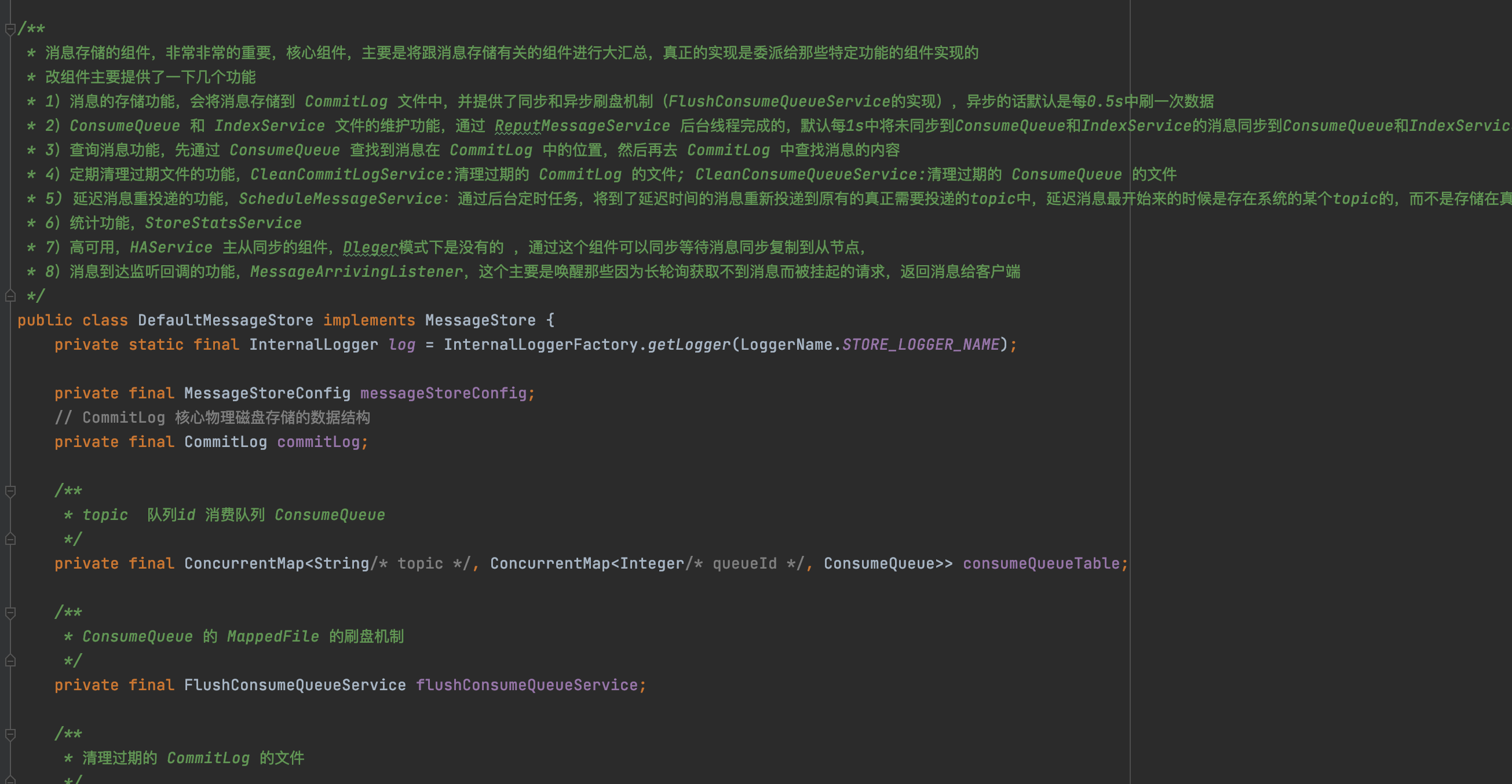
如何去阅读源码,我总结了18条心法
在聊如何去阅读源码之前,先来简单说一下为什么要去阅读源码,大致可分为以下几点原因:最直接的原因,就是面试需要,面试喜欢问源码,读完源码才可以跟面试官battle提升自己的编程水平,学习编程思想…...
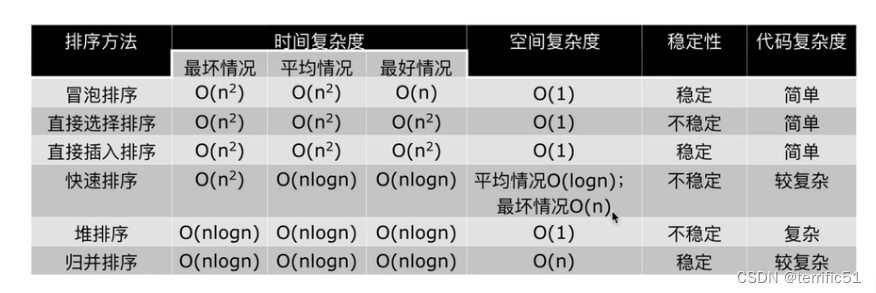
排序:归并排序
一、归并 li[2,4,5,7,//1,3,6,8]#归并的前提是必须两部分排好序 def merge(li,low,mid,high):ilowjmid1ltmp[]while i<mid and j<high: #只要左右两边都有数if li[i]<li[j]:ltmp.append(li[i])i1else:ltmp.append(li[j])j1#while执行完,肯定有一部分没数…...
Allegro172版本线到铜皮不按照设定值避让的原因和解决办法
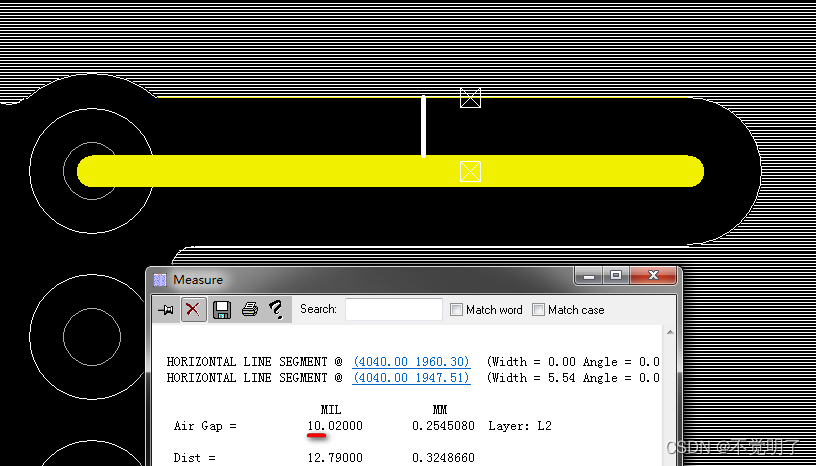
Allegro172版本线到铜皮不按照设定值避让的原因和解决办法 用Allegro做PCB设计的时候,有时会单独给某块铜皮附上线到铜皮额外再增加一个数值,如下图 在规则的基础上,额外再避让10mil 规则避让line到铜皮10.02mil 额外设置多避让10mil,避让的结果却是30.02mil,正确的是20.…...
小白该从哪方面入手学习大数据
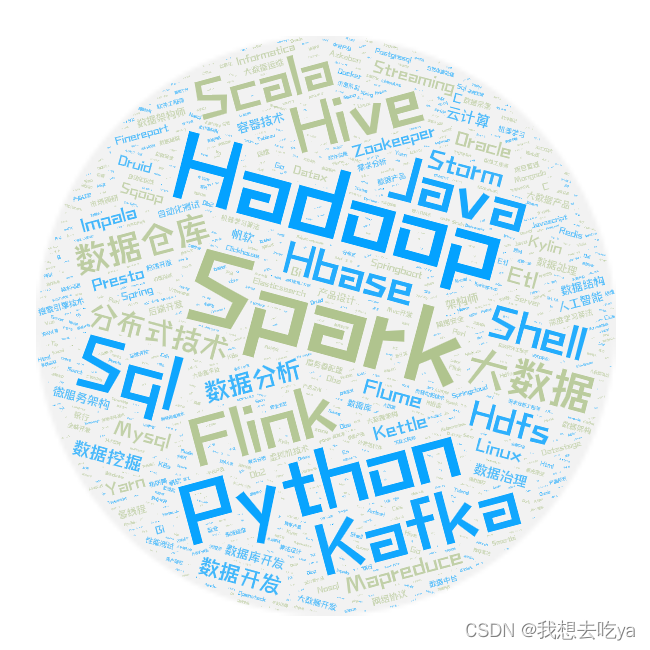
大数据本质上是海量数据。 以往的数据开发,需要一定的Java基础和工作经验,门槛高,入门难。 如果零基础入门数据开发行业的小伙伴,可以从Python语言入手。 Python语言简单易懂,适合零基础入门,在编程语言…...
尚医通(十)数据字典加Redis缓存 | MongoDB
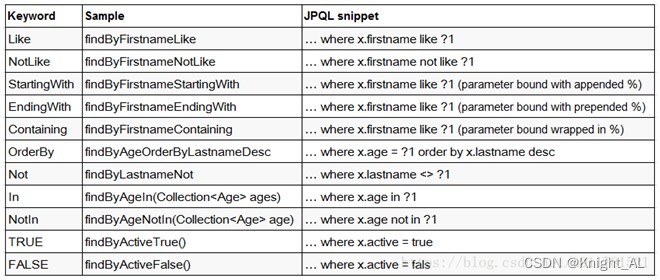
目录一、Redis介绍二、数据字典模块添加Redis缓存1、service_cmn模块,添加redis依赖2、service_cmn模块,添加Redis配置类3、在service_cmn模块,配置文件添加redis配置4、通过注解添加redis缓存5、查询数据字典列表添加Redis缓存6、bug&#x…...
为什么我们不再发明编程语言了?
上个世纪,数百种编程语言被发明出来,但是进入21世纪,当我们都进入互联网时代时,只剩那么寥寥几个了。 如果你翻一下TIOBE得编程语言排行榜,就会发现20年来,上蹿下跳的就是那几张老面孔:C , Java…...

预处理指令详解
预处理指令详解**1.预定义符号****2.#define****2.1 #define 定义标识符****2.2 #define 定义宏****2.3 #define 替换规则****2.4 #和##****#的作用****##的作用****2.5 带副作用的宏参数****2.6 宏和函数的对比****宏和函数对比图****2.7 命名约定****3.#undef**4.条件编译4.1…...
Redis
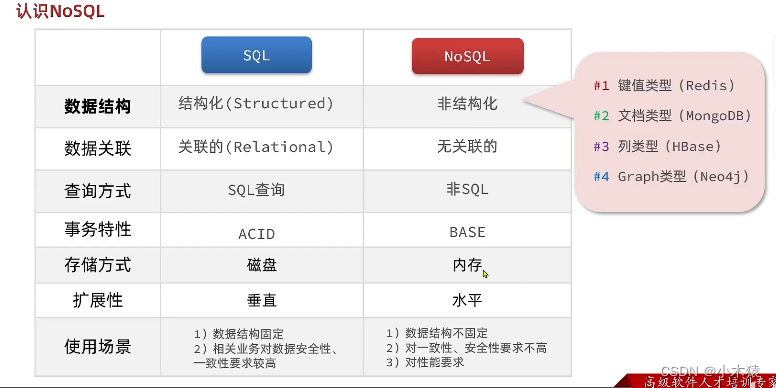
一.认识NoSQL 1.SQL 关系型数据库 结构化: 定义主键,无符号型数据等关联的:结构化表和表之间的关系通过外键进行关联,节省存储空间SQL查询:语法固定 SELECT id,name,age FROM tb_user WHERE id1 ACID 2.NoSQL 非关系型数据库 Re…...
Elasticsearch5.5.1 自定义评分插件开发
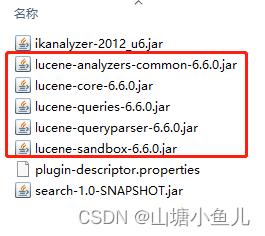
文本相似度插件开发,本文基于Elasticsearch5.5.1,Kibana5.5.1 下载地址为: Past Releases of Elastic Stack Software | Elastic 本地启动两个服务后,localhost:5601打开Kibana界面,点击devTools,效果图…...
4.4 序列化与反序列化
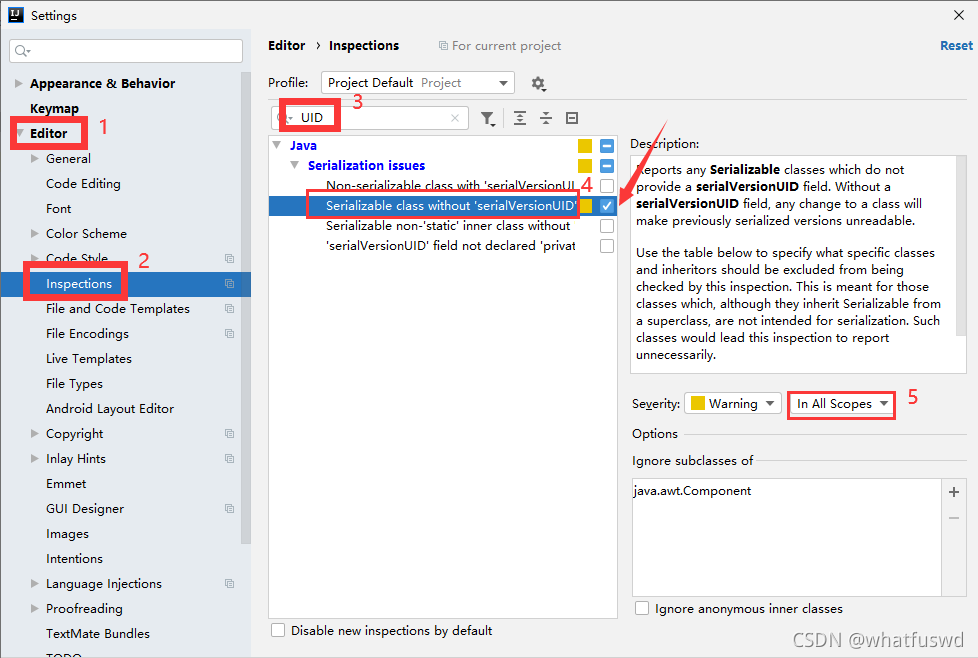
文章目录1.概述2.特点/应用场景3.涉及到的流对象4.代码实现序列化与反序列化4.1 步骤1:创建学生类Student24.2 步骤2:创建序列化测试类5.测试案例中常见的几种编译错误类型6.为什么反序列化版本号需要与序列化版本号一致?7.自动提示 生成UID …...

647. 回文子串 516. 最长回文子序列
647. 回文子串 方法一:动态规划 dp[i][j]:[i,j]范围的下标字符串s是否为回文子串 遍历字符串,每次判断s[i]与s[j]是否相等 ①若相等,j-i0 即单个字符串s[i],那么一定为回文子串,赋值为1 ②若相等,j-i1…...

实用小妙招
记录一些实用小妙招,都是收藏夹里收藏的各种文章,总结在一起,持续更新 实用小妙招LinuxUbuntu修改终端语言安装 Node.js (nvm)git 记住账号密码WSL迁移默认用户修改Linux Ubuntu 修改终端语言 apt update apt install -y language-pack-zh…...

别让猴子跳回背上
1.管理者的贡献来自于他们的判断力与影响力,而非他们所投入的个人时间与埋头苦干 2.管理者的绩效表现则是许多人群策群力的结果 3.管理者的时间管理: 老板占用的时间;组织占用的时间;自己占用的时间;外界占用的时间; 4.管理者的策略在于增加自己的时间,…...
数据结构 | 线性表
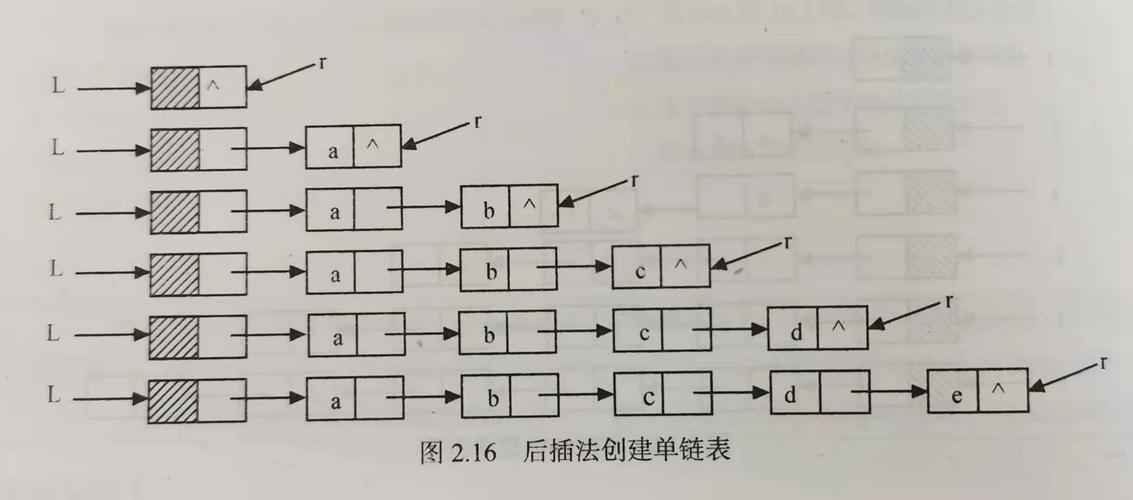
🔥Go for it!🔥 📝个人主页:按键难防 📫 如果文章知识点有错误的地方,请指正!和大家一起学习,一起进步👀 📖系列专栏:数据结构与算法 ὒ…...

Deepwalk深度游走算法
主要思想 Deepwalk是一种将随机游走和word2vec两种算法相结合的图结构数据的挖掘算法。该算法可以学习网络的隐藏信息,能够将图中的节点表示为一个包含潜在信息的向量, Deepwalk算法 该算法主要分为随机游走和生成表示向量两个部分,首先…...
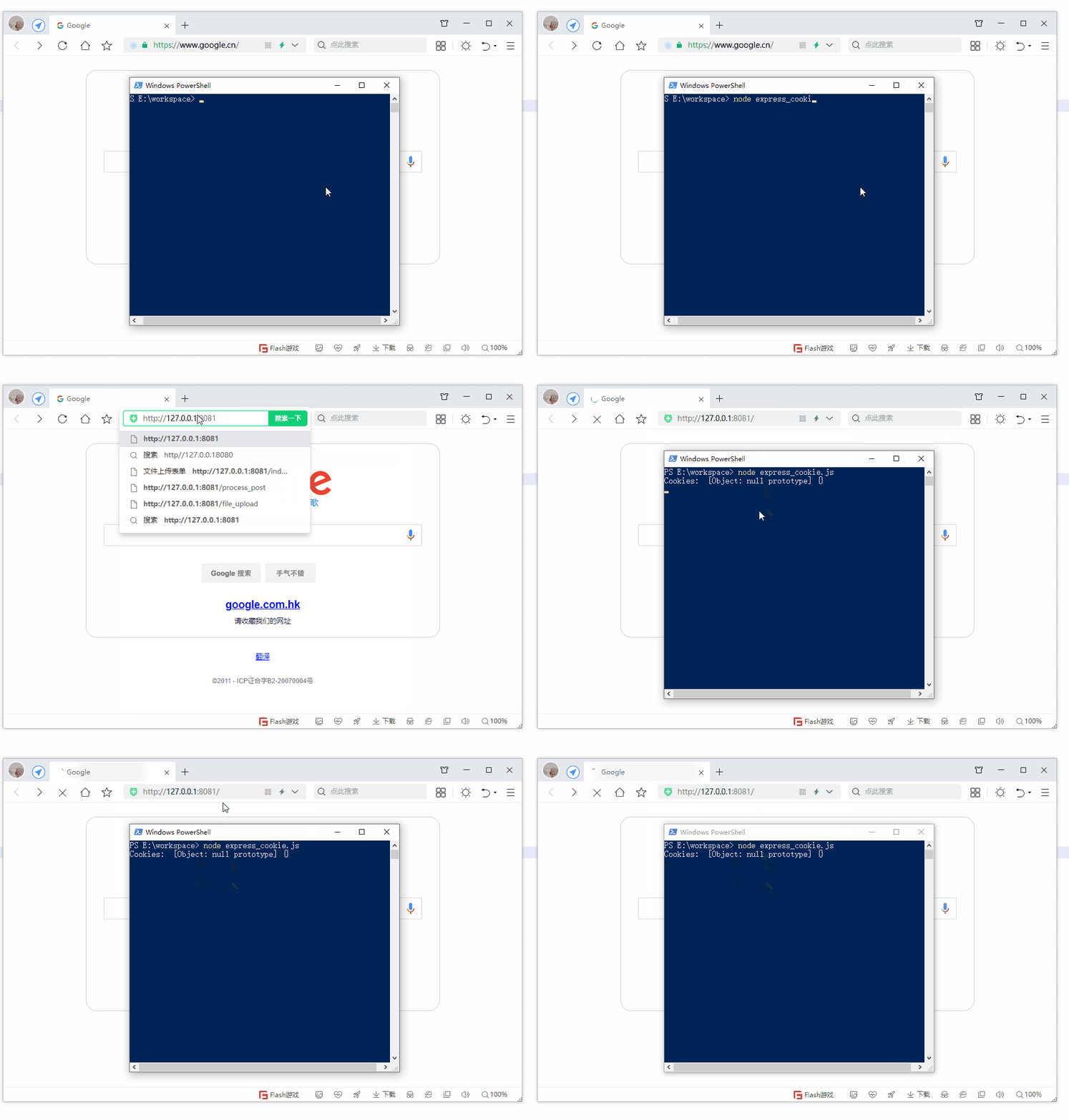
第19节 Node.js Express 框架
Express 是一个为Node.js设计的web开发框架,它基于nodejs平台。 Express 简介 Express是一个简洁而灵活的node.js Web应用框架, 提供了一系列强大特性帮助你创建各种Web应用,和丰富的HTTP工具。 使用Express可以快速地搭建一个完整功能的网站。 Expre…...
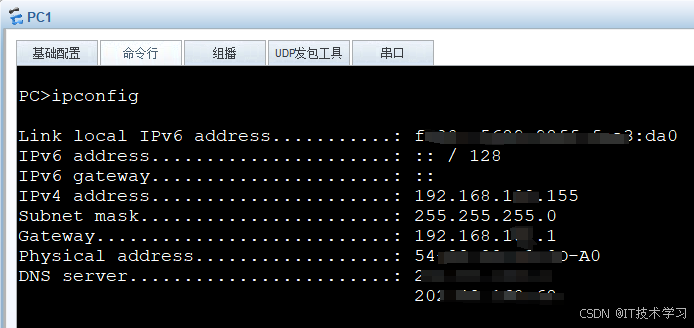
eNSP-Cloud(实现本地电脑与eNSP内设备之间通信)
说明: 想象一下,你正在用eNSP搭建一个虚拟的网络世界,里面有虚拟的路由器、交换机、电脑(PC)等等。这些设备都在你的电脑里面“运行”,它们之间可以互相通信,就像一个封闭的小王国。 但是&#…...
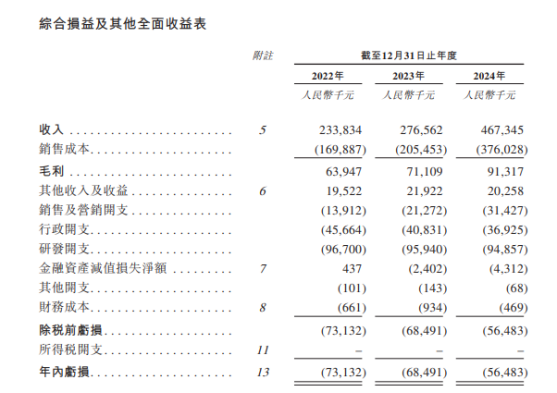
从深圳崛起的“机器之眼”:赴港乐动机器人的万亿赛道赶考路
进入2025年以来,尽管围绕人形机器人、具身智能等机器人赛道的质疑声不断,但全球市场热度依然高涨,入局者持续增加。 以国内市场为例,天眼查专业版数据显示,截至5月底,我国现存在业、存续状态的机器人相关企…...

重启Eureka集群中的节点,对已经注册的服务有什么影响
先看答案,如果正确地操作,重启Eureka集群中的节点,对已经注册的服务影响非常小,甚至可以做到无感知。 但如果操作不当,可能会引发短暂的服务发现问题。 下面我们从Eureka的核心工作原理来详细分析这个问题。 Eureka的…...
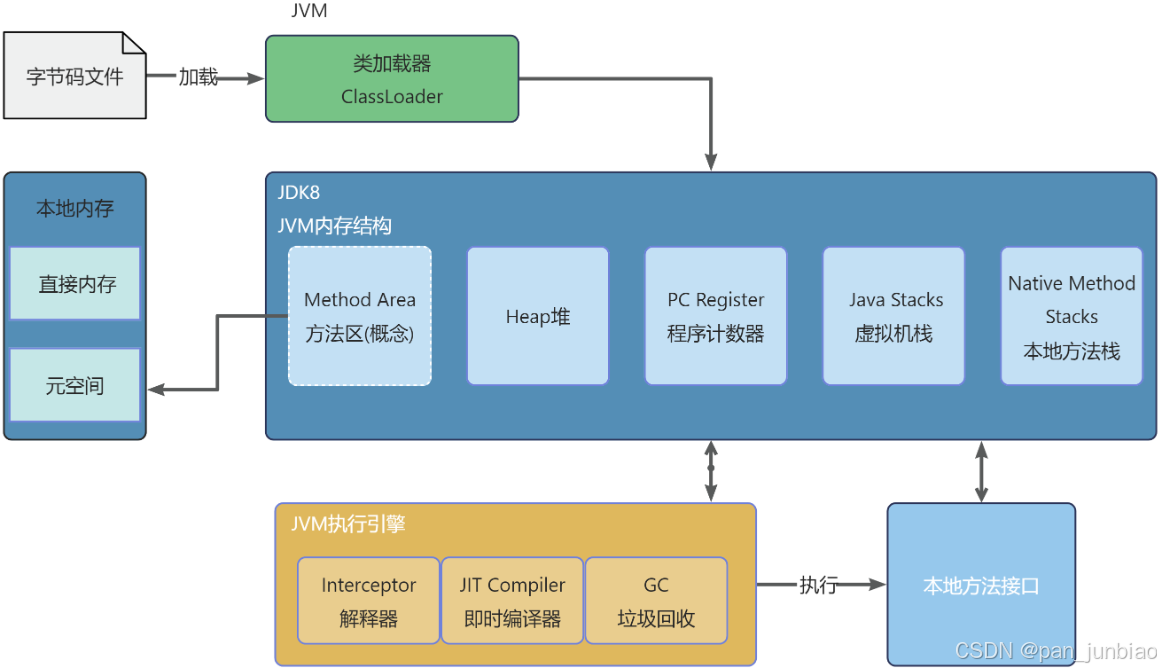
JVM虚拟机:内存结构、垃圾回收、性能优化
1、JVM虚拟机的简介 Java 虚拟机(Java Virtual Machine 简称:JVM)是运行所有 Java 程序的抽象计算机,是 Java 语言的运行环境,实现了 Java 程序的跨平台特性。JVM 屏蔽了与具体操作系统平台相关的信息,使得 Java 程序只需生成在 JVM 上运行的目标代码(字节码),就可以…...
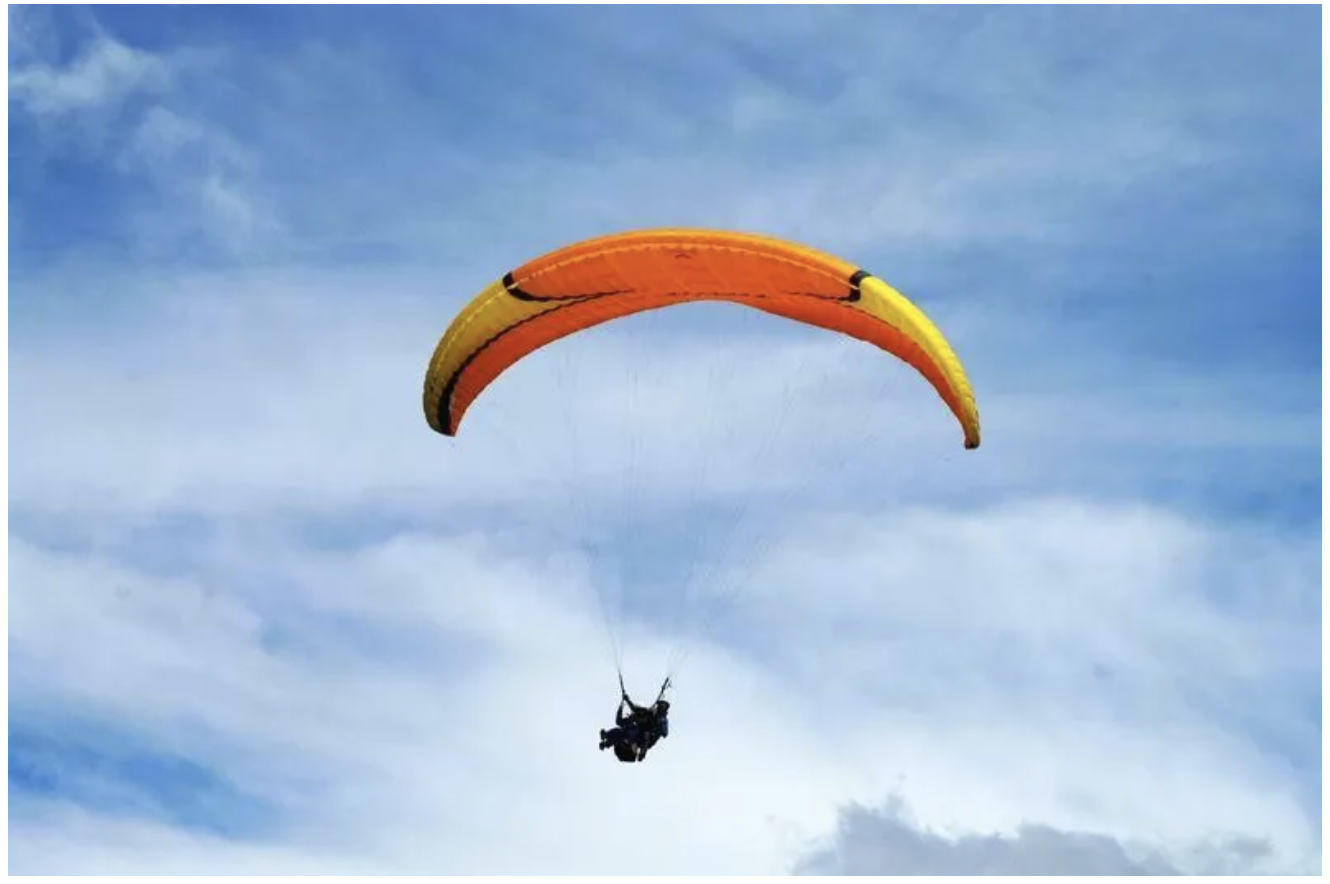
数学建模-滑翔伞伞翼面积的设计,运动状态计算和优化 !
我们考虑滑翔伞的伞翼面积设计问题以及运动状态描述。滑翔伞的性能主要取决于伞翼面积、气动特性以及飞行员的重量。我们的目标是建立数学模型来描述滑翔伞的运动状态,并优化伞翼面积的设计。 一、问题分析 滑翔伞在飞行过程中受到重力、升力和阻力的作用。升力和阻力与伞翼面…...

6️⃣Go 语言中的哈希、加密与序列化:通往区块链世界的钥匙
Go 语言中的哈希、加密与序列化:通往区块链世界的钥匙 一、前言:离区块链还有多远? 区块链听起来可能遥不可及,似乎是只有密码学专家和资深工程师才能涉足的领域。但事实上,构建一个区块链的核心并不复杂,尤其当你已经掌握了一门系统编程语言,比如 Go。 要真正理解区…...
基于单片机的宠物屋智能系统设计与实现(论文+源码)
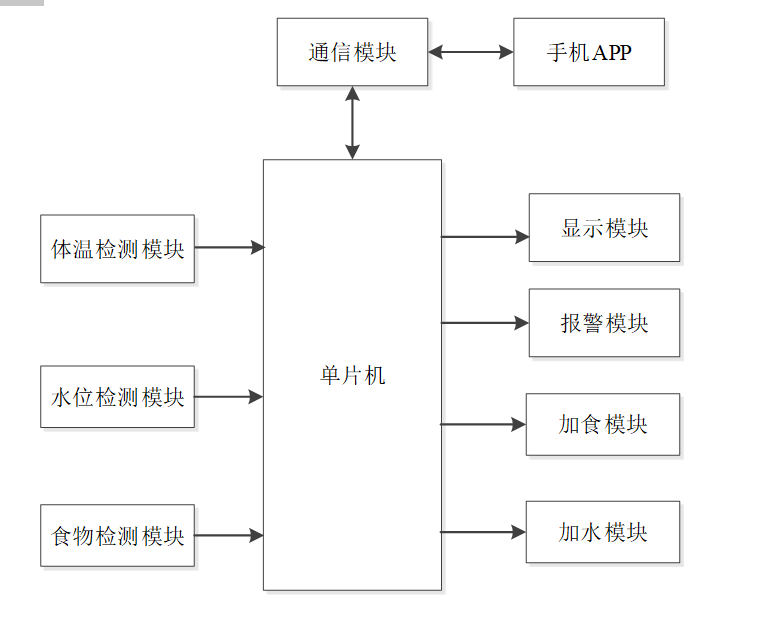
本设计基于单片机的宠物屋智能系统核心是实现对宠物生活环境及状态的智能管理。系统以单片机为中枢,连接红外测温传感器,可实时精准捕捉宠物体温变化,以便及时发现健康异常;水位检测传感器时刻监测饮用水余量,防止宠物…...

电脑桌面太单调,用Python写一个桌面小宠物应用。
下面是一个使用Python创建的简单桌面小宠物应用。这个小宠物会在桌面上游荡,可以响应鼠标点击,并且有简单的动画效果。 import tkinter as tk import random import time from PIL import Image, ImageTk import os import sysclass DesktopPet:def __i…...

MySQL体系架构解析(三):MySQL目录与启动配置全解析
MySQL中的目录和文件 bin目录 在 MySQL 的安装目录下有一个特别重要的 bin 目录,这个目录下存放着许多可执行文件。与其他系统的可执行文件类似,这些可执行文件都是与服务器和客户端程序相关的。 启动MySQL服务器程序 在 UNIX 系统中,用…...