
基于SSM的智慧养老平台设计与实现
末尾获取源码
开发语言:Java
Java开发工具:JDK1.8
后端框架:SSM
前端:采用JSP技术开发
数据库:MySQL5.7和Navicat管理工具结合
服务器:Tomcat8.5
开发软件:IDEA / Eclipse
是否Maven项目:是
目录
一、项目简介
二、系统功能
三、系统项目截图
管理员功能介绍
老人管理
公告管理
家人管理
公告类型管理
四、核心代码
登录相关
文件上传
封装
一、项目简介
现代经济快节奏发展以及不断完善升级的信息化技术,让传统数据信息的管理升级为软件存储,归纳,集中处理数据信息的管理方式。本智慧养老平台就是在这样的大环境下诞生,其可以帮助管理者在短时间内处理完毕庞大的数据信息,使用这种软件工具可以帮助管理人员提高事务处理效率,达到事半功倍的效果。此智慧养老平台利用当下成熟完善的SSM框架,使用跨平台的可开发大型商业网站的Java语言,以及最受欢迎的RDBMS应用软件之一的Mysql数据库进行程序开发。实现了老人基础数据的管理,家人管理,机构社区人员管理,服务管理,留言管理,公告信息的发布等功能。智慧养老平台的开发根据操作人员需要设计的界面简洁美观,在功能模块布局上跟同类型网站保持一致,程序在实现基本要求功能时,也为数据信息面临的安全问题提供了一些实用的解决方案。可以说该程序在帮助管理者高效率地处理工作事务的同时,也实现了数据信息的整体化,规范化与自动化。
二、系统功能

三、系统项目截图
管理员功能介绍
老人管理
此页面提供给管理员的功能有:新增老人,修改老人,删除老人。

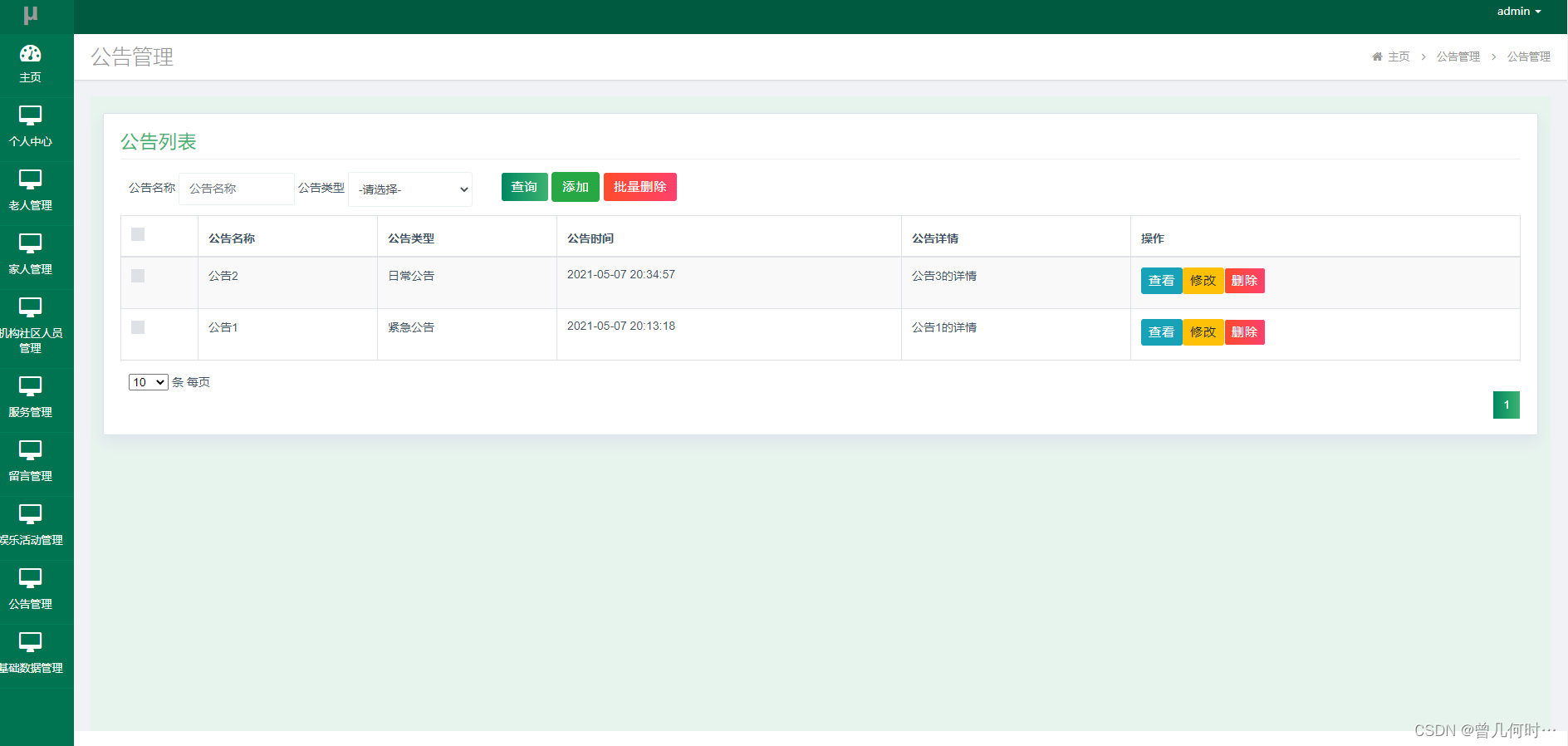
公告管理
此页面提供给管理员的功能有:新增公告.修改公告,删除公告。
家人管理
此页面提供给管理员的功能有:新增家人,修改家人,删除家人。

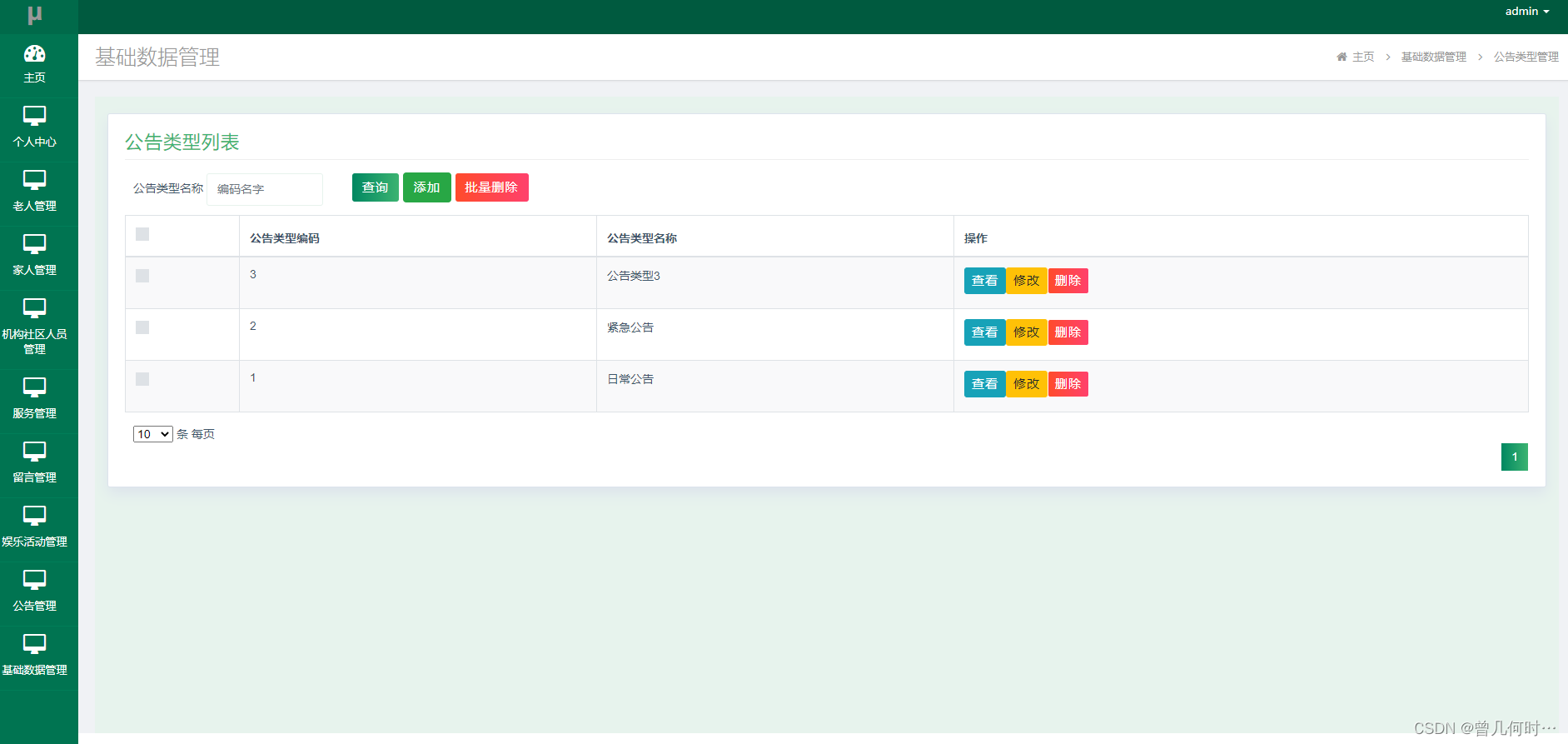
公告类型管理
此页面提供给管理员的功能有:新增公告类型,修改公告类型,删除公告类型。
四、核心代码
登录相关
package com.controller;import java.util.Arrays;
import java.util.Calendar;
import java.util.Date;
import java.util.Map;import javax.servlet.http.HttpServletRequest;import org.springframework.beans.factory.annotation.Autowired;
import org.springframework.stereotype.Controller;
import org.springframework.web.bind.annotation.GetMapping;
import org.springframework.web.bind.annotation.PathVariable;
import org.springframework.web.bind.annotation.PostMapping;
import org.springframework.web.bind.annotation.RequestBody;
import org.springframework.web.bind.annotation.RequestMapping;
import org.springframework.web.bind.annotation.RequestParam;
import org.springframework.web.bind.annotation.ResponseBody;
import org.springframework.web.bind.annotation.RestController;import com.annotation.IgnoreAuth;
import com.baomidou.mybatisplus.mapper.EntityWrapper;
import com.entity.TokenEntity;
import com.entity.UserEntity;
import com.service.TokenService;
import com.service.UserService;
import com.utils.CommonUtil;
import com.utils.MD5Util;
import com.utils.MPUtil;
import com.utils.PageUtils;
import com.utils.R;
import com.utils.ValidatorUtils;/*** 登录相关*/
@RequestMapping("users")
@RestController
public class UserController{@Autowiredprivate UserService userService;@Autowiredprivate TokenService tokenService;/*** 登录*/@IgnoreAuth@PostMapping(value = "/login")public R login(String username, String password, String captcha, HttpServletRequest request) {UserEntity user = userService.selectOne(new EntityWrapper<UserEntity>().eq("username", username));if(user==null || !user.getPassword().equals(password)) {return R.error("账号或密码不正确");}String token = tokenService.generateToken(user.getId(),username, "users", user.getRole());return R.ok().put("token", token);}/*** 注册*/@IgnoreAuth@PostMapping(value = "/register")public R register(@RequestBody UserEntity user){
//    	ValidatorUtils.validateEntity(user);if(userService.selectOne(new EntityWrapper<UserEntity>().eq("username", user.getUsername())) !=null) {return R.error("用户已存在");}userService.insert(user);return R.ok();}/*** 退出*/@GetMapping(value = "logout")public R logout(HttpServletRequest request) {request.getSession().invalidate();return R.ok("退出成功");}/*** 密码重置*/@IgnoreAuth@RequestMapping(value = "/resetPass")public R resetPass(String username, HttpServletRequest request){UserEntity user = userService.selectOne(new EntityWrapper<UserEntity>().eq("username", username));if(user==null) {return R.error("账号不存在");}user.setPassword("123456");userService.update(user,null);return R.ok("密码已重置为:123456");}/*** 列表*/@RequestMapping("/page")public R page(@RequestParam Map<String, Object> params,UserEntity user){EntityWrapper<UserEntity> ew = new EntityWrapper<UserEntity>();PageUtils page = userService.queryPage(params, MPUtil.sort(MPUtil.between(MPUtil.allLike(ew, user), params), params));return R.ok().put("data", page);}/*** 列表*/@RequestMapping("/list")public R list( UserEntity user){EntityWrapper<UserEntity> ew = new EntityWrapper<UserEntity>();ew.allEq(MPUtil.allEQMapPre( user, "user")); return R.ok().put("data", userService.selectListView(ew));}/*** 信息*/@RequestMapping("/info/{id}")public R info(@PathVariable("id") String id){UserEntity user = userService.selectById(id);return R.ok().put("data", user);}/*** 获取用户的session用户信息*/@RequestMapping("/session")public R getCurrUser(HttpServletRequest request){Long id = (Long)request.getSession().getAttribute("userId");UserEntity user = userService.selectById(id);return R.ok().put("data", user);}/*** 保存*/@PostMapping("/save")public R save(@RequestBody UserEntity user){
//    	ValidatorUtils.validateEntity(user);if(userService.selectOne(new EntityWrapper<UserEntity>().eq("username", user.getUsername())) !=null) {return R.error("用户已存在");}userService.insert(user);return R.ok();}/*** 修改*/@RequestMapping("/update")public R update(@RequestBody UserEntity user){
//        ValidatorUtils.validateEntity(user);userService.updateById(user);//全部更新return R.ok();}/*** 删除*/@RequestMapping("/delete")public R delete(@RequestBody Long[] ids){userService.deleteBatchIds(Arrays.asList(ids));return R.ok();}
}
文件上传
package com.controller;import java.io.File;
import java.io.FileNotFoundException;
import java.io.IOException;
import java.util.Arrays;
import java.util.Date;
import java.util.HashMap;
import java.util.List;
import java.util.Map;
import java.util.Random;
import java.util.UUID;import org.apache.commons.io.FileUtils;
import org.apache.commons.lang3.StringUtils;
import org.springframework.beans.factory.annotation.Autowired;
import org.springframework.http.HttpHeaders;
import org.springframework.http.HttpStatus;
import org.springframework.http.MediaType;
import org.springframework.http.ResponseEntity;
import org.springframework.util.ResourceUtils;
import org.springframework.web.bind.annotation.PathVariable;
import org.springframework.web.bind.annotation.RequestBody;
import org.springframework.web.bind.annotation.RequestMapping;
import org.springframework.web.bind.annotation.RequestParam;
import org.springframework.web.bind.annotation.RestController;
import org.springframework.web.multipart.MultipartFile;import com.annotation.IgnoreAuth;
import com.baomidou.mybatisplus.mapper.EntityWrapper;
import com.entity.ConfigEntity;
import com.entity.EIException;
import com.service.ConfigService;
import com.utils.R;/*** 上传文件映射表*/
@RestController
@RequestMapping("file")
@SuppressWarnings({"unchecked","rawtypes"})
public class FileController{@Autowiredprivate ConfigService configService;/*** 上传文件*/@RequestMapping("/upload")public R upload(@RequestParam("file") MultipartFile file,String type) throws Exception {if (file.isEmpty()) {throw new EIException("上传文件不能为空");}String fileExt = file.getOriginalFilename().substring(file.getOriginalFilename().lastIndexOf(".")+1);File path = new File(ResourceUtils.getURL("classpath:static").getPath());if(!path.exists()) {path = new File("");}File upload = new File(path.getAbsolutePath(),"/upload/");if(!upload.exists()) {upload.mkdirs();}String fileName = new Date().getTime()+"."+fileExt;File dest = new File(upload.getAbsolutePath()+"/"+fileName);file.transferTo(dest);FileUtils.copyFile(dest, new File("C:\\Users\\Desktop\\jiadian\\springbootl7own\\src\\main\\resources\\static\\upload"+"/"+fileName));if(StringUtils.isNotBlank(type) && type.equals("1")) {ConfigEntity configEntity = configService.selectOne(new EntityWrapper<ConfigEntity>().eq("name", "faceFile"));if(configEntity==null) {configEntity = new ConfigEntity();configEntity.setName("faceFile");configEntity.setValue(fileName);} else {configEntity.setValue(fileName);}configService.insertOrUpdate(configEntity);}return R.ok().put("file", fileName);}/*** 下载文件*/@IgnoreAuth@RequestMapping("/download")public ResponseEntity<byte[]> download(@RequestParam String fileName) {try {File path = new File(ResourceUtils.getURL("classpath:static").getPath());if(!path.exists()) {path = new File("");}File upload = new File(path.getAbsolutePath(),"/upload/");if(!upload.exists()) {upload.mkdirs();}File file = new File(upload.getAbsolutePath()+"/"+fileName);if(file.exists()){/*if(!fileService.canRead(file, SessionManager.getSessionUser())){getResponse().sendError(403);}*/HttpHeaders headers = new HttpHeaders();headers.setContentType(MediaType.APPLICATION_OCTET_STREAM);    headers.setContentDispositionFormData("attachment", fileName);    return new ResponseEntity<byte[]>(FileUtils.readFileToByteArray(file),headers, HttpStatus.CREATED);}} catch (IOException e) {e.printStackTrace();}return new ResponseEntity<byte[]>(HttpStatus.INTERNAL_SERVER_ERROR);}}
封装
package com.utils;import java.util.HashMap;
import java.util.Map;/*** 返回数据*/
public class R extends HashMap<String, Object> {private static final long serialVersionUID = 1L;public R() {put("code", 0);}public static R error() {return error(500, "未知异常,请联系管理员");}public static R error(String msg) {return error(500, msg);}public static R error(int code, String msg) {R r = new R();r.put("code", code);r.put("msg", msg);return r;}public static R ok(String msg) {R r = new R();r.put("msg", msg);return r;}public static R ok(Map<String, Object> map) {R r = new R();r.putAll(map);return r;}public static R ok() {return new R();}public R put(String key, Object value) {super.put(key, value);return this;}
}
相关文章:
基于SSM的智慧养老平台设计与实现
末尾获取源码 开发语言:Java Java开发工具:JDK1.8 后端框架:SSM 前端:采用JSP技术开发 数据库:MySQL5.7和Navicat管理工具结合 服务器:Tomcat8.5 开发软件:IDEA / Eclipse 是否Maven项目&#x…...

图像生成colab集合
不过colab会做检测,一般文生图算法是基本很难跑起来的。 https://github.com/camenduruhttps://github.com/camenduru这哥们有很多colab。 1.stable-diffusion-webui https://colab.research.google.com/drive/1Iy-xW9t1-OQWhb0hNxueGij8phCyluOh#scrollTow3KNZ-…...
SpringBoot整合Quartz示例
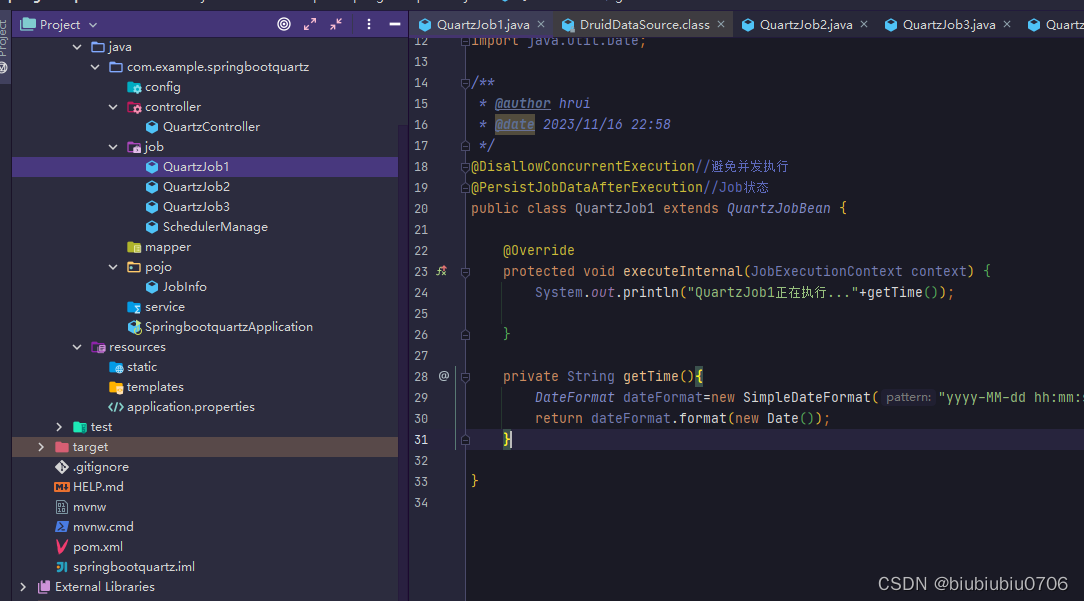
数据表 加不加无所谓,如果需要重启服务器后重新执行所有JOB就把sql加上 如果不加表 将application.properties中的quartz数据库配置去掉 自己执行自己的逻辑来就好,大不了每次启动之后重新加载自己的逻辑 链接:https://pan.baidu.com/s/1KqOPYMfI4eHcEMxt5Bmt…...

物联网AI MicroPython学习之语法 I2C总线
学物联网,来万物简单IoT物联网!! I2C 介绍 模块功能: I2C Master设备驱动 接口说明 I2C - 构建硬件I2C对象 函数原型:I2C(id, scl, sda, freq)参数说明: 参数类型必选参数?说明idintYI2C外设ÿ…...

RocketMQ的适用场景有哪些?
程序员的公众号:源1024,获取更多资料,无加密无套路! 最近整理了一波电子书籍资料,包含《Effective Java中文版 第2版》《深入JAVA虚拟机》,《重构改善既有代码设计》,《MySQL高性能-第3版》&…...

ubuntu启动转圈,无法进入登录界面
安装卸载搜狗拼音输入法相关东西后出现启动转圈问题 当前使用的是lightdm,按网上说去切换成gdm3 (1)要在刚进入系统没显示圈圈和ubuntu时长按shift进入gurb。 (2)选择Ubuntu高级选项,enter (3)…...
MATLAB 机械臂逆运动学进行轨迹控制建模
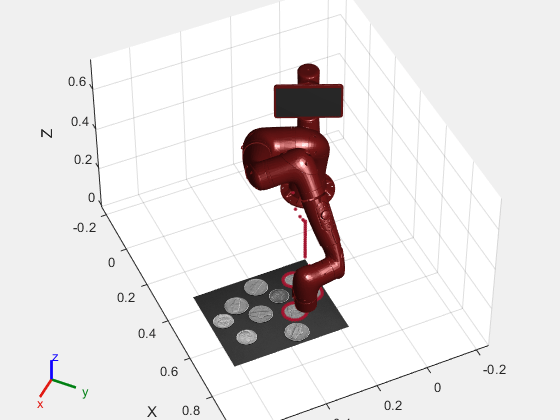
系列文章目录 文章目录 系列文章目录前言一、模型概览1.1 Target Pose Generation 目标姿势生成1.2 Inverse Kinematics 逆运动学1.3 Manipulator Dynamics 机械手动力学1.4 Pose Measurement 姿势测量 二、机械手定义三、生成航点四、模型设置五、模拟机械手运动六、将结果可视…...
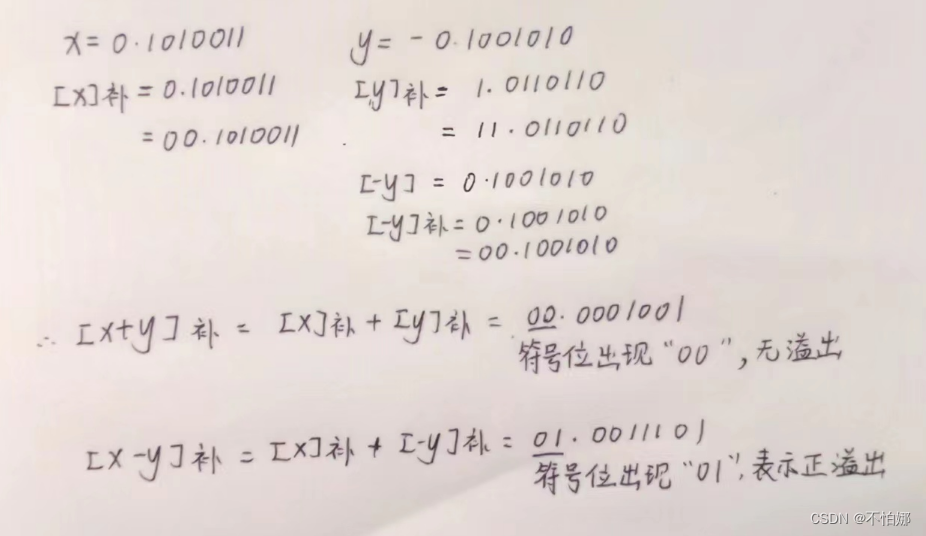
【计算机组成原理】定点加法、减法运算
系列文章目录 绘制出纯整数(1字节)和纯小数的数轴 将十进制数20.59375,转换成754标准的32位浮点数的二进制存储格式 用双符号位补码求 x 0.1010011, y -0.1001010, 分别求出 x y, x - y,并判溢出...

scp 跨服务器传输命令,把一个服务器上的文件复制传到当前服务器目录下
要将一个服务器上的文件复制到当前服务器的目录下,可以使用 scp 命令进行跨服务器传输。以下是具体的命令格式: 复制 scp usernamesource_server:/path/to/source_file destination_directory username: 远程服务器的用户名。 source_server: 远程服务…...

【python基础】用户输入和while循环详解
文章目录 一. 函数input()的工作原理1. 编写清晰的程序2. 使用int()来获取数值输入3. 求模运算符 二. while循环简介1. 使用while循环2. 让用户选择何时退出3. 使用标志4. 使用break退出循环5. 在循环中使用continue 三. 使用while循环处理列表和字典1. 在列表之间移动元素2. 删…...
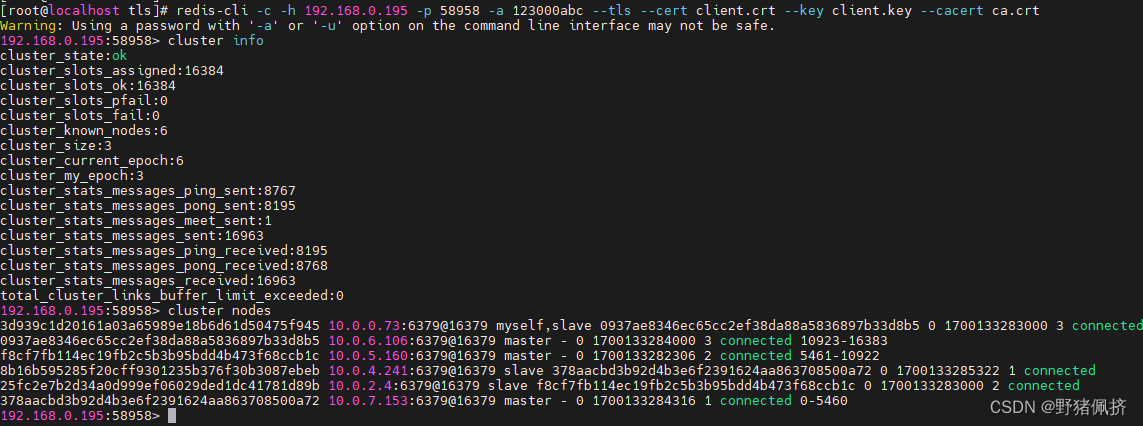
k8s-部署Redis-cluster(TLS)
helm pull bitnami/redis-cluster v8.3.8拉取源码生成证书 git clone https://github.com/redis/redis.git #文档 https://redis.io/docs/management/security/encryption/#getting-started生成你的TLS证书用官网的工具生成 1 Run ./utils/gen-test-certs.sh 生成根CA和服务…...
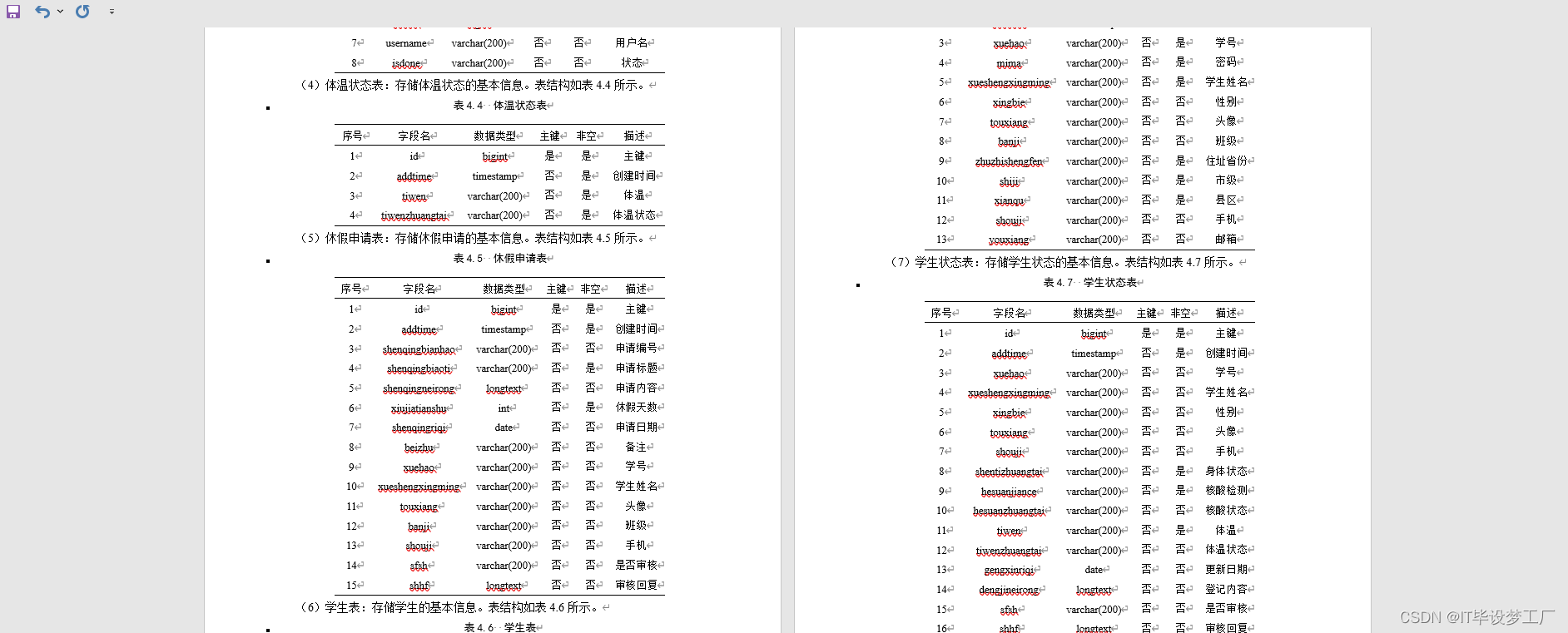
计算机毕业设计选题推荐-幼儿园管理微信小程序/安卓APP-项目实战
✨作者主页:IT毕设梦工厂✨ 个人简介:曾从事计算机专业培训教学,擅长Java、Python、微信小程序、Golang、安卓Android等项目实战。接项目定制开发、代码讲解、答辩教学、文档编写、降重等。 ☑文末获取源码☑ 精彩专栏推荐⬇⬇⬇ Java项目 Py…...

ElasticStack日志分析平台-ES 集群、Kibana与Kafka
一、Elasticsearch 1、介绍: Elasticsearch 是一个开源的分布式搜索和分析引擎,Logstash 和 Beats 收集的数据可以存储在 Elasticsearch 中进行搜索和分析。 Elasticsearch为所有类型的数据提供近乎实时的搜索和分析:一旦数据被索引&#…...
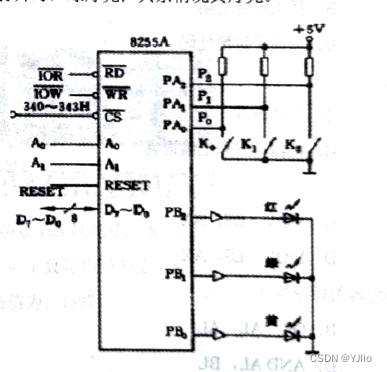
微机原理_10
一、单项选择题(本大题共15小题,每小题3分,共45分。在每小题给出的四个备选项中,选出一个正确的答案。) 1,将二进制数110110.01转换为十六进制为() A. 66.1H B. 36.4H C. 66.4 D. 36.2 2,一台计算机的字长是4个字节,含义是() A.能处理的最大…...
第八章:SpringMVC程序开发)
(SpringBoot)第八章:SpringMVC程序开发
文章目录 一:Spring MVC概述(1)什么是Spring MVC(2)什么是MVC(3)Spring MVC和SpringBoot(4)如何学习Spring MVC二:Spring MVC创建和连接(1)Spring MVC项目创建(2)@RequestMapping注解三:Spring MVC处理参数(1)传递简单参数(2)传递对象(3)@RequestParam:重…...
)
openssl + 3DES开发实例(linux)
文章目录 一、3DES介绍3DES 的特点:3DES 加密的步骤:3DES 的应用场景: 二、3DES原理1. DES 原理回顾:2. 3DES 原理:3. 3DES 的加密流程: 三、openssl 3DES开发实例 一、3DES介绍 3DES(Triple …...

遵循开源软件安全路线图
毫无疑问,开源软件对于满足联邦任务所需的开发和创新至关重要,因此其安全性至关重要。 OSS(运营支持系统) 支持联邦政府内的每个关键基础设施部门。 联邦政府认识到这一点,并正在采取措施优先考虑 OSS 安全ÿ…...

294_C++_
1、全部大致解析: struct alarminfo_t {unsigned int alarmid;INTF_ALARM_INFO_S pAlarm; };typedef enum{INTF_IO_ALARM_E= 0, //I/O探头告警开始INTF_MOTION_ALARM_E, //移动侦测告警开始INTF_AI_ALARM_E,...
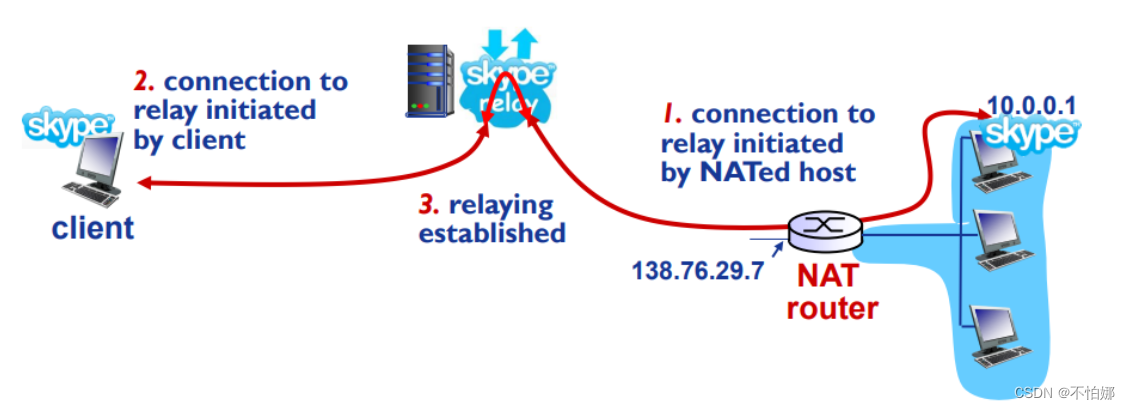
【计算机网络笔记】网络地址转换(NAT)
系列文章目录 什么是计算机网络? 什么是网络协议? 计算机网络的结构 数据交换之电路交换 数据交换之报文交换和分组交换 分组交换 vs 电路交换 计算机网络性能(1)——速率、带宽、延迟 计算机网络性能(2)…...
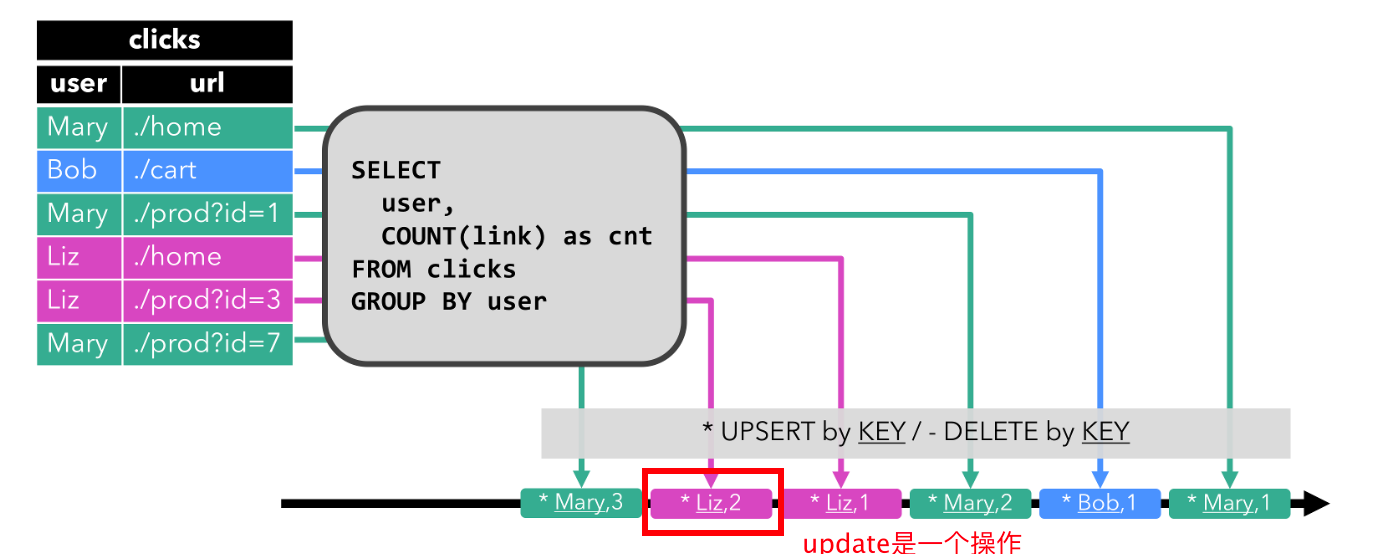
【flink理论】动态表:关系查询处理流的思路:连续查询、状态维护;表转换为流需要编码编码
文章目录 一. 使用关系查询处理流的讨论二. 动态表 & 连续查询(Continuous Query)三. 在流上定义表1. 连续查询2. 查询限制2.1. 维护状态2.2. 计算更新 四. 表到流的转换1. Append-only 流2. Retract 流3. Upsert 流 本文主要讨论了: 讨论通过关系查询处理无界流…...

Steam成就数据自主管理:技术深度解析与实战应用
Steam成就数据自主管理:技术深度解析与实战应用 【免费下载链接】SteamAchievementManager A manager for game achievements in Steam. 项目地址: https://gitcode.com/gh_mirrors/st/SteamAchievementManager 你是否曾因某个隐藏成就的触发条件过于苛刻而反…...

Kindle电子书批量下载与DRM去除终极指南:打造你的个人数字图书馆
Kindle电子书批量下载与DRM去除终极指南:打造你的个人数字图书馆 【免费下载链接】Kindle_download_helper Download all your kindle books script. 项目地址: https://gitcode.com/GitHub_Trending/ki/Kindle_download_helper Kindle电子书下载助手是一款强…...

Grafika全帧矩形绘制优化:5个提升OpenGL ES性能的终极技巧
Grafika全帧矩形绘制优化:5个提升OpenGL ES性能的终极技巧 【免费下载链接】grafika Grafika test app 项目地址: https://gitcode.com/gh_mirrors/graf/grafika Grafika是一款专注于Android平台OpenGL ES图形渲染测试的开源项目,通过其FullFrame…...

从Postman到真机:我的Coze+微信小程序多模态对话开发踩坑全记录
从Postman到真机:我的Coze微信小程序多模态对话开发踩坑全记录 作为一名长期关注对话式AI落地的开发者,当Coze平台推出全新API时,我立刻意识到这是将多模态对话能力集成到微信小程序的绝佳机会。但没想到从Postman测试到真机运行,…...

如何快速上手DRG存档编辑器:深岩银河玩家的终极修改指南
如何快速上手DRG存档编辑器:深岩银河玩家的终极修改指南 【免费下载链接】DRG-Save-Editor Rock and stone! 项目地址: https://gitcode.com/gh_mirrors/dr/DRG-Save-Editor 还在为《深岩银河》中漫长的资源收集而烦恼?想要快速解锁所有职业的高级…...

达摩院AI春联模型部署案例:教育局春节安全宣传标语智能延展生成
达摩院AI春联模型部署案例:教育局春节安全宣传标语智能延展生成 春节将至,对于各地教育局来说,除了要组织好假期安排,还有一项重要工作——开展春节安全宣传。传统的宣传方式,比如张贴安全标语、发放宣传单࿰…...
✅)
计算机毕业设计:豆果美食菜谱数据分析与可视化系统 Django框架 爬虫 机器学习 数据分析 可视化 食物 食品 菜谱(建议收藏)✅
博主介绍:✌全网粉丝10W,前互联网大厂软件研发、集结硕博英豪成立工作室。专注于计算机相关专业项目实战6年之久,选择我们就是选择放心、选择安心毕业✌ > 🍅想要获取完整文章或者源码,或者代做,拉到文章底部即可与…...

Python实战:打造多功能二维码与条形码处理工具
1. 为什么需要二维码与条形码处理工具 在超市结账时收银员扫描商品条形码的"嘀"声,或是用手机扫描餐厅桌角的二维码点餐,这些场景已经成为我们日常生活的一部分。作为开发者,我们经常需要在自己的项目中集成这类功能。比如电商平台…...

腰痛伴随臀部疼,不是单纯腰突,多是梨状肌综合征混淆病情
腰痛连着臀部疼,甚至放射到大腿后侧,很多人直接当成腰椎间盘突出治疗,按摩、牵引做了一大堆,症状却没有缓解,反而越来越重,其实这种疼痛,大概率是梨状肌综合征在作祟,和腰突症状相似…...

小白也能用的Qwen3.5-9B:开箱即用,解锁AI图文视频新玩法
小白也能用的Qwen3.5-9B:开箱即用,解锁AI图文视频新玩法 1. 为什么选择Qwen3.5-9B? Qwen3.5-9B是一款强大的多模态AI模型,专为处理文本、图像和视频内容而设计。相比传统AI模型,它有三个突出优势: 多模态…...