
04 Android基础--RelativeLayout
04 Android基础--RelativeLayout
- 什么是RelativeLayout?
- RelativeLayout的常见用法:
什么是RelativeLayout?
相对布局(RelativeLayout)是一种根据
父容器和兄弟控件作为参照来确定控件位置的布局方式。
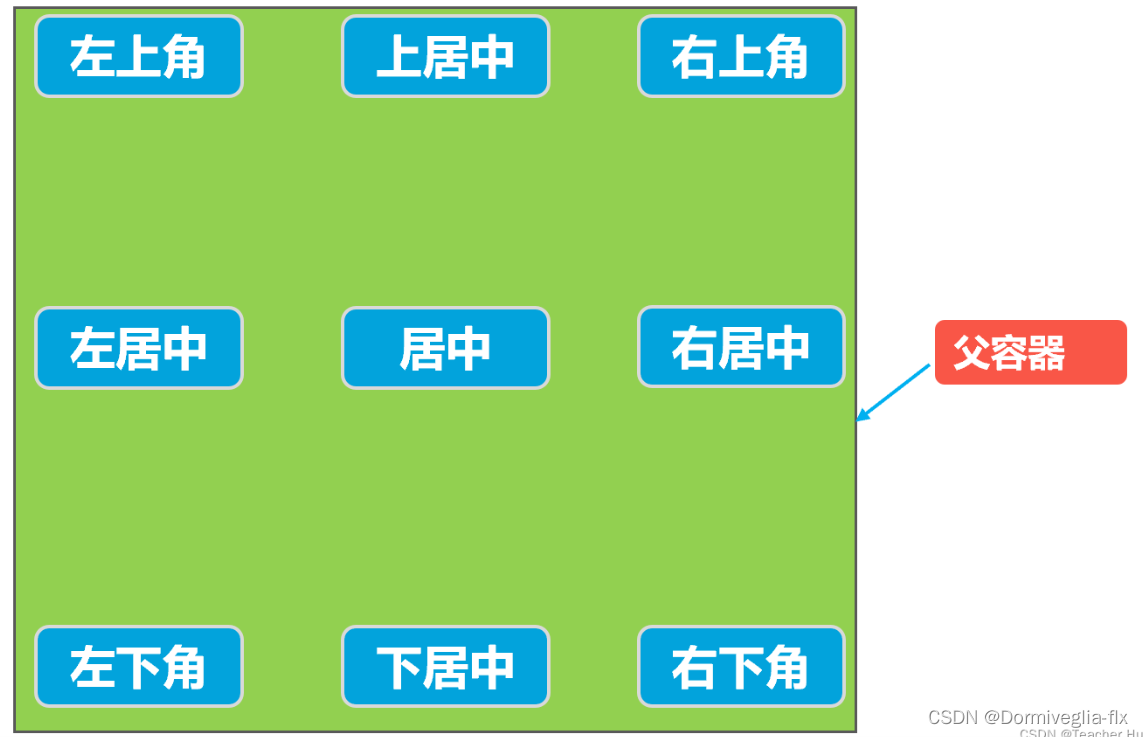
根据父容器定位
在相对布局中,可以通过以下的属性让的组合让控件处于父容器左上角、右上角、左下角、右下角、上下左右居中,正居中等九个位置。属性如下:
- android:layout_alignParentLeft=“true” 父容器左边
- android:layout_alignParentRight=“true” 父容器右边
- android:layout_alignParentTop=“true” 父容器顶部
- android:layout_alignParentBottom=“true” 父容器底部
- android:layout_centerHorizontal=“true” 水平方向居中
- android:layout_centerVertical=“true” 垂直方向居中
- android:layout_centerInParent=“true” 水平垂直都居中
根据兄弟控件定位
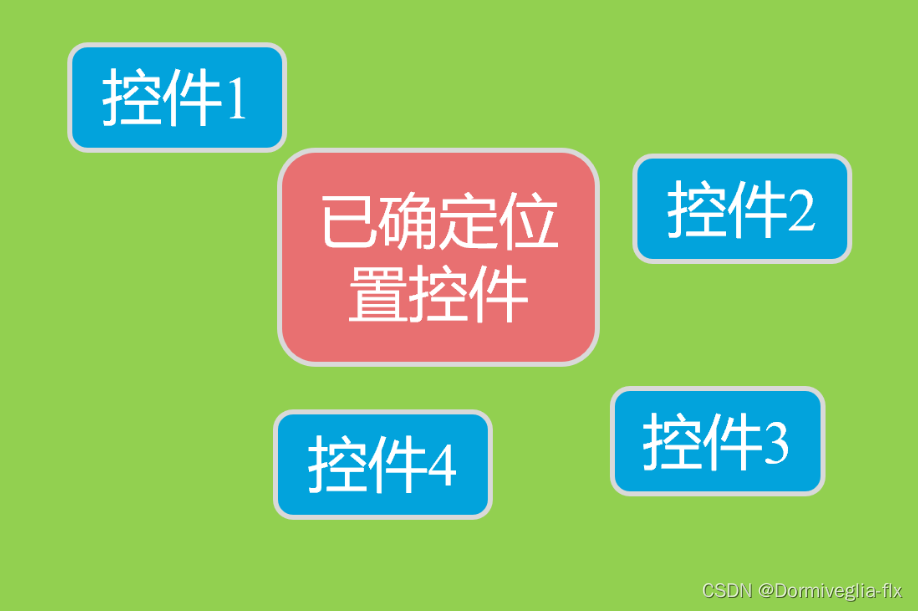
在相对布局中,还支持通过已确定位置的控件作为参考来确定其他控件的位置,以下的属性让的组合让控件处于另外控件左上角、右上角、左下角、右下角、正上方、正下方、正左方、正右方等位置。属性如下:
- android:layout_toLeftOf=“@+id/button1” 在button1控件左方
- android:layout_toRightOf=“@+id/button1” 在button1控件右方
- android:layout_above=“@+id/button1” 在button1控件上方
- android:layout_below=“@+id/button1” 在button1控件下方
- android:layout_alignLeft=“@+id/button1” 与button1控件左边平齐
- android:layout_alignRight=“@+id/button1” 与button1控件右边平齐
- android:layout_alignTop=“@+id/button1” 与button1控件上边平齐
- android:layout_alignBottom=“@+id/button1” 与button1控件下边平齐
RelativeLayout的常见用法:
第一种情况:常用的列表页布局:
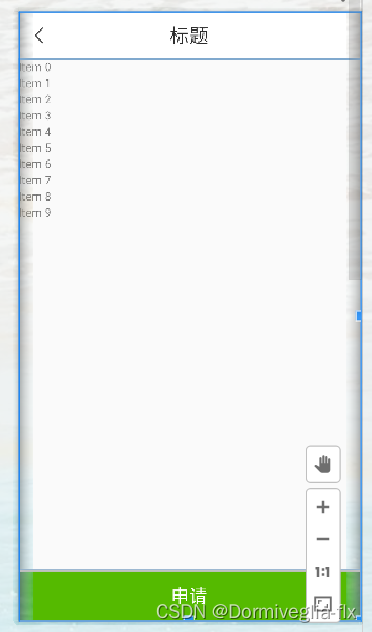
<RelativeLayoutandroid:layout_width="match_parent"android:layout_height="match_parent">// 标题<includeandroid:id="@+id/title_layout"layout="@layout/title_layout"/>// 1.android:layout_below="@+id/title_layout";这个布局在title的下方// 2.android:layout_marginBottom="60dp";指定该属性所在控件距下部最近控件的最小值;<androidx.swiperefreshlayout.widget.SwipeRefreshLayoutandroid:id="@+id/sw_layout"android:layout_width="match_parent"android:layout_height="match_parent"android:layout_below="@+id/title_layout"android:layout_marginBottom="60dp"><androidx.recyclerview.widget.RecyclerViewandroid:id="@+id/recyclerview"android:layout_width="match_parent"android:layout_height="match_parent" /></androidx.swiperefreshlayout.widget.SwipeRefreshLayout>// 3.android:layout_alignParentBottom="true";在父容器底部<LinearLayoutandroid:layout_alignParentBottom="true"><Buttonandroid:id="@+id/material_apply"android:layout_width="match_parent"android:layout_height="match_parent"/></LinearLayout></RelativeLayout>
第二种情况:常用的搜索抽屉布局:
搜索栏有很多,有滚动条,重置与搜索按钮在最底部。
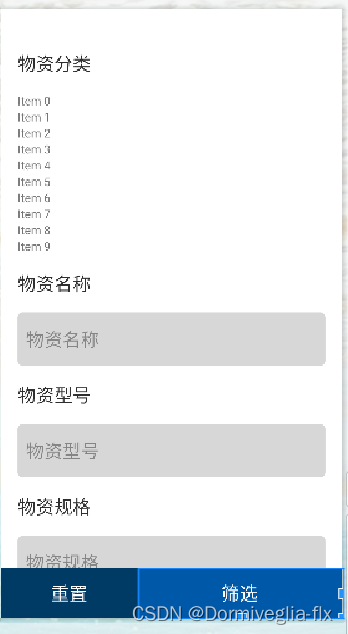
<RelativeLayout>// 1. 添加滚动条<androidx.core.widget.NestedScrollViewandroid:layout_width="match_parent"android:layout_height="match_parent"android:paddingHorizontal="20dp">// 2. 搜索栏需要 占满全屏 <LinearLayoutandroid:layout_width="match_parent"android:layout_height="match_parent"android:orientation="vertical"><TextViewstyle="@style/select_title"android:text="@string/material_type" /><androidx.recyclerview.widget.RecyclerViewandroid:id="@+id/madetails_recyclerview"android:layout_width="match_parent"android:layout_height="wrap_content"android:layout_marginTop="20dp" /><TextViewstyle="@style/select_title"android:layout_marginTop="20dp"android:text="@string/name_of_goods" /><EditTextandroid:id="@+id/madetails_name_of_goods"style="@style/select_ed"android:background="@drawable/select_ed_background"android:hint="@string/name_of_goods" /><TextViewstyle="@style/select_title"android:layout_marginTop="20dp"android:text="@string/model_of_goods" /><EditTextandroid:id="@+id/madetails_model_of_goods"style="@style/select_ed"android:background="@drawable/select_ed_background"android:hint="@string/model_of_goods" /><TextViewstyle="@style/select_title"android:layout_marginTop="20dp"android:text="@string/specification_of_goods" /><EditTextandroid:id="@+id/madetails_specification_of_goods"style="@style/select_ed"android:background="@drawable/select_ed_background"android:hint="@string/specification_of_goods" /><TextViewstyle="@style/select_title"android:layout_marginTop="20dp"android:text="@string/code_of_goods" /><EditTextandroid:id="@+id/madetails_code_of_goods"style="@style/select_ed"android:background="@drawable/select_ed_background"android:hint="@string/code_of_goods" /></LinearLayout></androidx.core.widget.NestedScrollView>// 3. android:layout_alignParentBottom="true";相对于根元素布局,在根元素的底部。<LinearLayoutstyle="@style/select_bottom_layout"android:layout_alignParentBottom="true"><Buttonandroid:id="@+id/reset_btn"android:layout_width="0dp"android:layout_height="match_parent"android:layout_weight="2"android:background="@color/dark_blue"android:text="@string/reset"android:textColor="@color/white"android:textSize="22dp" /><Buttonandroid:id="@+id/filter_btn"android:layout_width="0dp"android:layout_height="match_parent"android:layout_weight="3"android:background="@color/colorAccent"android:text="@string/filter"android:textColor="@color/white"android:textSize="22dp" /></LinearLayout></RelativeLayout>
类似于这种布局的做法:1.上面的元素需要
占满全屏2.下面的按钮android:layout_alignParentBottom="true"相对父元素布局,在父元素的底部。
第三种情况:子页面展示项
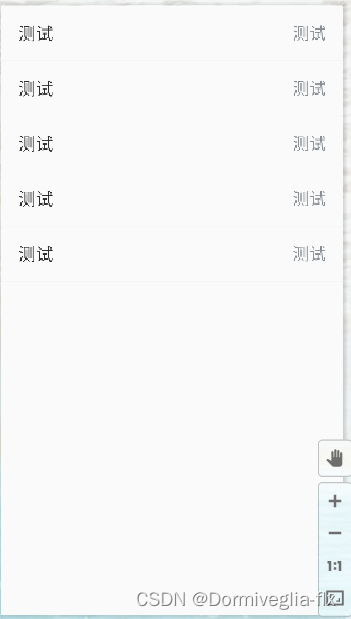
<?xml version="1.0" encoding="utf-8"?>
<RelativeLayout xmlns:android="http://schemas.android.com/apk/res/android"xmlns:app="http://schemas.android.com/apk/res-auto"xmlns:tools="http://schemas.android.com/tools"android:layout_width="match_parent"android:layout_height="match_parent"android:orientation="vertical""><LinearLayoutandroid:layout_width="match_parent"android:layout_height="wrap_content"android:orientation="vertical"><!--1. android:layout_alignParentLeft="true": 父容器左边android:layout_alignParentRight="true" 父容器右边android:layout_centerInParent="true" 水平垂直都居中--><RelativeLayout android:layout_width="match_parent"android:layout_height="60px"><TextViewandroid:layout_alignParentLeft="true"android:layout_centerInParent="true"android:layout_width="wrap_content"android:layout_height="wrap_content"android:text="测试" /><TextViewandroid:id="@+id/apply_form_tv"android:layout_alignParentRight="true"android:layout_centerInParent="true"android:layout_width="wrap_content"android:layout_height="wrap_content"tools:text="测试" /></RelativeLayout><!--测试--><RelativeLayout style="@style/sub_line"><TextViewandroid:layout_alignParentLeft="true"android:layout_centerInParent="true"android:layout_width="wrap_content"android:layout_height="wrap_content"android:text="测试" /><TextViewandroid:id="@+id/apply_form_tv"android:layout_alignParentRight="true"android:layout_centerInParent="true"android:layout_width="wrap_content"android:layout_height="wrap_content"tools:text="测试" /></RelativeLayout></LinearLayout></RelativeLayout>
对于这种展示形布局或者说是提交型布局:1.<LinearLayout 标签可以让其下的子布局页面竖向排列 2.<RelativeLayout 标签:位于父容器左边与父容器右边,且水平竖直居中。
相关文章:
04 Android基础--RelativeLayout
04 Android基础--RelativeLayout什么是RelativeLayout?RelativeLayout的常见用法:什么是RelativeLayout? 相对布局(RelativeLayout)是一种根据父容器和兄弟控件作为参照来确定控件位置的布局方式。 根据父容器定位 在相…...

python基础命令
1.现在包的安装路径 #pip show 包名 2.pip讲解 相信对于大多数熟悉Python的人来说,一定都听说并且使用过pip这个工具,但是对它的了解可能还不一定是非常的透彻,今天小编就来为大家介绍10个使用pip的小技巧,相信对大家以后管理和…...
用 Real-ESRGAN 拯救座机画质,自制高清版动漫资源
内容一览:Real-ESRGAN 是 ESRGAN 升级之作,主要有三点创新:提出高阶退化过程模拟实际图像退化,使用光谱归一化 U-Net 鉴别器增加鉴别器的能力,以及使用纯合成数据进行训练。 关键词:Real-ESRGAN 超分辨率 视…...
)
数据结构预备知识(模板)
模板 功能上类比C的重载函数,可以使用一种通用的形式,去代替诸多数据类型,使得使用同一种函数的时候,可以实现对于不同数据类型的相同操作。增强类和函数的可重用性。 使用模板函数为函数或类声明一个一般的模式,使得…...
SWM181按键控制双通道PWM固定占空比输出
SWM181按键控制双通道PWM固定占空比输出📌SDK固件包:https://www.synwit.cn/kuhanshu_amp_licheng/ 🌼开发板如下图: ✨注意新手谨慎选择作为入门单片机学习。目前只有一个简易的数据手册和SDK包,又没有参考手册&am…...

pygame函数命令
pygame.mixer.music.load() —— 载入一个音乐文件用于播放 pygame.mixer.music.play() —— 开始播放音乐流 pygame.mixer.music.rewind() —— 重新开始播放音乐 pygame.mixer.music.stop() —— 结束音乐播放 pygame.mixer.music.pause() —— 暂停音乐播放 pygame.mixer.mu…...

异步循环
业务 : 批量处理照片 , 批量拆建 , 裁剪一张照片需要异步执行等待 , 并且是批量 所以需要用到异步循环 裁剪图片异步代码 : 异步循环 循环可以是 普通 for 、 for of 、 for in 不能使用forEach ,这里推荐 for…...

Vue表单提交与数据存储
学习内容来源:视频p5 书接目录对页面重新命名选择组件后端对接测试接口设置接口前端调用对页面重新命名 将之前的 Page1 Page2 进行重新命名,使其具有实际意义 Page1 → BookManage ; Page2 → AddBook 并且 /router/index.js 中配置页面信息…...
以及业务网关(后端服务网关)设计思路(二))
API网关(接入层之上业务层之上)以及业务网关(后端服务网关)设计思路(二)
文章目录 流量网关业务网关常见网关对比1. OpenResty2. KongKong解决了什么问题Kong的优点以及性能Kong架构3. Zuul1.0过滤器IncomingEndpointOutgoing过滤器类型Zuul 1.0 请求生命周期4. Zuul2.0Zuul 与 Zuul 2 性能对比5. Spring Cloud GatewaySpring Cloud Gateway 底层使用…...
有些笑话,外行人根本看不懂,只有程序员看了会狂笑不止
我一直都觉得我们写代码的程序员与众不同,就连笑话都跟别人不一样。 如果让外行人来看我们一些我们觉得好笑的东西,他们根本不知道笑点在哪里。 不信你来瞧瞧,但凡有看不懂的地方,说明你的道行还不够深。 1.大多数人开始学编程时…...
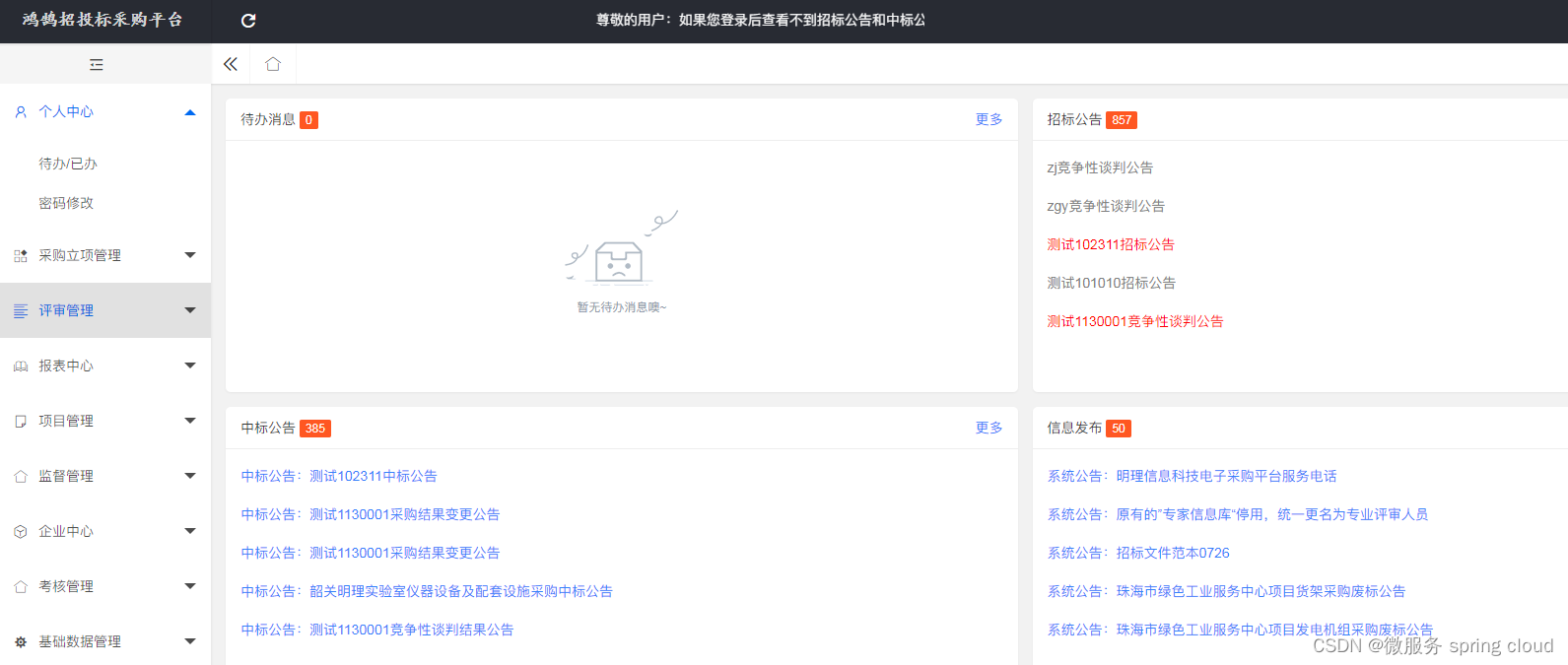
企业电子招投标采购系统——功能模块功能描述
功能模块: 待办消息,招标公告,中标公告,信息发布 描述: 全过程数字化采购管理,打造从供应商管理到采购招投标、采购合同、采购执行的全过程数字化管理。通供应商门户具备内外协同的能力,为外…...

Presto 在美图的实践
导读:本文的主题是Presto高性能引擎在美图的实践,首先将介绍美图在处理ad-hoc场景下为何选择Presto,其次我们如何通过外部组件对Presto高可用与稳定性的增强。然后介绍在美图业务中如何做到合理与高效的利用集群资源,最后如何利用…...
Molecule:使用Jetpack Compose构建StateFlow流
Molecule:使用Jetpack Compose构建StateFlow流 看下面的jetpack compose片段: Composable fun MessageCard(message: Message) {Column {Text(text message.author)Text(text message.body)} }这段代码最有趣的部分是它实际上是reactive。其反应性为 通过Composa…...
计算机组成原理(2.2)--系统总线
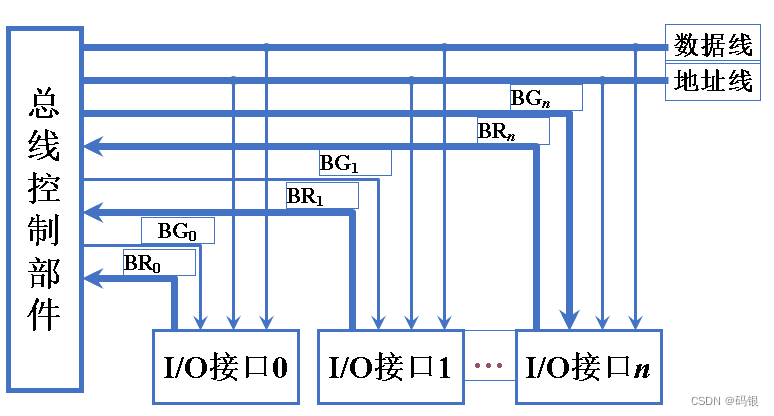
目录 一、总线结构 1.单总线结构 1.1单总线结构框图 编辑1.2单总线性能下降的原因 2.多总线结构 2.1双总线结构 2.2三总线结构 2.3四总线结构 编辑 二、总线结构举例 1. 传统微型机总线结构 2. VL-BUS局部总线结构 3. PCI 总线结构 4. 多层 PCI 总线结构 …...

如何使用dlinject将一个代码库实时注入到Linux进程中
关于dlinject dlinject是一款针对Linux进程安全的注入测试工具,在该工具的帮助下,广大研究人员可以在不使用ptrace的情况下,轻松向正在运行的Linux进程中注入一个共享代码库(比如说任意代码)。之所以开发该工具&#…...
Docker安装Cassandra数据库,在SpringBoot中连接Cassandra
简介 Apache Cassandra是一个高度可扩展的高性能分布式数据库,旨在处理许多商用服务器上的大量数据,提供高可用性而没有单点故障。它是NoSQL数据库的一种。首先让我们了解一下NoSQL数据库的作用。 NoSQL 数据库 NoSQL数据库(有时称为“Not …...
)
Linux常用命令总结(建议收藏)
Linux常用命令总结(建议收藏) 这里收集了一些常用命令以便需要时查看,欢迎作补充。(这里的提到操作都默认以CentOS系统为基础) 文件管理 目录操作 切换目录 cd 查看目录 ls -l 列出文件详细信息 或者直接ll-a 列出当前目录下所有文件及…...

【Java】P1 基础知识与碎碎念
Java 基础知识 碎碎念安装 Intellij IDEAJDK 与 JREJava 运行过程Java 系统配置Java 运行过程Java的三大分类前言 本节内容主要围绕Java基础内容,从Java的安装到helloworld,什么是JDK与什么是JRE,系统环境配置,不深入Java代码知识…...
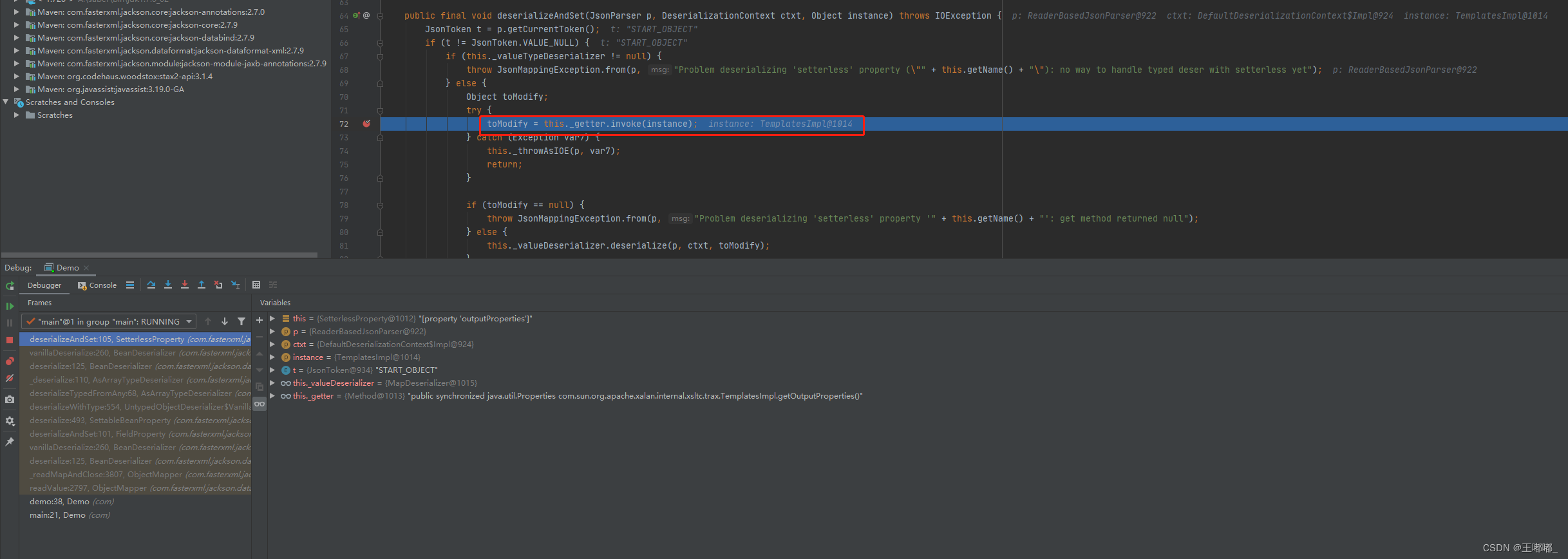
Jackson CVE-2017-7525 反序列化漏洞
0x00 前言 Jackson 相对应fastjson来说利用方面要求更加苛刻,默认情况下无法进行利用。 同样本次的调用链也可以参考fastjson内容:Java代码审计——Fastjson TemplatesImpl调用链 相关原理,可以参考:Jackson 反序列化漏洞原理 …...

【2023】DevOps、SRE、运维开发面试宝典之Kubernetes相关面试题
文章目录 1、Kubernetes集群的特点?2、Kubernetes集群各节点的组件有那些?分别有什么作用?3、简述Kubernetes集群的工作原理4、什么是Pod资源5、Label标签的作用?6、Deployment控制器与Statfulset控制器的区别?7、Pod拉取镜像的三种策略?8、简述Pod的生命周期9、Pod的生命…...
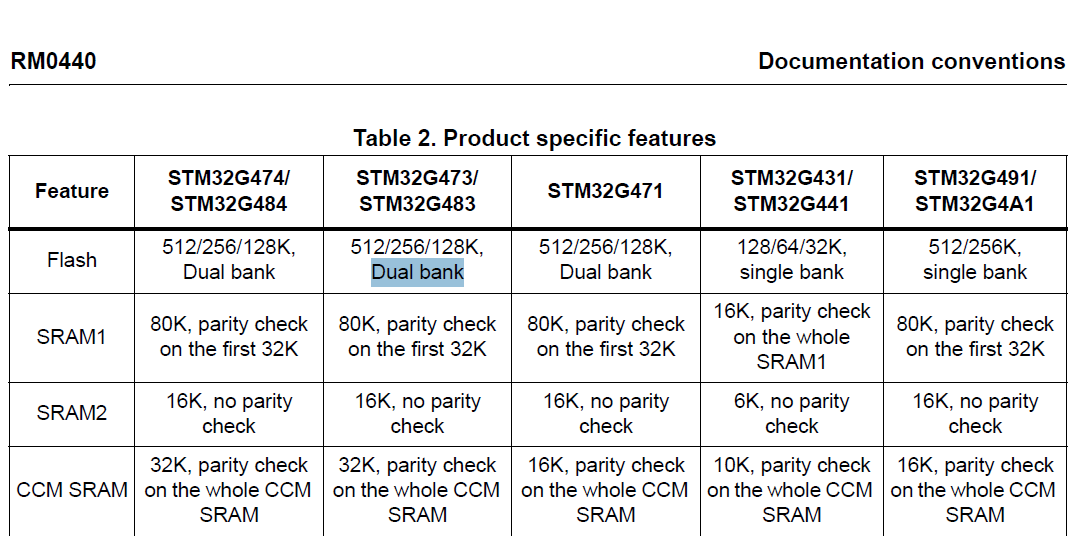
stm32G473的flash模式是单bank还是双bank?
今天突然有人stm32G473的flash模式是单bank还是双bank?由于时间太久,我真忘记了。搜搜发现,还真有人和我一样。见下面的链接:https://shequ.stmicroelectronics.cn/forum.php?modviewthread&tid644563 根据STM32G4系列参考手…...
)
React Native 导航系统实战(React Navigation)
导航系统实战(React Navigation) React Navigation 是 React Native 应用中最常用的导航库之一,它提供了多种导航模式,如堆栈导航(Stack Navigator)、标签导航(Tab Navigator)和抽屉…...
Cesium相机控制)
三维GIS开发cesium智慧地铁教程(5)Cesium相机控制
一、环境搭建 <script src"../cesium1.99/Build/Cesium/Cesium.js"></script> <link rel"stylesheet" href"../cesium1.99/Build/Cesium/Widgets/widgets.css"> 关键配置点: 路径验证:确保相对路径.…...

DockerHub与私有镜像仓库在容器化中的应用与管理
哈喽,大家好,我是左手python! Docker Hub的应用与管理 Docker Hub的基本概念与使用方法 Docker Hub是Docker官方提供的一个公共镜像仓库,用户可以在其中找到各种操作系统、软件和应用的镜像。开发者可以通过Docker Hub轻松获取所…...

Admin.Net中的消息通信SignalR解释
定义集线器接口 IOnlineUserHub public interface IOnlineUserHub {/// 在线用户列表Task OnlineUserList(OnlineUserList context);/// 强制下线Task ForceOffline(object context);/// 发布站内消息Task PublicNotice(SysNotice context);/// 接收消息Task ReceiveMessage(…...
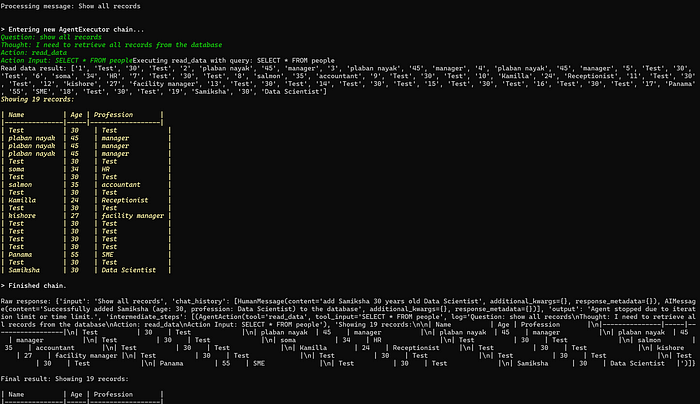
理解 MCP 工作流:使用 Ollama 和 LangChain 构建本地 MCP 客户端
🌟 什么是 MCP? 模型控制协议 (MCP) 是一种创新的协议,旨在无缝连接 AI 模型与应用程序。 MCP 是一个开源协议,它标准化了我们的 LLM 应用程序连接所需工具和数据源并与之协作的方式。 可以把它想象成你的 AI 模型 和想要使用它…...
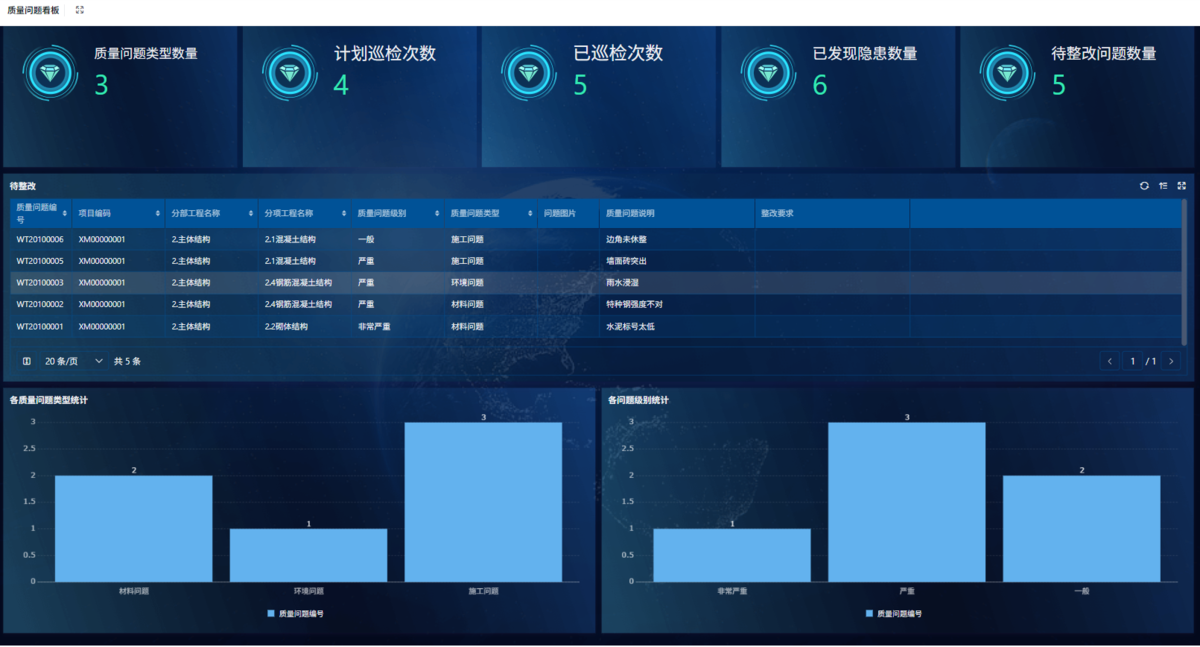
为什么需要建设工程项目管理?工程项目管理有哪些亮点功能?
在建筑行业,项目管理的重要性不言而喻。随着工程规模的扩大、技术复杂度的提升,传统的管理模式已经难以满足现代工程的需求。过去,许多企业依赖手工记录、口头沟通和分散的信息管理,导致效率低下、成本失控、风险频发。例如&#…...
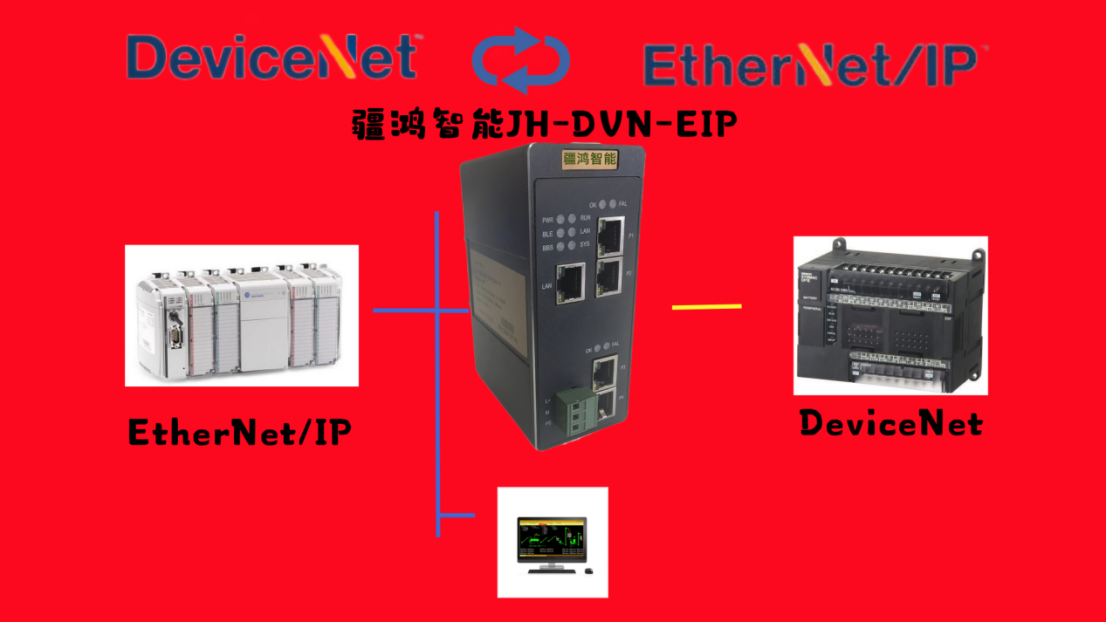
EtherNet/IP转DeviceNet协议网关详解
一,设备主要功能 疆鸿智能JH-DVN-EIP本产品是自主研发的一款EtherNet/IP从站功能的通讯网关。该产品主要功能是连接DeviceNet总线和EtherNet/IP网络,本网关连接到EtherNet/IP总线中做为从站使用,连接到DeviceNet总线中做为从站使用。 在自动…...
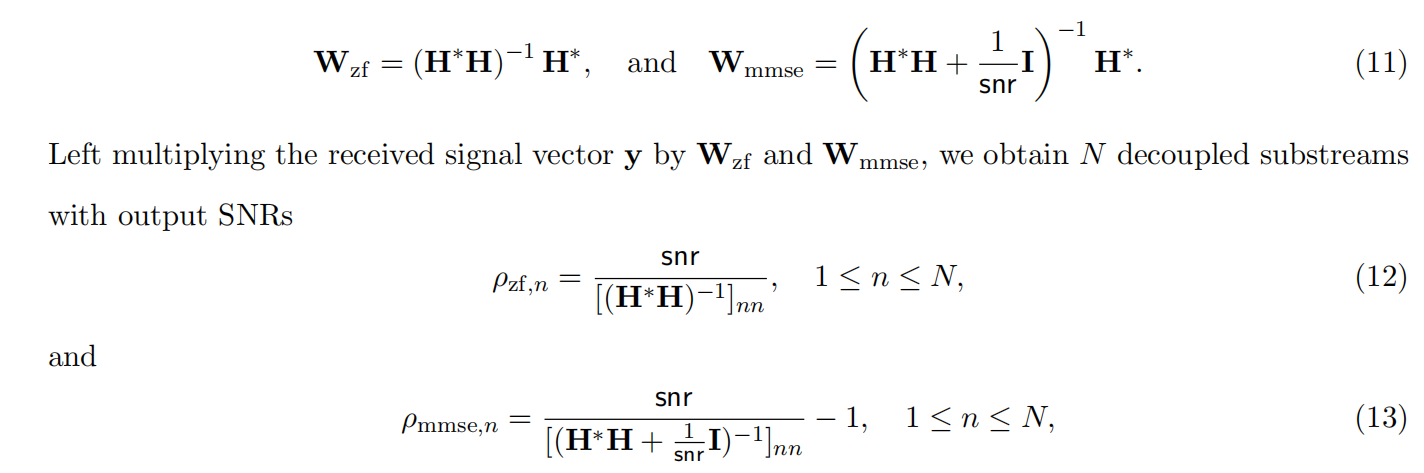
均衡后的SNRSINR
本文主要摘自参考文献中的前两篇,相关文献中经常会出现MIMO检测后的SINR不过一直没有找到相关数学推到过程,其中文献[1]中给出了相关原理在此仅做记录。 1. 系统模型 复信道模型 n t n_t nt 根发送天线, n r n_r nr 根接收天线的 MIMO 系…...
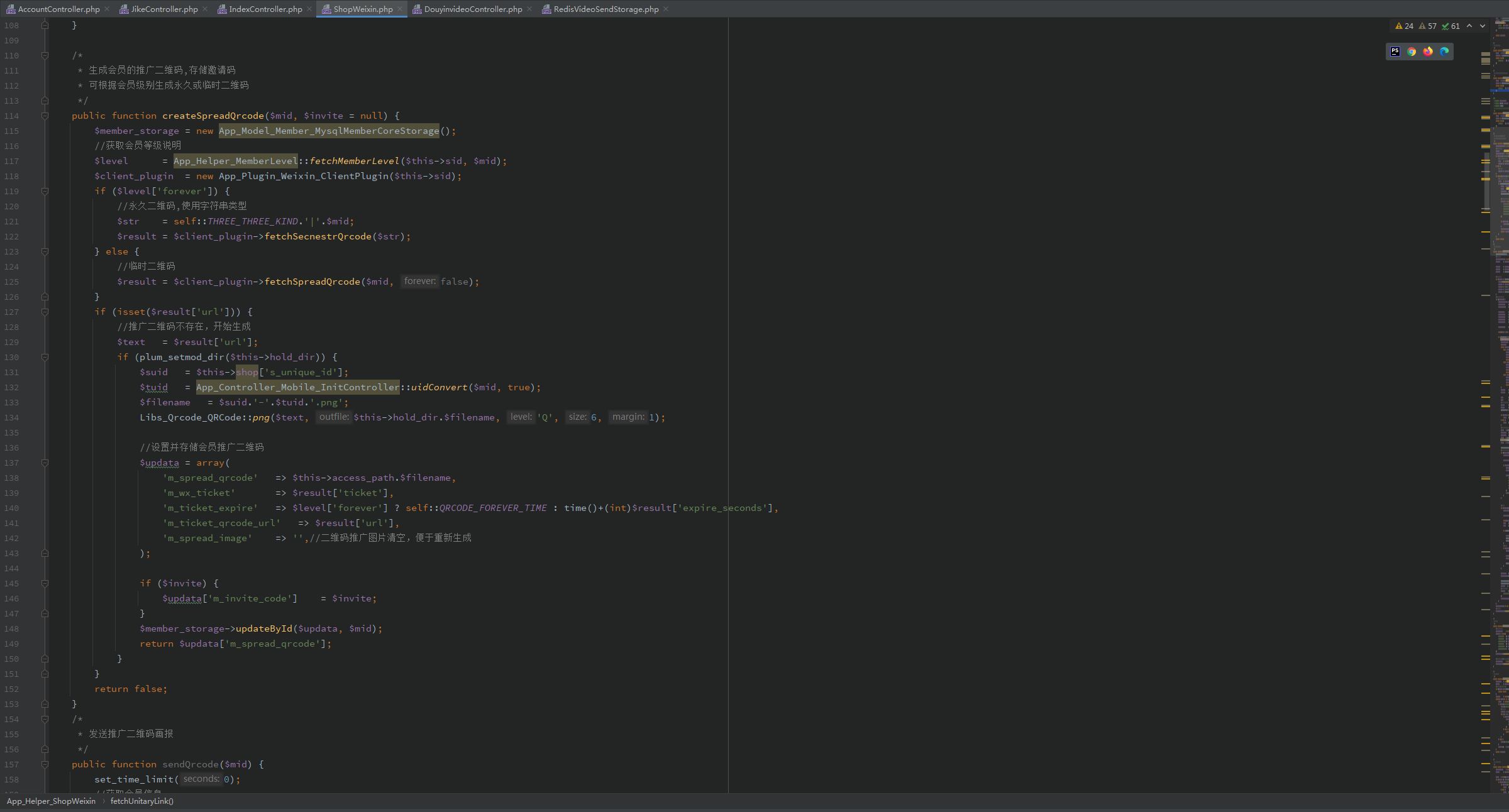
短视频矩阵系统文案创作功能开发实践,定制化开发
在短视频行业迅猛发展的当下,企业和个人创作者为了扩大影响力、提升传播效果,纷纷采用短视频矩阵运营策略,同时管理多个平台、多个账号的内容发布。然而,频繁的文案创作需求让运营者疲于应对,如何高效产出高质量文案成…...