
uni-app 一些实用的页面模板
时间倒计时
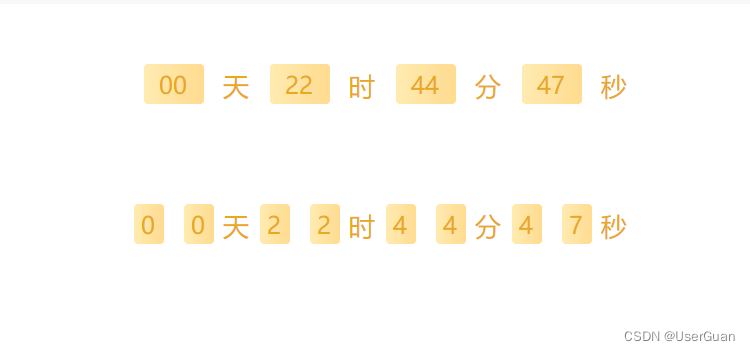
<!-- 时间倒计时 -->
<template><view class="container"><view class="flex-row time-box"><view class="time-item">{{ laveTimeList[0] }}</view><text>天</text><view class="time-item">{{ laveTimeList[1] }}</view><text>时</text><view class="time-item">{{ laveTimeList[2] }}</view><text>分</text><view class="time-item">{{ laveTimeList[3] }}</view><text>秒</text></view><view class="flex-row time-box"><view class="flex-row"><block v-for="(item, i) in laveTimeDateList[0]" :key="i"><view class="time-item date-item">{{ item }}</view></block><text>天</text></view><view class="flex-row"><block v-for="(item, i) in laveTimeDateList[1]" :key="i"><view class="time-item date-item">{{ item }}</view></block><text>时</text></view><view class="flex-row"><block v-for="(item, i) in laveTimeDateList[2]" :key="i"><view class="time-item date-item">{{ item }}</view></block><text>分</text></view><view class="flex-row"><block v-for="(item, i) in laveTimeDateList[3]" :key="i"><view class="time-item date-item">{{ item }}</view></block><text>秒</text></view></view></view>
</template><script>
export default {data() {return {laveTimeList: [], // 剩余时间(天-时-分-秒)laveTimeDateList: [], // 在拆分timer: "" // 定时器};},onLoad() {this.getLeftTime("2023/10/25 14:52:00");},onUnload() {if (this.timer) clearInterval(this.timer);},methods: {/* 计算剩余时间 */getLeftTime(e) {let timeLeft = this.getTimestap(e); // 获取时间戳this.initDate(timeLeft); // 初始化数据this.timer = setInterval(() => {this.initDate(timeLeft); // 初始化数据if (timeLeft-- === 0) clearInterval(this.timer); // 清除定时}, 1000);},/* 初始化数据 */initDate(e) {const period = this.formateSeconds(e); // 天-时-分-秒this.laveTimeList = period; // 剩余时间(天-时-分-秒)this.laveTimeDateList = this.formatDate(JSON.stringify(period)); // 格式化日期},/* 天-时-分-秒 */formateSeconds(e) {const time = [],day = parseInt(e / 86400),hour = parseInt((e % 86400) / 3600),min = parseInt(((e % 86400) % 3600) / 60),sec = parseInt(((e % 86400) % 3600) % 60);time[0] = day > 0 ? this.addZero(day) : this.addZero(0);time[1] = hour > 0 ? this.addZero(hour) : this.addZero(0);time[2] = min > 0 ? this.addZero(min) : this.addZero(0);time[3] = sec > 0 ? this.addZero(sec) : this.addZero(0);return time;},/* 数字前面补零 */addZero(num) {return num < 10 ? "0" + num : num;},/* 获取时间戳 */getTimestap(e) {const curTime = parseInt(new Date().getTime() / 1000); // 当前时间const futureTime = parseInt(new Date(e.replace(/-/g, "/")).getTime() / 1000); // 指定时间return futureTime <= curTime ? 0 : futureTime - curTime;},/* 格式化日期 */formatDate(e) {const list = JSON.parse(e);for (let i = 0; i < list.length; i++) {list[i] = list[i].toString().split("");}return list;}}
};
</script><style lang="scss" scoped>
.container {.flex-row {display: flex;align-items: center;justify-content: center;flex-direction: row;}.time-box {color: #eaa81b;font-size: 26rpx;margin: 20rpx;padding: 40rpx 20rpx;background: #fff;border-radius: 20rpx;}.time-item {width: 60rpx;text-align: center;height: 40rpx;line-height: 40rpx;font-size: 24rpx;margin: 0 20rpx;background: linear-gradient(90deg, #ffebb1 0%, #ffdb8f 100%);border-radius: 4rpx;}.date-item {width: 30rpx;margin: 0 10rpx;}
}
</style>
canvas 图形验证码
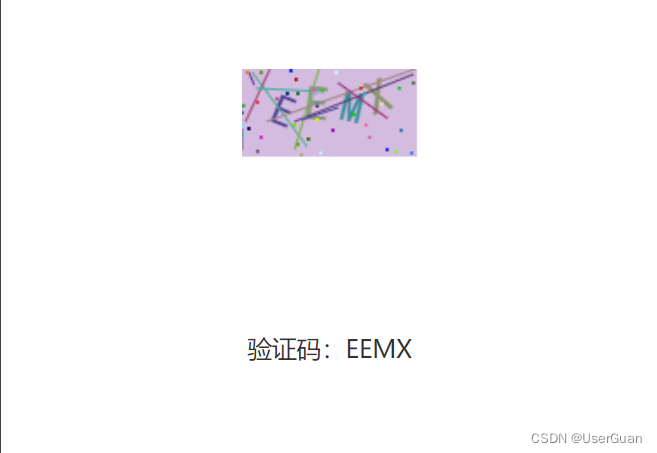
<!-- canvas 图形验证码 -->
<template><view class="container"><view class="canvas-box"><canvas type="2d" id="canvasCode" @click="drawPic" /></view><view class="text-tip">验证码:{{ curCode }}</view></view>
</template><script>
export default {data() {return {width: 100, // 宽度height: 50, // 高度fontSize: 25, // 字体大小fontFamily: "SimHei", // 字体count: 4, // 验证码位数curCode: "", // 当前验证码jamPointNum: 40, // 干扰点数jamLineNum: 10 // 干扰线数};},onLoad() {this.drawPic(); // 绘制验证码图片},methods: {/* 绘制验证码图片 */drawPic() {uni.createSelectorQuery().select("#canvasCode").fields({ node: true, size: true }).exec(res => {const canvasObj = res[0].node;const ctx = canvasObj.getContext("2d");// 清除画布ctx.fillStyle = "rgb(255, 255, 255)";ctx.fillRect(0, 0, 91, 36);// 绘制背景色ctx.fillStyle = this.randomColor(180, 240); // 颜色若太深可能导致看不清ctx.fillRect(0, 0, this.width, this.height);// 绘制文字const str = "ABCEFGHJKLMNPQRSTWXY123456789";let codeTemp = "";for (let i = 0; i < this.count; i++) {const txt = str[this.randomNum(0, str.length)];codeTemp += txt;ctx.fillStyle = this.randomColor(50, 160); // 随机生成字体颜色ctx.font = this.randomNum(this.fontSize, this.fontSize + 6) + "px " + this.fontFamily; // 随机生成字体大小const x = 10 + i * 20;const y = this.randomNum(25, 30);const deg = this.randomNum(-30, 30);// 修改坐标原点和旋转角度ctx.translate(x, y);ctx.rotate((deg * Math.PI) / 180);ctx.fillText(txt, 5, 0);// 恢复坐标原点和旋转角度ctx.rotate((-deg * Math.PI) / 180);ctx.translate(-x, -y);}this.curCode = codeTemp;// 绘制干扰线for (let i = 0; i < this.jamLineNum; i++) {ctx.strokeStyle = this.randomColor(40, 180);ctx.beginPath();ctx.moveTo(this.randomNum(0, this.width), this.randomNum(0, this.height));ctx.lineTo(this.randomNum(0, this.width), this.randomNum(0, this.height));ctx.stroke();}// 绘制干扰点for (let i = 0; i < this.jamPointNum; i++) {ctx.fillStyle = this.randomColor(0, 255);ctx.beginPath();ctx.arc(this.randomNum(0, this.width), this.randomNum(0, this.height), 1, 0, 2 * Math.PI);ctx.fill();}});},randomNum(min, max) {// 生成一个随机数return Math.floor(Math.random() * (max - min) + min);},randomColor(min, max) {// 生成一个随机色const red = this.randomNum(min, max); // 红色const green = this.randomNum(min, max); // 绿色const blue = this.randomNum(min, max); // 蓝色return `rgb(${red}, ${green}, ${blue})`;}}
};
</script><style lang="scss" scoped>
.container {.canvas-box {width: 200rpx;height: 100rpx;margin: 200rpx auto;}.text-tip {width: 80%;text-align: center;color: #333;font-size: 28rpx;margin: 80rpx auto;}
}
</style>
圆角灯笼
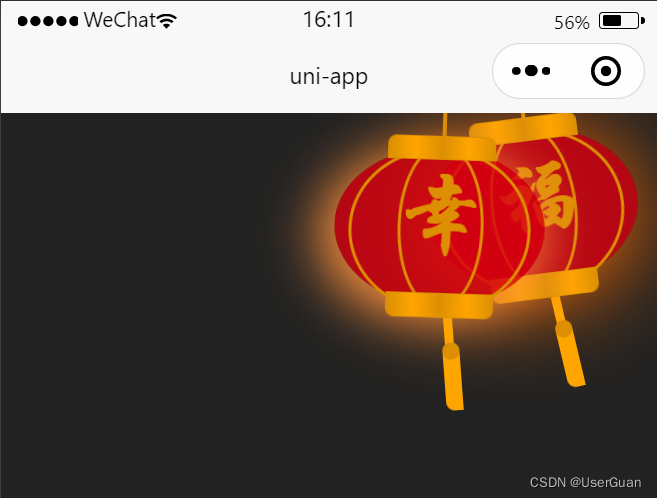
<!-- 圆角灯笼 -->
<template><view class="container"><!-- 灯笼-内 --><view class="cont-box"><view class="lantern-box"><view class="line-tip"></view><view class="outer-bg"><view class="inner-bg"><view class="text-tip">福</view></view></view><view class="spike-box"><view class="spike-tip"></view><view class="dots-tip"></view></view></view></view><!-- 灯笼-外 --><view class="cont-box cont-outer-box"><view class="lantern-box"><view class="line-tip"></view><view class="outer-bg"><view class="inner-bg"><view class="text-tip">幸</view></view></view><view class="spike-box"><view class="spike-tip"></view><view class="dots-tip"></view></view></view></view></view>
</template><script>
export default {data() {return {};},onLoad() {},methods: {}
};
</script><style lang="scss" scoped>
.container {.cont-box {position: fixed;top: -80rpx;right: -40rpx;z-index: 999;.lantern-box {position: relative;width: 240rpx;height: 180rpx;background: rgba(216, 0, 15, 0.8);margin: 100rpx;transform-origin: 50% -200rpx;-webkit-transform-origin: 50% -200rpx;animation: swing 3s infinite ease-in-out;-webkit-animation: swing 3s infinite ease-in-out;box-shadow: -10rpx 10rpx 100rpx 8rpx rgba(250, 108, 0, 1);border-radius: 50% 50%;}.lantern-box::before {content: " ";position: absolute;top: -14rpx;left: 58rpx;display: block;width: 120rpx;height: 24rpx;background: linear-gradient(to right, #dc8f03, #ffa500, #dc8f03, #ffa500, #dc8f03);border: solid 2rpx #dc8f03;border-radius: 10rpx 10rpx 0 0;z-index: 999;}.lantern-box::after {content: " ";position: absolute;bottom: -14rpx;left: 20rpx;display: block;width: 120rpx;height: 24rpx;margin-left: 40rpx;background: linear-gradient(to right, #dc8f03, #ffa500, #dc8f03, #ffa500, #dc8f03);border: solid 2rpx #dc8f03;border-radius: 0 0 10rpx 10rpx;}.line-tip {position: absolute;top: -40rpx;left: 120rpx;width: 4rpx;height: 40rpx;background: #dc8f03;}.outer-bg {width: 200rpx;height: 180rpx;background: rgba(216, 0, 15, 0.1);margin: 24rpx 16rpx 16rpx 16rpx;border: 4rpx solid #dc8f03;border-radius: 50% 50%;.inner-bg {width: 90rpx;height: 180rpx;background: rgba(216, 0, 15, 0.1);margin: -8rpx 16rpx 16rpx 52rpx;border: 4rpx solid #dc8f03;border-radius: 50% 50%;.text-tip {text-align: center;line-height: 170rpx;color: #dc8f03;font-size: 3.1rem;font-family: 华文行楷, Arial, Lucida Grande, Tahoma, sans-serif;font-weight: bold;}}}.spike-box {position: relative;width: 10rpx;height: 40rpx;background: #ffa500;margin: -10rpx 0 0 118rpx;transform-origin: 50% -90rpx;-webkit-transform-origin: 50% -90rpx;animation: swing 4s infinite ease-in-out;-webkit-animation: swing 4s infinite ease-in-out;border-radius: 0 0 10rpx 10rpx;.dots-tip {position: absolute;top: 28rpx;left: -4rpx;width: 20rpx;height: 20rpx;background: #dc8f03;border-radius: 50%;}.spike-tip {position: absolute;top: 36rpx;left: -4rpx;width: 20rpx;height: 70rpx;background: #ffa500;border-radius: 0 0 0 10rpx;}}}.cont-outer-box {top: -60rpx;right: 20rpx;.lantern-box {animation: swing 5s infinite ease-in-out;-webkit-animation: swing 5s infinite ease-in-out;box-shadow: -10rpx 10rpx 60rpx 8rpx rgba(252, 144, 61, 1);}}@keyframes swing {0% {-webkit-transform: rotate(-10deg);}50% {-webkit-transform: rotate(10deg);}100% {-webkit-transform: rotate(-10deg);}}@-webkit-keyframes swing {0% {-webkit-transform: rotate(-10deg);}50% {-webkit-transform: rotate(10deg);}100% {-webkit-transform: rotate(-10deg);}}
}
</style><style>
page {background-color: #222;
}
</style>
自定义顶部导航栏
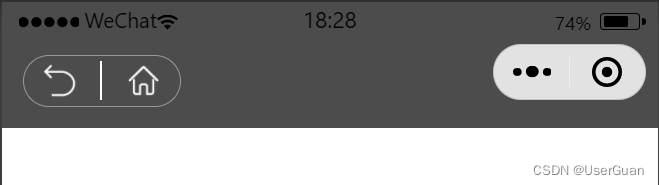
<!-- 自定义顶部导航栏 -->
<template><view class="container" :style="'padding-top: ' + navHeight + 'rpx'"><view class="head-back"><image src="/static/return.png" mode="aspectFill" @click="toBack" /><image src="/static/home.png" mode="aspectFill" @click="toHome" /></view></view>
</template><script>
export default {data() {return {statusBarHeight: 0, // 状态导航栏高度navigationBarHeight: 0, // 导航栏高度(标题栏高度)navHeight: 0 // 总体高度};},onLoad() {/** 状态栏高度 */this.statusBarHeight = wx.getSystemInfoSync().statusBarHeight;/** 获取微信胶囊的位置信息 width,height,top,right,left,bottom */const custom = wx.getMenuButtonBoundingClientRect();/** 导航栏高度(标题栏高度) = 胶囊高度 + (顶部距离 - 状态栏高度) * 2 */this.navigationBarHeight = custom.height + (custom.top - this.statusBarHeight) * 2;/** 总体高度 = 状态栏高度 + 导航栏高度 */this.navHeight = this.navigationBarHeight + this.statusBarHeight;},methods: {/* 返回 */toBack() {console.log("返回");},/* 回到首页 */toHome() {console.log("回到首页");}}
};
</script><style lang="scss" scoped>
.container {padding-bottom: 25rpx;background-color: rgba(0, 0, 0, 0.7);.head-back {position: relative;display: flex;align-items: center;justify-content: space-between;width: 180rpx;height: 60rpx;padding: 0 20rpx;margin-left: 25rpx;border: 1rpx solid rgba(204, 204, 204, 0.6);box-sizing: border-box;border-radius: 50rpx;image {width: 40rpx;height: 40rpx;}}.head-back::after {content: "";position: absolute;top: 10%;left: calc(50% - 1rpx);width: 2rpx;height: 80%;background: #fff;}
}
</style>
滚动自动吸顶
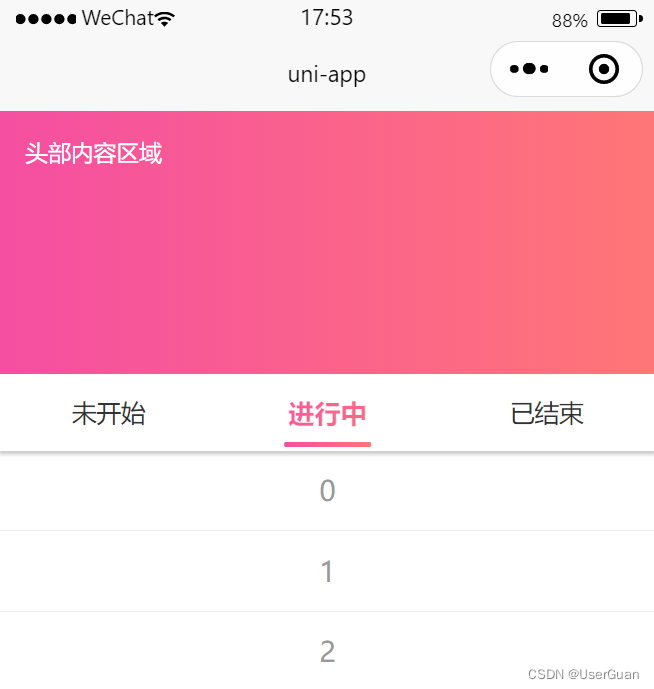
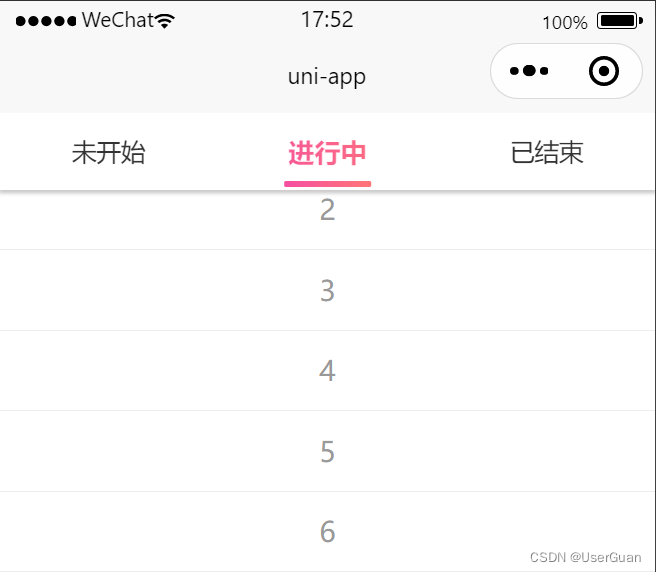
<!-- 滚动自动吸顶 -->
<template><view class="container"><view class="head-box">头部内容区域</view><view class="nav-box" :class="isFixed ? 'fix-tip' : ''" id="navBox"><view class="nav-item" :class="{ 'active-tip': curNav === i }" v-for="(item, i) in navList" :key="i" @click="navToggle(i)">{{ item }}</view></view><view :class="isFixed ? 'p-t-nav' : ''" id="contBox"><view class="cont-item" v-for="(item, i) in curNav * 10 + 5" :key="i">{{ item }}</view></view></view>
</template><script>
export default {data() {return {isFixed: false, // 是否吸顶navTop: 0, // 导航栏到顶部的距离curNav: 0, // 当前导航栏navList: ["未开始", "进行中", "已结束"]};},onReady() {// 获取节点距离顶部的距离uni.createSelectorQuery().select("#navBox").boundingClientRect(rect => {if (rect && rect.top) this.navTop = parseInt(rect.top);}).exec();},/* 监听页面滚动事件 */onPageScroll(e) {this.isFixed = parseInt(e.scrollTop) >= this.navTop;},methods: {/* 导航栏切换 */navToggle(i) {if (this.curNav == i) return;this.curNav = i;if (this.isFixed) uni.pageScrollTo({ selector: "#contBox", duration: 0.5 }); // duration.滚动到指定位置需要的时间}}
};
</script><style lang="scss" scoped>
.container {$navHeight: 88rpx; // nav导航栏高度.head-box {width: 100%;height: 300rpx;color: #fff;font-size: 26rpx;padding: 30rpx;background: linear-gradient(90deg, #f54ea2, #ff7676);box-sizing: border-box;}.nav-box {position: relative;display: flex;width: 100%;height: $navHeight;line-height: $navHeight;background: #fff;box-shadow: 0 5rpx 5rpx #ccc;.nav-item {position: relative;flex: 1;text-align: center;color: #333;font-size: 28rpx;}.nav-item::after {content: "";position: absolute;left: 50%;transform: translateX(-50%);bottom: 4rpx;width: 0;height: 6rpx;background: linear-gradient(90deg, #f54ea2, #ff7676);transition: 0.3s width linear;border-radius: 3rpx;}.active-tip {color: transparent;font-size: 30rpx;background-clip: text;-webkit-background-clip: text;background-image: linear-gradient(90deg, #f54ea2, #ff7676);transition: 0.3s all linear;transition-delay: 0.1s;font-weight: 900;}.active-tip::after {width: 40%;}}.fix-tip {position: fixed;top: 0;left: 0;z-index: 99;}.p-t-nav {padding-top: $navHeight;}.cont-item {text-align: center;height: 50rpx;line-height: 50rpx;color: #999;padding: 20rpx;background: #fff;border-bottom: 1rpx solid #eaeef1;}
}
</style>
swiper 消息滚动
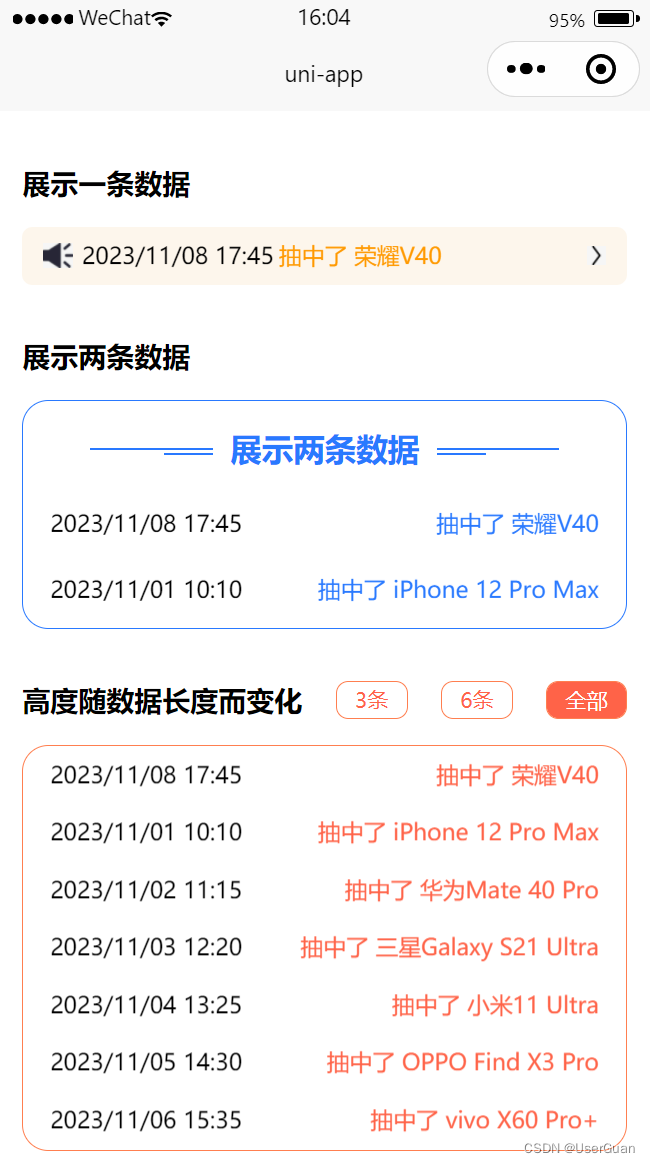
<!-- swiper 消息滚动 -->
<template><view><!-- 展示一条数据 --><template><view class="tit-box"><view class="tit-tip">展示一条数据</view></view><view class="scroll-notice"><image class="horn-tip" src="https://img1.baidu.com/it/u=3874629958,3395061015&fm=253" /><swiperclass="notice-box"verticalautoplaycircularinterval="4000"duration="1500"display-multiple-items="1"easing-function="easeInOutCubic"><swiper-item v-for="(item, i) in swiperList" :key="i"><view class="item-box"><view>{{ item.bonusTime }}</view><view class="name-tip">抽中了 {{ item.awardName }}</view></view></swiper-item></swiper><image class="arrow-tip" src="https://img0.baidu.com/it/u=1153718811,3800194060&fm=253" /></view></template><!-- 展示两条数据 --><template><view class="tit-box"><view class="tit-tip">展示两条数据</view></view><view class="fix-two-box"><view class="title-box"><view class="line-tip"></view><view class="title-tip">展示两条数据</view><view class="line-tip"></view></view><swiper class="fix-swiper" vertical autoplay circular interval="3000" display-multiple-items="2"><swiper-item v-for="(item, i) in dataList" :key="i"><view class="item-box"><view>{{ item.bonusTime }}</view><view class="name-tip">抽中了 {{ item.awardName }}</view></view></swiper-item></swiper></view></template><!-- 高度随数据长度而变化 --><template><view class="tit-box"><view class="tit-tip">高度随数据长度而变化</view><view class="btn-tip" :class="{ 'is-sel': curLen === 3 }" @click="toSwitchLen(3)">3条</view><view class="btn-tip" :class="{ 'is-sel': curLen === 6 }" @click="toSwitchLen(6)">6条</view><view class="btn-tip" :class="{ 'is-sel': curLen === 'all' }" @click="toSwitchLen('all')">全部</view></view><view class="vary-swiper"><swiperverticalautoplaycircularinterval="3000":style="'height: ' + (swiperList.length > 6 ? 460 : swiperList.length * 60) + 'rpx'":display-multiple-items="swiperList.length > 6 ? 7 : swiperList.length"><swiper-item v-for="(item, i) in swiperList" :key="i"><view class="item-box"><view>{{ item.bonusTime }}</view><view class="name-tip">抽中了 {{ item.awardName }}</view></view></swiper-item></swiper></view></template></view>
</template><script>
export default {data() {return {dataList: [{ bonusTime: "2023/11/01 10:10", awardName: "iPhone 12 Pro Max" },{ bonusTime: "2023/11/02 11:15", awardName: "华为Mate 40 Pro" },{ bonusTime: "2023/11/03 12:20", awardName: "三星Galaxy S21 Ultra" },{ bonusTime: "2023/11/04 13:25", awardName: "小米11 Ultra" },{ bonusTime: "2023/11/05 14:30", awardName: "OPPO Find X3 Pro" },{ bonusTime: "2023/11/06 15:35", awardName: "vivo X60 Pro+" },{ bonusTime: "2023/11/07 16:40", awardName: "谷歌Pixel 6 Pro" },{ bonusTime: "2023/11/08 17:45", awardName: "荣耀V40" }], // 数据源/* 高度随数据长度而变化 */curLen: "",swiperList: []};},onLoad() {this.toSwitchLen("all"); // 切换数据长度},methods: {/* 切换数据长度 */toSwitchLen(e) {if (this.curLen === e) return;this.curLen = e;const rowData = JSON.parse(JSON.stringify(this.dataList));if (e === "all") e = rowData.length;this.swiperList = rowData.slice(0, e);}}
};
</script><style lang="scss" scoped>
.tit-box {display: flex;align-items: center;justify-content: space-between;margin: 60rpx 30rpx 30rpx;.tit-tip {font-weight: 900;}.btn-tip {font-size: 24rpx;color: #ff6348;padding: 5rpx 20rpx;border: 1px solid #ff7f50;border-radius: 15rpx;}.is-sel {color: #fff;background: #ff6348;}
}
/* 展示一条数据 */
.scroll-notice {$noticeHeight: 66rpx;display: flex;align-items: center;flex-direction: row;height: $noticeHeight;line-height: $noticeHeight;padding: 0 24rpx;margin: 30rpx;background: #fdf6ec;border-radius: 12rpx;// 小喇叭.horn-tip {flex-shrink: 0;width: 34rpx;height: 28rpx;margin-right: 10rpx;}.notice-box {flex: 1;height: $noticeHeight;.item-box {display: flex;align-items: center;font-size: 26rpx;.name-tip {color: #ff9900;margin-left: 6rpx;}}}// 向右箭头.arrow-tip {flex-shrink: 0;width: 22rpx;height: 22rpx;}
}
/* 展示两条数据 */
.fix-two-box {margin: 30rpx;border: 1px solid #2979ff;border-radius: 30rpx;.title-box {$bgColor: #2979ff; // 字体、线条颜色$lineWidth: 140; // 线条长度display: flex;align-items: center;justify-content: center;margin-top: 30rpx;.line-tip {position: relative;width: $lineWidth + rpx;height: 1rpx;background: $bgColor;}.line-tip::before {content: "";position: absolute;bottom: -7rpx;width: $lineWidth / 3 + 10 + rpx;height: 1rpx;background: $bgColor;}.line-tip:nth-child(1)::before {right: 0;}.title-tip {color: $bgColor;font-size: 36rpx;margin: 0 20rpx;font-weight: 900;}}.fix-swiper {height: 150rpx;font-size: 28rpx;margin-top: 30rpx;.item-box {display: flex;align-items: center;justify-content: space-between;font-size: 26rpx;padding: 10rpx 30rpx;.name-tip {color: #2979ff;}}}
}
/* 高度随数据长度而变化 */
.vary-swiper {margin: 30rpx;box-sizing: border-box;border-radius: 30rpx;border: 1px solid #ff7f50;.item-box {display: flex;align-items: center;justify-content: space-between;font-size: 26rpx;padding: 10rpx 30rpx;.name-tip {color: #ff6348;}}
}
</style>
swiper 商品滑动
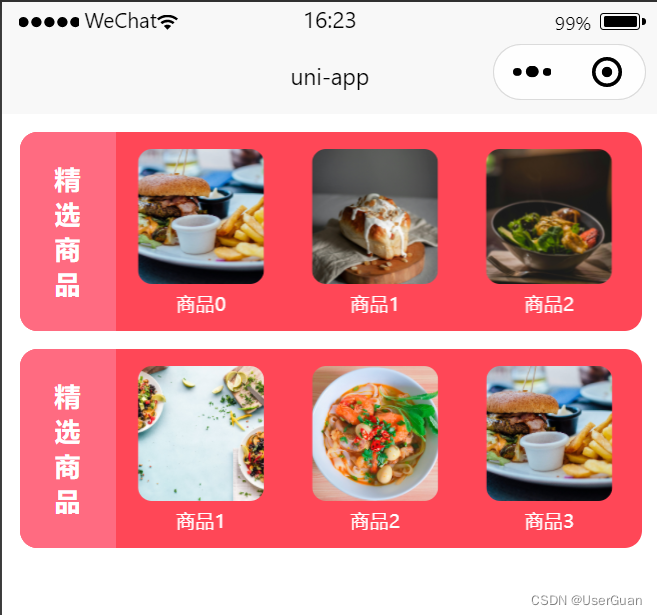
<!-- swiper 商品滑动 -->
<template><view><!-- 一次滑动三条 --><view class="container"><view class="tit_box"><view class="tit-tip">精选商品</view></view><view class="cont-box"><swiper class="swiper-box" :indicator-dots="false" autoplay interval="5000" duration="1000" circular><swiper-item v-for="(row, i) in goodsList" :key="i"><view class="item-box" v-for="(item, j) in row.list" :key="j"><image class="img-tip" :src="item.img" mode="aspectFill" /><view class="name-tip">商品{{ j }}</view></view></swiper-item></swiper></view></view><!-- 一次滑动一条 --><view class="container"><view class="tit_box"><view class="tit-tip">精选商品</view></view><view class="cont-box"><swiperclass="swiper-box":indicator-dots="false"autoplayinterval="1500"duration="1000"circular:display-multiple-items="recordList.length > 2 ? 3 : recordList.length"><swiper-item v-for="(item, i) in recordList" :key="i"><view class="item-box" style="width: 100%"><image class="img-tip" :src="item.img" mode="aspectFill" /><view class="name-tip">商品{{ i }}</view></view></swiper-item></swiper></view></view></view>
</template><script>
export default {data() {return {goodsList: [{list: [{ img: "https://images.pexels.com/photos/1660030/pexels-photo-1660030.jpeg" },{ img: "https://images.pexels.com/photos/1640774/pexels-photo-1640774.jpeg" },{ img: "https://images.pexels.com/photos/699953/pexels-photo-699953.jpeg" }]},{list: [{ img: "https://images.pexels.com/photos/70497/pexels-photo-70497.jpeg" },{ img: "https://images.pexels.com/photos/7441761/pexels-photo-7441761.jpeg" },{ img: "https://images.pexels.com/photos/842571/pexels-photo-842571.jpeg" }]},{list: [{ img: "https://images.pexels.com/photos/17216084/pexels-photo-17216084.jpeg" },{ img: "https://images.pexels.com/photos/8969237/pexels-photo-8969237.jpeg" },{ img: "https://images.pexels.com/photos/1099680/pexels-photo-1099680.jpeg" }]}],recordList: [{ img: "https://images.pexels.com/photos/1660030/pexels-photo-1660030.jpeg" },{ img: "https://images.pexels.com/photos/1640774/pexels-photo-1640774.jpeg" },{ img: "https://images.pexels.com/photos/699953/pexels-photo-699953.jpeg" },{ img: "https://images.pexels.com/photos/70497/pexels-photo-70497.jpeg" },{ img: "https://images.pexels.com/photos/7441761/pexels-photo-7441761.jpeg" },{ img: "https://images.pexels.com/photos/842571/pexels-photo-842571.jpeg" },{ img: "https://images.pexels.com/photos/17216084/pexels-photo-17216084.jpeg" }]};},onLoad() {},methods: {}
};
</script><style lang="scss" scoped>
.container {position: relative;height: 228rpx;margin: 20rpx;background: #ff4757;border-radius: 20rpx;overflow: hidden;.tit_box {width: 110rpx;text-align: center;height: 100%;background: #ff6b81;.tit-tip {display: inline-block;color: #fff;width: 50rpx;text-align: center;vertical-align: middle;font-size: 30rpx;white-space: pre-wrap;font-weight: 900;}}.tit_box::after {content: "";display: inline-block;height: 100%;vertical-align: middle;}.cont-box {position: absolute;top: 20rpx;left: 108rpx;width: 84%;white-space: nowrap;overflow-y: auto;box-sizing: border-box;.swiper-box {height: 192rpx;overflow: hidden;.item-box {float: left;width: calc(100% / 3);height: 192rpx;text-align: center;.img-tip {display: block;width: 145rpx;height: 154rpx;margin: 0 auto 9rpx;border-radius: 16rpx;}.name-tip {text-align: center;height: 30rpx;line-height: 30rpx;color: #fff;font-size: 22rpx;}}}}
}
</style>
相关文章:
uni-app 一些实用的页面模板
时间倒计时 <!-- 时间倒计时 --> <template><view class"container"><view class"flex-row time-box"><view class"time-item">{{ laveTimeList[0] }}</view><text>天</text><view class&qu…...
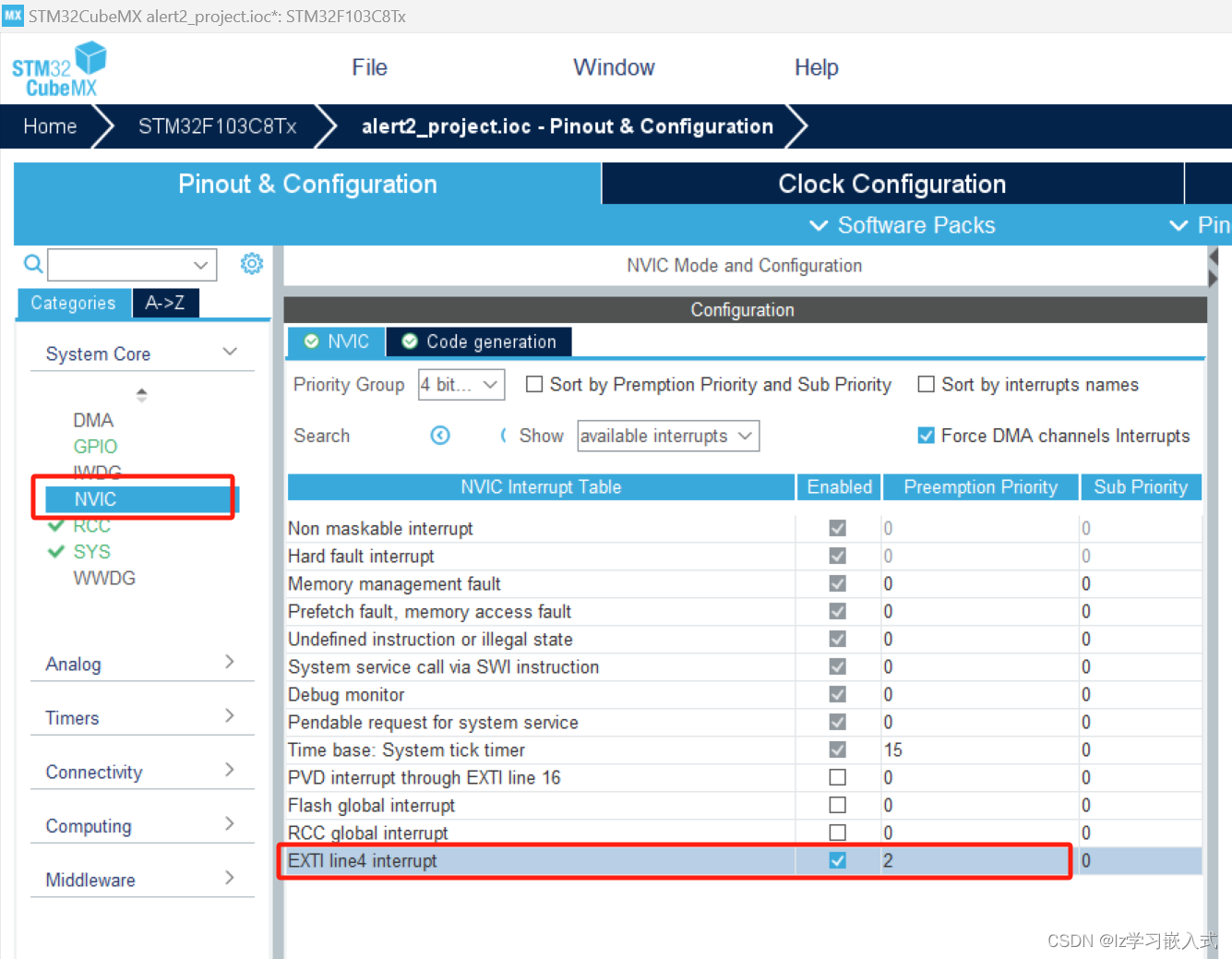
STM32——震动传感器点亮LED灯
震动传感器简单介绍 若产品不震动,模块上的 DO 口输出高电平; 若产品震动,模块上的 DO 口输出低电平,D0-LED绿色指示灯亮。 震动传感器与STM32的接线 编程实现 需求:当震动传感器接收到震动信号时,使用中断…...
使用 Timm 库替换 YOLOv8 主干网络 | 1000+ 主干融合YOLOv8
文章目录 前言版本差异说明替换方法parse_moedl( ) 方法_predict_once( ) 方法修改 yaml ,加载主干论文引用timm 是一个包含最先进计算机视觉模型、层、工具、优化器、调度器、数据加载器、数据增强和训练/评估脚本的库。 该库内置了 700 多个预训练模型,并且设计灵活易用。…...
?)
PHP中什么是闭包(Closure)?
在PHP中,闭包(Closure)是一种匿名函数,它可以作为变量传递、作为参数传递给其他函数,或者被作为函数的返回值。闭包可以在定义时捕获上下文中的变量,并在以后的执行中使用这些变量。闭包在处理回调函数、事…...

boost::graph学习
boost::graph API简单小结 boost::graph是boost为图算法提供的API,简单易用。 API说明 boost::add_vertex 创建一个顶点。 boost::add_edge 创建一条边。 boost::edges 获取所有的边。 boost::vertices 获取所有的顶点。 graph.operator[vertex_descriptor] 获…...
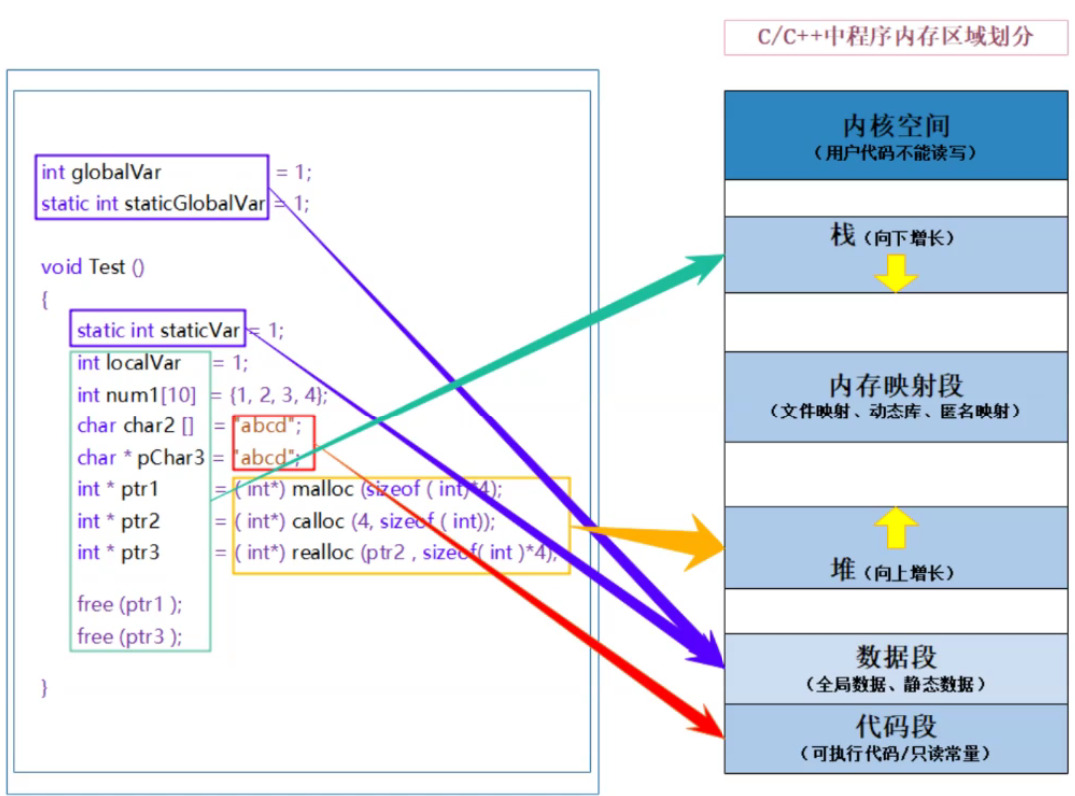
【C语言:动态内存管理】
文章目录 前言1.malloc2.free3.calloc4.realloc5.动态内存常见错误6.动态内存经典笔试题分析7.柔性数组8.C/C中的内存区域划分 前言 文章的标题是动态内存管理,那什么是动态内存管理?为什么有动态内存管理呢? 回顾一下以前学的知识ÿ…...

【Python基础】迭代器
文章目录 [toc]什么是迭代可迭代对象判断数据类型是否是可迭代类型 迭代器对可迭代对象进行迭代的本质获取可迭代对象的迭代器通过迭代器获取数据StopIteration异常 自定义迭代器__iter__()方法__next__()方法判断数据类型是否是可迭代类型自定义迭代器案例分离模式整合模式 fo…...
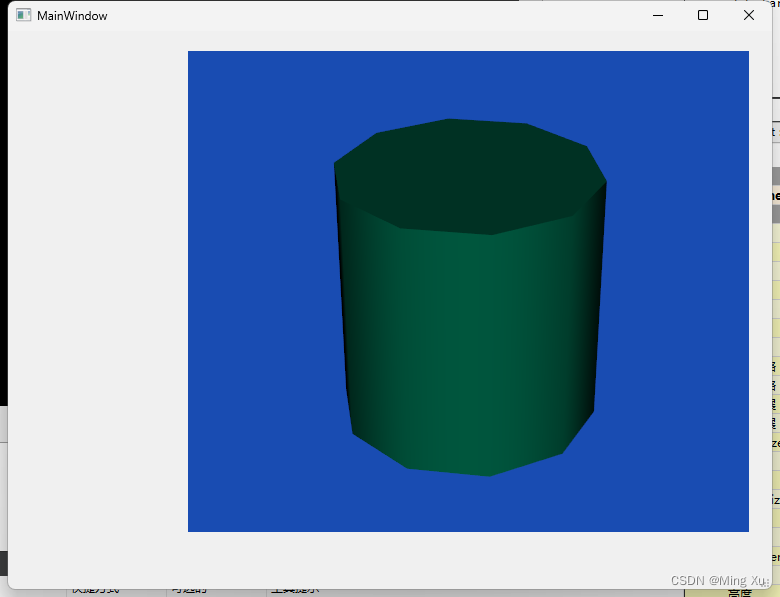
QVTK 可视化
#ifndef MAINWINDOW_H #define MAINWINDOW_H#include <QMainWindow>#include <vtkNew.h> // 智能指针 #include <QVTKOpenGLNativeWidget.h> #include <vtkCylinderSource.h> // 圆柱#include <vtkPolyDataMapper.h&g…...
【初阶C++】入门(超详解)
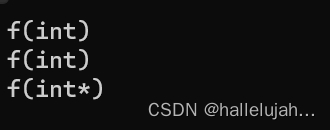
C入门 前言1. C关键字(C98)2. 命名空间2.1 命名空间定义2.2 命名空间使用2.3嵌套命名空间 3. C输入&输出4. 缺省参数4.1 缺省参数概念4.2 缺省参数分类 5. 函数重载5.1 函数重载概念5.2 C支持函数重载的原理--名字修饰(name Mangling) 6. 引用6.1 引用概念6.2 引用特性6.3 …...

Java正则表达式的使用
标题:Java正则表达式的使用 介绍: 正则表达式是一种强大的文本匹配模式和搜索工具。在Java中,通过使用正则表达式,我们可以快速有效地进行字符串的匹配、查找和替换。本文将介绍Java正则表达式的基本使用方法,并提供相…...
Collecting Application Engine Performance Data 收集应用程序引擎性能数据
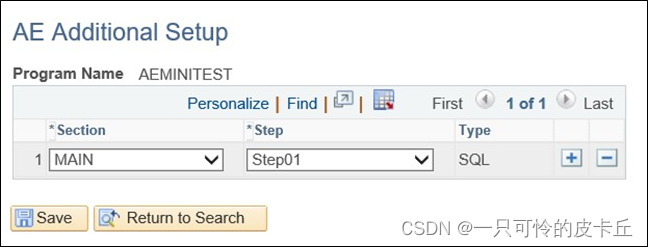
You can collect performance data of any specific SQL action of an Application Engine program to address any performance issue. 您可以收集应用程序引擎程序的任何特定SQL操作的性能数据,以解决任何性能问题。 You can collect performance data of the S…...

C Primer Plus阅读--章节16
C Primer Plus阅读–章节16 翻译程序的第一步 预处理之前,编译器必须对该程序进行一些翻译处理。 首先,编译器将源代码中出现的字符映射到源字符集。第二,编译器定位每个反斜杠后面跟着换行符的实力,并删除他们。物理行的合并。…...
直接插入排序与希尔排序
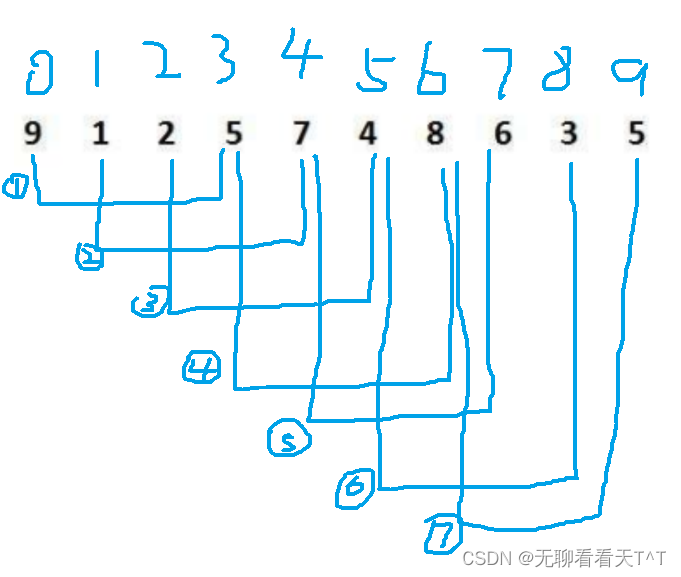
目录 前言 插入排序 直接插入排序 时空复杂度 直接插入排序的特性 希尔排序(缩小增量排序) 预排序 顺序排序 多组并排 小总结 直接插入排序 时空复杂度 希尔排序的特性 前言 字可能有点多,但是真的理解起来真的没那么难&#…...
敏捷:应对软件定义汽车时代的开发模式变革
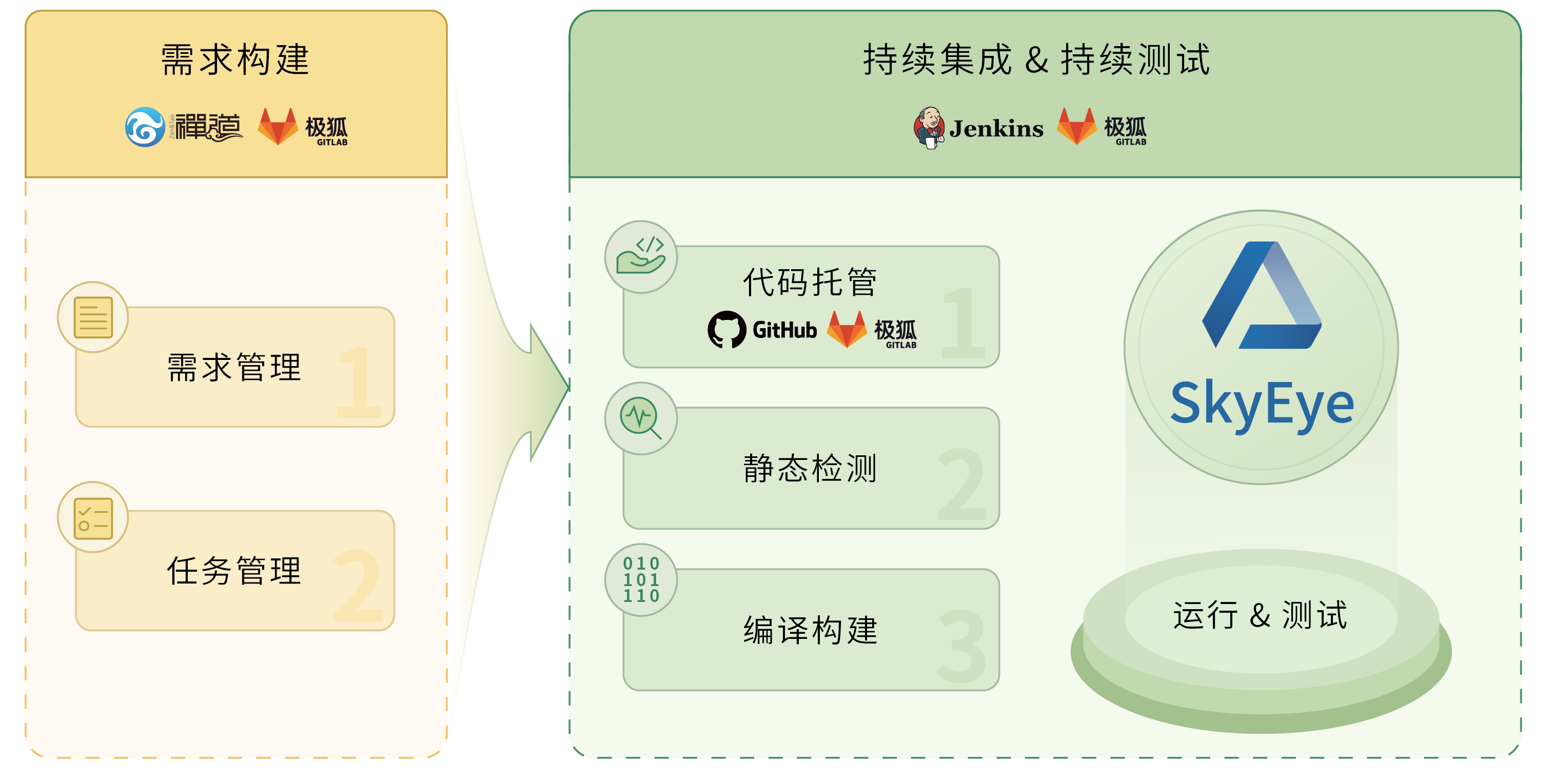
随着软件定义汽车典型应用场景的落地,汽车从交通工具转向智能移动终端的趋势愈发明显。几十年前,一台好车的定义主要取决于高性能的底盘操稳与动力系统;几年前,一台好车的定义主要取决于智能化系统与智能交互能否满足终端用户的用…...
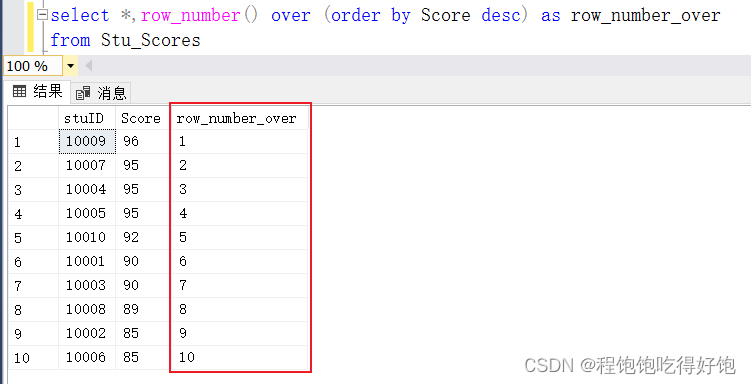
做题笔记:SQL Sever 方式做牛客SQL的题目--查询每天刷题通过数最多的前二名用户
----查询每天刷题通过数最多的前二名用户id和刷题数 现有牛客刷题表questions_pass_record,请查询每天刷题通过数最多的前二名用户id和刷题数,输出按照日期升序排序,查询返回结果名称和顺序为: date|user_id|pass_count 表单创建…...

Vue3 用 Proxy API 替代 defineProperty API 的那些事
一、Object.defineProperty 定义:Object.defineProperty() 方法会直接在一个对象上定义一个新属性,或者修改一个对象的现有属性,并返回此对象 1.1 为什么能实现响应式 通过defineProperty 两个属性,get及set get 属性的 gett…...
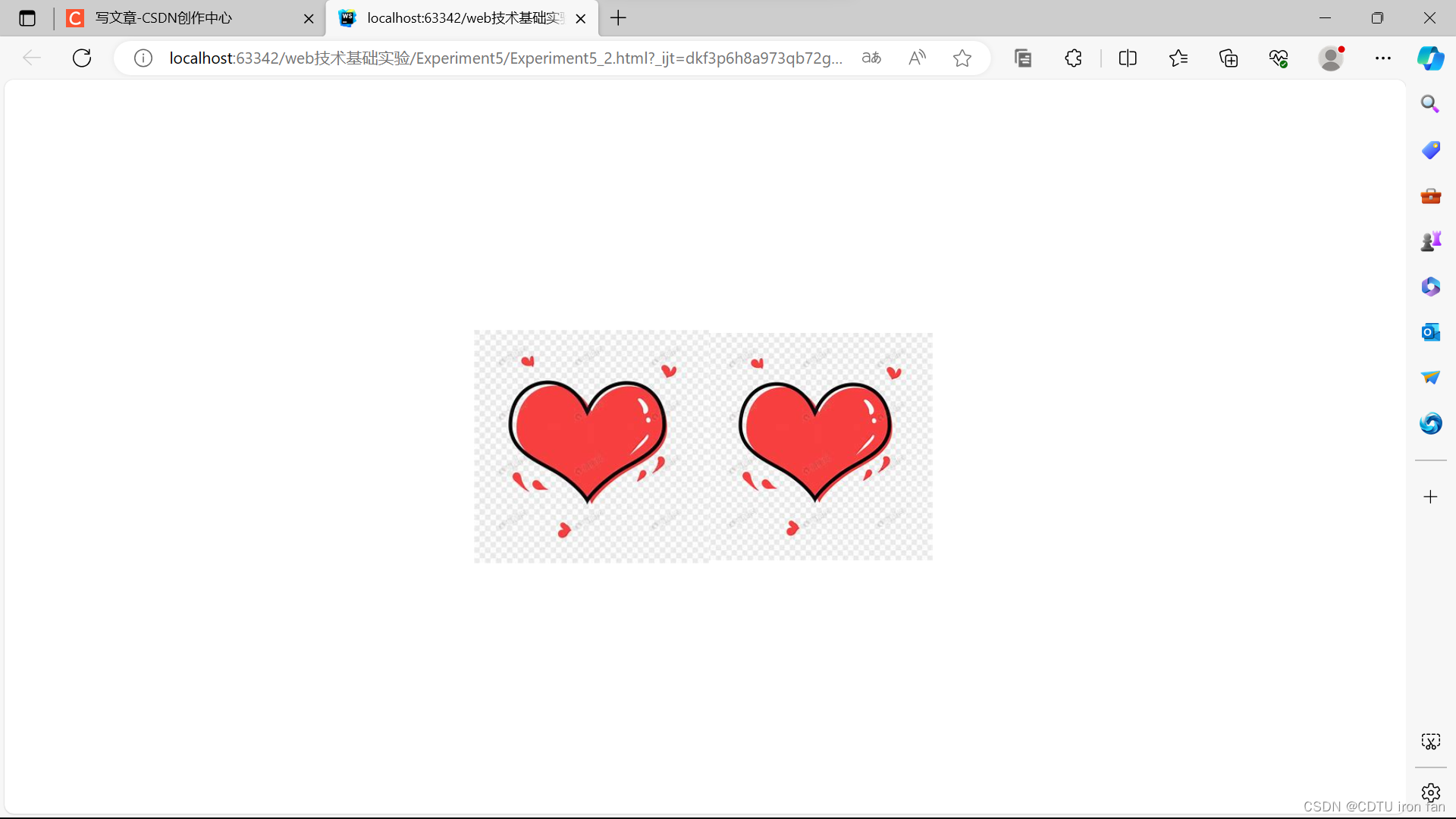
成都工业学院Web技术基础(WEB)实验五:CSS3动画制作
写在前面 1、基于2022级计算机大类实验指导书 2、代码仅提供参考,前端变化比较大,按照要求,只能做到像,不能做到一模一样 3、图片和文字仅为示例,需要自行替换 4、如果代码不满足你的要求,请寻求其他的…...
三剑客之 docker-compose文件书写项目多服务容器运行)
【Docker】学习笔记(三)三剑客之 docker-compose文件书写项目多服务容器运行
简介 引言(需求) 为了完成一个完整项目势必用到N多个容器配合完成项目中的业务开发,一旦引入N多个容器,N个容器之间就会形成某种依赖,也就意味着某个容器的运行需要其他容器优先启动之后才能正常运行; 容…...

node.js基础
node.js基础 🍓什么是node.js🍓node.js模块🍒🍒 内置模块🍅🍅🍅fs模块🍅🍅🍅path模块🍅🍅🍅http模块 🍒&#…...

fastapi实现websocket在线聊天
最近要实现一个在线聊天功能,基于fastapi的websocket实现了这个功能。下面介绍一下遇到的技术问题 1.问题难点 在线上环境部署时,一般是多进程的方式进行部署启动fastapi服务,而每个启动的进程都有自己的独立存储空间。导致存储的连接对象分…...
华为云10分钟部署及使用保姆级流程)
【教程】OpenClaw(Clawdbot)华为云10分钟部署及使用保姆级流程
【教程】OpenClaw(Clawdbot)华为云10分钟部署及使用保姆级流程。OpenClaw(Clawdbot/Moltbot)作为开源、本地优先的AI助理框架,凭借724小时在线响应、多任务自动化执行、跨平台协同等核心能力,成为个人办公与…...

DeepSeek-R1-Distill-Qwen-7B实战:Ollama轻松部署,体验媲美OpenAI o1的推理能力
DeepSeek-R1-Distill-Qwen-7B实战:Ollama轻松部署,体验媲美OpenAI o1的推理能力 1. 模型介绍 DeepSeek-R1-Distill-Qwen-7B是一款经过深度蒸馏的7B参数语言模型,基于Qwen架构开发。该模型在数学推理、代码生成和逻辑分析任务上表现出色&…...

Step3-VL-10B-Base进阶:利用LaTeX编写包含模型公式的技术文档
Step3-VL-10B-Base进阶:利用LaTeX编写包含模型公式的技术文档 你是不是也遇到过这种情况?辛辛苦苦画好了一张复杂的神经网络结构图,或者整理了一堆实验结果图表,结果在写论文或者技术报告的时候,光是描述这些图表就花…...

Ubuntu20.04 Autoware.universe部署实战:从环境配置到避坑指南
1. 环境准备:从零开始的Ubuntu20.04配置 在开始Autoware.universe部署之前,确保你的Ubuntu20.04系统处于一个相对干净的状态非常重要。我遇到过太多因为系统环境混乱导致的问题,比如ROS版本冲突、依赖项缺失等。如果你和我一样,之…...
)
Python爬虫实战:5分钟搞定东方财富网股票数据抓取(附完整代码)
Python爬虫实战:5分钟搞定东方财富网股票数据抓取(附完整代码) 最近在研究量化交易的朋友们可能深有体会——获取高质量的股票数据是第一步,也是最让人头疼的一步。市面上虽然有各种数据接口,但要么收费昂贵࿰…...

DeOldify图像上色服务在低光照与高噪声老照片上的修复表现
DeOldify图像上色服务在低光照与高噪声老照片上的修复表现 翻箱倒柜找出家里的老照片,看着那些泛黄、模糊、布满斑点的影像,是不是总想让它恢复往日的清晰与色彩?这几乎是每个家庭都会有的念想。传统的修复方法要么费时费力,要么…...
)
Simulink频域分析实战:5步搞定控制系统性能评估(附完整MATLAB代码)
Simulink频域分析实战:5步搞定控制系统性能评估(附完整MATLAB代码) 控制系统工程师经常面临一个关键挑战:如何快速验证设计方案的动态性能?频域分析作为经典方法,能直观揭示系统稳定性与响应特性。本文将用…...

M2FP实战:多人重叠场景精准解析,WebUI界面操作简单直观
M2FP实战:多人重叠场景精准解析,WebUI界面操作简单直观 1. 项目概述与核心价值 M2FP多人人体解析服务是一款基于先进计算机视觉技术的实用工具,专门用于处理包含多个人物的图像解析任务。这项技术能够将图像中的每个人物分解成不同的身体部…...

OFA-VE科研复现指南:SNLI-VE基准测试全流程代码与参数
OFA-VE科研复现指南:SNLI-VE基准测试全流程代码与参数 1. 引言:视觉蕴含任务与OFA-VE系统 视觉蕴含是多模态人工智能领域的核心任务之一,它要求模型理解图像内容与文本描述之间的逻辑关系。OFA-VE系统基于阿里巴巴达摩院的OFA大模型构建&am…...

UI-TARS-desktop行业案例:医疗信息科用Qwen3-Agent自动抓取指南文献、提取适应症、生成摘要表
UI-TARS-desktop行业案例:医疗信息科用Qwen3-Agent自动抓取指南文献、提取适应症、生成摘要表 1. 医疗信息处理的痛点与解决方案 医疗信息科每天需要处理大量的医学文献、临床指南和研究报告。传统的人工处理方式效率低下,容易出现遗漏和错误。医生和研…...