
Linux环境grep搜索方法记录
1 grep
grep 命令,用来搜索字符串所在位置,可以具体到不同文件,不同行;
在Linux 下,查看命令释义如下
zhaoc@ubuntu2004:~$ grep --help
Usage: grep [OPTION]... PATTERNS [FILE]...
Search for PATTERNS in each FILE.
Example: grep -i 'hello world' menu.h main.c
PATTERNS can contain multiple patterns separated by newlines.Pattern selection and interpretation:-E, --extended-regexp     PATTERNS are extended regular expressions-F, --fixed-strings       PATTERNS are strings-G, --basic-regexp        PATTERNS are basic regular expressions-P, --perl-regexp         PATTERNS are Perl regular expressions-e, --regexp=PATTERNS     use PATTERNS for matching-f, --file=FILE           take PATTERNS from FILE-i, --ignore-case         ignore case distinctions in patterns and data--no-ignore-case      do not ignore case distinctions (default)-w, --word-regexp         match only whole words-x, --line-regexp         match only whole lines-z, --null-data           a data line ends in 0 byte, not newlineMiscellaneous:-s, --no-messages         suppress error messages-v, --invert-match        select non-matching lines-V, --version             display version information and exit--help                display this help text and exitOutput control:-m, --max-count=NUM       stop after NUM selected lines-b, --byte-offset         print the byte offset with output lines-n, --line-number         print line number with output lines--line-buffered       flush output on every line-H, --with-filename       print file name with output lines-h, --no-filename         suppress the file name prefix on output--label=LABEL         use LABEL as the standard input file name prefix-o, --only-matching       show only nonempty parts of lines that match-q, --quiet, --silent     suppress all normal output--binary-files=TYPE   assume that binary files are TYPE;TYPE is 'binary', 'text', or 'without-match'-a, --text                equivalent to --binary-files=text-I                        equivalent to --binary-files=without-match-d, --directories=ACTION  how to handle directories;ACTION is 'read', 'recurse', or 'skip'-D, --devices=ACTION      how to handle devices, FIFOs and sockets;ACTION is 'read' or 'skip'-r, --recursive           like --directories=recurse-R, --dereference-recursive  likewise, but follow all symlinks--include=GLOB        search only files that match GLOB (a file pattern)--exclude=GLOB        skip files that match GLOB--exclude-from=FILE   skip files that match any file pattern from FILE--exclude-dir=GLOB    skip directories that match GLOB-L, --files-without-match  print only names of FILEs with no selected lines-l, --files-with-matches  print only names of FILEs with selected lines-c, --count               print only a count of selected lines per FILE-T, --initial-tab         make tabs line up (if needed)-Z, --null                print 0 byte after FILE nameContext control:-B, --before-context=NUM  print NUM lines of leading context-A, --after-context=NUM   print NUM lines of trailing context-C, --context=NUM         print NUM lines of output context-NUM                      same as --context=NUM--color[=WHEN],--colour[=WHEN]       use markers to highlight the matching strings;WHEN is 'always', 'never', or 'auto'-U, --binary              do not strip CR characters at EOL (MSDOS/Windows)When FILE is '-', read standard input.  With no FILE, read '.' if
recursive, '-' otherwise.  With fewer than two FILEs, assume -h.
Exit status is 0 if any line (or file if -L) is selected, 1 otherwise;
if any error occurs and -q is not given, the exit status is 2.Report bugs to: bug-grep@gnu.org
GNU grep home page: <http://www.gnu.org/software/grep/>
General help using GNU software: <https://www.gnu.org/gethelp/>
2 搜索方式
2.1 通用格式
我目前使用的命令,通用格式如下
grep <命令选项(可选)> <附加命令项(可选)> <带搜索字符串(支持正则)> <路径(默认为当前路径)>
2.2 当前路径搜索
在当前路径搜索特定字符串,并显示出对应行数
grep -rn "zhaoc"

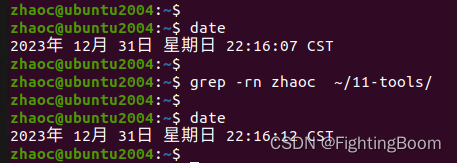
2.3 指定路径搜索
grep -rn zhaoc ~/11-tools/
2.4 搜索指定文件类型
grep -rin --include=*.h --include=*.cpp foo <可选搜索路径>
实际操作,举例如下:
zhaoc@ubuntu2004:~$ date; grep -rn --include="*h" include ~/gitRepository/UsefulWheels/
2023年 12月 31日 星期日 22:18:09 CST
/home/zhaoc/gitRepository/UsefulWheels/LinuxCppInterface/BasicInclude.h:4:#include <iostream>
/home/zhaoc/gitRepository/UsefulWheels/LinuxCppInterface/BasicInclude.h:5:#include <string>
/home/zhaoc/gitRepository/UsefulWheels/LinuxCppInterface/BasicInclude.h:6:#include <string.h>
/home/zhaoc/gitRepository/UsefulWheels/LinuxCppInterface/BasicInclude.h:7:#include <vector>
/home/zhaoc/gitRepository/UsefulWheels/LinuxCppInterface/CppWheels_Other.h:4:#include "BasicInclude.h"
/home/zhaoc/gitRepository/UsefulWheels/LinuxCppInterface/CppWheels_Other.h:5:#include "Linuxcpptypes.h"
/home/zhaoc/gitRepository/UsefulWheels/LinuxCppInterface/CppWheels_String.h:4:#include "BasicInclude.h"
/home/zhaoc/gitRepository/UsefulWheels/CppInterface/CppWheels_String.h:4:#include <iostream>
/home/zhaoc/gitRepository/UsefulWheels/CppInterface/CppWheels_String.h:5:#include <string>
/home/zhaoc/gitRepository/UsefulWheels/CppInterface/CppWheels_String.h:6:#include <vector>
相关文章:
Linux环境grep搜索方法记录
1 grep grep 命令,用来搜索字符串所在位置,可以具体到不同文件,不同行; 在Linux 下,查看命令释义如下 zhaocubuntu2004:~$ grep --help Usage: grep [OPTION]... PATTERNS [FILE]... Search for PATTERNS in each FI…...

C语言-破解密码
题目描述 密码是我们生活中非常重要的东东,我们的那么一点不能说的秘密就全靠它了。哇哈哈. 接下来渊子要在密码之上再加一套密码,虽然简单但也安全。 假设老王原来一个BBS上的密码为zvbo941987,为了方便记忆,他通过一种算法把这个密码变换…...
ffmpeg 解码文件时的时间戳问题
实时流和普通文件 1 实时流 实时流编码时,我们一般不进行b帧编码,但是文件存储时为了减小大小,会增加b帧,实时流只带了I,P帧,那就会好很多 2 普通文件 很多文件带了b帧,所以要使用解码时间去同…...
Java企业电子招投标系统源代码,支持二次开发,采用Spring cloud框架
在数字化采购领域,企业需要一个高效、透明和规范的管理系统。通过采用Spring Cloud、Spring Boot2、Mybatis等先进技术,我们打造了全过程数字化采购管理平台。该平台具备内外协同的能力,通过待办消息、招标公告、中标公告和信息发布等功能模块…...

[python]基于faster whisper实时语音识别语音转文本
语音识别转文本相信很多人都用过,不管是手机自带,还是腾讯视频都附带有此功能,今天简单说下: faster whisper地址: https://github.com/SYSTRAN/faster-whisperhttps://link.zhihu.com/?targethttps%3A//github.com…...

2023纠结中前行? 2024继续还是放下?
喝下2023年的第一口雪碧,没有想像中的那么期待,甜水,放弃吧;还是吃些水果吧,不行吃块肉、喝两口酒~ 关于生活 挣扎了10几年的一颗牙“终于“掉了,几个月时间都在为新牙努力着;”进了医院就不在…...
原型链补充
1.什么是原型对象 函数的独有属性,他用prototype来表示,可以在函数的prototype上挂载一些公用的属性和方法,供实例化对象来访问。 2.__proto__属性 这个属性每一个对象都有,实例化对象就是通过这个属性,来访问原型对象上的属性和方法的。 3.三者之间的关系 1.在构造函数的原型…...

《Linux Nano命令详解:小而强大的文本编辑器》
《Linux Nano命令详解:小而强大的文本编辑器》 引言: 在Linux系统中,文本编辑是开发和系统管理中不可或缺的一部分。虽然有许多强大的文本编辑器可供选择,但Nano以其简单易用、小巧灵活而备受喜爱。本文将深入探讨Nano命令&…...
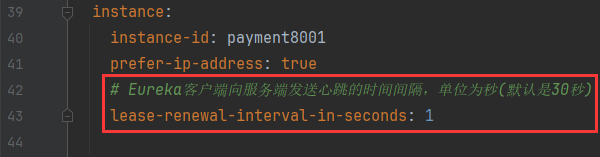
系列四、Eureka自我保护
一、Eureka自我保护 1.1、故障现象 保护模式主要用于一组客户端和Eureka Server之间存在网络分区场景下的保护。一旦进入保护模式,Eureka Server将会尝试保护其服务注册表中的信息,不再删除服务注册表中的数据,也就是不会注销任何微服务。如…...
)
C++回调函数-实操(二)
回调通常通过函数指针、函数对象(仿函数)、Lambda 表达式或者 std::function 来实现。 1、函数指针实现回调 这一方法实现回调比较好记,就记住把函数当作参数传给方法,在方法中调用方法。 #include <iostream>// 回调函数…...

MySQL中常用的用户授权操作
mysql 用户授权 1 )概述 让每个应用程序,单独开一个mysql的用户权限所有mysql用户存储在 mysql库的user表中 2 ) 多种用户授权方式示例 show databases; use mysql;select user, authentication_string, host from mysql.user;-- 创建和删除用户 -- c…...

LabVIEW开发智能火灾自动报警系统
LabVIEW开发智能火灾自动报警系统 系统基于LabVIEW虚拟仪器开发,由火灾报警控制器、感温感烟探测器、手动报警器、声光报警器、ZigBee无线通讯节点以及上位机电脑等组成,展示了LabVIEW在智能化火灾预警与控制方面的应用。该系统通过结合二总线协议和Zig…...

Vagrant使用教程
vmware下载地址:https://www.vmware.com/products/workstation-pro/workstation-pro-evaluation.html VirtualBox下载地址:https://www.virtualbox.org/wiki/Downloads Vagrant下载地址:https://developer.hashicorp.com/vagrant/install#…...
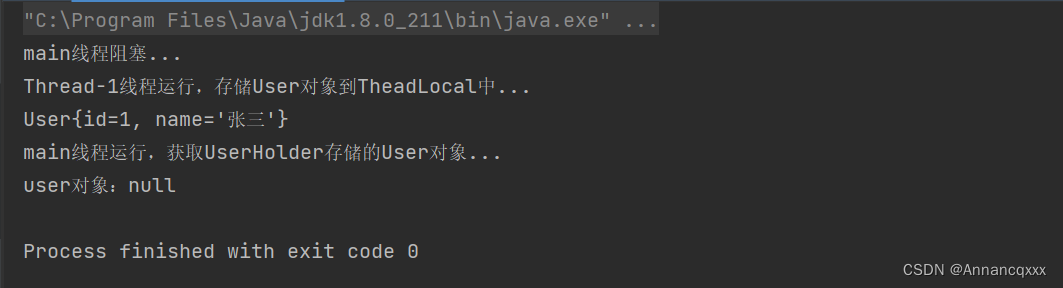
【Java】ThreadLocal原理与使用场景
ThreadLocal原理: 字段: //ThreadLocal对象的哈希码 private final int threadLocalHashCode nextHashCode();//生成ThreadLocal对象的哈希码时,需要用到该对象,从0开始 private static AtomicInteger nextHashCode new Atomic…...

软件测试/测试开发丨Linux进阶命令(curl、jq)
1、 curl 接口请求 curl是一个发起请求数据给服务器的工具curl支持的协议FTP、FTPS、HTTP、HTTPS、TFTP、SFTP、Gopher、SCP、Telnet、DICT、FILE、LDAP、LDAPS、IMAP、POP3、SMTP和RTSPcurl是一个非交互的工具 2、 curl 发起 get 请求 -G:使用get请求-d…...
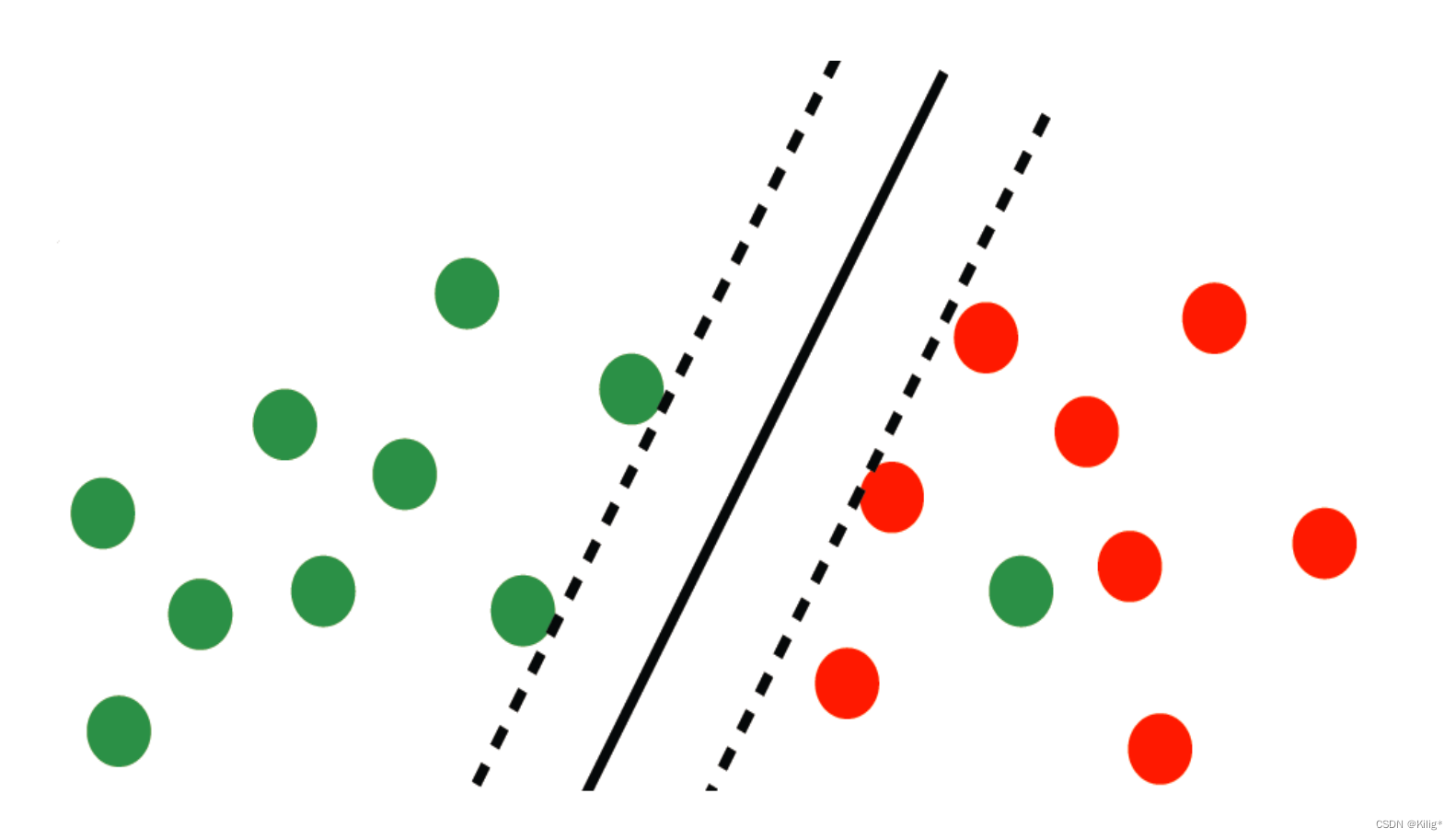
模式识别与机器学习-SVM(带软间隔的支持向量机)
SVM(带软间隔的支持向量机) 软间隔思想的由来软间隔的引入 谨以此博客作为复习期间的记录。 软间隔思想的由来 在上一篇博客中,回顾了线性可分的支持向量机,但在实际情况中,很少有完全线性可分的情况,大部分线性可分…...

CentOS 7 firewalld+ipset+定时任务防御ssh暴力破解——筑梦之路
对于暴露在公网上的linux服务器,很容易被暴力破解登陆,为了增强服务器的安全性,因此对于ssh安全加固是很有必要的,这里主要介绍centos7 系统如何使用ipsetfirewalld定时任务来对ssh服务进行安全加固。 定义firewalld ipset fire…...

ElasticSearch的RestClient结合Sniffer提高可用性
一、背景 由于要安装分词器插件,所以需要重启ElasticSearch集群以使得新安装的插件生效 但是在重启集群的过程中,服务端代码却出现了大量错误,如下所示 java.net.ConnectException: Connection refused at org.elasticsearch.client.R…...
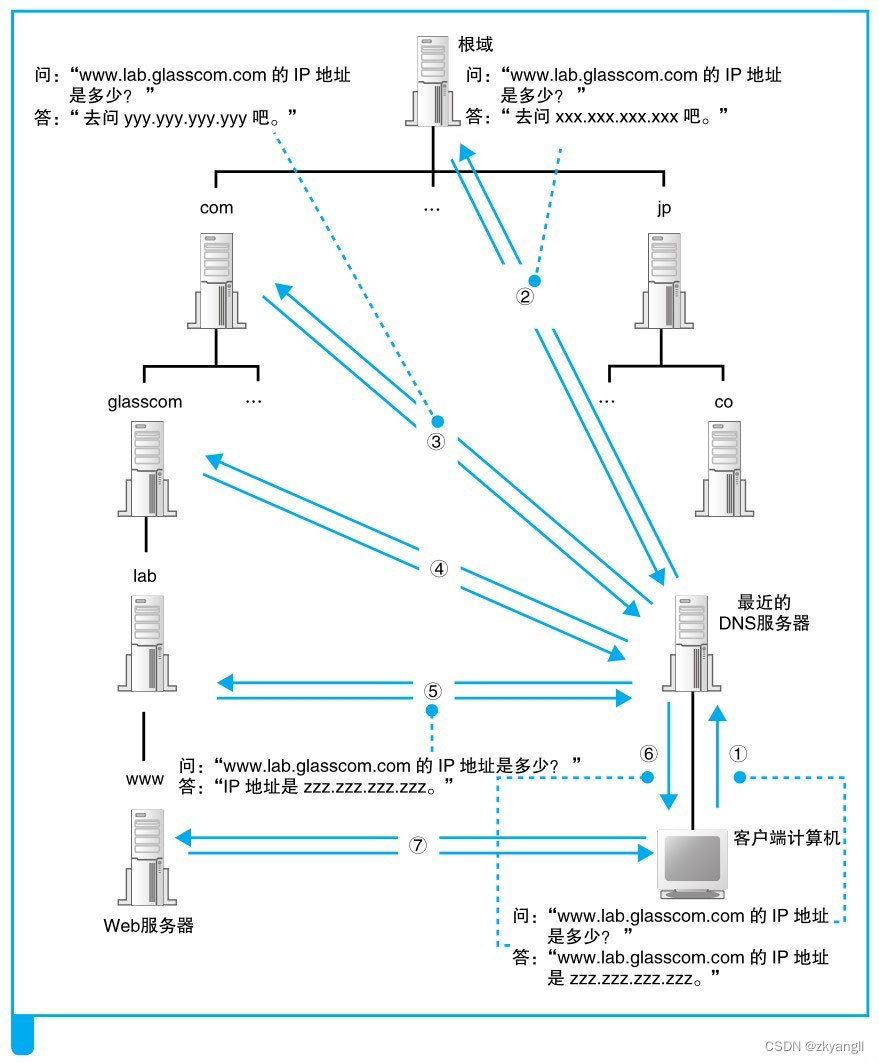
【网络面试(2)】DNS原理-域名和IP地址的查询转换
从上一篇博客我们得知浏览器是如何生成了HTTP消息了,但是浏览器作为应用程序,是不具备向网络中发送请求的能力,而是需要委托给操作系统的内核协议栈来发送请求。在委托协议栈之前,浏览器还要做的一件事情就是将域名转换为IP地址。…...

【PHP】函数array_intersect、array_diff:从数组中取出、去除指定的几个键值
1.从数组中取出 :array_intersect 要从数组中取出指定的几个键值,可以使用 array_intersect_key 函数。以下是一个示例: $array [name > John,age > 30,email > johnexample.com,city > New York ];$keys [name, email];$resu…...

内存分配函数malloc kmalloc vmalloc
内存分配函数malloc kmalloc vmalloc malloc实现步骤: 1)请求大小调整:首先,malloc 需要调整用户请求的大小,以适应内部数据结构(例如,可能需要存储额外的元数据)。通常,这包括对齐调整,确保分配的内存地址满足特定硬件要求(如对齐到8字节或16字节边界)。 2)空闲…...
使用rpicam-app通过网络流式传输视频)
树莓派超全系列教程文档--(62)使用rpicam-app通过网络流式传输视频
使用rpicam-app通过网络流式传输视频 使用 rpicam-app 通过网络流式传输视频UDPTCPRTSPlibavGStreamerRTPlibcamerasrc GStreamer 元素 文章来源: http://raspberry.dns8844.cn/documentation 原文网址 使用 rpicam-app 通过网络流式传输视频 本节介绍来自 rpica…...
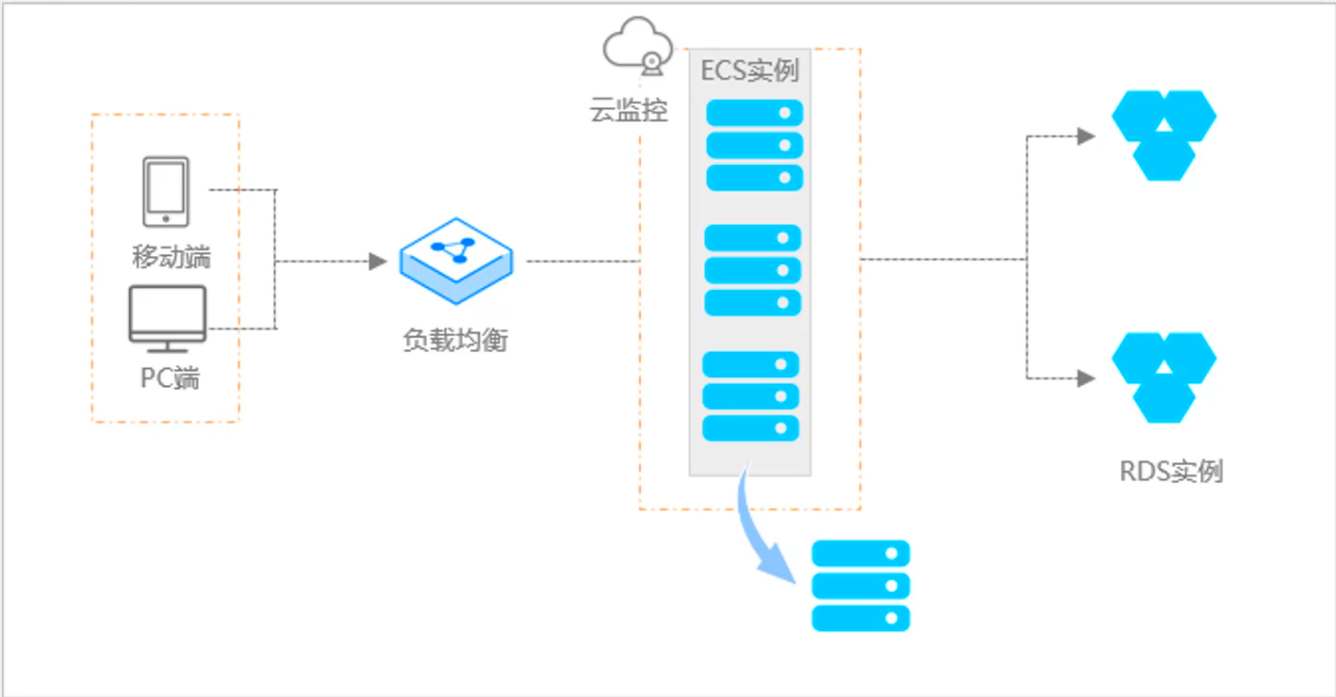
阿里云ACP云计算备考笔记 (5)——弹性伸缩
目录 第一章 概述 第二章 弹性伸缩简介 1、弹性伸缩 2、垂直伸缩 3、优势 4、应用场景 ① 无规律的业务量波动 ② 有规律的业务量波动 ③ 无明显业务量波动 ④ 混合型业务 ⑤ 消息通知 ⑥ 生命周期挂钩 ⑦ 自定义方式 ⑧ 滚的升级 5、使用限制 第三章 主要定义 …...
` 方法)
深入浅出:JavaScript 中的 `window.crypto.getRandomValues()` 方法
深入浅出:JavaScript 中的 window.crypto.getRandomValues() 方法 在现代 Web 开发中,随机数的生成看似简单,却隐藏着许多玄机。无论是生成密码、加密密钥,还是创建安全令牌,随机数的质量直接关系到系统的安全性。Jav…...
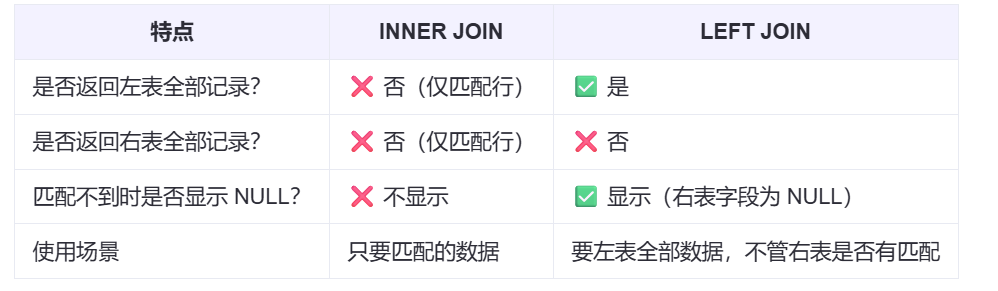
【SQL学习笔记1】增删改查+多表连接全解析(内附SQL免费在线练习工具)
可以使用Sqliteviz这个网站免费编写sql语句,它能够让用户直接在浏览器内练习SQL的语法,不需要安装任何软件。 链接如下: sqliteviz 注意: 在转写SQL语法时,关键字之间有一个特定的顺序,这个顺序会影响到…...

第25节 Node.js 断言测试
Node.js的assert模块主要用于编写程序的单元测试时使用,通过断言可以提早发现和排查出错误。 稳定性: 5 - 锁定 这个模块可用于应用的单元测试,通过 require(assert) 可以使用这个模块。 assert.fail(actual, expected, message, operator) 使用参数…...

OPenCV CUDA模块图像处理-----对图像执行 均值漂移滤波(Mean Shift Filtering)函数meanShiftFiltering()
操作系统:ubuntu22.04 OpenCV版本:OpenCV4.9 IDE:Visual Studio Code 编程语言:C11 算法描述 在 GPU 上对图像执行 均值漂移滤波(Mean Shift Filtering),用于图像分割或平滑处理。 该函数将输入图像中的…...
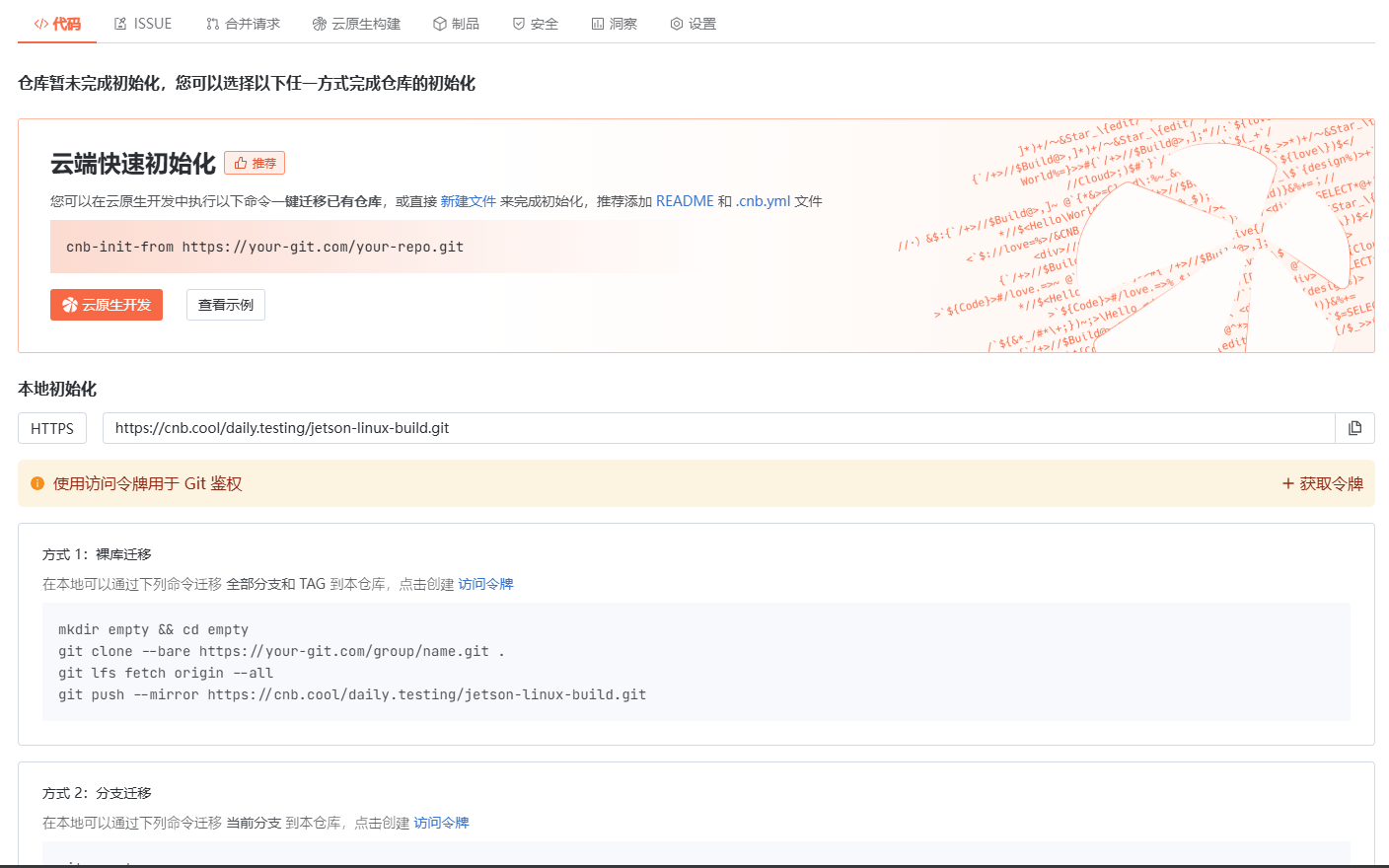
云原生玩法三问:构建自定义开发环境
云原生玩法三问:构建自定义开发环境 引言 临时运维一个古董项目,无文档,无环境,无交接人,俗称三无。 运行设备的环境老,本地环境版本高,ssh不过去。正好最近对 腾讯出品的云原生 cnb 感兴趣&…...
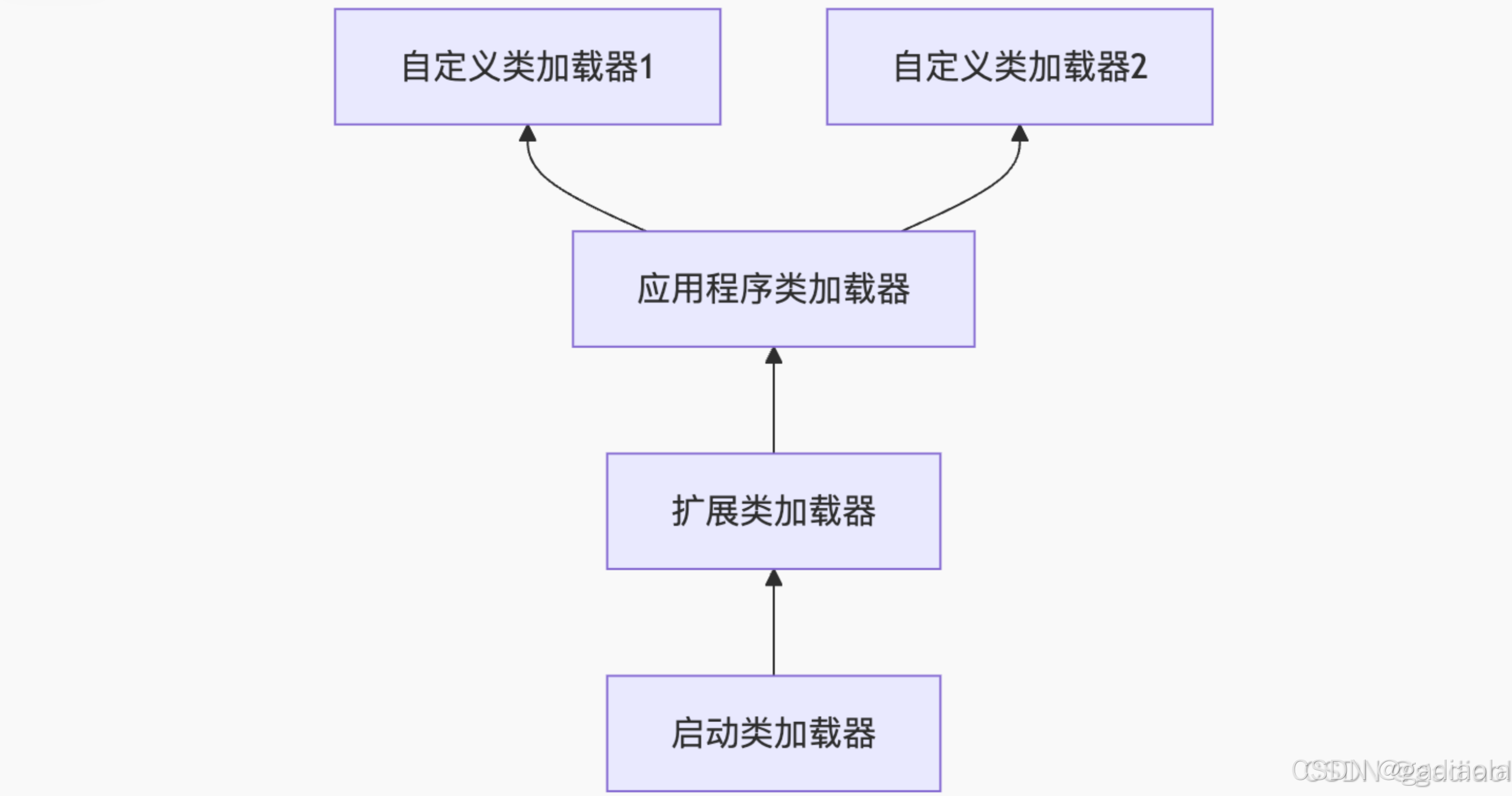
【JVM面试篇】高频八股汇总——类加载和类加载器
目录 1. 讲一下类加载过程? 2. Java创建对象的过程? 3. 对象的生命周期? 4. 类加载器有哪些? 5. 双亲委派模型的作用(好处)? 6. 讲一下类的加载和双亲委派原则? 7. 双亲委派模…...

Go语言多线程问题
打印零与奇偶数(leetcode 1116) 方法1:使用互斥锁和条件变量 package mainimport ("fmt""sync" )type ZeroEvenOdd struct {n intzeroMutex sync.MutexevenMutex sync.MutexoddMutex sync.Mutexcurrent int…...