
彻底解决vue-video-player播放视频有黑边
需求
最近需要接入海康视频摄像头,然后把视频的画面接入到自己的网站系统中。以前对接过rtsp固定IP的显示视频,这次的不一样,没有了固定IP。海康的解决办法是,摄像头通过配置服务器到萤石云平台,然后购买企业版账号和套餐【注意必须要购买套餐】最便宜的一个月是300元。如果不购买,视频会一直转圈圈,无法播放。
# 萤石云平台官网
https://open.ys7.com
1、购买萤石云平台企业版套餐。

2、购买4G卡的流量,默认500MB,新人注册免费领取2G。官方测评一天流量消耗是8个G。
3、购买4G版的摄像头。
效果图

技术方案
1、摄像头通过4G的SIM卡把视频画面传输到萤石云平台。
2、萤石云平台把视频画面生成https开始m3u8结束的访问地址。
3、VUE通过vue-video-player播放m3u8视频画面。
操作教程
如果前期工作都准备好了可以直接看6789
如果前期工作都准备好了可以直接看6789
如果前期工作都准备好了可以直接看6789
1、配置摄像头
海康4G版的摄像头必须通过网线连接,然后需要一台电脑安装软件【设备网络搜索】,这个摄像头的网线必须和电脑在同一个网段内。
# SADP(设备网络搜索)下载地址
https://www.hikvision.com/cn/support/tools/hitools/clea8b3e4ea7da90a9/
2、摄像头初始化
安装完成后打开软件,软件会自动搜索到摄像头设备,注意未激活字样是当前的设备,注意看IP,在说明书的最后一页有摄像头默认的IP,如果一样就是当前的这台设备。左边单机设备,然后右边选中【使用萤石云】,输入账号密码和验证码即可。保存后就初始化完成。官网教程地址
# 海康设备接入指南
https://open.ys7.com/bbs/article/34
3、摄像头绑定
切记不要用海康的APP绑定,如果绑定了必须先取消绑定,否则萤石云平台是无法绑定设备的。
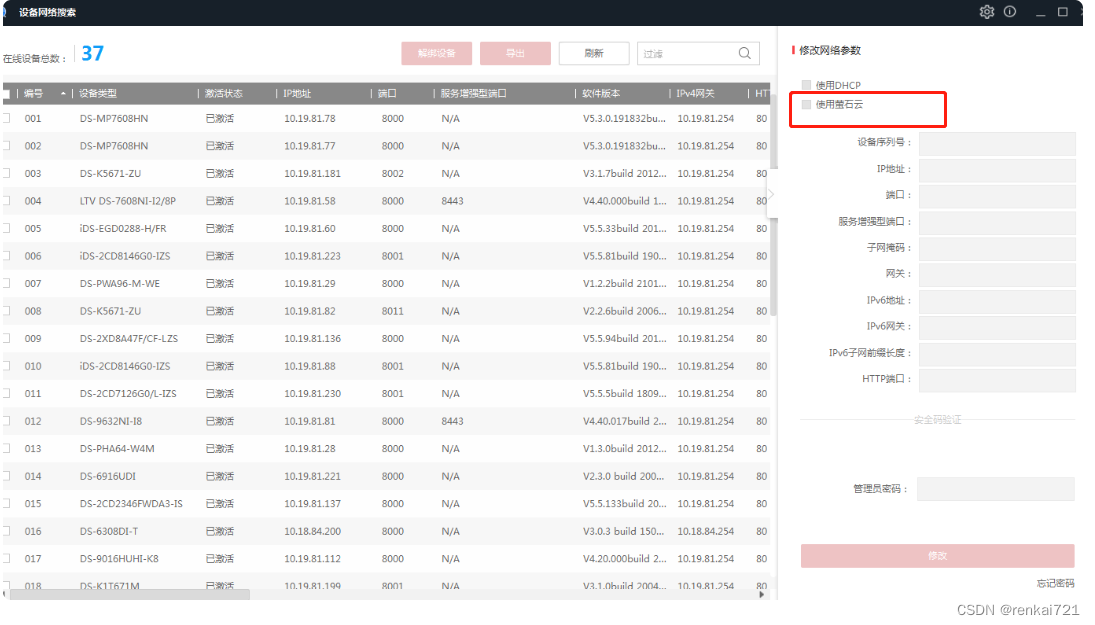
4、萤石云平台添加设备
打开萤石云平台, 点击【云接入】-【视频监控控制台】。点击添加新设备,追个添加,输入摄像头的序列号和验证码。添加好了,手动刷新页面,数据不会自动刷新的。
5、企业版购买
6、获取播放地址
【云接入】-【视频监控控制台】-【直播】,然后就能看到生成的访问地址,然后复制地址到VUE代码中。注意播放地址的有效期,后续可以通过代码动态获取播放地址。
# 根据appKey和secret获取accessToken
https://open.ys7.com/help/81# 获取播放地址
https://open.ys7.com/help/1414#萤石配网SDK使用说明
https://open.ys7.com/help/38
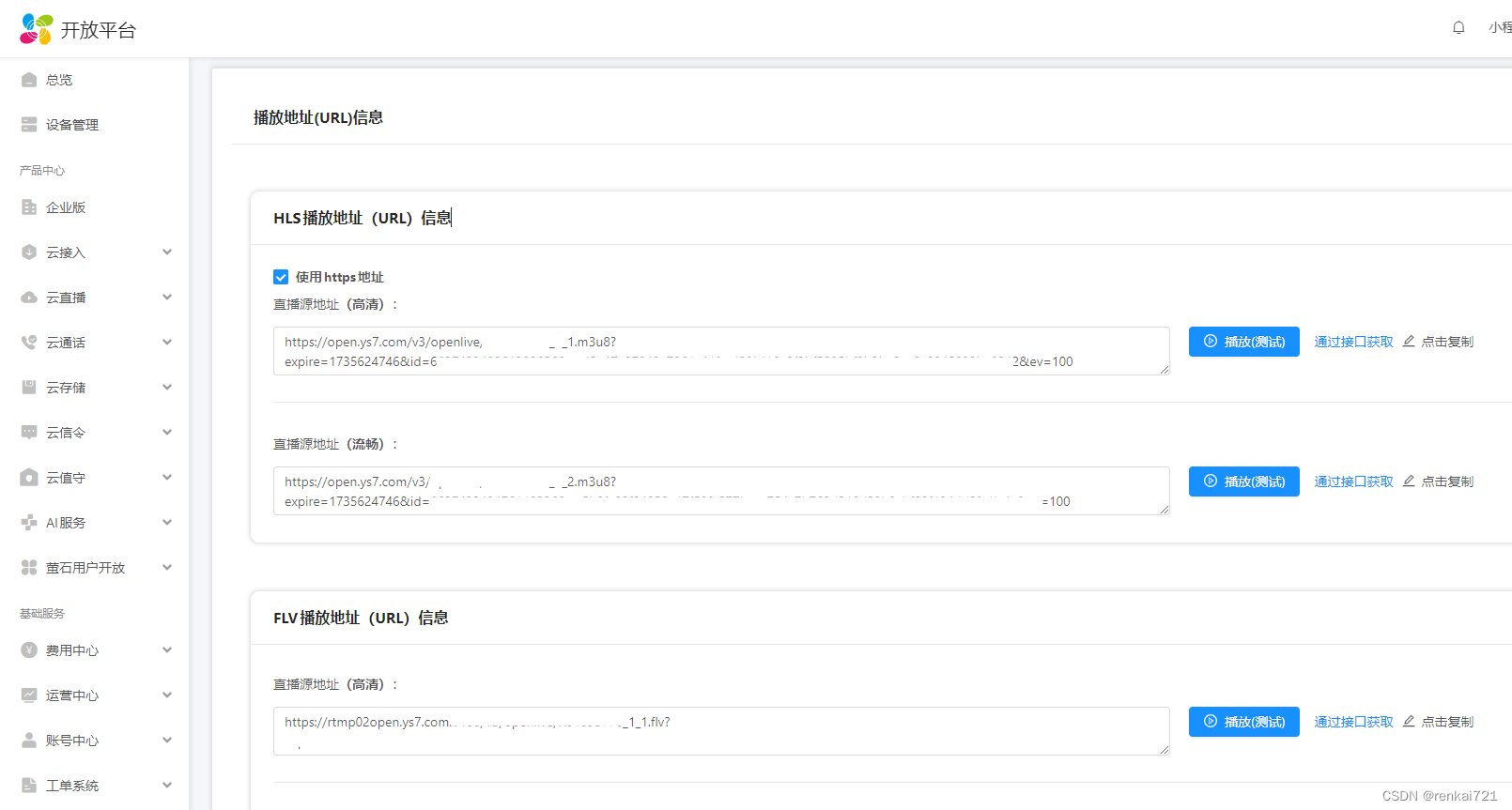
7、VUE安装插件
# 安装插件 vue2不知道video-player6的版本,只能安装5
npm install vue-video-player@5 --save # 安装hls
npm install videojs-contrib-hls --save
8、修改main.js
require('video.js/dist/video-js.css');
require('vue-video-player/src/custom-theme.css');
import hls from 'videojs-contrib-hls';
import VideoPlayer from 'vue-video-player';Vue.use(hls);
Vue.use(VideoPlayer);
9、VUE代码
<template><!-- 详情 --><el-drawer direction="ttb" custom-class="demo-drawer my_drawer1" ref="drawer" title="视频播放测试":visible.sync="openInfo" :before-close="handleClose" :wrapperClosable="false" size="100%"style="width: 1000px; margin: 0 auto;" append-to-body><div class="demo-drawer__content"><div class="formOutDiv"><div style="width: 100%; height: 450px; "><video-player ref="videoPlayer" class="vjs-custom-skin" :options="playerOptions"></video-player></div></div></div></el-drawer>
</template><script>import {getDevice} from "@/api/flowinn/device";export default {name: "Device",components: {},data() {return {openInfo: false,// 按照如下的配置+底部的css样式就能完成视频铺满DIV的效果,否则两边有黑边playerOptions: {//  playbackRates: [0.7, 1.0, 1.5, 2.0], //播放速度autoplay: false, //如果true,浏览器准备好时开始回放。muted: false, // 默认情况下将会消除任何音频。loop: false, // 导致视频一结束就重新开始。preload: 'auto', // 建议浏览器在<video>加载元素后是否应该开始下载视频数据。auto浏览器选择最佳行为,立即开始加载视频(如果浏览器支持)language: 'zh-CN',// aspectRatio: '16:9', // 将播放器置于流畅模式,并在计算播放器的动态大小时使用该值。值应该代表一个比例 - 用冒号分隔的两个数字(例如"16:9"或"4:3")// fluid: true, // 当true时,Video.js player将拥有流体大小。换句话说,它将按比例缩放以适应其容器。sources: [{type: 'application/x-mpegURL',src: null, //你的m3u8地址(必填)}, ],//poster: '', //你的封面地址poster.jpgdefaultQuality: 0,width: '1000px',height: '450px',hls: true,notSupportedMessage: '此视频暂无法播放,请稍后再试', //允许覆盖Video.js无法播放媒体源时显示的默认信息。},};},created() {},methods: {// 设备详情页面关闭前事件handleClose(done) {done();let myPlayer = this.$refs.videoPlayer.player;myPlayer.pause();},/** 设备详情,我的方法是在父类页面触发的,自己按照自己的业务配置触发即可 */handleInfo(row) {let _this = this;let myPlayer = this.$refs.videoPlayer.player;getDevice(id).then(response => {if (response.data.videoUrl != null && response.data.videoUrl != "") {// 必须这种赋值,如果是直接用等号赋值播放一会就会报错,// The media could not be loaded, either because the server or network failed or because the format is not supported._this.$set(_this.playerOptions.sources, 0, {type: "application/x-mpegURL",src: response.data.videoUrl,});// 停止播放// myPlayer.pause();setTimeout(function() {//播放myPlayer.play();}, 30);}});},},mounted() {}};
</script><style rel="stylesheet/scss"></style>
// 以下两个样式就可以完成视频,全屏铺满DIV,不然两边会有黑边
<style rel="stylesheet/scss" lang="scss" scoped>::v-deep .video-js .vjs-tech {object-fit: fill;}::v-deep .vjs-poster {background-size: cover;}
</style>
结束
-----华丽的分割线,以下是凑字数,大家不用花时间看,快去改代码-----
-----华丽的分割线,以下是凑字数,大家不用花时间看,快去改代码-----
-----华丽的分割线,以下是凑字数,大家不用花时间看,快去改代码-----
package cn.renkai721.bean.vo;import lombok.extern.slf4j.Slf4j;@Slf4j
public class MakeUpTheWordCount {private String make_up_the_word_count_column_999999999_1;private String make_up_the_word_count_column_999999999_2;private String make_up_the_word_count_column_999999999_3;private String make_up_the_word_count_column_999999999_4;private String make_up_the_word_count_column_999999999_5;private String make_up_the_word_count_column_999999999_6;private String make_up_the_word_count_column_999999999_7;private String make_up_the_word_count_column_999999999_8;private String make_up_the_word_count_column_999999999_9;private String make_up_the_word_count_column_999999999_10;private String make_up_the_word_count_column_999999999_11;private String make_up_the_word_count_column_999999999_12;private String make_up_the_word_count_column_999999999_13;private String make_up_the_word_count_column_999999999_14;private String make_up_the_word_count_column_999999999_15;private String make_up_the_word_count_column_999999999_16;private String make_up_the_word_count_column_999999999_17;private String make_up_the_word_count_column_999999999_18;private String make_up_the_word_count_column_999999999_19;private String make_up_the_word_count_column_999999999_20;public String getMake_up_the_word_count_column_999999999_1() {return make_up_the_word_count_column_999999999_1;}public void setMake_up_the_word_count_column_999999999_1(String make_up_the_word_count_column_999999999_1) {this.make_up_the_word_count_column_999999999_1 = make_up_the_word_count_column_999999999_1;}public String getMake_up_the_word_count_column_999999999_2() {return make_up_the_word_count_column_999999999_2;}public void setMake_up_the_word_count_column_999999999_2(String make_up_the_word_count_column_999999999_2) {this.make_up_the_word_count_column_999999999_2 = make_up_the_word_count_column_999999999_2;}public String getMake_up_the_word_count_column_999999999_3() {return make_up_the_word_count_column_999999999_3;}public void setMake_up_the_word_count_column_999999999_3(String make_up_the_word_count_column_999999999_3) {this.make_up_the_word_count_column_999999999_3 = make_up_the_word_count_column_999999999_3;}public String getMake_up_the_word_count_column_999999999_4() {return make_up_the_word_count_column_999999999_4;}public void setMake_up_the_word_count_column_999999999_4(String make_up_the_word_count_column_999999999_4) {this.make_up_the_word_count_column_999999999_4 = make_up_the_word_count_column_999999999_4;}public String getMake_up_the_word_count_column_999999999_5() {return make_up_the_word_count_column_999999999_5;}public void setMake_up_the_word_count_column_999999999_5(String make_up_the_word_count_column_999999999_5) {this.make_up_the_word_count_column_999999999_5 = make_up_the_word_count_column_999999999_5;}public String getMake_up_the_word_count_column_999999999_6() {return make_up_the_word_count_column_999999999_6;}public void setMake_up_the_word_count_column_999999999_6(String make_up_the_word_count_column_999999999_6) {this.make_up_the_word_count_column_999999999_6 = make_up_the_word_count_column_999999999_6;}public String getMake_up_the_word_count_column_999999999_7() {return make_up_the_word_count_column_999999999_7;}public void setMake_up_the_word_count_column_999999999_7(String make_up_the_word_count_column_999999999_7) {this.make_up_the_word_count_column_999999999_7 = make_up_the_word_count_column_999999999_7;}public String getMake_up_the_word_count_column_999999999_8() {return make_up_the_word_count_column_999999999_8;}public void setMake_up_the_word_count_column_999999999_8(String make_up_the_word_count_column_999999999_8) {this.make_up_the_word_count_column_999999999_8 = make_up_the_word_count_column_999999999_8;}public String getMake_up_the_word_count_column_999999999_9() {return make_up_the_word_count_column_999999999_9;}public void setMake_up_the_word_count_column_999999999_9(String make_up_the_word_count_column_999999999_9) {this.make_up_the_word_count_column_999999999_9 = make_up_the_word_count_column_999999999_9;}public String getMake_up_the_word_count_column_999999999_10() {return make_up_the_word_count_column_999999999_10;}public void setMake_up_the_word_count_column_999999999_10(String make_up_the_word_count_column_999999999_10) {this.make_up_the_word_count_column_999999999_10 = make_up_the_word_count_column_999999999_10;}public String getMake_up_the_word_count_column_999999999_11() {return make_up_the_word_count_column_999999999_11;}public void setMake_up_the_word_count_column_999999999_11(String make_up_the_word_count_column_999999999_11) {this.make_up_the_word_count_column_999999999_11 = make_up_the_word_count_column_999999999_11;}public String getMake_up_the_word_count_column_999999999_12() {return make_up_the_word_count_column_999999999_12;}public void setMake_up_the_word_count_column_999999999_12(String make_up_the_word_count_column_999999999_12) {this.make_up_the_word_count_column_999999999_12 = make_up_the_word_count_column_999999999_12;}public String getMake_up_the_word_count_column_999999999_13() {return make_up_the_word_count_column_999999999_13;}public void setMake_up_the_word_count_column_999999999_13(String make_up_the_word_count_column_999999999_13) {this.make_up_the_word_count_column_999999999_13 = make_up_the_word_count_column_999999999_13;}public String getMake_up_the_word_count_column_999999999_14() {return make_up_the_word_count_column_999999999_14;}public void setMake_up_the_word_count_column_999999999_14(String make_up_the_word_count_column_999999999_14) {this.make_up_the_word_count_column_999999999_14 = make_up_the_word_count_column_999999999_14;}public String getMake_up_the_word_count_column_999999999_15() {return make_up_the_word_count_column_999999999_15;}public void setMake_up_the_word_count_column_999999999_15(String make_up_the_word_count_column_999999999_15) {this.make_up_the_word_count_column_999999999_15 = make_up_the_word_count_column_999999999_15;}public String getMake_up_the_word_count_column_999999999_16() {return make_up_the_word_count_column_999999999_16;}public void setMake_up_the_word_count_column_999999999_16(String make_up_the_word_count_column_999999999_16) {this.make_up_the_word_count_column_999999999_16 = make_up_the_word_count_column_999999999_16;}public String getMake_up_the_word_count_column_999999999_17() {return make_up_the_word_count_column_999999999_17;}public void setMake_up_the_word_count_column_999999999_17(String make_up_the_word_count_column_999999999_17) {this.make_up_the_word_count_column_999999999_17 = make_up_the_word_count_column_999999999_17;}public String getMake_up_the_word_count_column_999999999_18() {return make_up_the_word_count_column_999999999_18;}public void setMake_up_the_word_count_column_999999999_18(String make_up_the_word_count_column_999999999_18) {this.make_up_the_word_count_column_999999999_18 = make_up_the_word_count_column_999999999_18;}public String getMake_up_the_word_count_column_999999999_19() {return make_up_the_word_count_column_999999999_19;}public void setMake_up_the_word_count_column_999999999_19(String make_up_the_word_count_column_999999999_19) {this.make_up_the_word_count_column_999999999_19 = make_up_the_word_count_column_999999999_19;}public String getMake_up_the_word_count_column_999999999_20() {return make_up_the_word_count_column_999999999_20;}public void setMake_up_the_word_count_column_999999999_20(String make_up_the_word_count_column_999999999_20) {this.make_up_the_word_count_column_999999999_20 = make_up_the_word_count_column_999999999_20;}
}
相关文章:
彻底解决vue-video-player播放视频有黑边
需求 最近需要接入海康视频摄像头,然后把视频的画面接入到自己的网站系统中。以前对接过rtsp固定IP的显示视频,这次的不一样,没有了固定IP。海康的解决办法是,摄像头通过配置服务器到萤石云平台,然后购买企业版账号和…...

区域负责人常用的ChatGPT通用提示词模板
区域市场分析:如何分析区域市场的特点、竞争态势和客户需求? 区域销售策略制定:如何制定针对区域市场的销售策略,包括产品定位、价格策略、渠道策略等? 区域销售目标设定:如何设定明确的区域销售目标&…...

Java Spring boot 可變參數,以及弊端
function中 不固定的參數 public boolean sendEmail(String manFrom, String manTo,String manCc, String subject, String... msg); 必須是最後一個參數,傳值時可以多個。 sendEmail(“a.gmail”,"b.gmail","c.gmail","subject",…...

机器视觉系统选型-线阵工业相机选型
线阵相机特点: 1.线阵相机使用的线扫描传感器通常只有一行感光单元(少数彩色线阵使用三行感光单元的传感器) 2.线阵相机每次只采集一行图像; 3.线阵相机每次只输出一行图像; 4.与传统的面阵相机相比,面阵扫…...
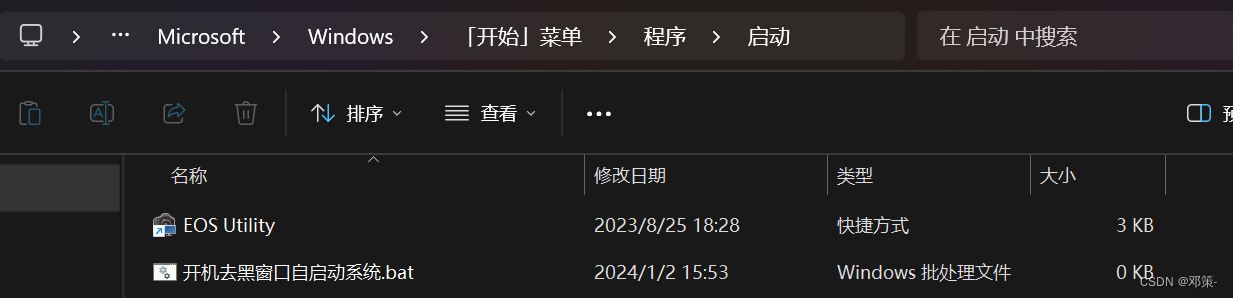
单机开机无感全自动进入B\S架构系统
单机开机无感全自动进入B\S架构系统 标题:单机用jar包启动项目bat(批处理)不弹黑窗口,并设置开机自启,打开浏览器,访问系统。引言:在实际工作中,遇到单机部署的情况,如今…...

大一,如何成为一名fpga工程师?
1、数电(必须掌握的基础),然后进阶学模电(选学), 2、掌握HDL(HDLverilogVHDL)可以选择verilog或者VHDL,建议verilog就行。 3、掌握FPGA设计流程/原理(推…...
MyBatisPlus学习三:Service接口、代码生成器
学习教程 黑马程序员最新MybatisPlus全套视频教程,4小时快速精通mybatis-plus框架 Service接口 简介 在MyBatis-Plus框架中,Service接口的作用是为实体类提供一系列的通用CRUD(增删改查)操作方法。通常情况下,Servi…...

产品经理如何选择城市?
年底,全国性的人口大迁徙即将开始。选择城市,堪称年轻人的“二次投胎”,族望留原籍,家贫走他乡。 古人在选择城市时,主要的考量因素是家族势力,这一点放在当代,大致也成立,如果在老…...
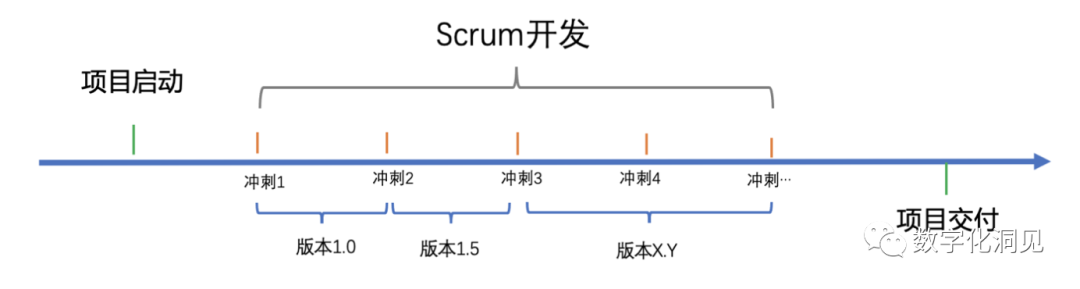
再谈“敏捷”与“瀑布”在产品开发过程中的反思
作为一家专注于软件开发的公司《智创有术》,我们致力于为客户提供创新、高效和可靠的解决方案。通过多年的经验和专业知识,我们已经在行业内建立了良好的声誉,并赢得了客户的信任和支持。 支持各种源码,网站搭建,APP&a…...
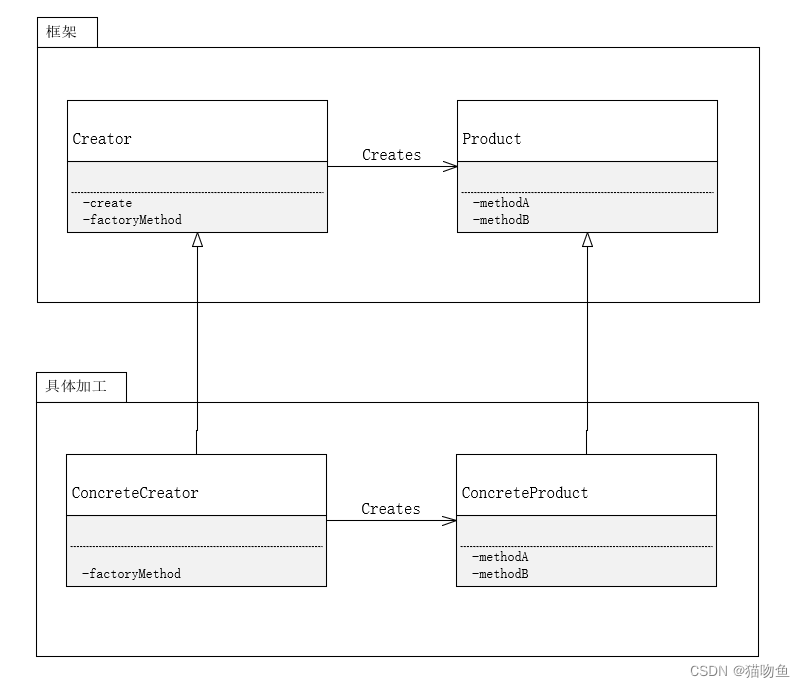
设计模式② :交给子类
文章目录 一、前言二、Template Method 模式1. 介绍2. 应用3. 总结 三、Factory Method 模式1. 介绍2. 应用3. 总结 参考内容 一、前言 有时候不想动脑子,就懒得看源码又不像浪费时间所以会看看书,但是又记不住,所以决定开始写"抄书&qu…...

Hive 源码
hive 编译 issue Failed to execute goal com.github.os72:protoc-jar-maven-plugin:3.5.1.1:run (default) on project hive-standalone-metastore: Error resolving artifact: com.google.protobuf:protoc:2.5.0: The following artifacts could not be resolved: com.goog…...
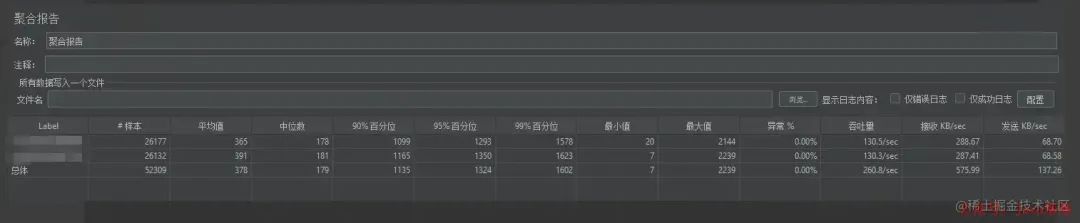
调整几行代码,接口吞吐提升 10 倍,性能调优妙啊!
景 分析过程 总结 背景 公司的一个ToB系统,因为客户使用的也不多,没啥并发要求,就一直没有经过压测。这两天来了一个“大客户”,对并发量提出了要求:核心接口与几个重点使用场景单节点吞吐量要满足最低500/s的要求。 当时一想,500/s吞吐量还不简单。Tomcat按照100个线程…...
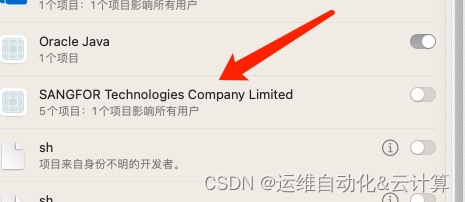
MACOS Atrust服务异常
MAC版Atrust服务异常 点击进入办公后出现提示其一: 核心服务未启动,部分功能存在异常,确定重新启动吗? 可能的原因: 1.上次已完全退出客户端 2.核心服务被其他程序优化禁用 点击重新启动后,出现提示&#x…...
:在ChatGLM3-6B中使用langchain)
LLM大语言模型(四):在ChatGLM3-6B中使用langchain
目录 背景准备工作工具添加LangChain 已实现工具Calculator、Weather Tool配置 自定义工具自定义kuakuawo Agent 多工具使用参考 背景 LangChain是一个用于开发由语言模型驱动的应用程序的框架。它使应用程序能够: 具有上下文意识:将语言模型与上下文源(提示指令&…...
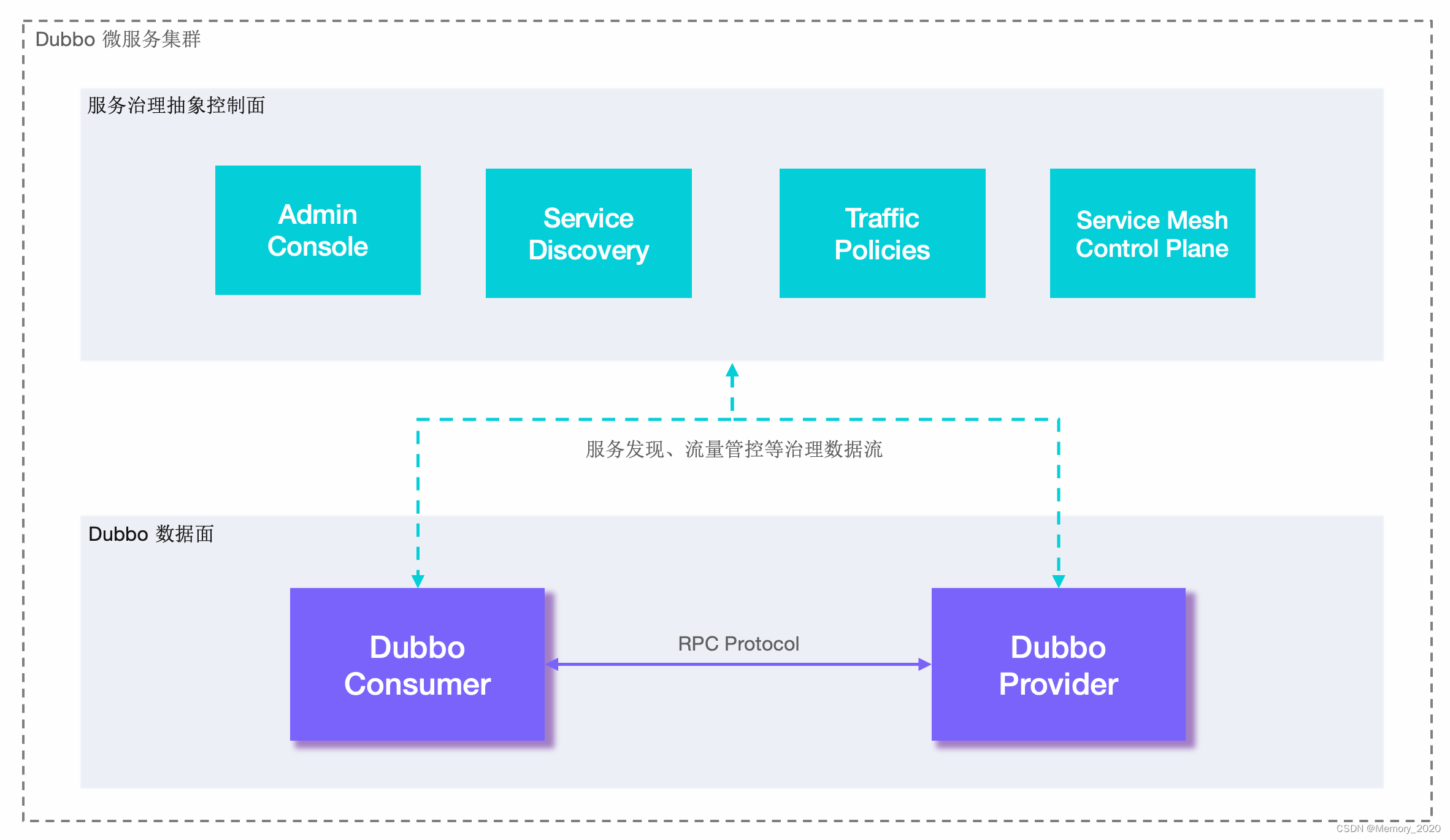
Dubbo入门介绍和实战
1. 引言 Dubbo是一款开源的高性能、轻量级的Java RPC(远程过程调用)框架,旨在解决分布式服务之间的通信问题。本文将介绍Dubbo的基础概念、核心特性以及使用场景,包括实际示例演示。 2. 什么是Dubbo? Dubbo是阿里巴…...

如何实现无人机识别功能
无人机识别算法可以基于不同的传感器和技术,结合多种方法进行实现。以下是一些常见的无人机识别算法和技术: 视觉识别: 图像处理: 使用计算机视觉技术对无人机图像进行处理,包括特征提取、目标检测和跟踪等。深度学习&…...
流程控制方法)
Python学习笔记(四)流程控制方法
流程控制有三种方法:分支、循环、跳出 流程的控制通过布尔值来实现,分支和循环都需要对一定的条件进行判断,根据判断结果(布尔值)决定下一步要做什么 布尔值通过比较运算符、逻辑运算符来进行判断是True还是False 不…...
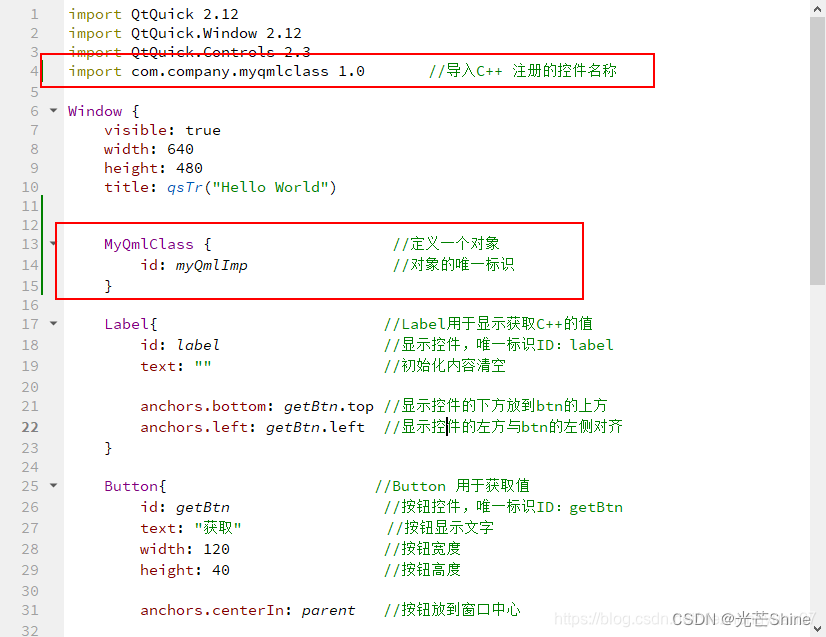
【Qt- C++ Qml 交互】
Qt编程指南 VX:hao541022348 ■ 将C对象注册到 QML中,在QML使用C对象■ C对象注册到元对象系统■ Q_INVOKABLE 宏定义是将C 的 函数(方法)声明为元对象系统可调用的函数■ 演示步骤 ■ 将 C类注册到 QML,并在QML声明一…...
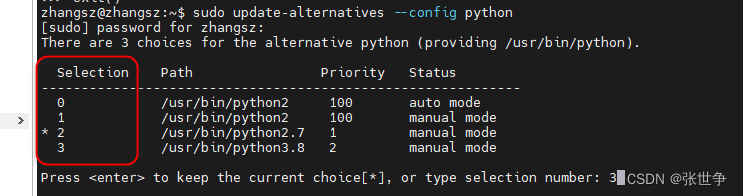
ubuntu 20.04 自由切换 python 的版本
问题描述 当前 ubuntu 20.04 默认安装了多个 python 的版本,执行 python 时,默认版本是 Python 2.7.18 zhangszzhangsz:~$ python Python 2.7.18 (default, Jul 1 2022, 12:27:04) [GCC 9.4.0] on linux2 Type "help", "copyright&quo…...

程序性能优化全能手册
本文聊一个程序员都会关注的问题:性能。 当大家谈到“性能”时,你首先想到的会是什么? 是每次请求需要多长时间才能返回? 是每秒钟能够处理多少次请求? 还是程序的CPU和内存使用率高不高? 这些问题基本上…...
 —— STM32的SPI外设)
STM32单片机学习(28) —— STM32的SPI外设
文章目录概述SPI通信的移位机制(以bit为单位)SPI外设框图第一部分:数据通路SPI通信的数据帧格式SPI外设移位机制(以字节为单位)第二部分:主机时钟生成器SPI通信时钟频率与传输速率第三部分:主从…...

如何快速掌握开源UE资产编辑器:UAssetGUI完整配置与实战指南
如何快速掌握开源UE资产编辑器:UAssetGUI完整配置与实战指南 【免费下载链接】UAssetGUI A tool designed for low-level examination and modification of Unreal Engine game assets by hand. 项目地址: https://gitcode.com/gh_mirrors/ua/UAssetGUI UAss…...

SSH工具对比:新手用户和熟练运维,选型逻辑有什么不同
结论 新手用户和熟练运维在选择 SSH 工具时,关注点往往完全不同。 新手更在意的是:能不能顺利连接、界面是否直观、文件和配置是否容易找到、网站出问题时能不能快速定位。 而熟练运维更在意的是:连接效率、命令自由度、多服务器管理能力、原…...
)
别再用SonarQube凑数了!DeepSeek原生圈复杂度引擎的6大颠覆性能力(含GitHub私有部署密钥)
更多请点击: https://kaifayun.com 第一章:DeepSeek圈复杂度分析的底层原理与范式革命 DeepSeek圈复杂度分析并非传统McCabe度量的简单复刻,而是基于控制流图(CFG)动态重构与语义感知路径裁剪的双重机制构建的新范式。…...

碧蓝航线自动化脚本终极指南:3小时学会全自动游戏管理
碧蓝航线自动化脚本终极指南:3小时学会全自动游戏管理 【免费下载链接】AzurLaneAutoScript Azur Lane bot (CN/EN/JP/TW) 碧蓝航线脚本 | 无缝委托科研,全自动大世界 项目地址: https://gitcode.com/gh_mirrors/az/AzurLaneAutoScript 还在为碧蓝…...

基于MAX78000的离线鸟类声音识别:边缘AI从数据到部署全流程解析
1. 项目概述:当边缘AI“听懂”鸟鸣在野外生态监测或自家后院观鸟时,你是否有过这样的经历:听到一阵清脆或婉转的鸟鸣,却完全不知道是哪位“歌唱家”在表演?传统的鸟类识别依赖专家经验和图鉴比对,不仅门槛高…...
)
Windows开机自动全屏打开指定网页?一个快捷方式参数就搞定(Chrome/Edge/Firefox教程)
Windows开机自动全屏展示网页的终极方案每次开机都要手动打开浏览器、输入网址、切换全屏模式?这种重复操作不仅浪费时间,还容易在重要演示时手忙脚乱。想象一下:电脑启动后自动全屏显示你的仪表盘、会议日程或是监控大屏,整个过程…...

qobuz-dl终极实战指南:专业无损音乐下载工具架构解析与高效应用
qobuz-dl终极实战指南:专业无损音乐下载工具架构解析与高效应用 【免费下载链接】qobuz-dl A complete Lossless and Hi-Res music downloader for Qobuz 项目地址: https://gitcode.com/gh_mirrors/qo/qobuz-dl 在数字音乐时代,追求极致音质的音…...

从无线破解到PDF解密:盘点那些容易被忽略的‘非主流’密码审计场景与工具
密码安全审计的隐秘战场:从无线网络到加密文档的实战指南 当大多数人谈论密码安全时,脑海中浮现的往往是服务器登录、数据库访问这些企业级场景。然而在数字生活的每个角落,从家庭Wi-Fi到工作文档,密码保护的脆弱性同样可能成为安…...

大厂校招变了:AI 能力正在进入笔试和面试
最近不少同学投递校招时,应该已经发现一个变化: 以前 JD 里写的是“熟悉 Python / Java / SQL / Office 优先”。 现在越来越多岗位开始出现新的描述: “熟练使用 AI 工具者优先” “了解大模型应用者优先” “具备 AI 辅助编程经验优先” “…...