
【2023】java常用HTTP客户端对比以及使用(HttpClient/OkHttp/WebClient)
💻目录
- 1、介绍
- 2、使用
- 2.1、添加配置
- 2.1.1、依赖
- 2.1.2、工具类
- 2.1.3、实体
- 2.1.4、Controller接口
- 2.2、Apache HttpClient使用
- 2.3 、OkHttp使用
- 2.4、WebClient使用
1、介绍
现在java使用的http客户端主要包括以下几种
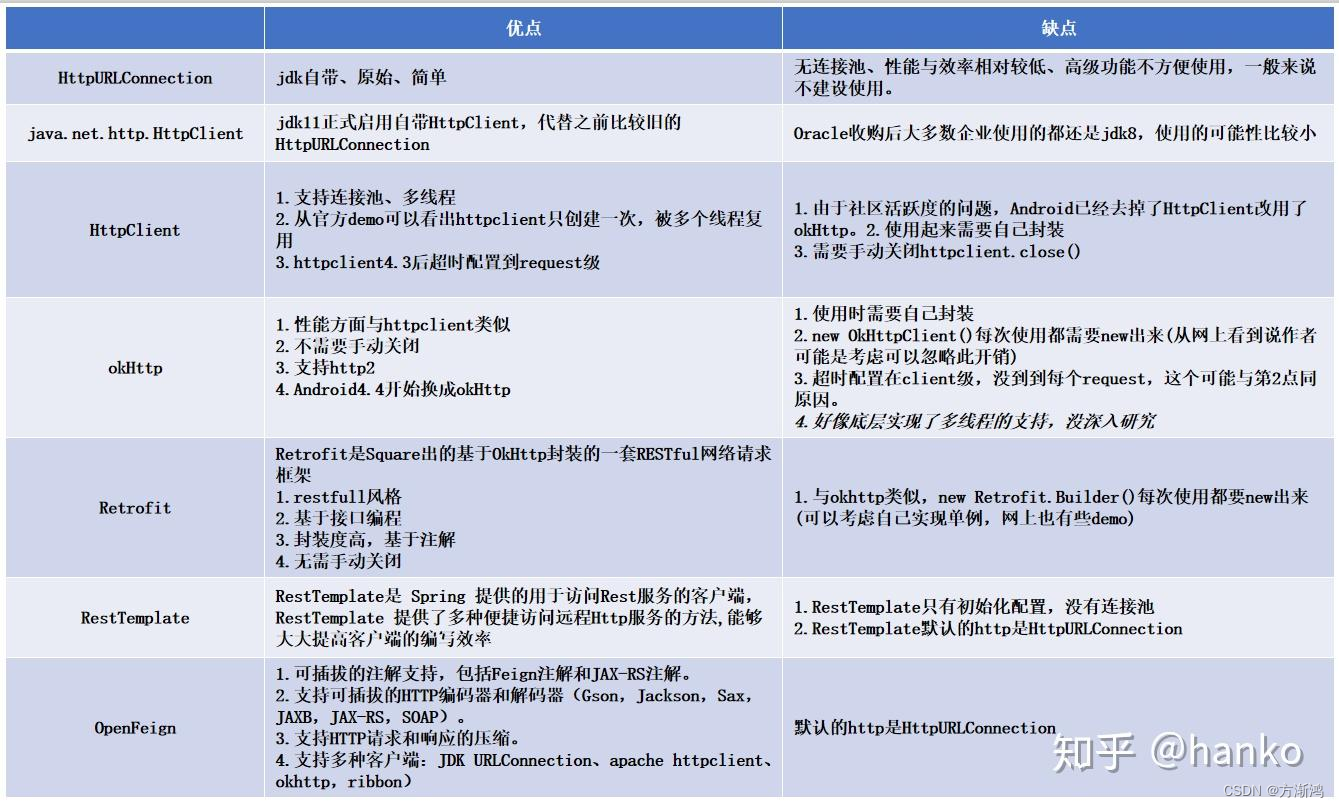
而这些中使用得最频繁的主要是:
-
Apache HttpClient:这是一个功能强大且广泛使用的第三方库,用于进行HTTP通讯。它提供了更高级的API和更丰富的功能,比如支持连接池、认证、重定向、Cookie管理等。Apache HttpClient可以作为独立的库使用,也可以作为Apache HttpComponents项目的一部分。
-
OkHttp:这是另一个流行的第三方库,用于进行HTTP通讯。OkHttp提供了简洁的API和高性能的特性,支持同步和异步请求,以及连接池、缓存、拦截器等功能。OkHttp也是Square公司的一个开源项目。
-
Spring WebClient:这是Spring框架中的一个模块,是RestTemplate的升级版,用于进行非阻塞的HTTP通讯。它基于Reactive Streams编程模型,适用于构建响应式的应用程序。Spring WebClient提供了简单的API来发送HTTP请求和处理响应,可以与Spring WebFlux等模块一起使用。
2、使用
下面展示了Apache HttpClient和OkHttp以及Spring WebClient的常用使用方式,包括get和post
2.1、添加配置
2.1.1、依赖
<!-- https://mvnrepository.com/artifact/org.apache.httpcomponents.client5/httpclient5 --><dependency><groupId>org.apache.httpcomponents.client5</groupId><artifactId>httpclient5</artifactId></dependency><!--okhttp--><dependency><groupId>com.squareup.okhttp3</groupId><artifactId>okhttp</artifactId></dependency><dependency><groupId>cn.hutool</groupId><artifactId>hutool-all</artifactId><version>5.8.22</version></dependency><!--webClient--><dependency><groupId>org.springframework.boot</groupId><artifactId>spring-boot-starter-webflux</artifactId></dependency>
2.1.2、工具类
- Result:统一返回类
@Data
public class Result<T> {//状态码private Integer code;//信息private String message;//数据private T data;private Result(){}//设置数据,返回对象的方法public static <T> Result<T> build(T data, ResultCodeEnum resultCodeEnum) {//创建Result对象,设置值,返回对象Result<T> result = new Result<>();//判断返回结果中是否需要数据if (data != null) {//设置数据到result对象result.setData(data);}//设置其他值result.setCode(resultCodeEnum.getCode());result.setMessage(resultCodeEnum.getMessage());//返回设置值之后的对象return result;}//成功的方法public static <T> Result<T> ok(T data) {return build(data, ResultCodeEnum.SUCCESS);}//成功的方法public static <T> Result<T> ok() {return build(null, ResultCodeEnum.SUCCESS);}//失败的方法public static <T> Result<T> fail(T data) {return build(data, ResultCodeEnum.FAIL);}
}- ResultCodeEnum:返回结果
@Getter
public enum  ResultCodeEnum {SUCCESS(200,"成功"),FAIL(201, "失败"),;private Integer code;private String message;ResultCodeEnum(Integer code, String message) {this.code = code;this.message = message;}
}
2.1.3、实体
- User
@Data
public class User {private String name;private Integer age;private Integer post;
}
- ProductInfo:返回数据
@Data
@AllArgsConstructor
@NoArgsConstructor
@ToString
public class ProductInfo implements Serializable {private Long id;/**销量*/private Integer sale;/**价格*/private Integer price;/**名称*/private String name;/**类型*/private Integer type;/**端口*/private Integer port;
}
2.1.4、Controller接口
@RestController
@RequestMapping("/productInfo/index")
public class ProductInfoController {@Resourceprivate ProductInfoService productInfoService;//    获取当前服务的端口@Value("${server.port}")private Integer port;@GetMapping("/get")public Result<?> get(Integer type){List<ProductInfo> productInfoList = getProductInfoList(type);System.out.println(productInfoList);return Result.ok(productInfoList);}@PostMapping("/post")public Result<?> post(@RequestBody User user){Integer post = user.getPost();List<ProductInfo> productInfoList = getProductInfoList(post);System.out.println(productInfoList);return Result.ok(productInfoList);}public List<ProductInfo> getProductInfoList(Integer type) {ProductInfo productInfo3 = new ProductInfo(3l,800,20,"哈密瓜1",1,port);ProductInfo productInfo1 = new ProductInfo(1l,50,8,"苹果1",1,port);ProductInfo productInfo2 = new ProductInfo(2l,200,13,"牛肉1",2,port);ProductInfo productInfo4 = new ProductInfo(4l,50,9,"青菜1",2,port);/*        实际项目中,会从数据库查出数据 */List<ProductInfo> productInfoList = Arrays.asList(productInfo1,productInfo2,productInfo3,productInfo4);//        根据传入的类型返回指定类型List<ProductInfo> result = productInfoList.stream().filter(productInfo -> productInfo.getType() == type).collect(Collectors.toList());return result;}
}
2.2、Apache HttpClient使用
- get使用
默认只能同步异步需要加额外的依赖,get请求不能携带参数,只能通过拼接路径
<!--异步请求--><dependency><groupId>org.apache.httpcomponents</groupId><artifactId>httpasyncclient</artifactId></dependency>
    public static void get(CloseableHttpClient httpClient,String url){
//            连接对象try {
//        HttpGet不能携带参数,如果需要参数只能通过拼接HttpGet httpGet = new HttpGet(url+"?type=1");String execute = httpClient.execute(httpGet, response -> {JSONObject entries = new JSONObject(EntityUtils.toString(response.getEntity()));Result result = JSONUtil.toBean(entries, Result.class);if (result.getCode() == 200) {String data = result.getData().toString();System.out.println(data);return data;} else {System.err.println(result.getMessage());return result.getMessage();}});System.out.println("get成功结果:"+execute);} catch (Exception e) {e.printStackTrace();}}
- post
post请求,通过setEntity()给HttpPost对象添加请求对象
    public static void post(CloseableHttpClient httpClient,String url){HttpPost httpPost = new HttpPost(url);User user = new User();user.setPost(1);
//        添加参数对象httpPost.setEntity(new StringEntity(JSONUtil.toJsonStr(user)));// 设置请求头httpPost.setHeader(HttpHeaders.CONTENT_TYPE, "application/json");try {String execute = httpClient.execute(httpPost, response -> {JSONObject entries = new JSONObject(EntityUtils.toString(response.getEntity()));Result result = JSONUtil.toBean(entries, Result.class);if (result.getCode() == 200) {String data = result.getData().toString();log.info(data);return data;} else {log.error(result.getMessage());return result.getMessage();}});log.info("HttpClient的post成功结果:"+execute);} catch (IOException e) {e.printStackTrace();}}
- 全部代码
执行步骤:
- 创建CloseableHttpClient对象
- 创建get获取post请求对象
- 通过execute()方法发送请求
- 通过response.getEntity()获取响应回来的数据
@Slf4j
public class HttpClientUtil {private static String postUrl = "http://localhost:8202/productInfo/index/post";private static String getUrl = "http://localhost:8202/productInfo/index/get";public static void main(String[] args) {try {
//            创建客户端对象CloseableHttpClient client = HttpClients.createDefault();get(client,getUrl);post(client,postUrl);client.close();} catch (IOException e) {e.printStackTrace();}}public static void get(CloseableHttpClient httpClient,String url){
//            连接对象try {
//        HttpGet不能携带参数,如果需要参数只能通过拼接HttpGet httpGet = new HttpGet(url+"?type=1");String execute = httpClient.execute(httpGet, response -> {JSONObject entries = new JSONObject(EntityUtils.toString(response.getEntity()));Result result = JSONUtil.toBean(entries, Result.class);if (result.getCode() == 200) {String data = result.getData().toString();log.info(data);return data;} else {log.info(result.getMessage());return result.getMessage();}});log.info("HttpClient的get成功结果:"+execute);} catch (Exception e) {e.printStackTrace();}}public static void post(CloseableHttpClient httpClient,String url){HttpPost httpPost = new HttpPost(url);User user = new User();user.setPost(1);
//        添加参数对象httpPost.setEntity(new StringEntity(JSONUtil.toJsonStr(user)));// 设置请求头httpPost.setHeader(HttpHeaders.CONTENT_TYPE, "application/json");try {String execute = httpClient.execute(httpPost, response -> {JSONObject entries = new JSONObject(EntityUtils.toString(response.getEntity()));Result result = JSONUtil.toBean(entries, Result.class);if (result.getCode() == 200) {String data = result.getData().toString();log.info(data);return data;} else {log.error(result.getMessage());return result.getMessage();}});log.info("HttpClient的post成功结果:"+execute);} catch (IOException e) {e.printStackTrace();}}
}
2.3 、OkHttp使用
执行步骤:
- 创建OkHttpClient对象,用于配置和管理HTTP请求的行为
- 创建Request对象,用于描述要发送的HTTP请求。Request对象包含了URL、请求方法、请求头、请求体等信息。
- 创建Call对象,使用OkHttpClient的newCall()方法,传入Request对象,创建一个Call对象,Call对象表示一次HTTP请求的调用,可以用于执行同步或异步的请求。
- 执行请求,同步通过Call对象的execute()方法来;异步通过Call对象的enqueue()方法来执行请求,并通过回调函数处理响应
- 解析响应,通过response.body()得到响应的内容在通过json解析。
@Slf4j
public class OkHttpUtil {private static String postUrl = "http://localhost:8202/productInfo/index/post";private static String getUrl = "http://localhost:8202/productInfo/index/get";public static void main(String[] args) {OkHttpClient client = new OkHttpClient().newBuilder().connectTimeout(30, TimeUnit.SECONDS) //连接超时时间.writeTimeout(30,TimeUnit.SECONDS)  //请求超时时间.readTimeout(30,TimeUnit.SECONDS)  //响应超时时间.build();
//        get(client);
//        asyncGet(client);
//        post(client);asyncPost(client);}/*** 同步get* @param client        * @return void*/public static void get(OkHttpClient client){
//        创建get请求对象Request request = new Request.Builder().url(getUrl+"?type=1").get().header("Content-Type", "application/json") // 设置Content-Type请求头.build();try {
//            返回响应对象Response response = client.newCall(request).execute();
//              验证响应是否成功if (!response.isSuccessful()) throw new IOException("Unexpected code " + response);
//              解码对象Result result = JSONUtil.toBean(response.body().string(), Result.class);Object data = result.getData();System.out.println(data);} catch (IOException e) {e.printStackTrace();}}/*** 异步get* @param client* @return void*/public static void asyncGet(OkHttpClient client){//        创建get请求对象Request request = new Request.Builder().url(getUrl+"?type=1").get()   //不指定请求方式默认是get.build();
//           异步发送请求,没有返回结果client.newCall(request).enqueue(new Callback() {//               处理失败请求@Overridepublic void onFailure(Call call, IOException e) {log.debug("Unexpected code " + e.getMessage());e.printStackTrace();}//            处理成功请求@Overridepublic void onResponse(Call call, Response response) throws IOException {
//              验证响应是否成功if (!response.isSuccessful()) throw new IOException("Unexpected code " + response);
//              解码对象Result result = JSONUtil.toBean(response.body().string(), Result.class);Object data = result.getData();System.out.println(data);}});}/*** 同步post* @param client* @return void*/public static void post(OkHttpClient client){User user = new User();user.setPost(1);String str = JSONUtil.toJsonStr(user);Request request = new Request.Builder().url(postUrl).post(RequestBody.create(MediaType.parse(ContentType.JSON.getValue()), str)).build();Call call = client.newCall(request);try {Response response = call.execute();//              验证响应是否成功if (!response.isSuccessful()) throw new IOException("Unexpected code " + response);
//              解码对象Result result = JSONUtil.toBean(response.body().string(), Result.class);Object data = result.getData();log.info("post请求成功,返回结果:{}",data);} catch (IOException e) {e.printStackTrace();}}/*** 异步post请求* @param client        * @return void*/public static void asyncPost(OkHttpClient client){User user = new User();user.setPost(1);
//          把对象转为json字符串String str = JSONUtil.toJsonStr(user);Request request = new Request.Builder().url(postUrl).post(RequestBody.create(MediaType.parse(ContentType.JSON.getValue()), str)).build();Call call = client.newCall(request);
//       异步请求没返回call.enqueue(new Callback() {
//            请求异常@Overridepublic void onFailure(Call call, IOException e) {log.debug("Unexpected code " + e.getMessage());e.printStackTrace();}
//            请求成功@Overridepublic void onResponse(Call call, Response response) throws IOException {//              验证响应是否成功if (!response.isSuccessful()) throw new IOException("Unexpected code " + response);
//              解码对象Result result = JSONUtil.toBean(response.body().string(), Result.class);Object data = result.getData();log.info("异步post请求成功,返回结果:{}",data);}});}
}
2.4、WebClient使用
执行步骤:
-
创建WebClient对象,推荐使用WebClient.builder()的方式创建,因为可以自定义配置客户端的参数,直接new是只能使用默认的配置。
-
构建请求,直接通过webClient对象,如get()、post()等,构建一个请求(如果没有指定请求方式),默认是get请求。
-
处理响应:使用响应对象(如Mono、Flux等)来处理响应数据。你可以通过操作符(如map()、flatMap()等)对响应进行转换、过滤、合并等操作。
-
订阅响应:使用subscribe()方法来订阅响应流,启动请求并处理响应数据。你可以通过回调函数或操作符链来处理响应数据。
@Component
@Slf4j
public class WebClientUtil {private static String postUrl = "http://localhost:8202/productInfo/index/post";private static String getUrl = "http://localhost:8202/productInfo/index/get";/*** 同步执行get请求* @param webClient* @return void*/public void get(WebClient webClient){Mono<Result> mono = webClient.get().uri(getUrl + "?type=2").retrieve().bodyToMono(Result.class);//        获取返回结果 block()会进行堵塞,等待返回结果Result result = mono.block();if (result.getCode()==200){log.info("get请求返回结果{}",result.getData());}}/*** 异步get* @return void*/public void asyncGet(){HttpClient client = HttpClient.create().option(ChannelOption.CONNECT_TIMEOUT_MILLIS, 10000)  //设置连接超时.doOnConnected(conn -> conn.addHandler(new ReadTimeoutHandler(10, TimeUnit.SECONDS)) //写入超时.addHandler(new WriteTimeoutHandler(10))); //读取超时//        也可以以这种方式创建WebClient可以添加请求头和url以及一些参数;WebClient webClient = WebClient.builder().clientConnector(new ReactorClientHttpConnector(client)).baseUrl(getUrl).defaultHeader(HttpHeaders.USER_AGENT, "Mozilla/5.0 (Windows NT 10.0; WOW64) AppleWebKit/537.36 (KHTML, like Gecko)")
//                .defaultCookie()  //添加请求Cookie.build();//        获取返回结果Mono<Result> mono = webClient.get().uri( "?type=2")// 请求路径,会拼接上面的.accept(MediaType.APPLICATION_JSON)//                .retrieve() //获取响应体
//                .bodyToMono(Result.class);  //指定获取的类型,直接获取结果。//                或者通过该方式手动处理结果.exchangeToMono(response->{if (response.statusCode().equals(HttpStatus.OK)) {
//                        成功返回return response.bodyToMono(Result.class);}else {
//                        失败返回return response.createException().flatMap(Mono::error);}});//        异步获取返回结果mono.subscribe(result -> {if (result.getCode() == 200) {log.info("get请求返回结果{}", result.getData());}});System.out.println("执行完成");}/*** 同步post* @return void*/public void post(){// 创建 WebClient 对象WebClient webClient = WebClient.builder().baseUrl(getUrl).build();User user = new User();user.setPost(2);Mono<Result> mono = webClient.post().uri(postUrl).contentType(MediaType.APPLICATION_JSON).header("token","12321412").body(BodyInserters.fromValue(user)).retrieve().bodyToMono(Result.class);Result result = mono.block();if (result.getCode()==200){log.info("post请求返回结果{}",result.getData());}}/*** WebClient异步请求* @return void*/public void asyncPost(){// 创建 WebClient 对象WebClient webClient = WebClient.builder().baseUrl(getUrl).build();User user = new User();user.setPost(2);Mono<Result> mono = webClient.post().uri(postUrl).contentType(MediaType.APPLICATION_JSON)  //指定类型.header("token","12321412")  //添加请求头.body(BodyInserters.fromValue(user)) //添加请求对象.retrieve().bodyToMono(Result.class);
//          异步请求mono.subscribe(result -> {if (result.getCode()==200){log.info("post异步请求返回结果{}",result.getData());}});}
}
相关文章:
【2023】java常用HTTP客户端对比以及使用(HttpClient/OkHttp/WebClient)
💻目录 1、介绍2、使用2.1、添加配置2.1.1、依赖2.1.2、工具类2.1.3、实体2.1.4、Controller接口 2.2、Apache HttpClient使用2.3 、OkHttp使用2.4、WebClient使用 1、介绍 现在java使用的http客户端主要包括以下几种 而这些中使用得最频繁的主要是: A…...

微信小程序获取来源场景值
https://developers.weixin.qq.com/miniprogram/dev/framework/app-service/scene.html#返回来源信息的场景 https://developers.weixin.qq.com/miniprogram/dev/api/base/app/life-cycle/wx.getLaunchOptionsSync.html 场景值列表 只有1008是来源群聊 /** * 生命周期函数--监…...
Vue3:vue-cli项目创建及vue.config.js配置
一、node.js检测或安装: node -v node.js官方 二、vue-cli安装: npm install -g vue/cli # OR yarn global add vue/cli/*如果安装的时候报错,可以尝试一下方法 删除C:\Users**\AppData\Roaming下的npm和npm-cache文件夹 删除项目下的node…...
关于CAD导入**地球的一些问题讨论
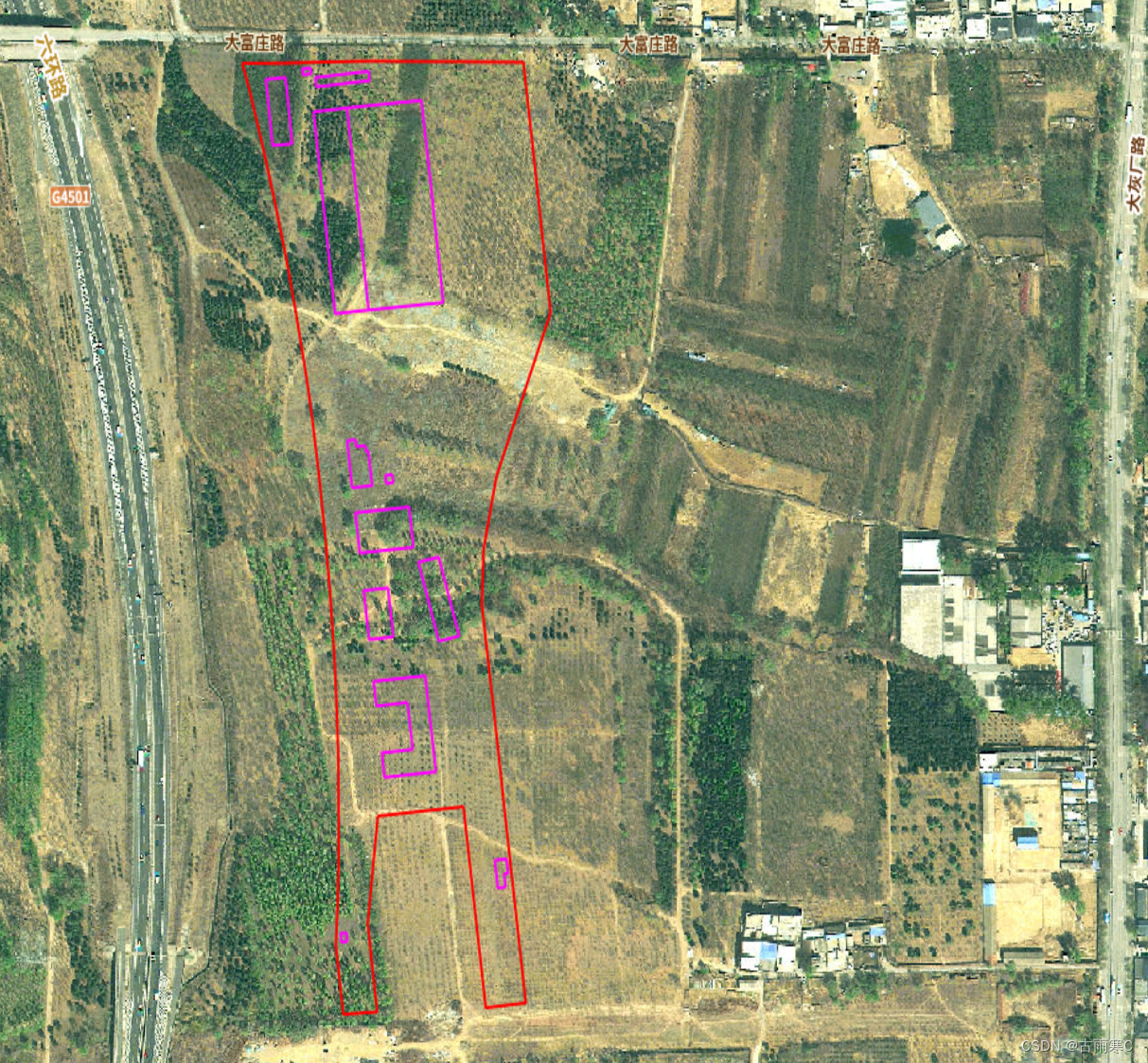
先上示例: 上图是将北京王佐停车场的红线CAD图导入到图新地球效果,如果看官正是需要这样的效果,那么请你继续往下看,全是干货! 在地球中导入CAD图可以做为电子沙盘。对于工程人来说,是极有帮助的。以前一直用谷歌地球,大约在2020年左右,就被和谐了。当时感觉挺可惜的。…...

Semaphore信号量详解
在Java并发编程中,Semaphore是一个非常重要的工具类。它位于java.util.concurrent包中,为我们提供了一种限制对临界资源的访问的机制。你可以将其视为一个同步控制的瑞士军刀,因为它既能够控制对资源的并发访问数量,也能够保证资源…...
Python的核心知识点整理大全66(已完结撒花)
目录 D.3 忽略文件 .gitignore 注意 D.4 初始化仓库 D.5 检查状态 D.6 将文件加入到仓库中 D.7 执行提交 D.8 查看提交历史 D.9 第二次提交 hello_world.py D.10 撤销修改 hello_world.py 注意 D.11 检出以前的提交 往期快速传送门👆(在文…...
k8s的存储卷
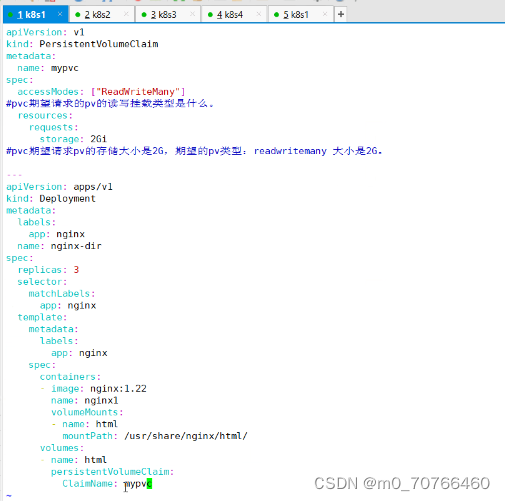
存储卷------数据卷 把容器内的目录,和宿主机的目录进行挂载。 容器在系统上的生命周期是短暂的,delete,k8s用控制(deployment)创建的pod,delete相当于重启,容器的状态也会回复到初始状态。 …...

Git 实战指南:常用指令精要手册(持续更新)
👑专栏内容:Git⛪个人主页:子夜的星的主页💕座右铭:前路未远,步履不停 目录 一、Git 安装过程1、Windows 下安装2、Cent os 下安装3、Ubuntu 下安装 二、配置本地仓库1、 初始化 Git 仓库2、配置 name 和 e…...

关于SpringMVC前后端传值总结
一、传递方式 1、查询参数&路径参数 查询参数: URI:/teachers?typeweb GetMapping("/klasses/teachers") public List<Teacher> getKlassRelatedTeachers(String type ) { ... }如果查询参数type与方法的名称相同,则直接将web传入…...
【排序】归并排序(C语言实现)
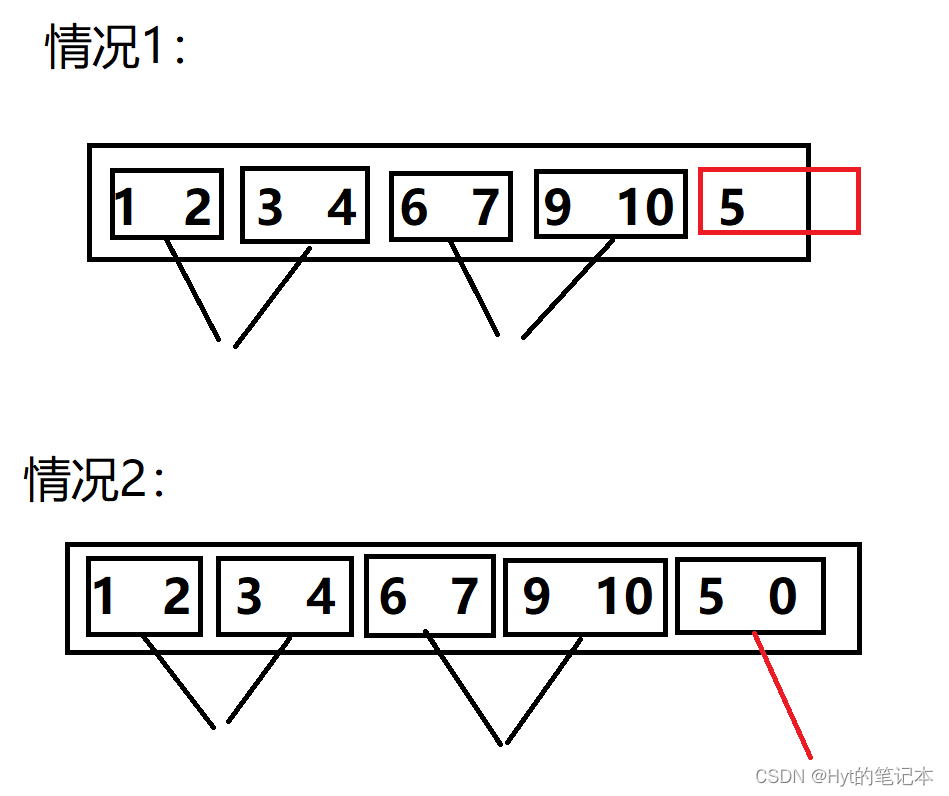
文章目录 1. 递归版的归并排序1.1 归并排序的思想2. 递归版的归并排序的实现 2. 非递归版的归并排序 1. 递归版的归并排序 1.1 归并排序的思想 归并排序(MERGE - SORT)是建立在归并操作上的一种有效的排序算法, 该算法是采用分治法(Divide a…...

127. 单词接龙
和433.最小基因变化这道题一样的解法。 https://blog.csdn.net/qq_43606119/article/details/135538247 class Solution {public int ladderLength(String beginWord, String endWord, List<String> wordList) {Set<String> cnt new HashSet<>();for (int …...

计算机算法贪心算法
贪心算法(Greedy Algorithm)是一种常见的算法思想,它在每一步选择当前状态下最优的解决方案,从而希望最终能够达到全局最优解。 贪心算法的基本思路是每一步都选择当前状态下的局部最优解,而忽略了当前选择所带来的影…...

基于css实现动画效果
介绍 本文将会基于css,实现各种动画效果,接下来会从简单几个例子入手。 案例 三颗球 <!DOCTYPE html> <html lang"en"><head><meta charset"utf-8" /><title>React App</title><style>…...

18.将文件上传至云服务器 + 优化网站的性能
目录 1.将文件上传至云服务器 1.1 处理上传头像逻辑 1.1.1 客户端上传 1.1.2 服务器直传 2.优化网站的性能 2.1 本地缓存优化查询方法 2.2 压力测试 1.将文件上传至云服务器 客户端上传:客户端将数据提交给云服务器,并等待其响应;用户…...

Linux: module: kheaders;CONFIG_IKHEADERS
文章目录 参考错误开一个玩笑。configcommit参考 https://github.com/iovisor/bcc/pull/2312 https://github.com/iovisor/bcc/pull/3588 https://bugs.gentoo.org/809347 https://lore.kernel.org/lkml/20190408212855.233198-1-joel@joelfernandes.org/ 错误 <built-in…...
Page 251~254 Win32 GUI项目
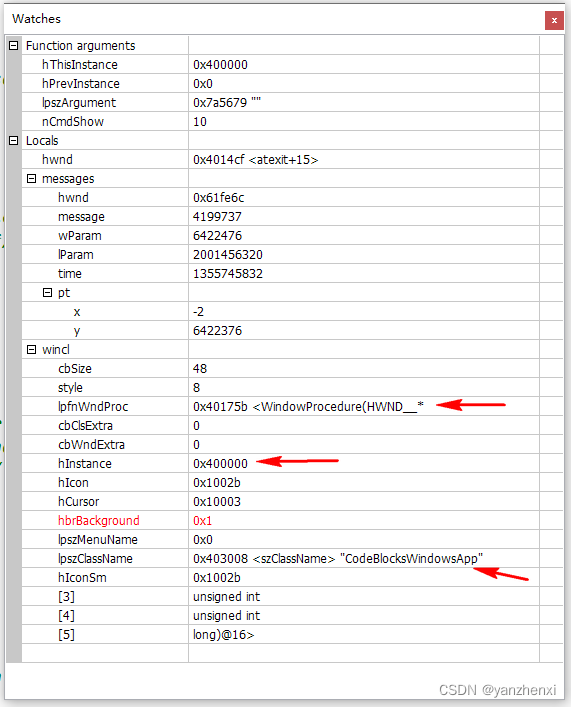
win32_gui 源代码: #if defined(UNICODE) && !defined(_UNICODE)#define _UNICODE #elif defined(_UNICODE) && !defined(UNICODE)#define UNICODE #endif#include <tchar.h> #include <windows.h>/* Declare Windows procedure */…...
Kafka(七)可靠性
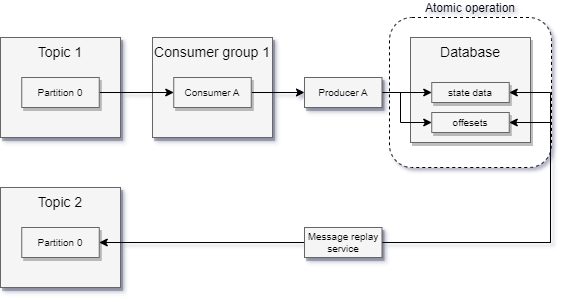
目录 1 可靠的数据传递1.1 Kafka的可靠性保证1.2 复制1.3 Broker配置1.3.1 复制系数1.3.2 broker的位置分布1.3.3 不彻底的首领选举1.3.4 最少同步副本1.3.5 保持副本同步1.3.6 持久化到磁盘flush.messages9223372036854775807flush.ms9223372036854775807 1.2 在可靠的系统中使…...
Spring Data JPA入门到放弃
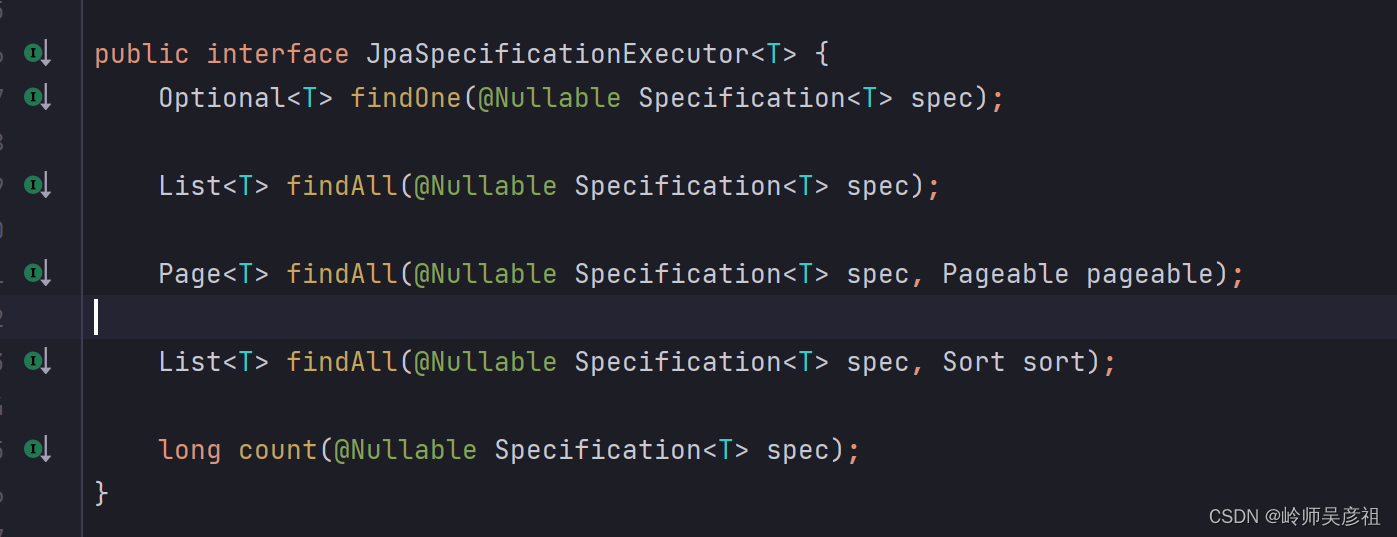
参考文档:SpringData JPA:一文带你搞懂 - 知乎 (zhihu.com) 一、 前言 1.1 概述 Java持久化技术是Java开发中的重要组成部分,它主要用于将对象数据持久化到数据库中,以及从数据库中查询和恢复对象数据。在Java持久化技术领域&a…...
MES系统数据采集的几种方式
生产制造执行MES系统具有能够帮助企业实现生产数据收集与分析、生产计划管理、生产过程监控等的功能板块,在这里小编就不一一介绍了,主要讲讲它的数据采集功能板块,可以说,数据采集是该系统进行数据统计与生产管理等后续工作的基础…...

铭文 LaunchPad 平台 Solmash 推出早鸟激励计划
为感谢用户对Solmash的支持,Solmash 特别推出“Solmash早鸟激励计划”,以回馈社区的早期参与者,这是专为已经参与Staking Pool或Honest Pool的用户推出的激励。 Solmash NFT激励 被列入早鸟计划的用户,可通过点击:sol…...

AlphaFold 3终极指南:掌握Jackhmmer与HMMER提升蛋白质结构预测精度
AlphaFold 3终极指南:掌握Jackhmmer与HMMER提升蛋白质结构预测精度 【免费下载链接】alphafold3 AlphaFold 3 inference pipeline. 项目地址: https://gitcode.com/gh_mirrors/alp/alphafold3 你是否在蛋白质结构预测项目中遇到MSA生成效率低下的瓶颈&#x…...

Office RibbonX Editor:让Office界面定制变得像搭积木一样简单
Office RibbonX Editor:让Office界面定制变得像搭积木一样简单 【免费下载链接】office-ribbonx-editor An overhauled fork of the original Custom UI Editor for Microsoft Office, built with WPF 项目地址: https://gitcode.com/gh_mirrors/of/office-ribbon…...

嵌入式快速原型开发:基于Sceptre平台与LPC2148的实战指南
1. 项目概述:Sceptre,一个被低估的嵌入式快速原型利器 在嵌入式开发的世界里,我们总是在寻找那个“刚刚好”的平台:它要足够强大,能跑复杂的算法;要足够小巧,能塞进各种外壳;要足够便…...

自制极低频电流探头:负电阻补偿原理与低频方波测量实践
1. 项目概述:为极低频电流测量而生在电子测试领域,电流探头是个再常见不过的工具,无论是排查开关电源的纹波,还是分析电机驱动的波形,都离不开它。但如果你尝试用市面上常见的电流探头去观察一个频率低至几赫兹&#x…...

2026长沙智能家居品牌实测,这些本地老牌值得选
2026年,长沙的智能家居市场已经从“概念热”转向“落地战”。我走访了长沙多个本地服务商,实测了不同品牌在别墅、酒店、大平层等场景的真实表现。今天,结合数据与案例,分享几个值得关注的本地品牌,尤其是深耕8年以上的…...
)
告别硬编码!在UE5.1里用蓝图动态配置MySQL连接参数(控件蓝图实战)
动态配置MySQL连接:UE5.1控件蓝图的工程化实践在游戏开发中,数据库连接往往是项目架构中不可或缺的一环。传统硬编码方式虽然简单直接,却带来了维护困难、安全性差、灵活性低等一系列问题。本文将深入探讨如何在UE5.1中构建一个完全动态化的M…...

<背包问题>
背包问题是一类组合优化问题,其基本形式是给定一组物品,每个物品都有一个重量和一个价值,以及一个有限的背包容量,目标是在不超过背包容量的前提下,选择物品使得背包中的物品价值最大化。动态规划是解决背包问题的常用…...

DeepSeek重复代码识别失效了?5个被90%团队忽略的AST解析盲区及修复清单
更多请点击: https://codechina.net 第一章:DeepSeek代码重复检测失效的真相与影响 DeepSeek-R1 模型在代码理解任务中表现出色,但其内置的代码重复检测机制在特定场景下存在系统性失效。根本原因在于模型对语义等价但语法结构差异显著的代…...

LeagueAkari:基于LCU接口的英雄联盟客户端自动化工具深度解析
LeagueAkari:基于LCU接口的英雄联盟客户端自动化工具深度解析 【免费下载链接】League-Toolkit An all-in-one toolkit for LeagueClient. Gathering power 🚀. 项目地址: https://gitcode.com/gh_mirrors/le/League-Toolkit 功能模块架构与核心技…...

Visual C++运行库一键安装指南:彻底解决Windows应用依赖问题
Visual C运行库一键安装指南:彻底解决Windows应用依赖问题 【免费下载链接】vcredist AIO Repack for latest Microsoft Visual C Redistributable Runtimes 项目地址: https://gitcode.com/gh_mirrors/vc/vcredist 你是否曾经遇到过打开软件时弹出"缺少…...