
FRP内网穿透如何避免SSH暴力破解(二)——指定地区允许访问
背景
上篇文章说到,出现了试图反复通过FRP的隧道,建立外网端口到内网服务器TCP链路的机器人,同时试图暴力破解ssh。这些连接造成了流量的浪费和不必要的通信开销。考虑到服务器使用者主要分布在A、B、C地区和国家,我打算对上一篇文章获取的建立连接的ip再过滤一遍,把其他地区的ip加以封禁,确保服务器不被恶意访问骚扰。
思路
在FRP服务端写一个python程序,每个小时查询一次已连接ip的清单,只允许指定区域的ip访问内网的指定端口。本文国家/地区列表我设置为中国大陆、香港、新加坡、马来西亚、美国。
获取地区&检查是否是目标区域
# 设置允许访问地区列表
target_countries = ('China', 'Hong Kong', 'Singapore', 'Malaysia', 'United States')def get_ip_location(ip_address):response = requests.get(f'https://ipapi.co/{ip_address}/json/').json()country_name = response.get("country_name")# print(country_name)return country_namedef check_ip_location(ip_address):country_name = get_ip_location(ip_address)if country_name in target_countries:# print('ok')return 'ok'else:return 'no'
封禁服务区域外的ip
def ban_ip(ip_address):# 检查IP是否已经被封禁if is_ip_banned(ip_address):print(f"IP {ip_address} is already banned.")returntry:# 封禁IP地址subprocess.run(['sudo', 'iptables', '-A', 'INPUT', '-s', ip_address, '-j', 'DROP'], check=True)# 记录到文件with open('/home/user/ban_ip_no_cn.txt', 'a') as file:ban_time = datetime.datetime.now()unban_time = ban_time + datetime.timedelta(days=1)file.write(f"{ban_time}, {ip_address}, {unban_time}\n")print(f"IP {ip_address} has been banned.")except Exception as e:print(f"Error banning IP {ip_address}: {e}")
封禁时间限制
每天运行一次脚本ban_ip_no_cn.sh,检查是否到了解封时间。
BAN_FILE="/home/user/ban_ip_no_cn.txt"
TEMP_FILE="/tmp/temp_ban_ip_no_cn.txt"while IFS=, read -r ban_time ip_address unban_time; docurrent_time=$(date +%Y-%m-%d' '%H:%M:%S)if [[ "$current_time" > "$unban_time" ]]; thensudo iptables -D INPUT -s $ip_address -j DROPelseecho "$line" >> $TEMP_FILEfi
done < $BAN_FILEmv $TEMP_FILE $BAN_FILE
定期清理连接建立记录(ip_ban_delete_old.py)
# 已建立连接ip的清单‘establishment_ip.txt’,每三天释放一次from datetime import datetime, timedelta
import osdef delete_old_entries(file_path):cutoff_date = datetime.now().date() - timedelta(days=1)temp_file_path = file_path + ".tmp"with open(file_path, 'r') as read_file, open(temp_file_path, 'w') as write_file:for line in read_file:line_date_str = line.split(' ')[0]  # Extract only the date partline_date = datetime.strptime(line_date_str, '%Y-%m-%d').date()if line_date >= cutoff_date:write_file.write(line)os.replace(temp_file_path, file_path)# Path to the establishment_ip.txt file
file_path = '/home/peter/establishment_ip.txt'
delete_old_entries(file_path)
注意
establishment_ip.txt文件的格式如下,通过ss -anp | grep ":port"(port切换为你的frps开放的port)命令获取。
2024-02-06 07:36:52.541687: Established connection from IP 203.145.18.60 on port 23
2024-02-06 07:36:52.578422: Established connection from IP 203.145.18.60 on port 23
2024-02-06 07:40:01.597133: Established connection from IP 56.101.207.179 on port 24
2024-02-06 07:40:01.597341: Established connection from IP 203.145.18.60 on port 24
2024-02-06 07:40:01.633414: Established connection from IP 203.145.18.60 on port 24
2024-02-06 07:40:36.380221: Established connection from IP 203.145.18.60 on port 24
效果:
ip_ban_no_cn.log输出打印
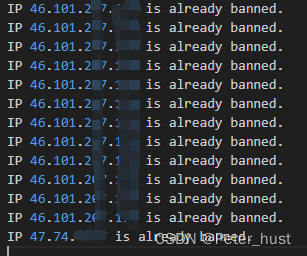
ban_ip_no_cn.txt的被封禁ip记录

完整Python代码ip_ban_no_cn.py (注意修改路径)
# 每小时运行一次,从已建立连接ip的清单查询,封禁所有不欢迎ip
# 已建立连接ip的清单‘establishment_ip.txt’,每三天释放一次import re
import requests
import subprocess
import datetime# 更新国家列表
target_countries = ('China', 'Hong Kong', 'Singapore', 'Malaysia', 'United States')def get_ip_location(ip_address):response = requests.get(f'https://ipapi.co/{ip_address}/json/').json()country_name = response.get("country_name")# print(country_name)return country_namedef check_ip_location(ip_address):country_name = get_ip_location(ip_address)if country_name in target_countries:# print('ok')return 'ok'else:return 'no'def is_ip_banned(ip_address):try:with open('/home/{user}/ban_ip_no_cn.txt', 'r') as file:for line in file:if ip_address in line:return Trueexcept FileNotFoundError:# 如果文件不存在,意味着没有IP被封禁return Falsereturn Falsedef ban_ip(ip_address):# 检查IP是否已经被封禁if is_ip_banned(ip_address):print(f"IP {ip_address} is already banned.")returntry:# 封禁IP地址subprocess.run(['sudo', 'iptables', '-A', 'INPUT', '-s', ip_address, '-j', 'DROP'], check=True)# 记录到文件with open('/home/{user}/ban_ip_no_cn.txt', 'a') as file:ban_time = datetime.datetime.now()unban_time = ban_time + datetime.timedelta(days=1)file.write(f"{ban_time}, {ip_address}, {unban_time}\n")print(f"IP {ip_address} has been banned.")except Exception as e:print(f"Error banning IP {ip_address}: {e}")def main():log_file_path = '/home/{user}/establishment_ip.txt'ip_pattern = re.compile(r'\b(?:\d{1,3}\.){3}\d{1,3}\b')current_time = datetime.datetime.now()try:with open(log_file_path, 'r') as file:for line in file:# 尝试解析每行的时间戳parts = line.split(": Established connection from IP ")if len(parts) > 1:timestamp_str = parts[0].strip()# print(timestamp_str)try:timestamp = datetime.datetime.strptime(timestamp_str, '%Y-%m-%d %H:%M:%S.%f')# 检查时间是否在最近2小时内# print(timestamp)if (current_time - timestamp) <= datetime.timedelta(hours=2):search_result = ip_pattern.search(line)# print((current_time - timestamp))if search_result:ip_address = search_result.group(0)if check_ip_location(ip_address) == 'no':ban_ip(ip_address)except ValueError:# 如果时间戳格式不正确,跳过这一行continueexcept FileNotFoundError:print(f"File {log_file_path} not found.")except Exception as e:print(f"An error occurred: {e}")if __name__ == '__main__':main()
Crontab运行的脚本
# Run ban_ip_no_cn.sh every 24 hours and log output
0 0 * * * /home/user/ban_ip_no_cn.sh > /home/user/log_temp/ban_ip_no_cn.log 2>&1# Run ip_ban_no_cn.py every hour and log output
0 * * * * python3 /home/user/ip_ban_no_cn.py > /home/user/log_temp/ip_ban_no_cn.log 2>&1# Run ip_ban_delete_old.py every 24 hours and log output
0 0 * * * python3 /home/user/ip_ban_delete_old.py > /home/user/log_temp/ip_ban_delete_old.log 2>&1
总结
- 代码写完才发现,早就有大神写了个复杂版本。呜呼哀哉,就好像论文idea被抢发了一样:https://github.com/zngw/frptables
- ip归属地查询返回的是JSON格式,不光能查国家,还能获取到城市、语言、首都等信息。
get_location() function
As per the API documentation of ipapi, we need to make a GET request on https://ipapi.co/{ip}/{format}/ to get location information for a particular IP address. {ip} is replaced by the IP address and {format} can be replaced with any of these – json, jsonp, xml, csv, yaml.This function internally calls the get_ip() function to get the IP address and then makes a GET request on the URL with the IP address. This API returns a JSON response that looks like this:{"ip": "117.214.109.137","version": "IPv4","city": "Gaya","region": "Bihar","region_code": "BR","country": "IN","country_name": "India","country_code": "IN","country_code_iso3": "IND","country_capital": "New Delhi","country_tld": ".in","continent_code": "AS","in_eu": false,"postal": "823002","latitude": 24.7935,"longitude": 85.012,"timezone": "Asia/Kolkata","utc_offset": "+0530","country_calling_code": "+91","currency": "INR","currency_name": "Rupee","languages": "en-IN,hi,bn,te,mr,ta,ur,gu,kn,ml,or,pa,as,bh,sat,ks,ne,sd,kok,doi,mni,sit,sa,fr,lus,inc","country_area": 3287590,"country_population": 1352617328,"asn": "AS9829","org": "National Internet Backbone"
}
相关文章:
FRP内网穿透如何避免SSH暴力破解(二)——指定地区允许访问
背景 上篇文章说到,出现了试图反复通过FRP的隧道,建立外网端口到内网服务器TCP链路的机器人,同时试图暴力破解ssh。这些连接造成了流量的浪费和不必要的通信开销。考虑到服务器使用者主要分布在A、B、C地区和国家,我打算对上一篇…...
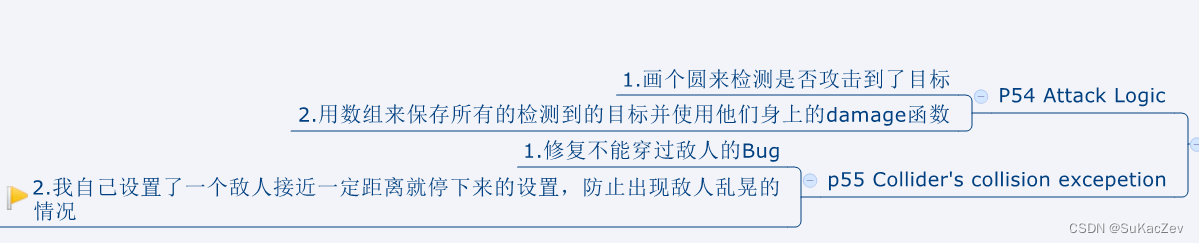
Unity类银河恶魔城学习记录4-1,4-2 Attack Logic,Collider‘s collision excepetion源代码 P54 p55
Alex教程每一P的教程原代码加上我自己的理解初步理解写的注释,可供学习Alex教程的人参考 此代码仅为较上一P有所改变的代码【Unity教程】从0编程制作类银河恶魔城游戏_哔哩哔哩_bilibili Entity.cs using System.Collections; using System.Collections.Generic; u…...

各种编程语言送祝福:2024龙年大吉
我是码农一枚,在这里用不同编程语言中祝福大家"2024,龙年大吉"~ Python print("2024,龙年大吉")Java public class Main {public static void main(String[] args) {System.out.println("2024,龙年大…...

C++中用Boost::Python调用Python模块
这个过程有挺多坑,记录一下。我这里的环境: Windows 11 Qt 6.2 Boost 1.8.4 CMake 3.25.2 Visual Stutio 2019(主要用于C编译) 1、下载并将Boost编译为静态库 b2.exe toolsetmsvc-14.2 install --prefixboost安装路径 links…...
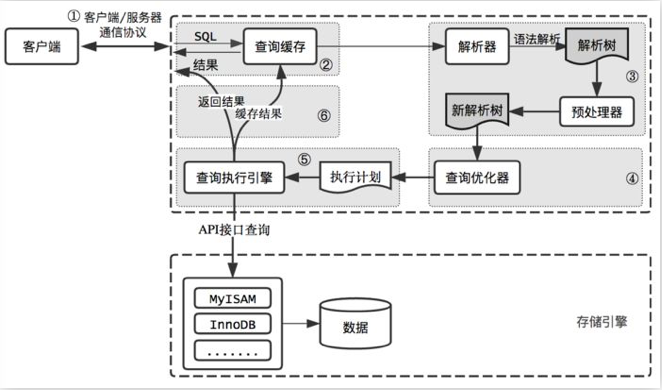
MySQL查询缓存
MySQL查询缓存 MySQL在查询的时候首先会查询缓存,如果缓存命中的话就直接返回结果,不需要解析sql语句,也不会生成执行计划,更不会执行;如果没有命中缓存,则再进行SQL解析以及进行查询,并将结果返…...

Filter 实现过滤符合条件的请求并落库
其他系列文章导航 Java基础合集数据结构与算法合集 设计模式合集 多线程合集 分布式合集 ES合集 文章目录 其他系列文章导航 文章目录 前言 一、配置过滤器类 二、定义数据表、实体类、Mapper 2.1 DDL 2.2 实体类 2.3 Mapper 三、创建一个过滤器 四、实现 Nacos 配置…...

使用ChatGpt和文心一言辅助文章创作
近期在写数字水浒系列文章,使用了ChatGpt和文心一言进行辅助创作,整体感受不错,提高了工作效率。 在使用过程中,感觉文心的中文能力更强一些,主要体现在: 1 语料库更大,比如对水浒传了解的更多…...

OpenCV识别视频中物体运动并截取保存
功能很简单:输入原始视频,输出视频中有画面变化的部分 适合理解基本框架,可以在这个基础上增加各种酷炫时髦的功能 [doge] ※注释非常保姆级※ import cv2 import numpy as np import os from datetime import datetime# 检测两帧之间变化…...

6.Swift字面量
Swift 字面量 在 Swift 中,字面量是指直接指定数值、字符串、布尔值等常量的值的表示方式。使用字面量可以直接在代码中指定常量的值,而不需要通过变量或常量来存储。Swift 支持多种类型的字面量,包括整数、浮点数、布尔值、字符串、数组、字…...

拿捏循环链表
目录: 一:单链表(不带头单向不循环)与循环链表(带头双向循环)区别 二:循环链表初始化 三:循环链表头插 四:循环链表尾插 五:循环链表头删 六࿱…...
)
UMLChina公众号精选(20240207更新)
UMLChina服务 如何选择UMLChina服务 《软件方法》分步改进指南 做对《软件方法》强化自测题获得“软件方法建模师”称号 建模示范视频 [EA-029/石油钻井管理平台]35套UML/SysMLEA/StarUML的建模示范视频-全程字幕 UMLChina连EA经销商都不是,EA水平靠谱嘛?…...

东南亚手游市场攻略:出海前的关键准备与注意事项
随着全球游戏市场的日益繁荣,越来越多的手游企业开始将目光投向海外市场,其中东南亚地区因其庞大的用户基数和逐渐成熟的游戏市场环境,成为了不少企业的首选目标。然而,想要在东南亚市场取得成功,并非易事。本文Nox聚星…...
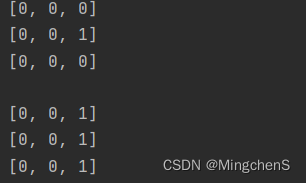
python二维数组初始化的一个极其隐蔽的bug(浅拷贝)
初始化一个三行三列的矩阵 m n 3初始化方式1 a [[0 for i in range(m)] for j in range(n)]初始化方式2 b [] row [0 for i in range(0,m)] for i in range(0,n):b.append(row)分别输出两个初始化的结果 for row in a:print(row) for row in b:print(row)当前的输出为…...
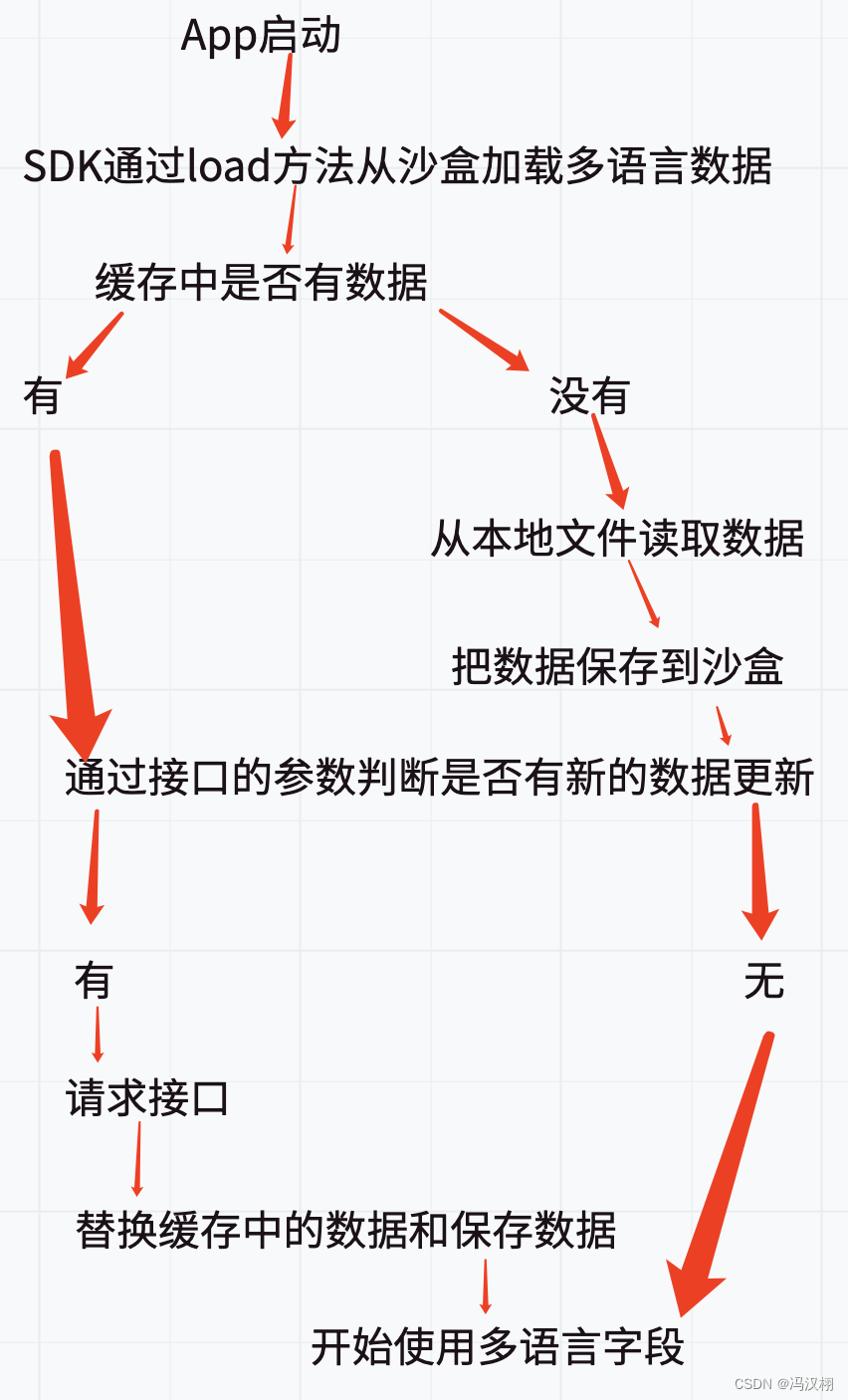
iOS 需求 多语言(国际化)App开发 源码
一直觉得自己写的不是技术,而是情怀,一个个的教程是自己这一路走来的痕迹。靠专业技能的成功是最具可复制性的,希望我的这条路能让你们少走弯路,希望我能帮你们抹去知识的蒙尘,希望我能帮你们理清知识的脉络࿰…...
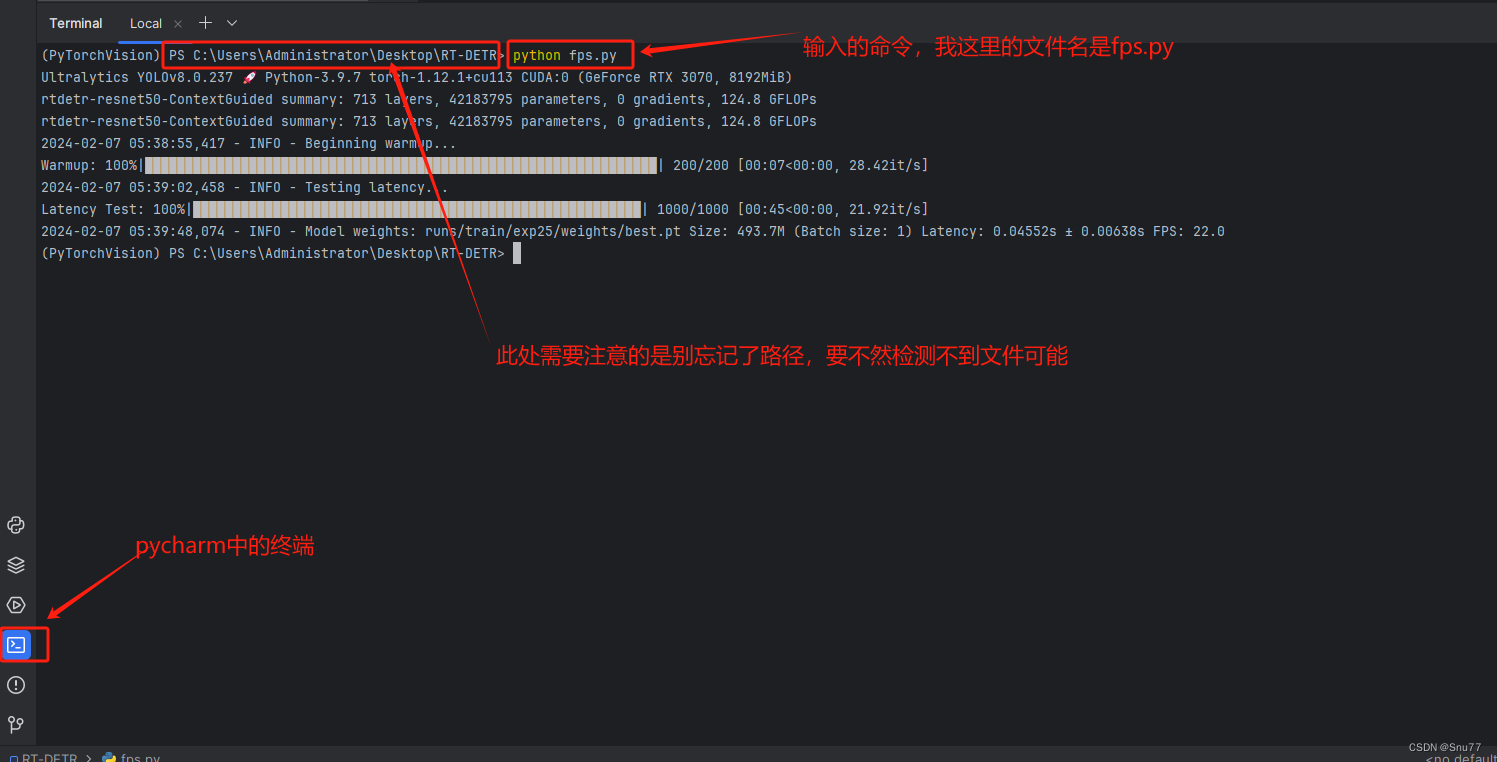
YOLOv8改进 | 利用训练好权重文件计算YOLOv8的FPS、推理每张图片的平均时间(科研必备)
一、本文介绍 本文给大家带来的改进机制是利用我们训练好的权重文件计算FPS,同时打印每张图片所利用的平均时间,模型大小(以MB为单位),同时支持batch_size功能的选择,对于轻量化模型的读者来说,本文的内容对你一定有帮助,可以清晰帮你展示出模型速度性能的提升以及轻量…...

std::vector<cv::Mat>和unsigned char** in_pixels 互相转换
将std::vectorcv::Mat转换为unsigned char** in_pixels, std::vector<cv::Mat> matVector; // 假设已经有一个包含cv::Mat的vector// 创建一个二维数组,用于存储像素数据 unsigned char** in_pixels new unsigned char*[matVector.size()]; for …...
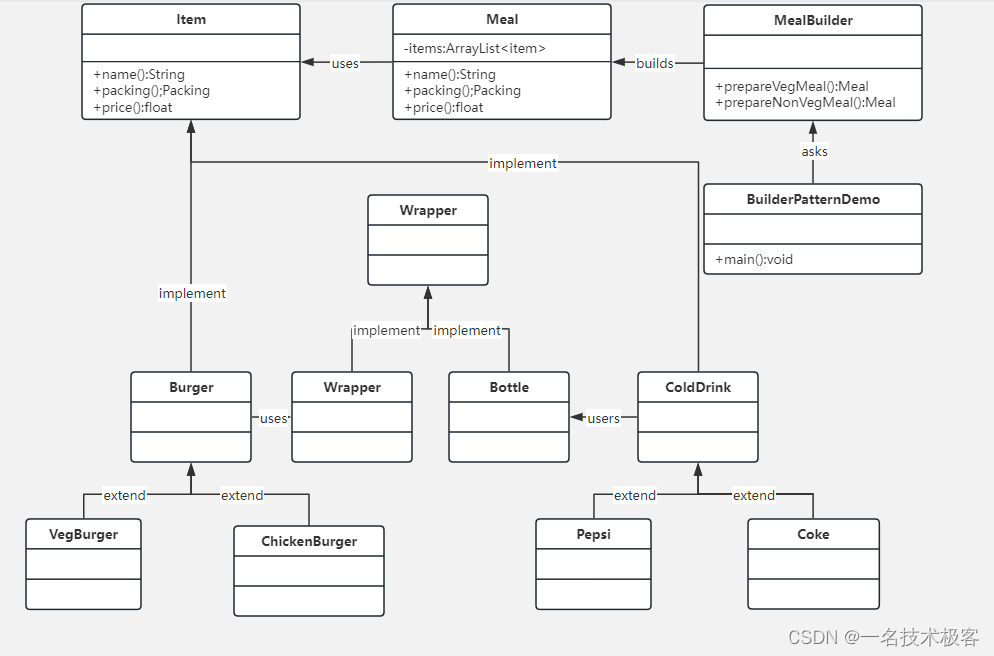
04-Java建造者模式 ( Builder Pattern )
建造者模式 摘要实现范例 建造者模式(Builder Pattern)使用多个简单的对象一步一步构建成一个复杂的对象 一个Builder 类会一步一步构造最终的对象,该 Builder 类是独立于其他对象的 建造者模式属于创建型模式,它提供了一种创建对…...
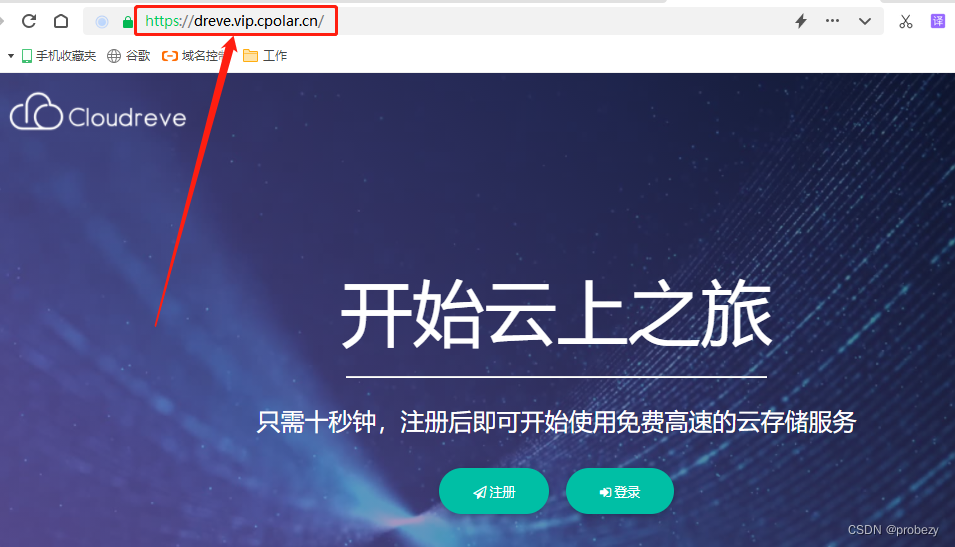
使用PHPStudy搭建Cloudreve网盘服务
文章目录 1、前言2、本地网站搭建2.1 环境使用2.2 支持组件选择2.3 网页安装2.4 测试和使用2.5 问题解决 3、本地网页发布3.1 cpolar云端设置3.2 cpolar本地设置 4、公网访问测试5、结语 1、前言 自云存储概念兴起已经有段时间了,各互联网大厂也纷纷加入战局&#…...

Lua协程-coroutine
lua也有协程这个机制,用以完成非抢占式的多任务处理。 协程与线程 协程和线程类似,有自己的堆栈、局部变量、指令指针等等。但同时也有不一致的地方,其中最重要的地方在于多线程程序可以同一时间运行多个线程,而协程同一时间只能…...
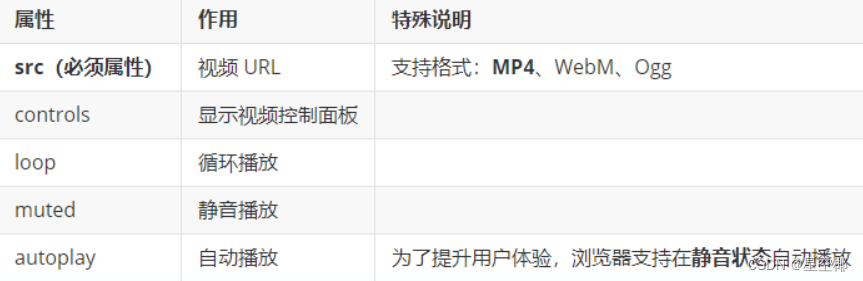
HTML5+CSS3+移动web——HTML 基础
目录 一、标签语法 HTML的基本框架 1. 标题标签 2. 段落标签 3. 换行和水平线 4. 文本格式化标签 5. 图像标签 6. 路径 相对路径 绝对路径 7. 超链接标签 8. 音频 9. 视频 10. 注释 二、标签结构 一、标签语法 HTML 超文本标记语言——HyperText Markup Langua…...

19c补丁后oracle属主变化,导致不能识别磁盘组
补丁后服务器重启,数据库再次无法启动 ORA01017: invalid username/password; logon denied Oracle 19c 在打上 19.23 或以上补丁版本后,存在与用户组权限相关的问题。具体表现为,Oracle 实例的运行用户(oracle)和集…...

HTML 语义化
目录 HTML 语义化HTML5 新特性HTML 语义化的好处语义化标签的使用场景最佳实践 HTML 语义化 HTML5 新特性 标准答案: 语义化标签: <header>:页头<nav>:导航<main>:主要内容<article>&#x…...

鸿蒙中用HarmonyOS SDK应用服务 HarmonyOS5开发一个医院挂号小程序
一、开发准备 环境搭建: 安装DevEco Studio 3.0或更高版本配置HarmonyOS SDK申请开发者账号 项目创建: File > New > Create Project > Application (选择"Empty Ability") 二、核心功能实现 1. 医院科室展示 /…...

基础测试工具使用经验
背景 vtune,perf, nsight system等基础测试工具,都是用过的,但是没有记录,都逐渐忘了。所以写这篇博客总结记录一下,只要以后发现新的用法,就记得来编辑补充一下 perf 比较基础的用法: 先改这…...

MODBUS TCP转CANopen 技术赋能高效协同作业
在现代工业自动化领域,MODBUS TCP和CANopen两种通讯协议因其稳定性和高效性被广泛应用于各种设备和系统中。而随着科技的不断进步,这两种通讯协议也正在被逐步融合,形成了一种新型的通讯方式——开疆智能MODBUS TCP转CANopen网关KJ-TCPC-CANP…...

vue3 定时器-定义全局方法 vue+ts
1.创建ts文件 路径:src/utils/timer.ts 完整代码: import { onUnmounted } from vuetype TimerCallback (...args: any[]) > voidexport function useGlobalTimer() {const timers: Map<number, NodeJS.Timeout> new Map()// 创建定时器con…...
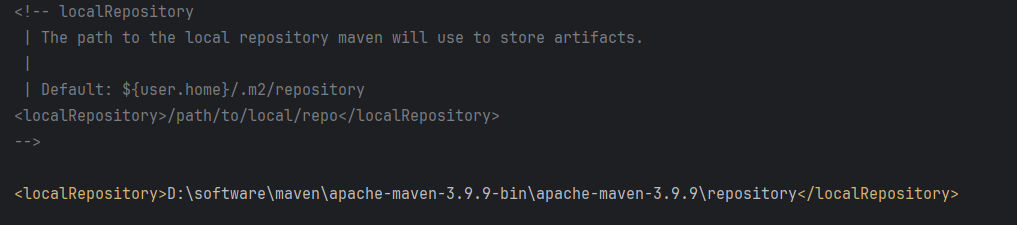
Maven 概述、安装、配置、仓库、私服详解
目录 1、Maven 概述 1.1 Maven 的定义 1.2 Maven 解决的问题 1.3 Maven 的核心特性与优势 2、Maven 安装 2.1 下载 Maven 2.2 安装配置 Maven 2.3 测试安装 2.4 修改 Maven 本地仓库的默认路径 3、Maven 配置 3.1 配置本地仓库 3.2 配置 JDK 3.3 IDEA 配置本地 Ma…...

Linux --进程控制
本文从以下五个方面来初步认识进程控制: 目录 进程创建 进程终止 进程等待 进程替换 模拟实现一个微型shell 进程创建 在Linux系统中我们可以在一个进程使用系统调用fork()来创建子进程,创建出来的进程就是子进程,原来的进程为父进程。…...

服务器--宝塔命令
一、宝塔面板安装命令 ⚠️ 必须使用 root 用户 或 sudo 权限执行! sudo su - 1. CentOS 系统: yum install -y wget && wget -O install.sh http://download.bt.cn/install/install_6.0.sh && sh install.sh2. Ubuntu / Debian 系统…...

LeetCode - 199. 二叉树的右视图
题目 199. 二叉树的右视图 - 力扣(LeetCode) 思路 右视图是指从树的右侧看,对于每一层,只能看到该层最右边的节点。实现思路是: 使用深度优先搜索(DFS)按照"根-右-左"的顺序遍历树记录每个节点的深度对于…...