
office文件转pdf在线预览
一、工具类
package com.sby.utils;import java.io.File;
import java.io.FileInputStream;
import java.io.FileOutputStream;
import java.io.InputStream;
import java.math.RoundingMode;
import java.text.DecimalFormat;
import java.util.Locale;import com.aspose.cells.PdfSaveOptions;
import com.aspose.cells.Workbook;
import com.aspose.slides.Presentation;
import com.aspose.words.Document;
import com.aspose.words.SaveFormat;/*** Created with IntelliJ IDEA.** @Author: cqwuliu* @Date: 2024/02/08/11:41  will_isme@163.com* @Description:*/
public class AsposeUtil {/*** 获取license** @return*/public static boolean getLicense(int type) {boolean result = false;try {InputStream is = AsposeUtil.class.getClassLoader().getResourceAsStream("license.xml");if (type == 1) {//excelcom.aspose.cells.License aposeLic = new com.aspose.cells.License();aposeLic.setLicense(is);result = true;} else if (type == 2) {//wordcom.aspose.words.License aposeLic = new com.aspose.words.License();aposeLic.setLicense(is);result = true;} else {//pptcom.aspose.slides.License aposeLic = new com.aspose.slides.License();aposeLic.setLicense(is);result = true;}} catch (Exception e) {e.printStackTrace();}return result;}public static String Excel2Pdf(String officePath,String OutPutPath,String officeName) {// 验证Licenseif (!getLicense(1)) {return null;}try {File file = new File(OutPutPath);if (!file.exists()) {file.mkdirs();}
//            long old = Sysout.currentTimeMillis();Workbook wb = new Workbook(officePath);// 原始excel路径File pdfFile = new File(OutPutPath+officeName);// 输出路径FileOutputStream fileOS = new FileOutputStream(pdfFile);//wb.save(fileOS, com.aspose.cells.SaveFormat.PDF);PdfSaveOptions pdfSaveOptions = new PdfSaveOptions();pdfSaveOptions.setAllColumnsInOnePagePerSheet(true);wb.save(fileOS, pdfSaveOptions);return pdfFile.getAbsolutePath();
//            long now = Sysout.currentTimeMillis();
//            Sysout.println("共耗时:" + ((now - old) / 1000.0) + "秒");} catch (Exception e) {e.printStackTrace();System.err.println("Excel2Pdf转换pdf错误");}return null;}public static String Word2Pdf(String officePath,String OutPutPath,String officeName) {// 验证Licenseif (!getLicense(2)) {return null;}try {File file = new File(OutPutPath);if (!file.exists()) {file.mkdirs();}Document doc = new Document(officePath);// 原始word路径File pdfFile = new File(OutPutPath+officeName);// 输出路径FileOutputStream fileOS = new FileOutputStream(pdfFile);doc.save(fileOS, SaveFormat.PDF);return pdfFile.getAbsolutePath();} catch (Exception e) {e.printStackTrace();System.err.println("word转换pdf错误");}return null;}public static String PPT2Pdf(String officePath,String OutPutPath,String officeName) {// 验证Licenseif (!getLicense(3)) {return null;}try {File PathFile = new File(OutPutPath);if (!PathFile.exists()) {PathFile.mkdirs();}InputStream slides = new FileInputStream(new File(officePath));// 原始ppt路径Presentation pres = new Presentation(slides);File file = new File(OutPutPath+officeName);// 输出pdf路径FileOutputStream fileOS = new FileOutputStream(file);pres.save(fileOS, com.aspose.slides.SaveFormat.Pdf);return file.getAbsolutePath();} catch (Exception e) {e.printStackTrace();System.err.println("ppt转换pdf错误");}return null;}/*** fileTyle.equals(".DOCX") || fileTyle.equals(".DOC") || fileTyle.equals(".PPT") || fileTyle.equals(".PPTX") || fileTyle.equals(".XLS") || fileTyle.equals(".XLSX")* @param officePath* @return 返回转换以后的pdf文件路径*/public static String OfficeToPdf(String officePath) {//G:/product/WebApp/fwis_develop/com/is/flywings/oa/attchfile/1000000000/i0002/101951.docx⌒101951.docx⌒feiyu.docxString[] split = officePath.split("⌒");int lastIndex = split[0].lastIndexOf(".");int lastNameIndex = split[0].lastIndexOf("\\");String officeType = split[0].substring(lastIndex+1).toLowerCase(Locale.ROOT);String officeName = split[0].substring(lastNameIndex+1,lastIndex)+".pdf";String OutPutPath = split[0].substring(0,lastNameIndex+1)+"topdf/";File file = new File(split[0]);File pdfFile = new File(OutPutPath+officeName);//判断当前office文件是否已经转为PDF,如果已转为PDF就不需要再次转换。if(pdfFile.exists()){return OutPutPath+officeName;}if (file.exists()) {double bytes = file.length();double kilobytes = (bytes / 1024);double megabytes = (kilobytes / 1024);DecimalFormat df = new DecimalFormat("0.00");df.setRoundingMode(RoundingMode.HALF_UP);String MB = df.format(megabytes);Double Size = Double.parseDouble(MB);if(Size>30){return Size+"MB";}//"doc", "docx", "xls","xlsx", "ppt", "pptx"try {if(officeType.equals("doc")||officeType.equals("docx")){return   Word2Pdf(split[0],OutPutPath,officeName);}else if(officeType.equals("xls")||officeType.equals("xlsx")){return   Excel2Pdf(split[0],OutPutPath,officeName);}else if(officeType.equals("ppt")||officeType.equals("pptx")){return   PPT2Pdf(split[0],OutPutPath,officeName);}else{System.err.println("无法识别该文件");return "Error";}} catch (Exception e) {e.printStackTrace();}} else {return "NotExists";}return OutPutPath+officeName;}// public static void main(String[] args) {//  OfficeToPdf("C:\\Users\\DELL\\Desktop\\桌面表格文件\\2020年沙坪坝维护.xlsx");// }}相关jar包在我的资源里面下载
调用方法将不同文件类型分类处理后发送到前端预览,不在分类中的直接发送文件下载。
public void previewFile(Integer id, HttpServletResponse response) throws IOException {FileInfo files = fileMapper.getFilesById(id);String filePate = dir + "\\" + files.getAliasName();String fileName = files.getAliasName();String fileTyle = fileName.substring(fileName.lastIndexOf("."), fileName.length()).toUpperCase();FileInputStream fileInputStream = new FileInputStream(filePate);int available = fileInputStream.available();if (available>(1024*1024*readonline) || fileTyle.equals(".DOCX") || fileTyle.equals(".DOC") || fileTyle.equals(".PPT") || fileTyle.equals(".PPTX") || fileTyle.equals(".XLS") || fileTyle.equals(".XLSX")) {try{//将office转换成pdf "预览";fileInputStream = new FileInputStream(AsposeUtil.OfficeToPdf(filePate));IOUtils.copy(fileInputStream, response.getOutputStream());return;}catch (Exception e){log.error("officez转换pdf预览失败"+filePate);System.err.println("officez转换pdf预览失败");}String filename = files.getFileName();filename = java.net.URLEncoder.encode(filename, "UTF-8").replace("+", "%20");response.setHeader("Content-Disposition", "attachment; filename*=UTF-8''" + filename);IOUtils.copy(fileInputStream, response.getOutputStream());} else if (!fileTyle.equals(".PNG") && !fileTyle.equals(".JPG") && !fileTyle.equals(".JPEG") && !fileTyle.equals(".PDF")) {BufferedReader br = new BufferedReader(new InputStreamReader(fileInputStream, "UTF-8"));String line;while ((line = br.readLine()) != null) {response.setContentType("text/html;charset=UTF-8");response.getWriter().write(line);response.getWriter().write("<br/>");}} else {IOUtils.copy(fileInputStream, response.getOutputStream());}}<dependency><groupId>com.aspose</groupId><artifactId>aspose.slides</artifactId><version>15.9.0</version><scope>system</scope><systemPath>${basedir}/lib/aspose.slides-15.9.0.jar</systemPath></dependency><dependency><groupId>com.aspose</groupId><artifactId>aspose.cells.java</artifactId><version>18.11</version><scope>system</scope><systemPath>${basedir}/lib/aspose-cells-java-18.11.jar</systemPath></dependency><dependency><groupId>com.aspose</groupId><artifactId>aspose.words</artifactId><version>15.8.0</version><scope>system</scope><systemPath>${basedir}/lib/aspose-words-15.8.0.jar</systemPath></dependency>
相关文章:

office文件转pdf在线预览
一、工具类 package com.sby.utils;import java.io.File; import java.io.FileInputStream; import java.io.FileOutputStream; import java.io.InputStream; import java.math.RoundingMode; import java.text.DecimalFormat; import java.util.Locale;import com.aspose.cel…...
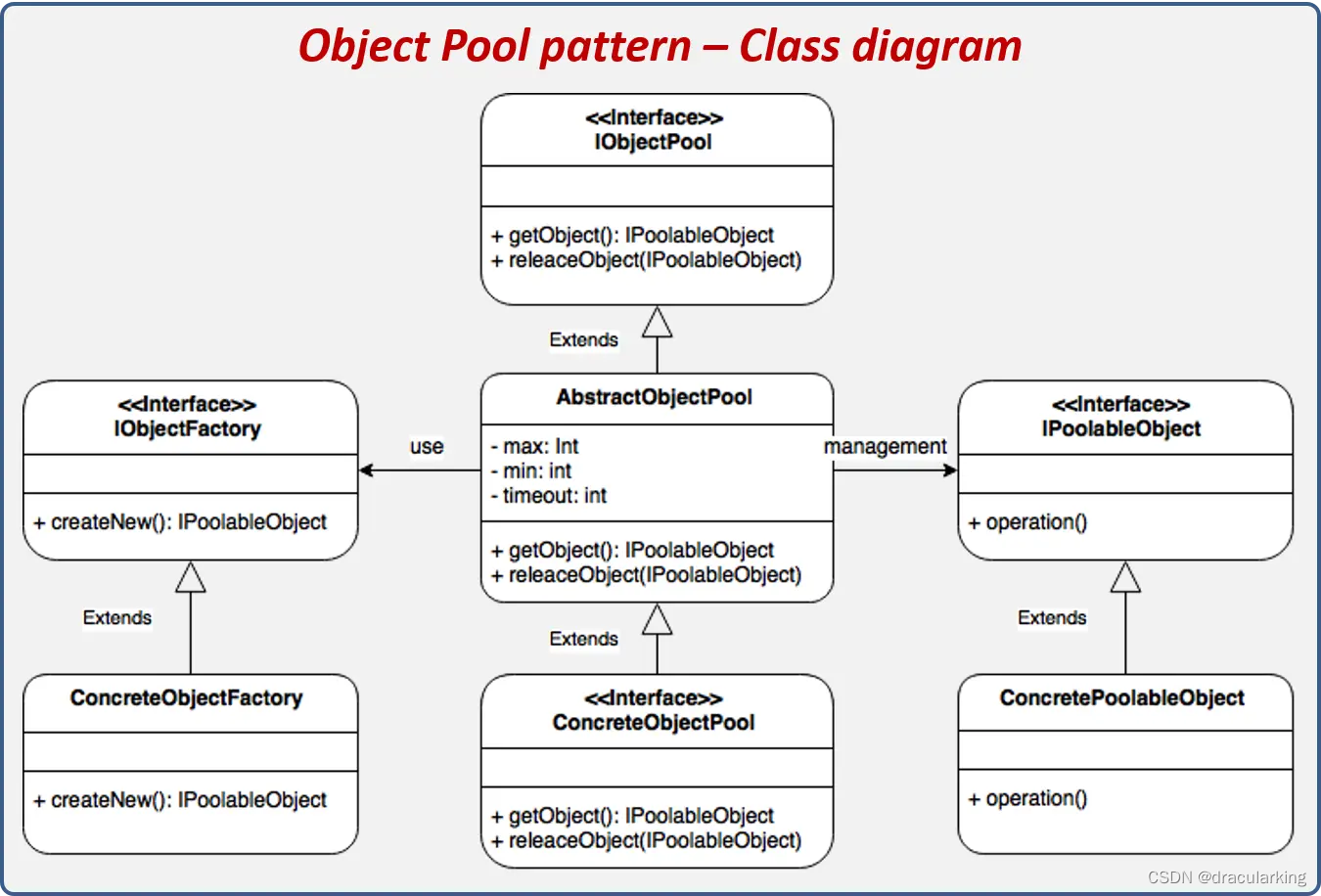
设计模式2-对象池模式
对象池模式,Object Pool Pattern,当你的应用程序需要频繁创建和销毁某种资源(比如数据库连接、线程、socket连接等)时,Object Pool 设计模式就变得很有用。它通过预先创建一组对象并将它们保存在池中,以便在…...
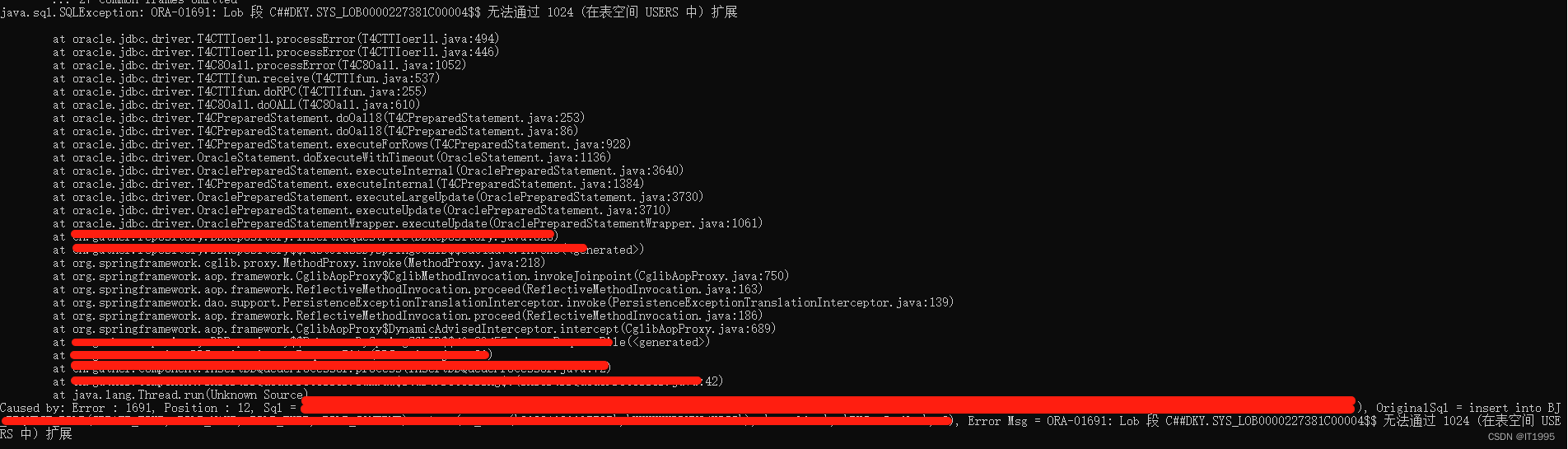
Oracle笔记-为表空间新增磁盘(ORA-01691)
如下报错: 原因是Oracle表空间满了,最好是新增一个存储盘。 #查XXX命名空间目前占用了多大的空间 select FILE_NAME,BYTES/1024/1024 from dba_data_files where tablespace_name XXXX #这里的FILE_NAME能查到DBF的存储位置#将对应的datafile设置为30g…...

【专业技术】高效并行分布式深度学习策略,助力模型训练与量化
尊敬的客户,您好!我们是一家专注于提供高效深度学习解决方案的专业团队,为您提供并行分布式策略、高效精调策略、大模型无损量化和高性能推理服务。 我们的服务包括: 并行分布式策略:我们的Trainer封装支持多种并行配…...

力扣-137. 只出现一次的数字 II
文章目录 力扣题目代码 力扣题目 给你一个整数数组 nums ,除某个元素仅出现 一次 外,其余每个元素都恰出现 三次 。请你找出并返回那个只出现了一次的元素。 你必须设计并实现线性时间复杂度的算法且使用常数级空间来解决此问题。 示例 1:…...
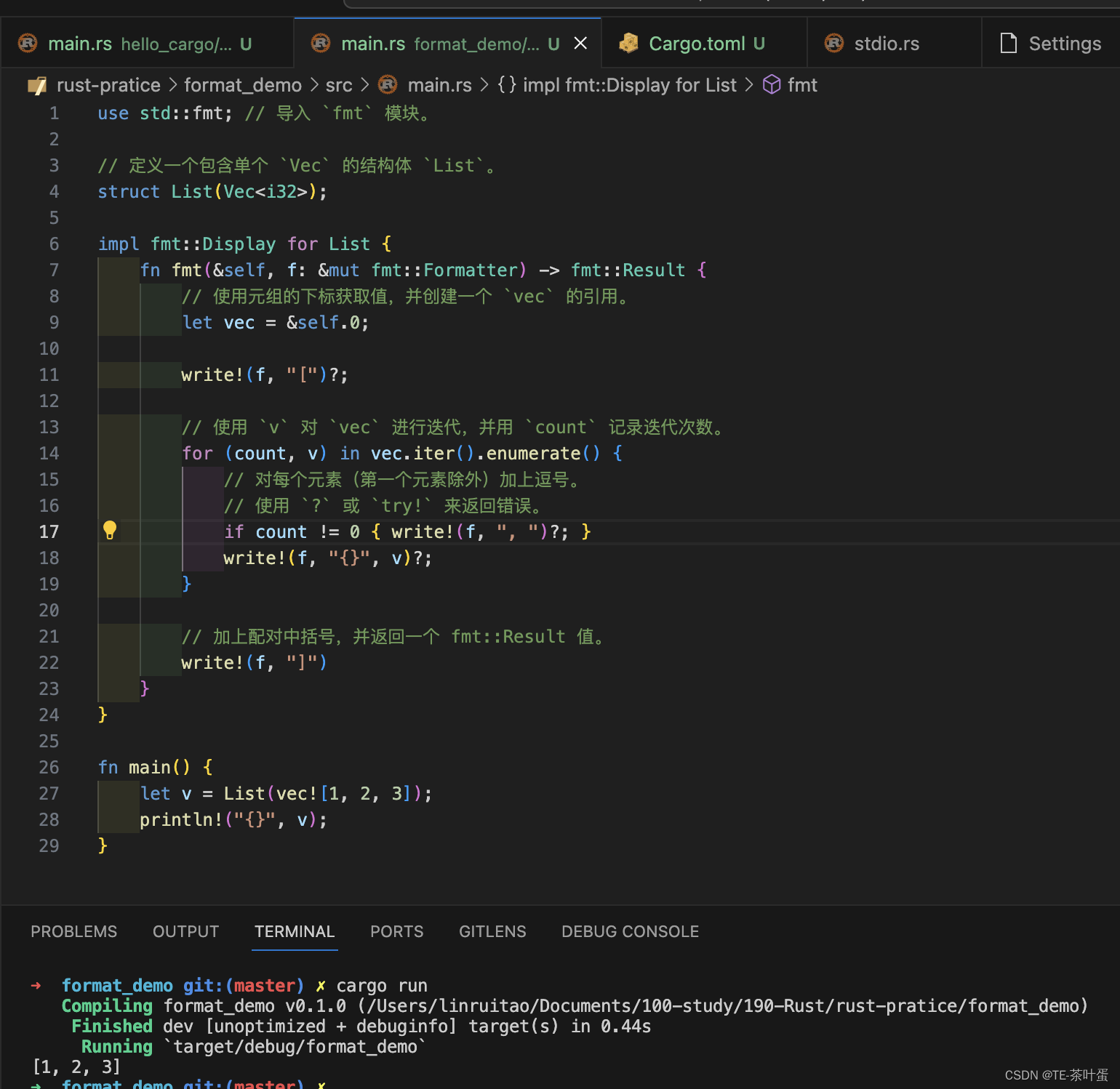
Rust 格式化输出
提示:文章写完后,目录可以自动生成,如何生成可参考右边的帮助文档 文章目录 前言一、format! 宏二、fmt::Debug三、fmt::Display四、? 操作符 循环打印 前言 Rust学习系列-本文根据教程学习Rust的格式化输出,包括fmt::Debug&…...
常用方法)
c#进程(Process)常用方法
在C#中,Process类提供了一系列用于操作进程的常用方法,以下是其中一些常用的方法: Start():启动一个新的进程。 Process.Start("notepad.exe");Kill():终止进程。 Process.GetProcessesByName("note…...
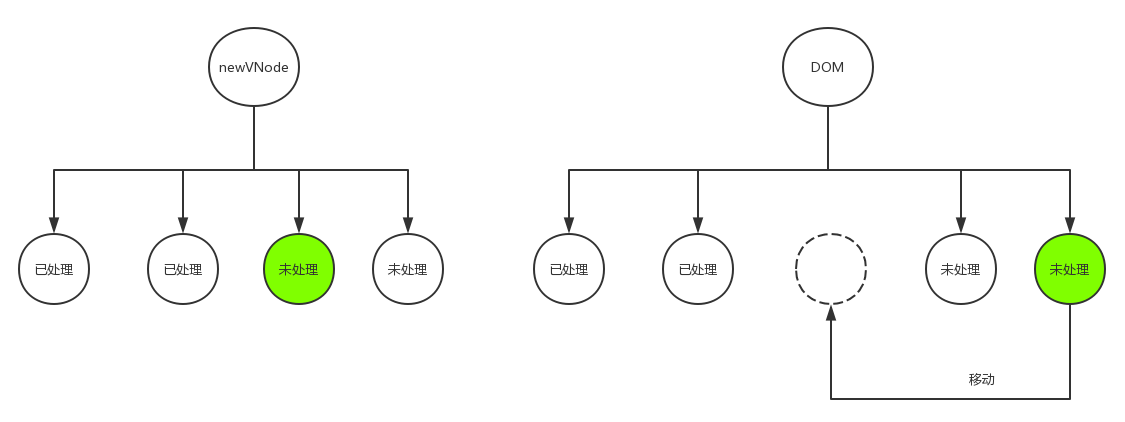
Vue源码系列讲解——虚拟DOM篇【三】(更新子节点)
1. 前言 在上一篇文章中,我们了解了Vue中的patch过程,即DOM-Diff算法。并且知道了在patch过程中基本会干三件事,分别是:创建节点,删除节点和更新节点。创建节点和删除节点都比较简单,而更新节点因为要处理…...

一个设备内存2M,一个1G大小的文件,这个文件有若干行,输出其中的带有hello的行以及行数
第一种 linux上的awk命令: awk {if($1 "113.111.211.224"){print $0}} temp.log 第二种:PHP程序yield ,和awk这个命令用的时间差不多一样,效率是很高的 $file __DIR__."/temp.log";foreach(readfilecong…...
)
json模块(高维数据的存储与读取)
json模块是 Python 标准库中的一个模块,用于处理 JSON(JavaScript Object Notation)格式的数据。JSON是一种轻量级的数据交换格式,易于人阅读和编写,同时也易于机器解析和生成。模块提供了在 Python 中进行 JSON 编码&…...
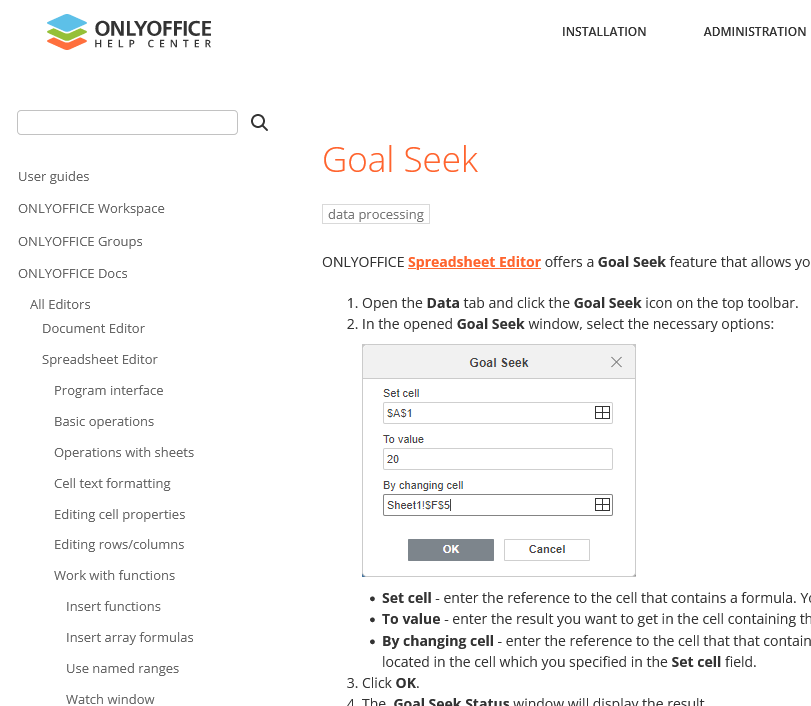
ONLYOFFICE文档8.0新功能浅探
ONLYOFFICE文档8.0新功能浅探 上个月末这个月初的几天,ONLYOFFICE版本更新了!更新到了一个比较整的大的版本号,8.0版本,看来这个生产力工具的升级速度基本上能保持每年两个版本号的速度,还是很快的,一般来…...
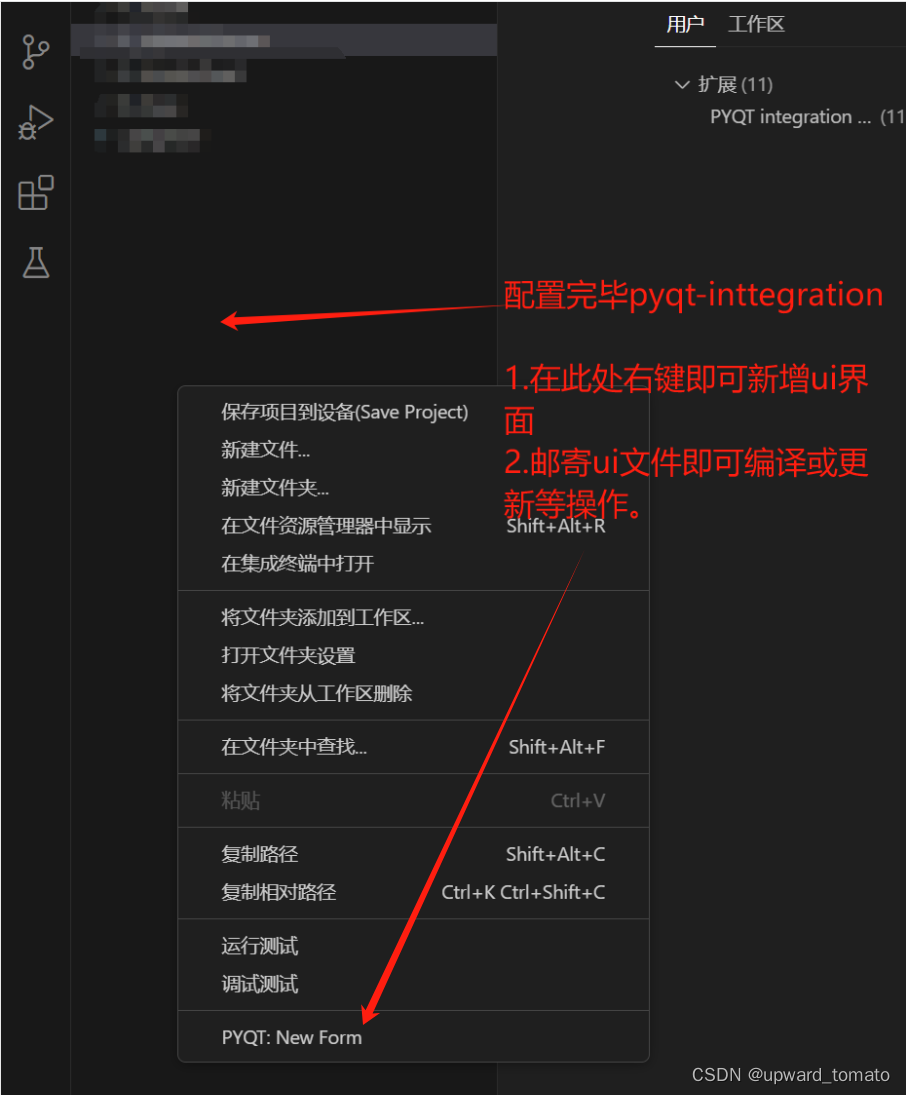
在vscode 中配置 pyside6 环境
在vscode中编写pyside环境配置 start 记录一下在 vscode 中编写 pyside6 程序,环境如何配置。 前提 请自行安装好 python。请自行安装好 vscode。安装 vscode 插件 Python,PYQT Integration。 配置环境 1.借助 pip 安装我们的pyside6 pip install…...

C语言:月份缩写
题目描述 从一月份到十二月的英文全称依次是:“January”,“February”,“March”,“April”,“May”,“June”,“July”,“August”,“September”,“October”,“November”,“December” 对应的缩写依次是:“Jan.”,“Feb.”,“Mar.”,“Apr.”,“Ma…...

线阵相机系列-- 1. 什么是线阵相机
线阵相机的概念 根据工业相机像素排列方式的不同,分为面阵相机和线阵相机。面阵相机的像素排列为一个完整的面,一次获取整幅二维图像,而线阵相机的像素以一条线排列,每次得到的图像呈现出一条线,通过设置扫描频率以及…...
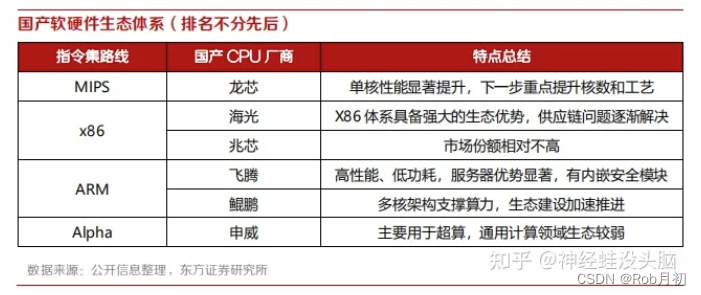
CISCRISC? CPU架构有哪些? x86 ARM?
编者按:鉴于笔者水平有限,文中难免有不当之处,还请各位读者海涵。 是为序 我猜,常年混迹CSDN的同学应该不会没听说过CPU吧? 但你真的了解CPU吗?那笔者问你CPU有哪些架构呢? 如果你对你的答案…...
指针进阶)
【C语言】(15)指针进阶
1. 指针与const 在C语言中,const关键字和指针一起使用时,可以创建对常量的引用,或者创建指向常量的指针。这对于保护重要数据不被意外修改以及提高程序的可读性和运行时的安全性非常有用。 1.1 const的基本用法 const关键字用于声明一个变…...
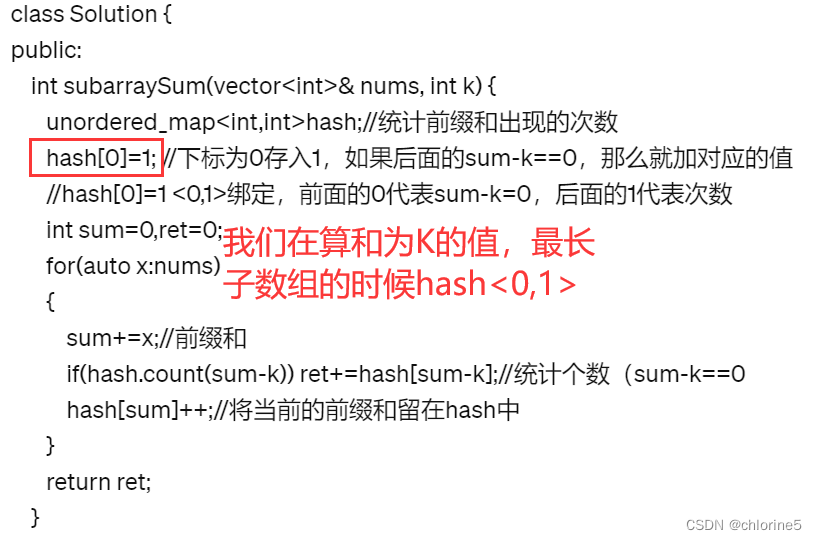
力扣精选算法100道—— 连续数组(前缀和专题)
连续数组(前缀和专题) 目录 🚩了解题意 🚩算法原理 ❗为什么hash设置成<0,-1>键值对 ❗与和为K的子数组比较hash的键值对 🚩代码实现 🚩了解题意 我们看到给定数组里面只有0和1,我们…...

flutter 国内源
Flutter 在中国由于网络原因,从官方默认的国外源下载Dart包和Flutter SDK可能会比较慢或者不稳定。为了加速依赖包的获取与Flutter SDK的安装,可以使用国内镜像源。以下是一些国内常用的Flutter和Dart包镜像源: 清华大学开源软件镜像站 Flu…...
第九个知识点:内部对象
Date对象: <script>var date new Date();date.getFullYear();//年date.getMonth();//月date.getDate();//日date.getDay();//星期几date.getHours();//时date.getMinutes();//分date.getSeconds();//秒date.getTime();//获取时间戳,时间戳时全球统一&#x…...

Android 车载应用开发之车载操作系统
一、前言 到 2030 年,全球电动汽车的销量将超过 7000 万辆,保有量将达到 3.8 亿辆,全球年度新车渗透率有望触及 60% 。这一数据来自国际能源署(IEA)发布的《全球电动汽车展望2023》。 市场趋势和政策努力的双加持下,新能源汽车来势凶猛,燃油车保有量逐年递减。此番景象…...
基于ASP.NET+ SQL Server实现(Web)医院信息管理系统
医院信息管理系统 1. 课程设计内容 在 visual studio 2017 平台上,开发一个“医院信息管理系统”Web 程序。 2. 课程设计目的 综合运用 c#.net 知识,在 vs 2017 平台上,进行 ASP.NET 应用程序和简易网站的开发;初步熟悉开发一…...
【JVM】- 内存结构
引言 JVM:Java Virtual Machine 定义:Java虚拟机,Java二进制字节码的运行环境好处: 一次编写,到处运行自动内存管理,垃圾回收的功能数组下标越界检查(会抛异常,不会覆盖到其他代码…...

React Native在HarmonyOS 5.0阅读类应用开发中的实践
一、技术选型背景 随着HarmonyOS 5.0对Web兼容层的增强,React Native作为跨平台框架可通过重新编译ArkTS组件实现85%以上的代码复用率。阅读类应用具有UI复杂度低、数据流清晰的特点。 二、核心实现方案 1. 环境配置 (1)使用React Native…...

渲染学进阶内容——模型
最近在写模组的时候发现渲染器里面离不开模型的定义,在渲染的第二篇文章中简单的讲解了一下关于模型部分的内容,其实不管是方块还是方块实体,都离不开模型的内容 🧱 一、CubeListBuilder 功能解析 CubeListBuilder 是 Minecraft Java 版模型系统的核心构建器,用于动态创…...

五年级数学知识边界总结思考-下册
目录 一、背景二、过程1.观察物体小学五年级下册“观察物体”知识点详解:由来、作用与意义**一、知识点核心内容****二、知识点的由来:从生活实践到数学抽象****三、知识的作用:解决实际问题的工具****四、学习的意义:培养核心素养…...

【Go】3、Go语言进阶与依赖管理
前言 本系列文章参考自稀土掘金上的 【字节内部课】公开课,做自我学习总结整理。 Go语言并发编程 Go语言原生支持并发编程,它的核心机制是 Goroutine 协程、Channel 通道,并基于CSP(Communicating Sequential Processes࿰…...
Mac软件卸载指南,简单易懂!
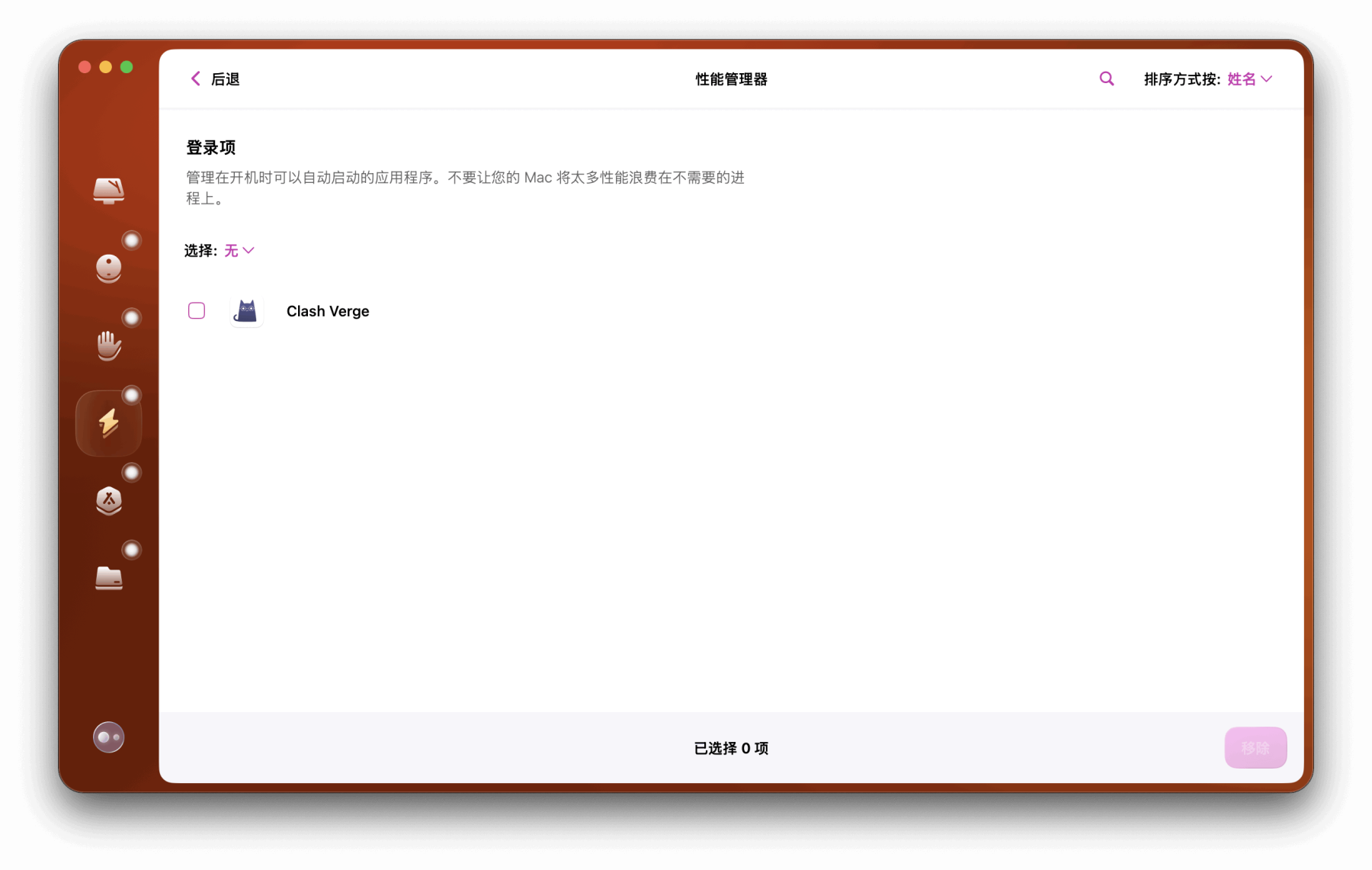
刚和Adobe分手,它却总在Library里给你写"回忆录"?卸载的Final Cut Pro像电子幽灵般阴魂不散?总是会有残留文件,别慌!这份Mac软件卸载指南,将用最硬核的方式教你"数字分手术"࿰…...
深度学习习题2
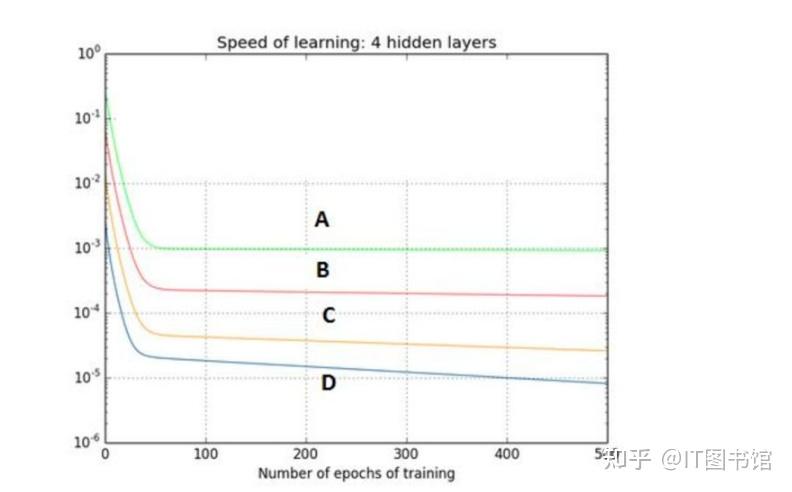
1.如果增加神经网络的宽度,精确度会增加到一个特定阈值后,便开始降低。造成这一现象的可能原因是什么? A、即使增加卷积核的数量,只有少部分的核会被用作预测 B、当卷积核数量增加时,神经网络的预测能力会降低 C、当卷…...
NXP S32K146 T-Box 携手 SD NAND(贴片式TF卡):驱动汽车智能革新的黄金组合
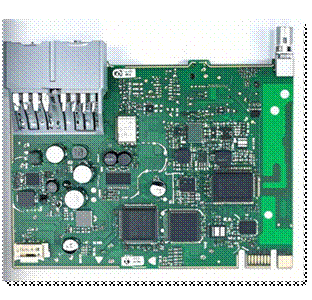
在汽车智能化的汹涌浪潮中,车辆不再仅仅是传统的交通工具,而是逐步演变为高度智能的移动终端。这一转变的核心支撑,来自于车内关键技术的深度融合与协同创新。车载远程信息处理盒(T-Box)方案:NXP S32K146 与…...
push [特殊字符] present
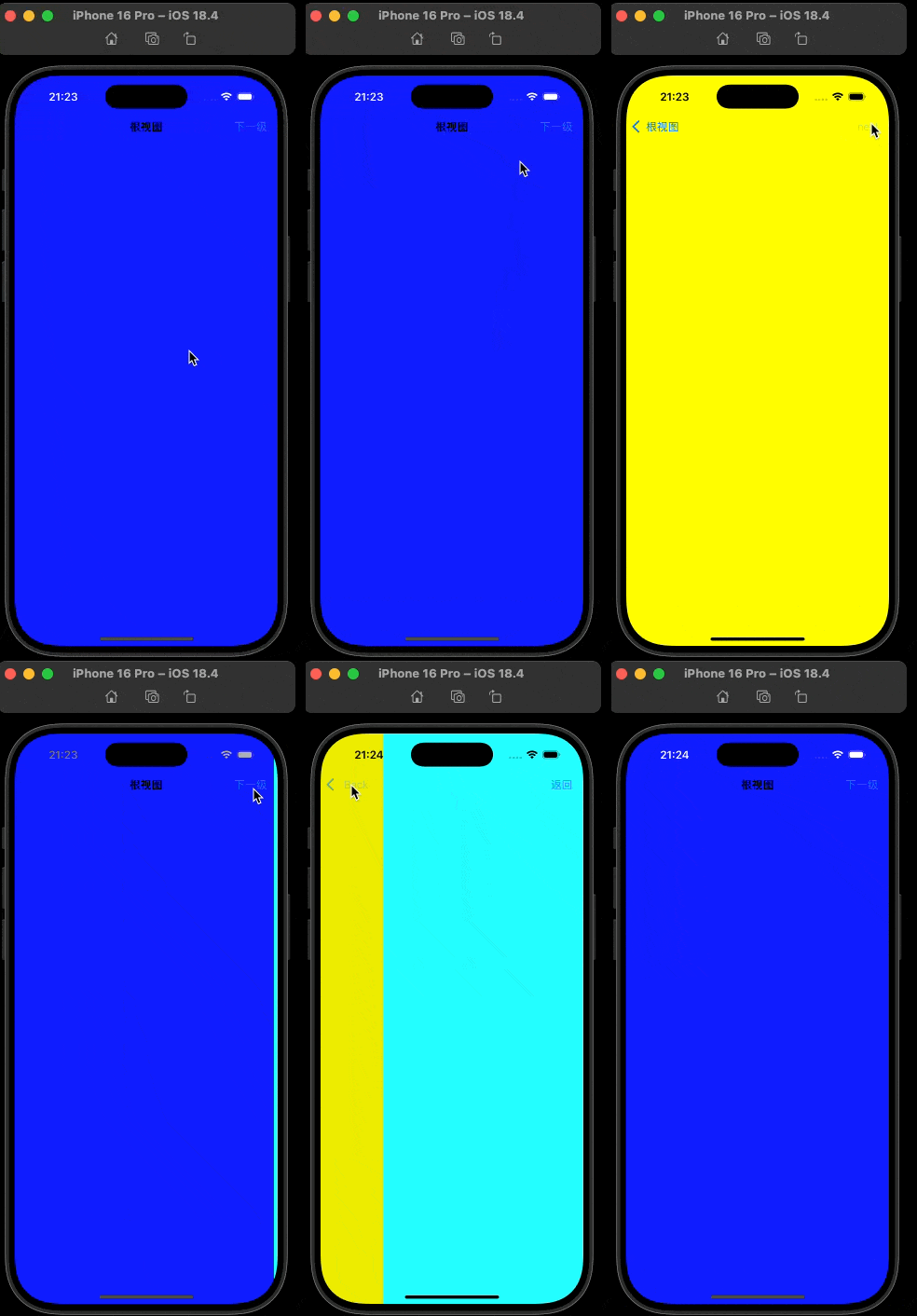
push 🆚 present 前言present和dismiss特点代码演示 push和pop特点代码演示 前言 在 iOS 开发中,push 和 present 是两种不同的视图控制器切换方式,它们有着显著的区别。 present和dismiss 特点 在当前控制器上方新建视图层级需要手动调用…...