
用 Wireshark 解码 H.264
H264,你不知道的小技巧-腾讯云开发者社区-腾讯云
这篇文章写的非常好
这里仅做几点补充
init.lua内容:
-- Set enable_lua to false to disable Lua support.
enable_lua = trueif not enable_lua thenreturn
end-- If false and Wireshark was started as (setuid) root, then the user
-- will not be able to execute custom Lua scripts from the personal
-- configuration directory, the -Xlua_script command line option or
-- the Lua Evaluate menu option in the GUI.
-- Note: Not checked on Windows. running_superuser is always false.
--run_user_scripts_when_superuser = truedofile(DATA_DIR.."rtp_h264_extractor.lua")
init.lua 放到了这个目录:
C:\Program Files\Wireshark\plugins
rtp_h264_extractor.lua 内容为:
--[[* rtp_h264_extractor.lua* wireshark plugin to extract h264 stream from RTP packets** Copyright (C) 2015 Volvet Zhang <volvet2002@gmail.com>** rtp_h264_extractor is free software; you can redistribute it and/or* modify it under the terms of the GNU Lesser General Public* License as published by the Free Software Foundation; either* version 2.1 of the License, or (at your option) any later version.** rtp_h264_extractor is distributed in the hope that it will be useful,* but WITHOUT ANY WARRANTY; without even the implied warranty of* MERCHANTABILITY or FITNESS FOR A PARTICULAR PURPOSE.  See the GNU* Lesser General Public License for more details.** You should have received a copy of the GNU Lesser General Public* License along with FFmpeg; if not, write to the Free Software* Foundation, Inc., 51 Franklin Street, Fifth Floor, Boston, MA 02110-1301 USA*]]dolocal MAX_JITTER_SIZE = 50local h264_data = Field.new("h264")local rtp_seq = Field.new("rtp.seq")local function extract_h264_from_rtp()local function dump_filter(fd)local fh = "h264";if fd ~= nil and fd ~= "" thenreturn string.format("%s and (%s)", fh, fd)elsereturn fhendendlocal h264_tap = Listener.new("ip", dump_filter(get_filter()))local text_window = TextWindow.new("h264 extractor")local filename = ""local seq_payload_table = { }local pass = 0local packet_count = 0local max_packet_count = 0local fu_info = nillocal pre_seq = 0;local function log(info)text_window:append(info)text_window:append("\n")end-- get_preference is only available since 3.5.0if get_preference thenfilename = get_preference("gui.fileopen.dir") .. "/" .. os.date("video_%Y%m%d-%H%M%S.264")elsefilename = "dump.264"endlog("Dumping H264 stream to " .. filename)local fp = io.open(filename, "wb")if fp == nil thenlog("open dump file fail")endlocal function seq_compare(left, right)if math.abs(right.key - left.key) < 1000 thenreturn left.key < right.keyelsereturn left.key > right.keyendendlocal function dump_single_nal(h264_payload)fp:write("\00\00\00\01")fp:write(h264_payload:tvb()():raw())fp:flush()endlocal function dump_fu_a(fu_info)if  fu_info.complete ==  true thenlog("dump_fu_a")fp:write("\00\00\00\01")fp:write(string.char(fu_info.nal_header))for i, obj in ipairs(fu_info.payloads) dofp:write(obj:tvb()():raw(2))endfp:flush()elselog("Incomplete NAL from FUs, dropped")endendlocal function handle_fu_a(seq, h264_data)fu_indicator = h264_data:get_index(0)fu_header = h264_data:get_index(1)nal_header = bit.bor(bit.band(fu_indicator, 0xe0), bit.band(fu_header, 0x1f))if bit.band(fu_header, 0x80) ~= 0 then-- fu start flag foundfu_info = { }fu_info.payloads = { }fu_info.seq = seqfu_info.complete = truefu_info.nal_header = nal_headertable.insert(fu_info.payloads, h264_data)log("Fu start: seq = "..tostring(seq))returnendif fu_info == nil thenlog("Incomplete FU found: No start flag, dropped")returnendif seq ~= (fu_info.seq + 1)% 65536 thenlog("Incomplete FU found:  fu_info.seq = "..tostring(fu_info.seq)..", input seq = "..tostring(seq))fu_info.complete = false;returnendfu_info.seq = seqtable.insert(fu_info.payloads, h264_data)if bit.band(fu_header, 0x40) ~= 0 then-- fu end flag foundlog("Fu stop: seq = "..tostring(seq))dump_fu_a(fu_info)fu_info = nilendendlocal function handle_stap_a(h264_data)log("start dump stap nals")offset = 1		-- skip nal header of STAP-Arepeatsize = h264_data:tvb()(offset, 2):uint()offset = offset + 2local next_nal_type = bit.band(h264_data:get_index(offset), 0x1f)log("STAP-A has naltype = "..next_nal_type..", size = "..size)fp:write("\00\00\00\01")fp:write(h264_data:tvb()():raw(offset, size))offset = offset + sizeuntil offset >= h264_data:tvb():len()fp:flush()log("finish dump stap nals")endlocal function on_ordered_h264_payload(seq, h264_data)local naltype = bit.band(h264_data:get_index(0), 0x1f)if naltype > 0 and naltype < 24 then-- Single NAL unit packetif fu_info ~= nil thenlog("Incomplete FU found: No start flag, dropped")fu_info = nilenddump_single_nal(h264_data)--log("tap.packet: "..", single nal packet dumpped, naltype = "..tostring(naltype)..", len = "..tostring(packet.len))elseif naltype == 28 then-- FU-Ahandle_fu_a(seq, h264_data)elseif naltype == 24 then-- STAP-Aif fu_info ~= nil thenlog("Incomplete FU found: No start flag, dropped")fu_info = nilendhandle_stap_a(h264_data)elselog("tap.packet: "..", Unsupported nal, naltype = "..tostring(naltype))endendlocal function on_jitter_buffer_output()table.sort(seq_payload_table, seq_compare)if #seq_payload_table > 0 thenlog("on_jitter_buffer_output:  seq = "..tostring(seq_payload_table[1].key)..", payload len = "..tostring(seq_payload_table[1].value:len()))on_ordered_h264_payload(seq_payload_table[1].key, seq_payload_table[1].value)table.remove(seq_payload_table, 1)endendlocal function jitter_buffer_finilize()for i, obj in ipairs(seq_payload_table) dolog("jitter_buffer_finilize:  seq = "..tostring(obj.key)..", payload len = "..tostring(obj.value:len()))on_ordered_h264_payload(obj.key, obj.value)endendlocal function on_h264_rtp_payload(seq, payload)local cur_seq = seq.value--log("on_h264_rtp_payload:  seq = "..tostring(seq.value)..", payload len = "..tostring(payload.len)..",pre_seq = "..pre_seq..",cur_seq = "..cur_seq..",packet_count = "..packet_count)if packet_count == 0 thenpre_seq = cur_seqelseif cur_seq == pre_seq thenpacket_count = packet_count + 1--log("on_h264_rtp_payload, duplicate seq = "..tostring(seq.value)..",packet_count = "..packet_count)returnelsepre_seq = cur_seqendendpacket_count = packet_count + 1table.insert(seq_payload_table, { key = tonumber(seq.value), value = payload.value })--log("on_h264_rtp_payload: table size is "..tostring(#seq_payload_table))if #seq_payload_table > MAX_JITTER_SIZE thenon_jitter_buffer_output()endendfunction h264_tap.packet(pinfo, tvb)local payloadTable = { h264_data() }local seqTable = { rtp_seq() }if (#payloadTable) < (#seqTable) thenlog("ERROR: payloadTable size is "..tostring(#payloadTable)..", seqTable size is "..tostring(#seqTable))returnendif pass == 0 thenfor i, payload in ipairs(payloadTable) domax_packet_count = max_packet_count + 1endelsefor i, payload in ipairs(payloadTable) doon_h264_rtp_payload(seqTable[1], payload)endif packet_count == max_packet_count thenjitter_buffer_finilize()endendendfunction h264_tap.reset()endfunction h264_tap.draw()endlocal function remove()if fp thenfp:close()fp = nilendh264_tap:remove()endlog("Start")text_window:set_atclose(remove)log("phase 1")pass = 0retap_packets()log("phase 2:  max_packet_count = "..tostring(max_packet_count))pass = 1retap_packets()if fp ~= nil thenfp:close()fp = nillog("Video stream written to " .. filename)endlog("End")endregister_menu("Extract h264 stream from RTP", extract_h264_from_rtp, MENU_TOOLS_UNSORTED)
end
该文件放到了这里:
C:\Program Files\Wireshark
此外,Elecard StreamEye Tools 可以到这里下载:
Download video analysis and monitoring applications| Elecard: Video Compression GuruDownload Elecard products for video analysis and monitoring, encoding and decoding video of various formats. https://www.elecard.com/software
相关文章:
用 Wireshark 解码 H.264
H264,你不知道的小技巧-腾讯云开发者社区-腾讯云 这篇文章写的非常好 这里仅做几点补充 init.lua内容: -- Set enable_lua to false to disable Lua support. enable_lua trueif not enable_lua thenreturn end-- If false and Wireshark was start…...
鸿蒙TypeScript学习第10天:【String(字符串)】
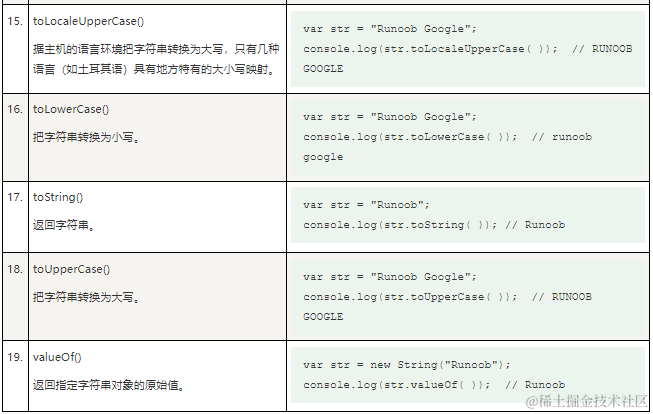
1、TypeScript String(字符串) String 对象用于处理文本(字符串)。 语法 var txt new String("string"); 或者更简单方式: var txt "string"; 2、String 对象属性 下表列出了 String 对象支…...
【201】Java8读取JSON树形结构并插入到MySQL数据库表中
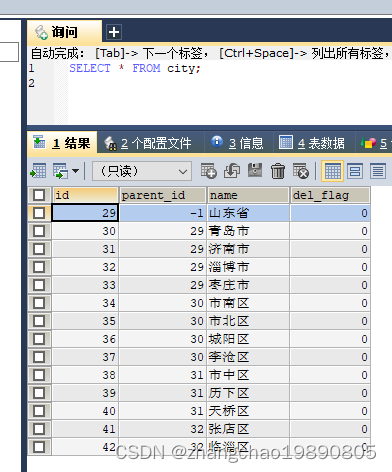
我写了一个 maven 项目的 Demo,用来演示 JAVA8 如何读取 JSON 文件树形结构,并将这种树形结构保存到 MySQL 中。 json文件 city.json {"name": "山东省","sub": [{"name": "青岛市","sub"…...

AI“复活”:慰藉心灵还是触碰禁忌?一文看懂技术与伦理的较量|TodayAI
随着人工智能(AI)技术的迅猛发展,其应用领域也越来越广泛,不仅仅局限于数据分析、机器人自动化等传统领域,更是延伸到了一些人们曾经认为只存在于科幻小说中的领域。近年来,使用AI技术“复活”逝者的概念&a…...
Jackson @JsonUnwrapped注解扁平化 序列化反序列化数据
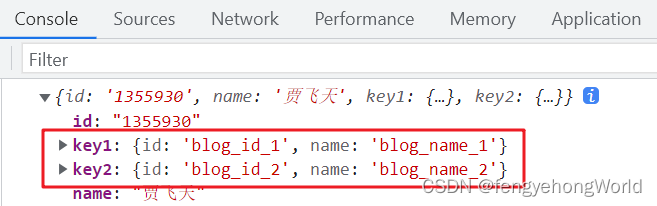
参考资料 Jackson 2.x 系列【7】注解大全篇三JsonUnwrapped 以扁平的数据结构序列化/反序列化属性Jackson扁平化处理对象 目录 一. 前期准备1.1 前端1.2 实体类1.3 Controller层 二. 扁平化序列反序列化数据2.1 序列化数据2.2 反序列化数据 三. 前缀后缀处理属性同名四. Map数…...
日期时间相关的类
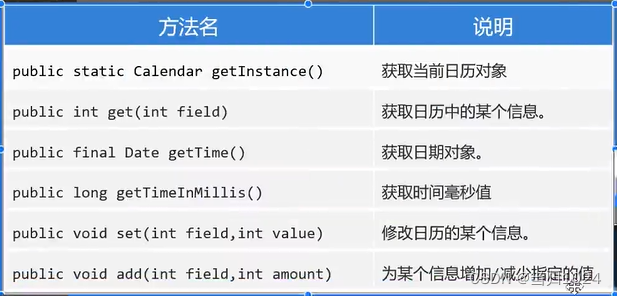
分界线jdk8 jdk8之前和之后分别提供了一些日期和时间的类,推荐使用jdk8之后的日期和时间类 Date类型 这是一个jdk8之前的类型,其中有很多方法已经过时了,选取了一些没有过时的API //jdk1.8之前的日期 Date Date date new Date(); // 从1970年…...

微信小程序脚本的执行顺序
在小程序中的脚本执行顺序和浏览器中有所不同。 小程序的执行的入口文件是 app.js 。 并且会根据其中 require 的模块顺序决定文件的运行顺序,代码是一个 app.js 示例。 app.js /* a.js console.log(a.js) */ var a require(./a.js) console.log(app.js)/* b.js co…...

zabbix监控警告
监控概述 对服务的管理,不能仅限于可用性。 还需要服务可以安全、稳定、高效地运行。 监控的目的:早发现、早治疗。 被监控的资源类型: 公开数据:对外开放的,不需要认证即可获取的数据 私有数据:对外不…...
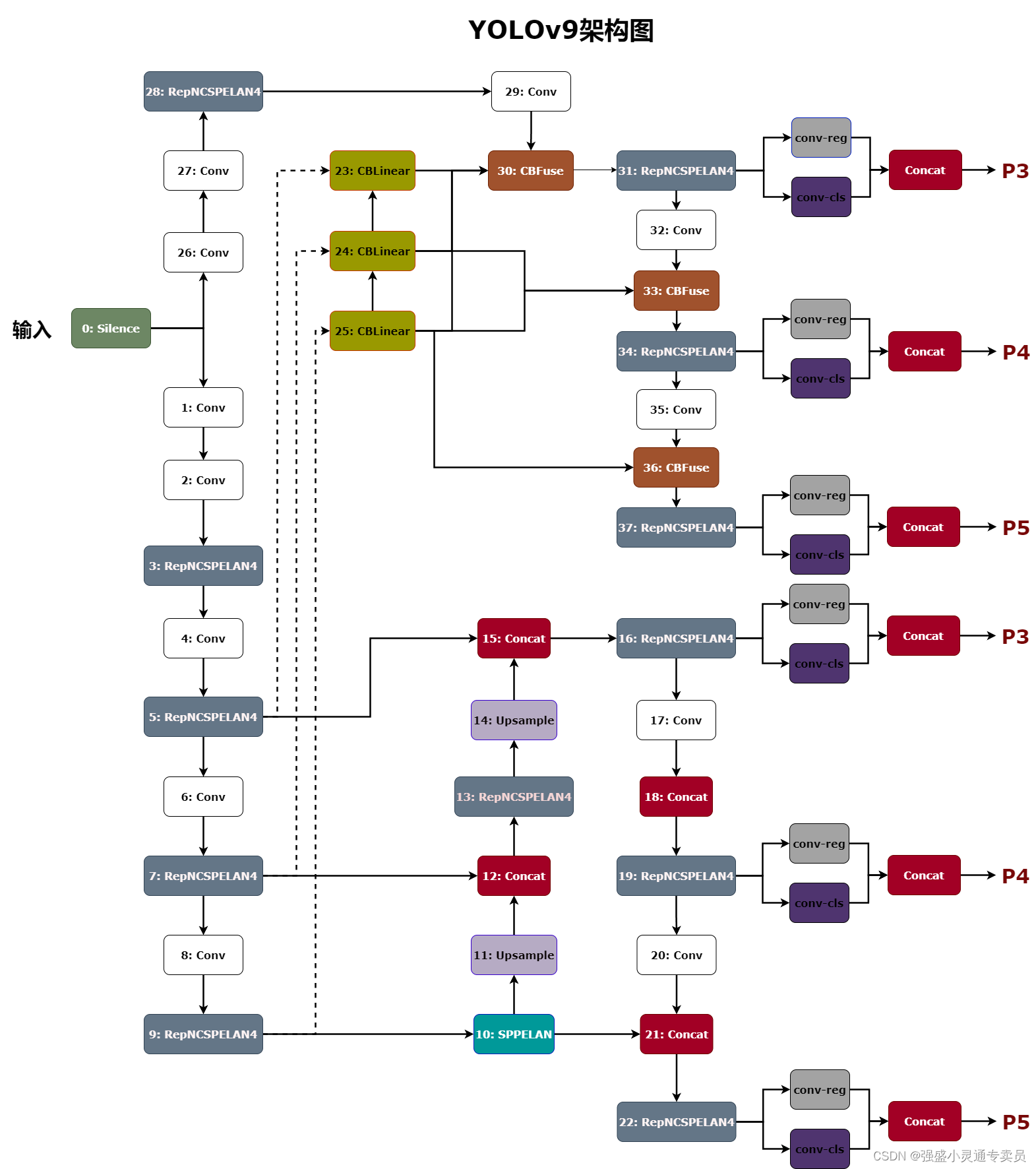
YOLOv9架构图分享
YOLOv9是YOLO (You Only Look Once)系列实时目标检测系统的最新迭代。它建立在以前的版本之上,结合了深度学习技术和架构设计的进步,以在目标检测任务中实现卓越的性能。通过将可编程梯度信息(PGI)概念与广义ELAN (GELAN)架构相结合,YOLOv9在…...

全自动封箱机的工作原理:科技与效率的完美结合
随着科技的不断发展,越来越多的自动化设备走进了我们的日常生活和工业生产中。其中,全自动封箱机作为物流包装领域的重要一环,凭借其高效、精准的工作性能,正逐渐成为提升生产效率、降低劳动成本的得力助手。星派就来与大家深入探…...
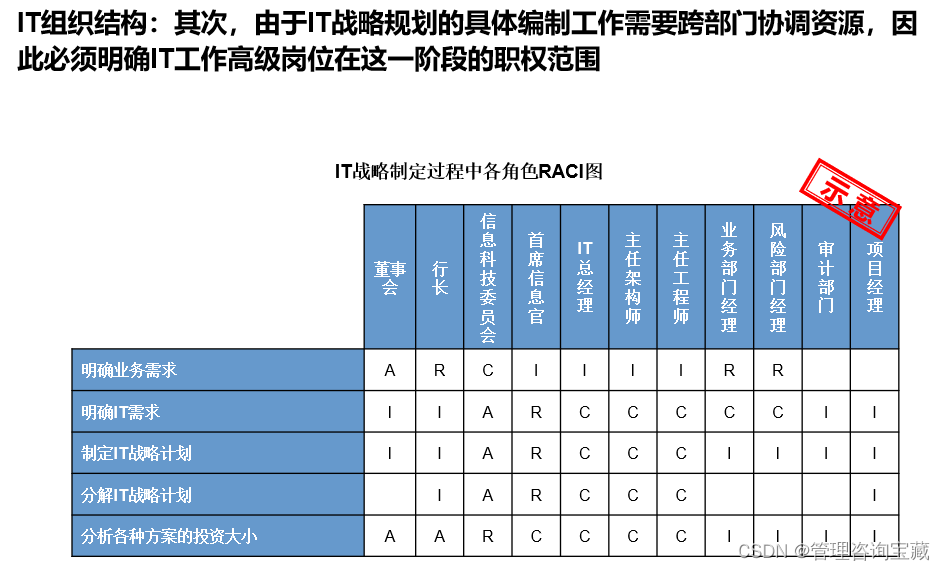
【管理咨询宝藏48】AA银行信息科技提升分析报告
本报告首发于公号“管理咨询宝藏”,如需阅读完整版报告内容,请查阅公号“管理咨询宝藏”。 【管理咨询宝藏48】AA银行信息科技提升分析报告 【格式】PPT版本,可编辑 【关键词】战略规划、商业分析、管理咨询 【强烈推荐】这是一套市面上非常…...

循序表实战——基于循序表的通讯录
前言:本篇文章主要是利用顺序表作为底层, 实现一个通讯录。偏向于应用, 对于已经学习过c的友友们可能没有难度了已经。没有学习过c的友友, 如果顺序表不会写, 或者说没有自己实现过, 请移步学习顺序表相关内…...

Java编程规范及最佳实践
文章目录 一、命名规范二、代码风格规范三、注释规范四、推荐的编程实践五、类和接口六、异常处理七、可见性八、并发九、代码复用十、代码组织和模块化十一、Java集合框架十二、输入验证十三、资源管理十四、文档和注释十五、测试和代码质量十六、代码可读性十七、性能优化十八…...

90天玩转Python—07—基础知识篇:Python中运算符详解
90天玩转Python系列文章目录 90天玩转Python—01—基础知识篇:C站最全Python标准库总结 90天玩转Python--02--基础知识篇:初识Python与PyCharm 90天玩转Python—03—基础知识篇:Python和PyCharm(语言特点、学习方法、工具安装) 90天玩转Python—04—基础知识篇:Pytho…...

C语言 位域
C 语言的位域(bit-field)是一种特殊的结构体成员,允许我们按位对成员进行定义,指定其占用的位数。 如果程序的结构中包含多个开关的变量,即变量值为 TRUE/FALSE,如下: struct {unsigned int w…...

【LeetCode热题100】【技巧】颜色分类
题目链接:75. 颜色分类 - 力扣(LeetCode) 只需排序三种,可以记录0和1的个数,然后直接原地赋值 class Solution { public:void sortColors(vector<int> &nums) {int zero 0, one 0;for (auto &num: n…...
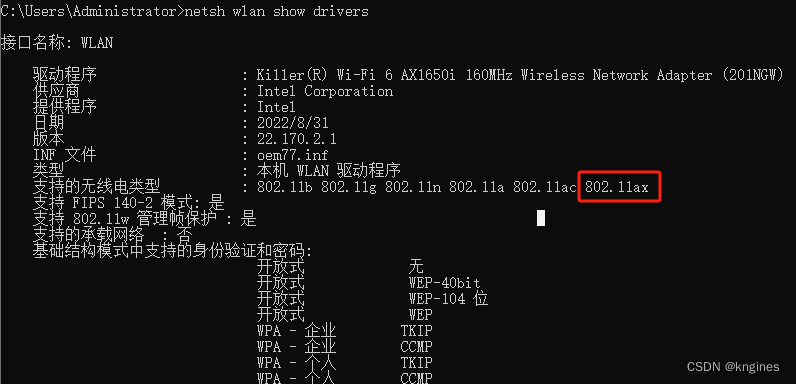
笔记本电脑win7 Wireless-AC 7265连不上wifi6
1.背景介绍 旧路由器连接人数有限,老旧,信号不稳定更换了新路由器,如 TL-XDR5430易展版用户电脑连不上新的WIFI网络了,比较着急 核心问题:有效解决笔记本连接wifi上网问题,方法不限 2.环境信息 Windows…...
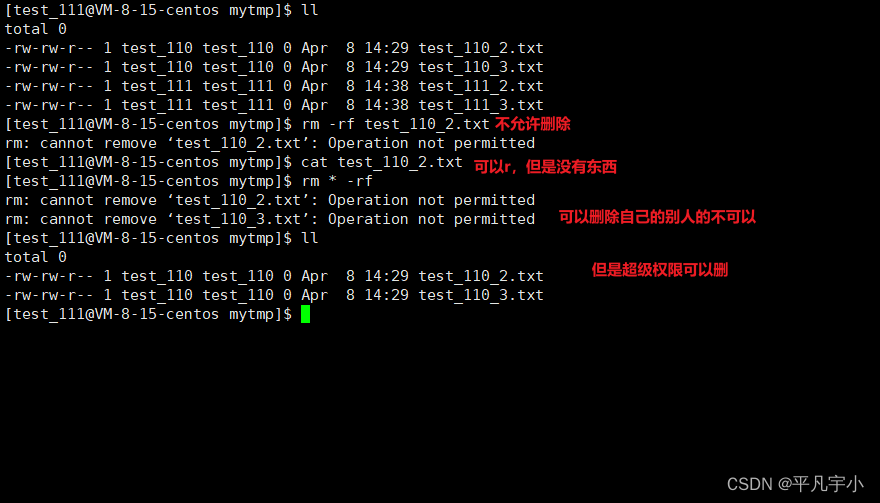
Linux gcc day5粘滞位
粘滞位 背景:一定时在一个公共目录(root创建)下。进行临时文件的操作 Linux系统中有很多人,我们需要在一个公共目录下,进行临时文件的操作(增删查改) 创建一个根目录下的dir(mytmp…...

单片机按键消抖常用的软硬件方法
一:什么是开关抖动? 当我们按下按钮或拨动开关或微动开关时,两个金属部件会接触以短路电源。但它们不会立即连接,而是金属部件在实际稳定连接之前连接和断开几次。释放按钮时也会发生同样的事情。这会导致误触发或多次触发&#…...
)
钉钉自建应用-下载excel(h5)
由于不同手机对于文件下载有不同的支持,而且文件路径也不一样,找起来十分的麻烦。所以,最好是找到一个都支持的方法。还好,钉钉官网提供了网盘,我们可把文件保存到钉钉自带的网盘,这样方便查找。 这里需要…...

SkyWalking 10.2.0 SWCK 配置过程
SkyWalking 10.2.0 & SWCK 配置过程 skywalking oap-server & ui 使用Docker安装在K8S集群以外,K8S集群中的微服务使用initContainer按命名空间将skywalking-java-agent注入到业务容器中。 SWCK有整套的解决方案,全安装在K8S群集中。 具体可参…...
(十)学生端搭建
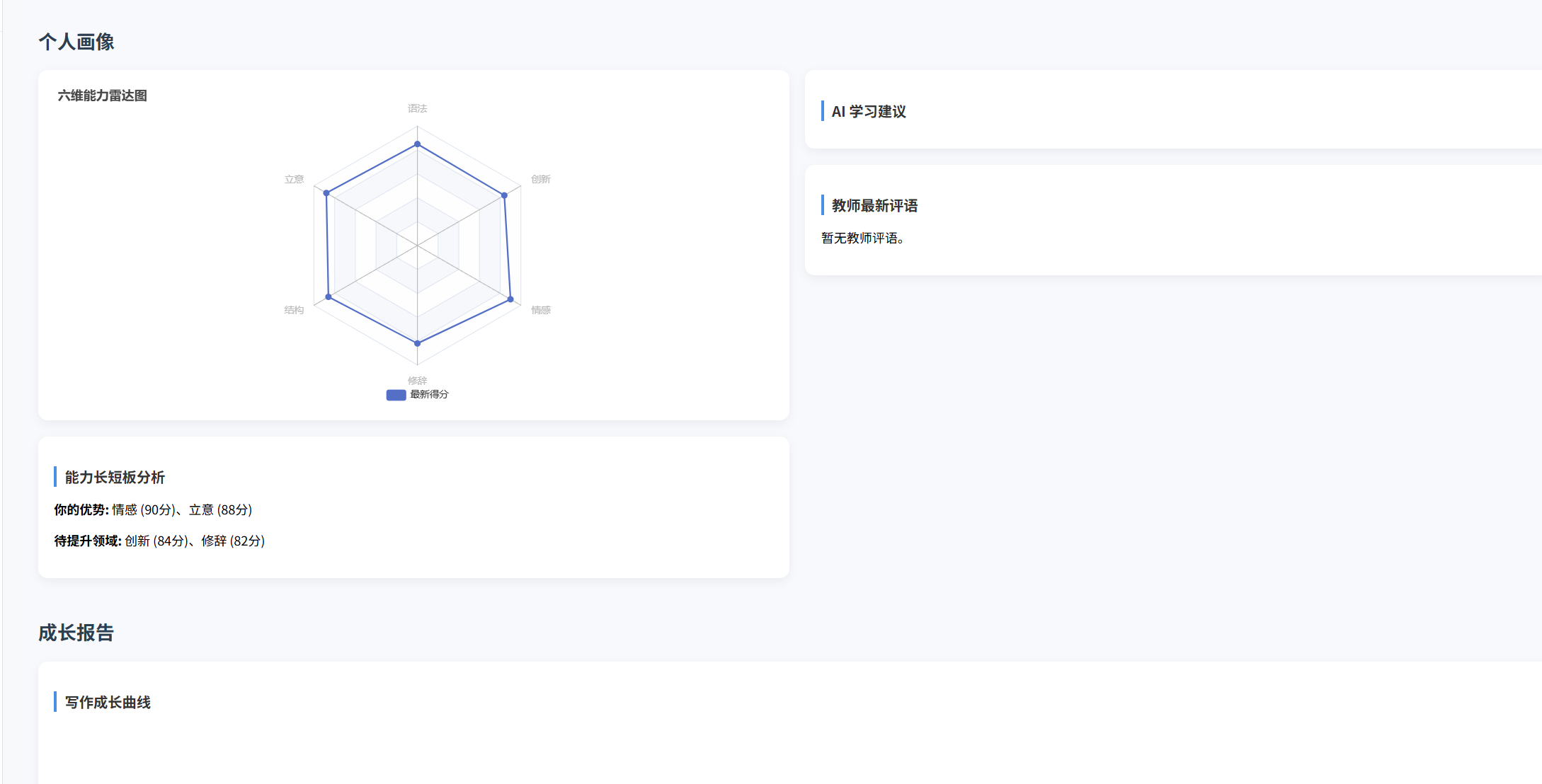
本次旨在将之前的已完成的部分功能进行拼装到学生端,同时完善学生端的构建。本次工作主要包括: 1.学生端整体界面布局 2.模拟考场与部分个人画像流程的串联 3.整体学生端逻辑 一、学生端 在主界面可以选择自己的用户角色 选择学生则进入学生登录界面…...

DeepSeek 赋能智慧能源:微电网优化调度的智能革新路径
目录 一、智慧能源微电网优化调度概述1.1 智慧能源微电网概念1.2 优化调度的重要性1.3 目前面临的挑战 二、DeepSeek 技术探秘2.1 DeepSeek 技术原理2.2 DeepSeek 独特优势2.3 DeepSeek 在 AI 领域地位 三、DeepSeek 在微电网优化调度中的应用剖析3.1 数据处理与分析3.2 预测与…...

前端导出带有合并单元格的列表
// 导出async function exportExcel(fileName "共识调整.xlsx") {// 所有数据const exportData await getAllMainData();// 表头内容let fitstTitleList [];const secondTitleList [];allColumns.value.forEach(column > {if (!column.children) {fitstTitleL…...
STM32F4基本定时器使用和原理详解
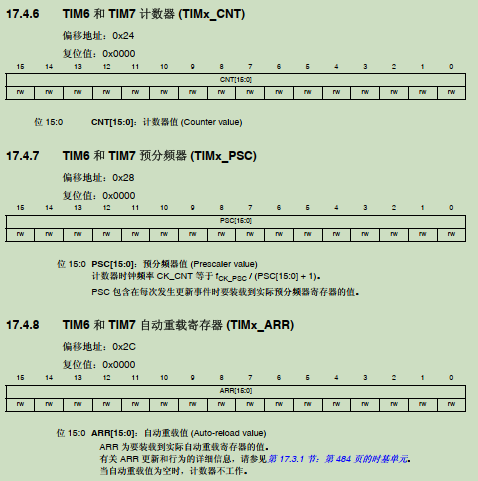
STM32F4基本定时器使用和原理详解 前言如何确定定时器挂载在哪条时钟线上配置及使用方法参数配置PrescalerCounter ModeCounter Periodauto-reload preloadTrigger Event Selection 中断配置生成的代码及使用方法初始化代码基本定时器触发DCA或者ADC的代码讲解中断代码定时启动…...

基于当前项目通过npm包形式暴露公共组件
1.package.sjon文件配置 其中xh-flowable就是暴露出去的npm包名 2.创建tpyes文件夹,并新增内容 3.创建package文件夹...
微信小程序云开发平台MySQL的连接方式
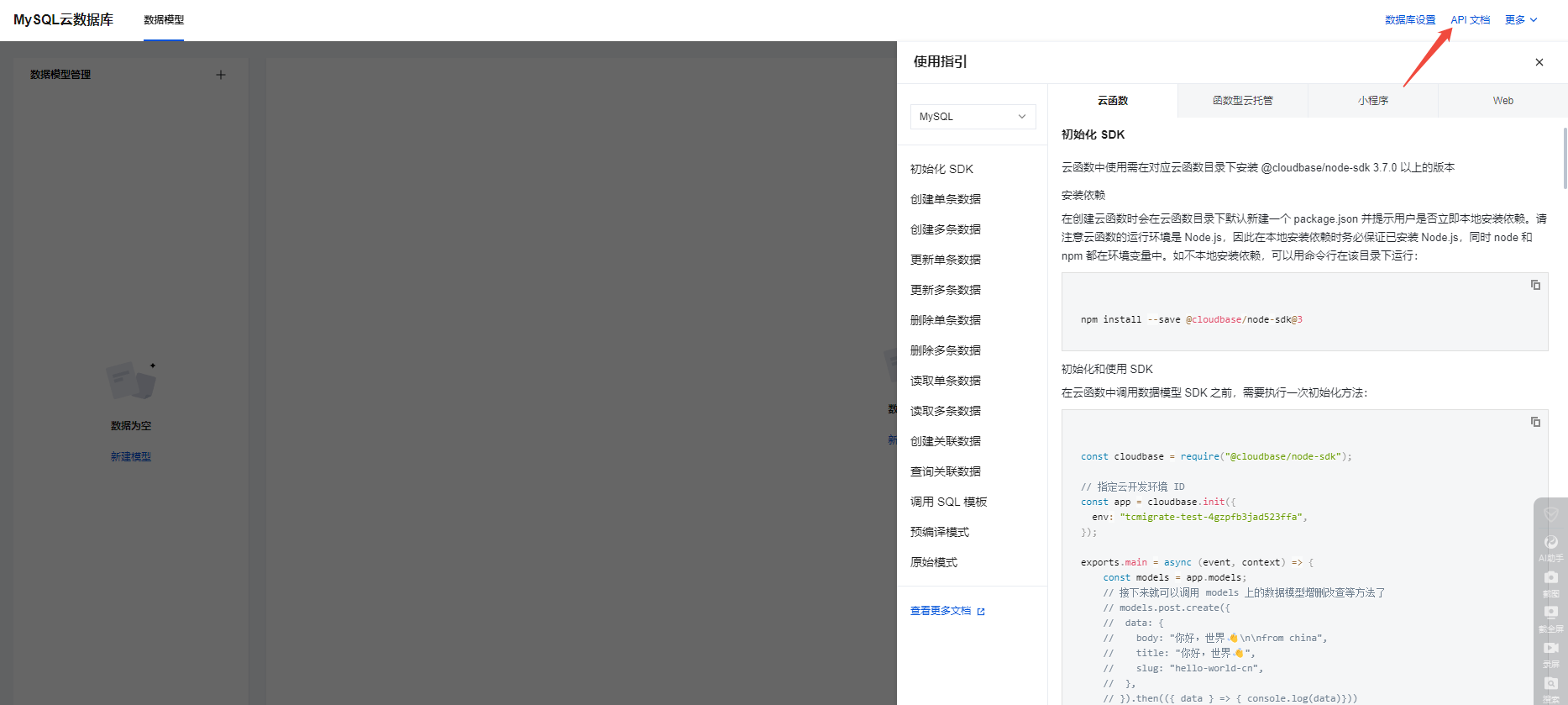
注:微信小程序云开发平台指的是腾讯云开发 先给结论:微信小程序云开发平台的MySQL,无法通过获取数据库连接信息的方式进行连接,连接只能通过云开发的SDK连接,具体要参考官方文档: 为什么? 因为…...
打手机检测算法AI智能分析网关V4守护公共/工业/医疗等多场景安全应用
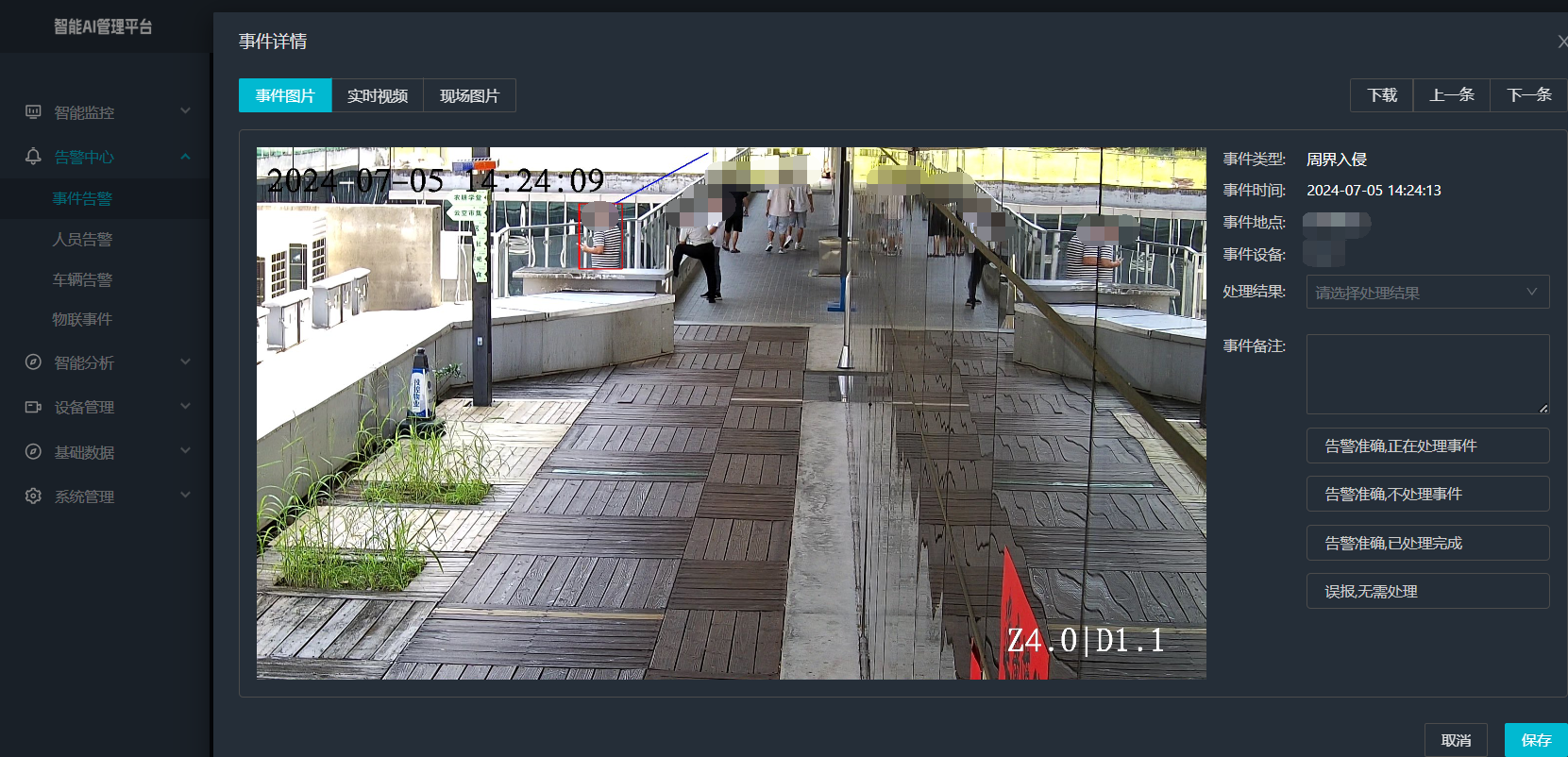
一、方案背景 在现代生产与生活场景中,如工厂高危作业区、医院手术室、公共场景等,人员违规打手机的行为潜藏着巨大风险。传统依靠人工巡查的监管方式,存在效率低、覆盖面不足、判断主观性强等问题,难以满足对人员打手机行为精…...

在鸿蒙HarmonyOS 5中使用DevEco Studio实现企业微信功能
1. 开发环境准备 安装DevEco Studio 3.1: 从华为开发者官网下载最新版DevEco Studio安装HarmonyOS 5.0 SDK 项目配置: // module.json5 {"module": {"requestPermissions": [{"name": "ohos.permis…...
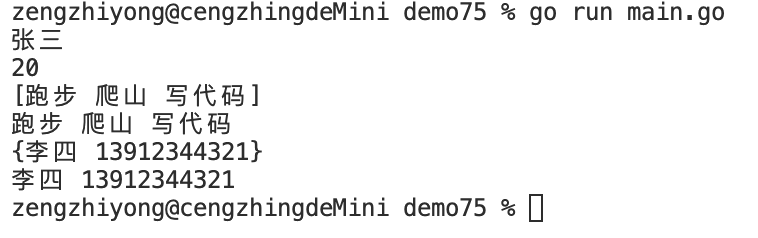
Golang——7、包与接口详解
包与接口详解 1、Golang包详解1.1、Golang中包的定义和介绍1.2、Golang包管理工具go mod1.3、Golang中自定义包1.4、Golang中使用第三包1.5、init函数 2、接口详解2.1、接口的定义2.2、空接口2.3、类型断言2.4、结构体值接收者和指针接收者实现接口的区别2.5、一个结构体实现多…...