
从前端到后端全面解析文件上传
从前端到后端全面解析文件上传
- 1.前端准备(vue+element-ui)
- 2.后端准备(SpringBoot+minio+mysql)
- 2.1解决跨域
- 2.2配置minio与mysql
- 2.3controller层
- 2.4service层
1.前端准备(vue+element-ui)
<!DOCTYPE html>
<html lang="en">
<head><meta charset="UTF-8"><title>index</title><link rel="stylesheet" href="./element-ui/lib/theme-chalk/index.css"><link rel="stylesheet" href="css/index.css"><script src="js/vue.js"></script><script src="js/axios-0.18.0.js"></script><script src="./element-ui/lib/index.js"></script><style>.avatar-uploader .el-upload {border: 1px dashed #d9d9d9;border-radius: 6px;cursor: pointer;position: relative;overflow: hidden;}.avatar-uploader .el-upload:hover {border-color: #409EFF;}.avatar-uploader-icon {font-size: 28px;color: #8c939d;width: 178px;height: 178px;line-height: 178px;text-align: center;}.avatar {width: 178px;height: 178px;display: block;}</style>
</head>
<style>
</style>
<body><div id="app"><el-uploadclass="avatar-uploader"action="http://localhost:8088/members/upload":show-file-list="false":on-success="handleAvatarSuccess":before-upload="beforeAvatarUpload"><img v-if="imageUrl" :src="imageUrl" class="avatar"><i v-else class="el-icon-plus avatar-uploader-icon"></i><p>{{name}}</p></el-upload>
</div><script>new Vue({el: "#app",data() {return {imageUrl: '',name:'',url:'',};},methods: {handleAvatarSuccess(res, file) {this.imageUrl = URL.createObjectURL(file.raw);this.name=file.response.namethis.url=file.response.urlconsole.log(file)},beforeAvatarUpload(file) {const isLt2M = file.size / 1024 / 1024 < 10;if (!isLt2M) {this.$message.error('上传头像图片大小不能超过 10MB!');}return isLt2M;}}})
</script>
</body>
</html>
2.后端准备(SpringBoot+minio+mysql)
2.1解决跨域
package com.data211.config;import org.springframework.context.annotation.Bean;
import org.springframework.context.annotation.Configuration;
import org.springframework.web.cors.CorsConfiguration;
import org.springframework.web.cors.UrlBasedCorsConfigurationSource;
import org.springframework.web.filter.CorsFilter;/*** @author rjj* @date 2023/2/3 - 15:15*/
@Configuration
public class GlobalCorsConfig {/*** 允许跨域调用的过滤器*/@Beanpublic CorsFilter corsFilter() {CorsConfiguration config = new CorsConfiguration();//允许白名单域名进行跨域调用(设置http://localhost:8080/ 表示指定请求源允许跨域)config.addAllowedOriginPattern("*");//允许跨越发送cookieconfig.setAllowCredentials(true);//放行全部原始头信息config.addAllowedHeader("*");//允许所有请求方法跨域调用config.addAllowedMethod("*");UrlBasedCorsConfigurationSource source = new UrlBasedCorsConfigurationSource();//指定拦截路径source.registerCorsConfiguration("/**", config);return new CorsFilter(source);}
}
2.2配置minio与mysql
pom依赖
<dependency><groupId>io.minio</groupId><artifactId>minio</artifactId><version>8.5.1</version></dependency><dependency><groupId>mysql</groupId><artifactId>mysql-connector-java</artifactId><scope>runtime</scope></dependency><dependency><groupId>com.baomidou</groupId><artifactId>mybatis-plus-boot-starter</artifactId><version>3.4.1</version></dependency><!--第三方工具jar包--><dependency><groupId>cn.hutool</groupId><artifactId>hutool-all</artifactId><version>5.7.17</version></dependency>
配置文件配置
server:port: 8088spring:datasource:type: com.alibaba.druid.pool.DruidDataSourcedriver-class-name: com.mysql.cj.jdbc.Driverurl: username: rootpassword: mybatis-plus:mapper-locations: classpath:mapper/*.xml
#  配置别名type-aliases-package: com.data211.pojoglobal-config:db-config:
#      主键自增长id-type: auto
#      表名前缀table-prefix: data211_
#      逻辑删除logic-delete-value: 1logic-not-delete-value: 0
#      控制台输出操作数据库日志configuration:log-impl: org.apache.ibatis.logging.stdout.StdOutImplminio:endpoint: accessKey: secretKey: bucket:files:
配置minio客户端
package com.data211.config;import io.minio.MinioClient;
import org.springframework.beans.factory.annotation.Value;
import org.springframework.context.annotation.Bean;
import org.springframework.context.annotation.Configuration;/**@author rjj@date 2023/2/18 - 17:37
*/
@Configuration
public class MinioConfig {@Value("${minio.endpoint}")private String endpoint;@Value("${minio.accessKey}")private String accessKey;@Value("${minio.secretKey}")private String secretKey;@Beanpublic MinioClient minioClient() {MinioClient minioClient =MinioClient.builder().endpoint(endpoint).credentials(accessKey, secretKey).build();return minioClient;}
}
2.3controller层
@RequestMapping(value = "/upload")public UploadFileResultDto upload(@RequestPart("file") MultipartFile file) throws IOException {return membersService.upload(file);};2.4service层
package com.data211.service.impl;import cn.hutool.crypto.digest.DigestUtil;
import com.baomidou.mybatisplus.extension.service.impl.ServiceImpl;
import com.data211.dao.MembersDao;
import com.data211.dto.UploadFileResultDto;
import com.data211.pojo.MediaFiles;
import com.data211.pojo.Members;
import com.data211.service.IMembersService;
import com.data211.utils.BaseContext;
import io.minio.MinioClient;
import io.minio.PutObjectArgs;
import org.springframework.beans.BeanUtils;
import org.springframework.beans.factory.annotation.Value;
import org.springframework.stereotype.Service;
import org.springframework.transaction.annotation.Transactional;
import org.springframework.web.multipart.MultipartFile;import javax.annotation.Resource;
import java.io.ByteArrayInputStream;
import java.io.IOException;
import java.text.SimpleDateFormat;
import java.util.Date;@Service
public class MembersServiceImpl extends ServiceImpl<MembersDao, Members> implements IMembersService {@Resourceprivate MinioClient minioClient;//普通文件桶@Value("${minio.bucket.files}")private String bucket_Files;@Resourceprivate MembersServiceImpl membersService;@Resourceprivate MediaFilesServiceImpl mediaFilesService;@Overridepublic UploadFileResultDto upload(MultipartFile file) throws IOException {String fileMd5 = DigestUtil.md5Hex(file.getBytes());String folder = getFileFolder(new Date(), true, true, true);String filename = fileMd5+file.getName().substring(file.getName().lastIndexOf("."));MediaFiles mediaFiles = null;try {//TODO 上传到minioaddMediaFilesToMinIO(file, bucket_Files, folder+filename);//TODO 上传到数据库 (用Spring控制的代理对象实现事务控制生效)mediaFiles = membersService.addMediaFilesToDb(BaseContext.getUserId(),filename,folder+filename);UploadFileResultDto uploadFileParamsDto = new UploadFileResultDto();BeanUtils.copyProperties(mediaFiles,uploadFileParamsDto);return uploadFileParamsDto;} catch (Exception e) {e.printStackTrace();}return null;}@Override@Transactionalpublic MediaFiles addMediaFilesToDb(String userId, String filename,String url) {MediaFiles mediaFiles = new MediaFiles(userId, filename, url);mediaFilesService.save(mediaFiles);return mediaFiles;}public void addMediaFilesToMinIO(MultipartFile file, String bucket, String objectName) throws IOException {//  将文件字节输入到内存流中ByteArrayInputStream byteArrayInputStream = new ByteArrayInputStream(file.getBytes());//获取文件类型String contentType = file.getContentType();try {PutObjectArgs putObjectArgs =PutObjectArgs.builder().bucket(bucket).object(objectName)//-1 表示文件分片按 5M(不小于 5M,不大于 5T),分片数量最大10000.stream(byteArrayInputStream, byteArrayInputStream.available(), -1).contentType(contentType).build();minioClient.putObject(putObjectArgs);} catch (Exception e) {e.printStackTrace();}}private String getFileFolder(Date date, boolean year, boolean month, boolean day) {SimpleDateFormat sdf = new SimpleDateFormat("yyyy-MM-dd");//获取当前日期字符串String dateString = sdf.format(new Date());//取出年、月、日String[] dateStringArray = dateString.split("-");StringBuffer folderString = new StringBuffer();if (year) {folderString.append(dateStringArray[0]);folderString.append("/");}if (month) {folderString.append(dateStringArray[1]);folderString.append("/");}if (day) {folderString.append(dateStringArray[2]);folderString.append("/");}return folderString.toString();}}
相关文章:

从前端到后端全面解析文件上传
从前端到后端全面解析文件上传1.前端准备(vueelement-ui)2.后端准备(SpringBootminiomysql)2.1解决跨域2.2配置minio与mysql2.3controller层2.4service层1.前端准备(vueelement-ui) <!DOCTYPE html> <html lang"en"> <head><meta charset"…...

全网火爆,软件测试面试题大全,接口测试题+回答 (18k+的offer)
目录:导读前言一、Python编程入门到精通二、接口自动化项目实战三、Web自动化项目实战四、App自动化项目实战五、一线大厂简历六、测试开发DevOps体系七、常用自动化测试工具八、JMeter性能测试九、总结(尾部小惊喜)前言 面试测试工程师的时…...

【iOS】—— 浅看block源码
block 文章目录block如何通过终端clang生成源码cpp文件block实质截获自动变量全局变量和静态变量的截获__block说明符iOS开发“强弱共舞”——weak和strong配套使用解决block循环引用问题如何通过终端clang生成源码cpp文件 之前在学习block中学习的比较浅,只看了oc…...

I.MX6ULL_Linux_系统篇(23) busybox文件系统构建
Linux“三巨头”已经完成了 2 个了,就剩最后一个 rootfs(根文件系统)了,本章我们就来学习一下根文件系统的组成以及如何构建根文件系统。这是 Linux 移植的最后一步,根文件系统构建好以后就意味着我们已经拥有了一个完整的、可以运行的最小系…...

shpjs将.zip文件转成geoJson
一、npm install shpjs二、import shp from shpjs三、async setLayerSource() {const geoJsonData await shp(dataUrl)}一直报错:是因为Buffer这个插件一直没找到Uncaught Error: nodebuffer is not supported by this browser解决办法npm install node-polyfill-w…...

eBay是不是一定要养号?是的
相信每个运营过eBay的用户遇到过这个棘手的问题,eBay个人账户的刊登数量是有限的,尤其是新账户只有5个sku,所以一开始的运营会比较艰难。想要快点走上正轨的话,就一定要去注重这个“养号”。eBay运营模式 1.拍卖 eBay最开始是一个…...
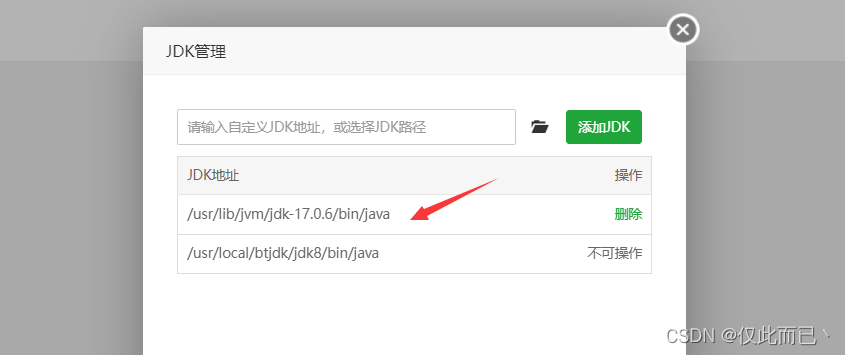
宝塔(二):升级JDK版本
目录 背景 一、下载JDK17 二、配置环境变量 三、配置新的JDK路径 背景 宝塔的软件商店只有JDK8,不满足我当前项目所需的JDK版本,因此想对JDK版本进行升级,升级为JDK17。 一、下载JDK17 先进入 /usr/lib/jvm 目录 点击终端,进…...

【LeetCode】螺旋矩阵 [M](数组)
54. 螺旋矩阵 - 力扣(LeetCode) 一、题目 给你一个 m 行 n 列的矩阵 matrix ,请按照 顺时针螺旋顺序 ,返回矩阵中的所有元素。 示例 1: 输入:matrix [[1,2,3],[4,5,6],[7,8,9]] 输出:[1,2,3,…...

实验二:动态规划
1.双11的红包雨 问题描述 双11到了,据说这2天会下红包雨,每个红包有不同的价值,小k好开心,但有个规则,就只能接掉落在他身旁的10米范围内的红包(0-10这11个位置)。小k想尽可能的多抢红包&…...

华为机试 HJ27 查找兄弟单词
题目链接:https://www.nowcoder.com/practice/03ba8aeeef73400ca7a37a5f3370fe68?tpId37&tqId21250&rp1&ru/exam/oj/ta&qru/exam/oj/ta&sourceUrl%2Fexam%2Foj%2Fta%3Fdifficulty%3D3%26page%3D1%26pageSize%3D50%26search%3D%26tpId%3D37%26t…...

佩戴舒适的蓝牙耳机有哪些?佩戴舒适的蓝牙耳机推荐
音乐对许多人而言,都是一种抚慰生命的力量,特别是在上下班的时候,在熙熙攘攘的人流中,戴着耳机听一首动听的曲子,无疑会让人心情变得更加舒畅,要想获得出色的音乐体验,没有一副出色的耳机可不行…...
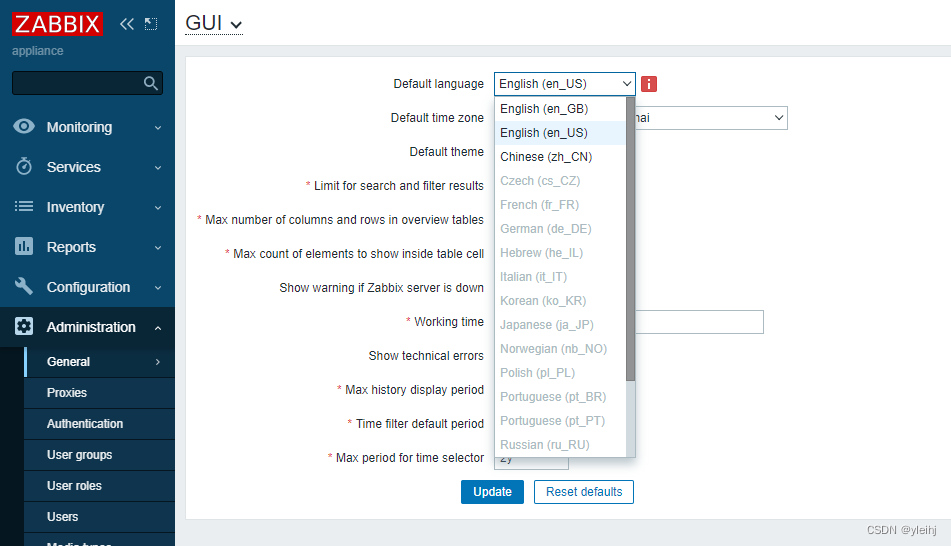
ESXI主机安装Zabbix 6.2
1:首先下载Zabbix Appliance 2:还需要下载VMware converter ,这个需要VMware的账号,或者从其他地方下载也可以。 3:vmdk格式的 image 可直接在 VMware Player、 Server 和 Workstation 产品中使用。要在 ESX,、ESXi 和 vSphere 中…...
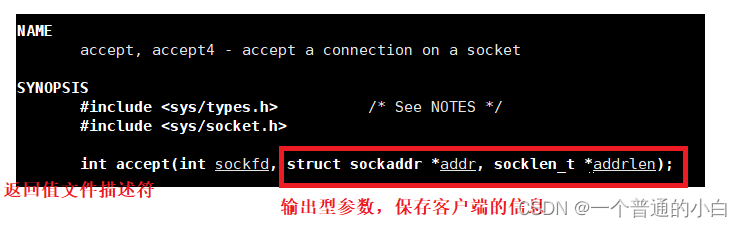
【Linux 网络编程1】使用UDP/TCP编写套接字,多进程/多线程版本的TCP编写的套接字,将套接字封装
目录 1.学习网络编程前的一些基础知识 2.UDP(user datagram protocol)协议的特点 3.使用有UPD编写套接字 4.使用TCP编写套接字 4.2.TCP客服端 4.3.TCP服务器端 4.4.单进程版本(没有人会使用) 4.5.多进程版本 4.6.多线程版本 5.把套接字封装 1…...
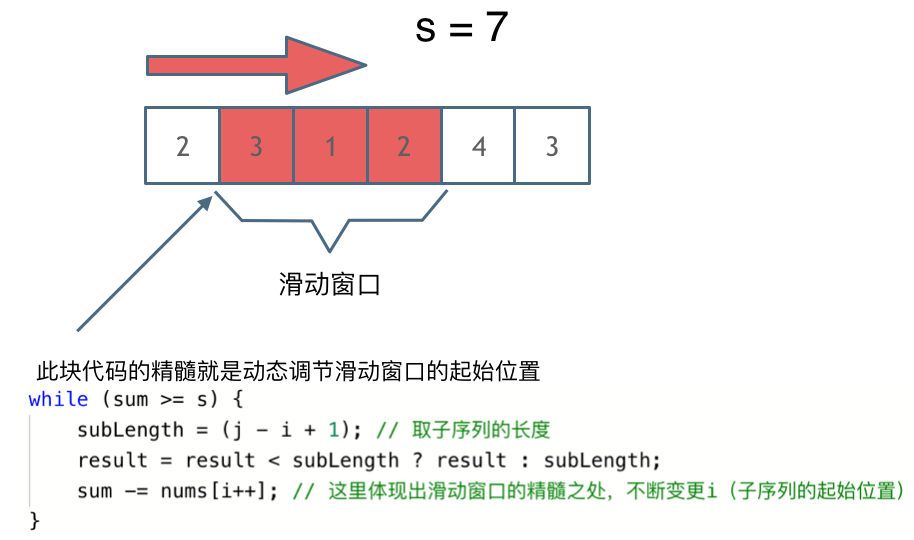
滑动窗口求最大和最小
滑动窗口 要区分最小和最大滑窗,内层while循环的条件和更新结果的地方 核心: 关键的区别在于,最大滑窗是在迭代右移右边界的过程中更新结果,而最小滑窗是在迭代右移左边界的过程中更新结果。 最小滑窗 给定数组 nums࿰…...

跟ChatGPT学量化,菜鸟炒股也不怕
你是一个python资深量化开发工程师,请介绍量化交易的基本框架 量化交易的基本框架包括以下几个步骤: 数据获取:获取市场数据和公司财务数据等,可以使用API接口、爬虫等方式获取。数据清洗和预处理:对获取到的数据进行清…...

扬帆优配|2600亿新能源巨头狂飙!外资唱多中国:再涨15%
全国停摆的危机,正在迫临法国。 大停工正在将法国推向风险境地。法国政府估计,当地时间3月7日,将迸发全国大型停工游行。法国总工会宣告,到时将让全法国停摆。法国担任交通业务的部长级代表克莱蒙博讷正告称,7日将成为…...
ChatGPT技术与商业模式及产业发展布局方案
文章目录模块一:概念模块二:架构模块三:技术模块四:算力模块五:体验模块六:应用模块七:商业模块八:产业模块九:建议结语主要内容: 采用模块化教学方法&#x…...

CIMCAI port ai shipping ai artificial intelligence smart port
上海人工智能独角兽中集集团高科技中集飞瞳,是全球应用落地最广,规模最大,最先进的的港航人工智能高科技企业,工业级成熟港航人工智能产品全球规模化落地应用,全球前三大船公司及港口码头应用落地。上海人工智能独角兽…...
《数据解构》HashMap源码解读
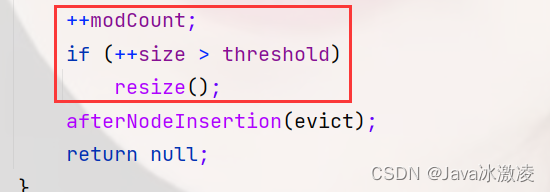
👑作者主页:Java冰激凌 📖专栏链接:数据结构 目录 了解HashMap HashMap的构造 两个参数的构造方法 一个参数的构造方法 不带参数的构造方法 哈希表初始化的长度 HashMap源码中的成员 Pt Get 了解HashMap 首先我们要明…...

Databend 开源周报 第 83 期
Databend 是一款现代云数仓。专为弹性和高效设计,为您的大规模分析需求保驾护航。自由且开源。即刻体验云服务:https://app.databend.com 。Whats New探索 Databend 本周新进展,遇到更贴近你心意的 Databend 。Support for WebHDFSHDFS 是大数…...

生成xcframework
打包 XCFramework 的方法 XCFramework 是苹果推出的一种多平台二进制分发格式,可以包含多个架构和平台的代码。打包 XCFramework 通常用于分发库或框架。 使用 Xcode 命令行工具打包 通过 xcodebuild 命令可以打包 XCFramework。确保项目已经配置好需要支持的平台…...

手游刚开服就被攻击怎么办?如何防御DDoS?
开服初期是手游最脆弱的阶段,极易成为DDoS攻击的目标。一旦遭遇攻击,可能导致服务器瘫痪、玩家流失,甚至造成巨大经济损失。本文为开发者提供一套简洁有效的应急与防御方案,帮助快速应对并构建长期防护体系。 一、遭遇攻击的紧急应…...

大语言模型如何处理长文本?常用文本分割技术详解
为什么需要文本分割? 引言:为什么需要文本分割?一、基础文本分割方法1. 按段落分割(Paragraph Splitting)2. 按句子分割(Sentence Splitting)二、高级文本分割策略3. 重叠分割(Sliding Window)4. 递归分割(Recursive Splitting)三、生产级工具推荐5. 使用LangChain的…...

测试markdown--肇兴
day1: 1、去程:7:04 --11:32高铁 高铁右转上售票大厅2楼,穿过候车厅下一楼,上大巴车 ¥10/人 **2、到达:**12点多到达寨子,买门票,美团/抖音:¥78人 3、中饭&a…...
《通信之道——从微积分到 5G》读书总结
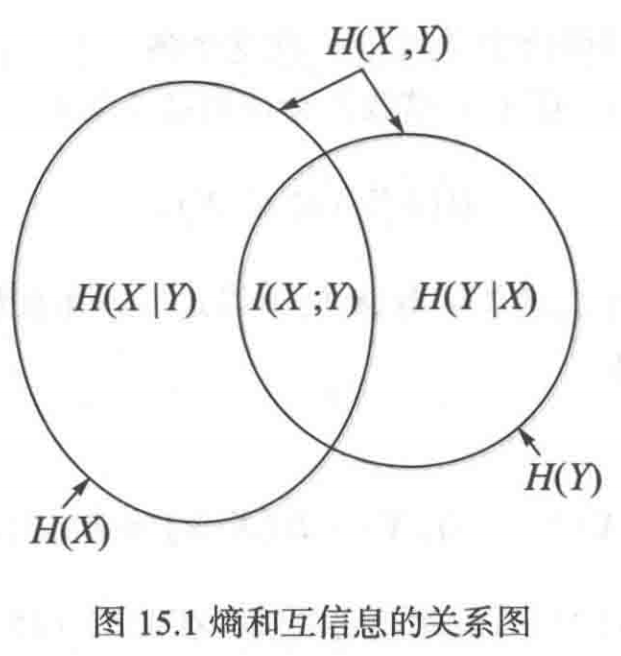
第1章 绪 论 1.1 这是一本什么样的书 通信技术,说到底就是数学。 那些最基础、最本质的部分。 1.2 什么是通信 通信 发送方 接收方 承载信息的信号 解调出其中承载的信息 信息在发送方那里被加工成信号(调制) 把信息从信号中抽取出来&am…...
Linux-07 ubuntu 的 chrome 启动不了
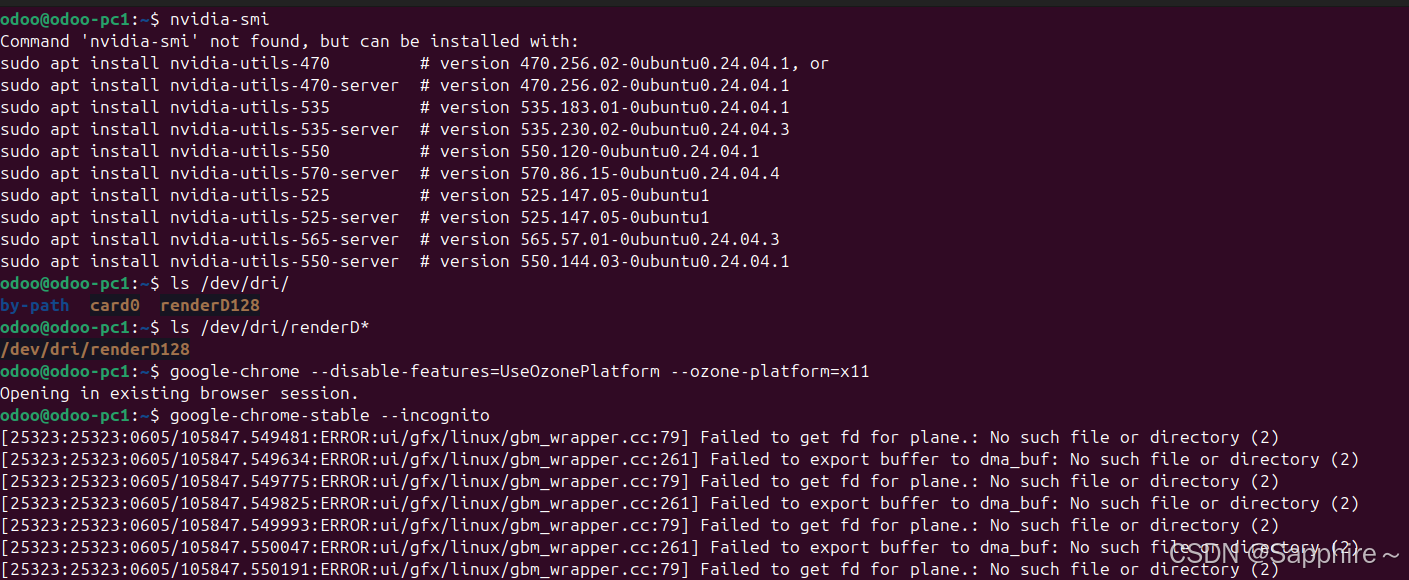
文章目录 问题原因解决步骤一、卸载旧版chrome二、重新安装chorme三、启动不了,报错如下四、启动不了,解决如下 总结 问题原因 在应用中可以看到chrome,但是打不开(说明:原来的ubuntu系统出问题了,这个是备用的硬盘&a…...

UR 协作机器人「三剑客」:精密轻量担当(UR7e)、全能协作主力(UR12e)、重型任务专家(UR15)
UR协作机器人正以其卓越性能在现代制造业自动化中扮演重要角色。UR7e、UR12e和UR15通过创新技术和精准设计满足了不同行业的多样化需求。其中,UR15以其速度、精度及人工智能准备能力成为自动化领域的重要突破。UR7e和UR12e则在负载规格和市场定位上不断优化…...
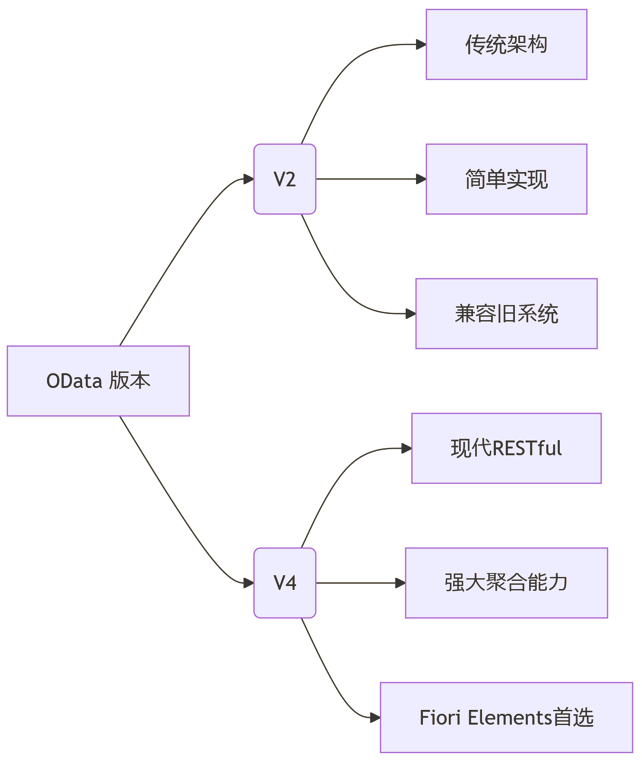
SAP学习笔记 - 开发26 - 前端Fiori开发 OData V2 和 V4 的差异 (Deepseek整理)
上一章用到了V2 的概念,其实 Fiori当中还有 V4,咱们这一章来总结一下 V2 和 V4。 SAP学习笔记 - 开发25 - 前端Fiori开发 Remote OData Service(使用远端Odata服务),代理中间件(ui5-middleware-simpleproxy)-CSDN博客…...
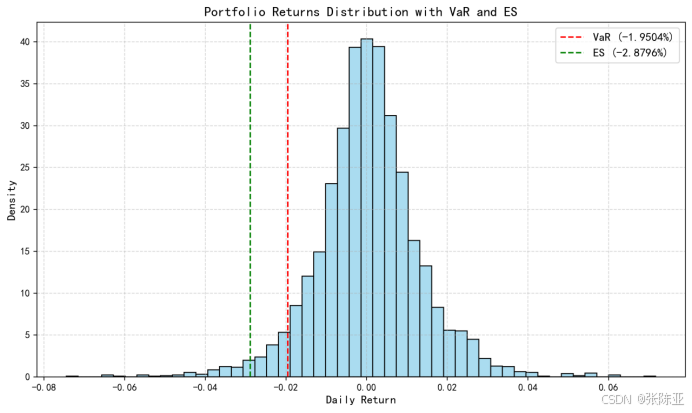
Python基于历史模拟方法实现投资组合风险管理的VaR与ES模型项目实战
说明:这是一个机器学习实战项目(附带数据代码文档),如需数据代码文档可以直接到文章最后关注获取。 1.项目背景 在金融市场日益复杂和波动加剧的背景下,风险管理成为金融机构和个人投资者关注的核心议题之一。VaR&…...
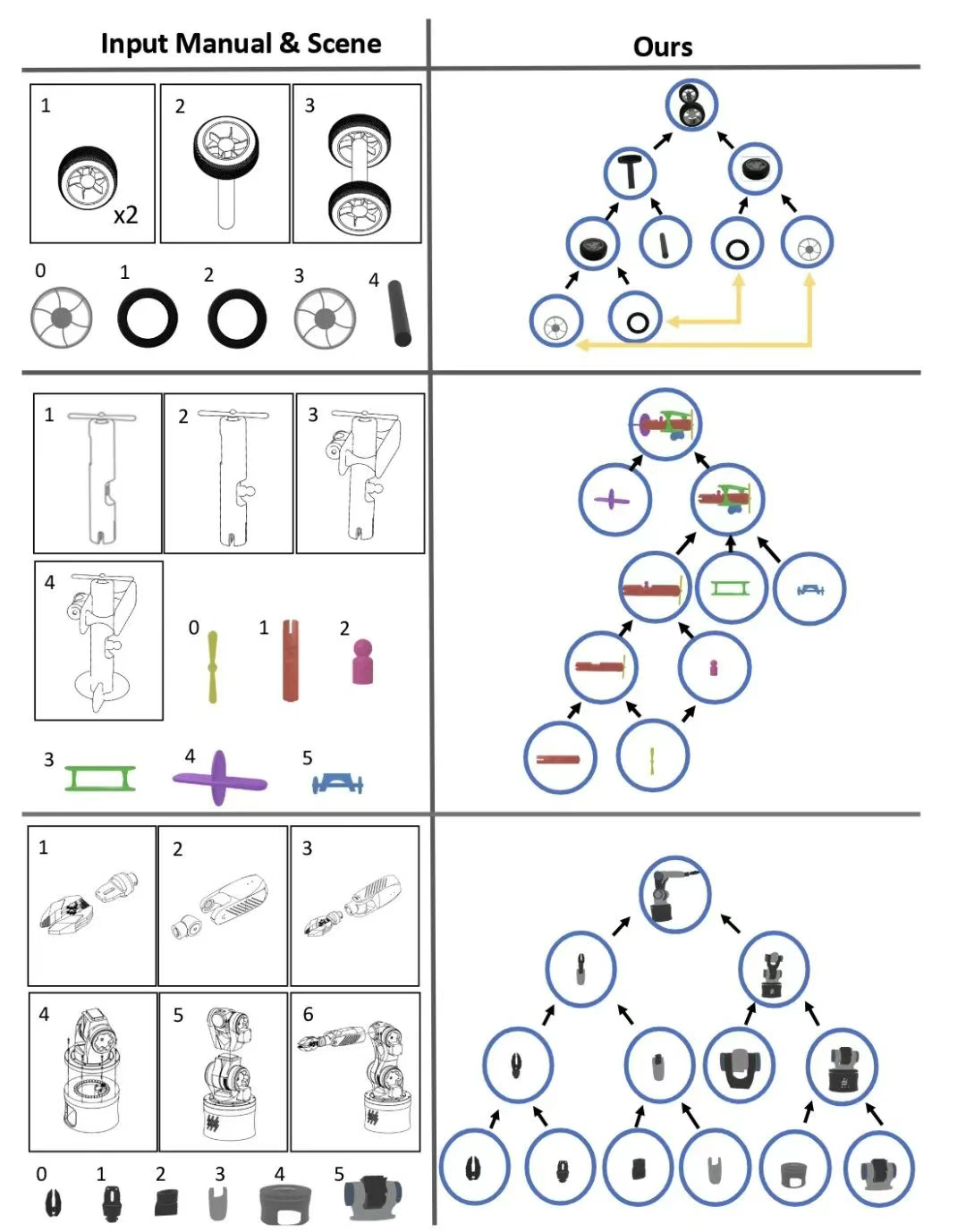
RSS 2025|从说明书学习复杂机器人操作任务:NUS邵林团队提出全新机器人装配技能学习框架Manual2Skill
视觉语言模型(Vision-Language Models, VLMs),为真实环境中的机器人操作任务提供了极具潜力的解决方案。 尽管 VLMs 取得了显著进展,机器人仍难以胜任复杂的长时程任务(如家具装配),主要受限于人…...