
ENSP-旁挂式AC
提醒:如果AC不能成功上线AP,一般问题不会出在AC上,优先关注AC-AP线路上的二层或三层组网的三层交换机
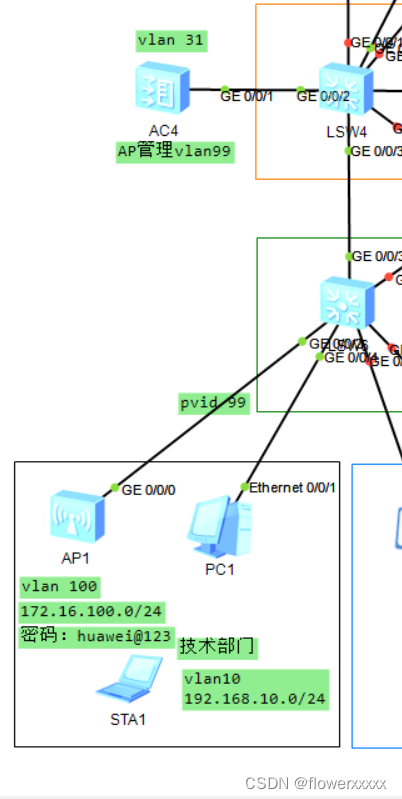
拓扑图
管理VLAN:99 | 业务VLAN:100
注意点:
1.连接AP的接口需要打上pvid为管理vlan的标签
2.AC和SW4之间为access口且capwap为AC g0/0/1的vlan号
3.AC需要设置静态路由 ip route static 0.0.0.0 0.0.0.0 192.168.31.1(下一跳地址即连接的SW4的接口地址)
4.管理vlan可在AC上设置地址池和分配地址
5.业务vlan在SW4上设置,可使用vrrp在AC和SW4上都设置,可使用DHCP中继DHCP路由器
6.AC中管理 vlan 的 ip pool 设置 option 43 sub-option 3 ascii 192.168.32.2(AC的接口地址)
配置
AC4
#sysname AC
#undo http secure-server enable
#set memory-usage threshold 0
#
ssl renegotiation-rate 1
#
vlan batch 31 99 to 100
#
authentication-profile name default_authen_profile
authentication-profile name dot1x_authen_profile
authentication-profile name mac_authen_profile
authentication-profile name portal_authen_profile
authentication-profile name macportal_authen_profile
#
dhcp enable
#
diffserv domain default
#
radius-server template default
#
pki realm defaultrsa local-key-pair defaultenrollment self-signed
#
ike proposal defaultencryption-algorithm aes-256 dh group14 authentication-algorithm sha2-256 authentication-method pre-shareintegrity-algorithm hmac-sha2-256 prf hmac-sha2-256
#
free-rule-template name default_free_rule
#
portal-access-profile name portal_access_profile
#
ip pool vlan99gateway-list 172.16.99.1 network 172.16.99.0 mask 255.255.255.0 excluded-ip-address 172.16.99.10 option 43 sub-option 3 ascii 192.168.31.2
#
aaaauthentication-scheme defaultauthentication-scheme radiusauthentication-mode radiusauthorization-scheme defaultaccounting-scheme defaultdomain defaultauthentication-scheme radiusradius-server defaultdomain default_adminauthentication-scheme defaultlocal-user admin password irreversible-cipher $1a$%2+^YaTn$#$H}QIE7T'L5<CVR+O%"
g5=KakX9!"U#*%R0NI\1&@$local-user admin service-type http
#
interface Vlanif31ip address 192.168.31.2 255.255.255.0dhcp select global
#
interface Vlanif99ip address 172.16.99.10 255.255.255.0vrrp vrid 99 virtual-ip 172.16.99.1vrrp vrid 99 priority 120dhcp select relaydhcp relay server-ip 192.168.31.2
#
interface MEth0/0/1undo negotiation autoduplex half
#
interface GigabitEthernet0/0/1port link-type accessport default vlan 31
#
interface GigabitEthernet0/0/2
#
interface GigabitEthernet0/0/3
#
interface GigabitEthernet0/0/4
#
interface GigabitEthernet0/0/5
#
interface GigabitEthernet0/0/6
#
interface GigabitEthernet0/0/7
#
interface GigabitEthernet0/0/8
#
interface GigabitEthernet0/0/9
#
interface GigabitEthernet0/0/10
#
interface GigabitEthernet0/0/11
#
interface GigabitEthernet0/0/12
#
interface GigabitEthernet0/0/13
#
interface GigabitEthernet0/0/14
#
interface GigabitEthernet0/0/15
#
interface GigabitEthernet0/0/16
#
interface GigabitEthernet0/0/17
#
interface GigabitEthernet0/0/18
#
interface GigabitEthernet0/0/19
#
interface GigabitEthernet0/0/20
#
interface GigabitEthernet0/0/21undo negotiation autoduplex half
#
interface GigabitEthernet0/0/22undo negotiation autoduplex half
#
interface GigabitEthernet0/0/23undo negotiation autoduplex half
#
interface GigabitEthernet0/0/24undo negotiation autoduplex half
#
interface XGigabitEthernet0/0/1
#
interface XGigabitEthernet0/0/2
#
interface NULL0
#snmp-agent local-engineid 800007DB03000000000000snmp-agent
#
ssh server secure-algorithms cipher aes256_ctr aes128_ctr
ssh server key-exchange dh_group14_sha1
ssh client secure-algorithms cipher aes256_ctr aes128_ctr
ssh client secure-algorithms hmac sha2_256
ssh client key-exchange dh_group14_sha1
#
ip route-static 0.0.0.0 0.0.0.0 192.168.31.1
#
capwap source interface vlanif31
#
user-interface con 0
user-interface vty 0 4protocol inbound all
user-interface vty 16 20protocol inbound all
#
wlantraffic-profile name defaultsecurity-profile name defaultsecurity-profile name wlan-netsecurity wpa-wpa2 psk pass-phrase %^%#Ii5]I|1%rNlDdPCIZ/wLM'EUEeGj<L:\8g$);_CA
%^%# aessecurity-profile name default-wdssecurity-profile name default-meshssid-profile name defaultssid-profile name wlan-netssid wlan-netvap-profile name defaultvap-profile name wlan-netservice-vlan vlan-id 100ssid-profile wlan-netsecurity-profile wlan-netwds-profile name defaultmesh-handover-profile name defaultmesh-profile name defaultregulatory-domain-profile name defaultair-scan-profile name defaultrrm-profile name defaultradio-2g-profile name defaultradio-5g-profile name defaultwids-spoof-profile name defaultwids-profile name defaultwireless-access-specificationap-system-profile name defaultport-link-profile name defaultwired-port-profile name defaultserial-profile name preset-enjoyor-toeap ap-group name defaultap-group name ap-group1radio 0vap-profile wlan-net wlan 1radio 1vap-profile wlan-net wlan 1ap-id 0 type-id 56 ap-mac 00e0-fc17-3cc0 ap-sn 210235448310EE058576ap-name area_1ap-group ap-group1provision-ap
#
dot1x-access-profile name dot1x_access_profile
#
mac-access-profile name mac_access_profile
#
return
SW4
#
sysname SW4
#
vlan batch 10 to 14 20 31 50 99 to 100
#
stp instance 1 root primary
stp instance 2 root secondary
#
cluster enable
ntdp enable
ndp enable
#
drop illegal-mac alarm
#
dhcp enable
#
diffserv domain default
#
drop-profile default
#
aaaauthentication-scheme defaultauthorization-scheme defaultaccounting-scheme defaultdomain defaultdomain default_adminlocal-user admin password simple adminlocal-user admin service-type http
#
interface Vlanif1ip address 192.168.1.2 255.255.255.0
#
interface Vlanif10ip address 192.168.10.10 255.255.255.0vrrp vrid 10 virtual-ip 192.168.10.1vrrp vrid 10 priority 130vrrp vrid 10 track interface GigabitEthernet0/0/5 reduced 50dhcp select relaydhcp relay server-ip 192.168.12.2
#
interface Vlanif11ip address 192.168.11.2 255.255.255.0
#
interface Vlanif12
#
interface Vlanif13ip address 192.168.13.1 255.255.255.0
#
interface Vlanif14ip address 192.168.14.1 255.255.255.0
#
interface Vlanif31ip address 192.168.31.1 255.255.255.0
#
interface Vlanif50ip address 192.168.50.254 255.255.255.0
#
interface Vlanif99ip address 172.16.99.10 255.255.255.0vrrp vrid 99 virtual-ip 172.16.99.1vrrp vrid 99 priority 120dhcp select relaydhcp relay server-ip 192.168.31.2
#
interface Vlanif100ip address 172.16.100.1 255.255.255.0dhcp select relaydhcp relay server-ip 192.168.12.2
#
interface MEth0/0/1
#
interface GigabitEthernet0/0/1port link-type accessport default vlan 11
#
interface GigabitEthernet0/0/2port link-type accessport default vlan 31
#
interface GigabitEthernet0/0/3port link-type trunkundo port trunk allow-pass vlan 1port trunk allow-pass vlan 2 to 4094
#
interface GigabitEthernet0/0/4
#
interface GigabitEthernet0/0/5port link-type accessport default vlan 14
#
interface GigabitEthernet0/0/6
#
interface GigabitEthernet0/0/7port link-type accessport default vlan 13
#
interface GigabitEthernet0/0/8
#
interface GigabitEthernet0/0/9
#
interface GigabitEthernet0/0/10
#
interface GigabitEthernet0/0/11
#
interface GigabitEthernet0/0/12
#
interface GigabitEthernet0/0/13
#
interface GigabitEthernet0/0/14
#
interface GigabitEthernet0/0/15
#
interface GigabitEthernet0/0/16
#
interface GigabitEthernet0/0/17
#
interface GigabitEthernet0/0/18
#
interface GigabitEthernet0/0/19
#
interface GigabitEthernet0/0/20
#
interface GigabitEthernet0/0/21
#
interface GigabitEthernet0/0/22
#
interface GigabitEthernet0/0/23
#
interface GigabitEthernet0/0/24
#
interface NULL0
#
ospf 1area 0.0.0.0network 192.168.11.0 0.0.0.255network 192.168.10.0 0.0.0.255network 192.168.14.0 0.0.0.255network 192.168.13.0 0.0.0.255network 172.16.100.0 0.0.0.255network 192.168.31.0 0.0.0.255network 172.16.99.0 0.0.0.255
#
user-interface con 0
user-interface vty 0 4
#
return
LSW6
#
sysname SW6
#
vlan batch 10 99 to 100
#
cluster enable
ntdp enable
ndp enable
#
drop illegal-mac alarm
#
dhcp enable
#
diffserv domain default
#
drop-profile default
#
aaaauthentication-scheme defaultauthorization-scheme defaultaccounting-scheme defaultdomain defaultdomain default_adminlocal-user admin password simple adminlocal-user admin service-type http
#
interface Vlanif1
#
interface Vlanif10
#
interface MEth0/0/1
#
interface GigabitEthernet0/0/1port link-type trunkport trunk allow-pass vlan 2 to 4094
#
interface GigabitEthernet0/0/2port link-type trunkport trunk pvid vlan 99undo port trunk allow-pass vlan 1port trunk allow-pass vlan 2 to 4094
#
interface GigabitEthernet0/0/3port link-type trunkport trunk allow-pass vlan 2 to 4094
#
interface GigabitEthernet0/0/4port link-type accessport default vlan 10
#
interface GigabitEthernet0/0/5port link-type trunkport trunk allow-pass vlan 2 to 4094
#
interface GigabitEthernet0/0/6
#
interface GigabitEthernet0/0/7
#
interface GigabitEthernet0/0/8
#
interface GigabitEthernet0/0/9
#
interface GigabitEthernet0/0/10
#
interface GigabitEthernet0/0/11
#
interface GigabitEthernet0/0/12
#
interface GigabitEthernet0/0/13
#
interface GigabitEthernet0/0/14
#
interface GigabitEthernet0/0/15
#
interface GigabitEthernet0/0/16
#
interface GigabitEthernet0/0/17
#
interface GigabitEthernet0/0/18
#
interface GigabitEthernet0/0/19
#
interface GigabitEthernet0/0/20
#
interface GigabitEthernet0/0/21
#
interface GigabitEthernet0/0/22
#
interface GigabitEthernet0/0/23
#
interface GigabitEthernet0/0/24
#
interface NULL0
#
user-interface con 0
user-interface vty 0 4
#
AC参考配置
3、AC配置:syssysname ACvlan batch 10interface GigabitEthernet0/0/2port link-type trunkport trunk allow-pass vlan 10interface Vlanif10ip address 10.1.10.2 255.255.255.0capwap source interface vlanif 10wlanregulatory-domain-profile name defaultcountry-code cnquitap-group name ap-group1regulatory-domain-profile defaultquitap auth-mode mac-authap-id 0 ap-mac 00e0-fcbd-7250ap-name area_1ap-group ap-group1quitsecurity-profile name wlan-netsecurity wpa-wpa2 psk pass-phrase 12345678 aesquitssid-profile name wlan-netssid wlan-netquitvap-profile name wlan-netforward-mode direct-forwardservice-vlan vlan-id 20security-profile wlan-netssid-profile wlan-netquitap-group name ap-group1vap-profile wlan-net wlan 1 radio 0vap-profile wlan-net wlan 1 radio 1quit相关文章:
ENSP-旁挂式AC
提醒:如果AC不能成功上线AP,一般问题不会出在AC上,优先关注AC-AP线路上的二层或三层组网的三层交换机 拓扑图 管理VLAN:99 | 业务VLAN:100 注意点: 1.连接AP的接口需要打上pvid为管理vlan的标签 2.AC和…...

如何获取手机root权限?
获取手机的 root 权限通常是指在 Android 设备上获取超级用户权限,这样用户就可以访问和修改系统文件、安装定制的 ROM、管理应用权限等。然而,需要注意的是,获取 root 权限可能会导致手机失去保修、安全性降低以及使系统变得不稳定。在获取 …...
海南赛区复赛真题)
2023年全国青少年信息素养大赛(Python)海南赛区复赛真题
2023年全国青少年信息素养大赛(Python)海南赛区复赛真题第1题,整数加8 题目描述: 输入一个整数,输出这个整数加8 的结果。 输入描述: 输入一行一个正整数。 输出描述: 输出求和的结果。 样例1: 输入: 5 输出: 13 x= int(input()) print(x+8) 第2题,哼哈二将 题目描…...
node.js服务器动态资源处理
一、node.js服务器动态资源处理与静态资源处理的区别? 静态与动态服务器主要区别于是否读取数据库,若然在数据库中的资料处理中将数据转换成可取用格式的结构,也就是说把对象转化为可传输的字节序列过程称为序列化,反之则为反序列…...

DNS是TCP还是UDP
既使用TCP也使用UDP 1. 域名解析时用UDP 在大多数情况下,DNS请求使用UDP协议,因为UDP协议可以提供较高的效率和安全性,尤其是在查询的响应大小较小(通常不超过512字节)时。非可靠连接,因为传输的数据量小…...
)
Redis魔法:解锁高性能缓存的神奇之门(二)
本系列文章简介: 在现代的软件开发中,高性能和高可用性是每个开发者都追求的目标。然而,随着数据量和访问频率的不断增长,传统的数据库存储方案往往难以应对这种挑战。这就引出了一个问题:如何在保证数据的高效访问和持…...
ROS2 仿真学习02 Gazebo导入官方示例模型
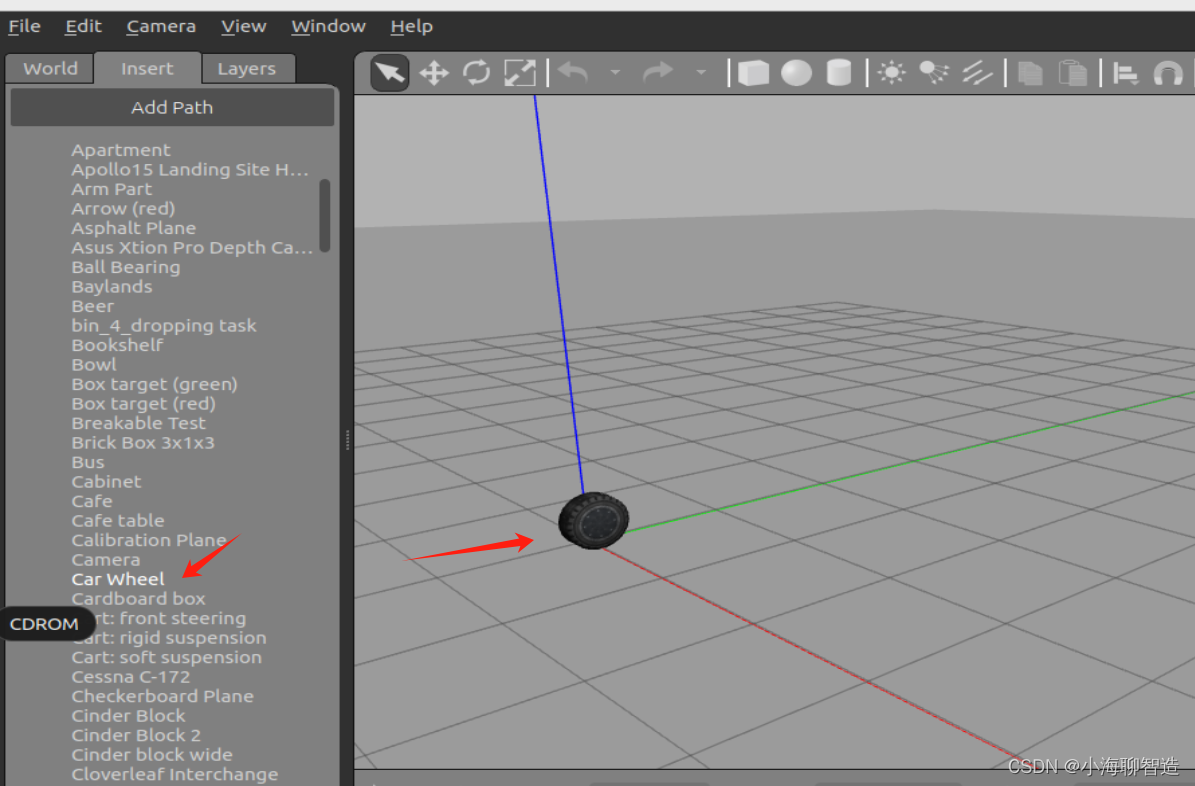
1.下载模型 git clone https://gitee.com/bingda-robot/gazebo_models.git将gazebo_models拖到到.gazebo当中(如果没看到.gazebo文件请按住CTRLh) 2.添加模型到gazebo的Insert 这就将官方示例的模型都导入到Gazebo 了 随便试试一个模型...

echarts图表按需导入
引入核心包引入图表类型引入使用组件引入渲染器注册所有引入 在项目中引入 Apache ECharts // 引入 echarts 核心模块,核心模块提供了 echarts 使用必须要的接口。 import * as echarts from echarts/core; // 引入柱状图图表,图表后缀都为 Chart impo…...
蓝桥杯(基础题)
试题 C: 好数 时间限制 : 1.0s 内存限制: 256.0MB 本题总分:10 分 【问题描述】 一个整数如果按从低位到高位的顺序,奇数位(个位、百位、万位 )上 的数字是奇数,偶数位(十位、千位、十万位 &…...
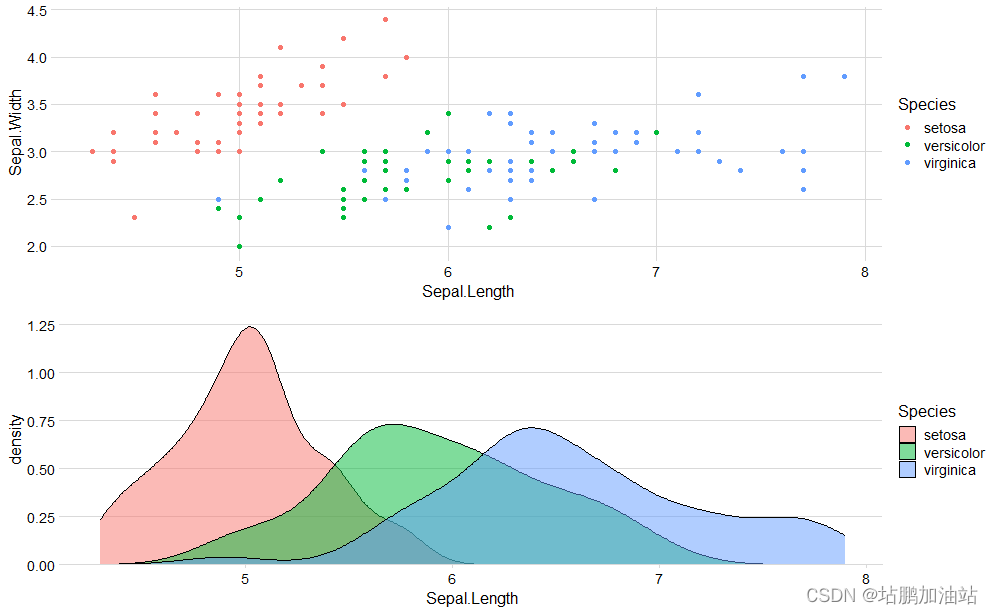
【R语言】概率密度图
概率密度图是用来表示连续型数据的分布情况的一种图形化方法。它通过在数据的取值范围内绘制一条曲线来描述数据的分布情况,曲线下的面积代表了在该范围内观察到某一数值的概率。具体来说,对于给定的连续型数据,概率密度图会使用核密度估计&a…...

【学习】软件测试需求分析要从哪些方面入手
软件测试需求分析是软件测试过程中非常重要的一个环节,它是为了明确软件测试的目标、范围、资源和时间等要素,以确保软件测试的有效性和全面性。本文将从以下几个方面对软件测试需求分析进行详细的阐述: 一、软件测试目标 软件测试目标是指…...

starrocks的fe节点启动不起来的解决办法
fe节点启动报错:Do not specify the helper node to FE itself. Please specify it to the existing running Leader or Follower FE at com.starrocks.StarRocksFE.main(StarRocksFE.java:68) [starrocks-fe.jar:?] Caused by: com.sleepycat.je.EnvironmentFailureExcepti…...
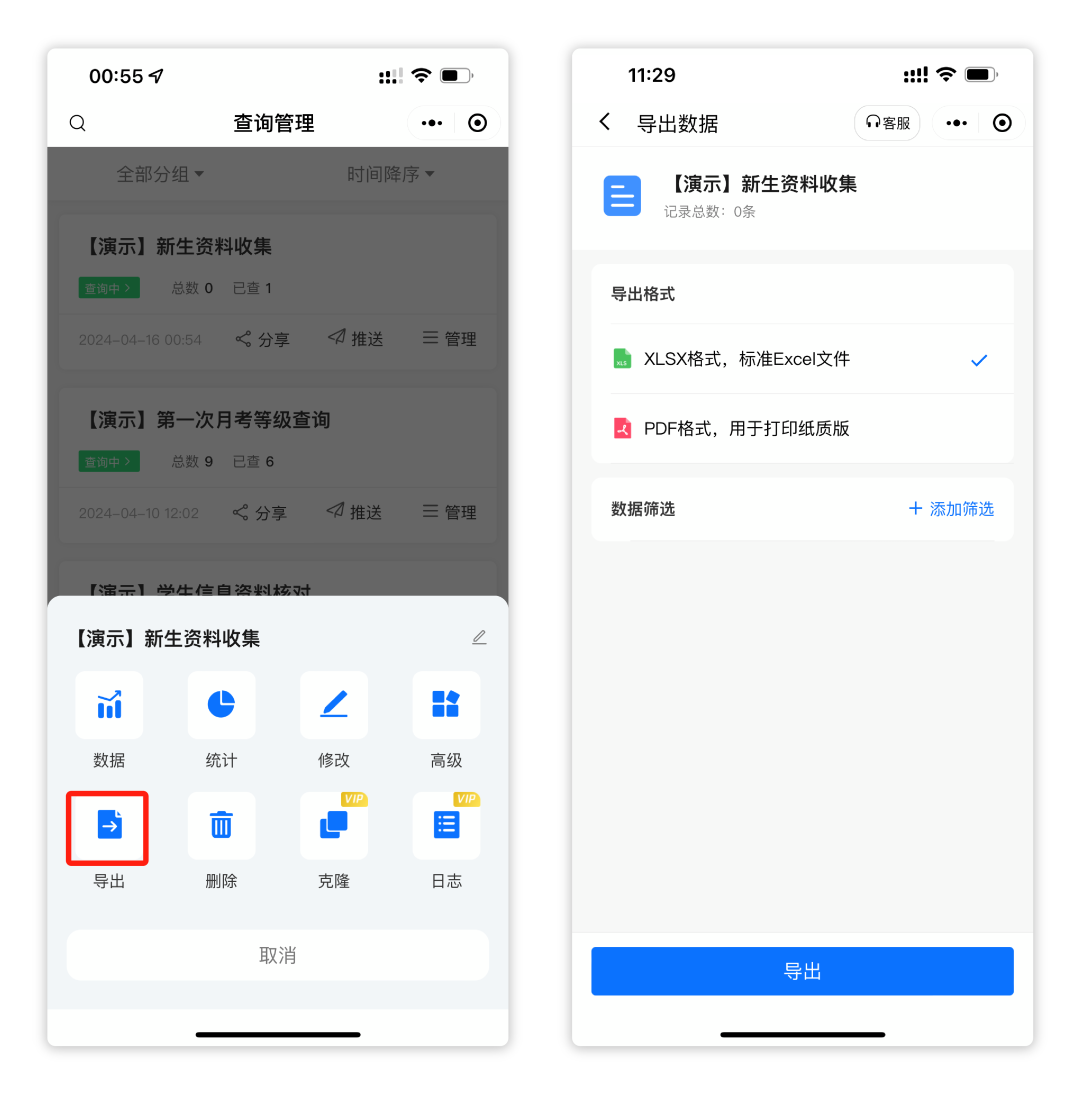
如何用易查分小程序快速制作填表?
工作中,我们经常需要收集信息,填写表格,可以使用易查分的新建填表功能,本文将介绍怎样快速制作一个信息收集表。 案例:新生资料收集系统 01进入新建填表 进入易查分小程序首页,点击新建填表,有…...
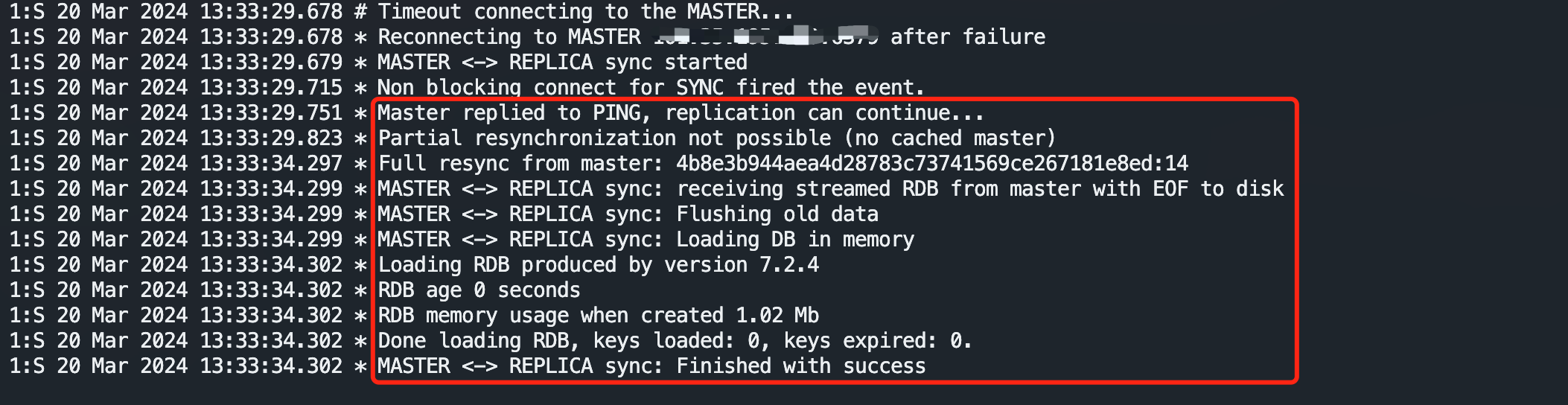
Redis部署之主从
使用两台云服务器,在 Docker 下部署。 Redis版本为:7.2.4 下载并配置redis 配置文件 下载 wget -c http://download.redis.io/redis-stable/redis.conf配置 master节点配置 bind 0.0.0.0 # 使得Redis服务器可以跨网络访问,生产环境请考虑…...
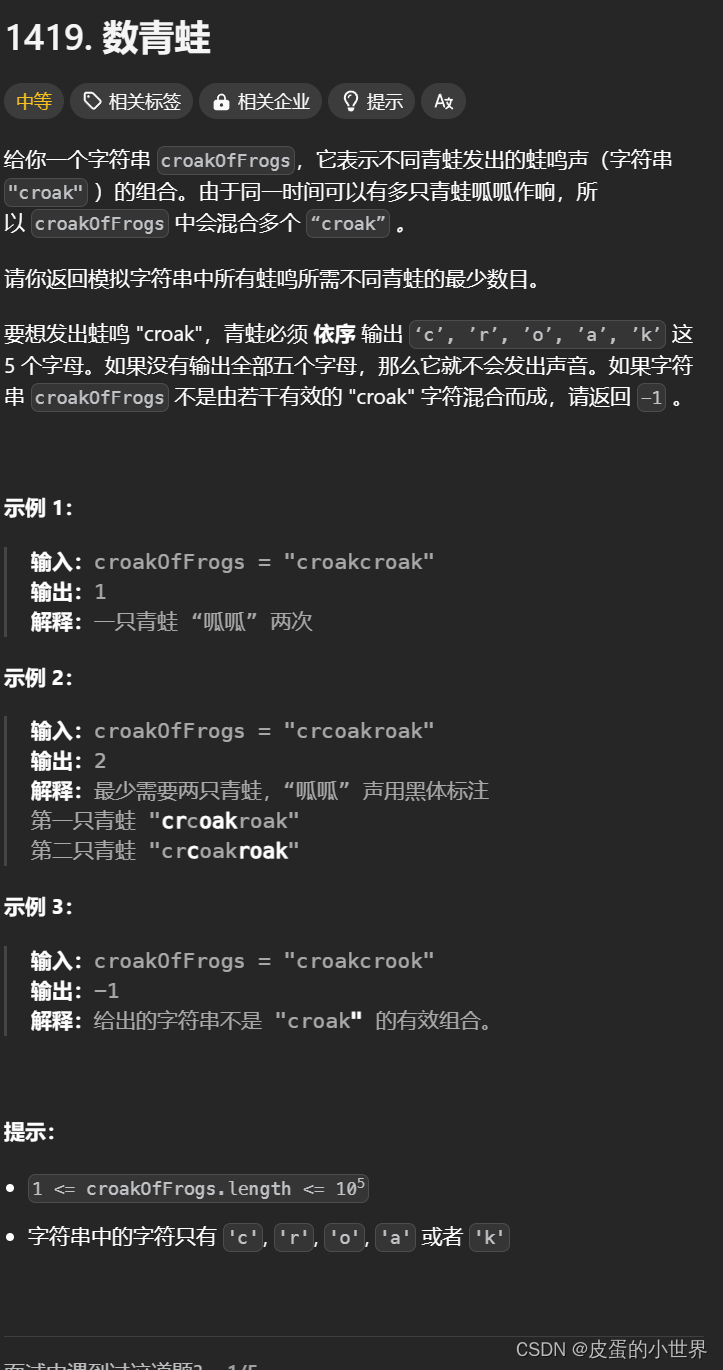
【模拟】Leetcode 数青蛙
题目讲解 1419. 数青蛙 算法讲解 class Solution { public:int minNumberOfFrogs(string croakOfFrogs) {string target "croak";int n target.size();//保存target每个字符的位置indexunordered_map<char, int>index;for(int i 0; i < n; i)index[tar…...

Scala 02——Scala OOP
文章目录 Scala 02——Scala OOP前序类1. 类的基本结构2. 普通类和数据类的区别 继承1. extends2. override 抽象类抽象类的特点 单例对象1. 定义2. 场景3. 方法3.1 方法定义3.2 方法调用 特质1. 抽象类和特质的区别2. 强制混入语法3. 静态混入和动态混入 内部类Java和Scala内部…...
FFmpeg: 自实现ijkplayer播放器--04消息队列设计
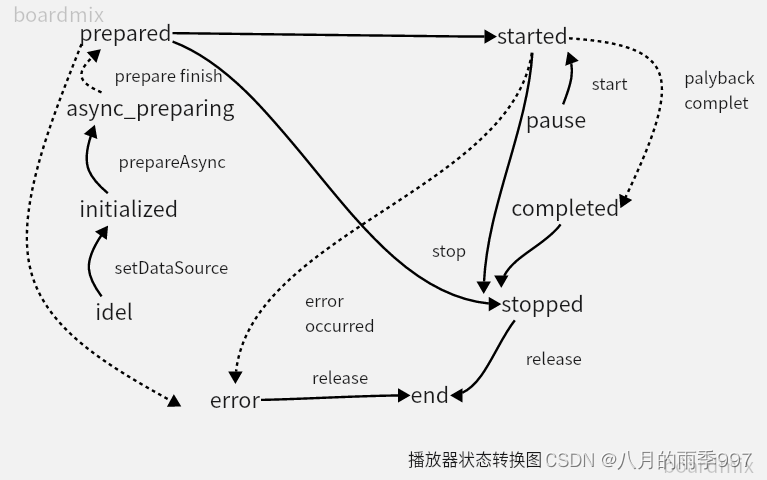
文章目录 播放器状态转换图播放器状态对应的消息: 消息对象消息队列消息队列api插入消息获取消息初始化消息插入消息加锁初始化消息设置消息参数消息队列初始化清空消息销毁消息启动消息队列终止消息队列删除消息 消息队列,用于发送,设置播放…...
Redis中的集群(四)
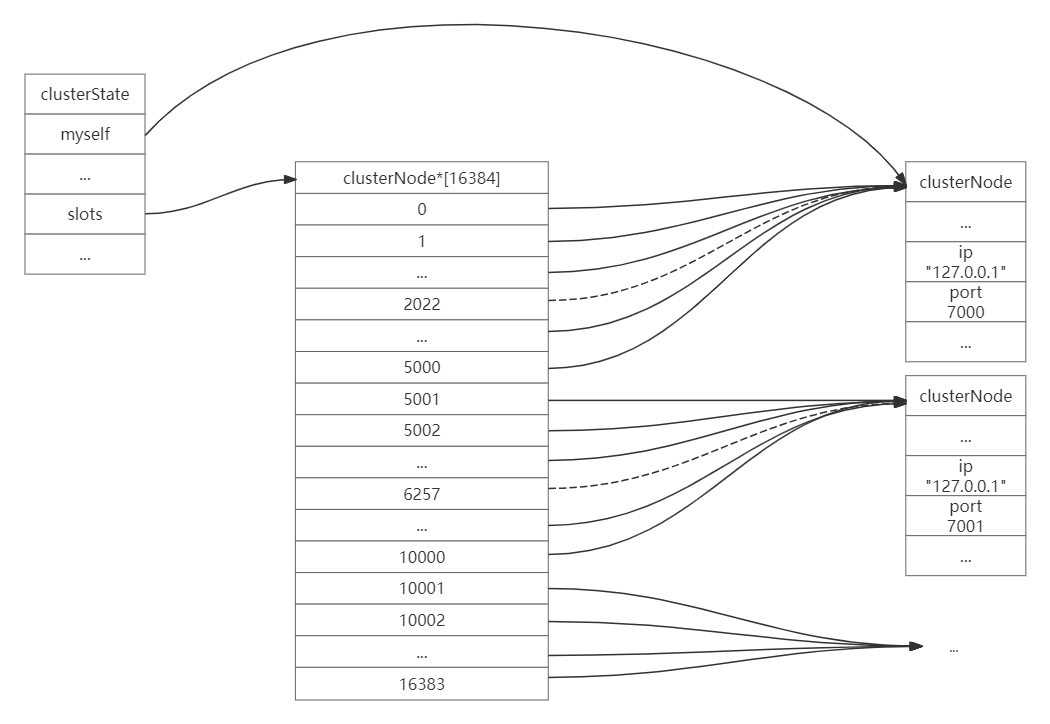
集群 槽指派 CLUSTER ADDSLOTS命令的实现 CLUSTER ADDSLOTS命令接受一个或多个槽作为参数,并将所有输入的槽指派给接收该命令的节点负责: CLUSTER ADDSLOTS <slot> [slot ...]CLUSTER ADDSLOTS命令的实现可以用以下伪代码来表示: def CLUSTER_ADDSLOTS(*…...

JookDB下载安装使用
天行健,君子以自强不息;地势坤,君子以厚德载物。 每个人都有惰性,但不断学习是好好生活的根本,共勉! 文章均为学习整理笔记,分享记录为主,如有错误请指正,共同学习进步。…...
百度OCR身份证识别C++离线SDKV3.0 C#对接
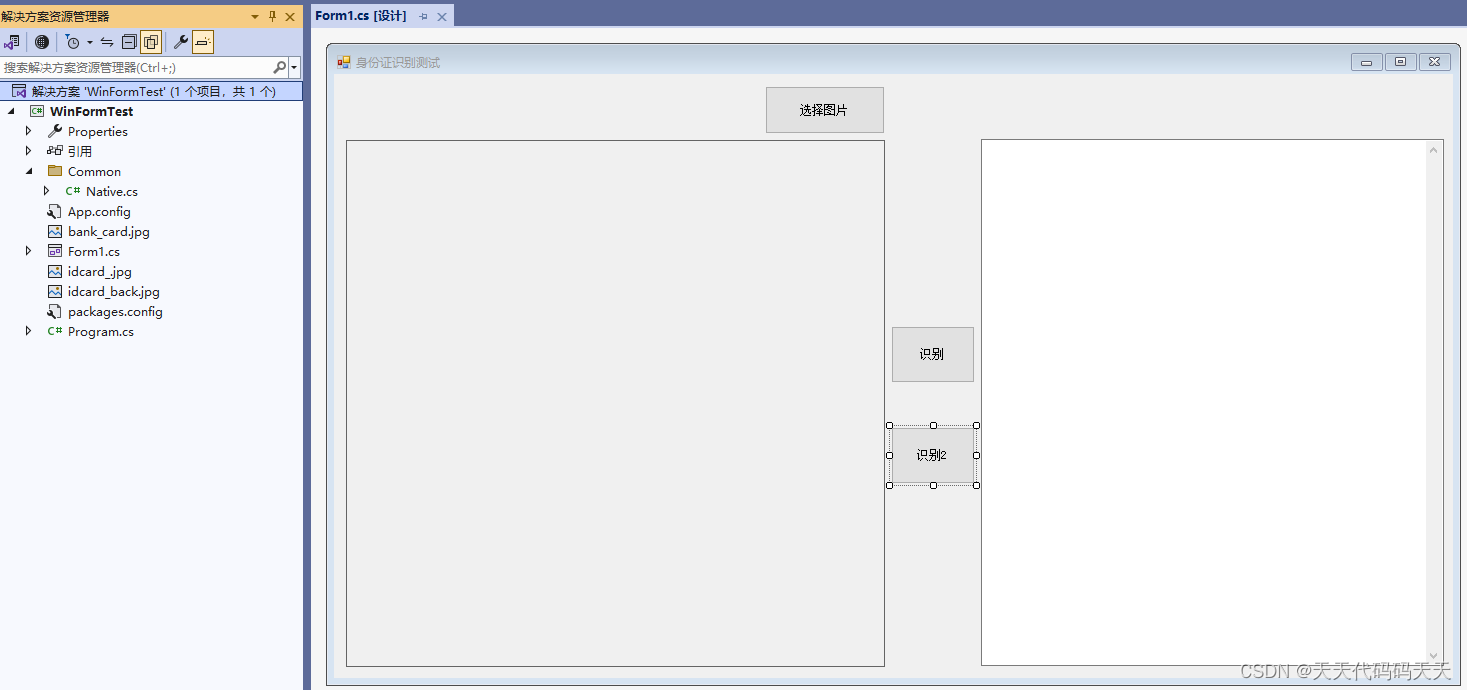
百度OCR身份证识别C离线SDKV3.0 C#对接 目录 说明 效果 问题 项目 代码 下载 说明 自己根据SDK封装了动态库,然后C#调用。 SDK 简介 本 SDK 适应于于 Windows 平台下的⾝份证识别系统,⽀持 C接⼜开发的 SDK,开发者可在VS2015 下⾯进⾏开发(推荐…...

macOS多出来了:Google云端硬盘、YouTube、表格、幻灯片、Gmail、Google文档等应用
文章目录 问题现象问题原因解决办法 问题现象 macOS启动台(Launchpad)多出来了:Google云端硬盘、YouTube、表格、幻灯片、Gmail、Google文档等应用。 问题原因 很明显,都是Google家的办公全家桶。这些应用并不是通过独立安装的…...
微信小程序 - 手机震动
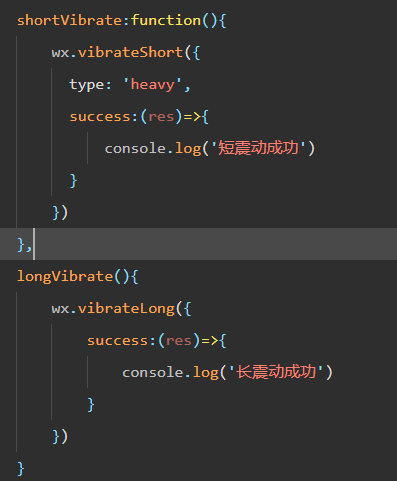
一、界面 <button type"primary" bindtap"shortVibrate">短震动</button> <button type"primary" bindtap"longVibrate">长震动</button> 二、js逻辑代码 注:文档 https://developers.weixin.qq…...
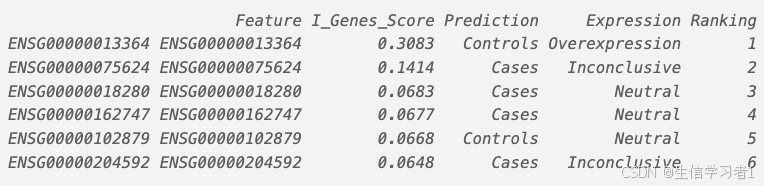
【数据分析】R版IntelliGenes用于生物标志物发现的可解释机器学习
禁止商业或二改转载,仅供自学使用,侵权必究,如需截取部分内容请后台联系作者! 文章目录 介绍流程步骤1. 输入数据2. 特征选择3. 模型训练4. I-Genes 评分计算5. 输出结果 IntelliGenesR 安装包1. 特征选择2. 模型训练和评估3. I-Genes 评分计…...

Fabric V2.5 通用溯源系统——增加图片上传与下载功能
fabric-trace项目在发布一年后,部署量已突破1000次,为支持更多场景,现新增支持图片信息上链,本文对图片上传、下载功能代码进行梳理,包含智能合约、后端、前端部分。 一、智能合约修改 为了增加图片信息上链溯源,需要对底层数据结构进行修改,在此对智能合约中的农产品数…...
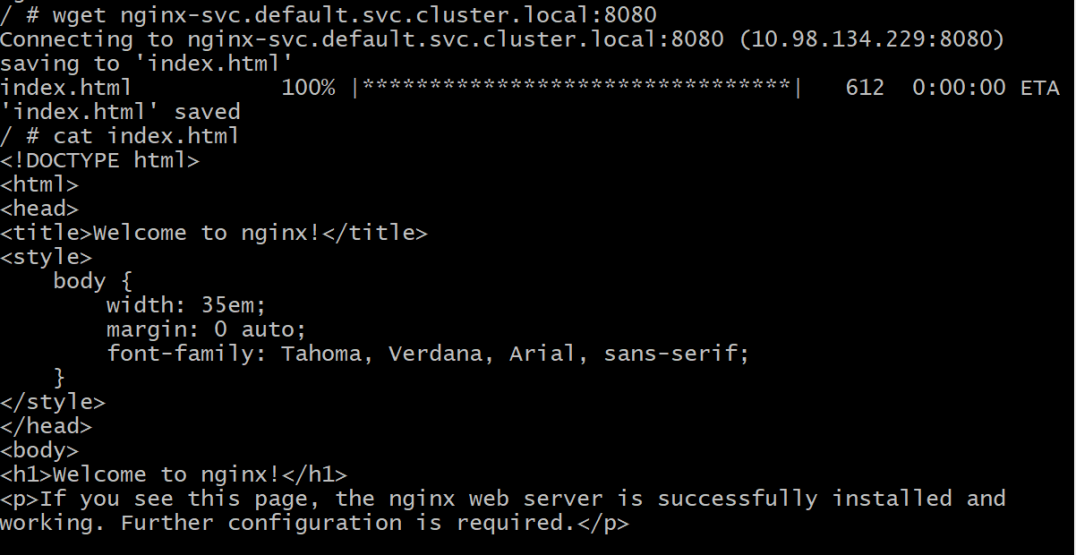
初探Service服务发现机制
1.Service简介 Service是将运行在一组Pod上的应用程序发布为网络服务的抽象方法。 主要功能:服务发现和负载均衡。 Service类型的包括ClusterIP类型、NodePort类型、LoadBalancer类型、ExternalName类型 2.Endpoints简介 Endpoints是一种Kubernetes资源…...
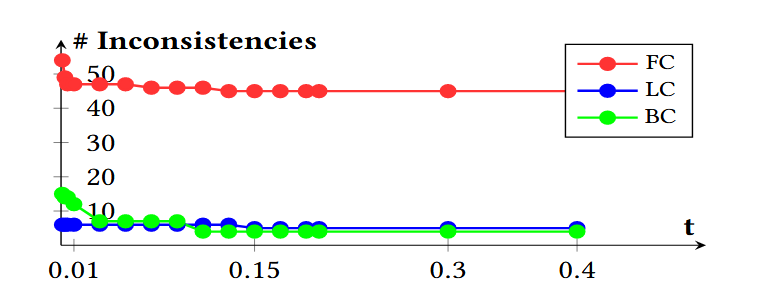
论文阅读笔记——Muffin: Testing Deep Learning Libraries via Neural Architecture Fuzzing
Muffin 论文 现有方法 CRADLE 和 LEMON,依赖模型推理阶段输出进行差分测试,但在训练阶段是不可行的,因为训练阶段直到最后才有固定输出,中间过程是不断变化的。API 库覆盖低,因为各个 API 都是在各种具体场景下使用。…...
 error)
【前端异常】JavaScript错误处理:分析 Uncaught (in promise) error
在前端开发中,JavaScript 异常是不可避免的。随着现代前端应用越来越多地使用异步操作(如 Promise、async/await 等),开发者常常会遇到 Uncaught (in promise) error 错误。这个错误是由于未正确处理 Promise 的拒绝(r…...
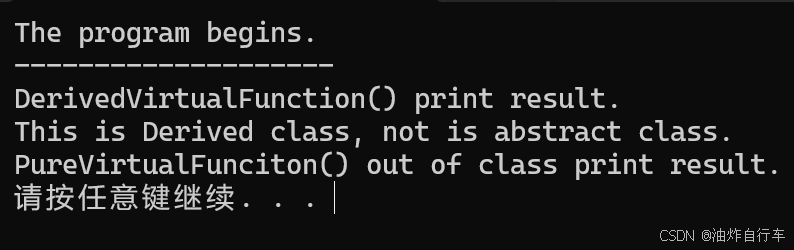
【C++】纯虚函数类外可以写实现吗?
1. 答案 先说答案,可以。 2.代码测试 .h头文件 #include <iostream> #include <string>// 抽象基类 class AbstractBase { public:AbstractBase() default;virtual ~AbstractBase() default; // 默认析构函数public:virtual int PureVirtualFunct…...
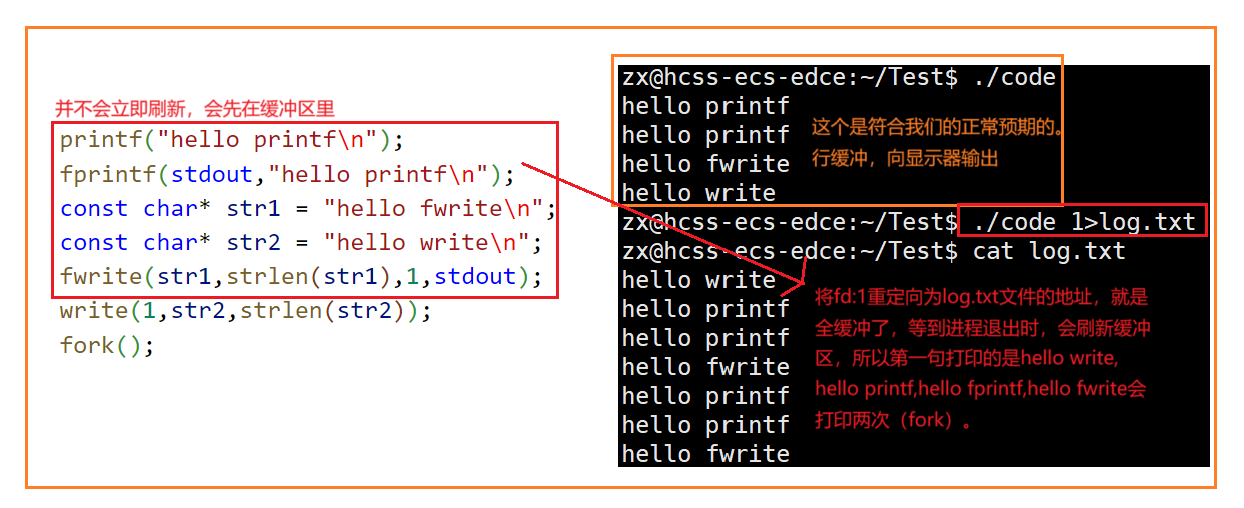
Linux中《基础IO》详细介绍
目录 理解"文件"狭义理解广义理解文件操作的归类认知系统角度文件类别 回顾C文件接口打开文件写文件读文件稍作修改,实现简单cat命令 输出信息到显示器,你有哪些方法stdin & stdout & stderr打开文件的方式 系统⽂件I/O⼀种传递标志位…...

小木的算法日记-多叉树的递归/层序遍历
🌲 从二叉树到森林:一文彻底搞懂多叉树遍历的艺术 🚀 引言 你好,未来的算法大神! 在数据结构的世界里,“树”无疑是最核心、最迷人的概念之一。我们中的大多数人都是从 二叉树 开始入门的,它…...