
iOS——SDWebImage源码学习
什么是SDWebImage
SDWebImage是一个流行的iOS和macOS平台上的开源库,用于异步加载和缓存网络图片。它提供了一套简单易用的API,使得在应用中加载网络图片变得更加方便和高效。
主要特点和功能:
- 异步加载:SDWebImage通过异步方式加载网络图片,避免了阻塞主线程的问题,提高了应用的流畅性和响应性。
- 缓存管理:SDWebImage实现了内存缓存和磁盘缓存,可以有效地管理已加载过的图片,避免重复加载和节省网络带宽。
- 图片处理:支持对图片进行解码、压缩和裁剪等处理,以满足不同需求下的图片展示效果。
- UIImageView扩展:提供了对UIImageView的扩展,可以直接通过UIImageView加载网络图片,无需手动管理加载过程。
- 支持多种图片格式:SDWebImage支持加载多种图片格式,包括PNG、JPEG、GIF、WebP等。
- 内存优化:对于大型图片和动态图片(如GIF),SDWebImage提供了内存优化的机制,避免内存占用过高。
- 支持缓存过期:可以设置图片缓存的过期时间,以确保及时更新缓存。
- 支持渐进式加载:支持渐进式加载图片,提高用户体验。
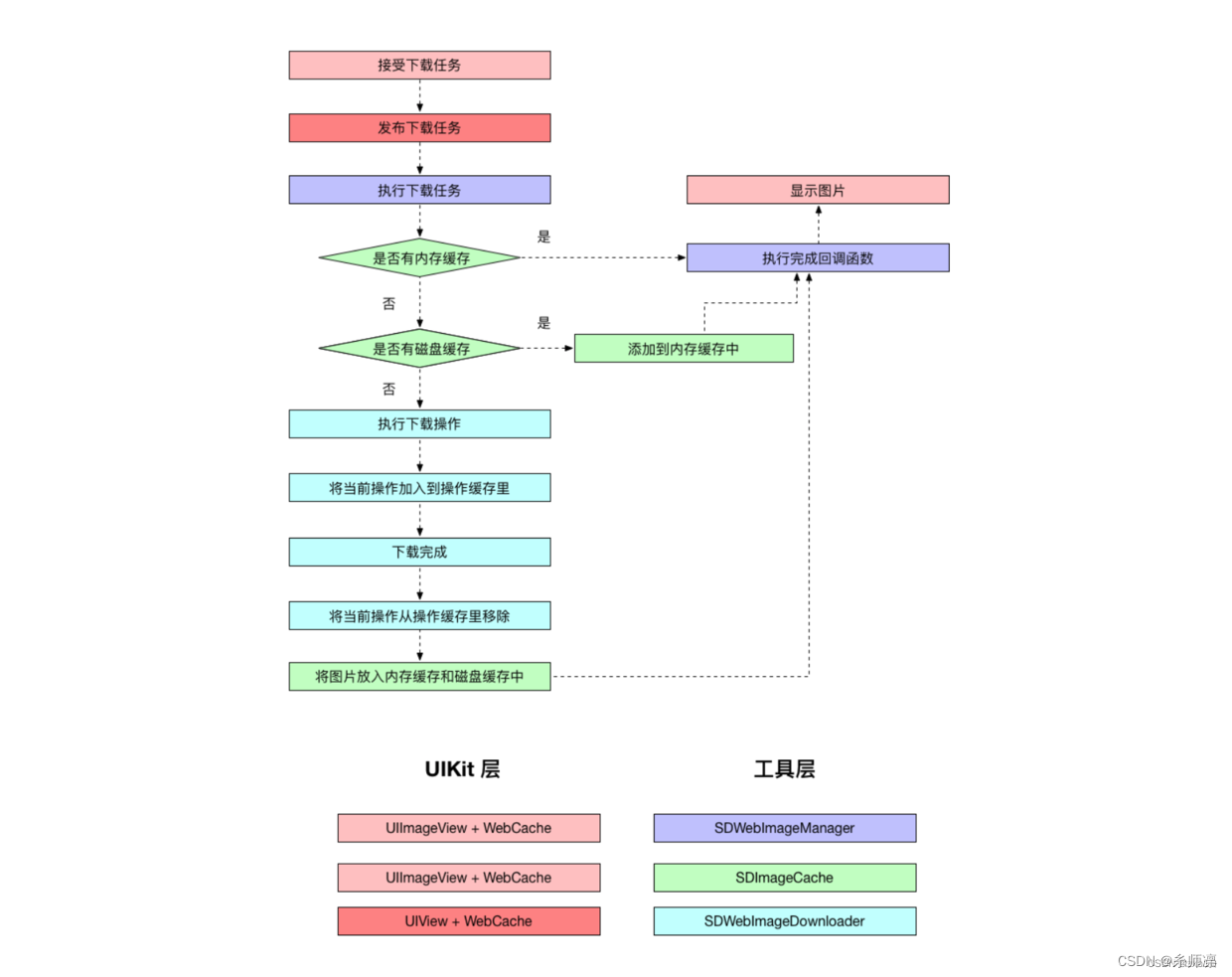
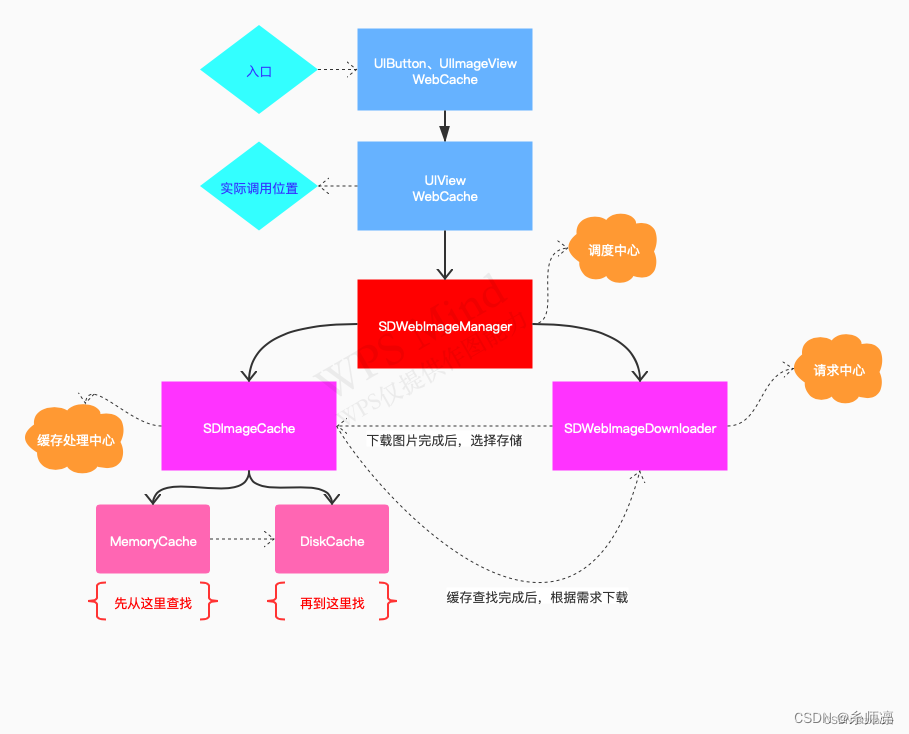
UIKit层
- UIImageView+WebCache.h
#import "SDWebImageCompat.h"
#import "SDWebImageManager.h"/*** 将SDWebImage的异步下载和缓存远程图像集成到UIImageView中。*/
@interface UIImageView (WebCache)#pragma mark - Image State/*** 获取当前图像的URL。*/
@property (nonatomic, strong, readonly, nullable) NSURL *sd_currentImageURL;#pragma mark - Image Loading/*** 使用url设置imageView的`image`。** 下载是异步的并且被缓存。** @param url 图像的URL。*/
- (void)sd_setImageWithURL:(nullable NSURL *)url NS_REFINED_FOR_SWIFT;/*** 使用url和占位图像设置imageView的`image`。** 下载是异步的并且被缓存。** @param url         图像的URL。* @param placeholder 最初设置的图像,直到图像请求完成。* @see sd_setImageWithURL:placeholderImage:options:*/
- (void)sd_setImageWithURL:(nullable NSURL *)urlplaceholderImage:(nullable UIImage *)placeholder NS_REFINED_FOR_SWIFT;/*** 使用url、占位图像和自定义选项设置imageView的`image`。** 下载是异步的并且被缓存。** @param url         图像的URL。* @param placeholder 最初设置的图像,直到图像请求完成。* @param options     下载图像时使用的选项。有关可能值,请参阅SDWebImageOptions。*/
- (void)sd_setImageWithURL:(nullable NSURL *)urlplaceholderImage:(nullable UIImage *)placeholderoptions:(SDWebImageOptions)options NS_REFINED_FOR_SWIFT;/*** 使用url、占位图像、自定义选项和上下文设置imageView的`image`。** 下载是异步的并且被缓存。** @param url         图像的URL。* @param placeholder 最初设置的图像,直到图像请求完成。* @param options     下载图像时使用的选项。有关可能值,请参阅SDWebImageOptions。*/
- (void)sd_setImageWithURL:(nullable NSURL *)urlplaceholderImage:(nullable UIImage *)placeholderoptions:(SDWebImageOptions)optionscontext:(nullable SDWebImageContext *)contextprogress:(nullable SDImageLoaderProgressBlock)progressBlockcompleted:(nullable SDExternalCompletionBlock)completedBlock;/*** 取消当前的图像加载操作。* @note 对于高亮图像,请使用`sd_cancelCurrentHighlightedImageLoad`。*/
- (void)sd_cancelCurrentImageLoad;@end
- UIImageView+WebCache
#import "UIImageView+WebCache.h"
#import "objc/runtime.h"
#import "UIView+WebCacheOperation.h"
#import "UIView+WebCacheState.h"
#import "UIView+WebCache.h"@implementation UIImageView (WebCache)- (void)sd_setImageWithURL:(nullable NSURL *)url {// 使用默认选项加载图像[self sd_setImageWithURL:url placeholderImage:nil options:0 progress:nil completed:nil];
}- (void)sd_setImageWithURL:(nullable NSURL *)url placeholderImage:(nullable UIImage *)placeholder {// 使用默认选项加载图像,并设置占位图像[self sd_setImageWithURL:url placeholderImage:placeholder options:0 progress:nil completed:nil];
}- (void)sd_setImageWithURL:(nullable NSURL *)url placeholderImage:(nullable UIImage *)placeholder options:(SDWebImageOptions)options {// 使用指定选项加载图像,并设置占位图像[self sd_setImageWithURL:url placeholderImage:placeholder options:options progress:nil completed:nil];
}- (void)sd_setImageWithURL:(nullable NSURL *)url placeholderImage:(nullable UIImage *)placeholder options:(SDWebImageOptions)options context:(nullable SDWebImageContext *)context {// 使用指定选项和上下文加载图像,并设置占位图像[self sd_setImageWithURL:url placeholderImage:placeholder options:options context:context progress:nil completed:nil];
}- (void)sd_setImageWithURL:(nullable NSURL *)url completed:(nullable SDExternalCompletionBlock)completedBlock {// 使用默认选项加载图像,并在完成后调用自定义完成块[self sd_setImageWithURL:url placeholderImage:nil options:0 progress:nil completed:completedBlock];
}- (void)sd_setImageWithURL:(nullable NSURL *)url placeholderImage:(nullable UIImage *)placeholder completed:(nullable SDExternalCompletionBlock)completedBlock {// 使用默认选项加载图像,并设置占位图像,完成后调用自定义完成块[self sd_setImageWithURL:url placeholderImage:placeholder options:0 progress:nil completed:completedBlock];
}- (void)sd_setImageWithURL:(nullable NSURL *)url placeholderImage:(nullable UIImage *)placeholder options:(SDWebImageOptions)options completed:(nullable SDExternalCompletionBlock)completedBlock {// 使用指定选项加载图像,并设置占位图像,完成后调用自定义完成块[self sd_setImageWithURL:url placeholderImage:placeholder options:options progress:nil completed:completedBlock];
}- (void)sd_setImageWithURL:(nullable NSURL *)url placeholderImage:(nullable UIImage *)placeholder options:(SDWebImageOptions)options progress:(nullable SDImageLoaderProgressBlock)progressBlock completed:(nullable SDExternalCompletionBlock)completedBlock {// 使用指定选项、占位图像和进度块加载图像,并在完成后调用自定义完成块[self sd_setImageWithURL:url placeholderImage:placeholder options:options context:nil progress:progressBlock completed:completedBlock];
}- (void)sd_setImageWithURL:(nullable NSURL *)urlplaceholderImage:(nullable UIImage *)placeholderoptions:(SDWebImageOptions)optionscontext:(nullable SDWebImageContext *)contextprogress:(nullable SDImageLoaderProgressBlock)progressBlockcompleted:(nullable SDExternalCompletionBlock)completedBlock {// 使用指定选项、占位图像、上下文和进度块加载图像,并在完成后调用自定义完成块[self sd_internalSetImageWithURL:urlplaceholderImage:placeholderoptions:optionscontext:contextsetImageBlock:nilprogress:progressBlockcompleted:^(UIImage * _Nullable image, NSData * _Nullable data, NSError * _Nullable error, SDImageCacheType cacheType, BOOL finished, NSURL * _Nullable imageURL) {if (completedBlock) {completedBlock(image, error, cacheType, imageURL);}}];
}#pragma mark - State- (NSURL *)sd_currentImageURL {// 获取当前加载的图像的URLreturn [self sd_imageLoadStateForKey:nil].url;
}- (void)sd_cancelCurrentImageLoad {// 取消当前的图像加载操作return [self sd_cancelImageLoadOperationWithKey:nil];
}@end
- UIView+WebCache.h
/** 这个文件是 SDWebImage 包的一部分。* (c) Olivier Poitrey <rs@dailymotion.com>** 有关完整的版权和许可信息,请查看随源代码分发的 LICENSE 文件。*/#import "SDWebImageCompat.h"
#import "SDWebImageDefine.h"
#import "SDWebImageManager.h"
#import "SDWebImageTransition.h"
#import "SDWebImageIndicator.h"
#import "UIView+WebCacheOperation.h"
#import "UIView+WebCacheState.h"/**这个值指定了图像加载进度单元数无法确定,因为 progressBlock 没有被调用。*/
FOUNDATION_EXPORT const int64_t SDWebImageProgressUnitCountUnknown; /* 1LL */typedef void(^SDSetImageBlock)(UIImage * _Nullable image, NSData * _Nullable imageData, SDImageCacheType cacheType, NSURL * _Nullable imageURL);/**将 SDWebImage 的异步下载和远程图像缓存集成到 UIView 子类中。*/
@interface UIView (WebCache)/*** 获取当前图像操作的 key。操作 key 用于标识一个视图实例(如 UIButton)的不同查询。* 有关更多信息,请参阅 `SDWebImageContextSetImageOperationKey`。** @note 您可以使用方法 `UIView+WebCacheOperation` 来查看不同查询的操作。* @note 对于历史版本兼容性,在当前 UIView 具有完全称为 `image` 的属性时,操作 key 将使用 `NSStringFromClass(self.class)`。 包括 `UIImageView.image/NSImageView.image/NSButton.image`(不包括 `UIButton`)* @warning 此属性应仅用于单状态视图,如没有高亮状态的 `UIImageView`。 对于具有多个图像加载的具有状态的视图,例如 `UIButton`(一个视图可以有多个图像加载),请检查其头文件以调用正确的 API,如 `-[UIButton sd_imageOperationKeyForState:]`*/
@property (nonatomic, strong, readonly, nullable) NSString *sd_latestOperationKey;#pragma mark - State/*** 获取当前图像的 URL。* 这只是简单地将 `[self sd_imageLoadStateForKey:self.sd_latestOperationKey].url` 转换为 v5.18.0 中的写法** @note 请注意,由于类别的限制,如果直接使用 setImage:,此属性可能会失去同步。* @warning 此属性应仅用于单状态视图,如没有高亮状态的 `UIImageView`。 对于具有多个图像加载的具有状态的视图,例如 `UIButton`(一个视图可以有多个图像加载),请使用 `sd_imageLoadStateForKey:`。 有关更多信息,请参阅 `UIView+WebCacheState.h`*/
@property (nonatomic, strong, readonly, nullable) NSURL *sd_imageURL;/*** 与视图关联的当前图像加载进度。单元数是接收的大小和下载的期望大小。* 在新图像加载开始后(从当前队列更改),`totalUnitCount` 和 `completedUnitCount` 将重置为 0。 如果 progressBlock 没有被调用但图像加载成功以标记进度完成(从主队列更改),它们将设置为 `SDWebImageProgressUnitCountUnknown`。* @note 您可以对进度进行键值观察,但是您应该注意进度的更改是在下载期间的后台队列(与 progressBlock 相同)。 如果要使用 KVO 并更新 UI,请确保在主队列上调度。 建议使用一些 KVO 库,如 KVOController,因为它更安全且易于使用。* @note 如果值为 nil,则 getter 将创建一个进度实例。 但是,默认情况下,我们不创建一个。 如果需要使用键值观察,请在加载开始之前触发 getter 或设置自定义进度实例。 默认值为 nil。* @note 请注意,由于类别的限制,如果直接更新进度,则此属性可能会失去同步。* @warning 此属性应仅用于单状态视图,如没有高亮状态的 `UIImageView`。 对于具有多个图像加载的具有状态的视图,例如 `UIButton`(一个视图可以有多个图像加载),请使用 `sd_imageLoadStateForKey:`。 有关更多信息,请参阅 `UIView+WebCacheState.h`*/
@property (nonatomic, strong, null_resettable) NSProgress *sd_imageProgress;/*** 使用 `url` 和可选的占位图像设置 imageView 的 `image`。** 下载是异步的并且被缓存。** @param url            图像的 URL。* @param placeholder    最初设置的图像,直到图像请求完成。* @param options        下载图像时使用的选项。 请参阅 SDWebImageOptions 以获取可能的值。* @param context        包含不同选项以执行指定更改或进程的上下文,请参阅 `SDWebImageContextOption`。 这保存了 `options` 枚举无法保存的额外对象。* @param setImageBlock  用于自定义设置图像代码的块。 如果未提供,则使用内置的设置图像代码(当前仅支持 `UIImageView/NSImageView` 和 `UIButton/NSButton`)* @param progressBlock  图像下载过程中调用的块*                       @note 进度块在后台队列上执行* @param completedBlock 操作完成时调用的块。*   这个块没有返回值,并以请求的 UIImage 作为第一个参数和 NSData 表示作为第二个参数。*   在出错的情况下,图像参数为 nil,第三个参数可能包含一个 NSError。**   第四个参数是一个 `SDImageCacheType` 枚举,指示图像是从本地缓存还是从内存缓存或从网络中检索的。**   第五个参数通常总是 YES。 但是,如果您为启用渐进式下载并自行设置图像的 SDWebImageAvoidAutoSetImage 与 SDWebImageProgressiveLoad 选项,这样会使图像自行调用。 因此,该块会重复调用具有部分图像的块。 当图像完全下载时,将最后一次调用该块并将最后一个参数设置为 YES。**   最后一个参数是原始图像 URL*  @return 用于取消缓存和下载操作的返回操作,通常类型为 `SDWebImageCombinedOperation`*/
- (nullable id<SDWebImageOperation>)sd_internalSetImageWithURL:(nullable NSURL *)urlplaceholderImage:(nullable UIImage *)placeholderoptions:(SDWebImageOptions)optionscontext:(nullable SDWebImageContext *)contextsetImageBlock:(nullable SDSetImageBlock)setImageBlockprogress:(nullable SDImageLoaderProgressBlock)progressBlockcompleted:(nullable SDInternalCompletionBlock)completedBlock;/*** 取消当前图像加载* 这只是简单地将 `[self sd_cancelImageLoadOperationWithKey:self.sd_latestOperationKey]` 转换为 v5.18.0 中的写法** @warning 此方法应仅用于单状态视图,如没有高亮状态的 `UIImageView`。 对于具有多个图像加载的具有状态的视图,例如 `UIButton`(一个视图可以有多个图像加载),请使用 `sd_cancelImageLoadOperationWithKey:`。 有关更多信息,请参阅 `UIView+WebCacheOperation.h`*/
- (void)sd_cancelCurrentImageLoad;#if SD_UIKIT || SD_MAC#pragma mark - Image Transition/**当图像加载完成时的图像过渡。请参阅 `SDWebImageTransition`。如果指定 nil,则不进行过渡。 默认为 nil。@warning 此属性应仅用于单状态视图,如没有高亮状态的 `UIImageView`。 对于具有多个图像加载的具有状态的视图,编写自己的实现 `setImageBlock:` 并检查当前具有状态视图的状态以呈现 UI。*/
@property (nonatomic, strong, nullable) SDWebImageTransition *sd_imageTransition;#pragma mark - Image Indicator/**在图像加载期间的图像指示器。如果不需要指示器,请指定 nil。 默认为 nilsetter 将从当前视图的子视图中删除旧的指示器视图并添加新的指示器视图。@note 由于这涉及 UI,因此您应仅从主队列访问。@warning 此属性应仅用于单状态视图,如没有高亮状态的 `UIImageView`。 对于具有多个图像加载的具有状态的视图,编写自己的实现 `setImageBlock:` 并检查当前具有状态视图的状态以呈现 UI。*/
@property (nonatomic, strong, nullable) id<SDWebImageIndicator> sd_imageIndicator;#endif@end- UIView+WebCache.m
//获取图像加载的进度。它首先获取最近图像加载操作的键,然后根据该键从sd_imageLoadStateForKey方法中获取图像加载状态。接着,它获取加载状态中的进度对象,如果进度对象不存在,则创建一个新的进度对象,并将其赋值给加载状态的进度属性。最后返回这个进度对象。
- (NSProgress *)sd_imageProgress {SDWebImageLoadState *loadState = [self sd_imageLoadStateForKey:self.sd_latestOperationKey];NSProgress *progress = loadState.progress;if (!progress) {progress = [[NSProgress alloc] initWithParent:nil userInfo:nil];self.sd_imageProgress = progress;}return progress;
}//用于设置图像加载的进度。它首先检查传入的进度对象是否为nil,如果是,则直接返回,不进行任何操作。接着,它获取最近图像加载操作的键,然后根据该键从sd_imageLoadStateForKey方法中获取图像加载状态。如果加载状态不存在,则创建一个新的加载状态对象。接着,将传入的进度对象赋值给加载状态对象的进度属性。最后,调用sd_setImageLoadState:forKey:方法,将更新后的加载状态对象保存起来。
- (void)setSd_imageProgress:(NSProgress *)sd_imageProgress {if (!sd_imageProgress) {return;}SDWebImageLoadState *loadState = [self sd_imageLoadStateForKey:self.sd_latestOperationKey];if (!loadState) {loadState = [SDWebImageLoadState new];}loadState.progress = sd_imageProgress;[self sd_setImageLoadState:loadState forKey:self.sd_latestOperationKey];
}//用于设置图像加载的各种参数和回调
- (nullable id<SDWebImageOperation>)sd_internalSetImageWithURL:(nullable NSURL *)urlplaceholderImage:(nullable UIImage *)placeholderoptions:(SDWebImageOptions)optionscontext:(nullable SDWebImageContext *)contextsetImageBlock:(nullable SDSetImageBlock)setImageBlockprogress:(nullable SDImageLoaderProgressBlock)progressBlockcompleted:(nullable SDInternalCompletionBlock)completedBlock {if (context) {// 如果传入的 context 不为空,进行一次拷贝,避免可变对象的问题context = [context copy];} else {// 如果传入的 context 为空,创建一个空的字典作为 contextcontext = [NSDictionary dictionary];}//从context中获取有效的操作键,如果没有则使用当前类名作为键。validOperationKey是一个用于标识图像加载操作的唯一键值,它在这段代码中起到重要的作用:在图像加载过程中,可能会有多个操作同时进行,比如同时加载多张图片或者在不同的地方加载同一张图片。为了区分这些操作,需要为每个操作分配一个唯一的标识符,这就是validOperationKey的作用。如果在context中已经设置了一个有效的操作键SDWebImageContextSetImageOperationKey,那么就使用这个键作为validOperationKey。否则,使用当前对象的类名作为validOperationKey。通过使用validOperationKey,可以确保每个图像加载操作都有一个独一无二的标识符,这样在管理和取消图像加载操作时就能够准确地识别每个操作NSString *validOperationKey = context[SDWebImageContextSetImageOperationKey];if (!validOperationKey) {validOperationKey = NSStringFromClass([self class]);SDWebImageMutableContext *mutableContext = [context mutableCopy];mutableContext[SDWebImageContextSetImageOperationKey] = validOperationKey;context = [mutableContext copy];}// 将最新的操作键保存到对象中self.sd_latestOperationKey = validOperationKey;// 如果不包含 SDWebImageAvoidAutoCancelImage 选项,则取消之前相同操作键的加载操作//SDWebImageAvoidAutoCancelImage 是一个选项,用于控制图像加载时的自动取消行为。这个选项的作用是告诉 SDWebImage 不要自动取消之前相同操作键的加载操作。if (!(SD_OPTIONS_CONTAINS(options, SDWebImageAvoidAutoCancelImage))) {[self sd_cancelImageLoadOperationWithKey:validOperationKey];}// 获取或创建图像加载状态对象,并保存到对象中SDWebImageLoadState *loadState = [self sd_imageLoadStateForKey:validOperationKey];if (!loadState) {loadState = [SDWebImageLoadState new];}loadState.url = url;[self sd_setImageLoadState:loadState forKey:validOperationKey];// 获取上下文中的自定义SDWebImageManager实例SDWebImageManager *manager = context[SDWebImageContextCustomManager];// 如果上下文中没有自定义的manager实例if (!manager) {// 使用SDWebImage共享的默认manager实例manager = [SDWebImageManager sharedManager];} else {// 如果存在自定义的manager实例,则需要移除它以避免循环引用// 创建一个可变的上下文副本SDWebImageMutableContext *mutableContext = [context mutableCopy];// 将自定义manager实例从上下文中移除mutableContext[SDWebImageContextCustomManager] = nil;// 更新上下文为移除了自定义manager的副本context = [mutableContext copy];}// 根据是否使用弱缓存,设置对应的缓存策略BOOL shouldUseWeakCache = NO;if ([manager.imageCache isKindOfClass:SDImageCache.class]) {shouldUseWeakCache = ((SDImageCache *)manager.imageCache).config.shouldUseWeakMemoryCache;}// 如果不延迟显示占位图,则根据缓存策略获取缓存的图片或触发弱缓存同步逻辑if (!(options & SDWebImageDelayPlaceholder)) {if (shouldUseWeakCache) {NSString *key = [manager cacheKeyForURL:url context:context];// call memory cache to trigger weak cache sync logic, ignore the return value and go on normal query// this unfortunately will cause twice memory cache query, but it's fast enough// in the future the weak cache feature may be re-design or removed[((SDImageCache *)manager.imageCache) imageFromMemoryCacheForKey:key];}// 异步设置占位图dispatch_main_async_safe(^{[self sd_setImage:placeholder imageData:nil basedOnClassOrViaCustomSetImageBlock:setImageBlock cacheType:SDImageCacheTypeNone imageURL:url];});}id <SDWebImageOperation> operation = nil;// 如果 URL 存在,则开始加载图片if (url) {// 重置进度NSProgress *imageProgress = loadState.progress;if (imageProgress) {imageProgress.totalUnitCount = 0;imageProgress.completedUnitCount = 0;}#if SD_UIKIT || SD_MAC// check and start image indicator[self sd_startImageIndicator];id<SDWebImageIndicator> imageIndicator = self.sd_imageIndicator;
#endif// 根据不同条件设置加载进度回调SDImageLoaderProgressBlock combinedProgressBlock = ^(NSInteger receivedSize, NSInteger expectedSize, NSURL * _Nullable targetURL) {// 更新进度if (imageProgress) {imageProgress.totalUnitCount = expectedSize;imageProgress.completedUnitCount = receivedSize;}
#if SD_UIKIT || SD_MAC// 更新 UI 控件的加载进度//首先检查imageIndicator对象是否实现了updateIndicatorProgress:方法。用于确保imageIndicator对象能够响应这个方法调用。if ([imageIndicator respondsToSelector:@selector(updateIndicatorProgress:)]) {//计算加载进度。receivedSize是已接收的数据大小,expectedSize是预期的总数据大小。double progress = (double)receivedSize / expectedSize;//将计算得到的进度值限制在0到1之间progress = MAX(MIN(progress, 1), 0);//将后续的更新操作放入主队列中异步执行。这是因为UI操作必须在主线程上执行,而图像加载通常是在后台线程进行的。dispatch_async(dispatch_get_main_queue(), ^{//传入计算得到的加载进度值作为参数。这个方法会根据进度值更新指示器[imageIndicator updateIndicatorProgress:progress];});}
#endif// 触发外部传入的进度回调if (progressBlock) {//如果progressBlock存在,就调用它,并将接收到的数据大小、预期总数据大小和目标URL作为参数传入。这样可以让外部代码在加载过程中获取到实时的加载进度信息,并根据需要进行处理或者显示。progressBlock(receivedSize, expectedSize, targetURL);}};// 开始加载图片,并设置完成回调//避免在后续的代码中形成循环引用。这样做是因为在异步加载图片过程中,可能会导致self对象在图片加载完成前被释放,为了避免这种情况,使用了弱引用。@weakify(self);//调用SDWebImage提供的loadImageWithURL:options:context:progress:completed:方法来异步加载图片。operation = [manager loadImageWithURL:url options:options context:context progress:combinedProgressBlock completed:^(UIImage *image, NSData *data, NSError *error, SDImageCacheType cacheType, BOOL finished, NSURL *imageURL) {//使用strongify宏将之前弱引用的self对象转换为强引用,这样在后续的代码中就可以安全地使用self对象,而不用担心在回调中self对象已经被释放的问题。@strongify(self);//在回调中使用了强引用的self对象进行了判空检查。如果self对象已经被释放(比如在加载图片过程中用户退出了当前界面),则直接返回,不再处理后续的逻辑。if (!self) { return; }// if the progress not been updated, mark it to complete stateif (imageProgress && finished && !error && imageProgress.totalUnitCount == 0 && imageProgress.completedUnitCount == 0) {//将进度对象的总单位数和已完成单位数都设置为未知。//这样做的目的可能是在图像加载过程中,初始阶段无法确定具体的进度单位数量,因此将其设置为未知状态,避免显示不准确的进度信息。imageProgress.totalUnitCount = SDWebImageProgressUnitCountUnknown;imageProgress.completedUnitCount = SDWebImageProgressUnitCountUnknown;}#if SD_UIKIT || SD_MAC// check and stop image indicatorif (finished) {[self sd_stopImageIndicator];}
#endif//如果图像加载已完成或者设置了 SDWebImageAvoidAutoSetImage 选项,则应该调用加载完成的回调。BOOL shouldCallCompletedBlock = finished || (options & SDWebImageAvoidAutoSetImage);//如果图像存在且设置了SDWebImageAvoidAutoSetImage选项,或者图像不存在且没有设置SDWebImageDelayPlaceholder选项,则不应该设置图像。BOOL shouldNotSetImage = ((image && (options & SDWebImageAvoidAutoSetImage)) ||(!image && !(options & SDWebImageDelayPlaceholder)));//在适当的条件下调用加载完成的回调completedBlock。SDWebImageNoParamsBlock callCompletedBlockClosure = ^{if (!self) { return; }if (!shouldNotSetImage) {[self sd_setNeedsLayout];}if (completedBlock && shouldCallCompletedBlock) {completedBlock(image, data, error, cacheType, finished, url);}};//用于判断是否应该设置图像if (shouldNotSetImage) {dispatch_main_async_safe(callCompletedBlockClosure);return;}UIImage *targetImage = nil;NSData *targetData = nil;if (image) {targetImage = image;targetData = data;} else if (options & SDWebImageDelayPlaceholder) {targetImage = placeholder;targetData = nil;}#if SD_UIKIT || SD_MAC//用于存储最终选择的过渡动画对象SDWebImageTransition *transition = nil;//是否应该使用过渡动画。BOOL shouldUseTransition = NO;//表示无论什么情况下,都会使用过渡动画来显示图像。if (options & SDWebImageForceTransition) {// AlwaysshouldUseTransition = YES;} else if (cacheType == SDImageCacheTypeNone) {// From network//表示如果图像是从网络加载的,就会使用过渡动画来显示图像。shouldUseTransition = YES;} else {//如果图像来源不是网络,而是本地缓存,则根据不同情况决定是否使用过渡动画。if (cacheType == SDImageCacheTypeMemory) {//如果图像缓存在内存中,则不使用过渡动画。shouldUseTransition = NO;} else if (cacheType == SDImageCacheTypeDisk) {if (options & SDWebImageQueryMemoryDataSync || options & SDWebImageQueryDiskDataSync) {//如果图像缓存在磁盘中,并且用户没有使用同步查询,则不使用过渡动画。shouldUseTransition = NO;} else {//如果缓存类型不是内存或磁盘,表示缓存类型无效,这时候使用回退策略,不使用过渡动画。shouldUseTransition = YES;}} else {// Not valid cache type, fallbackshouldUseTransition = NO;}}if (finished && shouldUseTransition) {//将过渡动画对象赋值给transition变量。transition = self.sd_imageTransition;}
#endif
//下面这段代码是在主线程异步安全地设置图像的显示//dispatch_main_async_safe是一个宏定义,用于确保在主线程上执行代码dispatch_main_async_safe(^{
#if SD_UIKIT || SD_MAC[self sd_setImage:targetImage imageData:targetData basedOnClassOrViaCustomSetImageBlock:setImageBlock transition:transition cacheType:cacheType imageURL:imageURL];
#else[self sd_setImage:targetImage imageData:targetData basedOnClassOrViaCustomSetImageBlock:setImageBlock cacheType:cacheType imageURL:imageURL];
#endifcallCompletedBlockClosure();});}];[self sd_setImageLoadOperation:operation forKey:validOperationKey];} else {
#if SD_UIKIT || SD_MAC[self sd_stopImageIndicator];
#endifif (completedBlock) {dispatch_main_async_safe(^{NSError *error = [NSError errorWithDomain:SDWebImageErrorDomain code:SDWebImageErrorInvalidURL userInfo:@{NSLocalizedDescriptionKey : @"Image url is nil"}];//调用了传入的加载完成后的回调completedBlock,并传入了错误对象和其他参数,以便通知调用者图像加载失败的情况。completedBlock(nil, nil, error, SDImageCacheTypeNone, YES, url);});}}return operation;
}
工具层
SDWebImageManager
首先来看看SDWebImageManager的头文件中声明的属性和方法:
#import "SDWebImageCompat.h"
#import "SDWebImageOperation.h"
#import "SDImageCacheDefine.h"
#import "SDImageLoader.h"
#import "SDImageTransformer.h"
#import "SDWebImageCacheKeyFilter.h"
#import "SDWebImageCacheSerializer.h"
#import "SDWebImageOptionsProcessor.h"typedef void(^SDExternalCompletionBlock)(UIImage * _Nullable image, NSError * _Nullable error, SDImageCacheType cacheType, NSURL * _Nullable imageURL);//用于执行在图像操作完成后的回调
typedef void(^SDInternalCompletionBlock)(UIImage * _Nullable image, NSData * _Nullable data, NSError * _Nullable error, SDImageCacheType cacheType, BOOL finished, NSURL * _Nullable imageURL);// 代表缓存和加载操作的组合操作。您可以使用它来取消加载过程。
@interface SDWebImageCombinedOperation : NSObject <SDWebImageOperation>// 取消当前操作,包括缓存和加载过程
- (void)cancel;// 操作是否已取消。
@property (nonatomic, assign, readonly, getter=isCancelled) BOOL cancelled;// 来自图像缓存查询的缓存操作
@property (strong, nonatomic, nullable, readonly) id<SDWebImageOperation> cacheOperation;// 来自图像加载器(例如下载操作)的加载器操作
@property (strong, nonatomic, nullable, readonly) id<SDWebImageOperation> loaderOperation;@end@class SDWebImageManager;//管理器代理协议。
@protocol SDWebImageManagerDelegate <NSObject>@optional/*** 当在缓存中找不到图像时,控制是否应下载图像。** @param imageManager 当前的 `SDWebImageManager`* @param imageURL     要下载的图像的 URL** @return 返回 NO 以防止在缓存未命中时下载图像。如果未实现,则默认为 YES。*/
- (BOOL)imageManager:(nonnull SDWebImageManager *)imageManager shouldDownloadImageForURL:(nonnull NSURL *)imageURL;/*** 控制当下载错误发生时如何将 URL 标记为失败的复杂逻辑。* 如果代理实现了这个方法,我们将不使用基于错误代码的内置方式来标记 URL 为失败;@param imageManager 当前的 `SDWebImageManager`@param imageURL 图像的 URL@param error URL 的下载错误@return 是否阻止此 URL。返回 YES 表示将此 URL 标记为失败。*/
- (BOOL)imageManager:(nonnull SDWebImageManager *)imageManager shouldBlockFailedURL:(nonnull NSURL *)imageURL withError:(nonnull NSError *)error;@end/*** SDWebImageManager 是 UIImageView+WebCache 类别背后的类,以及类似的类别。它将异步下载器(SDWebImageDownloader)与图像缓存存储(SDImageCache)关联起来。*/
@interface SDWebImageManager : NSObject/*** 管理器的代理。默认为 nil。*/
@property (weak, nonatomic, nullable) id <SDWebImageManagerDelegate> delegate;/*** 管理器用于查询图像缓存的图像缓存。*/
@property (strong, nonatomic, readonly, nonnull) id<SDImageCache> imageCache;/*** 管理器用于加载图像的图像加载器。*/
@property (strong, nonatomic, readonly, nonnull) id<SDImageLoader> imageLoader;/**管理器的图像变换器。用于在图像加载完成后对图像进行变换并将变换后的图像存储到缓存中,参见 `SDImageTransformer`。默认为 nil,表示不应用任何变换。@note 如果您提供了图像变换器,它将影响此管理器的所有加载请求。但是,您可以在上下文参数中明确使用 `SDWebImageContextImageTransformer` 来使用该变换器。*/
@property (strong, nonatomic, nullable) id<SDImageTransformer> transformer;/*** 缓存过滤器用于每次 SDWebImageManager 需要使用图像缓存的缓存键时将 URL 转换为缓存键。* 以下示例在应用程序代理中设置了一个过滤器,该过滤器将在将 URL 用作缓存键之前删除任何查询字符串:*/
@property (nonatomic, strong, nullable) id<SDWebImageCacheKeyFilter> cacheKeyFilter;/*** 缓存序列化器用于将解码后的图像,即源下载数据,转换为用于存储到磁盘缓存的实际数据。如果返回 nil,则表示从图像实例生成数据,参见 `SDImageCache`。* 例如,如果您使用 WebP 图像并且在稍后再次从磁盘缓存中检索时遇到了解码时间过长的问题。您可以尝试将解码后的图像编码为 JPEG/PNG 格式以存储到磁盘缓存,而不是源下载数据。* @note `image` 参数为非空,但是当您同时提供图像变换器并且图像已经被转换时,`data` 参数可能为 nil,请注意这种情况。* @note 该方法是从全局队列中调用的,以避免阻塞主线程。* 默认值为 nil。表示只将源下载数据存储到磁盘缓存中。*/
@property (nonatomic, strong, nullable) id<SDWebImageCacheSerializer> cacheSerializer;/**选项处理器用于对所有图像请求的选项和上下文选项进行全局控制。@note 如果您使用了管理器的 `transformer`、`cacheKeyFilter` 或 `cacheSerializer` 属性,输入上下文选项已经应用了这些属性再传递。这个选项处理器是这些属性在常见用法中的一个更好的替代品。*/
@property (nonatomic, strong, nullable) id<SDWebImageOptionsProcessor> optionsProcessor;/*** 检查一个或多个操作是否正在运行*/
@property (nonatomic, assign, readonly, getter=isRunning) BOOL running;/**当没有参数创建的管理器时,默认的图像缓存。比如共享管理器或初始化。默认为 nil。表示使用 `SDImageCache.sharedImageCache`*/
@property (nonatomic, class, nullable) id<SDImageCache> defaultImageCache;/**当没有参数创建的管理器时,默认的图像加载器。比如共享管理器或初始化。默认为 nil。表示使用 `SDWebImageDownloader.sharedDownloader`*/
@property (nonatomic, class, nullable) id<SDImageLoader> defaultImageLoader;/*** 返回全局共享的管理器实例。*/
@property (nonatomic, class, readonly, nonnull) SDWebImageManager *sharedManager;/*** 允许指定用于管理器的缓存和图像加载器的实例。* @return 使用指定缓存和加载器创建的 `SDWebImageManager` 的新实例。*/
- (nonnull instancetype)initWithCache:(nonnull id<SDImageCache>)cache loader:(nonnull id<SDImageLoader>)loader NS_DESIGNATED_INITIALIZER;/*** 如果缓存中不存在图像,则下载给定 URL 的图像,否则返回缓存的版本。* @param url            图像的 URL* @param options        用于此请求的选项掩码* @param progressBlock  下载图像时调用的块*                       @note 进度块在后台队列上执行* @param completedBlock 操作完成后调用的块。**   此参数是必需的。**   此块没有返回值,以请求的 UIImage 为第一个参数,NSData 表示形式为第二个参数。如果发生错误,则图像参数为 nil,并且第三个参数可能包含 NSError。**   第四个参数是 `SDImageCacheType` 枚举,指示图像是从本地缓存还是从内存缓存还是从网络中检索的。**   当使用 `SDWebImageProgressiveLoad` 选项并且图像正在下载时,第五个参数设置为 NO。这样,该块会重复调用,直到图像下载完成。当图像完全下载时,最后一个参数设置为 YES。**   最后一个参数是原始图像 URL** @return 返回 SDWebImageCombinedOperation 的实例,您可以取消加载过程。*/
- (nullable SDWebImageCombinedOperation *)loadImageWithURL:(nullable NSURL *)urloptions:(SDWebImageOptions)optionsprogress:(nullable SDImageLoaderProgressBlock)progressBlockcompleted:(nonnull SDInternalCompletionBlock)completedBlock;/*** 如果缓存中不存在图像,则下载给定 URL 的图像,否则返回缓存的版本。** @param url            图像的 URL* @param options        用于此请求的选项掩码* @param context        包含不同选项以执行指定更改或进程的上下文,参见 `SDWebImageContextOption`。这保存了额外对象,`options` 枚举不能包含的对象。* @param progressBlock  下载图像时调用的块*                       @note 进度块在后台队列上执行* @param completedBlock 操作完成后调用的块。** @return 返回 SDWebImageCombinedOperation 的实例,您可以取消加载过程。*/
- (nullable SDWebImageCombinedOperation *)loadImageWithURL:(nullable NSURL *)urloptions:(SDWebImageOptions)optionscontext:(nullable SDWebImageContext *)contextprogress:(nullable SDImageLoaderProgressBlock)progressBlockcompleted:(nonnull SDInternalCompletionBlock)completedBlock;/*** 取消所有当前操作*/
- (void)cancelAll;/*** 从失败的黑名单中删除指定的 URL。* @param url 失败的 URL。*/
- (void)removeFailedURL:(nonnull NSURL *)url;/*** 从失败的黑名单中删除所有 URL。*/
- (void)removeAllFailedURLs;/*** 返回给定 URL 的缓存键,不考虑变换器或缩略图。* @note 此方法没有上下文选项,仅使用 URL 和管理器级别的 cacheKeyFilter 生成缓存键。*/
- (nullable NSString *)cacheKeyForURL:(nullable NSURL *)url;/*** 返回给定 URL 和上下文选项的缓存键。* @note 上下文选项,如 `.thumbnailPixelSize` 和 `.imageTransformer` 将影响生成的缓存键,如果有这些关联的上下文,请使用此方法。
*/
- (nullable NSString *)cacheKeyForURL:(nullable NSURL *)url context:(nullable SDWebImageContext *)context;@end
SDWebImageCombinedOperation的类扩展中:
@interface SDWebImageCombinedOperation ()//getter = isCancelled:这部分指定了该属性的获取方法名为isCancelled,而不是默认的方法名(cancelled)。
//这个属性用于表示一个操作是否被取消
@property (assign, nonatomic, getter = isCancelled) BOOL cancelled;
//用来表示图像加载过程中的操作
@property (strong, nonatomic, readwrite, nullable) id<SDWebImageOperation> loaderOperation;
//用来表示缓存操作的对象
@property (strong, nonatomic, readwrite, nullable) id<SDWebImageOperation> cacheOperation;
//用来指向 SDWebImageManager 对象的实例
@property (weak, nonatomic, nullable) SDWebImageManager *manager;@end
我们从SDWebImage中下载图片的方法开始看起:
/* 如果缓存中不存在图像,则下载给定 URL 的图像,否则返回缓存的版本。* @param url            图像的 URL* @param options        用于此请求的选项掩码* @param progressBlock  下载图像时调用的块*                       @note 进度块在后台队列上执行* @param completedBlock 操作完成后调用的块。*/
- (SDWebImageCombinedOperation *)loadImageWithURL:(nullable NSURL *)urloptions:(SDWebImageOptions)optionscontext:(nullable SDWebImageContext *)contextprogress:(nullable SDImageLoaderProgressBlock)progressBlockcompleted:(nonnull SDInternalCompletionBlock)completedBlock {// 不带完成回调调用此方法是没有意义的NSAssert(completedBlock != nil, @"若意在预加载图片,请改用-[SDWebImagePrefetcher prefetchURLs]");// 常见错误是使用NSString而非NSURL传递URL。由于某些奇怪的原因,Xcode对此类型不匹配不会抛出任何警告。// 这里我们通过允许URL以NSString形式传递来安全处理这个错误。if ([url isKindOfClass:NSString.class]) {url = [NSURL URLWithString:(NSString *)url];}// 防止因参数类型错误(例如发送NSNull而非NSURL)导致应用崩溃if (![url isKindOfClass:NSURL.class]) {url = nil;}// 代表缓存和加载操作的组合操作。可以使用它来取消加载过程。SDWebImageCombinedOperation *operation = [SDWebImageCombinedOperation new];//将当前对象作为 operation 的管理器,以便 operation 对象在执行加载图像的操作时,能够与当前对象关联,从而实现加载过程中的相关功能或交互。例如,operation 可能需要在加载完成后通知管理器,或者管理器需要取消 operation 的加载操作等。//根据上面的SDWebImageCombinedOperation的类扩展中定义的属性我们知道,manager是对 SDWebImageManager 类的一个实例的引用。manager 属性让 SDWebImageCombinedOperation 对象可以访问这个管理器。operation.manager = self;BOOL isFailedUrl = NO;if (url) {//使用 SD_LOCK 宏对 _failedURLsLock 进行加锁操作,这是为了确保在多线程环境下对 _failedURLs 属性的访问是安全的。SD_LOCK(_failedURLsLock);//判断failedURLs是否包含urlisFailedUrl = [self.failedURLs containsObject:url];//使用 SD_UNLOCK 宏对 _failedURLsLock 进行解锁操作,以释放锁。SD_UNLOCK(_failedURLsLock);/*在这段代码中,涉及到了对 _failedURLs 属性的访问操作,而 _failedURLs 属性很可能是一个共享资源,即多个线程可能会同时访问它。在多线程环境下,如果不进行加锁操作,就可能会导致数据竞争(data race)的问题,即多个线程同时修改同一个共享资源,导致数据不一致或者出现未定义的行为。*/}// 预处理选项和上下文参数,以决定最终的manager处理结果SDWebImageOptionsResult *result = [self processedResultForURL:url options:options context:context];//字符串长度是否为0,或者如果选项中不包含SDWebImageRetryFailed标志位并且URL被标记为失败,则进入条件块。if (url.absoluteString.length == 0 || (!(options & SDWebImageRetryFailed) && isFailedUrl)) {NSString *description = isFailedUrl ? @"图片URL已被拉黑" : @"图片URL为空";//设置错误代码NSInteger code = isFailedUrl ? SDWebImageErrorBlackListed : SDWebImageErrorInvalidURL;//这个方法通常在图像的异步加载操作完成或者发生错误时被调用,用于执行一些收尾工作。传递了操作(operation)、完成块(completedBlock)、错误信息(通过NSError创建,包括了错误域、错误代码、用户信息中的描述)、队列(从result.context[SDWebImageContextCallbackQueue]获取)、URL(url)等参数。//typedef NSString *NSErrorUserInfoKey;[self callCompletionBlockForOperation:operation completion:completedBlock error:[NSError errorWithDomain:SDWebImageErrorDomain code:code userInfo:@{NSLocalizedDescriptionKey : description}] queue:result.context[SDWebImageContextCallbackQueue] url:url];return operation;}//将这个操作加入进程,为避免在多线程环境下发生资源竞争的问题,因此使用了锁SD_LOCK(_runningOperationsLock);[self.runningOperations addObject:operation];SD_UNLOCK(_runningOperationsLock);// 开始从缓存加载图片的入口步骤,以下是更详细的步骤// 无转换器步骤:// 1. 从缓存查询图片,未命中// 2. 下载数据和图片// 3. 存储图片至缓存// 带转换器步骤:// 1. 从缓存查询转换后的图片,未命中// 2. 从缓存查询原始图片,未命中// 3. 下载数据和图片// 4. 在CPU上执行转换// 5. 存储原始图片至缓存// 6. 存储转换后的图片至缓存[self callCacheProcessForOperation:operation url:url options:result.options context:result.context progress:progressBlock completed:completedBlock];return operation;
}
其中,在这段代码中:
// 预处理选项和上下文参数,以决定最终的manager处理结果SDWebImageOptionsResult *result = [self processedResultForURL:url options:options context:context];
这段代码涉及到一个processedResultForURL: options: context:方法,这是一个用于处理给定的URL、选项和上下文,生成最终的图像加载选项结果的方法,这里我们详细解释一下:
/*url:要处理的图像的URL。options:SDWebImageOptions枚举类型,表示加载图像时的选项,比如是否需要缓存、是否需要渐进式加载等。context:SDWebImageContext对象,包含了额外的图像加载参数,比如图像转换器、缓存键过滤器、缓存序列化器等。*/
//处理给定的URL、选项和上下文,生成最终的图像加载选项结果(SDWebImageOptionsResult对象)
- (SDWebImageOptionsResult *)processedResultForURL:(NSURL *)url options:(SDWebImageOptions)options context:(SDWebImageContext *)context {SDWebImageOptionsResult *result;//SDWebImageMutableContext的定义:typedef NSMutableDictionary<SDWebImageContextOption, id> SDWebImageMutableContext;SDWebImageMutableContext *mutableContext = [SDWebImageMutableContext dictionary];// 从管理器获取图像转换器//确保 context 中存在 SDWebImageContextImageTransformer 键对应的值时,将 self.transformer 的值设置为该键的值。if (!context[SDWebImageContextImageTransformer]) {//定义了一个名为 transformer 的变量,其类型为遵循 SDImageTransformer 协议的对象。该对象的类型必须符合指定的协议,但具体的类可以是任意实现了该协议的类id<SDImageTransformer> transformer = self.transformer;[mutableContext setValue:transformer forKey:SDWebImageContextImageTransformer];}// 从管理器获取缓存键过滤器if (!context[SDWebImageContextCacheKeyFilter]) {id<SDWebImageCacheKeyFilter> cacheKeyFilter = self.cacheKeyFilter;[mutableContext setValue:cacheKeyFilter forKey:SDWebImageContextCacheKeyFilter];}// 从管理器获取缓存序列化器if (!context[SDWebImageContextCacheSerializer]) {id<SDWebImageCacheSerializer> cacheSerializer = self.cacheSerializer;[mutableContext setValue:cacheSerializer forKey:SDWebImageContextCacheSerializer];}//将 mutableContext 中的键值对合并到 context 中,并确保最终的 context 对象包含了 mutableContext 中的所有键值对。if (mutableContext.count > 0) {if (context) {[mutableContext addEntriesFromDictionary:context];}context = [mutableContext copy];}// 应用选项处理器//调用 self.optionsProcessor 对象的处理方法,传入 URL、选项和上下文参数,并将处理后的结果赋值给 result 变量。if (self.optionsProcessor) {result = [self.optionsProcessor processedResultForURL:url options:options context:context];}//检查处理后的结果是否为空,如果为空则创建一个默认的选项结果对象,并将其赋值给 result 变量。这样可以确保在处理后的结果为空时,仍能有一个有效的默认选项结果对象。if (!result) {// 使用默认选项结果result = [[SDWebImageOptionsResult alloc] initWithOptions:options context:context];}return result;
}
其中SDWebImageOptionsResult是一个是一个用于存储图像加载选项和上下文信息的类:
#import <Foundation/Foundation.h>
#import "SDWebImageCompat.h"
#import "SDWebImageDefine.h"@class SDWebImageOptionsResult;typedef SDWebImageOptionsResult * _Nullable(^SDWebImageOptionsProcessorBlock)(NSURL * _Nullable url, SDWebImageOptions options, SDWebImageContext * _Nullable context);/**选项结果包含了选项和上下文信息。*/
@interface SDWebImageOptionsResult : NSObject/**WebCache 选项。*/
@property (nonatomic, assign, readonly) SDWebImageOptions options;/**上下文选项。*/
@property (nonatomic, copy, readonly, nullable) SDWebImageContext *context;/**创建一个新的选项结果。@param options 选项@param context 上下文@return 包含选项和上下文信息的选项结果。*/
- (nonnull instancetype)initWithOptions:(SDWebImageOptions)options context:(nullable SDWebImageContext *)context;@end/**这是用于选项处理器的协议。选项处理器可以用于控制单个图像请求的最终结果中的 `SDWebImageOptions` 和 `SDWebImageContext`。实现此协议可全局控制每个单独图像请求的选项。*/
@protocol SDWebImageOptionsProcessor <NSObject>/**返回指定图像 URL 的处理后选项结果,包含其选项和上下文信息。@param url 图像的 URL@param options 用于此请求的选项掩码@param context 包含不同选项以执行指定更改或处理的上下文,参见 `SDWebImageContextOption`。该上下文包含了 `options` 枚举无法包含的额外对象。@return 处理后的结果,包含选项和上下文信息*/
- (nullable SDWebImageOptionsResult *)processedResultForURL:(nullable NSURL *)urloptions:(SDWebImageOptions)optionscontext:(nullable SDWebImageContext *)context;@end/**一个带有 block 的选项处理器类。*/
@interface SDWebImageOptionsProcessor : NSObject<SDWebImageOptionsProcessor>- (nonnull instancetype)initWithBlock:(nonnull SDWebImageOptionsProcessorBlock)block;
+ (nonnull instancetype)optionsProcessorWithBlock:(nonnull SDWebImageOptionsProcessorBlock)block;@end
在前面的代码中还涉及到一个缓存过滤器SDWebImageCacheKeyFilter,那么这个具体是个什么东西呢:
#import <Foundation/Foundation.h>
#import "SDWebImageCompat.h"typedef NSString * _Nullable(^SDWebImageCacheKeyFilterBlock)(NSURL * _Nonnull url);/**这是缓存键过滤器的协议。我们可以使用一个 block 来指定缓存键过滤器。但使用协议可以使其可扩展,并允许 Swift 用户更容易地使用它,而不是使用 `@convention(block)` 将 block 存储到上下文选项中。*//* SDWebImageCacheKeyFilter,即缓存键过滤器,在SDWebImage库中起着非常重要的作用。在SDWebImage库中,每张图片都会根据其URL生成一个唯一的缓存键,这个缓存键被用来在缓存系统中存储和查找图像。然而,在某些情况下,我们可能希望修改或自定义这个缓存键的生成规则。例如,我们可能希望对同一张图像的不同尺寸版本使用不同的缓存键,或者我们可能需要将某些URL参数考虑在内以生成缓存键。这时,SDWebImageCacheKeyFilter就派上用场了。通过实现SDWebImageCacheKeyFilter协议,我们可以自定义缓存键的生成规则。当SDWebImage需要生成缓存键时,它会调用协议中的cacheKeyForURL:方法,我们可以在这个方法中实现自己的逻辑来生成缓存键。除此之外,SDWebImageCacheKeyFilter还支持使用block来快速创建一个过滤器,这使得在需要自定义缓存键生成规则时更加方便。
*/
@protocol SDWebImageCacheKeyFilter <NSObject>- (nullable NSString *)cacheKeyForURL:(nonnull NSURL *)url;@end/**一个带有 block 的缓存键过滤器类。*/
@interface SDWebImageCacheKeyFilter : NSObject <SDWebImageCacheKeyFilter>- (nonnull instancetype)initWithBlock:(nonnull SDWebImageCacheKeyFilterBlock)block;
+ (nonnull instancetype)cacheKeyFilterWithBlock:(nonnull SDWebImageCacheKeyFilterBlock)block;@end
实现文件:
#import "SDWebImageCacheKeyFilter.h"@interface SDWebImageCacheKeyFilter () // 类扩展@property (nonatomic, copy, nonnull) SDWebImageCacheKeyFilterBlock block; // block 属性,用于存储过滤器 block@end@implementation SDWebImageCacheKeyFilter // 类实现部分// 使用 block 初始化方法
- (instancetype)initWithBlock:(SDWebImageCacheKeyFilterBlock)block {self = [super init]; // 调用超类初始化方法if (self) { // 如果初始化成功self.block = block; // 存储过滤器 block}return self; // 返回初始化后的实例
}// 类方法,使用 block 创建过滤器实例
+ (instancetype)cacheKeyFilterWithBlock:(SDWebImageCacheKeyFilterBlock)block {SDWebImageCacheKeyFilter *cacheKeyFilter = [[SDWebImageCacheKeyFilter alloc] initWithBlock:block]; // 创建实例return cacheKeyFilter; // 返回创建的实例
}// 实现协议方法,生成缓存键
- (NSString *)cacheKeyForURL:(NSURL *)url {if (!self.block) { // 如果没有设置过滤器 blockreturn nil; // 返回 nil}return self.block(url); // 调用过滤器 block 生成缓存键
}@end
还有缓存序列化器SDWebImageCacheSerializer:
#import <Foundation/Foundation.h>
#import "SDWebImageCompat.h"// 定义一个类型为 SDWebImageCacheSerializerBlock 的 block,该 block 接收一个非空的 UIImage 对象,一个可为空的 NSData 对象和一个可为空的 NSURL 对象,返回一个可为空的 NSData 对象。
typedef NSData * _Nullable(^SDWebImageCacheSerializerBlock)(UIImage * _Nonnull image, NSData * _Nullable data, NSURL * _Nullable imageURL);/**这是缓存序列化器的协议。我们可以使用一个 block 来指定缓存序列化器。但是使用协议可以使这一功能更具扩展性,并且允许 Swift 用户更容易地使用它,而不是使用 `@convention(block)` 将 block 存储到上下文选项中。*/
@protocol SDWebImageCacheSerializer <NSObject>/// 提供与图像关联的图像数据并存储到磁盘缓存中
/// @param image 加载的图像
/// @param data 原始加载的图像数据。当图像被转换时可能为nil(UIImage.sd_isTransformed = YES)
/// @param imageURL 图像的URL
- (nullable NSData *)cacheDataWithImage:(nonnull UIImage *)image originalData:(nullable NSData *)data imageURL:(nullable NSURL *)imageURL;@end/**一个带有 block 的缓存序列化器类。*/
@interface SDWebImageCacheSerializer : NSObject <SDWebImageCacheSerializer>- (nonnull instancetype)initWithBlock:(nonnull SDWebImageCacheSerializerBlock)block;
+ (nonnull instancetype)cacheSerializerWithBlock:(nonnull SDWebImageCacheSerializerBlock)block;@end
#import "SDWebImageCacheSerializer.h"@interface SDWebImageCacheSerializer ()// 声明一个名为 block 的属性,它是 SDWebImageCacheSerializerBlock 类型的 block,设置为非空并且拷贝语义
@property (nonatomic, copy, nonnull) SDWebImageCacheSerializerBlock block;@end// SDWebImageCacheSerializer 类的实现部分
@implementation SDWebImageCacheSerializer// 使用 block 初始化 SDWebImageCacheSerializer 对象的方法
- (instancetype)initWithBlock:(SDWebImageCacheSerializerBlock)block {// 调用父类的 init 方法进行初始化self = [super init];// 如果 self 不为空,设置 self 的 block 属性为传入的 blockif (self) {self.block = block;}// 返回初始化后的对象return self;
}// 创建并返回一个 SDWebImageCacheSerializer 对象的类方法,该对象使用传入的 block 进行初始化
+(instancetype)cacheSerializerWithBlock:(SDWebImageCacheSerializerBlock)block {SDWebImageCacheSerializer *cacheSerializer = [[SDWebImageCacheSerializer alloc] initWithBlock:block];return cacheSerializer;
}// 实现 SDWebImageCacheSerializer 协议中的 cacheDataWithImage:originalData:imageURL: 方法
- (NSData *)cacheDataWithImage:(UIImage *)image originalData:(NSData *)data imageURL:(nullable NSURL *)imageURL {// 如果 block 属性为空,直接返回 nilif (!self.block) {return nil;}// 如果 block 属性不为空,调用 block 并返回其结果return self.block(image, data, imageURL);
}@end
缓存方面的代码
在最后的callCacheProcessForOperation是负责缓存方面的方法,它用于处理图像的缓存逻辑,如果图像在缓存中找到,则直接返回,否则从网络下载。接下来我们来详细看一下缓存方面的代码:
// 查询普通缓存的流程
- (void)callCacheProcessForOperation:(nonnull SDWebImageCombinedOperation *)operationurl:(nonnull NSURL *)urloptions:(SDWebImageOptions)optionscontext:(nullable SDWebImageContext *)contextprogress:(nullable SDImageLoaderProgressBlock)progressBlockcompleted:(nullable SDInternalCompletionBlock)completedBlock {// 获取要使用的图像缓存id<SDImageCache> imageCache = context[SDWebImageContextImageCache];if (!imageCache) {//如果该图像没有缓存过就将添加缓存imageCache = self.imageCache;}// 获取查询缓存类型SDImageCacheType queryCacheType = SDImageCacheTypeAll;//查询context中有没有设置缓存类型 要是设置了就讲刚刚定义的缓存类型设置为这个if (context[SDWebImageContextQueryCacheType]) {queryCacheType = [context[SDWebImageContextQueryCacheType] integerValue];}// 检查我们是否应该查询缓存//SD_OPTIONS_CONTAINS是一个宏,用于检查options变量BOOL shouldQueryCache = !SD_OPTIONS_CONTAINS(options, SDWebImageFromLoaderOnly);if (shouldQueryCache) { // 如果需要查询缓存// 生成缓存键NSString *key = [self cacheKeyForURL:url context:context];@weakify(operation); // 弱引用 operation 避免循环引用// 查询缓存operation.cacheOperation = [imageCache queryImageForKey:key options:options context:context cacheType:queryCacheType completion:^(UIImage * _Nullable cachedImage, NSData * _Nullable cachedData, SDImageCacheType cacheType) {@strongify(operation); // 强引用 operation,如果我们在block中直接使用弱引用的operation,那么operation可能在block执行过程中被释放。if (!operation || operation.isCancelled) { // 如果 operation 不存在或被取消// 结束操作,返回错误信息[self callCompletionBlockForOperation:operation completion:completedBlock error:[NSError errorWithDomain:SDWebImageErrorDomain code:SDWebImageErrorCancelled userInfo:@{NSLocalizedDescriptionKey : @"Operation cancelled by user during querying the cache"}] queue:context[SDWebImageContextCallbackQueue] url:url];[self safelyRemoveOperationFromRunning:operation];return;} else if (!cachedImage) { // 如果没有在缓存中找到图像//获取原始缓存NSString *originKey = [self originalCacheKeyForURL:url context:context];//判断当前的键是否与原始缓存的键相同。如果不同,返回 YES,表示可能在原始缓存中;如果相同,返回 NO,表示不在原始缓存中。BOOL mayInOriginalCache = ![key isEqualToString:originKey];// 查询原始缓存,然后应用转换if (mayInOriginalCache) {[self callOriginalCacheProcessForOperation:operation url:url options:options context:context progress:progressBlock completed:completedBlock];return;}}// 如果在缓存中找到图像,继续下载过程[self callDownloadProcessForOperation:operation url:url options:options context:context cachedImage:cachedImage cachedData:cachedData cacheType:cacheType progress:progressBlock completed:completedBlock];}];} else { // 如果不需要查询缓存,直接开始下载过程[self callDownloadProcessForOperation:operation url:url options:options context:context cachedImage:nil cachedData:nil cacheType:SDImageCacheTypeNone progress:progressBlock completed:completedBlock];}
}
其中图像缓存类型有这几种:
/// 图像缓存类型
typedef NS_ENUM(NSInteger, SDImageCacheType) {/*** 对于响应中的查询和包含操作,表示图像在图像缓存中不可用* 对于请求中的操作,此类型不可用,无效果。*/SDImageCacheTypeNone,/*** 对于响应中的查询和包含操作,表示图像是从磁盘缓存中获取的。* 对于请求中的操作,表示仅处理磁盘缓存。*/SDImageCacheTypeDisk,/*** 对于响应中的查询和包含操作,表示图像是从内存缓存中获取的。* 对于请求中的操作,表示仅处理内存缓存。*/SDImageCacheTypeMemory,/*** 对于响应中的查询和包含操作,此类型不可用,无效果。* 对于请求中的操作,表示处理内存缓存和磁盘缓存。*/SDImageCacheTypeAll
};
在上面代码的查询缓存键时用到了queryImageForKey:方法,该方法是用于查询指定键的图片,其详细代码:
// 查询指定键的图片
// 参数:key - 要查询的键
//       options - 查询选项
//       context - 查询的上下文
//       cacheType - 缓存类型
//       completionBlock - 查询完成的回调
- (id<SDWebImageOperation>)queryImageForKey:(NSString *)key options:(SDWebImageOptions)options context:(SDWebImageContext *)context cacheType:(SDImageCacheType)cacheType completion:(SDImageCacheQueryCompletionBlock)completionBlock {// 如果键为空,直接返回nilif (!key) {return nil;}// 获取缓存//NSArray<id<SDImageCache>>数组中的每个元素都是实现了SDImageCache协议的对象,这些对象代表了不同的缓存。NSArray<id<SDImageCache>> *caches = self.caches;NSUInteger count = caches.count;// 如果没有缓存,直接返回nilif (count == 0) {return nil;} else if (count == 1) { // 如果只有一个缓存,直接在这个缓存中查询return [caches.firstObject queryImageForKey:key options:options context:context cacheType:cacheType completion:completionBlock];}// 根据查询策略来决定如何查询图片switch (self.queryOperationPolicy) {case SDImageCachesManagerOperationPolicyHighestOnly: { // 只查询优先级最高的缓存id<SDImageCache> cache = caches.lastObject;return [cache queryImageForKey:key options:options context:context cacheType:cacheType completion:completionBlock];}case SDImageCachesManagerOperationPolicyLowestOnly: { // 只查询优先级最低的缓存id<SDImageCache> cache = caches.firstObject;return [cache queryImageForKey:key options:options context:context cacheType:cacheType completion:completionBlock];}case SDImageCachesManagerOperationPolicyConcurrent: { // 并行查询所有的缓存SDImageCachesManagerOperation *operation = [SDImageCachesManagerOperation new];[operation beginWithTotalCount:caches.count];[self concurrentQueryImageForKey:key options:options context:context cacheType:cacheType completion:completionBlock enumerator:caches.reverseObjectEnumerator operation:operation];return operation;}case SDImageCachesManagerOperationPolicySerial: { // 串行查询所有的缓存SDImageCachesManagerOperation *operation = [SDImageCachesManagerOperation new];[operation beginWithTotalCount:caches.count];[self serialQueryImageForKey:key options:options context:context cacheType:cacheType completion:completionBlock enumerator:caches.reverseObjectEnumerator operation:operation];return operation;}default: // 默认情况,直接返回nilreturn nil;}
}
concurrentQueryImageForKey:方法:
// 并行查询所有缓存中的图片
// 参数:key - 要查询的键
//       options - 查询选项
//       context - 查询的上下文
//       queryCacheType - 查询的缓存类型
//       completionBlock - 查询完成的回调
//       enumerator - 缓存的枚举器
//       operation - 操作
- (void)concurrentQueryImageForKey:(NSString *)key options:(SDWebImageOptions)options context:(SDWebImageContext *)context cacheType:(SDImageCacheType)queryCacheType completion:(SDImageCacheQueryCompletionBlock)completionBlock enumerator:(NSEnumerator<id<SDImageCache>> *)enumerator operation:(SDImageCachesManagerOperation *)operation {// 断言,确保enumerator和operation不为空NSParameterAssert(enumerator);NSParameterAssert(operation);// 遍历所有的缓存for (id<SDImageCache> cache in enumerator) {// 在每个缓存中查询图片[cache queryImageForKey:key options:options context:context cacheType:queryCacheType completion:^(UIImage * _Nullable image, NSData * _Nullable data, SDImageCacheType cacheType) {// 如果操作已经被取消,直接返回if (operation.isCancelled) {return;}// 如果操作已经完成,直接返回if (operation.isFinished) {return;}// 完成一个操作[operation completeOne];// 如果查询到了图片,标记所有操作为完成,并调用完成回调if (image) {[operation done];if (completionBlock) {completionBlock(image, data, cacheType);}return;}// 如果所有的操作都已经完成,标记所有操作为完成,并调用完成回调if (operation.pendingCount == 0) {[operation done];if (completionBlock) {completionBlock(nil, nil, SDImageCacheTypeNone);}}}];}
}
cacheKeyForURL:方法:用于为给定的URL和上下文生成一个缓存键:
//为给定的URL和上下文生成一个缓存键
- (nullable NSString *)cacheKeyForURL:(nullable NSURL *)url context:(nullable SDWebImageContext *)context {if (!url) { // 检查URL是否为空return @""; // 如果URL为空,返回空字符串作为缓存键}NSString *key; // 用于存储缓存键的变量// 获取缓存键过滤器id<SDWebImageCacheKeyFilter> cacheKeyFilter = self.cacheKeyFilter;if (context[SDWebImageContextCacheKeyFilter]) {cacheKeyFilter = context[SDWebImageContextCacheKeyFilter];}if (cacheKeyFilter) { // 如果存在缓存键过滤器,使用过滤器生成缓存键key = [cacheKeyFilter cacheKeyForURL:url];} else { // 否则,直接使用URL的绝对字符串作为缓存键key = url.absoluteString;}// 处理缩略图键NSValue *thumbnailSizeValue = context[SDWebImageContextImageThumbnailPixelSize];if (thumbnailSizeValue != nil) { // 如果存在缩略图大小值CGSize thumbnailSize = CGSizeZero; // 初始化缩略图大小为零// 获取真实的缩略图大小
#if SD_MAC // 如果是在Mac系统上thumbnailSize = thumbnailSizeValue.sizeValue; // 使用sizeValue属性获取大小
#else // 如果是在其他系统上thumbnailSize = thumbnailSizeValue.CGSizeValue; // 使用CGSizeValue属性获取大小
#endifBOOL preserveAspectRatio = YES; // 默认保持原图的纵横比NSNumber *preserveAspectRatioValue = context[SDWebImageContextImagePreserveAspectRatio]; // 获取是否保持纵横比的值if (preserveAspectRatioValue != nil) { // 如果有设置是否保持纵横比的值preserveAspectRatio = preserveAspectRatioValue.boolValue; // 使用设置的值}// 生成缩略图的缓存键,考虑了缩略图的大小和是否保持纵横比key = SDThumbnailedKeyForKey(key, thumbnailSize, preserveAspectRatio);}// 处理转换器键id<SDImageTransformer> transformer = self.transformer;if (context[SDWebImageContextImageTransformer]) { // 如果上下文中存在图像转换器,需要在缓存键中添加相关信息transformer = context[SDWebImageContextImageTransformer];if ([transformer isEqual:NSNull.null]) {transformer = nil;}}if (transformer) {key = SDTransformedKeyForKey(key, transformer.transformerKey);}return key; // 返回生成的缓存键
}
serialQueryImageForKey:方法:
//用于在一系列的缓存中查询指定的图片
//方法定义,接受7个参数,key是你要查询的图片的键,options是查询选项,context包含一些额外的上下文信息,queryCacheType限定查询的缓存类型,completionBlock是查询完成后的回调,enumerator用于遍历所有的缓存,operation是管理查询操作的对象。
- (void)serialQueryImageForKey:(NSString *)key options:(SDWebImageOptions)options context:(SDWebImageContext *)context cacheType:(SDImageCacheType)queryCacheType completion:(SDImageCacheQueryCompletionBlock)completionBlock enumerator:(NSEnumerator<id<SDImageCache>> *)enumerator operation:(SDImageCachesManagerOperation *)operation {NSParameterAssert(enumerator); // 确保enumerator不为空,否则抛出异常NSParameterAssert(operation); // 确保operation不为空,否则抛出异常id<SDImageCache> cache = enumerator.nextObject; // 获取下一个缓存对象if (!cache) {// 如果没有更多的缓存,那么完成操作,并调用回调函数,传入nil表示没有找到图片[operation done];if (completionBlock) {completionBlock(nil, nil, SDImageCacheTypeNone);}return;}@weakify(self); // 防止在block中发生循环引用[cache queryImageForKey:key options:options context:context cacheType:queryCacheType completion:^(UIImage * _Nullable image, NSData * _Nullable data, SDImageCacheType cacheType) {@strongify(self); // 强引用self,确保在block执行期间self不会被销毁if (operation.isCancelled) {// 如果操作已经被取消,那么直接返回return;}if (operation.isFinished) {// 如果操作已经完成,那么直接返回return;}[operation completeOne]; // 表示一个查询操作已经完成if (image) {// 如果找到了图片,那么完成所有操作,并调用回调函数[operation done];if (completionBlock) {completionBlock(image, data, cacheType);}return;}// 如果没有找到图片,那么查询下一个缓存[self serialQueryImageForKey:key options:options context:context cacheType:queryCacheType completion:completionBlock enumerator:enumerator operation:operation];}];
}
在上面的代码中有个SDImageCachesManagerOperation类,这个类的对象主要负责管理一系列的图像缓存查询操作:
#import <Foundation/Foundation.h>
#import "SDWebImageCompat.h"/// 这用于操作管理,但不用于操作队列执行
@interface SDImageCachesManagerOperation : NSOperation// 未完成的操作的数量
@property (nonatomic, assign, readonly) NSUInteger pendingCount;// 开始一个包含指定数量的操作
- (void)beginWithTotalCount:(NSUInteger)totalCount;// 完成一个操作
- (void)completeOne;// 完成所有操作
- (void)done;@end
#import "SDImageCachesManagerOperation.h"
#import "SDInternalMacros.h"@implementation SDImageCachesManagerOperation {SD_LOCK_DECLARE(_pendingCountLock);
}@synthesize executing = _executing;
@synthesize finished = _finished;
@synthesize cancelled = _cancelled;
@synthesize pendingCount = _pendingCount;- (instancetype)init {if (self = [super init]) {SD_LOCK_INIT(_pendingCountLock);_pendingCount = 0;}return self;
}//totalCount:开始的操作的总数
- (void)beginWithTotalCount:(NSUInteger)totalCount {//表示正在执行操作self.executing = YES;//表示操作还未完成self.finished = NO;//表示还有totalCount数量的操作待完成_pendingCount = totalCount;
}- (NSUInteger)pendingCount {SD_LOCK(_pendingCountLock);NSUInteger pendingCount = _pendingCount;SD_UNLOCK(_pendingCountLock);return pendingCount;
}// 完成一个操作
- (void)completeOne {// 上锁,防止在多线程环境下`_pendingCount`的值被同时修改SD_LOCK(_pendingCountLock);// 如果`_pendingCount`的值大于0,则减1,否则保持为0_pendingCount = _pendingCount > 0 ? _pendingCount - 1 : 0;// 解锁SD_UNLOCK(_pendingCountLock);
}- (void)cancel {self.cancelled = YES;[self reset];
}// 所有操作完成
- (void)done {// 将`finished`设为YES,表示所有操作已完成self.finished = YES;// 将`executing`设为NO,表示不再有正在执行的操作self.executing = NO;// 重置操作[self reset];
}- (void)reset {SD_LOCK(_pendingCountLock);_pendingCount = 0;SD_UNLOCK(_pendingCountLock);
}- (void)setFinished:(BOOL)finished {[self willChangeValueForKey:@"isFinished"];_finished = finished;[self didChangeValueForKey:@"isFinished"];
}- (void)setExecuting:(BOOL)executing {[self willChangeValueForKey:@"isExecuting"];_executing = executing;[self didChangeValueForKey:@"isExecuting"];
}- (void)setCancelled:(BOOL)cancelled {[self willChangeValueForKey:@"isCancelled"];_cancelled = cancelled;[self didChangeValueForKey:@"isCancelled"];
}@end
在上面的callCacheProcessForOperation:的查询缓存的代码中,还有一个用于获取原始缓存的方法originalCacheKeyForURL:。
什么是原始缓存呢?
"原始缓存"是指对图像进行任何形式转换(如裁剪、缩放、滤镜应用等)之前的图像缓存。比如,你可能会把一张大图缩小后保存在缓存中,这时如果再次需要原图,就需要去原始缓存中获取。
该方法代码如下:
// 获取指定URL的原始缓存键
- (nullable NSString *)originalCacheKeyForURL:(nullable NSURL *)url context:(nullable SDWebImageContext *)context {// 如果URL为空,则返回空字符串if (!url) {return @"";}NSString *key;// 缓存键过滤器id<SDWebImageCacheKeyFilter> cacheKeyFilter = self.cacheKeyFilter;// 如果上下文中存在缓存键过滤器,则使用上下文中的缓存键过滤器if (context[SDWebImageContextCacheKeyFilter]) {cacheKeyFilter = context[SDWebImageContextCacheKeyFilter];}// 如果存在缓存键过滤器,则使用过滤器处理URL得到缓存键if (cacheKeyFilter) {key = [cacheKeyFilter cacheKeyForURL:url];} else {// 如果不存在缓存键过滤器,则直接使用URL的绝对字符串作为缓存键key = url.absoluteString;}// 返回缓存键return key;
}
这里的cacheKeyForURL:方法在上面的SDWebImageCacheKeyFilter的类中有,这里再展示一下,它是用来生成缓存键的。
// 实现协议方法,生成缓存键
- (NSString *)cacheKeyForURL:(NSURL *)url {if (!self.block) { // 如果没有设置过滤器 blockreturn nil; // 返回 nil}return self.block(url); // 调用过滤器 block 生成缓存键
}
这里来说一下,缓存通常以键值对的形式存储数据。键(Key)是用来标识和查找数据的唯一标识,值(Value)则是你要存储的具体数据。因此这里要生成缓存键才能将缓存存入。
callOriginalCacheProcessForOperation:方法:处理原始缓存的查询过程:
// 处理原始缓存的查询过程
- (void)callOriginalCacheProcessForOperation:(nonnull SDWebImageCombinedOperation *)operationurl:(nonnull NSURL *)urloptions:(SDWebImageOptions)optionscontext:(nullable SDWebImageContext *)contextprogress:(nullable SDImageLoaderProgressBlock)progressBlockcompleted:(nullable SDInternalCompletionBlock)completedBlock {// 获取要使用的图片缓存,优先选择独立的原始缓存id<SDImageCache> imageCache = context[SDWebImageContextOriginalImageCache];if (!imageCache) {// 如果没有可用的独立缓存,使用默认缓存imageCache = context[SDWebImageContextImageCache];if (!imageCache) {imageCache = self.imageCache;}}// 设置原始查询缓存类型为磁盘缓存SDImageCacheType originalQueryCacheType = SDImageCacheTypeDisk;// 如果上下文中提供了原始查询缓存类型,那么使用上下文中的类型if (context[SDWebImageContextOriginalQueryCacheType]) {originalQueryCacheType = [context[SDWebImageContextOriginalQueryCacheType] integerValue];}// 检查是否应查询原始缓存BOOL shouldQueryOriginalCache = (originalQueryCacheType != SDImageCacheTypeNone);if (shouldQueryOriginalCache) {// 获取没有转换器的原始缓存键生成NSString *key = [self originalCacheKeyForURL:url context:context];@weakify(operation);//防止循环引用operation.cacheOperation = [imageCache queryImageForKey:key options:options context:context cacheType:originalQueryCacheType completion:^(UIImage * _Nullable cachedImage, NSData * _Nullable cachedData, SDImageCacheType cacheType) {@strongify(operation);//防止operation被释放if (!operation || operation.isCancelled) {// 用户取消了图像组合操作[self callCompletionBlockForOperation:operation completion:completedBlock error:[NSError errorWithDomain:SDWebImageErrorDomain code:SDWebImageErrorCancelled userInfo:@{NSLocalizedDescriptionKey : @"Operation cancelled by user during querying the cache"}] queue:context[SDWebImageContextCallbackQueue] url:url];[self safelyRemoveOperationFromRunning:operation];return;} else if (!cachedImage) {// 原始图片缓存丢失。继续下载过程[self callDownloadProcessForOperation:operation url:url options:options context:context cachedImage:nil cachedData:nil cacheType:SDImageCacheTypeNone progress:progressBlock completed:completedBlock];return;}// 跳过下载并继续转换过程,现在忽略.refreshCached选项[self callTransformProcessForOperation:operation url:url options:options context:context originalImage:cachedImage originalData:cachedData cacheType:cacheType finished:YES completed:completedBlock];[self safelyRemoveOperationFromRunning:operation];}];} else {// 继续下载过程[self callDownloadProcessForOperation:operation url:url options:options context:context cachedImage:nil cachedData:nil cacheType:SDImageCacheTypeNone progress:progressBlock completed:completedBlock];}
}
safelyRemoveOperationFromRunning:
// 安全地从正在运行的操作集合中移除指定的操作
- (void)safelyRemoveOperationFromRunning:(nullable SDWebImageCombinedOperation*)operation {// 如果操作为空,则直接返回if (!operation) {return;}// 加锁,防止在多线程环境下同时修改`runningOperations`导致的问题SD_LOCK(_runningOperationsLock);// 从正在运行的操作集合中移除指定的操作[self.runningOperations removeObject:operation];// 解锁SD_UNLOCK(_runningOperationsLock);
}
下载部分
说完了缓存的部分,接下来同样重要的是下载图片的部分,首先在我们上面那块的代码中就有,调用到了callDownloadProcessForOperation:方法,该方法是图片的下载过程,下面详解:
// 下载过程
- (void)callDownloadProcessForOperation:(nonnull SDWebImageCombinedOperation *)operationurl:(nonnull NSURL *)urloptions:(SDWebImageOptions)optionscontext:(SDWebImageContext *)contextcachedImage:(nullable UIImage *)cachedImagecachedData:(nullable NSData *)cachedDatacacheType:(SDImageCacheType)cacheTypeprogress:(nullable SDImageLoaderProgressBlock)progressBlockcompleted:(nullable SDInternalCompletionBlock)completedBlock {// 标记缓存操作结束@synchronized (operation) {//缓存操作的对象为niloperation.cacheOperation = nil;}// 获取要使用的图像加载器id<SDImageLoader> imageLoader = context[SDWebImageContextImageLoader];if (!imageLoader) {imageLoader = self.imageLoader;}// 检查我们是否应该从网络下载图像BOOL shouldDownload = !SD_OPTIONS_CONTAINS(options, SDWebImageFromCacheOnly);//如果没有缓存的图像或者选项中包含SDWebImageRefreshCached(即使有缓存图像也要下载新的图像),那么应该下载图像。shouldDownload &= (!cachedImage || options & SDWebImageRefreshCached);//如果委托没有实现imageManager:shouldDownloadImageForURL:方法或者委托允许下载这个URL的图像,那么应该下载图像。shouldDownload &= (![self.delegate respondsToSelector:@selector(imageManager:shouldDownloadImageForURL:)] || [self.delegate imageManager:self shouldDownloadImageForURL:url]);//如果图像加载器支持canRequestImageForURL:options:context:方法,那么我们将根据这个方法的结果来决定是否应该下载图像。如果不支持这个方法,那么我们将根据canRequestImageForURL:方法的结果来决定是否应该下载图像。if ([imageLoader respondsToSelector:@selector(canRequestImageForURL:options:context:)]) {shouldDownload &= [imageLoader canRequestImageForURL:url options:options context:context];} else {shouldDownload &= [imageLoader canRequestImageForURL:url];}if (shouldDownload) {if (cachedImage && options & SDWebImageRefreshCached) {// 如果在缓存中找到了图像,但提供了SDWebImageRefreshCached,则通知缓存的图像// 并尝试重新下载,以便让NSURLCache有机会从服务器刷新。[self callCompletionBlockForOperation:operation completion:completedBlock image:cachedImage data:cachedData error:nil cacheType:cacheType finished:YES queue:context[SDWebImageContextCallbackQueue] url:url];// 将缓存的图像传递给图像加载器。图像加载器应该检查远程图像是否等于缓存图像。SDWebImageMutableContext *mutableContext;if (context) {mutableContext = [context mutableCopy];} else {mutableContext = [NSMutableDictionary dictionary];}mutableContext[SDWebImageContextLoaderCachedImage] = cachedImage;context = [mutableContext copy];}@weakify(operation);operation.loaderOperation = [imageLoader requestImageWithURL:url options:options context:context progress:progressBlock completed:^(UIImage *downloadedImage, NSData *downloadedData, NSError *error, BOOL finished) {@strongify(operation);if (!operation || operation.isCancelled) {// 图像组合操作被用户取消[self callCompletionBlockForOperation:operation completion:completedBlock error:[NSError errorWithDomain:SDWebImageErrorDomain code:SDWebImageErrorCancelled userInfo:@{NSLocalizedDescriptionKey : @"在发送请求期间用户取消了操作"}] queue:context[SDWebImageContextCallbackQueue] url:url];} else if (cachedImage && options & SDWebImageRefreshCached && [error.domain isEqualToString:SDWebImageErrorDomain] && error.code == SDWebImageErrorCacheNotModified) {// 图像刷新命中了NSURLCache缓存,不调用完成块} else if ([error.domain isEqualToString:SDWebImageErrorDomain] && error.code == SDWebImageErrorCancelled) {// 在发送请求前用户取消了下载操作,不阻止失败的URL[self callCompletionBlockForOperation:operation completion:completedBlock error:error queue:context[SDWebImageContextCallbackQueue] url:url];} else if (error) {[self callCompletionBlockForOperation:operation completion:completedBlock error:error queue:context[SDWebImageContextCallbackQueue] url:url];BOOL shouldBlockFailedURL = [self shouldBlockFailedURLWithURL:url error:error options:options context:context];//根据条件阻止或重试失败的URL,并确保在多线程环境下的线程安全性。if (shouldBlockFailedURL) {SD_LOCK(self->_failedURLsLock);[self.failedURLs addObject:url];SD_UNLOCK(self->_failedURLsLock);}} else {if ((options & SDWebImageRetryFailed)) {SD_LOCK(self->_failedURLsLock);[self.failedURLs removeObject:url];SD_UNLOCK(self->_failedURLsLock);}// 继续转换过程[self callTransformProcessForOperation:operation url:url options:options context:context originalImage:downloadedImage originalData:downloadedData cacheType:SDImageCacheTypeNone finished:finished completed:completedBlock];}if (finished) {[self safelyRemoveOperationFromRunning:operation];}}];} else if (cachedImage) {[self callCompletionBlockForOperation:operation completion:completedBlock image:cachedImage data:cachedData error:nil cacheType:cacheType finished:YES queue:context[SDWebImageContextCallbackQueue] url:url];[self safelyRemoveOperationFromRunning:operation];} else {// 缓存中没有图像,且委托禁止下载[self callCompletionBlockForOperation:operation completion:completedBlock image:nil data:nil error:nil cacheType:SDImageCacheTypeNone finished:YES queue:context[SDWebImageContextCallbackQueue] url:url];[self safelyRemoveOperationFromRunning:operation];}
}
在上面代码中,如果找到了缓存中的图像,但是有SDWebImageRefreshCached,则需要再下载。这里的SDWebImageRefreshCached是对图像下载和缓存控制的一个设置,当使用这个设置的时候,即使图像已缓存,也要尊重HTTP响应的缓存控制,并根据需要从远程位置刷新图像。磁盘缓存将由NSURLCache处理,而不是SDWebImage,导致轻微的性能下降。此选项有助于处理在相同请求URL后更改的图像,例如Facebook图形API个人资料图片。如果刷新缓存的图像,则完成块会一次调用缓存的图像,然后再调用最终图像。仅在无法使URL静态化并嵌入缓存破坏参数时使用此标志。
简单解释一下就是:在某些情况下,即使一个图像已经被缓存到本地,我们仍然需要考虑HTTP响应中的缓存控制信息。如果HTTP响应中的缓存控制信息表示我们应该从远程位置刷新图像,我们就需要重新从网络下载这个图像,而不是直接使用已经缓存到本地的图像。在这种情况下,磁盘缓存将由NSURLCache而不是SDWebImage来处理,这可能会导致性能略有下降。这个选项对于某些特定的情况很有帮助,例如一个图像的URL没有变,但是图像的内容已经变了。一个典型的例子就是Facebook的个人资料图片,它们的URL通常是固定的,但是用户可以随时更改自己的个人资料图片。如果我们选择刷新缓存的图像,那么当我们完成图像的下载和处理后,会首先调用一次完成的回调函数,传递给它缓存的图像,然后再调用一次完成的回调函数,这次传递的是最新下载的图像。
还有其他很多类似的选项,我会将具体有什么选项放在最后。
requestImageWithURL:
// 定义一个请求图像的方法
- (id<SDWebImageOperation>)requestImageWithURL:(NSURL *)url options:(SDWebImageOptions)options context:(SDWebImageContext *)context progress:(SDImageLoaderProgressBlock)progressBlock completed:(SDImageLoaderCompletedBlock)completedBlock {// 如果没有提供 URL,则直接返回 nil,因为没有图像可以请求if (!url) {return nil;}// 获取所有的图像加载器NSArray<id<SDImageLoader>> *loaders = self.loaders;// 遍历所有的图像加载器,从后向前遍历,保证后添加的加载器优先被考虑for (id<SDImageLoader> loader in loaders.reverseObjectEnumerator) {// 检查当前的加载器是否可以处理这个 URL 的请求if ([loader canRequestImageForURL:url]) {// 如果可以处理,那么就使用这个加载器来请求图像,并返回这个请求操作return [loader requestImageWithURL:url options:options context:context progress:progressBlock completed:completedBlock];}}// 如果所有的加载器都不能处理这个 URL 的请求,那么返回 nilreturn nil;
}
canRequestImageForURL:
- (BOOL)canRequestImageForURL:(nullable NSURL *)url {return [self canRequestImageForURL:url options:0 context:nil];
}- (BOOL)canRequestImageForURL:(NSURL *)url options:(SDWebImageOptions)options context:(SDWebImageContext *)context {//获取所有的图像加载器NSArray<id<SDImageLoader>> *loaders = self.loaders;//对加载器数组进行反向遍历for (id<SDImageLoader> loader in loaders.reverseObjectEnumerator) {//如果某个加载器支持canRequestImageForURL:options:context:方法,且该方法返回YES,那么这个方法就返回YESif ([loader respondsToSelector:@selector(canRequestImageForURL:options:context:)]) {if ([loader canRequestImageForURL:url options:options context:context]) {return YES;}} else {//如果某个加载器不支持canRequestImageForURL:options:context:方法,但支持canRequestImageForURL:方法,且该方法返回YES,那么这个方法也返回YESif ([loader canRequestImageForURL:url]) {return YES;}}}return NO;
}
对下载的图像进行转换处理:
// 转换处理
//SDWebImageCombinedOperation包含一个或多个相关的操作,比如下载、缓存、转换图像等。
//枚举类型SDWebImageOptions参数可以影响图像的下载和缓存行为。
- (void)callTransformProcessForOperation:(nonnull SDWebImageCombinedOperation *)operationurl:(nonnull NSURL *)urloptions:(SDWebImageOptions)optionscontext:(SDWebImageContext *)contextoriginalImage:(nullable UIImage *)originalImageoriginalData:(nullable NSData *)originalDatacacheType:(SDImageCacheType)cacheTypefinished:(BOOL)finishedcompleted:(nullable SDInternalCompletionBlock)completedBlock {// 获取图像转换器id<SDImageTransformer> transformer = context[SDWebImageContextImageTransformer];if ([transformer isEqual:NSNull.null]) {transformer = nil;}// 转换器检查BOOL shouldTransformImage = originalImage && transformer;shouldTransformImage = shouldTransformImage && (!originalImage.sd_isAnimated || (options & SDWebImageTransformAnimatedImage));shouldTransformImage = shouldTransformImage && (!originalImage.sd_isVector || (options & SDWebImageTransformVectorImage));// 缩略图检查BOOL isThumbnail = originalImage.sd_isThumbnail;NSData *cacheData = originalData;UIImage *cacheImage = originalImage;if (isThumbnail) {cacheData = nil; // 缩略图不存储全尺寸数据originalImage = nil; // 缩略图没有全尺寸图像}if (shouldTransformImage) {// 转换后的缓存键NSString *key = [self cacheKeyForURL:url context:context];dispatch_async(dispatch_get_global_queue(DISPATCH_QUEUE_PRIORITY_HIGH, 0), ^{// 情况:转换器在缩略图上,这时需要全像素图像//使用当前的图像转换器对缓存图像进行转换,并将转换后的图像赋值给transformedImage。UIImage *transformedImage = [transformer transformedImageWithImage:cacheImage forKey:key];//转换后的图像是否存在if (transformedImage) {//该属性设置为YES,表示这个图像已经被转换过了transformedImage.sd_isTransformed = YES;//将转换后的图像和原始数据存储起来[self callStoreOriginCacheProcessForOperation:operation url:url options:options context:context originalImage:originalImage cacheImage:transformedImage originalData:originalData cacheData:nil cacheType:cacheType finished:finished completed:completedBlock];} else {//如果转换后的图像不存在,那么就直接调用callStoreOriginCacheProcessForOperation:方法,将缓存图像和原始数据存储起来[self callStoreOriginCacheProcessForOperation:operation url:url options:options context:context originalImage:originalImage cacheImage:cacheImage originalData:originalData cacheData:cacheData cacheType:cacheType finished:finished completed:completedBlock];}});} else {//若图像转换失败或者没有进行转换,直接存储原始的缓存图像和数据[self callStoreOriginCacheProcessForOperation:operation url:url options:options context:context originalImage:originalImage cacheImage:cacheImage originalData:originalData cacheData:cacheData cacheType:cacheType finished:finished completed:completedBlock];}
}
- (UIImage *)transformedImageWithImage:(UIImage *)image forKey:(NSString *)key {if (!image) {return nil;}UIImage *transformedImage = image;//self.transformers是一个每个元素都是遵循SDImageTransformer协议的数组//在这个for in循环中,每一次循环都会取出一个图像转换器,然后用这个转换器对transformedImage进行转换。转换的方法是调用转换器的transformedImageWithImage:forKey:方法,它返回一个新的图像,这个新图像就是转换后的结果。然后,我们把转换后的图像赋值给transformedImage,这样在下一次循环中,就可以用转换后的图像作为输入,进行下一个转换器的转换。//这段代码的作用就是用self.transformers数组中的所有图像转换器,依次对输入的图像进行转换。for (id<SDImageTransformer> transformer in self.transformers) {transformedImage = [transformer transformedImageWithImage:transformedImage forKey:key];}return transformedImage;
}
callStoreOriginCacheProcessForOperation:方法:存储原始缓存过程:
// 存储原始缓存过程
- (void)callStoreOriginCacheProcessForOperation:(nonnull SDWebImageCombinedOperation *)operationurl:(nonnull NSURL *)urloptions:(SDWebImageOptions)optionscontext:(SDWebImageContext *)contextoriginalImage:(nullable UIImage *)originalImagecacheImage:(nullable UIImage *)cacheImageoriginalData:(nullable NSData *)originalDatacacheData:(nullable NSData *)cacheDatacacheType:(SDImageCacheType)cacheTypefinished:(BOOL)finishedcompleted:(nullable SDInternalCompletionBlock)completedBlock {// 获取要使用的图像缓存,首选独立原始缓存id<SDImageCache> imageCache = context[SDWebImageContextOriginalImageCache];if (!imageCache) {// 如果没有可用的独立缓存,使用默认缓存imageCache = context[SDWebImageContextImageCache];if (!imageCache) {imageCache = self.imageCache;}}// 原始存储图像缓存类型SDImageCacheType originalStoreCacheType = SDImageCacheTypeDisk;if (context[SDWebImageContextOriginalStoreCacheType]) {originalStoreCacheType = [context[SDWebImageContextOriginalStoreCacheType] integerValue];}id<SDWebImageCacheSerializer> cacheSerializer = context[SDWebImageContextCacheSerializer];// 如果原始缓存类型是disk,因为我们不需要再次存储原始数据// 从originalStoreCacheType中剥离diskif (cacheType == SDImageCacheTypeDisk) {if (originalStoreCacheType == SDImageCacheTypeDisk) originalStoreCacheType = SDImageCacheTypeNone;if (originalStoreCacheType == SDImageCacheTypeAll) originalStoreCacheType = SDImageCacheTypeMemory;}// 获取不带转换器的原始缓存键生成NSString *key = [self originalCacheKeyForURL:url context:context];if (finished && cacheSerializer && (originalStoreCacheType == SDImageCacheTypeDisk || originalStoreCacheType == SDImageCacheTypeAll)) {dispatch_async(dispatch_get_global_queue(DISPATCH_QUEUE_PRIORITY_HIGH, 0), ^{NSData *newOriginalData = [cacheSerializer cacheDataWithImage:originalImage originalData:originalData imageURL:url];// 存储原始图像和数据[self storeImage:originalImage imageData:newOriginalData forKey:key options:options context:context imageCache:imageCache cacheType:originalStoreCacheType finished:finished completion:^{// 继续存储缓存过程,转换后的数据为nil[self callStoreCacheProcessForOperation:operation url:url options:options context:context image:cacheImage data:cacheData cacheType:cacheType finished:finished completed:completedBlock];}];});} else {// 存储原始图像和数据[self storeImage:originalImage imageData:originalData forKey:key options:options context:context imageCache:imageCache cacheType:originalStoreCacheType finished:finished completion:^{// 继续存储缓存过程,转换后的数据为nil[self callStoreCacheProcessForOperation:operation url:url options:options context:context image:cacheImage data:cacheData cacheType:cacheType finished:finished completed:completedBlock];}];}
}
最后是缓存和下载操作的枚举:
/// WebCache options
typedef NS_OPTIONS(NSUInteger, SDWebImageOptions) {/*** 默认情况下,当URL下载失败时,URL会被列入黑名单,因此库将停止尝试。该标志禁用此黑名单。*/SDWebImageRetryFailed = 1 << 0,/*** 默认情况下,图像下载在用户界面交互期间开始,此标志禁用此功能,导致在UIScrollView减速期间延迟下载。*/SDWebImageLowPriority = 1 << 1,/*** 此标志启用渐进式下载,图像在下载过程中逐渐显示,就像浏览器一样。默认情况下,图像仅在完全下载后显示。*/SDWebImageProgressiveLoad = 1 << 2,/*** 即使图像已缓存,也要尊重HTTP响应的缓存控制,并根据需要从远程位置刷新图像。磁盘缓存将由NSURLCache处理,而不是SDWebImage,导致轻微的性能下降。此选项有助于处理在相同请求URL后更改的图像,例如Facebook图形API个人资料图片。如果刷新缓存的图像,则完成块会一次调用缓存的图像,然后再调用最终图像。** 仅在无法使URL静态化并嵌入缓存破坏参数时使用此标志。*//*--------------------------------------------------------------------------对上面说明的解释:在某些情况下,即使一个图像已经被缓存到本地,我们仍然需要考虑HTTP响应中的缓存控制信息。如果HTTP响应中的缓存控制信息表示我们应该从远程位置刷新图像,我们就需要重新从网络下载这个图像,而不是直接使用已经缓存到本地的图像。在这种情况下,磁盘缓存将由NSURLCache而不是SDWebImage来处理,这可能会导致性能略有下降。这个选项对于某些特定的情况很有帮助,例如一个图像的URL没有变,但是图像的内容已经变了。一个典型的例子就是Facebook的个人资料图片,它们的URL通常是固定的,但是用户可以随时更改自己的个人资料图片。如果我们选择刷新缓存的图像,那么当我们完成图像的下载和处理后,会首先调用一次完成的回调函数,传递给它缓存的图像,然后再调用一次完成的回调函数,这次传递的是最新下载的图像。*/SDWebImageRefreshCached = 1 << 3,/*** 在iOS 4+中,如果应用程序进入后台,继续下载图像。这是通过请求系统来请求额外的后台时间来完成请求。如果后台任务过期,操作将被取消。*/SDWebImageContinueInBackground = 1 << 4,/*** 通过设置NSMutableURLRequest.HTTPShouldHandleCookies = YES;来处理存储在NSHTTPCookieStore中的Cookie。*/SDWebImageHandleCookies = 1 << 5,/*** 允许使用不受信任的SSL证书。用于测试目的。在生产中谨慎使用。*/SDWebImageAllowInvalidSSLCertificates = 1 << 6,/*** 默认情况下,图像按照排队的顺序加载。此标志将它们移动到队列的前面。*/SDWebImageHighPriority = 1 << 7,/*** 默认情况下,当图像加载时,会加载占位图像。此标志将延迟加载占位图像,直到图像加载完成后。* @note 这用于将占位图像视为**错误占位符**,而不是**加载占位符**。如果图像加载被取消或出错,占位符将始终被设置。* @note 因此,如果您同时需要**错误占位符**和**加载占位符**,请使用`SDWebImageAvoidAutoSetImage`手动设置这两个占位符和最终加载的图像,取决于加载结果。* @note 此选项是UI级别选项,在ImageManager或其他组件上没有用。*/SDWebImageDelayPlaceholder = 1 << 8,/*** 我们通常不对动画图像应用转换,因为大多数转换器无法管理动画图像。使用此标志无论如何转换它们。*/SDWebImageTransformAnimatedImage = 1 << 9,/*** 默认情况下,图像在下载后被添加到imageView中。但是在某些情况下,我们希望在设置图像之前先进行手动处理(例如应用滤镜或添加交叉淡入淡出动画)。* 如果要在成功时手动设置图像,请使用此标志* @note 此选项是UI级别选项,在ImageManager或其他组件上没有用。*/SDWebImageAvoidAutoSetImage = 1 << 10,/*** 默认情况下,图像按照其原始大小解码。此标志将图像缩小到与设备的受限内存兼容的大小。要控制限制的内存字节,请检查`SDImageCoderHelper.defaultScaleDownLimitBytes`(在iOS上默认为60MB)* (从5.16.0开始)这实际上将转换为使用上下文选项`SDWebImageContextImageScaleDownLimitBytes`,该选项检查和计算小于限制字节的缩略图像素大小(包括动画图像)* (从5.5.0开始)这些标志也会影响渐进式和动画图像* @note 如果需要详细的控制,最好使用上下文选项`imageScaleDownBytes`。* @warning 这不影响缓存键。这意味着,这会影响全局缓存,即使下次您没有使用此选项进行查询。在全局选项上使用此选项时,请注意。建议始终使用请求级选项进行不同流水线处理。*/SDWebImageScaleDownLargeImages = 1 << 11,/*** 默认情况下,当图像已经缓存在内存中时,我们不会查询图像数据。此掩码可以同时强制查询图像数据。但是,除非您指定`SDWebImageQueryMemoryDataSync`,否则此查询是异步的。*/SDWebImageQueryMemoryData = 1 << 12,/*** 默认情况下,当您只指定`SDWebImageQueryMemoryData`时,我们会异步查询内存图像数据。也可以将此掩码结合使用,以同步查询内存图像数据。* @note 不建议同步查询数据,除非您希望确保在同一运行循环中加载图像,以避免在单元重用过程中出现闪烁。*/SDWebImageQueryMemoryDataSync = 1 << 13,/*** 默认情况下,当内存缓存未命中时,我们会异步查询磁盘缓存。此掩码可以强制在内存缓存未命中时(内存缓存未命中时)同步查询磁盘缓存。* @note 这3个查询选项可以组合在一起。有关这些掩码组合的完整列表,请参阅wiki页面。* @note 不建议同步查询数据,除非您希望确保在同一运行循环中加载图像,以避免在单元重用过程中出现闪烁。*/SDWebImageQueryDiskDataSync = 1 << 14,/*** 默认情况下,当缓存未命中时,会从加载程序中加载图像。此标志可以防止从缓存中加载,仅从缓存中加载。*/SDWebImageFromCacheOnly = 1 << 15,/*** 默认情况下,我们会在从加载程序加载图像之前查询缓存。此标志可以防止从加载程序加载,仅从加载程序加载。*/SDWebImageFromLoaderOnly = 1 << 16,/*** 默认情况下,在图像加载完成后,使用`SDWebImageTransition`执行一些视图过渡,此过渡仅适用于异步(从网络或磁盘缓存查询)时的图像。此掩码可以强制适用于任何情况,例如内存缓存查询或同步磁盘缓存查询。* @note 此选项是UI级别选项,在ImageManager或其他组件上没有用。*/SDWebImageForceTransition = 1 << 17,/*** 默认情况下,我们会在缓存查询和从网络下载期间在后台解码图像。这有助于提高性能,因为在屏幕上呈现图像时,首先需要解码。但是,这由Core Animation在主队列上执行。* 但是,此过程也可能增加内存使用量。如果您遇到由于内存消耗过多而导致的问题,此标志可以防止解码图像。* @note 5.14.0引入了`SDImageCoderDecodeUseLazyDecoding`,使用它可以从编解码器中更好地控制,而不是后处理。它的作用类似于此选项,但也适用于SDAnimatedImage(此选项不适用于SDAnimatedImage)。* @deprecated 在v5.17.0中已弃用,如果您不想强制解码,请在上下文选项中传递[.imageForceDecodePolicy] = [SDImageForceDecodePolicy.never]*/SDWebImageAvoidDecodeImage API_DEPRECATED("Use SDWebImageContextImageForceDecodePolicy instead", macos(10.10, 10.10), ios(8.0, 8.0), tvos(9.0, 9.0), watchos(2.0, 2.0)) = 1 << 18,/*** 默认情况下,我们会对动画图像进行解码。此标志可以仅解码第一帧,并生成静态图像。*/SDWebImageDecodeFirstFrameOnly = 1 << 19,/*** 默认情况下,对于`SDAnimatedImage`,我们在渲染期间解码动画图像帧,以减少内存使用量。但是,您可以指定将所有帧预加载到内存中,以减少当动画图像由大量imageView共享时的CPU使用率。* 这实际上会在后台队列(仅磁盘缓存和下载)中触发`preloadAllAnimatedImageFrames`。*/SDWebImagePreloadAllFrames = 1 << 20,/**
* 默认情况下,当你使用 SDWebImageContextAnimatedImageClass 上下文选项(像使用设计为使用 SDAnimatedImage 的 SDAnimatedImageView),即使内存缓存命中,或者图像解码器无法生成一个完全匹配你的自定义类,我们可能仍然使用 UIImage 作为降级方案。
* 使用这个选项,可以确保我们总是返回你提供的类的图像。如果无法生成一个,将会使用一个错误码为 SDWebImageErrorBadImageData 的错误。
* 注意这个选项与 SDWebImageDecodeFirstFrameOnly 不兼容,后者总是生成一个 UIImage/NSImage。
*/SDWebImageMatchAnimatedImageClass = 1 << 21,/**
* 默认情况下,当我们从网络加载图像时,图像会被写入缓存(内存和硬盘,由你的 storeCacheType 上下文选项控制)
* 这可能是一个异步操作,最终的 SDInternalCompletionBlock 回调并不能保证硬盘缓存的写入已经完成,可能会导致逻辑错误。(例如,你在完成块中修改硬盘数据,然而,硬盘缓存还没有准备好)
* 如果你需要在完成块中处理硬盘缓存,你应该使用这个选项来确保在回调时硬盘缓存已经被写入。
* 注意,如果你在使用自定义缓存序列化,或者使用转换器时使用这个选项,我们也会等到输出图像数据的写入完成。
*/SDWebImageWaitStoreCache = 1 << 22,/**
* 我们通常不对矢量图像进行变换,因为矢量图像支持动态改变到任何大小,栅格化到固定大小将会丢失细节。要修改矢量图像,你可以在运行时处理矢量数据(例如修改 PDF 标签 / SVG 元素)。
* 无论如何,使用这个标志来转换它们。
*/SDWebImageTransformVectorImage = 1 << 23,/*** 默认情况下,当您使用UIImageView的UI级别类别(例如`sd_setImageWithURL:`)时,它将取消加载图像请求。但是,一些用户可能选择不取消加载图像请求,并始终启动新的流水线。使用此标志禁用自动取消行为。* @note 此选项是UI级别选项,在ImageManager或其他组件上没有用。*/SDWebImageAvoidAutoCancelImage = 1 << 24,
};
#pragma mark - Context optionSDWebImageContextOption const SDWebImageContextSetImageOperationKey = @"setImageOperationKey";
SDWebImageContextOption const SDWebImageContextCustomManager = @"customManager";
SDWebImageContextOption const SDWebImageContextCallbackQueue = @"callbackQueue";
SDWebImageContextOption const SDWebImageContextImageCache = @"imageCache";
SDWebImageContextOption const SDWebImageContextImageLoader = @"imageLoader";
SDWebImageContextOption const SDWebImageContextImageCoder = @"imageCoder";
SDWebImageContextOption const SDWebImageContextImageTransformer = @"imageTransformer";
SDWebImageContextOption const SDWebImageContextImageForceDecodePolicy = @"imageForceDecodePolicy";
SDWebImageContextOption const SDWebImageContextImageDecodeOptions = @"imageDecodeOptions";
SDWebImageContextOption const SDWebImageContextImageScaleFactor = @"imageScaleFactor";
SDWebImageContextOption const SDWebImageContextImagePreserveAspectRatio = @"imagePreserveAspectRatio";
//设定生成缩略图的像素尺寸
SDWebImageContextOption const SDWebImageContextImageThumbnailPixelSize = @"imageThumbnailPixelSize";
SDWebImageContextOption const SDWebImageContextImageTypeIdentifierHint = @"imageTypeIdentifierHint";
SDWebImageContextOption const SDWebImageContextImageScaleDownLimitBytes = @"imageScaleDownLimitBytes";
SDWebImageContextOption const SDWebImageContextImageEncodeOptions = @"imageEncodeOptions";
SDWebImageContextOption const SDWebImageContextQueryCacheType = @"queryCacheType";
SDWebImageContextOption const SDWebImageContextStoreCacheType = @"storeCacheType";
SDWebImageContextOption const SDWebImageContextOriginalQueryCacheType = @"originalQueryCacheType";
SDWebImageContextOption const SDWebImageContextOriginalStoreCacheType = @"originalStoreCacheType";
SDWebImageContextOption const SDWebImageContextOriginalImageCache = @"originalImageCache";
SDWebImageContextOption const SDWebImageContextAnimatedImageClass = @"animatedImageClass";
SDWebImageContextOption const SDWebImageContextDownloadRequestModifier = @"downloadRequestModifier";
SDWebImageContextOption const SDWebImageContextDownloadResponseModifier = @"downloadResponseModifier";
SDWebImageContextOption const SDWebImageContextDownloadDecryptor = @"downloadDecryptor";
SDWebImageContextOption const SDWebImageContextCacheKeyFilter = @"cacheKeyFilter";
SDWebImageContextOption const SDWebImageContextCacheSerializer = @"cacheSerializer";
SDWebImageDownloader
这个部分的核心代码是downloadImageWithURL:方法,这里详细说一下:
// 定义一个下载图像的方法
- (nullable SDWebImageDownloadToken *)downloadImageWithURL:(nullable NSURL *)urloptions:(SDWebImageDownloaderOptions)optionscontext:(nullable SDWebImageContext *)contextprogress:(nullable SDWebImageDownloaderProgressBlock)progressBlockcompleted:(nullable SDWebImageDownloaderCompletedBlock)completedBlock {// 如果 URL 是 nil,那么直接调用完成回调,没有图像或数据if (url == nil) {if (completedBlock) {NSError *error = [NSError errorWithDomain:SDWebImageErrorDomain code:SDWebImageErrorInvalidURL userInfo:@{NSLocalizedDescriptionKey : @"Image url is nil"}];completedBlock(nil, nil, error, YES);}return nil;}id downloadOperationCancelToken;// 当不同的缩略图大小与相同的url下载时,我们需要确保每个回调都使用期望的大小被调用id<SDWebImageCacheKeyFilter> cacheKeyFilter = context[SDWebImageContextCacheKeyFilter];NSString *cacheKey;if (cacheKeyFilter) {cacheKey = [cacheKeyFilter cacheKeyForURL:url];} else {cacheKey = url.absoluteString;}SDImageCoderOptions *decodeOptions = SDGetDecodeOptionsFromContext(context, [self.class imageOptionsFromDownloaderOptions:options], cacheKey);SD_LOCK(_operationsLock);NSOperation<SDWebImageDownloaderOperation> *operation = [self.URLOperations objectForKey:url];// 存在一种情况,操作可能被标记为完成或取消,但没有从 `self.URLOperations` 中移除BOOL shouldNotReuseOperation;if (operation) {@synchronized (operation) {shouldNotReuseOperation = operation.isFinished || operation.isCancelled;}} else {shouldNotReuseOperation = YES;}if (shouldNotReuseOperation) {operation = [self createDownloaderOperationWithUrl:url options:options context:context];if (!operation) {SD_UNLOCK(_operationsLock);if (completedBlock) {NSError *error = [NSError errorWithDomain:SDWebImageErrorDomain code:SDWebImageErrorInvalidDownloadOperation userInfo:@{NSLocalizedDescriptionKey : @"Downloader operation is nil"}];completedBlock(nil, nil, error, YES);}return nil;}@weakify(self);operation.completionBlock = ^{@strongify(self);if (!self) {return;}SD_LOCK(self->_operationsLock);[self.URLOperations removeObjectForKey:url];SD_UNLOCK(self->_operationsLock);};[self.URLOperations setObject:operation forKey:url];// 在提交到操作队列之前添加处理程序,避免操作完成之前设置处理程序的竞争条件downloadOperationCancelToken = [operation addHandlersForProgress:progressBlock completed:completedBlock decodeOptions:decodeOptions];// 根据 Apple 的文档,只有在所有配置完成后才将操作添加到操作队列。// `addOperation:` 不会同步执行 `operation.completionBlock`,因此不会导致死锁[self.downloadQueue addOperation:operation];} else {// 当我们重用下载操作来附加更多的回调时,可能存在线程安全问题,因为回调的 getter 可能在另一个队列(解码队列或代理队列)中// 所以我们在这里锁定操作,在 `SDWebImageDownloaderOperation` 中,我们使用 `@synchonzied (self)`,以确保这两个类之间的线程安全@synchronized (operation) {downloadOperationCancelToken = [operation addHandlersForProgress:progressBlock completed:completedBlock decodeOptions:decodeOptions];}}SD_UNLOCK(_operationsLock);// 创建一个下载令牌SDWebImageDownloadToken *token = [[SDWebImageDownloadToken alloc] initWithDownloadOperation:operation];token.url = url;token.request = operation.request;token.downloadOperationCancelToken = downloadOperationCancelToken;// 返回下载令牌return token;
}// 定义一个帮助方法
+ (SDWebImageOptions)imageOptionsFromDownloaderOptions:(SDWebImageDownloaderOptions)downloadOptions {// 初始化图像选项为 0SDWebImageOptions options = 0;// 检查下载选项是否包含 `SDWebImageDownloaderScaleDownLargeImages`,如果是,那么在图像选项中添加 `SDWebImageScaleDownLargeImages`if (downloadOptions & SDWebImageDownloaderScaleDownLargeImages) options |= SDWebImageScaleDownLargeImages;// 检查下载选项是否包含 `SDWebImageDownloaderDecodeFirstFrameOnly`,如果是,那么在图像选项中添加 `SDWebImageDecodeFirstFrameOnly`if (downloadOptions & SDWebImageDownloaderDecodeFirstFrameOnly) options |= SDWebImageDecodeFirstFrameOnly;// 检查下载选项是否包含 `SDWebImageDownloaderPreloadAllFrames`,如果是,那么在图像选项中添加 `SDWebImagePreloadAllFrames`if (downloadOptions & SDWebImageDownloaderPreloadAllFrames) options |= SDWebImagePreloadAllFrames;// 检查下载选项是否包含 `SDWebImageDownloaderAvoidDecodeImage`,如果是,那么在图像选项中添加 `SDWebImageAvoidDecodeImage`if (downloadOptions & SDWebImageDownloaderAvoidDecodeImage) options |= SDWebImageAvoidDecodeImage;// 检查下载选项是否包含 `SDWebImageDownloaderMatchAnimatedImageClass`,如果是,那么在图像选项中添加 `SDWebImageMatchAnimatedImageClass`if (downloadOptions & SDWebImageDownloaderMatchAnimatedImageClass) options |= SDWebImageMatchAnimatedImageClass;// 返回转化后的图像选项return options;
}
在这个方法中还调用了一个createDownloaderOperationWithUrl方法,我们发现这个方法才是真正的下载:
- (nullable NSOperation<SDWebImageDownloaderOperation> *)createDownloaderOperationWithUrl:(nonnull NSURL *)urloptions:(SDWebImageDownloaderOptions)optionscontext:(nullable SDWebImageContext *)context {//创建一个等待时间NSTimeInterval timeoutInterval = self.config.downloadTimeout;if (timeoutInterval == 0.0) {timeoutInterval = 15.0;}// In order to prevent from potential duplicate caching (NSURLCache + SDImageCache) we disable the cache for image requests if told otherwise// 为了防止潜在的重复缓存(NSURLCache + SDImageCache),我们禁用图像请求的缓存NSURLRequestCachePolicy cachePolicy = options & SDWebImageDownloaderUseNSURLCache ? NSURLRequestUseProtocolCachePolicy : NSURLRequestReloadIgnoringLocalCacheData;//创建下载请求NSMutableURLRequest *mutableRequest = [[NSMutableURLRequest alloc] initWithURL:url cachePolicy:cachePolicy timeoutInterval:timeoutInterval];mutableRequest.HTTPShouldHandleCookies = SD_OPTIONS_CONTAINS(options, SDWebImageDownloaderHandleCookies);mutableRequest.HTTPShouldUsePipelining = YES;//线程安全的创建一个请求头SD_LOCK(self.HTTPHeadersLock);mutableRequest.allHTTPHeaderFields = self.HTTPHeaders;SD_UNLOCK(self.HTTPHeadersLock);// Context Option// Context选项SDWebImageMutableContext *mutableContext;if (context) {mutableContext = [context mutableCopy];} else {mutableContext = [NSMutableDictionary dictionary];}// Request Modifier//请求修饰符,设置请求修饰符,在图像加载之前修改原始的下载请求。返回nil将取消下载请求。id<SDWebImageDownloaderRequestModifier> requestModifier;if ([context valueForKey:SDWebImageContextDownloadRequestModifier]) {requestModifier = [context valueForKey:SDWebImageContextDownloadRequestModifier];} else {//self.requestModifier默认为nil,表示不修改原始下载请求。requestModifier = self.requestModifier;}NSURLRequest *request;//如果请求修饰符存在if (requestModifier) {NSURLRequest *modifiedRequest = [requestModifier modifiedRequestWithRequest:[mutableRequest copy]];// If modified request is nil, early return// 如果修改请求为nil,则提前返回if (!modifiedRequest) {return nil;} else {request = [modifiedRequest copy];}} else {request = [mutableRequest copy];}// Response Modifier// 响应修饰符,设置响应修饰符来修改图像加载期间的原始下载响应。返回nil将标志当前下载已取消。id<SDWebImageDownloaderResponseModifier> responseModifier;if ([context valueForKey:SDWebImageContextDownloadResponseModifier]) {responseModifier = [context valueForKey:SDWebImageContextDownloadResponseModifier];} else {//self.responseModifier默认为nil,表示不修改原始下载响应。responseModifier = self.responseModifier;}//如果响应修饰存在if (responseModifier) {mutableContext[SDWebImageContextDownloadResponseModifier] = responseModifier;}// Decryptor// 图像解码,设置解密器对原始下载数据进行解密后再进行图像解码。返回nil将标志下载失败。id<SDWebImageDownloaderDecryptor> decryptor;if ([context valueForKey:SDWebImageContextDownloadDecryptor]) {decryptor = [context valueForKey:SDWebImageContextDownloadDecryptor];} else {//self.decryptor默认为nil,表示不修改原始下载数据。decryptor = self.decryptor;}//如果图像解码操作存在if (decryptor) {mutableContext[SDWebImageContextDownloadDecryptor] = decryptor;}context = [mutableContext copy];// Operation Class// 操作类Class operationClass = self.config.operationClass;//操作类存在 && 操作类是NSOperation的实例类 && 操作类遵守SDWebImageDownloaderOperation协议if (operationClass && [operationClass isSubclassOfClass:[NSOperation class]] && [operationClass conformsToProtocol:@protocol(SDWebImageDownloaderOperation)]) {// Custom operation class// 自定义操作类(可以自行修改和定义)} else {//默认操作类operationClass = [SDWebImageDownloaderOperation class];}//创建下载操作:SDWebImageDownloaderOperation用于请求网络资源的操作,它是一个 NSOperation 的子类NSOperation<SDWebImageDownloaderOperation> *operation = [[operationClass alloc] initWithRequest:request inSession:self.session options:options context:context];//如果operation实现了setCredential:方法if ([operation respondsToSelector:@selector(setCredential:)]) {//url证书if (self.config.urlCredential) {operation.credential = self.config.urlCredential;} else if (self.config.username && self.config.password) {operation.credential = [NSURLCredential credentialWithUser:self.config.username password:self.config.password persistence:NSURLCredentialPersistenceForSession];}}//如果operation实现了setMinimumProgressInterval:方法if ([operation respondsToSelector:@selector(setMinimumProgressInterval:)]) {operation.minimumProgressInterval = MIN(MAX(self.config.minimumProgressInterval, 0), 1);}//设置该url的操作优先级if (options & SDWebImageDownloaderHighPriority) {operation.queuePriority = NSOperationQueuePriorityHigh;} else if (options & SDWebImageDownloaderLowPriority) {operation.queuePriority = NSOperationQueuePriorityLow;}if (self.config.executionOrder == SDWebImageDownloaderLIFOExecutionOrder) {// Emulate LIFO execution order by systematically, each previous adding operation can dependency the new operation// This can gurantee the new operation to be execulated firstly, even if when some operations finished, meanwhile you appending new operations// Just make last added operation dependents new operation can not solve this problem. See test case #test15DownloaderLIFOExecutionOrder// 通过系统地模拟后进先出的执行顺序,前一个添加的操作可以依赖于新操作// 这样可以保证先执行新操作,即使有些操作完成了,同时又追加了新操作// 仅仅使上次添加的操作依赖于新的操作并不能解决这个问题。参见测试用例#test15DownloaderLIFOExecutionOrderfor (NSOperation *pendingOperation in self.downloadQueue.operations) {[pendingOperation addDependency:operation];}}return operation;
}
相关文章:
iOS——SDWebImage源码学习
什么是SDWebImage SDWebImage是一个流行的iOS和macOS平台上的开源库,用于异步加载和缓存网络图片。它提供了一套简单易用的API,使得在应用中加载网络图片变得更加方便和高效。 主要特点和功能: 异步加载:SDWebImage通过异步方式…...

信创基础软件之中间件
信创基础软件之中间件 中间件概述 中间件是一种应用于分布式系统的基础软件,位于应用与操作系统、数据库之间,主要用于解决分布式环境下数据传输、数据访问、应用调度、系统构建和系统集成、流程管理等问题,是分布式环境下支撑应用开发、运…...
在Ubuntu linux操作系统上操作MySQL数据库常用的命令
检查是否安装了MySQL,或检查MySQL的状态: sudo systemctl status mysql或 sudo systemctl status mysql.service如果mysql有安装,上面这条命令会返回mysql的状态active或inactive。 卸载mysql数据库 第一步是停了数据库: sud…...

前端科举八股文-JAVASCRIPT篇
前端科举八股文-JAVASCRIPT篇 Js的变量类型,区别是什么平时有用过symbol吗函数闭包的理解?js的原型链? Function Function.constructor 返回值?promise的出现是为了解决什么问题?前端中的事件流事件委托?js的new操作符做了哪些…...

Docker私有仓库与Harbor部署使用
目录 一、本地私有仓库 1. 下载registry镜像 2. 在daemon.json文件中添加私有镜像仓库地址 编辑 3. 运行registry容器 4. Docker容器的重启策略如下 5. 为镜像打标签 6. 上传到私有仓库 7. 列出私有仓库的所有镜像 8. 列出私有仓库的centos镜像有哪些tag 9. 先删…...

Linux的iptables防火墙基础介绍
iptables 防火墙 应用层软件----管理 内核级netfilter 硬件-------内核----网络—netfilter/kvm----- app iptables iptables—控制netfilter 过滤:<smac/sip/dip/sport/dport/状态> TCP/IP 应用层 传输层 sport dport 状态 <三次握手/四次断开> 网…...

deepspeed+transformers模型微调
一、目录 代码讲解 二、实现。 1、代码讲解,trainer 实现。 transformers通过trainer 集成deepspeed功能,所以中需要进行文件配置,即可实现deepspeed的训练。 微调代码: 参数定义—>数据处理---->模型创建/评估方式----&…...

无人机摄影测量数据处理、三维建模及在土方量计算中的应用
专题一、无人机摄影测量技术应用现状及其发展 1、无人机摄影测量技术概述 2、摄影测量系统的发展 3、无人机摄影测量技术应用分析 专题二、基本原理和关键技术讲解 1、摄影测量基础知识 1)航空摄影 2)航摄像片的方位元素 3)共…...

《ESP8266通信指南》15-MQTT连接、订阅MQTT主题并打印消息(基于Lua|适合新手|非常简单)
往期 《ESP8266通信指南》14-连接WIFI(基于Lua)-CSDN博客 《ESP8266通信指南》13-Lua 简单入门(打印数据)-CSDN博客 《ESP8266通信指南》12-Lua 固件烧录-CSDN博客 《ESP8266通信指南》11-Lua开发环境配置-CSDN博客 《ESP826…...

LeetCode:两数之和
文章收录于LeetCode专栏 LeetCode地址 两数之和 给定一个整数数组nums和一个整数目标值target,请你在该数组中找出和为目标值的那两个整数,并返回它们的数组下标。 你可以假设每种输入只会对应一个答案。但是数组中同一个元素在答案里不能重复出现。…...
CSDN我的创作纪念日128天||不忘初心|努力上进|勇往直前
机缘 Hello,大家好,我是景天,其实很早之前我就加入到了CSND的大军,彼时我还是个刚毕业的小白白,时常过来CSND汲取养料,就这样,慢慢的来提升自己,强大自己。工作锻炼了我,…...

MySQL数据库中的浮点类型和高精度类型有什么区别?为什么不推荐使用浮点类型?
在软件开发中,作为后端,无可避免的需要熟练使用 MySQL 数据库进行数据存储和读取。对于信息系统而言,数据库的的地位不言而喻。那作为软件开发工程师,在使用 MySQL 过程中,又有哪些需要注意的呢?我们从实际…...
C++ 抽象与封装
一 抽象 抽象实例:时钟 数据抽象: 具有表面当前时间的时、分、秒 行为抽象: 具有设置时间和显示时间两个最基本的功能。 抽象实例:人 数据抽象:姓名、年龄、性别等。 行为抽象: 生物属性:吃…...

antV X6的简要使用教程
🧑🎓 个人主页:《爱蹦跶的大A阿》 🔥当前正在更新专栏:《VUE》 、《JavaScript保姆级教程》、《krpano》、《krpano中文文档》 ✨ 前言 在我们的日常开发工作中,我们经常需要构建复杂的交互式图…...
【LLM 论文】Step-Back Prompting:先解决更高层次的问题来提高 LLM 推理能力
论文:Take a Step Back: Evoking Reasoning via Abstraction in Large Language Models ⭐⭐⭐⭐ Google DeepMind, ICLR 2024, arXiv:2310.06117 论文速读 该论文受到的启发是:人类再解决一个包含很多细节的具体问题时,先站在更高的层次上解…...

Java——接口的补充
目录 一:接口的注意事项 1. 接口中不能有方法块; 2. 接口没有构造方法: 3.接口是可以多继承的; 4. 多个接口抽象方法重复 5. 类的父类方法与接口方法重复 二:类与接口 1. 继承与实现 2. 多个父接口的抽象…...

word转pdf的java实现(documents4j)
一、多余的话 java实现word转pdf可用的jar包不多,很多都是收费的。最近发现com.documents4j挺好用的,它支持在本机转换,也支持远程服务转换。但它依赖于微软的office。电脑需要安装office才能转换。鉴于没在linux中使用office,本…...
基于K8S构建Jenkins持续集成平台
文章目录 安装和配置NFSNFS简介NFS安装 在Kubernetes安装Jenkins-Master创建NFS client provisioner安装Jenkins-Master Jenkins与Kubernetes整合实现Jenkins与Kubernetes整合构建Jenkins-Slave自定义镜像 JenkinsKubernetesDocker完成微服务持续集成拉取代码,构建镜…...
PHPStudy 访问网页 403 Forbidden禁止访问
涉及靶场 upload-labd sqli-labs pikachu dvwa 以及所有部署在phpstudy中的靶场 注意:一定要安装解压软件 很多同学解压靶场代码以后访问报错的原因是:电脑上没有解压软件。 这个时候压缩包看起来就是黄色公文包的样子,右键只有“全部提取…...
热爱电子值得做的电子制作实验
加我zkhengyang,进嵌入式音频系统研究开发交流答疑群(课题组) AM/FM收音机散件制作,磁带随声听散件,黑白电视机散件制作,功放散件制作,闪光灯散件制作,声控灯散件,等等,可提高动手能…...
LBE-LEX系列工业语音播放器|预警播报器|喇叭蜂鸣器的上位机配置操作说明
LBE-LEX系列工业语音播放器|预警播报器|喇叭蜂鸣器专为工业环境精心打造,完美适配AGV和无人叉车。同时,集成以太网与语音合成技术,为各类高级系统(如MES、调度系统、库位管理、立库等)提供高效便捷的语音交互体验。 L…...

19c补丁后oracle属主变化,导致不能识别磁盘组
补丁后服务器重启,数据库再次无法启动 ORA01017: invalid username/password; logon denied Oracle 19c 在打上 19.23 或以上补丁版本后,存在与用户组权限相关的问题。具体表现为,Oracle 实例的运行用户(oracle)和集…...
Debian系统简介
目录 Debian系统介绍 Debian版本介绍 Debian软件源介绍 软件包管理工具dpkg dpkg核心指令详解 安装软件包 卸载软件包 查询软件包状态 验证软件包完整性 手动处理依赖关系 dpkg vs apt Debian系统介绍 Debian 和 Ubuntu 都是基于 Debian内核 的 Linux 发行版ÿ…...
Linux相关概念和易错知识点(42)(TCP的连接管理、可靠性、面临复杂网络的处理)
目录 1.TCP的连接管理机制(1)三次握手①握手过程②对握手过程的理解 (2)四次挥手(3)握手和挥手的触发(4)状态切换①挥手过程中状态的切换②握手过程中状态的切换 2.TCP的可靠性&…...
srs linux
下载编译运行 git clone https:///ossrs/srs.git ./configure --h265on make 编译完成后即可启动SRS # 启动 ./objs/srs -c conf/srs.conf # 查看日志 tail -n 30 -f ./objs/srs.log 开放端口 默认RTMP接收推流端口是1935,SRS管理页面端口是8080,可…...

使用van-uploader 的UI组件,结合vue2如何实现图片上传组件的封装
以下是基于 vant-ui(适配 Vue2 版本 )实现截图中照片上传预览、删除功能,并封装成可复用组件的完整代码,包含样式和逻辑实现,可直接在 Vue2 项目中使用: 1. 封装的图片上传组件 ImageUploader.vue <te…...

网络编程(UDP编程)
思维导图 UDP基础编程(单播) 1.流程图 服务器:短信的接收方 创建套接字 (socket)-----------------------------------------》有手机指定网络信息-----------------------------------------------》有号码绑定套接字 (bind)--------------…...

【碎碎念】宝可梦 Mesh GO : 基于MESH网络的口袋妖怪 宝可梦GO游戏自组网系统
目录 游戏说明《宝可梦 Mesh GO》 —— 局域宝可梦探索Pokmon GO 类游戏核心理念应用场景Mesh 特性 宝可梦玩法融合设计游戏构想要素1. 地图探索(基于物理空间 广播范围)2. 野生宝可梦生成与广播3. 对战系统4. 道具与通信5. 延伸玩法 安全性设计 技术选…...
)
Typeerror: cannot read properties of undefined (reading ‘XXX‘)
最近需要在离线机器上运行软件,所以得把软件用docker打包起来,大部分功能都没问题,出了一个奇怪的事情。同样的代码,在本机上用vscode可以运行起来,但是打包之后在docker里出现了问题。使用的是dialog组件,…...

【Android】Android 开发 ADB 常用指令
查看当前连接的设备 adb devices 连接设备 adb connect 设备IP 断开已连接的设备 adb disconnect 设备IP 安装应用 adb install 安装包的路径 卸载应用 adb uninstall 应用包名 查看已安装的应用包名 adb shell pm list packages 查看已安装的第三方应用包名 adb shell pm list…...