
maven archetype
1.简介
maven脚手架是为了创建一个项目模板,以后新建项目都能够复用该模板
maven中模板引擎使用的是velocity,在文件中可以使用它的语法获取变量等操作
2.实现
单模块脚手架实现
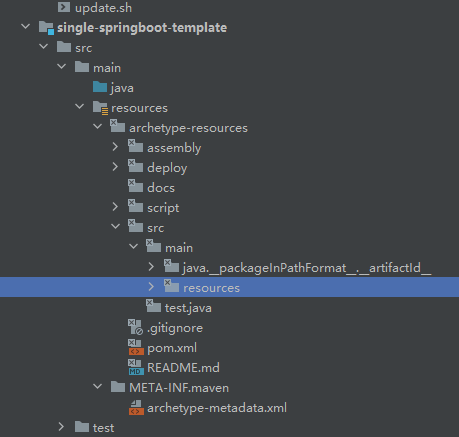
pom.xml
<?xml version="1.0" encoding="UTF-8"?>
<project xmlns="http://maven.apache.org/POM/4.0.0"xmlns:xsi="http://www.w3.org/2001/XMLSchema-instance"xsi:schemaLocation="http://maven.apache.org/POM/4.0.0 http://maven.apache.org/xsd/maven-4.0.0.xsd"><modelVersion>4.0.0</modelVersion><groupId>org.example</groupId><artifactId>single-springboot-template</artifactId><version>1.0-SNAPSHOT</version><packaging>maven-archetype</packaging><properties><maven.compiler.source>11</maven.compiler.source><maven.compiler.target>11</maven.compiler.target><project.build.sourceEncoding>UTF-8</project.build.sourceEncoding><maven-javadoc-plugin.version>3.2.0</maven-javadoc-plugin.version><maven-source-plugin.version>3.2.1</maven-source-plugin.version><maven-gpg-plugin.version>1.6</maven-gpg-plugin.version><maven-archetype-plugin.version>3.2.1</maven-archetype-plugin.version><maven-checksum-plugin.version>1.10</maven-checksum-plugin.version></properties><build><extensions><extension><groupId>org.apache.maven.archetype</groupId><artifactId>archetype-packaging</artifactId><version>${maven-archetype-plugin.version}</version></extension></extensions><plugins><plugin><groupId>net.nicoulaj.maven.plugins</groupId><artifactId>checksum-maven-plugin</artifactId><version>${maven-checksum-plugin.version}</version><executions><execution><id>create-checksums</id><goals><goal>artifacts</goal></goals></execution></executions></plugin><plugin><groupId>org.apache.maven.plugins</groupId><artifactId>maven-source-plugin</artifactId><version>2.2.1</version><executions><execution><id>attach-sources</id><goals><goal>jar-no-fork</goal></goals></execution></executions></plugin><plugin><groupId>org.apache.maven.plugins</groupId><artifactId>maven-javadoc-plugin</artifactId><version>2.9.1</version><configuration><encoding>UTF-8</encoding><aggregate>true</aggregate><charset>UTF-8</charset><docencoding>UTF-8</docencoding></configuration><executions><execution><id>attach-javadocs</id><goals><goal>jar</goal></goals><configuration><additionalparam>-Xdoclint:none</additionalparam></configuration></execution></executions></plugin><plugin><groupId>org.apache.maven.plugins</groupId><artifactId>maven-release-plugin</artifactId><version>2.5.3</version><configuration><autoVersionSubmodules>true</autoVersionSubmodules><useReleaseProfile>false</useReleaseProfile><releaseProfiles>release</releaseProfiles><goals>deploy</goals></configuration></plugin><plugin><groupId>org.apache.maven.plugins</groupId><artifactId>maven-resources-plugin</artifactId><version>3.1.0</version><configuration><includeEmptyDirs>true</includeEmptyDirs><addDefaultExcludes>false</addDefaultExcludes></configuration></plugin><plugin><artifactId>maven-archetype-plugin</artifactId><version>${maven-archetype-plugin.version}</version><configuration><!-- needed to include .gitignore --><useDefaultExcludes>false</useDefaultExcludes></configuration></plugin></plugins></build>
</project>
archetype-metadata.xml
<?xml version="1.0" encoding="UTF-8"?>
<archetype-descriptorxsi:schemaLocation="https://maven.apache.org/plugins/maven-archetype-plugin/archetype-descriptor/1.1.0 http://maven.apache.org/xsd/archetype-descriptor-1.1.0.xsd"name="xfg-frame-archetype"xmlns="https://maven.apache.org/plugins/maven-archetype-plugin/archetype-descriptor/1.1.0"xmlns:xsi="http://www.w3.org/2001/XMLSchema-instance"><fileSets><fileSet filtered="true" encoding="UTF-8"><directory>docs</directory><includes><include>**/**</include></includes></fileSet><fileSet filtered="true" encoding="UTF-8"><directory>script</directory><includes><include>**/**</include></includes></fileSet><fileSet filtered="true" encoding="UTF-8"><directory>deploy</directory><includes><include>**/**</include></includes></fileSet><fileSet encoding="UTF-8"><directory/><includes><include>README.md</include><include>.gitignore</include></includes></fileSet><fileSet filtered="true" encoding="UTF-8"><directory>src/main/java</directory><includes><include>**/**</include></includes></fileSet><fileSet filtered="true" encoding="UTF-8"><directory>src/main/resources</directory><includes><include>**/**</include></includes></fileSet><fileSet><directory>src/test/java</directory></fileSet></fileSets>
</archetype-descriptor>
#模板项目安装到本地
mvn claen install#执行生成项目命令 静默方式不需要用户输入mvn archetype:generate -DgroupId=com.wl -DartifactId=demo -Dpackagename=com.wl -DarchetypeGroupId=org.example -DarchetypeArtifactId=single-springboot-template -DarchetypeVersion=1.0-SNAPSHOT -DinteractiveMode=false#执行生成项目命令mvn archetype:generate -DgroupId=com.wl -DartifactId=demo -Dpackagename=com.wl -DarchetypeGroupId=org.example -DarchetypeArtifactId=single-springboot-template -DarchetypeVersion=1.0-SNAPSHOT3.参考文档
- https://medium.com/@sybrenbolandit/maven-archetype-deed0160cdeb
- Velocity入门到精通(上篇)_velocity教程-CSDN博客
相关文章:
maven archetype
1.简介 maven脚手架是为了创建一个项目模板,以后新建项目都能够复用该模板 maven中模板引擎使用的是velocity,在文件中可以使用它的语法获取变量等操作 2.实现 单模块脚手架实现 pom.xml <?xml version"1.0" encoding"UTF-8"?> &…...

浏览器打开抽奖系统html
<!DOCTYPE html> <html> <head> <meta charset"utf-8"> <title>在线抽奖 随机选取 自动挑选</title> <script src"https://libs.baidu.com/jquery/1.10.2/jquery.min.js"></script> <style> body {…...

微信小程序-使用Component方法代替Page方法构造页面
一.使用Component方法的前提条件 在小程序js文件里使用Component方法代替Page方法需要在json文件里面定义usingComponents属性 {"usingComponents": {} }二.注意事项 1.在page页面里使用的钩子函数和事件监听方法都需要写在methods对象里面 methods:{update(){thi…...

Spark SQL----DISTRIBUTE BY子句
Spark SQL----DISTRIBUTE BY子句 一、描述二、语法三、参数四、例子 一、描述 DISTRIBUTE BY子句用于根据输入表达式对数据进行重新分区。与CLUSTER BY子句不同,这不会对每个分区内的数据进行排序。 二、语法 DISTRIBUTE BY { expression [ , ... ] }三、参数 e…...

HTML5-canvas1
1、canvas:创建画布 <canvas id"canvas"></canvas>2、画一条直线 var canvasdocument.getElementById(cancas); canvas.width800; canvas.height800; var contextcanvas.getContext(2d); //获得2d绘图上下文环境 //画一条直线 c…...

【NOI-题解】1009 - 数组逆序1162 - 数组元素的删除1211 - 数组元素的插入1161. 元素插入有序数组1159. 数组元素的移动
文章目录 一、前言二、问题问题:1009 - 数组逆序问题:1162 - 数组元素的删除问题:1211 - 数组元素的插入问题:1161. 元素插入有序数组问题:1159. 数组元素的移动 三、感谢 一、前言 本章节主要对数组问题中数组元素移…...

新电脑如何设置 npm 源及查看源、安装 cnpm、pnpm 和 yarn 的详细教程
当你获得一台新电脑,或需要在现有电脑上优化 JavaScript 和 Node.js 的开发环境时,正确配置 npm 是一步不可少的过程。本教程将详细指导你如何设置 npm 源,查看当前源,以及如何安装 cnpm、pnpm 和 yarn。 1. 设置 npm 源 npm (N…...

完全移动huggingface模型仓库(不是简单mv)
Linux中移动huggingface模型仓库 参考链接 先在bashrc中配置: export HF_DATASETS_CACHE"/your/path/dataset" export HF_HOME"/your/path/" export HUGGINGFACE_HUB_CACHE"/your/path/hub" export TRANSFORMERS_CACHE"/your…...

手机空号过滤批量查询的意义及方法
手机空号过滤批量查询是现代营销和通信管理中常用的技术手段,旨在通过批量处理手机号码,筛选出活跃号码和空号等无效号码,以提高营销效率和减少不必要的通信成本。以下是关于手机空号过滤批量查询的详细解答: 一、手机空号过滤批…...
Dockerfile制作部署wordpress-6.6
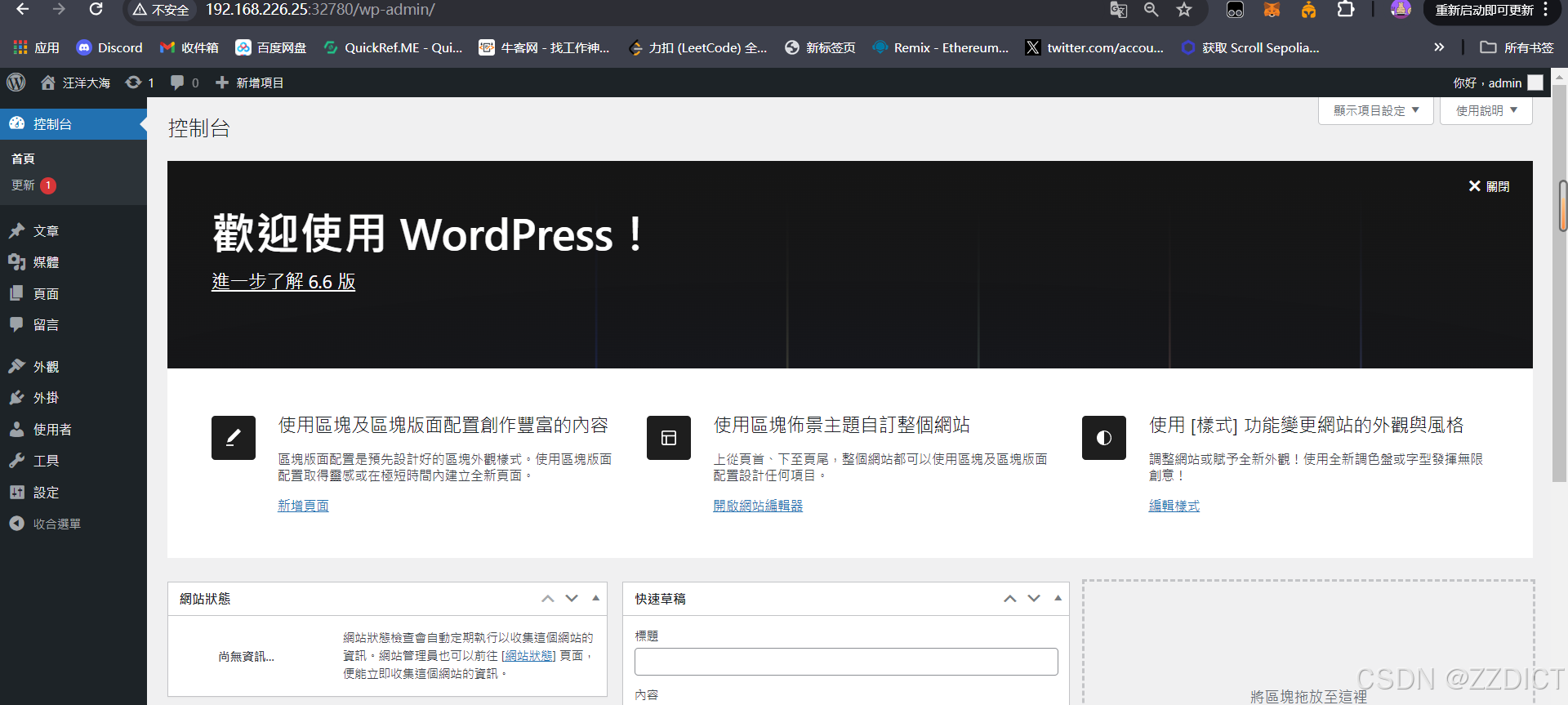
目录 一. 环境准备 二. 准备对应的配置文件 三. 编写Dockerfile 四. 构建镜像 五. 配置MySQL 六. 安装wordpress 七. 扩展 一. 环境准备 localhost192.168.226.25 rocky_linux9.4 Docker version 27.0.3 关闭防火墙和selinux,进行时间同步。 安装docker…...

项目的纪要
ai客服项目中发现的问题: 可以在控制台看到我们存储的cookie: 可以看到是这样的, 但是我们通过getCookie方法专门获取这个字段, 然后在控制台打印后 const userName getCookie(SA_USER_NICK_NAME); console.log(userName, userName); 输出结果是: 然后我们尝试通过de…...

ubuntu 更新源
前言 实现一键替换在线源 一键更新源 ubuntu 全球镜像站以下支持现有ubuntu 20,22,24 echo "Delete the default source" rm -rf /etc/apt/sources.listecho "Build a new source" cat <<EOF>>/etc/apt/sources.li…...

XGBoost、RF随机森林算法MATLAB实现
% 加载并预处理训练数据 opts1 = detectImportOptions(附件一AE.xlsx, PreserveVariableNames, true); train_data = readtable(附件一AE.xlsx, opts1); train_data.Time = datetime(train_data.time, InputFormat, yyyy-MM-dd HH:mm:ss); % 特征提取和标签准备 windowSize…...

WPF 解决: DataGrid 已定义列,但是还是会显示模型的所有属性的问题
AutoGenerateColumns 属性 AutoGenerateColumns:这个属性决定 DataGrid 是否根据数据源中的属性自动生成列。如果设置为 true,DataGrid 会根据数据源中的属性自动生成列。如果设置为 false,则 DataGrid 不会自动生成列,开发者需要…...

【ai】Easy-RAG : ImportError: cannot import name ‘BaseModel‘ from ‘pydantic‘
[Bug]: cannot import name ‘RootModel’ from ‘pydantic’ #1237 版本不匹配导致 ImportError: cannot import name ‘BaseModel’ from ‘pydantic’ /home/zhangbin/miniconda3/envs/Easy-RAG/bin/python /home/zhangbin/proj/06_rag/02_Easy-RAG/webui.py /home/zhangbi…...

WebKit简介
WebKit是一个开源的浏览器引擎,最初由苹果公司开发,用于Safari浏览器。它是基于KDE项目的KHTML引擎进行开发,并在改进和扩展中形成了WebKit引擎。 WebKit的工作流程可以分为以下几个步骤: 1.解析HTML:当浏览器加载一个…...
笔记 | Python环境下的GUI编程常用包
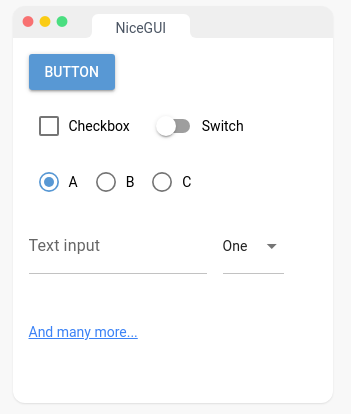
前言 Python的使用频率和范围越来越大,在一些开发工作中由于需要可视化的图形界面,常常需要进行图形用户界面(Graphic User Interface, GUI)开发。例如,目前最火热的大模型应用,常常是以一个网页界面进行操…...

mysql 数据库空间统计sql
mysql 数据库空间统计 文章目录 mysql 数据库空间统计说明一、数据库存储代码二、查询某个数据库的所有表的 代码总结 说明 INFORMATION_SCHEMA Table Reference 表参考 information_schema是MySQL中的一个特殊数据库,它存储了关于所有其他数据库的元数据信息。…...

【Linux】线程——线程池、线程池的实现、线程安全的线程池、单例模式的概念、饿汉和懒汉模式、互斥锁、条件变量、信号量、自旋锁、读写锁
文章目录 Linux线程7. 线程池7.1 线程池介绍7.2 线程池的实现7.3 线程安全的线程池7.3.1 单例模式的概念7.3.2 饿汉和懒汉模式 8. 常见锁使用汇总8.1 互斥锁(Mutex)8.2 条件变量(Condition Variable)8.3 信号量(Semaph…...

stm32入门-----TIM定时器(PWM输出比较——下)
目录 前言 一、硬件元器件介绍 1.舵机 2.直流电机驱动 二、C语言编程步骤 1.开启时钟 2.配置输出的GPIO口 3.配置时基单元 4.初始化输出比较通道 5.开启定时器 三、实践项目 1.PWM驱动LED呼吸灯 2.PWM驱动舵机 3.PWM驱动直流电机 前言 本期我们就开始去进行TIM定时…...

挑战杯推荐项目
“人工智能”创意赛 - 智能艺术创作助手:借助大模型技术,开发能根据用户输入的主题、风格等要求,生成绘画、音乐、文学作品等多种形式艺术创作灵感或初稿的应用,帮助艺术家和创意爱好者激发创意、提高创作效率。 - 个性化梦境…...

手游刚开服就被攻击怎么办?如何防御DDoS?
开服初期是手游最脆弱的阶段,极易成为DDoS攻击的目标。一旦遭遇攻击,可能导致服务器瘫痪、玩家流失,甚至造成巨大经济损失。本文为开发者提供一套简洁有效的应急与防御方案,帮助快速应对并构建长期防护体系。 一、遭遇攻击的紧急应…...
Flask RESTful 示例
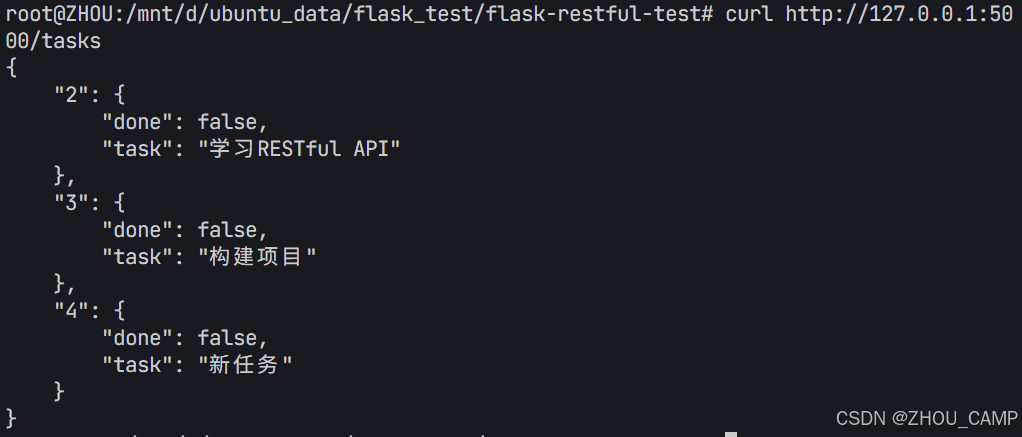
目录 1. 环境准备2. 安装依赖3. 修改main.py4. 运行应用5. API使用示例获取所有任务获取单个任务创建新任务更新任务删除任务 中文乱码问题: 下面创建一个简单的Flask RESTful API示例。首先,我们需要创建环境,安装必要的依赖,然后…...
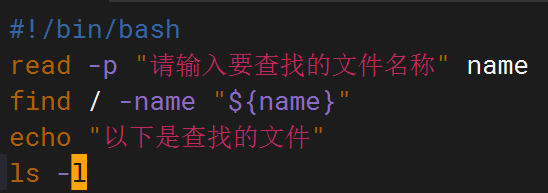
shell脚本--常见案例
1、自动备份文件或目录 2、批量重命名文件 3、查找并删除指定名称的文件: 4、批量删除文件 5、查找并替换文件内容 6、批量创建文件 7、创建文件夹并移动文件 8、在文件夹中查找文件...

AI Agent与Agentic AI:原理、应用、挑战与未来展望
文章目录 一、引言二、AI Agent与Agentic AI的兴起2.1 技术契机与生态成熟2.2 Agent的定义与特征2.3 Agent的发展历程 三、AI Agent的核心技术栈解密3.1 感知模块代码示例:使用Python和OpenCV进行图像识别 3.2 认知与决策模块代码示例:使用OpenAI GPT-3进…...

多场景 OkHttpClient 管理器 - Android 网络通信解决方案
下面是一个完整的 Android 实现,展示如何创建和管理多个 OkHttpClient 实例,分别用于长连接、普通 HTTP 请求和文件下载场景。 <?xml version"1.0" encoding"utf-8"?> <LinearLayout xmlns:android"http://schemas…...
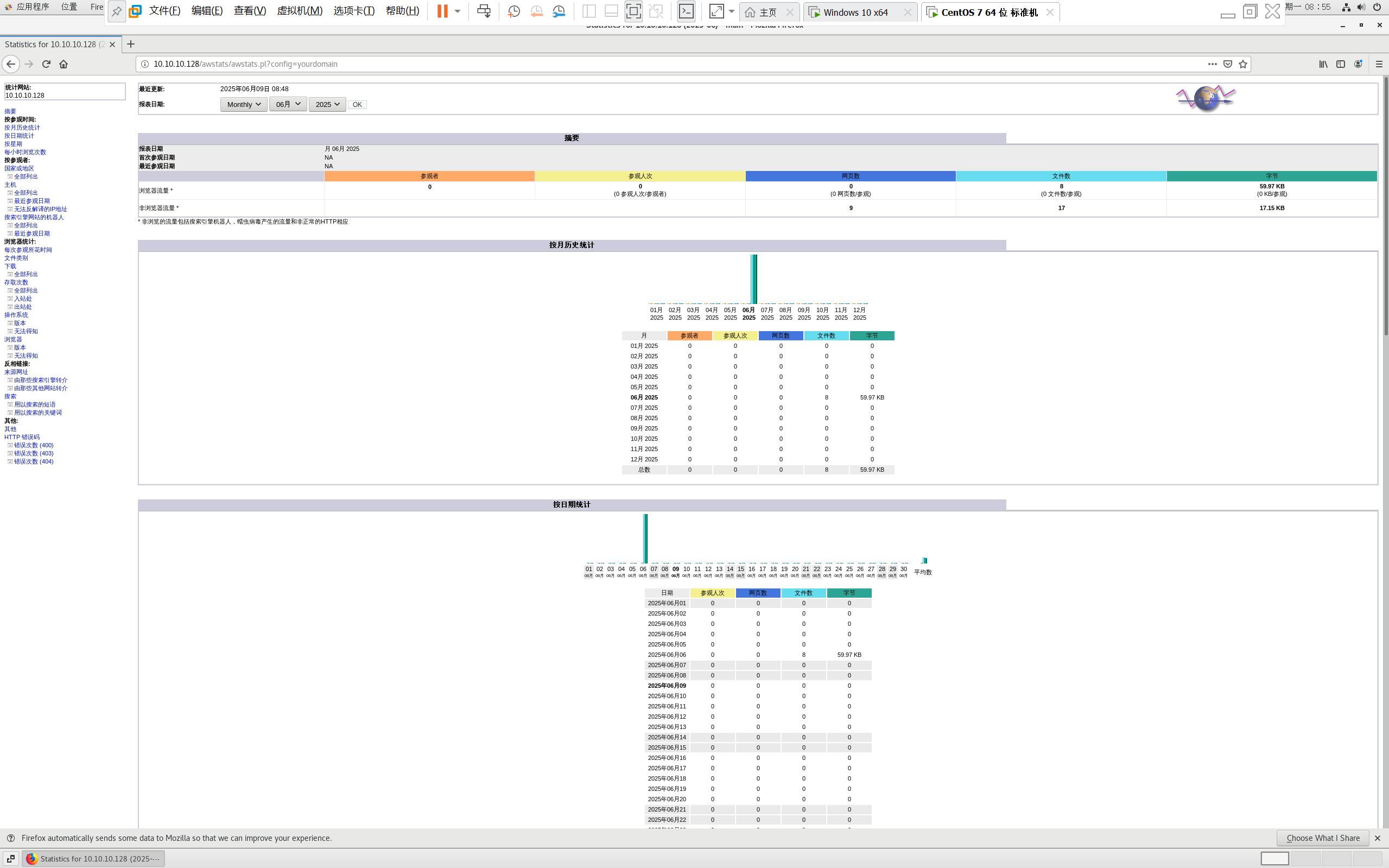
centos 7 部署awstats 网站访问检测
一、基础环境准备(两种安装方式都要做) bash # 安装必要依赖 yum install -y httpd perl mod_perl perl-Time-HiRes perl-DateTime systemctl enable httpd # 设置 Apache 开机自启 systemctl start httpd # 启动 Apache二、安装 AWStats࿰…...

MODBUS TCP转CANopen 技术赋能高效协同作业
在现代工业自动化领域,MODBUS TCP和CANopen两种通讯协议因其稳定性和高效性被广泛应用于各种设备和系统中。而随着科技的不断进步,这两种通讯协议也正在被逐步融合,形成了一种新型的通讯方式——开疆智能MODBUS TCP转CANopen网关KJ-TCPC-CANP…...
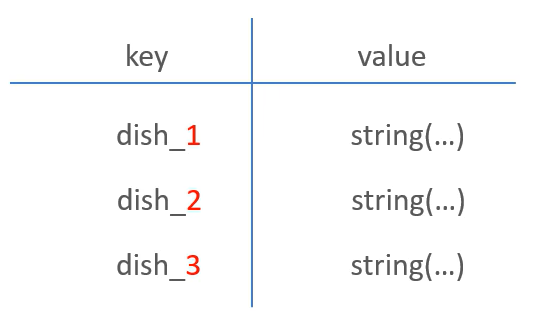
苍穹外卖--缓存菜品
1.问题说明 用户端小程序展示的菜品数据都是通过查询数据库获得,如果用户端访问量比较大,数据库访问压力随之增大 2.实现思路 通过Redis来缓存菜品数据,减少数据库查询操作。 缓存逻辑分析: ①每个分类下的菜品保持一份缓存数据…...
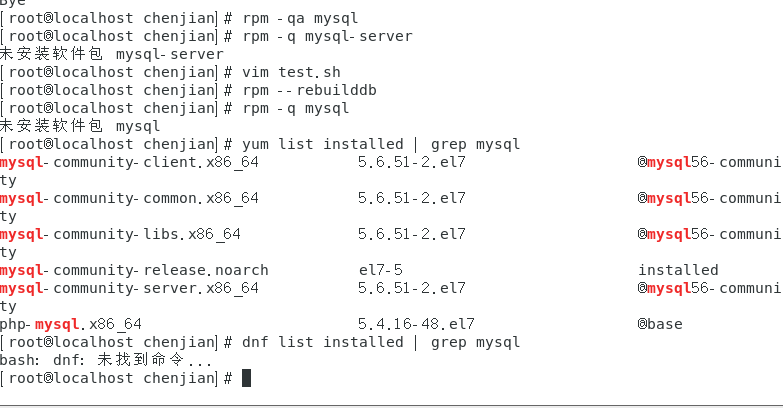
mysql已经安装,但是通过rpm -q 没有找mysql相关的已安装包
文章目录 现象:mysql已经安装,但是通过rpm -q 没有找mysql相关的已安装包遇到 rpm 命令找不到已经安装的 MySQL 包时,可能是因为以下几个原因:1.MySQL 不是通过 RPM 包安装的2.RPM 数据库损坏3.使用了不同的包名或路径4.使用其他包…...